06 March 2013

Download MediaMonkey App For Windows 8


CLICK HERE TO SEE FULL POST


MediaMonkey, the popular media management software, has now been released for Windows 8 and Windows RT, and is now available to install from the official Windows Store. For those who’re not aware of MediaMonkey, it’s one of the better applications available to manage and organize media collections on a computer running Windows operating system. The [...]

Get A Sneak Peek At Springpad 4.0 In A Live Google+ Hangout Anyone Can Join [Updates]


Love Springpad? It might get even better soon, and you have a chance to get a sneak peek into the new upcoming changes. The popular note-taking application will be holding a special Google Hangout On Air event today at 4PM Easter time (21:00 UTC), and will present some new features which will be included in Springpad 4.0.


The Hangout will include a first look at Springpad 4.0, but will also include a question and answer round with the Springpad team, so if you’ve always had a burning Springpad question you’ve been dying to ask, there’s a chance to get it answered during the Hangout. The event is open to anyone with a Google+ account – all you have to do is RSVP on the Hangout page to receive the link.


Springpad is a cross-platform note-taking app which is available as a Web app, an iPhone/iPad app, and on Android. In case you’ve never used it, Springpad lets to save a wide range of content, including notes, links to books, products and services, images and photos, to-do lists, calendar events and alarms, recipes, music and videos, wine collections—nearly anything that can be accessed on the Internet. You can then access this content no matter where you are using the mobile apps, and collaborate on notes with other users.


A link to the live event will be posted on Springpad’s Google+ page and Twitter page today at 3:50PM Eastern time (20:50 UTC). If you don’t use Google+, you can follow the event on Twitter as well, and even ask questions using the #springpadsneakpeek hashtag. The Hangout will last around 30 minutes, so you can tune in at any time between 4-4:30PM EST and watch it


Source: Springpad


The post Get A Sneak Peek At Springpad 4.0 In A Live Google+ Hangout Anyone Can Join [Updates] appeared first on MakeUseOf.


Try Chrome's Data Compression Proxy


The latest version of Chrome Beta for Android added the experimental data compression feature. It's not enabled by default, but here's how you can try this feature:


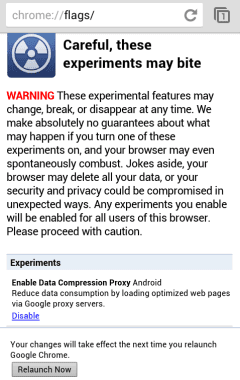
1. open a new tab, type chrome://flags in the address bar and tap "Go"


2. tap "Enable" next to the "data compression proxy" experiment (it's the first one right now)


3. tap "Relaunch now"


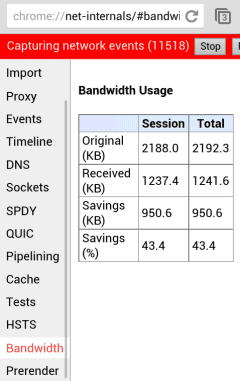
After relaunching the browser, you can see how much data you've saved by opening a new tab, typing chrome://net-internals and selecting the "Bandwidth" section in the left sidebar. Then visit different sites in a different tab and check the stats.


Google's proxy is faster than Opera Mobile's Turbo feature, while saving almost the same amount of data. For example, the savings for AnandTech.com were 48.9%, while Opera Mobile Turbo's data savings were 50%. The savings for apple.com were 60.3%, while Opera Mobile Turbo's data savings were 57%. Chrome's major advantage is that the proxy doesn't slow down browsing, unlike Opera Mobile.


Logon Screen Rotator For Windows 8


CLICK HERE TO SEE FULL POST


Remember the Logon Screen Rotator, the tool which enables you automatically rotate Windows 7 logon screen background after every login or lock? As some of you know, Logon Screen Rotator is probably the only free tool available to rotate logon background picture. Windows 7 users who have upgraded to Windows 8 and are missing the [...]

Procrastinate On Facebook With These Great Ideas [Weekly Facebook Tips]


We know full well that most people who use Facebook use it to mess around and generally procrastinate, instead of getting on with their real work. Yeah, sometimes we use it for some genuinely interesting conversations with friends, but there’s still a lot of time-wasting in the works. If you disagree, you’re probably one of the few disciplined people who simply ensure you don’t head to Facebook in the first place. If so, good on you. If not, read on.


So, you’ve suddenly realised you’re on Facebook again. You’ve scrolled through your home page for a good while now and started to hit refresh to see if anything new is happening. You know you’re just procrastinating and that this is pointless. Isn’t there anything better you can do? Yes – yes, there is. Facebook is such a great procrastination tool because there are dozens of ways to make your day disappear. If you’re going to hang out on Facebook wasting time, you may as well do it in the most fun ways possible. So, here’s some ideas for next time you’re bored.


Stop Hitting Refresh!


When you’re viewing your home page, the default option is to view your “Top Stories“. These are stories Facebook has decided are the most popular from all of your friends, filtered according to your Facebook EdgeRank score with your various friends. What this probably means for you is that it’s not even half of what your friends are actually posting.


If you’re actually bored and want to see more, head to the sort button at the top-right of the home feed. Then choose “Most Recent” to give yourself the fire-hose of posts you’ve been dying to see.


Play Games


Facebook is awash with time-wasting games to play with your friends. So, if you’re wasting time on Facebook and failing to play Facebook’s games, you’re missing most of the fun. However, when you’re bleary and stuck in the home page cycle it’s strangely easy to forget the Facebook games even exist.


There are so many Facebook game choices to be made, from board-game style word games like Scrabble and Words With Friends, through popular games like Draw Something and Angry Birds, party-style games such as karaoke, right to the ultimate time-wasters like Farmville, Mafia Wars and the like.


If you have friends worldwide, there’s almost always someone awake to play with, too. Pick anything that looks okay to you and watch your day waste away to oblivion.


Search For Cool Stuff With Facebook Graph Search


Facebook Graph Search is still fairly new, so searching for interesting things can make for some fascinating enlightenment. However, there are also some searches you can run which are pretty much guaranteed to entertain you – at least the first time.


One well-loved search Facebook recommends is “Photos I have liked“, which if you’re like me will include millions of photos of your friends’ kids. If you click on the “More than 100 Photos” button that hovers over to the right, you can filter it by year, location, who is tagged, who else liked the photo or whatever you like. Basically, this search will continue to show you all the pictures you’ve loved over the years – possibly ones you haven’t seen in a while. It’s a great way to re-live great memories.


Or, use Facebook Graph search to find apps or groups to enjoy via your friends. It’s the quickest way to find a new things to waste your time with.


If you’d prefer just to get straight to things you can waste your time looking at, try searching for “Photos by pages liked by my friends” or one of the many suggested alternatives, filters or extensions to this search. After a few hours, you’ll be ready for something else to do.


Update Your Privacy Settings


If the Facebook graph searches have made you worry a bit about your privacy, maybe you could spend a little time updating your privacy settings to deal with Facebook Graph Search. It’s less fun than other time-wasting activities on Facebook, but probably worth it in the long run.


Update Your Facebook Page


If you’re killing time anyway, why not take a few minutes to improve any Facebook pages or groups you help to run. There’s lots you can do to improve your page’s popularity: brighten up the page to make it more interesting, add some photos to gain popularity, fix niggling annoyances, or set up some automation.


No – I Want To STOP Procrastinating!


Maybe this post has hit home a little and you’d actually prefer to stop yourself from procrastinating on Facebook and maybe block Facebook games completely. That’s your choice, obviously. We’ll see you back on Facebook soon, I’m sure.


The post Procrastinate On Facebook With These Great Ideas [Weekly Facebook Tips] appeared first on MakeUseOf.


05 March 2013

How To Free Up Disk Space On Surface Pro


CLICK HERE TO SEE FULL POST


Microsoft Surface Pro is currently available in two models: 64GB and 128GB. As some of you already know, the actual free storage space that you get to use on 64GB model is approximately 29GB, and 89GB on 128GB model. Windows 8 files, Microsoft Office, and built-in apps take roughly 21GB and the recovery image takes [...]

Picasa Web Albums Redirects to Google+ Photos


After replacing Picasa Web with Google+ Photos in the navigation bar and redirecting individual albums to the Google+ interface, now Google redirects picasaweb.google.com to the albums section of Google+ Photos. You can still go back to the old Picasa Web interface if you use this URL: https://picasaweb.google.com/lh/myphotos?noredirect=1. Google displays this URL in a message that says: "Click here to go back to Picasa Web Albums".


When you use that URL, Google also sets a cookie value that prevents the redirect to Google+ Photos even when you enter picasaweb.google.com in the address bar.


Google+ Photos has constantly improved last year, while Picasa Web Albums no longer added new features. It's obvious that Google+ Photos is an upgraded version of Picasa Web Albums, which will be discontinued in the future. There are still a lot of cool Picasa Web features that haven't been added to Google+ Photos (Creative Commons licensing, photo mapping, featured photos, search), so let's hope that Google won't retire Picasa Web Albums until Google+ Photos adds these features.


{ Thanks, Dave and Eric. }


Download CCleaner 3.28 Latest Version


CCleaner is one of the best and #1 optimization tool for Windows computers. Now it has released the latest version of CCleaner 3.28 for all the Windows PCs with stunning new features. This latest version has fixed some minor bugs and fully supports with Windows 8 operating system. And also Piriform is planing to release CCleaner 4.0 in upcoming months. CCleaner developer team has introduced a new logo in this latest version.


Click here to Download CCleaner 3.28


How To Disable Databases Are Out Of Date Notification In Kaspersky


CLICK HERE TO SEE FULL POST


Kaspersky may not offer free antivirus software to protect your PC from viruses, malware, trojans, and other threats, but its paid Antivirus and Internet Security are definitely two better security software available to safeguard your PC. Both Kaspersky Antivirus and Kaspersky Internet Security software come with plenty of advanced features. Just like most security software [...]

04 March 2013

Gmail's Account Activity Reveals More Information


Gmail's account activity is a very useful security feature that offers information about the clients that connected to your email account recently, including the IP addresses and the date.


Until now, Google only displayed generic information about the access type (browser, mobile, POP3). A recent updated added some new details: the browser's name and the user agent. If you click "show details", you can find more information from the user agent: the browser's version and the operating system. Obviously, the browser's user agent can be easily spoofed.


{ Thanks, Herin. }


Change the Default Country Code in Gmail


Gmail has a new setting that lets you change the default country code for phone numbers. Google already detected the country, but you can now manually change it.


The default country code is used by Gmail's contact manager. If a phone number doesn't include a country code, Gmail uses the code you've selected.


{ Thanks, Scott and Herin. }


Recover My Password: Free Software To Reset Windows Password


CLICK HERE TO SEE FULL POST


Windows lets you create a password reset disk so that you can access your PC and user account even if you forget the password. But the problem is that many Windows users don’t create a password reset disk after setting up a complex password. Users who don’t have a password reset disk and want to [...]

Easy App Toolbox complete backup tool for Android Apps


Easy Backup Tool is simple, ad-free and powerful backup tool for your installed android apps. Easy Backup Tool have a lot of premium features like cloud/backup restore, backup to PC etc.


Using EBT you can share an app with a friend that doesn’t have the Play Store on his device? No problem with Easy App Toolbox – simply send it to him via Gmail, etc


Best of all is Easy App Toolbox doesn’t requires rooted device Where other backup tools like Carbon backup or titanium requires this.


Easy Backup Toolbox also offers cloud Backup/Restore on Dropbox, Google Drive and Box.


easy app toolbox Easy App Toolbox complete backup tool for Android Apps


Easy App Toolbox features:

* Send your installed apps (APK files) to your friends (via Gmail, etc…)

* Backup and Restore your apps to/from Dropbox

* Backup and Restore your apps to/from Google Drive

* Backup and Restore your apps to/from Box.net

* Backup and restore your apps to/from SD card

* Backup your apps to your PC

* View many detailed information about your installed apps (permissions, activities, services, files and folders, etc…)

* Easy uninstaller – gives you batch uninstalls.


Install Easy App Toolbox from Google Play


The post Easy App Toolbox complete backup tool for Android Apps appeared first on Hack Illusion.


"Try These Too" in Google Image Search


Google Image Search has a new feature that shows a list of 7 related images when you select a result. The section is called "try these too" and is a clever way to integrate the similar images feature. Click one of the related images and it will replace the original result. The first image from the list is always the original search result, so you can always go back to that image.


If you want to find a more comprehensive list of similar images, click "more sizes", then click the "More sizes" dropdown and select "Visually similar".


03 March 2013

A Complete Guide To Laptop Operating Systems


When you buy a laptop these days you are not just buying a machine. You are buying the software that runs the machine. Years ago, there weren't many choices. Almost all consumers went with a Windows laptop. Some loyalists would choose Mac, while hardcore computer users might choose Linux. Through the years that has changed drastically.


More people than ever are buying Mac laptops. Windows comes in many forms, including the new Windows 8. There are tons of different Linux builds. Then there are the specialty operating systems. Google has released the Chrome OS for its Chromebook line. Android, too, powers many laptop-like devices. The choices are no longer straight forward.


If you're looking to buy a laptop, or just want to become more familiar with the options available, this guide will show you the way.

List of all Major Laptop OS with their PROS and CONS:


Mac OSX


While it runs on less than 10 percent of all personal computers, Mac OSX has grown drastically in the last ten years. Fed up with Windows, many people have turned their attentions to Mac OSX on both desktops and laptops.


Pros:


  • Ease of use. Everything in OSX is relatively straight forward, making it easy to understand even for novice computer users.

  • Efficiency. OSX is designed to correct itself, reallocating memory in order to run in the most efficient manner.

  • Security. While there have been more malicious attacks on Macs in the last year than ever before, the incidents are still very rare compared to Windows PCs.

  • Media. Macs were made to work with high-resolution video and audio media.


Cons:


  • Software availability. Since about 90 percent of computer users run Windows machines, developers create more software for them. While Mac software availability has improved in the last ten years, there is still a lot more software for Windows.

  • Closed environment. PC users switching to Mac will notice that they have a lot less control over the computing experience. Macs are known for their uniform user experiences.

  • Price. Apple prices its Mac computers considerably higher than Windows laptops. Even their low-end devices cost $1,000US. Decent Windows laptops can be had for half that price.


Windows 8


The newest release from Microsoft, Windows 8 is all about cross-platform compatibility. It is meant to run not only on laptops and desktops, but also smartphones and tablets. The results have yet to be seen, but Windows 8 could be the OS that unites all of our gadgets.


Pros:


  • User interface. The user interface of Windows 8 is one of the best Microsoft has ever created. For touchscreen laptops, there is the tile view. For traditional laptops there is the classic Windows view.

  • Improvements. Since Windows 8 was just released, it will undergo many changes in the near future. Bugs will be fixed, and problems will be solved.

  • Security. Windows 8 is the most secure version of Windows yet, which will increase its appeal.

  • Range of devices. Windows 8 runs on all kinds of devices, including standard laptops, laptop-tablet hybrids, and the sleek new ultrabooks.


Cons:


  • Buggy. While improvements are coming, Windows 8 still contains many bugs that hinder the user experience.

  • Compatibility. There is some software not yet designed to run on Windows 8.

  • Gaming. While most software runs well on Windows 8, games are not quite up to speed yet.

  • Pricing. Microsoft ran a sale in late 2012, but Windows 8 pricing is back to its normal levels. You can, however, get a 90-day trial of Windows 8.


The good news is that many of the cons will go away as Windows 8 develops. It should be the best Windows by a long shot by the end of 2013.

Windows 7


After many failed releases, Microsoft finally won over the market with its Windows 7 operating system. Even though it has recently released Windows 8, Windows 7 remains a functional operating system that many users perfer.


Pros:


  • Universality. More users run Windows 7 than any other computer platform. That allows users to share tips and tricks, as well as software.

  • Gaming. While Windows 8 isn't quite up to speed yet, gamers love Windows 7. Many will not upgrade because of gaming issues.

  • Customization. Windows 7 is the most customizable version of Windows.

  • Efficiency. While not as efficient as Mac OSX, Windows 7 is an efficient operating system.


Cons:


  • Support. Since there is a new version of Windows to support, Windows 7 won't receive the same level of support from Microsoft that it has in the past.

  • Development. With more and more people installing Windows 8, developers will start focusing on that OS.

  • Upgrading. Again, it will cost a lot to upgrade to Windows 8. Buying a Windows 7 laptop now means paying that upgrade cost in the future.


Chrome OS


In 2009 Google announced a new OS, called Chrome OS. It is based on their Chrome web browser, and it runs web apps instead of traditional apps. While Chromebooks got off to a slow start, they made progress in 2012. Google recently released the Chromebook Pixel, its most advanced model yet.


Pros


  • Speed. Because Chrome OS contains few bells and whistles, it runs web apps faster than traditional laptops.

  • Simplicity. Everything in Chrome OS is straight forward and easy to use, even for novice PC users.

  • Essentials. Chrome OS contains essentials for web browsing and web use, even for heavy and pro web users.


Cons


  • Power. Chromebooks are underpowered by design, since they require few resources. But they are sometimes underpowered, leading to issues.

  • Limited capabilities. If you want to do anything that doesn't involve direct web use, you're out of luck. Chrome OS is severely limited in what it can perform.

  • Clunky interface. Some Chromebooks feature touchscreens, but the OS doesn't seem to be designed for a touchscreen interface in the same way Android is.

  • Price. Even the low-end Chromebooks are priced too highly for what they bring to the table. The new Pixel costs $1,300US, which is more than the MacBook Air.


About Author:Joe Pawlikowski writes, edits, and consults for several tech blogs across the web. He writes about mobile gadgets and technology at his site, MobileMoo.


How to Accept Social Payments on your Website


Web publishers and content creators are experimenting with a “cash-less” payment model where people can use social networks to pay for premium products like ebooks, songs, discount coupons, research reports, etc.


Say you have written a short ebook on a particular topic. Now instead of asking 99¢ for a copy, you can let anyone download your ebook either in exchange of a tweet, a like on Facebook or a +1 on Google Plus. The buyer makes a public recommendation of your product on a social network and you reward them with a free copy.


Pay with Tweet or Facebook Like

Tweet this Share on Facebook


Digital Inspiration @labnol This story, How to Accept Social Payments on your Website, was originally published at Digital Inspiration on 02/03/2013 under Facebook, Google Plus, Twitter, Internet.


Chrome for Android Travels in Time


Speaking of Chrome for Android, there's a milestone that needs to be mentioned: it's the first time when the latest stable version of Chrome for Android matches the desktop Chrome.


You've probably noticed that Chrome for Android has always been a few months behind the desktop Chrome and the delay has continually increased. Chrome 18, the previous stable version, corresponds to the desktop version released in March 2012. That's one year of performance improvements, bug fixes, new HTML5 features, new WebKit and V8 releases. It's like using a completely new browser or travelling in time and skipping 6 Chrome versions.


Chrome for Android has a great interface and cutting-edge syncing features, but it was slower than the stock browser, buggy and used a lot of resources. Google addressed some of these issues, so let's hope that Chrome for Android will start to push the boundaries when it comes to speed, without neglecting the constraints of the mobile devices.


"Chrome for Android has been developed in a separate repository as a fork, which means that most of the code will have to be upstreamed," mentioned Peter Beverloo last year, when Chrome for Android was launched. "Of course, bringing a browser to a different - much more limited - platform goes further than simply re-using code. Mobile devices have a lot of limitations compared to desktop and laptop machines. Besides the lower amount of available memory and CPU power, other constraints lie in less memory bandwidth and VRAM on the device's GPU. Google Chrome has a complicated architecture which imposed some interesting challenges here: separating the browser from the renderers through its multiple process architecture, to name an example. Decreased rendering and scrolling performance were also an issue."


{ Image licensed as Creative Commons Attribution by CityGypsy11. }