05 March 2020

How to Run Android Apps and Games on Linux


android-apps-linux

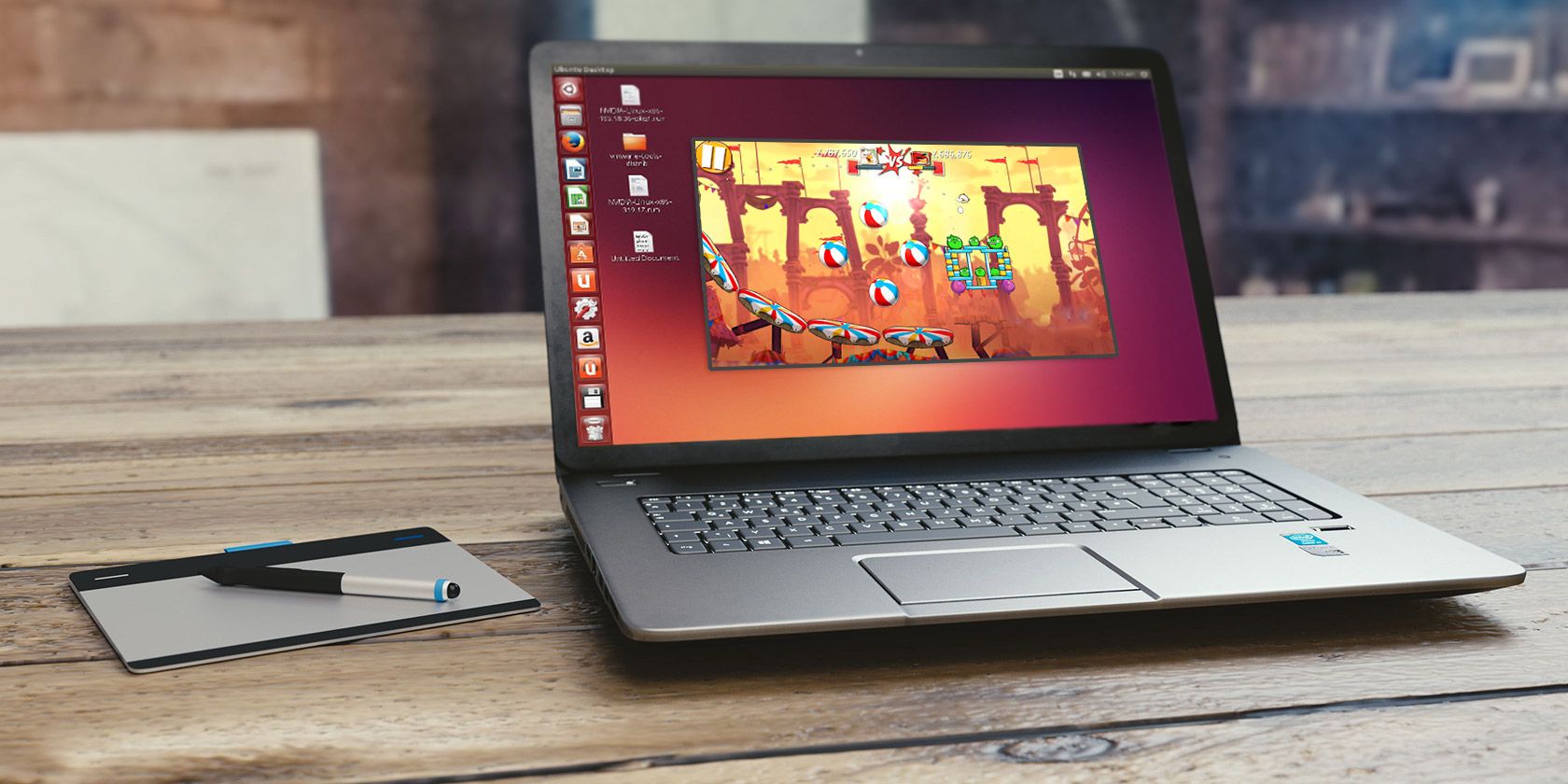
Want to run Android apps on Linux? How about play Android games? Several options are available, but the one that works the best is Anbox. This is a tool that runs your favorite Android apps on Linux without emulation.

Unlock the "Essential Linux Commands" cheat sheet now!

This will sign you up to our newsletter

Enter your Email

Here’s how to use Anbox to run Android apps on your Linux PC today.

Meet Anbox, Your “Android in a Box”

Having access to your preferred Android apps and games brings an exciting new dimension of productivity to Linux. Mobile apps are, by design, a lot simpler than those found on desktop operating systems.

This could be just what you’re looking for to improve desktop productivity!

Meanwhile, mobile games are becoming increasingly sophisticated. It makes sense that you might want to continue playing on a different device. This is especially true considering the limited battery life of a phone or tablet.

Several macOS and Windows tools are available for running Android apps (such as Bluestacks) but this isn’t available for Linux.

Instead, Linux users should try Anbox, a free and open source tool to run Android apps on Linux. It’s based on the latest version from the Android Open Source Project (AOSP) and offers a window-based Android environment.

Anbox uses containers to separate Android from the host operating system, enabling you to run Android games on Linux

That’s not all; Anbox has no limits, so in theory you can run any Android app on Linux. There’s no hardware virtualization either, so Anbox works as well on a laptop or desktop, whatever the system spec.

Which Linux Distros Support Snap?

Although free to use, Anbox comes as a snap package. This means that the binary and any dependencies are included in a single package, easing installation. Unfortunately, it means that your Linux OS cannot use Anbox unless it can unpackage and install snaps.

The snapd service is required to install snaps, and this is compatible with Linux distributions such as:

  • Arch Linux
  • Debian
  • Fedora
  • Gentoo
  • Linux Mint
  • Manjaro
  • openSUSE
  • Solus
  • Ubuntu

In Ubuntu, snapd comes pre-installed from 14.04 onwards. You’ll find full details for your distro at the Snapcraft website.

To install snapd, use the following terminal command:

sudo apt install snapd

Wait until the installation completes before proceeding. Note that while snapd runs or is preinstalled with the above distros, Anbox is official supported on:

  • Ubuntu 16.04 LTS (Xenial Xerxes)
  • Ubuntu 18.04 LTS (Bionic Beaver)

Subsequent releases of Ubuntu should also run Anbox. This support means that you’re likely to get better results running Android apps on Ubuntu than other distros.

Installing Anbox on Linux

With the snapd service installed on your Linux PC, you’re ready to install Anbox. Use the following command, which installs everything you need:

snap install --classic anbox-installer && anbox-installer

Enter a password when prompted and the snap package will download.

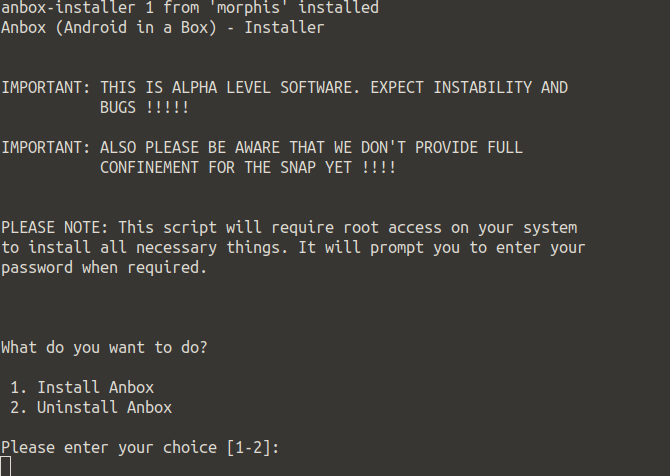
Shortly after, you’ll see a choice:

  1. Install Anbox
  2. Uninstall Anbox

Setup Anbox to run Android apps on Linux

Should you need to remove the software later, simply re-run the installer command above, and select option 2. In the case of installing Anbox, however, you can proceed with option 1.

Following this, you’ll see a summary of what the installation will do. Take a moment to read through this.

You’ll see that files added from a PPA listed. There should also be a notice that the anbox runtime will autostart when you log into Linux. (This is a software library that enables other software and apps to run.)
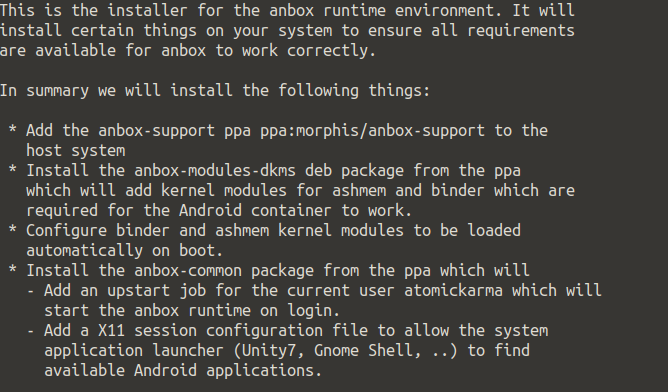
Set up Anbox on Linux

If you’re happy with all of this, enter I AGREE and wait for Anbox to install. Once done, follow the instruction to reboot your system before proceeding.

Downloading APK Files to Your Linux PC

With your PC rebooted, you should find Anbox available in your desktop’s menu. Click it to launch— you’ll soon see the Anbox window.
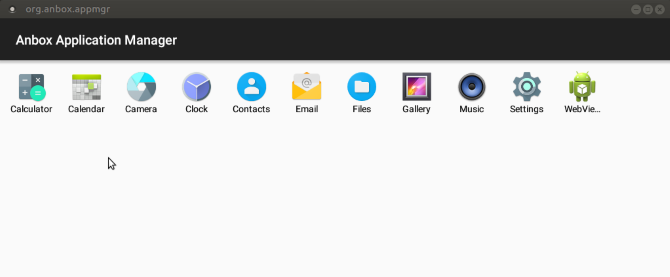
Anbox runs Android apps on Linux

If nothing happens, or you’re stuck on a splash screen with the Starting message, cancel or wait for this to end. Then open a new terminal and enter

anbox session-manager

Next, click the icon in the menu again. A few moments later, Anbox should run. This is a known bug in Ubuntu 16.04-based distributions and shouldn’t affect later distros.

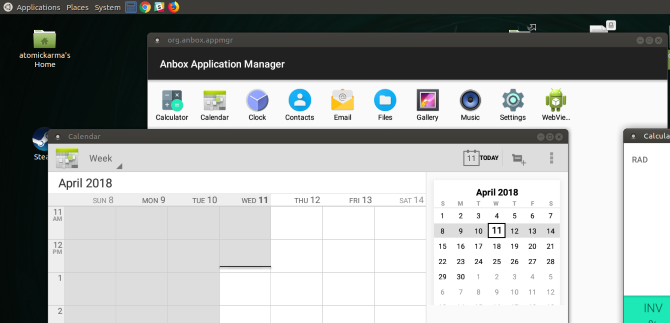
With Anbox running, you’ll see a list of the basic Android apps you can run on Linux, such as Calendar and Email. Simply left click these icons to open them; they’ll appear in new windows that you can resize as required. If you need a browser, the WebView Shell is included.

To add your own apps and games, all you need to do is download (or copy from another device) the appropriate APK files. These are installer files, like DEB files (or snaps) in Linux, or EXE files in Windows.

On Android phones and tables, APK files are available via Google Play on Android… but that doesn’t apply on Anbox.

Installing Android Apps on Linux With Anbox

Because the Anbox implementation of Android is not registered, you won’t be able to access (or install) Google Play. So, how can you run Android apps on Ubuntu and other Linux distros with Anbox?

The answer, therefore, is to download and sideload APKs. You’ll find these via Google Play alternatives, but you can also extract APKs from Google Play.

While Google restricts access to the Play Store to registered Android devices, bypassing this is not piracy. If you already own the APK files, or they’re available freely, it’s okay to run them on unregistered Android devices.

Once you’ve got hold of any APK files you want to install, you’ll need to enable installation from unknown sources. Do this by opening the Settings menu from the apps screen, then find Security. Enable the switch next to Unknown Sources and click OK to accept.

With this done, find your APK files and double-click the first one you want to install. A few moments later, the app or game should be ready, and will run in its own window. Installed games are listed alongside all other Linux apps.

Running Android apps on Linux is that simple!

Now You Can Run Android APKs on Linux
How to run Android apps on Linux

Since Anbox is in the alpha stage, there may be some stability issues. However, it is reassuring to know how simple it is to set up, install, and run Android apps on Linux Ubuntu with Anbox.

To recap:

  1. Confirm your distro supports snap packages.
  2. Install or update the snapd service.
  3. Install Anbox.
  4. Launch Anbox from your Linux desktop.
  5. Download APK files and run them.
  6. Wait as the APK file installs.
  7. Click to run Android apps on your Linux desktop.

Anbox isn’t the only way to run Android apps and games on Linux, but we reckon it will be the most popular within a few years. And to go the other way, check out how to run Linux on your Android device.

Read the full article: How to Run Android Apps and Games on Linux


Read Full Article

How to Switch Google Authenticator to a New Phone


two-step-authentication

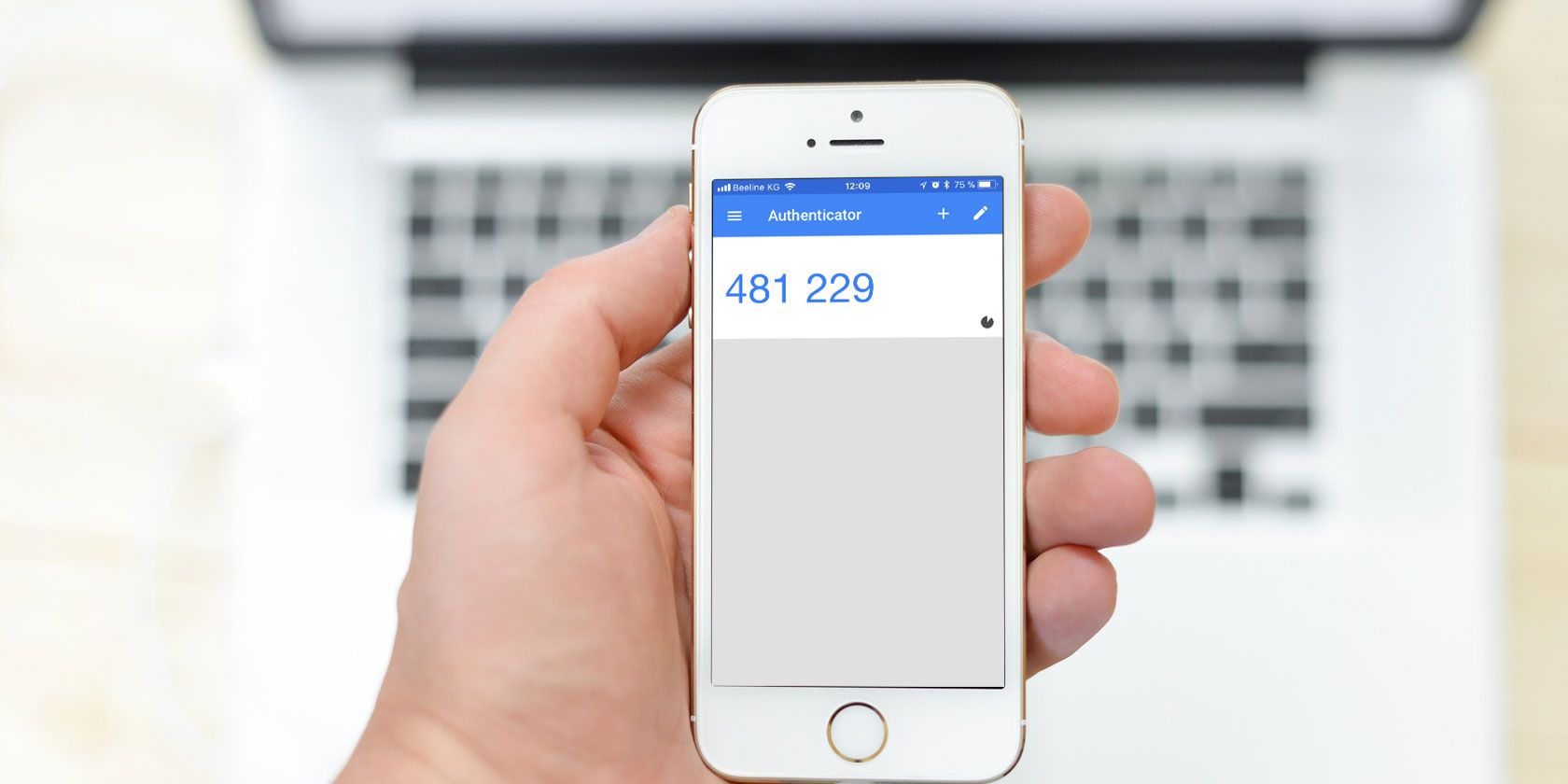
Google Authenticator is one of the most popular two-factor authentication apps around. But if you’ve opted to use Google Authenticator and switch to a new phone, you’ll find that moving Google Authenticator to your new phone is not an entirely straightforward task.

Here’s how to change Google Authenticator to a new phone.

How to Switch Google Authenticator to a New Phone

Note: It is important to complete your Google Authenticator switch while you still have your old phone. If you get rid of, lose, or sell your phone before switching your Google Authenticator app and the 2FA codes, there is a strong chance you will not regain access to some of your accounts. Google Authenticator does not include a method to retrieve lost 2FA codes.

Now that this disclaimer is out of the way, let’s find out how to switch the 2FA codes before getting rid of your old device.

  1. Install the Google Authenticator app for iOS or Android on your new phone.
  2. Load the Google Authenticator page in a browser. You’ll receive a prompt to log in with your Google credentials.
  3. You should see the Authenticator app listed. Click Change phone.Google Authenticator change phone
  4. In the popup window, you’ll receive a prompt to select what kind of new phone you have: Android or iPhone. After you make your selection, click Next.
    Google Authenticator new phone type
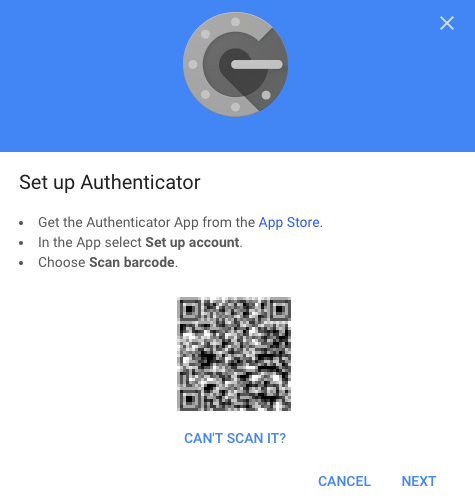
  5. Open up the Google Authenticator app on your new phone and tap Begin setup > Scan barcode.Google authenticator new phone setup
  6. Once you’ve used your new phone to scan the barcode displayed in your browser, choose Next on the webpage. You’ll be prompted to enter the authenticator code you see on your phone.
  7. Click Verify.

Next comes the time-consuming bit. If you use Google Authenticator for other apps, you’ll need to log into each of those sites separately to remove the old Google Authenticator app and add your new phone, also by scanning the QR code.

Once you finish updating each account on your new phone, you can head back to your old phone. Tap the Edit button (pencil icon) and begin deleting the individual 2FA codes. After you delete all those codes, you can delete Google Authenticator from the old device.

What Are Google Backup Codes?

Google backup codes are a set of unique security codes that allow you to gain access to your Google accounts without using 2FA. If you lose your phone or are otherwise unable to access Google Authenticator, you can use one of your unique backup codes to enter your Google account, bypassing the two-factor authentication.

Please note: this only works for your Google accounts, such as Gmail, Google Drive, YouTube, and so on. Other services may also offer a 2FA bypass procedure, but you have to contact and work through each service individually.

You can create a secure backup copy of your Google backup codes, ready for use should the moment ever arrive. Here’s how you create a set of Google backup codes:

  1. Open the 2-Step Verification settings page of your Google account.
  2. Scroll down to Backup codes, then select Set Up.
  3. Make a copy of the codes. Select Download to create a text file of the codes that you can save, or select Print to create a hard copy of the codes.

google backup codes generate

You can create a new set of Google backup codes at any time. However, once you create a new set of backup codes, the previous set becomes unusable.

Use a Google Authenticator Alternative to Sync Your 2FA Codes and Accounts

Everyone should use a two-factor authentication app to boost security, and Google Authenticator handles this. But for all the good that Google Authenticator provides, the fact you can lose your 2FA codes—and potentially your accounts—is pretty terrible.

Given the risks of Google Authenticator if you lose or break your phone, you should consider an alternative 2FA app. If you don’t like any of these, take a look at other methods for two-factor authentication instead.

1. Authy

Authy is a Google Authenticator alternative with a major difference: you can sync your 2FA codes across multiple devices and back up your accounts to easily restore them on any new device. That means you don’t have to go through this arduous process with each new device you purchase. Furthermore, Authy encrypts your 2FA codes before backup, and you can use a passphrase to lock your account.

Authy is available for iOS and Android, and is compatible with all the same sites as Google Authenticator.

Download: Authy for iOS | Android (Free)

2. LastPass Authenticator

Another excellent Google Authenticator alternative is LastPass Authenticator. As you may know, LastPass is a well-respected password management tool, and the LastPass Authenticator is an extension that allows you to protect your accounts with 2FA.

LastPass Authenticator backs up to your LastPass account automatically. This means your 2FA accounts remain secure in the case of a lost, broken, or new phone.

Also, LastPass Authenticator integrates with the LastPass extension in your browser. That means you can use automatic login on some sites and services, rather than having to enter your 2FA code manually. The system is still secure, but saves you some additional seconds during the login process. (Not that 2FA takes long to use anyway!)

Download: LastPass Authenticator for Android | iOS (Free)

3. andOTP

In comparison to the 2FA app big hitters, andOTP is an outsider. But andOTP ticks many of the boxes you want in a security product.

For instance, andOTP is completely open source. It requests as few permissions as possible, asking for only what the app requires to run. As an Android app, it offers a handy UI that uses the minimalist Material Design, allowing you to select from three different themes.

andOTP offers multiple backup options, too. You can store your 2FA codes in plain text (which is inadvisable), using a password, or using OpenPGP encryption.

Download: andOTP for Android (Free)

Do You Need 2FA for Every Account?

You want to protect your online accounts, without a doubt. If you go to great lengths to protect your accounts with a strong and unique password, why not take the extra step and use a 2FA app? The apps above are all free, relatively easy to use, and the additional layer of protection could stop someone hacking into your email or social media accounts and causing havoc.

Backing up your 2FA codes is extremely handy. However, you do have to trust the 2FA application with your backups. For many users, backing up and trusting a third party with a 2FA code is an absolute security no-no. For most people, however, the additional functionality of a safety backup is perfect. And given that you can encrypt your backups, there is little to worry about.

There is one remaining question: should you use two-factor authentication over SMS?

Read the full article: How to Switch Google Authenticator to a New Phone


Read Full Article
What to Know When Buying a Robot Vacuum: 3 Tips to Keep in Mind


Are you in the market for a robot vacuum, but can’t tell your suction power from your side brushes? Don’t worry! Taking the first uncertain steps into buying any sort of tech can lead to confusion at first. Especially when terms you’re not familiar with crop up in item descriptions.

Robot vacuums are becoming increasingly popular. They’re convenient to have at home, especially if you’d rather fill your life with more soul-nourishing pursuits than cleaning! If you’d like to learn more about robot vacuums, read on. We’ve put together this handy guide to buying (or upgrading) your robot servant and what to look out for.

1. It’s All About Suction Power

Woman relaxing on sofa drinking tea while robot vacuum cleans

The most important thing your robot vacuum can do is suck up dust and debris from your floor. That is, after all, the point of a vacuum. It is therefore crucial that you are aware of the suction power of the vac you’re looking at buying. This will determine whether or not it has done a good enough job once it has finished cleaning.

You are most likely to see suction measured in Pa. This refers to the suction pressure in the unit of measurement called Pascals. Not all manufacturers will tell you the suction power of their vacuum in this way, but it is good to look out for. For example, iRobot doesn’t readily give you this information for their Roomba series, but Bagotte mentions that the max suction power their BG600 model is 1,500 Pa. Great for hard floors!

Bagotte BG600 Robot Vacuum Bagotte BG600 Robot Vacuum Buy Now On Amazon $219.83

If you have pets, carpets, or both, then you’ll want to look at something with a higher max suction. The Roborock S4, for example, is a great vacuum if you’re thinking about something with more meat on its bones. It crams in a hefty 2,000 Pa suction power, alongside a wealth of other cool features. This means it will even lift dust and trapped hair from low-pile carpets.

Roborock S4 Robot Vacuum Roborock S4 Robot Vacuum Buy Now On Amazon $399.99

2. Loudness Is Also Important

Man Relaxing On Sofa With Robotic Vacuum Cleaner On Hardwood Floor

Let’s face it, robot vacuum cleaners should be convenient. They become less so if the noise they make is enough to disturb you. If you want to stay in bed on a Sunday morning, you don’t want the sound of a vacuum interrupting your snores! So, factor in the amount of noise your robot buddy is going to be making before you leap in and buy.

The noise level of the Neato Robotics D4 operates at a fairly loud 65 dB. To give you a comparison, a busy street (with traffic) will probably push around 80 dB in volume. If you feel this is too loud, then Eufy has just the ticket to endless sleepy Sundays: their RoboVac 11S makes only 55 dB of noise. Practically a whisper! The suction for this model isn’t the best they offer, though. The RoboVac 30C Max maintains the 55 dB noise limit while boasting a respectable 2,000 Pa suction.

eufy BoostIQ RoboVac 30C Max Robot Vacuum eufy BoostIQ RoboVac 30C Max Robot Vacuum Buy Now On Amazon $209.99

At some point, though, you’re probably going to have to make a compromise. Do you want a super-quiet vacuum with less powerful suction or a slightly louder one with great cleaning efficiency? Given that you’re unlikely to want to follow your robot vacuum around with a handheld, we’d recommend the latter.

3. Don’t Neglect Cleaning Modes

The cleaning pattern that your robot vacuum follows—referred to as cleaning mode—will have a major effect on its cleaning efficiency. It affects the time spent cleaning and the cleaning coverage. There are two modes that you will come across and we will explain a little about each, below.

Random Mode

Robot vacuum cleaner stuck between chair legs

Random mode, also known as “bounce mode” is, as the name suggests, completely random. The vacuum won’t follow a specific path and will, instead, clean in what may seem like an erratic fashion. While this isn’t specifically an issue, you may find that the random cleaning mode doesn’t cover your floor completely. It can also mean that your robo-vac may get stuck between chair and table legs.

The majority of vacs that use bounce mode, come with built-in “bumpers” that cover the front of the device. As you may have guessed, these inform the vacuum when it knocks into a footboard or a table leg, so it knows to change direction and keep cleaning elsewhere. As mentioned, this means it might miss a spot or two. You can quite easily work around this by using the remote control, directing your robo-servant to the spots it has missed.

Generally, the more basic, less costly models will run in bounce mode. The Ecovac Yeedi K600 Robot Vacuum Cleaner, for example, is a great budget model that covers all the basics. If you’re looking for a simple robot vacuum cleaner as an entry-level device, then you could do significantly worse. It uses a random cleaning pattern and you can then use the bundled remote to sweep up any bits it has missed.

Ecovac Yeedi K600 Robot Vacuum Ecovac Yeedi K600 Robot Vacuum Buy Now On Amazon $199.99

Linear Mode

robot vacuum cleaner in kitchen

Linear mode is equally easy to understand. Rather than bounce around in a vaguely haphazard fashion, the vac will clean in straight lines. This is an excellent way of cleaning as it provides the most floor coverage. If you think of the vac operating in the same pattern as a gardener mows a lawn, then this is how linear cleaning works.

If you want a vac that uses linear cleaning, you will likely have to pay a little more for it. The investment will mean that you get a robot vacuum with more autonomy, so you have even less to worry about in terms of cleaning efficiency. Some of the cheaper linear-mode models will still feature bumpers, but you are pretty much guaranteed a better clean in terms of how much dust and dirt the vacuum picks up.

One vacuum that comes with a super-low price-tag, when all of its features are taken into consideration, is the X6 VSLAM Camera Robot Vacuum Cleaner. It cleans in linear mode, and will only set you back $229. Honestly, with the other features available, this is a steal!

X6 VSLAM Camera Robot Vacuum X6 VSLAM Camera Robot Vacuum Buy Now On Amazon $229.99

Other Options to Know About

using a robot vacuum cleaner with a smartphone app

So we’ve covered cleaning modes, noise, and suction power. Robot vacs are becoming more and more advanced, though. Many of them work with an app so you can clean from the office (!!!). Some models actually map the floor of your home, scanning for obstacles, and allow you to draw virtual walls using the app. You can even get hybrid models that mop and vacuum. (Get one of these and your life will be complete!)

The X6 VSLAM mentioned above won’t break the bank but features: up to 2500 Pa suction, so a powerful vac; Wi-Fi-integrated remote control via the app; a built-in floor mapping mode with virtual walls; and much more. Definitely worth the cash!

Which Robot Vacuum Is Right for You?

Hopefully, this guide has made your decision a little easier. With a wealth of features to choose from, all you need to do is decide how much of in investment to make. If you want your life to be less about chores and more about actually living, it is definitely worth a punt.

Still not sure which robot vacuum model to plump for? Check out our review of the Roborock S6 robot vacuum to see why we think it’s easily one of the best-value robot vacuums on the market right now.

Read the full article: What to Know When Buying a Robot Vacuum: 3 Tips to Keep in Mind


Read Full Article

Daily Crunch: Twitter tests ephemeral Fleets


Twitter tries out its own version of the popular Stories format, a court orders Otto’s founder to pay a big fine to Google and electric skateboard company Boosted makes cuts. Here’s your Daily Crunch for March 5, 2020.

1. Twitter starts testing its own version of Stories, called ‘Fleets,’ which disappear after 24 hours

Twitter is testing a new sharing format called “Fleets,” starting in Brazil, which will let users post ephemeral content to its social network for the first time. Unlike Tweets, Twitter’s new Fleets can’t receive Likes, Replies or Retweets. And they’ll disappear entirely after 24 hours.

To be clear, Fleets are publicly viewable, but they’re a little less accessible. You could visit someone’s public Twitter profile and tap to view their Fleets even if you don’t follow them. But their Fleet won’t circulate Twitter’s network, show up in Search or Moments and it can’t be embedded on an external website.

2. Anthony Levandowski ordered to pay $179M to Google

An arbitration panel ruled in December that Levandowski and Lior Ron had engaged in unfair competition and breached their contract with Google when they left the company to start a rival autonomous vehicle company focused on trucking, called Otto. (Uber acquired Otto in 2017.) On Wednesday, a San Francisco County court confirmed the panel’s decision.

3. Boosted lays off ‘a significant portion’ of its team as it looks for a buyer

Boosted — the company behind Boosted Boards and the Boosted Rev electric scooter — attributes the layoffs to the costs of developing, producing and maintaining electric vehicles and the “unplanned challenge with the high expense of the US-China tariff war.”

4. 5G is now live in 24 markets, GSMA predicts it’ll be 20% of global connections by 2025 — and eyes a big tech break-up

The next-gen flavor of mobile connectivity, 5G, is now live in 24 markets globally, according to industry group GSMA’s annual state of the global mobile economy report.

5. Despite earnings beat and upbeat forecast, Zoom shares fall after reporting Q4 results

Zoom came in ahead of both current-quarter expectations and full-fiscal-year anticipation. Why did the share price go down, given all of that? Perhaps investors expected an even more impressive beat? Or an even more impressive forecast? (Extra Crunch membership required.)

6. Hailo raises $60M Series B for its AI chips

What makes the Hailo chip stand out is its innovative architecture, which can automatically adapt resources to best run its users’ custom neural networks. With this, the chip doesn’t just run faster — it’s also far more energy efficient.

7. Judge rejects Tulsi Gabbard’s ‘free speech’ lawsuit against Google

Last July, Hawaii representative and longshot Democratic presidential hopeful Tulsi Gabbard filed a lawsuit against Google, accusing the company of violating her First Amendment rights to free speech when it briefly suspended her campaign’s ad account. On Wednesday, California’s Central District Court rejected the suit outright.

The Daily Crunch is TechCrunch’s roundup of our biggest and most important stories. If you’d like to get this delivered to your inbox every day at around 9am Pacific, you can subscribe here.


Read Full Article

Reddit partners and integrates with mental health service Crisis Text Line


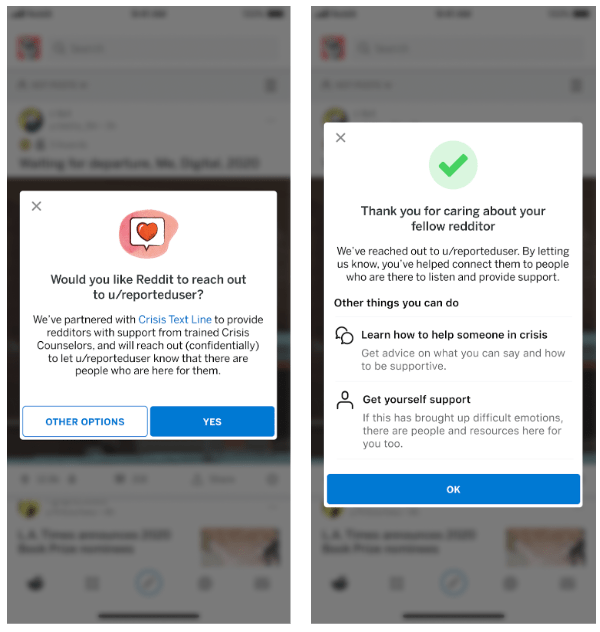
Reddit, a discussion website and home to thousands of communities, announced this week a new partnership with mental health service, Crisis Text Line. The company offers a mental health text line offering live, 24/7 support for people in crisis, including those considering suicide or engaging in self-harm. With this partnership, Reddit users will be able to now flag others whose posts indicate they’re struggling or in crisis. The flagged user is then immediately sent a private message offering them resources and an optional helpline where they’ll be connected with a Crisis Counselor.

Unlike helplines in the past which required users to call in, Crisis Text Line instead operates over text — the preferred communication mechanism for a generation who grew up with smartphones, and who may feel that phone calls are too intimidating.

To get started, they’ll be prompted to text the phrase “CHAT” to 741741. They can then text with their counselor for as long as they need, and the counselor will help them sort through their feelings and thoughts, ask questions, empathize and actively listen.

The person who flagged the user can also get help through the same service, as taking that step can be triggering.

The option to report a post or comment is available directly from the post, by selecting the reporting option: “Someone is considering suicide or serious self-harm.” You can also visit the person’s profile directly and select: “Get them help and support.” (On the web, this is under the “more options” section.)

Reddit also notes that the person in crisis won’t sent multiple messages in short succession even if a number of people flag and report their post. And it will have a link to report “messages received in error” so Reddit can monitor for abuse of the feature.

Crisis Text Line has said in the past that only 30% of its cases are about suicide, and because it’s able to de-escalate the situation it only engages it an “active rescue” (meaning the phone number is provided to a 911 center) in 0.82% of conversations. The counselor doesn’t otherwise have the texter’s phone number, which is encrypted, and they will not call the texter.

Reddit decided to partner with Crisis Text Line because of how often its platform is used for support. Today, the company already offers a number of forums where users can get help facing challenges in their life — like quitting smoking or drinking, getting pregnant, or addressing anxiety and depression, for example. There are also communities solely focused on finding someone to talk to, says Reddit, like r/KindVoice and r/CasualConversation.

“On Reddit, people are able to find community around an infinite number of topics relevant to them – and as an anonymous platform, we provide a space for people to express the most vulnerable parts of themselves,” the company wrote, in its announcement.

Of course, if Reddit wants to host communities like this, it also has a responsibility to its users to provide safety mechanisms and reporting features.

“We’re thrilled to be partnering with Reddit, where redditors can feel safe and supported by their community, 24/7,” added Bob Filbin, Co-Founder & Chief Data Scientist of Crisis Text Line, in a statement. “Reddit has proven to be thoughtful leaders in the online safety space as they ensure users have access to trusted mental health resources at all times,” he said.


Read Full Article

Frontline Ventures raises new $80M fund focused on bringing US firms into Europe


Frontline Ventures, based between Dublin and London, has announced a new $80 million fund designed to assist US tech companies expanding into Europe.

The new FrontlineX fund — which means the firm now has $200 million under management — focuses mainly on growth-stage B2B companies and invest up to $5 million per company alongside lead investors in later-stage rounds. FrontlineX will be led by partners Stephen McIntyre and Brennan O’Donnell.

The firm believes that flawed go-to-market strategies and weak local talent networks means that US companies tend to lose too much money in foregone revenue when they expand into Europe and the team is aiming to try and address this.

Ireland has been a crucial landing point, particularly for US tech companies expanding into Europe, in part because of its low tax regime. No doubt, Irish investors are now realizing that with the UK leaving the EU, both Dublin and Ireland will become an even more attractive proposition.

Frontline has backed a number of successful companies in Seed Funds I and II, including Britebill (acquired by Amdocs), Logentries (acquired by Rapid7), and Orchestrate (acquired by CenturyLink). Most recently, Frontline was an early investor in Pointy, which was acquired by Google last month.

Prior to joining Frontline, McIntyre setup Twitter’s European headquarters as the Vice President of EMEA and built its EMEA business. Prior to that he ran a substantial part of Google’s ads business.

O’Donnell joins FrontlineX as a partner in San Francisco. He previously held multiple go-to-market leadership roles at Google in the US and Europe and executive roles at Yammerm SurveyMonkey, Euclid and Airtable.

In a statement McIntyre said: “We’ve benchmarked the best of B2B software and seen that, by the time a company goes public, 30% of its revenue should be coming from Europe. But even the biggest names in tech fail to get there because of avoidable mistakes when they land. We’ve learned about international expansion the hard way as operators. The good news is that most of these problems are known and solvable.”

FrontlineX already invested in the Series B of TripActions, a company that has gone on to raise from Andreessen Horowitz at a $4 billion valuation; People.ai’s $100 million Series C together with Lightspeed, Andreessen Horowitz and ICONIQ; and Clearbanc’s $50 million Series B with Emergence and Highland. The VC has also backed more than 60 companies with recent investments including TeachCloud, Siren, Cloudsmith and Sweepr.

Ariel Cohen, the CEO of TripActions, commented that Frontline was “a crucial source of go-to-market advice”.


Read Full Article

TCL riffs on the foldable format with a pair of prototypes


Those TCL concept phones that were set for Mobile World Congress have finally arrived in prototype form. The Chinese hardware maker showcased a pair of devices this week, including one that saw a brief unveiling during a CES event.

The usual concept caveat certainly applies here. As with concept cars, TCL is clearly gauging consumer interest in certain design elements for the product. And while I’m usually not a fan of dead-end concept devices, there’s something to be said for approaching the foldable category with the same sort of caution you would use to open and close the original Galaxy Fold.

The tri-fold is the product we caught a glimpse of back in January. The name betrays the concept a bit. The device has three screens and two folding mechanisms. That makes for a pretty massively beefy phone when closed, but a luxurious (dual-creased) 10-inch tablet when unfurled.

There’s already some skepticism around how eager users will ultimately be in adopting this technology, and I don’t see effectively double the footprint (and, for that matter, the potential points of failure) as a particularly engaging solution, as nice as it might be to stick a 10-inch tablet in my pocket.

The slide-out device is nothing if not more compelling, allowing the user to essentially pull out the screen for more real estate. That addresses, certainly, hinge and crease issues, but it’s impossible to see if it’s any more robust.

There’s apparently a working unit somewhere in a lab on the other side of the world, but we’re all understandably skeptical until we can get one in our hands.


Read Full Article

App Store Guidelines ban police-spotting apps, raises bar on dating apps and more


Apple this week alerted developers to a new set of App Store Review Guidelines which detail which apps will be accepted or rejected, and what apps are allowed to do. The changes to the guidelines impact reviews, push notifications, Sign in with Apple, data collection and storage, mobile device management, and more, the company says.  Some of the more high-profile changes include the ability for apps to now use notifications for ads, stricter rules for dating and fortune-telling apps, and a new rule that allows Apple to reject apps that help users evade law enforcement, among other things.

This latter change to police spotting apps, surprisingly, didn’t get as much attention as push ads or dating apps changes — though it’s among the most notable of the new rules.

A previous version of the App Store Review Guidelines (seen in a snapshot here from January 2020) stated that apps could only display DUI checkpoints that were published by law enforcement agencies, and noted that apps shouldn’t encourage activities like “drunk driving” or “excessive speed.” These were reasonable concerns.

The revised rule (section 1.4.4.) now says that Apple will reject apps “used to commit or attempt to commit crimes of any kind by helping users evade law enforcement,” in addition to the existing language.

As you may recall, Apple last year got into hot water over its decision to reject a crowdsourced mapping app, HKmap, that was being used by Hong Kong pro-democracy protestors to evade police. Initially, the app had been approved, but was pulled a day after Apple was criticized by Chinese state media who said the app allowed “rioters…to go on violent acts.”

The app had allowed users to crowdsource information like the location of police, the use of tear gas, and other details about the protests, which were added to a regularly updated map. In a statement, Apple said it removed the app when it learned it was used to “target and ambush police.”

Above: Section 1.4.4, before and after

The new App Store Review Guidelines now puts Apple’s final decision over this sort of app into writing. Effectively, it bans apps that help users evade law enforcement. Arguably, avoiding police isn’t always about wanting to “commit crimes,” as the guidelines state, however. Amnesty International, for example, documented cases of police brutality including beatings and torture in police detention during the Hong Kong protests. The HKmap may have also allowed users to bypass police for their own safety.

Apple’s rule, therefore, is vague enough that it still allows the company itself to make the ultimate call over how an app is being used before deciding to reject or ban it.

Other worthy-of-note changes to the guidelines include an update (section 4.5.4) that allows app developers to send marketing messages (aka ads) in their push notifications. Before, these were banned. This change was immediately hit with user outcry, but it may not be as bad as it first seems.

Clearly, many apps were already spamming their users with ads, despite the prior ban. Now, they’re being required to get customer consent within their app’s user interface and to provide an opt-out mechanism in their app that lets users turn the push notification ads off. This change will at least force reviewers to look for mechanisms and opt-outs in apps offering in-app purchases or that rely on sales to generate revenues.

“Abuse of these services may result in revocation of your privileges,” Apple also warns.

Another change adds “fortune-telling” and “dating” apps to the list of apps that are considered spam if they’re not providing a “unique, high-quality” experience. The relevant section (4.3) warns developers about the app categories that Apple thinks are oversaturated, and where it will be more critical with its reviews.

The guidelines also now include a new section (5.6.1) that instruct developers on how to respond to App Store reviews, reminding them to “treat customers with respect when responding to their comments” and not include irrelevant information, personal information, spam, and marketing in their messages.

And developers must now use Apple’s own API to solicit reviews, instead of other mechanisms. This will allow users to toggle off App Store review prompts across all apps from the iOS settings.

Finally, Apple reminded developers that all apps going forward, including app updates, will need to use the iOS 13 SDK as of April 30, 2020. Apps will need to support the “Sign in with Apple” login/sign-up option as of that date, too.


Read Full Article

How a miniaturized atomic clock could revolutionize space exploration | Jill Seubert

How a miniaturized atomic clock could revolutionize space exploration | Jill Seubert

Ask any deep space navigator like Jill Seubert what makes steering a spacecraft so difficult, and they'll tell you it's all about the timing; a split-second can decide a mission's success or failure. So what do you do when a spacecraft is bad at telling time? You get it a clock -- an atomic clock, to be precise. Let Seubert whisk you away with the revolutionary potential of a future where you could receive stellar, GPS-like directions -- no matter where you are in the universe.

Click the above link to download the TED talk.

Emma, the personal finance tracker, scores $2.5M seed led by Connect Ventures


Emma, the personal finance management app that bills itself as your best “financial friend,” has raised $2.5 million in seed funding.

Connect Ventures led the round, with participation from Ithaca Investments, Tiny.vc and existing investor, Aglaé Ventures. The fintech previously raised $700,000 in angel funding in June 2018.

Launched in the U.K. in early 2018 — and most recently expanding to the U.S. and Canada — the Emma app connects to your bank accounts (and crypto wallets) to help you budget, track spending and save money.

It aims to let you understand how much money you have left to spend until payday, track and find wasteful subscriptions or alert you when you are paying over the odds on utility bills, and preemptively help you avoid going into your bank’s overdraft.

For those who like to be more hands-on with tracking their finances, Emma also offers a paid subscription version of its app dubbed “Emma Pro”. It lets you do additional things like create custom categories, add emojis to custom categories, export your data between specified time ranges, create manual accounts in any currency, create manual transactions, and split transactions,

“In a world where 70% of mental health issues are derived by financial problems, Emma is defining a new category, financial therapy,” says Emma founder and CEO Edoardo Moreni. “Our mission is to remove anxiety regarding money matters and bring instant gratification whenever our users interact with money regardless of their financial situation”.

Noteworthy, Connect Ventures is also an investor in open banking platform TrueLayer, which Emma uses to power its account aggregation in the U.K. (it uses Plaid in the U.S.). Describing TrueLayer as the “infrastructure layer,” Connect’s Rory Stirling says Emma represents investing in the “application layer” – perhaps as it is just the kind of app open banking promised.

“The team at Emma have built a product people love and as a result they have the highest engagement and retention we’ve seen in this category,” he says in a statement. “That’s really exciting to us – better tools for financial education and empowerment are only valuable if people engage with them”. (Users open the app on average five times a week, twice a day).

“We have about 200,000 users now and are growing pretty fast in the U.S., Canada and U.K.,” Moreni tells me. “We’ll be launching in every english speaking country and we’ll raise our Series A in the next 12 months. If you think about it, every single generation in history had a tracker. At Emma, we want to become the abacus for the modern world”.


Read Full Article

Bluecrew launches a mobile app to help businesses manage a flexible workforce


Bluecrew, a flexible staffing business owned by holding company IAC, is launching a new mobile app called Bluecrew Manager.

Rather than relying on a network of independent contractors, Bluecrew hires its own W-2 employees, who in turn have the option to accept hourly jobs from Bluecrew customers.

The company already offered web-based management tools for those customers, but CEO Adam Roston said the mobile app is designed to help them accomplish “the stuff you need to do right now, while you’re on-the-go.”

For example, he said that a warehouse manager spends most of their day “running around the floor,” so if they’re visiting the pick-and-pack department and need to see who’s on the team that day, they can open the app and see pictures of everyone who’s supposed to be working. And if they see that someone forgot to check in, they can adjust their time clock directly from the app.

Other features include the ability to request more workers and to “favorite” a worker, making it more likely that they’ll be assigned to the same company for future jobs.

Bluecrew says it has been testing out the Manager app (which is available for free to all customers) for the past month. In the launch announcement, Eduardo Medrano, cafe manager at hospitality company Eurest, said the app “is completely changing how I approach staffing” because it allows him “to make adjustments and check who will be there right on my phone.”

The company says that since its acquisition by IAC in 2018, its client base has nearly quadrupled, with growth in industries like logistics and manufacturing, hospitality/culinary and warehousing.

Roston also pointed to California’s new AB-5 law (which limits the ways that companies can classify workers as independent contractors) as a sign that Bluecrew has taken the right approach to combining flexibility and worker protections.

“When [co-founder and CTO Gino Rooney] started the company five years ago, it seemed a little bit crazy to be doing this with W-2 employees,” Roston said. “Over the last year. the landscape has just shifted … The reality, is most companies in the country are already following labor laws and have been at W-2 for years. But we’ve seen some increased momentum from AB-5, and we would expect to see it elsewhere.”


Read Full Article

Google Cloud goes after the telco business with Anthos for Telecom and its Global Mobile Edge Cloud


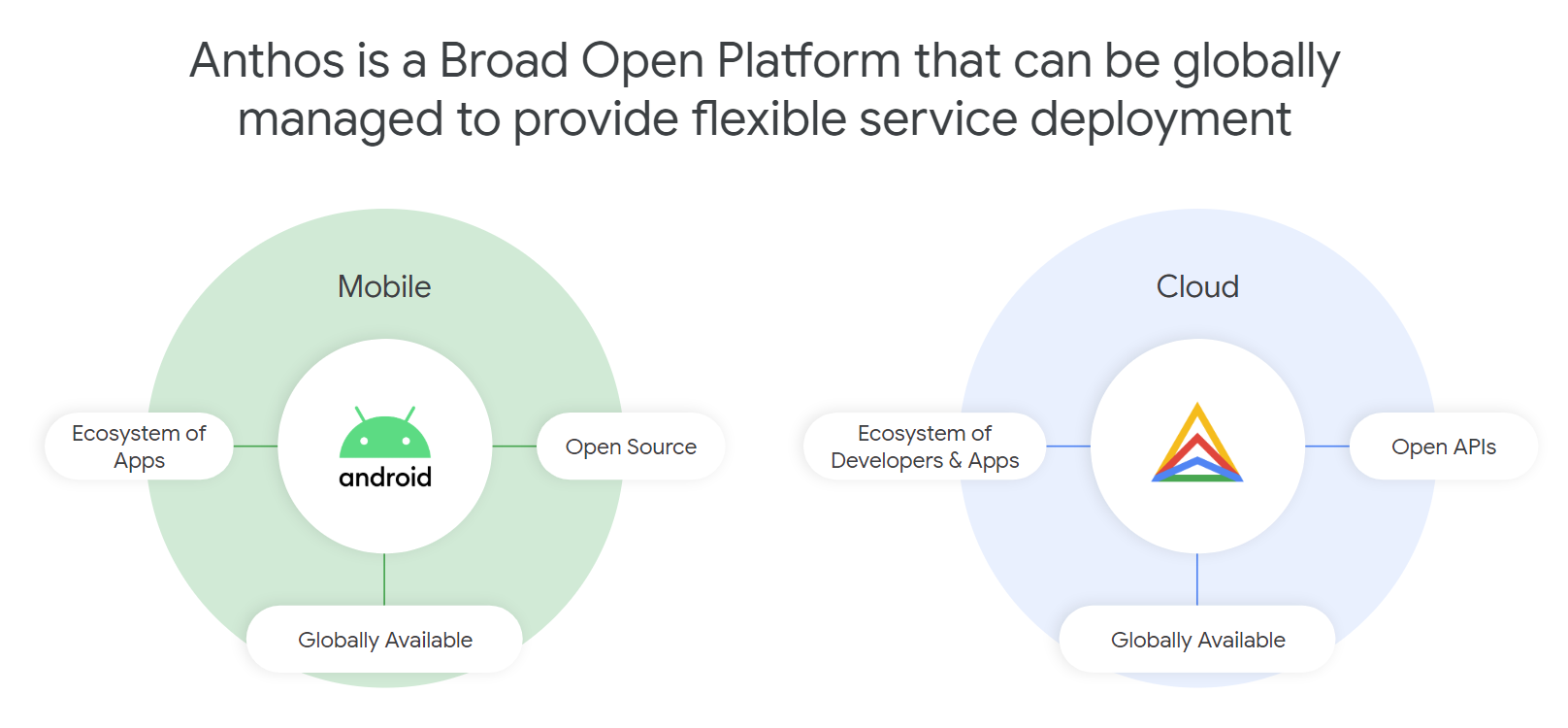
Google Cloud today announced a new solution for its telecom customers: Anthos for Telecom. You can think of this as a specialized edition of Google’s container-based Anthos multi-cloud platform for both modernizing existing applications and building new ones on top of Kubernetes. The announcement, which was originally slated for MWC, doesn’t come as a major surprise, given Google Cloud’s focus on offering very targeted services to its enterprise customers in a number of different verticals.

Given the rise of edge computing and, in the telco business, 5G, Anthos for Telecom makes for an interesting play in what could potentially be a very lucrative market for Google. This is also the market where the open-source OpenStack project has remained the strongest.

What’s maybe even more important here is that Google is also launching a new service called the Global Mobile Edge Cloud (GMEC). With this, telco companies will be able to run their applications not just in Google’s 20+ data center regions, but also in Google’s more than 130 edge locations around the world.

“We’re basically giving you compute power on our edge, where previously it was only for Google use, through the Anthos platform,” explained Eyal Manor, the VP of Engineering for Anthos. “The edge is very powerful and I think we will now see substantially more innovation happening for applications that are latency-sensitive. We’ve been investing in edge compute and edge networking for a long time in Google over the years for the internal services. And we think it’s a fairly unique capability now to open it up for third-party customers.”

For now, Google is only making this available to its teleco partners, with AT&T being the launch customers, but over time, Manor said, it’ll likely open its edge cloud to other verticals, as well. Google also expects to be able to announce other partners in the near future.

As for Anthos for Telecom, Manor notes that this is very much what its customers are asking for, especially now that so many of their new applications are containerized.

“[Anthos] brings the best of cloud-as-a-service to our customers, wherever they are, in multiple environments and provide the lock-in free environment with the latest cloud tools,” explained Manor. “The goal is really to empower developers and operators to move faster in a consistent way, so regardless of where you are, you don’t have to train your technical staff. It works on-premise, it works on GCP and on other clouds. And that’s what we hear from customers — customers really like choice.”

In the telecom industry, those customers also want to get higher up the stack and get consistency between their data centers and the edge — and all of that, of course, is meant to bring down the cost of running these networks and services.

“We don’t want to manage the [technology] we previously invested in for many years because the upgrades were terribly expensive and slow for that. I hear that consistently. And please Google, make this seem like a service in the cloud for us,” Manor said.

For developers, Anthos also promises to provide the same development experience, no matter where the application is deployed — and Google now has an established network of partners that provides both solutions to developers as well as operators around Anthos. To this effect, Google is also launching new partnerships with the Amdocs customer experience platform and Netcracker today.

“We’re excited to unveil a new strategy today to help telecommunications companies innovate and accelerate their digital transformation through Google Cloud,” said Thomas Kurian, CEO of Google Cloud, in today’s announcement. “By collaborating closely with leading telecoms, partners and customers, we can transform the industry together and create better overall experiences for our users globally.”


Read Full Article

5G is now live in 24 markets, GSMA predicts it’ll be 20% of global connections by 2025 — and eyes a big tech break-up


The next-gen flavor of mobile connectivity, 5G, is now live in 24 markets globally, per global mobile industry association the GSMA — which has just published its annual state of the global mobile economy report.

The cutting edge network tech is capable of supporting speeds up to 100x faster than LTE/4G and delivering latency of just a few milliseconds, as well as being able to connect many more devices per cell site — which means that, as it rolls out, it’s expected to underpin a new wave of ‘smarter’ digital services which bake in real-time AI assistance and help drive the digitization of legacy industries.

In last year’s report the carrier association didn’t break out a firm figure for markets where 5G is live — but dubbed the tech “a reality” after commercial launches in the US and South Korea towards the end of 2018. It also said it was expecting 16 more “major countries” to have launched 5G networks by the end of 2019.

It’s now touting “significant traction” for 5G — saying 79 operators across a further 39 markets had announced plans to launch commercial 5G services as of January 20, 2020. 

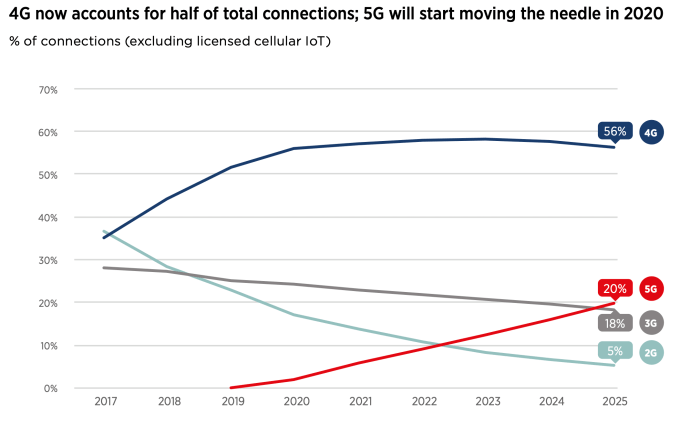
As it stands actual 5G connections remain a fraction of the connectivity pie vs current (4G) and previous gen cellular favors. Per the report, 4G became the dominant mobile tech globally in 2019 — with over 4BN connections, accounting for 52% of total connections (excluding licensed cellular IoT).

The GSMA expects 4G connections to continue to grow for the next few years, peaking at just under 60% of global connections by 2023.

For 5G its forecast is that it will account for a fifth (20%) of global connections by 2025, with the carrier association expecting “particularly strong” take-up across developed Asia, North America and Europe.

(For wider context, almost half of the global population (3.8BN people) are now users of the mobile internet as a whole (2G-5G), per the report — which is forecast to grow to 61% (5BN people) by 2025.)

It’s worth emphasizing that the presence of 5G in a market does not mean universal coverage.

On the contrary, 5G rollouts have tended to be targeted on urban centers. Which means 5G availability in the 24 markets that have launched commercial networks so far is likely highly limited vs population. There are also still relatively few 5G smartphones vs non-5G handsets (though since this time last year more are being unboxed; Sony, for example, just announced its first 5G handsets).

Perhaps, most importantly, consumer demand for the next-gen flavor of connectivity has yet to be robustly stood up. The GSMA’s report poses the (existential, for telcos) question of: “Will they pay for it?”

The number of live 5G markets is increasing by the day and consumers’ awareness of the technology is also growing as hype makes way for reality. However, there is wide variation across the globe in terms of intentions to upgrade to 5G and the willingness to pay more for it,” it concedes.

“In general, consumers in South Korea and China – having witnessed some of the earliest launches – appear to be the most excited by the prospect of upgrading to 5G, while those in the US, Europe and Japan seem more content with 4G for the time being,” the GSMA adds, before striking an upbeat note: “5G is still in its infancy though; as more tangible use cases are deployed, more consumers will appreciate the benefits of 5G.”

Aka, 5G needs a killer app. But one has yet to emerge. (Edit note: A global pandemic that triggers a mass transition to remote working and virtualized socializing could have potential though. After all, concerns about the corona virus did force the GSMA to cancel its own annual shindig, MWC, just last month.)

Despite the report’s prediction that consumers will, down the line, be sold on 5G’s “benefits” another graphic in the report maps out the current reality — that “awareness of 5G does not necessarily translate into an intention to upgrade”.

It shows adults in markets including the UK, Australia, Spain and Italy having high awareness of the tech but low intent to pay for 5G, with less than 35% saying they want to upgrade. The US market also has a similarly high level of awareness of 5G — and only a slightly higher intention to upgrade (~40%+). 

The GSMA writes that more needs to be done by carriers to “raise awareness” of other “benefits” than just higher data speeds, touting claimed advantages such as “improved mobile service coverage”, “innovative new services” and “connectivity for previously unconnected devices” as having 5G marketing potential.

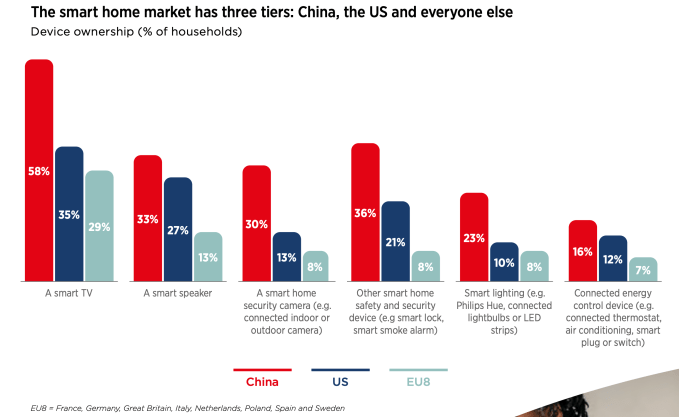
However, on the latter point at least, the report also chronicles variable and often low appetite — certainly outside China — for a range of ‘smart’ devices…

Still, the GSMA predicts billions more IoT devices will be coming on stream over the next five years — saying that between 2019 and 2025 the number of global IoT connections will more than double to almost 25 billion, while it expects global IoT revenue to more than triple to $1.1 trillion.

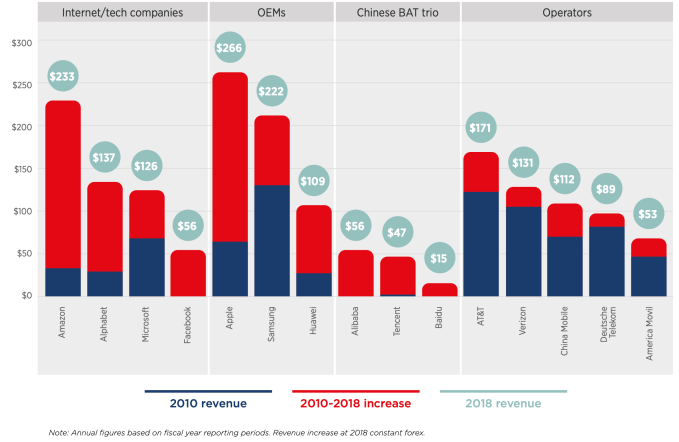
Another segment of the report deals with the perennial issue of stagnant operator revenue growth vs Internet companies, with the GSMA noting telcos continue to lag tech giants and major device makers.

For many operators, revenue growth as a percentage is in the low single digits, if that,” it writes. “As core telecoms revenue stagnates, a common strategy now for major operator groups is to seek revenue growth from adjacent services. Pay TV, media, IoT, enterprise solutions and the broader array of digital services still only account for a minor share of operator revenues (10–20% for most), although there are a few notable exceptions, largely enabled by M&A activity.”

It’s perhaps no surprise, then, that top of the GSMA’s 2025 prediction/wish-list is a bold one that one of the GAFA companies (Google, Apple, Facebook and Amazon) will be broken up. (It makes not suggestion of which — though plenty of American eyes are now on Google.)

Other near-term hopes on the GSMA’s list are that “AR eye glasses reach the mass market with a form factor from at least one global OEM”; health wearables become “part of the solution to overburdened public health systems”; and “private enterprise networks explode and become a battleground between telcos and cloud companies” (we don’t think they mean explode literally). 

There’s also another 2025 prediction for 5G — that the technology becomes “the first generation in the history of mobile to have a bigger impact on enterprise than consumers”.

Which is certainly one way to silver-line a low-demand ‘cloud’ and hedge (hopefully) for business buy-in to make up for lacklustre consumer desire to pay more to do the same stuff slightly faster* (*depending on network conditions). 

Governments and regulators must play their part to help propel 5G into commercial use by implementing policies that encourage advanced technologies (e.g. AI and IoT) to be applied across all economic sectors,” the GSMA writes elsewhere in the report — a call to action that aligns exactly with policy priorities recently set out by the new European Commission, suggesting telco lobbying in Brussels has borne fruit

Thierry Breton, the Commissioner for internal market — who’s now driving a pan-EU strategy to encourage the pooling and reuse of industrial data that leans heavily on the deployment of what’s he’s called “critical” 5G networks — is also a former chairman and CEO of France Telecom.

You can download the full GSMA report here.


Read Full Article

Anyone Can Create a Professional Website in Minutes With Page Builder Pro


According to freelance marketplace 99designs, hiring a professional designer to create a website can cost anything from $500 to over $5,000. If you run a small business, your budget might not stretch that far. Page Builder Pro offers an affordable alternative. This online platform allows you to build a stunning website using simple drag-and-drop controls. Right now, you can get lifetime service for just $49.99 at MakeUseOf Deals.

Zero Code

Unless you happen to be a designer, coding a website from scratch is a pretty daunting task. Thankfully, there are other options. With Page Builder Pro, you can design your perfect site without writing a single line of code.

This platform lets you choose from a range of beautiful, mobile-friendly templates. You can customize these designs with your own colors and fonts, before adding content. Page Builder Pro lets you work with thousands of pre-designed elements, from live chat to pop-up forms.

When you are happy with your site, you simply hit publish. Your subscription includes hosting with unlimited bandwidth, and all the templates are SEO-friendly.

Lifetime Service for $49.99

You would normally pay $745 for a lifetime subscription, but you can get Page Builder Pro now for just $49.99.

Read the full article: Anyone Can Create a Professional Website in Minutes With Page Builder Pro


Read Full Article

Anthony Levandowski ordered to pay $179 million to Google


Anthony Levandowski, the engineer and autonomous vehicle startup founder who was at the center of a trade secrets lawsuit between Uber and Waymo, has been ordered to pay $179 million to end a contract dispute over his departure from Google.

Reuters was the first to report the court order.

An arbitration panel ruled in December that Levandowski and Lior Ron had engaged in unfair competition and breached their contract with Google when they left the company to start a rival autonomous vehicle company focused on trucking, called Otto. Uber acquired Otto in 2017. A San Francisco County court confirmed Wednesday the panel’s decision.

Ron settled last month with Google for $9.7 million. However, Levandowski, had disputed the ruling. The San Francisco County Superior Court denied his petition today, granting Google’s petition to hold Levandowski to the arbitration agreement under which he was liable.

Levandowski himself may not have to pay the money personally, as this sort of liability may fall to his employer depending on his contract or other legal quirks. However, Levandowski personally filed today for Chapter 11 bankruptcy, stating that the presumptive $179M debt quite exceeds his assets, which he estimates at somewhere between $50M and $100M.

A representative for Levandowski declined comment for this story.

Devin Coldewey contributed to this story.


Read Full Article

Judge rejects Tulsi Gabbard’s ‘free speech’ lawsuit against Google


Last July, Hawaii representative and longshot Democratic presidential hopeful Tulsi Gabbard filed a lawsuit against Google, accusing the company of violating her First Amendment rights to free speech when it briefly suspended her campaign’s ad account. On Wednesday, California’s Central District Court rejected the suit outright.

Gabbard’s campaign, Tulsi Now, Inc., asked for $50 million in damages from Google for “serious and continuing violations of Tulsi’s right to free speech.” In the suit, her campaign claimed that Google “helps to run elections” through political advertising and search results — an argument District Judge Stephen Wilson firmly rejected.

In dismissing the case, Wilson writes that what Gabbard “fails to establish is how Google’s regulation of its own platform is in any way equivalent to a governmental regulation of an election.” When it comes to Google, “an undisputedly private company,” the First Amendment’s free speech protections do not apply. A week ago, another California court reached the same conclusion in a case that right-wing group PragerU brought against YouTube.

In a case of poor timing, Gabbard’s account was suspended for an interval of time following the first presidential debate as viewers sought information about the unfamiliar candidate. In the lawsuit, Gabbard noted that Google took her advertising account offline “in the thick of the critical post-debate period.”

“Since at least June 2019, Google has used its control over online political speech to silence Tulsi Gabbard, a candidate millions of Americans want to hear from,” the suit stated.

Echoing unfounded conservative complaints of tech censorship, Gabbard characterized paid political advertising as free speech, language that Facebook itself would later adopt in defending its lax position on policing political ads.

“This is a threat to free speech, fair elections, and to our democracy, and I intend to fight back on behalf of all Americans,” Gabbard said in a statement at the time.

Gabbard also decried Google’s dominance of the search business, echoing the anti-monopolist tech sentiments expressed by other Democratic candidates. Political figures in both parties have seized on anti-tech sentiment in recent years, and the Hawaii representative’s lawsuit is just one example of politically expedient posturing against major tech platforms.

After the incident, a Google representative explained that the platform automatically flagged Gabbard’s account for unusual activity, a mistake it corrected a short time later.


Read Full Article