10 December 2019

10 LEGO Star Wars Toys Actually Worth Buying Right Now


star-wars-lego-guide

A long time ago in a toy factory far, far away, some bright spark thought it would be a good idea to save a stuttering brand by sealing commercial tie-ups with well-known movie franchises.

LEGO’s tie-in with Lucasfilm is probably the most famous and recognizable result of this decision; a concept that mashes together the idea of Star Wars toys with the LEGO Space brand of the 1980s and 1990s.

It’s a range so big it can be difficult to know where to begin, but we’re here to help.

The Original Trilogy

As with any good Star Wars-related exercise, the place to start is, of course, the Original Trilogy. Sure, the prequels are chronologically first, but they represent an evolution of the storyline (as various TV documentaries and books prior to the prequels bear out).

1. LEGO Star Wars Darth Vader 75534 Building Kit

LEGO Star Wars Darth Vader 75534 Building Kit LEGO Star Wars Darth Vader 75534 Building Kit Buy Now On Amazon $39.90

One of several Star Wars figure kits, this LEGO Darth Vader Building Kit features arm-swinging function and the famous red lightsaber. Standing at over 12 inches (32 cm) tall, this figure is constructed from 168 pieces of LEGO. The removable mask reveals the scarred, dying face of Anakin Skywalker. But while this is an achievable build, the end result may disappoint.

Rather than the brooding menace of the original Darth Vader, this model is bulkier, and more muscular, like many Vader toys. Other than that, it’s a great option that no Star Wars fan should be without. Other builds in this series include Boba Fett, General Grievous, and Chewbacca.

2. LEGO Star Wars 75060 Slave 1

LEGO Star Wars Slave 1 LEGO Star Wars Slave 1 Buy Now On Amazon $287.99

First seen in The Empire Strikes Back (1980), Slave 1 is inspired by the shape of a street lamp. Flown by legendary bounty hunter Boba Fett, he uses it to track the Millennium Falcon from Hoth to Bespin. His aim is to track down and capture the smuggler turned Rebellion hero, Han Solo.

In this set, you’ll find figures of Fett, a Bespin Guard, a Stormtrooper, and two Han Solos. One is the regular minifigure, while the second is Han Solo frozen in carbonite. Like the original Kenner toy, the ship features a pivoting pilot seat, to accommodate the correct direction of flight.

Containing a massive 1,996 pieces, the Slave 1 is seven inches high, 17 inches long, and 14 inches wide!

3. LEGO Star Wars: The Empire Strikes Back Snowspeeder—20th Anniversary Edition 75259

LEGO Star Wars: The Empire Strikes Back Snowspeeder---20th Anniversary Edition 75259 LEGO Star Wars: The Empire Strikes Back Snowspeeder---20th Anniversary Edition 75259 Buy Now On Amazon $32.49

2019 marks two decades of Star Wars-flavored brick building. To celebrate, LEGO has released a range of 20th anniversary kits, including the LEGO Star Wars: The Empire Strikes Back Snowspeeder. Each 20th anniversary set features a bonus figure, along with an anniversary plinth to display it on.

The craft features laser cannons, spring-loaded shooters, a stud shooter, and a harpoon for taking down AT-AT walkers! You’ll also find a gun tower in the 309-piece kit. Three figures are included: Luke Skywalker (with lightsaber), Dak Ralter in pilot outfits, and a rebel trooper.

The Prequel Trilogy and The Clone Wars

Some of you may be unaware, but between 1999 and 2005, a second trilogy of Star Wars films was released. At the time, the movies were well received, expanding on the legend of the Clone Wars and the Jedi.

The movies were then followed by an animated movie and series, The Clone Wars.

4. LEGO Star Wars Clone Turbo Tank 75151

LEGO Star Wars Clone Turbo Tank 75151 LEGO Star Wars Clone Turbo Tank 75151 Buy Now On Amazon $154.19

Sitting at 12 inches in length, and 6 inches high, with a 5-inch width due to the massive wheels, this LEGO Star Wars Clone Turbo Tank appeared in Revenge of the Sith and the Star Wars: The Clone Wars TV show.

Featuring 903 pieces, the tank has two side flaps and a rear door to provide access to the inside. You’ll also find a cockpit for the driver. Four characters and two Battle Droids are included: Luminara Unduli, Quinlan Vos, Clone Commander Gree, and Elite Corps Clone Trooper.

These figures can be placed inside the tank or positioned on the flaps or on the turret. The set also includes a mini AT-RT Walker, and the tank can fire missiles!

5. LEGO Star Wars: The Phantom Menace Anakin’s Podracer—20th Anniversary Edition 75258

LEGO Star Wars: The Phantom Menace Anakin's Podracer – 20th Anniversary Edition 75258 LEGO Star Wars: The Phantom Menace Anakin's Podracer – 20th Anniversary Edition 75258 Buy Now On Amazon $23.99

The LEGO Star Wars: The Phantom Menace Anakin’s Podracer is another 20th anniversary re-release set. Featuring minifigures of Anakin and Padme Amidala, there’s also a 20th anniversary Luke Skywalker, complete with lightsaber and plinth.

This 279-piece kit measures 13 inches in length and comes with a play handle. This is an L-shaped collection of mostly transparent LEGO pieces that doubles as a stand. As a result, the podracer appears to be hovering when placed on a surface.

6. LEGO Star Wars Duel on Naboo 75169

LEGO Star Wars Duel on Naboo 75169 LEGO Star Wars Duel on Naboo 75169 Buy Now On Amazon $32.99

While the prequel trilogy has received much criticism (often justified), one scene stands out across all nine movies. Qui-Gon Jinn and Obi-Wan Kenobi’s epic lightsaber battle scene against monosyllabic Darth Maul is superb!

So, it makes sense that the scene should be reproduced in LEGO, complete with field gates and a minifigure catapult. Comprising 208 bricks, the LEGO Star Wars Duel on Naboo kit features the three principal characters, complete with lightsabers.

The Disney Era Movies

Since the release of The Force Awakens in 2015, there have been five new Star Wars movies. These have opened a whole new avenue for LEGO set builders to explore, delivering iconic and previously barely seen vehicles.

7. LEGO Star Wars Solo: A Star Wars Story Kessel Run Millennium Falcon 75212 Building Kit

LEGO Star Wars Solo: A Star Wars Story Kessel Run Millennium Falcon 75212 Building Kit LEGO Star Wars Solo: A Star Wars Story Kessel Run Millennium Falcon 75212 Building Kit Buy Now On Amazon $189.90

Featuring in Solo: A Star Wars Story, this version of the LEGO Star Wars Solo: A Star Wars Story Millennium Falcon includes Han Solo and Chewbacca. You’ll also find Qi’ra, Lando Calrissian, and Quay Tolsite minifigures within. This kit is an impressive 1,414 pieces.

The resulting build is 18 inches long, 11 inches wide, and 4 inches high. Like larger, more expensive versions of the Millennium Falcon, you’ll find flaps that open to give access to the interior. There’s also an opening cockpit for your choice of pilot and a detachable auxiliary ship.

8. LEGO Star Wars: The Rise of Skywalker Millennium Falcon 75257

LEGO Star Wars: The Rise of Skywalker Millennium Falcon 75257 LEGO Star Wars: The Rise of Skywalker Millennium Falcon 75257 Buy Now On Amazon

If you prefer a more traditional approach to the Han Solo’s ship, however, the LEGO Star Wars: The Rise of Skywalker Millennium Falcon might pique your interest. Featuring four flaps to reveal the ship’s interior, along with a removable canopy for the cockpit, it’s remarkably detailed.

Look for rotating top and bottom gun turrets, spring-loaded shooters, and a lowering ramp. The kit features seven minifigures: Finn, Chewbacca, Lando Calrissian, C-3PO and Boolio, plus D-O and BB-8. This impressive craft is built from 1,351 bricks and measures 17 inches wide, 12 inches long, and five inches high.

9. LEGO Star Wars: The Rise of Skywalker Resistance Y-Wing Starfighter 75249

LEGO Star Wars: The Rise of Skywalker Resistance Y-Wing Starfighter 75249 LEGO Star Wars: The Rise of Skywalker Resistance Y-Wing Starfighter 75249 Buy Now On Amazon $55.99

The LEGO Star Wars: The Rise of Skywalker Resistance Y-Wing Starfighter is an awesome bomb-dropping, missile-firing redesign of the classic Y-Wing craft, appearing in 2019 film, The Rise of Skywalker. The kit includes Poe Dameron, Zorii Bliss, and a First Order Snowtrooper.

The ship also comes with the D-O and astromech droids. Once you’ve seen The Rise of Skywalker movie, you can build this ship and re-enact key scenes from the film. Boasting spring-loaded shooters, the Y-Wing is 16 inches long, 7 inches wide, and uses 578 pieces.

Bonus: LEGO Star Wars Video Game!

Surely there are no other LEGO Star Wars toys to mention? Well, there are, and more than we can shake a handful of bricks at. But, if you want a recommendation for something a little different…

10. LEGO Star Wars: The Force Awakens Deluxe Edition

LEGO Star Wars: Force Awakens Deluxe Edition - Xbox One LEGO Star Wars: Force Awakens Deluxe Edition - Xbox One Buy Now On Amazon $13.99

This LEGO Star Wars: Force Awakens Deluxe Edition game features some previously exclusive character packs. These include characters from Prequel Trilogy, Star Wars: Rebels, and the excellent Freemaker Adventures LEGO animated series. The game is available on most major gaming consoles, including the Playstation 4 and Xbox One.

If you’ve ever played a LEGO Star Wars game, then you’ll know what to expect—stud collecting and puzzle-solving. All of this is tied together with close adherence to the movie’s plot, and lots of cut-scene humor. Various Easter eggs can be found throughout the game for added entertainment.

That’s No Moon… It’s LEGO!

So, there you go, Star Wars fans: an extensive list of LEGO toys to suit all budgets. They’re also suitable for all skill levels and ages, so you should find the perfect Star Wars LEGO experience.

Know a LEGO fan who doesn’t like Star Wars? Check these top LEGO gifts.

Read the full article: 10 LEGO Star Wars Toys Actually Worth Buying Right Now


Read Full Article

What Is the Amazon Fire TV Stick and How Does It Work?


amazon-fire-tv-stick

The number of streaming media devices on the market continues to grow as consumers flock to popular services like Netflix and Amazon Prime Video. But if you’re new to the technology, it can be difficult to find the best streaming device for you.

Unlock the list of "Essential Amazon Fire Stick TV Channels" now!

This will sign you up to our newsletter

Enter your Email

One of the best options currently on the market is the Amazon Fire TV Stick. Along with the low cost, the streaming device plugs directly into an HDMI port, making it a strong choice for anyone with limited space near their TV.

In this article we take a closer look at the streaming device, explaining how the Amazon Fire TV works and telling potential buyers what they need to know before buying one.

How Does the Amazon Fire TV Stick Work

The real draw of the Fire TV Stick is video content, especially if you’re an Amazon Prime member.

Since the device is from Amazon, you can view movies and television shows on Amazon Prime Video. Here are the best Amazon Prime movies to get you started.

And that’s far from all. You can access a wide range of other subscription services including Netflix, HBO Now, Disney+, and many others. Cord cutters will be happy to hear that streaming TV services like Hulu, Sling TV, or DirecTV Now are also available on the device. It’s also the place to go to access any content purchased from Amazon like movies, TV shows, and even music.

If you purchase a Fire TV Stick directly from Amazon, the device will come pre-registered with your account information. If it is a gift or from another retailer, you’ll first need to enter your Amazon account information and pair the remote via Bluetooth. Thankfully, Amazon provides two AAA batteries to use with the remote.

Amazon Fire TV Stick Home screen

There are six major sections to explore in the Fire TV interface: Search, Home, Movies, TV Shows, Apps, and Settings. Users will always start in the Home section. To move across the different sections and content, you’ll use the navigation trackpad on the remote. The center of the trackpad is used as the select button.

Instead of needing to use the different buttons on the remote itself, you can accomplish a large number of tasks by pressing the microphone button and speaking to Alexa. You can use voice commands to play a movie or TV show, search for content, search within apps, control playback, launch apps, control live TV apps, and more.

Because of its design, the Fire TV Stick is easy to move between televisions in your home or even take while traveling. You’ll always have entertainment ready to go.

What Is the Amazon Fire TV Stick?

Amazon Fire TV Stick 4K

Most of today’s streaming video options are small boxes that sit near the television and attach via an HDMI cable. But the Amazon Fire TV Stick is a little different.

As its name suggests, the device is a small, stick-like dongle that’s a bit larger than a USB flash drive. It’s 3.4 inches tall and 1.2 inches wide. On the end of the device is a standard HDMI plug designed to be placed into an open HDMI port on a television.

As long as your TV has an HDCP-compatible HDMI port, which is found on any modern set, you’ll be good to go once you have connected a micro-USB power cable and chosen a Wi-Fi network.

Amazon also includes a small Alexa Voice Remote with the Fire TV Stick. This allows users to navigate the Fire TV Stick interface and even interact with Amazon’s personal assistant Alexa.

Alexa support opens up a vast amount of different skills and other commands. One of the best is the ability to play music with just a simple press of the microphone button voice command.

What Does an Amazon Fire TV Stick Do?

Here are even more facts you need to know about what the Fire TV Stick does.

Amazon provides access to a wide variety of different apps to download. But something you may not know is that the device runs the Android. So it’s possible to sideload Android apps onto the Fire TV Stick. The best way is using an Android phone, but it can also be done on a Mac, PC, or Linux machine.

Firefox Fire TV Stick

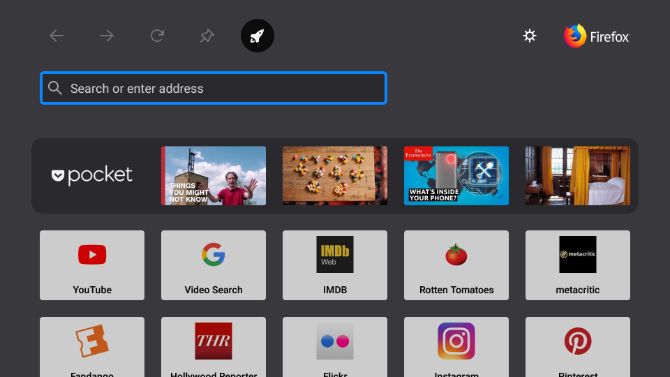
One type of app you won’t have to worry about sideloading is a web browser. We’ve previously compared two of the best Amazon Fire TV Stick browsers: Firefox and Silk.

Just like other Amazon hardware products, the Fire TV Stick features parental controls. During setup, parents can set a 5-digit PIN password. The PIN will be required to play content rated Teen or above, or to make a purchase.

You don’t need the Alexa Voice Remote to control the Fire TV Stick. Make sure to download the Amazon Fire TV Remote app for Android or iOS. Along with navigation through on-screen navigation, the app also supports voice search.

If you already own an Amazon Echo device, you can link the Fire TV Stick and control the streaming device using a simple Alexa command.

Where to Buy the Amazon Fire TV Stick

There are two versions of the Amazon Fire TV Stick to choose from. The best place to purchase both options is from Amazon itself. The streaming devices are also available at a large number of other retailers including Best Buy, Target, Walmart, and Newegg.

The Amazon Fire TV Stick 4K brings Ultra HD content to any compatible 4K television. You can stream 4K content at up to 60fps. The device also supports many different content formats like Dolby Vision, HDR 10, HLG, and HDR10+ for the greatest visual detail. The Fire TV Stick 4K also supports the Dolby Atmos sound format for great, room-filling sound with a compatible sound system.

You’ll be able to control the experience with a second-generation Alexa Voice Remote that offers a physical power button and volume controls.

Amazon Fire TV Stick 4K Amazon Fire TV Stick 4K Buy Now On Amazon $49.99

For anyone with just a 1080p HD set, the standard Amazon Fire TV Stick is less expensive and offers access to all of the same content and apps. You’ll also receive the same Alexa Voice Remote as the more expensive version. Be sure you take a look at our list of essential apps for the Amazon Fire TV Stick.

Amazon Fire TV Stick Amazon Fire TV Stick Buy Now On Amazon $39.99

In the box of both options, buyers will find the Fire TV Stick, the Alexa Voice Remote, two AAA batteries, a power adapter, and an HDMI extender. The extender provides better Wi-Fi reception to the device and will allow users to not crowd out any nearby HDMI ports. That’s especially important if you have a limited amount of free HDMI ports on your television.

Stream Media With an Amazon Fire TV Stick

As you can see, the Amazon Fire TV Stick is the perfect way to bring all the advantages of a streaming media device to your TV. The inexpensive price, small size, and access to a huge amount of different services makes the Fire TV Stick a great choice for most users.

And if you decide to take the plunge and make the purchase, be sure you know how to set up and use the Amazon Fire TV Stick first.

Read the full article: What Is the Amazon Fire TV Stick and How Does It Work?


Read Full Article

What Is an AI File and How to Open It Without Adobe Illustrator


open-ai-without-illustrator

Graphic designers commonly work with vector images. The files are small, yet the images themselves are infinitely resizable. They’re perfect for drawings, and especially for things like logos and icons.

The AI file is the most common type of vector image. It’s a proprietary Adobe Illustrator format, so it can be tricky to open AI files if you don’t have Illustrator. How you do it depends on what you want to do with it.

Put simply, it’s easy to open an AI file just to view, but editing it is less straightforward. In this article we take a look at both scenarios…

How to Open AI Files Without Illustrator

If you have an AI file you need to view but not edit, there are lots of programs that can do it.

The default save settings for AI files in Illustrator mean that the files are saved with PDF content embedded. This means you can view them in most apps that support PDF viewing.

  • In Windows, you need to change the .ai file extension to .pdf. Highlight the file and hit F2 on your keyboard. Add PDF to the end of the filename and confirm the change when prompted. Now, double-click the file and it will open in your default PDF viewer.
  • On a Mac you can view AI files in Preview without any changes.
  • You can also upload AI files to Google Drive and view them there.

If you want to add the file to a larger collection of artwork and have a way to browse through it easily, try Adobe Bridge. This is one of the best free Adobe apps, and lets you open and view Illustrator files.

In all these instances you’ll be looking at a flat, uneditable image.

Open AI Files in Photoshop or GIMP

Should you need to incorporate an AI image into a larger piece of artwork without editing it directly, you can do so using Photoshop or its free equivalent GIMP.

When you open the image in these apps it is imported as a PDF. You’ll see an Import dialog box, and you can normally accept the default suggestions.

Import AI files as PDF with the correct settings

The main thing to remember is to import the image at a large size. You’ll lose the benefits of vector graphics when importing, so it’s better to import a large image and shrink it down than it is to import a small image and enlarge it.

When you’re done you can copy and paste the image onto its own layer in another piece of artwork or add additional layers to this file. You’ll have to save it in a different format afterwards.

If none of the above options work, try changing the file extension to EPS (another vector image format) to see if that helps. If not, you’ll need to convert the image to a different format. We’ll look at that next.

How to Edit AI Files Without Illustrator

When you download an Illustrator template or get sent an AI file that you need to edit, things get trickier. There aren’t many mainstream apps that can edit AI files natively; you normally have to convert it to a different format first.

Convert AI to SVG or EPS Online

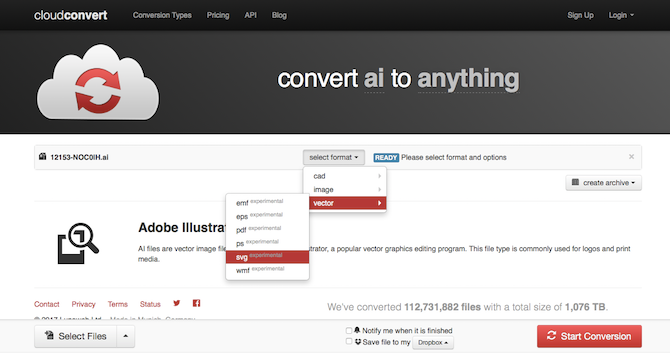
If you are going to convert the file yourself, you should convert it to SVG. This is an open format with wide support, although it’s designed primarily for web use. If you’re working in print, try EPS instead.

Use CloudConvert to convert AI files

To convert your image:

  1. Go to cloudconvert.com.
  2. Click Select Files and choose the file from your hard drive.
  3. Next, click Select Format and choose either SVG or EPS, listed under Vector.
  4. Select Start Conversion, and wait.
  5. When it’s done, click Download to save your newly converted file.

Problems With Editing Converted AI Files

Whenever you try to edit AI files without Illustrator, there are a few potential problems you need to be aware of.

  • Conversions are not always 100 percent accurate. This is especially true when the original file used features or effects unique to Illustrator.
  • You’ll often lose layer information. This can make complex files difficult to navigate since all the elements will no longer be labelled.
  • You often cannot save or export your edited file in the AI format (and Illustrator can’t read the proprietary format of your editing app either). Save in a format like SVG or EPS for widest compatibility.

Whether or not you need to convert your file first depends on what software you’re using. Here are the best apps for editing Adobe Illustrator (AI) files.

Gravit Designer

Gravit Designer is a great free Illustrator alternative. It’s a cloud-based app that runs on Mac, Windows, Linux, and Chrome OS, or directly in your browser so you can open and edit AI files online.

To work with AI files you need to convert them to the SVG format first, as outlined above. Once that’s done, simply drag the file into the Gravit Designer window to open it.

Gravit Designer can import AI files

As is often the case, all parts of the image are grouped into a single layer, but they can be edited individually.

The app has a very modern and user-friendly interface. Although there’s plenty of power beneath the hood, it makes working with vector art very accessible. It’s especially good for things like logos, icons, and symbols.

Download: Gravit Designer (Free)

Inkscape

The most well known free Illustrator alternative is the open-source Inkscape. It’s available for Windows, Mac, and Linux.

You can open AI files directly in Inkscape. It doesn’t support drag-and-drop, so you need to go to File > Open and then select the document from your hard drive.

The file is then imported as a PDF. Like Photoshop, you have to click through some Import settings first—you can accept the defaults here—but unlike Photoshop, the resulting image is fully editable.

Inkscape can import AI files

All the parts of the image are grouped together. The easiest way to select a specific element is to hit F2 to activate the “Edit nodes” tool, then hover over the image until the part you want is highlighted. Then click to select it.

You can’t save edited images in the AI format. SVG and EPS are supported as alternatives.

Download: Inkscape (Free)

Affinity Designer

Affinity Designer is a commercial graphic design package available for Windows and Mac. We rate it as the best Adobe Illustrator alternative. It’s aimed at the same pro users, but is subscription-free—it’ll cost you less than three months of an equivalent Adobe sub.

open ai files in affinity designer

The program can open AI files as long as they have been saved with PDF content (the default in Illustrator). This means you lose the layer information, as usual, and cannot save the file in its original format.

If you want to be able to open your edited image in Illustrator again, you need to save it in PDF, SVG, or EPS format.

Affinity Designer is a powerful and popular piece of software with an impressive feature list. It could be a good option for anyone looking to transition away from Illustrator.

Download: Affinity Designer (Free trial available)

CorelDRAW

CorelDRAW is a graphic design program for Windows. The Home & Student Suite is affordably priced for mainstream users, while there are more deluxe offerings for pros. Either way you get AI support.

open ai files in coreldraw 2019

The software works with native AI files made with Illustrator versions up to and including CS6, or with PDF-enabled files made in more recent versions.

You need to import the files by going to File > Import, then clicking through the Import settings (which you’ll only see for the PDF-based files).

The main option to consider here is whether to have text rendered as text (which makes it editable but may lose some effects), or as curves. This will be a more accurate conversion, but the text won’t be editable.

When you have finished editing the Illustrator file you can export it back to the AI format. However, if you’ve used any features unique to CorelDRAW, these won’t be supported in Illustrator.

Corel also makes Paint Shop Pro, the Photoshop alternative. This app can open and save AI files natively, but is generally less suitable for vector graphics work.

Download: CorelDRAW (Free trial available)

Sketch

Sketch is a Mac-only design suite and it’s one of the best vector software for Mac designers on a budget. If you’re looking to open and edit AI files on a Mac, it’s a viable choice.

The program has limited native support for Illustrator files. You can open them as you would any other file, but they will only be displayed as a single flattened layer. This is the equivalent of opening it in Photoshop, and means the image is not editable.

Some users have reported success by changing the file extension from AI to PDF. Select the file on your computer and add .pdf to the end of the filename. Drag it into Sketch to get an editable image. Your results here may depend on the complexity of the file, however.

Sketch can import AI files on Macs

A more foolproof solution is to convert the file to the SVG format using CloudConvert. Since you cannot save files in the AI format this also represents the best way of ensuring your edited file can be reopened in Illustrator in the future.

Download: Sketch (Free trial available)

Moving Away From Illustrator

Opening any proprietary file outside of the app for which it was intended can produce mixed results. It’s the same when you open a PSD file without Photoshop.

But apart from a few limitations, support for AI files is generally pretty good. In fact, while Illustrator is still the industry standard, more casual users don’t really need it.

So if you’d like to save some cash, take a look at the best free alternatives to Illustrator, Photoshop, and Lightroom for the most essential downloads.

Read the full article: What Is an AI File and How to Open It Without Adobe Illustrator


Read Full Article

13 Royalty-Free Christmas Music Downloads


christmas-music

Lure the spirit of the season into your home and get into the mood with festive Christmas music. Paired with Christmas cookies, mulled wine, and the best Christmas movies on Netflix, you and your family will soon relax into the holidays.

In this article, we have compiled legal and free resources for contemporary, classical, and traditional Christmas music downloads. We’ve also added a few sheet music sites, in case you’re a talented (budding) musician yourself.

Free Christmas Music Downloads

1. Feels Like Christmas

Feels Like Christmas Free Holiday Music Download

Our first site provides “free holiday music from top indie artists”. The collection includes contemporary and traditional tunes, as well as vocal and instrumental interpretations. In addition to holiday music, you’ll find seasonal sounds and audio files of Christmas stories for kids.

You can stream the music on the site or download MP3 files.

2. New Christmas Music

New Christmas Music with snowflakes and snowman

At New Christmas Music, you will find new (contemporary) Christmas songs and traditional Christmas carols. The collection includes “O Christmas Tree,” “O Holy Night,” “Silent Night,” “Joy to the World,” and “Jingle Bells”. Some songs are available in different versions. “O Holy Night,” for example, comes in an instrumental and a vocal recording.

Downloads come in several formats, including MP3, WMA, and MIDI. Some songs also feature dated Flash animations. You can preview MP3 and WMA files in your browser. To download a tune, right-click the file format, e.g. MP3, and select Save link as…

3. Free Christmas MP3

Free Christmas MP3 Traditional Christmas Songs

If you feel a little overwhelmed, start here. The site features only 24 traditional Christmas songs, one for every day of the Advent season. Each song comes with a brief description.

For example, did you know that “Jingle Bells” was originally named “One Horse Open Sleigh” or that the original version of “Silent Night”—“Stille Nacht” in German—was written by Austrian author Franz Gruber and then translated into 300 languages?

All downloads come in the form of MP3 files.

4. Free Music Archive

Free Music Archive (FMA) Christmas music playlist

The FMA is the music archive of WMFU (recently acquired by Triebe of Noise), the longest running freeform radio station in the U.S. The archive includes a section with over 350 free Christmas songs across various genres.

You can sort their list by artist, track or album name, date added, or most interesting. To play the songs in your browser, click the Play Page button in the top right. When you found a Christmas song you like, you can download it to your computer; right-click the arrow and click Save link as…

5. Uncle Dave’s Xmas Tunes

Uncle Dave's Xmas Tunes with Santa

For over 20 years, Uncle Dave has been recording instrumental versions of traditional Christmas tunes. You can stream the songs and download MP3 and MIDI files.

While all songs on this site are in the public domain, “these arrangements are copyrighted as derivative works by David M. Latchaw”. That said, you’re welcome to use Uncle Dave’s music if you provide a link back to the source.

6. A-M Classical

A M Classical Christmas Carols with Creative Commons rating

The Christmas Carols available on A-M Classical come with a Creative Commons Attribution license (what are the Creative Commons?) This license allows you free use of the recordings in any way you please, as long as you credit the original creator.

The site also features classical Christmas music and Christmas pipe organ music. You can play the files in your browser or right-click and download each file individually.

7. Amazon’s Free Christmas Music Downloads

Amazon offers 30 free holiday-themed songs. The selection is certainly unique, but these Christmas songs are all free, so who’s going to complain?

To buy a tune, add it to your Amazon cart and then check out for free.

Download Full Christmas Albums

8. NuBeat Music

NuBeat Christmas Music albums

All albums featured on NuBeat Music are free. In the Christmas Albums section, you will find instrumental music, beats, rhythm, and many traditional Christmas songs. You can stream each tune, and for most songs, you can also download lyrics. The only downside is that you need to download albums one song at a time.

In addition to the nine musical albums, NuBeat Music also features two storytelling albums: Christmas Special and Christmas Drama.

9. Bandcamp Christmas Music

Bandcamp is a great site to discover new music. Many artists offer entire albums to download for free, though you’re welcome to pay for what you enjoy. You’ll find both original recordings and interpretations of titles like “White Christmas,” “Santa Baby,” and other classic tunes.

The 2019 “A Very Furnace Christmas” (full release on December 13) is a must-listen for fans of alternative holiday music. It reinterprets mainstream hits like “YMCA” or “Gangsta’s Paradise” in a very seasonal spirit.

Before you download anything, you can preview the music in a free stream.

Download Christmas Sheet Music

Maybe you prefer to play your own music. Then these sites are for you.

10. Virtual Sheet Music

Virtual Christmas Sheet Music

On Virtual Sheet Music, you can choose your instrument and skill level before you pick a song from their vast collection of over 3,000 Christmas carols. The online sheets feature a MIDI file, which will help you find the right tune.

All sheets come in printable PDF format. A premium membership will give you full access to all sheet music downloads.

11. 8notes.com

8notes O Holy Night! sheet music

Regardless of what instrument you play or what skill level you’re at, this site has the matching sheet music. The Christmas section covers over 130 songs. For each instrument, you can stream a MIDI file, set the tempo, and follow green highlights through the sheet. Click a section on the sheet and the MIDI will jump to that section too.

To print multiple pages at once, you have to subscribe to the site.

12. Piano Song Download

If you play the piano, you will appreciate this Christmas sheet music source. Whether you’re a beginner, intermediate, or advanced player, you’ll find sheets suitable for your skill level. Some songs even come with video tutorials.

True beginners can also review piano chords and basic piano tutorials.

Bonus: All Kinds of Christmas Music

13. mfiles

mfiles Christmas Music and Carols

This last site has it all: classical and traditional music, sheet music, MIDI, and MP3 files, all on one page dedicated to Christmas music and carols. You’ll find arrangements for guitar and other instruments, along with printable PDFs of the sheet music, and media files you can download.

Each song has its own dedicated page, featuring its backstory, history, and all available files.

What Christmas Music Are You Downloading?

These sites offer all of the free Christmas music you could ever need. So, what Christmas music are you downloading?

With your Christmas music collection now freshly restocked, what else do you need to get into the mood for the holidays?

You could try one of these online Advent calendars for kids. And once the holiday season has passed, here’s where to download free legal music throughout the year.

Image Credit: janews/Shutterstock

Read the full article: 13 Royalty-Free Christmas Music Downloads


Read Full Article

The Best Prebuilt, DIY, and NAS Solutions for a Plex Server


best-solutions-plex

Plex rose to prominence as a media center. Initially, it was a DIY Netflix and Spotify allowing for remote access of videos, music, and pictures.

However, since then, Plex added plugins for streaming content, podcast support, and connectivity with antennas for live TV and DVR. You can even get a Plex Pass, which offers lots of entertainment options. As such, Plex is a cord cutter’s dream.

Ready to build your own Plex server? Check out our roundup of the top Plex servers on the market, from pre-built and DIY options to Plex NAS hardware.

Best Plex Server: Pre-Built and DIY Options

From enterprise workstations to streaming devices and DIY PCs, these are the top Plex servers you can buy.

1. Nvidia Shield TV Pro

Nvidia Shield TV Pro Nvidia Shield TV Pro Buy Now On Amazon $289.99

The Nvidia Shield TV Pro is among the best streaming devices on the market. Its hardware is capable of streaming in 4K from a variety of providers including Netflix. Using the optional Samsung SmartThings Link, the Shield transforms into a smart home hub.

Plus, it’s engineered for gaming, running Android games as well as retro emulators including PlayStation Portable, Nintendo 64, Gamecube, and Wii titles. You can stream games from your PC to the Shield TV using Nvidia GameStream provided you’ve got a compatible GPU.

The Nvidia Shield TV Pro doubles as a Plex server and client. Its hardware handles around two or three simultaneous transcodes. You can mount USB drives and microSD cards as removable storage, and mount network shares. Several antenna options connect with the Shield TV for DVR and live TV in Plex. If you’re using your Shield TV as a Plex server, I suggest opting for the 500GB Pro variant. Even that hard drive is likely to fill up quickly though.

Because of its versatility as a Plex server and client, along with gaming, smart home, and media streaming functionality, the Nvidia Shield TV Pro is the best overall Plex server you can buy.

2. Dell PowerEdge T30 Tower Server System

Dell PowerEdge T30 Tower Server System Dell PowerEdge T30 Tower Server System Buy Now On Amazon $464.00

The Dell PowerEdge T30 features a Xeon E3-1225 v5 processor, which is more than powerful enough for a home Plex machine. You’ll benefit from a 7833 PassMark which should handle just shy of four simultaneous 1080p transcodes.

As configured, it supports four hard drives, but you can add up to six for a range of storage options. The T30 plays well with Linux too making it the ideal dedicated Plex server. Its 280W PSU means you can run the T30 as an always-on server without huge energy costs.

3. CanaKit Raspberry Pi 4 4GB Starter Kit

CanaKit Raspberry Pi 4 4GB Starter Kit - 4GB RAM CanaKit Raspberry Pi 4 4GB Starter Kit - 4GB RAM Buy Now On Amazon $99.99

Although it’s certainly not the most powerful device available, the CanaKit Raspberry Pi 4 4GB Starter Kit is a great entry-level option. You can easily turn the Raspberry Pi into an inexpensive Plex server. It’s best for users planning on streaming in-home only, or for a travel Plex server. Try installing Kodi as well for a home theater PC (HTPC) combined with Plex media server functionality.

4. Intel NUC 7 Mini PC

Intel NUC 7 Mini PC Intel NUC 7 Mini PC Buy Now On Amazon $452.86

The Intel NUC 7 Mini PC is compact, but the i5-7260U CPU offers a decent PassMark rating just shy of 6000. With VESA mounting bracket compatibility, you can attach to the back of a TV or monitor.

Unfortunately, storage options are limited to a single 2.5-inch SATA drive or SSD. If you require a lot of storage space, this isn’t the device for you. Moreover, unlike a modular desktop, you can’t upgrade the CPU, just the hard drive and RAM.

As such, it’s not future proof. Nevertheless, it’s a solid option for those seeking an HTPC Plex server. Intel NUCs are small, powerful, and energy efficient.

Best NAS for Plex Options: Plex NAS Devices

While the best Plex server devices come in pre-built and DIY packages, you might consider a Plex NAS set up instead. Network Attached Storage (NAS) differs from a server in that it’s intended as a centralized location for data storage on a network.

Customization and settings are usually more basic than on the average server. Plex NAS options usually come preconfigured—just add hard drives.

1. QNAP TS-453Be 4-Bay Professional NAS.

QNAP 4-Bay Professional NAS QNAP 4-Bay Professional NAS Buy Now On Amazon

The QNAP TS-453Be four-bay Plex NAS comes complete with 4GB of RAM and an Intel Celeron Apollo Lake J3455 Quad-core CPU. It’s pretty pricey but is capable of 4K hardware transcoding, and has an HDMI output.

Onboard, you’ll find a 10Gb Ethernet port and support for the likes of VMware and Hyper-V. RAM is upgradeable to 16GB, and you can add up to 64TB worth of hard drives for more storage space.

Unfortunately, all of this comes at a premium. The QNAP TS-453Be is pretty pricey. For the price of this NAS without hard drives, you can snag a far more powerful server with a 10TB drive.

2. Synology DS218play

Synology DS218play Synology DS218play Buy Now On Amazon $249.95

Synology’s DS218play delivers excellent value with a tiny footprint. At its core, there’s a quad-core processor capable of handling 4K video playback at 30 frames per second. There’s an Ethernet port, two USB 3.0 ports, and 1GB of DDR3 RAM.

It’s a decent entry-level Plex NAS, but you won’t win any benchmarking tests with its processor. However, the Synology DS218play is one of the best NAS options for Plex streaming.

Check our review of the DS418play, the next model up from the DS218, to get an idea of Synology NAS setups.

3. TerraMaster F4-220 4-Bay NAS

TerraMaster F4-220 NAS TerraMaster F4-220 NAS Buy Now On Amazon

If you need a budget Plex NAS, the TerraMaster F4-220 is a great option. It’s powered by a dual-core 2.1GHz CPU, 2GB of DDR3 RAM, and has an HDMI output. This maintains compatibility with software such as Kodi. The device comes bundled with remote control too.

The HDMI port even maintains 7.1 channel compatibility. Like other NAS devices, it’s not cheap, but you’re paying for a quality storage unit that’s simple to set up. When we reviewed the TerraMaster F2-220 (functionally similar to the F4-220, but with two bays rather than four) we found it to be a rock solid performer and is perfect for Plex and more.

The Best Server and NAS Options for Plex

Ultimately, there are loads of potential Plex server options. I suggest using server hardware rather than a NAS. You’ll get a more powerful system for less money, and it’s upgradeable.

The PowerEdge T30 is a solid choice with an excellent CPU. As a Plex client and server, the Nvidia Shield TV offers unrivaled value. Now that you’ve picked out a Plex server, it’s time to choose the best Plex client device for streaming your media.

Read the full article: The Best Prebuilt, DIY, and NAS Solutions for a Plex Server


Read Full Article
6 Things You Can Do to Silence a Noisy Laptop Fan


You can’t beat a laptop computer when it comes to getting work done in the surroundings of your choice. But portability comes at a cost. Heat buildup is often a problem, thanks to the cramped space inside and the high capacity batteries.

As soon as things get hot, you’ll find your laptop fan starts getting loud. But how can you make your laptop fan quieter? Let’s find out.

What You Need to Know About Laptop Fan Noise

Laptops, touchscreen hybrids, and other devices ship with fans for one reason: to dissipate heat by circulating air.

Most of the time when your fans fire up, it’s because they’re supposed to. But it can be distracting and, in some cases, surprisingly loud. Even an expensive machine like the latest MacBook Pro sounds like a drone taking off when under extreme load.

If the environment is hot, your laptop will need to work harder to dissipate heat, which means more fan noise. Similarly, if the vents are covered (usually when using a laptop on soft furnishings), the laptop will get hot.

Meanwhile, if you’re playing a 3D game, using webGL, or rendering video then you’ll also experience heat buildup.

Note: If your fans suddenly sound different and are making a loud rattling or buzzing noise, it’s likely a bearing problem and the fan should be replaced. If your fans sound normal but are still running constantly, the fan unit itself is unlikely to be the issue.

If your laptop is regularly overheating, take a look at our guide on how to fix an overheating laptop. First, here are six ways to stop your laptop fan being so loud.

1. Kill Your Processes to Stop a Noisy Laptop Fan

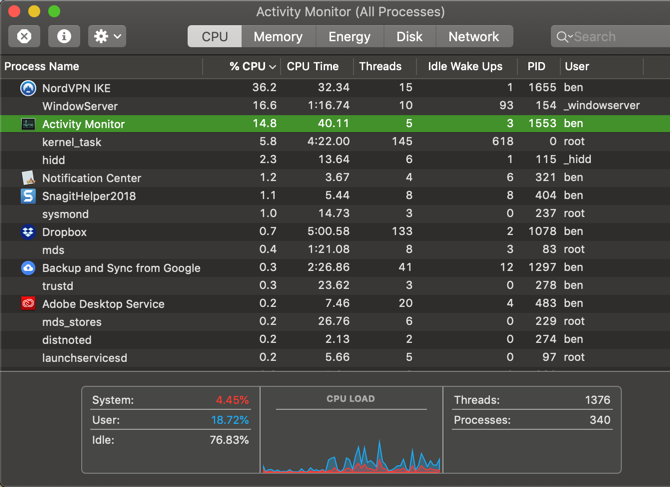
Close your open processes to fix a noisy laptop fan

Fans that suddenly spin into action without warning are responding to demands placed on the hardware, commonly the GPU. The best way to solve this is to eliminate the demand, by killing the process.

Mac users can isolate and kill unwanted processes using Activity Monitor, while Windows users can use Task Manager. Linux users also have a number of options available to them for managing rogue processes.

If heat is a problem, it might be wise to prevent too many processes starting when your computer boots. Windows 10 users can edit the startup folder while Mac users should can head to System Preferences > Users > Startup and remove anything unnecessary.

Linux startup processes can also be tweaked for a quieter laptop fan.

2. Using a Mac? Reset SMC & PRAM

One quick tip for Mac users who are encountering constant fan noise is to reset the system management controller (SMC). The SMC is responsible for all sorts of everyday macOS things, and out-of-control fans are a classic symptom of a problem.

You could also try resetting the PRAM.

3. Cool Your Noisy Laptop

Laptop coolers used to be innocuous-looking plates of metal with fans in the base, that would help maximize available airflow. These days they’re covered in LEDs, with variable wind speeds, temperature sensors, and in-built USB hubs.

Fortunately peripherals like the Havit Laptop Cooling Pad still perform their job of keeping your laptop cool.

Havit HV-F2056 15.6"-17" Laptop Cooler Cooling Pad - Slim Portable USB Powered (3 Fans) (Black+Blue) Havit HV-F2056 15.6"-17" Laptop Cooler Cooling Pad - Slim Portable USB Powered (3 Fans) (Black+Blue) Buy Now On Amazon $17.35

Coolers are ideal if you use your laptop on a desk or in another static position. They’re an especially compelling purchase for those looking to play demanding 3D games, render video, or put their machine under load for extended periods of time.

In addition to the cooling baseplates onto which you place the laptop, you can also now get clip-on vacuum fan coolers which literally suck the hot air straight out of your machine.

The Opolar LC05 is one example designed with rapid cooling in mind. Most reviews are positive, but your specific laptop model will dictate whether this device will work for you.

Opolar LC05 Laptop Cooler with Vacuum Fan Opolar LC05 Laptop Cooler with Vacuum Fan Buy Now On Amazon $25.95

Remember: External coolers offer a remedy to your heat problem but aren’t a long-term solution for constantly hot, noisy laptops. In that case, you might want to…

4. Laptop Fan Noisy? Clean Your Laptop!

Clean your noisy laptop fan
Image credit: Timo Kuusela/Flickr

Loud laptop fans mean heat; if your fans are always loud then that means your laptop is always hot. Dust and hair buildup are unavoidable, and only serves to reduce airflow. Reduced airflow means poor heat dissipation, so you’ll need to physically clean the machine to make things better.

Warning: If your machine is still under warranty, opening it will void that warranty (including after-market extended warranties like AppleCare). Furthermore, if you don’t know what you’re doing you could damage components. Take care or consult a friend with a little more experience.

In order to clean your machine, you’ll need a can of compressed air, a screwdriver to open your laptop, and patience. You should also use an anti-static wristband and unplug your machine from the power (and if possible, remove the battery) to avoid damaging the internals or yourself with static electricity.

Rosewill Anti Static Wrist Strap Band Rosewill Anti Static Wrist Strap Band Buy Now On Amazon $5.99

Use the air in short bursts to remove dust and hair from the internal components, particularly around fans and heatsinks. Take the time to read our thorough laptop cleaning guide which covers ports, vents, and internals.

5. The Software Fix for a Noisy Laptop Fan

Most laptops will allow you to control your fan speed using third party software. Some even feature built-in controls.

These typically enable laptop fan speed adjustments or initialize a cleaning routine to expel dirt and dust. If you’re reducing the laptop fan speed, note that it will make your laptop hotter, reducing its lifespan long term.

Third party fan management apps are available for Windows, macOS, and Linux.

Download: SpeedFan for Windows

Download: smcFanControl for macOS

For Linux, you’ll need to install the lm-sensors and fancontrol packages. Check out this StackExchange thread on Fan Management for more information.

6. Get an Expert to Check the Loud Laptop Fan

An engineer may be required to fix your noisy laptop fan

If your laptop fan is still noisy, or you’re unwilling to open the device, speak to an expert.

Hopefully your computer is under warranty. An Apple laptop can be taken to an Apple store; other manufacturers have their own repair policies.

If you bought online, or your retailer is too far to visit, PC repair shops are also an option.

The best-case scenario here is that they’ll be able to clean the laptop, perhaps replacing the fan. However, be prepared for bad news. In some cases, the issue might require replacement of important hardware, like the motherboard.

You’ll typically be quoted a price for repair—if it’s expensive, it might be cheaper to buy a new laptop.

Success, You Fixed That Noisy Laptop Fan!

If your laptop has a noisy fan you can fix it with these six simple steps:

  1. Kill processes to keep the fan quiet
  2. Mac users: reset SMC and PRAM
  3. Keep your laptop cool
  4. Clean your laptop
  5. Use software to control your laptop fan speed
  6. Get an expert to check the noisy laptop fan

Thinking about buying a new laptop? Keep noisy fans and heat management in mind. Hybrids like Microsoft’s Surface range and the iPad Pro generate heat but use more efficient (and less powerful chips).

Here are more things to keep in mind when buying a new laptop.

Read the full article: 6 Things You Can Do to Silence a Noisy Laptop Fan


Read Full Article

11 Audible Insider Tips to Get the Most Out of Audible


audible-insider-tips

If you’re a fan of audiobooks, Audible is tough to beat. With a huge selection of books, some great perks, and apps that let you listen anywhere and everywhere, it’s the go-to choice for people who listen to audiobooks.

However, as good as Audible is, there are some Audible tips and tricks you need to use to get the most out of Audible. In this article, we list Audible tips which will help you get your money’s worth from your subscription.

1. Save Money With the Silver Plan

Audible’s main plan is the Gold plan, which currently costs $15/month and gets you one book credit (plus a discount on other books). While $15/month doesn’t seem like much, it adds up over the course of a year.

The Silver plan (how to unlock Audible’s Silver plan) is the best way to use Audible if you want a cheaper price, or if you don’t read that many audiobooks. With the Silver plan, you’ll pay $15 for one credit every other month. Audible doesn’t advertise the Silver plan, so you’ll have to get in touch with customer service directly to make use of it.

2. Return Books You Don’t Like

Audible Tips Return Books Purchase History

Your Audible credits are valuable—many audiobooks are worth more than the $15 you pay for the credit. So when you get one you don’t like, it feels like a waste of money. But don’t worry, as the Audible returns policy lets you take back any books you don’t like.

You can exchange an Audible book as long as it has been purchased within the past 12 months. When making self-service returns yourself, the number is limited—it’s still not exactly clear what that Audible exchange limit is.

To return an Audible book (how to return an Audible audiobook), just head to your account details and click “Purchase History”. From there, you’ll see a list of your orders. Find the order that contains the book you want to return, and click “Return”. If you’ve reached the Audible return limit, you can still return your book by contacting Audible customer services.

3. Add Audible Narration to Your Kindle Books

Audible Tips Read and Listen to Books

With Whispersync, you can sync your Kindle and your Audible books. That way, you’ll always pick up where you left off, no matter which device you’re using. It’s also good for listening and reading at the same time.

When you’re buying Kindle books, keep an eye out for the option that reads, “Add Audible book to your purchase”. Checking off that box will let you have access to the Kindle and audiobook.

You can often get really good deals this way, too. If a book is on sale for a few bucks, the audiobook will also likely go down in price.

Don’t forget to use Amazon Matchmaker to see the Kindle books in your collection that can be upgraded to an audiobook. Amazon also has an entire section dedicated to Whispersync-enabled books.

Audible Tips Whispersync Category

To view your Whispersync options, head to Audible’s main store page, and click “More to Explore” in the top menu bar. From there, scroll down and click “Whispersync for Voice” on the left sidebar.

4. Keep an Eye Out for Sales

Audible Daily Deals Books

Much like Kindle books, you can find some fantastic sales on Audible books. There’s the Daily Deal, regular two-for-one sales, price-drops on single books, and other ways to save. Amazon doesn’t make the Daily Deal easy to uncover, but you can head to audible.com/dailydeal to find it.

Signing up for Daily Deal emails will keep you up to date on these hefty sales. And Audible will probably send you emails about other sales too. You may want to just delete them, but if you’re an audiobook fiend, glancing through them is worth it.

You can also add items to your wishlist to get updates on when they go on sale. Audible has run other types of sales in the past, like buy-four-get-$10 listener rewards sales. This particular one hasn’t shown up in a while, but there are always other great ways to save money coming up.

Speaking of which, you can currently grab one free audiobook and gain access to two free Audible Originals when you sign up for an Audible trial.

To help you further, here are the audiobooks you should listen to during your trial.

5. Put Your Monthly Membership on Hold

If you have a monthly membership, you can put it on hold for up to three months (but you can only do it once a year). This is great if you know you’re not going to be listening to many audiobooks for a while.

While your account is on hold, you can still buy books and use your credits, but you won’t accrue any new credits. So, if a great sale comes up, you can still take advantage of it while you’re saving some extra cash.

Audible asks you to contact Audible customer services to put your membership on hold.

6. Get Discounts on Your Membership and Books

audible pro tips membership cash back

If you haven’t signed up for Audible yet, you might be able to get cashback or discounts on your membership and books. There are numerous discount and cashback sites that sometimes have offers for Audible users.

Of course, not all cashback sites are worth using. But if you’ve had success with one, it’s worth a shot. Groupon also occasionally has deals on Audible memberships, so check there when you need to sign up or renew your membership.

7. Take Advantage of Free Audible Originals

Audible Originals Monthly Selection

Each month, Audible provides a different selection of free Audible Originals—you get to choose two for free every month. While some Originals are engaging fictional stories, others have to do with true crime and amazing success stories. Audible offers an entire library of interesting Originals, but you’ll have to pay to get access to other series.

8. Get Free Audiobooks With Prime Reading

Audible also includes a series of free ebooks thanks to the Prime Reading feature that comes with your Prime Membership. With Prime Reading, you can borrow up to 10 books with no fees. Most books come with the option of Audible narration, so you’ll get good bang for your buck.

To find the free available books, go to Amazon’s Prime Reading page. Here, you’ll see thousands of books and magazines to choose from.

9. Use Your Credits Before They Expire

Amazon recently updated its policy and extended the expiration date on credits. Now, you have one year to use your credits after you receive them. Definitely take advantage of the fact that you don’t need to spend your credits right away, but make sure not to wait too long.

10. Get Audible Escape for Unlimited Romance Stories

Audible Escape Romance Subscription

If you’re a fan of romance novels, you’ll want to take advantage of Audible Escape. This gives you access to thousands of love stories and romance novels.

You can opt to sign up for Audible Escape in addition to your Audible membership, or you can do so separately. Just keep in mind that Audible Escape comes at a cheaper monthly price if you already have an Audible membership. Otherwise, you’ll have to pay a higher monthly fee for Audible Escape alone.

11. Almost Cancel Your Membership to Score Discounts

Audible Cancel Membership Discounts

To get even more discounts on Audible, you have to be a little clever. Go through the steps of canceling your Audible membership, but stop when you get asked why you want to cancel. For this option, select “It’s too expensive”.

When you continue to the next page, Amazon might offer you a discounted membership. Select that offer to get an even cheaper Audible rate.

Get the Most Out of Your Audible Subscription

Audiobooks are a great way to read more books, and Audible is one of the best ways to satisfy your literary cravings. But if you’re still paying full price and not taking advantage of all of these features, you’re not getting the most out of your Audible subscription.

Perhaps you’re not ready to commit to an Audible subscription just yet. If that’s the case, you might want to check out the best free audiobooks worth listening to instead.

Read the full article: 11 Audible Insider Tips to Get the Most Out of Audible


Read Full Article