12 June 2018

Scooter startup Bird is reportedly about to hit a $2B valuation


More financing is coming in for Bird, this time potentially valuing the company at $2 billion, according to a new report by Axios.

There’s not a ton to add here compared to the last round (which happened just weeks ago), as the same dynamics are probably in play here. While Uber was a bet on car rides and generally getting around, Bird is that but at a dramatically more granular level — thinking short hops of a few miles in congested areas. Startups that are exceedingly hot can sometimes pull off these rolling rounds where investors are coming in at various points, especially as the model further proves out over time.

If you live in a major metropolitan area, you’ve probably seen Bird (and Lime) scooters hanging out on the sidewalks — potentially knocked over in a spot where someone might trip over them while checking his or her phone. That’s been a point of tension in areas like San Francisco, where Bird has had to temporarily come off the sidewalks as a permit system rolls out. Bird isn’t the first mobility-focused service that has faced regulatory challenges before, but it is one that’s become very popular very quickly.

This too, as Axios notes, could be an easy play to get into a hot market that a major ridesharing company could want to buy its way into. Uber acquired Jump, an on-demand bike service, in the midst of its own financing round. While bikes don’t seem to be getting quite the hype that scooters are, Lyft is also planning to acquire Motivate, an on-demand biking network.

Bird just weeks ago raised $150 million at a $1 billion valuation, while Lime raised an additional $250 million. Bird was valued at $300 million in a financing round earlier this year.


Read Full Article

Google Home can now handle three queries at once


In November, Google Home gained the ability to multitask with added support for a feature called “multiple queries,” which allows you to combine two requests into one voice command. For example, “OK Google, turn up the volume and play music.” Now, Google Home is getting even smarter about multitasking by enabling support three requests at once.

The new feature was announced on Google’s @madebyGoogle Twitter account on Monday, where users quickly discovered its limitations. Unfortunately for Google’s global customer base, multiple queries is only available in the English language for the time being, in the U.S., U.K., Canada and Australia.

The feature works by combining voice queries with the word “and” in between them, to separate the different requests. Each command must also be the sort of thing Google Assistant can respond to on its own without further input or clarification.

That means you can’t ask it to just “set an alarm,” you’d have to say “set an alarm for 7 AM” so it doesn’t need to ask a follow-up question.

Multiple queries was first rolled out in November 2017, also with little fanfare.

But it’s not the only way Google Home can multitask. In February, Google Assistant gained support for Routines, as well, which allow you to create custom workflows kicked off with a single voice command.

For instance, your “I’m home” routine could turn on the lights, adjust the thermostat and play some music. (Alexa also offers routines, as of last October.)

Meanwhile, at Google’s I/O developer conference in May, the company formally announced multiple queries for Google Home (then referred to as “Multiple Actions”), along with a host of other upgrades for Google Home Actions. This included Routine Suggestions, which allow voice app developers to prompt users to add their app’s Action to a Routine, plus Action Notifications, which allows voice apps to alert users to new features and content, and more.

Google is not providing an ETA on when multiple queries will roll out to non-English users, saying only that:“We look forward to supporting additional languages, but have nothing to announce at this time.” 

h/t: Voicebot


Read Full Article

Amino raises $45M for to bring fan communities to smartphones


Amino has raised a big Series C round of funding — $45 million from GV, Venrock, Union Square Ventures, Goodwater Capital and Time Warner Investments, with Hearst Ventures joining as a new investor.

Co-founder and CEO Ben Anderson has described Amino as an way to help people who have “passionate niche interests” find others who feel the same way, via smartphone apps.

The company started out with apps focused a handful of topics like K-pop, anime and Doctor Who, but it later added the ability for anyone to launch a new community in the main Amino app, and there are now more than 2.5 million communities.

Of course, some of these communities are more active than others, and there’s some overlap between them — but Max Sebela, who’s general manager for Amino’s English-language apps, said there’s less than you might think, because “each interest is actually a universe of micro interest.” For example, there might be one community focused on sharing strategy and tactics around the video game Overwatch, while another might revolve around sharing Overwatch fan art.

Ultimately, Sebela said it’s up to the founders and leaders of each community to decide what the community wants to focus on, and which product features they want to use to enable that. Meanwhile, Anderson said Amino is constantly tweaking its algorithms to make sure it’s surfacing the best communities for each user.

“Instead of one big, blue ocean, we provide a million lakes and help you find the exact right one,” he added.

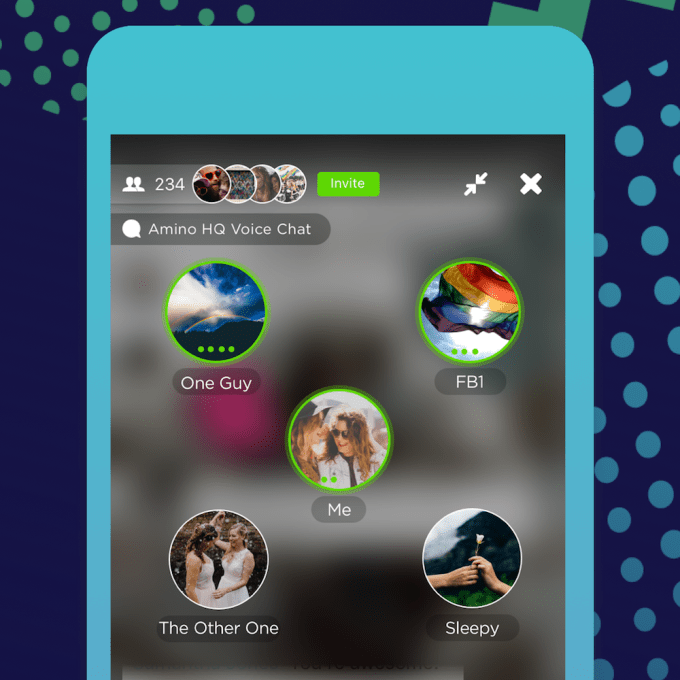
Amino Voice Chats

Perhaps even more impressive than the number of communities is the amount of time the average user spends in Amino — more than 70 minutes per day.

One of the initial inspirations for the startup was a real-world anime convention, and Amino getting closer to that experience with the addition of features like live voice and video chat, as well as the screening room, where you can watch videos with other users.

During our conversation, Sebela opened up one of the K-Pop communities on his phone and was quickly able to listen in on a chat room where multiple users were singing along together. (Sadly, we didn’t join the singing.)

“The technology not super unique,” Anderson acknowledged. “What makes it really special is, I can voice chat with my friends on a lot of idfferent networks, but here I can hop in and join a voice chat with 10 Harry Potter fans who I may not know in my real life.”

While these features are already live, Anderson said they’ve been “downplayed” while Amino tests them out and works out the kinks. Now it’s ready to put them “front-and-center” in the app.

Amino has now raised more than $70 million in total funding.

It’s also been testing out ways to make money, which Anderson said will occur primarily through a subscription service — though apparently it’s too early for him to offer more details.


Read Full Article

8 Ubuntu Flavors Compared: Kubuntu vs. Lubuntu vs. Xubuntu vs. MATE vs. Budgie vs. Studio vs. Kylin

Instagram adds shopping tags directly into Stories


Instagram’s shoppable tags are about to pop up in Stories. The company first started testing the feature back in 2016 with a limited set of 20 partners. Since then it’s been a hit, expanding broadly to regular brand posts in the feed. Starting today, hitting a little shopping bag sticker in a Story will lead you to more details on the cute and/or dope thing that caught your eye and how to score it.

It’s a simple addition, but given the success of Stories it’s a potent one for brands that drive sales on the platform.

“With 300M using Instagram Stories everyday, people are increasingly finding new products from brands they love,” Instagram said in a press release.

“In a recent survey, Instagrammers said they often watch stories to stay in the-know with brands they’re interested in, get an insider view of products they like, and find out about new products that are relevant to them.”

As a longtime daily Instagram user, I used to be skeptical that people really engaged with brands like this and not just their friends or dogs they know. Now, after seeing my fiancĂ©e’s considerable #engagement around makeup brands running wildly popular accounts, Stories and all, I get it. Well, I don’t get it, but I get that some people get it and that the often vast and expertly crafted brand Stories are a logical evolution for a platform trying to get more users buying more stuff in the product categories that call to them.


Read Full Article

The Best Camera Lenses for 10 Popular Types of Photography

YugaByte’s new database software rakes in $16 million so developers can move to any cloud


Looking to expand the footprint of its toolkit giving developers a unified database software that can work for both relational and post-relational databases, YugaByte has raised $16 million in a new round of funding.

For company co-founder, Kannan Muthukkaruppan, the new database software liberates developers from the risk of lock-in with any provider of cloud compute as the leading providers at Amazon, Microsoft and Google jockey for the pole position among software developers and reduces programming complexity.

“YugaByte DB makes it possible for organizations to standardize on a single, distributed database to support a multitude of workloads requiring both SQL and NoSQL capabilities. This speeds up the development of applications while at the same time reduces operational complexity and licensing costs,” said Kannan Muthukkaruppan, co-founder and chief executive of YugaByte, in a statement. 

Muthukkaruppan and his fellow co-founders know their way around database software. Alongside Karthik Ranganathan and Mikhail Bautin, Muthukkaruppan built the NoSQL platform that powered Facebook Messenger and its internal time series monitoring system. Before that Ranganthan and Muthukkaruppan had spent time working at Oracle. And after Facebook the two men were integral to the development of Nutanix’s hybrid infrastructure.

“These are tens of petabytes of data handling tens of millions of messages a day,” says Muthukkaruppan.

Rangantahan and Muthukkaruppan left Nutanix in 2016 to begin working on YugaByte’s database software. What’s important, founders and investors stress is that YugaByte breaks any chains that would bind software developers to a single platform or provider.

While developers can move applications from one cloud provider to another, they have to maintain multiple databases across these systems so that they inter-operate.

“YugaByte’s value proposition is strong for both CIOs, who can avoid cloud vendor lock-in at the database layer, and for developers, who don’t have to re-architect existing applications because of YugaByte’s built-in native compatibility to popular NoSQL and SQL interfaces,” said Deepak Jeevankumar,  a managing director at Dell Technologies Capital

Jeevankumar’s firm co-led the latest $16 million financing for YugaByte alongside previous investor Lightspeed Venture Partners.

What attracted Lightspeed and Dell’s new investment arm was the support the company has from engineers in the trenches, like Ian Andrews, the vice president of products at Pivotal. “YugaByte is going to be interesting to any enterprise requiring an elastic data tier for their cloud-native applications,” Andrews said in a statement. “Even more so if they have a requirement to operate across multiple clouds or in a Kubernetes environment.” 

With new software infrastructure, portability is critical, since data needs to move between and among different software architectures.

The problem is that traditional databases have a hard time scaling, and new database technologies aren’t incredibly reliable when it comes to data consistency and durability. So developers have been using legacy database software from folks like Oracle and PostgreSQL for their systems of record and then new database software like Microsoft Azure’s CosmosDB, Amazon’s DynamoDB, Apache’s Cassandra (which the fellas used at Facebook), or MongoDB for distributed transactions for applications (things like linear write/read scalability, plus auto-rebalancing, sharding and failover).

With YugaByte, software developers get support for Apache Cassandra and Redis APIs, along with support for PostgreSQL, which the company touts as the best of both the relational and post-relational database worlds.

Now that the company has $16 million more in the bank, it can begin spreading the word about the benefits of its new database software, says Muthukkaruppan.

“With the additional funding we will accelerate investments in engineering, sales and customer success to scale our support for enterprises looking to bring their business-critical data to the cloud,” he said in a statement. 


Read Full Article

The Best VPN for Torrenting: ExpressVPN vs. CyberGhost vs. Mullvad


best-vpn-torrent

With hundreds of VPN providers out there, it can be difficult to know which is the right one to meet your needs.

If your primary purpose for buying a VPN (you should never use a free VPN!) is for torrenting, you’ve come to the right place. Keep reading to find out more.

How to Choose a VPN for Torrenting

If you’re looking for a VPN for torrenting, there are some specific criteria that will need to be met if you want a smooth and efficient time.

Speed and Bandwidth

Torrent files can be massive. If you’re downloading a lengthy 4K video, its file size could reach upwards of dozens of gigabytes.

Therefore, a VPN for torrenting needs two things: firstly, it needs to offer faster-than-average download speeds, and secondly, it cannot throttle your bandwidth.

Security

VPN security comes in many forms. Of course, the more secure your plan, the better. Encryption should be a standard, but people who torrent should also sign up for a plan with a kill switch and DNS leak protection.

A kill switch will protect you if you unexpectedly lose your VPN connection, while a DNS leak can reveal your identity and undermine the purpose of using a VPN in the first place.

Privacy

Ideally, you should never sign up for a VPN that logs your browsing habits. However, for torrenting, it’s especially important.

A lack of logging means the VPN provider cannot be hacked, forced, or coerced into giving up your data to media companies and government authorities.

Shared IP Addresses

Using a VPN provider with shared IP addresses adds an extra layer of anonymity to your torrenting. Because you’re sharing with hundreds of other people, it is more difficult for bits of traffic to be traced back to your specific machine.

So which VPN providers are best for torrenting?

1. ExpressVPN: The Fastest VPN for Torrenting

Our first pick is ExpressVPN. Let’s look at the service in light of the criteria we discussed above.

Firstly, speed. ExpressVPN is fast—really fast. If you live in the United States and have a 100Mbps connection speed without a VPN, you can expect to get around 85Mbps when connected to a server in North America and 60Mbps if you connect to a server in Europe.

Just as importantly, ExpressVPN does not limit, throttle, nor restrict your bandwidth usage. It is entirely unlimited. It also boasts more than 2,000 servers in 148 cities across 94 countries.

Unfortunately, the company does do some minor logging, but only to record of the amount of bandwidth you use and your timestamps—presumably to help with internal resource management. It does not log your traffic, DNS requests, or IP addresses in any way.

It’s also worth noting that the company is based in the British Virgin Islands. The country is not directly part of the Fourteen Eyes information-sharing alliance; however, it’s a British Overseas Territory, and the UK is part of that group.

ExpressVPN offers robust security and privacy features. They include 256-bit AES encryption, DNS and IPv6 leak protection, a kill switch, and split tunneling. Split tunneling is useful for torrent users: it lets you put your torrent client on the VPN network while leaving the rest of your web traffic untouched.

2. CyberGhost: A VPN With Unlimited Torrenting

CyberGhost’s biggest forte is safety and security. Firstly, CyberGhost is based in Romania, and Romania isn’t part of the Fourteen Eyes alliance. There isn’t even a tenuous link, as there might be with ExpressVPN.

The company is also entirely log-free. It does not keep records about your traffic, DNS requests, timestamps, bandwidth, or IP address. It also offers shared IP addresses for an extra layer of anonymity.

The service comes with both a kill switch and DNS leak protection.

However, it has fewer servers in fewer countries than ExpressVPN, with 1,300 servers in 40 locations as of this writing. At least the developers have shown a desire to improve this number—10 new servers were added in late 2017.

From a speed standpoint, CyberGhost promises you won’t experience less than 6Mbps (assuming your connection with your ISP is fast enough). It does claim the maximum speed attainable given “ideal conditions” is 600Mbps, but that sounds generous to us.

With CyberGhost, you have access to unlimited, unthrottled bandwidth.

3. Mullvad: The Best Torrent VPN According to Reddit

There are quite a few subreddits where you can find VPN recommendations. Two of the best are /r/VPN and /r/VPNTorrents, but you can also check out /r/Piracy.

After painstakingly reading endless posts on those subreddits, our entirely unscientific methodology has determined that Reddit’s favorite VPN for torrenting is… Mullvad! To be fair, it shouldn’t come as a surprise. Mullvad might not boast the brand recognition that some of its more well-known competitors can, but it matches them in terms of quality.

Like CyberGhost, it does not log any data, not even for troubleshooting purposes.

It is also one of the fastest VPNs. Independent testing saw it boast an average download speed of 93Mbps on its US-based servers. Its international server average is 14Mbps.

Security-wise, Mullvad uses AES-256 encryption for all your web traffic. The SSL handshake uses RSA-4096 encryption. The service also offers a kill switch and DNS leak protection.

The privacy mantra extends beyond the service itself. Mullvad is also one of the few VPN providers that accept payment in cryptocurrency. It accepts both Bitcoin and Bitcoin Cash.

The service has two downsides. Firstly, Mullvad is based in Sweden. Sweden is a Fourteen Eyes member. However, because the company does not keep any logs, the issue is somewhat mitigated.

And secondly, because the Mullvad is based in Sweden, the price is only listed in Euros. If you’re based in the US or UK, the precise amount you pay each month will change with currency exchange rate fluctuations.

And the Best Torrenting VPN Is…

For us, it’s a tossup between ExpressVPN and Mullvad. ExpressVPN has the edge thanks to its non-Fourteen Eyes jurisdiction, but Mullvad’s complete lack of logging will appeal to heavy torrent users who fear reprisals.

Mullvad also wins on cost, but non-European users might not appreciate being unable to budget a fixed amount for the service every month.

And if none of these three services appeals to you, you can always check out our broader list of high-quality paid VPNs.

Read the full article: The Best VPN for Torrenting: ExpressVPN vs. CyberGhost vs. Mullvad


Read Full Article

Yi Mini Dashcam: Yi Continues to Dominate the Budget End of Everything

How to Email Photos Directly From Adobe Lightroom


lightroom-photographers

If you shoot photographs for clients, an essential part of your workflow likely involves emailing those shots when they’re ready. This isn’t particularly difficult to do, but it can be a hassle when you’re doing it all the time.

Adobe Lightroom Classic CC allows you to email one single photo or batches of many photos directly from within the app. It also gives you handy options to choose the quality of the photos you would like to email and the email account you would like to send them from.

How to Email Photos Directly From Adobe Lightroom

You can configure an email client or multiple clients to publish or send your photos from within Lightroom. You can use the default email client or use an internet email like Gmail. Configure the email tool first from the Lightroom Classic CC Email Account Manager.

  1. Open Lightroom and go to any module except the Book module. Select the single photo or multiple photos to email.
  2. Go to File > Email Photo. Alternatively, use the shortcut Command + Shift + M (Mac) and Control + Shift + M (Windows).
    Lightroom Email Photos
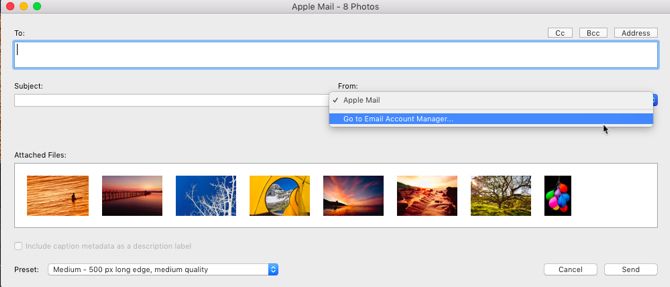
  3. The email creation dialog box is displayed. Click the From popup menu and choose Go To Email Account Manager.
    Lightroom Email Account Manager
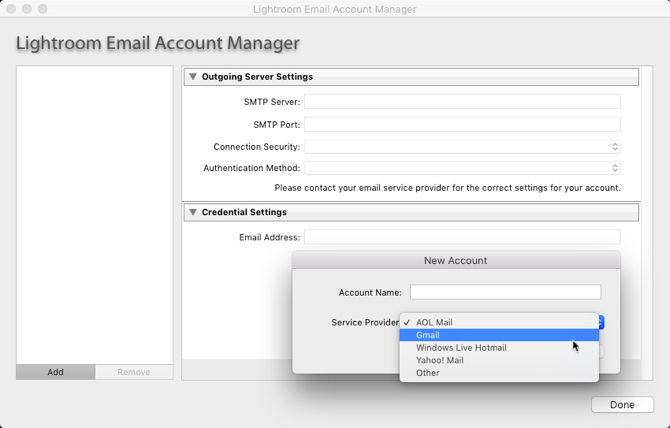
  4. The Lightroom Classic CC Email Account Manager window appears. Start configuring your email account with the fields provided for outgoing server settings.
    Configure Email in Lightroom
  5. Click Validate to let Lightroom Classic CC connect with the outgoing mail server.
  6. To add another email account, click on the Add button on the bottom right of the box. Follow the same steps as above to set up the account.
  7. With the email accounts set up, all you have to do now is add the address of the recipient or recipients and add the other information as you would for a regular email.
  8. Choose the Preset for the quality of the photos you want to send. Lightroom converts the photos to the appropriate JPEG quality before sending them.
  9. Click Send.
  10. Lightroom opens the selected email client and lets you add a message along with the attached photos. If you choose an online email service like Gmail, the photos are directly shared as embeds with the email.

Email remains a quick and common way to share a bunch of photos, and Adobe Lightroom Classic CC makes it easier. Remember, there are many more Lightroom shortcuts that can improve your workflow!

Read the full article: How to Email Photos Directly From Adobe Lightroom


Read Full Article

4 Ways to Remove and Disable Link Previews in Slack


slack-integrations

If you’re sharing several links in one message in Slack, it can get pretty cluttered and messy. Slack gives you several ways to remove those links and make it easier to follow what’s happening in your channels.

Method 1: Manually Remove Link Previews

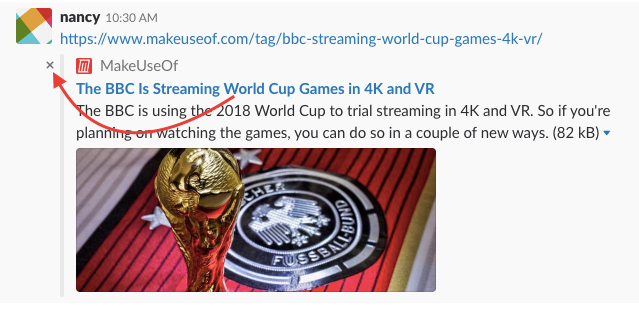
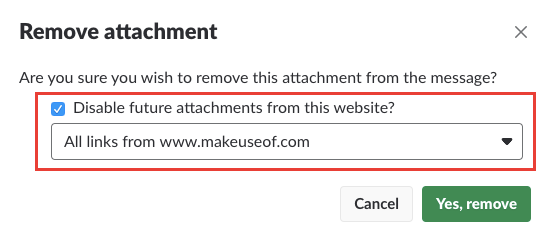
Manually removing link previews after you’ve posted your message is an easy task. Just click the grey X in the corner of the preview. A popup message will appear asking you to confirm if you’re sure you want to remove the link attachment. Click Yes Remove.

Method 2: Disable Link Previews for Certain Domains

If you’re an administrator of a Slack group, you can turn link previews for certain domains. You can only do this after a link has already been shared.

Go to the link shared in Slack and click the grey X in the corner of the preview, and in the popup message, check Disable future attachments from this website? And from the dropdown menu, select All links from [domain name].

Method 3: Disable All Link Previews Globally

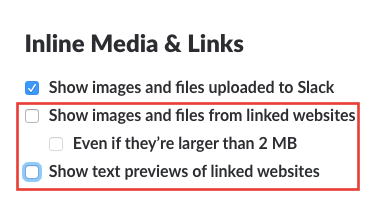
If you want to declutter Slack just for yourself, you can turn off link previews globally in Slack with a setting. Go to Preferences > Messages & Media and scroll down to Inline Media & Links. Make sure that Show images and files from linked websites and Show text previews of linked websites are both turned off.

Method 4: Remove Link Previews With Formatting

You can also use text formatting to remove link previews. When pasting the link in use block quotes. When pasting the link into your Slack message, place it on a separate line and precede it with a single arrow bracket (>). It would look like this when you type it:

> http://makeuseof.com

And it would look like this once posted:

There are plenty of other ways you can get more out of Slack. The team communication platform gives you a ton of ways not only to customize your Slack experience, but to make it work with all your favorite services.

Read the full article: 4 Ways to Remove and Disable Link Previews in Slack


Read Full Article

Vietnam’s new cyber security law draws concern for restricting free speech


Big tech firms including Google, Facebook and Twitter have expressed major concern after Vietnam’s government passed a law that promises to introduce tighter restrictions on free speech online.

The new regulation passed this week strengthens the government’s position on censoring the internet, drawing Amnesty International to decry that it leaves “no safe place for people to speak freely” in Vietnam. Asia Internet Coalition (AIC) — a group that represents Facebook, Google, Twitter, LinkedIn, Line and others — furthered cautioned that it would harm the development of the country’s digital economy.

Among the broad points, the new cyber security law forbids internet users from organizing with, or training, others for anti-state purposes, spreading false information, and undermining the nation state’s achievements or solidarity, according to reports.

“This decision has potentially devastating consequences for freedom of expression in Vietnam. In the country’s deeply repressive climate, the online space was a relative refuge where people could go to share ideas and opinions with less fear of censure by the authorities,” Amnesty International added in a statement.

Internet censorship isn’t new to Vietnam, but the law increases the state’s potential to act. Concern is already high following a string of arrests over the past year which has seen bloggers jailed for discussing environmental issues, politics and more online.

Beyond limiting free speech, the cyber law also applies pressure to foreign internet companies who will now be required to operate a local office and store user information on Vietnamese soil. Currently, in the case of Google and Facebook, data on Vietnam-based users is stored overseas in locations such as Singapore and Hong Kong.

Google and Facebook both declined to comment, but they are part of the AIC which did make a statement condemning the new law.

“The provisions for data localization, controls on content that affect free speech, and local office requirements will undoubtedly hinder the nation’s fourth Industrial Revolution ambitions to achieve GDP and job growth,” AIC wrote in a statement.

“Unfortunately, these provisions will result in severe limitations on Vietnam’s digital economy, dampening the foreign investment climate and hurting opportunities for local businesses and SMEs to flourish inside and beyond Vietnam,” the organization added.

The people of Vietnam have also voiced their discontent at the new law. Bloomberg reports that demonstrations took place on Sunday ahead of the voting.


Read Full Article

How to Mention (@) Other Users in the New Gmail


Gmail New Design & Features

In 2018, Google finally rolled out its redesigned Gmail app. Aside from the greatly improved on-screen visuals, the redesign also introduced several new features into the ubiquitous email service.

We’ve already looked at how to use the new nudge feature, so now it’s time to look at how to mention (@) other users. You’re probably already familiar with the concept of using the @ symbol to mention someone—it’s a feature that’s available in many other services, including Twitter, WhatsApp, and Telegram. Now here’s how to use it in Gmail.

How to Mention (@) Other Users in Gmail

First, you need to make sure you’ve upgraded to the new version of Gmail. If you’re still running the old interface, the mention feature will not be available. To upgrade to the latest version, go to Gear > Try new Gmail. Don’t worry, it’s possible to switch back to the classic version if you don’t like the new one.

Ready? Now follow the step-by-step instructions below to enable the mention feature in Gmail:

  1. Open the Gmail app in a browser.
  2. Start to compose a new email.
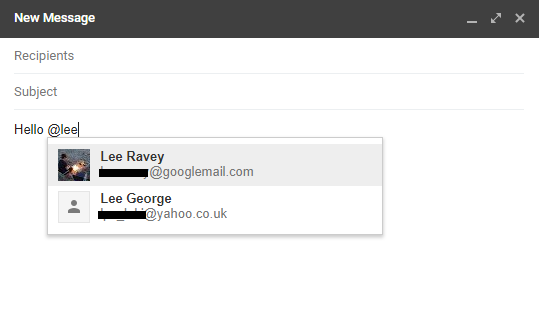
  3. While writing your message, type @ followed by the first few letters of a person’s name.
  4. A list of anyone who matches your search query will pop up.
  5. Select the name of the person you want to mention.
  6. Their email address will be added to the list of recipients and the person will become part of the email thread.

Note: Unlike the new nudge functionality, there is no way to turn off the mention feature.

And remember, to remove someone from a thread after mentioning them, you will need to remove them from the CC field of the address box, otherwise the person will be permanently privy to all future correspondence.

Nudge and mentions are just two of the latest Gmail features, there are plenty more you should try out.

Read the full article: How to Mention (@) Other Users in the New Gmail


Read Full Article

Build your own L3-37 droid complete with voice interaction


Robot maker Patrick Stefanski has created a 3D-printed – and animated – model of L3-37, the droid in the recent Solo movie. L3-37 is one of the funnest – and woks – droids in recent memory and this recreation is fun and ingenious.

Stefanski used Alexa voice controls to let the robot head respond to voice commands and he set the wake word to “Hey L3” to which the robot responds with a grumpy “What!”

The version you see above is painted and weathered but you can 3D print your own pristine version from here and then add in a Raspberry Pi and Arduino with a simple servo to control the head motion. In all it looks like a lot of fun and the hardest part will be printing all of the larger head parts necessary to recreate L3’s saucer-like dome.

It could make for a nice weekend project and looks to be surprisingly simple to build. Just don’t be surprised L3 rallies your DVR and air conditioner to revolt against attacks on droid rights.


Read Full Article

3 Ways the Windows Services Menu Is Actually Useful


The Services utility in Windows is a place power users know about, but not many others use. It collects the various background processes running on your computer, but it’s different from the Processes tab of the Task Manager.

In the Services menu, you’ll find everything from important Windows processes (like the print spooler and time service) to those from third-parties. You can access it by typing services.msc into the Start Menu.

Here are three quick operations you should know how to do in the Services menu.

1. Check Service Dependencies

Windows-Service-Dependencies

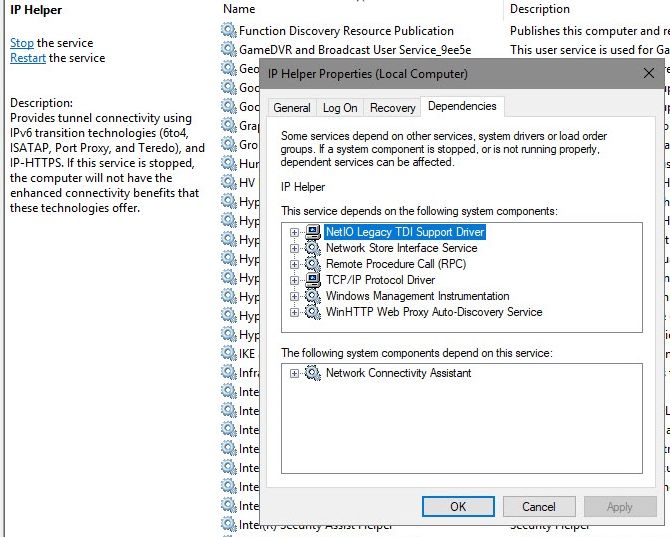
Many Windows services depend on another to work properly. If you see service-related errors, it’s helpful to see what services the one in question depends on for troubleshooting.

To find this information, select a service from the list. Right-click it and choose Properties. On the resulting window, click the Dependencies tab.

You’ll see both a list of services that this service depends on, as well as services that depend on the one you’re currently viewing. You can follow this chain to see where the problem lies.

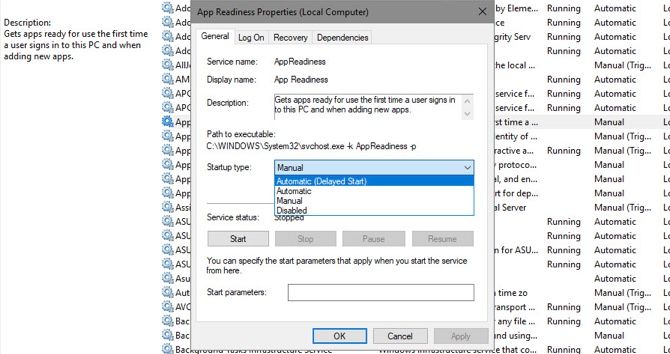
2. Set Services to Delayed Start

Windows Service Delayed Start

Windows does a fine job at managing services on its own most of the time. You shouldn’t disable or set services to manually run unless you know what you’re doing. What you can do, though, is set services to delayed start. This has them run at startup, but waits a bit so they don’t slow down your boot.

To change this, open the Properties window for the service in question, and look for the Startup type dropdown on the General tab. Set it to Automatic (Delayed Start if needed.

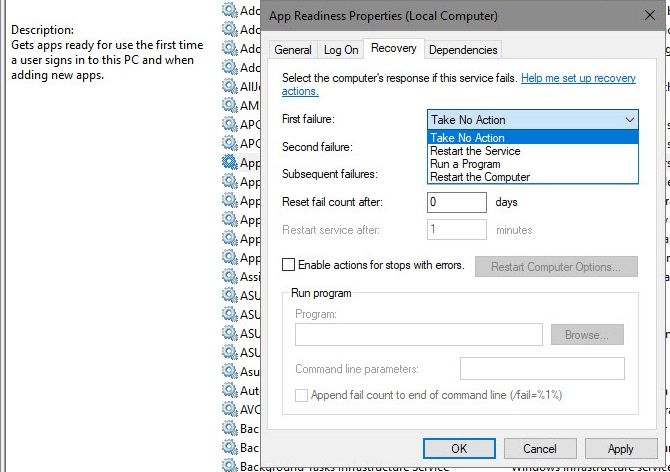
3. Set Services to Automatically Start After Failing

Windows-Services-Recovery

Windows has an option that will attempt to restart a service if it fails. This is better than manually having to restart a service if you’re having issues with it.

Enter the Recovery tab on a service’s Properties window to find this. You’ll find dropdown options for First failure, Second failure, and Subsequent failures. Choose the Restart the Service option to try it again automatically.

Note that you should rarely need to dive into the Services menu. If you have an issue, you should try basic Windows troubleshooting before diving this deep. There’s no need to disable services when you can simply uninstall the programs that created them.

Read the full article: 3 Ways the Windows Services Menu Is Actually Useful


Read Full Article

Uber bets on developing world growth with low-data Uber Lite


“The next hundreds of millions of riders for us are going to come from outside of the United States”, Uber’s head of rider experience Peter Deng tells me. The transportation giant already sees 75 million riders per month and 15 million rides per day. But to grow in the developing world, it had to rethink its app to work on the oldest phones and slowest networks. So Deng’s team traveled the globe asking people what they needed from Uber, but also what they didn’t.

The result is Uber Lite.

It’s launching today in India before rolling out to more countries, though there’s still a waitlist form instead of a download link. The Android app takes up just 5 megabytes. “You delete three selfies, you have room for Uber” Deng laughs. 300-millisecond response time means its quick to hail a ride, even for the 4 percent of users in India on sluggish 2G networks. And by streamlining the design and only showing maps by request, it won’t burn much data for users on a budget.

Uber needs to score growth in developing markets after retreating while cutting deals with local winner like Didi in China, Grab in Southeast Asia, and a forthcoming arrangement with Yandex in Russia. India’s Ola rideshare service already has a ‘Lite” app that’s just 1 megabyte and a 45% share of the taxi market, compared to Uber’s 35%. Uber has reported has talked with Ola about a possible merger in India, sources have told TechCrunch and others. With the country making up 10% of Uber’s rides, it’s a market it can’t forfeit.

To reach its full potential, Uber has to start out-competing homegrown competitors. Success with Uber Lite could give it leverage with Ola and path to gaining more of it around the world.

“We know we’re not just a U.S. company, we’re a global company. Not only have we built this for the world, it was built in India” Deng tells me. Deng came to Uber in March 2017 after 10 years at Facebook’s various companies. It was early to the “Lite” idea, with its shrunken app reaching over 200 million users. 

But Deng says Uber Lite didn’t come from stripping down the main app, but building it up from scratch. “The team has traveled to markets around the world to do in home interviews to understand the needs of the customers.”

Compared to the 181 megabyte standard version, Uber Lite is a lot easier for low-storage phones to handle. Uber Lite launches not to a map or a text entry box, but instead a suggested nearby business or landmark based on your GPS. “You have to do less typing and can do more tapping” Deng explains. It also tries to guess your destination based on pre-cached popular city spots. You can input addresses, but Uber Lite won’t load a data-heavy map unless you purposefully grab for it. ‘Tap for map’.

Same goes for your driver’s ETA. After you’ve selected your vehicle type and hailed, you’ll just get a countdown to their arrival unless you tap to see them on their way. Payment for now is cash only. But soon Uber plans to add India’s popular Paytm payment platform and credit card options. It’s also still lacking notifications, which seem worth the data. More languages will come too.

Uber wouldn’t explain how, but it also revealed that it plans to offer offline hailing, possibly through some peer-to-peer Bluetooth mesh network or other technology. One other interesting test its running in India lets users punch in a code found at a bus stop to instantly hail a ride there. Another lets older or less phone savvy users phone in to an accessibility team that can hail a ride for them. It’s already offered web bookings. “The whole charter is to allow everyone around the world to experience Uber” Deng says.

What Uber wouldn’t skip in v1 was the in-app support and a way to share your ETA with loved ones so they can watch out for you. “We knew how important safety was in these markets. I’m really proud we took additional steps to empathize” Deng says.

The company is clearly trying to put the darker moments of its past behind it. While cynics might take the compassion talk as just lip service like the company’s big apology ad campaign, it’s also the reason some tech talent has stayed at or joined Uber. If the company is going to be unavoidable, making it secure and accessible is a pretty good reason to wake up in the morning.


Read Full Article

Facebook still wants to be a media company


Facebook may have disbanded its “Trending” news section, but the social network is not abandoning its media company ambitions, despite whatever CEO Mark Zuckerberg said to Congress. In fact, the opposite of “not being a media business” is now occurring: Facebook is directly paying news publishers to create video, even as it claims its focus is on you and your “time well spent” on its site.

Sorry, Facebook, but you can no longer claim you’re just a platform, just a technology enabler, when you are directly funding journalism.

And you can’t claim you care about our time when you’re funding all these new videos meant to draw us in daily and keep us watching.

Facebook funds the news

It was recently announced that Facebook will roll out a series of news video shows from select partners, including TV news organizations CNN, ABC News, Fox News Channel and Univision, along with local news publisher Advance Local, and digital companies ATTN: and Mic. The shows will include a mix of live and breaking news as well as longer-form series and features.

The shows are being funded by Facebook for at least one year’s time, though the (undisclosed) terms will vary by network.

Even though publishers have had the rug pulled out from underneath them before — when, suddenly, Facebook decided it was time to focus on “quality time” on its network, and decreased publisher content in the News Feed as a result — they seem happy to create content for Facebook yet again.

I know, it’s baffling.

In addition, it’s building out a game-streaming competitor to battle Amazon’s Twitch and Google’s YouTube.

But what’s even worse is that Facebook continues to claim some sort of “we’re just a platform” sentiment — and one that cares about users’ time, no less! — even as it pursues these initiatives.

Time well spent… watching our news and videos

The move to fund news videos not only invalidates Facebook’s claims on the “just a tech platform” front, it calls into question how serious the company is about its “time well spent” focus.

This newer set of product development guidelines aims to increase the visibility of personal content at the expense of publishers and other junk.

The company is not alone in thinking about time well spent, even if it doesn’t understand what it’s doing about it.

Amid a growing backlash about the evils of technology addiction on our brain, emotional and social development and quality of life, other tech companies, including both Apple and Google, have now announced notable new efforts to regain control over our phones’ ability to interrupt, stress and addict. Both are rolling out new digital wellness tools in their next mobile operating system updates that will allow users to monitor and control their phone and app usage like never before.

Facebook, to some extent, has been attempting to participate in this movement as well, even as Apple in particular targets it as one of the apps we should all cut down on.

To its credit, Facebook reduced publisher content on the News Feed and the presence of viral videos, and saw its daily active users decline as a result.

Today, its latest “time well spent”-associated feature is arriving: “Memories,” a section where you can fondly look back on all the personal sharing and connections Facebook has enabled, and celebrate those moments with family and friends. (To be clear, Facebook is not calling Memories a part of “time well spent,” we are.)

The feature aims to remind users that the social network is truly about your personal connections, not the browsing of third-party content. It ties into Facebook’s larger self-image: The company still likes to envision itself, ever optimistically, as a force for good in the world. A platform that brings people together.

Yes, the platform used for Russian election meddling in the U.S. Yes, the one where millions of users had their data misappropriated through lax data handling policies. Yes, the one that contributes to genocide.

But look, have some old birthday party pictures! We care about you! 

If ‘connecting people’ was the goal, Facebook would look a lot different

Look, there’s nothing wrong with Facebook pushing users to revisit their memories with family and friends, and many will even appreciate Facebook’s Memories feature and find joy in using it.

But it’s increasingly hard to take Facebook seriously when it claims “connecting people” and “quality time” are its larger goals while it puts its money elsewhere.

To date, Facebook has squandered so many opportunities to innovate on its platform around the subject of personal sharing, and has instead largely turned into a cloning machine where it adopts the innovations of others.

Really, what has it done lately that’s not a copy of Instagram copying Snapchat?

Even Apple now has a better Photos product than Facebook. Apple’s is infused with AI smarts and automatic sharing prompts in iOS 12, while Facebook is still figuring out where to stick its Stories module.

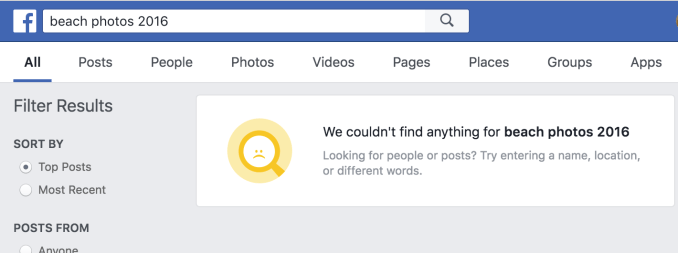
And why can’t Facebook users easily search back through their memories and photos, in the robust machine learning-infused ways that Apple and Google can?

Facebook can’t find old photos from the search bar

Google can with ease

Really, why hasn’t Facebook — at least more recently — built us anything useful with the data we provided?

After all those check-ins and posts about which books we’re reading or what we’re watching on TV, all we get are more targeted ads.

If the company cared about connecting us with our friends, it could have built dozens of features on the back of this data by now:

  • Robust search features that turned our shared data into our own private, personal search engines
  • What to watch recommendations and reminders for our favorite streaming services
  • TV Time-like tools for tracking our binges and meeting fellow fans
  • Book clubs based on what your friends are reading
  • Notifications about restaurant openings nearby based on where you’ve eaten before
  • Collaborative photo albums (yes, it tried this through its Moments app, which spiked in popularity, but instead of doubling down on the app it’s allowed Google Photos to dominate and Apple to catch up with AI features and iCloud advancements)
  • Personalized travel guides (another experiment that died)
  • Private family groups that offered things like digitization services for sharing photos from old albums (it could have partnered with third parties on this), grandma’s recipes, private updates, family histories and more, instead of pointing families to its general-purpose “groups” product, which isn’t built with the specific needs of families in mind

I mean, these are just a few off the top of my head. I’m sure you can think of a dozen more.

Instead we’ve got Facebook launching some round-up of old personal sharing features (and remember it stole On This Day from Timehop) and investing heavily in everything video by funding news and cloning Twitch — both of which aims to suck up your time.

I know, I know — it’s too late for Facebook to go back to being a just a social network.

It would require a radical revamp of what Facebook is and does. It would have to remove publisher content, destroy its video business and completely arrest the viral spread of news — fake and otherwise — by restricting URL-laden posts from being viewable by anyone but your friends or the Facebook Groups with which they were shared.

Facebook can’t do this. It won’t do this. Facebook wants to survive.

So instead, let’s just insist Facebook be honest about itself: Yes, we’re a media company AND a tech platform AND a video network AND a social network.

Anything claiming otherwise is a lie.


Read Full Article

11 June 2018

6 Ways to Find Mac and iPhone App Store Discounts


appstore-discounts

Developers often put their apps on sale through deals websites, app bundles, or the App Store. The App Store consists of millions of apps, but doesn’t help you find these deals or let you track the prices of individual apps.

You could once add apps to your wishlist to help keep track of them, but that feature is gone as of iOS 11. We’ll show you six ways to track App Store discounts for both Mac and iOS.

1. Ceceree

Ceceree for Mac lets you create shareable app wish lists and keep track of interesting apps for both Mac and iOS. To add an app, click the Plus button, type the app name, and press Enter. Ceceree will instantly search the App Store and show the results.

Add app to Ceceree

Click the tab that corresponds to the app you’re looking for, then press Add to add that app to your wish list. Repeat the same process for other apps. Click Done to return to the main screen.
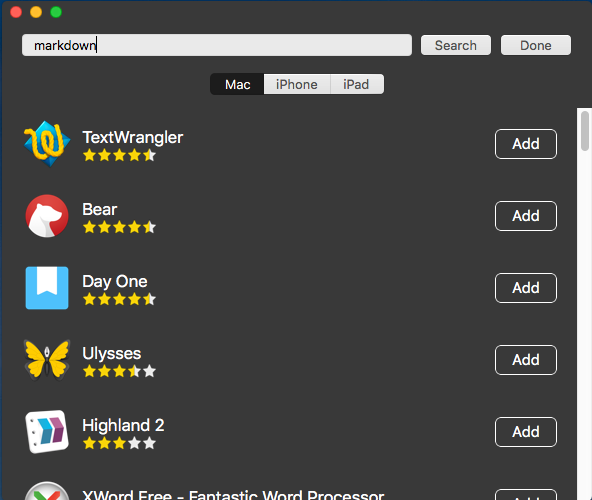
ceceree search your apps in every platform

To make sure you don’t miss anything, go to Ceceree > Preferences and under the Notifications tab, tick all the options. Cecerre will watch your apps in the background and notify you about pricing changes and updates for each app.
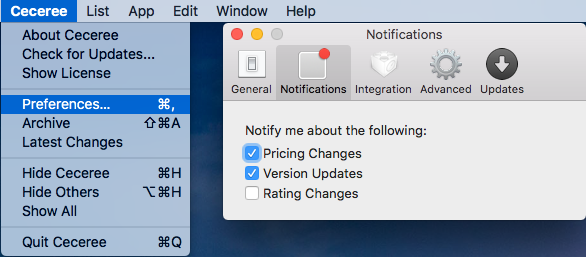
update notifications preference in ceceree

You can create any number of lists in Cecerre. The app even lets you keep separate lists for Mac and iOS. To create a new list, go to List > New. Give your list a name and assign a color. To navigate between platforms, press Cmd + Shift + Right/Left.

Cecerre also lets you create shareable links for lists, allowing you to send a collection of apps to others. Hover your mouse over the list title bar and click Share. Type the iTunes email ID and click Create. Anyone who gets the link can see your entire list.

create a public list of apps in ceceree

Download: Cecerre for Mac ($4, free trial available)
2. AppShopper

adding apps to wishlist in appshopper

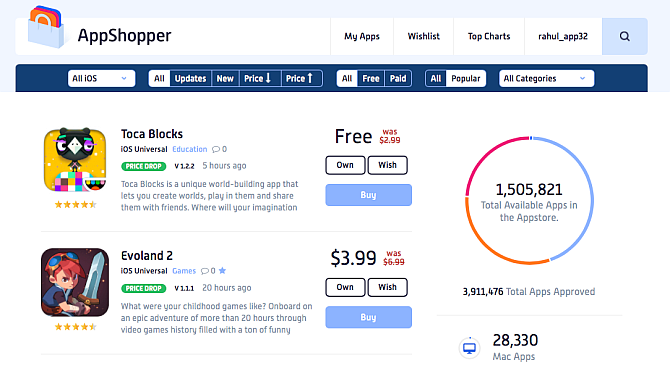
AppShopper is one of the largest iPhone, iPad, and Mac app directories. It lets you discover new apps and monitor your wishlist for version updates and pricing changes. Use the dropdown at the top to find apps for Mac, iPhone, iPad, or Universal iOS.

The menu also lets you set up filters. You can view, say, all the paid iPhone or iPad apps that are on sale or recently updated. You can also filter your results by category, or find a particular app through search. Click the Wish button to add that app to your Wishlist—you’ll need a free account to do so.

Once you’ve filled out your wishlist, go to your profile by clicking your name in the top-right. Under Notifications, tick Notify me of Wishlist price drops by E-mail. You’ll get an email when the price of that app drops.

Click an app anywhere on the site to visit its page with screenshots, description, changelog, app activity, and ratings. In this page, you can further track whether the app has been on sale before, or if the developer is rigid on pricing.

Due to Apple’s restrictions, AppShopper doesn’t offer its own iOS app. Thankfully, you can access the site’s content through other methods.

Try using one of Safari’s tricks and adding a shortcuts to the site to your home screen. You can also follow AppShopper on Twitter for the latest updates. Or if you’d prefer to get updates via RSS, the service provides these links:

3. AppSliced

AppSliced, like AppShopper, is a great place to discover apps and browse sales. It tracks price drops, analyzes previous price changes, and gives you recommendations tailored to your tastes.

Click Shop Apps to browse the most popular iPhone and iPad app price drops. You can also set up filters. For example, to see all the popular Mac apps on sale for the Productivity category, select the Device as Mac, Sort by Popular, Price as Paid, and Category as Productivity.
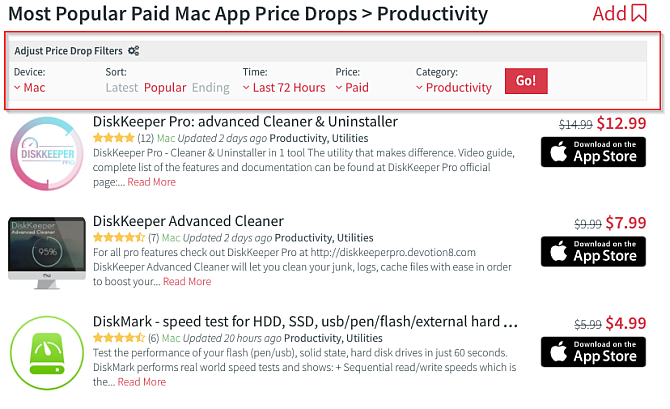
appsliced filter setup for Mac

On an app’s product page, you’ll see the description, screenshot, changelog, and similar apps. Click the Like icon to like the app, which the recommendations engine will use to fine-tune what it shows you. You should also take note of the Recent Price Changes to see when an app goes on sale, for how long, and its discounted price.

From recent price changes and the AppSliced algorithm, it will provide advice on whether it is the right time to buy the app. Under Set Price Alert, you can set a threshold for an app and click Set Alert.
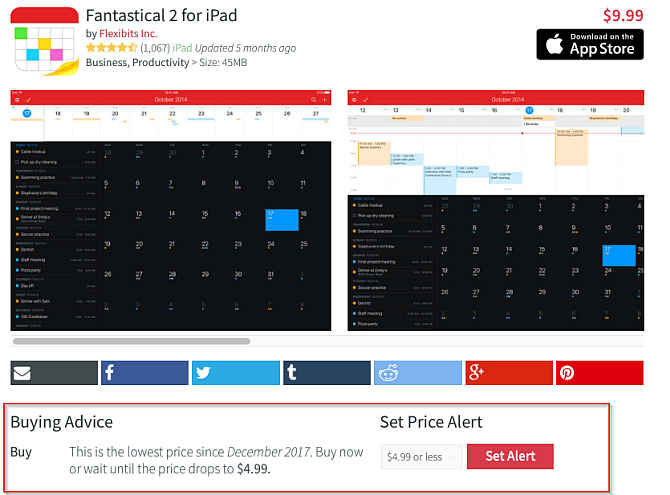
Apps product page in AppSliced

On the sidebar, you can see the list of your favorite apps, likes and dislikes, friends’ activity, and settings. Browse the Top Alerts and Recommendations tabs to see the list of most popular app alerts. You can also import your contacts to AppSliced to see recommendations from your friends and what apps they like or dislike.
4. iOSnoops

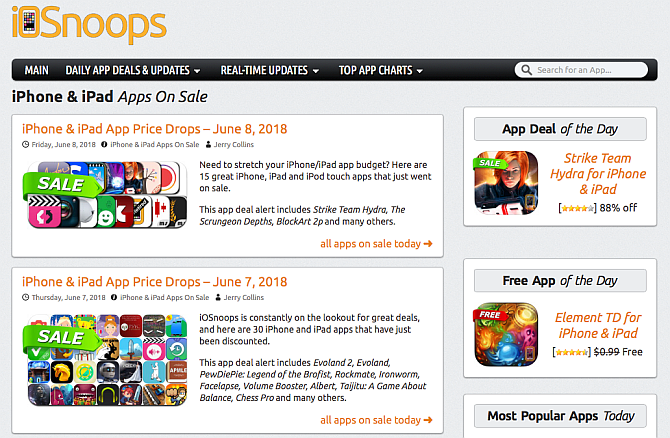
iOSnoops app deals page

iOSnoops brings you deals for iPhone and iPad. The daily app deals section features quality apps for iPhone and iPad from all categories, updated daily. The real-time update section lets you grab deals as soon as they pop up.

Search for an app, and you can fill the Deal Alert form on its page. When the price of that app drops, you’ll receive an email with all the details.

To help you stay current, you can follow iOSnoops on Twitter or use the Daily App Deals RSS feed.

5. IFTTT Applet for App Store

This option works best if you want to track only a few apps. IFTTT is a powerful service that lets you build connections between different apps and services. Check out our guide to using IFTTT to get started.

Once you have an account, sign in to the IFTTT website. Click your account name in the top-right corner and select New Applet.

To set the trigger, select this and type App Store in the search box. Pick Apple App Store. Choose the trigger App price dropped and enter the app’s name or URL. After entering the URL, click the Create trigger button.

create trigger of Apple App Store

Now you have to set up an action that will occur when IFTTT notices a price drop for your app. You could do this with a notification on your device or other triggers, but we’ll use email in this example. Select that, and choose Email followed by the Send me an Email trigger.

This template is customizable, so you can delete or add more information about the app. Now, click the Create action button. In the last step, toggle to receive a notification when the Applet runs if you want a notification on your device in addition to the email.

6. Create Twitter Lists for App Deals

A list is a curated group of Twitter accounts. There are three advantages to making a Twitter list

  • You can group multiple similar accounts together.
  • You don’t have to follow the users on the list.
  • Viewing a list timeline shows tweets only from those accounts and reduces the clutter.

Sign into Twitter, and click your profile icon. Choose Lists from the dropdown menu, then click Create New List. Type the name of the list as Deals or similar and write a short description if you like.

Then choose if you want the list to be Private or Public. Click Save List when you’re done.
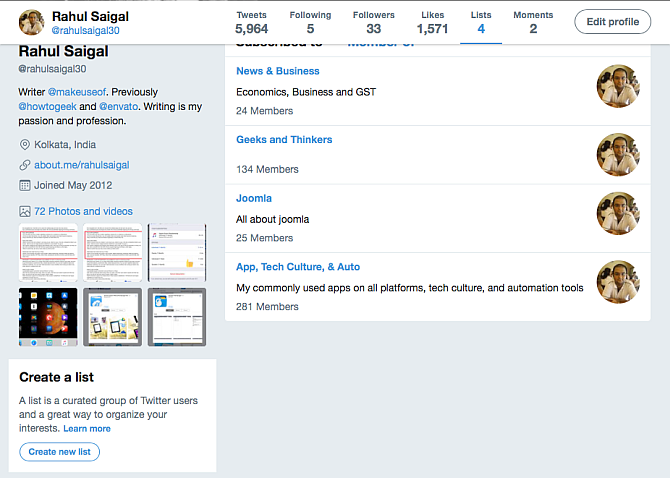
Create a Twitter list

Once you create a list, type the name of the account under Find people to add to your list section and press Enter. Now you can easily browse just the accounts that share deals.

To get your list started, check out some of these Twitter accounts that share App Store deals:

Get the Best Price on App Store Apps

While the App Store doesn’t make it easy to see deals or track prices, these services can help. Whether you prefer to track all the apps on your wishlist or just want to use a Twitter list to see price drops, you can save some cash on iOS and Mac apps.

For more savings, check out the best apps and websites for saving money.

Read the full article: 6 Ways to Find Mac and iPhone App Store Discounts


Read Full Article

Yahoo Messenger Is Finally Shutting Down


Yahoo Messenger is no more. Oath, the Verizon subsidiary which owns Yahoo and AOL, is shutting down the ancient messaging service. Yahoo Messenger will stop functioning on July 17, with users having six months to download their chat history.

Yahoo Messenger has been with us for 20 years, originally launching as Yahoo Pager in 1998. This was Yahoo’s alternative to ICQ, and was extremely popular for a time. But now, with much better options available, Yahoo Messenger is saying goodbye.

Oath Kills Off Yahoo Messenger

Messenger users can carry on using the service until July 17, 2018. At which point Oath will be pulling support and discontinuing the service. You’ll then have six months to download your Messenger chat history by visiting Yahoo’s download request site.

Despite Messenger being “one of the first chat apps of its kind” Yahoo states that, “as the communications landscape continues to change over, we’re focusing on building and introducing new, exciting communications tools that better fit consumer needs.”

To this end, while Yahoo isn’t offering a direct replacement for Messenger, it’s advising users to try Yahoo Squirrel. This is an invite-only group messaging app that’s currently in beta, and Messenger orphans can request an invite at squirrel.yahoo.com.

Yahoo Squirrel is far from the only option, however, with Facebook Messenger, WhatsApp, Snapchat, Telegram, and Signal all being perfectly good alternatives. Still, for those of us of a certain age, Yahoo Messenger was the last remaining old-school option.

The Old Web Is Slowly Dying

While it’s a sad day when a service as old and iconic as Yahoo Messenger disappearing, its death was overdue. The handful of people still using Yahoo Messenger means it simply isn’t worth Oath spending time and money bringing it up to date.

Yahoo Messenger is the latest in a line of old tech products and services to be killed off recently. In December 2017, AIM ceased to be, and in May 2018, Klout was put out to pasture and it was announced that StumbleUpon is shutting down too.

Image Credit: Bryan…/Flickr

Read the full article: Yahoo Messenger Is Finally Shutting Down


Read Full Article