04 December 2013

Short URLs in the New Google Maps


One of the cool things about the new Google Maps is that the URL is updated automatically when you navigate the map, so you can simply copy it from the address bar. Unfortunately, the URL is still huge and a short version is often useful.


Now you can get a short URL by clicking the gear icon at the bottom of the page, selecting "share and embed map" and checking "short URL". I think the short URL should be displayed by default, since the long version can be found in the address bar. "By using a short URL, you can squeeze a long Google Maps link into fewer characters to leave more room to say what's on your mind," explains Google.


{ via +Google Maps }

15 Ways To Turn Your Best Instagram Shots Into Gorgeous Gifts


Instagram-gifts.jpg

Instagram gifts? Who would want a thing like that? If that’s your thinking, it’s only because you have no idea what’s in store for you out there. Yes, it’s that time of the year again, and you’re racking your brain to find some original gifts. Instagram-based gifts may sound like the tackiest thing of earth, but by the time you’re through reading this, you’ll find the perfect gift for at least several family members, and maybe some Instagram-loving friends. This is not just magnets and prints we’re talking about. Turns out there’s almost nothing you can’t print your best Instagram...


Read the full article: 15 Ways To Turn Your Best Instagram Shots Into Gorgeous Gifts


How To Build A Desktop Start Menu Replacement In Windows 8.1


windows-8-start

Are you tired of the Modern interface? Windows 8.1 allows you to boot to the desktop. If only the restored Start Button would launch a proper Start Menu! Well, it sort of can. Step 1: Boot To Desktop This is the thing Microsoft got right in Windows 8.1: you can finally boot to the desktop natively. To enable this feature, go to the desktop, right-click the taskbar and select Properties. In the Taskbar and Navigation properties window, switch to the Navigation tab and under Start screen, select the option “When I sign in or close all applications on a screen,...


Read the full article: How To Build A Desktop Start Menu Replacement In Windows 8.1


Chromecast Game


If you have a Chromecast and you want to try a new app that supports Google's dongle, install TicTacToe for Android or for iOS. It's a very simple game that requires 2 players and displays the results on your TV. You can install it on an Android phone or tablet, on an iPhone or iPad, but you need 2 devices to play the game.


While the game is pretty simple, it shows that Chromecast isn't just for streaming music and video. Once the Google Cast API is out of beta, you'll find a lot more interesting apps.


{ via Reddit }

03 December 2013

Create A Killer Website Analytics Dashboard With Google Core Reporting API


Analytics-to-Docs15

If you had the choice between flying an airplane blindfolded or flying it with your eyes open, which would you prefer? The same holds true for running a website. Would you like to just publish a site and run it blindly, or would you like a full-featured, functional dashboard that shows you what’s going on with the site at all times? If you’re familiar with Google Analytics, then you’ll be pleased to learn that Google offers a powerful API called the Google Core Reporting API, which lets you tap into the numbers from your Google Analytics account. You can use...


Read the full article: Create A Killer Website Analytics Dashboard With Google Core Reporting API


The 10 Best YouTube Channels For Automotive Enthusiasts


automotiveyoutube

Cars aren’t as cool as they used to be. Fewer teenagers are applying for a driver’s license every year (in the United States, at least) while European gearheads try to still have fun while dealing with emission taxes. While today’s best automobiles are truly the best ever made, getting into the hobby isn’t as easy as it used to be. Thankfully, YouTube can help. The Internet’s favorite video streaming site is brimming with excellent automotive channels that provide informative reviews, excellent head-to-head comparisons, and in some cases, a fair bit of humor. In many ways, these channels seem to provide...


Read the full article: The 10 Best YouTube Channels For Automotive Enthusiasts


Teachers Can Now Offer Office 365 To Their Students For Free With Worldwide Launch Of Microsoft’s Student Advantage


students

The worldwide launch of Microsoft’s Student Advantage program now allows teachers to offer Office 365 to their students for free. The initiative will allow teachers to help their students prepare for the technological demands of the modern workplace. The program was announced in October, and with the latest announcement on Microsoft’s blog, the Student Advantage program has been opened up to 35,000 schools and colleges worldwide. Students are uniquely placed to derive the benefits. If their educational institution signs up and uses a license for the Office 365 ProPlus or Office Professional Plus (for official use by staff and faculty),...


Read the full article: Teachers Can Now Offer Office 365 To Their Students For Free With Worldwide Launch Of Microsoft’s Student Advantage


Sites that Pay you for Writing Articles (Sponsored Posts)


Sponsored Posts are one of the most popular ways to make money from your blog.Though Google says that Sponsored Reviews or sponsored posts are against their webmaster guidelines, if done with care and a little common sense you can make good money.In this article I have listed some best sites to get sponsored reviews.


1.SponsoredReviews.com


One of the old yet very popular site to find advertisers and write sponsored posts on your blog for which you will be getting paid.


  • The bad thing about Sponsored Reviews is they keep 50% commission you generate from every sponsored post as they were acting as a mediator between you and the advertiser.

  • To get quick approval you must have good page rank and alexa rank.


Read more »

Boost Productivity With These Excellent Google Spreadsheet Scripts


google_spreadsheet_scripts_intro

Did you know that the suite of products on Google Drive, especially Google Spreadsheet, can have their functionality extended by custom scripts? These scripts can dramatically improve your productivity while using Google Spreadsheet, and it’s relatively easy to alter existing scripts or even create your own! If you use a spreadsheet application to crunch data, then custom scripts could be the master key. Start rolling with these excellent Google Spreadsheet scripts and make use of your data in new ways. How To Use Scripts Before you begin drooling over the following Google Spreadsheet scripts, it’s important to know how to...


Read the full article: Boost Productivity With These Excellent Google Spreadsheet Scripts


Top 5 Online Subscriptions You Can Give As Gifts


With the ever increasing digitization of society, online subscriptions have become a valid form of gift-giving and they're often more fulfilling than a physical gift of same worth.

Read the full article: Top 5 Online Subscriptions You Can Give As Gifts


Personalized Embedded Google Maps


Last week, Google announced that you can now embed maps in the new Google Maps interface. Just click the gear icon at the bottom of the page and select "embed map". You can pick from the 3 sizes that are available or click "custom size" to enter your favorite width and height.


The most interesting thing about the new embeds? "This map is built for you. When you view this map on your site, you'll see your saved places on the map. Your site's visitors won't see those saved places – they'll see a map built for them." This only happens if you see your profile icon in the top right corner of the map. You can star locations in an embedded map and they'll be saved to your Google account.


"You can embed a basic map, driving directions, or a local search into your website or blog from the new Google Maps," informs Google.

Google Santa Tracker


Google no longer offers the official Santa Tracker. Last year, NORAD partnered with Microsoft and Google launched its own service. Now the Google Santa Tracker is back with cool games and nifty features that help you get into the Christmas spirit.


"On Christmas Eve we'll be proudly showcasing a preview of Santa's dashboard -- the technology that powers his sleigh during his around-the-world journey. We've received this special preview from one of Santa's many developer elves, who are hard at work in the North Pole helping Santa prepare for his big day. Santa's dashboard - featuring the latest and greatest in Google Maps technology and sleigh engineering - will allow you to follow his progress around the world, and also learn a little about some of his stops along the way. Our friendly elves have also invited you to explore Santa's village while Santa gets ready for his journey. So go ahead and explore his village, you might just find some fun activities and meet some interesting elves," informs Google.


{ via Adam Haberlach. }

Chrome Download Tips


These features aren't new, but they're pretty useful and they might help you become more productive when you download files in Google Chrome.


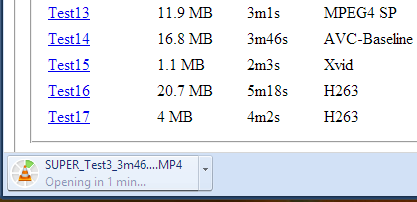
1. Do you want to open a file immediately after Chrome downloads it? You don't have to wait, just click the file in the download bar and you should see something like "opening in X minutes".


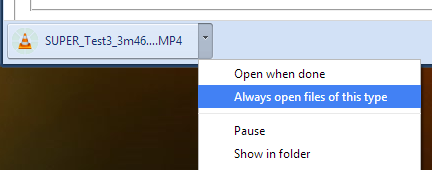
2. If you always want to open certain files after Chrome downloads them, click the arrow icon and check "always open files of this type". You can use this for .mp4 files or .torrent files, for example.


3. How to move to the desktop a file you've just downloaded? Just drag it from the download bar and drop it onto your desktop.


4. Some files open directly in Chrome: PDF documents, MP4 videos, MP3 songs. How to download them? Use a keyboard shortcut: Ctrl+S or Command-S for Mac. Another option is to right click and select "save as". You can also right click the link to the file and select "save link as".


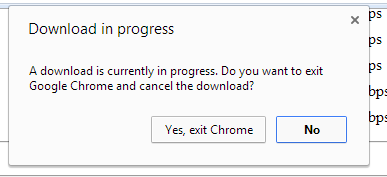
5. Don't worry about closing the Chrome window accidentally while downloading some files. Chrome shows a warning: "download in progress".


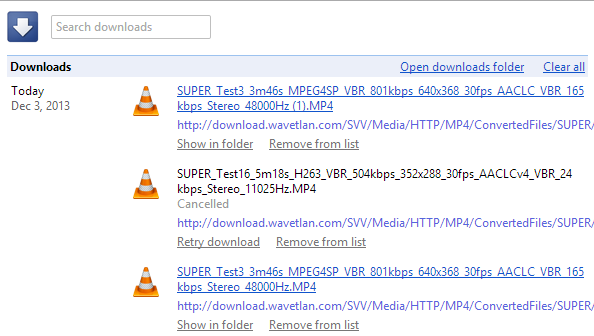
6. Manage your downloads by clicking "Downloads" in the Chrome or pressing Ctrl+J (Command-J for Mac). Use the search box to find a file you've downloaded last month, right-click the URL and you can copy it, click "Show in folder" to locate the file. You can also clear all the downloads.


More Search Results in the New Google Maps


The new Google Maps for desktop updated the local search card and now shows the top 3 results instead of only one. You can still go to the list of top results or check the results from the map, but the card is more convenient. Google is the king of search, so people expect to find a hierarchy. The list of top results is one click away, but many people will never find it.


{ via Jérôme }

My Google?


iGoogle has been discontinued, it's time for My Google. It's not clear what's behind this new service or if it will ever be released, but one thing it's clear: a Chromium bug report from a Google employee included a few links to some articles from Google's help centers. One of the links is: https://support.google.com/mygoogle/answer/3151281?hl=en&ref_topic=3148584 and there's a reference to "MyGoogle".


Clicking the link sends you to a 403 error page: "Your client does not have permission to get URL from this server". You get a 404 error page if the page doesn't exist, so this is different.


It's likely that the My Google help center is only available for Google employees, since the service hasn't been released yet. The Chromium bug report included links to the following Google help centers: MyGoogle, Google+, Google Maps, Google Search and YouTube, so the new service could be important.


"My" suggests that you'll be able to personalize Google. iGoogle, My Yahoo, My MSN focused on personalized homepages, but Google moved away from this model and started to focus on pushing content when it's likely to be useful (Google Now).


Maybe it's about Google Now, maybe it's another attempt at personalizing search results, maybe it's a way to manage preferences for all Google services. What's your take?


{ Thanks, Florian K. }

Make The Minutes Work: How To Take Effective Notes During A Meeting


meeting-featured

It’s a skill which few people have perfected; the perfect meeting minutes. It’s a familiar story in an imperfect world. You’re working on a project of critical importance at work. This is an inter-departmental affair, with all the painful inter-departmental politics that comes with that. As the deadline looms with the project no closer to completion, you schedule a meeting with your colleagues. After setting an agenda for the meeting and two hours of tedious discussion, you end up with an agreed schedule and plan of action. And then the agreed schedule isn’t met, and the agreed plan of action...


Read the full article: Make The Minutes Work: How To Take Effective Notes During A Meeting


02 December 2013

What Everybody Ought to Know About Dealing With Email Spam


spam-featured-image

Here’s one more reason for everyone to hate Mondays. They’re supposedly the busiest days for email spam, that frustrating stream of unsolicited emails about weight loss, Viagra, million-dollar lotteries, and what not. It might be next to impossible to stop spam completely, but it’s certainly possible to reduce its flow to a trickle. We have already covered ways to tackle Facebook spam , Twitter spam, and spam from friends. In this post, we’ll tell you how to control email spam. Unfortunately, the option to stop unwanted emails from piling up in your inbox is not available as a one-click solution....


Read the full article: What Everybody Ought to Know About Dealing With Email Spam


2 Ways To Encrypt Your Files From Your Browser


encrypting-zipper

Do you want to send a file across the Internet to a friend or coworker, but don’t want the NSA to snoop on that file? You’ll want to encrypt that file, but in the quickest and easiest way possible. Thanks to various web technologies, you can now do this without even having to deal with a heavier desktop-based encryption program. File Lock File Lock is a fantastic file encryption service that runs entirely on HTML5 technologies — you don’t even need to install a plugin for your browser! All you have to do is visit their website, choose the file...


Read the full article: 2 Ways To Encrypt Your Files From Your Browser


2 Ways To Encrypt Your Files From Your Browser


encrypting-zipper

Do you want to send a file across the Internet to a friend or coworker, but don’t want the NSA to snoop on that file? You’ll want to encrypt that file, but in the quickest and easiest way possible. Thanks to various web technologies, you can now do this without even having to deal with a heavier desktop-based encryption program. File Lock File Lock is a fantastic file encryption service that runs entirely on HTML5 technologies — you don’t even need to install a plugin for your browser! All you have to do is visit their website, choose the file...


Read the full article: 2 Ways To Encrypt Your Files From Your Browser


Amazon Delivery Drones, Facebook Hack, Kindle Fire Vs iPad Air [Tech News Digest]


Today in Tech News Digest, Amazon plans to deliver packages via aerial drones, a Facebook friends list hack is revealed, a vulnerability in Google Nexus handsets is discovered, Black Friday numbers are released, Steam introduces user reviews, and the Kindle Fire HDX is compared favorably to the iPad Air. Amazon Delivery Drones Amazon R&D is also working on buildings that you can drive to to pick up things in 10 minutes or less — Ashlee Vance (@valleyhack) December 2, 2013 When you order an item from Amazon in five years time you may get it delivered to your door within...


Read the full article: Amazon Delivery Drones, Facebook Hack, Kindle Fire Vs iPad Air [Tech News Digest]