15 July 2013

Why Google No Longer Needs Google Toolbar


Google Toolbar is the first software released by Google. The first version of the add-on was released back in 2000, when Google's most important services were the search engine, Google Directory and AdWords. Here's Google's homepage from December 2000.


At that time, Google suggested to "get the Google Toolbar for your IE browser and take the power of Google with you anywhere on the web." Internet Explorer was the dominant browser and it didn't have a search box, so Google Toolbar was a great way to promote Google. It also made it easier to search the web.


Since then, Google Toolbar added many new features: pop-up blocker, online bookmarks, custom buttons, inline find-in-page, automatic translation, spell checking, suggestions on navigation errors and more. Some of these features were integrated in Internet Explorer. Google made a lot of business deals and many popular applications bundled Google Toolbar. Google also developed a version of the Toolbar for Firefox, but it was discontinued in 2011.


For many years, Google Toolbar was the most important Google software. Internet Explorer was the only popular browser that didn't use Google as the default search engine. "Microsoft's Internet Explorer web browser, now accounts for less than 60% of the market, down from 95% at its peak in 2003," mentioned a BBC News article from 2010.


Internet Explorer's market share has decreased as Firefox and Google Chrome became more popular. Even though Microsoft started to update the software more often and Internet Explorer became faster and added support for many HTML5 features, the 5-year stagnation between IE6 (2001) and IE7 (2006), the 2-year gap between IE7 and IE8, IE9's lack of support for Windows XP, as well as the increased popularity of web apps like Gmail or Google Docs - all of these made Internet Explorer a distant memory for many users.


Google Chrome is now the most popular browser, according to Google. This means that Internet Explorer is no longer the dominant browser from the early 2000s. Google now focuses on promoting Chrome, which is a lot more important for Google: Chrome users are more likely to use Google's services and Google can improve the overall browsing experience, instead of only adding a few features.


Just like Google discontinued Chrome Frame, you can expect to see a similar announcement for Google Toolbar. Google Bookmarks will also disappear if Google Toolbar is discontinued, since Toolbar is the only product that uses it.


The last major Google Toolbar release was in 2011, so the Toolbar is probably in maintenance mode. If you visit the Toolbar site in Chrome, you'll see this message: "You're using Chrome, that's great. All of the features of Google Toolbar are already built into your browser." That's not quite true, but Google probably thinks that the missing features aren't very important or can be replaced by Chrome extensions.


Toolbars are no longer fashionable, they take up a lot of space and slow down browsers. Today's browsers have minimalist interface and use most of the space to display web pages. More reasons to discontinue Google Toolbar.

Virtual Machine Starter Adds Booting From USB Support To VirtualBox


CLICK HERE TO SEE FULL POST


VMware Player and VirtualBox are the two popular free virtualization software out there for Windows operating system. Even though both have their own pros and cons, VirtualBox is probably the most popular one as it’s an open source software and offers more number of features. A lot of us use VirtualBox to test preview versions [...]

Rovio to release a New Angry Birds Game Today


Rovio plans to release a brand new Game today, “Attention, Angry Birds fans! Stay tuned on Monday, July 15th, for big news about a brand new game! We’re talking the biggest character line-up ever, awesome new powers, and maybe even a few surprises!”


rovio-star-wars-game


Rovio didn’t provide any further details about the new Angry Bird series game, so lets wait a bit more.


The post Rovio to release a New Angry Birds Game Today appeared first on Hack Illusion.


How To Authenticate Over SSH With Keys Instead of Passwords


key

SSH is a great way to gain remote access to your computer. When you open the ports on your router (port 22 to be exact) you can not only access your SSH server from within your local network, but from anywhere in the world. However, you don't want to risk using a weak password for authentication. Luckily, it's very easy to set up your global SSH server in a very secure manner by using key-based authentication and disabling password authentication on your server altogether.

Continue reading the article


Read full article: How To Authenticate Over SSH With Keys Instead of Passwords


New Google Maps in Your Mobile Browser


The mobile web app for Google Maps now uses the new map styles from the updated Google Maps for desktop. The same map styles are also used by the latest version of Google Maps for Android.


If you open maps.google.com in your favorite mobile browser, Google now redirects to the encrypted Google Maps, which uses SSL, so you'll be sent to https://maps.google.com. There's also a strange "null" message below the map, which shows that there are still some bugs that need to be fixed.


While the mobile web app uses the new map styles, it still has the old interface, but that will probably change soon.


14 July 2013

Update the Google+ Notification Counter


Google updates the Google+ notification counter automatically, but there's a simple way to force a refresh: mouse over the bell icon. This works for Google+ and all Google services that show the notification icon in the navigation bar.


You can also click the bell icon to refresh the counter and see the latest notifications, but this should be obvious. Most likely, Google anticipates your actions and assumes that you are about to click the bell icon when you mouse over it and that's why it updates the counter.


Another tip: drag the bell icon to the address bar or right-click it and select "open link in new tab" to read the Google+ notifications in a new page.

The Updates Chart for Android Phones


I was trying to find if there's an Android phone that was officially updated for more than 2 years and came up with this list, mostly based on data from Wikipedia articles. Some of the phones have multiple versions and not all of them were updated, while some of the updates were delayed by carriers. I only included the date when the last update was released. Recent phones like Galaxy S3/S4, HTC One X, HTC One, Nexus 4 aren't included, but One S is included because it will no longer be updated.


For now, Nexus S and HTC Thunderbolt are the champions, with 22 months of updates. Most phones from the list got 2 major updates and were supported for less than a year and a half, but these are the flagship devices. If Galaxy Nexus is updated to Android 4.3, it will probably be the first Android phone with more than 2 years of official updates.


Note: Dates are in the dd/mm/yyyy format and dd is always 01. It's a workaround for Google Sheets, which doesn't support the mm/yyyy format.

Know What Software To Uninstall With Should I Remove It?


Should I Remove It?

Here at MakeUseOf, we've put out many articles reviewing and highlighting software that allows you to completely and cleanly uninstall applications from your system. One issue many of you run into is not knowing which of your installed programs are essential. When you buy a new PC, it's going to come with at least one or two pre-installed programs that you will want to remove immediately. You need a way to tell apart bloatware from useful software. Should I Remove It? will tell you just that.

Continue reading the article


Read full article: Know What Software To Uninstall With Should I Remove It?


4 Things You Didn’t Know About BitTorrent


bittorrent-300

What do you think of when you hear the word “BitTorrent”? It probably depends on who you are. If you're an average Internet user, you think of free stuff. If you’re the president of a large multimedia corporation you think of pirates, grabbing your goodies without paying. And if you’re not technically inclined, you think of the magical way in which your tech-savvy friends find all that great stuff they didn’t pay for.

Continue reading the article


Read full article: 4 Things You Didn’t Know About BitTorrent


Mute All Google+ Posts From a Person or Page


If you follow some people or pages that clutter your Google+ stream or if you'd like to read their posts when you click their circle, there's a very easy way to mute them.


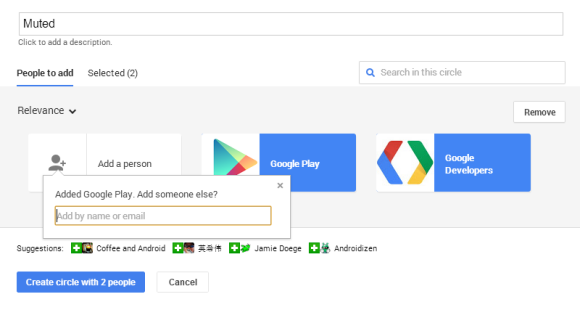
1. Create a new circle. You can call it Muted.


2. Add the people and pages you want to mute.


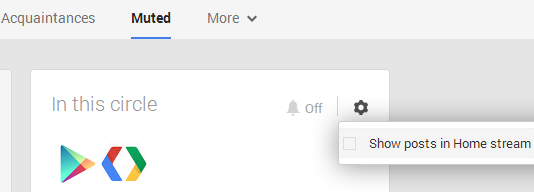
3. Go to your Google+ stream, click "More" below the search box and select the circle you've created.


4. Click the wheel icon from the "In this circle" box and uncheck "Show posts in Home stream".


5. You can add other people later to the Muted circle. You can also mute other circles or just pick "Amount: Fewer" from the settings menu instead of hiding all the posts.

Don’t Want To Pay For Red Hat Linux? Try CentOS Instead


centos_logo

In case you don't know already, most of the web is powered by Linux -- Facebook, Twitter, Google, and a vast majority of other major Internet sites use Linux for their servers. While server administrators can choose between multiple distributions for their enterprise or server setups, the primary leader of these distributions is Red Hat. However, Red Hat Enterprise Linux, or RHEL for short, costs a lot of money in support fees. If RHEL interests you but money is an issue, then it's almost a given to try CentOS.

Continue reading the article


Read full article: Don’t Want To Pay For Red Hat Linux? Try CentOS Instead


13 July 2013

Translate Multilingual Web Pages in Chrome


Google Translate usually detects the predominant language from a text. For example, an English text that includes a few sentences in German and French will be identified as an English text.


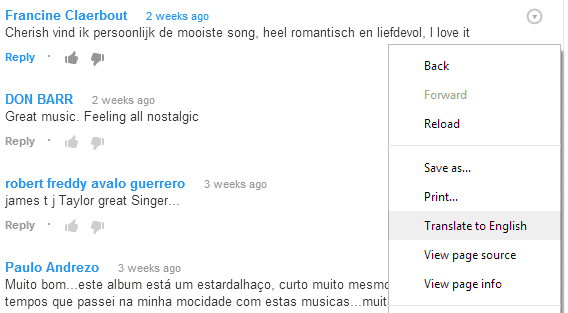
If you use the desktop Chrome in English and you visit an English page with a few comments in other languages, Chrome won't translate the page automatically and it won't show the translation bar. To translate the text that's not in English, right-click the page and select "Translate to English".


Here's an example from YouTube:


... and here's the translated page:


Chrome's translation bar says that the page has been translated from English to English. Amazingly, Google translated the comments in Dutch and Portuguese, while preserving the original English text.

Chrome for Android Adds Page Translation


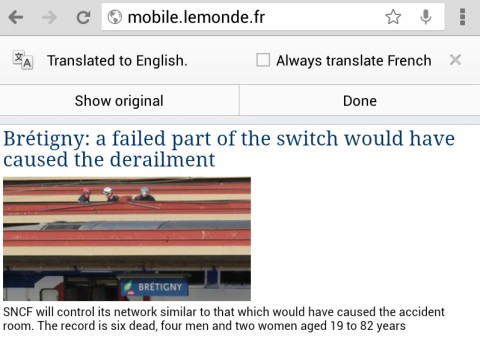
Chrome 28 for Android has a new feature that translates pages automatically. It uses Google Translate and it's similar to the desktop translation feature.


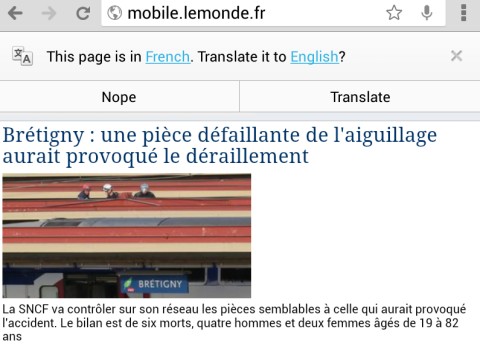
For some reason, Chrome for Android doesn't use the translation settings from the desktop Chrome. They're synced, but the mobile Chrome ignores them. Even if you've asked Chrome in the past to always translate French pages, you'll still see this message: "This page is in Fresch. Translate it to English?"


After the page is translated, you can check "Always translate French" and you'll no longer see the infobar at the top of the page. The desktop Chrome always shows the translation bar, even if you've selected this option.


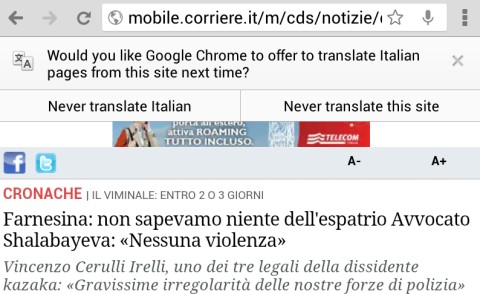
If you answer "no" two times in a row, you'll see an infobar that lets you choose between "never translate [this language]" and "never translate this site".


As you can see, there are a lot of missing features in the mobile Chrome. You can't change the language automatically detected by Google and you can't choose a different language for the translation. If you accidentally tap "Always translate" or "Never translate", the only way to see the infobar again is to go to the settings and reset translation settings.


If you want to disable the Google Translate integration, go to the Settings page, select "Content settings", then "Google Translate" and turn off this feature.

Find Out Where A Website’s Server Is Located With FlagFox and Flag for Chrome


flag_extensions_intro

Surprisingly, some of the best browser extensions are the most simplest. This is the case with FlagFox and Flag for Chrome. Both extensions display the national flag of a website's server location in the URL bar of their respective browser. This little flag can serve some interesting purposes, for example it can let you know which country a server is located in or help you identify a phishing website. Extensions are a key part of the browser experience. Let's see which camp scores more points in this comparison!

Continue reading the article


Read full article: Find Out Where A Website’s Server Is Located With FlagFox and Flag for Chrome


11 Video Game Personalities To Follow On Twitter


twittericon.jpg

Today, we are going to focus on video game personalities you can follow on Twitter. Plenty of journalists, developers, and brands post on Twitter all the time, and each one brings something interesting to the table. Sure, you can simply read video game articles to keep up with the latest video game news, but if you want a more candid view from the people in the industry, Twitter is the place to turn. Follow these people, and you will be happy you did.

Continue reading the article


Read full article: 11 Video Game Personalities To Follow On Twitter


How to Stay Organized With the World’s Simplest To-Do System That Works – Todo.txt


TodoTxt Intro

Here at MakeUseOf, we’ve covered plenty of to-do systems in the past. But if you’re like me, to-do systems can sometimes become too much work to maintain and end up costing you in productivity. I tend to procrastinate using my to-do lists because they can become cumbersome over time. I need to do a bunch of actions to add a single item. What if there was a system that eliminated all of that overhead and actually saved you time without skimping on the core features? Well, that system exists: Todo.txt.

Continue reading the article


Read full article: How to Stay Organized With the World’s Simplest To-Do System That Works – Todo.txt


How to Stay Organized With the World’s Simplest To-Do System That Works – Todo.txt


TodoTxt Intro

Here at MakeUseOf, we’ve covered plenty of to-do systems in the past. But if you’re like me, to-do systems can sometimes become too much work to maintain and end up costing you in productivity. I tend to procrastinate using my to-do lists because they can become cumbersome over time. I need to do a bunch of actions to add a single item. What if there was a system that eliminated all of that overhead and actually saved you time without skimping on the core features? Well, that system exists: Todo.txt.

Continue reading the article


Read full article: How to Stay Organized With the World’s Simplest To-Do System That Works – Todo.txt


How to Stay Organized With the World’s Simplest To-Do System That Works – Todo.txt


TodoTxt Intro

Here at MakeUseOf, we’ve covered plenty of to-do systems in the past. But if you’re like me, to-do systems can sometimes become too much work to maintain and end up costing you in productivity. I tend to procrastinate using my to-do lists because they can become cumbersome over time. I need to do a bunch of actions to add a single item. What if there was a system that eliminated all of that overhead and actually saved you time without skimping on the core features? Well, that system exists: Todo.txt.

Continue reading the article


Read full article: How to Stay Organized With the World’s Simplest To-Do System That Works – Todo.txt


A YouTube Experiment Increases Text Size


This is not a bug, it's an YouTube experiment that increases the text size for suggestion links to 19 pixels. I think the text is way too big and distracting.


Here's the regular interface (13 pixels):


Here's how you can enable the experimental feature. If you use Chrome, Firefox, Opera, Safari or Internet Explorer 8+:


1. open youtube.com in a new tab


2. load your browser's developer console:


* Chrome - press Ctrl+Shift+J for Windows/Linux/ChromeOS or Command-Option-J for Mac


* Firefox - press Ctrl+Shift+K for Windows/Linux or Command-Option-K for Mac


* Opera - press Ctrl+Shift+I for Windows/Linux or Command-Option-I for Mac, then click "Console"


* Safari - check this article


* Internet Explorer - press F12 and select the "Console" tab.


3. paste the following code which changes a YouTube cookie:


document.cookie="VISITOR_INFO1_LIVE=-fntp2HbKFI; path=/; domain=.youtube.com";window.location.reload();


4. press Enter and close the console.


To go back to the regular interface, use the same instructions, but replace the code from step 3 with this one:


document.cookie="VISITOR_INFO1_LIVE=; path=/; domain=.youtube.com";window.location.reload();

9 Ways To Bookmark Your Favorite Folders In Windows


favorites-star-icon.png

The Windows file system can be complicated, with folders scattered all over the place and even buried deep under other, hidden folders. If you need quick access to a variety of folders scattered across your file system -- or you just want easier access to one or two folders you frequently use -- there are a variety of ways you can bookmark these folders and make them more easily accessible. Whether you're using Windows 7 or Windows 8, these tips will give you quicker access to your most frequently used folders.

Continue reading the article


Read full article: 9 Ways To Bookmark Your Favorite Folders In Windows