Amit Singhal announced at Google I/O that this is "the end of search as we know it". The future of search goes beyond search results and it has more to do with answering questions, conversations and anticipating user's intentions.
Google has 3 products with similar goals: Knowledge Graph, Voice Search and Google Now. They go hand in hand to deliver the future of search today.
Voice Search has been available on the desktop if you're using Chrome, but now it's much better: it has been upgraded to the conversational voice search released last year for Android and iOS. Just click the microphone icon from the Google search box, ask questions and you'll get a spoken answer. Soon you'll be to just say "OK Google" to trigger voice search.
Google Search for Android added some new Google Now cards: reminders, last train home (Japan only), real time public transit updates and recommendations for books, games and music albums. Google Now can understand things like "remind me to call Susan tomorrow at 10", "when I go to Rome, remind me to buy a new suit" or "remind me to meet Dan when I get to work". You can create both time-based reminders and location-based reminders.
Voice Search is getting more sophisticated, the Knowledge Graph has more facts and connections between concepts, while Google Now gets smarter and tries to anticipate your searches.
The new Google Maps has three goals: creating personalized maps, making maps immersive and building the interface around maps. Just like Google Chrome removed unnecessary interface elements, Google developed a completely new Google Maps service without sidebars, buttons, search results boxes. It's a simplified experience that focuses on the maps.
"The entire map is now interactive. Clicking anywhere will focus the map on that location and show you helpful things, like related places and the best ways to get there."
Directions are easier to use because they integrate flight search and they compare multiple modes on transportation, so you can find the best one. Search results are directly placed on the map: icons and brief descriptions help you determine if they're useful.
Google Maps highlights the places that are important to you and it shows recommendations from experts and your Google+ circles. This way, you get a customized map that emphasizes the things that are relevant to you.
The new interface is powered by WebGL and it brings the Google Earth imagery to the browser without having to use plugins. Google has a different way to show some of the map layers like photos and satellite view, while other layers are missing.
Google will also update the mobile Google Maps apps for Android and iOS this summer and you'll finally get Google Maps for iPad.
The Google Reader users are habituated to bookmark their sites. Some others went ahead and used to subscribe their sites and updating them by using Emails. Out of all services, Google Reader service is very useful. Through the Gmail account, a Google reader can obtain whatever information required and by adding the information to their sites and selecting URLs and can obtain old posts from here. Therefore the Google network is providing an astonished facility to the users. This network has been functioning successfully since many years. But, due to some unavoidable reasons the Google shutting down this reader facility and this announcement is a shock to the users.
What are the Reasons?
In the Google Reader Blog post, the date of shutting down was announced as July,1st, 2013. As the Google Reader is retiring from the Global Internet by showing two reasons, which are very simple.
Usage of Google reader has declined and as a company we are pouring all of our energy into fewer products.
We think that kind of focus will make for a better user experience.
This announcement was published in the month of March. It is also advised the users to shift into better alternative services with in three months. It is also brought a new Service as Google Takeout service in order to collect the backup of the data deposited in Google reader website. Therefore with this new service the data preserved in not only in Google reader but also in Google account the entire data in Bloggers, Google+, Mails, Google drive data, Picasa Data, Youtube, etc can be collected.
What are the alternatives?
There are so many alternative websites came into existence in the place of Google reader. Some of them are
Feedly – It is very good web based application available also iOs and android application
Bloglines - Bloglines is the fastest way to find, track and vote on your favorite websites and blogs in real-time
Feedspot - Feedspot is the best RSS Reader with social features. It's Free
Old Reader (Minimalistic) : It's the ultimate RSS reader. Just like the old Google reader, only better. Import your subscriptions in one click,
News Blur (Open source) : NewsBlur is a personal news reader bringing people together to talk about the world. Web. iPad & iPhone. Android. Sign in. First.
RSS Bandit (You will get updates at your desktop with this application): A free desktop news aggregator for Windows built on the .NET Framework.
Conclusion:
The Google reader service is going to be shutdown on 1st July, 2013. So every user should backup the data preserved in their Reader services and should changes into alternative service as soon as possible.
Do not forget to share this post on Social Media like Facebook, Twitter, Google+ and Pinterest friends.
In a blog post on the official Windows blog, Microsoft today confirmed that Windows 8.1 will be the final name of codenamed Windows Blue update. The blog post also confirmed that Windows 8.1 will be available as a free update to existing Windows 8 and Windows RT users. According to the official blog, Windows 8.1 [...]
The Internet isn’t perfect. In fact, it’s far from it. For various reasons we may explore in a future We Ask You column, for every part of the Web we’re thankful for there is an annoyance we have to put up in order to be good netizens. The biggest of these is arguably the lack of privacy which is a truly unfortunate part of the way we share information about ourselves and others online for all the world to see.
However careful you may be about what you share on the Web, there is always a chance you’re leaking information. Websites collect data about you, which is then used to present you with relevant adverts. Social networks store updates and comments you make, any of which could come back to haunt you later in life. And that’s just the tip of the iceberg. Which is why we decided to ask you for your views on this issue.
The Results
We asked you, Does The Internet Need A ‘Delete’ Button? The question was prompted by comments made by Google Chairman Eric Schmidt, who, while defending his company’s policies, declared we needed to have a debate about the lack of a ‘Delete’ button on the Internet now rather than later. The MakeUseOf readership delivered.
We received a healthy number of comments, and although this isn’t a discussion that can be neatly summed up in a few words, we can try to reach a consensus of sorts.
Most commenters accepted that while a ‘Delete’ button would be nice, it’s not feasible. The best we can ever hope for may be “something like a simple dashboard which shows all websites and services I am active on and lets me delete my identity and traces from selected web services,” as suggested by Harshit J. Even that may be wishful thinking.
A couple of people mentioned the usefulness of the Internet for future historians, who will need to see the data intact in order to make sense of how civilization looked at the start of the 21st century. But that wasn’t enough to convince people that we shouldn’t be the sole arbiters over the fate of our own personal data.
Comment Of The Week
We had great input from the likes of Rob H, BiG eViL, and Lisa Santika Onggrid, to name just a few. Comment Of The Week goes to dragonmouth, who, as well as the respect of myself and hopefully everybody reading this, receives 150 points to use for MakeUseOf Rewards.
While it might be nice to have, it is much too late for a “Delete” button. Pandora’s box has been opened and cannot be closed. There are too many entities in possesion of our data to even contemplate its complete deletion. Besides, each and every entity will argue very strongly for their right/need to retain the data. By saying “there are times when erasure [of data] is the right thing … and there are times when it is inappropriate.” Mr.Schmidt is already positioning himself to argue Google case for retention of any data in their possession.
“How do we decide?”
WE don’t decide. The owner of the data decides. Mr. Schmidt and his employers DO NOT have a say in the matter. Unless they are following the maxim that possession is 9/10ths of the law.
” We have to have that debate now.”
There is no debate, there is no “WE”. If, as the owner of the data, I decide to expunge it from the Internet, not Mr.Schmidt, not his employers, not the government have any say in it. Privacy is like being pregnant, either you are or you’re not, either we have privacy or we don’t. There is no partial privacy just as there is no partial pregnancy.
Of course, in the real world everybody wants to know everything about everybody. Whether it is vital for business interests, as in the case of Google, Amazon, etc., or for “national interests” as is the case with governments, we will never be allowed to expunge traces of ourselves from the Internet.
We liked this comment because it strongly argues the case for why a ‘Delete’ button is improbable (likely impossible) at this stage of the game. It also addresses Schmidt’s points directly, cutting through the notion that he might be working on our behalf rather than on the behalf of his company.
We will be asking a new question tomorrow, so please join us then. We Ask You is a weekly column dedicated to finding out the opinions of MakeUseOf readers. We ask you a question and you tell us what you think. The question is open-ended and is usually open to debate. Some questions will be purely opinion-based, while others will see you sharing tips and advice, or advocating tools and apps for your fellow MakeUseOf readers. This column is nothing without your input, all of which is valued.
Rick Klau, who is now a partner at Google Ventures, gave an interesting talk about Google OKRs. "Objectives and Key Results" (OKRs) have been used by Google since 1999 and they're a great way to set ambitious goals and to measure how much you've achieved. Each Google employee has his own OKRs, each Google team has a few OKRs and there are some Google-wide OKRs that reflect the most important priorities of the company. All OKRs are public inside the company, so each employee knows what's going on.
There are yearly OKRs and there are quarterly OKRs. Usually there are no more than 5 objectives and each objective has a few key results that help you determine the progress. Key results have to be measurable. An example of objective is improving Gmail revenue and a key result could be adding a new ad format that doubles the CTR (click-through rate). At the end of the quarter, you can grade each key result and attribute a value from 0 to 1.0. Apparently, it's best when your average grade is somewhere between 0.6 and 0.7. If your grades are higher, the goals aren't ambitious enough.
"To make sure our products work seamlessly together across Google, we're focusing more on broader OKRs – big company goals that can only be achieved if everyone works together. For example, a recent OKR objective for our search team was to improve the world's information and make it universally accessible and useful, which restates and reiterates the company's mission statement. The key results underneath that objective included metrics and projects for the quarter, many of which span a number of teams, ensuring a well-coordinated push toward a shared goal. Having these shared goals also has the benefit of helping prevent the formation of silos – always a concern as companies grow," explains a Google Think Insights article.
Rick Klau joined Google from the FeedBurner acquisition and he worked on products like Blogger, Google Profiles and YouTube. The talk includes some examples of OKRs for Blogger. Back in 2008, the most important objective for Blogger was to improve revenue.
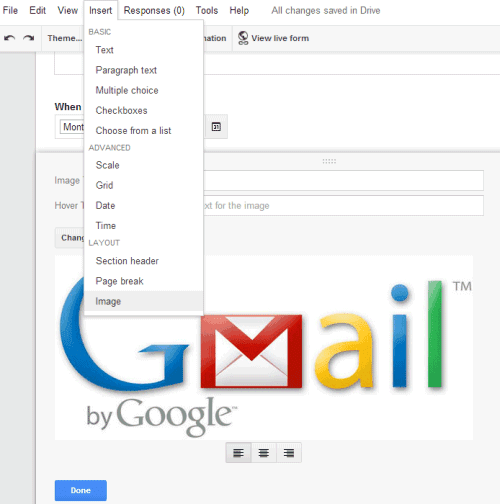
You can now add images to Google Forms. Just click the "Insert" menu, select "Image" and upload the image you want to add. You can also select an image from Google Drive, Google+ Photos, take a snapshot, enter the URL or use Google Image Search to find the right image.
"Photos can be resized, centered, or swapped out for another photo with just a few simple clicks," informs Google. You can also enter an image title and a hover text.
It's another feature that makes Google Forms more useful, just like the new question types for date and time. Next up: rich-text editing.
Last week I invited you to a MakeUseOf Hangout. This past Friday, six loyal readers joined me and contributed to a great conversation around MakeUseOf and technology in general. We received a lot of valuable feedback from this chat. Moreover, participants seemed to really enjoy to talk tech with fellow-minded people, which was also reflected in their comments after the Hangout was finished.
This actually wasn’t our first meet & greet with readers on Google Hangouts. Several months ago Jackson ran a spontaneous and open-to-all Hangout on which James and I joined him. It was a very good learning experience and really helped me in preparing this second attempt.
The Invitation Process
My public invitation contained a brief form, based on which I chose participants. Given the short notice and the specific time zone, the response was not overwhelming, but I still couldn’t invite everyone who responded to the form. I picked nine readers who seemed enthusiastic to join and most of whom I had seen commenting on MakeUseOf before.
In my personal invitation to the Hangout, I was very clear about expectations. My intention was to avoid people talking over each other, being rude, or trying to control the conversation. The trick with these expectations is that you should never mention what you don’t want people to do because you risk planting an idea in their head, which might have an undesired impact. Just try not to think of pink elephants for a moment. So instead of making a list of rules, I shared with them how I envisioned our get together. Now I have to admit that I don’t know whether this actually worked or whether we just have the most awesome readers on this planet; I will leave that up to your own judgement.
The Participants
Unfortunately, not everyone could make it in the end. However, the smaller size of the group allowed everyone to participate more and we could cover a broader range of topics.
The readers who joined me were (left to right in image below):
Alex from the US, college student majoring in web design.
Kay from Germany, working in the test department of a European mobile operator.
Nazim from France, high school student, music composer, and writer for the French website Fandroid.
Paul from the US, retired Marine and self-employed in IT support.
Rajaa from India, freelance IT consultant.
Siddhant from Singapore, middle school student.
We had quite a range in terms of age, origin, and professions, which made for interesting conversations.
When & How Did You Discover MakeUseOf?
One of the things I am really interested in is how people discover MakeUseOf. With five loyal readers being my guests, I made this my kick-off question. Kay was the first one to take the chance and share his story.
Kay’s employer was looking to do more innovative stuff and while looking for resources online, Kay found MakeUseOf. With time, it became his first stop for inspiration.
If you surround yourself with innovative stuff – software, hardware, whatever – you will be much better in creating your stuff, it’s very inspiring. – Kay
Nazim found MakeUseOf two years ago while searching for Windows application reviews. He read a few articles and found the website so attractive that he subscribed to our RSS feed.
Actually I’m now reading [the feed] every day. In the two years, I read every article of MakeUseOf. – Nazim
Nazim appreciates the diversity of articles and the comprehensive nature of each of our articles.
Alex discovered MakeUseOf in 2008 and has been visiting it on a daily basis since.
Rajaa doesn’t remember how he came across MakeUseOf, but probably through Facebook about a year and a half ago. What attracted him was the variety, ranging from Windows to mobile environment. What really got him hooked was the Q&A section, where he has been an active volunteer in answering questions.
It gives a lot of satisfaction if you can help someone. – Rajaa
When I ask them what they feel is missing, Rajaa brings up MakeUseOf’s lack of a mobile app, a question that has come up occasionally on MakeUseOf Answers. Rajaa recommends us to look into this environment to make it easier for people to follow feeds. Alternatively, he says we could plug our feeds into Pulse.
What Gadgets Do You Have?
Alex, Nazim, and Kay show off their gadget collection. Alex uses one of the first Nook eReaders and Nazim recommends the Nexus 4 as one of the best Android phones. Kay loves his Samsung Galaxy Notes II phablet because his hands are quite big. Rajaa has an entry level Android with a QWERTY keyboard, which he prefers over touch input. Kay and Alex chime in that they prefer keyboards too, and Kay wishes that a new Android with a keyboard would come out. Alex says his last two phones had a QWERTY keyboard and points out that if you really need a keyboard, you can just attach a Bluetooth keyboard. He refers to one of his favorite MakeUseOf articles, which was about turning your smartphone into a desktop replacement.
Who Are Your Favorite Writers?
Since we are on the topic of writers, I wonder whether they like anyone in particular. Alex is careful to say that he is not paying attention to the writers (obviously he isn’t!) and immediately adds that everyone has good articles, so nobody stands out.
Rajaa on the other hand openly confesses that he is biased towards Saikat because he is from India. He has also been enjoying articles from Kannon and, as he says, obviously James. Rajaa feels that James is our most technically sound writer, which is of course reflected in his articles.
Being our resident über geek and a routine podcast host, I asked James to stand by for emergency support in case things go awry. So I have him on GTalk and the moment Rajaa’s statement is aired, I receive a very happy comment from him.
Rajaa continues that he really enjoys the opinion polls and the We Ask You section hosted by Yaara and Dave Parrack. He bemoans that it has become harder to find those articles since we removed their dedicated URLs (category or tag).
Like Alex, Kay admits that he doesn’t follow authors, even though he has written articles himself for several magazines. Nazim explains his impression that everyone on the team has their niche.
So I ask them whether there is something that unites our writing and makes our articles recognizable as MakeUseOf articles.
I think it’s the whole group combined that gives [MakeUseOf] the power. I even think it’s better if no one stands out. – Kay
Like Nazim, Kay thinks everyone has their specialty. He compares it to his work of reviewing mobile phone features and says it would be awful if he started writing about topics he isn’t comfortable with.
On Gadgets & Technology
After receiving so much MakeUseOf related feedback, I switched to more general topics that I hope are close to our geeks’ hearts. Last year Ryan wrote an article on Why You Never Forget Your First Computer, which received a flood of engaged comments, so I ask them about their first computer and their favorite gadget.
We also discuss the challenges of IT support.
I have to learn what they want and learn to get them what they want with their equipment, if it’s possible. – Paul
Paul recommends Soluto and we learn that he is an alpha tester for them, helping with developing the application. Erez has reviewed Soluto for MakeUseOf.
From IT support, we move on to discussing the future of operating systems, Cloud security, software licensing and subscription models, innovation at Apple, and much more. If you would like to see the whole conversation, you have the chance to watch it on YouTube.
Just a small correction. There was a misunderstanding on my part when Rajaa asked about hardware rewards. Unfortunately, hardware rewards are not available for all countries. However, we did change back our policy on Giveaway contests, which are open to participants worldwide.
Conclusion
It was incredibly rewarding and inspiring to host such a knowledgeable and geeky group of people. In review it would have been nice to have a co-host to take care of the chat and some technical details. Sometimes it was hard for me to focus on the conversation. For next time, I’m hoping our YouTube channel will be properly set up, that we will give readers more of a heads-up for participating. We will promote the event more beforehand and maybe take in live feedback from a bigger audience.
Finally, I want to express my gratitude to Alex, Kay, Nazim, Paul, Rajaa, and Siddhant for joining me. It was a pleasure to have all of you in this hangout! I very much appreciate your patience while I was prototyping what will hopefully become a regular event at MakeUseOf. Thank you very much!
If you own a Windows 8 tablet or notebook and running out of storage space, you can utilize the microSD memory card slot on your tablet/notebook to add a microSD memory card and then configure Windows to install Modern (Metro) apps on it. While most of the desktop programs out there offer an option to [...]
Quite a few free tools out there to help you create bootable USB drive from Windows ISO file. While using the native Command Prompt method remains to be the best method to prepare bootable USB thumb drive and install Windows from it, not all users are comfortable with command line and prefer using third-party software [...]
Is this the first Google Image Search Easter Egg? Search for [atari breakout] and you can play Atari's Breakout game. It's an arcade game introduced in April 1976. The game has an interesting story that involves Steve Jobs and Steve Wozniak and it influenced Steve Wozniak's design for the Apple II computer.
"In the game, a layer of bricks lines the top third of the screen. A ball travels across the screen, bouncing off the top and side walls of the screen. When a brick is hit, the ball bounces away and the brick is destroyed. The player loses a turn when the ball touches the bottom of the screen. To prevent this from happening, the player has a movable paddle to bounce the ball upward, keeping it in play."
If you've ever wanted a Chrome extension that combines the most important Google services and lets you quickly switch between them, check Black Menu. It's based on the short-lived vertical menu launched by Google in 2011, but it offers more features than Google's menu.
Mouse over each menu item and you'll get a gadget-like interface for a Google service. You can check your mail, compose new messages, create calendar events, add tasks, check your Google+ notifications, share pages to Google+, read the latest news, use Google Translate and Google Search, upload files to Google Drive, quickly search Google Drive and more.
Mouse over the links section and you'll see some useful links for the Google service you've selected. It's great for quickly checking your favorite YouTube videos or creating a Google contact.
You can rearrange menu items and add new ones from the "more" section. For example, you can add the URL shortener option to quickly create a short URL for the current page. Add the Chrome Apps menu item to get a Chrome launcher that includes the apps you've installed in Chrome.
Black Menu is like a simplified iGoogle for Google services. Actually, the extension uses some iGoogle gadgets, but they'll need to be replaced before iGoogle is gone.
For many of us, Twitter is fine just the way it is. Despite what you may think, I’m not going to say otherwise. Twitter truly is fine just the way it is. The thing is, and much like everything else, it can also be better, and making it better doesn’t necessarily involve using a third-party client.
If you’re the kind of person who prefers to leave things in the browser, certain Chrome Twitter extensions can help you get all sorts of fun and useful Twitter features without having to resort to out-of-the-browser clients. Whether you’re looking to save time when sharing webpages, save brain cells when reading your stream, or retweet the good old way from Twitter’s native interface, there are ways to do so without leaving your browser. Try the Chrome Twitter extensions below to find out!
PowerInbox is a browser extension available for Chrome, Firefox, Safari and IE, which takes your regular Twitter emails and makes them much more useful by turning them interactive. In fact, PowerInbox does its trick with many additional services besides Twitter, including Instagram, Facebook, Tumblr, Spotify, Pinterest, and others.
Focusing on Twitter, PowerInbox makes it so you can actually make use of those pesky email updates you keep getting from Twitter, such as “you have a new follower” or “Bla and BlaBla have tweets for you”. After installing the add-on and signing into your Twitter account, emails from Twitter will start looking something like this:
As you can see, instead of getting a simple alert you can’t do much with, PowerInbox makes it so you can follow users from within the email, send tweets, and in other emails also view your stream, reply, retweet, and favorite tweets.
PowerInbox has an on/off button on top of every supported email, so if you don’t feel like viewing interactive content, you can simply turn it off and turn it back on when you’re ready for more.
Tareem Extender takes your good old Twitter interface, and powers it up with some new and useful features. While I couldn’t get every single feature listed to work, the extension still adds a considerable amount of them. Starting with features that actually work, Tareem Extender adds an old retweet button to every tweet, as well as a DM button and a quick translate button to translate tweets from English into dozens of languages.
You can also set the extension to highlight your mentions in the stream, and to show desktop notifications for your Twitter mentions.
So what didn’t work? Tareem Extender claims to include a built-in link shortener, which I couldn’t get to work, as well as a “speak to tweet” feature which was no where to be found. Considering Twitter’s ever changing API and interface, I’m assuming some features just stopped working over time, but where it counts, Tareem Extender provides the means to use Twitter’s native interface to much better results.
Most blogs and websites include a tweet button of some kind, but these are located in a different spot on every page, and might even look different from website to website. In addition, most of these buttons are just extensions of the twitter.com webpage, and as such don’t let you use your personal link shortener. Tweet This Page can change that.
Tweet This Page is a simple Chrome Twitter extension that makes it super easy to tweet a link to any page you’re on. Want to share a link on Twitter? Click the new Twitter button on the right side of Chrome’s address bar to create the tweet. You can set Tweet This Page to use your personal bit.ly account and to automatically use selected text as the tweet body, making it possible to click and tweet in seconds.
Silver Bird is a fully-fledged Twitter client built into a Chrome extension. Behind a colorful bird icon hides a simple interface that nonetheless includes pretty much anything you could wish for in a Twitter client. And what’s more, it’s all completely customizable.
From the icon’s color at any given moment, to the interface’s font and color, to the compose area’s position, Silver Bird is like a mold you can shape as your own. With its built-in pop-up notifications, built-in link shortener, its ability to add images to tweets and its handy suspend option for when you really need to concentrate, you may never need to venture into twitter.com again.
Twitter too noisy? Larry Filter can make it a quieter place with the help of some well-placed filters. This handy extension lets you set keywords and hashtags you’re not interested in, and either hide them completely, or increase opacity on tweets that include them.
While this is not the only way to filter tweets, I love Larry Filter for its simplicity, and for its ability to only half hide the culprit tweets. This way, I can make sure I’m not missing anything important, and still have a quieter Twitter feed. It’s like having my cake and eating it too!
As always, we’d also love to hear some of your recommendations. Are there any Chrome twitter extension you find invaluable? What makes your Twitter life easier? Share your favorites in the comments.



 The Internet isn’t perfect. In fact, it’s far from it. For various reasons we may explore in a future We Ask You column, for every part of the Web we’re thankful for there is an annoyance we have to put up in order to be good netizens. The biggest of these is arguably the lack of privacy which is a truly unfortunate part of the way
 Last week I


 For many of us, Twitter is fine just the way it is. Despite what you may think, I’m not going to say otherwise. Twitter truly is fine just the way it is. The thing is, and much like everything else, it can also be better, and making it better doesn’t necessarily involve using a third-party client.


