23 March 2019

Planning for the uncertain future of work


In a recently published, roughly 75-page report, British non-profit organization The Royal Society for the Encouragement of Arts (RSA) outlined several scenarios for how the UK labor market will be impacted by frontier technologies such as automation, AI, AVs and more.

The analysis titled “The Four Futures of Work” was conducted in collaboration with design and consulting firm Arup and was spearheaded by the RSA’s “Future Work Centre”, which focuses on the impact of new technologies on work and is backed by law firm Taylor Wessing, the Friends Provident Foundation, Google’s philanthropic arm Google.org and others.

The report is less of a traditional research paper and more of a qualitative, theoretical and abstract exploration of how the world might look depending on how certain technological and sociological variables (immigration, political will, etc.) develop. The authors don’t try to estimate growth paths for new technologies nor do they try to reach a definitive conclusion on what the future of work will look like. The work instead looks to lay out multiple possible outcomes in order to help citizens prepare for transformations in labor and to derive policy recommendations to mitigate externalities in each scenario.

As opposed to traditional quantitative data-based methodologies, research was conducted using “morphological scenario analysis.” The authors’ worked with technologists, industry executives and academic researchers to identify the technological and non-technological uncertainties that will have a critical impact on the future of work, before projecting three (minimal impact, moderate impact, and severe impact) possible scenarios of how each will look by the year 2035. With input from the report’s collaborators, the researchers then chose the four most compelling and sensical scenarios for how the future of work look.

The value of the report depends entirely on how readers intend to use it. If one hopes to gauge market sizes or inform forecasts or is looking for scientific, quantitative research with data — they should not read this. The report is more useful as a way to understand the different ways new technologies may evolve through thought-provoking, fun-yet-probabilistic, and poetic narratives of hypothetical future economic structures and how they might function.

Rather than summarize the four detailed scenarios in the report and all the conclusions discussed, which can be found in the executive summary or full report, here are a few takeaways and the most interesting highlights in our view:

The underwhelming:


Read Full Article

How Nuro plans to spend Softbank’s $940 million


Autonomous delivery startup Nuro is bursting with ideas since SoftBank invested nearly $1 billion in February, new filings reveal.

A recent patent application details how its R1 self-driving vehicle could carry smaller robots to cross lawns or climb stairs to drop off packages. The company has even taken the step of trademarking the name “Fido” for delivery services.

“We think there’s something neat about that name,” Nuro founder Dave Ferguson told TechCrunch. “It’s friendly, neighborly and embodies the spirit of a helper that brings you things. It wasn’t intended to extend towards literal robot dogs, although some of the legged platforms that others are building could be very interesting for this last 10-foot problem.”

Another section of Nuro’s patent shows the R1 delivering piping hot pizza and beverages, prepared en route in automated kitchens.

“We tried to build a lot of flexibility into the R1’s compartment so we could serve all the applications that people will be able to think of,” Ferguson said. “A coffee machine is actually a pretty good one. If you go to your local barista, those machines are incredibly expensive. Amortizing them over an entire neighborhood makes sense.”

As automated technologies mature, companies are focusing less on simply getting around and more on how services will connect with actual customers. Delivering goods instead of passengers also means fewer regulations to navigate.

That opportunity has prompted a number of companies, including e-commerce and logistics giant Amazon, FedEx, and numerous startups to explore autonomous delivery.  At CES this year, Continental unveiled a prototype dog-shaped robot for last-yard deliveries, while Amazon has unveiled a sidewalk robot called Scout that is already delivering packages to homes.

The first company to scale automated driving and delivery could start building revenue while those aiming for autonomous taxis are stuck in a maze of laws, safety concerns and consumer skepticism.

Origin story

Softbank’s capital allows Nuro’s founders to run with its many ideas. But even in its earliest days, they benefited from an early injection of cash.

Nuro was founded in June 2016 by Ferguson and another former Google engineer, Jiajun Zhu, after they received multi-million dollar payouts from the company’s infamous Chauffeur bonus plan. Chauffeur bonuses were intended to incentivize engineers who stuck with Google’s self-driving car project. However, the plan’s structure meant that anyone who left after the first payout in 2015 would also receive a large lump sum.

Lead engineer Anthony Levandowski appears to have earned over $125 million from the plan. He used some of the money to start Otto, a self-driving truck company that was acquired by Uber and subsequently became the focus of an epic patent and trade secrets theft lawsuit.

Court filings from that case suggest that Ferguson and Zhu received around $40 million each, although Ferguson would not confirm this. (Another Chauffeur alum, Russell Smith, got a smaller payout and quickly joined Nuro as its hardware lead).

Nuro completed its first Series A funding round in China just three months later, in a previously unreported deal that gave NetEase founder Ding Lei (aka William Ding) a seat on Nuro’s board. Ding was China’s first Internet and gaming billionaire, and was reportedly once the wealthiest person in China. However, his business empire, which spans e-commerce, education and pig farming, recently laid off large numbers of staff.

“William has been a board member and a strong supporter from the very start. But he’s not directing company decisions,” says Ferguson.

A second, U.S.-based round in June 2017 raised Nuro’s total Series A funding to $92 million.

A Nuro spinout

Nuro started pilot grocery deliveries last summer with a Kroger supermarket affiliate in the Phoenix suburb of Scottsdale. The pilot initially used modified Toyota Prius sedans and transitioned in December to its R1 vehicle. “We’re super excited about the application area,” says Ferguson. “87 percent of commerce is still local and 43 percent of all personal vehicle trips in the U.S. are for shopping and running errands.”

Meanwhile, Uber’s self-driving truck program, which had begun with the acquisition of Otto, was on its last legs. Although the program was not publicly canned until July 2018, many of its key personnel left in May. The LinkedIn profiles of engineers Jur van den Berg, Nancy Sun and Alden Woodrow show them going straight from Uber to found Ike, another self-driving truck startup, the same month.

When Ike came out of stealth mode in October, Nuro characterized its relationship with the new company as a partnership, where “we gave Ike a copy of our autonomy and infrastructure software and, in exchange, Nuro got an equity stake in Ike.”

In reality, Ike was more of a spinout. California and Delaware business records show that Ike was not incorporated until July, and shared office space with Nuro until at least the beginning of September. Ike’s founding engineers actually worked at Nuro after leaving Uber. Van den Berg can even be seen in a Nuro team photo that was shot in June and reproduced in Nuro’s Safety Report, wearing a Nuro T-shirt.

Ferguson confirmed that all three Ike founders had worked at Nuro before starting Ike.

“We are always looking for opportunities where the tech that we’ve built could help,” Ferguson said. “Trucking was a really good example, but we recognized that as a company, we couldn’t spread ourselves too thin. It made sense for both sides for the Ike co-founders to build their own independent company.”

Ike CEO Woodrow told TechCrunch recently that it’s using Nuro’s hardware designs and autonomous software, as well as data logging, maps and simulation systems. It raised $52 million in its own Series A in February.

Not to be outdone, Nuro quickly followed with an announcement of a $940 million investment by the SoftBank Vision Fund, in exchange for what Ferguson calls a “very, very significant ownership stake.” Nuro had been introduced to SoftBank after talks with Cruise fell through.

Thousands of bots

Apart from robotic dogs, what does the future hold for a newly cash-rich Nuro?

“We’re very excited about the Scottsdale pilot, but it’s basically one grocery store in one ZIP code,” says Ferguson. Shortly after our interview, Nuro announced that it would be expanding its delivery service to four more ZIP codes in Houston, Texas.

“Next year and onwards, we want to start to realize the potential of what we’re building to eventually service millions of people” Ferguson said. We’re aggressively expanding the number of partners we’re working with and we’re working on how we manufacture a vehicle at a large scale.”

Nuro will likely to partner with an established auto OEM to build a fleet of what Ferguson hopes will become tens or hundreds of thousands of driverless vehicles. Last week, it petitioned the National Highway Traffic Safety Administration (NHTSA) for exemptions to safety standards that do not make sense for a driverless vehicle – like having to install a windshield or rearview mirrors.

Nuro told NHTSA that it wants to introduce up to 5,000 upgraded vehicles called the R2X, over the next two years. The electric vehicles would have a top speed of 25 miles per hour and appear very similar to the R1 prototype operating in Arizona and Texas today. The R2X will have 12 high-def cameras, radars, and a top-mounted LiDar sensor. Nuro said it would not sell the vehicle but “own and centrally operate the entire fleet of R2Xs through partnerships with local businesses.”

“Providing services is also very expensive,” Ferguson explained. “Look at Uber or Lyft. As we scale up to the population we’re trying to serve and the number of verticals we’re looking at, it requires capital to operate until we’re profitable, which will not happen this year.”


Read Full Article

The damage of defaults


Apple popped out a new pair of AirPods this week. The design looks exactly like the old pair of AirPods. Which means I’m never going to use them because Apple’s bulbous earbuds don’t fit my ears. Think square peg, round hole.

The only way I could rock AirPods would be to walk around with hands clamped to the sides of my head to stop them from falling out. Which might make a nice cut in a glossy Apple ad for the gizmo — suggesting a feeling of closeness to the music, such that you can’t help but cup; a suggestive visual metaphor for the aural intimacy Apple surely wants its technology to communicate.

But the reality of trying to use earbuds that don’t fit is not that at all. It’s just shit. They fall out at the slightest movement so you either sit and never turn your head or, yes, hold them in with your hands. Oh hai, hands-not-so-free-pods!

The obvious point here is that one size does not fit all — howsoever much Apple’s Jony Ive and his softly spoken design team believe they have devised a universal earbud that pops snugly in every ear and just works. Sorry, nope!

A proportion of iOS users — perhaps other petite women like me, or indeed men with less capacious ear holes — are simply being removed from Apple’s sales equation where earbuds are concerned. Apple is pretending we don’t exist.

Sure we can just buy another brand of more appropriately sized earbuds. The in-ear, noise-canceling kind are my preference. Apple does not make ‘InPods’. But that’s not a huge deal. Well, not yet.

It’s true, the consumer tech giant did also delete the headphone jack from iPhones. Thereby depreciating my existing pair of wired in-ear headphones (if I ever upgrade to a 3.5mm-jack-less iPhone). But I could just shell out for Bluetooth wireless in-ear buds that fit my shell-like ears and carry on as normal.

Universal in-ear headphones have existed for years, of course. A delightful design concept. You get a selection of different sized rubber caps shipped with the product and choose the size that best fits.

Unfortunately Apple isn’t in the ‘InPods’ business though. Possibly for aesthetic reasons. Most likely because — and there’s more than a little irony here — an in-ear design wouldn’t be naturally roomy enough to fit all the stuff Siri needs to, y’know, fake intelligence.

Which means people like me with small ears are being passed over in favor of Apple’s voice assistant. So that’s AI: 1, non-‘standard’-sized human: 0. Which also, unsurprisingly, feels like shit.

I say ‘yet’ because if voice computing does become the next major computing interaction paradigm, as some believe — given how Internet connectivity is set to get baked into everything (and sticking screens everywhere would be a visual and usability nightmare; albeit microphones everywhere is a privacy nightmare… ) — then the minority of humans with petite earholes will be at a disadvantage vs those who can just pop in their smart, sensor-packed earbud and get on with telling their Internet-enabled surroundings to do their bidding.

Will parents of future generations of designer babies select for adequately capacious earholes so their child can pop an AI in? Let’s hope not.

We’re also not at the voice computing singularity yet. Outside the usual tech bubbles it remains a bit of a novel gimmick. Amazon has drummed up some interest with in-home smart speakers housing its own voice AI Alexa (a brand choice that has, incidentally, caused a verbal headache for actual humans called Alexa). Though its Echo smart speakers appear to mostly get used as expensive weather checkers and egg timers. Or else for playing music — a function that a standard speaker or smartphone will happily perform.

Certainly a voice AI is not something you need with you 24/7 yet. Prodding at a touchscreen remains the standard way of tapping into the power and convenience of mobile computing for the majority of consumers in developed markets.

The thing is, though, it still grates to be ignored. To be told — even indirectly — by one of the world’s wealthiest consumer technology companies that it doesn’t believe your ears exist.

Or, well, that it’s weighed up the sales calculations and decided it’s okay to drop a petite-holed minority on the cutting room floor. So that’s ‘ear meet AirPod’. Not ‘AirPod meet ear’ then.

But the underlying issue is much bigger than Apple’s (in my case) oversized earbuds. Its latest shiny set of AirPods are just an ill-fitting reminder of how many technology defaults simply don’t ‘fit’ the world as claimed.

Because if cash-rich Apple’s okay with promoting a universal default (that isn’t), think of all the less well resourced technology firms chasing scale for other single-sized, ill-fitting solutions. And all the problems flowing from attempts to mash ill-mapped technology onto society at large.

When it comes to wrong-sized physical kit I’ve had similar issues with standard office computing equipment and furniture. Products that seems — surprise, surprise! — to have been default designed with a 6ft strapping guy in mind. Keyboards so long they end up gifting the smaller user RSI. Office chairs that deliver chronic back-pain as a service. Chunky mice that quickly wrack the hand with pain. (Apple is a historical offender there too I’m afraid.)

The fixes for such ergonomic design failures is simply not to use the kit. To find a better-sized (often DIY) alternative that does ‘fit’.

But a DIY fix may not be an option when discrepancy is embedded at the software level — and where a system is being applied to you, rather than you the human wanting to augment yourself with a bit of tech, such as a pair of smart earbuds.

With software, embedded flaws and system design failures may also be harder to spot because it’s not necessarily immediately obvious there’s a problem. Oftentimes algorithmic bias isn’t visible until damage has been done.

And there’s no shortage of stories already about how software defaults configured for a biased median have ended up causing real-world harm. (See for example: ProPublica’s analysis of the COMPAS recidividism tool — software it found incorrectly judging black defendants more likely to offend than white. So software amplifying existing racial prejudice.)

Of course AI makes this problem so much worse.

Which is why the emphasis must be on catching bias in the datasets — before there is a chance for prejudice or bias to be ‘systematized’ and get baked into algorithms that can do damage at scale.

The algorithms must also be explainable. And outcomes auditable. Transparency as disinfectant; not secret blackboxes stuffed with unknowable code.

Doing all this requires huge up-front thought and effort on system design, and an even bigger change of attitude. It also needs massive, massive attention to diversity. An industry-wide championing of humanity’s multifaceted and multi-sized reality — and to making sure that’s reflected in both data and design choices (and therefore the teams doing the design and dev work).

You could say what’s needed is a recognition there’s never, ever a one-sized-fits all plug.

Indeed, that all algorithmic ‘solutions’ are abstractions that make compromises on accuracy and utility. And that those trade-offs can become viciously cutting knives that exclude, deny, disadvantage, delete and damage people at scale.

Expensive earbuds that won’t stay put is just a handy visual metaphor.

And while discussion about the risks and challenges of algorithmic bias has stepped up in recent years, as AI technologies have proliferated — with mainstream tech conferences actively debating how to “democratize AI” and bake diversity and ethics into system design via a development focus on principles like transparency, explainability, accountability and fairness — the industry has not even begun to fix its diversity problem.

It’s barely moved the needle on diversity. And its products continue to reflect that fundamental flaw.

Many — if not most — of the tech industry’s problems can be traced back to the fact that inadequately diverse teams are chasing scale while lacking the perspective to realize their system design is repurposing human harm as a de facto performance measure. (Although ‘lack of perspective’ is the charitable interpretation in certain cases; moral vacuum may be closer to the mark.)

As WWW creator, Sir Tim Berners-Lee, has pointed out, system design is now society design. That means engineers, coders, AI technologists are all working at the frontline of ethics. The design choices they make have the potential to impact, influence and shape the lives of millions and even billions of people.

And when you’re designing society a median mindset and limited perspective cannot ever be an acceptable foundation. It’s also a recipe for product failure down the line.

The current backlash against big tech shows that the stakes and the damage are very real when poorly designed technologies get dumped thoughtlessly on people.

Life is messy and complex. People won’t fit a platform that oversimplifies and overlooks. And if your excuse for scaling harm is ‘we just didn’t think of that’ you’ve failed at your job and should really be headed out the door.

Because the consequences for being excluded by flawed system design are also scaling and stepping up as platforms proliferate and more life-impacting decisions get automated. Harm is being squared. Even as the underlying industry drum hasn’t skipped a beat in its prediction that everything will be digitized.

Which means that horribly biased parole systems are just the tip of the ethical iceberg. Think of healthcare, social welfare, law enforcement, education, recruitment, transportation, construction, urban environments, farming, the military, the list of what will be digitized — and of manual or human overseen processes that will get systematized and automated — goes on.

Software — runs the industry mantra — is eating the world. That means badly designed technology products will harm more and more people.

But responsibility for sociotechnical misfit can’t just be scaled away as so much ‘collateral damage’.

So while an ‘elite’ design team led by a famous white guy might be able to craft a pleasingly curved earbud, such an approach cannot and does not automagically translate into AirPods with perfect, universal fit.

It’s someone’s standard. It’s certainly not mine.

We can posit that a more diverse Apple design team might have been able to rethink the AirPod design so as not to exclude those with smaller ears. Or make a case to convince the powers that be in Cupertino to add another size choice. We can but speculate.

What’s clear is the future of technology design can’t be so stubborn.

It must be radically inclusive and incredibly sensitive. Human-centric. Not locked to damaging defaults in its haste to impose a limited set of ideas.

Above all, it needs a listening ear on the world.

Indifference to difference and a blindspot for diversity will find no future here.


Read Full Article

5 Online Calculators for Everyone That Aren’t About Math


Unique Online Calculators

If you hated math, then calculators were your best friends. That hasn’t changed for the adults in us. From the ancient abacus to the latest smartphone app, the humble calculator has helped you keep track of large numbers. But thanks to the web, a calculator isn’t always about math or arithmetic.

Here are five useful but cool online calculators that can help you stay on top of your time, habits, sleep, and life itself.

Free Time Calculator: Visualize Your Free Time

Visualize Your Free Time

About 40% of our time is spent sleeping. That’s a big but necessary chunk of your life. What about the rest? This free online calculator is a simple project by Erik Rood (who is a People Analyst at Google) that visualizes the total “free” time left in your life. The calculator is for everyone. It can be an early lesson on how to make all those free hours more meaningful.

Erik says,

This helps put into perspective sensitivity to things like working hours, commute, etc and how those factors stack up into a big time sink over long periods.

You can track your productivity with time management apps like RescueTime. But the Free Time Calculator gives you the big picture. Look at the graph and decide what you are going to do with the free time you have. Maybe, use it for personal growth and spend a little less time on social media.

Make Yourself Great Again: Take a Digital Look in the Mirror

Make Yourself Great Again

This free calculator takes the idea of the time and chops it into the details. It is designed to make you reflect on your lifestyle choices and the time you are spending on them. It is a personal calculator to help you find the average time you spend on distractions and opportunities.

Examples of the former include social media, commuting, TV etc. Opportunities include learning new skills, relationships, self-reflection etc. Each box also suggests approximate hours per week an average person spends on each activity. Track your time spent and use these as a rough benchmark for your own.

You can enter your own activities too. Enter the average time in each box and the calculator will spew out a balance sheet. You are good if good habits outweigh the bad. If not, then you have some tweaks to make.

Alternative: TV Alternatives from OmniCalculator

Life Expectancy Calculator: How Old You Will Live to Be?

Life Expectancy Calculator

It’s wonderful to gaze into a crystal ball and figure out the future. We can only rely on a bit of science today, but not too accurately though. Life expectancy is the average number of years a person might live based on certain factors. A lot of actuarial science and studies like the Global Burden of Disease help to set the model.

They can help you with key life decisions—for instance, how much you should save for retirement, or how much time you have to accomplish your goals, and more.

Set a goal to begin with. Give the calculator data on your lifestyle choices and it will tell you the likelihood of your meeting your goals. The calculator considers the Canadian Physical Activity Guidelines that considers ethnicity. Find a similar calculator for your country and take it for a spin.

Alternative: Addiction calculator

Sleep Calculator: Go to Bed on Time

Sleep Calculator

Night owls know about the struggle to wake up early. The secret is in going to sleep at the right time and staying away from digital devices at bedtime. There are other secrets to sleep well and wake up rested, but let’s focus on the right time to head to bed.

The simple Sleep Calculator works out the best time for you to rise or go to sleep. The calculator bases its calculations on our body’s internal biological clock. Give it the time you need to wake up at or find out the time for your alarm if you feel sleepy now. Either way, there’s a good chance you won’t wake up on the wrong side of the bed.

Alternative: Slumber Bear

Junkies: Keep Binge Watching in Check

Calculate binge watching time

Junkies is a free and fun calculator that tells you the amount of time you “waste” on TV shows. Enter the name of the TV show, the season, and the episodes you watched to get the total hours spent on enjoying them. The readout can get embarrassing for binge watchers, so be careful whom you share the statistics with!

You can track your watched episodes and synchronize the data with your Google account. Of course, you can loop this back to the first and second calculators on our list and find out if screen time is getting out of hand.

Alternative: Tiii.me

Online Calculators Help Your Decisions

Online calculators work as decision-making shortcuts. Use the right calculator to put the vague into concrete figures and make the right change in your life. For instance, these calculators will tell you if you are saving enough for retirement. Take a look over the horizon and start working for it today.

Read the full article: 5 Online Calculators for Everyone That Aren’t About Math


Read Full Article

Extra Crunch: What’s the cost of buying users from Facebook and the other ad networks?

The 5 Best Chromebooks for Every Type of User

How to Install an Operating System on a Raspberry Pi

Top 10 Professional Sample Code Websites for Programmers


Most programmers are not just desktop programmers, web programmers or scripting gurus—they are often all of the above. Knowing where to find free samples of code online can help you learn and create applications with these working code snippets.

Every developer has a list of their favorite websites where they not only search for free sample code, but they also take part in the developer community that exists at these sites. There are many of these sites to choose from, but here are ten of the best free code sample websites to get you started!

1. Stack Overflow

Stack Overflow Code Community

The undisputed champion of websites for code snippets, help, and discussion is Stack Overflow. Regardless of whether you are just starting with your first programming language, maintaining old software in an obscure, forgotten language, or working at the cutting edge of Machine Learning, Stack Overflow will have content for you.

Most posts concentrate on a single issue and adding sample code of your own is expected to show what you have already tried. Most users will reply with example code, explaining how it works, and how to implement it.

2. SourceForge

SourceForge Software Development Listings

SourceForge is one of the most significant Open Source communities on the Internet. When you need to review sample code to learn how to do something, this is a great place to search.

From the main page, hover over the Open Source Software tab and select Development The next page will astound you. You’ll discover an entire world of Open Source projects.

You read that right, that’s over 44,000 listings under Software Development. If you find software that sparks your interest you might consider joining the development team and contributing to the project or just view the source code to learn how it works.

3. CodeGuru

Code Guru website

CodeGuru is a useful site for developers. It mostly covers just Visual C++/C++, .Net/C# and Visual Basic. While this isn’t a huge selection of programming languages, the site is full of articles that are far more comprehensive than the standard short forum posts that you find at other websites. CodeGuru samples explain how to accomplish specific tasks.

Each article contains visual guides, sample code, and use cases. CodeGuru looks dated but it is still an incredible resource, and the forum is active with topics covering every web and software development topic.

4. CodeProject

CodeProject online community for coders

CodeProject is a booming developer community who have created a library of free resources. The content producers are programmers who want to provide the best programming articles. Most of these come complete with well-written explanations along with the sample code.

Due to its community aspect, you’re likely to get sucked into the many prize competitions, surveys, articles, message boards, or even the job board. This community is an excellent way to connect with other programmers with common coding interests. Before you know it, you may be tempted to write an article yourself!

5. DevX

DevX sample codes

No list of developer resources would be complete without a mention of DevX. This site is a massive programmer’s paradise and a huge portal to other huge sites. It covers the most popular programming topics such as Java, C++, Database programming, Visual Basic, Mobile programming and much more.

Running your mouse over the left menu bar, as shown above, will display the sub-communities that exist under the DevX umbrella portal. No matter what you are working on, you are likely to find useful resources here.

6. Planet Source Code

Planet Source Code resource website

Planet Source Code has a vast library of useful sample code. Select your programming language from the navigation bar to begin. On the next page, you’ll see many categories of sample code to choose from. The site covers most of the major languages.

Most of the languages have search filter options and each category has tens or even hundreds of thousands of lines of sample code available.

7. The GNU Free Software Directory

GNU Free Software Directory

If your thing is Open Source, then you can’t miss out on the Free Software Directory that’s linked directly from the GNU home page. This directory is an impressive list of free software.

Categories cover almost every application type you would ever need. Since everything here is Open Source, it is a perfect place to see how complex applications work.

8. Google Open Source

Google Open Source Hub

If you want to learn how to make software, why not learn from the biggest and best? Google has a variety of projects available on its Open Source portal to contribute to, along with instructions on how to start your own project and share it.

This site goes hand in hand with Google’s Developer Portal which hosts a wealth of essential information for developers of all types.

9. The Top React Open Source Projects

The Top Open Sourced React projects

More a collection of projects than a single site, this blog post combines the best Open Source resources for React. Many other frameworks concentrate on back end software development and user applications for a specific operating system.

React, however, is the modern face of the internet used extensively in front-end user interfaces. These Open Source projects cover all aspects of learning and using React in a modern development environment. React is worth learning, as alongside its use in the browser you can write Android Apps using React Native.

10. CodePen

Codepen is an online playground for designers

CodePen is on online code snippet playground. Anyone can create graphics and small apps in the browser without any prior setup.

If you are interested in front-end CSS and JavaScript, CodePen is for you. Regular jams, challenges, and showcases bring together everyone from beginners to industry professionals. CodePen is also a great place to learn new skills like how to create motion graphics with JavaScript animation libraries.

Learn From These Sample Source Code Sites

Each site on this list could provide you with the code examples you need to create your software. The modern web is an incredible resource, and along with these code communities, there are even ways to test code within your browser.

This article is by no means exhaustive, and there are many more resources out there for finding code. Source code is a great way to learn, but if you are a total beginner, you might want to take a course instead. Just make sure you know what to expect from a programming course before signing up!

Image Credit: Robert Gourley/Flickr

Read the full article: Top 10 Professional Sample Code Websites for Programmers


Read Full Article

Are Spectre and Meltdown Still a Threat? The Patches You Need


spectre-meltdown-safety

The Spectre and Meltdown processor vulnerability revelations were a shocking start to 2018. The vulnerabilities affect almost every processor, across virtually every operating system and architecture. Processor manufacturers and operating system developers swiftly issued patches to protect against the vulnerabilities.

But there were some serious teething issues, too.

Now, over a year on from the initial reports, are we any closer to genuinely fixing the Meltdown and Spectre vulnerabilities?

Spectre and Meltdown Vulnerabilities Latest

The Spectre and Meltdown vulnerabilities discovered in early 2018 continue to impact computing. Meltdown specifically affects Intel microprocessors stretching back to 1995. The longevity of this issue means most of the world’s Intel processors are at risk and even services like Microsoft Azure and Amazon Web Services.

Spectre has a similar global effect. The Spectre vulnerability affects microprocessors from Intel, as well as other major designers including AMD and ARM. Thus, Spectre and Meltdown render most of the world’s computing vulnerable, a situation that dates back over 20 years.

Understandably, the revelations continue to cause consternation for consumers and businesses alike. The worry is multifaceted. Intel, AMD, and ARM all released patches for the vulnerabilities; will those patches work? Is it simpler to replace entire stocks of microprocessors? When will a fully secure processor come to market? And what about the cost?

“We’ve never seen such an expansive bug like this that impacts literally every major processor,” says David Kennedy, the CEO of TrustedSec, which does penetration testing and security consulting for corporations.

“I was on at least ten calls last week with big companies and two yesterday explaining what’s happening. They have no idea what to do when it comes to patching. It’s really causing a mess.”

Spectre Next Generation

No, it isn’t the James Bond-Star Trek crossover you’ve been dreaming about. Spectre Next Generation is the second generation of Spectre vulnerabilities. The second generation was uncovered by Google’s Project Zero (who also revealed the first generation).

Project Zero is Google’s taskforce for finding and responsibly disclosing zero-day vulnerabilities before nefarious individuals discover them.

I’m not going to dip into all of the details here, but here’s an article explaining the implications of Spectre Next Generation.

Are There Spectre and Meltdown Patches?

The sheer range of vulnerable devices offers another problem. Each type of hardware needs a slightly different individually crafted solution. The patch process since January 2018 has been nothing short of boggling.

spectre and meltdown secure yet

Intel rushed to develop and release a security patch. The downside was serious performance issues. Intel infamously said, “any performance impacts are workload-dependent, and, for the average computer user, should not be significant and will be mitigated over time.” The statement was untrue then and remains so at the time of writing.

Even newer processors only just coming to market still feel the effects.

In fact, on 22 January 2018, Intel retracted one of its Spectre patches because it was causing a random reboot issue. Intel suggested that network administrators should simply roll-back any updates already installed, with Intel executive vice president Neil Shenoy saying “I apologize for any disruption this change in guidance may cause.” VMware, Lenovo, and Dell all made similar announcements at the same time.

Then at the end of January, Microsoft also announced that the Spectre and Meltdown patches for Windows 10 were compromising performance and causing random fatal errors, confirming that their security fixes were buggy.

Oh, and Apple similarly retracted claims regarding protections for older machines, releasing a plethora of patches for High Sierra, Sierra, and El Capitan.

Linus and Linux

Linus Torvalds, the creator and principal developer of the Linux kernel, remains highly critical of the entire Spectre/Meltdown patch process. (What is a kernel, anyway?). In fact, Torvalds went as far as to declare the Intel patches as “COMPLETE AND UTTER GARBAGE.”

You can read the rest of his tirade here. It is well worth the read.

Linus analyzed the patches. He found Intel attempting to make the security patches optional, as well as OS-based so that they don’t have to completely overhaul their CPU design (which is the only option for real security—I’ll explain why in a moment).

An alternative would be issuing two patches where one enables the security patches and a second one that implements the fixes to the kernel.

Instead, Torvalds contends Intel is forcing the two together to gloss over the performance hits by allowing an “Optional Secure Mode,” whereby the user must opt their CPU into the fix and making the performance hit the customers decision, rather than Intel taking the flak. Furthermore, if and when users boot an older operating system that hasn’t ever known the patch, they’ll be instantly vulnerable.

On January 29, the Linux 4.15 kernel was made available, featuring newly expanded security capabilities in Intel and AMD CPUs on Linux devices. And while Linus Torvalds rant was Linux focused, it is clear that the Intel patches weren’t up to scratch for any operating system.

Did China Know About Spectre and Meltdown?

Despite Intel dodging one bullet regarding its earnings reports (despite the critical vulnerability found in most of the world’s computers, Intel profits chug along quite nicely), Intel took heaps of criticism for reportedly disclosing both Meltdown and Spectre to its massive Chinese customers, like Alibaba and Lenovo, before it told the US government.

Several major US agencies were only made aware of Spectre and Meltdown when reports went public, rather than any pre-disclosure notification process. And while there is no indication that the information was improperly used (e.g., passed onto and used by the Chinese government), it raises significant concerns about Intel’s choice of who to inform.

Given the depth and scale of Chinese internet surveillance, it seems entirely unlikely the Chinese government was not aware of the vulnerabilities before the US government.

Windows 10 Retpoline Spectre Fix

Retpoline is a “software construct for preventing branch-target-injection.” In other words, it is a patch that protects against Spectre by introducing an alternative prediction branch, keeping the system safe from Spectre-style speculation attacks.

In December 2018, Microsoft made the retpoline fix available for its Insider program. The Insider program and the Insider Previews are where Microsoft tests the upcoming version of Windows 10 before it hits mainstream release. The latest update, 19H1, contains the retpoline update.

However, in March 2019, Microsoft announced that the retpoline fix is available for anyone that wants to download it. There are a couple of stipulations:

  • The system must be running Windows 10 October 2018 update.
  • The fix only works for pre-Intel Skylake processors and older (the fix also works for AMD machines, AMD readers).

Unsure which Windows 10 version you are currently using? Press Windows Key + I, then System > About. You can see your current Windows version under Windows specification. If it says 1809, you can install the update. If not, you will have to wait until your Windows version catches up.

The retpoline update, KB4470788, will arrive on your system via the regular Windows Update process. However, you can download the KB4470788 update via the Microsoft Update Catalog. Download the correct version for your operating system architecture (e.g., x64 for 64-bit, x86 for 32-bit), then install.

Will Spectre and Meltdown Ever Be Fixed for Good?

The first generation of Spectre and Meltdown patches were temporary solutions. The onus should not fall on consumers to enable the vulnerability blocking patches, let alone have to decide on the trade-off between kernel-level security issues and CPU performance hits. It is simply unfair, let alone wholly unethical.

Windows 10 Meltdown check

The slow rollout of retpoline fixes is better for consumers, patching the system vulnerabilities and returning system speed back to previous levels. Still, some users don’t have the benefit of a retpoline fix, so it isn’t a magic band-aid.

Back in early 2018, the Intel financial report featured information from CEO Brian Krzanich who promised that chips with true hardware fixes would begin shipping this year. Unfortunately, Krzanich didn’t elaborate on what that bold statement meant.

However, because Krzanich did confirm Intel plans to continue developing its 14nm products (Intel CPUs from 2014 onwards—Kaby Lake, Coffee Lake, Skylake, etc.) throughout 2018. This creates possibilities: “in-silicon” fixes for the current generation of CPUs and fixes for the upcoming Cannon Lake processors, or one or the other.

Later in 2018, Intel announced that hardware fixes—that’s an in silicon, processor-based fix—will arrive with the upcoming Intel CPU generation. Some fixes will rollout with the low-power processor series, Whiskey Lake, while more are set to arrive with the de facto 10th generation processors, Ice Lake. The new generation of Intel CPUs should also protect against the Foreshadow vulnerability, too.

Think you’re unaffected by Spectre and Meltdown? Check out the list of computer hardware unaffected by the vulnerabilities, and think again.

Read the full article: Are Spectre and Meltdown Still a Threat? The Patches You Need


Read Full Article

Gates-backed Lumotive upends lidar conventions using metamaterials


Pretty much every self-driving car on the road, not to mention many a robot and drone, uses lidar to sense its surroundings. But useful as lidar is, it also involves physical compromises that limit its capabilities. Lumotive is a new company with funding from Bill Gates and Intellectual Ventures that uses metamaterials to exceed those limits, perhaps setting a new standard for the industry.

The company is just now coming out of stealth, but it’s been in the works for a long time. I actually met with them back in 2017 when the project was very hush-hush and operating under a different name at IV’s startup incubator. If the terms “metamaterials” and “Intellectual Ventures” tickle something in your brain, it’s because the company has spawned several startups that use intellectual property developed there, building on the work of materials scientist David Smith.

Metamaterials are essentially specially engineered surfaces with microscopic structures — in this case, tunable antennas — embedded in them, working as a single device.

Echodyne is another company that used metamaterials to great effect, shrinking radar arrays to pocket size by engineering a radar transceiver that’s essentially 2D and can have its beam steered electronically rather than mechanically.

The principle works for pretty much any wavelength of electromagnetic radiation — i.e. you could use X-rays instead of radio waves — but until now no one has made it work with visible light. That’s Lumotive’s advance, and the reason it works so well.

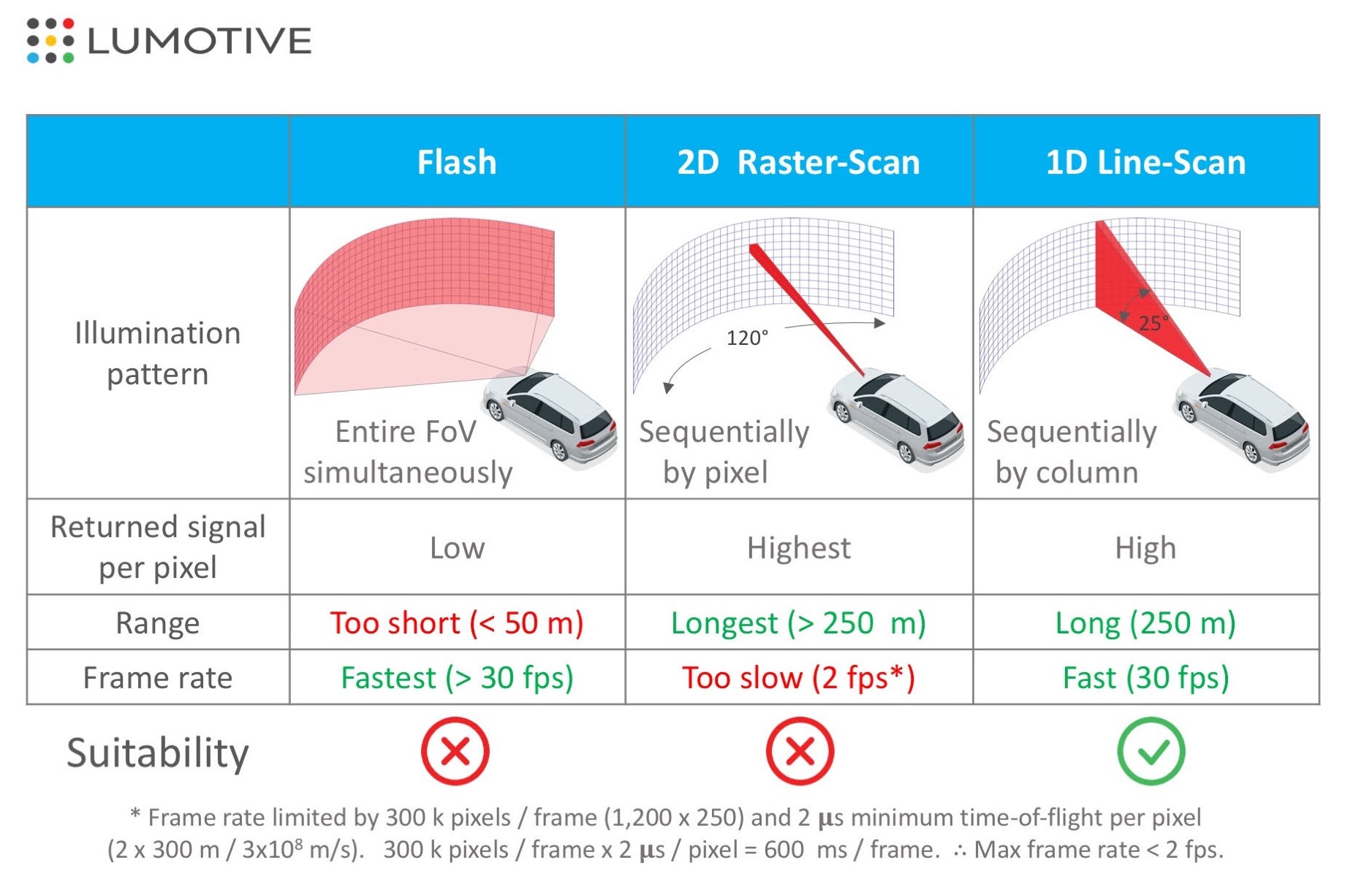
Flash, 2D, and 1D lidar

Lidar basically works by bouncing light off the environment and measuring how and when it returns; This can be accomplished in several ways.

Flash lidar basically sends out a pulse that illuminates the whole scene with near-infrared light (905 nanometers, most likely) at once. This provides a quick measurement of the whole scene, but limited distance as the power of the light being emitted is limited.

2D or raster scan lidar takes a NIR laser and plays it over the scene incredibly quickly, left to right, down a bit, then do it again, again, and again… scores or hundreds of times. Focusing the power into a beam gives these systems excellent range, but similar to a CRT TV with an electron beam tracing out the image, it takes rather a long time to complete the whole scene. Turnaround time is naturally of major importance in driving situations.

1D or line scan lidar strikes a balance between the two, using a vertical line of laser light that only has to go from one side to the other to complete the scene. This sacrifices some range and resolution but significantly improves responsiveness.

Lumotive offered the following diagram, which helps visualize the systems, although obviously “suitability” and “too short” and “too slow” are somewhat subjective:

The main problem with the latter two is that they rely on a mechanical platform to actually move the laser emitter or mirror from place to place. It works fine for the most part, but there are inherent limitations. For instance, it’s difficult to stop, slow, or reverse a beam that’s being moved by a high speed mechanism. If your 2D lidar system sweeps over something that could be worth further inspection, it has to go through the rest of its motions before coming back to it… over and over.

This is the primary advantage offered by a metamaterial system over existing ones: electronic beam steering. In Echodyne’s case the radar could quickly sweep over its whole range like normal, and upon detecting an object could immediately switch over and focus 90 percent of its cycles tracking it in higher spatial and temporal resolution. The same thing is now possible with lidar.

Imagine a deer jumping out around a blind curve. Every millisecond counts because the earlier a self-driving system knows the situation, the more options it has to accommodate it. All other things being equal, an electronically-steered lidar system would detect the deer at the same time as the mechanically-steered ones, or perhaps a bit sooner; Upon noticing this movement, could not just make more time for evaluating it on the next “pass,” but a microsecond later be backing up the beam and specifically targeting just the deer with the majority of its resolution.

Just for illustration. The beam isn’t some big red thing that comes out.

Targeted illumination would also improve the estimation of direction and speed, further improving the driving system’s knowledge and options — meanwhile the beam can still dedicate a portion of its cycles to watching the road, requiring no complicated mechanical hijinks to do so. Meanwhile it has an enormous aperture, allowing high sensitivity.

In terms of specs, it depends on many things, but if the beam is just sweeping normally across its 120×25 degree field of view, the standard unit will have about a 20Hz frame rate, with a 1000×256 resolution. That’s comparable to competitors, but keep in mind that the advantage is in the ability to change that field of view and frame rate on the fly. In the example of the deer, it may maintain a 20Hz refresh for the scene at large but concentrate more beam time on a 5×5 degree area, giving it a much faster rate.

Meta doesn’t mean mega-expensive

Naturally one would assume that such a system would be considerably more expensive than existing ones. Pricing is still a ways out — Lumotive just wanted to show that its tech exists for now — but this is far from exotic tech.

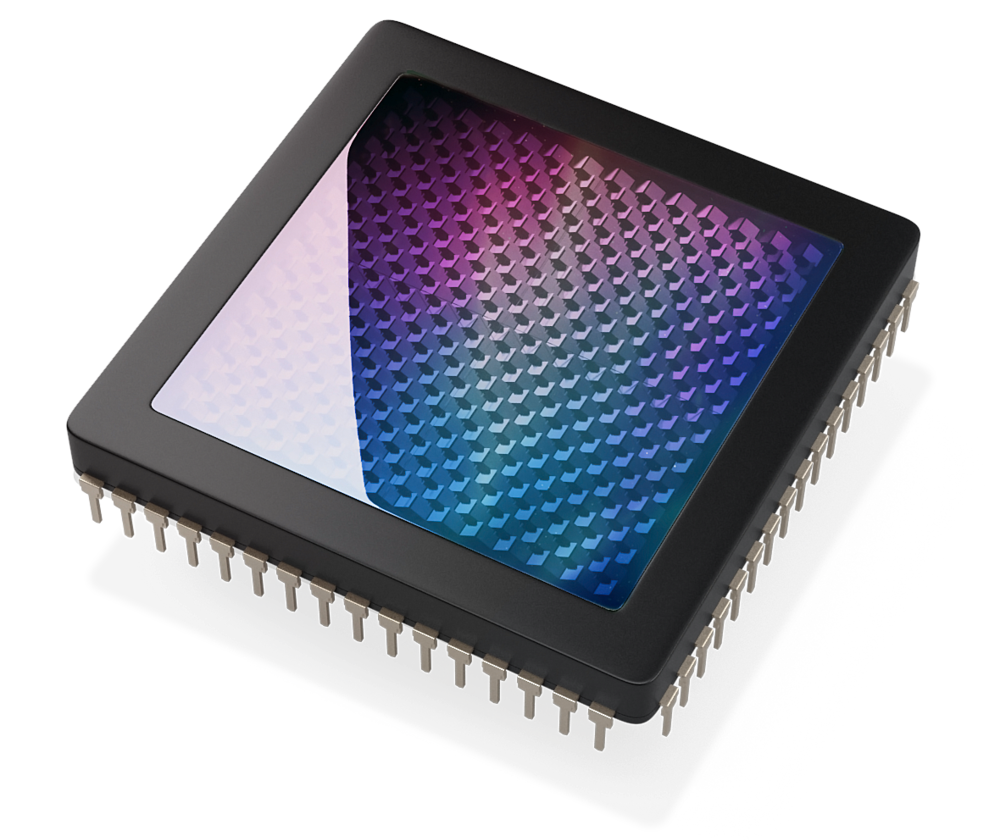
CG render of a lidar metamaterial chip.The team told me in an interview that their engineering process was tricky specifically because they designed it for fabrication using existing methods. It’s silicon-based, meaning it can use cheap and ubiquitous 905nm lasers rather than the rarer 1550nm, and its fabrication isn’t much more complex than making an ordinary display panel.

CTO and co-founder Gleb Akselrod explained: “Essentially it’s a reflective semiconductor chip, and on the surface we fabricate these tiny antennas to manipulate the light. It’s made using a standard semiconductor process, then we add liquid crystal, then the coating. It’s a lot like an LCD.”

An additional bonus of the metamaterial basis is that it works the same regardless of the size or shape of the chip. While an inch-wide rectangular chip is best for automotive purposes, Akselrod said, they could just as easily make one a quarter the size for robots that don’t need the wider field of view, or an larger or custom-shape one for a specialty vehicle or aircraft.

The details, as I said, are still being worked out. Lumotive has been working on this for years and decided it was time to just get the basic information out there. “We spend an inordinate amount of time explaining the technology to investors,” noted CEO and co-founder Bill Colleran. He, it should be noted, is a veteran innovator in this field, having headed Impinj most recently, and before that was at Broadcom, but is perhaps he is best known for being CEO of Innovent when it created the first CMOS Bluetooth chip.

Right now the company is seeking investment after running on a 2017 seed round funded by Bill Gates and IV, which (as with other metamaterial-based startups it has spun out) is granting Lumotive an exclusive license to the tech. There are partnerships and other things in the offing but the company wasn’t ready to talk about them; the product is currently in prototype but very showable form for the inevitable meetings with automotive and tech firms.


Read Full Article

22 March 2019

Panama Canal


Panama Canal

Firefox is now a better iPad browser


Mozilla today announced a new iOS version of Firefox that has been specifically optimized for Apple’s iPad. Given the launch of the new iPad mini this week, that’s impeccable timing. It’s also an admission that building a browser for tablets is different from building a browser for phones, which is what Mozilla mostly focused on in recent years.

“We know that iPads aren’t just bigger versions of iPhones,” Mozilla writes in today’s announcement. “You use them differently, you need them for different things. So rather than just make a bigger version of our browser for iOS, we made Firefox for iPad look and feel like it was custom made for a tablet.”

So with this new version, Firefox for iPad gets support for iOS features like split screen and the ability to set Firefox as the default browser in Outlook for iOS. The team also optimized tab management for these larger screens, including the option to see tabs as large tiles, “making it easy to see what they are, see if they spark joy and close with a tap if not.” And if you have a few tabs you want to share, then you can do so with the Send Tabs feature Mozilla introduced earlier this year.

Starting a private browsing session on iOS always took a few extra tabs. The iPad version makes this a one-tap affair as it prominently highlights this feature in the tab bar.

Because quite a few iPad users also use a keyboard, it’s no surprise that this version of Firefox also supports keyboard shortcuts.

If you are an iPad user in search of an alternative browser, Firefox may now be a viable option for you. Give it a try and let us know what you think in the comments (just don’t remind us how you work from home for only a few hours a day and make good money… believe me, we’re aware).


Read Full Article

How Does DuckDuckGo Protect Your Personal Information Online?

PuppyCube Review: Turn Any Surface Into an Interactive Touchscreen

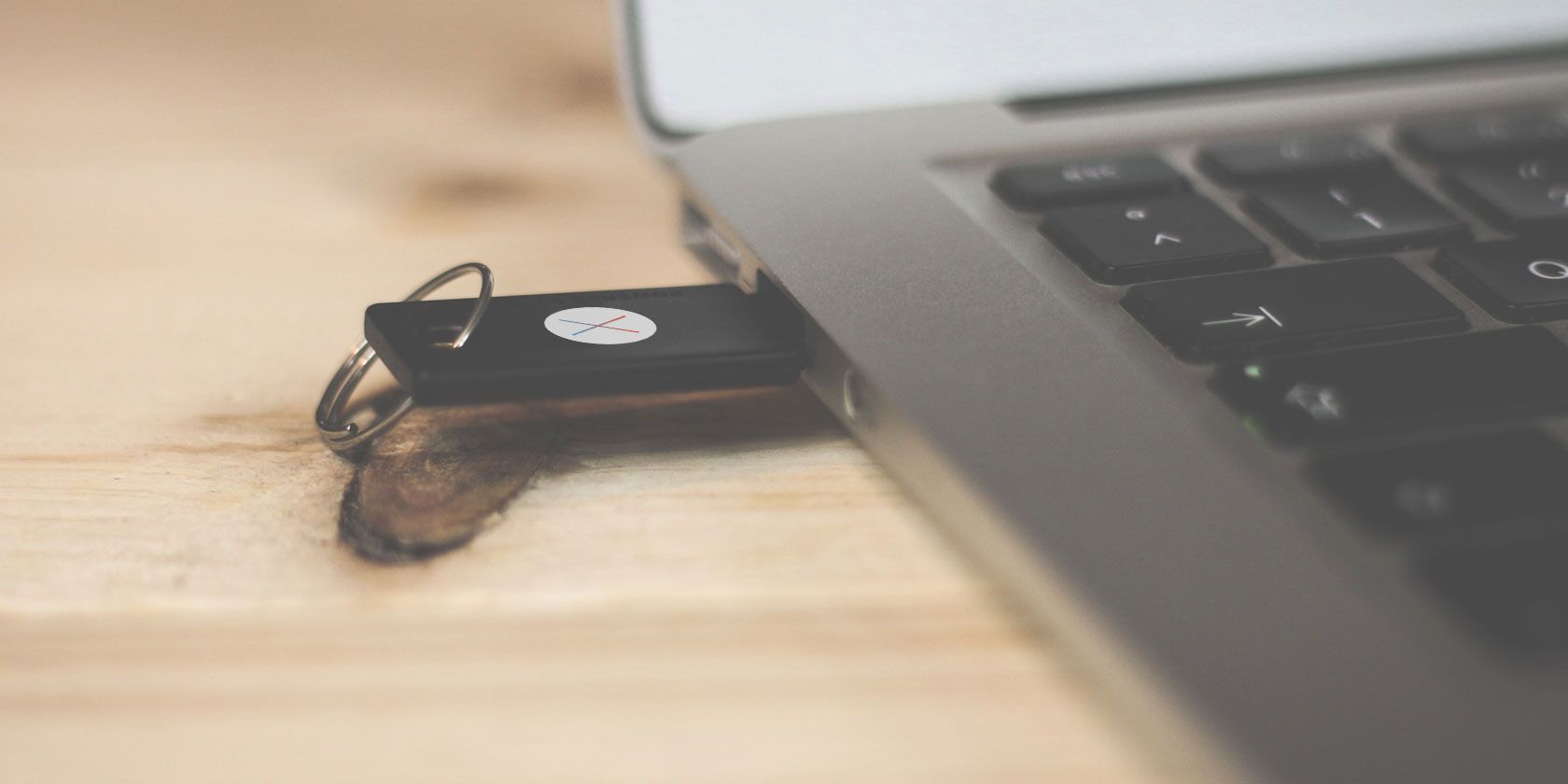
How to Make Your Mac Boot From a USB Drive


boot-mac-usb

Mac won’t boot? Fancy testing out the latest macOS beta? You should try running your Mac from an external drive.

It’s a good way to help solve a lot of problems, and is easier to set up than you might expect. It works on any machine, from a MacBook Pro to an old iMac. So read on to find out to make your Mac boot from a USB drive.

Why Boot macOS From USB?

There are a few good reasons to boot macOS from a USB drive.

The most likely one is that your Mac won’t start, or has another problem. Booting from an external drive gets around this. It enables you to access the contents of your internal drive—assuming it still works and isn’t encrypted—and it helps you to repair your Mac disk with Disk Utility and other troubleshooting tools.

internal drive still accessible

Another reason is so you can run different versions of macOS. This is particularly important if you’ve got crucial apps that don’t run on the latest version. It’s common for older apps to eventually become incompatible.

And similarly, it allows you to test a new version before you make the decision to upgrade. This includes trying the beta version, bugs and all. It might not be stable enough to use as your daily driver, so installing the Mac beta on an external drive lets you test it risk-free.

Note that our guide below will not build you a “Hackintosh” that can run macOS on a machine built for Windows. That requires a very different process.

What You Need

To run macOS off a USB drive, you need a drive of at least 32GB for casual use. We’d recommend one a lot larger if you intend to use it seriously.

Fast hardware is also important. This means USB 3, and either a flash drive with fast read and write speeds, or a solid state drive instead of a hard drive. You will notice a difference if your hardware is not fast enough.

You also need a copy of macOS.

How to Download macOS

download macos in app store

There are several different ways to get a copy of macOS to install on your USB drive.

  • If your Mac is running a version of macOS older than Mojave, you can download many versions through the App Store. Just go to your Purchased tab and you should see them listed among your other apps.
  • In case your Purchased tab doesn’t contain the version you’re looking for, you might be able to get it via the Apple website. For example, you can download Sierra and download High Sierra from its site.
  • If you’ve upgraded to Mojave (or later), unfortunately the only legal way to get the old operating systems is to buy them. Alternatively, you might still have copies on an old installation disk.
  • To download the macOS beta, you first need to sign up for the Apple Beta Software Program.

When you choose a version that’s more than a few years older than what you’re currently running on your Mac you might encounter an error message saying that it’s too old to install. If this happens, there is a solution.

Head over to our guide on how to install macOS from USB, where you’ll find full instructions. This requires you to use the Terminal app. It’s a bit more hands-on, but still easy to follow.

Install macOS on a USB Drive

So now you’re ready to set up your USB drive to boot to macOS. First up, you need to format your drive. Connect it to your computer and launch Disk Utility.

Locate your drive in the left-hand column, where you’ll see both the device and the volume. On newer versions of macOS, you might need to go to View > Show All Devices to make this show up.

mac disk utility

Eject the volume by clicking the Eject button alongside it. Now select the device name.

Go to Erase and type a name for the drive. Set Format to Mac OS Extended (Journaled), and set Scheme to GUID Partition Map. Now click Erase. Remember that this will wipe everything on your drive.

format disk mac

Now download the version of macOS you want to use. If you get it from the App Store, it’ll save to your Applications folder. Double-click this to get started.

Click through the license agreement. You’ll then be asked where you want to install the operating system. Click Show All Disks and select your external drive. Choose Install, enter your password, and it’ll begin.

install macos on usb drive

All the necessary files will copy over to your drive first, which might take up to 10 minutes. Then your Mac will shut down and the full installation will start. This takes a while, and the time estimate is not necessarily accurate.

In our case the estimate was 15 minutes, but the process was still chugging away after half an hour. Faster hardware is definitely a plus here.

When it’s done your, Mac will reboot into your new, pristine copy of macOS. Now you just need to set it up as you normally would. Connect to Wi-Fi, add your Apple ID info, and so on. It’s ready to go.

install mac on usb drive

How to Run macOS From an External Drive

Next time you start your computer, it might revert back to booting from your internal hard drive. You’ve got two options to boot to your external drive.

Go to System Preferences > Startup Disk. Click the lock and enter your password to change the settings. Select your USB drive from the list and click Restart.

set startup disk mac

The second method is to turn on your computer and hold down the Option key. After a short delay you’ll see a list of available drives, including both internal and external ones. Choose the external drive and hit Enter to continue booting.

change startup disk

Both of these methods set the external drive as the default. Of course, you can only boot from an external drive when it’s connected. Therefore you can simply unplug it whenever you want to boot to your internal drive instead.

There’s one final (and important) point to know. When running macOS off an external drive, you still have to shut it down in the normal way. Don’t just whip out the USB drive, or try to eject it somehow. This could cause you to corrupt your data. You need a full computer reboot to switch from one drive to the other.

Fix Mac Boot Problems

The entire process of setting your Mac to boot from USB should take around half an hour at most. Install it on a fast SSD and you’ve got a usable dual-boot system on your hands. Or you could install macOS on a flash drive, stick it in a drawer, and keep it for emergencies.

Booting your Mac from a USB drive gives you a way to fix any boot problems your computer experiences. But it isn’t the only solution. We’ve got a complete guide on how to fix Mac boot problems that should help get you up and running no matter what is wrong.

Read the full article: How to Make Your Mac Boot From a USB Drive


Read Full Article
Microsoft Brings Windows Defender to Mac


Microsoft is bringing Windows Defender to macOS. Although, as it’s no longer solely dedicated to defending Windows, it will now be known as Microsoft Defender. This is currently only available to businesses, but a consumer version could follow.

While many Mac owners are blase about the risk, macOS isn’t immune from malware. Which is why anyone using a Mac, but especially businesses, should consider installing some form of antivirus protection. And you can now use Microsoft Defender on a Mac.

Microsoft Launches Microsoft Defender ATP for Mac

Microsoft Defender ATP (Advanced Threat Protection) is a program designed to protect computers from malware. It offers full threat protection, with the ability to run scans as and when needed. The idea being to make life easier for IT admins everywhere.

Microsoft Defender is part of Microsoft 365, and with more businesses using both Windows and Mac, bringing it to macOS makes a lot of sense. And according to Microsoft Communities, Microsoft Defender for Mac is almost identical to the Windows version.

Microsoft Defender ATP is currently available in limited preview for businesses running a mix of Windows and Macs. Microsoft Defender ATP customers can apply to take part in the preview, with macOS Mojave, macOS High Sierra, and macOS Sierra all supported.

The eagle-eyed among you may have spotted that the third person in the image atop this article is using a Linux laptop. Which suggests that Microsoft Defender will also be available for Linux in the future. Because, just like macOS, Linux isn’t immune to viruses.

Microsoft Is Increasingly Looking Beyond Windows

Microsoft is increasingly opening its apps and services up to other platforms, as we saw when Microsoft open-sourced Windows Calculator. So bringing Microsoft Defender to Mac was almost inevitable. Let’s just hope a consumer version is also in the works.

Read the full article: Microsoft Brings Windows Defender to Mac


Read Full Article

5 Ways to Block Sites and Limit Screen Time on Linux

How to Create Awesome Images for Your Blog Using Canva


create-images-canva

When a blog post is shared across social media, the featured image is embedded with it. Therefore, an eye-catching image is important. However, there’s a subtle art to designing blog images.

Thankfully, it’s easy to create awesome images for your blog using Canva, and it should only take a few minutes. In this article, we’ll guide you through the process from start to finish.

Creating Awesome Images for Your Blog

Canva Final Feature Image

In this guide, we’ll be creating a simple feature image for a blog. It will have an eye-grabbing background image, a translucent layer, and text so that users on social media can read the title of the post when they’re scrolling through their feeds. Once we have the basics nailed down, we’ll move on to templates.

This process can be done with any image editing app, but we’ll be using Canva due to its availability and accessibility.

Step 1: Create the Canvas

Go to canva.com and log in to your account.

After logging in, the dashboard will appear on the screen. In this tutorial, we’ll be using Canva 2.0. If the version being used is Canva 1.0, then use the option from the sidebar to upgrade before getting started.

From the Dashboard, browse around and explore popular formats like the Facebook post, Instagram Story, Tumblr header, etc.

Canva Dashboard

As we’re designing a blog image, we’ll use the Custom Dimensions option. In the top-right corner of the window, click on the Custom Dimensions button and type in the resolution of the image you want to create. Click on Create New Design and a new page with Canva Editor will open.

Canva Enter Custom Dimensions

Step 2: Add a Background Image

If this is your first time using the Canva Editor, spend some time exploring the editor interface. The two main elements here are the sidebar on the left and the toolbar at the top of the screen.

The Sidebar on the left side of the screen is where you’ll find all the images, graphics, assets, templates that you will need, along with your uploads. The Toolbar at the top is dynamic. It will show options based on the selected element.

The first thing we’ll do is add a background image. There are two ways to go about this. You can either upload a background image that you have pre-selected or you can browse through Canva’s own collection of free and paid images.

If you need help finding a background image, here are the best websites for free stock photos to get you started.

Uploading an image is quite simple. All you have to do is drag an image from your computer and drop it on the left sidebar. The uploaded image will then show up in the Uploads section of the sidebar. Click on it to add it to the canvas.

To search for an image in Canva itself, click on Elements and select Photos. Then use the search bar. When you find an image that you like, simply click on it to add it to your image.

Canva Editor Search for photos

Once the image is added, the next step is to position it. Click on the top-left or top-right edge of the image and then drag it outward to expand the image.

Canva Editor Adding a Photo

You can click on the image and move it around as well. When you’re moving it, you’ll notice that the image automatically snaps to the grid. This helps you to center the image perfectly.

Canva Editor Setting a Photo

Step 3: Add a Translucent Layer

Now, it’s time to add a translucent layer on top of the background image. This layer is crucial to make the text more readable. It instantly increases contrast and readability. It also looks more elegant.

From the Sidebar, click on Elements and then select Shapes. Click on the Square shape to add it to the canvas. Then resize it so it takes up the whole canvas.

Canva Editor Adding a Square Shape

First, change the color of the element. By default, it’s a white shade. Click on the Color button and switch it to a dark grey shade.

Now, click on the Transparency button (it’s next to the Position button) and bring the transparency down from 100 to 30. You can play around with the exact number. For most backgrounds, 20 to 40 is a good range to maintain text legibility and to showcase the background.

Canva Editor Transparency and Color

Step 4: Add Text

Finally, let’s add some text. You can do this in two ways: by using a text template or by designing the text yourself. Canva’s text templates are beautiful but as they’re designed for posters, they’re not easy to edit. The chances of finding a template that’s the perfect length and format for your title are quite low.

You can explore templates in Canva by clicking on the Text option from the Sidebar. Scroll down to see more templates. If you like something, click on it and then double-click to change the text.

Canva Text Templates

For the feature image, it’s better to start with a blank text box. Click on Add a Heading button to create a text box. Double click on it to change the text.

Canva Editor Add Text

Select the whole text box and you’ll see the toolbar at the top change. First, let’s increase the font size. If you’re designing a feature image that’s 1000 pixels wide, I would suggest you go with 42-point font size or higher as it is easier to read on mobile devices.

However, the most important part is the font. Canva has an amazing selection of fonts, from playful ones to serious ones. As we’re keeping things simple here, it’s best to go with a Sans-serif font, preferably in a bold or a slab typeface.

This might be a good time to read our guide to the most important typography terms so you understand the subject more fully.

Try the following fonts to see whether you like how they look. League Spartan, Montserrat, Alfa Slab One, Lato Heavy, Merriweather Sans Bold, Open Sans, PT Sans, Playfair Display Black, and Raleway Heavy.

Canva Change Font

Once you’ve got the right font, you can play around with the alignment and its position across the image. As a beginner, it’s best to stick with center-aligned text.

Step 5: Add Graphics and Logos (Optional)

Sometimes you might want to make an image punchier with a graphic or an icon. You might want to include your website’s logo in a corner of the image as well.

To search for graphics, click on the Elements button and select Graphics. When you find a graphic that you like, click on it to add it to your image. A graphic once added to the image can be resized and cropped. You can even change its color as per your preference.

Canva Editor Add Graphics

Creating Images With Canva: As Easy as 1-2-3

Creating an elegant blog image is a simple three-step process. Pick a good background, add a translucent layer, and dazzle the viewer with gorgeous type.

Keep it simple and create a format that works for your website (along with your website logo). Canva makes it easy to duplicate images so you can use the same format to create multiple blog images. Then, you will only need to replace the image and the text. No need to start from scratch every time.

Once you get the hang of some of the basic features, you should try exploring templates. Canva’s templates are usually full of color, though sometimes, they can be quite loud as well.

As they’re fully editable, you can pick and choose certain parts of a template, (for example, the title text from one template, and the graphics from another) and create your own concoction.

In the Templates section, you can find templates for every format imaginable from YouTube thumbnails to professional presentations. Browse around the templates (or choose a new format from the Dashboard) and you’ll find multiple things you can create using Canva with zero effort.

Read the full article: How to Create Awesome Images for Your Blog Using Canva


Read Full Article