05 October 2018

Instagram prototypes handing your location history to Facebook


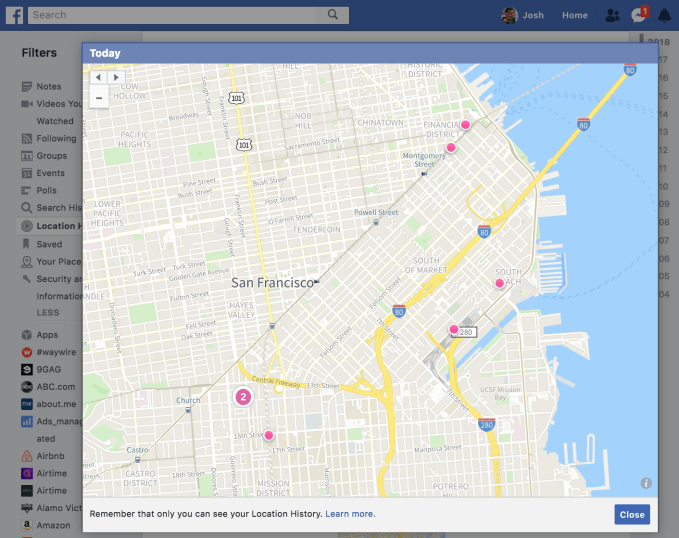
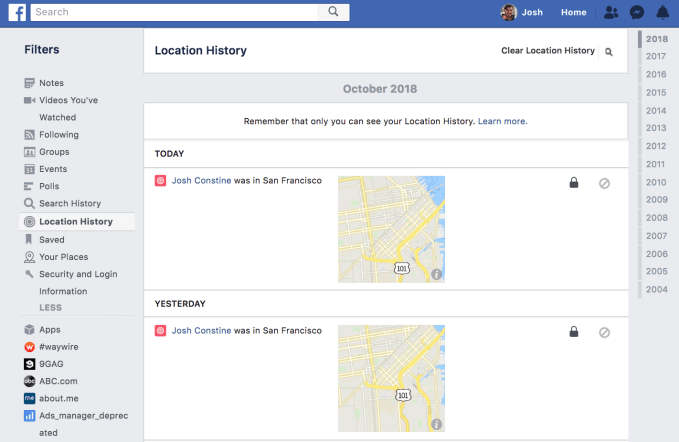
This is sure to exacerbate fears that Facebook will further exploit Instagram now that its founders have resigned. Instagram has been spotted prototyping a new privacy setting that would allow it to share your location history with Facebook. That means your exact GPS coordinates collected by Instagram, even when you’re not using the app, would help Facebook to target you with ads and recommend you relevant content. Worryingly, the Location History sharing setting was defaulted to On in the prototype. The geo-tagged data would appear to users in their Facebook Profile’s Activity Log, which include creepy daily maps of the places you been.

This commingling of data could upset users who want to limit Facebook’s surveillance of their lives. With Facebook installing its former VP of News Feed and close friend of Mark Zuckerberg, Adam Mosseri, as the head of Instagram, some critics have worried that Facebook would attempt to squeeze more value out of Instagram. Tat includes driving referral traffic to the main app via spammy notifications, inserting additional ads, or pulling in more data. Facebook was sued for breaking its promise to European regulators that it would not commingle WhatsApp and Facebook data, leading to an $122 million fine.
 

A Facebook spokesperson tells TechCrunch that “To confirm, we haven’t introduced updates to our location settings. As you know, we often work on ideas that may evolve over time or ultimately not be tested or released. Instagram does not currently store Location History; we’ll keep people updated with any changes to our location settings in the future.” That effectively confirms Location History sharing is something Instagram has prototyped, and that it’s considering launching but hasn’t yet.
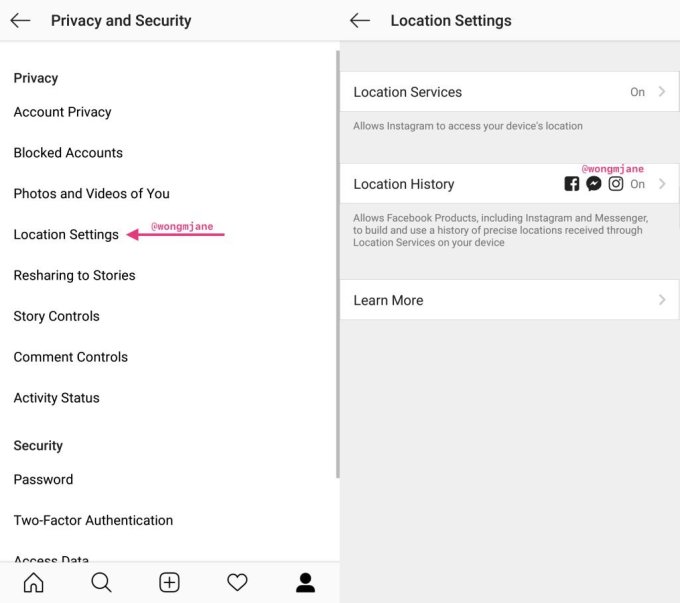
The screenshots come courtesy of mobile researcher and frequent TechCrunch tipster Jane Manchun Wong. Her prior finds like prototypes of Instagram Video Calling and Music Stickers have drawn “no comments” from Instagram but then were officially launched in the following months. That lends credence to the idea that Instagram is serious about Location History.

Located in the Privacy and Security settings, the Location History option “Allows Facebook Products, including Instagram and Messenger, to build and use a history of precise locations received through Location Services on your device.”
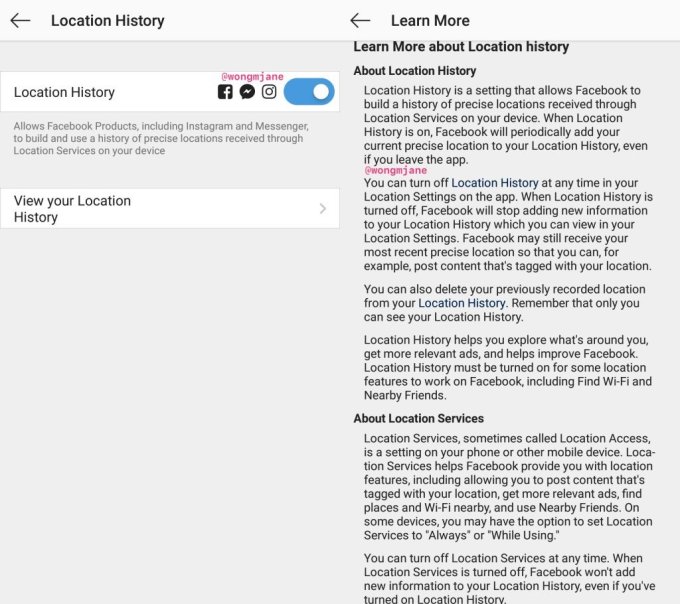
A ‘Learn More’ button provides additional info (emphasis mine):

“Location History is a setting that allows Facebook to build a history of precise locations received through Location Services on your device. When Location History is on, Facebook will periodically add your current precise location to your Location History even if you leave the app. You can turn off Location History at any time in your Location Settings on the app. When Location History is turned off, Facebook will stop adding new information to your Location History which you can view in your Location Settings. Facebook may still receive your most recent precise location so that you can, for example, post content that’s tagged with your location. Location History helps you explore what’s around you, get more relevant ads, and helps improve Facebook. Location History must be turned on for some location feature to work on Facebook, including Find Wi-Fi and Nearby Friends.”
As part of a 2011 settlement with the FTC over privacy violations, Facebook agreed that “Material retroactive changes to the audience that can view the information users have previously shared on Facebook” must now be opt-in. But since Location History is never visible to other users and only deals with data Facebook sees, it’s exempt from that agreement and could be quietly added. Most users might never dig deep enough into their privacy settings to turn the opt-out feature off.

Delivering the exact history of where Instagram users went could assist Facebook with targeting them with local ads across its family of apps. If users are found to visit certain businesses, countries, neighborhoods, or schools, Facebook could use that data to infer which products they might want to buy and promote them. It could even show ads for restaurants or shops close to where users spend their days. Just yesterday, we reported that Facebook was testing a redesign of its Nearby Friends feature that replaces the list view of friends’ locations with a map. Pulling in Location History from Instagram could help keep that map up to date.
Sources tell TechCrunch that Instagram founders Kevin Systrom and Mike Krieger left the company following increasing tensions with Zuckerberg about dwindling autonomy of their app within the Facebook corporation. Systrom apparently clashed with Zuckerberg over how Instagram was supposed to contribute to Facebook success, especially as younger users began abandoning the older social network for the newer visual media app. Facebook is under pressure to keep up revenue growth despite it running out of News Feed ad inventory and users switching to Stories that advertisers are still acclimating to. Facebook is in heated competition with Google for last-mile local advertising and will take any advantage it can get.

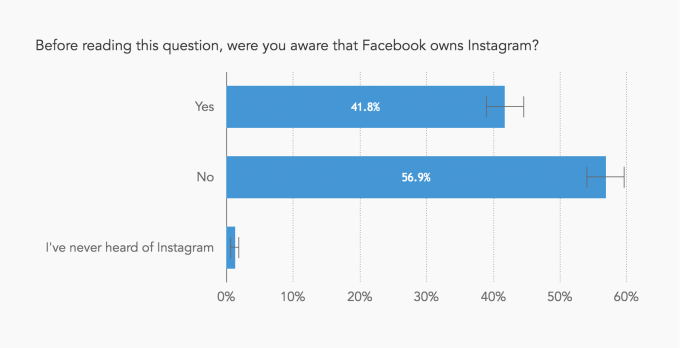
Instagram has served as a life raft for Facebook’s brand this year amidst an onslaught of scandals including fake news, election interference, social media addiction, and most recently, a security breach that gave hackers the access tokens for 50 million users that could have let them take over their accounts. A survey of 1,153 US adults conducted in March 2018 found that 57 percent of them didn’t know Instagram was owned by Facebook. But if Facebook treats Instagram as a source of data and traffic it can strip mine, the negative perceptions associated with the parent could spill over onto the child.


Read Full Article

Instagram prototypes handing your location history to Facebook


This is sure to exacerbate fears that Facebook will further exploit Instagram now that its founders have resigned. Instagram has been spotted prototyping a new privacy setting that would allow it to share your location history with Facebook. That means your exact GPS coordinates collected by Instagram, even when you’re not using the app, would help Facebook to target you with ads and recommend you relevant content. Worryingly, the Location History sharing setting was defaulted to On in the prototype. The geo-tagged data would appear to users in their Facebook Profile’s Activity Log, which include creepy daily maps of the places you been.

This commingling of data could upset users who want to limit Facebook’s surveillance of their lives. With Facebook installing its former VP of News Feed and close friend of Mark Zuckerberg, Adam Mosseri, as the head of Instagram, some critics have worried that Facebook would attempt to squeeze more value out of Instagram. Tat includes driving referral traffic to the main app via spammy notifications, inserting additional ads, or pulling in more data. Facebook was sued for breaking its promise to European regulators that it would not commingle WhatsApp and Facebook data, leading to an $122 million fine.


A Facebook spokesperson tells TechCrunch that “To confirm, we haven’t introduced updates to our location settings. As you know, we often work on ideas that may evolve over time or ultimately not be tested or released. Instagram does not currently store Location History; we’ll keep people updated with any changes to our location settings in the future.” That effectively confirms Location History sharing is something Instagram has prototyped, and that it’s considering launching but hasn’t yet.

The screenshots come courtesy of mobile researcher and frequent TechCrunch tipster Jane Manchun Wong. Her prior finds like prototypes of Instagram Video Calling and Music Stickers have drawn “no comments” from Instagram but then were officially launched in the following months. That lends credence to the idea that Instagram is serious about Location History.

Located in the Privacy and Security settings, the Location History option “Allows Facebook Products, including Instagram and Messenger, to build and use a history of precise locations received through Location Services on your device.”

A ‘Learn More’ button provides additional info (emphasis mine):

“Location History is a setting that allows Facebook to build a history of precise locations received through Location Services on your device. When Location History is on, Facebook will periodically add your current precise location to your Location History even if you leave the app. You can turn off Location History at any time in your Location Settings on the app. When Location History is turned off, Facebook will stop adding new information to your Location History which you can view in your Location Settings. Facebook may still receive your most recent precise location so that you can, for example, post content that’s tagged with your location. Location History helps you explore what’s around you, get more relevant ads, and helps improve Facebook. Location History must be turned on for some location feature to work on Facebook, including Find Wi-Fi and Nearby Friends.”

As part of a 2011 settlement with the FTC over privacy violations, Facebook agreed that “Material retroactive changes to the audience that can view the information users have previously shared on Facebook” must now be opt-in. But since Location History is never visible to other users and only deals with data Facebook sees, it’s exempt from that agreement and could be quietly added. Most users might never dig deep enough into their privacy settings to turn the opt-out feature off.

Delivering the exact history of where Instagram users went could assist Facebook with targeting them with local ads across its family of apps. If users are found to visit certain businesses, countries, neighborhoods, or schools, Facebook could use that data to infer which products they might want to buy and promote them. It could even show ads for restaurants or shops close to where users spend their days. Just yesterday, we reported that Facebook was testing a redesign of its Nearby Friends feature that replaces the list view of friends’ locations with a map. Pulling in Location History from Instagram could help keep that map up to date.

Sources tell TechCrunch that Instagram founders Kevin Systrom and Mike Krieger left the company following increasing tensions with Zuckerberg about dwindling autonomy of their app within the Facebook corporation. Systrom apparently clashed with Zuckerberg over how Instagram was supposed to contribute to Facebook success, especially as younger users began abandoning the older social network for the newer visual media app. Facebook is under pressure to keep up revenue growth despite it running out of News Feed ad inventory and users switching to Stories that advertisers are still acclimating to. Facebook is in heated competition with Google for last-mile local advertising and will take any advantage it can get.

Instagram has served as a life raft for Facebook’s brand this year amidst an onslaught of scandals including fake news, election interference, social media addiction, and most recently, a security breach that gave hackers the access tokens for 50 million users that could have let them take over their accounts. A survey of 1,153 US adults conducted in March 2018 found that 57 percent of them didn’t know Instagram was owned by Facebook. But if Facebook treats Instagram as a source of data and traffic it can strip mine, the negative perceptions associated with the parent could spill over onto the child.


Read Full Article
Nametag Makes It Easy to Add Instagram Friends


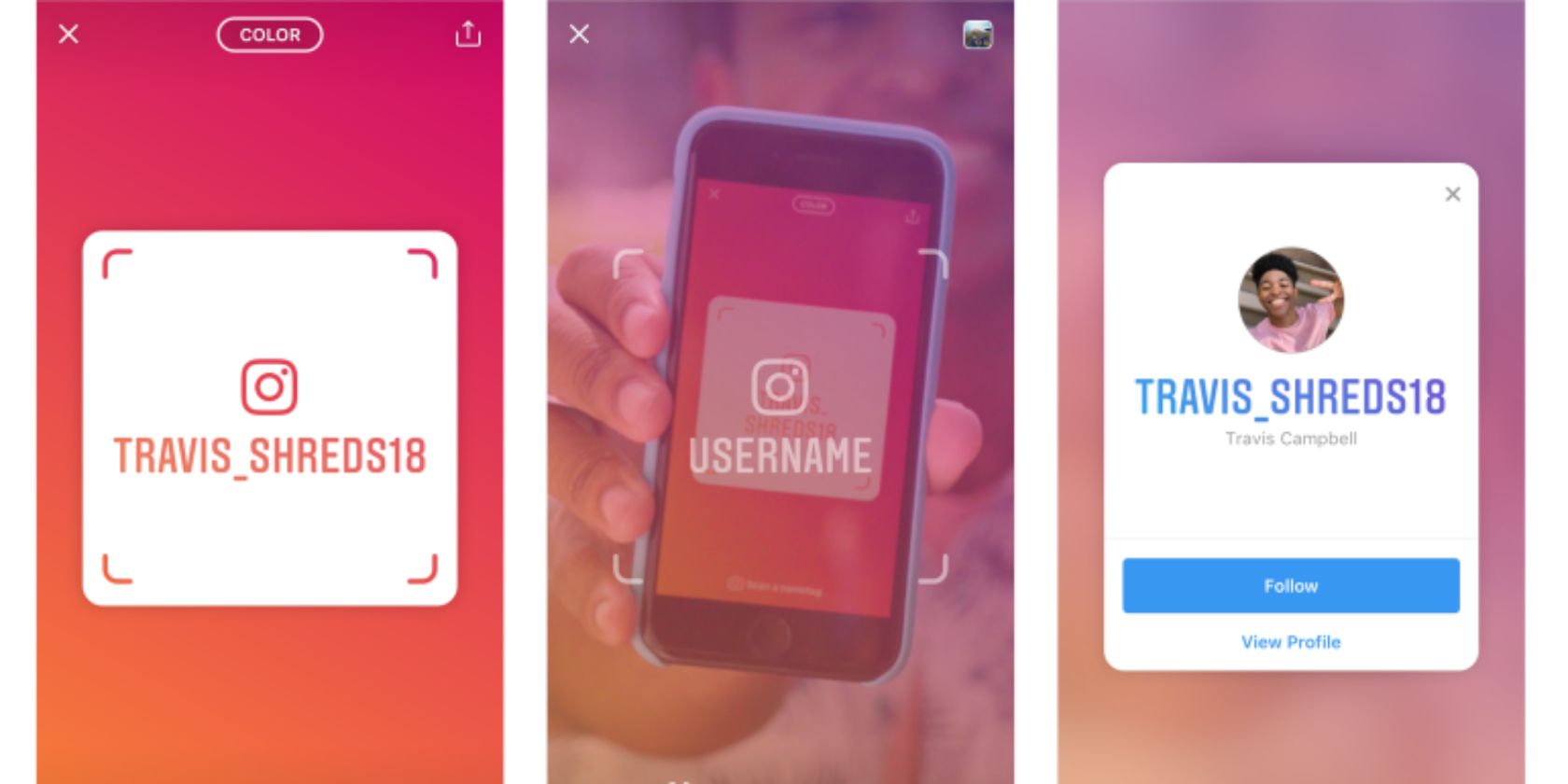
Instagram has launched a new feature designed to make it easier to follow people you meet in real life. It’s called Nametag, and it allows everyone on Instagram to create a personalized name tag that’s unique to them. Yes, just like Snapchat’s Snapcodes.

How to Share Your Instagram Nametag

As described on the Instagram Blog, Nametag is a “customizable identification card that allows people to find your Instagram profile when it’s scanned.” This makes it very easy to follow people on Instagram, or help other people follow you.

To create your own Nametag, click on your profile, and find Nametag behind the three lines at the top. You can then personalize your nametag, adding different colors, emojis, and selfies so that your Nametag perfectly reflects your personality.

Once you have your Nametag set up you can share it with friends via social media sites and messaging apps. And you can scan other people’s Nametags by swiping right into the camera, hovering over the Nametag, and holding down on the screen.

Instagram Fosters School Communities

Instagram is also launching a feature called School Communities. This, as the name suggests, lets you connect with other people who currently attend, or recently graduated from, your school. This is currently being tested in a handful of U.S. universities.

Once you have access to School Communities, you’ll be able to list your school, year, major sorority, and other interests. You’ll then see a directory listing of everyone who attended the same university, allowing you to connect with them through a shared experience.

Snapchat Snapcodes By Another Name

OK, so Instagram’s Nametag feature is something else the company has copied from Snapchat. Albeit years after Snapcodes arrived on the scene. Still, Nametag makes it much easier to find people on Instagram, so we shouldn’t really complain.

While Nametag makes it easier to follow someone on Instagram we’ve previously detailed how to remove Instagram followers. And given Instagram’s interest in school communities now also might be a good time to read the parent’s guide to Instagram.

Read the full article: Nametag Makes It Easy to Add Instagram Friends


Read Full Article

VP Pence calls on Google to end work on a search engine for China


On Thursday, Vice President Mike Pence called for Google to end its development of a search engine custom built to accommodate China’s disposition for censorship.

Pence gave the speech at conservative think tank in D.C., dipping into a range of anti-Beijing sentiments, from intellectual property concerns to tariffs and the trade war. Pence didn’t mince words, calling on Google to abandon its plans for a China-friendly mobile version of its otherwise ubiquitous search engine.

Pence accused any company with plans to work around Chinese internet restrictions of “abetting Beijing’s oppression” and didn’t hesitate to call the search giant out by name.

More business leaders are thinking beyond the next quarter, and thinking twice before diving into the Chinese market if it means turning over their intellectual property or abetting Beijing’s oppression. But more must follow suit. For example, Google should immediately end development of the “Dragonfly” app that will strengthen Communist Party censorship and compromise the privacy of Chinese customers…

More journalists are reporting the truth without fear or favor, and digging deep to find where China is interfering in our society, and why – and we hope that more American, and global, news organizations will join in this effort.

More scholars are speaking out forcefully and defending academic freedom, and more universities and think tanks are mustering the courage to turn away Beijing’s easy money, recognizing that every dollar comes with a corresponding demand. We’re confident that more will join their ranks.

And across the nation, the American people are growing in vigilance, with a newfound appreciation for our administration’s actions to re-set America’s economic and strategic relationship with China, to finally put America First.

Pence’s full remarks are available on the Hudson Institute’s website.

Google’s covert project, known as Dragonfly, is reportedly a version of the search engine that blocks forbidden sites like Facebook and Twitter, censors search terms like the Tiananmen Square massacre and cuts out prominent Western news sources like the BBC and the New York Times. The project, first reported by the Intercept, sparked internal turmoil at the company and a letter of protest from employees who felt too in the dark to make “ethically-informed decisions about our work, our projects, and our employment.”

Google drama aside, Pence’s tough talk on China might be politically expedient bluster, but it’s not without irony: The Trump administration has repeatedly expressed its outright contempt for a free press, a hallmark of an aggressively restrictive government like China. The irony of Pence’s derision of China’s “unparalleled surveillance state” are also fairly rich, given domestic policy on warrantless surveillance.

The vice president also took the opportunity to refresh controversial claims that China is “meddling” in the U.S. midterm elections, echoing language often used to describe Russia’s substantiated election interference efforts. President Trump suggested as much last week, claiming that China “has been attempting to interfere in our upcoming 2018 election, coming up in November, against my administration.” Yesterday, Department of Homeland Security Kirstjen Nielsen declined to endorse the president’s unsubstantiated claims, noting that China pursues a “holistic approach” to cultivating a positive image in the U.S.


Read Full Article

Mars Rover Curiosity is switching brains so it can fix itself


When you send something to space, it’s good to have redundancy. Sometimes you want to send two whole duplicate spacecraft just in case — as was the case with Voyager — but sometimes it’s good enough to have two of critical components. Mars Rover Curiosity is no exception, and it is now in the process of switching from one main “brain” to the other so it can do digital surgery on the first.

Curiosity landed on Mars with two central computing systems, Side-A and Side-B (not left brain and right brain — that would invite too much silliness). They’re perfect duplicates of each other, or were — it was something of a bumpy ride, after all, and cosmic radiation may flip a bit here and there.

The team was thankful to have made these preparations when, on sol 200 in February of 2013 (we’re almost to sol 2,200 now), the Side-A computer experienced a glitch that ended up taking the whole rover offline. The solution was to swap over to Side-B, which was up and running shortly afterwards and sending diagnostic data for its twin.

Having run for several years with no issues, Side-B is now, however, having its own problems. Since September 15 it has been unable to record mission data, and it doesn’t appear to be a problem that the computer can solve itself. Fortunately, in the intervening period, Side-A has been fixed up to working condition — though it has a bit less memory than it used to, since some corrupted sectors had to be quarantined.

“We spent the last week checking out Side A and preparing it for the swap,” said Steven Lee, deputy project manager of the Curiosity program at JPL, in a mission status report. “We are operating on Side A starting today, but it could take us time to fully understand the root cause of the issue and devise workarounds for the memory on Side B. It’s certainly possible to run the mission on the Side-A computer if we really need to. But our plan is to switch back to Side B as soon as we can fix the problem to utilize its larger memory size.”

No timeline just yet for how that will happen, but the team is confident that they’ll have things back on track soon. The mission isn’t in jeopardy — but this is a good example of how a good system of redundancies can add years to the life of space hardware.


Read Full Article

5 Apps That Make the Weather More Entertaining


As some pricey coding camps fade away, Codecademy barrels ahead with affordable paid offerings and a new mobile app


Between 2013 and last year, the number of boot camp schools tripled to more than 90 in the U.S. alone, according to Course Report, an outfit that tracks the industry. Some — including The Iron Yard and Dev Bootcamp — have since folded, unable to find enough eager recruits willing to pay top dollar to learn coding skills. (The average cost of a 14-week program last year was $11,400.)

At the same time, it has become apparent that when it comes to massive open online courses, a very high percentage of students don’t stay the course.

New York-based Codeacademy, which began offering free coding courses at its outset, has managed to keep plugging away — and grow — despite these headwinds. In fact, the company today employs 85 people, up from 45 when we last sat down with cofounder and CEO Zach Sims in 2016. Its revenue is also up 65 percent year over year.

None of it has been a walk in the park, admits Sims, who dropped out of Columbia University in 2011 to start the company. “There’s been a ton of ups and downs,” he says, explaining that the company struggled for years with how to produce meaningful revenue before introducing two premium products in the last couple of years, both of which are affordable by design.

One of these is Codecademy Pro, meant to help users learn the fundamentals of coding, as well as develop a deeper knowledge (and receive certification from Codecademy) in up to 10 areas, including machine learning and data analysis. The cost is $20 per month, money that Pro users often see back in the form of a a $5,000 to $10,000 raise from their employer, insists Sims. He says the course “isn’t so much for those who are transition to full-time jobs but people who are learning skills to level up in their existing career.”

A second offering is Codecademy Pro Intensive, which is designed to immerse learners from six to 10 weeks (depending on the coursework), in either website development, programming, or data science. Students follow a structured, detailed syllabus that’s broken into focused units to organize the learning experience, which is synchronous but collaborative. To wit, users are placed in a moderated Slack group and can chat with people who are learning the same materials at the same time. They also receive unlimited access to a pool of 200 mentors who work with Codecademy, some of them “graduates” of Codecademy themselves.

Sims declines to talk about what percentage of the 45 million people who’ve taken a Codecademy course has paid the company, but he notes that the “macro trends in the market are going our way. People still need to find jobs, and tech is still an important skill to get them there.” Indeed, according to Code.org, a nonprofit that seeks to expand computer-science instruction in schools, there are more than 540,000 open computing jobs. At the same time, fewer than 50,000 computer-science majors graduated from school last year.

Sims also stresses the importance to Codecademy of ensuring its offerings remain “free and low cost everywhere in the world.” Toward that end, the company is today rolling out its newest product, a mobile app that enables users to learn on the go, though it is accessible to paying customers only after a seven-day trial for everyone. (No credit card is required.) The idea, says Sims: “Lots of people use mobile phones, and we should be letting them practice whenever and whereve they want. They end doing twice as many exercises if they can learn on the subway, then pick up where they left off on the desktop later.”

How much of an accelerant the app will be remains to be seen, but certainly, Codeacademy’s approach — catering to people who can’t take or aren’t interesting in expensive offline programs — seems as relevant if not more as some of its competitors fade into the distance.

“When we first started,” says Sims, “the skills gap was just making itself evident. There were tons of tech reports about tech jobs and not a lot of people to fill them. A lot of boot camps and other options emerged in that vacuum because, at the time, colleges weren’t equipped to handle [the knowledge gap]. Plus, student debt continued to be an issue, which made [underprivileged] students particularly ill-prepared for the workforce.”

What has changed since then is, well, not much, argues Sims. He notes that aside from a glut of hyped offerings to come and go, people still need ways to adapt to rapid-fire technological change, and with college costs as high as they’ve ever been — prices have soared upwards of 200 percent over the last 20 years —  they need affordable alternatives in particular.

If Codecademy needs more capital to provide them, it isn’t saying. Asked about fundraising — Codecademy has raised $42.5 million to date, including Union Square Ventures and Naspers — Sims says it isn’t talking currently with VCs. “We’re pretty capital efficient. We still have the majority of our last round (raised in 2016) in the bank. And we’ve been able to grow pretty sustainably. If we see opportunities to accelerate growth down the line,” he adds, “we’ll go raise it.”

Asked if it can see a day where it works more closely with enterprise customers that want to help employees burnish their skills, he says that’s a high likelihood, too. But “so far,” he says, “we’ve seen pretty good consumer growth. It kind of comes down to how many things can you focus on.”


Read Full Article

15 Great Arduino Projects for Beginners


arduino-projects

Completing an Arduino project gives you a sense of satisfaction like no other. It can be, however, difficult to know where to start. Luckily there are many ways to get started. Here are 15 beginner Arduino projects to get you going!

A note on required equipment: For the sake of brevity, items that are usually included in Arduino starter kits aren’t included in the overviews provided here. Any other required components will be listed in the project description.

1. Make a Buzz Wire Game With an Arduino

You will need:

  • 1 x Small Arduino compatible buzzer
  • 1 x Old metal coat hanger.

This build combines a classic carnival game with simple electronics and code. Using cheap components and a little DIY craft, the Arduino Buzz Wire Game is a fantastic project to work on with children.

2. Arduino MIDI Controller

You will need:

  • 1 x 5-pin DIN female Socket
  • 1 x MIDI cable
  • 1 x MIDI interface or MIDI capable device

Any musician who is familiar with MIDI controllers knows how powerful they can be. Did you know that you can use an Arduino to make a DIY controller? Even if you’ve never used one, this is a perfect way to get started, rather than buy an expensive keyboard or controller.

The project uses a free MIDI code library and simple components. It’s beginner friendly, and has the potential to be improved over time, until you have a fully featured custom MIDI controller!

3. Control Your Arduino With Python

If you already know Python, you can learn about Arduino hardware without learning a new language. This project is especially useful for people just starting out, as Python is a beginner-friendly language. The code side of this project is straightforward, and requires no components at all, just an Arduino board!

4. Arduino Game Controller

You will need:

The only thing cooler than making your own games is making your own game controller.

This custom Arduino game controller project covers both building your own hardware, and step-by-step coding of a simple game.

5. Arduino RFID Smart Lock

You will need:

  • 1 x Logic-level N channel Mosfet
  • 1 x MFRC522 module
  • 1 x 12v Solenoid
  • 1 x 12v Power supply

This Arduino smart locking system looks complicated. But due to a cheap and easy-to-use RFID reader, it’s more straightforward than you’d think.

This project uses a few parts that may be new to you. Rather than starting from scratch, the code is modified from existing examples. This is an excellent introduction to multi-component devices with real practical uses.

6. Simple Arduino Alarm System

You will need:

  • 1 x Ultrasonic “ping” sensor
  • 1 x Piezo buzzer
  • 1 x LED strip light

A simple alarm system that uses a motion sensor to detect movement, LEDs flash and a high-pitched warning tone is emitted when an intruder is detected.

While it’s not exactly proper home protection, it does offer a perfect solution to protect small spaces. Ideal for keeping an eye your snack drawer!

7. Traffic Light Controller

traffic-light-with-switch

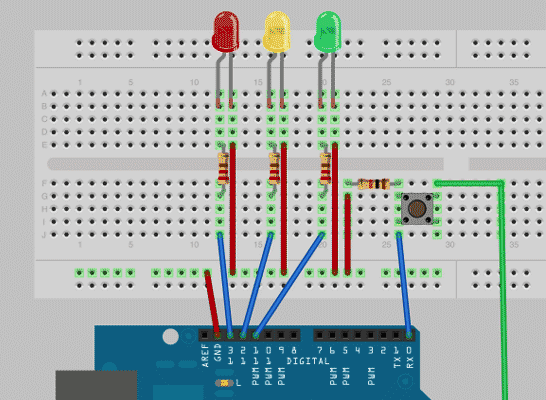
This project is a great introduction to Arduino programming. The traffic light controller uses a red, yellow, and green LED to re-create a traffic light on your breadboard. It’s an easy way to get hands-on with writing and editing code. As a bonus, all the required components should be included in your starter kit.

8. Companion Cube Mood Lamp

You will need:

  • Square glass jar or bottle
  • Hard-drying clear glue
  • Gray and red modeling clay
  • White candle

Remember the video game Portal? In this project, a Portal-themed mood lamp uses a square glass jar to create a color-shifting display that looks incredible. Creating the lamp is a great DIY project for beginners. The wiring and code are relatively simple, and you’ll end up with a striking DIY creation!

9. Arduino-Powered Temperature Controller

temperature-controller-box

You will need:

  • Temperature sensor, such as the TMP36
  • Relay or RC plug switches
  • Screw terminals
  • Box to trap the heat
  • Heating/cooling element, or incandescent bulb with fixture (or both)

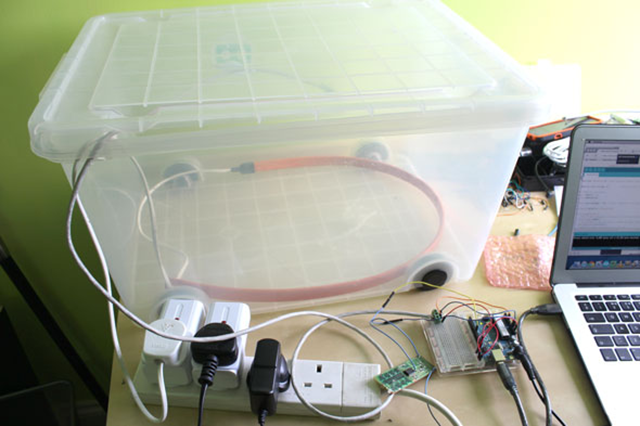
Using just an Arduino and a few parts you can create a temperature control device instead of paying for a commercial model. Not only is this an excellent beginner level project, but it has real-world applications!

10. Recreate the Arcade Classic “Pong”

You will need:

  • An Arduino compatible OLED screen

Coding a retro game is great programming practice. Pong is a classic, and there are two ways you can play it on your Arduino. You can code the game from scratch, and play on an inexpensive OLED screen.

11. “The TV Devil” Arduino Prank Remote

You will need:

  • IR transmitter LED, such as TIL38
  • IR receiver, such as TSOP382

An Arduino along with an IR(infrared) transmitter and receiver can cause some innocent chaos. Bombarding any IR controlled device with IR signals makes them act as if they have a life of their own.

In this project you’ll learn how to build a remote control using an Arduino and some IR components. The result is assured to drive anyone nearby mad!

12. Make Your Own Ambilight

You will need:

  • 10A 5V power supply
  • WS2812B LED strip

Originally developed for Philips TVs, the Ambilight features ambient lighting that reacts to the images on your television screen. It’s not too difficult to recreate the Ambilight for any screen. Cheap addressable LEDs cut the cost of this impressive looking build, and at the time of writing the component list for this project has dropped much lower than the $60 guide cost.

13. Arduino-Powered Laser Turret

You will need:

  • 2 servos
  • Laser module
  • Piezo buzzer
  • Metal wire and cable ties

While there aren’t many practical reasons for building an Arduino-powered laser turret, that shouldn’t stop you! The code in this project is easily extendable and allows you to customize your turret’s movement. This is an excellent introduction to using servos with Arduino boards, the building blocks of robotics!

14. Pulsating LED Cube

You will need:

  • 64 LEDs
  • Craft wire
  • Component wire
  • Crocodile clips
  • Scrap wood
  • Drill

If you are looking for something beautiful to build, the pulsating LED cube is a perfect choice. Controlled from a single Arduino via multiplexing, it is still easy enough for beginners to make. This project is also excellent soldering practice, which is one of the essential beginner’s electronics skills you need to know.

15. Weekend Project: Build a Giant LED Pixel Display

You will need:

  • 10-meter strip of LED pixels
  • 5V 10A power supply
  • Thick wire
  • Ikea RIBBA photo frame
  • Glass frosting spray
  • White paint

The LED pixel display uses strands of LEDs to create vibrant patterns, text, or even animated GIFs that you can frame, and hang right on your wall. The build relies on external software, called Glediator (free) that allows you complete LED matrix control, and the ability to create live or pre-recorded mixes of your LED animations.

Endless Possibilities With These DIY Arduino Projects

Most simple Arduino projects use few components and teach you the basics of DIY hardware. The best way to get familiar is to follow beginner tutorials like these.

Once you feel confident, why not move on to something more significant like automating your home!

Read the full article: 15 Great Arduino Projects for Beginners


Read Full Article

04 October 2018

Intel Core i3 vs. i5 vs. i7: Which One Do You Really Need?


i3-i5-i7

The processor is the brain of a computer, but understanding the difference between processors requires a lot of brainpower of your own. Intel has a confusing naming scheme, and the question we get asked most often is: What’s the difference between an i3, i5, or i7 processor? Which one should I buy?

It’s time to demystify that. In this article, we won’t be touching on Intel’s other processors like the Pentium series or the new laptop-centric Core M series. They’re good in their own right, but the Core series is the most popular and confusing, so let’s just focus on that.

The Differences Between Core i7, Core i5, and Core i3

Intel Core i3 vs. Core i5 vs. Core i7

An Intel Core i7 is better than a Core i5, which in turn is better than a Core i3. The trouble is knowing what to expect within each tier. Things go a little deeper.

First, i7 does not mean a seven-core processor! These are just names to indicate relative performance.

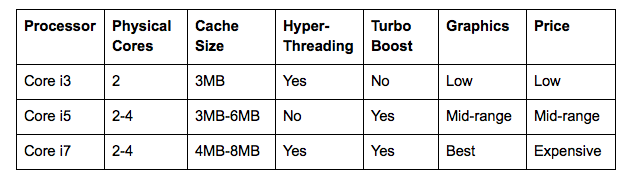
Typically, the Core i3 series has only dual-core processors, while the Core i5 and Core i7 series have both dual-core and quad-core processors. Quad-cores are usually better than dual-cores, but don’t worry about that just yet.

Intel releases “families” of chipsets, called generations. The current one is the 8th-generation series called Kaby Lake Refresh. Each family, in turn, has its own line of Core i3, Core i5, and Core i7 series of processors.

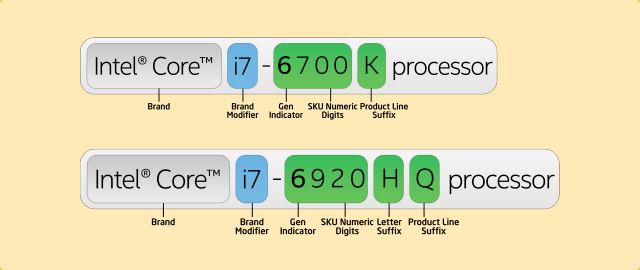
You can spot which generation a processor belongs to by the first digit in its four-digit model name. For example, the Intel Core i3-8250 belongs to the 8th generation.

Pro Tip: Here’s a useful rule of thumb. The other three digits are Intel’s assessment of how the processor compares to others in its own line. For example, an Intel Core i3-8145U is superior to the Core i3-8109U because 145 is higher than 109.

What Intel’s Model Numbers Mean: U vs. Q vs. H vs. K

Intel's processor naming scheme

As you can see, the model number will typically be followed by one, or a combination of the following letters: U, Y, T, Q, H, G, and K. Here’s what they mean:

  • U: Ultra Low Power. The U rating is only for laptop processors. These draw less power and are better for the battery.
  • Y: Low Power. Typically found on older generation laptop and mobile processors.
  • T: Power Optimized for desktop processors.
  • Q: Quad-Core. The Q rating is only for processors with four physical cores.
  • H: High-Performance Graphics. The chipset has one of Intel’s better graphics units in it.
  • G: Includes Discrete Graphics. Typically found on laptops, this means there is a dedicated GPU with the processor.
  • K: Unlocked. This means you can overclock the processor above its rating.

Understanding these letters and the numbering system above will help you know what a processor offers just by looking at the model number, without needing to read the actual specifications. Of course, before making a buying decision, it’s advisable to check the details at ark.intel.com.

You can find the meaning of other suffixes at Intel’s guidelines on processor numbers.

Intel Core i7 vs. i5 vs. i3: Hyper-Threading

The physical cores largely determine the speed of a processor. But with how modern CPUs work, you can get a boost in speed with virtual cores, activated through a system called Hyper-Threading Technology.

In layman’s terms, hyper-threading allows a single physical core to act as two virtual cores, thus performing multiple tasks simultaneously without activating the second physical core (which would require more power from the system).

If both processors are active and using hyper-threading, those four virtual cores will compute faster. However, do note that physical cores are faster than virtual cores. A quad-core CPU will perform much better than a dual-core CPU with hyper-threading!

The Intel Core i3 series has hyper-threading. The Intel Core i7 series supports hyper-threading, too. The Intel Core i5 series does not support it.

However, recent reports suggest Intel might be dropping hyper-threading on all its processors except the fastest Core i9 series.

Intel Core i7 vs. i5 vs. i3: Turbo Boost

The Intel Core i3 series does not support Turbo Boost. The Core i5 series uses Turbo Boost to speed up your tasks, as does the Core i7 series.

Turbo Boost is Intel’s proprietary technology to intelligently increase a processor’s clock speed if the application demands it. For example, if you are playing a game and your system requires some extra horsepower, Turbo Boost will kick in to compensate.

Turbo Boost is useful for those who run resource-intensive software like video editors or video games, but it doesn’t have much of an effect if you’re just going to be browsing the web and using Microsoft Office.

Intel Core i7 vs. i5 vs. i3: Cache Size

How cache size of processor impacts speed

Apart from Hyper-Threading and Turbo Boost, the one other major difference in the Core lineup is Cache Size. Cache is the processor’s own memory and acts like its private RAM. It’s one of the little-known specs that slows down your PC.

Just like with RAM, more cache size is better. So if the processor is performing one task over and over, it will keep that task in its cache. If a processor can store more tasks in its private memory, it can do them faster if they come up again.

The Core i3 series typically has up to 3MB of cache. The Core i5 series has between 3MB and 6MB of cache. The Core i7 series has between 4MB and 8MB of cache.

Intel Graphics: HD, UHD, Iris, Iris Pro or Plus

Ever since graphics were integrated on the processor chip, it’s become an important decision point in buying CPUs. But as with everything else, Intel has made the system a little confusing.

There are now typically three levels of graphics units: Intel HD, Intel Iris, and Intel Iris Pro or Iris Plus. You’ll see a model name like Intel HD 520 or Intel Iris Pro 580… and that’s where the confusion begins.

Here’s a brief example of how mind-boggling it can be. Intel HD 520 is a basic graphics chipset. Intel Iris 550 is better than Intel HD 520, but also basic. But Intel HD 530 is a high-performance graphics unit and is better than Intel Iris 550. However, Intel Iris Pro 580 is also a high-performance graphics unit and better than Intel HD 530.

The best advice for how to interpret these? Just don’t. Instead, rely on Intel’s naming system. If the processor’s model ends with an H, you know it’s a model with high graphics performance. If it ends with a G, that means there is a dedicated GPU, not one of Intel’s chips.

Choosing Between Intel Cores i3 vs. i5 vs. i7

Intel-core-i3-i5-i7-table-comparison

Generally speaking, here’s who each processor type is best for:

  • Intel Core i3: Basic users. Economic choice. Good for browsing the web, using Microsoft Office, making video calls, and social networking. Not for gamers or professionals.
  • Intel Core i5: Intermediate users. Those who want balance between performance and price. Good for gaming if you buy a G processor or a Q processor with a dedicated graphics processor.
  • Intel Core i7: Power users. You multi-task with several windows open at the same time, you run apps that require a lot of horsepower, and you hate waiting for anything to load.

How Did You Choose?

This article provides a basic guide for anyone looking to buy a new Intel processor but is confused between Core i3, i5, and i7. But even after understanding all this, when it’s time to make a decision, you might need to choose between two processors from different generations because they’re priced the same.

When you’re comparing, my best tip is to head to CPU Boss where you can compare both processors and get a detailed analysis, as well as ratings. If you don’t understand the jargon, just go with the rating and the basic advice. Even if you understand jargon, CPU Boss has all the details you’ll need.

Note: Most People Don’t Need Intel Core i9

Intel also has a top-end, high-performance range of processors called the Intel Core i9. Typically, these have more cores (10 to 18 on desktop), leading to higher speed. But for most people, the extra performance is not really worth it.

The Core i9 is only useful if you’re a hardcore gamer who also streams live, or a video editor working on multiple tasks. For everyone else, the Intel Core i7 should be good enough, and maybe even the Intel Core i5. If you’re curious, here’s what you need to know when deciding between Intel Core i9 vs. Core i7 vs. Core i5.

Read the full article: Intel Core i3 vs. i5 vs. i7: Which One Do You Really Need?


Read Full Article

Instagram launches scannable Nametags, tests school networks for teen growth


When your feed and Stories tray go stale, or your follower count stops rising, you drift away from Instagram. That’s why the app is rolling out two big new features designed to connect you to new people and diversify your graph so there’s alwasy something surprising to look at and like.

Today Instagram launches its QR Snapcode-style Nametags globally on iOS and Android, after TechCrunch broke the news on the feature back in March and April. Though not technically QR codes, they’re scanned like them to let you follow people you meet offline.

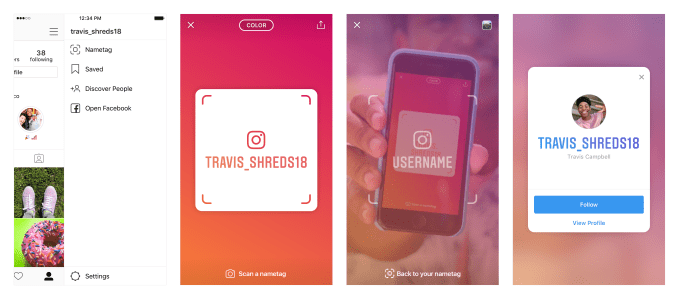
The customizable codes are accessible from the three-line hamburger menu on your profile. They can be scanned when other users tap and hold on your code through the Instagram Stories camera or Scan Nametag button on your own Nametag to instantly follow you. You can add colors, emojis, or AR-embellished selfies to your Instagram Nametag, show it off on your phone to help people follow you in person, put it on your website or social media, or message it to friends through SMS, WhatsApp, Messenger, and more.

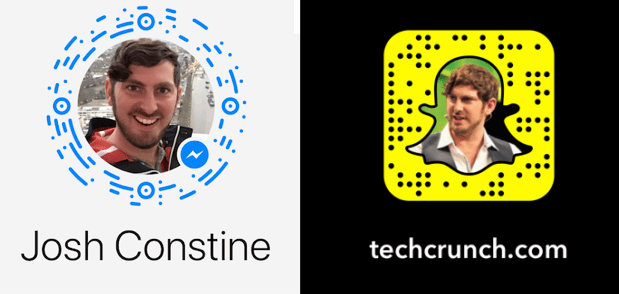
It’s actually surprising it took this long for Instagram to copy Snapchat’s Snapcodes that debuted for profiles in 2015 and were later expanded to open websites and unlock AR filters. Facebook Messenger launched its own QR codes in April 2017, though never quite caught on. But they make a ton of sense on Instagram since it’s tougher to share links on the app, people often treat it as their primary presence on the web that they want to promote, and because businesses are increasingly relying on the app for commerce. It’s easy to imagine brands putting their Instagram Nametags on billboards and posters, or buying ads to promote them around the web.

Facebook Messenger and Snapchat’s QR codes

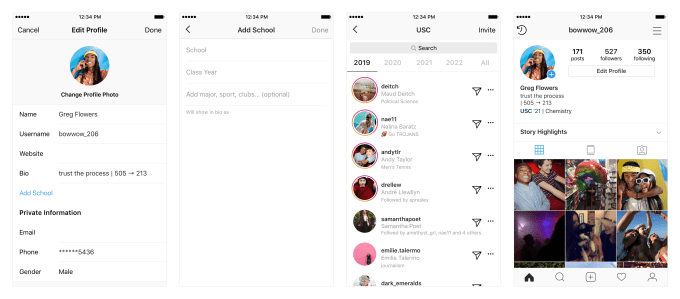
Secondly, Instagram is starting to test school communities in a variety of universities across the US. The allow you to join your university’s network to add a line to your profile listing your school, class year, and your major, sports team, or fraternity/sorority. You’ll show up in a directory listing everyone from your school that you can use to follow or message people, though those DMs may go to their pending inbox.

The school communities feature harkens back to Facebook’s origins when users could actually set their privacy to show all their content to everyone in their school. Here you won’t be able to instantly expose your private Instagram to everyone from your school. You could imagine a freshman in college going through their network to discover new potential friends to follow, or an alumni seeking out others from their Alma Mater in search of business or romance.

Instagram relies on info users have publicly shared about their school and the people they followed to verify if they were in fact a student or recent alumni of a university. Rather than actively signing up, users will get a notification prompting them to join the network.That’s a lot less reliable than using university email addresses for verification like Facebook used to, but also a lot simpler for users.

The company does provide a tool for alerting it to misuse of the school communities feature in case any sketchy older users are employing it as a stalking tool. Beside each user’s name is a three-dot button that opens a menu where users can report  Next to each user’s name is an overflow menu of 3 dots where people can report accounts they don’t think belong in a certain community.

Today’s launch is the first under Instagram’s new leader Adam Mosseri following the resignation of the company’s founders. Critics are watching to see if Mosseri, the former Facebook VP of News Feed and member of Mark Zuckerberg’s inner circle, will push harder to drive growth and monetization for Instagram. Given Instagram’s priority here is expanding its social graphs and keeping users engaged, it seems willing to trade occasionally allowing or disallowing the wrong people to reduce friction and juice growth.


Read Full Article

Instagram launches QR Nametags, tests school networks for teen growth


When your feed and Stories tray go stale, or your follower count stops rising, you drift away from Instagram. That’s why the app is rolling out two big new features designed to connect you to new people and diversify your graph so there’s alwasy something surprising to look at and like.

Today Instagram launches its Snapcode-style QR Nametags globally on iOS and Android, after TechCrunch broke the news on the feature back in March and April. These customizable QR codes accessible from the three-line hamburger menu on your profile can be scanned with the Instagram Stories camera by other users to instantly follow you. You can add colors, emojis, or AR-embellished selfies to your Instagram Name, show it off on your phone to help people follow you in person, put it on your website or social media, or message it to friends through SMS, WhatsApp, Messenger, and more.

It’s actually surprising it took this long for Instagram to copy Snapchat’s Snapcodes that debuted for profiles in 2015 and were later expanded to open websites and unlock AR filters. Facebook Messenger launched its own QR codes in April 2017, though never quite caught on. But they make a ton of sense on Instagram since it’s tougher to share links on the app, people often treat it as their primary presence on the web that they want to promote, and because businesses are increasingly relying on the app for commerce. It’s easy to imagine brands putting their Instagram Nametags on billboards and posters, or buying ads to promote them around the web.

Facebook Messenger and Snapchat’s QR codes

Secondly, Instagram is starting to test school communities in a variety of universities across the US. The allow you to join your university’s network to add a line to your profile listing your school, class year, and your major, sports team, or fraternity/sorority. You’ll show up in a directory listing everyone from your school that you can use to follow or message people, though those DMs may go to their pending inbox.

The school communities feature harkens back to Facebook’s origins when users could actually set their privacy to show all their content to everyone in their school. Here you won’t be able to instantly expose your private Instagram to everyone from your school. You could imagine a freshman in college going through their network to discover new potential friends to follow, or an alumni seeking out others from their Alma Mater in search of business or romance.

Instagram relies on info users have publicly shared about their school and the people they followed to verify if they were in fact a student or recent alumni of a university. Rather than actively signing up, users will get a notification prompting them to join the network.That’s a lot less reliable than using university email addresses for verification like Facebook used to, but also a lot simpler for users.

The company does provide a tool for alerting it to misuse of the school communities feature in case any sketchy older users are employing it as a stalking tool. Beside each user’s name is a three-dot button that opens a menu where users can report  Next to each user’s name is an overflow menu of 3 dots where people can report accounts they don’t think belong in a certain community.

Today’s launch is the first under Instagram’s new leader Adam Mosseri following the resignation of the company’s founders. Critics are watching to see if Mosseri, the former Facebook VP of News Feed and member of Mark Zuckerberg’s inner circle, will push harder to drive growth and monetization for Instagram. Given Instagram’s priority here is expanding its social graphs and keeping users engaged, it seems willing to trade occasionally allowing or disallowing the wrong people to reduce friction and juice growth.


Read Full Article

20 Private Roku Channels You Should Install Right Now


private-roku-channels

Roku devices come in a variety of different models and specifications, but at their core, they all operate in the same way: you add channels and watch the content you want.

There are two sources of channels. One is the Streaming Channels library on the device itself. There are more than enough free Roku channels in there to keep you entertained. However, the Roku really comes into its own when you start adding private channels.

Keep reading to learn how to add private channels to your Roku and discover the best Roku channels that you can install right now.

How Do You Add Private Channels to Roku?

Before you can add a private channel to your Roku box, you’ll need two things:

  • The channel’s code (we have included the codes in our list below)
  • A Roku account (set one up for free on the Roku website)

Once you have the code and have created an account, it’s easy to start adding channels.

To begin, head to your account portal and click Add a channel with a code. Insert the code, accept the on-screen confirmation, and you’re done.

The channel should immediately appear at the bottom of the channel list on your Roku’s homescreen. If it doesn’t, you can force a refresh by going to Settings > System > System Update > Check Now on the device.

So, now you know how to add channels, you just need to know which channels are worthwhile. Here are a bunch that you should consider installing right away.

1. Clikia (clikialive)

Clikia offers a mix of live channels, on-demand videos, and ad-free radio stations. You can access some free content without paying anything.

If you’re willing to dip into your wallet, there are three packages available. If you want access to cable channels like TNT, Sony, Cartoon Network, FOX News, and ESPN, you’ll need to pay $31.95/month.

2. Weather Radar (radar)

weather radar

Weather Radar will be especially useful to people who live in hurricane- and tornado-prone areas. It features local radar and satellite loops for your location, as well as tropical cyclone and disturbance maps.

Content from U.S. GOESs and the National Hurricane Center is available.

3. FreeJack TV (YQJ5B)

Are you a fan of conspiracy theories? If the answer is yes, you need to check out FreeJack TV. It offers a mix of conspiracy-themed chat shows, live streams, movies, and more.

4. EuroRoku (296XJKP)

EuroRoku is a paid private Roku channel that provides access to 24/7 streams of European TV stations.

The service costs $15/month and offers more than 300 channels, including networks from the U.K., France, Spain, Germany, Portugal, Poland, and Sweden.

5. Back From the Grave (BFTG)

back from the grave main screen

If you’re into sci-fi, murder mystery, horror films, and noir content, Back From the Grave is the channel for you.

The TV shows and movies that are available include Tales of Tomorrow and The Moon of the Wolf.

6. Donkey Kong (DonkeyKong)

Roku’s gaming potential is often overlooked. There are lots of great games you can play on your Roku device.

One that’s definitely worth checking out is the remake of Donkey Kong. It’s still in beta—hence why it’s a private channel.

7. The Silent Movie Channel (rollem)

French movie The Artist might have cleaned up at the 2012 Oscars, but the real heyday of silent film was back in the 1920s.

The Silent Movie Channel lets you relive the glory days of Harold Lloyd, Charlie Chaplin, and Buster Keaton. Genres include adventure, sci-fi, comedy, and horror.

8. RokuMovies (zb34ac)

Not to be confused with the official ad-supported Roku movie channel, RokuMovies focuses on bringing you the world’s strangest and most outlandish low-budget films.

Give it a try if you like giant monsters and forgotten kung-fu flicks with ridiculous storylines.

9. iTunes Podcast Channel (ITPC)

Podcasts continue to grow in popularity. Regardless of your specific tastes, you should be able to find something that you like.

The iTunes Podcast Channel provides access to the iTunes Podcast Directory and lets you listen to the shows through your Roku device.

10. Daily Motion (Dailymotion)

dailymotion roku channel

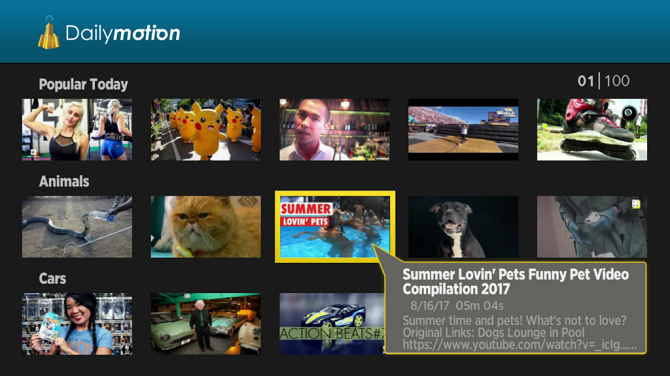
Oddly, the world’s second-largest video streaming site doesn’t have an official channel on Roku. Nonetheless, if you install this private channel, you still be able to enjoy all the best content that the site has to offer.

11. The Internet Archive (NMJS5)

The Internet Archive should be familiar to you by now. We’ve recommended its content as an excellent resource for cord cutters on numerous occasions.

The Roku channel provides access to the site’s vast repository of old TV shows, movies, and videos.

12. LodeRunner (LodeRunnerPreview)

LodeRunner is a classic video game from 1983. The puzzle-oriented game was initially available on the Apple II, Atari 8-bit machines, the VIC-20, the Commodore 64, and IBM PCs. In later years, it also appeared on PCs and Game Boys.

It was one of the first games to feature a level editor.

13. Home Movies (HomeMovies)

There was something special about shows like America’s Funniest Home Videos back in the 1990s. They’re not the same since smartphones became commonplace.

If you’d like to relive some of that glorious home video hilarity, install the Home Movies channel. There are hours of funny, silly, unusual, or just downright unbelievable classic home video footage to watch.

14. Syntrix (synctrixbeta)

Lots of people use Google Drive or Dropbox as their media server. It’s not as elegant a solution as a service like Plex, but it works.

If you store your TV shows and movies in the cloud, grab Syntrix. It lets you access your accounts and watch your videos on your Roku device.

15. Science Fiction and Beer (TZG6P92)

What’s the perfect way to end a tough day in the office? Crash on your sofa with a beer and a sci-fi movie, of course!

Science Fiction and Beer brings you a number of classic sci-fi movies for free. But no free beer, unfortunately. More are being added all the time.

16. The Odeon Theater (odeon)

The Odeon Theater has a sole focus on classic, cult, and independent films. It shows just one movie per week; it’s released on Wednesdays at noon.

17. Nowhere TV (H9DWC)

nowhere tv home screen

Nowhere TV isn’t as impressive as it once was, but it’s still a must-have for any Roku owner.

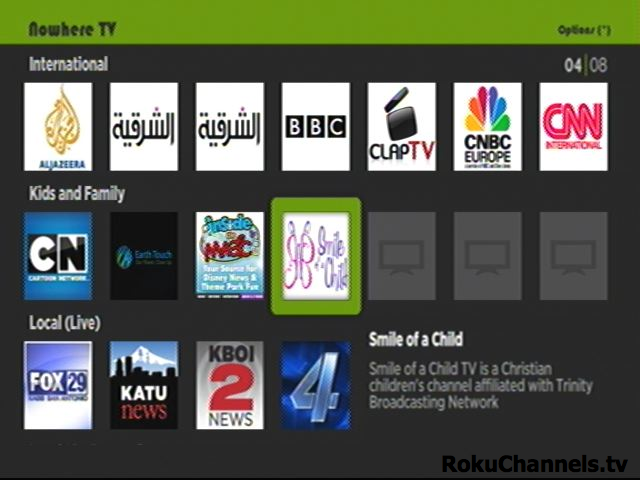
These days, most of the content is podcast video and audio content. However, it’s still a great way to stay on top of the latest videos from networks like CNET, NASA, and C-SPAN without needing to install multiple channels that clog up (and slow down) your Roku device.

18. Twitch (TwitchTV)

Twitch has a curious relationship with Roku. There used to be an official app, then Amazon pulled it, then reinstated it, then pulled it again. It’s not entirely clear why this is the case.

Install this unofficial Twitch app, and you won’t be at the mercy of Amazon’s latest whims.

19. Spanish Time (spanishtime)

If you speak Spanish and would like to keep abreast of the latest goings on in Latin America, you could subscribe to Spanish Time for $9.99/month.

It offers more than 150 live streaming channels from across the region, including all the biggest networks in Mexico, Argentina, and Colombia. There’s also a broad selection of miscellaneous Spanish-language sports and entertainment channels.

20. Goats Live (GoatsLive)

No, this isn’t a joke—it really is a channel focused on live goats.

Sure, it sounds ridiculous, but bear in mind that it was listed in EarthCam’s “25 Most Interesting Webcams of 2015”. There is also an accompanying YouTube channel.

As one viewer said, you simply “can’t get enough of goats in a tree.”

What Are Your Favorite Roku Channels?

Roku private channels have something for everyone. If you’re not using them, you’re going to severely restrict your enjoyment and limit your device’s potential.

To learn more about how to get the most out of your Roku device, check out our article on awesome Roku features you’re probably not using.

Read the full article: 20 Private Roku Channels You Should Install Right Now


Read Full Article

This autonomous spray-painting drone is a 21st-century tagger’s dream


Whenever I see an overpass or billboard that’s been tagged, I worry about the tagger and the danger they exposed themselves to in order to get that cherry spot. Perhaps this spray paint-toting drone developed by ETH Zurich and Disney Research will take some of the danger out of the hobby. It could also be used for murals and stuff, I guess.

Although it seems an obvious application in retrospect, there just isn’t a lot of drone-based painting being done out there. Consider: a company could shorten or skip the whole scaffolding phase of painting a building or advertisement, leaving the bulk of painting to a drone. Why not?

There just isn’t a lot of research into it yet, and like so many domain-specific applications, the problem is deceptively complex. This paper only establishes the rudiments of a system, but the potential is clearly there.

The drone used by the researchers is a DJI Matrice 1002, customized to have a sensing rig mounted on one side and a spraying assembly on the other, counterbalancing each other. The sprayer, notably, is not just a nozzle but a pan-and-tilt mechanism that allows details to be painted that the drone can’t be relied on to make itself. To be clear we’re still talking broad strokes here, but accurate to an inch rather than three or four.

It’s also been modified to use wired power and a constant supply of paint, which simplifies the physics and also reduces limits on the size of the surface to be painted. A drone lugging its own paint can wouldn’t be able to fly far, and its thrust would have to be constantly adjusted to account for the lost weight of sprayed paint. See? Complex.

The first step is to 3D scan the surface to be painted; this can be done manually or via drone. The mesh is then compared to the design to be painted and a system creates a proposed path for the drone.

Lastly the drone is set free to do its thing. It doesn’t go super fast in this prototype form, nor should it, since even the best drones can’t stop on a dime, and tend to swing about when they reduce speed or change direction. Slow and steady is the word, following a general path to put the nozzle in range of where it needs to shoot. All the while it is checking its location against the known 3D map of the surface so it doesn’t get off track.

In case you’re struggling to see the “bear,” it’s standing up with its paws on a tree. That took me a long time to see so I thought I’d spare you the trouble.

Let’s be honest: this thing isn’t going to do much more complicated than some line work or a fill. But for a lot of jobs that’s exactly what’s needed — and it’s often the type of work that’s the least suited to skilled humans, who would rather be doing stuff only they can do. A drone could fill in all the easy parts on a building and then the workers can do the painstaking work around the windows or add embellishments and details.

For now this is strictly foundational work — no one is going to hire this drone to draw a Matterhorn on their house — but there’s a lot of potential here if the engineering and control methods can be set down with confidence.


Read Full Article