16 November 2013

Blue YouTube


I like blue, so I was pleasantly surprised to see that YouTube made some UI elements blue (#2793e6): the like button and the line below the number of views. Maybe someone was unhappy that Android KitKat removed all the blue icons and decided to compensate in other ways or maybe it's an attempt to calm YouTube users and make them stop posting silly comments.


Folders in Chrome's App Launcher


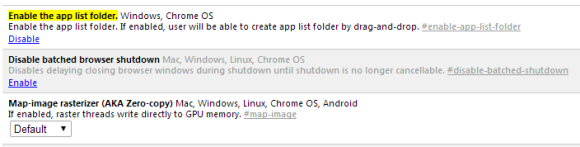
Chrome's latest Dev channel release lets you create folders in the app launcher. If you use Chrome 33 (Dev, Canary) or Chromium 33 for Windows, you can paste this in the address bar:


chrome://flags/#enable-app-list-folder


Then click "Enable" next to "Enable the app list folder" and then click the "Relaunch now" button at the bottom of the page to restart the browser and enable the experimental feature.


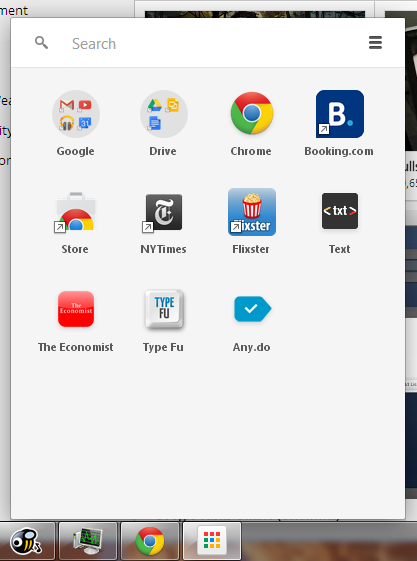
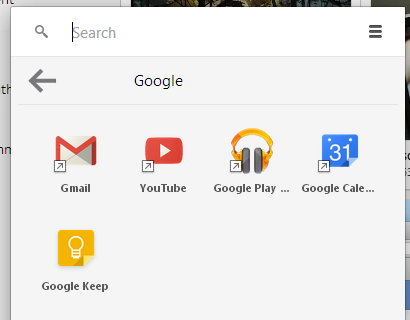
"If enabled, user will be able to create app list folder by drag-and-drop," informs Google. It works just like in Android: drag one app on top of another to create a folder, then drag other apps to the folder.


Here's the Google folder from the screenshot above:


It's a simple feature that lets you organize your apps and reduce clutter.


{ Thanks, Silviu. }

Mobile First


A few years ago, many people complained that mobile sites and mobile apps are too limited. They couldn't include all the features from their desktop counterparts and some thought that was a bad thing.


Fast forward today and you'll notice that Google's desktop sites look more and more like Google's mobile apps. Most Google redesigns are all about taking mobile interfaces and adding them to the desktop. That's one of the reasons why many Google services drop advanced features and opt for simplified interfaces. This way, everything looks consistent and users can quickly switch from the mobile apps to the desktop apps.


Here are some examples:


1. The Google Maps redesign started with the iPhone app, continued with the desktop site and then the Android app.


2. The app launcher from the Google navigation bar was first available in the Google Search app for iOS.


3. Google Play's desktop interface had a lot of advanced features that were removed when Google updated the site to make it look more like the Android app.


4. The Google+ photo editor and Chrome Office editor are based on mobile apps that were ported to Native Client. You're now using the desktop to run mobile apps (only in Chrome).


5. Google Keep for Android has a lot more features than Google Keep for desktop. For example, you can't reorder notes or add more than one image in Google Keep for desktop.


Somehow, the most innovative and most interesting apps are now in the mobile space. That's where the users are moving and where things are constantly changing. Mobile is a flourishing testbed for new ideas.

New Gmail Interface for iPad


Google updated the Gmail app for iOS and added a new interface for iPad. The sidebar that lets you go to a label or a different mail account is now persistent in the landscape mode and it's a lot smaller. It only shows your inbox tabs and the number of unread messages from each tab, but you can tap the arrow icon to find your labels. Unfortunately, you can't select some labels that are always displayed, like you can do in the desktop Gmail.


The sidebar that displays the messages from the current view is now hidden in the portrait mode, so you can better read your mail. You need to tap the three dot icon to see the list of messages, but you can also swipe from the left edge. The built-in mail client from iOS also hides the messages list in portrait mode.


There's also a full-screen compose box, so you get more room to write your messages.


Google mentions some other improvements: a better scrolling experience and some iOS7 features like the new keyboard.


{ via Gmail Blog }

Google Image Search Tests Snippets


One of the features that was removed in the current Google Image Search interface is snippets. Now Google only shows the title of the page, the domain and the size of the image in pixels. Snippets used to reveal more information about the photo or the page that includes the image, just like the snippets that are used for all the other search results.


Google considers bringing back snippets. Here's a screenshot from a Google experiment:


In this case, the snippet is quite useful, but very long: "the company's energy supply. This makes the Googleplex one of the USA's largest corporate solar installations. Unfortunately, I wasn't allowed to take photos on the roof, so here's one Google made earlier."


Google's regular interface doesn't show snippets:


15 November 2013

8 Super Windows 8.1 Tweaks For Power Users


windows 8.1 surface

Whether you’re using Windows 8.1 on a desktop, tablet, or something in between, there are a variety of useful tweaks you should know about. These options allow you to do everything from making Windows 8.1 work better on a desktop PC to tweaking the way it works on a tablet. Many of these options are all-new in Windows 8.1 or have moved from where they were in Windows 8. Windows 8.1 is quite a large update compared to Microsoft’s old service packs for previous versions of Windows. Tweak Desktop Integration Windows 8.1 brings many useful options for desktop users. If...


Read the full article: 8 Super Windows 8.1 Tweaks For Power Users


Netflix On TV Gets A Major Redesign To Make It Easier To Discover Content


Netflix-update-for-TV-Better-Visual-Recommendations-Search

Video-streaming service Netflix, whose members watch a billion hours each month, has given the “biggest update in its history” to its TV app, bringing a visually richer experience with more descriptive results. “We set out to deliver an update that would make it even easier to discover something great to watch and we think we succeeded,” the company wrote in a blog post. There don’t seem to be many performance improvements under the hood, but you can easily improve Netflix streaming on any device. In the new update, Netflix will tell you why it has recommended you should watch a...


Read the full article: Netflix On TV Gets A Major Redesign To Make It Easier To Discover Content


Download Windows 8.1 90-Day Trial Copy


CLICK HERE TO SEE FULL POST


It’s been close to a month since Microsoft released Windows 8.1 RTM update to the public. Microsoft’s newest version of Windows operating system, which includes over 50 new exciting features, is an attempt to improve the previously released Windows 8 version and is available as a free upgrade to all Windows 8 users. Users who […]

SpecificFeeds Lets You Syndicate And Subscribe To Customized RSS Updates


firehose

Sometimes, does it feel that reading stories in your RSS feed reader is like trying to take a sip of water from a fire hose? Wouldn’t it be nice to isolate stories from your favorite websites that are only focused on the topics you like or are written by the authors you enjoy the most? Well, a new feed customizing service is now available that makes it possible to do exactly that. The name of the service is SpecificFeeds, and it’s called that because it lets you isolate specific items from website feeds that you want to see, filtering out...


Read the full article: SpecificFeeds Lets You Syndicate And Subscribe To Customized RSS Updates


A Free Screen Capture Tool Loaded with Features


A free but powerful screen capture tool for Windows captures and uploads the screenshot images to your favorite image hosting site with a single hotkey.


This story, A Free Screen Capture Tool Loaded with Features, was originally published at Digital Inspiration on 14/11/2013 under GIF, Screen Capture, Windows, Software

6 Inspiring 365 Day Photography Projects For Your Creative Mojo


Project-365

Any photography project done over the course of a year seems epic. But let’s break it down to a single day and a single task – a single photo every day…for only a year. Now, that doesn’t seem too impossible does it? I did talk about how it can improve your photography while seeding memories with opportune clicks. 365 day photo challenges are not just about capturing photos over the course of a year; they are also about documenting your maturity as a photographer. One of the other benefits is that it could spur your creativity as it makes you...


Read the full article: 6 Inspiring 365 Day Photography Projects For Your Creative Mojo


14 November 2013

Create DVDs and Blu-ray Disc Backups Effortlessly With DVDFab Copy Suite [Giveaway]


dvdfab-feat

There is nothing worse than buying an expensive DVD or Blu-ray disc of your favourite movie or TV show, only to damage it down the line. And while Blu-rays are less susceptible to damage with age, DVDs will get scratched to a point where you simply can’t use them anymore. One of the best practices you can have is to create backups of physical disc that you own — and enjoy viewing the digital copies while keeping the originals safe. DVDFab Copy Suite ($90 for a 1-year license) for Windows promises to make the whole process simpler. From the makers...


Read the full article: Create DVDs and Blu-ray Disc Backups Effortlessly With DVDFab Copy Suite [Giveaway]


How to Keep your Google Contacts Up-to-date [v2]


Your Google Contacts can now add or update their contact information in your online address book directly with this simple Google Script.


This story, How to Keep your Google Contacts Up-to-date [v2], was originally published at Digital Inspiration on 14/11/2013 under Google Contacts, Internet

(mt) Media Temple Grid Hosting Review and Giveaway


grid-feat

(mt) Media Temple is not your average website hosting company, and their Grid shared hosting service is miles beyond any shared hosting I’ve ever used. Performance, scalability, and incomparable support is what you’ll find. Here’s why I love it. We’re giving away ten 1-year Media Temple Grid shared hosting accounts with this review. So learn everything Media Temple’s Grid service has to offer, then join the giveaway to win! Plus, check out our latest free manual on how to start your own online business using Media Temple. Features At A Glance What makes Media Temple’s Grid hosting different to shared...


Read the full article: (mt) Media Temple Grid Hosting Review and Giveaway


PS4 Reviews, Moto G, Chromebook 11, Domainapalooza, [Tech News Digest]


Today in Tech News Digest, the PlayStation 4 gets reviewed, Motorola officially unveils the Moto G, the HP Chromebook 11 is removed from store shelves, Yahoo tries to sell some domains, it’s revealed that Snapchat rebuffed an acquisition offer from Facebook, the new Chrome Beta is listening in, Bing gains a musical overhaul, and Google is now bigger than the newspaper industry. PlayStation 4 Reviews Roundup the ps4 has a better controller and graphics. no games. expensive. software still clunky. wait a year or two. there, saved you an hour. — John Herrman (@jwherrman) November 13, 2013 The true next-gen...


Read the full article: PS4 Reviews, Moto G, Chromebook 11, Domainapalooza, [Tech News Digest]


PS4 Reviews, Moto G, Chromebook 11, Domainapalooza, [Tech News Digest]


Today in Tech News Digest, the PlayStation 4 gets reviewed, Motorola officially unveils the Moto G, the HP Chromebook 11 is removed from store shelves, Yahoo tries to sell some domains, it’s revealed that Snapchat rebuffed an acquisition offer from Facebook, the new Chrome Beta is listening in, Bing gains a musical overhaul, and Google is now bigger than the newspaper industry. PlayStation 4 Reviews Roundup the ps4 has a better controller and graphics. no games. expensive. software still clunky. wait a year or two. there, saved you an hour. — John Herrman (@jwherrman) November 13, 2013 The true next-gen...


Read the full article: PS4 Reviews, Moto G, Chromebook 11, Domainapalooza, [Tech News Digest]


syncDriver: SkyDrive Desktop Client For Windows 8.1


CLICK HERE TO SEE FULL POST


SkyDrive integration is one of the tons of features introduced with Windows 8.1 update. While the SkyDrive integration is handy for users who prefer signing-in with Microsoft account, users who have a local account can’t enjoy the SkyDrive integration without having to switch to the Microsoft account. As you should know by now, the official […]

How To Create Your Own Yahoo Pipes That Can Save You Money


green pipes

The Internet connects us to impossibly large amounts of information – but sorting through tremendous volumes of data can take a lot of time. There exist two innovations that make that process simple: Yahoo Pipes and RSS. Whether you seek employment or hot sales, these tools can get you the information you crave with very little effort. It works like this: RSS feeds contain timely updates from your favorite websites. Yahoo Pipes can filter information from RSS feeds, restricting what reaches you. For example, if you need job notifications pertaining to specific fields, such as nursing, you can subscribe to...


Read the full article: How To Create Your Own Yahoo Pipes That Can Save You Money


Google Chrome Beta Shows Noisy Tabs on Desktop, Gets New Switcher on Android


chrome-beta

Google’s been hard at work on the Chrome browser, adding features like smart malware blocking and factory reset. The new Chrome Beta on desktop and on Android comes with even more abilities, including telling you which tab that sound is coming from and switching tabs more easily. Chrome Beta on desktops The new Chrome Beta release for desktops includes a smart ability to find out which tab is being used for that sound coming out of your speakers or to get your image from your webcam. Often, you will have many tabs open and not know which one is making...


Read the full article: Google Chrome Beta Shows Noisy Tabs on Desktop, Gets New Switcher on Android


iOS7 Vs Android Kit-Kat: The War Is On! Who do you think is Going to Win the Battle?


The mobile application development especially that of the operating systems, has taken an ugly turn for both the Apple and the Android devices. Since Apple has come up with IOS 1.x (colloquially known as IOS 1 back in 2008), Google came up with the first iteration of its own operating system, the Android version 1.0 in the same year. It was just the beginning of the war which was going to rage on for the years to come.


2013 has been the year where the aspect of technology has gone through many upheavals. More focus has been put on mobile technology this year rather than emphasizing the personal desktops and laptops. This year has been the ideal platform for these tech giants to come up with the latest iteration of the mobile operating system, which is meant exclusively for the next generation smart phone user. The present status: Apple has already released the IOS 7 and Google is still to release its new OS- Android Kit-Kat 4.4.

Read more »