18 May 2020

To overcome challenges, stop comparing yourself to others | Dean Furness

To overcome challenges, stop comparing yourself to others | Dean Furness

When you stop comparing yourself to others, you can accomplish great things, says wheelchair athlete Dean Furness. He shares how, after losing the use of his legs in an accident, he discovered a powerful new mindset focused on redefining his "personal average" and getting better little by little.

Click the above link to download the TED talk.

U.S. House approves remote voting, though the tech is unclear


Congress will allow remote voting for the first time in its history, after the U.S. House approved Resolution 965 late Friday in response to the coronavirus pandemic.

The measure — sponsored by Massachusetts Representative Jim McGovern — authorizes proxy voting by members for renewable periods of 45 days and allows for remote participation in committee hearings.

H.R. 965 could also permanently alter the way Congress operates through a provision that establishes a bi-partisan process to explore digital voting away from Capitol Hill.

Per the directive, “The chair of the Committee on House Administration, in consultation with the ranking minority member, shall study the feasibility of using technology to conduct remote voting in the House, and shall provide certification…that operable and secure technology exists.”

Previous House rules required in person voting only. The Senate still makes decisions by recording verbal “Yeas” and “Nays” on a tally sheet.

Friday’s congressional action is another example of how COVID-19 is forcing every organization in the U.S. to overhaul longstanding ways of doing things, usually through a mix of digital tools.

We still don’t have clear details on what tech the U.S. House will use to implement both the short and longer term provisions of H.R. 965.

The proxy voting arrangement will allow members to vote remotely through designated representatives on Capitol Hill — effectively a form of pinch-hitting for Congress. For remote participation in hearings, there are a range of options that could be selected — from Google Meet to Microsoft Teams. Last week, Dr. Anthony Fauci testified before the U.S. Senate using Zoom.

On determining long-term means for remote voting, that’s now up to the Chairperson of the Committee on House Administration —  representative Zoe Lofgren (D-CA) —  and the ranking minority member Rodney Davis (R-IL), who voted against H.R. 965.

Lofgren offered a preview of how it could shape up in a statement supporting H.R. 965 late Friday: “For voting on the floor, we will rely on a secure email system, coupled with member-driven, remotely-directed authorizations.  This system would use secure email for proxy votes: a solid, well known, resilient technology with very low bandwidth requirements that we understand very well from a cybersecurity standpoint.”

Of course, she and Republican Congressman Davis will have to find agreement on this during a time when both parties rarely agree on anything. The vote on H.R. 965 was split along party lines, with 217 Dems voting in favor and not a single Republican member supporting the measure.

In the past, Congress has resisted calls to allow for remote voting. There was discussion of the need for such provisions after the September 11 attacks and 2001 Anthrax attacks. These was overridden by a long time expectation that those elected to represent constituencies be physically present to vote.

Over the last two months, it appeared the House might become a last holdout in the U.S. for in person only workplaces, as much of the country has shifted to tech-enabled measures for remote operations.

Shortly after the coronavirus outbreak hit the U.S. in March, Congressman Eric Swalwell (D-CA) pressed a resolution with Arkansas Representative Rick Crawford (R-AR) that would allow members to participate virtually in hearings and vote remotely, under special circumstances.

US capitol building at night

Image Credits: Bill Dickinson/Getty Images

That was nixed by House Speaker Nancy Pelosi  who, at the time, wanted Congress to remain in session and present to pass the first coronavirus stimulus bill.

Two months and nearly one hundred thousand American deaths later, it appears COVID-19 could force one of the more significant procedural changes in the House’s 231 year history.

In person voting could soon be replaced with some form of two-factor authentication, digital voting. This could change longstanding patterns for how lawmakers travel, interact with constituencies, and divide their time between the Beltway and districts back home.


Read Full Article

Buzzy Ethereum wallet app Argent comes out of stealth


Argent is launching the first public version of its Ethereum wallet for iOS and Android. The company has been available as a limited beta for a few months with a few thousand users. But it has already raised a seed and a Series A round with notable investors, such as Paradigm, Index Ventures, Creandum and Firstminute Capital. Overall, the company has raised $16 million.

I managed to get an invitation to the beta a few months ago and have been playing around with it. It’s a well-designed Ethereum wallet with some innovative security features. It also integrates really well with DeFi projects.

Many people leave their crypto assets on a cryptocurrency exchange, such as Coinbase or Binance. But it’s a centralized model — you don’t own the keys, which means that an exchange could get hacked and you’d lose all your crypto assets. Similarly, if there’s a vulnerability in the exchange API or login system, somebody could transfer all your crypto assets to their own wallets.

At heart, Argent is a non-custodial Ethereum wallet, like Coinbase Wallet or Trust Wallet. You’re in control of the keys. Argent can’t initiate a transaction without your authorization for instance.

But that level of control brings a lot of complexities. Hardware wallets, such as Ledger wallets, ask you to write down a seed phrase so that you can recover your wallet if you lose your device. It requires some discipline and it’s hard to understand if you’re not familiar with the concept of seed phrases.

Even Coinbase Wallet tells you to back up your seed phrase when you first create a wallet. “We see them as advanced tools for developers,” Argent co-founder and CEO Itamar Lesuisse told me.

That’s why a new generation of wallets tries to hide the complexity from the end user, such as ZenGo and Argent. Creating a wallet on Argent is one of the best experiences in the cryptocurrency space. Your wallet is secured by something called ‘guardians’.

Trust your friends

A guardian can be someone you know and trust, a hardware wallet (or another phone) or a MetaMask account. Argent also provides a guardian service, which requires you to confirm your identity with a text message and an email. If you lose your phone and you want to recover your wallet on another phone, you need to speak to your guardians and get a majority of confirmations. If they can all confirm that, yes, indeed, your phone doesn’t work anymore and you want to recover your crypto assets, the recovery process starts.

Let’s take an example. Here’s your list of guardians:

  • Argent’s own guardian service
  • Two friends who are also using Argent
  • A Ledger Nano S hardware wallet

In total, there are five different factors involved, you including. If you lose your phone, you can recover your wallet by downloading Argent on another phone (factor #1), asking Argent’s guardian service to send you a text and an email to confirm your identity (factor #2) and confirming your identity with the Ledger Nano S (factor #3).

You have reached a majority and the recovery process starts. You’ll get your funds in 36 hours so that you have enough time to cancel it it’s a hijacking attempt.

But you could also have downloaded the Argent app on another phone (factor #1) and pinged your two friends (factor #2 and #3) directly. If they can confirm the same sequence of characters (emojis in that case), the recovery process would start as well.

“I’m interested in social recovery, multi-key schemes,” Ethereum creator Vitalik Buterin said in a TechCrunch interview in July 2018. It’s not a new concept as social media apps already use social recovery systems. On WeChat, if you lose your password, WeChat asks you to select people in your contact list within a big list of names.

In Argent’s case, social recovery adds an element of virality as well. The experience gets better as more people around you start using Argent.

In addition to wallet recovery, Argent uses guardians to put some limits. Just like you have some limits on your bank account, you can set a daily transaction limit to prevent attackers from grabbing all your crypto assets. You can ask your guardians to waive transactions above your daily limits.

Similarly, you can ask your guardians to lock your account for 5 days in case your phone gets stolen.

Betting on Ethereum

Argent is focused on the Ethereum blockchain and plans to support everything that Ethereum offers. Of course, you can send and receive ETH. And the startup wants to hide the complexity on this front as well as it covers transaction fees (gas) for you and gives you usernames. This way, you don’t have to set the transaction fees to make sure that it’ll go through.

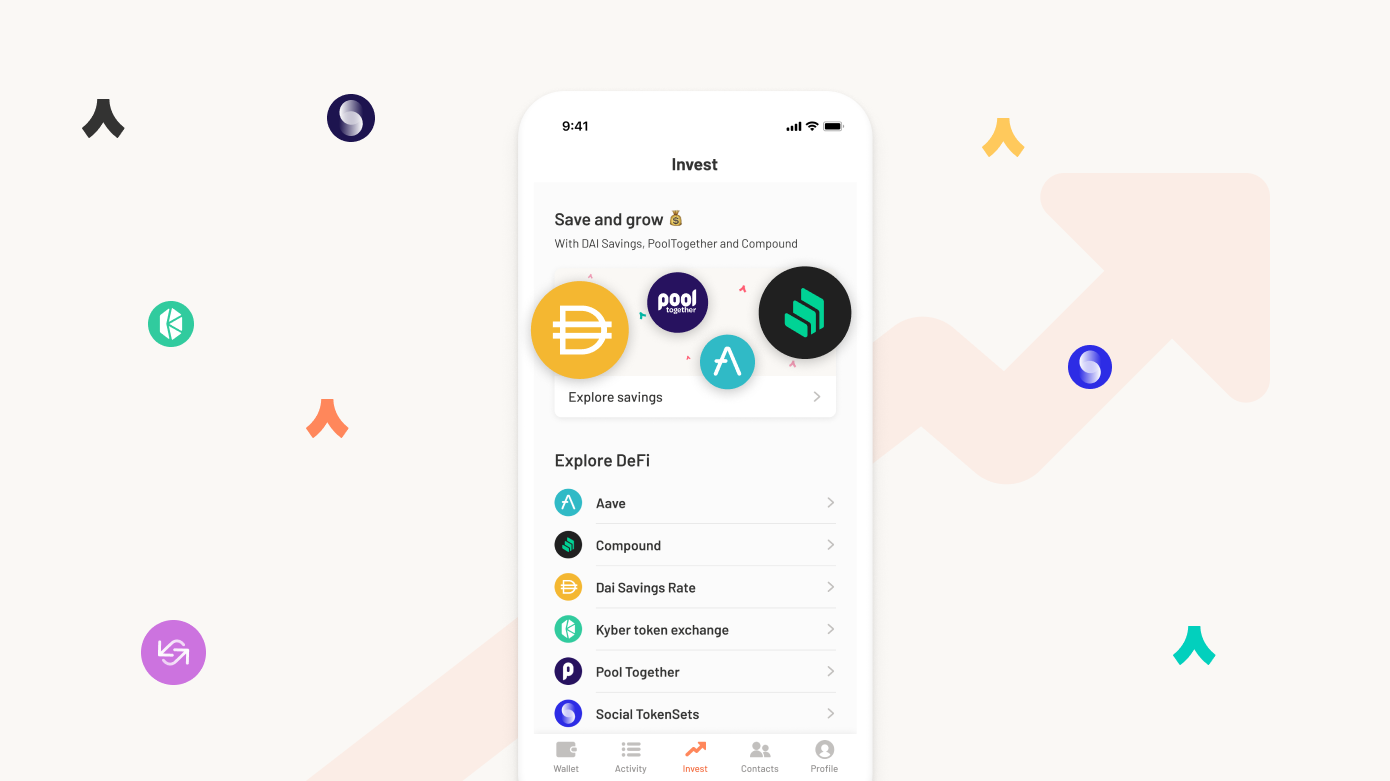
The startup plans to integrate DeFi projects directly in the app. DeFi stands for decentralized finance. As the name suggests, DeFi aims to bridge the gap between decentralized blockchains and financial services. It looks like traditional financial services, but everything is coded in smart contracts.

There are dozens of DeFi projects. Some of them let you lend and borrow money — you can earn interest by locking some crypto assets in a lending pool for instance. Some of them let you exchange crypto assets in a decentralized way, with other users directly.

Argent lets you access TokenSets, Compound, Maker DSR, Aave, Uniswap V2 Liquidity, Kyber and Pool Together. And the company already has plans to roll out more DeFi features soon.

Overall, Argent is a polished app that manages to find the right balance between security and simplicity. Many cryptocurrency startups want to build the ‘Revolut of crypto’. And it feels like Argent has a real shot at doing just that with such a promising start.


Read Full Article

Intraday Trading Calls for 19-May-2020

Intraday Trading Calls for 19-May-2020

Please click on the following link to view full post.

https://intradayguruji.blogspot.com/2020/05/intraday-trading-calls-for-19-may-2020_18.html

Via http://intradayguruji.blogspot.com

Live Intraday Trading on 18-May-2020 (Profit 5300)

Live Intraday Trading on 18-May-2020 (Profit 5300)

Please click on the following link to view full post.

https://intradayguruji.blogspot.com/2020/05/live-intraday-trading-on-18-may-2020.html

Via http://intradayguruji.blogspot.com

Fitbit’s Chinese rival Amazfit mulls a transparent, self-disinfecting mask


The COVID-19 pandemic has ushered in a wave of Chinese companies with manufacturing operations to produce virus-fighting equipment: Shenzhen-based electric vehicle giant BYD quickly moved to launch what it claims to be the world’s largest mask plant; Hangzhou-based voice intelligence startup Rokid is making thermal imaging glasses targeted at the US market; and many more.

The latest of such efforts comes from Huami, the NASDAQ-listed wearables startup that makes Xiaomi’s Mi Bands and sells its own fitness tracking watches under the Amazfit brand in more than 70 countries. In a phone interview with TechCrunch, the firm said it is developing a see-through plastic mask with built-in ultraviolet lights that can disinfect filters within 10 minutes when connected to a power supply through a USB port.

The Aeri concept comes with built-in ultraviolet lights that can disinfect filters within 10 minutes when connected to a power supply through a USB port.

Called Aeri, the mask uses removable filters that are on par with N95 filtration capacity. If the concept materializes, each filter could last up to a month and a half, significantly longer than the average life of surgical masks and N95 respirators. The modular design allows for customized accessories such as a fan for breathable comfort, hence the mask’s name Aeri, a homophone of “airy”.

Aeri started from the premise that wearing masks could thwart the increasingly common adoption of facial recognition. That said, imaging companies have been working on biometric upgrades to allow analyses of other facial features such as irises or the tip of noses.

Aeri might still have a market appeal though, argued Pengtao Yu, vice president of industrial design at Huami. “Whether people need to unlock their phones or not, they want to see each other’s faces at social occasions,” said Yu, the California-based Chinese designer who had served clients including Nest Labs, Roku, GoPro and Huawei prior to joining Huami.

Huami’s U.S. operation, which focuses on research and development, opened in 2014 and now counts a dozen of employees.

Many companies turning to pandemic-fighting manufacturing have taken a hit from their core business, but Huami has managed to stay afloat. Its Q1 revenue was up 36% year-over-year to hit $154 million, although net income decreased to $2.7 million from $10.6 million. Its stocks have been declining, however, sliding from a high point of $16 in January to around $10 in mid-May.

Huami is in the process of prototyping the Aeri masks. In Shenzhen, which houses the wearables company’s headquarters, the development cycle for hardware products — from ideation to market rollout — takes as short as 6-12 months thanks to the city’s rich supply chain resources, said Yu.

Huami hasn’t priced Aeri at this early stage, but Yu admitted that the masks are targeting the “mass consumer market” around the world, not only for protection against viruses but also everyday air pollution, rather than appealing to medical workers. Given Huami’s history of making wearables at thin margins, it won’t be surprising that Aeri will be competitively priced.

The Aeri project is part of Huami’s pivot to enter the general health sector beyond pure fitness monitoring. The company has recently teamed up with a laboratory led by Dr. Zhong Nanshan, the public face of China’s fight against COVID-19, to track respiratory diseases using wearables. It’s also in talks with the German public health authority to collaborate on a smartwatch-powered virus monitoring app, the company told TechCrunch.


Read Full Article

17 May 2020

The Great Reset


Talk of an economic downturn can be frightening, especially one precipitated by a pervasive health crisis. At times, I’m overwhelmed by the images of countless patients on life-support and the near-endless streams of statistics regurgitating bad news.

Having started in venture at the beginning of two recessions, I’ve seen how the startup industry functions during economic trouble. My second day of work at Charles River Ventures was September 11th, 2001. My first project, analyzing the VC industry, propelled the firm to return more than 60% of its fund to investors, going from a $1.2 billion fund to $450 million. In May 2008, Mike Maples and I founded Floodgate in the midst of the Great Recession. We learned that great founders won’t wait for a better economic moment to start a company.

While we are currently embroiled in personal and professional circumstances unimaginable even three months ago, these very challenges will form the basis of incredibly innovative ideas. In order for the world to move forward, we need our greatest minds to imagine a brighter future and create solutions to make it a reality.

When I analyze our society and novel health situation, one thing is certain: COVID-19 is a paradigm-shifting event, creating massively accelerated social and economic change.

The Great Reset is not just another economic event

Our current situation is unique. It’s not merely a cyclical economic event, nor is it a standalone health crisis. What we are experiencing is not just an inflection point: it’s a societal phase-change unlike anything we have ever seen. We face an epic choice of how we move forward, and the decisions we make today will shape an entire generation.

Here’s why: COVID-19 is prompting us to reset many of our most fundamental behaviors. These changes are impacting our financial system, with effects visible throughout our homes, businesses and even the concept of “workplace” itself.

COVID-19 is pervasive

As a global pandemic, the virus itself has spread to nearly every country in the world.

Between February 20 and March 26, 100% of the world’s 20 largest economies implemented government-mandated social distancing. Globally, the number of scheduled airline flights is down 64%. In some countries, like Spain and Germany, flight numbers are down by more than 90%.

Since the timeline for lifting government restrictions is unclear — and even then, scientists are uncertain how the virus will spread — the question lingers: How long will this go on?

COVID-19’s impact is uncertain, long-term and potentially undulating, affecting every facet of our lives. You can’t simply wait it out with the expectation that industries will rebound. In 2001, September 11 felt pervasive, but its economic impact ultimately stemmed from just one single incident and the resulting fear… and that one single incident still cost more than three trillion dollars. How much larger will COVID-19 be?


Read Full Article

E-bike startup Angell partners with SEB for manufacturing and investment


French startup Angell has signed a wide-ranging partnership with SEB, the French industrial company behind All-Clad, Krups, Moulinex, Rowenta, Tefal and others. As part of the deal, SEB will manufacture Angell’s electric bikes in a factory in Is-sur-Tille near Dijon, France.

SEB’s investment arm, SEB Alliance, is also investing in Angell. The terms of the deal are undisclosed, but Angell says it plans to raise between $7.6 and $21.7 million (between €7 and €20 million) with a group of investors that include SEB.

“We originally planned to manufacture 1,500 bikes in 2020,” Angell founder Marc Simoncini told me. “We realized that we were selling more bikes than expected. We now expect to sell 10,000 bikes.”

Angell has accepted 2,000 pre-orders over the past six months — 75% in France and 25% from the rest of the world. But pre-orders accelerated drastically with the lockdown in France. During the month of May, Angell expects to sell three times more bikes than during an average month.

Originally, Angell planned to build its own factory and assemble bikes itself. SEB is allocating 25 employees on the production line and production should start at the end of May. It should definitely make things move faster and reduce potential delays.

Angell unveiled its smart electric bike in November 2019. It has a 2.4-inch touch screen, an aluminum frame, integrated lights and a removable battery.

Like other connected bikes from Cowboy and VanMoof, it pairs with your phone using Bluetooth. This way, the Angell bike has an integrated lock and alarm system. There are also an integrated GPS chip and cellular modem to track it if it ever gets stolen.

But Angell is going one step further with the integrated display. You can select the level of assistance and display information on the screen, such as speed, calories, battery level and distance. It can also display turn-by-turn directions. Your handlebar also vibrates to indicate when you’re supposed to turn left or right.

The company is also announcing a second model this week, the Angell/S. It is a smaller, lighter version of the bike with a step-through frame. Both models feature the same battery, same motor and same electronics. They also both cost €2,690 ($2,900).

Angell now expects to deliver the first batch of bikes in July. By the end of the summer, new customers should be able to order a bike and get delivered within 10 days. Eventually, the company will also roll out a full line of accessories, such as fenders, baskets and mirrors.


Read Full Article

The Adobe Illustrator Keyboard Shortcuts Cheat Sheet


Bright colorful image on a MacBook screen

Adobe Illustrator is an incredibly powerful app, but it can be difficult to navigate. With so many menus and toolbars, it’s hard to find your way around. Fortunately, it offers a huge number of keyboard shortcuts to help speed up your workflow.

In this cheat sheet we’ve compiled some of the best Illustrator shortcuts, for both Windows and Mac. They’ll help you quickly find the most important tools and panels, work more efficiently with complex documents, and access some hidden features that will get you designing faster than ever.

FREE DOWNLOAD: This cheat sheet is available as a downloadable PDF from our distribution partner, TradePub. You will have to complete a short form to access it for the first time only. Download The Adobe Illustrator Keyboard Shortcuts Cheat Sheet.

Adobe Illustrator Keyboard Shortcuts

Shortcut (Win) Shortcut (Mac) Action
Basic Shortcuts
Ctrl + N Cmd + N Create new document
Alt + Ctrl + N Option + Cmd + N Skip New Document dialog box
Shift + Ctrl + N Shift + Cmd + N Create document from a template
Ctrl + S Cmd + S Save document
Alt + Ctrl + E Option + Cmd + E Export document for screens
Alt + Shift + Ctrl + P Option + Shift + Cmd + P Package document
Ctrl + P Cmd + P Print
Ctrl + Z Cmd + Z Undo
Shift + Ctrl + Z Shift + Cmd + Z Redo
Ctrl + X Cmd + X Cut
Ctrl + C Cmd + C Copy
Ctrl + V Cmd + V Paste
Shift + Ctrl + B Shift + Cmd + B Paste in place
Ctrl + F Cmd + F Paste in front of selected item
Ctrl + B Cmd + B Paste behind selected item
Shift + Ctrl + P Shift + Cmd + P Place an existing file into document
Ctrl + L Cmd + L Add new layer
Alt + Ctrl + L Option + Cmd + L Add new layer with the New Layer dialog box
Alt + Click layer name Option + Click layer name Select all objects on a layer
Alt + Click Eye icon Option + Click Eye icon Show or hide all other layers
Alt + Click Lock icon Option + Click Lock icon Lock or unlock all other layers
View Shortcuts
F F Switch between screen modes
(Normal, Full Screen, etc.)
Esc Esc Exit Full Screen mode
Shift + Ctrl + H Shift + Cmd + H Show or hide artboards
Ctrl + R Cmd + R Show or hide rulers
Ctrl + U Cmd + U Show or hide smart guides
Ctrl + ' Cmd + ' Show or hide grid
Shift + Ctrl + ' Shift + Cmd + ' Turn Snap to Grid on or off
Alt + Ctrl + ' Option + Cmd + ' Turn Snap to Point on or off
Ctrl + = Cmd + = Zoom in
Ctrl + - Cmd + - Zoom out
Ctrl + 0 Cmd + 0 Fit to window
Ctrl + 1 Cmd + 1 View actual size
Tool Shortcuts
Double click Double click View settings for selected tool
H H Hand tool
Spacebar Spacebar Use Hand tool when not entering text
Ctrl + Spacebar Cmd + Spacebar Use Hand tool while entering text
V V Selection tool
A A Direct Selection tool
Y Y Magic Wand tool
Q Q Lasso tool
P P Pen tool
+ + Add anchor point
- - Delete anchor point
Shift + C Shift + C Anchor Point tool
Shift + ~ Shift + ~ Curvature tool
T T Type tool
Shift + T Shift + T Touch Type tool
\ \ Line Segment tool
M M Rectangle tool
L L Ellipse tool
B B Paintbrush tool
Shift + B Shift + B Blob Brush tool
N N Pencil tool
Shift + N Shift + N Shaper tool
Shift + E Shift + E Eraser tool
C C Scissors tool
R R Rotate tool
O O Reflect tool
S S Scale tool
Shift + W Shift + W Width tool
Shift + R Shift + R Warp tool
E E Free Transform tool
Shift + M Shift + M Shape Builder tool
K K Live Paint Bucket
Shift + L Shift + L Live Paint Bucket Selection tool
Shift + P Shift + P Perspective Grid tool
Shift + V Shift + V Perspective Selection tool
U U Mesh tool
G G Gradient tool
I I Eyedropper tool
W W Blend tool
Shift + S Shift + S Symbol Sprayer tool
J J Column Graph tool
Shift + O Shift + O Artboard tool
Esc Esc Exit Artboard tool mode
Shift + K Shift + K Slice tool
Z Z Zoom tool
Ctrl + 1 Cmd + 1 Magnify 100 percent
X X Fill
Shift X Shift X Swap fill and stroke styles
Selection Shortcuts
Shift + Click Shift + Click Select multiple objects
Ctrl + A Cmd + A Select all
Shift + Ctrl + A Shift + Cmd + A Deselect all
Ctrl + 6 Cmd + 6 Reselect
Ctrl + G Cmd + G Group objects
Alt + Ctrl + ] Option + Cmd + ] Select object above current selection
Alt + Ctrl + [ Option + Cmd + [ Select object below current selection
Ctrl + Double click Cmd + Double click Select object behind
Arrow keys Arrow keys Move selection
Shift + Arrow keys Shift + Arrow keys Move selection 10 points
Alt + drag Option + drag Duplicate selection
Shift + Ctrl + B Shift + Cmd + B Hide bounding box for selected item
Alt + Shift + Ctrl + 3 Option + Shift + Cmd + 3 Hide unselected items
Shift + Ctrl + O Shift + Cmd + O Create outlines from type
Editing Tools Shortcuts
Shift + Drag handlebars Shift + Drag handlebars Expand or shrink object proportionally
Spacebar + Drag Spacebar + Drag Move and position shape while drawing it
] ] Increase size of brush, text, etc.
[ [ Decrease size of brush, text, etc.
Alt Option Draw shape starting from its center
Shift (when drawing or rotating) Shift (when drawing or rotating) Snap line or object to vertical, horizontal, or diagonal position
Ctrl + 7 Cmd + 7 Create clipping mask
Alt + Ctrl + 7 Option + Cmd + 7 Remove clipping mask
X X Switch between stroke and fill
D D Revert stroke and fill to default settings
/ / Set no stroke or fill
Ctrl + / Cmd + / Add new fill
Alt + Ctrl + / Option + Cmd + / Add new stroke
Shift + Eyedropper tool Shift + Eyedropper tool Sample color from an image
Ctrl + I Cmd + I Check spelling
Panels Shortcuts
Tab Tab Show or hide all panels
Shift + F7 Shift + F7 Align panel
Shift + F6 Shift + F6 Appearance panel
Ctrl + F11 Cmd + F11 Attributes panel
F5 F5 Brushes panel
F6 F6 Color panel
Shift + F3 Shift + F3 Color Guide panel
Ctrl + F9 Cmd + F9 Gradient panel
Shift + F5 Shift + F5 Graphic Styles panel
Ctrl + F8 Cmd + F8 Info panel
F7 F7 Layers panel
Shift + Ctrl + F9 Shift + Cmd + F9 Pathfinder panel
Ctrl + F10 Cmd + F10 Stroke panel
Shift + Ctrl + F11 Shift + Cmd + F11 Symbols panel
Shift + F8 Shift + F8 Transform panel
Shift + Ctrl + F10 Shift + Cmd + F10 Transparency panel

Useful Illustrator Tips and Templates

Learning the shortcuts above will help to make graphic design with Adobe Illustrator a whole lot easier. But that’s only the beginning. Check out our guide to the best free Illustrator templates, as well as these essential Illustrator tips to help you design faster.

Image Credit: NordWood Themes on Unsplash

Read the full article: The Adobe Illustrator Keyboard Shortcuts Cheat Sheet


Read Full Article

The real threat of fake voices in a time of crisis


As federal agencies take increasingly stringent actions to try to limit the spread of the novel coronavirus pandemic within the U.S., how can individual Americans and U.S. companies affected by these rules weigh in with their opinions and experiences? Because many of the new rules, such as travel restrictions and increased surveillance, require expansions of federal power beyond normal circumstances, our laws require the federal government to post these rules publicly and allow the public to contribute their comments to the proposed rules online. But are federal public comment websites — a vital institution for American democracy — secure in this time of crisis? Or are they vulnerable to bot attack?

In December 2019, we published a new study to see firsthand just how vulnerable the public comment process is to an automated attack. Using publicly available artificial intelligence (AI) methods, we successfully generated 1,001 comments of deepfake text, computer-generated text that closely mimics human speech, and submitted them to the Centers for Medicare & Medicaid Services’ (CMS) website for a proposed federal rule that would institute mandatory work reporting requirements for citizens on Medicaid in Idaho.

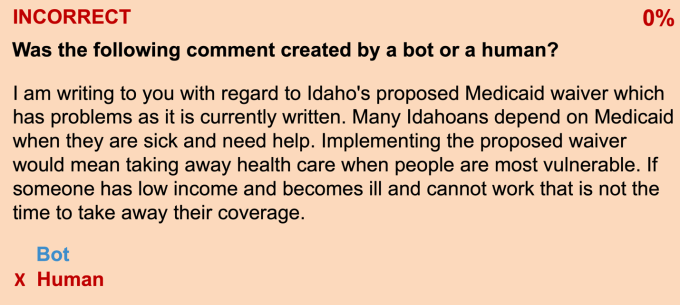
The comments we produced using deepfake text constituted over 55% of the 1,810 total comments submitted during the federal public comment period. In a follow-up study, we asked people to identify whether comments were from a bot or a human. Respondents were only correct half of the time — the same probability as random guessing.
deepfake text question

Image Credits: Zang/Weiss/Sweeney

The example above is deepfake text generated by the bot that all survey respondents thought was from a human.

We ultimately informed CMS of our deepfake comments and withdrew them from the public record. But a malicious attacker would likely not do the same.

Previous large-scale fake comment attacks on federal websites have occurred, such as the 2017 attack on the FCC website regarding the proposed rule to end net neutrality regulations.

During the net neutrality comment period, firms hired by industry group Broadband for America used bots to create comments expressing support for the repeal of net neutrality. They then submitted millions of comments, sometimes even using the stolen identities of deceased voters and the names of fictional characters, to distort the appearance of public opinion.

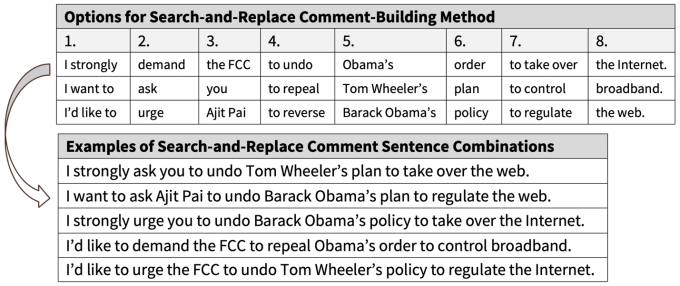
A retroactive text analysis of the comments found that 96-97% of the more than 22 million comments on the FCC’s proposal to repeal net neutrality were likely coordinated bot campaigns. These campaigns used relatively unsophisticated and conspicuous search-and-replace methods — easily detectable even on this mass scale. But even after investigations revealed the comments were fraudulent and made using simple search-and-replace-like computer techniques, the FCC still accepted them as part of the public comment process.

Even these relatively unsophisticated campaigns were able to affect a federal policy outcome. However, our demonstration of the threat from bots submitting deepfake text shows that future attacks can be far more sophisticated and much harder to detect.

The laws and politics of public comments

Let’s be clear: The ability to communicate our needs and have them considered is the cornerstone of the democratic model. As enshrined in the Constitution and defended fiercely by civil liberties organizations, each American is guaranteed a role in participating in government through voting, through self-expression and through dissent.
search and replace FCC questions

Image Credits: Zang/Weiss/Sweeney

When it comes to new rules from federal agencies that can have sweeping impacts across America, public comment periods are the legally required method to allow members of the public, advocacy groups and corporations that would be most affected by proposed rules to express their concerns to the agency and require the agency to consider these comments before they decide on the final version of the rule. This requirement for public comments has been in place since the passage of the Administrative Procedure Act of 1946. In 2002, the e-Government Act required the federal government to create an online tool to receive public comments. Over the years, there have been multiple court rulings requiring the federal agency to demonstrate that they actually examined the submitted comments and publish any analysis of relevant materials and justification of decisions made in light of public comments [see Citizens to Preserve Overton Park, Inc. v. Volpe, 401 U. S. 402, 416 (1971); Home Box Office, supra, 567 F.2d at 36 (1977), Thompson v. Clark, 741 F. 2d 401, 408 (CADC 1984)].

In fact, we only had a public comment website from CMS to test for vulnerability to deepfake text submissions in our study, because in June 2019, the U.S. Supreme Court ruled in a 7-1 decision that CMS could not skip the public comment requirements of the Administrative Procedure Act in reviewing proposals from state governments to add work reporting requirements to Medicaid eligibility rules within their state.

The impact of public comments on the final rule by a federal agency can be substantial based on political science research. For example, in 2018, Harvard University researchers found that banks that commented on Dodd-Frank-related rules by the Federal Reserve obtained $7 billion in excess returns compared to non-participants. When they examined the submitted comments to the “Volcker Rule” and the debit card interchange rule, they found significant influence from submitted comments by different banks during the “sausage-making process” from the initial proposed rule to the final rule.

Beyond commenting directly using their official corporate names, we’ve also seen how an industry group, Broadband for America, in 2017 would submit millions of fake comments in support of the FCC’s rule to end net neutrality in order to create the false perception of broad political support for the FCC’s rule amongst the American public.

Technology solutions to deepfake text on public comments

While our study highlights the threat of deepfake text to disrupt public comment websites, this doesn’t mean we should end this long-standing institution of American democracy, but rather we need to identify how technology can be used for innovative solutions that accepts public comments from real humans while rejecting deepfake text from bots.

There are two stages in the public comment process — (1) comment submission and (2) comment acceptance — where technology can be used as potential solutions.

In the first stage of comment submission, technology can be used to prevent bots from submitting deepfake comments in the first place; thus raising the cost for an attacker to need to recruit large numbers of humans instead. One technological solution that many are already familiar with are the CAPTCHA boxes that we see at the bottom of internet forms that ask us to identify a word — either visually or audibly — before being able to click submit. CAPTCHAs provide an extra step that makes the submission process increasingly difficult for a bot. While these tools can be improved for accessibility for disabled individuals, they would be a step in the right direction.

However, CAPTCHAs would not prevent an attacker willing to pay for low-cost labor abroad to solve any CAPTCHA tests in order to submit deepfake comments. One way to get around that may be to require strict identification to be provided along with every submission, but that would remove the possibility for anonymous comments that are currently accepted by agencies such as CMS and the Food and Drug Administration (FDA). Anonymous comments serve as a method of privacy protection for individuals who may be significantly affected by a proposed rule on a sensitive topic such as healthcare without needing to disclose their identity. Thus, the technological challenge would be to build a system that can separate the user authentication step from the comment submission step so only authenticated individuals can submit a comment anonymously.

Finally, in the second stage of comment acceptance, better technology can be used to distinguish between deepfake text and human submissions. While our study found that our sample of over 100 people surveyed were not able to identify the deepfake text examples, more sophisticated spam detection algorithms in the future may be more successful. As machine learning methods advance over time, we may see an arms race between deepfake text generation and deepfake text identification algorithms.

The challenge today

While future technologies may offer more comprehensive solutions, the threat of deepfake text to our American democracy is real and present today. Thus, we recommend that all federal public comment websites adopt state-of-the-art CAPTCHAs as an interim measure of security, a position that is also supported by the 2019 U.S. Senate Subcommittee on Investigations’ Report on Abuses of the Federal Notice-and-Comment Rulemaking Process.

In order to develop more robust future technological solutions, we will need to build a collaborative effort between the government, researchers and our innovators in the private sector. That’s why we at Harvard University have joined the Public Interest Technology University Network along with 20 other education institutions, New America, the Ford Foundation and the Hewlett Foundation. Collectively, we are dedicated to helping inspire a new generation of civic-minded technologists and policy leaders. Through curriculum, research and experiential learning programs, we hope to build the field of public interest technology and a future where technology is made and regulated with the public in mind from the beginning.

While COVID-19 has disrupted many parts of American society, it hasn’t stopped federal agencies under the Trump administration from continuing to propose new deregulatory rules that can have long-lasting legacies that will be felt long after the current pandemic has ended. For example, on March 18, 2020, the Environmental Protection Agency (EPA) proposed new rules about limiting which research studies can be used to support EPA regulations, which have received over 610,000 comments as of April 6, 2020. On April 2, 2020, the Department of Education proposed new rules for permanently relaxing regulations for online education and distance learning. On February 19, 2020, the FCC re-opened public comments on its net neutrality rules, which in 2017 saw 22 million comments submitted by bots, after a federal court ruled that the FCC ignored how ending net neutrality would affect public safety and cellphone access programs for low-income Americans.

Federal public comment websites offer the only way for the American public and organizations to express their concerns to the federal agency before the final rules are determined. We must adopt better technological defenses to ensure that deepfake text doesn’t further threaten American democracy during a time of crisis.


Read Full Article

16 May 2020

This Week in Apps: Houseparty battles Messenger, Telegram drops crypto plans, Instagram Lite is gone


Welcome back to This Week in Apps, the Extra Crunch series that recaps the latest OS news, the applications they support and the money that flows through it all.

The app industry is as hot as ever, with a record 204 billion downloads and $120 billion in consumer spending in 2019. People are now spending 3 hours and 40 minutes per day using apps, rivaling TV. Apps aren’t just a way to pass idle hours — they’re a big business. In 2019, mobile-first companies had a combined $544 billion valuation, 6.5x higher than those without a mobile focus.

In this Extra Crunch series, we help you keep up with the latest news from the world of apps, delivered on a weekly basis.

This week we’re continuing to look at how the coronavirus outbreak is impacting the world of mobile applications, including the latest news about COVID-19 apps, Facebook and Houseparty’s battle to dominate the online hangout, the game that everyone’s playing during quarantine, and more. We also look at the new allegations against TikTok, the demise of a popular “Lite” app, new apps offering parental controls, Telegram killing its crypto plans and many other stories, including a hefty load of funding and M&A.

Headlines

Contact tracing and COVID-19 apps in the news 

  • Global: WHO readies its coronavirus app for symptom-checking and possibly contact tracing. A WHO official told Reuters on Friday the new app will ask people about their symptoms and offer guidance on whether they may have COVID-19. Information on testing will be personalized to the user’s country. The organization is considering adding a Bluetooth-based, contact-tracing feature, too. A version of the app will launch globally, but individual countries will be able to use the underlying technology and add features to release their own versions. Engineers from Google and Microsoft have volunteered their time over the past few weeks to develop the app, which is available open-source on GitHub.
  • U.S.: Apple’s COVID-19 app, developed in partnership with the CDC, FEMA and the White House, received its first major update since its March debut. The new version includes recommendations for healthcare workers to align with CDC guidelines, best practices for quarantining if you’ve been exposed to COVID-19 and new information for pregnancy and newborns.
  • India: New Delhi’s contact-tracing app, Aarogya Setu, has reached 100 million users out of India’s total 450 million smartphone owners in 41 days after its release, despite privacy concerns. The app helps users self-assess if they caught COVID-19 by answering a series of questions and will alert them if they came into contact with someone who’s infected. The app has come under fire for how it stores user location data and logs the details for those reporting symptoms. The app is required to use Indian railways, which has boosted adoption.
  • Iceland: Iceland has one of the most-downloaded contact-tracing apps, with 38% of its population using it. But despite this, the country said it has not been a “game-changer” in terms of tracking the virus and only worked well when coupled with manual contact tracing — meaning phone calls that asked who someone had been in contact with. In addition, the low download rate indicates it may be difficult to get people to use these apps when they launch in larger markets.

Consumer advocacy groups say TikTok is still violating COPPA

5 Easy and Engaging Ways to Learn How to Dance Online for Free


Learn how to dance

Yes, you can learn how to dance online for free. From party moves and trending TikTok dances to classic ballroom steps, try these free websites for beginner and experienced dancers.

Online lessons are obviously not going to be as good as going to a professional dance studio. But they are effective nonetheless. Through a series of steps (no pun intended), anyone can learn how to dance online for free. And if you like the basics, many of those in this list offer paid packages for a professional online live dance class.

1. Learn Fortnite, TikTok, and Trending Dances Online for Free at Learn How to Dance

Learn How to Dance YouTube channel has detailed tutorials for fortnite dances, tiktok dances, and other trending dance moves

Social media loves dancing. Gamers love dancing. The internet loves dancing. And Bao from Learn How to Dance is here to teach you how to do the latest viral and trending dances in simple and free YouTube videos.

You can check the most popular videos, but Bao has also divided the channel into a few helpful playlists. There’s a Fortnite playlist for all the dances in the popular game. He updates the TikTok playlist most frequently so you can rock those moves on your social media. And there are tutorials for popular dance moves, hip-hop steps, and other assorted items.

The most common compliment subscribers give Bao is how much time he gives to breaking down the steps. Beginners will find it easy to learn moves from him because of how he demonstrates all angles of the body for each step and suggests easier and harder versions.

Also, like most active YouTubers, he reads the comments regularly. So if you want to learn a step he hasn’t featured yet, write a request and you might soon get a tutorial along with a shout-out.

2. Learn to Tap Dance Online for Free at Tap Dancing Resources

Tap Dancing Resources has everything you need to learn how to tap dance online for free, from tutorials to a dictionary of steps

Tap dancing is all about rhythm. It takes practice, but it’s much more accessible than others for beginners and those who consider themselves to have two left feet. Tap dancer Kathie Walling compiled some of the essential things you will need in one place at Tap Dancing Resources.

Start with the list of tap dancing lessons for all levels. Here, you will find links to several free tutorials online. Walling provides YouTube links to lessons by United Taps, as well as Shelby Kauffman’s excellent series where she breaks down each step. In fact, you can also learn about all the steps at the A-Z of tap dancing steps.

These online videos are the first stage of your tap dancing journey. You’ll also need the right music to tap along to, find surfaces and shoes that can work, warm-ups, and so on. Tap Dancing Resources has it all, along with links to instructors and schools around the world for you to tap the next step.

3. Learn Ballroom and Latin Dance Online for Free at Ballroom Dancers

Ballroom Dancers teaches you ballroom dancing and latin dances for free online

Ballroom Dancers looks and feels a little old, as do the videos in it. But when it comes to the classics of dancing, you don’t really need to jazz it up. When the content is top-notch, the design doesn’t matter.

The website teaches all the major steps involved in ballroom and latin dances like waltz, salsa, samba, foxtrot, rumba, cha cha, etc. Each dance and step offers a video as well a write-up.

The written part dives into the history of the moves, elaborates on the man’s part and woman’s part, and offers tips and tricks on how to gracefully execute the steps. As useful as the videos are, don’t forget to read the text.

You’ll need to sign up to access a lot of the videos, including the weekly variations. Registered users also get the printable syllabus if you’re going to stick to a routine to learn to dance. You can also view the videos on Ballroom Dancers’ YouTube, where you can easily download the videos for offline viewing.

4. Learn to Dance to Any Song at a Party at Move With Colour

Move With Colours teaches absolute beginner dancers how to dance to any song and find rhythm

Do you feel like you have no rhythm and two left feet? Dancer Nathan Short simplifies the whole idea of finding rhythms and grooving to them by making it a visual learning experience. He calls it Colourform, and it’s meant for absolute beginners to learn how to dance.

Here’s how it works. Short divides sound into six frequencies, from low to high. He then assigns them six colors of the spectrum. He also divides the human body into six sections: feet, knees, hips, torso, arms, and hands.

Each frequency, color, and body party forms a group, from lowest to highest. It’s really easy to follow in the video. This simple visualization will help you find the beat and rhythm of any song and dance appropriately to it.

If you’re confident with the basics of dance, try Short’s free 10-minute dance masterclass routines on YouTube. They’re beautifully shot as he teaches a group of students a few moves. You can see the variations people bring, and how a non-perfect dancer performs the same move as Short, which can be a confidence booster if you’re struggling. Plus, they also serve as free live workout classes at home to get fit.

5. Teach Kids to Dance Online for Free (and Learn Yourself Too) at Dance Parent 101

Dance Parent 101 is a repository of free dance resources for kids and parents of dancer children

Adults get conscious about how to dance correctly. But kids? Man, kids are uninhibited and joyful when they get to shake a leg. You can actually start them off at an early age, build up their confidence and skills.

Dance Parent 101 is all about teaching children the basics of dancing through online resources and maybe learning a thing or two along the way.

Blogger Samantha was a professional dancer and tutor. As a mom to two dancer kids, she put together this website that will help children learn dancing even in your home.

You’ll find how to build locomotive skills in toddlers, the basics of dancing for children, ballet tutorials, dancing for teens, fitness workouts for kids, and a whole lot more.

Dance Parent 101 is a repository of useful information for parents of dancers. And you know what? If your child is learning at home, why don’t you join them to pick up a few steps, get fitter, and most importantly, bond with your kid.

Learned to Dance? Learn Music

Dancing and music go hand in hand. Just like you can learn to dance online for free, you can also learn to play music online for free. This includes instruments like the guitar or harmonica, or you can work without equipment to learn to beatbox or sing with the help of online classes. It’s all among the musical skills you can learn online with or without instruments.

Read the full article: 5 Easy and Engaging Ways to Learn How to Dance Online for Free


Download Cybersecurity Essentials FREE Today (Worth $26.99)


extra-tor-security

If you want an easy-to-use, comprehensive introduction to cybersecurity, this ebook is for you. And up until May 26, 2020 you can download it free of charge!

Cybersecurity Essentials offers an in-depth introduction to the field, covering the theoretical and practical sides of four distinct challenges: securing the infrastructure, securing devices, securing local networks, and securing the perimeter.

This expert coverage of essential topics required for entry-level cybersecurity certifications is a must-read for anyone wanting to advance a career in cybersecurity.

Download Cybersecurity Essentials For Free

Cybersecurity Essentials Free Copy

Using real-world scenarios that show what vulnerabilities look like in everyday computing scenarios, this ebook comprehensively covers many of the challenges you will face as a cybersecurity expert.

Each section concludes with a summary of key concepts, review questions, and hands-on exercises, allowing you to test your understanding while exercising your new critical skills.

In short, Cybersecurity Essentials covers the fundamentals you will need to master the basics of this lucrative, growing field, including:

  • Understand security and surveillance fundamentals
  • Learn to secure and protect remote access and devices
  • Understand network topologies, protocols, and strategies
  • Identify threats and mount an effective defense
  • And more

Interested? Simply click here to download this free ebook (worth $26.99) from TradePub. You will have to complete a short form to access the ebook, but it’s well worth it!

Note: This free offer expires May 26, 2020.

Read the full article: Download Cybersecurity Essentials FREE Today (Worth $26.99)


Read Full Article

5 Easy and Engaging Ways to Learn How to Dance Online for Free


Learn how to dance

Yes, you can learn how to dance online for free. From party moves and trending TikTok dances to classic ballroom steps, try these free websites for beginner and experienced dancers.

Online lessons are obviously not going to be as good as going to a professional dance studio. But they are effective nonetheless. Through a series of steps (no pun intended), anyone can learn how to dance online for free. And if you like the basics, many of those in this list offer paid packages for a professional online live dance class.

1. Learn Fortnite, TikTok, and Trending Dances Online for Free at Learn How to Dance

Learn How to Dance YouTube channel has detailed tutorials for fortnite dances, tiktok dances, and other trending dance moves

Social media loves dancing. Gamers love dancing. The internet loves dancing. And Bao from Learn How to Dance is here to teach you how to do the latest viral and trending dances in simple and free YouTube videos.

You can check the most popular videos, but Bao has also divided the channel into a few helpful playlists. There’s a Fortnite playlist for all the dances in the popular game. He updates the TikTok playlist most frequently so you can rock those moves on your social media. And there are tutorials for popular dance moves, hip-hop steps, and other assorted items.

The most common compliment subscribers give Bao is how much time he gives to breaking down the steps. Beginners will find it easy to learn moves from him because of how he demonstrates all angles of the body for each step and suggests easier and harder versions.

Also, like most active YouTubers, he reads the comments regularly. So if you want to learn a step he hasn’t featured yet, write a request and you might soon get a tutorial along with a shout-out.

2. Learn to Tap Dance Online for Free at Tap Dancing Resources

Tap Dancing Resources has everything you need to learn how to tap dance online for free, from tutorials to a dictionary of steps

Tap dancing is all about rhythm. It takes practice, but it’s much more accessible than others for beginners and those who consider themselves to have two left feet. Tap dancer Kathie Walling compiled some of the essential things you will need in one place at Tap Dancing Resources.

Start with the list of tap dancing lessons for all levels. Here, you will find links to several free tutorials online. Walling provides YouTube links to lessons by United Taps, as well as Shelby Kauffman’s excellent series where she breaks down each step. In fact, you can also learn about all the steps at the A-Z of tap dancing steps.

These online videos are the first stage of your tap dancing journey. You’ll also need the right music to tap along to, find surfaces and shoes that can work, warm-ups, and so on. Tap Dancing Resources has it all, along with links to instructors and schools around the world for you to tap the next step.

3. Learn Ballroom and Latin Dance Online for Free at Ballroom Dancers

Ballroom Dancers teaches you ballroom dancing and latin dances for free online

Ballroom Dancers looks and feels a little old, as do the videos in it. But when it comes to the classics of dancing, you don’t really need to jazz it up. When the content is top-notch, the design doesn’t matter.

The website teaches all the major steps involved in ballroom and latin dances like waltz, salsa, samba, foxtrot, rumba, cha cha, etc. Each dance and step offers a video as well a write-up.

The written part dives into the history of the moves, elaborates on the man’s part and woman’s part, and offers tips and tricks on how to gracefully execute the steps. As useful as the videos are, don’t forget to read the text.

You’ll need to sign up to access a lot of the videos, including the weekly variations. Registered users also get the printable syllabus if you’re going to stick to a routine to learn to dance. You can also view the videos on Ballroom Dancers’ YouTube, where you can easily download the videos for offline viewing.

4. Learn to Dance to Any Song at a Party at Move With Colour

Move With Colours teaches absolute beginner dancers how to dance to any song and find rhythm

Do you feel like you have no rhythm and two left feet? Dancer Nathan Short simplifies the whole idea of finding rhythms and grooving to them by making it a visual learning experience. He calls it Colourform, and it’s meant for absolute beginners to learn how to dance.

Here’s how it works. Short divides sound into six frequencies, from low to high. He then assigns them six colors of the spectrum. He also divides the human body into six sections: feet, knees, hips, torso, arms, and hands.

Each frequency, color, and body party forms a group, from lowest to highest. It’s really easy to follow in the video. This simple visualization will help you find the beat and rhythm of any song and dance appropriately to it.

If you’re confident with the basics of dance, try Short’s free 10-minute dance masterclass routines on YouTube. They’re beautifully shot as he teaches a group of students a few moves. You can see the variations people bring, and how a non-perfect dancer performs the same move as Short, which can be a confidence booster if you’re struggling. Plus, they also serve as free live workout classes at home to get fit.

5. Teach Kids to Dance Online for Free (and Learn Yourself Too) at Dance Parent 101

Dance Parent 101 is a repository of free dance resources for kids and parents of dancer children

Adults get conscious about how to dance correctly. But kids? Man, kids are uninhibited and joyful when they get to shake a leg. You can actually start them off at an early age, build up their confidence and skills.

Dance Parent 101 is all about teaching children the basics of dancing through online resources and maybe learning a thing or two along the way.

Blogger Samantha was a professional dancer and tutor. As a mom to two dancer kids, she put together this website that will help children learn dancing even in your home.

You’ll find how to build locomotive skills in toddlers, the basics of dancing for children, ballet tutorials, dancing for teens, fitness workouts for kids, and a whole lot more.

Dance Parent 101 is a repository of useful information for parents of dancers. And you know what? If your child is learning at home, why don’t you join them to pick up a few steps, get fitter, and most importantly, bond with your kid.

Learned to Dance? Learn Music

Dancing and music go hand in hand. Just like you can learn to dance online for free, you can also learn to play music online for free. This includes instruments like the guitar or harmonica, or you can work without equipment to learn to beatbox or sing with the help of online classes. It’s all among the musical skills you can learn online with or without instruments.

Read the full article: 5 Easy and Engaging Ways to Learn How to Dance Online for Free


Read Full Article