21 February 2020

How ‘The Mandalorian’ and ILM invisibly reinvented film and TV production


“The Mandalorian” was a pretty good show. On that most people seem to agree. But while a successful live-action Star Wars TV series is important in its own right, the way this particular show was made represents a far greater change, perhaps the most important since the green screen. The cutting edge tech (literally) behind “The Mandalorian” creates a new standard and paradigm for media — and the audience will none the wiser.

What is this magical new technology? It’s an evolution of a technique that’s been in use for nearly a century in one form or another: displaying a live image behind the actors. But the advance is not in the idea but the execution: a confluence of technologies that redefines “virtual production” and will empower a new generation of creators.

As detailed in an extensive report in American Cinematographer Magazine (I’ve been chasing this story for some time but suspected this venerable trade publication would get the drop on me), the production process of “The Mandalorian” is completely unlike any before, and it’s hard to imagine any major film production not using the technology going forward.

“So what the hell is it?” I hear you asking.

Meet “The Volume.”

Formally called Stagecraft, it’s 20 feet tall, 270 degrees around, and 75 feet across — the largest and most sophisticated virtual filmmaking environment yet made. ILM just today publicly released a behind-the-scenes video of the system in use as well as a number of new details about it.

It’s not easy being green

In filmmaking terms, a “volume” generally refers to a space where motion capture and compositing take place. Some volumes are big and built into sets, as you might have seen in behind-the-scenes footage of Marvel or Star Wars movies. Some are smaller, plainer affairs where the motions of the actors behind CG characters play out their roles.

But they generally have one thing in common: They’re static. Giant, bright green, blank expanses.

Does that look like fun to shoot in?

One of the most difficult things for an actor in modern filmmaking is getting into character while surrounded by green walls, foam blocks indicating obstacles to be painted in later, and people with mocap dots on their face and suits with ping-pong balls attached. Not to mention everything has green reflections that need to be lit or colored out.

Advances some time ago (think prequels-era Star Wars) enabled cameras to display a rough pre-visualization of what the final film would look like, instantly substituting CG backgrounds and characters onto monitors. Sure, that helps with composition and camera movement, but the world of the film isn’t there, the way it is with practical sets and on-site shoots.

Practical effects were a deliberate choice for “The Child” (AKA Baby Yoda) as well.

What’s more, because of the limitations in rendering CG content, the movements of the camera are often restricted to a dolly track or a few pre-selected shots for which the content (and lighting, as we’ll see) has been prepared.

This particular volume, called Stagecraft by ILM, the company that put it together, is not static. The background is a set of enormous LED screens such as you might have seen on stage at conferences and concerts. The Stagecraft volume is bigger than any of those — but more importantly, it’s smarter.

See, it’s not enough to just show an image behind the actors. Filmmakers have been doing that with projected backgrounds since the silent era! And that’s fine if you just want to have a fake view out of a studio window or fake a location behind a static shot. The problem arises when you want to do anything more fancy than that, like move the camera. Because when the camera moves, it immediately becomes clear that the background is a flat image.

The innovation in Stagecraft and other, smaller LED walls (the more general term for these backgrounds) is not only that the image shown is generated live in photorealistic 3D by powerful GPUs, but that 3D scene is directly affected by the movements and settings of the camera. If the camera moves to the right, the image alters just as if it was a real scene.

This is remarkably hard to achieve. In order for it to work the camera must send its real-time position and orientation to, essentially, a beast of a gaming PC, since this and other setups like it generally run on the Unreal engine. This must take that movement and render it exactly in the 3D environment, with attendant changes to perspective, lighting, distortion, depth of field and so on — all fast enough so that those changes can be shown on the giant wall a fraction of a second later. After all, if the movement lagged even by a few frames it would be noticeable to even the most naive viewer.

Yet fully half of the scenes in The Mandalorian were shot within Stagecraft, and my guess is no one had any idea. Interior, exterior, alien worlds or spaceship cockpits, all used this giant volume for one purpose or another.

[gallery ids="1949115,1949123,1949122,1949124"]

There are innumerable technological advances that have contributed to this; The Mandalorian could not have been made as it was five years ago. The walls weren’t ready; The rendering tech wasn’t ready; The tracking wasn’t ready — nothing was ready. But it’s ready now.

It must be mentioned that Jon Favreau has been a driving force behind this filmmaking method for years now; Films like remake of The Lion King were in some ways tech tryouts for The Mandalorian. Combined with advances made by James Cameron in virtual filmmaking and of course the indefatigable Andy Serkis’s work in motion capture, this kind of production is only just now becoming realistic due to a confluence of circumstances.

Not just for SFX

Of course Stagecraft is probably also the most expensive and complex production environments ever used. But what it adds in technological overhead (and there’s a lot) it more than pays back in all kinds of benefits.

For one thing, it nearly eliminates on-location shooting, which is phenomenally expensive and time-consuming. Instead of going to Tunisia to get those wide-open desert shots, you can build a sandy set and put a photorealistic desert behind the actors. You can even combine these ideas for the best of both worlds: Send a team to scout locations in Tunisia and capture them in high-definition 3D to be used as a virtual background.

This last option produces an amazing secondary benefit: Reshoots are way easier. If you filmed at a bar in Santa Monica and changes to the dialogue mean you have to shoot the scene over again, no need to wrangle permits and painstakingly light the bar again. Instead, the first time you’re there, you carefully capture the whole scene with the exact lighting and props you had there the first time and use that as a virtual background for the reshoots.

The fact that many effects and backgrounds can be rendered ahead of time and shot in-camera rather than composited in later saves a lot of time and money. It also streamlines the creative process, with decisions able to be made on the spot by the filmmakers and actors, since the volume is reactive to their needs, not vice versa.

Lighting is another thing that is vastly simplified, in some ways at least, by something like Stagecraft. The bright LED wall can provide a ton of illumination, and because it actually represents the scene, that illumination is accurate to the needs of that scene. A red-lit interior of a space station, and the usual falling sparks and so on, shows red on the faces and of course the highly reflective helmet of the Mandalorian himself. Yet the team can also tweak it, for instance sticking a bright white line high on the LED wall out of sight of the camera but which creates a pleasing highlight on the helmet.

Naturally there are some trade-offs. At 20 feet tall, the volume is large but not so large that wide shots won’t capture the top of it, above which you’d see cameras and a different type of LED (the ceiling is also a display, though not as powerful). This necessitates some rotoscoping and post-production, or limits the angles and lenses one can shoot with — but that’s true of any soundstage or volume.

A shot like this would need a little massaging in post, obviously.

The size of the LEDs, that is of the pixels themselves, also limits how close the camera can get to them, and of course you can’t zoom in on an object for closer inspection. If you’re not careful you’ll end up with MoirĂ© patterns, those stripes you often see on images of screens.

Stagecraft is not the first application of LED walls — they’ve been used for years at smaller scales — but it is certainly by far the most high-profile and The Mandalorian is the first real demonstration of what’s possible using this technology. And believe me, it’s not a one-off.

I’ve been told that nearly every production house is building or experimenting with LED walls of various sizes and types — the benefits are that obvious. TV productions can save money but look just as good. Movies can be shot on more flexible schedules. Actors who hate working in front of green screens may find this more palatable. And you better believe commercials are going to find a way to use these as well.

In short, a few years from now it’s going to be uncommon to find a production that doesn’t use an LED wall in some form or another. This is the new standard.

This is only a general overview of the technology that ILM, Disney, and their many partners and suppliers are working on. In a follow-up article I’ll be sharing more detailed technical information directly from the production team and technologists who created Stagecraft and its attendant systems.


Read Full Article

20 February 2020

Daily Crunch: Twitter threads are getting easier


Twitter is rolling out a “continue thread” button, ViacomCBS has big plans for its streaming service and Morgan Stanley acquires E-Trade. Here’s your Daily Crunch for February 20, 2020.

1. Twitter adds a button so you can thread your shower thoughts

Twitter is adding a new feature for mobile users to make it easier to link dispersed tweets together. Per 9to5Mac, the feature — which Twitter tweeted about yesterday — is slowly rolling out to its iOS app. (At the time of writing we spotted it in Europe.)

The feature lets you pull down as you’re composing a tweet to create a thread, or to see a “continue thread” option.

2. CBS All Access to gain content from Nick, MTV, Comedy Central, Paramount Pictures & more

Until now, CBS All Access was of primary interest to Star Trek fans, but in today’s otherwise underwhelming Q4 earnings of the newly merged ViacomCBS, the company said the plan is to launch a new “broad pay” streaming service that will include CBS All Access content along with other ViacomCBS assets in film and TV.

3. What the $13B E-Trade deal says about Robinhood’s valuation

News broke this morning that Morgan Stanley, a banking behemoth, will buy E-Trade, an online brokerage and financial services firm, for around $13 billion in stock. Meanwhile, Robinhood has about twice the accounts as E-Trade — but E-Trade probably has more assets under management. (Extra Crunch membership required.)

4. A group of ex-NSA and Amazon engineers are building a ‘GitHub for data’

Data is often highly sensitive and out of reach, kept under lock and key by red tape and compliance, requiring weeks for approval. So the aforementioned engineers started Gretel, an early-stage startup that aims to help developers safely share and collaborate with sensitive data in real time.

5. HungryPanda, a food delivery app for Chinese communities, raises $20 million

Founded in the United Kingdom, where its service first launched in Nottingham, HungryPanda is now available in 31 cities in the U.K., Italy, France, Australia, New Zealand and the U.S.

6. Google gobbling Fitbit is a major privacy risk, warns EU data protection advisor

The European Data Protection Board has intervened to raise concerns about Google’s plan to scoop up the health and activity data of millions of Fitbit users. Google confirmed its plan to acquire Fitbit last November, but regulators are in the process of considering whether to allow the tech giant to gobble up all of Fitbit’s data.

7. Sling TV reports first-ever subscriber decline

This week, the company reported its first-ever decline in Sling TV subscribers, with a drop of 94,000 customers in the fourth quarter. Dish says the streaming service ended the year with 2.59 million total subscribers.

The Daily Crunch is TechCrunch’s roundup of our biggest and most important stories. If you’d like to get this delivered to your inbox every day at around 9am Pacific, you can subscribe here.


Read Full Article

Daily Crunch: Twitter threads are getting easier


Twitter is rolling out a “continue thread” button, ViacomCBS has big plans for its streaming service and Morgan Stanley acquires E-Trade. Here’s your Daily Crunch for February 20, 2020.

1. Twitter adds a button so you can thread your shower thoughts

Twitter is adding a new feature for mobile users to make it easier to link dispersed tweets together. Per 9to5Mac, the feature — which Twitter tweeted about yesterday — is slowly rolling out to its iOS app. (At the time of writing we spotted it in Europe.)

The feature lets you pull down as you’re composing a tweet to create a thread, or to see a “continue thread” option.

2. CBS All Access to gain content from Nick, MTV, Comedy Central, Paramount Pictures & more

Until now, CBS All Access was of primary interest to Star Trek fans, but in today’s otherwise underwhelming Q4 earnings of the newly merged ViacomCBS, the company said the plan is to launch a new “broad pay” streaming service that will include CBS All Access content along with other ViacomCBS assets in film and TV.

3. What the $13B E-Trade deal says about Robinhood’s valuation

News broke this morning that Morgan Stanley, a banking behemoth, will buy E-Trade, an online brokerage and financial services firm, for around $13 billion in stock. Meanwhile, Robinhood has about twice the accounts as E-Trade — but E-Trade probably has more assets under management. (Extra Crunch membership required.)

4. A group of ex-NSA and Amazon engineers are building a ‘GitHub for data’

Data is often highly sensitive and out of reach, kept under lock and key by red tape and compliance, requiring weeks for approval. So the aforementioned engineers started Gretel, an early-stage startup that aims to help developers safely share and collaborate with sensitive data in real time.

5. HungryPanda, a food delivery app for Chinese communities, raises $20 million

Founded in the United Kingdom, where its service first launched in Nottingham, HungryPanda is now available in 31 cities in the U.K., Italy, France, Australia, New Zealand and the U.S.

6. Google gobbling Fitbit is a major privacy risk, warns EU data protection advisor

The European Data Protection Board has intervened to raise concerns about Google’s plan to scoop up the health and activity data of millions of Fitbit users. Google confirmed its plan to acquire Fitbit last November, but regulators are in the process of considering whether to allow the tech giant to gobble up all of Fitbit’s data.

7. Sling TV reports first-ever subscriber decline

This week, the company reported its first-ever decline in Sling TV subscribers, with a drop of 94,000 customers in the fourth quarter. Dish says the streaming service ended the year with 2.59 million total subscribers.

The Daily Crunch is TechCrunch’s roundup of our biggest and most important stories. If you’d like to get this delivered to your inbox every day at around 9am Pacific, you can subscribe here.


Read Full Article

As Morgan Stanley buys ETrade, Robinhood preps social trading


Before it was worth $7.6 billion, the original idea for Robinhood was a stock trading social network. At my kitchen table in San Francisco in 2013, the founders envisioned an app for sharing hot tips to a feed complete with a leaderboard of whose predictions were most accurate. Once they had SEC approval, they pivoted towards the real money maker: letting people buy and sell stocks in the app, and pay to borrow cash to do so.

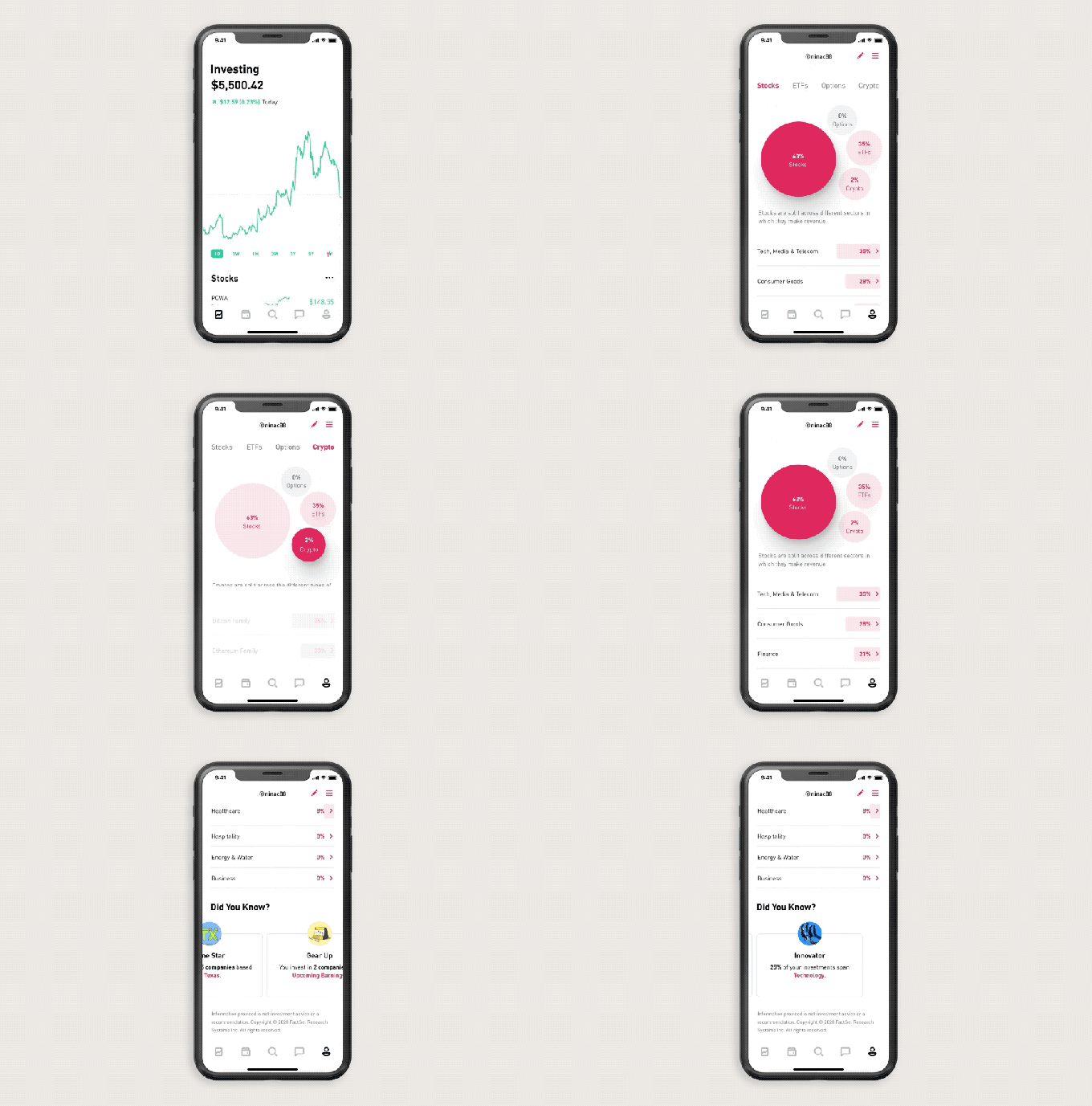
Now seven years later, Robinhood is subtly taking the first steps back to its start. Today it’s launching Profiles. For now, they let users see analytics about their portfolio like how concentrated they are in stocks vs options vs cryptocurrency, as well across different business sectors. Complete with usernames and a photo, Profiles let you follow self-made or Robinhood provided lists of stocks and other assets.

Profiles could give Robinhood’s customers the confidence to trade more, and create a sense of lock-in that stop them from straying to other brokerages that have dropped their per trade fees to zero to match the startup, like Charles Schwab, Ameritrade, and ETrade that was acquired for $13 billion today by Morgan Stanley, as reported by the Wall Street Journal.

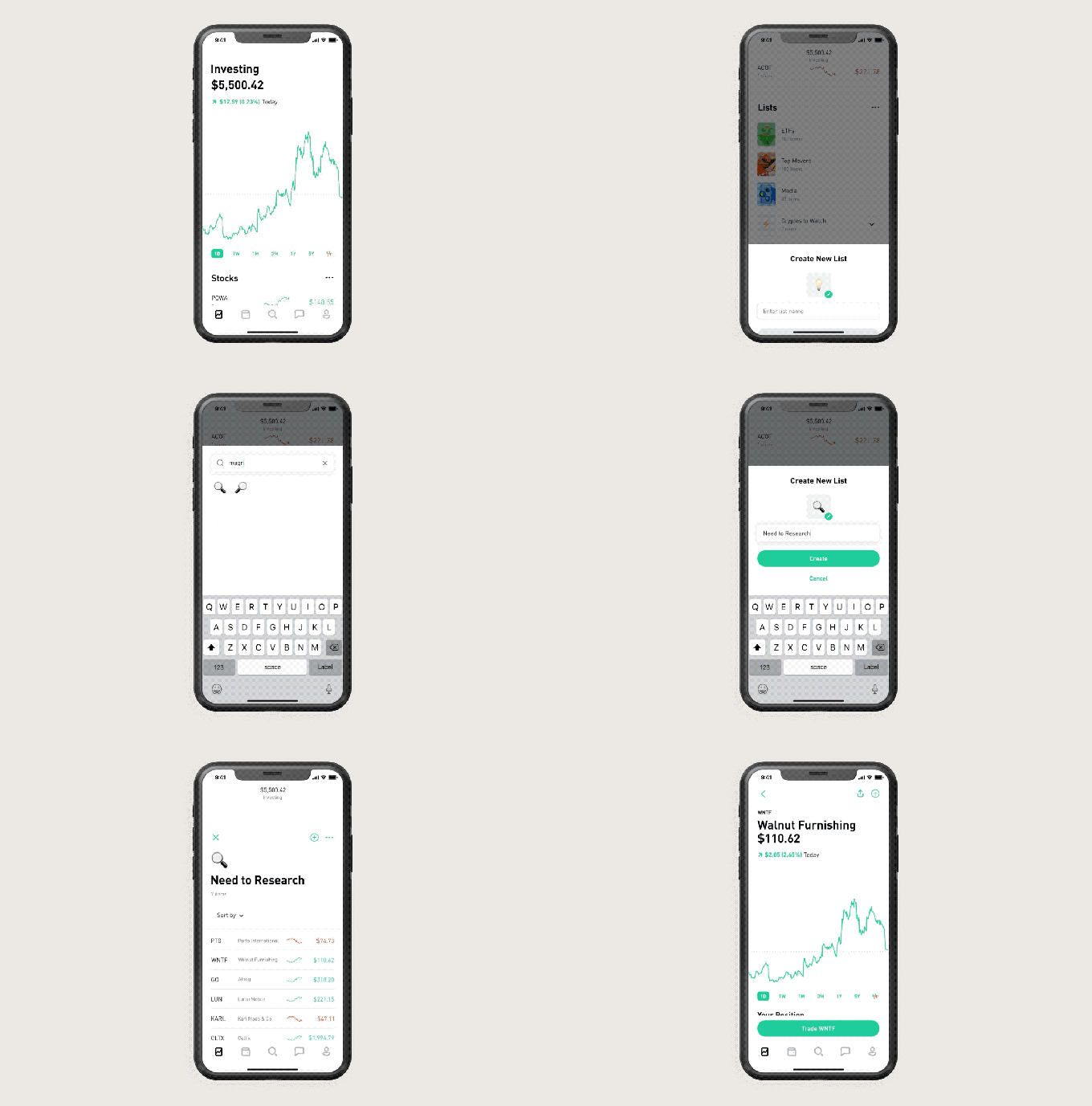
The Profile features certainly sound helpful. They could reveal that your portfiolio is to centered around Tech, Media, and Telecom stocks, or that you’re ignoring cryptocurrency or corporations from your home state. Lists also makes it easier to track specific business verticals, save stocks to buy when you have the cash, or set aside some for deeper research. Robinhood pulls info from FactSet, Morningstar, and other trusted sources to figure out which stocks and ETFs go into sector lists, or you can make and name your own. Profiles and lists begin to roll out to all users next week.

But what’s most interesting is how profiles lay the foundation for Robinhood as a social network. It’s easy to imagine letting users follow other accounts or lists they create. Instead of having to have an expensive financial advisor or enough cash to qualify for one with a different brokerage, Robinhood could let you crowdsource advice.

“We understand the connotation of taking something from the rich and giving it to the poor. Robinhood is liberating information that’s locked up with professionals and giving it to the people” Robinhood co-founder and co-CEO Vlad Tenev told me back in 2013.

Robinhood would certainly need to be careful about scammy tips going viral. Improper safeguards could lead to pump and dump schemes where those late to buy in get screwed when prices snap back to reality.

But embracing social could leverage some of its strongest assets: the youthfulness of its userbase and the depth of connection to its users. The median age of a Robinhood customer is 30 and half say they’re first time investors. Being able to turn to friends or experts within the app might convince them to pull the trigger on trades.

Most online brokerages are somewhat undifferentiated beyond differences in pricing while their clunky, unstylized products don’t generate the same brand affinity as people have for Robinhood. Unsatisfied users could bail for a competitor at any time. Robinhood’s users are accustomed to social networking and the way it locks in users since they don’t want to abandon their community.

When I asked Robinhood Profiles’ product manager Shanthi Shanmugam directly about whether this was the start of more social trading features, they suspiciously dodged the question, telling me “When thinking about how to reflect who you are as an investor, we looked at how other apps represent you and it felt natural to leverage a design that felt more like a profile. When helping people group their investment ideas, it was easy to envision this as a playlist you might find on your favorite music app.”

That’s far from a denial. Offering social validation for trading could help Robinhood earn more from its customers despite their small total account balances. While Robinhood might have over 10 million accounts versus ETrade’s 5.2 million and Morgan Stanley’s 3 million, but ETrade’s average account size is $69,230 and Morgan Stanley’s is $900,000 while a survey found most of Robinhood’s held $1,000 to $5,000.

That all means that Robinhood earns less on interest sitting in users’ accounts than the old incumbents. But Robinhood earns the majority of its money on selling order flow and through its subscription Robinhood Gold feature that lets users pay monthly so they can borrow cash to trade with. Profiles and lists, and then eventually more social features, could get Robinhood’s users trading more so there’s more order flow to sell and more reason for them to buy subscriptions.

“Democratizing access is about lowering fees, minimums and other barriers people face — like confidence. Profiles and lists make finance easier to understand and more familiar for people” says Shanmugam. More social features built safely, more reassurance, more trading, more revenue. Robinhood has raised $910 million. But to outgun larger competitors like the newly assembled Morgan Stanley-ETrade that’s matched its zero-fee pricing, Robinhood will have to win with product.


Read Full Article

As Morgan Stanley buys ETrade, Robinhood preps social trading


Before it was worth $7.6 billion, the original idea for Robinhood was a stock trading social network. At my kitchen table in San Francisco in 2013, the founders envisioned an app for sharing hot tips to a feed complete with a leaderboard of whose predictions were most accurate. Once they had SEC approval, they pivoted towards the real money maker: letting people buy and sell stocks in the app, and pay to borrow cash to do so.

Now seven years later, Robinhood is subtly taking the first steps back to its start. Today it’s launching Profiles. For now, they let users see analytics about their portfolio like how concentrated they are in stocks vs options vs cryptocurrency, as well across different business sectors. Complete with usernames and a photo, Profiles let you follow self-made or Robinhood provided lists of stocks and other assets.

Profiles could give Robinhood’s customers the confidence to trade more, and create a sense of lock-in that stop them from straying to other brokerages that have dropped their per trade fees to zero to match the startup, like Charles Schwab, Ameritrade, and ETrade that was acquired for $13 billion today by Morgan Stanley.

The Profile features certainly sound helpful. They could reveal that your portfiolio is to centered around Tech, Media, and Telecom stocks, or that you’re ignoring cryptocurrency or corporations from your home state. Lists also makes it easier to track specific business verticals, save stocks to buy when you have the cash, or set aside some for deeper research. Robinhood pulls info from FactSet, Morningstar, and other trusted sources to figure out which stocks and ETFs go into sector lists, or you can make and name your own. Profiles and lists begin to roll out to all users next week.

But what’s most interesting is how profiles lay the foundation for Robinhood as a social network. It’s easy to imagine letting users follow other accounts or lists they create. Instead of having to have an expensive financial advisor or enough cash to qualify for one with a different brokerage, Robinhood could let you crowdsource advice.

“We understand the connotation of taking something from the rich and giving it to the poor. Robinhood is liberating information that’s locked up with professionals and giving it to the people” Robinhood co-founder and co-CEO Vlad Tenev told me back in 2013.

Robinhood would certainly need to be careful about scammy tips going viral. But embracing social could leverage one of its strongest assets: the youthfulness of its userbase. Most online brokerages are somewhat undifferentiated beyond differences in pricing. Unsatisfied users could bail for a competitor at any time. But Robinhood’s users are accustomed to social networking and the way it locks in users since they don’t want to abandon their community.

When I asked Robinhood Profiles’ product manager Shanthi Shanmugam directly about whether this was the start of more social trading features, they suspiciously dodged the question, telling me “When thinking about how to reflect who you are as an investor, we looked at how other apps represent you and it felt natural to leverage a design that felt more like a profile. When helping people group their investment ideas, it was easy to envision this as a playlist you might find on your favorite music app.”

That’s far from a denial. Offering social validation for trading could help Robinhood earn more from its customers despite their small total account balances. While Robinhood might have over 10 million accounts versus ETrade’s 5.2 million and Morgan Stanley’s 3 million, but ETrade’s average account size is $69,230 and Morgan Stanley’s is $900,000 while a survey found most of Robinhood’s held $1,000 to $5,000.

That all means that Robinhood earns less on interest sitting in users’ accounts than the old incumbents. But Robinhood earns the majority of its money on selling order flow and through its subscription Robinhood Gold feature that lets users pay monthly so they can borrow cash to trade with. Profiles and lists, and then eventually more social features, could get Robinhood’s users trading more so there’s more order flow to sell and more reason for them to buy subscriptions.

“Democratizing access is about lowering fees, minimums and other barriers people face — like confidence. Profiles and lists make finance easier to understand and more familiar for people” says Shanmugam.


Read Full Article

Google’s new T&Cs include a Brexit ‘easter egg’ for UK users


Google has buried a major change in legal jurisdiction for its UK users as part of a wider update to its terms and conditions that’s been announced today and which it says is intended to make its conditions of use clearer for all users.

It says the update to its T&Cs is the first major revision since 2012 — with Google saying it wanted to ensure the policy reflects its current products and applicable laws.

Google says it undertook a major review of the terms, similar to the revision of its privacy policy in 2018, when the EU’s General Data Protection Regulation started being applied. But while it claims the new T&Cs are easier for users to understand — rewritten using simpler language and a clearer structure — there are no other changes involved, such as to how it handles people’s data.

“We’ve updated our Terms of Service to make them easier for people around the world to read and understand — with clearer language, improved organization, and greater transparency about changes we make to our services and products. We’re not changing the way our products work, or how we collect or process data,” Google spokesperson Shannon Newberry said in a statement.

Users of Google products are being asked to review and accept the new terms before March 31 when they are due to take effect.

Reuters reported on the move late yesterday — citing sources familiar with the update who suggested the change of jurisdiction for UK users will weaken legal protections around their data.

However Google disputes there will be any change in privacy standards for UK users as a result of the shift. it told us there will be no change to how it process UK users’ data; no change to their privacy settings; and no change to the way it treats their information as a result of the move.

We asked the company for further comment on this — including why it chose not to make a UK subsidiary the legal base for UK users — and a spokesperson told us it is making the change as part of its preparations for the UK to leave the European Union (aka Brexit).

Like many companies, we have to prepare for Brexit,” Google said. “Nothing about our services or our approach to privacy will change, including how we collect or process data, and how we respond to law enforcement demands for users’ information. The protections of the UK GDPR will still apply to these users.”

Heather Burns, a tech policy specialist based in Glasgow, Scotland — who runs a website dedicated to tracking UK policy shifts around the Brexit process — also believes Google has essentially been forced to make the move because the UK government has recently signalled its intent to diverge from European Union standards in future, including on data protection.

“What has changed since January 31 has been [UK prime minister] Boris Johnson making a unilateral statement that the UK will go its own way on data protection, in direct contrast to everything the UK’s data protection regulator and government has said since the referendum,” she told us. “These bombastic, off-the-cuff statements play to his anti-EU base but businesses act on them. They have to.”

“Google’s transfer of UK accounts from the EU to the US is an indication that they do not believe the UK will either seek or receive a data protection adequacy agreement at the end of the transition period. They are choosing to deal with that headache now rather than later. We shouldn’t underestimate how strong a statement this is from the tech sector regarding its confidence in the Johnson premiership,” she added.

Asked whether she believes there will be a reduction in protections for UK users in future as a result of the shift Burns suggested that will largely depend on Google.

So — in other words — Brexit means, er, trust Google to look after your data.

“The European data protection framework is based around a set of fundamental user rights and controls over the uses of personal data — the everyday data flows to and from all of our accounts. Those fundamental rights have been transposed into UK domestic law through the Data Protection Act 2018, and they will stay, for now. But with the Johnson premiership clearly ready to jettison the European-derived system of user rights for the US-style anything goes model,” Burns suggested.

“Google saying there is no change to the way we process users’ data, no change to their privacy settings and no change to the way we treat their information can be taken as an indication that they stand willing to continue providing UK users with European-style rights over their data — albeit from a different jurisdiction — regardless of any government intention to erode the domestic legal basis for those rights.”

Reuters’ report also raises concerns about the impact of the Cloud Act agreement between the UK and the US — which is due to come into effect this summer — suggesting it will pose a threat to the safety of UK Google users’ data once it’s moved out of an EU jurisdiction (in this case Ireland) to the US where the Act will apply.

The Cloud Act is intended to make it quicker and easier for law enforcement to obtain data stored in the cloud by companies based in the other legal jurisdiction.

So in future, it might be easier for UK authorities to obtain UK Google users’ data using this legal instrument applied to Google US.

It certainly seems clear that as the UK moves away from EU standards as a result of Brexit it is opening up the possibility of the country replacing long-standing data protection rights for citizens with a regime of supercharged mass surveillance. (The UK government has already legislated to give its intelligence agencies unprecedented powers to snoop on ordinary citizens’ digital comms — so it has a proven appetite for bulk data.)

Again, Google told us the shift of legal base for its UK users will make no difference to how it handles law enforcement requests — a process it talks about here — and further claimed this will be true even when the Cloud Act applies. Which is a weasely way of saying it will do exactly what the law requires.

Google confirmed that GDPR will continue to apply for UK users during the transition period between the old and new terms. After that it said UK data protection law will continue to apply — emphasizing that this is modelled after the GDPR. But of course in the post-Brexit future the UK government might choose to model it after something very different.

Asked to confirm whether it’s committing to maintain current data standards for UK users in perpetuity, the company told us it cannot speculate as to what privacy laws the UK will adopt in the future… đŸ˜¬

We also asked why it hasn’t chosen to elect a UK subsidiary as the legal base for UK users. To which it gave a nonsensical response — saying this is because the UK is no longer in the EU. Which begs the question when did the UK suddenly become the 51st American State?

Returning to the wider T&Cs revision, Google said it’s making the changes in a response to litigation in the European Union targeted at its terms.

This includes a case in Germany where consumer rights groups successfully sued the tech giant over its use of overly broad terms which the court agreed last year were largely illegal.

In another case a year ago in France a court ordered Google to pay €30,000 for unfair terms — and ordered it to obtain valid consent from users for tracking their location and online activity.

Since at least 2016 the European Commission has also been pressuring tech giants, including Google, to fix consumer rights issues buried in their T&Cs — including unfair terms. A variety of EU laws apply in this area.

In another change being bundled with the new T&Cs Google has added a description about how its business works to the About Google page — where it explains its business model and how it makes money.

Here, among the usual ‘dead cat’ claims about not ‘selling your information’ (tl;dr adtech giants rent attention; they don’t need to sell actual surveillance dossiers), Google writes that it doesn’t use “your emails, documents, photos or confidential information (such as race, religion or sexual orientation) to personalize the ads we show you”.

Though it could be using all that personal stuff to help it build new products it can serve ads alongside.

Even further towards the end of its business model screed it includes the claim that “if you don’t want to see personalized ads of any kind, you can deactivate them at any time”. So, yes, buried somewhere in Google’s labyrinthine setting exists an opt out.

The change in how Google articulates its business model comes in response to growing political and regulatory scrutiny of adtech business models such as Google’s — including on data protection and antitrust grounds.


Read Full Article

Why you should get paid for your data | Jennifer Zhu Scott

Why you should get paid for your data | Jennifer Zhu Scott

The world's most valuable tech companies profit from the personal data you generate. So why aren't you getting paid for it? In this eye-opening talk, entrepreneur and technologist Jennifer Zhu Scott makes the case for private data ownership -- which would empower you to donate, destroy or sell your data as you see fit -- and shows how this growing movement could put power (and cash) back into the hands of people.

Click the above link to download the TED talk.

 Awesome Mac Apps and Utilities - 2020 Edition


Whether you are a new Mac user or a seasoned veteran looking to do even more amazing things on your Mac, check out this updated collection of lesser-known but awesome Mac Apps of 2020. The majority of apps listed here are free and they’ll appeal to general Mac users, not just the techie crowd.

Best Mac Apps and Utilities

The Best  Mac Apps & Utilities

This collection of essential Mac Apps includes mostly lesser-known apps so the popular ones — like Evernote, Dropbox, Skype, OneNote, or Google Drive — aren’t listed here. Also, all the apps here are compatible with Yosemite and Catalina, the current version of Mac OS.

Wherever possible, I have included the Mac App Store links because the store not only makes it easy for you to install apps on your Mac but, in the case of paid apps, you also have an option for requesting refunds.

Let’s get started.

  1. Magnet - A perfect windows management app for Mac that lets you move and resize windows with configurable keyboard shortcuts. You can move windows between multiple displays too. Another alternative is Rectangle.

  2. ImageOptim - Always run your images through ImageOptim before uploading them on to your website. The Mac app will crush the size of your image files without affecting the visual quality.

  3. HiddenMe - If your Mac desktop is cluttered with folders and files, you can hide all the icons with a single click or with a keyboard shortcut.

  4. Site Sucker - Download entire websites includes images, PDF files and mirror them on your local disk for offline browsing. Like wget but with a visual interface.

  5. App Cleaner - The best uninstaller for your Mac that will automatically remove all the extra files that are left on the disk when you delete an app.

  6. Maccy - A clipboard manager that stores all that you copy to the clipboard and lets you paste the copied snippets into other apps with a simple shortcut. [CopyClip] is a good alternative.

  7. Clean Me - Recover space on your Mac by deleting all the system logs, cache and other temp files that your Mac can easily do away with.

  8. Dozer - An excellent alternative to the popular Bartender app. You can quickly re-order or even hide the app icons appearing in the Mac menu bar.

  9. NetNewsWire - A clean and fast RSS Reader for your MacOS. We have an RSS Feed too!

  10. RSS Bot - Access your RSS from your Mac’s menu bar and get notifications when new items are available. You can also apply filters to only show articles that match certain keywords.

Numi.app - The Smart Mac Calculator

  1. Flotato - It turns any web page into a native Mac app that you can quickly open outside the web browser. Also see, Fluid.

  2. Latest - It scans the Applications folder of your Mac and checks if all your installed apps are up to date. You can also update your outdated apps. MacUpdater is an even more powerful but paid alternative.

  3. Onyx - Perform system maintenance tasks to improve the performance of your Mac, verify disks and more.

  4. TinkerTool - It provides access to several configuration settings that are otherwise hidden on the Mac. For instance, you can specify the default folder where Screenshots should be saved on the Mac.

  5. KeepingYouAwake - It keeps your Mac stay awake and also prevents your screen from going to sleep. If you need more features, use Amphetamine.

  6. Shifty - Easily toggle between dark and light mode on your Mac. You can also decide which of your Apps or websites should stay light, while your system runs in Dark Mode. Also see, NightOwl.

  7. IINA - A modern alternative to the VLC Media Player that includes support for gestures and the touch bar in newer Macs.

  8. HyperSwitch - An improved window switching app for Mac that upgrades your default Command + Tab experience when cycling between open app windows.

  9. TextBar - You can specify system commands and the app will add the text output of those commands to the menu bar. For instance, ipconfig getifaddr en0 will print your current IP address. You can also have these as desktop widgets with Ăœbersicht.

  10. Tyke - A minimalistic notepad app that sits in the menu bar and lets you save quick notes.

Control the Night mode on MacOS

  1. Karabiner - Remap existing keys on the keyboard to perform a different command. For instance, the CAPS lock key can be configured to work as an Escape key. Useful when using any non-Apple keyboard with Mac.

  2. Dropzone - It makes it easy to copy or move files to your favorite folders, open applications and you can also upload files to the Internet right from your menu bar.

  3. Clocker - Show multiple clocks in your menu bar from different timezones.

  4. Duet Display - Use your iPad, iPhone or even an Android phone as an extra display for your Mac and PC.

  5. Transmit - The perfect FTP client for Mac OS X that just works. You can create droplets to instantly upload files to your favorite destinations from anywhere.

  6. AirDroid - It connects your Android phone to the Mac. You can access messages, manage photos, transfer files and more, wirelessly.

  7. Unarchiver - It’s like WinZip compression utility for Mac that can handle all the popular archive formats including RAR, TAR, GZIP, ISO, and more.

  8. Handbrake - Convert video files from one format to another. FFmpeg is powerful too but works only from the command line. For audio files, the recommended converter is fre:ac.

  9. Disk Inventory - If the Macbook is running low on space, use the Disk Inventory app to quickly discover large files and folders that are clogging the storage.

  10. Helium - An Always on Top like app but for your Mac. The browser window will float on top of other windows and you can also change the translucency level.

Better Volume Control for Mac

  1. XMenu - It provides explorer-style access to your favorite folders and Mac apps from the menu bar. You can launch apps, browse files and folders right from the menu bar.

  2. Flux - It automatically dims the brightness of your screen based on the time of the day - warm at night, bright during the day - so your eyes feel less strain. Also see the 20 20 20 rule.

  3. Text Expander - The app accelerates your touch typing by replacing pre-defined abbreviations with corresponding phrases. For instance, say ;sig to add your rich signature in the Gmail window.

  4. CheatSheet - Use this app to memorize keyboard shortcuts for any Mac app. Just hold the Command Key a bit longer to get a list of all shortcuts available in that app.

  5. Soundflower - If you are to record the Mac audio, like the sound coming out of the speakers, you would need SoundFlower to route that sound to the recording app instead of the speakers.

  6. JumpShare - Quickly upload files, record screencasts, capture screenshots and share them instantly, all from the convenience of your menu bar.

  7. GIF Brewery - It can convert video files and screencasts into animated GIFs and offers tons of options to fine-tune your GIF images. Also see, Giphy Capture.

  8. Hocus Focus - It helps keep your Mac desktop clean by automatically hiding windows that are inactive or haven’t been used for a while. You can even choose to hide windows as soon as they lose focus.

  9. Bandwidth+ - Monitor your Internet bandwidth usage in realtime. Especially handy when you are connected to a metered Wi-Fi hotspot.

  10. Background Music - An audio utility that provides per-application volume control for your Mac. It automatically pauses your music player when a second audio source is playing and unpauses the player when the second source has stopped.

Simple File Transfer for Mac

  1. Download Shuttle - A fast download manager for Mac that will split the files into multiple chunks and downloads them in parallel. Can pause and resume downloads too.

  2. WeTransfer- Send big files to anyone by simply drag and drop. You get a download link that automatically becomes inactive after 7 days.

  3. LICEcap - A light-weight screencast app for capturing any area of your Mac desktop as a small GIF file. Also see, Kap.

  4. Hazel - A folder monitoring app that lets you specify rules per watched folder and any files added to these folders are automatically organized. Supports AppleScript and Automator actions too.

  5. Authy - Not exactly a Mac app but a Chrome App that you cannot do without. It lets you log into online accounts that have 2-factor authentication enabled without requiring the phone.

  6. Self Control - To help you stop procrastinating, this Mac app that can temporarily block access to time-wasting websites, emails and everything else that you find distracting.

  7. Better Touch Tool - The app lets you modify the gestures of your Magic Mouse and the Magic Trackpad. You can configure Touch Bar settings and actions too.

  8. OBS - If you ever plan to set up a live stream on Twitch or YouTube, OBS is the only streaming software you’d need.

  9. Zoom - My favorite app for video conferencing on Mac. You can do screen sharing, the meetings are automatically recorded and you can remotely control the attendee’s computer for tech support.

  10. To Do - A perfect todo and task management app for your Mac from Microsoft. Also see, Trello.

Also see: The 101 Most Useful Websites


Here Are All the Ways People Have Found to Hack Voting Machines


hack-voting-machines

It’s becoming increasingly common to see the use of electronic systems in electoral voting. Whether online voting or the electronic voting machines you’ll find at polling stations, many elections now use electronic systems of some kind.

However, electronic voting is not without its risks. One of the biggest problems is the potential for such systems to be hacked. Here we’ll explain the various ways people have found to hack voting machines.

How Electronic Voting Works

When you go to a polling station, you may find an electronic voting machine where you enter your vote. This is instead of the traditional pen and paper format. The advantage of using electronic voting machines is that they can count votes faster and more accurately than counting up papers.

Given the importance of security in elections, you might think these machines must be very secure. Unfortunately, though, that’s not the case. There are a number of ways that these machines can be hacked. And replacing outdated machines with newer, more secure ones is extremely expensive.

Hackers Break Into Voting Machines at Def Con

How voting machines can be hacked - hackers at Def Con
Image Credit: lisafx/DepositPhotos

For the last few years at Def Con, a massive security conference attended by many ethical hackers, the organizers have put on an event called the Voting Village. Here, hackers are invited to hack various types of voting machine used in the US. The idea is to test whether these machines are secure.

Unfortunately, they are not. The hackers managed to compromise every single voting machine available at the 2019 event. The machines are available to buy on eBay, which makes it easy for hackers to practice accessing and subverting them.

Another concern was that many of the parts for voting machines come from outside of the US, making them vulnerable to foreign interference. For example, one machine the hackers tested contained hardware which pointed to a foreign IP address. The function of this connection wasn’t clear, but it is concerning to have found it.

Methods Used to Access the Voting Machines

At Def Con, the hackers used methods from correctly guessing weak default passwords, to breaking low-quality encryption. For some of these hacks, the hackers needed to be near the machine to open it up or add hardware. But in some cases, the hackers reported they could even hack the machines without being near them.

One issue was a machine which kept voter data on an SD card which was encrypted. But the keys to decrypt the data were stored in plain text in an XML file. This “allow[ed] all data to be easily accessed and modified, thereby rendering encryption meaningless,” as described in a Def Con report.

Another method the hackers used was accessing the BIOS of voting machines, as officials had not set BIOS passwords. This allowed hackers full access to all system settings. Even though the hardware did support Secureboot, which would stop the machine from running unknown code, election officials had not enabled it.

Yet another boot hack involved inserting a USB stick with a Linux operating system installed on it. When inserted, the voting machine could be made to boot from the USB. This gave hackers access to the machine and its data.

Another concern was that, on some of the voting machines, bloatware was not removed. This refers to pre-installed software which comes from the manufacturer and which may have security holes. These holes can allow hackers to access the machine. In one case, a voting machine was found to have apps installed like Netflix, Hulu, and Prime Video!

Hardware Hacks

A security expert demonstrates the ways hackers can access voting machines in this YouTube video. In it, he purchases a voting machine off eBay and finds ways to hack it.

One issue is that the smart card hardware installed onto the motherboard of the device was not secured. That means anyone could use the connection to add in their own hardware. Hackers could add in a defeat device. This is a piece of hardware that deliberately interferes with the running of the machine. The device could even change data as it enters the system, effectively allowing hackers to change votes.

Another issue is the use of smart cards generally. The machine allows the use of smart cards for voting officials to set up the machine and to collect data once voting is finished. But hackers can insert their own smart card. Even when the card is blank, hackers could use it to access logs of the machine. And this allows hackers to uncover vulnerabilities, and to see vote totals.

The researcher is also able to access error logs on the machine. Those might seem unimportant, but in fact they can hold a wealth of information for a hacker.

Hackers can use error logs both to work out the history of the machine, and to see into the underlying operating system. In this example, the errors are from a Windows system, and hackers could use this information to search for exploits.

Hacking Election Servers

It isn’t only voting machines that are vulnerable to hacking, however. The electronic voting infrastructure can be vulnerable too. At the start of 2020, Ars Technica reported that malicious parties may already have hacked an election server in Georgia, ahead of the 2016 and 2018 US elections.

Hackers were able to hack the server through the use of Shellshock, a vulnerability in Unix revealed in 2014. This vulnerability was particularly concerning because it was relatively easy to exploit, and it left any machine based on Unix or Linux vulnerable.

This issue on the election servers was patched in December 2014, but by that time someone could already have made use of the exploit and accessed the server.

Another issue with election server security occurred in 2016, when researchers discovered the election server at Kennesaw State University was vulnerable to a server flaw known as Drupageddon. This took advantage of a flaw in the Drupal content management system which was running on the server.

Security Issues Around Electronic Voting

Electronic voting has many advantages. It can make voting easier and quicker, and can be more accurate in tallying totals. However, there are also a number of ways that systems are vulnerable to hacking.

And this is just one way in which elections can be hacked. It doesn’t consider factors like manipulating voters or manipulating infrastructure. To learn more about different sorts of threats to elections, see our article on how election hacking works.

Read the full article: Here Are All the Ways People Have Found to Hack Voting Machines


Read Full Article

How to Make a Brochure or Pamphlet With Word Templates


make-brochure-word

If you need to create a brochure or pamphlet for your business or organization, you can save a lot of money by making it yourself in Microsoft Word.

Unlock the "Essential Microsoft Office Shortcuts" cheat sheet now!

This will sign you up to our newsletter

Enter your Email

We’ll show you how to customize the built-in Word templates, create your own brochure from scratch, and give you a few places to visit online for free brochure templates for Word too.

Brochure Versus Pamphlet

Many times you’ll hear the words brochure and pamphlet used interchangeably; however, there is a difference between the two.

A brochure is a page with a bifold or trifold layout that companies use to sell a product or service. Most brochures contain more images than text.

A pamphlet is more like a booklet with several pages to offer information about a product or service. Most pamphlets contain more text than images.

Modern Litho sums up the difference between a brochure and a pamphlet this way:

The most important difference is the subject matter. Pamphlets are used for non-commercial promotion, while brochures are used to advertise products and services.

With this in mind, the steps and templates we’ll discuss here will show you how to create a brochure in Microsoft Word using its above explanation.

How to Make a Brochure With a Built-In Word Template

One great way to make a brochure in Word is by using one of the built-in templates. You may see one or two when you browse the templates. But if you perform a search in the template section using “Brochure,” you’ll receive many more options from businesses to education to non-profit organizations.

Search Brochure Templates Word

  1. Select File > New from the menu.
  2. Pop “Brochure” into the template search box.
  3. Choose the one you want and click Create.

For our example, we’re going to use the Business Brochure. But you can follow the same actions for most of the templates.

If you click on the various areas within this brochure, you’ll see that the text and images are objects. Some templates will simply have text as it appears in a regular Word document. Either way, you’ll just select that text and replace it with your own.

Customize Your Text

After inserting your own text, you can customize the appearance of the text layout. Click the object border containing the text and then click the small Layout Options button that appears. You can then review the text wrapping options and pick a new one if you like.

Word Brochure Template Layout Options

If you want to change the font style, size, or formatting, you can do that just as you would a regular Word document. Select the text, click the Home tab, and use the options in the Font section of the ribbon.

Insert Your Own Images

You can easily replace an image in the template with your own. Use your logo, product photo, or an abstract design.

Right-click the image, select Change Picture, and insert your own. You can choose from a file, online sources, or icons.

Word Brochure Template Change Picture

If you’re unable to select an image in one of the brochure templates, then you cannot replace it.

Remove Other Objects

Some templates include objects other than images, such as shapes. To remove an object that you don’t want in your brochure, select and hit Delete.

Check Out the Tips

Many of the built-in Word brochure templates will contain helpful instructions, like this other Business Brochure. So for various adjustments to paragraph styles, spacing, breaks, and more, peruse the template you decide to use for useful tips.

Word Brochure Template Tips

How to Make a Custom Brochure

If you prefer to create your own brochure from scratch, this is always an option. And while there are plenty of customization options, here’s how to easily get started.

From the screenshots above or the built-in Word templates, you can see a few things that you’ll want to mimic with your own brochure, beginning with the page layout.

Set Up Your Brochure Layout

  1. Open a new document in Word and then click the Layout Each of the following settings are in the Page Setup section of the ribbon.
  2. Click Orientation and pick Landscape. This puts the page in a wide rather than slim layout.
  3. Click Margins and select Narrow. This makes the margins smaller so you can cover more of the page.
  4. Next, click Columns and choose two for a bifold or three for a trifold brochure.
  5. Optionally, you can click the Size button if you plan to print the brochure on a specific size of paper.

Insert Your Objects

  1. Click the Insert tab to start adding your text boxes and images. If you want two pages for the front and back of your brochure, start by clicking Pages > Blank Page to add another.
  2. In the Illustrations section of the ribbon, you can pick from Pictures, Online Pictures, Shapes, and other types of imagery. Move your cursor to where you want the image and then pick an option from the ribbon.
  3. In the Text section of the ribbon, click the Text Box Here, you’ll see different shapes, sizes, and spots for the text boxes. Those labeled as a Sidebar are ideal for creating a brochure. And once you pick one, the Shape Format menu will automatically appear for you to customize the shape, style, text, arrangement, and more. If you prefer, you can also click Draw Text Box for the exact shape and size you want it.

Word Brochure Text Boxes

Now that you have the basics for how to create a brochure in Word, you should be on your way to a fabulous product!

Additional Brochure Templates for Word

Maybe you’re not fond of the built-in Word templates and don’t want to spend time creating your own brochure from scratch. If so, take a look at these free brochure templates for Word you can grab online.

1. Business Brochure Template

Business Brochure Template Word TemplateLab

If you’d like a bifold brochure, TemplateLab offers some terrific options like this Business Brochure.

You get front and back pages, use objects for the text and images, and can swap out your own photos easily.

2. Mail Brochure Template

Mail Brochure Template Word TemplateLab

If you want a brochure that you can fold and then drop in the mail, take a look at this company brochure from TemplateLab.

This one also has front and back page, but with handy spots for your company address and your recipients’ address on the centerfold.

Along with the two above, be sure to browse through the main brochure template page on TemplateLab as well because you’ll see many excellent options.

3. Technology Brochure Template

Technology Brochure Template Word Stock Layouts

Another great spot for brochure templates for Word is Stock Layouts. This Technology Brochure is a nice, bifold template with an attractive and professional appearance.

Like the Business Brochure template above, this one also uses objects for the text and photos and lets you remove or replace the images in a snap.

4. Trifold Business Brochure Template

Trifold Business Brochure Template Word Stock Layouts

If you prefer the trifold layout for your brochure, here’s another good one from Stock Layouts.

This one also has a technology theme and easy-to-use text and image boxes.

Stock Layouts offers several additional free brochure templates for Word, so be sure to check out the other options. And note that some templates on the site are only available for purchase.

5. Colorful Brochure Template

Colorful Brochure Template Word PFL

If you want a brochure that’s neutral as far as the industry, but provides a neat design, take a look at this one from PrintingForLess.com.

As the website explains, just change the watermarked images for those of your own and pop your own words into the text boxes.

6. Pet Theme Brochure Template

Pet Theme Brochure Template Word PFL

If you’re in the pet business, whether a veterinarian, pet store, or dog walker, PrintingForLess.com offers a couple of pet-themed brochures.

Even though you’ll want to switch the watermarked images to your own, you can still get a nifty design and cool ideas for your pet business.

PrintingForLess.com has a handful of free Word brochure templates you can browse for additional ideas.

Make Your Information Brochure Easily

Whether you use a built-in template, create your own brochure, or opt for a third-party template, you definitely have options for making a brochure in Word.

Looking for more types of templates for Microsoft Word? Take a look at how to make flyers in Word with some awesome templates or check out this collection of business letter templates for Word that can save you time.

Read the full article: How to Make a Brochure or Pamphlet With Word Templates


Read Full Article