31 October 2019

What vaccinating vampire bats can teach us about pandemics | Daniel Streicker

What vaccinating vampire bats can teach us about pandemics | Daniel Streicker

Could we anticipate the next big disease outbreak, stopping a virus like Ebola before it ever strikes? In this talk about frontline scientific research, ecologist Daniel Streicker takes us to the Amazon rainforest in Peru where he tracks the movement of vampire bats in order to forecast and prevent rabies outbreaks. By studying these disease patterns, Streicker shows how we could learn to cut off the next pandemic at its source.

Click the above link to download the TED talk.

Apple Card users can now finance iPhone purchases for 24 months, interest-free


It’s not quite an “Apple Prime” subscription, but it’s compelling. Apple on Wednesday introduced a new program that will allow Apple Card users to finance their iPhone purchases for 24 months, without paying interest. The program aims to appeal to consumers who frequently upgrade their iPhone to the latest model, but often turn to their carrier to finance those purchases.

With the Goldman Sachs Apple Card, those iPhone users will have another option — and one without the associated interest and fees of a traditional credit card purchase, Apple says. In addition, the Apple Card offers 3% back on purchases from Apple, which further sweetens the deal.

The program helps to lay the groundwork for what some believe may eventually become a larger subscription product for Apple, or a so-called “Apple Prime” — a name that references the Amazon Prime membership program that includes a variety of perks alongside its fast, free shipping.

An Apple hardware subscription could see users instead paying for the privilege of using the latest Apple hardware, while also bundling in other services, like AppleCare, similar to its current iPhone Upgrade Program today. But a true “Apple Prime” would include other Apple subscriptions under the same roof, like iCloud, Apple Music, Apple TV+, Apple News+ and/or Apple Arcade, in some sort of bundle deal. 

Already, Apple has begun to experiment with subscription bundles. This week, for example, it announced a bundle for students that includes Apple Music and Apple TV+ for the same price as a student Apple Music subscription alone ($5/mo). And in a sense, Apple is already bundling its new Apple TV+ streaming service with its hardware, as it’s giving the service away for free with a new device purchase in its first year.

Apple has been steadily moving towards a more robust iPhone subscription program for some time.

In recent years, it has promoted iPhone trade-ins as something of a no-brainer for bringing down the cost of a new iPhone purchase. At the company’s iPhone 11 event in September, for example, Apple put up a slide that emphasized the new iPhone 11’s low price, when viewed under this model. Instead of a starting price of $699, the iPhone 11 could be as little as $399 — or $17 per month, Apple said — when you traded in your iPhone 8. The iPhone 11 Pro was $25 per month with an X trade-in, and the Pro Max, would be $29 per month with an X trade-in, Apple also said.

These sorts of promotions seem to be working, as more Apple customers are turning to trade-ins than in the past.

“We…continue to see great results from our trade-in program with more than five times the iPhone trade-in volume we had a year ago,” noted Apple CFO Luca Maestri on Apple’s earnings call.

The larger idea is to encourage Apple’s customer base to viewing the iPhone not as a big, expensive one-time purchase, but as just another monthly bill you have to pay. Tack on a few extras, like a warranty and some media and entertainment options, and Apple has the meat for a real iPhone-led subscription — it’s very own “Apple Prime,” so to speak. And thanks to the Goldman Sachs Apple Card, it has a way to incentive users to buy from Apple directly.


Read Full Article

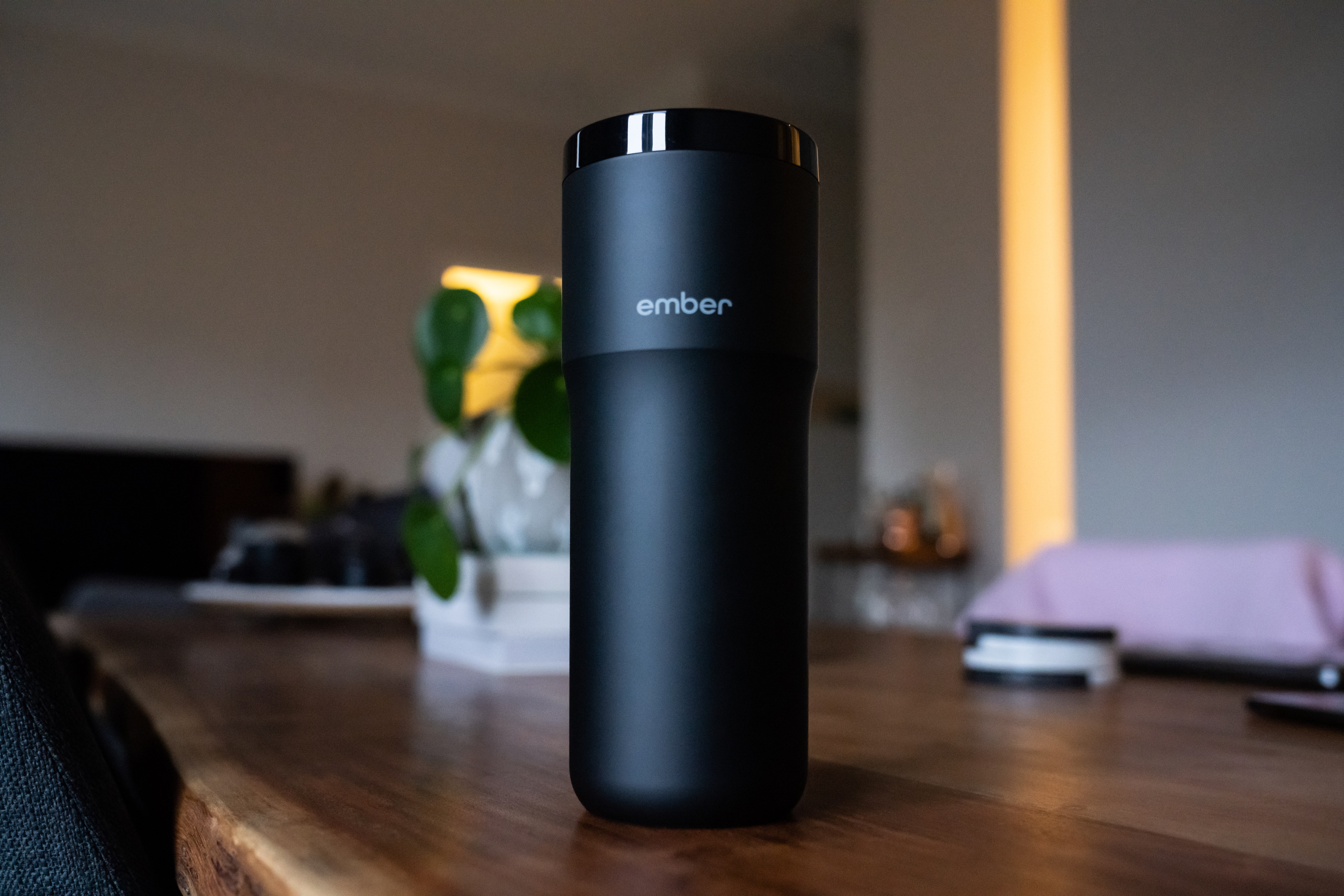
Ember’s Mug 2 and Travel Mug 2 extend your coffee temperature sweet spot


One of the world’s most static technologies may be the humble mug, but startup Ember decided it was time for a change when they introduced their temperature-controlled smart mug to the market in 2016. Now, the company has launched its Ember Mug 2 – a follow-up that keeps the concept and design intact, but that improves the lineup in some key ways.

There are two separate new second-generation Ember mugs – the Ember Travel Mug, and the Ember Mug designed for home and office use. Both add extended battery life, thanks to swapping its old battery technology with “the most advanced battery technology on the market,” and both gain new redesigned charging coasters, while the Travel Mug 2 gets a new control interface for adjusting the temperature of the beverage within, and it’s a bit lighter while holding the same volume.

Ember Mug 2 (from $99.95)

Ember Mug and Travel Mug 2 3This sequel to Ember’s home mug comes in black, white and copper versions, as well as in two sizes: 10z and 14oz. Like its predecessor, it features an internal heating element and battery, Bluetooth connectivity for smartphone control from the Ember app, and a durable ceramic coating.

The Ember Mug 2 has a customizable LED that shows you when it’s working, and that you can change to whatever color you wish, which is handy if you have a couple of these in use in one household. It comes in black and white (as well as the pricier copper edition) in order to set your desired temperature, you pair it with an app on your phone (a quick and painless process).

Ember will send you notifications when the liquid within reaches the desired temperature. I’ve long used one of their first generation products, and the one thing I found was that on my three-a-day coffee schedule, sometimes my third cup would end up cold, because the battery, while decent, would run out before my appetite for caffeine did.

Enter the sequel, which offers up to 50 percent better battery life than the original version. It’s hard to quantify, since the speed with which I drink my coffee differs day to day, but I will say that in testing I haven’t seen the low battery warning before I was long done actually drinking coffee for the day. In short, if you make sure to pop the mug back on its charging coaster every evening, you should have plenty of juice for a full day of use the next day without any sense of mug range anxiety.

Ember Travel Mug 2 ($179.95)

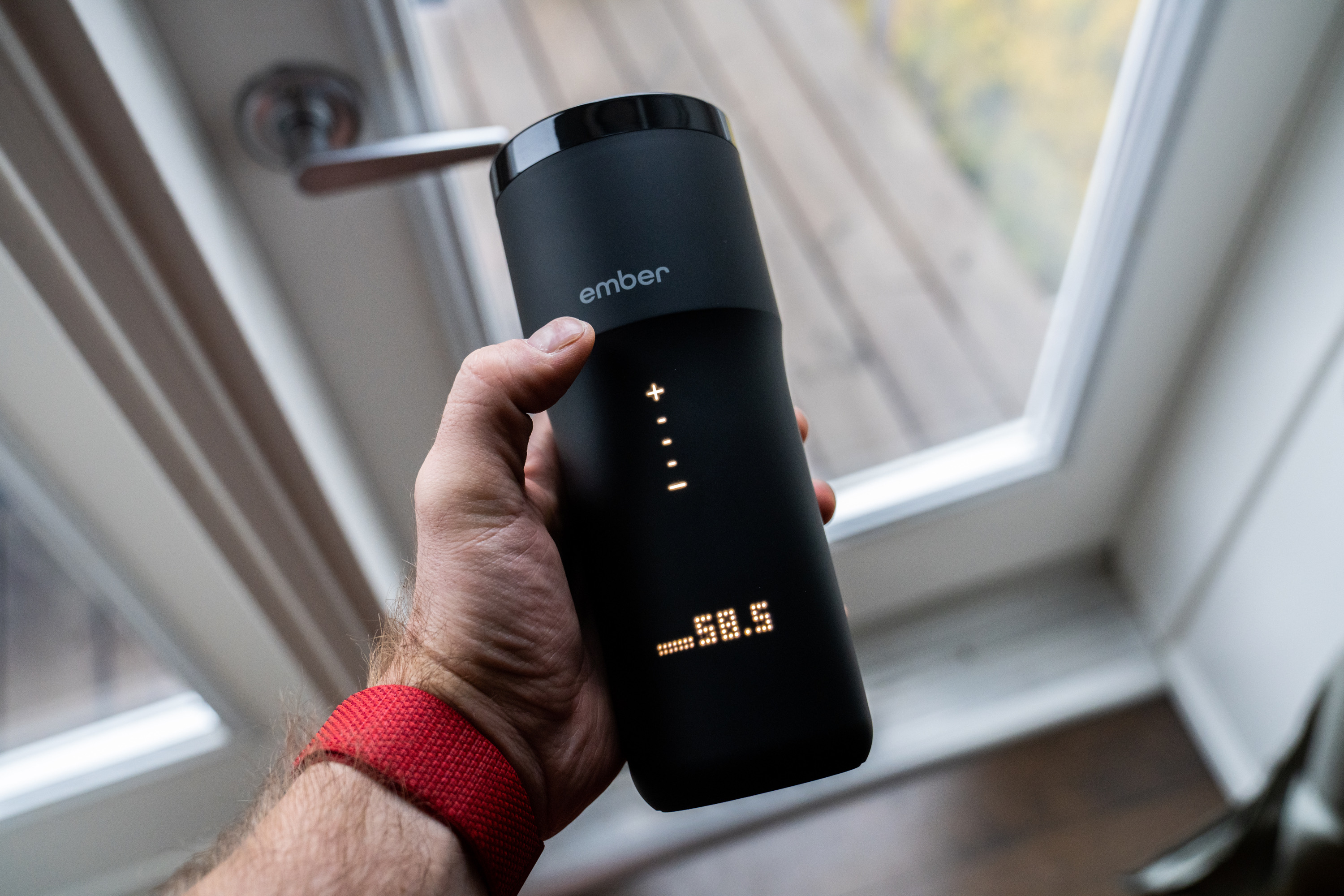
Ember Mug and Travel Mug 2 5The Travel Mug 2 gets a slight redesign as well as battery improvements. Whereas Ember used a physical dial to control temperature adjustments without requiring you to use your phone on the last generation, now there’s a touch sensitive area on the cup just above where the body expands out towards the top. You can slide your fingers around this to increase or decrease the temperature of whatever you have within.

This tweak is likely what allowed Ember to slim down the design while keeping the internal volume (12 oz) the same, so that it’s a bit more lightweight and travel friendly than before (while also offering as much as three hours of battery life). Ember also took the auto sleep and wake features that it introduced with the original Ember ceramic Mug and brought them to the Travel Mug 2, meaning that it’ll turn itself on and off automatically depending on whether it detects liquid inside. or motion from being picked up, to extend battery life even further.

Ember Mug and Travel Mug 2 7The design of the Ember Travel Mug 2 is top-notch, with a smooth matte surface and hand-friendly design, along with clear, easy to red LED displays that just disappear when not in use. The bottom display shows current temperature, as well as an indicator of remaining battery life, and you can add a custom name to show for avoiding confusion if there are multiple Travel Mugs in use.

Bottom Line

Ember’s follow-up hardware to its initial lineup isn’t a dramatic change – but the collection didn’t need a major overhaul because it gets so many things right. The added battery life in the new generation is great, and the appeal remains the same: If you’re a coffee or tea fanatic and don’t love returning to a lukewarm or cold cup, then this is the stuff for you.

Could you opt for a vacuum-walled mug or travel tumbler? Absolutely, and the Zojirushi line-up of insulated travel mugs will keep liquids hot for days. But Ember’s home mug is without peer for actually keeping things hot in an open-top design, and the Travel Mug’s ability to actually adjust and increase temperature on the fly is also a unique value proposition that can’t be matched by any passive insulation.


Read Full Article

Femtech startup Inne takes the wraps off a hormone tracker and $8.8M in funding


Berlin-based femtech startup Inne is coming out of stealth to announce an €8 million (~$8.8M) Series A and give the first glimpse of a hormone-tracking subscription product for fertility-tracking and natural contraception that’s slated for launch in Q1 next year.

The Series A is led by led by Blossom Capital, with early Inne backer Monkfish Equity also participating, along with a number of angel investors — including Taavet Hinrikus, co-founder of TransferWise; Tom Stafford, managing partner at DST; and Trivago co-founder Rolf Schromgens.

Women’s health apps have been having a tech-fuelled moment in recent years, with the rise of a femtech category. There are now all sorts of apps for tracking periods and the menstrual cycle, such as Clue and Flo.

Some also try to predict which days a women is fertile and which they’re not — offering digital tools to help women track bodily signals if they’re following a natural family planning method of contraception, or indeed trying to conceive a baby.

Others — such as Natural Cycles — have gone further down that path, branding their approach “digital contraception” and claiming greater sophistication vs traditional natural family planning by applying learning algorithms to cycle data augmented with additional information (typically a daily body temperature measurement). Although there has also been some controversy around aggressive and even misleading marketing tactics targeting young women.

A multi-month investigation by the medical device regulator in Natural Cycles’ home market, instigated after a number of women fell pregnant while using its method, found rates of failure were in line with its small-print promises but concluded with the company agreeing to clarify the risk of the product failing.

At issue is that the notion of “digital contraception” may present as simple and effortless — arriving in handy app form, often boosted by a flotilla of seductive social media lifestyle ads. Yet the reality for the user is the opposite of effortless. Because in fact they are personally taking on all of the risk.

For these products to work the user needs a high level of dedication to stick at it, be consistent and pay close attention to key details in order to achieve the promised rate of protection.

Natural contraception is also what Inne is touting, dangling another enticing promise of hormone-free contraception — its website calls the product “a tool of radical self-knowledge” and claims it “protect[s]… from invasive contraceptive methods”. It’s twist is it’s not using temperature to track fertility; its focus is on hormone-tracking as a fertility measure.

Inne says it’s developed a saliva-based test to measure hormone levels, along with an in vitro diagnostic device (pictured above) that allows data to be extracted from the disposable tests at home and wirelessly logged in the companion app.

Founder Eirini Rapti describes the product as a “mini lab” — saying it’s small and portable enough to fit in a pocket. Her team has been doing the R&D on it since 2017, preferring, she says, to focus on getting the biochemistry right rather than shouting about launching the startup. (It took in seed funding prior to this round but isn’t disclosing how much.)

At this stage Inne has applied for and gained European certification as a medical device. Though it’s not yet been formally announced.

The first product, a natural contraception for adult women — billed as best suited for women aged 28-40, i.e. at a steady relationship time-of-life — will be launching in select European markets (starting in Scandinavia) next year, though initially as a closed beta style launch as they work on iterating the product based on user feedback.

“It basically has three parts,” Rapti says of the proposition. “It has a small reader… It has what we call a little mouth opening in the front. It always gives you a smile. That’s the hardware part of it, so it recognizes the intensity of your hormones. And then there’s a disposable saliva test. You basically collect your saliva by putting it in your mouth for 30 seconds. And then you insert it in the reader and then you go about your day.

“The reader is connected to your phone, either via BlueTooth or wifi, depending on where you are taking the test daily… It takes the reading and it sends it over to your phone. In your phone you can do a couple of things. First of all you look at your hormonal data and you look at how those change throughout the menstrual cycle. So you can see how they grow, how they fall. What that means about your ovulation or your overall female health — like we measure progesterone; that tells you a lot about your lining etc. And then you can also track your fluids… We teach you how to track them, how to understand what they mean.”

As well as a contraception use-case, the fertility tracking element naturally means it could also be used by women wanting to get pregnant. Eirini Rapti

“This product is not a tracker. We’re not looking to gather your data and then tell you next month what you should be feeling — at all,” she adds. “It’s more designed to track your hormones and tell you look this is the most basic change that happens in your body and because of those changes you will feel certain things. So do you feel them or not — and if you don’t, what does it mean? Or if you do what does it mean?

“It builds your own hormonal baseline — so you start measuring your hormones and we go okay so this is your baseline and now let’s look at things that go out of your baseline. And what do they mean?”

Of course the key question is how accurate is a saliva-based test for hormones as a method for predicting fertility? On this Rapti says Inne isn’t ready to share data about the product’s efficacy — but claims it will be publishing details of the various studies it conducted as part of the CE marking process in the next few weeks.

“A couple more weeks and all the hardcore numbers will be out there,” she says.

In terms of how it works in general the hormone measurement is “a combination of a biochemical reaction and the read out of it”, as she puts it — with the test itself being pure chemistry but algorithms then being applied to interpret the hormonal reading, looping in other signals such as the user’s cycle length, age and the time of day of the test.

She claims the biochemical hormone test the product relies on as its baseline for predicting fertility is based on similar principles to standard pregnancy tests — such as those that involve peeing on a stick to get a binary ‘pregnant’ or ‘not pregnant’ result. “We are focused on specifically fertility hormones,” she says.

“Our device is a medical device. It’s CE-certified in Europe and to do that you have to do all kinds of verification and performance evaluation studies. They will be published pretty soon. I cannot tell you too much in detail but to develop something like that we had to do verification studies, performance evaluation studies, so all of that is done.”

While it developed and “validated” the approach in-house, Rapti notes that it also worked with a number of external diagnostic companies to “optimize” the test.

“The science behind it is pretty straightforward,” she adds. “Your hormones behave in a specific way — they go from a low to a high to a low again, and what you’re looking for is building that trend… What we are building is an individual curve per user. The starting and the ending point in terms of values can be different but it is the same across the cycle for one user.”

“When you enter a field like biochemistry as an outsider a lot of the academics will tell you about the incredible things you could do in the future. And there are plenty,” she adds. “But I think what has made a difference to us is we always had this manufacturability in mind. So if you ask me there’s plenty of ways you can detect hormones that are spectacular but need about ten years of development let alone being able to manufacture it at scale. So it was important to me to find a technology that would allow us to do it effectively, repeatedly but also manufacture it at a low cost — so not reinventing the whole wheel.”

Rapti says Inne is controlling for variability in the testing process by controlling when users take the measurement (although that’s clearly not directly within its control, even if it can send an in-app reminder); controlling how much saliva is extracted per test; and controlling how much of the sample is tested — saying “that’s all done mechanically; you don’t do that”.

“The beauty about hormones is they do not get influenced by lack of sleep, they do not get influenced by getting out of your bed — and this is the reason why I wanted to opt to actually measure them,” she adds, saying she came up with the idea for the product as a user of natural contraception searching for a better experience. (Rapti is not herself trained in medical or life sciences.)

“When I started the company I was using the temperature method [of natural contraception] and I thought it cannot be that I have to take this measurement from my bed otherwise my measurement’s invalid,” she adds.

However there are other types of usage restrictions Inne users will need to observe in order to avoid negatively affecting the hormonal measurements.

Firstly they must take the test in the same time window each time — either in the morning or the evening but sticking to one of those choices for good.

They also need to stick to daily testing for at least a full menstrual cycle. Plus there are certain days in the month when testing will always be essential, per Rapti, even as she suggests a “learning element” might allow for the odd missed test day later on, i.e. once enough data has been inputted.

Users also have to avoid drinking and eating for 30 minutes before taking the test. She further specifies this half hour pre-test restriction includes not having oral sex — “because that also affects the measurements”.

“There’s a few indications around it,” she concedes, adding: “The product is super easy to use but it is not for women who want to not think ever about contraception or their bodies. I believe that for these women the IUD would be the perfect solution because they never have to think about it. This product is for women who consciously do not want to take hormones and don’t want invasive devices — either because they’ve been in pain or they’re interested in being natural and not taking hormones.”

At this stage Inne hasn’t performed any comparative studies vs established contraception methods such as the pill. So unless or until it does users won’t be able to assess the relative risk of falling pregnant while using it against more tried and tested contraception methods.

Rapti says the plan is to run more clinical studies in the coming year, helped by the new funding. But these will be more focused on what additional insights can be extracted from the test to feed the product proposition — rather than on further efficacy (or any comparative) tests.

They’ve also started the process of applying for FDA certification to be able to enter the US market in future.

Beyond natural contraception and fertility tracking, Inne is thinking about wider applications for its approach to hormone tracking — such as providing women with information about the menopause, based on longer term tracking of their hormone levels. Or to help manage conditions such as endometriosis, which is one of the areas where it wants to do further research.

The intent is to be the opposite of binary, she suggests, by providing adult women with a versatile tool to help them get closer to and understand changes in their bodies for a range of individual needs and purposes.

“I want to shift the way people perceive our female bodies to be binary,” she adds. “Our bodies are not binary, they change around the month. So maybe this month you want to avoid getting pregnant and maybe next month you actually want to get pregnant. It’s the same body that you need to understand to help you do that.”

Commenting on the Series A in a supporting statement, Louise Samet, partner at Blossom Capital, said: “Inne has a winning combination of scientific validity plus usability that can enable women to better understand their bodies at all stages in their lives. What really impressed us is the team’s meticulous focus on design and easy-of-use together with the scientific validity and clear ambition to impact women all over the world.”


Read Full Article

Bosun Tijani talks strategy as CEO of Africa’s new largest tech hub


With CcHub‘s acquisition of iHub in September, Nigerian Bosun Tijani is at the helm of (arguably) the largest tech network in Africa.

He is now CEO of both organizations, including their robust membership rosters, startup incubation programs, global partnerships, and VC activities from Nigeria to Kenya.

One could conclude Tijani has become one of the most powerful figures in African tech with the CcHub iHub merger. But that would be a little shortsighted.

The techie from Lagos still faces plenty of challenges and unknowns in integrating two innovation hubs that lie 3,818 flight kilometers apart. Several sources speaking on background over the last year have indicated iHub was experiencing financial difficulties.

Tijani offered TechCrunch some initial details last month on how the acquisition will fall together.

But more recently he shared greater detail on his strategy for operating the multi-country innovation network. A big test for Tijani will be aligning the organizations on a path to sustainability. The buzzword is usually code for generating consistent operating income beyond expenses.

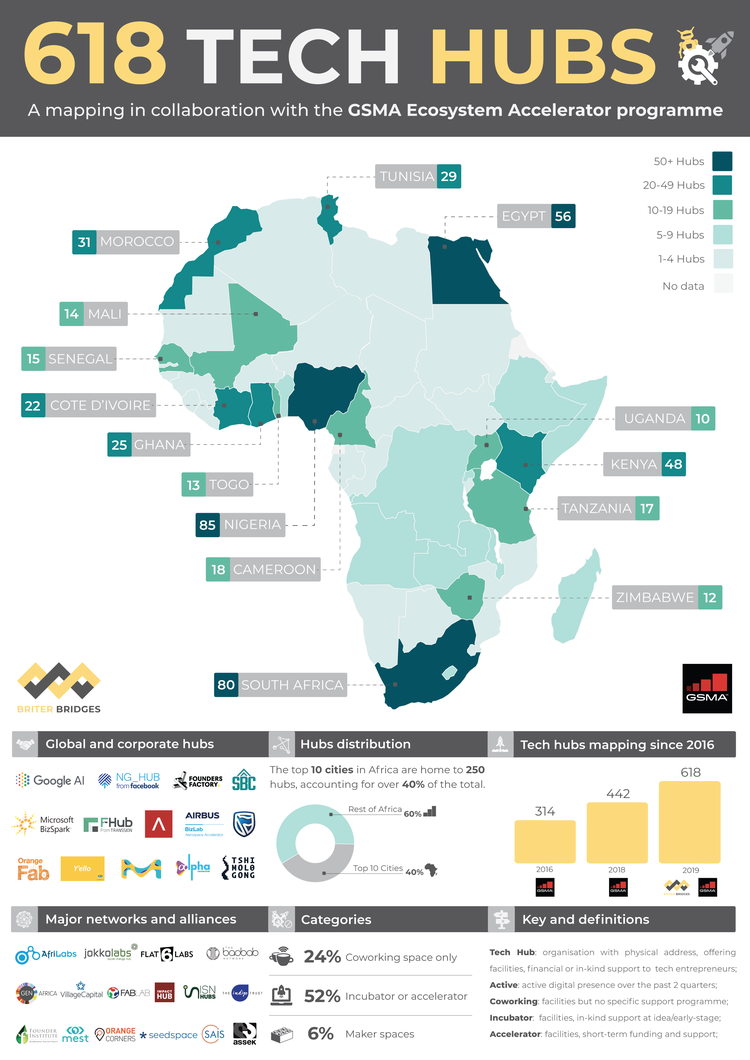
The growth of innovation spaces, accelerators and incubators in Africa — which tally 618 per GSMA stats — is often lauded as an achievement for the continent’s tech ecosystem.

But debate on how these focal points for startup formation, training and IT activity fund themselves is ever-present.

Grant income has served as a dominant revenue source for Africa’s tech hubs — including iHub in its early days — though many have worked to diversify.

TechHubsinAfricain2019 Briter Bridges

That includes CcHub, according to Tijani, who plans to continue the trend across the expanded CcHub, iHub organization.

“When people talk about sustainability, we’ve been in business for 9 years,” he notes of CcHub Nigeria.

“We de-emphasized grant funding six years ago; most of our revenue is actually earned revenue.”

On income sources Tijani looks to foster across both organizations, he named consulting services (for corporates, governments, and development agencies), events services, and generating greater return on investment.

iHub has been active with startup seed-investments and CcHub has a portfolio of companies through its Growth Capital Fund.

“Our size will become a major part of us being able to invest in startups and the longer we stay invested the more we will start to see significant returns and exits,” said Tijani.

CcHub CEO Bosun Tijani

The CcHub iHub nexus will also use its size to leverage more partnerships. Tijani and team have already mastered gaining collaborations with big African and global tech names, such as MainOne and Facebook.

Tijani will look to connect iHub to CcHub’s Google sponsored Pitch Drive — which has done African startup tours of Asia and Europe — and potentially take the show to the U.S.

“We’re talking about it,” Tijani said, of a U.S. pitch trip. And this could lead to a permanent presence in San Francisco for the new CcHub, iHub entity.

“Beyond just a tour, we want to build strong presence in the Bay Area,” Tijani said, but didn’t offer more specifics on what that could mean.

So on the list of things to emerge from the CcHub-iHub acquisition, African tech planting a big flag in San Francisco is a future possibility.

A more immediate result of the union between the innovation spaces will be Bosun Tijani becoming a regular sight on flights between Lagos and Nairobi.


Read Full Article
Learn How to Build Databases From Scratch With the Ultimate MySQL Bootcamp


When your job involves analyzing data, being able to build databases is pretty useful. Recruiters in marketing, sales, finance, and many other sectors are actively looking for people with these skills. If you want to stand out from the crowd, the Ultimate MySQL Bootcamp can help. This learning library includes 34 video tutorials and five hours of content, transforming you from a coding virgin to a database expert. You can get the bundle now for $11.99 via MakeUseOf Deals — and use code 20LEARN20 for 20% off.

Data Bootcamp

For data sets under a certain size, it’s easy enough to crunch the numbers in a spreadsheet. But to make good decisions in business, you need as much data as possible. This is where MySQL skills come to the fore.

This course shows you how to build advanced databases from scratch. The video tutorials start with the basics, helping you learn SQL syntax and write your first lines of code. You then discover how to work with large data sets, run analysis using aggregate functions, and create complex queries.

Along with the videos, the Bootcamp includes loads of exercises, challenges and projects to help you hone your new skills. You can also claim a certificate when you complete the course.

The Ultimate Bootcamp for $11.99

Order now for $11.99 to get lifetime access to the Bootcamp, worth $200.

Read the full article: Learn How to Build Databases From Scratch With the Ultimate MySQL Bootcamp


Read Full Article
Spotify Launches a Standalone App for Kids


Spotify has launched Spotify Kids, a standalone app designed for “the next generation of listeners”. This is Spotify built for kids. And it features a child-friendly UI and a collection of songs curated for even the youngest music lovers.

What to Expect From Spotify Kids

Spotify Kids is designed for kids aged 3+. There are thousands of songs available, all hand-picked by a team of editors. Younger children get Disney soundtracks and the like. Older kids can listen to pop songs from the likes of Ariana Grande and Taylor Swift.

The Kids app looks and feels different than the regular Spotify app. With a bright and colorful UI, and a cast of characters to choose from. The look varies by age group too, so the Spotify Kids app can evolve as kids grow up listening to Spotify.

Spotify Kids is exclusively available to Premium Family subscribers. This is partly due to the lack of ads. Spotify Kids is currently in beta, and only available in Ireland. However, it will be rolling out to all markets that currently have Premium Family.

According to the press release, Spotify has intentionally launched its Kids app in beta owing to “the sensitivities around content for children”. Spotify will use the beta to learn from “parents, caregivers and other experts as they begin to interact with the app.”

Download: Spotify Kids on Android | iOS (Only available to Premium Family subscribers)

Spotify Is Building for the Future

With the streaming wars starting to heat up, appealing to the next generation of subscribers could be the key to the longterm future of Spotify et al. If children associate a certain company with music, they’re more likely to stick with them as adults.

Whether you’re interested in Spotify Kids or not, you should check out our previous Spotify coverage. If you’re new to streaming here’s our unofficial guide to Spotify. And if you’re a longterm user, here’s how to fix common Spotify problems.

Read the full article: Spotify Launches a Standalone App for Kids


Read Full Article

Low RAM on Your Phone? 6 Android Memory Management Tips You Need to Know


Got an old Android phone, or like to play the latest high-end mobile games? You might encounter memory problems from time to time, as your phone struggles to keep up with you.

But what can you do about it, if anything? Let’s take a look at how to manage RAM on Android.

1. If It Ain’t Broke, Don’t Fix It

The first point to make about managing memory on Android is that unless you’ve got an old or budget phone, you won’t need to do it at all.

Most mid-range to flagship devices from the last couple of years will have at least 4GB of RAM. A flagship from 2019, like the OnePlus 7 Pro or Galaxy Note 10 Plus, could have as much as 12GB. You never need to manage the memory on these devices.

12GB RAM Samsung phone
Image Credit: Samsung

For the most part, Android is very efficient when it comes to handling memory. If you do check and find that all (or most) of your available RAM is in use, don’t worry—that’s how it’s designed to work. Android tries to keep apps in memory for as long as it can, so that they start up again instantly next time you need them.

If and when it does need to free up some extra memory, the system will quietly close some of the apps you haven’t used recently in the background.

There’s an old adage: free RAM is wasted RAM. That definitely applies to Android.

2. How Much RAM Do You Need?

So you don’t need to manage your memory if your phone has got enough of it. But how much RAM is enough?

To an extent, it depends on how you use your phone. If you’re mostly doing light browsing and using social media, you can get away with a lot less than if you’re constantly playing PUBG or Call of Duty.

call of duty memory use

For 2019 flagships, Google decided that 6GB was plenty for the Pixel 4, while Samsung went with 8GB for the Galaxy S10 (which uses Samsung’s more resource-heavy skin). We’d suggest that 4GB is still enough for all but the most demanding users, and even 3GB is fine for lighter use. Below that, you’re pushing it.

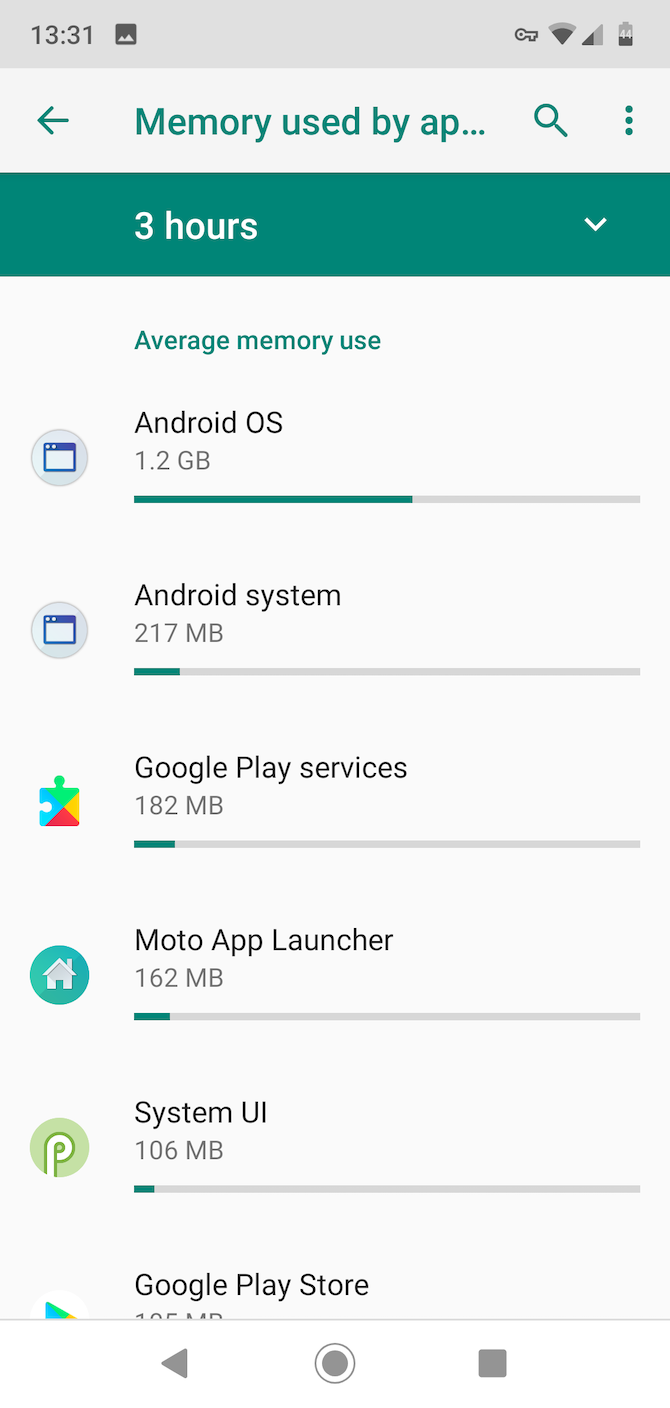
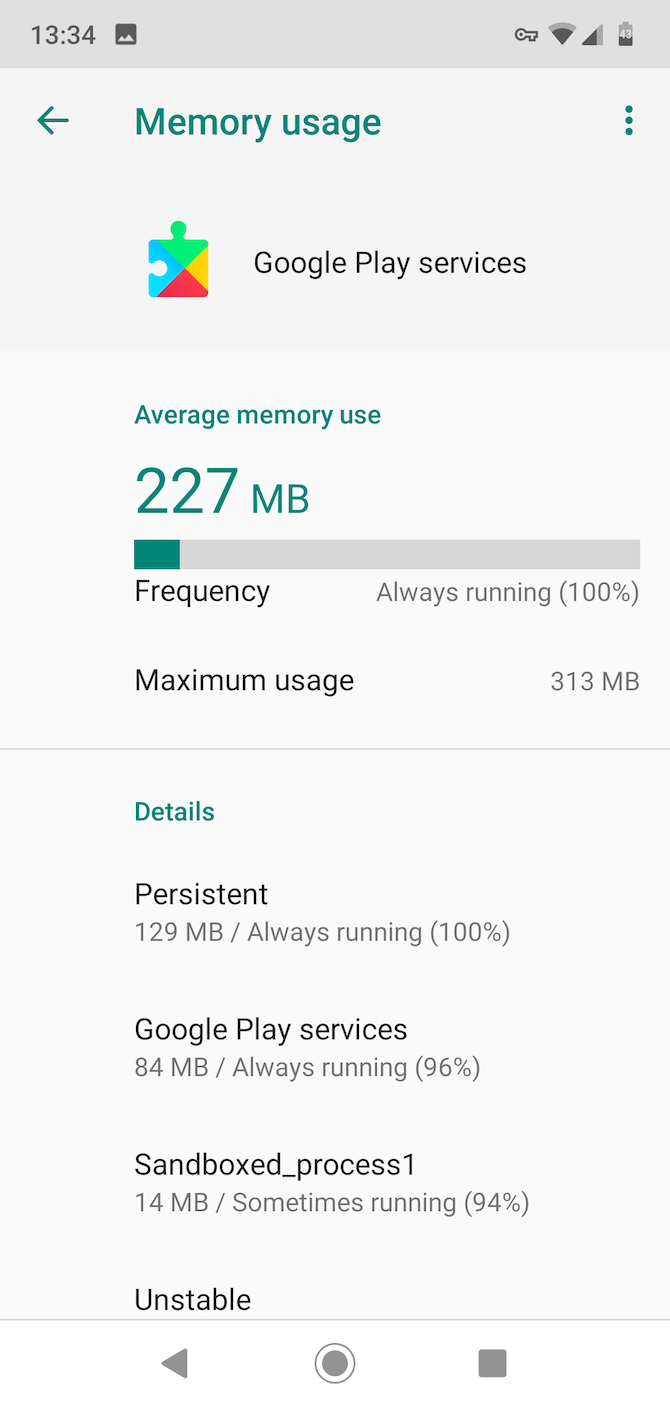
Android and Google Play Services will use up to around 1.5GB of RAM on their own, and they’re running all the time. A game like PUBG will use over 1GB, and even having several browser tabs open at the same time can use a similar amount.

3. Find Out Which Apps Are Using Your RAM

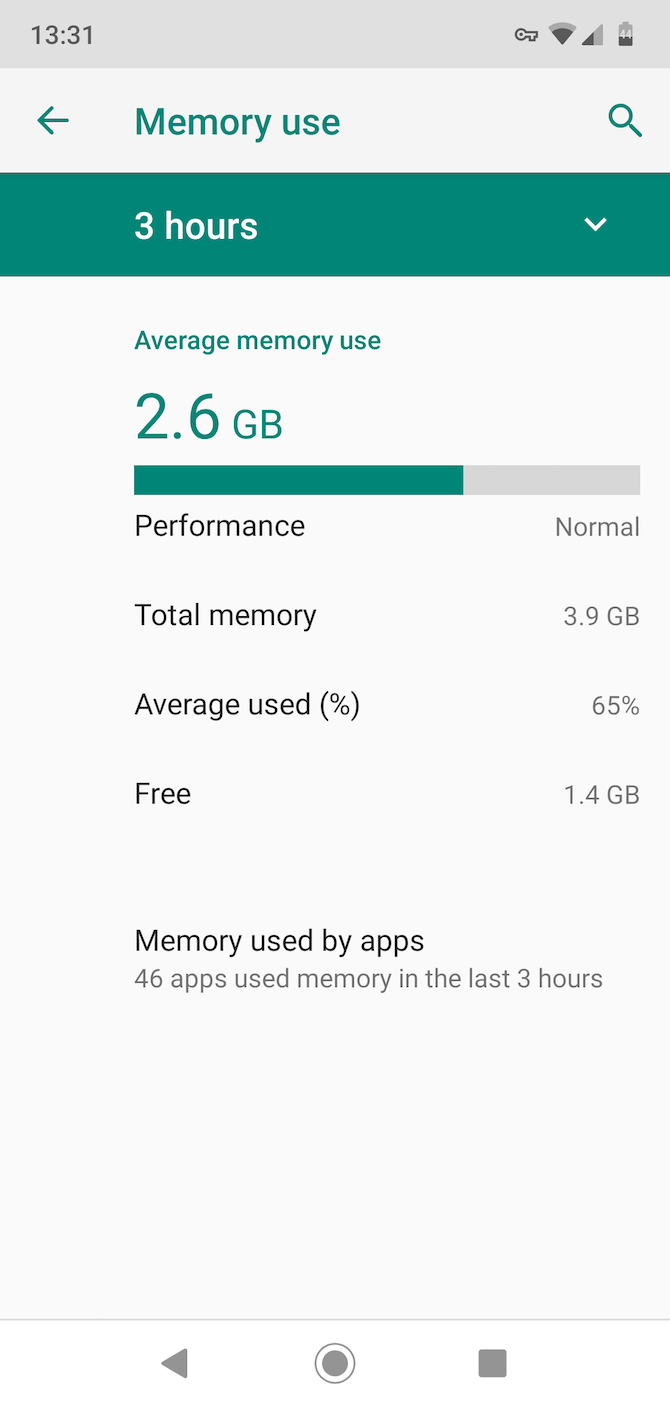
The key to managing your memory is to first figure out how it’s being used, and which of your apps are hogging the most of it. You can do this with the Memory tool that was introduced in Android 6 Marshmallow.

Where you find it depends on what version of Android you’ve got:

  • On Android 6 Marshmallow and 7 Nougat, go to Settings > Memory.
  • From Android 8 Oreo onwards, the Memory section is inside the Developer options. To see this, first go to Settings > About phone, then tap Build number seven times to make the Developer options appear. Then go to Settings > Advanced > Developer options > Memory.

Once you’re there, you can see your average RAM use in the last three hours and the last day. Tap Memory used by apps to get a full breakdown on which apps use the most. This will help you identify those RAM-hungry programs and possibly replace them with better-performing alternatives.

4. Don’t Use Task Killers or RAM Boosters

We’ve known for many years that task killers are bad news for Android. Yet there are still large numbers of them on the Play Store, which continue to rack up tens of millions of downloads.

So it’s worth reiterating: a task killer won’t make your phone faster. Nor will RAM boosters or any other kind of app that promises performance improvements.

As we’ve already said, Android handles apps and memory efficiently already, so forcing apps to close will interfere with this process. It’ll also make your apps slower to start up next time you need them, as well as wasting additional processor and battery power along the way.

Worse yet, some apps are designed to run in the background. Shutting them down with a task killer will often simply result in them opening right back up again. That also wastes more resources than if you just left them alone.

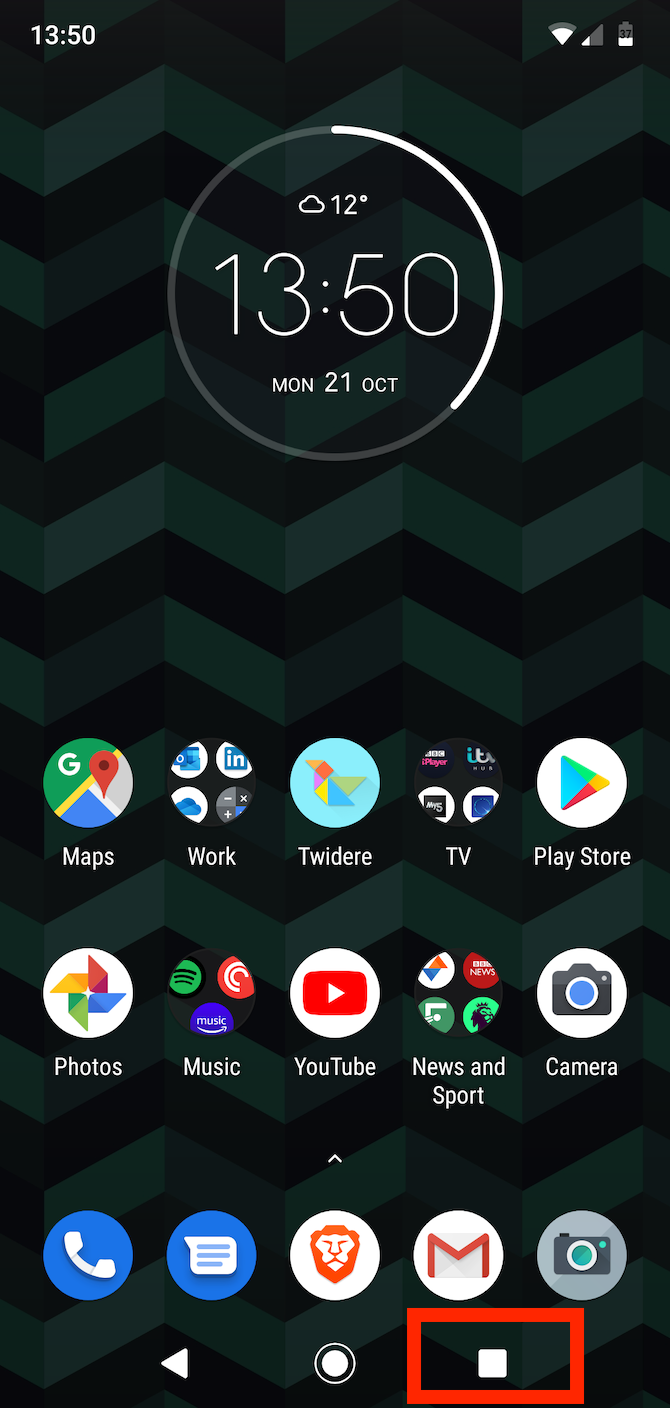
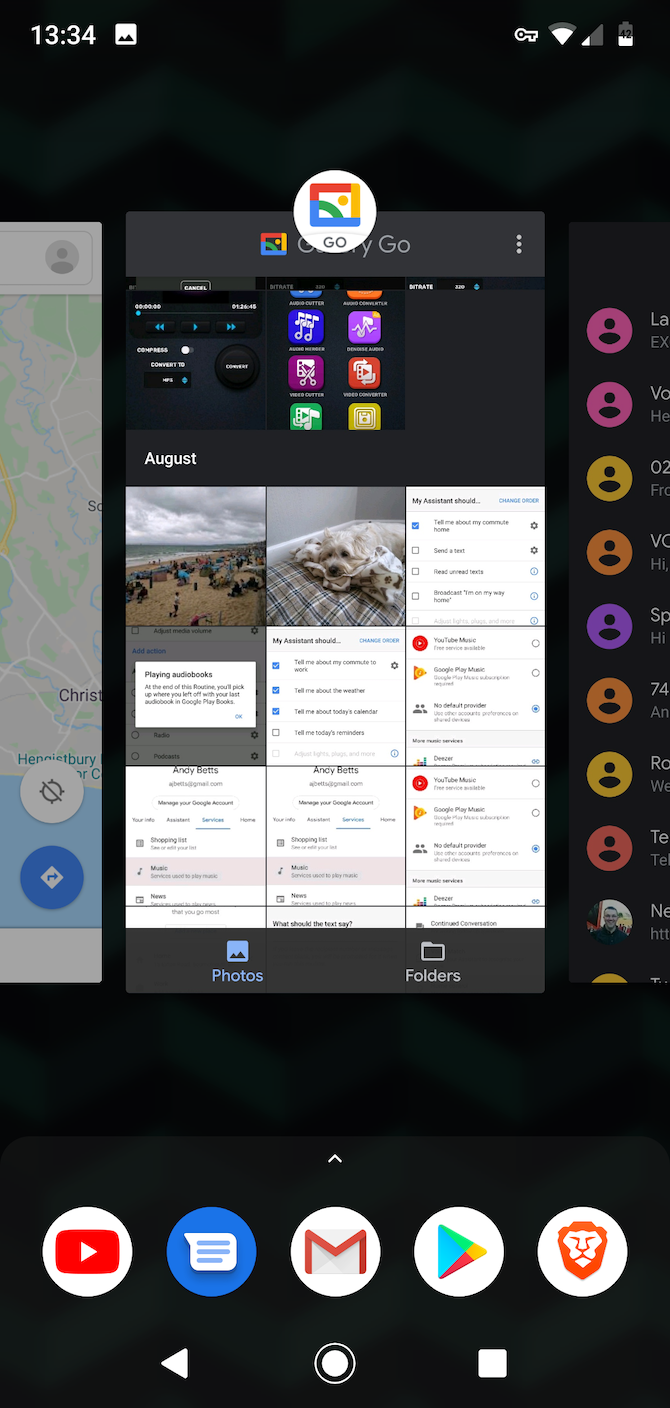
If you do need to close an app for any reason, do it manually. Tap the Recents button at the bottom of the screen, or swipe up from the bottom if you’re using the new Android gestures. When your list of recent apps appears, close any you no longer need by swiping them away.

5. How to Use Less RAM

When you’re working with a phone that’s short on RAM, you can improve performance by trying to limit the amount of memory you use.

This isn’t always easy. Apps like Facebook and Snapchat are notorious resource hogs, but there’s no alternative if you use these services. But there are other steps you can take:

  • Cut down on the number of home screens you use, and don’t use live wallpapers or too many widgets that continually update.
  • Uninstall apps you no longer need.
  • Disable preinstalled apps you don’t use by going to Settings > Apps & notifications > See all X apps, locating the app, and tapping Disable.
  • Install any software updates as they become available—both for apps and the Android system.
  • Find alternative apps that use less memory.

6. Choose the Light Option

When Google launched Android Go for low-end phones, it also launched a series of lightweight Android Go apps as alternatives to its most popular offerings. You don’t need a Go phone to use these apps—they’ll work on any Android device and use a lot less RAM.

go apps by google

Among your options are:

Once you’ve installed them, you can go ahead and disable the full-sized alternative using the method mentioned above. You usually cannot fully uninstall these built-in apps.

Don’t feel you need to stick with official Google apps either. You can often find faster, smaller alternatives to many of your favorite apps.

Chrome, for example, is quite RAM hungry, but you can easily replace it with something like Kiwi Browser. This is based on the same Chromium rendering engine, so web pages look the same. It just uses less memory.

Other Ways to Enhance Your Android Phone

Now you know how to manage your phone’s RAM, what to avoid, and how to make the most of your device. But a shortage of RAM isn’t the only hardware problem that’s likely to affect your phone. Fortunately, we can help you with those issues too.

Check out the best Android apps for when you’ve got bad internet coverage. And best of all, did you know you can improve your battery life using automation? Learn some amazing tips that’ll help keep your Android phone running longer than ever!

Read the full article: Low RAM on Your Phone? 6 Android Memory Management Tips You Need to Know


Read Full Article

5 Warning Signs Your Mac Has a Problem (And What to Do About Them)


mac-issues-hardware-tests

Your Mac is not immune to problems. Occasionally, issues crop up in either macOS or your computer components. They can gradually worsen over time, or occur suddenly.

Sometimes your Mac will give a warning sign before these become major issues. It’s up to you to take notice and keep a close watch on the system. We’ll show you some common warning signs and discuss how to fix these problems.

1. Mac Won’t Turn On

You press the power button on your Mac, and nothing happens. There’s no power light, no sound, and a completely black screen. Instead of panicking, try these steps one at a time to diagnose the problem:

  • Check the power connections to make sure they’re secure on both ends. Next, check the wires for damage and try a different charger or cable.
  • Check the video-out cable connection with the external display (if any). Also, try raising the monitor brightness to make sure that it’s not turned down extremely low.
  • There might be a problem with your accessories. Unplug all peripherals except your keyboard and mouse, then try to boot. Plug in your peripherals after a reboot and see if it all works properly.
  • Perform a power cycle. On a modern MacBook, press the power button and hold it for ten seconds. If your Mac is running, it’ll cut the power and force it to restart. On a desktop Mac, unplug the cable and wait ten seconds. Then plug it in and restart.
  • Reset the SMC and NVRAM. This is the last step you should try before taking your Mac in for a repair.

See our dedicated guide to get your Mac booting again if you still have trouble.

2. Mac Stalls During Startup

Once you power on your Mac, a sequence of booting events occurs until the login screen or desktop appears. But if the startup process gets stuck, no matter how long you wait, you’ll see only a plain gray screen or one with symbols.

Depending on what you see, follow these instructions.

Plain Gray Screen

If you have a simple gray screen when you boot, here’s what to do:

  • Faulty peripherals are the primary cause of gray screen problems. Thus, you should detach all wired accessories, then press and hold the power button to shut down your Mac. Plug in one peripheral after each restart to find the culprit.
  • Try a Safe mode boot. If your Mac completes the startup process here, restart again in normal mode and verify that your startup drive is working properly.
  • If the Safe mode boot fails or gets stuck, then reset both NVRAM and SMC settings as mentioned earlier.
  • RAM with incorrect specifications can also result in a gray screen. Remove any RAM you’ve recently added and restart again.
  • Restart your Mac in Recovery mode by holding Cmd + R as you boot. Then, repair your startup drive with the disk repair utility.

Gray Screen With No Disk Icon

gray screen with no disk icon

If the gray screen has a folder with a flashing question mark, then it means your Mac can’t find a valid startup volume. But when it shows a “Do Not Enter” symbol, it means that your macOS installation is corrupted.

To fix this:

  • Sometimes your Mac forgets the startup volume and momentarily shows a flashing question mark. To solve this problem, go to the Startup Disk pane in System Preferences and re-select your startup volume.
  • Boot your Mac in Recovery mode. In the Apple menu, check whether you can see the startup volume or not. If you can’t, the startup disk most likely has problems. Run the disk repair utility to fix the problem.
  • Reinstall macOS on your startup disk.

3. Repeated Kernel Panics

kernel panic in Mac

Occasionally, you may find that your Mac restarts spontaneously. When the screen comes back on, you’ll see a warning message, as shown above. This is known as a kernel panic—a type of low-level, system-wide crash that your macOS can’t recover from. It’s a bit like a blue screen of death on Windows.

The presence of this warning sign is what distinguishes kernel panics from app-related crashes and restarts. A single kernel panic is usually not a problem. But when it happens often, something more serious may be afoot. Since kernel panic tends to occur randomly, they’re often difficult to reproduce.

Causes and Solutions for Kernel Panics

  • Your Mac needs enough storage space to carry out day-to-day activities. A kernel panic could be a sign that you’re running critically low on disk space. See how to free up space on your Mac to regain some.
  • macOS is picky about the quality of RAM. If your RAM does not match the specifications or is even slightly defective, kernel panics or crashes can happen. Do a detailed Apple Hardware Test or Diagnostics to check your RAM.
  • Faulty or outdated peripherals can also result in kernel panics. Detach all peripherals except the power adapter, then reboot and check if it’s working properly. One by one, plug your external devices back in after each restart. If you find the problematic hardware, check for driver updates or contact the manufacturer.
  • Most of the time, macOS system updates include firmware updates. However, if you have an older Mac, you may be able to install firmware updates manually. Check Apple’s support page for EFI and SMC firmware updates, but know that it’s been archived by Apple. Also, check for updates for third-party apps. Bugs in apps may lead to a low-level system crash.
  • Safe mode can help isolate many issues that result in kernel panics. If your Mac boots in Safe mode, look for third-party libraries and system extensions in the Library folder.

4. Mac’s Fan Runs Excessively

computer fan

Your Mac contains some vital sensors that respond to temperature changes inside your system. These turn on your fan and provide necessary airflow to cool critical components. They’re important because overheating can lead to physical damage.

Sometimes an app requires a great deal of processing power to complete its task. In such cases, your fans will run heavily and make noise. This is perfectly normal, and you shouldn’t worry about it. But when your fan runs constantly even though it isn’t experiencing heavy usage, that’s a red flag.

Here are some places to check when your fans are going crazy:

  • Your Mac has vents that let fans bring in cold air and expel hot air. Make sure they aren’t blocked. Avoid using your Mac in places like the couch, a pillow, in bed, or on your lap for extended periods of time.
  • Dust can accumulate on the vents, fan, and the surface of any parts. When dust blocks the airflow, the heat that does escape has nowhere to go. Periodic cleaning with a cloth or compressed air will help remove this dust.
  • A faulty temperature sensor, or an erroneous System Management Controller (SMC) setting, could cause your Mac to run the fan all the time. Reset your SMC using the guide linked earlier to fix the problem.
  • An app might be consuming too much CPU. Open Activity Monitor and visit the CPU tab. Check for any updates for apps using too much CPU, or report the issue to the developer.

5. Mac Keeps Turning Itself Off

You’re working on your Mac, and then it suddenly turns off for no obvious reason. MacBooks can randomly power off despite having an internal battery. This unpredictable issue results in the loss of unsaved work. Worse, it might damage your hardware and macOS.

When your Mac shuts off randomly, here’s what to do:

  • Check to make sure that the power cord is firmly seated on both ends. Next, review the cables for any damage. Try a spare cable if you have any doubts. And if you’re using a UPS, make sure that it’s working properly and you can power your Mac from the battery.
  • Go to Energy Saver settings in System Preferences and click the Schedule button to verify that your Mac is not scheduled to shut down automatically.
  • The SMC chip is responsible for power management and thermal fan controls. When it goes haywire, the fan starts running fast in response to heat and shuts down your Mac. Thus, this is another issue that resetting the SMC in your Mac can fix.
  • If your fan is not working, then your Mac can shut down due to overheating. To check the health of your Mac’s fan, try apps like Macs Fan Control and TG Pro.
  • Start your Mac in Safe mode and run it for a while to see if the problem happens there.

Regular Mac Backups Keep Data Safe From Trouble

Macs can have problems just like other computers. Defective components, the age of your Mac, and user-based errors can cause a variety of issues. You’ll notice from the tips here that there’s not a single clearly defined solution for these problems. As a result, these warning signs require thought and care.

That’s where the importance of backups comes in. When you back up your data regularly, you won’t lose your important information if your Mac suddenly stops working. See our guide to backing up your Mac with Time Machine to protect your files.

Read the full article: 5 Warning Signs Your Mac Has a Problem (And What to Do About Them)


Read Full Article

Facebook shares rise on strong Q3, users up 2% to 2.45B


Despite ongoing public relations crises, Facebook kept growing in Q3 2019, demonstrating that media backlash does not necessarily equate to poor business performance.

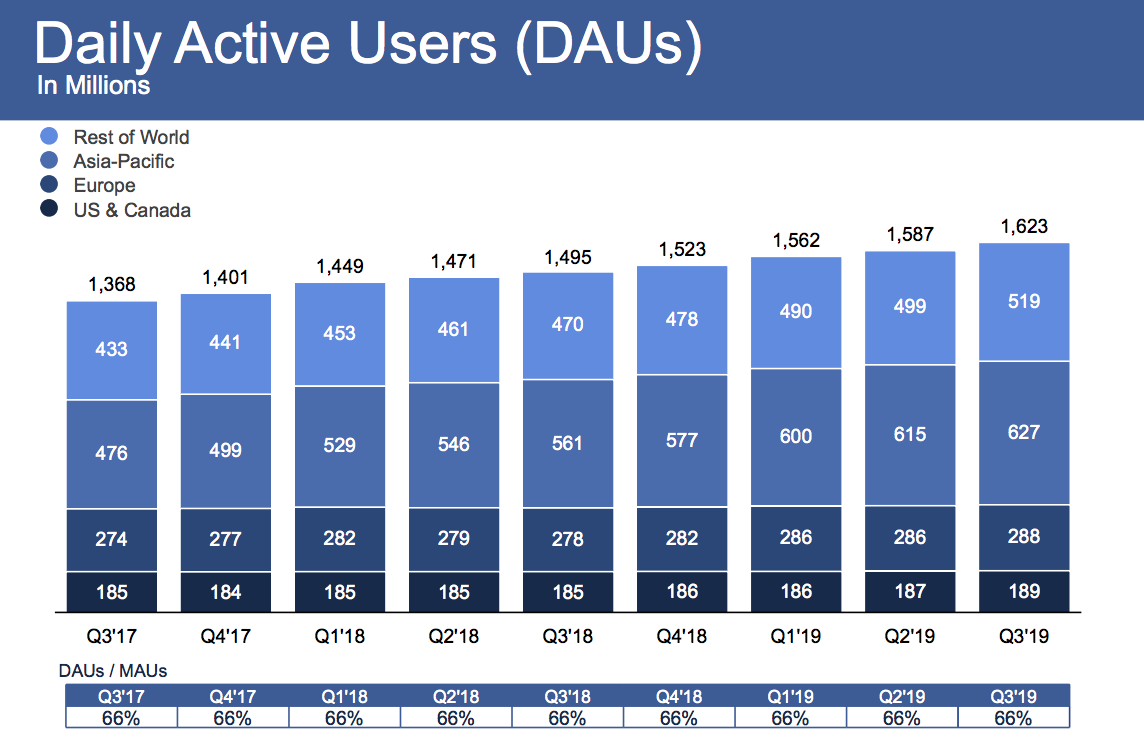
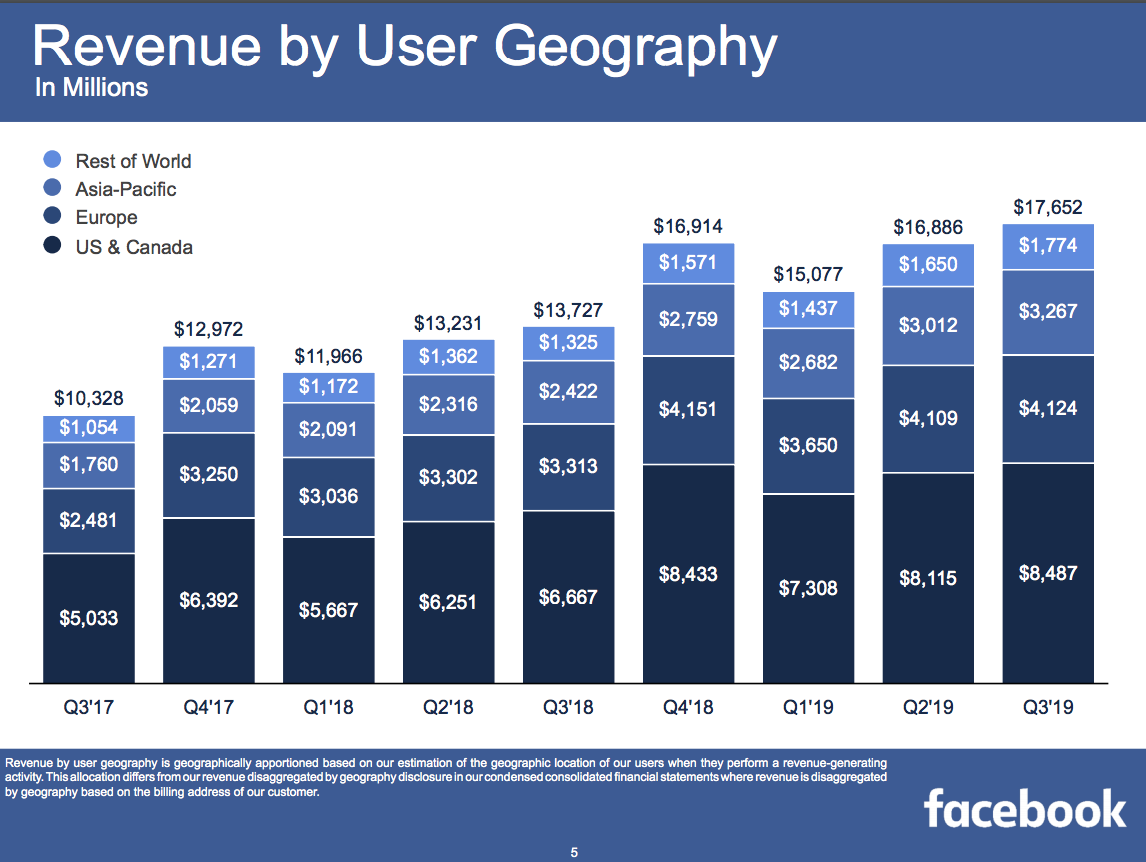
Facebook reached 2.45 billion monthly users, up 1.65 percent from 2.41 billion in Q2 2019 when it grew 1.6 percent, and it now has 1.62 billion daily active users, up 2 percent from 1.587 billion last quarter when it grew 1.6 percent. Facebook scored $17.652 billion of revenue, up 29 percent year-over-year, with $2.12 in earnings per share.

Facebook Q3 2019 DAU

Facebook’s earnings beat expectations compared to Refinitiv’s consensus estimates of $17.37 billion in revenue and $1.91 earnings per share. Facebook’s quarter was mixed compared to Bloomberg’s consensus estimate of $2.28 EPS. Facebook earned $6 billion in profit after only racking up $2.6 billion last quarter due to its SEC settlement.

Facebook shares rose to 1.84% in after-hours trading to $191.71 after earnings were announced, following a day where it closed down 0.56% at $188.25.

Notably, Facebook gained 2 million users in each of its core US & Canada and Europe markets that drive its business, after quarters of shrinkage, no growth, or weak growth there in the past 2 years. Average revenue per user grew healthily across all markets, boding well for Facebook’s ability to monetize the developing world where the bulk of user growth currently comes from.

Facebook says 2.2 billion users access Facebook, Instagram, WhatsApp, or Messenger every day, and 2.8 billion use one of this family of apps each month. That’s up from 2.1 billion and 2.7 billion last quarter. Facebook has managed to stay sticky even as it faces increased competition from a revived Snapchat, and more recently TikTok. However, those rivals might more heavily weigh on Instagram, for which Facebook doesn’t routinely disclose user stats.

Facebook ARPU Q3 2019

Facebook’s earnings announcement was somewhat overshadowed by Twitter CEO Jack Dorsey announcing it would ban all political ads — something TechCrunch previously recommended social networks do. That move flies in the face of Facebook CEO Mark Zuckerberg’s staunch support for allowing politicians to spread misinformation without fact-checks via Facebook ads. This should put additional pressure on Facebook to rethink its policy.

Scandals Continue, But So Does Growth

Overall, it was another rough quarter for Facebook’s public perception as it dealt with outages and struggled to get buy-in from regulators for its Libra cryptocurrency project. Former co-founder Chris Hughes (who I’ll be leading a talk with at SXSW) campaigned for the social network to be broken up — a position echoed by Elisabeth Warren and other presidential candidates.

The company did spin up some new revenue sources, including taking a 30% cut of fan patronage subscriptions to content creators. It’s also trying to sell video subscriptions for publishers, and it upped the price of its Workplace collaboration suite. But gains were likely offset as the company continued to rapidly hire to address abusive content on its platform, which saw headcount grow 28% year-over-year to 43,000. There are still problems with how it treats content moderators, and Facebook has had to repeatedly remove coordinated misinformation campaigns from abroad. Appearing concerned about its waning brand, Facebook moved to add “from Facebook” to the names of Instagram and WhatsApp.

While it escaped with just a $5 billion fine as part of its FTC settlement that some consider a slap on the wrist, especially since it won’t have to significantly alter its business model. But the company will have to continue to invest and divert product resources to meet its new privacy, security, and transparency requirements. These could slow its response to a growing threat: Chinese tech giant ByteDance’s TikTok.


Read Full Article

Facebook shares rise on strong Q3, users up 2% to 2.45B


Despite ongoing public relations crises, Facebook kept growing in Q3 2019, demonstrating that media backlash does not necessarily equate to poor business performance.

Facebook reached 2.45 billion monthly users, up 1.65 percent from 2.41 billion in Q2 2019 when it grew 1.6 percent, and it now has 1.62 billion daily active users, up 2 percent from 1.587 billion last quarter when it grew 1.6 percent. Facebook scored $17.652 billion of revenue, up 29 percent year-over-year, with $2.12 in earnings per share.

Facebook Q3 2019 DAU

Facebook’s earnings beat expectations compared to Refinitiv’s consensus estimates of $17.37 billion in revenue and $1.91 earnings per share. Facebook’s quarter was mixed compared to Bloomberg’s consensus estimate of $2.28 EPS. Facebook earned $6 billion in profit after only racking up $2.6 billion last quarter due to its SEC settlement.

Facebook shares shot up 3.45% in after hours trading to $194.75 after earnings were announced, following a day where it closed down 0.56% at $188.25.

Notably, Facebook gained 2 million users in each of its core US & Canada and Europe markets that drive its business, after quarters of shrinkage, no growth, or weak growth there in the past 2 years. Average revenue per user grew healthily across all markets, boding well for Facebook’s ability to monetize the developing world where the bulk of user growth currently comes from. Facebook says 2.2 billion users access Facebook, Instagram, WhatsApp, or Messenger every day, and 2.8 billion use one of this family of apps each month.

Facebook ARPU Q3 2019

Facebook’s earnings announcement was somewhat overshadowed by Twitter CEO Jack Dorsey announcing it would ban all political ads — something TechCrunch previously recommended social networks do. That move flies in the face of Facebook CEO Mark Zuckerberg’s staunch support for allowing politicians to spread misinformation without fact-checks via Facebook ads.

Overall, it was another rough quarter for Facebook’s public perception as it dealt with outages and struggled to get buy-in from regulators for its Libra cryptocurrency project. Former co-founder Chris Hughes (who I’ll be leading a talk with at SXSW) campaigned for the social network to be broken up — a position echoed by Elisabeth Warren and other presidential candidates.

The company did spin up some new revenue sources, including taking a 30% cut of fan patronage subscriptions to content creators. It’s also trying to sell video subscriptions for publishers, and it upped the price of its Workplace collaboration suite. But gains were likely offset as the company continued to rapidly hire to address abusive content on its platform, which saw headcount grow 28% year-over-year to 43,000. There are still problems with how it treats content moderators, and Facebook has had to repeatedly remove coordinated misinformation campaigns from abroad. Appearing concerned about its waning brand, Facebook moved to add “from Facebook” to the names of Instagram and WhatsApp.

While it escaped with just a $5 billion fine as part of its FTC settlement that some consider a slap on the wrist, especially since it won’t have to significantly alter its business model. But the company will have to continue to invest and divert product resources to meet its new privacy, security, and transparency requirements. These could slow its response to a growing threat: Chinese tech giant ByteDance’s TikTok.


Read Full Article

Jack Dorsey says Twitter will ban all political ads


CEO Jack Dorsey just announced, via tweet, that Twitter will be banning all political advertising — with a few exceptions like voter registration.

“We believe political message reach should be earned, not bought,” Dorsey said.

He also said the company will share the final policy by November 15, and that it will start enforcing the policy on November 22.

Updating


Read Full Article

What productive conflict can offer a workplace | Jess Kutch

What productive conflict can offer a workplace | Jess Kutch

Got an idea to make your workplace better? Labor organizer and TED Fellow Jess Kutch can show you how to put it into action. In this quick talk, she explains how "productive conflict" -- when people organize to challenge and change their work lives for the better -- can be beneficial for employees and employers alike.

Click the above link to download the TED talk.

Amazon Fresh Is Now Free on Amazon Prime


Amazon Fresh is now free for Amazon Prime members. Amazon Fresh formerly cost $14.99/month on top of the price of a Prime membership, but it’s now included as an Amazon Prime benefit. Which means Prime members can get groceries delivered for free.

What Is Amazon Fresh?

Amazon Fresh is Amazon’s delivery service for groceries. Customers place an order for groceries, including fresh produce, frozen goods, and household essentials. And it’s delivered straight to their door within a couple of hours.

Amazon Fresh has been expanding of late, and it’s now available in more than 2,000 cities and towns across the US. However, the $14.99/month fee to use Amazon Fresh will have put some people off using the service. Which is why Amazon is now removing that barrier.

How to Buy Your Groceries From Amazon

Amazon announced that Amazon Fresh is now free in a post on Day One. Turning Amazon Fresh into a Prime benefit means Prime members in more than 2,000 US cities can now get their groceries delivered for free from Amazon Fresh or Whole Foods Market.

Amazon’s VP of Grocery Delivery, Stephanie Landry, said, “Prime members love the convenience of free grocery delivery on Amazon, which is why we’ve made Amazon Fresh a free benefit of Prime, saving customers $14.99 per month.”

If you’re a Prime member already using Amazon Fresh, you can continue using it for free. However, due to how popular Amazon thinks Fresh will now become, other Prime members will have to request an invitation to begin receiving Amazon Fresh deliveries.

When Amazon has the capacity to add you as an Amazon Fresh customer, you’ll be notified. You can then start doing your grocery shopping on Amazon, and have it delivered to your door for free within the space of a couple of hours. As long as you pay for Prime.

Other Amazon Prime Benefits Worth Using

Amazon Fresh is just the latest in a long line of benefits for Amazon Prime subscribers. There’s free shipping, obviously, but there are lots of other awesome Amazon Prime benefits you’ve probably overlooked. And we can now add Amazon Fresh to that list.

Read the full article: Amazon Fresh Is Now Free on Amazon Prime


Read Full Article

iPhone Storage Full? How to Create Free Space on iOS


iphone-storage-full

Depending on whether you get the base model or the Pro, the latest iPhone models come with a maximum of 256GB or 512GB of storage. Why, then, do we still need to solve the “iPhone Storage Full” problem?

The usual culprits are photos, 4K videos, games, and other digital hoarding habits. You can’t upgrade an iPhone’s storage. That leaves you with three choices—buy a bigger phone, get more cloud storage, or create free space on your iPhone.

The first two don’t work if you want to free up space right now. So let’s look at the ways to free up storage space with a bit of iOS jugglery.

Note: You should make a backup of your device with iTunes before you do anything major, like deleting photos or videos. We cover this below.

Get Familiar With iPhone Storage

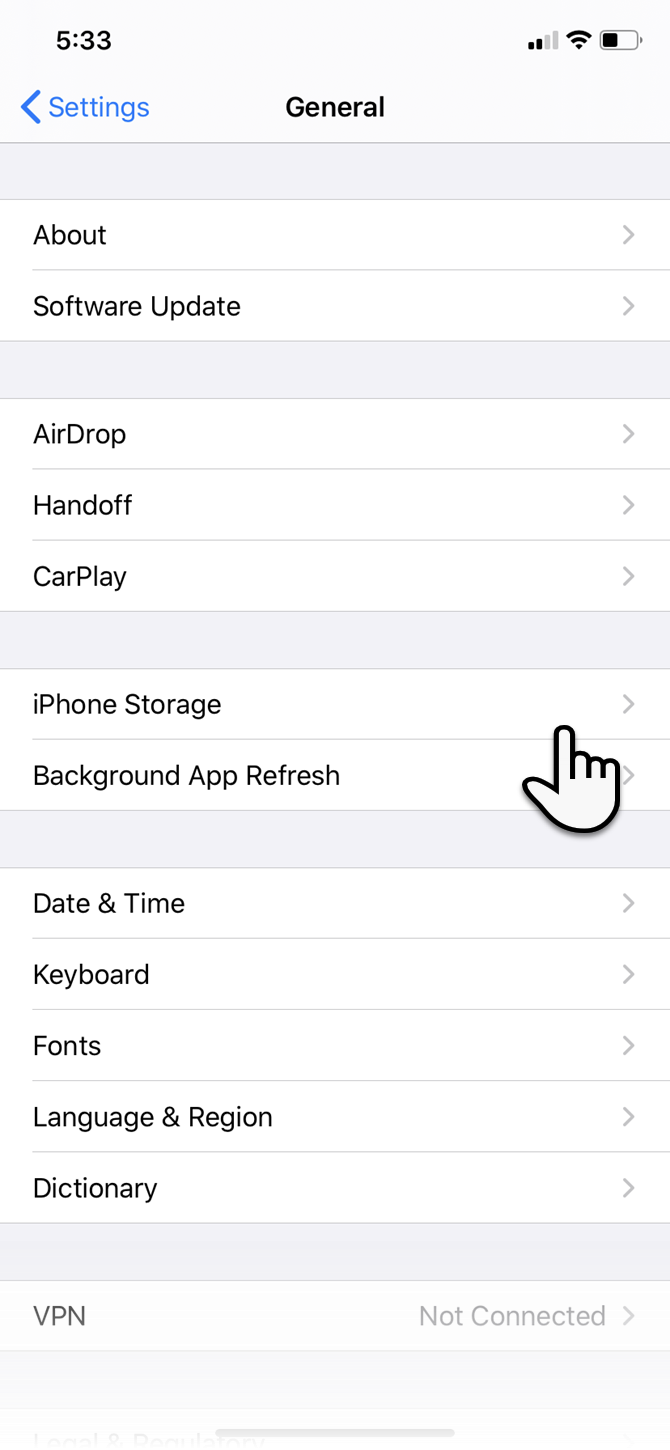
Newer versions of iOS have a dedicated iPhone Storage feature. It’s an improvement on the earlier Storage and iCloud Usage section. To find it, go to Settings > General >iPhone Storage.

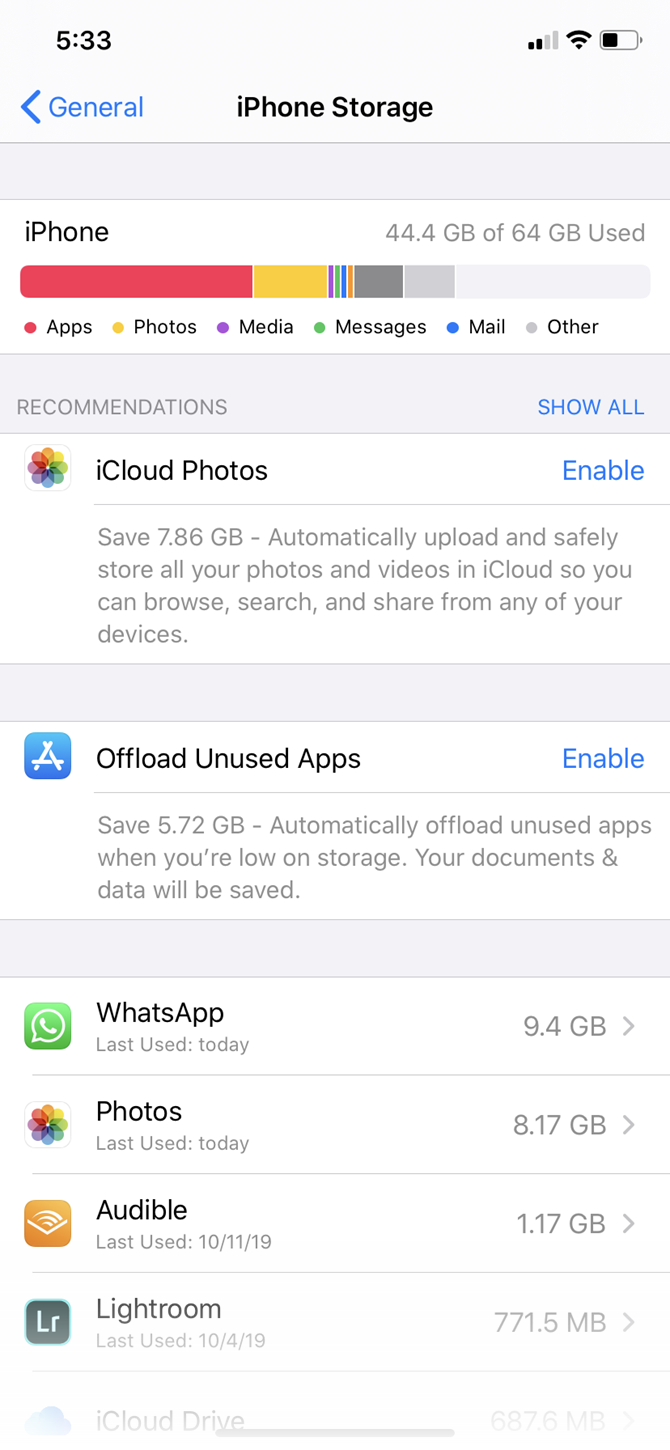
Here, you get a quick view of the storage space available on your device. The list of apps is ordered by the amount of storage each occupies. iOS suggests space-saving steps such as auto-deleting old messages, erasing large message attachments, and storing messages directly in iCloud.

Some of the Apple default apps will let you delete data from here. For instance, you can delete songs from the Music app, clean all website data from Safari, and review personal videos before you delete them.

But this screen is also important because it lets you target each app and act on them in two ways: offloading and deleting.

Offload or Delete Apps

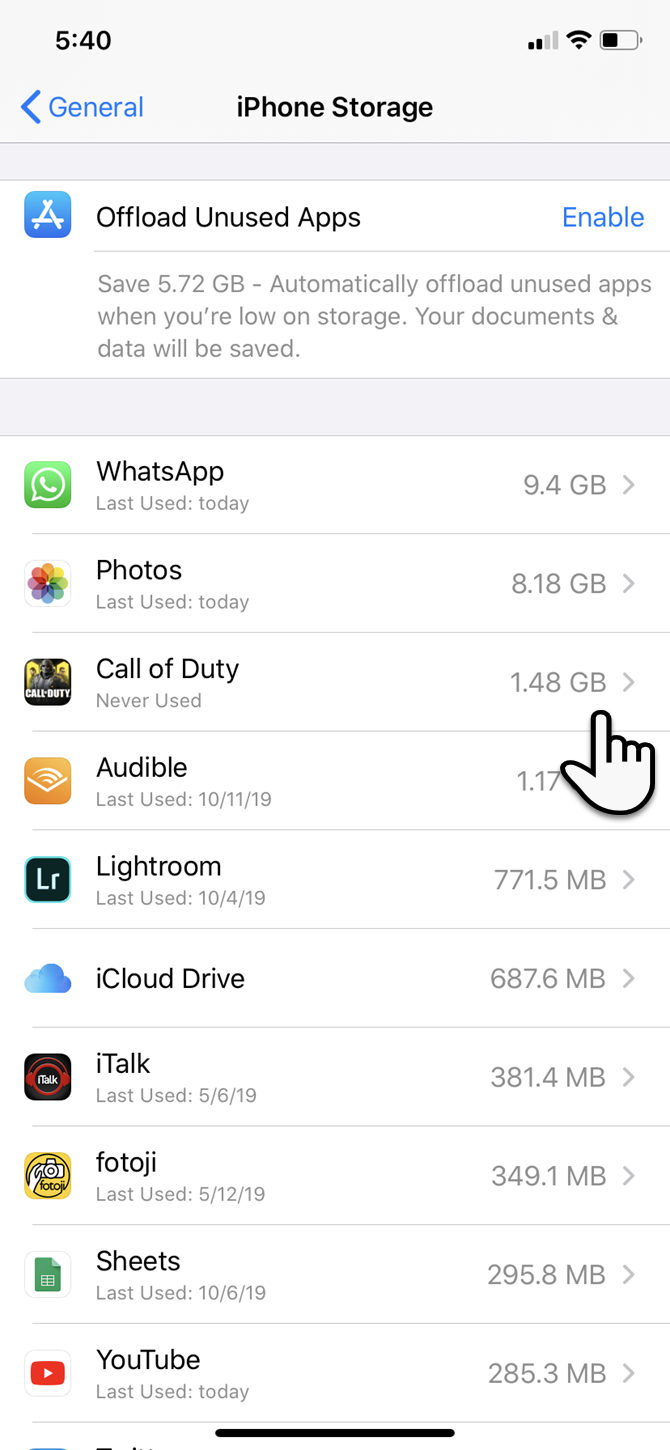
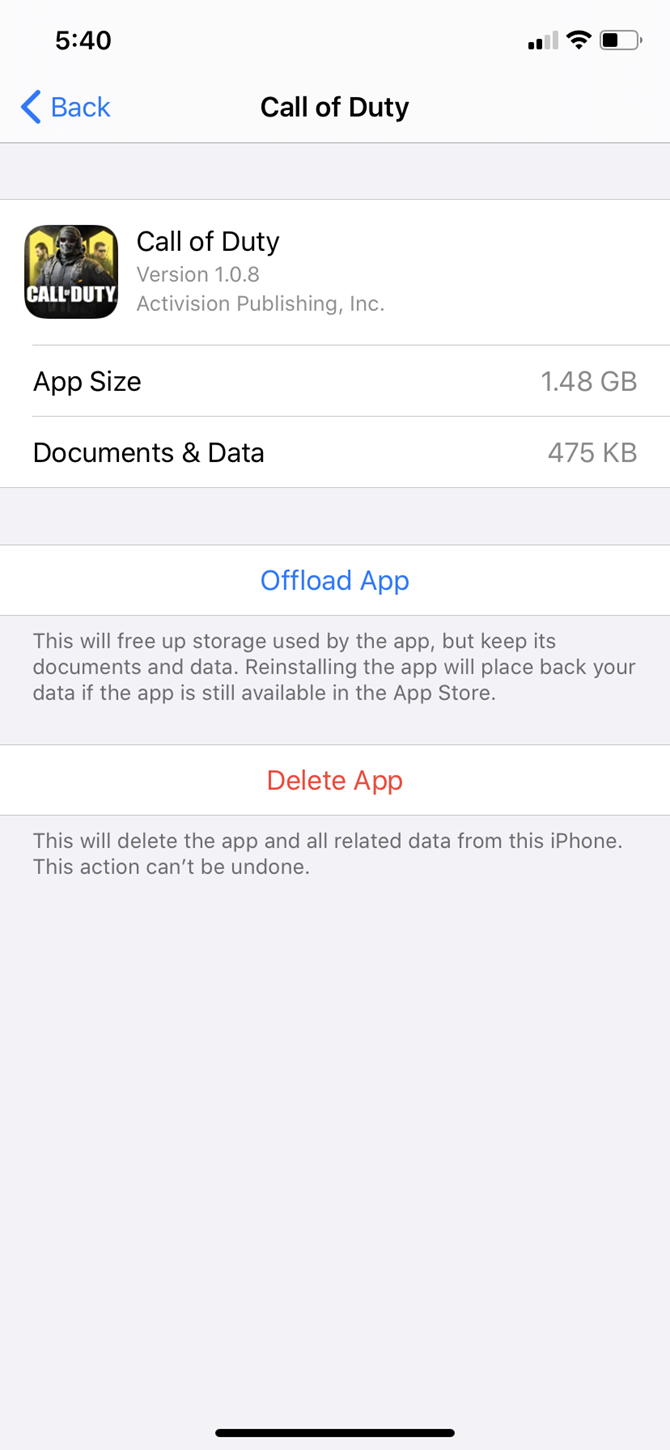
Tap an app on the list at Settings > General > iPhone Storage to view detailed info about its storage usage. At the bottom, you can choose one of two options: Offload App and Delete App.

  • Delete App removes the app and every bit of its data. It is the same as uninstalling the app from the home screen.
  • Offload App deletes the app’s core files, but keeps your personal data. This is useful for heavier apps (like PUBG Mobile) when you plan to use the app soon but need the space now. It lets you just remove the app; your important data will be there when you reinstall the app later.

Go down the list to pick the lowest hanging fruits. For instance, select the apps you use rarely and can safely offload or delete. You can make a choice according to your needs.

If you don’t want to do either, then go to the individual apps and delete unnecessary files that they save. For instance, you might erase large iMessage attachments or remove some downloaded songs from Spotify.

Delete games you’ve completed, as game files eat up a lot of space. They’re sometimes more of a space hog than photos and videos, which we will nix next.

Delete Photos and Videos

Videos and photos take up a lot of space on most people’s iPhones. You can take a few steps to clear them and make extra space:

  1. Enable iCloud Photos to upload your photos and videos to the cloud and save space on your device.
  2. Copy photos and videos from your iPhone to your computer and use the computer as a primary backup. Then delete them from your device.
  3. After you clean up your photo stream, remember to empty the Recently Deleted album in Photos as well.
  4. Select and delete old Live Photos (and photos taken in Burst Mode). The three-second moving pictures can take up a lot of space. You can disable Live Photos altogether, but we wouldn’t suggest this as they help create wonderful memories. Plus, you can also convert them into GIFs and videos.

If you shoot a lot with your iPhone’s Smart HDR option enabled, there is no need to save the normal photos along with the HDR copies. So…

Take Only HDR Photos

Tack-sharp iPhone photographs taken with High Dynamic Range (HDR) mode come at a price. Your iPhone saves two copies of the image in your photo library—the “normal” image (without HDR) and its HDR counterpart, which is a succession of three photos taken at different exposures.

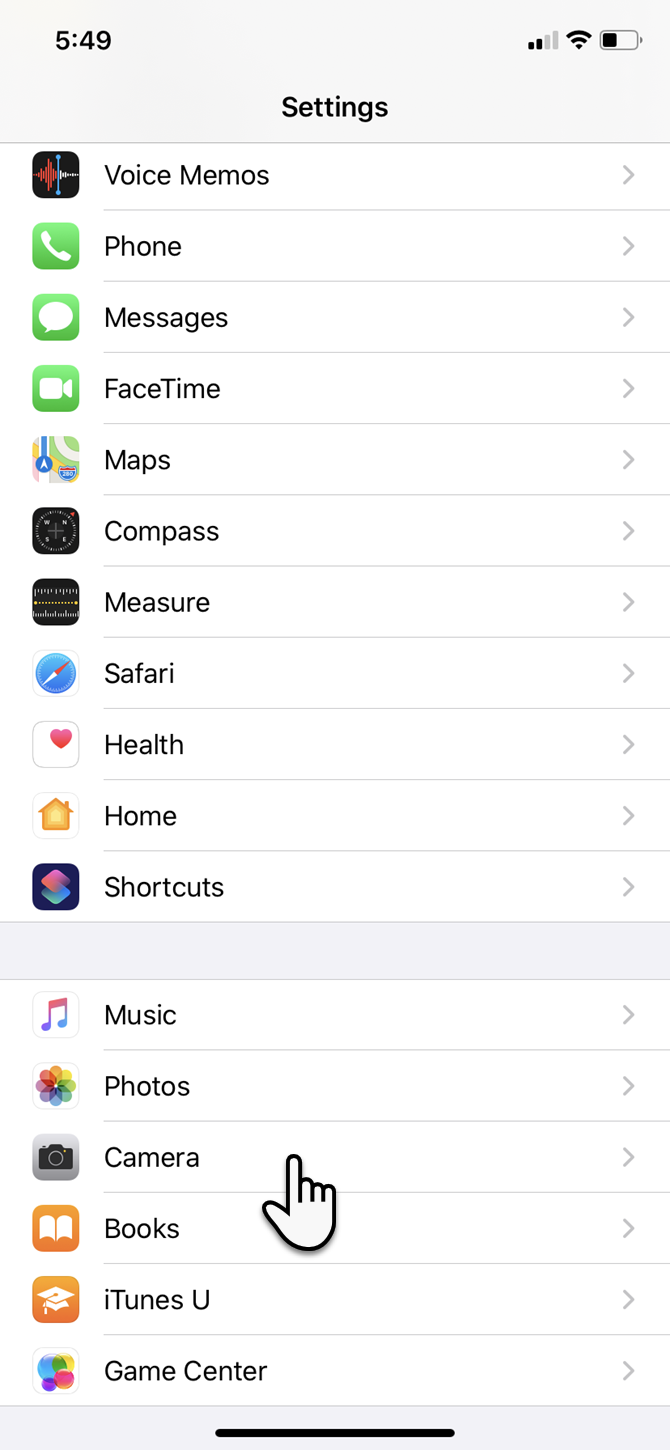
You can choose to disable the HDR mode by turning off the Smart HDR switch under Settings > Camera. You should also avoid tapping the HDR icon in the Camera app.

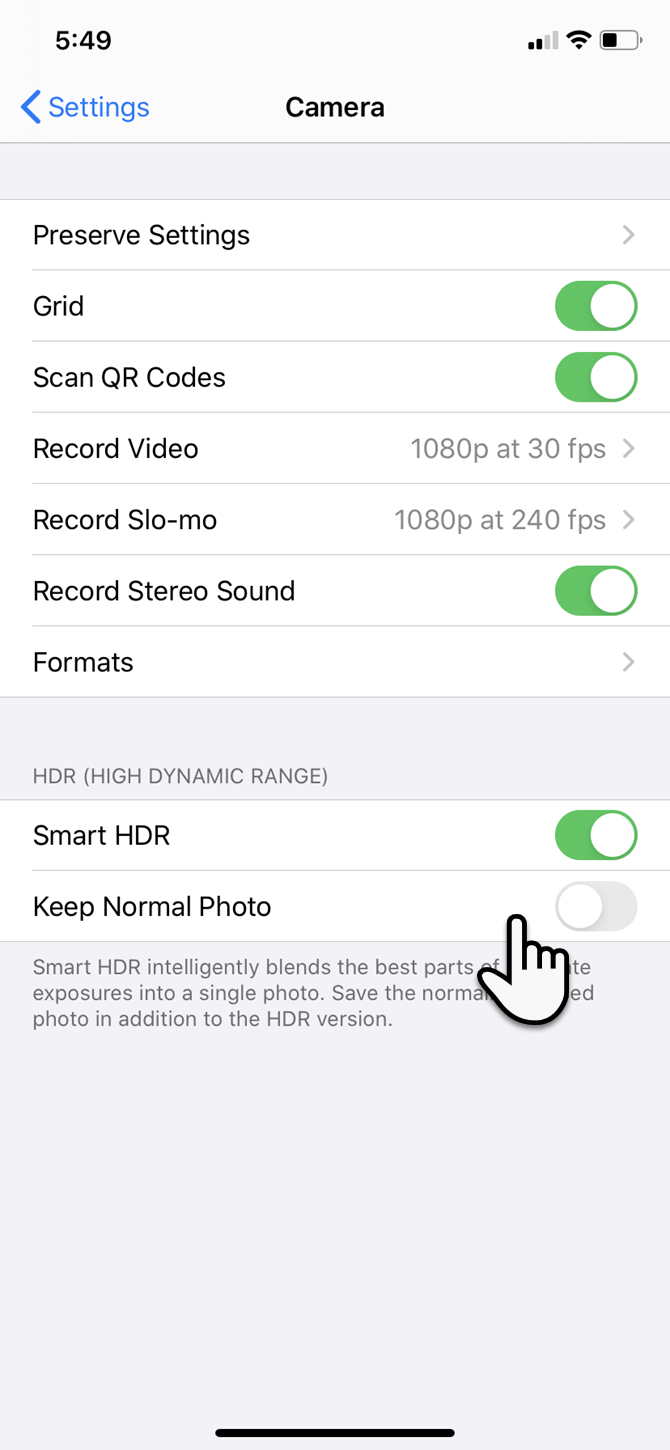
Alternatively, you can save space by not keeping the normal photo. To adjust this:

  1. Go to Settings on your iOS device and tap Camera.
  2. Toggle the Keep Normal Photo switch to the off position.

Wipe Browser Caches

In theory, browser cache acts as a speed booster, as the browser does not have to load every element of the page again. But temporary files from the numerous websites you visit every day can add up and clog your iPhone’s storage.

Here’s how you can clear Safari’s cache and free up a bit of space:

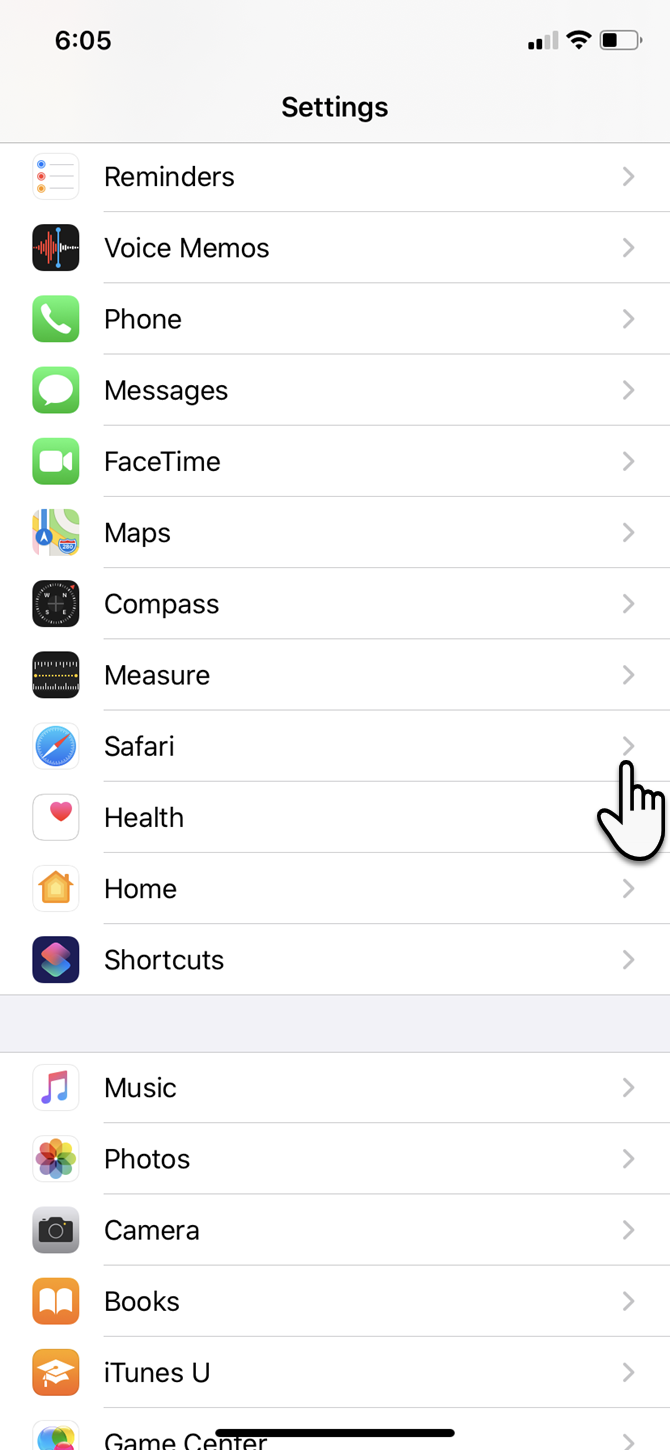
  1. Tap the Settings app on the iPhone home screen.
  2. Go down the menu and tap Safari.
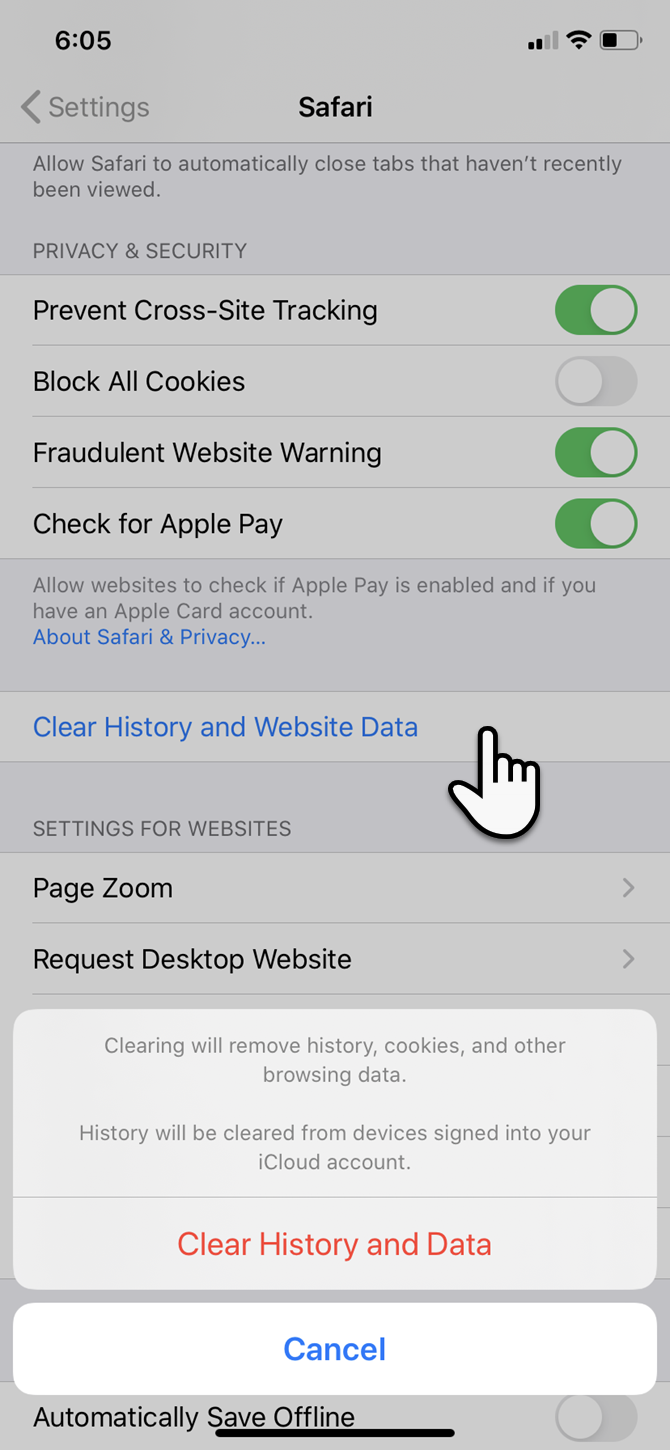
  3. Within the list of Safari options, tap Clear History and Website Data.
  4. In the confirmation box, tap Clear History and Data (or Cancel if you change your mind).

If you have Chrome installed…

  1. Tap on the Chrome app to open it.
  2. Select the three-dot menu at the bottom-right. Go to History > Clear browsing data.
  3. In the next screen, select what you want to remove or keep. Then tap the red button to start the cleaning process after the confirmation popup.

Manage Your Messages

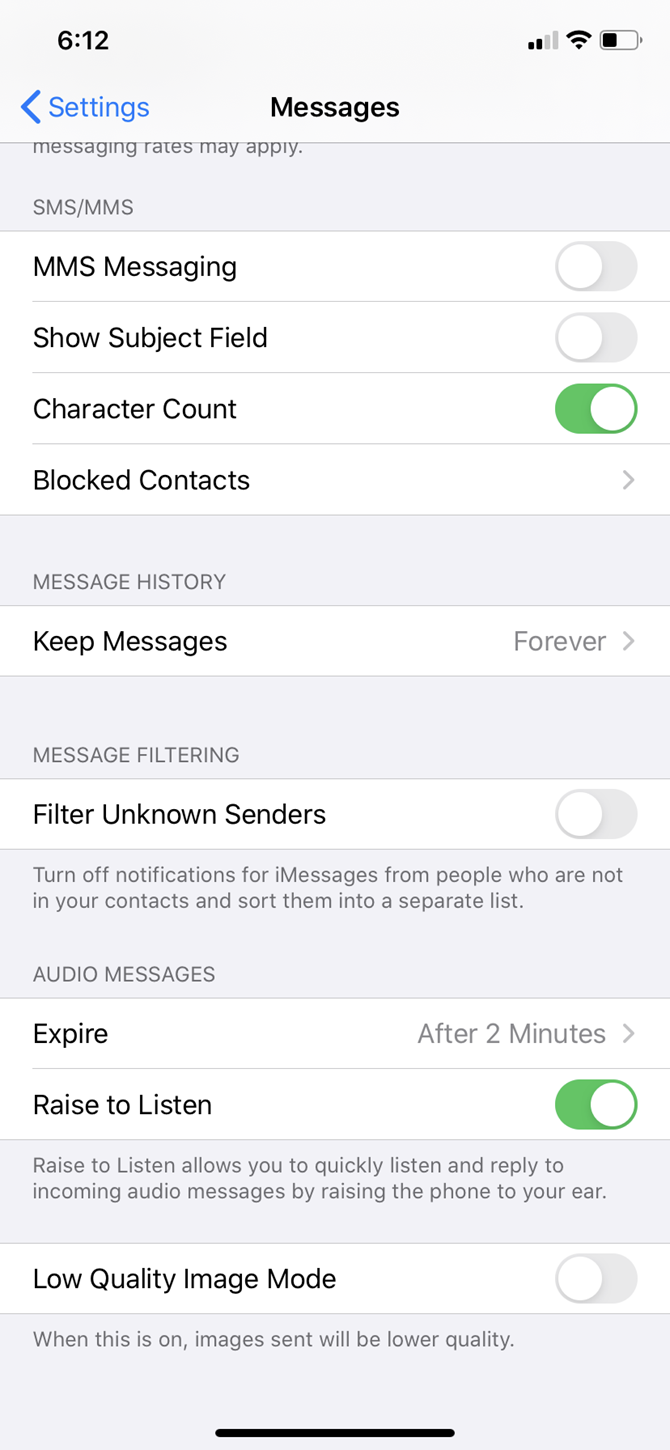
SMS, iMessages, and unattended spam messages can add up over time. You can limit the number of messages that get stored by automatically deleting them after some time.

  1. Go to Settings and scroll down the list to Messages.
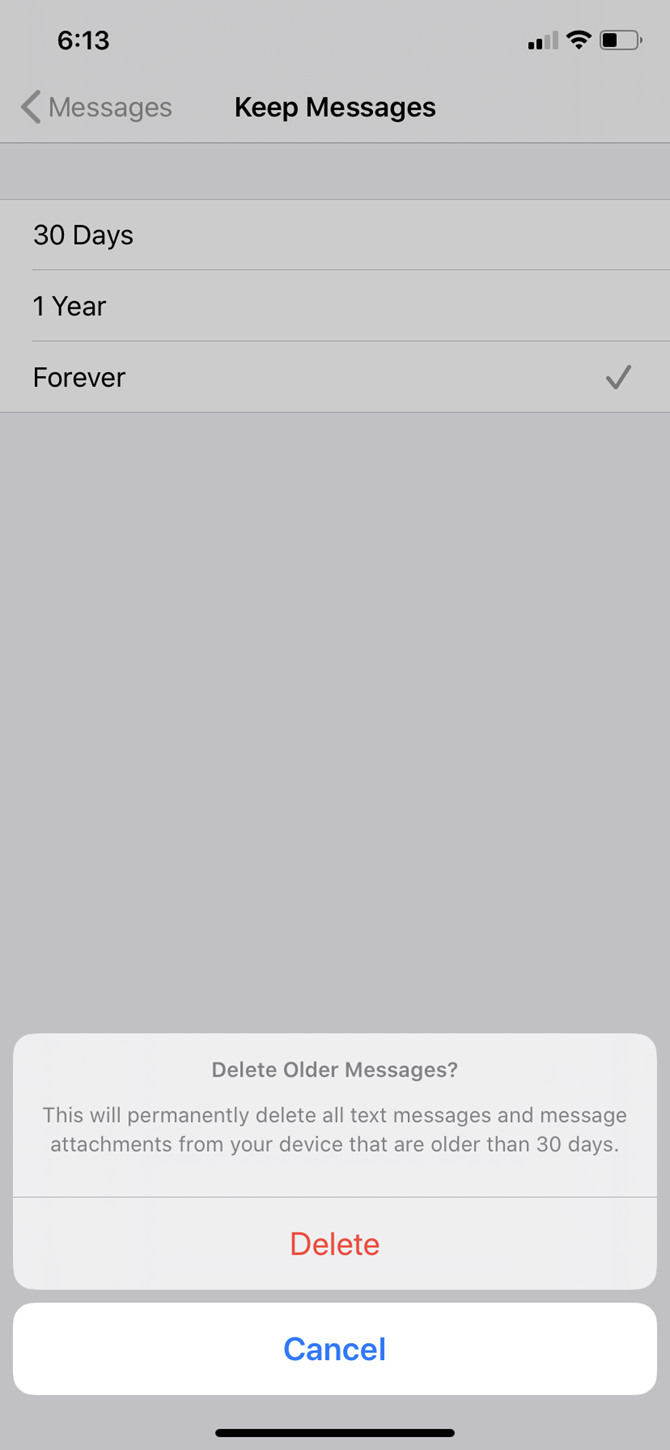
  2. Drill down to Message History.
  3. Choose either 30 days or 1 year instead of Forever.
  4. Click Delete on the Delete Older Messages confirmation popup.

Optimize WhatsApp

Instant chat apps like WhatsApp and Telegram are sneaky space predators. Their daily use consumes a fair amount of space, which can add up fast. Let’s optimize WhatsApp storage and get back some space on your phone. There are several ways to do this:

  • For the nuclear option, uninstall WhatsApp and re-install it to start from a clean slate.
  • For a selective option, tap on each contact and go down the Contact Info to select Clear Chat.

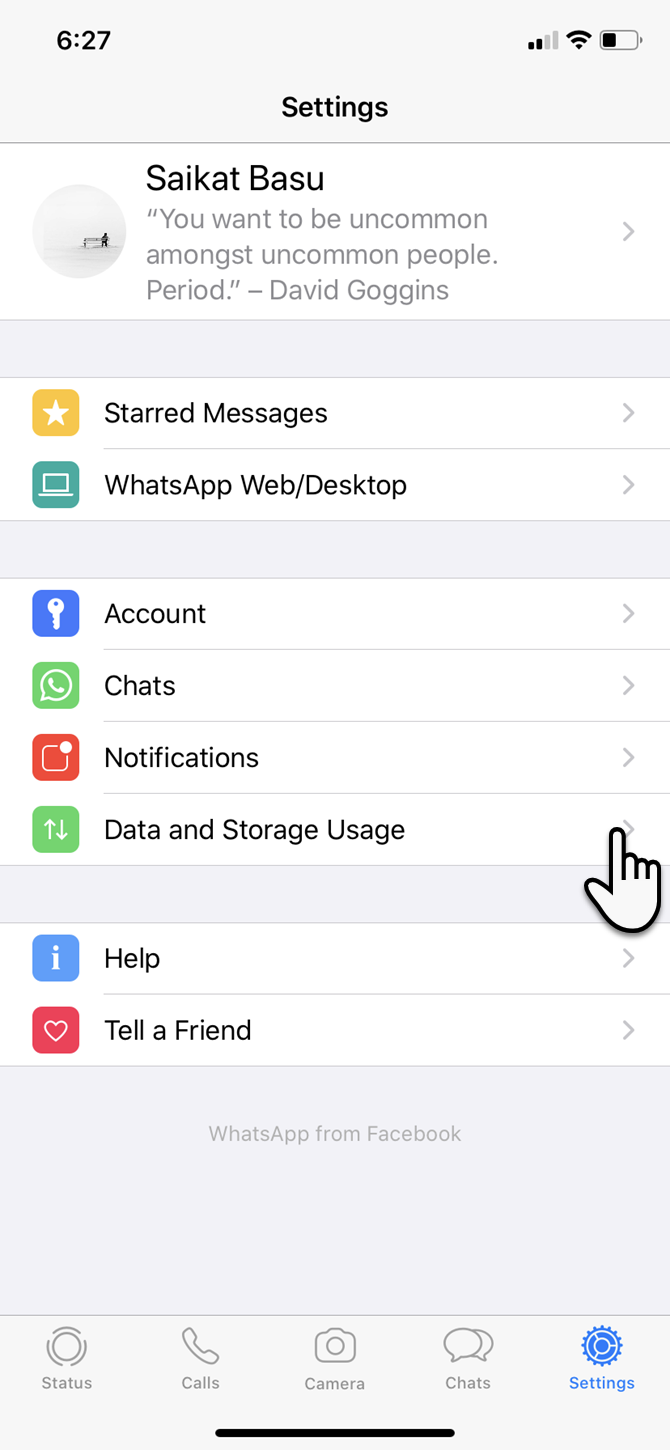
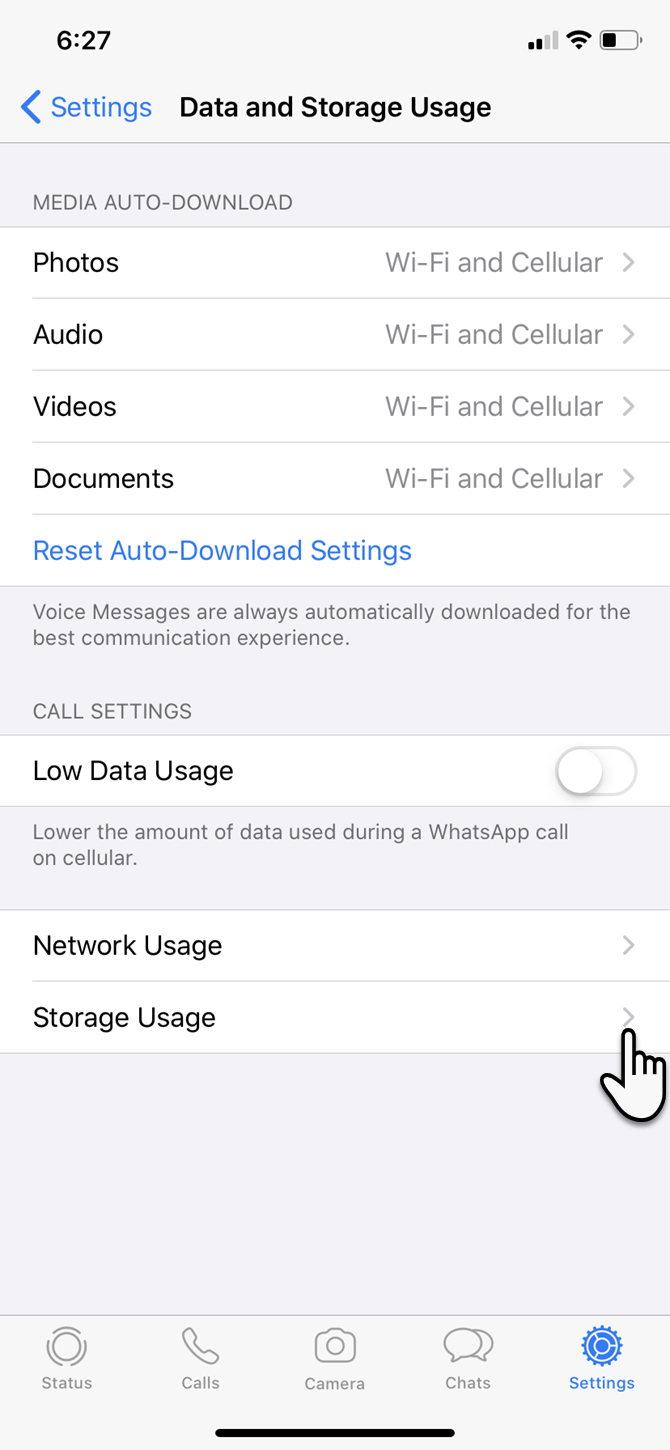
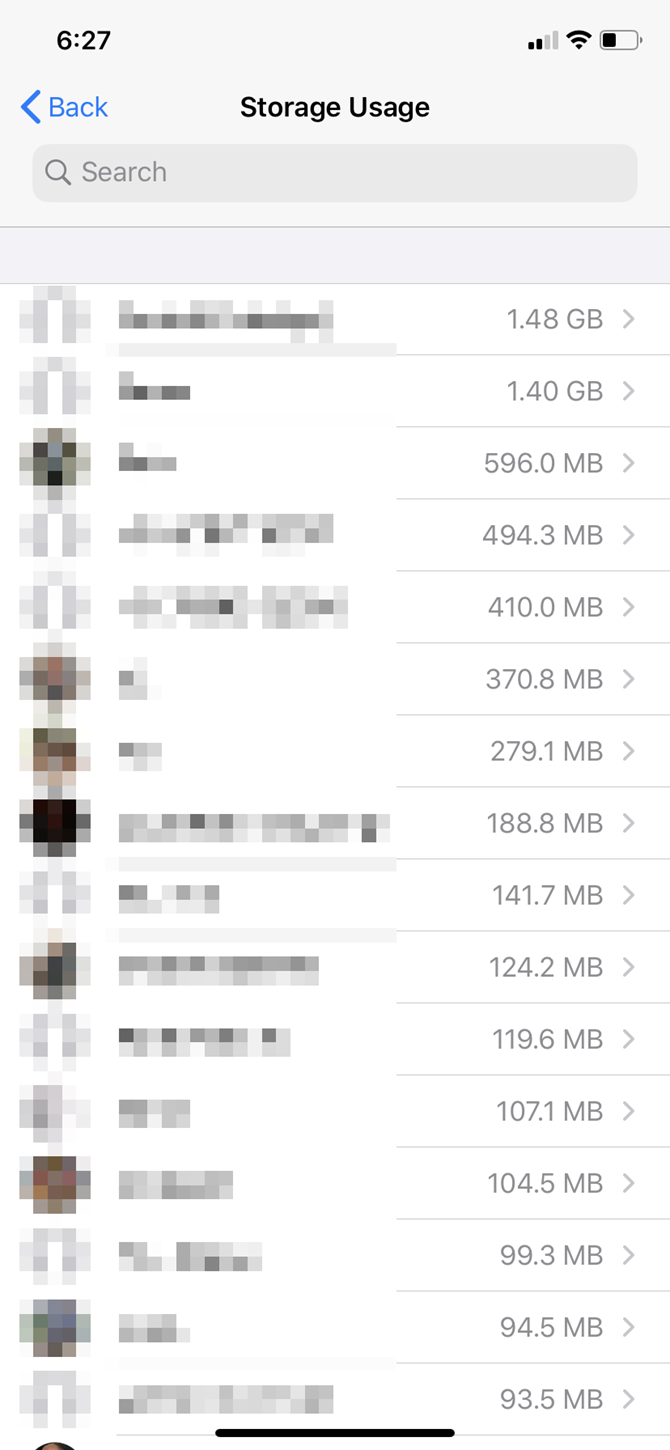
But if you want to be more surgical about it, then you can see how much storage each message thread is using. Launch WhatsApp > Settings > Data and Storage Usage > Storage Usage.

Use the list of your contacts to find the total storage size of each thread. Tap on any of these contacts and take action on that specific data by hitting Manage at the bottom.

For instance, clearing videos, photos, GIFs, and stickers while keeping documents can save you a lot of space.

Use External Storage With iOS 13

iPadOS and iOS 13 have added external storage support for iPhone and iPad. Though it is more useful for your workflow on an iPad, phone users can also plug in a flash drive and use it with the revamped Files app.

Most thumb drives and memory card readers with built-in Lightning connectors should work fine. You can use the extra space to store music, video, and photos using the drive’s additional storage. Then put the Files app to work as a media viewer.

Apple says the exFAT, FAT32, HSF+, and APFS formats are supported. NTFS is not.

Clear the “Other” Space With a Backup and Restore

Resetting your phone is a nuclear option, but it can also be the quickest way to start afresh.

Even if you don’t do this, it’s always a good idea to keep your iPhone data backed up to your computer. You should always use your computer as a primary backup for heavier files like photos and videos, and not rely on your iPhone’s storage.

A backup allows you to reset your device and start from scratch with a better plan to re-organize your device. Resetting your phone is also the handiest way to reduce the Other data you will spot on the iPhone Storage screen. It is a holding area for cache files of all kinds, especially those from streaming services.

iPhone "Other" storage space

The Solution to a Space Crunch on Your iPhone

It’s not fun juggling content here and there for a few spare gigabytes. Next time, you should buy an iPhone with more space if you like shooting photos and videos, playing games, or saving music to your device for offline enjoyment.

Otherwise, learn these iPhone photo management tips as a core skill before storage space becomes a problem.

Read the full article: iPhone Storage Full? How to Create Free Space on iOS


Read Full Article