22 February 2020

The 10 Best Local Multiplayer Games for the PS4


Multiplayer on PS4

Online multiplayer is part of nearly every major game release these days. However, local multiplayer, which was once wildly popular, has sadly become less prominent in recent years.

Thankfully, even though local multiplayer isn’t that common on current-gen consoles, you can still enjoy a great time playing with friends on one system in one room. And with that in mind, here are the best local multiplayer games on PS4, in no particular order…

1. Rocket League

Rocket League is a popular sports game that has you playing soccer with rocket-powered cars. You’ll need to master its physics to get the hang of boosting, flipping, and scoring goals.

For offline fun, Rocket League lets local players join and start an exhibition match. You and a friend can also compete against others online, if you prefer. The pick-up-and-play competitive nature of this game makes it perfect for novices and veterans alike. We also think it’s one of the best PS4 games for kids.

Buy: Rocket League ($19.99)

2. Borderlands: The Handsome Collection

Borderlands is an open-world loot-based shooter series. The Handsome Collection bundles Borderlands 2 and Borderlands: The Pre-Sequel for hundreds of hours of content to enjoy.

You can play both games in local multiplayer with up to four players. In fact, Borderlands works best in multiplayer, so this is the ideal way to play the game.

This is a title your non-gaming friends probably won’t appreciate. But if you want to sink your teeth into a long adventure with roommates, it’s a perfect pick.

Buy: Borderlands: The Handsome Collection

3. TowerFall Ascension

TowerFall nails what a multiplayer party game is all about: friendly competition where victory is never guaranteed. It’s a 2D pixel-art battle royale where you shoot the other contenders with arrows.

However, you have a limited supply in your quiver, so you’ll have to retrieve arrows from walls to stay in the fight. A variety of gameplay options keep the experience fresh every time, and there are co-op modes if you’d rather team up.

If you’re looking for a Super Smash Bros.-like experience that will have you hurling insults at your buddies all night, this is the game for you. As the developer states:

“TowerFall is best played competitively with friends, cross-legged on the floor within punching distance of each other.”

Buy: TowerFall Ascension ($14.99)

4. Rayman Legends

Rayman isn’t as well-known as Mario or Sonic, but that’s no excuse to miss this game. Rayman Legends is one of the best platformers of all time, with gorgeous graphics, excellent level design, and a kicking soundtrack.

While the adventure is great in single-player, Legends supports playing the whole game with up to four players in local co-op. You can work together to reach the end of each level, but depending on your companions, you may hurt each other more than help.

If you need a break, try the Kung Foot minigame. It’s a basic match of soccer with the same controls as the main game, and is surprisingly enjoyable on its own.

Buy: Rayman Legends ($19.99)

5. Diablo 3

Diablo 3 is a dungeon-crawling action game; the series is one of Blizzard’s most popular. For the right audience, it’s the perfect co-op multiplayer game.

Like Borderlands, we definitely don’t recommend this one for playing with casual gaming friends or kids. Diablo is a complex game and by the time you explain everything to a newcomer, the night will be over. This is a game to grind through over a long time with your significant other.

We’ve previously published some Diablo 3 tips and tricks which you should check out if you’d like to read more about this fantastic game.

Buy: Diablo 3: Ultimate Evil Edition ($29.99)

6. Overcooked / Overcooked 2

Overcooked is a truly special multiplayer game. It tasks up to four players with cooperating in a restaurant kitchen to complete orders. What starts off as a simple premise soon turns into a chaotic mess with conveyor belts, flickering lights, floors that break apart, and more.

Anyone can grasp the concept of the game, but the coordination required will test even the best of friends. Give it a try if you like teaming up more than competing and don’t mind a little stress. Our list of Overcooked tips and tricks should help you succeed.

If you enjoy the original, the sequel is largely more of the same with some extra polish.

Buy: Overcooked: Gourmet Edition ($19.99)

Buy: Overcooked 2 ($24.99)

7. Everybody’s Golf (2017)

Everybody’s Golf is exactly what it sounds like: a family-friendly golf game for up to four players. Due to the nature of golf gameplay, you can take turns with just one controller. This makes it a good choice if you don’t have extra controllers sitting around.

You don’t have to enjoy golf in real life to get a kick out of this game. It has a great character customization tool, simple controls, and the cartoony graphics keep it lighthearted.

Buy: Everybody’s Golf ($19.99)

8. The Jackbox Party Pack (Series)

If you like the idea of a local multiplayer experience that’s less of a video game and more like a party board game, give Jackbox a look. Once you start a game on your PS4, Jackbox allows everyone to join with just their smartphone or tablet. This makes it a great pick for large groups, or if you don’t have a lot of controllers.

At the time of writing, Jackbox offers six Party Packs, each containing five games. While you should avoid the first pack, each of the others has high and low points. Check out WhatNerd’s guide to every Jackbox game for more information. If you’re not sure where to start, we think Party Pack 3 is a great first choice.

Due to some suggestive content, some of these games can be inappropriate for young players. Most have a family-friendly option to filter the worst elements, though.

Buy: The Jackbox Party Pack 3 ($24.99)

9. Puyo Puyo Tetris

Do you love puzzle games and want to see who among your friends is sharpest? Puyo Puyo Tetris combines two classic puzzle games into one, and has great options for local multiplayer.

You can keep it simple and compete in basic matches of Puyo Puyo or Tetris. But the game also includes a variety of combination modes, including one where you regularly switch between a board for each mode, and another where you play them both at the same time.

Whether you’re a fan of one or both of these series, there’s a lot for traditional puzzle fans to love here.

Buy: Puyo Puyo Tetris ($19.99)

10. Nidhogg / Nidhogg 2

Nidhogg has simple visuals, but its tug-of-war gameplay makes for great competition. It pits two players in an arena, where the goal is to push your opponent back. You have a sword to fight with, but getting one kill isn’t the end. It takes several victories to earn the crown.

Like the best multiplayer titles, it’s simple but endlessly enticing. A night with this great two-player multiplayer game will settle any outstanding feuds between friends for sure. And if you enjoy the original, try Nidhogg 2 for more weapons, updated graphics, and more.

Buy: Nidhogg ($14.99)

Buy: Nidhogg 2 ($14.99)

A Night of Fun With Local Multiplayer PS4 Games

While local multiplayer isn’t as prevalent as online play today, you can still find awesome experiences with a bit of digging. Each of these local multiplayer games for PS4 supports various numbers of players and differing skill levels. With the right game for the right crowd, the hours will tick by without you ever noticing.

Don’t forget about the wealth of other titles on the PS4: We’ve rounded up the best PS4 exclusives you should definitely check out. And if you’re ready for some more multiplayer experiences, have a look at these local multiplayer games for Android and iOS.

Read the full article: The 10 Best Local Multiplayer Games for the PS4


Read Full Article

What Is Facebook Lite and Can It Replace Facebook?


facebook-lite

What is Facebook Lite? In a nutshell, it’s a stripped-down version of the standard Facebook app for Android and iOS. Although it lacks certain features, it’s still a great alternative to the full-sized Facebook app.

Unlock the free "Facebook Security Checklist" now!

This will sign you up to our newsletter

Enter your Email

However, as we all know, Facebook knows a lot of information about you, and the social network’s mobile app is one of the ways the company collects your data. Is the Facebook Lite app any better?

In this article, we’ll explain what Facebook Lite is and help you decide whether it can replace the standard Facebook app.

What Is Facebook Lite?

Facebook unveiled Facebook Lite in 2015 as a version of Facebook built from scratch to work smoothly with poor mobile connections and low-end phones.

It’s an app for the entire world, but built with developing countries where data connectivity is hard to come by in mind. Facebook Lite also helps save space on your phone, and still functions in 2G conditions.

The Benefits of Facebook Lite

The main difference between Facebook Lite and Facebook is its size. Facebook Lite’s download is under 10MB. On my device, it only takes up 2.19MB of space. Compare that to the amount of space regular Facebook takes up, which is 167MB. This is a substantial difference.

Additionally, Facebook Lite doesn’t preload photos in the way that Facebook does. This means slightly longer loading times when scrolling through your Newsfeed, but less data consumed. You’ll also notice that videos don’t autoplay the way they do on the standard app—videos will only autoplay on Facebook Lite when you’re connected to Wi-Fi.

You can save even more data by heading to your Facebook Lite settings, and scrolling down to the Media and Contacts setting. Here, you can choose the photo quality that Facebook Lite will display. Opting for low-resolution photos can help you reduce data usage. The standard Facebook app has a data saving feature, but it doesn’t save nearly as much when compared to Facebook Lite.

User Interface

Facebook Lite isn’t just a wrapper for the mobile website—it’s a completely redesigned app. In all honesty, the layout isn’t worse; it’s just different. You still have the same basic tabs: News Feed, Friend Requests, Messages, Videos, Notifications, and Options—you just can’t swipe between them; you have to tap them.

Here’s a comparison of both apps’ Newsfeed, with Facebook Lite on the left, and the original Facebook app on the right:

As you can see, Facebook Lite’s menu and search bar remain on top of the screen, while the standard Facebook app places the menu bar at the bottom. You’ll see generally smaller text and buttons on Facebook Lite, which is intended for devices with low-resolution screens. It still has a semi-modern look with white cards over a gray background, much like the regular Facebook app.

In the notification panel below, you can see that the Lite version features small, low-resolution profile photos to denote whether someone liked or commented on something. The text is also much smaller when compared to the original Facebook app.

Scrolling through the Lite app is a bit slower than scrolling through regular Facebook. It’s clear that Facebook made some cuts to allow the app to function properly on devices with low RAM, low CPU power, and a poor internet connection. Despite this, Facebook Lite is still useable.

Security and Privacy

Facebook definitely loves your information, and you want to be sure that the company isn’t just handing it out to everyone. Well for starters, Facebook have an online tool so you can verify your privacy settings, but once you’ve done that, it’s not a bad idea to see what permissions that mobile app has on your device.

You can even browse Facebook through Tor for added security.

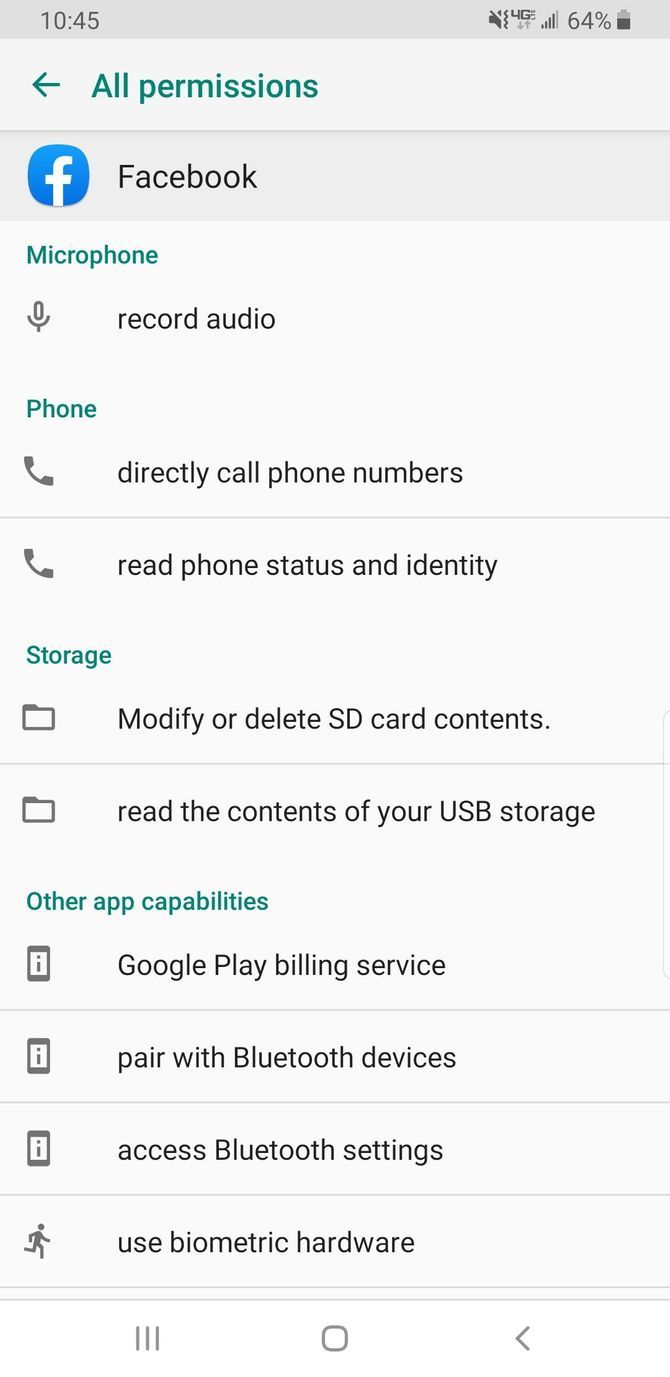
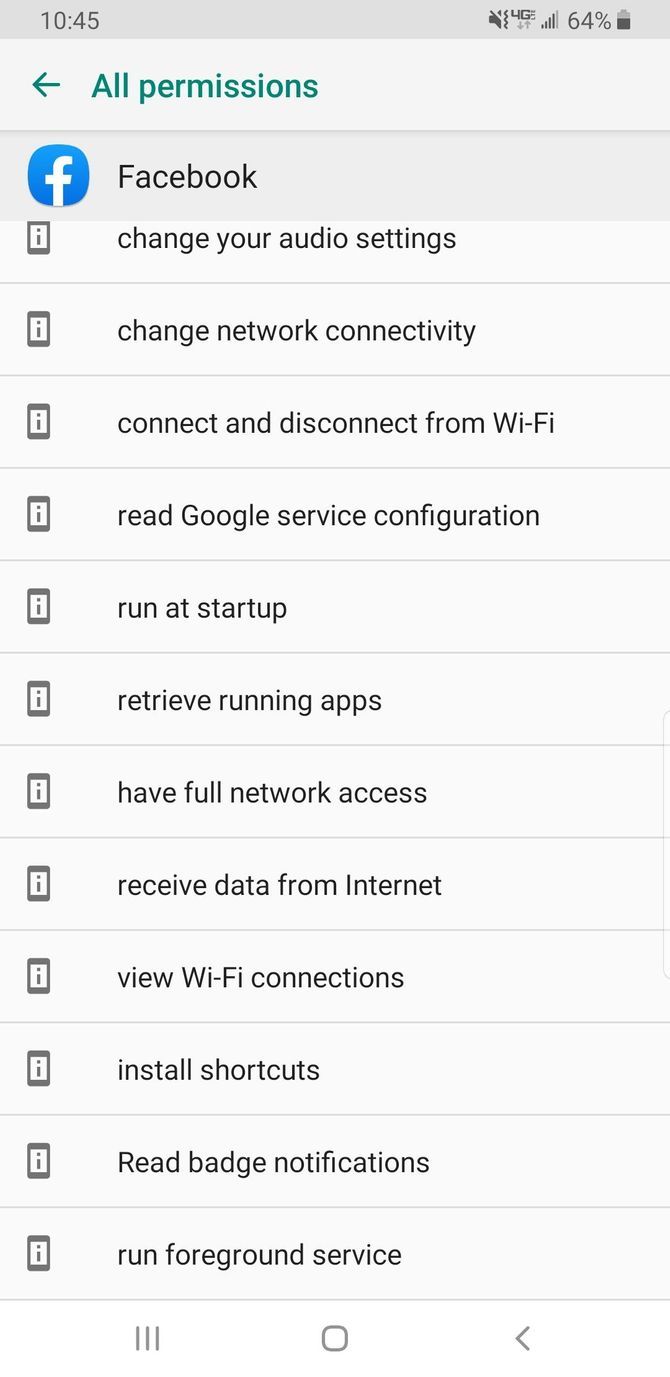
Some people consider the regular Facebook app’s permissions to be a bit invasive. You can see all of those below.

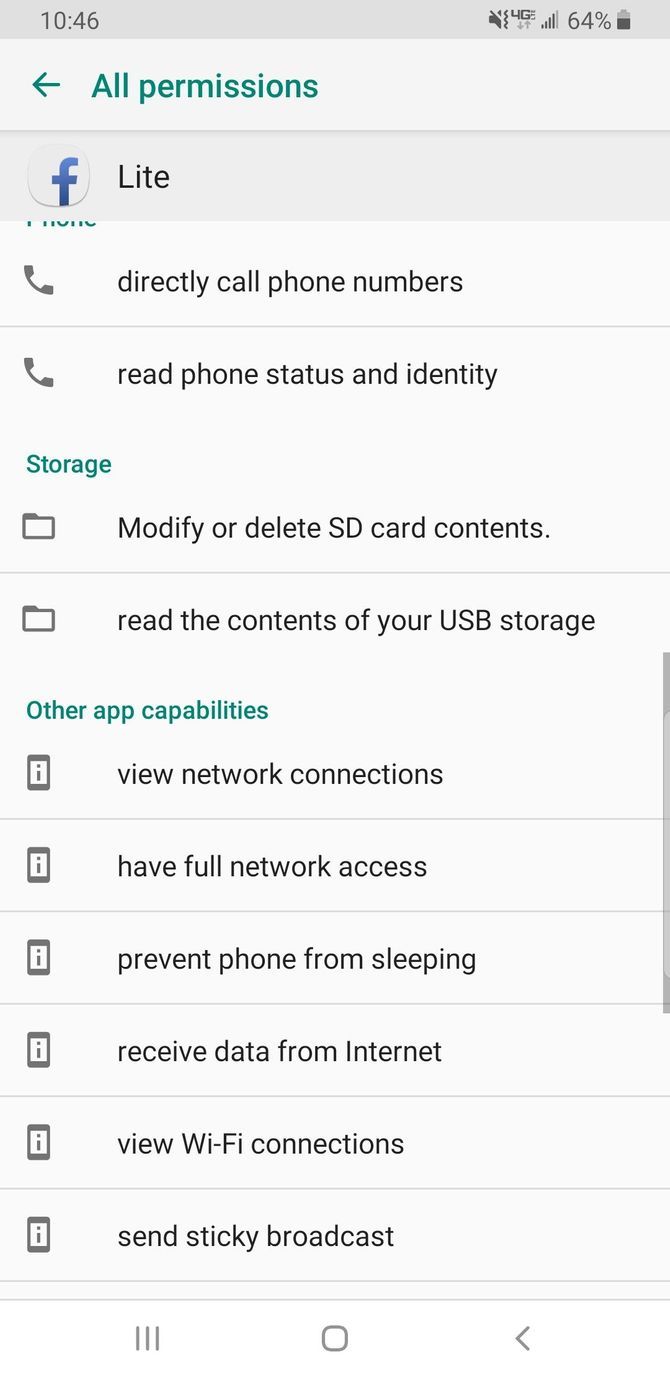
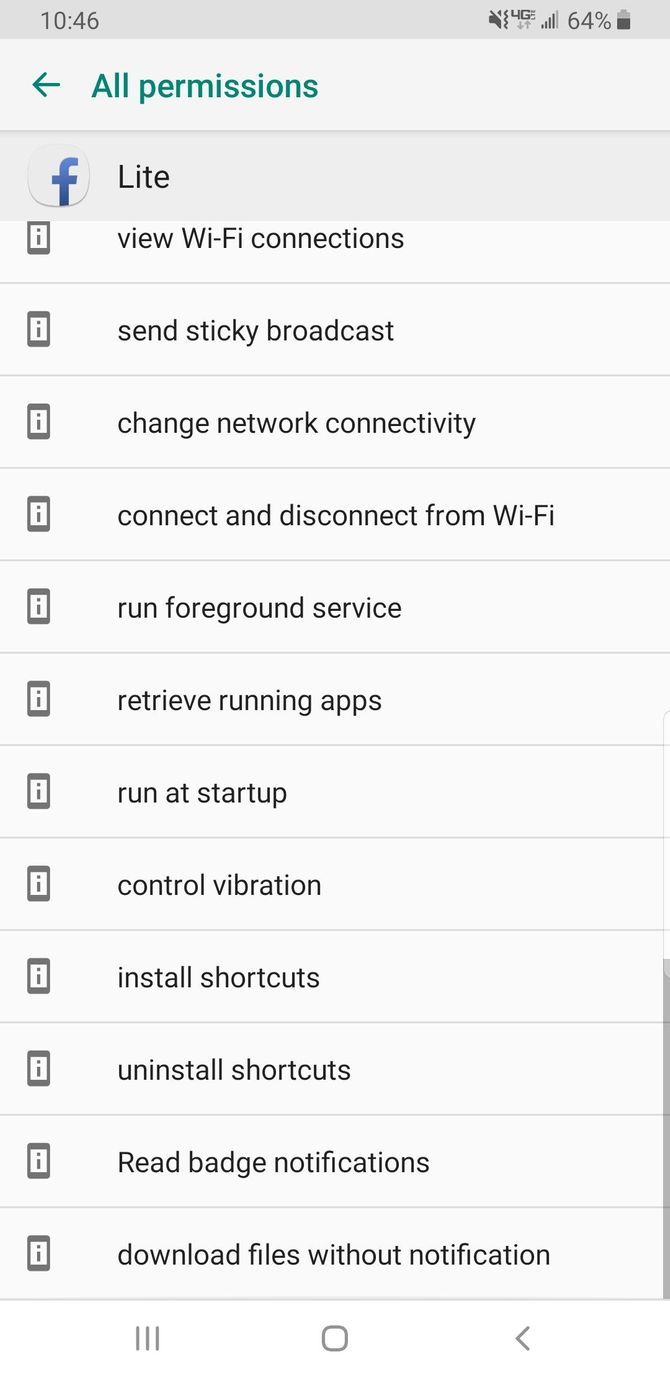
It looks like a long list, but Facebook Lite’s list is nearly as long:

The major differences? Regular Facebook has permissions to use biometric hardware, change audio settings, use Google Play billing services, and pair with your Bluetooth devices. So nothing too dramatic.

Basically, if regular Facebook’s permissions are too invasive for you, Facebook Lite’s probably are as well. Your best bet to avoid permissions is simply to access Facebook’s mobile website via your favorite Android browser.

Messaging

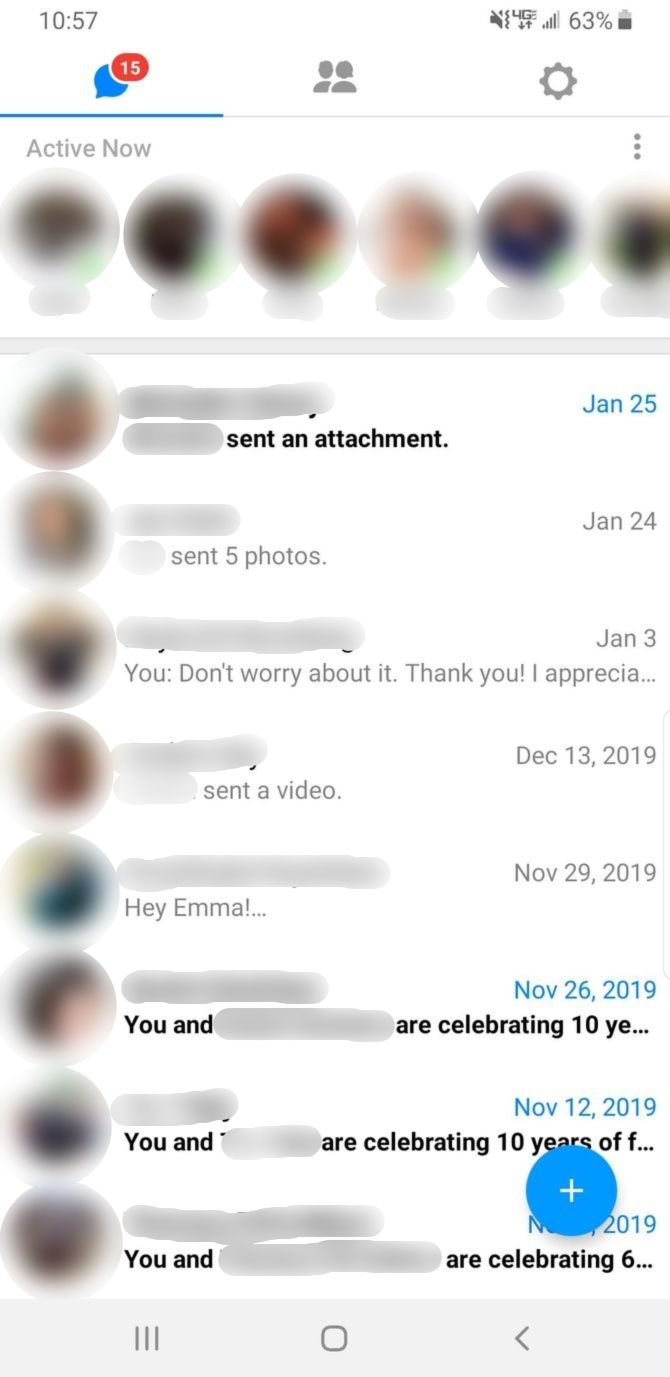
Facebook Lite used to have its own messaging system built right into the app. However, it now forces you to download and use a separate messaging app, just like the standard Facebook app. Instead of using the regular Messenger, Facebook Lite users are encouraged to use Messenger Lite on Android and iOS.

But if you’re going to make the switch, how does Messenger Lite compare to Messenger? See for yourself. Messenger Lite is below on the left, and Messenger is below on the right.

Facebook Messenger Lite looks almost the same as the regular Messenger. If you find Messenger to be too bloated, Lite might just be the messaging app you were looking for anyway.

And if you’re a fan of Facebook’s stickers then you’ll be happy to know that even the Lite version supports them. Just keep in mind that you won’t have access to the library of GIFs, emojis, and text styles that come along with the standard Messenger. It’s functional, but it’s not great.

How Do I Download Facebook Lite?

Facebook Lite is currently available in North America, as well as in parts of Asia, South America, Africa, and Europe. The Play Store and App Store listings are visible to everyone, but if you’re not in one of the countries supported, you’ll see a message saying: “This app is incompatible with all of your devices.”

Download: Facebook Lite for Android | iOS (Free)

Facebook vs. Facebook Lite: Which Should You Use?

While Facebook isn’t everyone’s cup of tea, Facebook Lite might be more appealing. Especially if you own an older phone or need to save data where possible.

However, if you don’t have an older phone and don’t need to conserve data, you’ll probably benefit more from the standard Facebook app. The only issue being the extra permissions needed to use it.

Although Facebook Messenger provides an easy way to communicate with your friends, you might want to keep your information off of Facebook. Fortunately, these Facebook Messenger alternatives are perfect if you don’t want to use Facebook.

Read the full article: What Is Facebook Lite and Can It Replace Facebook?


Read Full Article

How to Watch Instagram Live Videos in a Browser


If you spend a lot of time on Instagram, you’ve no doubt seen Instagram Live videos. But can you watch Instagram Live videos in a browser? The answer is yes and no.

The first thing you need to know is that logging into your Instagram account on a web browser on your PC or Mac won’t be of any help. Instead, you’ll need to download an extension.

Chrome IG Story used to be the go-to method for watching Instagram Live videos, but it’s no longer available. So, what are the Chrome IG Story alternatives you can use instead?

How to Use Desktop for Instagram

If you’re on a PC or Mac, your options for watching Instagram Live videos are extremely limited. So much so that we actually recommend you watch Instagram Live videos through the Instagram mobile app. If you want detailed instructions on how to do so, check out the Instagram help page for more information.

However, just because the options to watch Instagram Live on a computer are extremely limited does not mean that there are no browser add-ons for the app. There are tons of Instagram extensions for Chrome that offer increased functionality for the site’s other features.

One of the best that we’ve tested is Desktop for Instagram, by Devanco.

Watch Instagram Live on Computer Desktop for Instagram

Using this app, you can search Instagram for recent videos and pictures. You can watch people’s stories, post your own videos to IGTV, and download videos and pictures from Instagram to your desktop.

The developers claim that this extension lets you do everything you would normally do on the mobile Instagram app, including watching Instagram Live videos. However, after testing Desktop for Instagram, we don’t think it quite lives up to the hype.

Even worse is the fact that we tested a lot of different extensions to find one which lets you watch Instagram Live videos in a browser, and Desktop for Instagram is the best option. So, again, we recommend using the mobile app for that specific purpose.

Additional Apps Worth Trying

If you’re determined to find an alternative way of watching Instagram Live videos, there are other apps worth trying…

There’s a tool called Loola.tv that allows you to stream live videos from your desktop to multiple platforms. However, Loola is strictly geared towards content creators, not followers who want to watch Instagram Live on PC. This means it’s not suitable for watching Live Videos in a browser.

Stream Instagram Live Loola TV

Another extension—the Instagram Windows App for PC—also allows you to use Instagram on a desktop. For a while it was recommended as another go-to option for anyone using the social media site through a computer.

Unfortunately, the Instagram Windows App doesn’t appear to support Instagram Live on PC. The app also has a much lower rating than Desktop for Instagram. So keep this in mind if you decide to check it out.

The Instagram Mobile App Is the Best Option

As we said at the beginning, there’s no easy way to watch Instagram Live videos in a browser. So the Instagram mobile app remains the best option. But if you’re desperate for another solution, try Desktop for Instagram and see if it works for you.

In the meantime, if you’re new to Instagram, you should read our guide to IGTV and how it works in order to get yourself more acquainted with the platform before doing anything else.

Read the full article: How to Watch Instagram Live Videos in a Browser


Read Full Article

Uber Now Lets You Report Safety Incidents Discreetly


Uber has launched a new On-Trip Reporting feature. This enables riders to report a non-emergency safety issue in real time rather than waiting until after the trip has ended. The idea being to allow riders to report issues while they’re still fresh in their minds.

Uber Has Changed the Way We Interact With Drivers

Uber and its rivals have fundamentally changed the way we get around, especially in big cities. However, while traditional taxis offer professional drivers and a barrier between drivers and passengers, ride-sharing apps have changed that relationship.

This has, rather inevitably, led to an increase in safety issues. And these range in severity from bad driving to murder. If a serious incident is developing, riders should call 911. However, Uber has now launched a way for riders to report non-emergency safety issues.

How to Use Uber’s On-Trip Reporting Feature

Uber announced its On-Trip Reporting feature in a post on the Uber Newsroom. The company states that it gives riders “the ability to report a non-emergency safety issue in real time while it is top of mind, instead of waiting until after the trip has ended.”

Uber has launched On-Trip Reporting after its research showed that riders tend not to report experiences that make them feel uncomfortable after a trip has ended. So, it’s encouraging riders to use this feature to report issues at the time they happen.

To report a non-emergency safety issue, first, open the Safety Toolkit (accessed by clicking on the blue shield icon). Then, click Report Safety Issue, and fill in the details. The incident will be logged, and Uber’s safety team will follow up after the trip.

This isn’t intended for emergency situations such as a traffic accident or a physical assault. In those instances you should ring the emergency services. However, On-Trip Reporting is for those instances where you need to report a non-emergency safety issue.

Uber Is Trying to Keep Riders and Drivers Safe

Uber is clearly trying to do more on safety, with several systems in place to ensure both riders and drivers stay safe. In 2018, Uber introduced a slew of new safety features, and On-Trip Reporting is another effort intended to keep everyone safe from harm.

Image Credit: Automobile Italia/Flickr

Read the full article: Uber Now Lets You Report Safety Incidents Discreetly


Read Full Article

10 Video Games to Play With Your Parents


gaming-parents

Gaming is still a relatively young industry. So, while many of you grew up playing video games, your parents may have looked on in confusion. Of course, we all know the wonders that video games can bring, and it makes sense to want to share this hobby with your parents or guardians.

To help ease older members of your family into gaming, we’ve rounded up a list of the best video games to play with your parents. While these games are still excellent in their own right, they don’t require the muscle memory or reaction speeds that naturally come from gaming for years.

So, without further ado, here are the best video games to play with your parents…

1. For Bookworm Parents: Firewatch

Firewatch is an adventure game set in Wyoming. You take control of Henry, a fire lookout, and live out his days as he uncovers the mysteries that surround him.

Firewatch is played from a first-person perspective, so you move Henry around and interact with the environment. It’s simple to control and is focused on telling an immersive story in a world that looks and sounds beautiful. If your parents like delving into a unique story, Firewatch will be right up their street.

2. For Parents Who Watch TV: The Walking Dead

Thanks to advances in technology, games now have the spectacle of film and TV. Some of them are also based on established franchises, like The Walking Dead. Telltale produced a game based on the show in 2012 and it’s fantastic fun, especially if your parents watch The Walking Dead.

This game is told episodically, giving it the pace of a TV show, and tells an emotional story set in a zombie-infested world. Your parents will have to make tough choices that will make them feel immersed in the story. It definitely isn’t one for those who don’t like violence, though.

3. For Puzzling Parents: The Witness

If your parents are the type who enjoy solving a crossword or Sudoku, they’ll enjoy testing their brain with The Witness. While the game is set on an open world island, this simply acts as a backdrop for around 650 puzzles. It can be a great bonding experience to solve them together.

It gets really tricky, though it has a smooth learning curve, so your parents will be kept busy for a long time. And cracking some of the tougher puzzles is extremely satisfying.

4. For Parents Who Like to Laugh: The Secret of Monkey Island

Games don’t have to be serious, which The Secret of Monkey Island perfectly demonstrates. First published in 1990 and then remastered in 2009, this remains one of the funniest games ever made.

It’s a point-and-click adventure that follows the tales of wanna-be pirate Guybrush Threepwood as he sets out to defeat the evil ghost pirate LeChuck. The control scheme is a simple point-and-click affair, which means your parents can focus on solving the puzzles and enjoying the witty dialog.

5. For Artistic Parents: Journey

Video games are another form of art, and that’s none more evident than in Journey. The game can be played individually or in multiplayer. The entire adventure is wordless, as you guide a robed figure through a desolated desert.

The aesthetics of this game are stunning, as is the ethereal soundtrack, and your parents will likely be impressed by the contemplative, moving experience of Journey.

6. For Creative Parents: The Sims 4

Even if your parents have never played a video game, they’ve likely heard of The Sims. This life simulation became a cultural phenomenon and the fourth instalment is the perfect entry point.

There’s no particular goal here—instead, players can build and design their own homes, perfect for flexing their creative side. Then, these houses can be populated with people with their own needs and desires.

If your parents enjoy playing The Sims, there are lots of great The Sims 4 expansion packs you can use to enhance the game.

7. For Entrepreneurial Parents: Two Point Hospital

1997’s Theme Hospital was an incredibly popular hospital simulation game. Two Point Hospital is its spiritual successor, released in 2018 and developed by some of the same people. The aim is to build and maintain various hospitals, ensuring that they run safely and meet targets.

While the challenges can get tricky, business-minded parents will enjoy the challenge. Don’t worry, though, there’s humor injected to keep the experience light.

8. For Strategic Parents: Civilization VI

Civilization is a turn-based strategy game, playable against the computer or other people. You take control of a famous historical leader and try to build an empire so that it lasts throughout time, from the Stone Age to the Information Age.

Civilization is a very complex game once you dive into it, but the helpful tutorials will guide your parents along so that they’ll be waging war against Cleopatra or Gandhi in no time.

9. For Parents Who Are Just Big Kids: Lego Star Wars

There are endless Lego video games, but Lego Star Wars remains one of the best. It’s based around the first six films and is a perfect co-op game.

You and your parents can play as one of over 120 characters, battling your way through all of the iconic moments of Star Wars. Swing a lightsaber at Darth Vader, take part in a pod race, and more.

If your parents enjoy this, they should also check out the best Lego video games.

10. For Parents Who Are Animal Lovers: Planet Zoo

No matter what animal your parent loves, it’s bound to be available in Planet Zoo—from lions to elephants to flamingos. This is a simulation game where the aim is to build and manage the perfect zoo, keeping both the creatures and humans happy.

However, your parents can just focus on building their zoo if they like. The powerful construction tools offer endless opportunities to customize the zoo exactly how they want it.

There Are Games for Kids Too!

Hopefully your parents find a game or games they enjoy from this list. And before you know it, they’ll be recommending games for you to play.

Now that you’ve got your parents into playing video games, perhaps there are kids you want to entertain too? If so, our list of the best educational mobile games for kids will keep both parents and children alike happy.

Read the full article: 10 Video Games to Play With Your Parents


Read Full Article

Creality LD-002R: Best Resin Printer Yet?


creality ld-002r featured
Our verdict of the Creality LD-002R:
Reliable and high-quality prints, every time, in an affordable and simple to use package. Resin printers really don't get any better at this price point.
1010

The hobby market has been waiting decades for affordable high-quality 3D printers, and just like a bus, seven come along at once. The catchily named LD-002R is the latest from 3D printing experts, Creality. At under $300, it’s one of the cheapest resin printers we’ve seen yet, but it doesn’t compromise on build or print quality. In a word, it’s amazing.

LD-002R Specifications

Featuring an all-metal design with removable translucent orange UV filter cover made of thick acrylic, the LD-002R measures 8.7 x 8.7 x 16.9 inches (221 x 221 x 430mm) and weighs 15.4 pounds (7kg). The total print volume is 4.69 inches (119mm) wide x 2.56 inches (65mm) deep x 6.3 inches (160mm) height. It’s capable of printing at a layer height of 10 to 50 microns, with a 2560x1440px resolution screen, and prints at about 20-30mm per hour. Ball linear rails ensure a smooth Z-axis for stunning prints every time.

creality ld-002r build plate

For those who work with more pungent resins, the device also features a charcoal air filter system, which should reduce the smell. Many of the more commonly used resins don’t have a noxious odor, it should be noted.

Two screws secure the resin tank on top of the UV screen. They’re easy to remove when you need to empty and clean the vat.

Also in the package, you’ll find a nice little bag of extras, including

  • A small metal spatula
  • Plastic spatula
  • Some resin filters
  • A paintbrush (I have no idea what that’s for)
  • 2 pairs of latex gloves
  • USB drive
  • Spare FEP film

This isn’t a complete starter pack though. At the very least you’ll also need some plastic boxes to wash things in and some isopropyl alcohol. And of course, you’ll need some resin, which typically costs around $40 per liter.

The USB drive contains a sliced and ready to print the Eiffel Tower model, as well as a copy of the Chitubox software to get you started. However, you’re better off ignoring that and just downloading the more recent version of Chitubox which includes a built-in profile for the LD-002R. The inclusion of spare FEP film is appreciated, and this should be replaced if the supplied film becomes cloudy and your print quality starts to degrade.

creality ld-002r power socket at the rear

The power socket is on the rear, with the USB drive located towards the front of the left side. On the front, you’ll find a 3.5-inch touchscreen, through which you can choose the file to print and perform other maintenance if needed. There is no networking or other connectivity, so any prints must be loaded via USB.

Setting Up The Creality LD-002R

Setup couldn’t be simpler, because aside from unboxing the printer and plugging it in, there isn’t any setup. The printer is well packed and pre-leveled at the factory.

The included power cable is a standard IEC mains cable, same as your PC, so it’s easy to find a replacement if the wrong plug is supplied. Any power conversion is done inside of the machine, avoiding the need for bulky external power bricks that are awkward and easy to misplace.

creality ld-002r usb on side inserted

To get started simply plug in the power and the included USB drive. Then turn it on, press the print button, and locate the sample file. The file navigation shows a preview of the file, so you shouldn’t have a problem locating the correct file.

I did run into some teething problems in testing, with repeated USB read error warnings midway through. I moved the machine and reformatted the drive, and haven’t seen the errors reoccur.

Chitubox

The Creality LD-002R is based on the Chitu firmware, like most recent resin printers, so you’ll need the Chitubox software to slice your models. Download the latest one and you’ll find a profile for the Creality LD-002R is built into the software, requiring no additional configuration on your end. Just drag in your models, orient, then generate supports.

chitubox software screenshot with plate full of minis

I only used auto-supports, but the best results you’ll need to learn how to identify “islands” that may result in failed prints.

Sample Prints from the Creality LD-002R

Most of the models you see in the gallery below were from the January and February Cast’n’Play Patreon releases. All used auto-supports at medium thickness and 10-50% density. None of the prints failed, though I did break some fingers off while removing supports. I haven’t had time to paint anything, but since the resin I was using tends to not photograph well, I did try to apply a quick wash to bring out the details a little. There may also be some bits of support I didn’t catch, but hopefully, these give a good idea of the quality you’ll get from the printer.

Should You Buy the Creality LD-002R?

I’m blown away by every aspect of the Creality LD-002R, and it’s hard to find any faults. The build quality is fantastic, with smooth bearings and a metal body. At 20-30mm per hour, it’s fast enough to print out a plate full of miniatures in a couple of hours. More than anything, it offers reliable printing at a fantastic price point.

Yes, you can find cheaper printers, but those will invariably be made of plastic and prone to warping, with more of your time spent diagnosing issues than actually printing.

creality ld-002r cover off

I don’t think we’ll see quality resin printers getting any cheaper, so if you’ve been holding out for the technology to mature and the price to come down, now is a good time to buy. I can recommend the Creality LD-002R without reservation.

However, if you’re a complete beginner to 3D printing, you ought to know that there’s a lot of clean up involved, and resin is a nasty raw material to work with. As well as appropriate safety precautions (gloves and goggles), you’ll need to clean everything with flammable 99% IPA. Removing supports is also a lot more work than FDM printing. But ultimately, the quality you can get from resin printing is unrivaled.

Enter the Competition!

Creality LD-002R Resin Printer Giveaway

Read the full article: Creality LD-002R: Best Resin Printer Yet?


Read Full Article

Nvidia GeForce Now vs. Google Stadia: Which Is Best?


geforce-now-google-stadia

Google Stadia is Google’s cloud gaming service. It hit the headlines after its launch, as the service struggled with performance issues, a lack of content, and poor initial sales. Adding to Google’s woe, graphics card manufacturing behemoth Nvidia is chasing Google Stadia down with the announcement that its GeForce Now streaming service is ready for consumers.

So, what is Nvidia GeForce Now? Is Nvidia GeForce Now better than Google Stadia?

What Is Nvidia GeForce Now?

Nvidia GeForce Now is a cloud gaming service that allows you to play your games on any compatible device. Nvidia’s cloud gaming project was on the horizon before Google Stadia or Microsoft xCloud, but the project is only just moving out of beta and into the hands of consumers.

Like Google Stadia, you must own the game you want to play. However, the major difference is that Nvidia GeForce Now works with games you already own. Whereas, Google Stadia makes you purchase games within the Stadia ecosystem, which alone is causing consternation amongst critics.

Nvidia GeForce Now home

Nvidia GeForce Now requires you to install a launcher on each device you want to play your games on. Once installed, you connect to your existing gaming platforms, such as Steam, then link which games you want to play. Once verified, you’re free to play.

The launcher then boots into what looks like a virtual environment containing whichever platform you are using. You “install” the game (which takes seconds) and then you’re good to go.

How Much Does Nvidia GeForce Now Cost?

Free to play is important, especially in this context. Nvidia GeForce Now offers a completely free, albeit limited tier.

The free tier allows you to cloud stream your game for one hour. After this, you must stop, restart your game, and then play on. The hour session includes a countdown timer, too, so your one-hour period doesn’t end in the middle of a game.

There is a premium tier that costs $4.99 per month at the time of writing, though this price will rise in 12 months to a yet confirmed figure. The premium tier grants users six-hour cloud gaming sessions, in-game ray-tracing capabilities (where supported), and server priority access.

What Games Does Nvidia GeForce Now Support?

At the time of launch, Nvidia GeForce Now supports over 400 titles, with many more set to arrive in the short-term. There are some notable omissions, however. For instance, there are no titles from major developers like Square Enix (Final Fantasy, Tomb Raider, Hitman, etc.) or Rockstar Games (Grand Theft Auto, Red Dead Redemption, L.A. Noire, etc.).

Also, some games apparently available to the service don’t work, such as Halo: Master Chief Collection, Monster Hunter, or Temtem. Furthermore, as I was writing this article, Activision Blizzard pulled all of their titles from GeForce Now. That means no Call of Duty, World of Warcraft, Hearthstone, Overwatch, or Sekiro. The loss of those titles is another blow for the service.

One thing is for sure, though. Even with the gaps, Nvidia GeForce Now already supports more games than Google Stadia. More titles are set to arrive, and those now removed titles could well return.

Does Nvidia GeForce Now Perform Well?

Initial reports suggest Nvidia GeForce Now is performing well, although as with any new service, there are kinks that require ironing out. Performance relates to your internet connection. GeForce Now requires at least 15Mbps for 720p at 60fps, and at least 25Mbps for 1080p at 60fps.

I trialed Nvidia GeForce Now with a few different games, all using Steam. My home internet connection isn’t brilliant, as you will see in the following clips.

First up, Dirt Rally 2.0, a game I usually play on Ultra settings. As you can see, the resolution doesn’t get above 720p, but the game is perfectly playable—despite my driving skills.

Second, Destiny 2, which is intensive in different ways. Here is the Destiny 2 Tower:

The colors aren’t quite there, but the movement and vendor interactions are fine. However, the Tower is static, so here’s how it looks in the European Dead Zone, with some in-game action:

Again, the colors are a little off. But you must remember that the issues come from my internet connection, rather than the GeForce Now platform.

Finally, Rocket League. How does the extremely fast-paced rocket-powered battle car soccer game hold up?

Rocket League depends on your connection speed. As mine is both cloud streaming the game and connecting to the Rocket League server, the overall gameplay is taking a hit.

As you would expect, your internet connection dictates your Nvidia GeForce Now experience. My home internet connection isn’t great, so I have relatively poor resolution, and fast-paced games like Rocket League don’t hold up well.

Aside from internet connection, Nvidia GeForce Now cloud gaming servers use custom Nvidia T10-8 GPUs. The T10-8 GPUs are based upon the TU102 die, which powers the Turing architecture found in powerful GPUs like the RTX 2080 Ti Super. The custom GPU is accompanied by a custom Intel CC150 CPU, with eight cores and 16 threads.

While that sounds incredible, GeForce Now users aren’t getting an octa-core cloud gaming PC per person. A leaked GeekBench benchmark indicates the hardware is split between two instances. Each user has access to 4 cores and 8 threads, which is still a powerful cloud gaming platform.

Google Stadia Isn’t All Bad!

Google Stadia has taken some pummelling. But the Google Stadia platform isn’t all bad. In several areas, it is superior to GeForce Now.

The most obvious plus point for Stadia is the slick user interface. Menus load quickly and are easy to navigate—the ease of navigation ties into the simplistic approach of Google Stadia. You plug in the Chromecast Ultra, connect it to the Google Stadia app, and wait for your activation code. The design is easy enough that anyone can connect the dots and begin playing top-tier games without fiddling about or worrying about hardware. Stadia delivers on that.

Google also deserves a nod for the hardware powering Stadia. At the time of writing, Google Stadia cloud gaming servers run on custom 2.7GHz Intel CPU, with a custom AMD GPU based upon AMD Vega architecture. When AMD’s Navi architecture rolls out, Google Stadia will almost certainly begin upgrading its cloud gaming servers, further boosting the overall gaming experience on offer. That’s a decent hardware package that will continue to receive updates.

You should note the games available on Google Stadia, too. Remember how Red Dead Redemption, Tomb Raider, and other AAA games aren’t available on Nvidia GeForce Now? You can find them on Google Stadia.

Google Stadia Performance

Although Google Stadia struggled with performance issues during its launch, many users are very happy with the gameplay on offer. MakeUseOf’s Christian Cawley was “pleasantly surprised,” finding “Crisp graphics, good sound quality, and responsive actions,” making for a “tip-top gaming experience.”

You can see some of Christian’s Google Stadia in-game clips below, taken on a 45-50Mbps connection (which is similar to the connection I used for the Nvidia GeForce Now clips).

First up, Tomb Raider: Definitive Edition. The resolution and overall graphic fidelity are excellent, and the gameplay is smooth.

Second, rhythm-action rail-rider, Thumper. Again, fast and fluent gameplay that shows no impact concerning internet connection speed. You should also note how during the rapid transitions during Thumper, Google Stadia keeps the gameplay stable.

Finally, Samurai Showdown. The side-on fighting game is almost the same as its console release. The colors are accurate, there are absolutely no gameplay glitches, and you wouldn’t know that you’re using a cloud gaming platform.

Google Stadia’s gameplay is fantastic. The service copes extremely well with a limited internet connection, ensuring a Google Stadia user can enjoy their game in high resolution.

That said, as with GeForce Now, it illustrates how important a fast internet connection is to getting the most out of any cloud gaming service. If you don’t have the bandwidth, you won’t have the premium experience.

Google Stadia vs. GeForce Now: What’s the Best Cloud Gaming Platform?

There is one huge difference between Google Stadia and Nvidia GeForce Now, and it is crucial to how each cloud gaming platform will continue developing.

Google Stadia wants to replace your PC games and your consoles. Nvidia GeForce Now complements your existing game collection, rather than attempting to force you to part with it. That crucial difference is why critics are lauding Nvidia, and slating Stadia.

Most gamers already have an extensive collection of video games across Steam, Origin, GOG, and so on. Purchasing the same game to play on a cloud streaming platform is a waste of money at best and a ridiculous oversight by Google at worst. That’s without considering the minute library on offer for Google Stadia, too.

There is the cost, too. Google Stadia requires specific hardware to access its cloud gaming platform, whereas Nvidia GeForce Now works using your existing hardware. Google Stadia costs $130 out of the box, plus an extra $70 for another controller. Then there is the monthly subscription of $9.99 to unlock premium streaming and other content, as well as the games you must buy on the Stadia platform to play.

Even if you only use GeForce Now to stream games from your PC to your main TV, the free tier is worthwhile.

Is Google Stadia Dead Before It Begins?

Google Stadia isn’t what critics and users expected. It probably isn’t exactly what Google envisaged, either. However, there is no way Google Stadia launched without the development team being fully aware of Nvidia GeForce Now. With cloud gaming platforms, the long game is important.

You only have to look at the remarks of Phil Spencer, executive vice-president of Gaming at Microsoft and head of the Xbox brand.

“When you talk about Nintendo and Sony, we have a ton of respect for them, but we see Amazon and Google as the main competitors going forward.”

Google and Amazon are enormous in the cloud computing space, competing with Microsoft directly. Spencer realizes that a huge shift in the gaming space is lurking on the horizon. But not if Google cannot work out the issues with Stadia and not if Nvidia GeForce Now can continue the development of its awesome cloud gaming service.

Are you unsure about buying Google Stadia? Check out our hands-on Google Stadia review for an in-depth look at Google’s cloud gaming service.

Read the full article: Nvidia GeForce Now vs. Google Stadia: Which Is Best?


Read Full Article

The Best Way to End an Email Professionally


end-email-professionally

Emails are an inevitable part of modern life. Whether you’re sending emails for business or job hunting, the fact remains that you’ll need to deal with them on a daily or even hourly basis.

Because of this, you need to put care and time into the ways that you send an email. Then, you also need to think about how to end an email, too.

Here are the best email sign-offs you can use to keep your communications professional. We’ll also talk about why it’s so important to have an email signature if you’re sending one for business.

1. Why You Need a Good Email Ending

Email Signature

There are a couple of reasons why you need a good email ending:

  • Not having a proper sign off can come across as rude or overly casual.
  • If you’re emailing someone for business, you want to impress upon that person that you’re a professional.
  • If you’re emailing a company about a job posting, there’s a high chance that your email will be forwarded to the appropriate hiring manager. You want to impress upon those third parties that you’re a professional, too.

A good email sign off can also increase your chances of getting a response to that email. A call to action—such as “Thank you for taking the time to read my resume, I look forward to hearing from you”—can act as a prompt.

When you’re writing a sign-off, a good email format should consist of:

  • A closing line, usually one that expresses some sort of gratitude or a call to action.
  • A closing salutation, such as “Best Wishes,” “Sincerely,” or “Regards.” The type of email sign off that you use depends on the context of the email and how long the email thread is.
  • Your full name below the closing salutation. This will make it clear who is sending the email.
  • At the end, you should put your email signature, which should include your contact information, website link, and socials (if applicable). This is so the person reading the email knows of additional ways to reach out.

Note: Make sure you think about what sort of email signatures matches your communication style. The closing remarks have to mirror the situation in terms of professionalism and tone. They also have to sound authentic to you and your “voice.”

2. Different Types of Email Sign Offs and When They’re Appropriate

Email Sign Offs

Before you decide on an email closer, use context clues to figure out what sort of tone you need to set in your email.

  • Is this a brand new business that you’re contacting?
  • Does the start-up business have a casual way of communicating?
  • If it’s not casual, is this an older, well-established business or service, like a governmental office?
  • Do you know the person you’re directly contacting?
  • Have you emailed them before?

Different sorts of businesses require different kinds of emails. It’s always safer to act professionally, but on the flip side, you don’t want to run the risk of sounding too stiff or out of touch.

You also need to decide on the length of your email ending. For example, an introductory email is going to require a more in-depth call to action. An email thread with your coworkers can be casual.

Let’s talk about email sign-offs, and how to end an email depending on the situation.

Common Ways to End an Email That Work Well

Best or Best Wishes

  • Any variation on the word “Best” is usually a safe bet. It’s a common email sign off and proper for both casual or formal settings.
  • However, a study by Boomerang noted that this response has a lower than average response rate. So keep that in mind when you’re using “Best Wishes.”

In context, this sort of email closing would read similar to this:

Best Wishes,
Full Name

Sincerely

  • “Sincerely is another common way to end an email. It works well for formal business situations.
  • “Sincerely” would be a good way to end an email when you are applying to a new job with a company. It reiterates that you are being sincere in your desire to reach out.
  • You’re also being sincere in your hope that you hear back from the other person. Thus, it comes across as authentic.

In context, this email closer would read similar to this:

Sincerely,
Full Name

Regards

  • “Regards” runs the risk of coming off as too stiff. If you’re emailing someone in a formal business situation, however, “Regards” works fine.

In context, this email closer would read:

Regards,
Full Name

Other common ways to end an email that works well:

  • Respectfully
  • Many Thanks
  • Warm Wishes

Once again, remember to match the mood and tone of the correspondence when it comes to picking out the email sign off that works best. These outside factors will affect your success rate.

A Note on “Cheers”

While “Cheers” is a likely way to get a response, there also seems to be conflicting reports on its overall effectiveness.

Essentially, “Cheers” can come off as too casual, especially in an introductory email. It’s also best to match it to your speaking and communication style, to have it read as authentic.

Common Ways to End an Email That DON’T Work

We also need to point out a few ways that you should never end your emails.

Your Friend or Yours Truly

  • Unless this is a personal email and the individual on the other end is literally your friend, this is disingenuous. “Yours Truly” is simply too informal for most business settings.

Sent from my iPhone

  • Often used as the stale end of online jokes, “Sent from my iPhone” is the modern equivalent of a poorly thought out post-it note on the refrigerator. It looks tacky and last minute.

Take Care

  • “Take care” can cause anxiety in the recipient of the email, according to Business Insider. It can also imply there is something wrong with the recipient, potentially health-related. This will lead to a lower response rate.

3. The Importance of an Email Signature

How to End an Email

As we mentioned at the beginning of this article, the end of a professional email should have an email signature attached.

We’ve already talked about what you should include in this signature, but we want to stress that the signature is important because it’s essentially your public face. It’s how other people will form their first impression of you, especially if you’re working remotely.

Think of a good email signature like dressing for the job you want. You need to put your best foot forward during that job interview. The worst thing you can do is come across as sloppy, either in your appearance or behavior.

End Your Emails With Confidence

Emails take up a large chunk of our professional lives. Unfortunately, they’re something we’ll always need to deal with. If you have a general template for your emails figured out, however, you’ll be able to write them quicker.

If you want to learn more about efficient emailing, here are some tips on how to write the perfect professional email.

Read the full article: The Best Way to End an Email Professionally


Read Full Article

Is Facial Recognition Legal in Your Country?


facial-recognition-legal

Facial recognition technology is becoming more common in all sorts of areas of life. The police use it to identify suspects. Airports and other transport hubs use it for security and payment. And companies often use it for security in malls or other public places.

You may have heard that some cities have moved to ban the use of the technology. But what are the laws about the use of facial recognition technology in various countries around the globe?

The Legal Status of Facial Recognition in the US

Is facial recognition legal - US

Facial recognition technology is currently legal at a federal level in the US. Police forces use it, as do administrators at public venues such as at concerts or in airports.

However, some cities have banned the technology. San Francisco, for example, banned the use of facial recognition technology in 2019. Other cities, such as Oakland, California and Somerville, Massachusetts, are considering their own bans on the technology. In San Francisco, the police are no longer allowed to use the technology. However, areas under federal jurisdiction such as the international airport are allowed to use it.

Use of the Clearview App

However, public sentiment is pushing back against facial recognition technology in other areas too. In January 2020, the New York Times reported on US law enforcement’s use of an app called Clearview. This app takes an image of a face and searches across the internet for matching images. It essential allows the easy tracking of anyone in a public place across the internet. This has lead to many calls to restrict the use of this technology.

The CEO of Clearview claims that his company’s use of data is protected by the First Amendment. However, websites from which data is being scraped, such as YouTube, Facebook, Twitter, and LinkedIn, say that the app violates their terms of service. All these sites have demanded the app stop using their data in this way.

The fight about the legal status of this app and other facial recognition will be ongoing. For now, Clearview has said it plans to expand to other countries beyond the US. And a bill introduced in the US Senate in 2019 aims to curb the excessive use of facial recognition technology. If the bill were to pass, it would require law enforcement to get a court order before they could use facial recognition. A similar bill may be making its way through Congress soon as well.

The Legal Status of Facial Recognition in Canada

In Canada, facial recognition technology is allowed and law enforcement use it there. Police in areas including Calgary and Toronto do use facial recognition for matching images from crime scenes to databases of mug shots. In some areas, such as Alberta, officials such as privacy commissioners are calling for oversight of the police’s use of the technology.

Private companies also use the technology, for example in shopping malls to monitor visitors.

There is legislation around data privacy in Canada, but none which concerns facial recognition specifically. In 2018, an Ontario court ruled that the police’s use of facial recognition to search through databases without a warrant was legal. For now, the technology remains in use despite a lack of regulation.

The Legal Status of Facial Recognition in the UK

Is facial recognition legal - Canada

Facial recognition technology is common in the UK. But it is also a source of controversy. It is used not only by police, but also in public spaces, museums, and shopping malls. In 2019, a property developed in London’s King’s Cross estate admitted that it used facial recognition to track thousands of people moving around their homes.

There are no laws about the use of facial recognition yet. However, in 2019 the first legal challenges against the use of the technology began. Activists are taking the police to court over the use of automatic facial recognition, on the basis that it monitors everyone without their consent and before there is any reason to believe they are engaging in wrong-doing.

In Scotland, the Liberal Democrat party has introduced an amendment to a privacy bill which demands that the police delete photos of innocent people after three years. For now, this legislation is still under debate.

The Legal Status of Facial Recognition in China

The government and private companies across China commonly use facial recognition software. It is even mandatory for new mobile phone users to submit to facial recognition scans to confirm their identities. Some companies also use the software for their employees to clock in and out of work each day.

The technology is used in public places, on public transport, at concert venues, and even in schools. Its use in schools has been particularly controversial, with angry parents complaining about invasiveness and the education ministry saying it would curb the use of the technology in schools.

Facial recognition technology is ubiquitous in China, and almost impossible to avoid. But there are people challenging this. For example, a law professor is currently suing a wildlife park which changed from a fingerprint-based entry system to a facial recognition-based one.

The Legal Status of Facial Recognition in India

Is facial recognition legal - India
Image Credit: blasbike/DepositPhotos

The Indian government is developing its own facial recognition system, called the National Automated Facial Recognition System (NAFRS). The system is for use by law enforcement, allowing police to search for a suspect’s image from a database of images. When active, the system will be one of the largest in the world, able to process over 15 million images.

Despite concerns about the system raised by various civil liberties groups, the government has defended its use. The government argues that the system will modernize the police force. But activists say those in power could easily misuse the system and that it lacks a clear need to justify its existence.

The Legal Status of Facial Recognition in Australia

The government of Australia is working on its own database of facial images as well. In 2019, the government announced it would upload driver’s license details to state databases. In future, the government wanted to link these state databases to a national database. However the Australian intelligence and security committee rejected the proposal and said it did not do enough to protect public privacy.

Now, the government must be completely redraft the legislation and resubmit it to the committee before it can become law.

The Legal Status of Facial Recognition in New Zealand

The law does allow the use of facial recognition in New Zealand. Police, casinos, and shops use it. A privacy activist did try to bring a case against its use by the police, but this was denied by the High Court.

Police in Auckland have affirmed that they intend to use facial recognition software in the future.

Facial Recognition Tech Will Become More Widespread

Around the world, governments and private companies are using facial recognition technology. This will likely increase in future too. It’s very hard to get away from this technology. But you can read our advice on how to avoid facial recognition online and in public.

Image Credit: georgejmclittle/Depositphotos

Read the full article: Is Facial Recognition Legal in Your Country?


Read Full Article

Setting Fairness Goals with the TensorFlow Constrained Optimization Library


Many technologies that use supervised machine learning are having an increasingly positive impact on peoples’ day-to-day lives, from catching early signs of illnesses to filtering inappropriate content. There is, however, a growing concern that learned models, which generally satisfy the narrow requirement of minimizing a single loss function, may have difficulty addressing broader societal issues such as fairness, which generally requires trading-off multiple competing considerations. Even when such factors are taken into account, these systems may still be incapable of satisfying such complex design requirements, for example that a false negative might be “worse” than a false positive, or that the model being trained should be “similar” to a pre-existing model.

The TensorFlow Constrained Optimization (TFCO) library makes it easy to configure and train machine learning problems based on multiple different metrics (e.g. the precisions on members of certain groups, the true positive rates on residents of certain countries, or the recall rates of cancer diagnoses depending on age and gender). While these metrics are simple conceptually, by offering a user the ability to minimize and constrain arbitrary combinations of them, TFCO makes it easy to formulate and solve many problems of interest to the fairness community in particular (such as equalized odds and predictive parity) and the machine learning community more generally.

How Does TFCO Relate to Our AI Principles?
The release of TFCO puts our AI Principles into action, further helping guide the ethical development and use of AI in research and in practice. By putting TFCO into the hands of developers, we aim to better equip them to identify where their models can be risky and harmful, and to set constraints that ensure their models achieve desirable outcomes.

What Are the Goals?
Borrowing an example from Hardt et al., consider the task of learning a classifier that decides whether a person should receive a loan (a positive prediction) or not (negative), based on a dataset of people who either are able to repay a loan (a positive label), or are not (negative). To set up this problem in TFCO, we would choose an objective function that rewards the model for granting loans to those people who will pay them back, and would also impose fairness constraints that prevent it from unfairly denying loans to certain protected groups of people. In TFCO, the objective to minimize, and the constraints to impose, are represented as algebraic expressions (using normal Python operators) of simple basic rates.

Instructing TFCO to minimize the overall error rate of the learned classifier for a linear model (with no fairness constraints), might yield a decision boundary that looks like this:
Illustration of a binary classification dataset with two protected groups: blue and orange. For ease of visualization, rather than plotting each individual data point, the densities are represented as ovals. The positive and negative signs denote the labels. The decision boundary drawn as a black dashed line separating positive predictions (regions above the line) and negative (regions below the line) labels, chosen to maximize accuracy.
This is a fine classifier, but in certain applications, one might consider it to be unfair. For example, positively-labeled blue examples are much more likely to receive negative predictions than positively-labeled orange examples, violating the “equal opportunity” principle. To correct this, one could add an equal opportunity constraint to the constraint list. The resulting classifier would now look something like this:
Here the decision boundary is chosen to maximize the accuracy, subject to an equal opportunity (or true positive rate) constraint.
How Do I Know What Constraints To Set?
Choosing the “right” constraints depends on the policy goals or requirements of your problem and your users. For this reason, we’ve striven to avoid forcing the user to choose from a curated list of “baked-in” problems. Instead, we’ve tried to maximize flexibility by enabling the user to define an extremely broad range of possible problems, by combining and manipulating simple basic rates.

This flexibility can have a downside: if one isn’t careful, one might attempt to impose contradictory constraints, resulting in a constrained problem with no good solutions. In the context of the above example, one could constrain the false positive rates (FPRs) to be equal, in addition to the true positive rates (TPRs) (i.e., “equalized odds”). However, the potentially contradictory nature of these two sets of constraints, coupled with our requirement for a linear model, could force us to find a solution with extremely low accuracy. For example:
Here the decision boundary is chosen to maximize the accuracy, subject to both the true positive rate and false positive rate constraints.
With an insufficiently-flexible model, either the FPRs of both groups would be equal, but very large (as in the case illustrated above), or the TPRs would be equal, but very small (not shown).

Can It Fail?
The ability to express many fairness goals as rate constraints can help drive progress in the responsible development of machine learning, but it also requires developers to carefully consider the problem they are trying to address. For example, suppose one constrains the training to give equal accuracy for four groups, but that one of those groups is much harder to classify. In this case, it could be that the only way to satisfy the constraints is by decreasing the accuracy of the three easier groups, so that they match the low accuracy of the fourth group. This probably isn’t the desired outcome.

A “safer” alternative is to constrain each group to independently satisfy some absolute metric, for example by requiring each group to achieve at least 75% accuracy. Using such absolute constraints rather than relative constraints will generally keep the groups from dragging each other down. Of course, it is possible to ask for a minimum accuracy that isn’t achievable, so some conscientiousness is still required.

The Curse of Small Sample Sizes
Another common challenge with using constrained optimization is that the groups to which constraints are applied may be under-represented in the dataset. Consequently, the stochastic gradients we compute during training will be very noisy, resulting in slow convergence. In such a scenario, we recommend that users impose the constraints on a separate rebalanced dataset that contains higher proportions from each group, and use the original dataset only to minimize the objective.

For example, in the Wiki toxicity example we provide, we wish to predict if a discussion comment posted on a Wiki talk page is toxic (i.e., contains “rude, disrespectful or unreasonable” content). Only 1.3% of the comments mention a term related to “sexuality”, and a large fraction of these comments are labelled toxic. Hence, training a CNN model without constraints on this dataset leads to the model believing that “sexuality” is a strong indicator of toxicity and results in a high false positive rate for this group. We use TFCO to constrain the false positive rate for four sensitive topics (sexuality, gender identity, religion and race) to be within 2%. To better handle the small group sizes, we use a “re-balanced” dataset to enforce the constraints and the original dataset only to minimize the objective. As shown below, the constrained model is able to significantly lower the false positive rates on the four topic groups, while maintaining almost the same accuracy as the unconstrained model.
Comparison of unconstrained and constrained CNN models for classifying toxic comments on Wiki Talk pages.
Intersectionality – The Challenge of Fine Grained Groups
Overlapping constraints can help create equitable experiences for multiple categories of historically marginalized and minority groups. Extending beyond the above example, we also provide a CelebA example that examines a computer vision model for detecting smiles in images that we wish to perform well across multiple non-mutually-exclusive protected groups. The false positive rate can be an appropriate metric here, since it measures the fraction of images not containing a smiling face that are incorrectly labeled as smiling. By comparing false positive rates based on available age group (young and old) or sex (male and female) categories, we can check for undesirable model bias (i.e., whether images of older people that are smiling are not recognized as such).
Comparison of unconstrained and constrained CNN models for classifying toxic comments on Wiki Talk pages.
Under the Hood
Correctly handling rate constraints is challenging because, being written in terms of counts (e.g., the accuracy rate is the number of correct predictions, divided by the number of examples), the constraint functions are non-differentiable. Algorithmically, TFCO converts a constrained problem into a non-zero-sum two-player game (ALT’19, JMLR’19). This framework can be extended to handle the ranking and regression settings (AAAI’20), more complex metrics such as the F-measure (NeurIPS’19a), or to improve generalization performance (ICML’19).

It is our belief that the TFCO library will be useful in training ML models that take into account the societal and cultural factors necessary to satisfy real-world requirements. Our provided examples (toxicity classification and smile detection) only scratch the surface. We hope that TFCO’s flexibility enables you to handle your problem’s unique requirements.

Acknowledgements
This work was a collaborative effort by the authors of TFCO and associated research papers, including Andrew Cotter, Maya R. Gupta, Heinrich Jiang, Harikrishna Narasimhan, Taman Narayan, Nathan Srebro, Karthik Sridharan, Serena Wang, Blake Woodworth, and Seungil You.