19 February 2020

The 6 Best Meeting Scheduling Tools and Apps


meeting-scheduling-tools

Scheduling a meeting time with multiple people is a bit like herding cats. Everyone has different commitments that they need to keep, along with different time slots that they want to commit to. By the time you figure out when to meet, you may be so frustrated by everyone’s conflicting availability that you’ll have the urge to cancel.

While scheduling a meeting can feel near-impossible, having a scheduling app can make the process less painful. Here are the best meeting time planners that you can use.

How we ranked them: There are a lot of meeting schedulers out there. Because of this, we picked the options that scored the highest in the following three categories:

  • Integration: How easy is it to use the scheduling tool in combination with other apps?
  • Ease of use: How easy is it to use the app itself?
  • Features: How much can the app do?

Each category is scored from 1 to 5, with 1 being the lowest and 5 being the highest. Let’s explore these options now.

1. Google Calendar (Free)

Google Meeting Scheduler

Google Calendar is the first free scheduling app we’re including on this list. It scores high in all three of our categories: integration, ease of use, and features.

As part of a wider collection of tools, Calendar has an incredible ability to integrate with the rest of Google’s apps, including Gmail. It also offers a lot of flexibility when it comes to its features.

If you want to schedule a meeting, you need to create a Group Calendar within the app. To create one:

  1. Go to your Calendar app, then click on Other Calendars + > Create New Calendar.
  2. Once it’s created, click on the three dots next to the calendar’s name and click Settings and sharing.
  3. Choose a sharing option to share this calendar with your team.

Once you create a group Google Calendar, you can use it to:

  • Track everyone’s availability.
  • See who’s out of office.
  • Coordinate deadlines.

If you need an all-purpose meeting app that is easy to use, the Google Meeting scheduler is definitely the way to go.

Integration: 5
Ease of use: 4
Features: 3

Note: If you want to read more on this subject, here’s how to make another calendar in Google Calendar.

2. Rallly (Free)

Rallly Scheduling App

Next on the list? Rallly, an open-source scheduling tool. It’s completely free to use.

Simple and pared down compared to the other meeting apps on this list, Rallly allows you to create pages for new meetings or events. By sharing a link to that event, you and other recipients can discuss the details on the meeting page itself.

The big downside to Rallly is that you cannot create polls to vote on meeting time slots, so it’s not as flexible as some of the other free online scheduling tools.

Because of this, Rallly is better for small, casual groups of friends who are organizing one-off, simple get-togethers.

Integration: 2
Ease of use: 5
Features: 3

3. Assistant.to (Free)

Assistant.to Scheduling Assistant

Along with Google Calendar and Rallly, we wanted to recommend Assistant.to, which is another free scheduling app.

The idea behind Assistant.to? To integrate a scheduling assistant into your Gmail inbox.

When you compose an email in your inbox, Assistant.to pops up as a small, circular button in the bottom right-hand corner. After you click on that button, it will take you to a calendar scheduling app and attach the suggested time slots.

The major downside to this program? Assistant.to can only schedule a meeting between you and one other person. However, the app can also:

  • Automatically detect time zones.
  • Keep a record of when your most common meeting times are, to offer recommendations in the future.
  • Integrate with Google Hangouts, GoToMeeting, UberConference, and ReadyTalk.

Assistant.to is good for freelancers and business professionals looking to schedule one-on-one interviews. It is not good for teams at this time.

Integration: 4
Ease of use: 5
Features: 4

4. Doodle (Free, Subscription Available)

Doodle Poll Free

Doodle is another work schedule app we’re going to include on this list. Like Google Calendar, we’re including it because it scores high in all three of our categories.

Doodle has free and subscription options available. The free option is simple and is basically used for one-off events. To create a Doodle poll free of charge, just make a poll through the website, then send out the link.

For the subscription options, you can also try out Doodle’s free 14-day trial.

Doodle can also:

  • Auto-detect time zones.
  • Sync with Google Calendar and Office 365.
  • Send out proposed meeting times and have recipients vote on them.
  • Allow guests to indicate the dates they can make the meeting, along with the dates that they can make if there are no other options available.

If you sign up for a subscription to Doodle Premium, there are four different payment plans: Starter, Pro, Team, and Enterprise. Through the Doodle options Pro, Team, and Enterprise, you can also customize your Doodle app by adding your company logo or brand colors.

Doodle is the best schedule app out there if you want to set up a meeting. It’s also a relatively inexpensive option for business owners looking to take their team’s communication skills to the next level.

Integration: 5
Ease of use: 5
Features: 5

5. Calendly (Free, Subscription Available)

Calendly Meeting Scheduler

Calendly is another great option when it comes to doodle poll alternatives. Like Doodle, it has free and premium subscription options available.

When you’re setting up a schedule, Calendly will ask you for your time slot preferences. It’ll then calculate your availability from there. Through email, the recipient can pick a time to meet with you. Once a time has been decided it will be added to your calendar.

Calendly can also:

  • Integrate with Google Calendar, Office 365 or iCloud Calendar.
  • Set up buffers between meetings, to account for overtime.
  • Automatically figure out everyone’s availability by timezone.
  • Schedule one-on-one meetings.
  • Track the no-show rates to each meeting.

While Calendly can use used for one-on-one meetings, its true power comes from its ability to organize and monitor large-scale events.

Integration: 3
Ease of use: 3
Features: 5

6. YouCanBook.me (Subscription)

YouCanBook.me When to Meet

Lastly, we want to recommend the meeting scheduler app YouCanBook.me. It’s a paid subscription service that allows business professionals to book meetings with clients.

As YouCanBook.me is geared towards business-to-client relations, it’s not the best tool for in-house meetings. However, like the other options on this list, YouCanBook.me offers a ton of flexibility when it comes to its features.

You can:

  • Automatically detect time zones when scheduling a meeting.
  • Customize reminders for your meeting.
  • Display team member availability for your meeting.
  • Set prices for your bookings, if you are offering a paid consultation service.
  • Take payments for bookings through Stripe integration.

While YouCanBook.me is predominantly a subscription based service, you can explore the free trial prior to signing up.

YouCanBook.me is a good tool for businesses and independent contractors offering paid services to customers.

Integration: 3
Ease of use: 3
Features: 5

Use a Meeting Scheduler, Hassle-Free

Scheduling a meeting with multiple people has never been an easy task. With the help of these apps, however, you’ll be able to make the most of it.

Looking for other tips on team management? Here are some online project management tools for small teams.

Read the full article: The 6 Best Meeting Scheduling Tools and Apps


Read Full Article

How to Fix a Windows 10 Kernel Power Error in 5 Easy Steps


windows10-kernel-power-error

Does your Windows computer shut down without warning? Or does it crash every time you attempt to wake it from Sleep? Your computer might have a power supply fault that is causing it to crash without warning.

Unlock the FREE "Ultimate Windows Keyboard Shortcuts" cheat sheet now!

This will sign you up to our newsletter

Enter your Email

The issue, known as a Kernel-Power error, seemingly appears for no reason, yet is a critical system issue.

Here’s how you can fix Kernel-Power Event ID 41 and stop your computer from crashing.

What Is a Kernel-Power Critical Error?

The Kernel-Power critical error is a system error that causes your system to crash. The error can trigger under a range of circumstances, though all relate to a power issue.

However, the Kernel-Power issue doesn’t always indicate a power supply issue, rather an issue with your system hardware causing a power fault, and in turn, your system to crash.

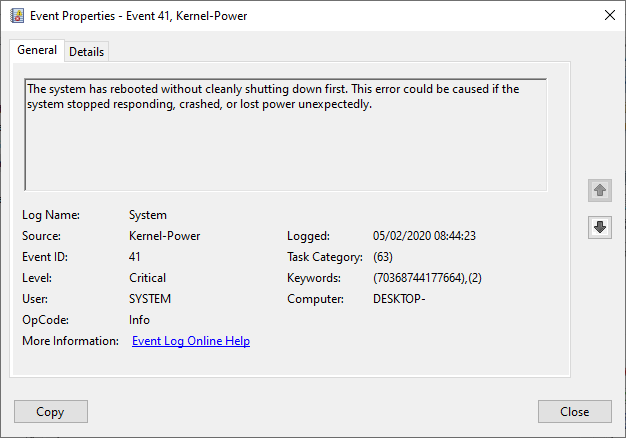
windows 10 kernel-power critical error event id 41

The Kernel-Power critical error associates with Event ID 41. Furthermore, Kernel-Power Event ID 41 is accompanied by the keywords (70368744177664),(2), which you can use to pinpoint your bug troubleshooting.

So, what causes Kernel-Power error 41?

While it is a common shutdown error code, there are several common causes, with easy fixes:

  1. Update Windows 10
  2. Disable Windows 10 fast startup
  3. Reseat your RAM and graphics card
  4. Run CHKDSK and SFC
  5. Test for a faulty PSU

Let’s take these fixes step by step and solve the Windows 10 Kernel-Power error.

1. Update Windows 10

Check if Windows 10 is up to date. Microsoft releases updates for Windows 10 frequently, fixing bugs and other issues. Your Kernel-Power critical error could stem from a bug that there is a fix ready for in an update.

Press Windows Key + I, type update in the search box, and select Check for updates. If there is an update waiting, download and install it, then restart your system.

2. Disable Windows 10 Fast Startup

Windows 10 fast startup is a hybrid sleep mode that enables your computer to boot extremely quickly. Windows 10 enables fast startup as a default setting during installation. If you enable fast startup, your computer doesn’t completely shut down.

It enters a middle ground that combines a full shutdown with hibernation mode, saving the last machine state to enable you to start working straight away.

However, unlike full hibernation mode, when you return to Windows 10, it is like starting the machine from scratch. There are no windows open, and your previous applications are not open, and so on.

windows 10 power settings disable fast startup

To disable Fast Startup, type power set in your Start Menu search bar, then select Choose a power plan.

Now, select Choose what the power buttons do, followed by Change settings that are currently unavailable.

Uncheck Turn on fast start-up and hit Save changes.

3. Reseat Your RAM and Graphics Card

Some users report their Kernel-Power 41 error resolving after reseating their RAM and graphics card (GPU).

You’ll need to get inside the case of your PC or laptop to reseat the hardware. Please be aware that this will void your manufacturer’s warranty in certain cases, so proceed with caution.

4. Run CHKDSK and SFC

CHKDSK is a Windows system tool you can use to verify your Windows 10 file system. You can add specific options to find and fix faults as the tool runs. Run it from the Command Prompt, and use the CHKDSK scan to find the problem and fix your machine.

  1. Type command prompt in your Start menu search bar, then right-click the best match and select Run as administrator. (Alternatively, press Windows key + X, then select Command Prompt (Admin) from the menu.)
  2. Next, type chkdsk /r and press Enter. The command will scan your system for errors and fix any issues along the way.

If CHKDSK doesn’t find any faults, you can run the Windows System File Check (SFC). System File Check is another Windows system tool you can use to check for missing or corrupt Windows system files.

In case you’re wondering, the difference between CHKDSK and SFC is the scope of the scan. CHKDSK scans your entire drive for errors, whereas SFC scans your Windows system files specifically.

However, before running the SFC command, it is best to check that it is completely functional.

DISM stands for Deployment Image Servicing and Management. DISM is an integrated Windows utility with a vast range of functions. In this case, the DISM Restorehealth command ensures that our next fix will work properly.

Work through the following steps.

  1. Type Command Prompt (Admin)in the Start menu search bar, then right-click and select Run as administrator to open an elevated Command Prompt.
  2. Type the following command and press Enter: DISM /online /cleanup-image /restorehealth
  3. Wait for the command to complete. The process can take up to 20 minutes, depending on your system health. The process seems stuck at certain times, but wait for it to complete.
  4. When the process completes, type sfc /scannow and press Enter.

5. Test for Faulty PSU With OCCT

Testing for hardware faults with your power supply unit isn’t easy unless you have the correct hardware to hand. You can check your PSU using a multimeter or a dedicated PSU testing tool.

The majority of software-based PSU checking tools cannot deliver an accurate reading on whether your PSU is working correctly.

That said, if you do want to attempt a PSU software test, I would suggest using OCCT, a free CPU/GPU/PSU stress testing tool. OCCT stress tests your CPU, GPU, and motherboard, and in the process can discover any faults with your power supply unit.

occt power supply stress test software

Open OCCT. Under Test Configuration, select Power. Select your graphics card, then set the resolution to 1920×1080. Save any work and close any other open programs on your system. When ready, hit the big red play icon in OCCT to begin the stress test.

The OCCT developer states that “Most errors are detected within the first 5 minutes. However, I recommend doing at least a 1-hour long test just to be sure.”

Once the test completes, OCCT produces a log that highlights any potential PSU errors (or with other hardware!).

Download: OCCT for Windows (Free)

Fixing Kernel-Power Critical Error 41

One of these five fixes will bring your Windows 10 computer back to full health. You might need to try a combination of fixes to stop the Kernel-Power critical error. For me, reseating my hardware and updating Windows 10 cured the issue.

Are you still experiencing random crashes? You need to check out these tips, tricks, and fixes to fix Windows blue screen errors.

Read the full article: How to Fix a Windows 10 Kernel Power Error in 5 Easy Steps


Read Full Article

How to Unblock a Number on an iPhone


unblock-number-iphone

In this guide, we explain everything you might want to know about unblocking numbers on your iPhone. That includes unblocking a contact so they can call or message you again, as well as unblocking a hidden number to find out who’s trying to reach you.

You might need to unblock a contact on your iPhone if you blocked someone by mistake. We’ve also shown how to unblock messages from someone without unblocking calls, in case you don’t want to speak over the phone.

In contrast, you probably want to unblock a number to reveal who keeps calling if their phone number or caller ID is blocked. Some people always hide their number from you, but if you unblock it, you’ll still know when it’s them.

How to Unblock Someone on Your iPhone

Every smartphone gives you the ability to block contacts you don’t want to talk to or hear from. When you block someone on your iPhone, they can’t call you, text you, FaceTime you, or email you. Your iPhone sends blocked contacts straight to voicemail without notifying you about missed calls or messages from them.

It’s a good idea to block numbers on your iPhone if you keep getting calls from spammers or telemarketers. But you could also use this function to remove toxic people from your life.

Sometimes, you might block the wrong person by mistake. When that happens, all you need to do is find the Blocked Contacts list on your iPhone and remove that person. After you do so, they’ll immediately be able to call, message, or email you again.

How to Find Blocked Numbers on Your iPhone

Your iPhone uses the same Blocked Contacts list for the Phone, Messages, FaceTime, and Mail apps. If you want to unblock someone on your iPhone, all you need to do is remove their details from this list.

It doesn’t matter if you have an older device like an iPhone 6 or a newer model—this is how you unblock numbers or contacts on any iPhone.

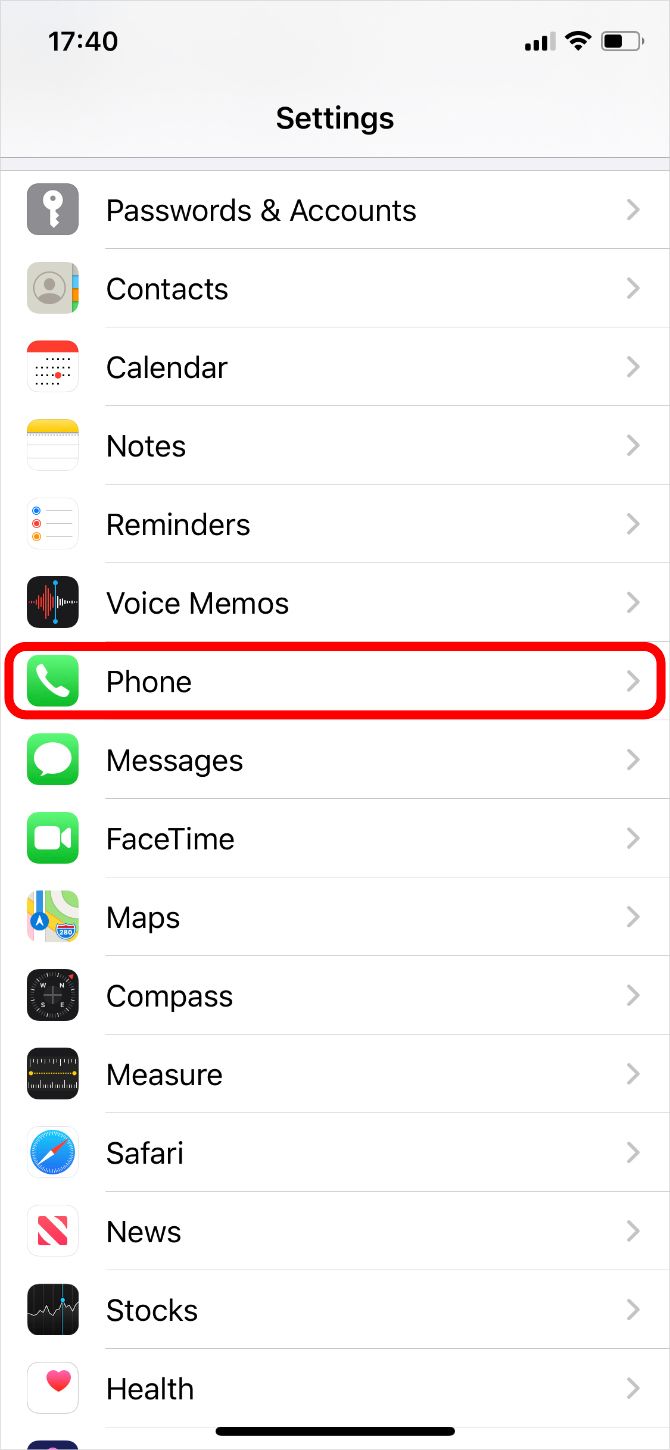
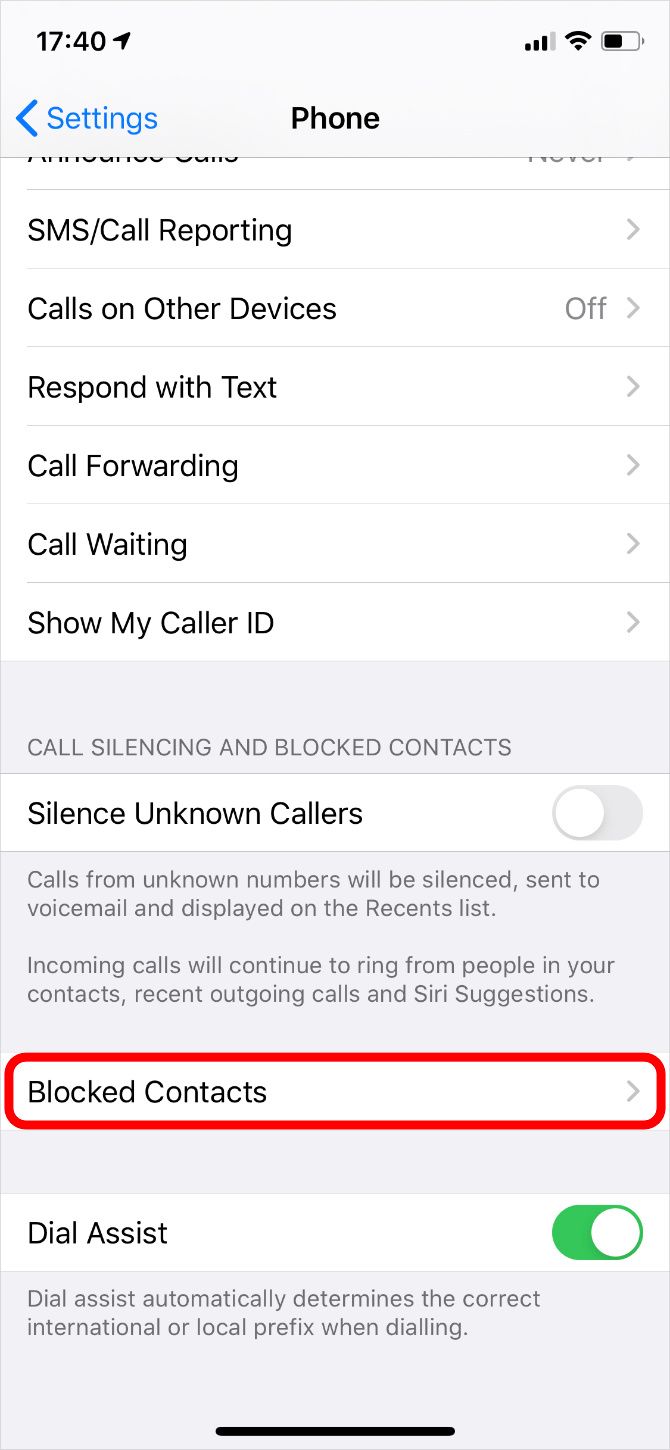
  1. Go to Settings > Phone > Blocked Contacts.
  2. Swipe left on a blocked contact to reveal an Unblock button.
    1. Alternatively, tap Edit, then hit the Minus () button next to a contact.
  3. Tap Unblock to remove that person from your Blocked Contacts list.

You might find that you still miss phone calls or messages, even if your Blocked Contacts list is empty. This usually happens because the people trying to reach you aren’t in your contacts list, which leads your iPhone to silence their calls and messages.

What to Do If Your iPhone Silences Unknown Callers

Spam calls are such a huge problem that Apple implemented a feature to automatically silence unknown callers on your iPhone. When this feature is turned on, your iPhone silences any calls from people who aren’t in the Contacts app.

That might lead you to think certain numbers are blocked, but all you need to do is turn this feature off in the Settings app:

  1. Go to Settings > Phone.
  2. Scroll down and turn off the option to Silence Unknown Callers.

Silence Unknown Callers option in iPhone Phone settings

If you turn this feature off, you should install one of the best caller identification apps so you know when it’s worth picking up the phone for an unknown caller.

What to Do If Your iPhone Filters Unknown Messages

Phone calls aren’t the only way spammers try to reach you; they might send you text messages as well. Luckily, Apple also added a feature to filter text messages from unknown senders into a different page in the Messages app.

These filtered messages don’t give you any notifications, which might explain why you keep missing messages on your iPhone. Disable this feature in the Settings app by performing the following:

  1. Go to Settings > Messages.
  2. Scroll down and turn off the option to Filter Unknown Senders.

Filter Unknown Senders option in iPhone Messages settings

How to Unblock Messages Without Unblocking Calls

It’s easier to deal with difficult people over text than it is to speak to them on the phone. For this reason, you might want to unblock text messages from a contact, without unblocking calls from them as well.

The only way to do this is by using a third-party app. That’s because your iPhone blocks all forms of communication at once, including both phone calls and texts.

Most third-party messaging apps act in the same way, except for Telegram.

Use Telegram to Block Phone Calls While Unblocking Messages

Download Telegram from the App Store and set up an account. You should ask your blocked contact to do the same, so they can message you using Telegram instead of regular text messages or iMessage.

After installing Telegram, change the in-app settings to block calls from that contact:

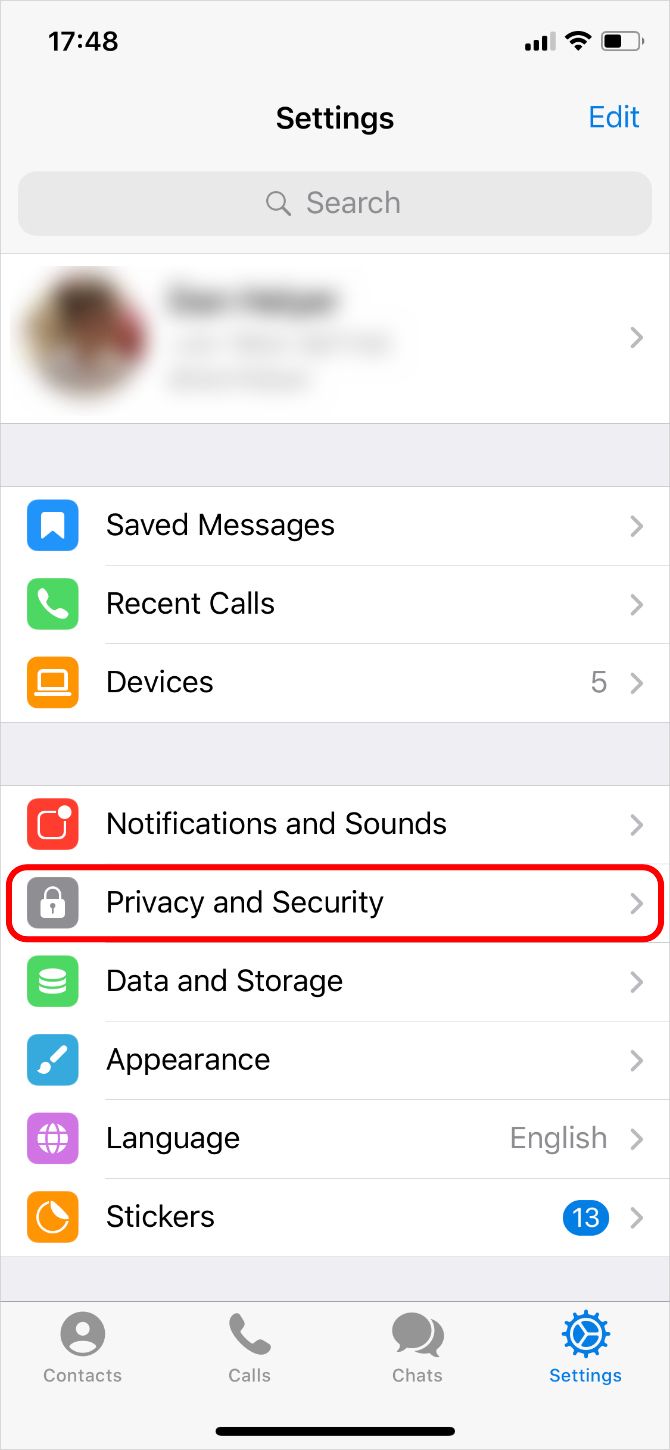
  1. Open Telegram on your iPhone and go to the Settings tab.
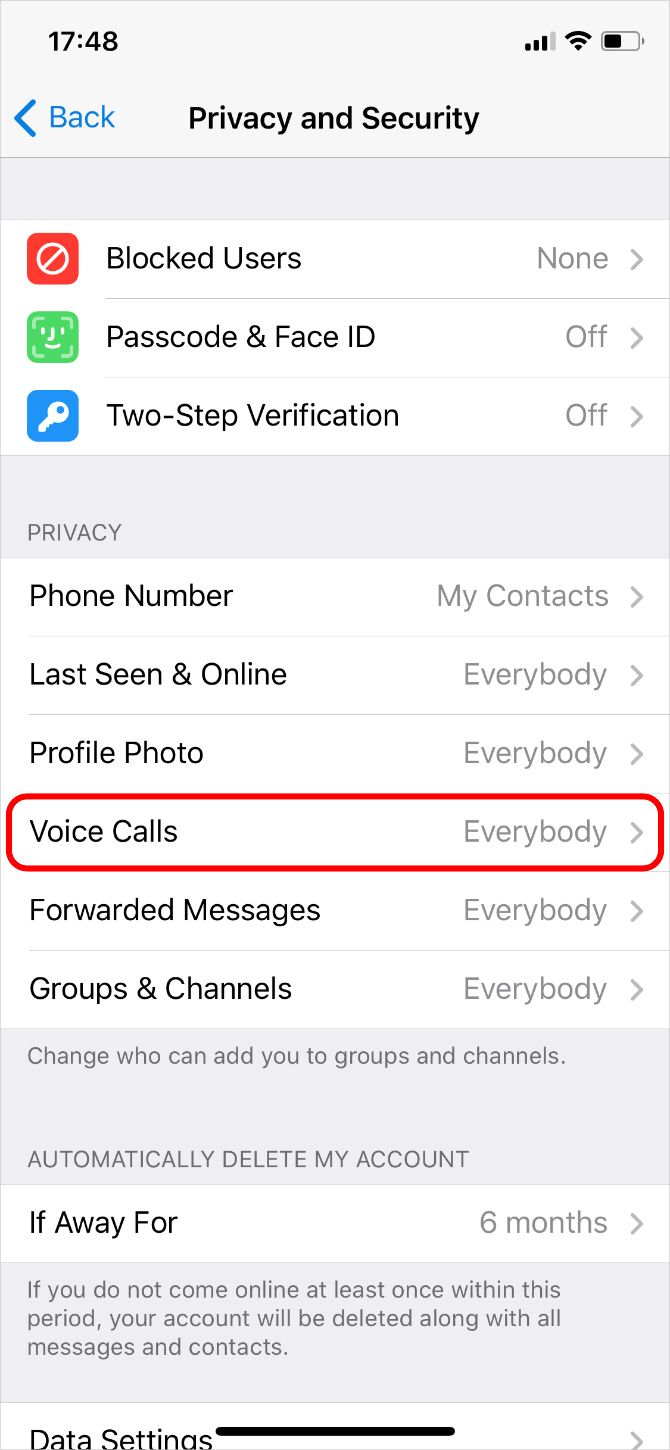
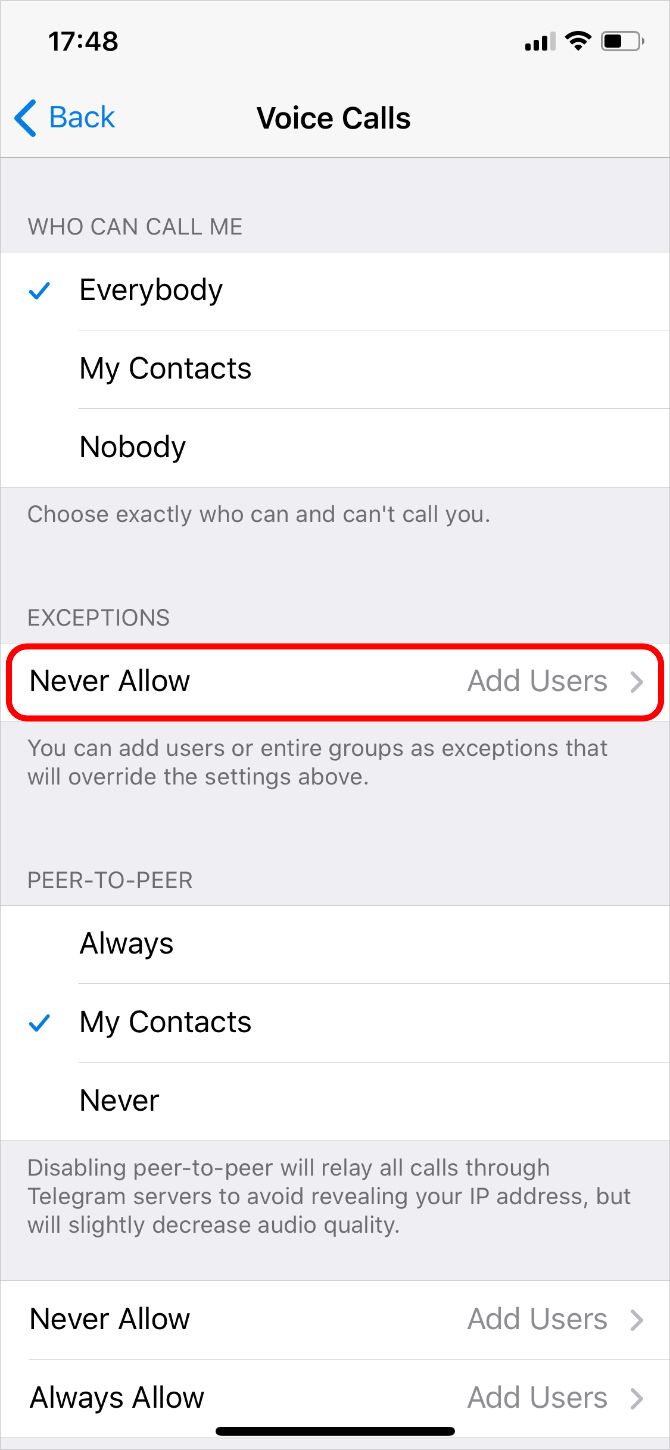
  2. Tap on Privacy and Security > Voice Calls.
  3. Under the Exceptions heading, tap Add Users and select the contact you want to block phone calls from, then choose Done.

That person can now message you using Telegram, but can’t call you. If you haven’t already, make sure you block them in your iPhone settings as well.

Download: Telegram for iOS (Free)

How to Unblock Hidden Callers on Your iPhone

You might receive a lot of phone calls from blocked numbers. When this happens, your iPhone usually says No Caller ID, Restricted, or Unknown on the screen without giving you a phone number or any contact details.

It’s never fun answering a blocked call, since you don’t know who might be on the other end of the line. To make matters worse, you can’t even block future phone calls from them, because you don’t know what number they’re calling from.

Unfortunately, there’s no way to unblock hidden numbers in your iPhone settings. However, your cell carrier may be able to see who’s calling you and block their future calls or messages for you. Give your cell carrier’s customer service line a call to see if they can help.

If that doesn’t work, there are a few third-party apps you can use instead to unblock hidden numbers. The most popular app for this is TrapCall.

Use TrapCall to Unblock Calls Hidden Numbers on Your iPhone

TrapCall is a premium app that reveals blocked numbers from incoming phone calls. You can use TrapCall to unblock numbers on any iPhone, from iPhone 6 to iPhone 11 and beyond. You can also use it to record your calls or automatically block known spammers.

Trapcall website homepage showing how to unblock unknown numbers

After downloading TrapCall from the App Store, you’ll need to sign up for a premium subscription or take advantage of its seven-day free trial.

Once you set up your account, all you need to do is decline incoming calls from blocked numbers by double-pressing the Sleep/Wake button on your iPhone. A moment later, your iPhone starts ringing again, but this time you should see a caller ID on the screen.

Two iPhones side-by-side with one saying No Caller ID and the other showing the phone number
Image Credit: TrapCall

Once you know who’s calling, you can choose to take the call or block that number. The caller won’t have any idea how you figured out it was them.

Download: TrapCall for iOS (Free trial, subscription required)

Find Out Exactly Who’s Calling You

Now you know how to unblock any number on your iPhone, but that doesn’t mean you always know who’s calling you. You won’t have most telemarketers or spammers in your Contacts app, which means you still won’t know it’s them until you pick up the phone.

That’s where identification apps like TrueCaller come in.

TrueCaller identifies people you don’t have saved in your iPhone, so you always know who’s calling. There are lots of other great functions inside TrueCaller as well, like recording calls or removing your number from public listings.

Read the full article: How to Unblock a Number on an iPhone


Read Full Article
Google Cloud opens its Seoul region


Google Cloud today announced that its new Seoul region, its first in Korea, is now open for business. The region, which it first talked about last April, will feature three availability zones and support for virtually all of Google Cloud’s standard service, ranging from Compute Engine to BigQuery, Bigtable and Cloud Spanner.

With this, Google Cloud now has a presence in 16 countries and offers 21 regions with a total of 64 zones. The Seoul region (with the memorable name of asia-northeast3) will complement Google’s other regions in the area, including two in Japan, as well as regions in Hong Kong and Taiwan, but the obvious focus here is on serving Korean companies with low-latency access to its cloud services.

“As South Korea’s largest gaming company, we’re partnering with Google Cloud for game development, infrastructure management, and to infuse our operations with business intelligence,” said Chang-Whan Sul, the CTO of Netmarble. “Google Cloud’s region in Seoul reinforces its commitment to the region and we welcome the opportunities this initiative offers our business.”

Over the course of this year, Google Cloud also plans to open more zones and regions in Salt Lake City, Las Vegas and Jakarta, Indonesia.


Read Full Article

TikTok introduces parental controls with new ‘Family Safety Mode’ feature, launching first in U.K.


TikTok announced today the introduction of a new set of parental controls, called “Family Safety Mode,” designed to let parents set limits on their teenage children’s use of the TikTok mobile app. The suite of features includes screen time management controls, limits on direct messages, and a restricted mode that limits the appearance of inappropriate content.

According to TikTok, parents who want to enable Family Safety Mode must first create their own account on the app, which is then linked to the teen’s account. Once enabled, parents will be able to control how long the teen can spend on the app every day; turn off or limit who the teen can direct message; and choose to turn on TikTok’s “restricted” mode that will limit inappropriate content.

These features were already available in the app for users to set for themselves, to be clear. The new Family Safety Mode just puts a parent or guardian in charge of toggling the switches on or off for their teens, and prevents the settings from being changed without parents’ involvement.

It’s not clear how well TikTok’s restricted mode works, as TikTok doesn’t explain the screening process it uses. For an app of this scale, it’s likely based in large part on users flagging inappropriate videos, however. Parents should be aware, then, that restricted mode is not going to be a foolproof means of controlling the user experience.

The new set of parental controls is actually only a subset of the controls users can enable for themselves. For example, users can also choose to make their accounts private, turn off commenting, or control who’s allowed to duet with them, among other things.

But the controls do tackle some of parents’ largest concerns around the addictive nature of TikTok’s app, the content being delivered, and the private messages that parents can’t monitor.

The launch timing follows increased scrutiny by government regulators of TikTok, owned by Beijing-based ByteDance.

In 2019, the U.S. Federal Trade Commission fined the app Musical.ly (which had acquired by ByteDance. ), $5.7 million for violation of U.S. children’s privacy law COPPA. And in the U.K., TikTok has been under investigation by the U.K.’s Information Commissioner’s Office (ICO) for potential GDPR violations around the protection of children’s data.

Not coincidentally, TikTok says the new parental controls are first available in the U.K., starting today. They’ll roll out to other markets in the weeks ahead, TikTok says but didn’t indicate which ones.

The parental controls, however, have been designed with European law in mind. In the U.S., TikTok offers the age-gate for younger users, but not controls for parents like this.

In addition to the launch of Family Safety mode, TikTok parented with creators to produce a series of safety videos about screen time management to encourage users to take a break from their phone. These are being added to the TikTop Tips video series and will also roll out in the app starting first in the U.K. today.


Read Full Article
The beautiful, hard work of co-parenting | Joel Leon

The beautiful, hard work of co-parenting | Joel Leon

"Co-parenting" isn't a buzzword -- it's a way of showing up for your family openly, consistently and lovingly, says storyteller and father Joel Leon. In this moving talk, he challenges all parents to play an equal, active role in their children's daily lives, even in a world that often places the weight of sacrifice on mothers alone. Leon encourages nuanced conversations about parenting and reminds us that being a parent isn't a responsibility -- it's an opportunity.

Click the above link to download the TED talk.

Google Cloud acquires mainframe migration service Cornerstone


Google today announced that it has acquired Cornerstone, a Dutch company that specializes in helping enterprise migrate their legacy workloads from mainframes to public clouds. Cornerstone, which provides very hands-on migration assistance, will form the basis of Google Cloud’s mainframe-to-GCP solutions.

This move is very much in line with Google Cloud’s overall enterprise strategy, which focuses on helping existing enterprises move their legacy workloads into the cloud (and start new projects as cloud-native solutions from the get-go).

“This is one more example of how Google Cloud is helping enterprise customers modernize their infrastructure and applications as they transition to the cloud,” said John Jester, VP of Customer Experience at Google Cloud. “We’ve been making great strides to better serve enterprise customers, including introducing Premium Support, better aligning our Customer Success organization, simplifying our commercial contracting process to make it easier to do business with Google Cloud, and expanding our partner relationships.”

A lot of businesses still rely on their mainframes to power mission-critical workloads. Moving them to the cloud is often a very complex undertaking, which is where Cornerstone and similar vendors come in. It doesn’t help that a lot of these mainframe applications were written in Cobol, PL/1 or assembly. Cornerstone’s technology can automatically break these processes down into cloud-native services that are then managed within a containerized environment. It can also migrate databases as needed.

It’s worth noting that Google Cloud also recently introduced support for IBM Power Systems in its cloud. This, too, was a move to help enterprises move their legacy systems into the cloud. With Cornerstone, Google Cloud adds yet another layer on top of this by providing even more hands-on migration assistance for users who want to slowly modernize their overall stack without having to re-architect all of their legacy applications.


Read Full Article

How to Scrape Reddit with Google Scripts


Reddit offers a fairly extensive API that any developer can use to easily pull data from subreddits. You can fetch posts, user comments, image thumbnails, votes and most other attributes that are attached to a post on Reddit.

The only downside with the Reddit API is that it will not provide any historical data and your requests are capped to the 1000 most recent posts published on a subreddit. So, for instance, if your project requires you to scrape all mentions of your brand ever made on Reddit, the official API will be of little help.

You have tools like wget that can quickly download entire websites for offline use but they are mostly useless for scraping Reddit data since the site doesn’t use page numbers and content of pages is constantly changing. A post can be listed on the first page of a subreddit but it could be pushed to the third page the next second as other posts are voted to the top.

Reddit Data in Google Sheets

Download Reddit Data with Google Scripts

While there exist quite a Node.js and Python libraries for scraping Reddit, they are too complicated to implement for the non-techie crowd. Fortunately, there’s always Google Apps Script to the rescue.

Here’s Google script that will help you download all the user posts from any subreddit on Reddit to a Google Sheet. And because we are using pushshift.io instead of the official Reddit API, we are no longer capped to the first 1000 posts. It will download everything that’s every posted on a subreddit.

  1. To get started, open the Google Sheet and make a copy in your Google Drive.
  2. Go to Tools -> Script editor to open the Google Script that will fetch all the data from the specified subreddit. Go to line 55 and change technology to the name of the subreddit that you wish to scrape.
  3. While you are in the script editor, choose Run -> scrapeReddit.

Authorize the script and within a minute or two, all the Reddit posts will be added to your Google Sheet.

Technical Details - How to the Script Works

The first step is to ensure that the script not hitting any rate limits of the PushShift service.

const isRateLimited = () => {
  const response = UrlFetchApp.fetch('https://api.pushshift.io/meta');
  const { server_ratelimit_per_minute: limit } = JSON.parse(response);
  return limit < 1;
};

Next, we specify the subreddit name and run our script to fetch posts in batches of 1000 each. Once a batch is complete, we write the data to a Google Sheet.

const getAPIEndpoint_ = (subreddit, before = '') => {
  const fields = ['title', 'created_utc', 'url', 'thumbnail', 'full_link'];
  const size = 1000;
  const base = 'https://api.pushshift.io/reddit/search/submission';
  const params = { subreddit, size, fields: fields.join(',') };
  if (before) params.before = before;
  const query = Object.keys(params)
    .map(key => `${key}=${params[key]}`)
    .join('&');
  return `${base}?${query}`;
};

const scrapeReddit = (subreddit = 'technology') => {
  let before = '';
  do {
    const apiUrl = getAPIEndpoint_(subreddit, before);
    const response = UrlFetchApp.fetch(apiUrl);
    const { data } = JSON.parse(response);
    const { length } = data;
    before = length > 0 ? String(data[length - 1].created_utc) : '';
    if (length > 0) {
      writeDataToSheets_(data);
    }
  } while (before !== '' && !isRateLimited());
};

The default response from Push Shift service contains a lot of fields, we are thus using the fields parameter to only request the relevant data like post title, post link, date created and so on.

If the response contains a thumbnail image, we convert that into a Google Sheets function so you can preview the image inside the sheet itself. The same is done for URLs.

const getThumbnailLink_ = url => {
  if (!/^http/.test(url)) return '';
  return `=IMAGE("${url}")`;
};

const getHyperlink_ = (url, text) => {
  if (!/^http/.test(url)) return '';
  return `=HYPERLINK("${url}", "${text}")`;
};

Bonus Tip: Every search page and subreddit on Reddit can be converted into JSON format using a simple URL hack. Just append .json to the Reddit URL and you have a JSON response.

For instance, if the URL is https://www.reddit.com/r/todayIlearned, the same page can be accessed in JSON format using the URL https://www.reddit.com/r/todayIlearned.json.

This works for search results as well. The search page for https://www.reddit.com/search/?q=india can be downloaded as JSON using https://www.reddit.com/search.json?q=india.


Facebook backs Indian education startup Unacademy


Unacademy, one of India’s fastest growing education startups, has just received the backing of a major technology giant: Facebook.

The social juggernaut has participated in the four-year-old Indian startup’s Series E financing round, sources familiar with the matter told TechCrunch.

General Atlantic is leading the round, the size of which is about $100 million, the sources said. It wasn’t immediately clear to us exactly how big of a check Facebook has cut, but one of the sources said it was under $20 million. The round values the startup, which had raised $90 million prior to the ongoing round, at over $400 million, the source said.

Unacademy is aimed at students who are preparing for competitive exams to get into a college and those who are pursuing graduation-level courses. It allows students to watch live classes from educators and later engage in sessions to review topics in more detail.

A year ago, the startup launched a subscription service that offers students access to all live classes. Gaurav Munjal, co-founder and chief executive of Unacademy, tweeted earlier this month that the subscription service had become a $30 million ARR business.

This is the second time Facebook is investing in an Indian startup. Last year, it participated in social commerce Meesho’s $125 million financing round led by Prosus Ventures.

Facebook and Unacademy did not respond to a request for comment.

Ajit Mohan, VP and managing director of Facebook India, told TechCrunch in an interview last year that the company was open to engaging with startups that are building solutions for the Indian market.

“Wherever we believe there is opportunity beyond the work we do today, we are open to exploring further investment deals,” he said.

Indian newspaper Mint first reported in December that Unacademy was in talks with General Atlantic and GGV Capital to raise as much as $100 million. TechCrunch understands that GGV Capital, which earlier this month invested in edtech startup Vedantu, is not participating in Unacademy’s funding round.

Vedantu and Unacademy compete with Byju’s, an Indian startup that counts General Atlantic as an investor and is valued at $8 billion. Chan Zuckerberg Initiative has invested in Byju’s, but has sold at least some of its stake, according to a regulatory filing analyzed by business outlet Entrackr.

As India’s startup ecosystem begins to mature, it has started to attract corporate giants. Google, Amazon and Twitter also have made investments in Indian startups. While Twitter has backed social platform ShareChat, Google has invested in hyperlocal concierge app Dunzo.


Read Full Article

What Is Bitcoin, How Is it Worth So Much, and How Can You Spend It?


This week’s Really Useful Podcast takes a look at Bitcoin and cryptocurrency. You’ve seen it on the news and on the financial pages of newspapers. It’s linked to crime and people seem to be able to actually make it using their computers.

But what is Bitcoin? How does it work, what is it worth, and are cryptocoins worth your time? To find out, we welcome regular contributor James Frew, who also contributes to the Blocks Decoded website. Christian Cawley hosts the show and asks the questions.

Really Useful Podcast Season 5 Episode 3 Shownotes

Help us help more people by leaving a review on Apple Podcasts. In just a few seconds you can help us find a bigger audience and with a higher rating we can help more listeners. We’ll also read out some of the reviews you leave.

Don’t miss the Really Useful Podcast—subscribe for automatic downloads and notifications:

See you next week!

Read the full article: What Is Bitcoin, How Is it Worth So Much, and How Can You Spend It?


Read Full Article

Ring Makes Two-Factor Authentication Mandatory


Ring is finally making two-factor authentication mandatory. In addition, Ring is also giving users more control over the third-party services which can access their information. This applies to both analytics and advertising. Which is a good first step.

Ring Has Been Getting a Lot of Criticism

While lots of people are buying, using, and loving their Ring doorbells and other products, the company has been criticized for some of its security practices. Especially the lack of mandatory two-factor authentication and poor password management.

The EFF has also criticized Ring for the amount of information the Ring app shares with third-parties. This includes customers’ personally identifiable information (PII) being shared with Facebook, mixpanel.com, appsflyer.com, and branch.io.

What Ring Is Doing to Secure Your Account

Now, as outlined in a post on The Ring Blog, Ring is promising to make changes. The first of which is making two-factor authentication mandatory. This means that not only is 2FA required rather than users opting-in, opting-out is no longer an option.

2FA means that every time you log in to your Ring account, you’ll receive a one-time, six-digit code via email or SMS. This “helps prevent unauthorized users from gaining access to your Ring account, even if they have your username and password.”

Ring is also launching tools to manage third-party service providers. This means you can now “opt out of sharing your information with third-party service providers for the purpose of receiving personalized ads.” You may still see ads, but they won’t be personalized.

It’s also working on “providing users with more abilities to opt out” and “limit sharing information with third-party service providers.” And in the meantime it’s “temporarily pausing the use of most third-party analytics services in the Ring apps and website”.

Is Ring Making Your Home More Secure?

This won’t go far enough for those who have found Ring’s systems wanting in recent months. However, it’s a start, and Ring users should make use of the new tools. Especially as there’s a case to be made that your Ring device is making your home less safe.

Read the full article: Ring Makes Two-Factor Authentication Mandatory


Read Full Article

Do trade shows still matter in the age of online business?


The death of Mobile World Congress 2020 started as a trickle.

First, it was an understandably nervous ZTE. As a Chinese company, it was undoubtedly going to receive extra scrutiny — never mind that ZTE’s Shenzhen headquarters are a two-hour flight from Wuhan. Soon enough, South Korea’s LG backed out, followed by Nvidia and Ericsson.

By the weekend, as deaths from the coronavirus rose to more than 800 (surpassing SARS in the process), event organizers GSMA put strict guidelines in place for approximately 100,000 expected attendees:

  • No travelers from the Hubei province would be permitted access.
  • Attendees were required to prove that they were outside China for 14 days prior to the event (passport stamp, health certificate).
  • Temperature screening was to be implemented.
  • Attendees needed to self-certify they had not been in contact with anyone infected.

Ultimately, it was too late. Soon enough, Amazon was out and the list ballooned to dozens of companies, including AT&T, Intel, Nokia, Sony and Vodafone. Each offered a similar boilerplate response, noting the cost-benefit analysis for sending staff to a large international show amid concerns of a global epidemic.

PCMag’s Sascha Segan wrote a piece worth reading on “snowballing hysteria” around a trade show killed in a country that only had two reported cases at the time of cancellation. It’s a valid point, though speaking purely pragmatically, I can understand why companies felt obligated to back out.

If you want to give them the benefit of the doubt, there are some valid concerns about sending employees into the petri dish of colds and flus that is basically every trade show, coupled with the novelty of a new and still not completely understood virus. It can be difficult to balance concerns for employee safety with the need to resist panicking over media reports that tend to overemphasize threats.


Read Full Article

A brief tour of the last 4 billion years (dinosaurs not included) | Lauren Sallan

A brief tour of the last 4 billion years (dinosaurs not included) | Lauren Sallan

In this hilarious, whirlwind tour of the last four billion years of evolution, paleontologist and TED Fellow Lauren Sallan introduces us to some of the wildly diverse animals that roamed the prehistoric planet (from sharks with wings to galloping crocodiles and long-necked rhinos) and shows why paleontology is about way more than dinosaurs.

Click the above link to download the TED talk.

Secret’s founder returns with anti-loneliness app Ikaria


“I don’t feel good about that. That sucks” Chrys Bader-Wechseler reflects when asked about the bullying that went down on the anonymous app Secret he co-founded in 2013. After $35 million raised, 15 million users, and a spectacular flame out two years later, the startup was dead. “Since I left secret I feel alive and aligned with my values and my purpose again.” 

But there was one bright side to Secret letting you post without a name or consequences. People opened up, got vulnerable, and felt less alone when comments revealed they weren’t the only person dealing with a certain struggle. What Bader learned from watching Secret’s users “do this in the dark” was the realization that “actually, we need to learn to do this in the light, to have that same kind of dialogue, but do it openly with each other.”

So began the journey to Bader’s new startup Ikaria that’s exclusively revealing itself to the world today on TechCrunch. It’s a different kind of chat app, named after the Greek island where close-knit community helps extend people’s lifespans. The 6-person Santa Monica team is funded by a $1.5 million seed round led by Initialized Capital and Fuel Capital. People can sign up for early beta access here.

During a long interview about the startup, Bader and his co-founder Sean Dadashi were cagey about exactly how Ikaria works since it’s still in development. Amidst all the philosophical context about the app’s intention, I was able to pull out a few details about what the product will actually look like.

“Basically, since 2004, technology has created this monumental shift in the human social experience. We’re more connected than ever technically but all the studies show we’re lonelier than ever.” Bader explains. “It’s like eating McDonald’s to get healthy. It’s not the right source of nutrition for our social well-being because true connection requires a level of vulnerability, presence, self-disclosure, and reciprocity that you don’t really get on these platforms.”

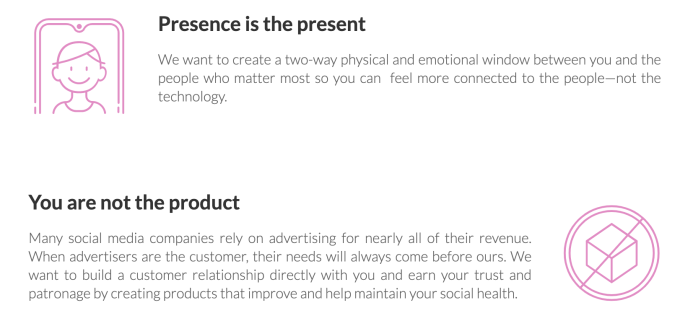
Ikaria isn’t another feed. It’s a safe space where you can chat with close friends & family, or people going through similar life challenges. Members of these group chats will optionally go through guided experiences that help them reflect on and discuss what’s going on in their hearts and minds. This could become a whole new media format where outside creators or mental health professionals could produce and contribute their own guided experiences.

“Part of the reason we’re announcing this is that . . . it’s a call to action to involve all these practitioners and people who are doing these types of things and giving them a platform to allow them to facilitate these kind of group bonding experiences through a platform where they can extend their practices into the digital world” Bader tells me. What Calm and Headspace did for making meditation more mainstream and accessible, Ikaria wants to do for mental health through online togetherness.

Ikaria already has a sizable closed beta going which the startup plans to continue until it finds product fit, and it hopes to know its official release timeline by the end of the year. “We’re not going to launch this until we know 40% of people would be disappointed if they couldn’t use it.”

Rather than monetizing by exploiting people’s attention, Ikaria plans to develop a ‘customer relationship’ with users, which could mean subscription access or in-app payments for buying content. Perhaps one user could act as the sponsor and purchase an experience for their whole group chat. Until then, it’s got its seed funding from Initialized, Fuel Capital, F7 Ventures, Ryan Hoover’s Weekend Fund, Backend Capital, Day One Ventures, Shrug, Todd Goldberg, and Superhuman’s Rahul Vohra.

“The hope is that eventually this would be an app you use instead of iMessage, to increase your sense of presence” Bader explains, revealing its grand ambitions. Why would we need to replace our core chat apps? Well for one thing, they don’t understand who really matters to you. If an app understood who your mom is, it could give her messages special prevalence or remind you to contact her.

Bader met Dadashi through an offline men’s group for discussing life, love, and everything in the wake of Secret’s collapse and a rough romantic breakup. After just a few weeks of these meetups, they say they felt closer to each other than to most of their friends. Only later did Bader, a designer by trade, discover that Dadashi was a coder who’d been CTO of electronics company MHD Enterprises before starting a travel and lifestyle startup for mental wellness called Somatic Studios. They tried working together on an app for sharing quotes from your friends but scrapped it.

Together, the pair went on to research the rapid rise of other vulnerability-focused meetup organizations like the one where they met, including EvrymanManKind ProjectQuiltAuthentic RelatingCircling, and T-Groups. Though they knew that to have a chance at impact at scale, they’d need to build a mobile app familiar enough to get people over the hurdle of starting a mindfulness practice. They laid out a few principles to build by: a focus on relationships instead of Likes and followers, conscious design that won’t exploit people’s attention or weaknesses, no ads, and keeping all data private and in control of the user.

There are other startups hoping to address the sad state of mental health from different angles. Talkspace offers a mobile connection to licensed therapists, though it can be pricey at $65 to $99 per week. 7 Cups and TalkLife makes peer-to-peer counseling from volunteers free, though these aren’t professionals. There are also plenty of journaling products, gratitude practice app, and wellness podcasts out there. But Ikaria’s approach combining mental health content with group chats of people you trust feels unique.

Having known Bader since the Secret days, it’s obvious that working with Dadashi has made him happier and more centered. Ikaria is an app he can wake up feeling good about each day. “You know, I don’t like to speak ill of David [Byttow, Secret’s CEO who sources say was abusive to employees], but that relationship was very, very toxic and taxing for me. And this time around with Sean, as I’m sure you can tell, is the polar opposite.”

If Ikaria can help people develop the open and honest relationships with friends or peers like building it has done for Bader and Dadashi, it could be a beacon amidst a sea of time unwell spent.


Read Full Article

Secret’s founder returns with anti-loneliness app Ikaria


“I don’t feel good about that. That sucks” Chrys Bader-Wechseler reflects when asked about the bullying that went down on the anonymous app Secret he co-founded in 2013. After $35 million raised, 15 million users, and a spectacular flame out two years later, the startup was dead. “Since I left secret I feel alive and aligned with my values and my purpose again.” 

But there was one bright side to Secret letting you post without a name or consequences. People opened up, got vulnerable, and felt less alone when comments revealed they weren’t the only person dealing with a certain struggle. What Bader learned from watching Secret’s users “do this in the dark” was the realization that “actually, we need to learn to do this in the light, to have that same kind of dialogue, but do it openly with each other.”

So began the journey to Bader’s new startup Ikaria that’s exclusively revealing itself to the world today on TechCrunch. It’s a different kind of chat app, named after the Greek island where close-knit community helps extend people’s lifespans. The 6-person Santa Monica team is funded by a $1.5 million seed round led by Initialized Capital and Fuel Capital. People can sign up for early beta access here.

During a long interview about the startup, Bader and his co-founder Sean Dadashi were cagey about exactly how Ikaria works since it’s still in development. Amidst all the philosophical context about the app’s intention, I was able to pull out a few details about what the product will actually look like.

“Basically, since 2004, technology has created this monumental shift in the human social experience. We’re more connected than ever technically but all the studies show we’re lonelier than ever.” Bader explains. “It’s like eating McDonald’s to get healthy. It’s not the right source of nutrition for our social well-being because true connection requires a level of vulnerability, presence, self-disclosure, and reciprocity that you don’t really get on these platforms.”

Ikaria isn’t another feed. It’s a safe space where you can chat with close friends & family, or people going through similar life challenges. Members of these group chats will optionally go through guided experiences that help them reflect on and discuss what’s going on in their hearts and minds. This could become a whole new media format where outside creators or mental health professionals could produce and contribute their own guided experiences.

“Part of the reason we’re announcing this is that . . . it’s a call to action to involve all these practitioners and people who are doing these types of things and giving them a platform to allow them to facilitate these kind of group bonding experiences through a platform where they can extend their practices into the digital world” Bader tells me. What Calm and Headspace did for making meditation more mainstream and accessible, Ikaria wants to do for mental health through online togetherness.

Ikaria already has a sizable closed beta going which the startup plans to continue until it finds product fit, and it hopes to know its official release timeline by the end of the year. “We’re not going to launch this until we know 40% of people would be disappointed if they couldn’t use it.”

Rather than monetizing by exploiting people’s attention, Ikaria plans to develop a ‘customer relationship’ with users, which could mean subscription access or in-app payments for buying content. Perhaps one user could act as the sponsor and purchase an experience for their whole group chat. Until then, it’s got its seed funding from Initialized, Fuel Capital, F7 Ventures, Ryan Hoover’s Weekend Fund, Backend Capital, Day One Ventures, Shrug, Todd Goldberg, and Superhuman’s Rahul Vohra.

“The hope is that eventually this would be an app you use instead of iMessage, to increase your sense of presence” Bader explains, revealing its grand ambitions. Why would we need to replace our core chat apps? Well for one thing, they don’t understand who really matters to you. If an app understood who your mom is, it could give her messages special prevalence or remind you to contact her.

Bader met Dadashi through an offline men’s group for discussing life, love, and everything. After just a few weeks of these meetups, they say they felt closer to each other than to most of their friends. Only later did Bader, a designer by trade, discover that Dadashi was a coder who’d been CTO of electronics company MHD Enterprises before starting a travel and lifestyle startup for mental wellness called Somatic Studios.

Together, they researched the rapid rise of other vulnerability-focused meetup organizations like EvrymanManKind ProjectQuiltAuthentic RelatingCircling, and T-Groups. But they knew that to have a chance at impact at scale, they’d need to build a mobile app familiar enough to get people over the hurdle of starting a mindfulness practice. They laid out a few principles to build by: a focus on relationships instead of Likes and followers, conscious design that won’t exploit people’s attention or weaknesses, no ads, and keeping all data private and in control of the user.

There are other startups hoping to address the sad state of mental health from different angles. Talkspace offers a mobile connection to licensed therapists, though it can be pricey at $65 to $99 per week. 7 Cups and TalkLife makes peer-to-peer counseling from volunteers free, though these aren’t professionals. There are also plenty of journaling products, gratitude practice app, and wellness podcasts out there. But Ikaria’s approach combining mental health content with group chats of people you trust feels unique.

Having known Bader since the Secret days, it’s obvious that working with Dadashi has made him happier and more centered. Ikaria is an app he can wake up feeling good about each day. “You know, I don’t like to speak ill of David [Byttow, Secret’s CEO who sources say was abusive to employees], but that relationship was very, very toxic and taxing for me. And this time around with Sean, as I’m sure you can tell, is the polar opposite.”

If Ikaria can help people develop the open and honest relationships with friends or peers like building it has done for Bader and Dadashi, it could be a beacon amidst a sea of time unwell spent.


Read Full Article