26 November 2019

Instagram founders join $30M raise for Loom work video messenger


Why are we all trapped in enterprise chat apps if we talk 6X faster than we type, and our brain processes visual info 60,000X faster than text? Thanks to Instagram, we’re not as camera-shy anymore. And everyone’s trying to remain in flow instead of being distracted by multi-tasking.

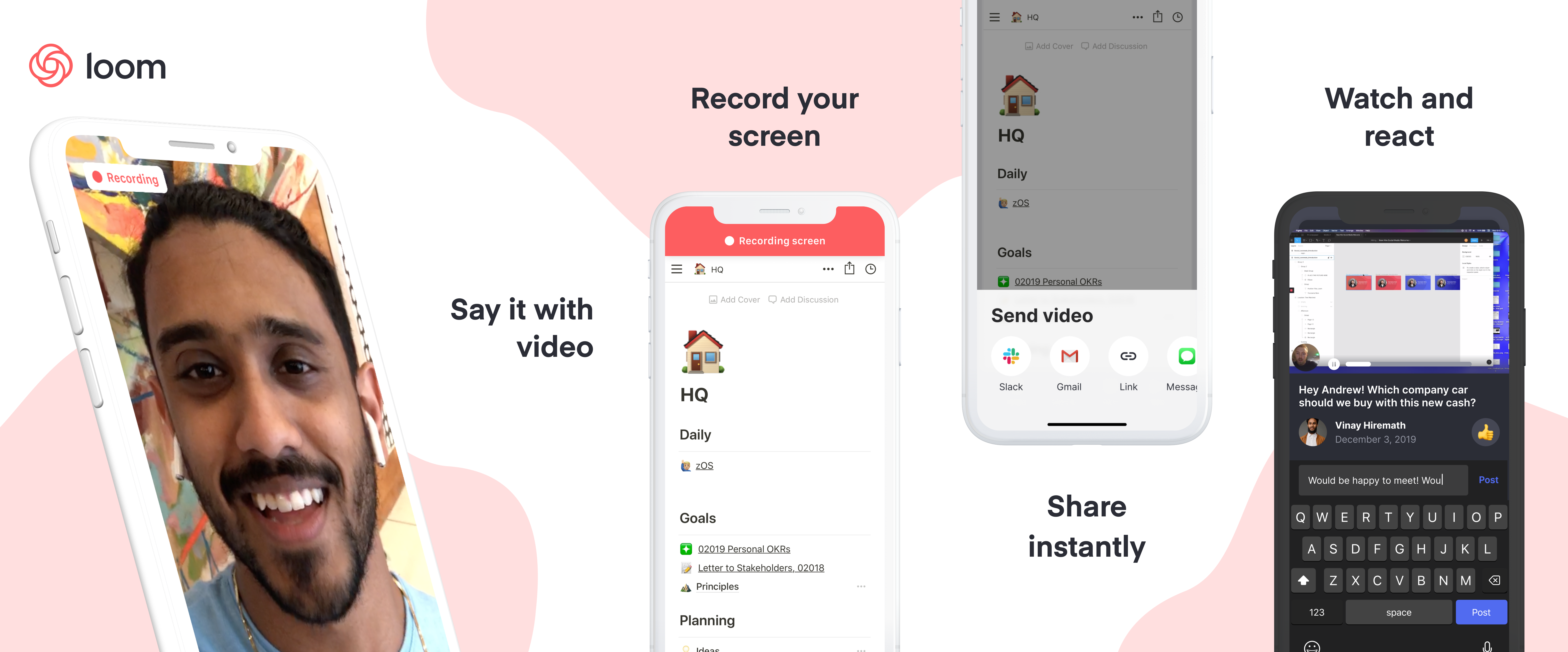
That’s why now is the time for Loom. It’s an enterprise collaboration video messaging service that lets you send quick clips of yourself so you can get your point across and get back to work. Talk through a problem, explain your solution, or narrate a screenshare. Some engineering hocus pocus sees videos start uploading before you finish recording so you can share instantly viewable links as soon as you’re done.

“What we felt was that more visual communication could be translated into the workplace and deliver disproportionate value” co-founder and CEO Joe Thomas tells me. He actually conducted our whole interview over Loom, responding to emailed questions with video clips.

Launched in 2016, Loom is finally hitting its growth spurt. It’s up from 1.1 million users and 18,000 companies in February to 1.8 million people at 50,000 businesses sharing 15 million minutes of Loom videos per month. Remote workers are especially keen on Loom since it gives them face-to-face time with colleagues without the annoyance of scheduling synchronous video calls. “80% of our professional power users had primarily said that they were communicating with people that they didn’t share office space with” Thomas notes.
A smart product, swift traction, and a shot at riding the consumerization of enterprise trend has secured Loom a $30 million Series B. The round that’s being announced later today was led by prestigious SAAS investor Sequoia and joined by Kleiner Perkins, Figma CEO Dylan Field, Front CEO Mathilde Collin, and Instagram co-founders Kevin Systrom and Mike Krieger.

“At Instagram, one of the biggest things we did was focus on extreme performance and extreme ease of use and that meant optimizing every screen, doing really creative things about when we started uploading, optimizing everything from video codec to networking” Krieger says. “Since then I feel like some products have managed to try to capture some of that but few as much as Loom did. When I first used Loom I turned to Kevin who was my Instagram co-founder and said, ‘oh my god, how did they do that? This feels impossibly fast.'”

Systrom concurs about the similarities, saying “I’m most excited because I see how they’re tackling the problem of visual communication in the same way that we tried to tackle that at Instagram.” Loom is looking to double-down there, potentially adding the ability to Like and follow videos from your favorite productivity gurus or sharpest co-workers.

Loom is also prepping some of its most requested features. The startup is launching an iOS app next month with Android coming the first half of 2020, improving its video editor with blurring for hiding your bad hair day and stitching to connect multiple takes. New branding options will help external sales pitches and presentations look right. What I’m most excited for is transcription, which is also slated for the first half of next year through a partnership with another provider, so you can skim or search a Loom. Sometimes even watching at 2X speed is too slow.

But the point of raising a massive $30 million Series B just a year after Loom’s $11 million Kleiner-led Series A is to nail the enterprise product and sales process. To date, Loom has focused on a bottom-up distribution strategy similar to Dropbox. It tries to get so many individual employees to use Loom that it becomes a team’s default collaboration software. Now it needs to grow up so it can offer the security and permissions features IT managers demand. Loom for teams is rolling out in beta access this year before officially launching in early 2020.
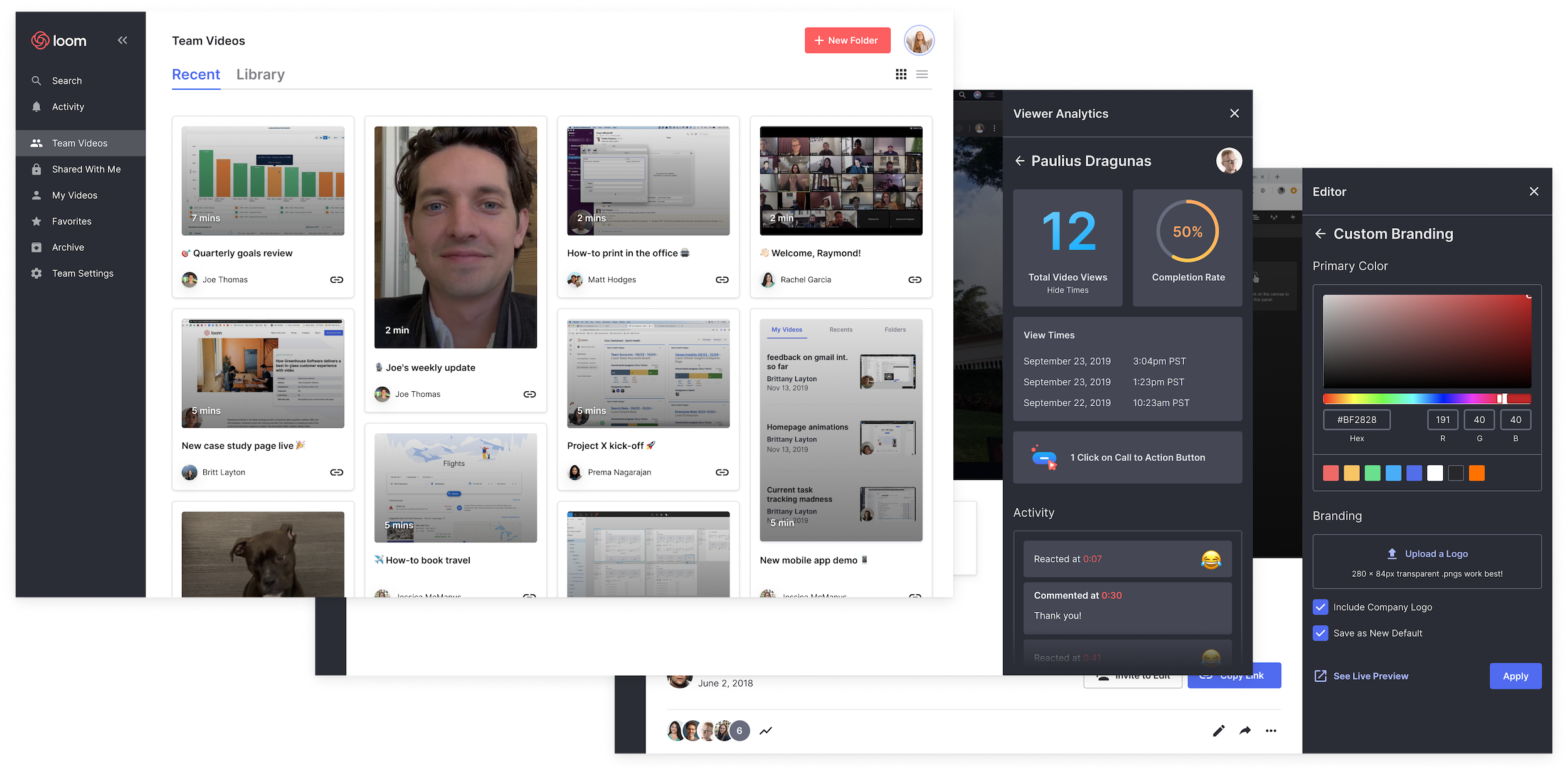
Loom’s bid to become essential to the enterprise, though, is its team video library. This will let employees organize their Looms into folders of a knowledge base so they can explain something once on camera, and everyone else can watch whenever they need to learn that skill. No more redundant one-off messages begging for a team’s best employees to stop and re-teach something. The Loom dashboard offers analytics on who’s actually watching your videos. And integration directly into popular enterprise software suites will let recipients watch without stopping what they’re doing.

To build out these features Loom has already grown to a headcount of 45. It’s also hired away former head of growth at Dropbox Nicole Obst, head of design for Slack Joshua Goldenberg, and VP of commercial product strategy for Intercom Matt Hodges.

Still, the elephants in the room remain Slack and Microsoft Teams. Right now, they’re mainly focused on text messaging with some additional screensharing and video chat integrations. They’re not building Loom-style asynchronous video messaging…yet. “We want to be clear about the fact that we don’t think we’re in competition with Slack or Microsoft Teams at all. We are a complementary tool to chat” Thomas insists. But given the similar productivity and communication ethos, those incumbents could certainly opt to compete.

Loom co-founder and CEO Joe Thomas

Hodges, Loom’s head of marketing, tells me “I agree Slack and Microsoft could choose to get into this territory, but what’s the opportunity cost for them in doing so? It’s the classic build vs. buy vs. integrate argument.” Slack bought screensharing tool Screenhero, but partners with Zoom and Google for video chat. Loom will focus on being easily integratable so it can plug into would-be competitors. And Hodges notes that “Delivering asynchronous video recording and sharing at scale is non-trivial. Loom holds a patent on its streaming, transcoding, and storage technology, which has proven to provide a competitive advantage to this day.”

The tea leaves point to video invading more and more of our communication, so I expect rival startups and features to Loom will crop up. As long as it has the head start, it needs to move as fast as it can. “It’s really hard to maintain focus to deliver on the core product experience that we set out to deliver versus spreading ourselves too thin. And this is absolutely critical” Thomas tells me.

One thing that could set Loom apart? A commitment to financial fundamentals. “When you grow really fast, you can sometimes lose sight of what is the core reason for a business entity to exist, which is to become profitable. . . Even in a really bold market where cash can be cheap, we’re trying to keep profitability at the top of our minds.”


Read Full Article

Instagram founders join $30M raise for Loom work video messenger


Why are we all trapped in enterprise chat apps if we talk 6X faster than we type, and our brain processes visual info 60,000X faster than text? Thanks to Instagram, we’re not as camera-shy anymore. And everyone’s trying to remain in flow instead of being distracted by multi-tasking.

That’s why now is the time for Loom. It’s an enterprise collaboration video messaging service that lets you send quick clips of yourself so you can get your point across and get back to work. Talk through a problem, explain your solution, or narrate a screenshare. Some engineering hocus pocus sees videos start uploading before you finish recording so you can share instantly viewable links as soon as you’re done.

“What we felt was that more visual communication could be translated into the workplace and deliver disproportionate value” co-founder and CEO Joe Thomas tells me. He actually conducted our whole interview over Loom, responding to emailed questions with video clips.

Launched in 2016, Loom is finally hitting its growth spurt. It’s up from 1.1 million users and 18,000 companies in February to 1.8 million people at 50,000 businesses sharing 15 million minutes of Loom videos per month. Remote workers are especially keen on Loom since it gives them face-to-face time with colleagues without the annoyance of scheduling synchronous video calls. “80% of our professional power users had primarily said that they were communicating with people that they didn’t share office space with” Thomas notes.

A smart product, swift traction, and a shot at riding the consumerization of enterprise trend has secured Loom a $30 million Series B. The round that’s being announced later today was led by prestigious SAAS investor Sequoia and joined by Kleiner Perkins, Figma CEO Dylan Field, Front CEO Mathilde Collin, and Instagram co-founders Kevin Systrom and Mike Krieger.

“At Instagram, one of the biggest things we did was focus on extreme performance and extreme ease of use and that meant optimizing every screen, doing really creative things about when we started uploading, optimizing everything from video codec to networking” Krieger says. “Since then I feel like some products have managed to try to capture some of that but few as much as Loom did. When I first used Loom I turned to Kevin who was my Instagram co-founder and said, ‘oh my god, how did they do that? This feels impossibly fast.'”

Systrom concurs about the similarities, saying “I’m most excited because I see how they’re tackling the problem of visual communication in the same way that we tried to tackle that at Instagram.” Loom is looking to double-down there, potentially adding the ability to Like and follow videos from your favorite productivity gurus or sharpest co-workers.

Loom is also prepping some of its most requested features. The startup is launching an iOS app next month with Android coming the first half of 2020, improving its video editor with blurring for hiding your bad hair day and stitching to connect multiple takes. New branding options will help external sales pitches and presentations look right. What I’m most excited for is transcription, which is also slated for the first half of next year through a partnership with another provider, so you can skim or search a Loom. Sometimes even watching at 2X speed is too slow.

But the point of raising a massive $30 million Series B just a year after Loom’s $11 million Kleiner-led Series A is to nail the enterprise product and sales process. To date, Loom has focused on a bottom-up distribution strategy similar to Dropbox. It tries to get so many individual employees to use Loom that it becomes a team’s default collaboration software. Now it needs to grow up so it can offer the security and permissions features IT managers demand. Loom for teams is rolling out in beta access this year before officially launching in early 2020.

Loom’s bid to become essential to the enterprise, though, is its team video library. This will let employees organize their Looms into folders of a knowledge base so they can explain something once on camera, and everyone else can watch whenever they need to learn that skill. No more redundant one-off messages begging for a team’s best employees to stop and re-teach something. The Loom dashboard offers analytics on who’s actually watching your videos. And integration directly into popular enterprise software suites will let recipients watch without stopping what they’re doing.

To build out these features Loom has already grown to a headcount of 45. It’s also hired away former head of growth at Dropbox Nicole Obst, head of design for Slack Joshua Goldenberg, and VP of commercial product strategy for Intercom Matt Hodges.

Still, the elephants in the room remain Slack and Microsoft Teams. Right now, they’re mainly focused on text messaging with some additional screensharing and video chat integrations. They’re not building Loom-style asynchronous video messaging…yet. “We want to be clear about the fact that we don’t think we’re in competition with Slack or Microsoft Teams at all. We are a complementary tool to chat” Thomas insists. But given the similar productivity and communication ethos, those incumbents could certainly opt to compete.

Loom co-founder and CEO Joe Thomas

Hodges, Loom’s head of marketing, tells me “I agree Slack and Microsoft could choose to get into this territory, but what’s the opportunity cost for them in doing so? It’s the classic build vs. buy vs. integrate argument.” Slack bought screensharing tool Screenhero, but partners with Zoom and Google for video chat. Loom will focus on being easily integratable so it can plug into would-be competitors. And Hodges notes that “Delivering asynchronous video recording and sharing at scale is non-trivial. Loom holds a patent on its streaming, transcoding, and storage technology, which has proven to provide a competitive advantage to this day.”

The tea leaves point to video invading more and more of our communication, so I expect rival startups and features to Loom will crop up. Vidyard and Wistia’s Soapbox are already pushing into the space. As long as it has the head start, Loom needs to move as fast as it can. “It’s really hard to maintain focus to deliver on the core product experience that we set out to deliver versus spreading ourselves too thin. And this is absolutely critical” Thomas tells me.

One thing that could set Loom apart? A commitment to financial fundamentals. “When you grow really fast, you can sometimes lose sight of what is the core reason for a business entity to exist, which is to become profitable. . . Even in a really bold market where cash can be cheap, we’re trying to keep profitability at the top of our minds.”


Read Full Article

How you can use impostor syndrome to your benefit | Mike Cannon-Brookes

How you can use impostor syndrome to your benefit | Mike Cannon-Brookes

Have you ever doubted your abilities, feared you were going to be discovered as a "fraud"? That's called "impostor syndrome," and you're definitely not alone in feeling it, says entrepreneur and CEO Mike Cannon-Brookes. In this funny, relatable talk, he shares how his own experiences of impostor syndrome helped pave the way to his success -- and shows how you can use it to your advantage, too.

Click the above link to download the TED talk.

5 Ways to Get In-Car Wi-Fi for Internet Access on the Go


wifi-in-car

New cars come connected, with some even offering Wi-Fi to passengers. But what about those of us who cannot afford a connected car? What options are available for getting Wi-Fi in your vehicle?

Whether you want live updates from Google Maps as you drive, listen to Spotify, or simply keep your kids entertained, here’s how you can get wireless internet in your car.

1. Simple Option: Use 4G Phones and Tablets

As most older vehicles shipped without any built-in networking, it makes sense to use 4G (or 5G, where available).

After all, if your passengers have mobile internet, why would you need to provide them with connectivity? Well, a couple of reasons spring to mind:

  1. It’s a long journey and their mobile data might be capped
  2. You’re driving beyond their carrier’s mobile internet range

In either scenario, it’s smart to use an in-car solution. But for city and suburban travel, there’s no reason why passengers shouldn’t use their own internet.

2. Set Your Mobile as a Hotspot for In-Car Internet

Okay, so you’re on the road with a car full all wanting music, video, even audiobooks. Maybe some online gaming. What do you do?

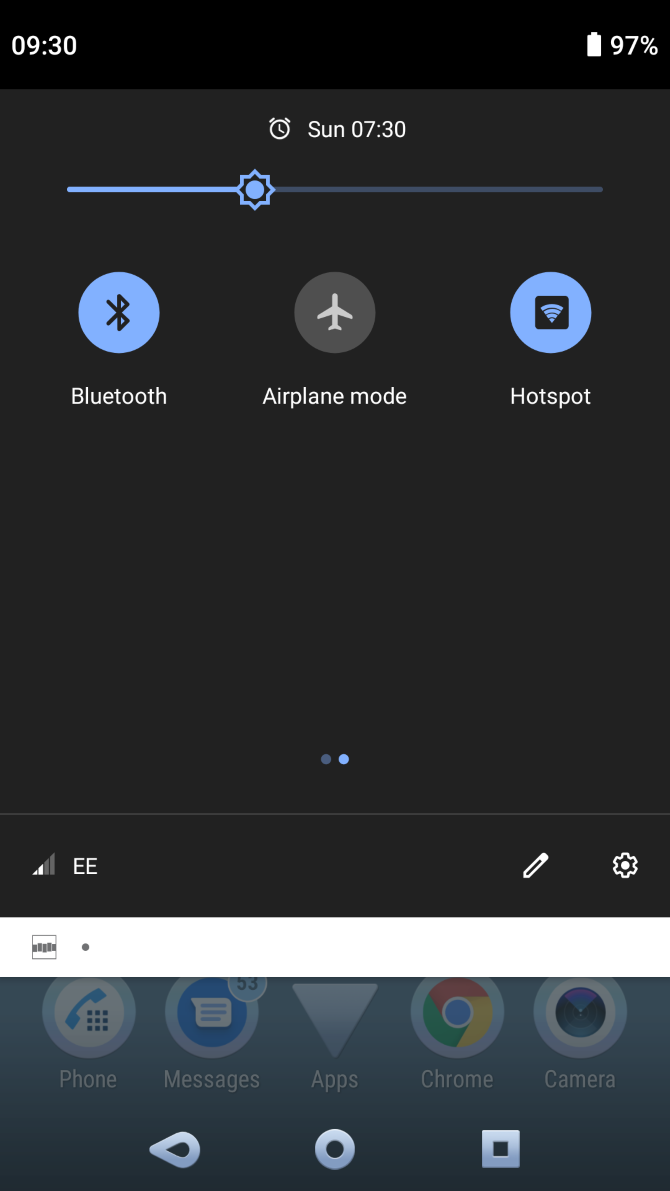
Well, if you’re basically unprepared, but have your smartphone with you, it makes sense to just share the connection. Mobile internet can be shared by setting your phone up as a hotspot. How you do this depends on what type of phone you use.

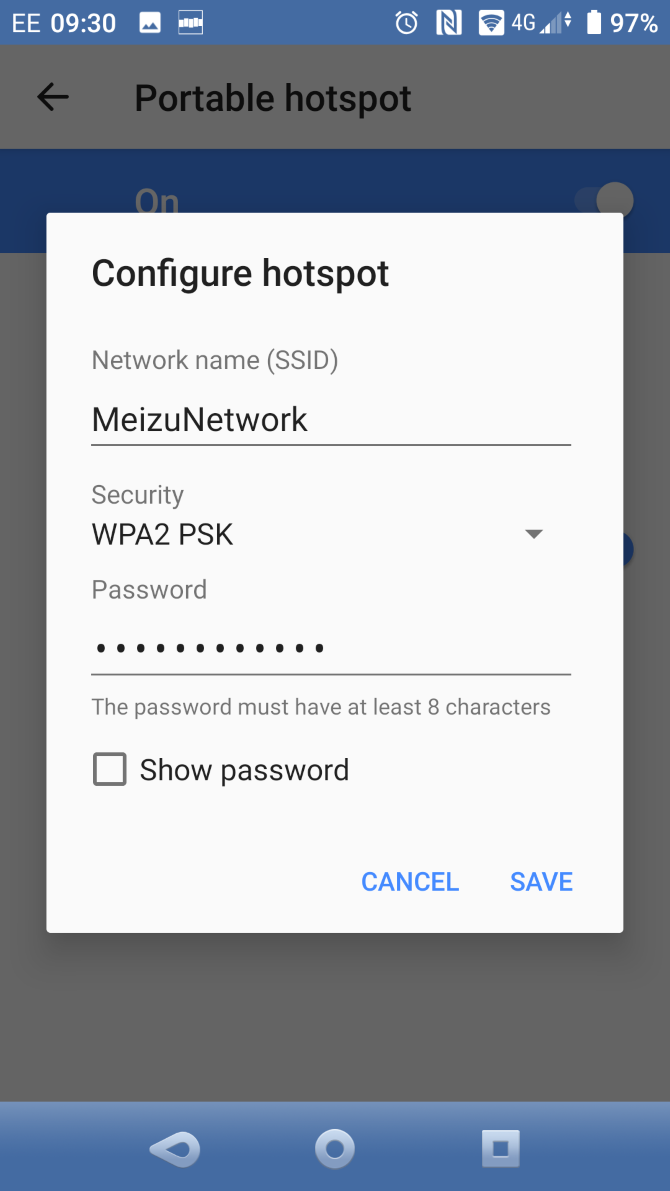
If you use an iPhone, it’s easy to set up the hotspot feature. No iPhone? It’s also simple to enable wireless tethering on Android and create a hotspot.

Set a password, share it with your passengers, and everyone in the car can benefit from your mobile internet connection.

3. Use a Universal Portable Hotspot

If you’re likely to regularly require mobile internet for your family or yourself, a portable hotspot seems smart.

These devices basically replicate the hotspot function of a mobile phone. Like your home router, they connect to the internet and share access via a secure password. The difference is, like a phone, portable hotspots use mobile internet. As such, a subscription or pre-payment is required to use them, on-top of the initial purchase price.

Various manufacturers produce portable hotspots. This Netgear 4G LTE Wi-Fi hotspot has 10 hours of battery and up to 10 days of standby charge.

To use one, you’ll need to speak to a mobile network to order a SIM card. Be sure to choose one that fits and provides the right level of usage. Otherwise, you could end up running out of data and have to use your smartphone!

4. Purchase an In-Car Hotspot

While you can easily use a portable hotspot in your car, some devices are specifically designed for in-car use.

One example is the Sprint Drive, a car tracking module that connects to your vehicle’s ODB-II port. This means that the device can share data about your vehicle’s performance, trip history analysis, fuel efficiency, vehicle health alerts, and diagnostics.

No idea what OBD-II is? Don’t worry, it’s a bit of a secret to most car users. In short, there’s a secret plug somewhere in the front of your car. Auto repair garages use the OBD-II port to perform car diagnostics, but you can also access it.

As a benefit for passengers, up to eight devices can be connected to the device’s Wi-Fi hotspot. Sprint Drive supports 5G, 4G, and 4G LTE. It will set you back around $120.00, with a 2GB plan for $10.00 a month or unlimited at $25.00/month.

Want to try a hotspot intended for a car? This Huawei device provides 150Mpbs

5. Use Old Hardware as an In-Car Wi-Fi Hotspot

Use a Sprint Drive for in-car internet

While portable hotspots and dedicated in-car 4G routers are expensive, you have cheaper options available.

For example, if you have an old phone, you could use this instead of your main device. Just leave it connected to your car’s charge port, maybe secure with tape or Velcro, and keep it hidden. Only share its existence with your passengers. Plus, you have a spare phone to use in an emergency.

Alternatively, you could rely on a mobile dongle. While such devices are rare these days, they can be found on eBay, or at the back of a drawer.

Importantly, mobile dongles only require a USB power source. So, you could take a few minutes to set one up manually with your laptop, then connect it to your car’s USB port. Whenever your car is running, the USB port will be powered, and the hotspot active.

It’s not a perfect solution, but it works.

A Word About Safe Driving

Before we finish, it’s worth taking a moment to consider the importance of adhering to road safety and the law.

In short, driving a vehicle while interacting with a mobile device is almost certainly an offense where you live. It’s a dangerous act, an inevitable, forced lapse in concentration that can cause an accident. Your vehicle’s occupants, pedestrians, and other road users are all at risk.

So, when using digital devices while driving, either pull over to set them up, or rely on a passenger.

Safety goes further, however. Getting internet in your car means staying secure, as well as safe. So, ensure a strong password is set for your wireless hotspot, and if possible hide the SSID (network name). This will keep the network hidden—just tell your passengers what to look for when they’re trying to connect.

Get Connected While You Drive

Long journeys can be tough. Some connected devices can help travelers relax, stream music, games, and more to phones and tablets.

At this stage, you should know exactly how to keep everyone in your car happy with an internet connection. To get in-car Wi-Fi you can:

  • Suggest everyone use their own mobile internet
  • Set a mobile as a hotspot
  • Use a portable Wi-Fi hotspot
  • Use a dedicated in-car hotspot
  • Consider a DIY in-car wireless hotspot

Alternatively, you might want to simply connect your phone to your car. Here’s how to stream music from your phone to your car audio system.

Read the full article: 5 Ways to Get In-Car Wi-Fi for Internet Access on the Go


Read Full Article

How to Block Someone on LinkedIn


block-linkedin-account

Don’t assume that everyone who’s on LinkedIn is as professional as you. Because LinkedIn has its fair share of self-promoters, scammers, and bullies. Thankfully, all you need to do is block them. So in this article we’ll show you how to block someone on LinkedIn.

Why You Should Block Someone on LinkedIn

There are always going to be LinkedIn connections you don’t want. Perhaps you’ve accepted LinkedIn invites from strangers only to find that they’re marketers in disguise. And while it’s possible to find your next mentor on LinkedIn, there are also plenty of bad actors you need to avoid at all costs.

The good news is that LinkedIn allows you to block people and remove them if they don’t serve any use. Here are some of the behaviors which should automatically make you block the profiles behind them:

  • Someone who refuses to take “no” for an answer.
  • A member (or acquaintance) who keeps asking for money.
  • Members who use bad language, or make misogynist or racist attacks.
  • You invited someone from your email contact list with a click on the wrong button.
  • Anyone looking for false endorsements and testimonials from you.
  • People who try to use LinkedIn as a dating site.
  • An individual who exhibits creepy behavior.

How to Block Someone on LinkedIn

To block someone on LinkedIn, you’ll have to visit their LinkedIn profile. A fellow LinkedIn member can see that you have visited their profile. But when you block someone, your entry will disappear from Who’s Viewed Your Profile.

So, don’t hesitate to take this step as the blocked member won’t get any notification of this action.

1. Search for the person from the LinkedIn search bar or go to the list of your connections (My Network > Connections).

To block someone on LinkedIn, go to the list of your connections

2. Go to the profile of the person you want to block and follow the steps below:

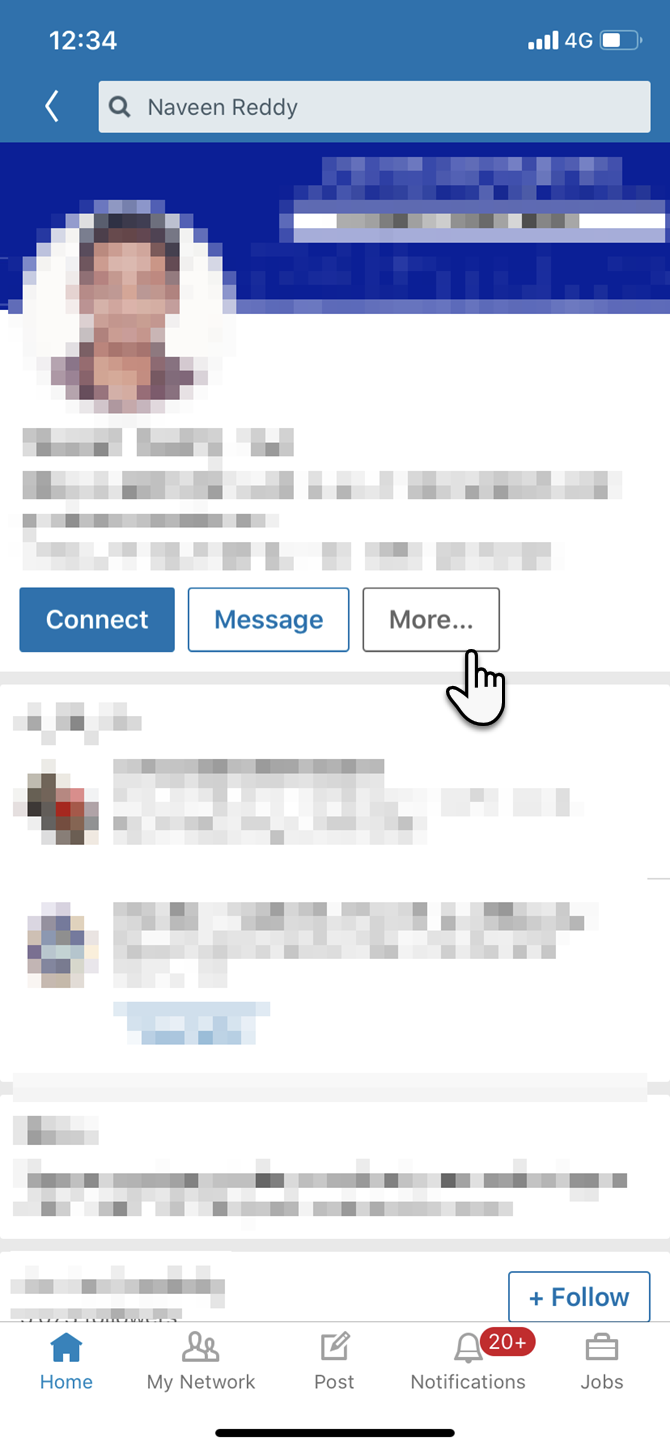
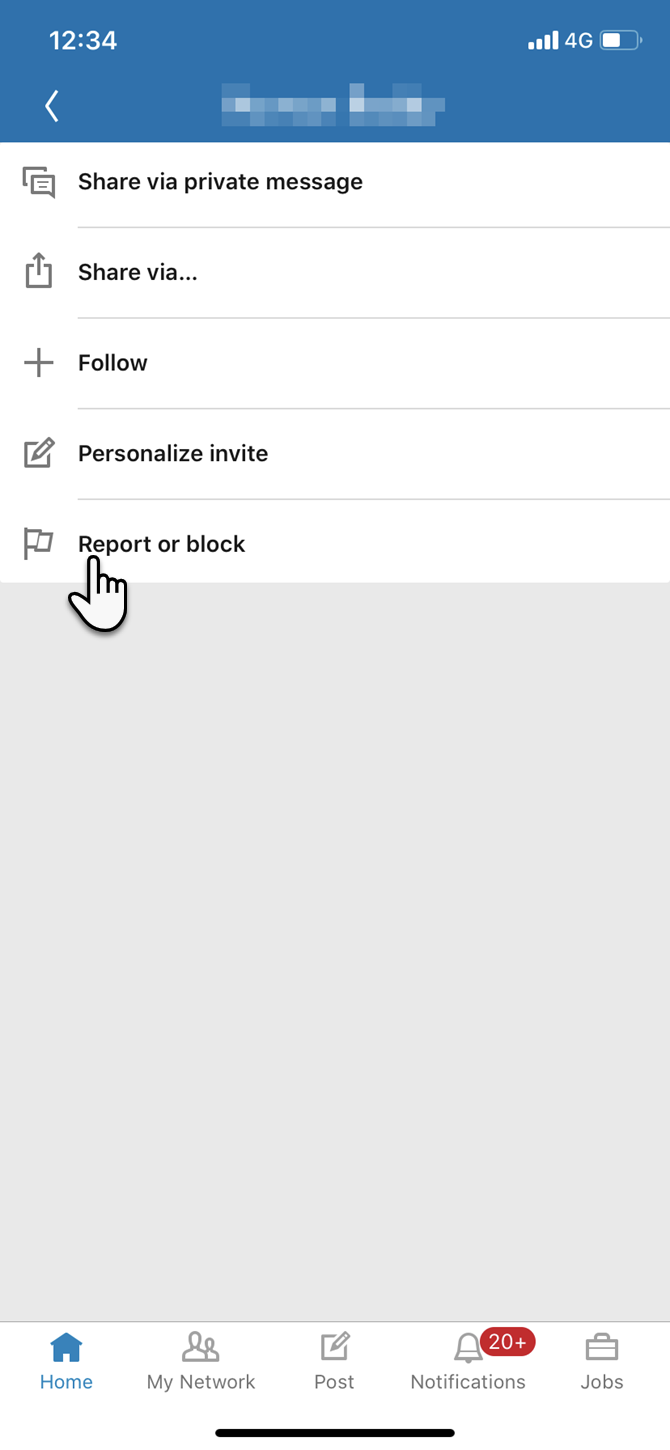
3. Click the More… button below the member’s profile picture. Select the Report/Block option from the list.

LinkedIn option to block someone

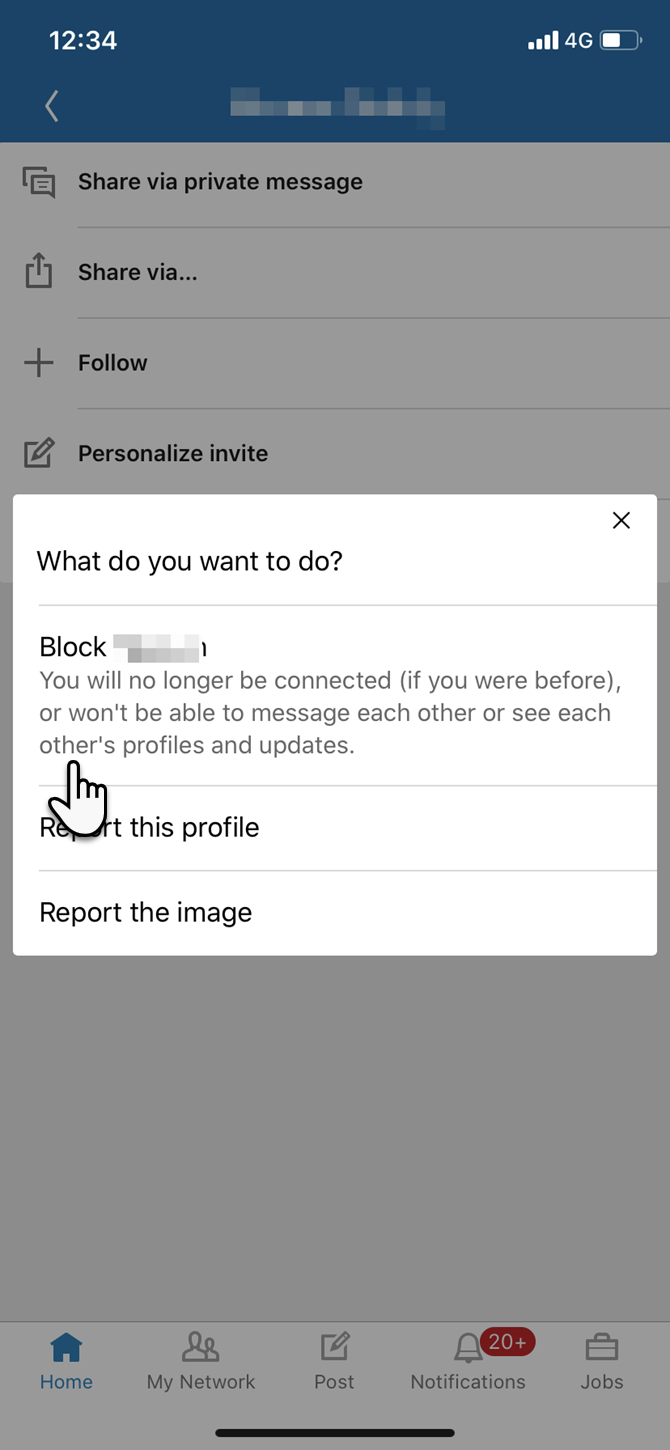
4. A box titled What do you want to do? appears and asks you to take a follow-up action from the three choices. Click on Block [Member Name].

LinkedIn asks you what do you want to do

5. A follow-up box confirms if “Are you sure you want to block [Name]?“. Read the fine print, and if you are OK with the result, click on the blue Block button. If not, you can click on Go Back.

That’s it. There’s no other notification. The member you have blocked also won’t receive an alert. LinkedIn says that you can block up to 1000 members on LinkedIn.

How to Unblock Someone on LinkedIn

If you want to unblock someone on LinkedIn, head to your LinkedIn Blocked List. This can also help you confirm you’ve successfully blocked someone. The Blocked list tells you how many contacts you’ve blocked and how long ago you blocked them.

  1. Click the Me icon at top of your LinkedIn homepage.
  2. From the dropdown menu, select Settings & Privacy.
  3. The Privacy tab opens in your personal settings page. Click Blocking and hiding on the left sidebar.
  4. Click Change next to Blocking on the list.
  5. From your blocked list, find the person’s name and click Unblock. Enter your LinkedIn log-in password in the box that pops up and click the blue Unblock member button.

Unblock a member from the LinkedIn Blocked List

LinkedIn says that after unblocking someone you’ll have to wait 48 hours before re-blocking them again.

How to Block Someone on the LinkedIn Mobile Apps

If you’re using the LinkedIn mobile apps the steps to blocking people are similar. Here’s how to block someone on LinkedIn using the iOS app…

  1. Search for and go to the profile of the person you’d like to block.
  2. Click on the More below the profile photo of your contact.
  3. Tap Report or block option on the screen.
  4. Tap Block [Name] in the dialog that says What do you want to do?
  5. Confirm it again in the next pop-up window with a tap on Block.

What Happens When You Block Someone on LinkedIn?

There are some important caveats worth noting when deciding whether to block someone on LinkedIn:

  • There won’t be a record of visits under Who’s Viewed Your Profile.
  • You won’t be able to access the blocked member’s profile on LinkedIn either.
  • Endorsements and recommendations from that member will be removed from your profile.
  • LinkedIn won’t suggest the names for People You May Know and People also Viewed.
  • LinkedIn Event notifications from either member will cease.
  • All shared content between you and the member will be erased.
  • Messaging between both members will be disabled.

The above limitations won’t matter if the connection is undesirable in the first place. But for any other relationship, you will have to weigh the pros and cons before you block someone.

If both of you belong to the same LinkedIn Group, the status of each individual member in the group depends on the Group Manager. That’s because they have the power to remove or block any member. You can choose to report a group member if they go against the group’s intent. Until then, both of you will be part of any group conversations.

Can Someone Still View Your Profile If You Have Blocked Them?

Yes, anyone can access your public profile. And it’s a no-brainer that someone who really wants to view your LinkedIn profile can just ask someone else to show it to them.

So, as well as following our LinkedIn profile tips to guarantee success, be sure to configure your privacy settings so that everyone can only see what you want them to see.

More LinkedIn Features You Should Be Using

There are many reasons to block someone on LinkedIn, and only you will know whether it’s the right thing to do. And while blocking someone isn’t the perfect solution to harassment and bullying, it’s a good option we’re glad exists.

The option to block someone on LinkedIn should help keep LinkedIn the professional networking platform it was designed to be. And there are plenty of other LinkedIn features you should be using.

Read the full article: How to Block Someone on LinkedIn


Read Full Article

How to Sleep Better With a Smart Home


sleep-better-smarthome

Insomnia is a surprising epidemic. Around 60 million Americans suffer from sleeplessness—though 50 percent frequently present symptoms—and its effects are wide-reaching. Insomnia is linked to depression, overdoses, and incidents on the road.

While there’s no cure-all fix for the condition, smart device can help you get more sleep each night. You can get better sleep by making a few simple changes around your house.

White Noise Generators

Hearing is different to listening. It’s why you might be used to traffic noise, but a dog barking keeps you on high alert. You can “tune out” of one but be alarmed by the other. Seth Horowitz writes, in The Universal Sense: How Hearing Shapes the Mind:

“There is no such thing as silence. We are constantly immersed in and affected by sound and vibration… And the reasons the constant thrumming doesn’t drive us all insane are the same reasons we get distracted by radio jingles and can’t read when the TV is on: we are good at choosing what we hear.”

This is where white noise comes in. It’s a constant frequency that acts as background noise. Your brain gets used to this and blends other sounds into the tone you’re already used to.

SNOOZ White Noise Sound Machine

SNOOZ White Noise Sound Machine SNOOZ White Noise Sound Machine Buy Now On Amazon $79.99

The SNOOZ White Noise Sound Machine is a fan-based unit—but don’t worry, you can still use it in winter as it doesn’t generate cold air. Its timer and variable tones allow you to customize the SNOOZ for adults, kids, and pets. Control it remotely through the accompanying app.

This includes a timer and “Nursery Calibration”, ideal for protecting babies and toddlers from excessive noise.

It looks like an Echo Dot or Google Nest Mini, so it’s light and compact. Once you’re accustomed to white noise, you can take it wherever you go.

Every Moment Counts White Noise Machine

Every Moment Counts White Noise Machine Every Moment Counts White Noise Machine Buy Now On Amazon $29.86

Every Moment Counts’ White Noise Machine produces white noise but is also a natural sound generator. These are perfect if you’re not keen on listening to something that sounds artificial.

This unit can generate 38 sounds, including birdsong, a train ride, pink noise (a deeper resonance than white), waves, a clock, and lullabies. Some—like the heartbeat or a dog barking—are superfluous or unsettling. The dripping water function might make you need the toilet. But this nonetheless offers amazing range and personalization.

Breathing Devices

Ever hear someone say they’ll sleep well after a long walk in the countryside? Natalie Dautovich, PhD, of the National Sleep Foundation, explains:

“Exercise helps, of course, but fresh air is a big factor. A decrease in temperature can lead to tiredness, and fresh air simulates a cooler environment… [T]here are a lot of positive associations between fresh air and relaxation, and when we feel relaxed and comfortable in our environment, we’re more likely to feel sleepy.”

You could also be victim to allergies, especially if you suffer from congestion during the night. Your breathing could be affected by dust particles, pollen, and mold, all of which may stop you relaxing in an evening.

AeraMax 300 Large Room Air Purifier

AeraMax 300 Large Room Air Purifier AeraMax 300 Large Room Air Purifier Buy Now On Amazon $248.90

The AeraMax 300 Large Room Air Purifier uses a High-Efficiency Particulate Air (HEPA) Filter to remove allergens, dust mites, and mold spores.

It also comes with an intensive mode to filter germs in flu seasons and pollen in the spring. This makes it ideal for anyone with breathing difficulties, as certified by the Asthma and Allergy Foundation of America.

LONOVE Dehumidifier

LONOVE Dehumidifier LONOVE Dehumidifier Buy Now On Amazon $45.99

The small LONOVE Dehumidifier is great for small bedrooms, bathrooms, or basements.

By keeping air moisture below 50 percent, it reduces the chance of mold, making a healthier environment for sleeping.

Yes, it’s tiny, but this makes it easily portable and quiet. Unlike some dehumidifiers, it emits less than 30dB, so can be used in children’s bedrooms. You can even put one in your wardrobe and it’ll slowly eliminate musty smells and slowly dry your clothes.

Temperature Control

You already know that it’s difficult to sleep if it’s too hot or too cold. Bill Bryson, in The Body: A Guide for Occupants, writes:

“Although our body temperature varies slightly throughout the day (it is lowest in the morning, highest in the late afternoon or evening), it stays within a decidedly narrow compass of 36 to 38 degrees Celsius. To avoid catastrophe, the brain has its trusty control centre, the hypothalamus, which tells the body to cool itself by sweating or to warm itself by shivering and diverting blood flow away from the skin and into the more vulnerable organs.”

Our body temperature reacts to the environment around us. Aim for your bedroom to be 16 to 18 degrees Celsius (that’s 60 to 65 degrees Fahrenheit).

Google Nest Thermostat

Google Nest Thermostat Google Nest Thermostat Buy Now On Amazon

It’s one of the best-known smart home devices. The Google Nest Thermostat is a self-learning unit which creates a heating schedule based on what temperatures you like and when you’re typically home.

The main selling point of a Nest is to save on energy bills. But it can also help you sleep by automatically regulating ambient room temperature. Of course, you can also alter settings remotely through the Nest app.

SwitchBot Hub Plus

SwitchBot Hub Plus SwitchBot Hub Plus Buy Now On Amazon $49.00

The SwitchBot Hub Plus isn’t designed solely for temperature control—pair it with any smart home appliance. That means you can use the SwitchBot app to control the lights, turn the TV on and off, and regulate the air conditioner.

Plan a schedule using programs like IFTTT, then decide which devices should be automated in different seasons. It means you can cool the bedroom in the summer while you’re binge-watching Netflix in the living room.

Plus the light-up cloud design looks fantastic.

Smart Home Lighting and Light Switches

Our bodies react to light. You get tired as the gloomier evenings draw in; you wake up earlier than usual as the sun shines through your blinds. It’s part of your internal clock known as the circadian rhythm, also controlled by the hypothalamus but affected by light exposure. The Sleep Council says:

“When we see light, our bodies assume it’s time to wake up. When it’s dark, we release melatonin which relaxes the body and helps us to drift off.”

Smart lighting affects your health. By attuning to your circadian rhythm, you regulate your sleep/wake cycle, so you’ll feel more energized during the day.

Philips Hue Starter Kit

Philips Hue Starter Kit Philips Hue Starter Kit Buy Now On Amazon $112.86

The biggest brand name in smart lighting can be intimidating. How do you even use it?

Just screw in one of the smart bulbs, download the free app, and connect the Hub to your router using an Ethernet cable or smart plug. You can use your phone to remotely turn your lights on, even if you’re not at home. You can dim them, set timers, and (depending on the bulb) change the color.

Each bulb is designed to last over 20 years.

If you or a youngster needs a night light, this is a good option as the Philips Hue Starter Kit bulbs can emit red light. A 2017 study by the University of Haifa found that “exposure to red light showed a very similar level of melatonin production” to when sleeping in total darkness.

Treatlife Smart Light Switch

Treatlife Smart Light Switch Treatlife Smart Light Switch Buy Now On Amazon $29.63

The Treatlife Smart Light Switch lets you control your lights from the comfort of your bed. Use the app on your smartphone or connect it to a voice assistant. You can also set a schedule so your house automatically lights up at the time you’re normally home from work.

There’s an Away Mode, reverting to a routine when you’re on vacation so no one knows you’re away.

The most useful addition is Group Control. Use these smart home light switches in every room then sync them. When you get into bed, Group Control lets you turn off every light in the house with one command. Just learn the distinction between a smart home light switch and bulb, so you make sure you’re opting for the right appliance.

How to Set a Sleep Timer Using Alexa

Can voice assistants help you sleep better? Many smart devices connect to voice assistants like Alexa. You don’t have to get up to adjust the Google Nest, for instance: just instruct Alexa to do it for you.

Voice assistants can also be used to relax in the evening by playing your favorite soothing music. Worried that it’ll continue playing after you’ve drifted off? It’s easy to set a Sleep Timer on Alexa. Simply say “Alexa, set a sleep timer for 60 minutes”, or however long you want it to continue.

After an hour has elapsed, it’ll switch off the music, audiobook, or podcast you’ve been listening to.

You can extend this afterwards if you’re still awake, of course. But if you want to stop the timer, say “Alexa, cancel sleep timer”.

How to Get a Better Night’s Sleep

Technology is often linked to insomnia. But gadgets aren’t always damaging:

  • White noise and natural sound generators help you ignore background noises.
  • Breathing devices purify the air in your bedroom, meaning you suffer less from allergens.
  • Temperature controllers help you regulate your body’s heat.
  • Smart home lighting aids your natural circadian rhythm.

In fact, if you’re suffering from sleeplessness, these apps track your nights and find out why you can’t drift off.

Read the full article: How to Sleep Better With a Smart Home


Read Full Article

What Is the Attention Economy? Here’s Why You Should Care


attention-economy

There is a currency, online and off, more valuable than cash. It’s even worth more than your data. What companies increasingly want (ours included) is your attention. How do we make money when you aren’t paying us, and why is this a big deal?

What Is the Attention Economy?

The attention economy isn't limited to the internet
Image Credit: taha ajmi /Unsplash

When we discuss economics, usually we talk about money. In a monetary economy, money is the resource that’s up for exchange. Providers offer goods for sale, and we buy them.

In the attention economy, the currency is our attention. We’re offered information that may be financially free, but we pay with our attention.

We all have a limited set of time to walk this earth, which makes our time inherently precious. Our attention is a scarce resource, and the question facing many businesses is how to obtain it. They’re not alone. Non-profits and political organizations alike also compete for our focus.

The tactics have changed over the years. From newspaper salespeople shouting on street corners to commercials we can’t skip and news feeds determined by algorithms, the efforts to capture our attention are ever-changing.

Who Coined the Phrase “Attention Economy”?

American psychologist and economist Herbert A. Simon receives credit as perhaps the first person to describe the dynamics at work in the attention economy. He noted that in an information-rich world, a wealth of information results in a poverty of attention.

Simon died in 2001, having won the Turing Award and the Nobel Prize in Economics over the course of his life. Around that time, other academics inspired by Simon’s perspective such as Michael H. Goldhaber and Thomas H. Davenport were coining the phrase “attention economy.”

Who Funds the Attention Economy?

Many companies produce content that attracts eyeballs, and other companies pay those companies for access to those eyeballs. Think of anything you read or watch that is ad-supported, such as this website.

Newspapers that don’t get enough subscriptions, radio stations with too few listeners, and TV shows that don’t bring in a substantial number of viewers all fail to attract ad dollars. They’re not generating enough attention.

The Attention Economy and the Web

Woman looking at phone while at computer
Image Credit: William Iven/Unsplash

Ad revenue is just one of many ways of bringing in revenue, but it is the default and most dominant approach taken on the web. These ads depend on different metrics and technologies than those used in other industries.

Direct Ads & Ad Networks

Some websites sell ads directly. They offer companies a dedicated place to advertise to their readers, such as a banner ad across the top or the down the side. Advertisers are experimenting with every more creative (or blunt) ways to get us to view their ads, such as preventing us from closing an advert until after a certain amount of time has passed.

Direct ads aren’t limited to traditional websites. Social networks often use this model. Facebook, Twitter, and YouTube make money selling ads to companies seeking to influence their millions or billions of users.

Many websites outsource the sales aspect to a third-party company. Google maintains one of the largest and most well-known of the networks: AdSense. Google provides websites with a short snippet of code to run on their website. Then Google connects ads with sites whose readers may be the most interested.

Cookies

Offline, ads tend to target publishers that appeal to a certain demographic. Companies looking to sell garden supplies place ads in gardening magazines. Want to sell car modifications? Try a racing channel.

On the internet, ads are less general. Thanks to tracking cookies and data generated through our online accounts, advertisers get to create detailed profiles specific to us. They can then serve us the ads we’re most likely to show interest in. If it feels like a certain ad is following you across the web, that’s because it is.

Page Views

Ads aren’t worth making if no one’s there to see them. How do advertisers know which websites can put their ads in front of eyeballs? Page views are the most prevalent metric companies use.

If a website receives millions of page views a month, then clearly people are looking. This has led to an internet culture driven on getting clicks, and all that clickbait headlines that entails.

Likes & Followers

Car beside a wall of graffiti that reads "All We Need Is More Likes"
Image Credit: Daria Nepriakhina/Unsplash

“Likes” are the positive affirmation users provide other users via built-in mechanisms such as the “Like” button on Facebook, the “Thumbs Up” on YouTube, and the “Heart” on Twitter. Receiving a large number of any of these measures is a way of indicating how much attention someone has received. Remember, if a certain number of people have liked something, even more have seen it.

Many of these likes come from people who follow someone else on social media, which keeps them informed on each new post. The number of followers gives an indication not only how much attention someone has received, but from how many people.

Issues Raised By the Attention Economy

Many of the contentious issues of our time are in part a direct result of the attention economy.

A Lack of Privacy

Prior to the web, the most specific information publishers could provide was perhaps an address and a phone number. Instead, they provided advertisers with general demographic data. Here is the area we serve. This is the average age of our viewers. This is how much money our readers tend to make.

Websites have more powerful tools at their disposal. Cookies can track an individual around the web and see which sites they visit. When you create an account, you give a website permission to log everything you do.

Companies claim this data is anonymous, but it’s easy enough for someone whose motivated to trace much of this information back to you.

Fake Ads, Polarization, and Outrage Culture

Endless arguments, the echo chamber, and misleading political ads clearly serve a disservice to our communities, democracies, and public discourse. Yet with so many people using and engaging with ads on social networks, it serves an enticing place for advertisers to grab your attention.

Social networks like Facebook and Twitter are decentivized from reducing outrage on their platforms (though Twitter has decided to stop accepting political ads). Outrage generates views, clicks, and more time spent on the site engaging in lengthy arguments and writing long diatribes.

YouTube’s algorithm is known to polarize people’s views, with each recommendation sending people further down the rabbit hole. Yet as long as people keep watching, that’s money in the bank.

For as long as there have been people, there have been disagreements. But the modern attention economy gives this difference a million microphones and generates profits from the noise that ensues.

Technology Addiction

Websites can see exactly which stories draw the most clicks or hold peoples’ attention the longest. With this data, we can better tune our content, making it harder for people to look away. The result is that people often don’t, at least not until they’ve already spent an hour or two more than they intended.

Online streaming services go even further. They analyze all the music or videos that we watch, compare them with others, and offer up recommendations tailored to our interests. Mobile games dish out notifications every few hours or days to draw you back in, just in case you were thinking of something else.

Peoples’ addiction to social media, online video, reading the news, and other online behavior isn’t an accident. This tech addiction is actively cultivated.

Do I Have Your Attention?

The attention economy is a complex ecosystem, where attention is more valuable than cash (typically, but not always, because attention leads to more cash). Who pays in this ecosystem?

  • You pay with your attention. Information sources compete for that attention in ever more intrusive and addictive ways.
  • Companies pay cash for that attention, whether to reach you with an advert or to turn your attention into a form of data-gathering.

The attention economy has enabled much of the web to happen. There are problems with the model, but with it generating so much wealth throughout the developed world, we can expect companies to try even more pervasive ways of grabbing our attention in the years ahead.

So you might want to get your hands on a time tracker to regain control of your time.

Read the full article: What Is the Attention Economy? Here’s Why You Should Care


Read Full Article

Absorb Essential Business Knowledge via Bitesize Book Summaries With Readitfor.me


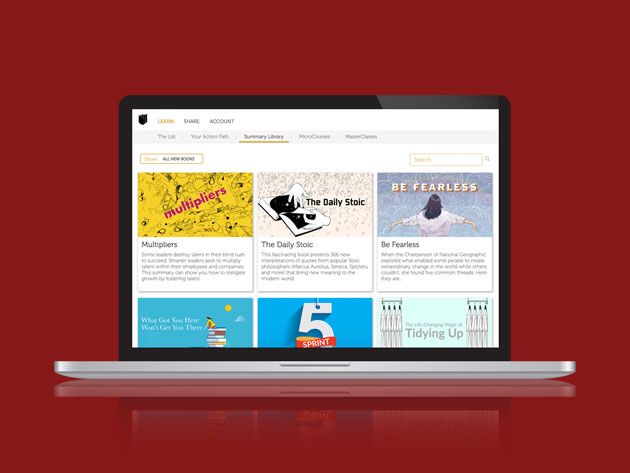
In order to be successful in business, you need to stay ahead of the curve. Reading is a great way to learn about new ideas, but it takes time. If you want to absorb the same knowledge faster, Readitfor.me can help. This online library has condensed some of the great business books ever written into bitesize summaries that take just minutes to read. You can currently pick up lifetime membership for just $99.99 at MakeUseOf Deals.

Faster Reads

In business, knowledge is very valuable. Just to keep your staff motivated and the sales flowing requires an understanding of market forces, financial figures, and human psychology.

If you want to gain this level of insight, Readitfor.me is a great resource. Used by top CEOs, the platform offers a selection of over 300 book summaries. Focused on business, the library covers topics such as productivity, communication, management, and more. You will find both recent best-sellers and all-time classics, with 100 new books added every year.

Each summary takes just a few minutes to read, but it includes all the key ideas from the original title. In addition, you can watch a short animation to fix the takeaways in your mind.

Lifetime Access for $99.99

Worth $840, lifetime membership to Readitfor.me is now only $99.99 with this deal.

Read the full article: Absorb Essential Business Knowledge via Bitesize Book Summaries With Readitfor.me


Read Full Article

6 Best Websites to Find New, Trending, and Weird Memes


meme-sites

Memes have become a unique type of language on the internet, letting people express opinions in a short but funny image. And like any language, it’s constantly evolving. If you want to know the latest memes or find unique ones, you’ve come to the right place.

You can’t escape memes on the internet anymore. Unless you want to be “Ok Boomer”-ed, it’s better to dive into the world of memes and learn what they represent. If you’re absolutely new to the whole thing, read our beginner’s guide to understand what is a meme, complete with some illustrative examples.

1. Know Your Meme (Web): Understand Any Meme

Know Your Meme is the unofficial dictionary and encyclopedia of the internet

The unofficial encyclopedia of memes, Know Your Meme has been around for 10 years. But we still think it’s worth mentioning in a guide like this because of just how far above the rest it is. It is still the best way to find the meaning of any meme.

For any meme, you will get a complete explanation of what it means and how it’s used, along with a whole lot of available information about it. Users search the origins of a meme by who used it first, as well as incidents that caused it to spread virally. You also get its most famous uses, like how a politician in New Zealand used “Ok Boomer” in Parliament.

The frontpage of Know Your Meme regularly gathers the newest memes being used on the internet, as well as new information about popular memes. This is the “meme dictionary” to look up any meaning.

2. Me.me (Web): Best Website to Browse and Search Memes

Me.me is the best website to find new and trending memes as well as meme news

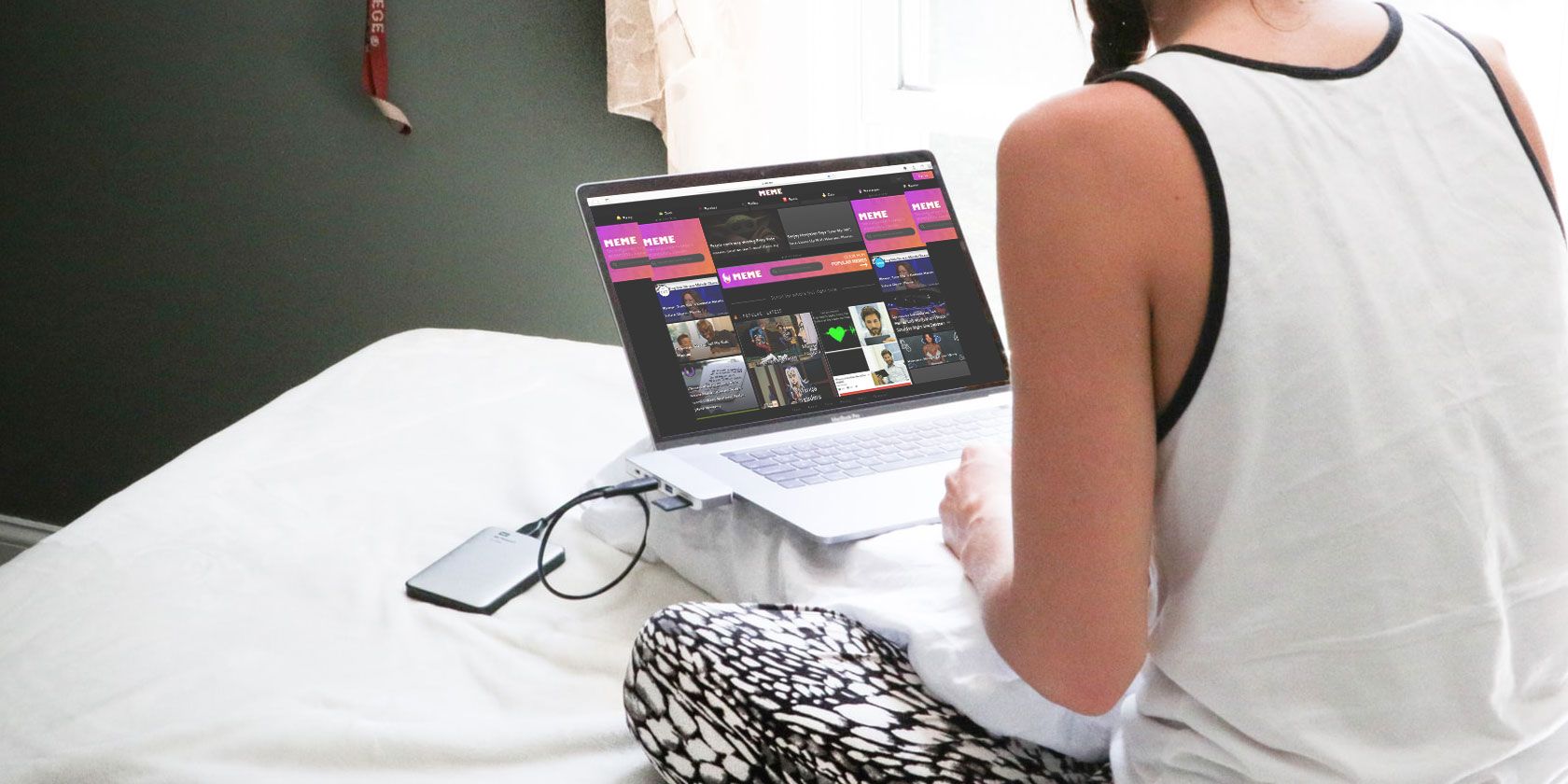
Me.me is a great website to the latest and greatest memes on the internet in one place or sorted by categories like funny, dank, politics, and sports. Just start scrolling on the main page and you’ll find an endless supply of hilarity.

If you create an account, the website lets you save favorite memes to use later or download. Some of the memes are original, while several are taken from other popular meme makers, aggregators, and Tumblr pages.

Plus, you can also get some meme news. Quite a few media websites cover meme news these days, both about why a meme was formed or how it’s become a part of the zeitgeist. It’s a great way to stay on top of what’s happening in the world of memes.

3. Top Fifty Memes (Web): Reddit’s Top 50 Memes Daily

Top Fifty Memes lists Reddit's top 50 memes across meme subreddits every day

The most frequent use of memes is on online message boards and forums. Where else will you find the best new memes than the internet’s largest community board, Reddit. Top Fifty Memes scans the most popular meme-based subreddits to find what’s trending.

Every day, the website goes through subreddits like r/memes, r/dankmemes, r/wholesomememes, r/me_irl, and others. A meme counts only once even with multiple posts or reposts. The algorithm assigns points to each meme based on popularity and upvotes. When it’s all calculated together, you get the top 50 memes on Reddit every day.

It’s another great way to find the best posts and recommendations on Reddit. Check this page and you’re almost guaranteed to be the first to share a new meme or be able to say, “Ho hum, seen it already!”

4. Meme of the Decade (Web): Vote Now to Decide the Best Meme of the 2010s

Vote now to decide what's the best meme of the decade 2010 to 2020

We’re drawing to the end of 2019. The internet has grown a lot more since 2010, and with it, so have the number of memes. Before the new decade starts, let’s vote and find out what the best meme of the decade is.

The voting is like a quiz from a messenger bot. It shows you three options for memes in a group, without telling you what the category is. Pick your favorite and keep going. It’s a pretty long quiz, so make sure you have some free time on your hands. The quiz issues updates when you reach 25%, 50%, and 75%, so you aren’t wondering how long it’s going to take.

It can be a fun way to spend 15-20 minutes with friends, or just to take a trip down memory lane. And as a bonus, you can have a voice in ensuring your favorite is the meme of the decade. I’m hoping it’s going to be the twin 60s Spider-men.

5. This Meme Does Not Exist and Slowmeme (Web): AI-Generated Memes

This Meme Does Not Exist uses AI to generate captions for memes, much like Slowmeme

Artificial intelligence can now create images all on its own. It’s among the coolest new things AI can do. And as you might expect from the great minds on the web, someone on the internet used this power to have AI create memes. Not once, but multiple times.

Slowmeme is entirely text-based. Choose a meme or let it pick one at random.

Give it a title. And then Slowmeme’s AI will create a caption based on the title and superimpose it on the meme image. People can vote on the memes on the site and on its subreddit, all of which lets you browse the best AI-generated memes.

ImgFlip is a well-known online meme creator and image editor.

This Meme Does Not Exist is a feature within the web app. It creates captions using a deep artificial neural network, which leans from the 48 most popular meme templates. You can add prefix text if you want, or let it go wild on the meme you pick. Be warned, it can use vulgar language.

6. Memefy This (Chrome): Fastest Meme Maker for Any Image

Memefy This is the fastest meme maker extension on Chrome

You can make a meme out of almost any image you see online these days. And if love memes, then Memefy This is the fastest way to make a meme on Chrome. It works with any image larger than 320×240 pixels, and you can download the edited image to your drive.

After you install the extension, right-click any image in the browser and choose Memefy This. The image will open in a pop-up with options to add text to the top and bottom. You can change the text size as well as its alignment, but not the font. It’s a pity because the serif font looks odd for memes, but hey, it’s still free and super quick.

Of course, if you really want to make an impact, it helps to use advanced tools and pay attention to detail. That’s why we put together a little guide on how to make a meme that goes viral.

Download: Memefy This for Chrome (Free)

Best Meme Generators

Once you have ways to discover trending memes and find out what they mean, the next step is to make your own memes. That’s the best way to participate in the fun. And there are plenty of websites and apps which make this as easy as possible for you.

Meme generators make it much easier since you get popular meme images as ready-to-use templates, with powerful editing options. For browser or mobile apps, check out some of the best free meme generators on the internet.

Read the full article: 6 Best Websites to Find New, Trending, and Weird Memes


Read Full Article