04 October 2013

Be First In Line To Buy A Nexus 5 With Four Easy Tips And Tricks


nexus-5

Want an absolute bullet-proof strategy for getting a Nexus 5? The Nexus 4 debacle taught us that the Nexus line of smartphones sells out quick. So how can you guarantee getting one without waiting months? You need a systematic approach. After testing methods for getting my Nexus 4 in February this year, I learned what works and what doesn’t: You want to use multiple methods for redundancy. First, you need software that provides instantaneous alerts. Second, you will need web automation software, such as IFTTT, to receive either SMS or email notifications when the latest Nexus goes on sale. Unfortunately,...


Read the full article: Be First In Line To Buy A Nexus 5 With Four Easy Tips And Tricks


Pocket For Web Gets Redesigned, Adds Keyboard Shortcuts


Pocket-for-Web-Redesign-Keyboard-Shortcuts-Bulk-Edit

Pocket, formerly known as Read It Later, is the ultimate digital bookmarking service in our opinion. And the Web version of the app has just got a major update that includes a few redesigned elements, new features and under-the-hood tweaks that improve the speed of downloading lists and loading images. Pocket is focusing on reducing visible elements with this update and has removed the navigation bar at the bottom of the screen to include its elements in the top bar. Now, the toolbar is all you need for all actions. Pocket also includes Retina-compatible images to make it a beautiful...


Read the full article: Pocket For Web Gets Redesigned, Adds Keyboard Shortcuts


Fix: The File Is Too Large For The Destination File System


CLICK HERE TO SEE FULL POST


This past Sunday, while transferring a couple of files from my friend’s PC to my USB flash drive, I got an error saying that The file Ubuntu.vdi is too large for the destination file system. My USB flash drive’s capacity is 16GB (actual capacity is 14.9 GB) and the size of the file in question […]

Add Shortcuts to Web Apps in Chrome for Android


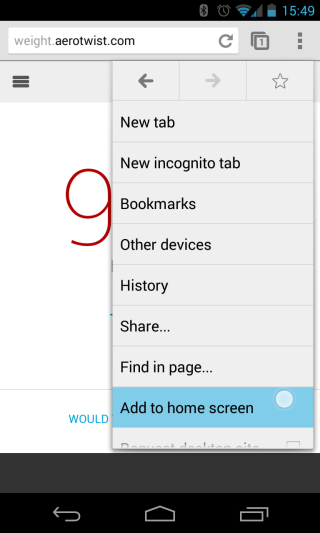
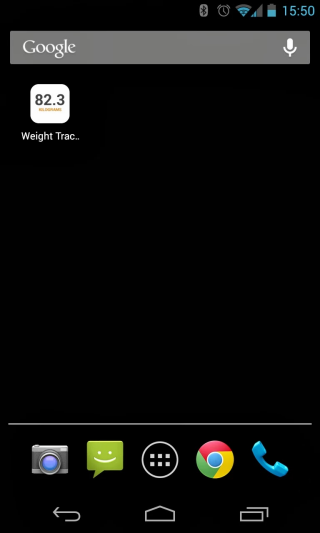
The latest release of Chrome Beta for Android lets you add to the home screen a shortcut to the page you're currently visiting. Until now, you had to bookmark the page, go to the new tab page, long tap the bookmark and select "add to home screen". If you use the latest Chrome Beta, you can open the Chrome menu and tap "add to home screen".


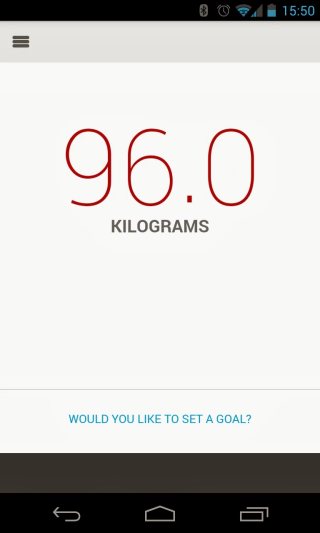
There's even a bonus feature: "Sites launched in this way will open in a normal Chrome for Android window, unless they include the mobile-web-app-capable meta tag. Those sites will instead open in a special fullscreen Chrome for Android window that doesn't display tabs, buttons, menus, or the Omnibox. Try adding a shortcut to weight.aerotwist.com to see this in action."


This is a good news for web apps fans and it's nice to see that a feature that was available in iPhoneOS 1.0 finally finds its way to the mobile Chrome. Unfortunately, Chrome for iOS won't add a similar feature because third-party iOS apps can't add shortcuts.


Another new feature integrates Chrome with Google Wallet. "requestAutocomplete() makes it easier for users to fill out online forms by offering web developers programmatic access to the browser's autocomplete information (with the user's explicit permission). For this first release, we've made it work for web payments. On sites with requestAutocomplete(), users will be able to either use their existing payment data stored with the browser or enter new details through a browser-provided interface." This works in Chrome Beta for Android, Windows, and Chrome OS.

Google Now Updates for Notable People


After adding support for reminders about the latest releases from your favorite music artists and actors, Google Now lets you subscribe to updates when you search for notable people. Just click "Keep me updated" in the Knowledge Graph card from Google's search results page and you'll get the latest news articles about that person in Google Now.


Google Now also shows cards for "breaking news and other developing stories you may be interested in", based on your web history.


It's not clear if the new updates feature will replace the reminders feature. Right now, a search for [U2] shows "Remind you about new releases", while a search for [Madonna] shows "Get updates about Madonna".


"Keeping up with the latest information about your favorite musicians, movie stars and other notable people just got easier thanks to the Knowledge Graph and Google Now," informs Google. "Say that you're a Lady Gaga fan and like staying informed about her latest album releases. On the Google Search App, search for [lady gaga]. On the card that pops up, tap 'Remind you about new releases?' and Google Now will keep you updated on your phone or tablet. Similarly, use Google Now to stay in the know about your favorite athletes. For example, search for [colin kaepernick] and tap 'Get updates about Colin Kaepernick' on his card; doing so lets Google Now know that you'd like to receive news. Remember that to use this feature, you'll need to be signed into your Google account on the Google Search App."


Well, I don't see 'Remind you about new releases?' when searching for [Lady Gaga].


YouTube Updates Center-Aligned UI, Adds Carousel


YouTube tests a new interface that uses carousels on the homepage, so it can show more videos from a channel. It's another version of the center-aligned layout, which uses a persistent header, a guide sidebar that's visible only when you click "Guide" and a card-style interface.


Here's how you can enable the experimental feature. If you use Chrome, Firefox, Opera, Safari or Internet Explorer 8+:


1. open youtube.com in a new tab


2. load your browser's developer console:


* Chrome or Opera 15+ - press Ctrl+Shift+J for Windows/Linux/ChromeOS or Command-Option-J for Mac


* Firefox - press Ctrl+Shift+K for Windows/Linux or Command-Option-K for Mac


* Internet Explorer 8+ - press F12 and select the "Console" tab


* Safari 6 - if you haven't enabled the Develop menu, open Preferences from the Safari menu, go to the Advanced tab and check "Show Develop menu in menu bar". Close Preferences and then press Command-Option-C to show the console.


* Opera 12 - press Ctrl+Shift+I for Windows/Linux or Command-Option-I for Mac, then click "Console".


3. paste the following code which changes a YouTube cookie:


document.cookie="VISITOR_INFO1_LIVE=lnq3tYnrDNU; path=/; domain=.youtube.com";window.location.reload();


4. press Enter and close the console.


To go back to the regular interface, use the same instructions, but replace the code from step 3 with this one:


document.cookie="VISITOR_INFO1_LIVE=; path=/; domain=.youtube.com";window.location.reload();


{ Thanks, Rubén. }

Google Starts Analytics Academy To Teach People About Google Analytics


Morguefile-Caprisco-News-1680x840

If you are a website owner, you know that understanding who has been visiting your site, where they are from, and what pages they looked at (and for how long) is absolutely essential if you are to have any hope of growing and developing your online presence. If you have no idea who your site visitors are, then you are walking blindfolded. The tool that most people turn to, in order to achieve this knowledge, is Google Analytics. But I can attest from personal experience that Google Analytics is not the easiest site to understand and navigate. If you are...


Read the full article: Google Starts Analytics Academy To Teach People About Google Analytics


03 October 2013

Google Starts Analytics Academy To Teach People About Google Analytics


Morguefile-Caprisco-News-1680x840

If you are a website owner, you know that understanding who has been visiting your site, where they are from, and what pages they looked at (and for how long) is absolutely essential if you are to have any hope of growing and developing your online presence. If you have no idea who your site visitors are, then you are walking blindfolded. The tool that most people turn to, in order to achieve this knowledge, is Google Analytics. But I can attest from personal experience that Google Analytics is not the easiest site to understand and navigate. If you are...


Read the full article: Google Starts Analytics Academy To Teach People About Google Analytics


How To Spell Check A Document Without A Word Processor


spell-check

Still copying text into Word so you can check your spelling? Stop. It’s 2013, and spell check is built into everything from browsers to PDF readers. Old habits die hard, and when it comes to computers, it might mean you’re working harder than you need to. For a long time word processors like Word were the only programs on a computer to feature built-in spell check, meaning copying text to and from them was the quickest way to check for obvious mistakes. That’s been over for a while, however. Here’s how to check your spelling in your browser, PDF files...


Read the full article: How To Spell Check A Document Without A Word Processor


Google Buys Flutter, Gesture Recognition App


Google acquired Flutter, a startup that built a software that lets you control music and movies with gestures. The desktop software uses your computer's webcam to detect your gestures. "Just put your hand up to stop the media playback, point your thumb right for 'next' and left for 'previous'," reports ArsTechnica.


You can still download the apps for Windows and Mac OS X. The software supports media players like iTunes, Windows Media Player, Winamp, Spotify, VLC, but also sites like YouTube, Netflix and Pandora using a Chrome extension.


Gestures are intuitive, but detection didn't work that well for me.


Flutter's comic-style site asks users to join "the fight against unnatural user interfaces".


"When we started three years ago, our dream to build a ubiquitous and power-efficient gesture recognition technology was considered by many as just 'a dream', not a real possibility. Since then, we have strived to build the best machine vision algorithms and a delightful user experience. Today, we are thrilled to announce that we will be continuing our research at Google. We share Google's passion for 10x thinking, and we're excited to add their rocket fuel to our journey," wrote Navneet Dalal, Flutter's CEO.


From touch interfaces, voice-driven user interfaces to gesture recognition, object recognition, facial recognition and biometric scanning, it looks like computers will change dramatically and natural user interfaces will make computers disappear into the background. Xbox Kinect, Google Glass, smartwatches and other wearable computers, flexible screens are probably just the beginning.

How To Upgrade Windows XP To Windows 8.1 By Keeping Personal Files


CLICK HERE TO SEE FULL POST


While Windows 8.1 is a free update for existing Windows 8 users and one can upgrade Windows 8 installation to Windows 8.1 without losing installed apps, PC users who’re running an older version of Windows can’t directly upgrade to Windows 8.1 update. Even though Windows 7 users will be able to upgrade to Windows 8.1 […]

You Don’t Know It All: 10 Amazing Tech Hacks You Can Find On Reddit


reddit-best-technology-hacks

Recently, we showed you 10 amazing technology ideas you could find on Pinterest. But over the past couple of years, Reddit has become the go-to place to share life hacks, whether it’s on the LifeProTips subreddit, the LifeHacks subreddit or other topics where such cool posts pop up. Among those, the ones to do with technology can get lost in a sea of constant updates, comments, and posts. We scoured through the site to come up with 10 amazing tech hacks you probably didn’t know about. Make an autocorrect shortcut on your phone for your email address Lots of mobile...


Read the full article: You Don’t Know It All: 10 Amazing Tech Hacks You Can Find On Reddit


Using VBA To Automate Internet Explorer Sessions From An Excel Spreadsheet


browser

Its integration with Windows allows control of Internet Explorer in a number of surprising ways using Visual Basic for Applications (VBA) script from any application that supports it, such as Word, Outlook or Excel. VBA automation – especially directly automating a browser like IE as you’ll see in this article – is exactly the sort of thing that elevates VBA from a convenient programming script into a powerful automation language. What makes it so awesome is the fact that many applications with controls or objects are created simply for the purpose of allowing you to integrate into it using the...


Read the full article: Using VBA To Automate Internet Explorer Sessions From An Excel Spreadsheet


Scribd And HarperCollins Launch All-You-Can-Read Book Subscription Service For $8.99/m


Scribd-Harper-Collins-netflix-for-books-subscription-service-digital-library

Popular document sharing and embedding service Scribd is getting into the digital book distribution market with the launch of a new subscription service. The company has teamed up with one of the five biggest publishers in the world, HarperCollins Publishers, which will be offering a significant amount of its catalogue to subscribers. Scribd — the new service and the original web app have the same name — costs $8.99 per month and can be accessed on iPhone, iPad, Android and Web browsers. This has been tested for the past 9 months through a beta program, but is now being launched...


Read the full article: Scribd And HarperCollins Launch All-You-Can-Read Book Subscription Service For $8.99/m


Fruumo Is The Minimalistic New Tab Page You’ve Been Looking For


fruumo-featured.jpg

New tab page extensions, can you ever get enough of them? The only problem with these new tab page extensions, especially on Chrome, is that there are tons of them, and many of them are actually really good. As a user, you need to find the one that’s perfect for you, and once you do, you’re free to enjoy the best new tab page you can possibly imagine. How do you find that perfect match in the vast sea of opportunities? You read about it on MakeUseOf, of course! I told you about a great one called OneFeed just a...


Read the full article: Fruumo Is The Minimalistic New Tab Page You’ve Been Looking For


Desktop Gadgets Reviver: Awesome Gadget Pack For Windows 8.1 With Close To 1000 Gadgets


CLICK HERE TO SEE FULL POST


Microsoft has discontinued Desktop Gadgets feature in Windows 8 and Windows 8.1 releases due to some serious vulnerably in Windows desktop sidebar platform. In Windows 8 and 8.1 versions, gadgets like Calendar and Weather have been replaced with built-in apps that show information on the Start screen in real-time. Users who aren’t very serious about […]

Restrict Chrome's Omibox Suggestions to Web Searches


What to do if you only want to see web search suggestions in Chrome's omnibox, not suggestions from Google's top results, your bookmarks, your browsing history or previously typed URLs. Type ? in the omnibox and then start typing your query. You can also use these keyboard shortcuts: Ctrl+K or Ctrl+E for Windows and Linux, ⌘-Option-F for Mac.


Chrome will still show suggestions from your previous searches. If you use this trick in the incognito mode, Chrome will only show suggestions from your search history.

Add a Keyboard Shortcut for Chrome's App Launcher


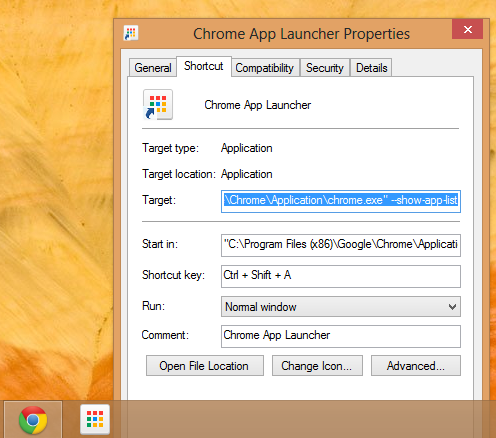
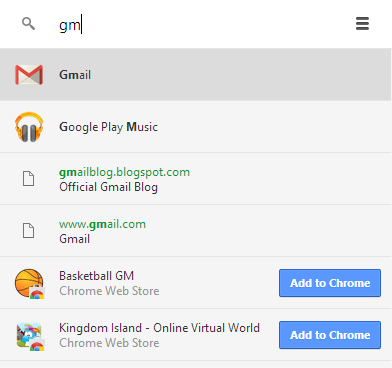
I'm not sure why Chrome's app launcher doesn't have a keyboard shortcut, but it's pretty easy to add one. If you use Windows 7 or 8, press Shift while right-clicking the colorful grid icon from the taskbar, select "Properties", go to the "Shortcut key" field and enter a keyboard shortcut. I picked Ctrl+Shift+A.


Now I can just press Ctrl+Shift+A and the launcher will show up. I can type a Google query, the first letters from a Chrome app or just use the arrow keys to pick an app.


Google now even shows suggestions from the Chrome Web Store, so you can quickly install apps without visiting the store. I wouldn't recommend doing that, unless you really trust the app. For example, you can search for "gmail" and quickly install Gmail Offline.

Who Should Replace Steve Ballmer As Microsoft CEO? [We Ask You]


Within the next 12 months Steve Ballmer is going to retire as CEO of Microsoft and likely to be never seen again. I doubt he’ll do a Bill Gates and use his money and fame to do good deeds, but stranger things have happened. Having already asked how do you feel about Ballmer’s departure and where should Microsoft head next, it’s time to get down to real business. Ballmer has already bid a fond farewell to the Microsoft faithfuls, his tearful goodbye being captured forever on the Weird & Wonderful Web. After a Goodbye often comes a Hello, and someone...


Read the full article: Who Should Replace Steve Ballmer As Microsoft CEO? [We Ask You]


4 Windows Media Player Alternatives for Windows 8


xbox video app splash screen

Windows Media Player is outdated on Windows 8. Oh sure, it’s still there, but it’s only available on the desktop and hasn’t seen any meaningful updates. Windows Media Player is also missing in action on Windows RT, even though most other desktop programs that come with Windows are included. If you have a Windows 8 tablet, you’ll want to use a Modern app from the Windows Store instead of Windows Media Player. If you want to watch video files, be sure they’re located in the Videos library — or another library — on your Windows 8 system. Modern apps won’t...


Read the full article: 4 Windows Media Player Alternatives for Windows 8