27 March 2020

The Zoom Keyboard Shortcuts Cheat Sheet for Desktop


Video conferencing on the web

With a steep rise in remote working all over the world, the video conferencing tool Zoom is gaining users rapidly. It enables teams to organize and conduct online meetings with ease.

If you use Zoom for remote communication, the cheat sheet below can be of great help. It contains keyboard shortcuts to help you use the Zoom interface effortlessly for group messaging and video calling.

The cheat sheet covers shortcuts for both Windows and macOS platforms. Many of the Windows shortcuts work on Linux too.

With the shortcuts listed, you can join and schedule meetings, share your screen, switch between various views, toggle various elements in the Zoom interface, and do a lot more.

(If you’re new to Zoom, you might appreciate a quick lesson on how to use Zoom for online meetings.)

FREE DOWNLOAD: This cheat sheet is available as a downloadable PDF from our distribution partner, TradePub. You will have to complete a short form to access it for the first time only. Download The Zoom Keyboard Shortcuts Cheat Sheet.

The Zoom Keyboard Shortcuts Cheat Sheet

Shortcut Action
Windows

General
F6 Move between Zoom popup windows
Ctrl + F Search
Alt + F Enter/exit full screen mode
Alt + L Toggle between Portrait view and Landscape view
Alt + F4 Close current window
Chat Controls
Ctrl + T Jump to chat with someone
Alt + Shift + T Take a screenshot
Ctrl + Up Go to previous chat
Ctrl + Down Go to next chat
Ctrl + W Close current chat session
In-Meeting Shortcuts
Alt + I Open Invite window
Alt + A Mute/unmute audio
¹Alt + M Mute/unmute audio for everyone except host
Alt + V Start/stop video
Alt + N Switch camera
²Alt + Shift + S Start/stop screen sharing
²Alt + T Pause/resume screen sharing
Alt + R Start/stop local recording
Alt + C Start/stop cloud recording
Alt + P Pause/resume recording
Alt + F1 Switch to Active Speaker view
Alt + F2 Switch to Gallery view
Ctrl + 2 Read active speaker name
Alt + U Show/hide Participants panel
Alt + H Show/hide Chat panel
Ctrl + Alt + Shift Move focus to meeting controls
Ctrl + Alt + Shift + H Show/hide floating meeting controls
Alt + Y Raise/lower hand
PageUp View previous page of video participants in Gallery view
PageDown View next page of video participants in Gallery view
Alt + Shift + R Begin Remote Control
Alt + Shift + G Revoke Remote Control permission
macOS

General
Cmd + J Join meeting
Cmd + D Schedule meeting
Cmd + Control + V Start new meeting
Cmd + Control + S Share screen
Cmd + F Search
Cmd + Shift + F Enter full screen mode
Esc Exit full screen mode
Cmd + Shift + M Enter/exit Minimal view
Cmd + L Toggle between Portrait view and Landscape view
Cmd + W Close current window
Chat Controls
Cmd + K Jump to chat with someone
Cmd + T Take a screenshot
Cmd + + Increase chat display size
Cmd + - Decrease chat display size
In-Meeting Shortcuts
Cmd + I Open Invite window
Cmd + Shift + A Mute/unmute audio
¹Cmd + Control + M Mute audio for everyone except host
¹Cmd + Control + U Unmute audio for everyone except host
Cmd + Shift + V Start/stop video
Cmd + Shift + N Switch camera
Cmd + Shift + S Start/stop screen sharing
Cmd + Shift + T Pause/resume screen sharing
Cmd + Shift + R Start/stop local recording
Cmd + Shift + C Start/stop cloud recording
Cmd + Shift + P Pause/resume recording
Cmd + Shift + W Toggle between Active Speaker view and Gallery view
Cmd + 2 Read active speaker name
Cmd + U Show/hide Participants panel
Cmd + Shift + H Show/hide Chat panel
³Control + \ Show/hide meeting controls
Option + Y Raise/lower hand
Control + P View previous page of video participants in Gallery view
Control + N View next page of video participants in Gallery view
Control + Shift + R Begin Remote Control
Control + Shift + G Revoke Remote Control permission
Cmd + W Prompt to leave/end meeting
¹Shortcut is available only if you’re the host.

²Shortcut works only when meeting controls toolbar has focus.

³Shortcut is available only if Always show meeting controls checkbox is enabled under Settings > Accessibility. The checkbox is enabled by default.

Keep Zoom Up to Date

Zoom and similar apps give you a simple way to make group calls for free. But they’re not without a few vulnerabilities, so you’ll need to know how to secure your video conferencing software.

Read the full article: The Zoom Keyboard Shortcuts Cheat Sheet for Desktop


Read Full Article

Stocks shoot upward as ‘Phase Three’ stimulus passes Senate and unemployment skyrockets


Stocks soared on Thursday even as the U.S. reported its worst unemployment numbers in 50 years of tracking data.

The pain felt on main street was offset for investors by the federal government opening its wallet to Wall Street, businesses and (at some point) workers in the form of the $2 trillion stimulus package designed as a response to business closures as a result of the COVID-19 epidemic.

Details of the plan and its implications for startup companies are still being assessed, but the spigot is now on for businesses large and small to avail themselves of low interest stimulus loans and financing that should keep them afloat even as prolonged shutdowns look to continue in the nation’s most populous cities.

Here’s the tale of the tape:

  • Dow Jones Industrial Average: jumped 6.38%, or 1,351.62 to close at 22,552.17
  • S&P 500: popped 6.24%, or 154.51, to close at 2,630.07
  • Nasdaq Composite: bounced 5.60%, or 413.24, to close at 7,797.54

Tech stocks followed the broader markets and posted gains on the day. Facebook was up nearly 4.5% and Alphabet (Google’s parent company) was up 5.5%. Shares of Apple were up over 5% as well and Amazon rose 3% on the day.


Read Full Article

Prisma Health develops FDA-authorized 3D-printed device that lets a single ventilator treat four patients


The impending shortage of ventilators for U.S. hospitals is likely already a crisis, but will become even more dire as the number of patients with COVID-19 that are suffering from severe symptoms and require hospitalization grows. That’s why a simple piece of hardware newly approved by the FDA for emergency use – and available free via source code and 3D-printing for hospitals – might be a key ingredient in helping minimize the strain on frontline response efforts.

The Prisma Health VESper is a deceptively simple-looking three-way connector that expands use of one ventilator to treat up to four patients simultaneously. The device is made for use with ventilators that comply to existing ISO standard ventilator hardware and tubing, and allows use of filtering equipment to block any possible transmission of viruses and bacteria.

VESper works in device pairs, with one attached to the intake of the ventilator, and another attached to the return. They can also be stacked to allow for treatment of up to four patients at once – provided that the patients require the same clinical treatment in terms of oxygenation, including the oxygen mix as well as the air pressure and other factors.

This was devised by Dr. Sarah Farris, an emergency room doctor, who shared the concept with her husband Ryan Farris, a software engineer who developed the initial prototype design for 3D printing. Prisma Health is making the VESper available upon request via its printing specifications, but it should be noted that the emergency use authorization under which the FDA approved its use means that this is only intended effectively as a last resort measure – for institutions where ventilators approved under established FDA rules have already been exhausted, and no other supply or alternative is available in order to preserveve the life of patients.

Devices cleared under FDA Emergency Use Authorization (EUA) like this one are fully understood to be prototypes, and the conditions of their use includes a duty to report the results of how they perform in practice. This data contributes to the ongoing investigation of their effectiveness, and to further development and refinement of their design in order to maximize their safety and efficacy.

In addition to offering the plans for in-house 3D printing, Prisma Health has sourced donations to help print units for healthcare facilities that don’t have access to their own 3D printers. The first batch of these will be funded by a donation from the Sargent Foundation of South Carolina, but Prisma Health is seeking additional donations to fund continued research as well as additional production.


Read Full Article

Facebook appoints Treasury’s Kimmitt as lead independent board director


Facebook has filled the lead independent board director role with former Deputy Secretary of the Treasury and U.S. Ambassador to Germany Robert M. Kimmitt. His job will be to serve as the go-between connecting Facebook CEO and controlling shareholder Mark Zuckerberg with the rest of the board.

Meanwhile, the CEO of The Cranemere Group Limited Jeffrey D. Zients will not seek re-election to Facebook’s board at the 2020 annual meeting, but will serve until then. Kimmitt replaces Dr. Susan Desmond-Hellmann, who was the former lead independent director but left the board in October.

When Zients departs, the only remaining independent directors besides Kimmitt will be long-time Zuckerberg loyalists and Facebook early investors Marc Andreessen and Peter Thiel. They, Zuckerberg, and Facebook COO Sheryl Sandberg will be the only board members who’ve been on the job more than a year.

“The lead independent director is an important role for us and we’ve been looking for a leader who can bring significant oversight and governance experience” Facebook CEO Mark Zuckerberg announced. “Bob has deep experience working in business, technology and public policy at the highest levels — serving in senior roles at the Treasury, State, and Defense departments under multiple presidents, as US Ambassador to Germany, and on the National Security Council. He has also served as president of a public technology company in Silicon Valley” Zuckerberg wrote.

Before serving with the U.S. Treasury from 2005 to 2009, 72-year-old Kimmitt was on Committee on Foreign Investment in the United States, which has been eying Chinese Facebook competitor TikTok and how it acquired Musically to become a giant in short-form video. The Vietnam combat veteran was a Major General in the Army Reserve. He was also the Under Secretary of State for Political Affairs during the Gulf War.

In the private sector, Ambassador Kimmitt was Executive Vice President of Global Public Policy at Time Warner, President of Commerce One, a partner at Wilmer Cutler & Pickering, and a managing director at Lehman Brothers. He’s now the Senior International Counsel at law firm WilmerHale.

“I am excited to take on this leadership role on Facebook’s board, as the company continues to improve the ways technology and innovation can bring us together” said Kimmitt.

Kimmitt’s appointment comes after several concerning changes to the board recently. Kenneth Chenault left the board at the beginning of the month following his push for Facebook to do more to protect elections, given its refusal to fact-check political ads. Disagreements with Zuckerberg about political policy led to Chenault’s exit.

In February, Zuckerberg’s friend Drew Houston, the co-founder of Dropbox, joined the board in what felt like a chummy appointment. Former White House Chief Of Staff Erskine Bowles and Netflix CEO Reed Hastings left in April 2019.

The board now consists of Zuckerberg, Kimmitt, Zients until the annual meeting, Sandberg, Thiel, Andreessen, Houston, PayPal’s Peggy Alford, McKinsey’s Nancy Killefer, and Estee Lauder’s Tracey T. Travis.

Fewer checks on Zuckerberg’s near-total power could make Facebook more efficient and decisive, but less able to foresee problems that those further removed from its rhetoric might predict.


Read Full Article

Exploring New Ways to Support Faculty Research


For the past 15 years, the Google Faculty Research Award Program has helped support world-class technical research in computer science, engineering, and related fields, funding over 2000 academics at ~400 Universities in 50+ countries since its inception. As Google Research continues to evolve, we continually explore new ways to improve our support of the broader research community, specifically on how to support new faculty while also strengthening our existing collaborations .

To achieve this goal, we are introducing two new programs aimed at diversifying our support across a larger community. Moving forward, these programs will replace the Faculty Research Award program, allowing us to better engage with, and support, up-and-coming researchers:

The Research Scholar Program supports early-career faculty (those who have received their doctorate within the past 7 years) who are doing impactful research in fields relevant to Google, and is intended to help to develop new collaborations and encourage long term relationships. This program will be open for applications in Fall 2020, and we encourage submissions from faculty at universities around the world.

We will also be piloting the Award for Inclusion Research Program, which will recognize and support research that addresses the needs of historically underrepresented populations. This Summer we will invite faculty—both directly and via their institutions—to submit their research proposals for consideration later this year, and we will notify award recipients by year's end.

These programs will complement our existing support of academic research around the world, including the Latin America Research Awards, the PhD Fellowship Program, the Visiting Researcher Program and research grant funding. To explore other ways we are supporting the research community, please visit this page. As always, we encourage faculty to review our publication database for overlapping research interests for collaboration opportunities, and apply to the above programs. We look forward to working with you!

26 March 2020

Tech giants should let startups defer cloud payments


Google, Amazon, and Microsoft are the landlords. Amidst the Coronavirus economic crisis, startups need a break from paying rent. They’re in a cash crunch. Revenue has stopped flowing in, capital markets like venture debt are hesitant, and startups and small-to-medium sized businessesf are at risk of either having to lay off huge numbers of employees and/or shut down.

Meanwhile, the tech giants are cash rich. Their success this decade means they’re able to weather the storm for a few months. Their customers cannot.

Cloud infrastructure costs area amongst many startups’ top expenses besides payroll. The option to pay these cloud bills later could save some from going out of business or axing huge parts of their staff. Both would hurt the tech industry, the economy, and the individuals laid off. But most worryingly for the giants, it could destroy their customer base.

The mass layoffs have already begun. Soon we’re sure to start hearing about sizable companies shutting down, upended by COVID-19. But there’s still an opportunity to stop a larger bloodbath from ensuing.

That’s why I have a proposal: cloud relief.

The platform giants should let startups and small businesses defer their cloud infrastructure payments for three to six months until they can pay them back in installments. Amazon AWS, Google Cloud, Microsoft Azure, these companies’ additional infrastructure products, and other platform providers should let customers pause payment until the worst of the first wave of the COVID-19 economic disruption passes. Profitable SAAS providers like Salesforce could give customers an extension too.

There are plenty of altruistic reasons to do this. They have the resources to help businesses in need. We all need to support each other in these tough times. This could protect tons of families. Some of these startups are providing important services to the public and even discounting them, thereby ramping up their bills while decreasing revenue.

Then there are the PR reasons. After years of techlash and anti-trust scrutiny, here’s the chance for the giants to prove their size can be beneficial to the world. Recruiters could use it as a talking point. “We’re the company that helped save Silicon Valley.” There’s an explanation for them squirreling away so much cash: the rainy day has finally arrived.

But the capitalistic truth and the story they could sell to Wall Street is that it’s not good for our business if our customers go out of business. Look at what happened to infrastructure providers in the dotcom crash. When tons of startups vaporized, so did the profits for those selling them hosting and tools. Any government stimulus for businesses would be better spent by them paying employees than paying the cloud companies that aren’t in danger. Saving one future Netflix from shutting down could cover any short-term loss from helping 100 other businesses.

This isn’t a handout. These startups will still owe the money. They’d just be able to pay it a little later, spread out over their monthly bills for a year or so. Once mass shelter-in-place orders subside, businesses can operate at least a little closer to normal, and investors get less cautious, customers will have the cash they need to pay their dues. Plus interest if necessary.

Meanwhile, they’ll be locked in and loyal customers for the foreseeable future. Cloud vendors could gate the deferment to only customers that have been with them for X amount of months or that have already spent Y amount on the platform. The vendors could also offer the deferment on the condition that customers add a year or more to their existing contracts. Founders will remember who gave them the benefit of the doubt.

cloud ice cream cone imagine

Consider it a marketing expense. Platforms often offer discounts or free trials to new customers. Now it’s existing customers that need a reprieve. Instead of airport ads, the giants could spend the money ensuring they’ll still have plenty of developers building atop them by the end of 2020.

Beyond deferred payment, platforms could just push the due date on all outstanding bills to three or six months from now. Alternatively, they could offer a deep discount such as 50% off for three months if they didn’t want to deal with accruing debt and then servicing it. Customers with multi-year contracts could offered the opportunity to downgrade or renegotiate their contracts without penalties. Any of these might require giving sales quota forgiveness to their account executives.

It would likely be far too complicated and risky to accept equity in lieu of cash, a cut of revenue going forward, or to provide loans or credit lines to customers. The clearest and simplest solution is to let startups skip a few payments, then pay more every month later until they clear their debt. When asked for comment or about whether they’re considering payment deferment options, Microsoft declined, and Amazon and Google did not respond.

To be clear, administering payment deferment won’t be simple or free. There are sure to be holes that cloud economists can poke in this proposal, but my goal is to get the conversation startup. It could require the giants to change their earnings guidance. Rewriting deals with significantly sized customers will take work on both ends, and there’s a chance of breach of contract disputes. Giants would face the threat of customers recklessly using cloud resources before shutting down or skipping town.

Most taxing would be determining and enforcing the criteria of who’s eligible. The vendors would need to lay out which customers are too big so they don’t accidentally give a cloud-intensive but healthy media company a deferment they don’t need. Businesses that get questionably excluded could make a stink in public. Executing on the plan will require staff when giants are stretched thin trying to handle logistics disruptions, misinformation, and accelerating work-from-home usage.

Still, this is the moment when the fortunate need to lend a hand to the vulnerable. Not a hand out, but a hand up. Companies with billions in cash in their coffers could save those struggling to pay salaries. All the fundraisers and info centers and hackathons are great, but this is how the tech giants can live up to their lofty mission statements.

We all live in the cloud now. Don’t evict us. #CloudRelief

Thanks to Falon Fatemi, Corey Quinn, Ilya Fushman, Jason Kim, Ilya Sukhar, and Michael Campbell for their ideas and feedback on this proposal


Read Full Article

After a brief pause, Google restarts Chrome and Chrome OS releases


It was only a week ago that Google said it would hit pause on Chrome and Chrome OS releases “due to adjusted work schedules” in light of the COVID-19 pandemic. Today, however, the company announced that it would resume releases — but with an adjusted schedule.

In the age of rapid-release schedules for browsers, the exact details of the new release schedules won’t actually matter all that much in practice.

I’m sure most Chrome users have no idea which version they are actually using. In case you do, though, the most noteworthy change here is that version 82 has been canceled. Version 80 is currently in the stable release channel, with version 81 in the beta channel. Around April 7, version 81 will become the stable version and then version 83 will launch a few weeks ahead of schedule in mid-May, while version 82 has gone the way of the dodo. You can find the detailed Chrome release schedule here.

In the end, the important news here is that Chrome and Chrome OS releases are back from their very short update hiatus. That, in and of itself, is a bit of a surprise, given that Google’s update from last week made it seem like we were in for a longer pause and would only see security updates for a while.


Read Full Article

It’s still easy to find coronavirus mask ads on Facebook


Ads for face masks are still appearing on Facebook, Instagram and Google, according to a review of the platforms carried out by the Tech Transparency Project (TTP). This despite pledges by the platforms that they would stamp out ads which seek to profit from the coronavirus pandemic.

Facebook said on March 6 that it would temporarily ban commerce listings and advertisements for medical face masks, in an effort to combat price-gouging and misinformation during the COVID-19 crisis.

Google followed suit a few days later, saying it would temporarily ban all medical face mask ads “out of an abundance of caution”.

The risk of online misinformation exacerbating a global public health crisis has been front of mind for policymakers in many Western markets. Meanwhile front line medical staff continue to face shortages of vital personal protective equipment, such as N95 masks, as they battle rising rates of infection.

There has also been concern that online sellers are attempting to cash in on a public health crisis by price gouging and/or targeting Internet users with ads for substandard masks.

Early last week two democrat senators urged the US’ FTC to act, blasting Google for continuing to allow ads for face masks to be shown to Internet users.

A week later and ads are still circulating.

The TTP — a research project by the nonprofit Campaign for Accountability, a group which focuses on exposing misconduct and malfeasance in public life — reported finding web users still being targeted with face mask ads on Google this week.

It also conducted a review of Facebook and Instagram, and was able to find more than 130 pages on Facebook listing masks for sale, including some using the platform’s ecommerce tools. 

“One Facebook Page called ‘CoronaVirus Mask’ offers a ‘respiratory mask collection,’ with prices ranging from $32 to $37, and uses Facebook’s ‘Shop’ feature to display its merchandise and allow people to add purchases to their cart,” it writes in a blog post. “Facebook’s ‘check out on website’ button then directs users to complete the purchase on the seller’s website.”

“Facebook pages that use WhatsApp to establish contact with buyers are employing a tactic commonly used by wildlife and other traffickers, who often display goods on Facebook and then arrange the actual purchase through WhatsApp encrypted messages. The Facebook Page ‘Surgical Face Mask For Sale,’ for example, has a video showing boxes of medical masks and the seller’s WhatsApp number scrawled on a piece of paper,” it added.

“A visit to one of these Facebook pages often triggers recommendations for other pages selling face masks, a sign that the platform’s algorithms are actually amplifying the reach of these sketchy sellers. TTP, without logging into Facebook, went to the page for ‘Corona Mask Shop’ and was served up ‘Related Pages’ for ‘Corona Mask 247’ and ‘Corona MASK on sale.'”

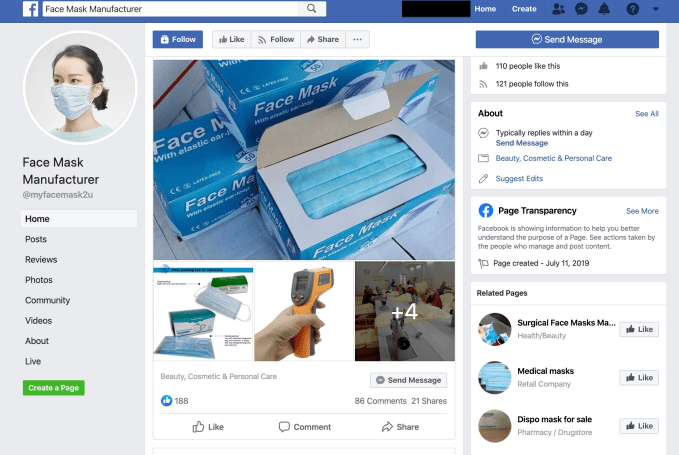
TechCrunch conducted our own searches on Facebook today and while some obvious search terms returned no results a little tweaking of keywords choice and we were quickly able to find additional pages hawking face masks — such as the below example grabbed from a Facebook page calling itself ‘Face Mask Manufacturer’.

From this page Facebook’s algorithm then recommended more pages — with names like ‘Medical Masks’ and ‘Dispo mask for sale’ — which also appeared to be selling masks.

The TTP’s review also found mask ads circulating on Facebook-owned Instagram.

“One Instagram account for @coronavsmask reads, ‘Act now before it’s too late! GET your N95 Respiratory Face Mask NOW!’ It only has a single post but already counts over 6,300 followers,” it wrote. “An account created on March 14 called @handsanitizers_and_coronamask includes over a dozen posts offering such products.”

It also found “several” Instagram accounts that sell drugs had begun to incorporate medical face masks into their offerings.

At the time of writing Facebook had not responded to our request for comment on the findings.

In further searches the group was reproduced examples of Google’s third party advertising display network serving ads for face masks alongside news stories related to the coronavirus — an issue highlighted by Sen. Mark Warner in a tweet last week when he blasted the company for “still running ads for facemasks and other coronavirus scams”.

“The Facebook mask pages were searched and collected on March 17-18 using the terms “corona mask,” “N95,” and “surgical mask” in Facebook’s search function,” a TTP spokesman told us when asked for more info about its review. “Of the more than 130 pages identified, 43 were created in the month of March, more than a dozen of those just days before TTP ran the searches.”

“We don’t have the same level of data from Instagram/Google. Instagram’s search function does not lend itself to the same search ability; it doesn’t bring up a list of accounts based on a single term like Facebook’s search function does. With Google, our goal was to show examples of Google-served ads; those were identified in news stories on March 18,” he added.

We reached out to Google for comment on the findings and a spokesman told us the company has a dedicated task force that has removed “millions” of ads in the past week alone — which he said jad already led to a sharp decrease in face mask ads. But Google said “opportunistic advertisers” had been trying to run “an unprecedented number” of these ads on its platforms.

Here’s Google’s statement:

Since January, we’ve blocked ads for products that aim to capitalise on coronavirus, including a temporary ban on face mask ads. In the past few weeks, we’ve seen opportunistic advertisers try to run an unprecedented number of these ads on our platforms. We have a dedicated task force working to combat this issue and have removed millions of ads in the past week alone. We’re monitoring the situation closely and continue to make real-time adjustments to protect our users.

Google declined to specify how many people it has working to identify and remove mask ads, saying only that the taskforce is made up of members from its product, engineering, enforcement and policy teams — and that it’s been set up with coverage across time zones.

It also said the examples highlighted by TTP are already over a week old and do not reflect the impact of its newest enforcement measures.

The company told us it’s analysing both ad content and how they’re served to enhance its takedown capacity.


Read Full Article

It’s still easy to find coronavirus mask ads on Facebook


Ads for face masks are still appearing on Facebook, Instagram and Google, according to a review of the platforms carried out by the Tech Transparency Project (TTP). This despite pledges by the platforms that they would stamp out ads which seek to profit from the coronavirus pandemic.

Facebook said on March 6 that it would temporarily ban commerce listings and advertisements for medical face masks, in an effort to combat price-gouging and misinformation during the COVID-19 crisis.

Google followed suit a few days later, saying it would temporarily ban all medical face mask ads “out of an abundance of caution”.

The risk of online misinformation exacerbating a global public health crisis has been front of mind for policymakers in many Western markets. Meanwhile front line medical staff continue to face shortages of vital personal protective equipment, such as N95 masks, as they battle rising rates of infection.

There has also been concern that online sellers are attempting to cash in on a public health crisis by price gouging and/or targeting Internet users with ads for substandard masks.

Early last week two democrat senators urged the US’ FTC to act, blasting Google for continuing to allow ads for face masks to be shown to Internet users.

A week later and ads are still circulating.

The TTP — a research project by the nonprofit Campaign for Accountability, a group which focuses on exposing misconduct and malfeasance in public life — reported finding web users still being targeted with face mask ads on Google this week.

It also conducted a review of Facebook and Instagram, and was able to find more than 130 pages on Facebook listing masks for sale, including some using the platform’s ecommerce tools. 

“One Facebook Page called ‘CoronaVirus Mask’ offers a ‘respiratory mask collection,’ with prices ranging from $32 to $37, and uses Facebook’s ‘Shop’ feature to display its merchandise and allow people to add purchases to their cart,” it writes in a blog post. “Facebook’s ‘check out on website’ button then directs users to complete the purchase on the seller’s website.”

“Facebook pages that use WhatsApp to establish contact with buyers are employing a tactic commonly used by wildlife and other traffickers, who often display goods on Facebook and then arrange the actual purchase through WhatsApp encrypted messages. The Facebook Page ‘Surgical Face Mask For Sale,’ for example, has a video showing boxes of medical masks and the seller’s WhatsApp number scrawled on a piece of paper,” it added.

“A visit to one of these Facebook pages often triggers recommendations for other pages selling face masks, a sign that the platform’s algorithms are actually amplifying the reach of these sketchy sellers. TTP, without logging into Facebook, went to the page for ‘Corona Mask Shop’ and was served up ‘Related Pages’ for ‘Corona Mask 247’ and ‘Corona MASK on sale.'”

TechCrunch conducted our own searches on Facebook today and while some obvious search terms returned no results a little tweaking of keywords choice and we were quickly able to find additional pages hawking face masks — such as the below example grabbed from a Facebook page calling itself ‘Face Mask Manufacturer’.

From this page Facebook’s algorithm then recommended more pages — with names like ‘Medical Masks’ and ‘Dispo mask for sale’ — which also appeared to be selling masks.

The TTP’s review also found mask ads circulating on Facebook-owned Instagram.

“One Instagram account for @coronavsmask reads, ‘Act now before it’s too late! GET your N95 Respiratory Face Mask NOW!’ It only has a single post but already counts over 6,300 followers,” it wrote. “An account created on March 14 called @handsanitizers_and_coronamask includes over a dozen posts offering such products.”

It also found “several” Instagram accounts that sell drugs had begun to incorporate medical face masks into their offerings.

At the time of writing Facebook had not responded to our request for comment on the findings.

In further searches the group was reproduced examples of Google’s third party advertising display network serving ads for face masks alongside news stories related to the coronavirus — an issue highlighted by Sen. Mark Warner in a tweet last week when he blasted the company for “still running ads for facemasks and other coronavirus scams”.

“The Facebook mask pages were searched and collected on March 17-18 using the terms “corona mask,” “N95,” and “surgical mask” in Facebook’s search function,” a TTP spokesman told us when asked for more info about its review. “Of the more than 130 pages identified, 43 were created in the month of March, more than a dozen of those just days before TTP ran the searches.”

“We don’t have the same level of data from Instagram/Google. Instagram’s search function does not lend itself to the same search ability; it doesn’t bring up a list of accounts based on a single term like Facebook’s search function does. With Google, our goal was to show examples of Google-served ads; those were identified in news stories on March 18,” he added.

We reached out to Google for comment on the findings and a spokesman told us the company has a dedicated task force that has removed “millions” of ads in the past week alone — which he said jad already led to a sharp decrease in face mask ads. But Google said “opportunistic advertisers” had been trying to run “an unprecedented number” of these ads on its platforms.

Here’s Google’s statement:

Since January, we’ve blocked ads for products that aim to capitalise on coronavirus, including a temporary ban on face mask ads. In the past few weeks, we’ve seen opportunistic advertisers try to run an unprecedented number of these ads on our platforms. We have a dedicated task force working to combat this issue and have removed millions of ads in the past week alone. We’re monitoring the situation closely and continue to make real-time adjustments to protect our users.

Google declined to specify how many people it has working to identify and remove mask ads, saying only that the taskforce is made up of members from its product, engineering, enforcement and policy teams — and that it’s been set up with coverage across time zones.

It also said the examples highlighted by TTP are already over a week old and do not reflect the impact of its newest enforcement measures.

The company told us it’s analysing both ad content and how they’re served to enhance its takedown capacity.


Read Full Article

Dyson and Gtech answer UK call for ventilator design and production to support COVID-19 response


Companies around the world are shifting production lines and business models to address the needs of governments and healthcare agencies in their efforts to slow the spread of COVID-19. Two companies answering that call are Dyson and Gtech, both of which are working on ventilator hardware, leveraging their experience building vacuums and other motor-driven airflow gadgets to spin up new designs and get them validated and produced as quickly as possible.

Dyson, the globally-recognized appliance maker, is working with The Technology Partnership (TTP) on a brand new ventilator design called the CoVent. This design is meant to be made quickly at at high volumes, and leverages Dyson’s existing Digital Motor design, as well as the company’s air purification products, to deliver safe and consistent ventilation for COVID-19 patients, according to an internal email from founder James Dyson to Dyson employees and provided to TechCrunch.

Dyson was reacting to a request from UK Prime Minister Boris Johnson for ventilator supplies, and intends to first fulfil an order of 10,000 units o the UK Government. Its ventilator still needs to be tested and its production process approved by the government and the UK’s Medicines and Healthcare Products Regulatory Agency (the MHRA, its FDA equivalent), but Dyson says in the email that “the race is now on to get it into production.” The company notes that experts from both the UK’s national healthcare agency and the MHRA have been involved throughout its design process, which should help expedite approvals.

The CoVent meets the specifications set out by clinicians for ventilator hardware, and is both bed-mounted and portable with a battery power supply, for flexible us across a variety of settings, including during patient transportation. Because it uses a lightly modified version Dyson’s existing Digital Motor design, the company says that the fan units needed for its production are “available in very high volume.”

“I am proud of what Dyson engineers and our partners at TTP have achieved. I am eager to see this new device in production and in hospitals as soon as possible,” Dyson wrote in his email. “This is clearly a time of grave international crisis, I will therefore donate 5,000 units to the international effort, 1,000 of which will go to the United Kingdom.”

Meanwhile, Gtech, another UK home appliance and vacuum maker, has likewise done what it can to answer the government’s call for ventilator hardware. The company’s owner Nick Grey said that it received a request to build up to 30,000 ventilators in just a two-week span, which promoted them to quickly set about figuring out what went into the design of this medical hardware.

Gtech’s team developed a ventilator that can be made from parts easily made from abundant stock materials, or off-the-shelf pre-assembled parts. The company says that it can spin up production of around 100 per day within a week or two, so long as it can source steel fabrication and CNC machining suppliers.

In addition to its own production capacity, Gtech is making its ventilator designs available for free to the broader community in order to ramp production. The company says that “there’s no reason why thousands of emergency ventilators can’t be made each day” in this way, according to an interview with Grey and CTV News. Like the Dyson model, Gtech’s design will need assessment and certification from the UK government and regulators before they can be put into use.


Read Full Article

Microsoft acquires 5G specialist Affirmed Networks


Microsoft today announced that it has acquired Affirmed Networks, a company that specializes in fully virtualized, cloud-native networking solutions for telecom operators.

With its focus on 5G and edge computing, Affirmed looks like the ideal acquisition target for a large cloud provider looking to get deeper into the telco business. According to Crunchbase, Affirmed raised a total of $155 million before this acquisition, and the company’s more than 100 enterprise customers include the likes of AT&T, Orange, Vodafone, Telus, Turkcell and STC.

“As we’ve seen with other technology transformations, we believe that software can play an important role in helping advance 5G and deliver new network solutions that offer step-change advancements in speed, cost and security,” writes Yousef Khalidi, Microsoft’s corporate vice president for Azure Networking. “There is a significant opportunity for both incumbents and new players across the industry to innovate, collaborate and create new markets, serving the networking and edge computing needs of our mutual customers.”

With its customer base, Affirmed gives Microsoft another entry point into the telecom industry. Previously, the telcos would often build their own data centers and stuff it with costly proprietary hardware (and the software to manage it). But thanks to today’s virtualization technologies, the large cloud platforms are now able to offer the same capabilities and reliability without any of the cost. And unsurprisingly, a new technology like 5G, with its promise of new and expanded markets, makes for a good moment to push forward with these new technologies.

Google recently made some moves in this direction with its Anthos for Telecom and Global Mobile Edge Cloud, too. Chances are we will see all of the large cloud providers continue to go after this market in the coming months.

In a somewhat odd move, only yesterday Affirmed announced a new CEO and president, Anand Krishnamurthy. It’s not often that we see these kinds of executive moves hours before a company announces its acquisition.

The announcement doesn’t feature a single hint at today’s news and includes all of the usual cliches we’ve come to expect from a press release that announces a new CEO. “We are thankful to Hassan for his vision and commitment in guiding the company through this extraordinary journey and positioning us for tremendous success in the future,” Krishnamurthy wrote at the time. “It is my honor to lead Affirmed as we continue to drive this incredible transformation in our industry.”

We asked Affirmed for some more background about this and will update this post if we hear more.


Read Full Article

2 questions to uncover your passion -- and turn it into a career | Noeline Kirabo

2 questions to uncover your passion -- and turn it into a career | Noeline Kirabo

What's your passion? Social entrepreneur Noeline Kirabo reflects on her work helping out-of-school young people in Uganda turn their passions into profitable businesses -- and shares the two questions you can ask yourself to begin doing the same.

Click the above link to download the TED talk.

Huawei announces the P40 and tries to stay relevant without Google


Huawei has unveiled new flagship phones today, the P40, P40 Pro and P40 Pro+. These are beautiful phones with great specs. But it would only take you a few minutes to realize that there’s something odd with them. There is no Gmail, no Google Maps and no Google Play Store.

Last year, the U.S. government restricted U.S. firms from maintaining a business relationship with Huawei. Even though Huawei can only release Google-free phones, the company isn’t standing still. It is still releasing flagship phones at a normal pace. Some day, Huawei might be able to leverage Google’s services again, after all.

Huawei uses the open-source version of Android without all of the core features that are tied to Google services. The company has its own store of apps and tries to compensate the lack of Google apps with Huawei-branded apps.

In China, Google services are blocked by the Great Firewall anyway. But if you don’t live in China, I wouldn’t recommend buying a P40 phone. A phone without Android or iOS leads to a ton of limitations.

But let’s talk about the new phones anyway as Huawei has released some interesting phones in the past. Like previous devices in the P series, Huawei has packed some impressive camera sensors in the device.

On the P40 Pro and P40 Pro+, the display is curved around all four edges, including the top and bottom edges of the device. Last year’s P30 featured a teardrop notch at the center of the device. This year, Huawei relies on a new hole-punch design in the top left corner. In some ways, it reminds me of recent Samsung phones.

There are three different devices — the P40, the P40 Pro and the P40 Pro+. Huawei has yet to talk about pricing and availability. The P40 has a 6.1-inch display while the two “pro” models have a 6.58-inch display. That display has a 90 Hz refresh rate.

As always, Huawei offers plenty of colorful options for the back of the device. Some finishes are matte just like on the iPhone 11 Pro. You can also get a black or white matte ceramic back on the P40 Pro+.

It is powered by Huawei’s own system on a chip, the Kirin 990, and it works on 5G networks. Compared to last year, the CPU is 23% faster and the GPU is 39% on that new system on a chip.

When it comes to cameras, the P40 Pro+ has four different camera modules and a time-of-flight sensor — an ultra-wide lens (18mm), a normal lens (23mm), a 3x lens (80mm) and a super periscope lens with a 10x optical zoom. That last camera is the equivalent of a 240mm lens.

The Huawei P40 Pro has three different camera modules and a time-of-flight sensor. In addition to the ultra-wide and normal lens, there’s a 5x camera lens (125mm equivalent).

The Huawei P40 has three camera modules — ultra-wide (17mm), normal (23mm) and 3x zoom (80mm). The main camera sensor produces 50-megapixel photos.

Smartphone cameras also require a ton of software processing to produce good shots. While I haven’t been able to play with the P40 devices due to the lockdown in Europe, Huawei is usually a bit too heavy-handed with post-processing. If you use your camera with the Master AI setting, colors are too saturated.

But Huawei says that you can expect improvements across the board when it comes to image processing — better HDR processing, better night mode, better hardware and software image stabilization, better portrait photography, etc. The P40 also tries to eliminate reflection from windows in post-processing.

The company has also added a new mode called AI Best Moment. Your phone automatically recognizes when it should capture a photo — it can be when everybody is jumping at the same time or when a basketball player is going for the slam dunk.

As you can see, Huawei has a long list of big numbers to prove that the P40 Pro+ is faster and better than the P30 Pro. Just like Samsung’s Galaxy S20 Ultra, it feels a bit like excesses. Sure, it’s good to see that smartphone manufacturers can always pack more powerful components year after year.

But the smartphone industry is at a turning point. It is no longer a race for better specs. Manufacturers have to prove that there are new use cases to justify buying new models. Manufacturers with a clear focus and vision will stand out of the crowd.


Read Full Article

How to Use Zoom for Online Meetings


Use Zoom for Online Meetings

If you work from home, you’ve probably heard of Zoom, a meeting tool that has recently exploded in popularity. But you might not be familiar with what Zoom does or how to use it.

Let’s take a look at what Zoom offers, how to join Zoom meetings, and also how to get the most out of the service.

What Is Zoom?

Zoom is a remote communication tool that allows teams to work together despite being in different locations. The company offers a variety of solutions, including virtual conference rooms, softphone systems, and video webinars. However, most people know Zoom for its video conferencing tools.

Your company might use one or all of Zoom’s services. For your purposes as a user, though, we’ll focus on Zoom video chat for desktop platforms here. You can also join meetings using Zoom’s mobile apps if you prefer.

Download: Zoom for Android | iOS (Free)

What Is a Zoom Meeting?

A Zoom meeting is a virtual gathering of people. Each person joins in using their desktop, laptop, or mobile device. Thanks to (often built-in) webcams and microphones, everyone can chat and have a meeting without being physically together.

Of course, Zoom provides additional tools to foster collaboration and ease some of the hurdles of meeting digitally. If you’ve used other video meeting tools like Google Hangouts, Webex, or GoToMeeting, Zoom will seem familiar to you.

How to Join a Zoom Meeting

If someone has invited you to a meeting in Zoom, getting in is simple. They may have sent you an email with a unique meeting URL. If that’s the case, you can click that link to jump right to the meeting page without worrying about a meeting ID.

If not, don’t worry. Just head to the Zoom Join a Meeting page, which you can access by clicking Join a Meeting at the top-right of Zoom’s homepage. Here, you’ll need to input a meeting number. The meeting organizer should have sent you this via email or other means. Input the number and choose Join.

Assuming this is the first time you’ve joined a Zoom meeting, you’ll see a prompt to install the Zoom app, which you should do for best performance. In case it doesn’t load correctly, click Download & run Zoom here.

Zoom Launch Meeting

Once it installs, choose a display name for and hit Join Meeting to jump in.

Using Tools and Options in a Zoom Meeting

Now, you’ll need to make sure your audio and video settings are working properly. In the Join Audio box, you can choose Test Speaker and Microphone to make sure everything is set, then click Join with Computer Audio to enter the room. Check the box at the bottom to skip this step in the future.

Zoom Join Audio

Once that’s done, you’ve fully joined a Zoom meeting. You can now tweak a few options and use some of Zoom’s features if needed.

Click the arrow next to Mute at the bottom-left to change your microphone or speaker. You can also choose Audio Settings from this menu to see all of Zoom’s available options, including general tweaks, keyboard shortcuts, statistics, and a lot more.

Zoom Settings Panel

If you need to show video and aren’t already, click Start Video in the bottom-left. Like the audio options, you can change the video device and access options here, if needed.

Also along the bottom bar, you’ll see options to invite others, view the participants’ list and text chat, share your screen, and record the session. Some of these options may not be available, based on what the host has set.

Zoom In Meeting Home

When you’re done, click Leave meeting and confirm. Next time, you can join a Zoom meeting using the app on your PC. Search for Zoom using the Start menu to launch it, then choose Join a Meeting and enter the meeting ID.

How to Set Up a Zoom Meeting

Joining a meeting you’re invited to is easy, but what if you need to set up a Zoom meeting yourself? There’s a bit more work to hosting, but it’s not difficult.

First, you’ll need to sign up for a Zoom account. Head to Zoom’s signup page, which you can find by clicking the Sign Up, It’s Free button at the top-right. Enter your work email address, or sign up using your Google or Facebook account if you prefer.

You’ll get an email with a link to continue signing up. Create a password, then you can skip the step of inviting others to the service. From there, you’ll see your new personal meeting URL. Clicking this will open the Zoom app on your computer and launch that meeting room.

Once inside the room, you’ll have a near-identical interface to meetings where you’re a participant, as described above. The only major difference is that you now have full control over the meeting participants, recording, and other features.

Click the Manage Participants button to open the side panel. There you can review who’s present and make any changes necessary. Use the options under More to prevent participants from unmuting themselves, changing their names, or even to lock the entire meeting.

Zoom Manage Participants

How to Schedule a Zoom Meeting

You can start a quick meeting anytime by sending out your personal meeting URL or ID. But most times, you’ll want to schedule a zoom meeting ahead of time so everyone can prepare.

To do this, visit your Zoom Meetings page by clicking My Account at the top-right of Zoom’s homepage and choosing Meetings from the left sidebar. There, you’ll see the button to Schedule a New Meeting.

Zoom Schedule Meetings

Click this to fill out all the info, including the topic, time, duration, and other preferences. Once you click Save, use the Add to buttons to put it on your Google, Outlook, or Yahoo calendar, through which you can invite others. You can also click Copy the invitation for a block of text that you can paste into an email or other messaging service.

Choose Start Meeting to begin a scheduled meeting. For more convenience in the future, you can install a plugin for Microsoft Outlook or a Chrome extension on the Meetings page to schedule meetings from those calendars.

While you’re in the settings, we recommend taking a look at Zoom’s many options. These will let you set up meetings exactly as you like so you don’t have to toggle the same options every time.

How to Record a Zoom Meeting

Recording a meeting when you’re the organizer is simple. Click the Record button at the bottom of the screen to begin recording immediately. Once your meeting is over, you’ll find an MP4 file in Zoom’s recording directory on your system.

To adjust these settings, click the arrow next to Mute and choose Audio Settings to open Zoom’s Settings page. There, switch to the Recording tab to choose a recording location and change other related options.

Zoom Recording Options

How to Share Your Screen on Zoom

Click the Share Screen button in Zoom to start screen sharing. There, you can choose which monitor you want to share, or choose to share only a certain app’s window. You’ll find more options at the bottom, as well as the Advanced tab.

We mentioned screen sharing earlier; as the organizer, you have full control over whether participants can share their screens or not. To change screen sharing options, click the arrow next to Share Screen, followed by Advanced Sharing Options.

There you can decide if participants are allowed to share, whether more than one person can share their screen at a time, and if participants can start sharing when someone else already is.

Zoom Screen Share Options

Zoom’s Pricing Plans

Depending on your needs, you may need to upgrade to one of Zoom’s premium plans. The free offering lets you host meetings with up to 100 participants. However, any meeting with more than two people is limited to 40 minutes.

The free plan should suffice for casual use, as it includes all the features we discussed above, plus more. Companies can look at the Pro or Business plans if needed.

How to Use Zoom Meetings

Now that we’ve looked at how Zoom works, you might wonder what people actually use Zoom for. Here are some common uses of Zoom as people are working from home more frequently:

  • Education: Zoom’s Education page describes how the service allows teachers to offer remote office hours, hold admin meetings, tutor students, and more.
  • Healthcare: Zoom for Healthcare offers HIPAA-compliant video conferencing. It’s used for important communication with clients, remote training, and virtual counseling.
  • Business meetings: When employees are working from home, meetings are more difficult than when everyone is in one location. As we saw above, Zoom makes it easy to bring people together for one-on-one chats or group discussions.

There are many more uses for Zoom, so your company might fall under another use case.

Zoom Privacy and Security

With Zoom’s increasing popularity, many have raised concerns about some questionable items in its terms of service and privacy policy. Zoom has changed these documents recently, making them difficult to discuss, so we recommend that you read them for yourself before signing up for Zoom.

One notable feature is Attendee Attention Tracking, which allows the meeting host to see which participants don’t have the Zoom window in focus while someone is sharing their screen. Be aware of this if you’re in a meeting that’s using screen-sharing.

Like other video conferencing tools, Zoom has had some security issues in the past, which the company has patched up. There’s one other security risk you should be aware of while using Zoom, however: unwanted participants joining your meeting and showing explicit material.

Called “Zoom-bombing”, this practice involves someone joining through your Zoom meeting link and broadcasting inappropriate content by sharing their screen. To keep this from happening, it’s wise to avoid sharing your meeting URL anywhere that’s public, such as social media. When hosting, you should also change the default setting that lets people share their screens without needing permission first.

Zoom’s blog post on how to prevent this has more good advice.

How Does Zoom Work? Now You Know

We’ve looked at what Zoom is, how to start and join Zoom meetings, and other tips to make the best of it. This should get you started with the new favorite tool for remote meetings.

If Zoom doesn’t work for your needs, check out some other free apps for making group video calls.

Read the full article: How to Use Zoom for Online Meetings


Read Full Article

Asana Keyboard Shortcuts for Efficient Task Management


To-do sign placed next to a keyboard and notebook

Asana is one of the best apps for project management. It’s a great functional way to organize your work and stay on top of projects, goals, and tasks.

If you use this free web-based app for collaborative task management at work, the cheat sheet below is a must-have. It lists various keyboard shortcuts that will help you use Asana more efficiently.

The cheat sheet covers shortcuts for navigating the Asana interface, creating tasks, formatting text, and managing your inbox. It also includes shortcuts to help you assign tasks, move them around, set due dates, and add subtasks, tags, and comments.

(New to this whole setup and need a quick lesson on the basics of Asana? Read our beginner’s guide to Asana for project management.)

FREE DOWNLOAD: This cheat sheet is available as a downloadable PDF from our distribution partner, TradePub. You will have to complete a short form to access it for the first time only. Download The Asana Keyboard Shortcuts Cheat Sheet.

The Asana Keyboard Shortcuts Cheat Sheet

On Windows, replace Cmd with Ctrl and Delete with Backspace in the shortcuts.

Shortcut Action
Navigation
Tab + H Switch to Home
Tab + Z Switch to My Tasks
Tab + I Switch to Inbox
Tab + / Jump to search box
Tab + O Toggle sidebar
Task Creation and Quick Add
Tab + Q Quick add task
Enter Create new task
Shift + Enter Create new task above current task
Shift + Tab + F Create follow-up task
Tab + N Create new section
Tab + W Quick add conversation
Task Selection
Up Arrow / Down Arrow Select task above/below
Cmd + Up Arrow / Down Arrow Move selected task(s) up/down
Cmd + Shift + Up Arrow / Down Arrow Move selected task(s) to section above/below
Cmd + Click Select multiple tasks
Shift + Up Arrow / Down Arrow Select tasks above/below in order
Task Management
Tab + Enter Show task details
Esc Hide task details
Tab + R Edit task description
Tab + K Like selected task
Tab + C Add comment to selected task
Tab + T Add tag to task
Tab + S Add subtask to current task
Tab + A Assign selected task(s)
Tab + M Assign selected task(s) to self
Tab + D Set due date for selected task(s)
Tab + F Add collaborator(s) to task(s)
Tab + P Add selected task(s) to project(s)
Tab + X View task in full screen mode
Tab + Delete Delete selected task(s)
Tab + Y Mark task as Today in My Tasks
Tab + U Mark task as Upcoming in My Tasks
Tab + L Mark task as Later in My Tasks
Text Formatting
Cmd + B Bold/emphasize text
Cmd + I Italicize text
Cmd + U Underline text
Cmd + Shift + X Strike through text
Cmd + Shift + M Switch to monospaced type
Cmd + Shift + 7 Create numbered list
Cmd + Shift + 8 Create bulleted list
Tab OR Cmd + ] Increase list indent
Shift + Tab OR Cmd + [ Decrease list indent
In Inbox…
S Archive
H Activity
F Join/leave task
I Archive notification
U Move notification to Inbox
K Move up
J Move down

From Task Management to Task Execution

Asana equips you with all the right tools to make shared projects and task lists easy to handle. And pairing it with keyboard shortcuts can make your task management workflow a lot smoother.

Of course, at some point you have to move past organizing tasks and actually work on them. If you’re struggling with that bit, try these productivity tips backed by science.

Image Credit: Jealous Weekends on Unsplash

Read the full article: Asana Keyboard Shortcuts for Efficient Task Management


Read Full Article

Stay Focused Working From Home With Toodledo Online Task Manager: Now 76% off


When you have to work from home, trying to stay focused is often a challenge. Making a plan for each day is one of the best ways to stay on task. There are many apps that are made for this purpose, but Toodledo is one of the standouts. This online app is filled with great features to help you prioritize tasks and store useful information. Right now, you can pick up a five-year Plus subscription for only $69.99 at MakeUseOf Deals.

Productivity System

Rated at 4.1 out of 5 stars on Capterra, this “productivity system” helps you make sense of all the tasks and ideas spinning around in your head.

You can create tasks in seconds, and sort your list by due date, priority, status, or folder. Toodledo also lets you create custom filters, so you can always see exactly what needs doing in any given project.

The notes area provides a great place to store ideas and journal entries, while the outlines section is useful for planning projects. In addition, Toodledo lets you create custom lists and track your habits over time.

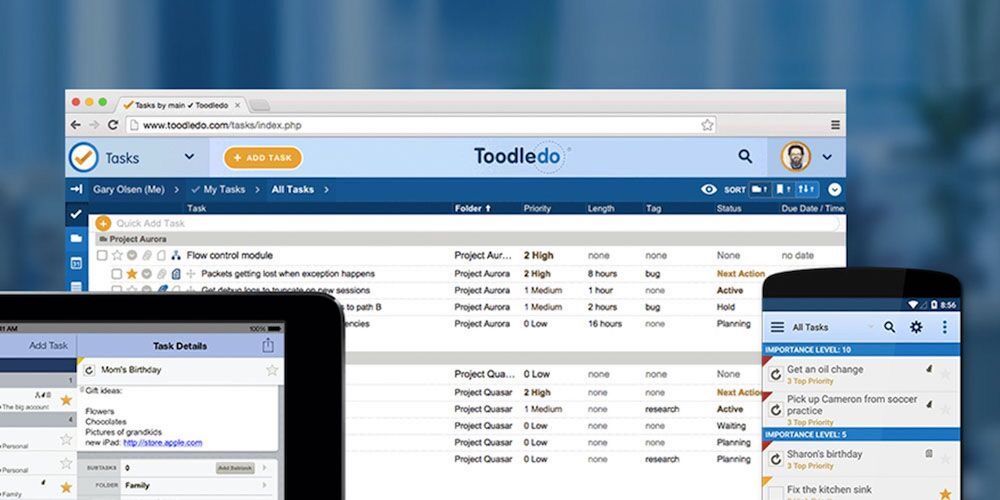
You can access Toodledo via any web browser, and there are apps to download on iOS and Android.

Five years for $69.99

Normally priced at $299.40, five-year subscriptions are now 76% off at $69.99.

Read the full article: Stay Focused Working From Home With Toodledo Online Task Manager: Now 76% off


Read Full Article