24 April 2020

Indian smartphone market grew by 4% in Q1, but projected to decline by 10% this year


India has emerged as one of the fastest growing smartphone markets in the last decade, reporting growth each quarter even as handset shipments slowed or declined elsewhere globally. But the world’s second largest smartphone is beginning to feel the coronavirus heat, too.

The Indian smartphone market grew by a modest 4% year-over-year in the quarter that ended on March 31, research firm Counterpoint said Friday evening. The shipment grew annually in January and February, when several firms launched their smartphones and unveiled aggressive promotional plans.

But in March, the shipment saw a 19% year-over-year dip, the firm said. Counterpoint estimated that the smartphone shipments in India will decline by 10% this year, compared to a 8.9% growth in 2019 and 10% growth in 2018.

The research firm also cautioned that India’s lockdown, ordered last month, has severely slowed down the local smartphone industry and it may take seven to eight months to get back on track. Currently, only select items such as grocery products are permitted to be sold in India.

Prachir Singh, Senior Research Analyst at Counterpoint Research, said the Covid-19 impact on India was relatively mild until mid-March. “However, economic activities declined as people save money in expectation of an extended period of uncertainty and an almost complete lockdown. Almost all smartphone manufacturing has been suspended. Further, with the social distancing norms, factories will be running at lower capacities even after the lockdown is lifted,” he said.

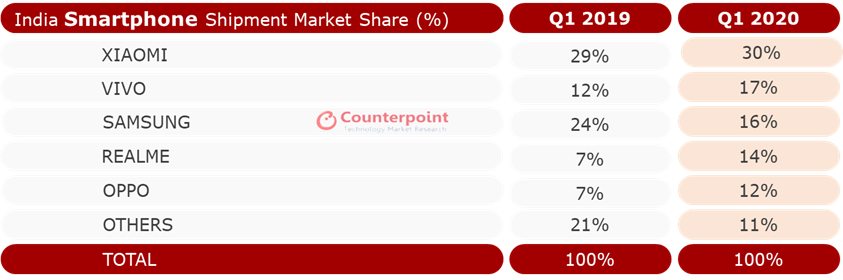
Overall, 31 million smartphone units shipped in India in Q1 2020. Chinese smartphone maker Xiaomi, which has held the tentpole position in what has become its biggest market globally for more than two years, widened its lead to command 30% of the market.

Vivo’s share grew to 17%, up from 12% during the same period last year. Samsung, which once led the Indian market, now sits at the third spot with 16% market share, down from 24% in Q1 2019. Apple maintained its recent momentum and grew by a strong 78% year-over-year in Q1 this year. It now commands 55% of the premium smartphone segment (handsets priced at $600 or above.).

More than 100 smartphone plants in India assemble or produce about 700,000 to 800,000 handsets a day, some of which are exported outside of the country. But the lockdown has halted the production and could cost the industry more than $3 billion to $4 billion in direct loss this year.

“We often draw parallels between India and China. But in China, their factories have adopted automation at various levels, something that is not the case in India,” said Tarun Pathak, a senior analyst at Counterpoint, earlier this week.

China, where smartphone sales declined by 38% annually in February this year, has already started to see recovery. Xiaomi said last month that its phone factories were already operating at more than 80% of their capacity. Globally, smartphone shipment declined by 14% in February, according to Counterpoint.


Read Full Article

Telegram hits 400 million monthly active users


Instant messaging service Telegram has amassed 400 million monthly active users, it said today, up from 300 million active users the seven-year-old service disclosed to the SEC last October.

The service — founded by Pavel Durov, who also created Russian social networking site VK — said it adds about 1.5 million users each day and is the most downloaded social media app in over 20 nations.

Telegram is working on bringing a secure video call feature to its users this year in response to the growing popularity of Zoom and Houseparty, it said. The company, headquartered in London and Dubai, however, did not talk about the future of its Gram cryptocurrency wallet and TON Blockchain that it had revealed in 2018, but put on hold early this year.

“As the gap in popularity between Telegram and its older competitors narrows, we find more and more validity in that original assumption,” the firm said in a blog post.

Telegram competes with dozens of popular instant messaging services including WhatsApp that has amassed over 2 billion users globally. Telegram often sees a surge in its user base when Facebook-owned service is facing an outage. Durov is also one of the most vocal critics of WhatsApp.

Telegram’s desktop app, which does not require the phone to be connected to the internet to function, and a range of features including folders and cloud storage have won it a loyal set of users.

But these features have also given rise to misuse of its platform with at least a few million of its users relying on the service to distribute and download illegal copies of movies, songs, and applications. Its piracy issue remains prevalent today.

Telegram has always operated with a degree of disregard for the opinions of government authorities and various corporates — that has resulted in some interesting use cases. Telegram, which is banned in China, counts the world’s most populous nation as one of its biggest markets.

People in the nation use virtual private networks (VPN) to download and run Telegram. Amid heavy censorship in China, Telegram became a refuge for WeChat users looking for authoritative information about the coronavirus early this year.

Telegram today revealed a sticker directory that lists over 20,000 stickers, and detailed a handful of improvements such as a new attachment menu on Android. The firm also said it was creating a database of educational tests for students, and plans to distribute 400,000 Euro to creators for creating those tests.

TechCrunch learned last week that the service had reached the 400 million users milestone, but at the time Telegram did not respond to a request for comment.


Read Full Article

The Best Speed-Reading Extensions for Google Chrome


speed-read-chrome

The internet is vast and unending, and it’d take several lifetimes to read everything on it. But you can get through online content a lot quicker with the help of a good speed-reading extension.

In this article, we’ve listed the five best speed-reading extensions available for Google Chrome. Each of them allows you to double, triple, or even quadruple your reading speed so you can absorb knowledge faster than ever before.

Let’s look at them!

1. Spreed: The Best All-Round Speed-Reader

Spreed Speed-Reading Extension in Google Chrome

Spreed is the most popular speed-reading extension on the Chrome store. Like all the extensions on this list, it aims to eliminate subvocalization—where you use your inner voice to sound out words in your head. Silencing that voice lets you gradually increase your reading speed from an average of 200 words per minute to 400 or more.

To use Spreed, highlight the passage you want to speed-read in Chrome, then press Alt + V (or Option + V on a Mac) or right-click and select Spreed selected text. You can even use Spreed without highlighting any text, to let it guess the most likely content you want to read instead.

A pop-up window appears with the first word of the passage and starts counting down before the speed-reading begins. Press Space to play or pause, then make adjustments to Spreed at the top of the window; change the reading speed, the number of words at a time, and the font size.

You can also change the background color—choosing from black, cream, or white—or disable the highlighted focus letters, which help to minimize eye movement. Clicking on the question mark shows you hotkeys you can use while reading to change the font, rewind, or navigate the text.

Click the Spreed extension at the top of Chrome to access your usage statistics, options, and instructions. You can even paste text into Spreed from outside of Chrome.

Download: Spreed for Chrome (Free)

2. Reedy: A Speed-Reader With More Options

Reedy speed reading pause screen

Unlike Spreed, Reedy doesn’t open a new window. Instead, it obscures the background and lets your speed-read text inside Chrome itself. Although Reedy is a far less streamlined app than Spreed, that does mean it gives you extra customization options.

To use Reedy, press Alt + S (or Option + S on a Mac) and hover your mouse over the text you want to read; Reedy highlights it in green. Change the size of this selection using the Up and Down arrows on your keyboard. Then press Enter or left-click to start reading.

Reedy shows the entire selection on a new screen with the first word magnified at the top. Press Space to start reading, at which point the rest of the selection disappears to let you focus on one word at a time.

From the pause screen, adjust the font size, the reading speed, and the vertical position of the text. You can even switch between day and night mode.

If you like that, check out these useful Chrome extensions to enable night mode for the rest of the web as well.

Click the Reedy extension icon in Chrome to access the settings or paste in some text you want to speed-read from outside of Chrome.

In the settings, Reedy gives you full control over the colors and a wide range of fonts to choose from. Enable autostart, bring up a display with the remaining time, or even stop Reedy from slowing down at punctuation marks.

Download: Reedy for Chrome (Free)

3. Readline: Streamlined and Easy to Use

Readline speed-reader with Google Chrome

Readline is much simpler than most of the other speed-reading extensions in Google Chrome. It isn’t as easy to select large passages to read in Readline, but the user interface is so quick and easy to use that you don’t really need to; simply select lots of small passages one after the other instead.

To use Readline, hold Alt (or Option on a Mac) and click the passage you want to read. That’s it!

Readline highlights each passage in gray to show you the selection before you start reading. Alternatively, highlight a passage yourself, then right-click and select Start Readline.

Readline immediately displays the first word of the passage in a new screen over Google Chrome and quickly cycles through each word. Much like the other speed-readers in this list, it uses Rapid Serial Visual Presentation (RSVP) to highlight a focus letter in each word so you don’t need to move your eyes as much.

Press Space to start and stop the playback and use the Up and Down arrows to adjust the reading speed. You can also use the Left and Right arrows to navigate back and forth through the text.

Click the Readline extension in Google Chrome to edit the options. From here you can choose between a small selection of fonts, enable different shortcuts, and toggle the progress bar or focus letter.

Readline doesn’t have as many options as other speed-reading Chrome extensions. But with such a clean and streamlined design, you don’t need them.

Download: Readline for Chrome (Free)

4. Sprint Reader: Open Source Customizability

Sprint Reader speed-reader extension window from Chrome

To use Sprint Reader, highlight the text you want to read, then right-click and choose Sprint read selected text. You should be able to press Ctrl + Alt (or Ctrl + Option on a Mac) to select text as well, then press Z to speed-read it, but at the time of writing that feature didn’t work.

Patchy features might be expected because Sprint Reader is an open-source project. You can even contribute to its development yourself over on GitHub.

When you speed-read text using Sprint Reader on Google Chrome, it opens in a separate pop-up window, much like Spreed. You need to press Space to get it started, at which point you’ll notice a progress bar fill up at the top of the screen as you work through the selection.

From this pop-up window, edit the content you plan to read, check out your usage statistics, or edit the speed-reader’s settings. Sprint Reader gives you all sorts of options, like changing the font, the words per slide, and the color scheme.

In the advanced settings, you can even fine-tune the length of time Sprint Reader pauses for different punctuation marks.

From Sprint Reader’s statistics panel, check out how many words you’ve read and how many minutes you’ve spent speed-reading with the extension. For fun, the statistics section also tells you how long it would take to read various classic novels at your average speed.

Download: Sprint Reader for Chrome (Free)

5. Read Fast: A Simple Speed-Reading Alternative

Read Fast Chrome extension window

Read Fast takes a slightly different approach to the other speed-reading Chrome extensions on this list. There isn’t a keyboard shortcut to start speed-reading. Instead, you need to highlight a passage and click the Read Fast extension in Chrome’s toolbar.

You can also click the Read Fast button without selecting any text; when you do this, Read Fast assumes you want to read everything on the page. This feature works best with apps like Pocket, which only show the article without other text on the screen.

The Read Fast window is more colorful than other speed-reading extensions, with three large buttons at the bottom for the reading mode, font, and speed.

Use the bottom-left button to choose between three different reading modes. Flash Mode shows one word at a time, albeit without a focus letter highlighted. Diamond Mode is similar but shows the surrounding text in a diamond above and below the highlighted word. And Flow Mode lets you view two, three, or four words at a time.

With the middle button, Read Fast also gives you three font choices: Serif, Sans Serif, and Monospaced.

Finally, click the bottom-right button to adjust your reading speed up to a maximum of 1000 words per minute.

Read Fast is far more basic than the other extensions on this list. But it is colorful and easy to use, making it especially good for children or those new to speed-reading.

Download: Read Fast for Chrome (Free)

The Best Speed-Reading Extension for Chrome

Obviously, the speed-reading extension that’s right for you depends on your needs. For a streamlined experience, go with Readline. For customization options, pick Reedy or Sprint Reader. For a good all-rounder, Spreed is the best bet. And Read Fast offers something colorful and unique.

Remember that speed-reading extensions aren’t the only way to increase your reading speed. You might also want to convert text to audio, split long articles into multiple parts, or start relying on summaries. In fact, there are plenty of inventive ways to get through long articles in less time.

Read the full article: The Best Speed-Reading Extensions for Google Chrome


Read Full Article
Chrome Now Lets You Send Web Pages to Other Devices


In September 2019, Google rolled out Chrome 77. And this iteration of Google’s web browser introduced a useful new feature. Namely, Google Chrome now lets you send web pages to other devices. In this article, we’ll explain how.

The First World Problem of Owning Multiple Devices

These days, most of us own multiple devices, switching from one to the other at various times throughout the day. The problem with this is keeping everything synced between various devices. Luckily, most web browsers make this relatively easy.

With Chrome, you can already sync bookmarks across devices, or see open tabs by looking at your History. However, since the arrival of Chrome 77, Google Chrome users have had another option, which is to send tabs across from one device to another device.

How to Send Web Pages to Other Devices on Chrome

The method to send a web page from one device to another using Google Chrome differs depending on whether you’re using a desktop device or mobile device. Either way, you’ll need to be signed into your Google account on all of the devices you want to use.

How to Send a Tab From Chrome on Desktop

  1. Highlight the URL you want to share.
  2. Click the laptop icon and select the device you want to share it to.
  3. A popup will alert you that a page is being sent.
  4. You’ll get a notification on your other device that you can click to open the page.

NB: You can also right-click on a website and click “Send to”.

How to Send a Tab From Chrome on Mobile

  1. Open the hamburger menu in the top-right.
  2. Tap “Share”.
  3. Click “Send to your devices”.
  4. Select the device you want to send the web page you’re currently on to.
  5. You’ll get a notification on your other device that you can click to open the page.

The Essential Google Chrome FAQ

The option to send web pages to other devices using Google Chrome is a small but potentially very useful one. Especially for people who regularly switch between different devices. You just need to have Chrome installed on all of your devices.

Whether you’re new to Chrome or have been using it for a long time, there’s probably things you don’t know about Google’s web browser. So we recommend reading our essential Google Chrome FAQ full of useful information.

Image Credit: Frankieleon/Flickr

Read the full article: Chrome Now Lets You Send Web Pages to Other Devices


Read Full Article

How to Secure Your Gmail Account in 6 Easy Steps


gmail-features

Gmail is the most popular free email service used by millions of people around the world. Billions of messages are sent and received through Google’s email software each day. Many of these messages contain personal or confidential information.

Unfortunately, it’s also true that malicious hacks, phishing attacks, and password leaks are becoming more commonplace. To prevent your personal email ending up in someone else’s hands, you’ll need to secure your Gmail account.

Let’s take a look at how to secure your Gmail account in just six easy steps.

1. Open Your Google Account Settings

Google Account Security settings

Navigate to Gmail and click on your profile picture at the top right of the page, which will open the Google menu. From there, select Manage your Google Account. When you signed up to Gmail, Google also created a single account for you to access all of their services. This is known as your Google Account.

Each service has it’s own settings and options, but critical information like your password, two-factor authentication, and other personal details are managed through your Google account. On the left menu, select Security.

2. Resolve Security Issues

Google Security Checkup

As part of an effort to help secure your account, Google offers security recommendations. If there are outstanding issues, these will be listed at the top of your account’s Security page. Even if there are no suggestions, click Secure account at the bottom of the Security issues found section.

This will take you to an overview of your Google account’s security status. The site uses a traffic light system to alert you to areas that need attention. If all six sections are green, then you can move onto other areas. Otherwise, follow the guidance listed by each section to improve your Gmail security.

3. Update Password and Two-Factor Authentication

Google Two-Factor Authentication Settings

Back at your Google account’s Security page, there is an overview titled Signing in to Google. Here you can see when your password was last changed, and whether you have enabled two-factor authentication. It is good practice to change your password for a stronger one, especially if you reuse passwords.

Two-factor authentication (2FA) adds a step to the login process. After entering your username and password, you’ll be asked to enter a temporary code. This is used to ensure that it is you signing in, and not just someone with your credentials. It is definitely worth securing all your accounts with 2FA.

Google offers a few options for this service; an authenticator app (like Google Authenticator or Authy) or an SMS code. If you use an Android device, you may also be able to set up an authentication notification on your phone, too.

4. Assess Recent Security Activity

Google Account Recent Security Activity

After you’ve completed Google’s security checkup, made sure you’re using a secure password, and enabled two-factor authentication, you can review past security events on your account. On the main Security settings page, scroll until you reach the Recent security activity section.

This area shows any login or access events in the past 28 days. Each item shows the device or app and date of the event. If you open a single event, there is more detail like the IP address, estimated location, and browser.

Although this is a read-only section, so you can’t edit or change any settings here, it should alert you to whether any suspicious activity has occurred on your account. Google even has a prompt on this page, noting that if you see anything that looks suspicious, you should follow guidance to secure your account.

5. Review Your Devices

Google Account Devices management settings

If you’ve checked over your recent security activity and found nothing suspicious, you can advance to reviewing devices with access to your Google account. Under the Your devices header, select Manage devices. This opens a list of every device currently signed in to your Gmail account.

You can choose to sign out unused or older devices. They appear in a separate collection labeled Where you’ve signed out. Identifying each may be a little challenging; if the activity came from a Windows PC, for example, the log would only show the device name as Windows, rather than something unique.

If you’re unsure, err on the side of caution and sign it out. The worst that’ll happen is you’ll need to log in again on that device.

6. Manage Third-Party Apps

Google Account Third-Party Apps

After signing out from devices, you should review the Third-party apps with account access from the Security settings page. This list details every app that you’ve given access to your Google or Gmail account. As with other areas of your account, the list is an overview, and you can select each item to expand the detail.

You may recognize the app, but that doesn’t necessarily mean you should leave it untouched. Viewing the item allows you to see the data that the app has permission to access. This is an important step, especially as in 2018, Google admitted that third-party apps can read your Gmail messages.

If it’s an email app, it’ll likely have access to your Gmail account and be able to send emails on your behalf. However, you may not have given it explicit permission to access all of your Google Drive content, for example.

Likewise, if you no longer use one of the apps in the list, you should remove it from your account. If you don’t recognize an item on the list and don’t believe you ever gave it access to your account, there is an option to flag it to Google by selecting the Report this app link.

How to Secure Your Gmail Account

While it’s essential to enable these features, you also need to consider the threats that Google can’t protect you from. If you reuse passwords, you could be putting all your online accounts at risk. Hackers are known to use leaked account details to perform credential stuffing attacks.

In these attacks, your stolen email address and password are entered into multiple sites to gain access to your data. To avert the danger of this attack, be sure to use one of the best password managers to create and store a unique login for each account.

Read the full article: How to Secure Your Gmail Account in 6 Easy Steps


Read Full Article

Where to Play Online Battleship for Free: The 8 Best Sites


You probably played Battleship in school using a self-made grid on a piece of paper. The classic board game dates from World War I, and it’s still popular today. However, maybe you want to do away with the piece of paper and play Battleship online instead.

It’s easy to dismiss Battleship as too simplistic. But the straightforward rules can help lay the base for logical thinking and strategy. Plus, you don’t have to hunt around for gaming partners thanks to these Battleship games you can play online, either alone or with others.

1. Battleship Games

Battleship Games Arcade

The online Battleship games site offers you many variations of the classic Battleship game for free. The games are also sourced from other websites like MiniClip.

For instance, the Battleship Advanced Mission is a full scale sea war with voiceovers and ship tonnage details. The Torpedo Attack game is a variation of the Battleship scenario. You have to guess and attack the computer’s fleet with torpedoes.

The games are presented in Adobe Flash, so you can still play them until web browsers stop supporting Flash at the end of 2020.

Thankfully, none of the sites listed below rely on Flash, so the rest of these online Battleship games should continue working long into the future.

2. Battleship

Play Battleship on Chrome

The interface of the game is a simple grid of 10 x 10 cells where you place rectangular selections for your ships. This is the closest you can come to the feel of the classic paper game in your browser.

A maximum of two players can play from anywhere in the world. Select the type of opponent—a friend or a random player from the pool that is online. Arrange your ships and go for it. You can even chat with your opponent while you destroy or evade the salvos.

The simple game is multilingual and you can also install it as a Chrome extension if you find yourself playing it often.

3. Battleship War

Battleship War

You will find the Flash version of Battleship War in many game galleries. But this is the HTML5 version which you can continue to enjoy after support for Flash ends.

There are two game modes—Classic and Advanced. In the advanced mode, you also get to use aircrafts and a radar to pinpoint and bomb your enemy.

The 3D-like perspective of the game is more entertaining than the ones played on paper grids. Watch the missiles launch with a whoosh and hit the exploding targets or splash down on the water.

4. BoomBoomBoat

BoomBoomBoat Battleship game

This free Battleship game can be started as a private game with a friend, a random stranger, or against the AI running the game. The clean visuals and the fast pace are the main draws of this one.

You can play BoomBoomBoat on any operating system with a browser.

The game is in beta right now, but the gameplay is already smooth enough to recommend it. You can look forward to options such as more boats and complete keyboard support in future iterations.

5. Papergames Battleship

Play Papergames Battleship online

The Battleship game from Papergames is one of the more colorful options on this list. The site wants to bring back the classic pencil and paper games from our childhood. Battleship is one of them.

Take part in daily Battleship games against players from across the world. The leaderboard racks up your wins and losses and you can see yourself progress through the global rankings. Log in with an online alias to preserve your ranking and levels.

Play every day and win game coins. These enable you to customize your account with funny avatars and emojis which you can use while playing.

You can also set up your own private tournaments and share it with your friends via a link. This could be the perfect cure for boredom when you are stuck indoors.

6. Sea Battleship

Sea Battleship

Sea Battleship is a free HTML5 game that is designed to give you the old feel of the pen and paper game. You can see that right down to the rough drawings of the ships.

The rules stay the same. You can play against a friend or the computer. The background audio of lapping waves is the only calming thing about this game as the shells come thick and fast.

Playing with a friend will involve both of you on the same computer with the two playing grids arranged side by side (but with the ships hidden). However, you cannot play this game when both of you are in different locations.

7. Intergalactic Battleship

Intergalactic Battleship game online

Ditch the water and head to the cosmos. Intergalactic Battleships changes the milieu, but the rules of engagement stay the same. You get to choose three difficulty modes before you click Play and get attacked by a “Death Star”.

There are subtle differences in the grid positions because the galactic ships are designed differently. You will find that one of them looks like the Millennium Falcon from Star Wars.

Intergalactic Battleship is a game you might enjoy because of its space angle. Unfortunately, you can only play against the computer as there is no multiplayer mode.

8. Battleship Printable

Battleship Printable

So far, we have talked about free Battleship games you can play online. While a game on paper isn’t the same thing, you can play it over a video chat. There are free printable templates of board games which make it easy to play with anyone, anywhere in the world.

Download this free Battleship template and print it out. Fill in your aircraft carrier, destroyer, submarine, and battleship. Then, just face off over video chat.

More Games You Can Play With Friends Online

There are other ways to play Battleship too, as this is one of the classic board games available on Android, iOS, and game consoles. However, Battleship is so elegant in its simplicity that you really don’t need to whip out your wallet to enjoy playing it.

Once you’ve tried all of these online versions of Battleship, it may be time to expand your horizons. So be sure to check out our list of free two-player games you can play in your browser.

Read the full article: Where to Play Online Battleship for Free: The 8 Best Sites


Read Full Article

Google ditched tipping feature for donating money to sites


Leaked images obtained by TechCrunch reveal that Google considered and designed a feature that would let people donate money to websites to help support news publishers, bloggers, and musicians. But Google scrapped the idea and chose not to build out the product, despite these kinds of businesses and creators often struggling to earn revenue.

Google’s design for tipping money to The New York Times

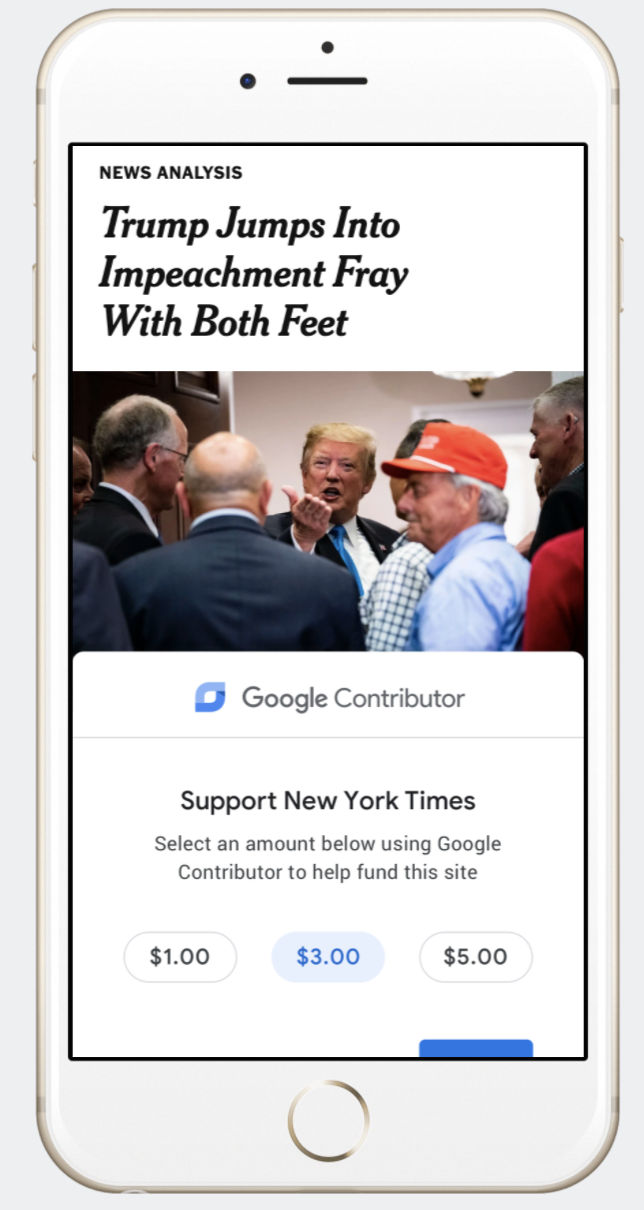
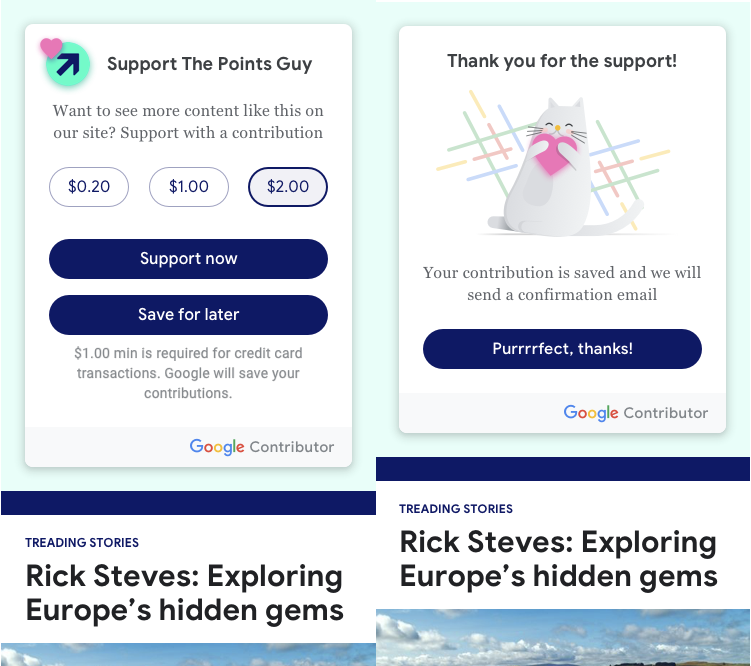
Last year, Google explored tipping as a new wing of Google Contributor, a service that lets people pay around 1 cent per page view to remove ads from partnered websites. Screenshots of the tipping feature showed the ability to make one-time donations of $0.20 to $5 to help support sites. “Want to see more content like this on our site? Support with a contribution” one version explained. It’s unclear if Google would have taken the same 10% cut of tips as it does from Contributor ad removal fees. Google mocked up designs for tipping on the sites of the New York Times, Wired, “Tech Crunch” [sic], and more.

If Google had launched the tipping feature, it could have provided a valuable tool to sites battered by the declining display ad market. And now amidst coronavirus lockdowns that have cancelled events and reduced podcast listenership that media publishers rely on for revenue, the ability to accept donations could have helped sites avoid laying off staff. Perhaps Google should consider resurrecting tipping as a more sustainable form of assistance alongside its new Journalism Emergency Relief Fund.

Google’s designs for tipping money to news sites

TechCrunch obtained these screenshots from a source that provided evidence that they came directly from Google. When asked, Google confirmed that the designs were of internal idea it explored last year but decided not to pursue as part of Contributor and Google Funding Choices, which lets sites ask visitors to disable ad blockers, or instead buy a subscription or pay a per page fee to remove ads. Google shared the idea with under a handful of publishers in a request for feedback. The company decided to prioritize other products, including a way for sites to request consent to personalize ads using their data amidst strengthened regulations like GDPR.

A Google spokesperson provided TechCrunch with a statement that “We recognize that there isn’t a single business model that works for all publishers today and think it’s critical to explore new technologies that can help publishers make more money. Funding Choices is a great example of a product we have invested in significantly and will continue to evolve to support publishers and their monetization strategies.”

A design for the floating button to be overlaid on websites for making a contribution

In fact, few business models work for publishers at all. With layoffs common across local news, national papers, and digital outlets, publishers could use have used all the help they could get, even if long-term subscriptions would be more lucrative than one-off tips.

Google’s Unlaunched Patronage Feature

Designs for Google’s tipping feature show a floating “Support New York Times” button overlaid at the bottom of the screen as you scroll. Tapping it reveals instructions to “Select an amount below using Google Contributor to help fund this site” with options like $1, $3, or $5.

Google’s designs for tipping on a musician’s website

After choosing one, users log into their Google account if they aren’t already, and then “By clicking ‘Pay now’ you agree that: You will use your Google Payments account to make this one-time payment.” You’re then returned to the page you were viewing, with the button saying “Thank you for your support!” before shrinking to just the Contributor logo.

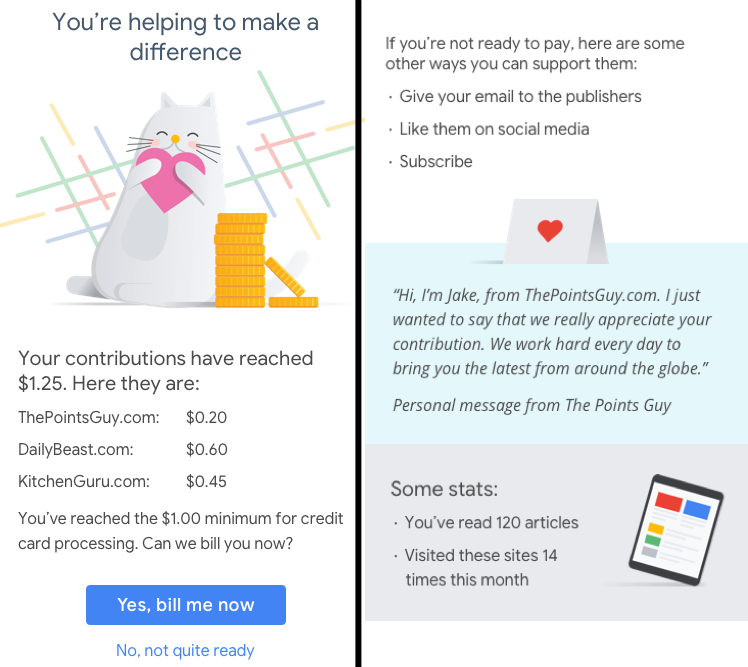
Google also designed a micropayments version of the feature where users could make smaller donations, such as $0.20. This call to action could be inserted into a static position inside a website. When a user’s contributions totaled $1 or more, they would be billed. They’d also have the option to save their contribution and make it later.

Google’s designs for micropayment tipping to blogs

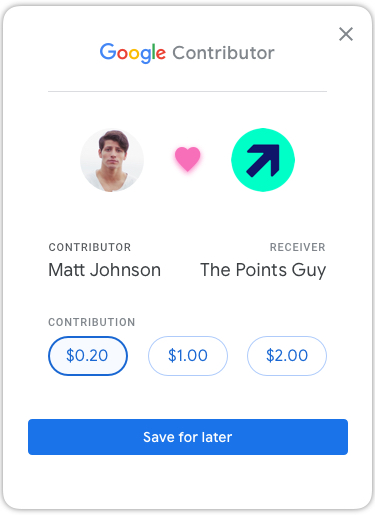
To drive home the emotional satisfaction of making a donation, this design shows a profile photo of you and tip recipient with a heart in between. Afterwards, a cute cat photo illustration shows a messaging saying “Thanks for the support. Your contribution is saved and we will send a confirmation email” with a cheeky “Purrrrrfect, thanks!” before returning you to the site.

Beyond traditional news sites, Google mocked up the tipping feature for The Points Guy travel advice site, the Spiritual Boss Babe blog, the Miranda Sings musician site, and the Forest Research UK government site. TechCrunch was not aware that Google was using our site in mockups for the tipping feature. Other sites included in the mockups did not respond to inquiries about if they were asked for feedback.

Publishers In Need

Google got into the publisher funding space with Google One Pass in 2011, helping users buy subscriptions to sites before it was shut down a year later. In 2014, Google Contributor launched to let people pay a monthly fee in exchange for ad removal on partnered sites, but that program concluded around the end of 2016.

In 2017, Google relaunched the program with users paying up front to fund a per page view fee for removal, and that program remains active with some publishers. The tech giant also operates Subscribe With Google, which lets people buy and manage publisher subscriptions or fan club entry from their Google account, and then surfaces that site’s content atop related Google searches.

If Google ever chose to revive the tipping feature and taxed it 10% like Contributor, it could create a modest new revenue stream. But more importantly, it could help fuel the creation of the content that fills its News and Search results. It would also allow Google to double-dip, potentially earning money from tips and from the ads users see on those sites.

A tipping feature could be especially helpful for websites that haven’t figured out a premium subscription strategy and mostly rely on ads. The fall of display ad prices, worsened by the COVID-19 recession, could put these publishers in danger of closing. BuzzFeed and Vox have cut staff pay or furloughed team members while tons of newspaper and sites like Protocol have suffered layoffs.

Tips might not replace other revenue streams, but could extend sites’ runway. A voluntary option to accept tips without having to build all the payments infrastructure could be a lifeline for the news business, if Google would ordain it a priority.


Read Full Article

Facebook pulls ‘pseudoscience’ from its list of targeted ad categories


Even as Mark Zuckerberg touted the “hundreds of thousands of pieces of misinformation related to COVID-19” that the site had pulled in recent months, Facebook continued to offer targeted ads classified as “pseudoscience.” It was an odd choice from a social network so publicly declaring its own campaigns to remove junk science amid a global pandemic.

Using Ad Manager, advertisers were able to serve ads to some 78 million people “who have expressed an interest in pseudoscience.” Following an investigation by The Markup that found the site buying ads to target that category, Facebook says it’s done with the pseudoscience tag.

In a statement to TechCrunch, the company reconfirmed the move. “This interest category of advertising should have been removed in a previous review and we’ve removed it,” Director of Product Management Rob Leathern said. There was never a great time to run junk science ads, of course, but the issue has come to a head in recent weeks and months, as COVID-19 has become a massive hotbed for conspiracy and dangerous cures.

As Zuckerberg noted in his piece last week, popular theories flagged by the company include the notions that “drinking bleach cures the virus or that physical distancing is ineffective at preventing the disease from spreading.” It’s unclear (beyond the obvious answer of ad revenue) why Facebook continued to offer the category until it was essentially called out on the matter.

Other ad networks and social media sites have been taking pains to slow the spread of misinformation. Twitter recently added 5G-related conspiracies to its list of COVID-19 related guidance, while Google just announced that it would be extending its ID verification for its ad systems.


Read Full Article

Chip Design with Deep Reinforcement Learning


The revolution of modern computing has been largely enabled by remarkable advances in computer systems and hardware. With the slowing of Moore’s Law and Dennard scaling, the world is moving toward specialized hardware to meet the exponentially growing demand for compute. However, today’s chips take years to design, resulting in the need to speculate about how to optimize the next generation of chips for the machine learning (ML) models of 2-5 years from now. Dramatically shortening the chip design cycle would allow hardware to adapt to the rapidly advancing field of ML. What if ML itself could provide the means to shorten the chip design cycle, creating a more integrated relationship between hardware and ML, with each fueling advances in the other?

In “Chip Placement with Deep Reinforcement Learning”, we pose chip placement as a reinforcement learning (RL) problem, where we train an agent (i.e, an RL policy) to optimize the quality of chip placements. Unlike prior methods, our approach has the ability to learn from past experience and improve over time. In particular, as we train over a greater number of chip blocks, our method becomes better at rapidly generating optimized placements for previously unseen chip blocks. Whereas existing baselines require human experts in the loop and take several weeks to generate, our method can generate placements in under six hours that outperform or match their manually designed counterparts. While we show that we can generate optimized placements for Google accelerator chips (TPUs), our methods are applicable to any kind of chip (ASIC).

The Chip Floorplanning Problem
A computer chip is divided into dozens of blocks, each of which is an individual module, such as a memory subsystem, compute unit, or control logic system. These blocks can be described by a netlist, a graph of circuit components, such as macros (memory components) and standard cells (logic gates like NAND, NOR, and XOR), all of which are connected by wires. Determining the layout of a chip block, a process called chip floorplanning, is one of the most complex and time-consuming stages of the chip design process and involves placing the netlist onto a chip canvas (a 2D grid), such that power, performance, and area (PPA) are minimized, while adhering to constraints on density and routing congestion. Despite decades of research on this topic, it is still necessary for human experts to iterate for weeks to produce solutions that meet multi-faceted design criteria. This problem’s complexity arises from the size of the netlist graph (millions to billions of nodes), the granularity of the grid onto which that graph must be placed, and the exorbitant cost of computing the true target metrics, which can take many hours (sometimes over a day) using industry-standard electronic design automation tools.

The Deep Reinforcement Learning Model
The input to our model is the chip netlist (node types and graph adjacency information), the ID of the current node to be placed, and some netlist metadata, such as the total number of wires, macros, and standard cell clusters. The netlist graph and the current node are passed through an edge-based graph neural network that we developed to encode the input state. This generates embeddings of the partially placed graph and the candidate node.
A graph neural network generates embeddings that are concatenated with the metadata embeddings to form the input to the policy and value networks.
The edge, macro and netlist metadata embeddings are then concatenated to form a single state embedding, which is passed to a feedforward neural network. The output of the feedforward network is a learned representation that captures the useful features and serves as input to the policy and value networks. The policy network generates a probability distribution over all possible grid cells onto which the current node could be placed.

In each iteration of training, the macros are sequentially placed by the RL agent, after which the standard cell clusters are placed by a force-directed method, which models the circuit as a system of springs to minimize wirelength. RL training is guided by a fast-but-approximate reward signal calculated for each of the agent’s chip placements using the weighted average of approximate wirelength (i.e., the half-perimeter wirelength, HPWL) and approximate congestion (the fraction of routing resources consumed by the placed netlist).
During each training iteration, the macros are placed by the policy one at a time and the standard cell clusters are placed by a force-directed method. The reward is calculated from the weighted combination of approximate wirelength and congestion.
Results
To our knowledge, this method is the first chip placement approach that has the ability to generalize, meaning that it can leverage what it has learned while placing previous netlists to generate better placements for new unseen netlists. We show that as we increase the number of chip netlists on which we perform pre-training (i.e., as our method becomes more experienced in placement optimization), our policy better generalizes to new netlists.

For example, the pre-trained policy organically identifies an arrangement that places the macros near the edges of the chip with a convex space in the center in which to place the standard cells. This results in lower wirelength between the macros and standard cells without introducing excessive routing congestion. In contrast, the policy trained from scratch starts with random placements and takes much longer to converge to a high-quality solution, rediscovering the need to leave an opening in the center of the chip canvas. This is demonstrated in the animation below.
Macro placements of Ariane, an open-source RISC-V processor, as training progresses. On the left, the policy is being trained from scratch, and on the right, a pre-trained policy is being fine-tuned for this chip. Each rectangle represents an individual macro placement. Notice how the cavity discovered by the from-scratch policy is already present from the outset in the pre-trained policy’s placement.
We observe that pre-training improves sample efficiency and placement quality. We compare the quality of placements generated using pre-trained policies to those generated by training the policy from scratch. To generate placements for previously unseen chip blocks, we use a zero-shot method, meaning that we simply use a pre-trained policy (with no fine-tuning) to place a new block, yielding a placement in less than a second. The results can be further improved by fine-tuning the policy on the new block. The policy trained from scratch takes much longer to converge, and even after 24 hours, its chip placements are worse than what the fine-tuned policy achieves after 12 hours.
Convergence plots for two policies on Ariane blocks. One is training from scratch and the other is finetuning a pre-trained policy.
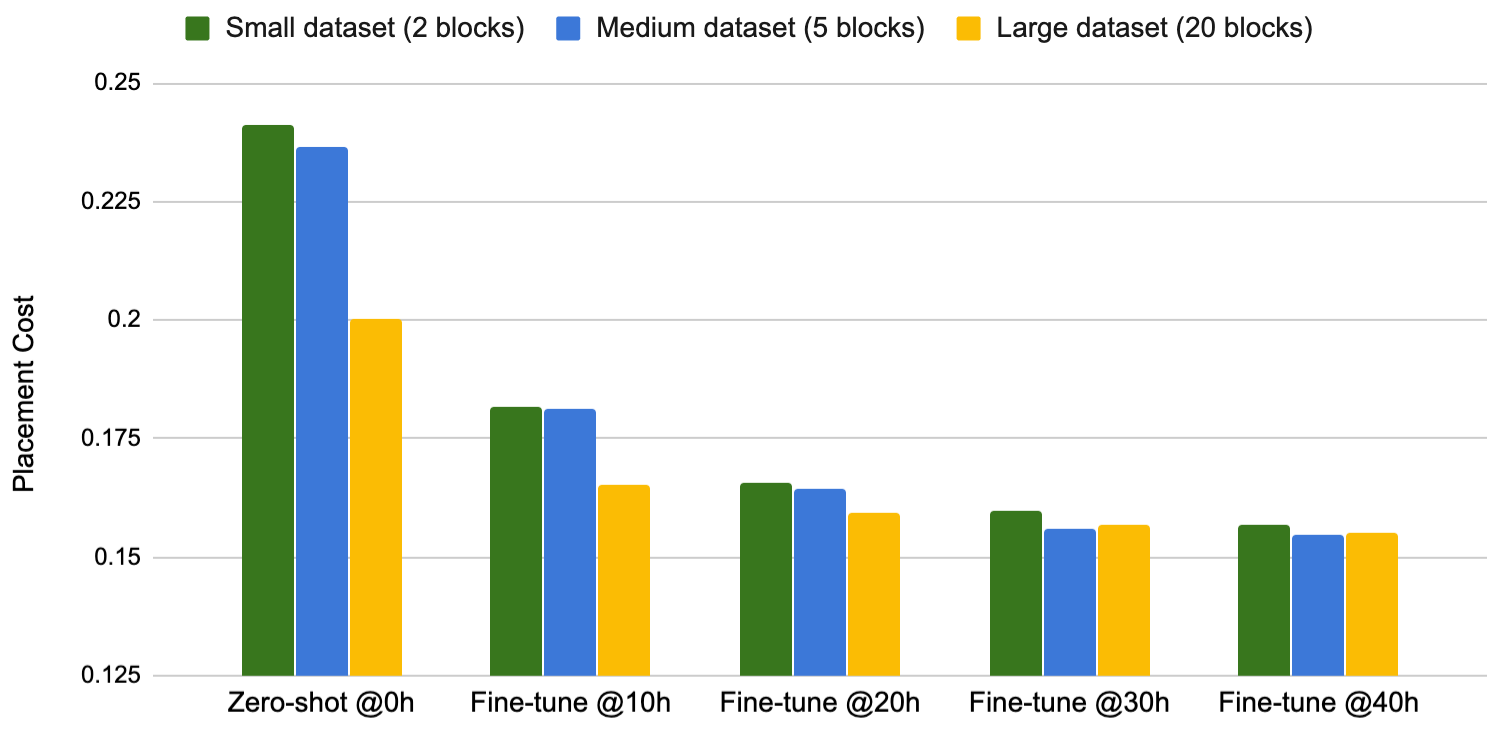
The performance of our approach improves as we train on a larger dataset. We observed that as we increase the training set from two blocks to five blocks, and then to 20 blocks, the policy generates better placements, both at zero-shot and after being fine-tuned for the same training wall-clock time.
Training data size vs. fine-tuning performance.
The ability of our approach to learn from experience and improve over time unlocks new possibilities for chip designers. As the agent is exposed to a greater volume and variety of chips, it becomes both faster and better at generating optimized placements for new chip blocks. A fast, high-quality, automatic chip placement method could greatly accelerate chip design and enable co-optimization with earlier stages of the chip design process. Although we evaluate primarily on accelerator chips, our proposed method is broadly applicable to any chip placement problem. After all that hardware has done for machine learning, we believe that it is time for machine learning to return the favor.

Acknowledgements
This project was a collaboration between Google Research and Google Hardware and Architecture teams. We would like to thank our coauthors: Mustafa Yazgan, Joe Jiang, Ebrahim Songhori, Shen Wang, Young-Joon Lee, Eric Johnson, Omkar Pathak, Sungmin Bae, Azade Nazi, Jiwoo Pak, Andy Tong, Kavya Srinivasa, William Hang, Emre Tuncer, Anand Babu, Quoc Le, James Laudon, Roger Carpenter, Richard Ho, and Jeff Dean for their support and contributions to this work.

23 April 2020

Germany’s COVID-19 contacts tracing app to link to labs for test result notification


A German research institute that’s involved in developing a COVID-19 contacts tracing app with the backing of the national government has released some new details about the work which suggests the app is being designed as more of a ‘one-stop shop’ to manage coronavirus impacts at an individual level, rather than having a sole function of alerting users to potential infection risk.

Work on the German app began at the start of March, per the Fraunhofer-Gesellschaft institute, with initial funding from the Federal Ministry of Education and Research and the Federal Ministry of Health funding a feasibility study.

In a PDF published today, the research organization reveals the government-backed app will include functionality for health authorities to directly notify users about a COVID-19 test result if they’ve opted in to get results this way.

It says the system must ensure only people who test positive for the virus make their measurement data available to avoid incorrect data being inputed. For the purposes of “this validation process”, it envisages “a digital connection to the existing diagnostic laboratories is implemented in the technical implementation”.

“App users can thus voluntarily activate this notification function and thus be informed more quickly and directly about their test results,” it writes in the press release (which we’ve translated from German with Google Translate) — arguing that such direct digital notification of tests results will mean that no “valuable time” is lost to curb the spread of the virus.

Governments across Europe are scrambling to get Bluetooth-powered contacts tracing apps off the ground, with apps also in the works from a number of other countries, including the UK and France, despite ongoing questions over the efficacy of digital contacts tracing vs such an infectious virus.

The great hope is that digital tools will offer a route out of economically crippling population lockdowns by providing a way to automate at least some contacts tracing — based on widespread smartphone penetration and the use of Bluetooth-powered device proximity as a proxy for coronavirus exposure.

Preventing a new wave of infections as lockdown restrictions are lifted is the near-term goal. Although — in line with Europe’s rights frameworks — use of contacts tracing apps looks set to be voluntary across most of the region, with governments wary about being seen to impose ‘health surveillance’ on citizens, as has essentially happened in China.

However if contacts tracing apps end up larded with features that are deep linking into national health systems that raises questions about how optional their use will really be.

An earlier proposal by a German consortium of medical device manufacturers, laboratories, clinics, clinical data management systems and blockchain solution providers — proposing a blockchain-based Digital Corona Health Certificate, which was touted as being able to generate “verifiable, certified test results that can be fed into any tracing app” to cut down on false positives — claimed to have backing from the City of Cologne’s public health department, as one example of potential function creep.

In March, Der Spiegel also reported on a large-scale study being coordinated by the Helmholtz Center for Infection Research in Braunschweig, to examine antibody levels to try to determine immunity across the population. Germany’s Robert Koch Institute (RKI) was reportedly involved in that study — and has been a key operator in the national contacts tracing push.

Both RKI and the Fraunhofer-Gesellschaft institute are also involved in parallel German-led pan-EU standardization effort for COVID-19 contacts tracing apps (called PEPP-PT) that’s been the leading voice for apps to centralize proximity data with governments/health authorities, rather than storing it on users’ device and performing risk processing locally.

As we reported earlier, PEPP-PT and its government backers appear to be squaring up for a battle with Apple over iOS restrictions on Bluetooth.

PEPP-PT bases its claim of being a “privacy-preserving” standard on not backing protocols or apps that use location data or mobile phone numbers — with only arbitrary (but pseudonymized) proximity IDs shared for the purpose of tracking close encounters between devices and potential coronavirus infections.

It has claimed it’s agnostic between centralization of proximity data vs decentralization, though so far the only protocol it’s publicly committed to is a centralized one.

Yet, at the same time, regional privacy experts, the EU parliament and even the European Commission have urged national governments to practice data minimization and decentralized when it comes to COVID-19 contacts tracing in order to boost citizen trust by shrinking associated privacy risks.

If apps are voluntary citizens’ trust must be earned not assumed, is the key argument. Without substantial uptake the utility of digital contacts tracing seems doubtful.

Apple and Google have also come down on the decentralized side of this debate — outting a joint effort last week for an API and later opt-in system-wide contacts tracing. The first version of their API is slated to be in developers’ hands next week.

Meanwhile, a coalition of nearly 300 academics signed an open letter at the start of this week warning that centralized systems risked surveillance creep — voicing support for decentralized protocols, such as DP-3T: Another contact tracing protocol that’s being developed by a separate European coalition which has been highly critical of PEPP-PT.

And while PEPP-PT claimed recently to have seven governments signed up to its approach, and 40 more in the pipeline, at least two of the claimed EU supporters (Switzerland and Spain) had actually said they will use a decentralized approach.

The coalition has also been losing support from a number of key research institutions which had initially backed its push for a “privacy-preserving” standard, as controversy around its intent and lack of transparency has grown.

Nonetheless the two biggest EU economies, Germany and France, appear to be digging in behind a push to centralize proximity data — putting Apple in their sights.

Bloomberg reported earlier this week that the French government is pressurizing Apple to remove Bluetooth restrictions for its COVID-19 contacts tracing app which also relies on a ‘trusted authority’ running a central server (we’ve covered the French ROBERT protocol in detail here).

It’s possible Germany and France are sticking to their centralized guns because of wider plans to pack more into these contacts tracing apps than simply Bluetooth-powered alerts — as suggested by the Fraunhofer document.

Access to data is another likely motivator.

“Only if research can access sufficiently valid data it is possible to create forecasts that are the basis for planning further steps against are the spread of the virus,” the institute goes on. (Though, as we’ve written before, the DP-3T decentralized protocol sets out a path for users to opt in to share proximity data for research purposes.)

Another strand that’s evident from the Fraunhofer PDF is sovereignty.

“Overall, the approach is based on the conviction that the state healthcare system must have sovereignty over which criteria, risk calculations, recommendations for action and feedback are in one such system,” it writes, adding: “In order to achieve the greatest possible usability on end devices on the market, technical cooperation with the targeted operating system providers, Google and Apple, is necessary.”

Apple and Google did not respond to requests for comment on whether they will be making any changes to their API as result of French and German pressure.

Fraunhofer further notes that “full compatibility” between the German app and the centralized one being developed by French research institutes Inria and Inserm was achieved in the “past few weeks” — underlining that the two nations are leading this particular contacts tracing push.

In related news this week, Europe’s Data Protection Board (EDPB) put out guidance for developers of contacts tracing apps which stressed an EU legal principle related to processing personal data that’s known as purpose limitation — warning that apps need to have purposes “specific enough to exclude further processing for purposes unrelated to the management of the COVID-19 health crisis (e.g., commercial or law enforcement purposes)”.

Which sounds a bit like the regulator drawing a line in the sand to warn states that might be tempted to turn contacts tracing apps into coronavirus immunity passports.

The EDPB also urged that “careful consideration” be given to data minimisation and data protection by design and by default — two other key legal principles baked into Europe’s General Data Protection Regulation, albeit with some flex during a public health emergency.

However the regulatory body took a pragmatic view on the centralization vs decentralization debate — saying both approaches are “viable” in a contacts tracing context, with the key caveat that “adequate security measures” must be in place.


Read Full Article

Nextdoor and Walmart partner on a new neighborly assistance program


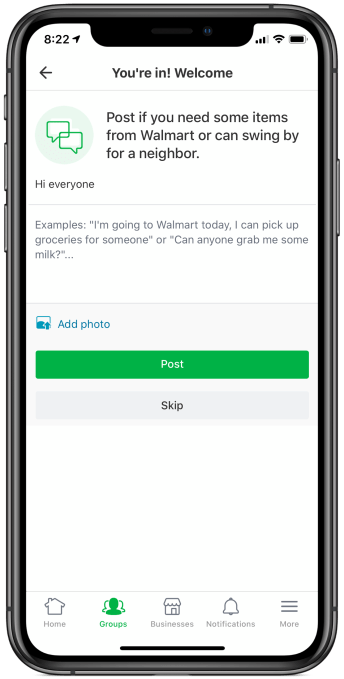
Neighborhood social network Nextdoor and Walmart are teaming up today to launch a new “Neighbors Helping Neighbors” program that will make it easier for vulnerable community members to get assistance from neighbors who are already planning a trip to Walmart. The new in-app feature will allow Nextdoor users to post to groups associated with their local Walmart store to request shopping assistance.

To find the new option, Nextdoor users can either use the Nextdoor website or mobile app.

From there, users will click on the “Groups” tab where they’ll see local Walmart stores pinned to the top of the page. Members can then post a message to the group feed where they can ask for help or offer to help others.

Members who connect in the feed can then work out the details on the message board or through direct message, where they can share more private details like their address and what they need from the store.

The feature is designed to help elderly, high-risk or other vulnerable members find someone who will pick up groceries, medications, or other essentials when they’re planning a trip to the store.

This could also offer a low-cost alternative to using online grocery delivery services, which require tipping. In the case of a neighbor helping a neighbor, the assistance is offered on a volunteer basis, not as someone’s job. That could be potentially life-saving for low-income community members who can’t risk shopping in a store during the coronavirus pandemic, but who also struggle to afford alternatives like online grocery.

Walmart isn’t moderating or managing these Nextdoor groups, to be clear, but worked with Nextdoor to make the feature available.

For the retailer, the addition isn’t just beneficial in terms of directing customers to Walmart to shop, it’s also seen as a way to reduce the number of people who come to the store in-person.

“I’ve seen first-hand the countless ways our Walmart team is working together during this challenging time, leading with humanity, compassion and understanding to serve our customers,” said Janey Whiteside, Walmart’s Chief Customer Officer, in a statement about the feature’s launch. “We’re continuing to do that through our new program with Nextdoor. We’re connecting neighbors to each other so that more members of our communities have access to essential items, while limiting contact and the number of people shopping in our stores,” she added.

Nextdoor has launched several new features in response to the coronavirus pandemic in recent weeks.

Its new “Help Maps” allowed members to post and offer help in their neighborhood, for example. But this feature had been buried on the “More” menu in the app and was being underutilized as a result. A dedicated place within Nextdoor Groups for these sorts of requests is more visible, making it easier to offer assistance or to ask for help.

Over the past few weeks, Nextdoor says it’s seen a 7x increase in people joining groups to help one another, a not surprising figure given its recent exit from beta.

Nextdoor will also make the Walmart groups easy to find by pinning them to the top of the Groups tab, it says.

Meanwhile, Walmart store locations and hours where “Neighbors Helping Neighbors” is available can be found on Nextdoor’s “Help Map.”

“We’re inspired everyday by the kindness of people around the world who are stepping up and helping out. In recent weeks, we’ve been blown away by the number of members who have raised their hand to run an errand, go to the grocery store, or pick up a prescription for a neighbor,” said Sarah Friar, Nextdoor CEO, about the feature. “We’re grateful for Walmart’s partnership to make this important connection between neighbors around vital services, and we’re proud to come together to ensure everyone has a neighborhood to rely on,” she said.

The new initiative is launching nationwide starting today, but may not be immediately available in the app as the rollout could take time to complete.


Read Full Article