Would you like to learn how to hack systems like black hat hackers and secure them like security experts? This free ebook (worth $23) could be what you’re looking for!
Written for anyone who wants to learn how to perform hacking and penetration testing, this practical book is aimed at beginners with no prior knowledge.
You’ll first learn some basic terminology, and how to set up your own penetration testing lab to practice safe and legal hacking. Then, when you’ve learned the basics, you’ll study various penetration testing fields, including servers, client-side attacks, networks, websites, and more.
For each of these fields, you’ll learn how they work, their vulnerabilities, how to exploit and hack those vulnerabilities, and how to secure the system.
By the end of the ebook, you’ll have a solid grasp of hacking and penetration testing, allowing you to “combine the techniques shown and tailor them to suit different scenarios”.
You have composed a draft email inside Gmail and would like to send the same message to multiple people, but separately. The subject, the email body, the attachments are common and the only thing that differs between each message is the recipient’s email address.
Maybe you are sending your résumé to multiple companies. How can you do this without having to copy-paste the subject and body of the draft message multiple times?
Create Duplicate Email Messages in Gmail
When you compose a draft email in Gmail and hit the Send button, the email is automatically removed from the Drafts folder and moved to the Sent Items folder.
There are however two easy ways to create duplicate draft emails inside Gmail. You can either use Mail Merge for Gmail or, if you are looking for a more simple one-click option, use the Duplicate Drafts feature available inside Email Studio.
Here’s how to get started.
Open your Gmail mailbox, compose a new email message and save it as a draft. You can attach files, embed inline images and other rich content.
Go to Email Studio and authorize the app* to access your Gmail account. This is required since the app will read your Gmail drafts and create copies inside your Gmail account.
Once the app is authorized, click the Draft Copier section.
Copy Gmail Drafts
To quickly clone a message to send separately to someone else, select the source draft from the drop-down, then select the number of copies you wish to have and click the Create Drafts button. The copied drafts will include the complete contents of the original message, including file attachments and inline images.
The Gmail clone tool works on both desktop and mobile so you can copy Gmail draft messages on a mobile phone as well.
The web app is written in Google Scripts and uses the Gmail API to create drafts copies. The app only requires Gmail access to copy your drafts and does not share, store or upload your data anywhere.
Email Studio is free for basic usage. Free users can copy a maximum of 3 email drafts at a time while premium users can duplicate up to 10 Gmail drafts in a single batch. No branding is included in premium version.
[*] If you have trouble authorizing the app, please ensure that you are not logged into multiple Google accounts. You can try try Email Studio in Chrome’s incognito mode or use this link to sign-out of your Gmail accounts.
What is slowing down my computer? A slow computer is frustrating and keeps you from getting work done.
While all computers slow down over time, in many cases, your own behavior can cause your computer to run slowly. Here are common mistakes that will slow your machine down to a crawl, and how to stop making them.
1. Running Too Many Programs
Over time, you’ve probably installed dozens of programs. Maybe you use a variety of tools for different functions, or have a bunch of apps installed from years ago that you forgot about. Running too many apps all the time can lead to your computer slowing down, as we explained when we looked at why installing software slows down your PC.
The biggest issue comes from programs setting themselves to automatically run in the background. This means that they’re eating up RAM, even if you never use them. To combat this, keep an eye out while installing new apps. If you see a checkbox similar to Automatically run [app] when I start my computer, make sure you clear it.
You can get an idea of what’s running in the background by looking at the System Tray in the bottom-right corner of your screen. You’ll see an icon for each program running, and may need to click the arrow to show the full list. In most cases, you can right-click an icon and choose Exit to close an app.
Removing Startup Programs
Instead of closing programs every time you boot up, you can disable programs from running at startup altogether. On Windows 10, open the Task Manager using Ctrl + Shift + Esc and click More details if you only see the basic interface. From there, switch to the Startup tab and you’ll see everything set to run when you log into Windows.
It’s classic advice to reboot your PC when you have a problem. But restarting regularly is important even if you’re not troubleshooting an active issue.
You might be tempted to never turn your computer off so that you can quickly resume where you left off next time. But this is a bad idea and can result in your Windows computer running slow.
The main benefit of restarting is that doing so flushes your RAM. Because RAM is volatile, it starts fresh upon every reboot. If you have any programs you run have a memory leak (meaning software never returns used RAM to the computer), restarting will fix that temporarily.
Windows also installs OS patches when you restart. Of course, Windows 10 will eventually try to force you to reboot to do this. But if you don’t reboot for long periods of time, your computer will be without the latest security fixes.
In most cases, you don’t need to reboot every night. Aim to restart your PC a few times per week. At other times, you can put your PC to sleep or use hibernation to quickly resume what you were doing.
3. Clicking Without Thinking
Next time you find your PC running slow, you should consider how carefully you click when online. Unfortunately, many websites are a minefield of harmful content. Fake download buttons, giant ads that lead to shady sites, and all sorts of other nonsense can cause problems on your computer.
Even legitimate downloads aren’t safe. While it’s not as big of a problem as it used to be, many free programs try to foist junky third-party software on you with preselected checkboxes. If you click “Next” without thinking, you could end up with extra trash on your system just from installing a few apps.
In the worst cases, this can even lead to malware getting on your system. You can open yourself to infection (and a slow computer) by opening a malicious email attachment that installs spyware or similar.
The lesson here is to make sure you always know what you’re clicking on. Take the extra second to confirm you aren’t missing a hidden checkbox or clicking on something that’s dangerous.
4. Not Maintaining Your Computer
Windows 10 is better than ever at taking care of some maintenance tasks on its own. But it isn’t perfect, so you’ll have to perform some basic tune-ups every once in a while. Making sure you take care of these could be the difference between your laptop running slow and working at peak performance.
As it works, your system builds up files that it only needed for a short time. This is a normal part of computer operation, but if you let these files pile up, they can start to take a toll on speed after a while. This is especially the case if you have a small SSD that fills up quickly.
You can head to Settings > System > Storage to turn on Storage Sense, a Windows 10 feature that helps you free up space automatically. For additional options, search for Disk Cleanup in the Start Menu.
Run Maintenance Scans
While your antivirus is likely set up to scan on a schedule, it’s wise to get a second opinion and scan with a dedicated anti-malware app occasionally. Malwarebytes is a great choice for this since the free version only scans on-demand. It’s much better to catch malware with a scan than to find that your computer is running slow weeks later.
Aside from this, Windows has some other scans you can run for maintenance, but you shouldn’t need to do so often. These include chkdsk and sfc.
The check disk command, or chkdsk, scans your hard drive for bad sectors that can cause your computer to act up. If you have an SSD in your machine, this isn’t as pertinent. But if you notice a sudden slowdown and still have an old HDD in your computer, it’s worth a try.
System file checker, or sfc, is a similar command. This one scans Windows system files and attempts to repair any that are corrupt.
Typically, people run these commands as part of troubleshooting an issue. But doing them every month or so can help you catch problems before they get worse.
Install Updates
We mentioned restarting to install Windows updates earlier, but it’s still a good idea to go to Settings > Update & Security > Windows Update to check for updates manually every once in a while. Doing so makes sure that updates aren’t stuck.
You should also take the time to make sure the software you use regularly is up-to-date. Using the latest version can introduce speed improvements not present in earlier builds.
5. Confusing Your Computer With the Internet
It’s common to think that your computer is slow, when in reality, your internet connection is the problem. If you only have trouble when accessing websites, streaming music, or doing other network-reliant activities, you probably have an issue with your internet connection. This can happen even with a blazing-fast computer in perfect shape.
We’ve taken a look at common user behaviors that can cause your PC to slow down. If you’ve done any of these, now is a great time to change your ways based on the advice provided. Eventually, all computers do slow down and need replacement. But until then, you can use these tips to regain some speed again.
Roku devices are regarded as one of the best ways to stream content on your TV. However, what if you want to use your Roku for other things, such as browsing the web and sorting through your photos?
What you need is access to Google services on your Roku. And in this article, we explain how to get Google on Roku. Including Google Play Movies and TV, Google Photos, and Google Search.
How to Get Google Play Movies and TV on Roku
We begin with one of the more straightforward ways to get Google on Roku.
Given that Roku devices support all of the major streaming services, it should be no surprise to learn that Google Play Movies and TV has an official Roku channel that you can download and use.
Once you have installed the Google Play Movies app on your Roku, you need to pair it with your Google account by visiting play.google.com/roku. You will also need to provide a payment method during the sign-up process, though you won’t be charged unless you order something.
On Google’s official help page, it claims some geo-restrictions exist. In theory, you can only use the app if you live in Canada, Germany, the Republic of Ireland, the United States, or the United Kingdom. It is unclear how accurate the information is; I live in Mexico and can download and access the service on my Roku. Just be aware that non-supported countries may have issues.
Sadly, there is no official Google Play Music for Roku devices. You can draw your own conclusions about Google’s reasoning (cough, Chromecasts).
There used to be a couple of ways to listen to Google Play Music on your Roku—you could use the Nowhere Music private Roku channel, or you could use a third-party plug-in for Plex. Alas, development has ceased on both projects.
As such, the only remaining option is to cast Google Play Music from an Android device or Windows computer directly to your Roku device. Roku sticks use Miracast technology, so iOS devices are not supported. Check out our explanation of how Miracast works to learn more.
It’s an inelegant solution for lots of reasons, but it works. Just remember that you’ll need to control the playback directly from your phone or computer rather than through the Roku TV remote.
To listen to Google Play Music on a Roku, follow these instructions if you’re an Android user:
Make sure your Android device and Roku device are on the same Wi-Fi network.
On your Android, swipe down on the Notification Bar.
Tap on Cast.
Select your Roku from the list of devices.
Or follow these steps if you’re running Windows:
Make sure your Windows computer and Roku device are on the same Wi-Fi network.
Open the Settings app.
Navigate to System > Display.
Scroll down to Multiple Displays.
Click on Connect to a Wireless Display.
Choose your Roku device from the list of available options.
As long as you are running Roku OS 7.7 or later, you do not need to take any action on the Roku device itself—the mirroring will start automatically.
How to Get Google Photos on Roku
Again, there is no official Google Photos app for Roku. This time, however, you can use a third-party app from the Roku Channel Store.
The app is called PhotoView for Google Photos. It started life back in late 2016 as a small and unpolished piece of software. Today, it holds an official “Partner” status with the Google Photos app and has become the best way to access your pictures on a Roku.
PhotoView supports your Google Photos albums and has an integrated search feature. The app also comes with a screensaver feature; you can play your photos in a slideshow when your Roku is not in use.
Be aware that you will need to give PhotoView access to your Google account during the setup process. Some people may feel uncomfortable with this.
Even though we’re sure that many people wish it were possible, there is simply no way to get the Google Play Store on your Roku device.
It’s because of the underlying services that the Play Store relies on. Your Roku would need to be running Google Services Framework, Google Account Manager, and Google Play Services—none of which are available. And, unlike the Fire TV, there is no way to sideload those components onto your stick.
In terms of getting Google apps on your Roku, the upshot of the lack of the Google Play Store is that if you want to use software like Gmail, Google Calendar, Google Keep, et al., you’ll be out of luck.
Again, the only possible solution is to mirror your screen using the steps described earlier. In this case, it’s not clear what benefit screen mirroring would have over merely using the respective apps directly on your phone or tablet.
Can You Get Google Chrome on Roku?
In what’s becoming a familiar story, there’s no Google Chrome app for Roku devices.
If you absolutely need to access Chrome on your TV screen, you need to mirror your screen from another Miracast-enabled device.
How to Get Google Search on Roku
If you are wondering how to get internet on Roku, we’ve got some bad news. Your list of options is minimal. The quality of web browsers on Roku devices is not as robust as the choices on Fire TV sticks or Android TV boxes.
Indeed, there are only two options to choose from: Web Browser X and Poprism.
Poprism is only text-based—it cannot display images, photos, or Flash content. Web Browser X is seriously unreliable. To use Google Search, navigate to google.com in the usual way.
If neither of the browsers work for you, the only option is to mirror your Android or Windows screen onto your TV once again.
Of course, just because the outlook for using Google’s apps and services on your Roku isn’t great, it doesn’t mean there aren’t still tons of great Roku channels for you to choose from.
According to The Wall Street Journal, the 3-2, party-line vote by FTC commissioners was carried by the Republican majority and will be moved to the Justice Department’s civil division to be finalized.
A $5 billion payout seems like a significant sum, but Facebook had already set aside $3 billion to cover the cost of the settlement and the company could likely make up the figure in less than a quarter of revenue (the company’s revenue for the last fiscal quarter was roughly $15 billion). Indeed, Facebook said in April that it expected to pay up to $5 billion to end the government’s probe.
The settlement will also include government restrictions on how Facebook treats user privacy, according to the Journal.
We have reached out to the FTC and Facebook for comment and will update this story when we hear back.
Ultimately, the partisan divide which held up the settlement broke down with Republican members of the commission overriding Democratic concerns for greater oversight of the social media giant.
Specifically the FTC was examining whether the data breach violated a 2012 consent decree which saw Facebook committing to engage in better privacy protection of user data.
Facebook’s woes didn’t end with Cambridge Analytica. The company has since been on the receiving end of a number of exposes around the use and abuse of its customers’ information and comes as calls to break up the big tech companies have only grown louder.
The settlement could also be a way for the company to buy its way out of more strict oversight as it faces investigations into its potentially anti-competitive business practices and inquiries into its launch of a new cryptocurrency — Libra — which is being touted as an electronic currency for Facebook users largely divorced from governmental monetary policy.
Potential sanctions proposed by lawmakers for the FTC were reported to include the possibility of elevating privacy oversight to the company’s board of directors and potentially the deletion of tracking data; restricting certain information collection; limiting ad targeting; and restricting the flow of user data among different Facebook business units.
While the agility of a Spot or Atlas robot is something to behold, there’s a special merit reserved for tiny, simple robots that work not as a versatile individual but as an adaptable group. These “tribots” are built on the model of ants, and like them can work together to overcome obstacles with teamwork.
Developed by EPFL and Osaka University, tribots are tiny, light, and simple, moving more like inchworms than ants, but able to fling themselves up and forward if necessary. The bots themselves and the system they make up are modeled on trap-jaw ants, which alternate between crawling and jumping, and work (as do most other ants) in fluid roles like explorer, worker, and leader. Each robot is not itself very intelligent, but they are controlled as a collective that deploys their abilities intelligently.
In this case a team of tribots might be expected to get from one end of a piece of complex terrain to another. An explorer could move ahead, sensing obstacles and relaying their locations and dimensions to the rest of the team. The leader can then assign worker units to head over and try to push the obstacles out of the way. If that doesn’t work, an explorer can try hopping over it — and if successful, it can relay its telemetry to the others so they can do the same thing.
Fly, tribot, fly!
It’s all done quite slowly at this point — you’ll notice that in the video, much of the action is happening at 16x speed. But rapidity isn’t the idea here; Similar to Squishy Robotics’ creations, it’s more about adaptability and simplicity of deployment.
The little bots weigh only 10 grams each, and are easily mass-produced, as they’re basically PCBs with some mechanical bits and grip points attached — “a quasi-two-dimensional metamaterial sandwich,” according to the paper. If they only cost (say) a buck each, you could drop dozens or hundreds on a target area and over an hour or two they could characterize it, take measurements and look for radiation or heat hot spots, and so on.
If they moved a little faster, the same logic and a modified design could let a set of robots emerge in a kitchen or dining room to find and collect crumbs or scoot plates into place. (Ray Bradbury called them “electric mice” or something in “There will come soft rains,” one of my favorite stories of his. I’m always on the lookout for them.)
Swarm-based bots have the advantage of not failing catastrophically when something goes wrong — when a robot fails, the collective persists, and it can be replaced as easily as a part.
“Since they can be manufactured and deployed in large numbers, having some ‘casualties’ would not affect the success of the mission,” noted With their unique collective intelligence, our tiny robots can demonstrate better adaptability to unknown environments; therefore, for certain missions, they would outperform larger, more powerful robots.”
It raises the question, in fact, of whether the sub-robots themselves constitute a sort of uber-robot? (This is more of a philosophical question, raised first in the case of the Constructicons and Devastator. Transformers was ahead of its time in many ways.)
The robots are still in prototype form, but even as they are constitute a major advance over other “collective” type robot systems. The team documents their advances in a paper published in the journal Nature.
Posted by Yinfei Yang and Amin Ahmad, Software Engineers, Google Research
Since it was introduced last year, “Universal Sentence Encoder (USE) for English’’ has become one of the most downloaded pre-trained text modules in Tensorflow Hub, providing versatile sentence embedding models that convert sentences into vector representations. These vectors capture rich semantic information that can be used to train classifiers for a broad range of downstream tasks. For example, a strong sentiment classifier can be trained from as few as one hundred labeled examples, and still be used to measure semantic similarity and for meaning-based clustering.
Today, we are pleased to announce the release of three new USE multilingual modules with additional features and potential applications. The first two modules provide multilingual models for retrieving semantically similar text, one optimized for retrieval performance and the other for speed and less memory usage. The third model is specialized for question-answer retrieval in sixteen languages (USE-QA), and represents an entirely new application of USE. All three multilingual modules are trained using a multi-task dual-encoder framework, similar to the original USE model for English, while using techniques we developed for improving the dual-encoder with additive margin softmax approach. They are designed not only to maintain good transfer learning performance, but to perform well on semantic retrieval tasks.
Multi-task training structure of the Universal Sentence Encoder. A variety of tasks and task structures are joined by shared encoder layers/parameters (pink boxes).
Semantic Retrieval Applications
The three new modules are all built on semantic retrieval architectures, which typically split the encoding of questions and answers into separate neural networks, which makes it possible to search among billions of potential answers within milliseconds. The key to using dual encoders for efficient semantic retrieval is to pre-encode all candidate answers to expected input queries and store them in a vector database that is optimized for solving the nearest neighbor problem, which allows a large number of candidates to be searched quickly with good precision and recall. For all three modules, the input query is then encoded into a vector on which we can perform an approximate nearest neighbor search. Together, this enables good results to be found quickly without needing to do a direct query/candidate comparison for every candidate. The prototypical pipeline is illustrated below:
A prototypical semantic retrieval pipeline, used for textual similarity.
Semantic Similarity Modules
For semantic similarity tasks, the query and candidates are encoded using the same neural network. Two common semantic retrieval tasks made possible by the new modules include Multilingual Semantic Textual Similarity Retrieval and Multilingual Translation Pair Retrieval.
Multilingual Semantic Textual Similarity Retrieval
Most existing approaches for finding semantically similar text require being given a pair of texts to compare. However, using the Universal Sentence Encoder, semantically similar text can be extracted directly from a very large database. For example, in an application like FAQ search, a system can first index all possible questions with associated answers. Then, given a user’s question, the system can search for known questions that are semantically similar enough to provide an answer. A similar approach was used to find comparable sentences from 50 million sentences in wikipedia. With the new multilingual USE models, this can be done in any of supported non-English languages.
Multilingual Translation Pair Retrieval
The newly released modules can also be used to mine translation pairs to train neural machine translation systems. Given a source sentence in one language (“How do I get to the restroom?”), they can find the potential translation target in any other supported language (“¿Cómo llego al baño?”).
Both new semantic similarity modules are cross-lingual. Given an input in Chinese, for example, the modules can find the best candidates, regardless of which language it is expressed in. This versatility can be particularly useful for languages that are underrepresented on the internet. For example, an early version of these modules has been used by Chidambaram et al. (2018) to provide classifications in circumstances where the training data is only available in a single language, e.g. English, but the end system must function in a range of other languages.
USE for Question-Answer Retrieval
The USE-QA module extends the USE architecture to question-answer retrieval applications, which generally take an input query and find relevant answers from a large set of documents that may be indexed at the document, paragraph, or even sentence level. The input query is encoded with the question encoding network, while the candidates are encoded with the answer encoding network.
Visualizing the action of a neural answer retrieval system. The blue point at the north pole represents the question vector. The other points represent the embeddings of various answers. The correct answer, highlighted here in red, is “closest” to the question, in that it minimizes the angular distance. The points in this diagram are produced by an actual USE-QA model, however, they have been projected downwards from ℝ500 to ℝ3 to assist the reader’s visualization.
Question-answer retrieval systems also rely on the ability to understand semantics. For example, consider a possible query to one such system, Google Talk to Books, which was launched in early 2018 and backed by a sentence-level index of over 100,000 books. A query, “What fragrance brings back memories?”, yields the result, “And for me, the smell of jasmine along with the pan bagnat, it brings back my entire carefree childhood.” Without specifying any explicit rules or substitutions, the vector encoding captures the semantic similarity between the terms fragrance and smell. The advantage provided by the USE-QA module is that it can extend question-answer retrieval tasks such as this to multilingual applications.
For Researchers and Developers
We're pleased to share the latest additions to the Universal Sentence Encoder family with the research community, and are excited to see what other applications will be found. These modules can be used as-is, or fine tuned using domain-specific data. Lastly, we will also host the semantic similarity for natural language page on Cloud AI Workshop to further encourage research in this area.
Acknowledgements Mandy Guo, Daniel Cer, Noah Constant, Jax Law, Muthuraman Chidambaram for core modeling, Gustavo Hernandez Abrego, Chen Chen, Mario Guajardo-Cespedes for infrastructure and colabs, Steve Yuan, Chris Tar, Yunhsuan Sung, Brian Strope, Ray Kurzweil for discussion of the model architecture.
The Daily Crunch is TechCrunch’s roundup of our biggest and most important stories. If you’d like to get this delivered to your inbox every day at around 9am Pacific, you can subscribe here.
Before you start complaining about censorship, keep in mind that hidden replies won’t actually get pulled from Twitter — they’ll disappear from the default view, but you can still tap a gray icon to see them.
The goal is to give the person who starts a conversation more control over which comments are visible, making it harder for trolls to jump in and derail things.
In a long-awaited decision, the Federal Elections Commission will now allow political campaigns to appoint cybersecurity helpers to protect themselves from cyberthreats and malicious attackers.
Kantar provides stats and insights on how consumers buy and think of products in areas like technology, media and health — we’ve written many stories citing their numbers.
Time for a new EC-1, which provides an in-depth profile of a successful startup! This time, we’re focusing on Roblox, a company that took at least a decade to hit its stride. (Extra Crunch membership required.)
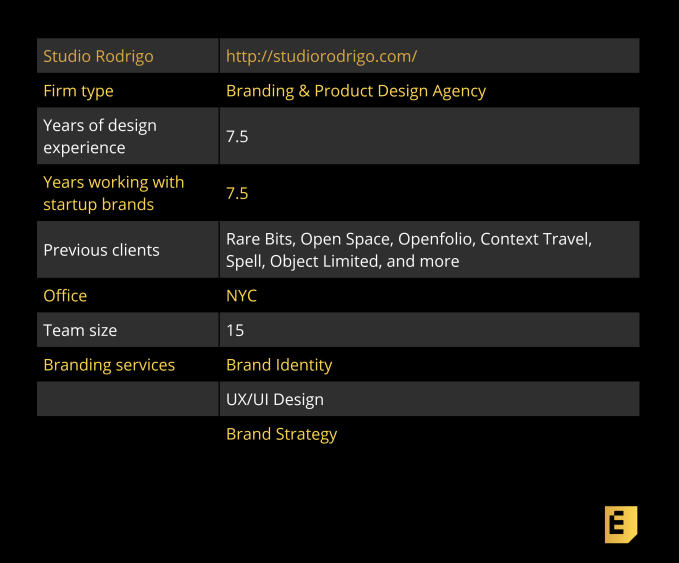
Ritik Dholakia worked as a startup product manager before he co-founded Studio Rodrigo, a branding and product design agency based in NYC. Unlike traditional branding firms, Studio Rodrigo is proud of its product design chops, especially when it comes to helping early-stage startups build version one of their product. It’s not an easy balancing act since most companies eventually want to bring their product design talent in-house, but it turns out, Studio Rodrigo can help with that too. Learn more about the studio in our Q&A with founder Ritik Dholakia.
Studio Rodrigo’s unique approach:
“Studio Rodrigo listened to all of our goals and dreams, concerns and uncertainties, and created a brand identity, website, and marketing materials that were true to our vision but better than anything we could have imagined.” Tze Chun, NYC, Founder, Uprise Art
“Basically, we’re a full-stack product design team. We have people who can do brand identity from a pure graphic design and visual communications standpoint, and who can also connect the dots between design and technology, business, and customer needs. We don’t have a traditional agency model with a project and account management overhead. You work directly with our designers.”
On Studio Rodrigo’s ideal client:
“We like working with clients that are solving big, meaty, challenging problems. We’ve got a smart team that likes to wrap their heads around the kinds of technologies that are pushing industries forward. For us, that’s currently technologies like machine learning and artificial intelligence.”
Below, you’ll find the rest of the founder reviews, the full interview, and more details like pricing and fee structures. This profile is part of our ongoing series coveringstartup brand designers and agencieswith whom founders love to work, based onthis surveyand our own research. The survey is open indefinitely, so please fill it out if you haven’t already.
Interview with Studio Rodrigo Co-founder Ritik Dholakia
Yvonne Leow: First things first, how did you get into brand design and product development?
Ritik Dholakia: I’ve been in digital design and product development for about 20 years now. I actually started my career as a product manager at a startup. I worked for two venture-backed startups as the first product manager. I was part of the Series A team, managing product development, acquiring initial customers, and building market traction.
The first startup was an enterprise software platform for customers doing triple bottom line reporting. The second one was one of the earliest social networking platforms, pre-Facebook, and around the same time as Friendster, LinkedIn, and Spoke.
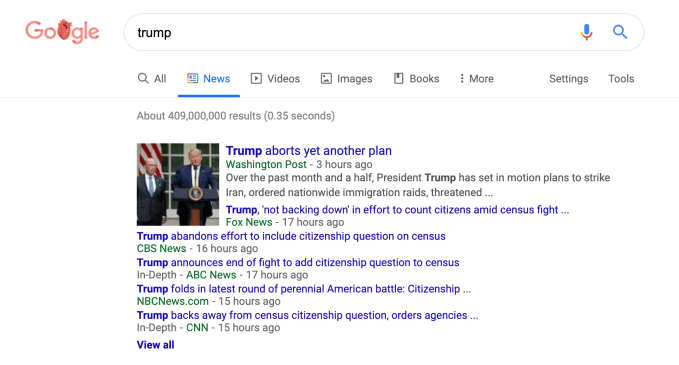
The Google News tab is getting a makeover. Google announced this week, by way of a tweet, a significant redesign of the Google.com News tab on the desktop, which will organize articles in a card-style layout, while also better emphasizing publisher names. The end result makes Google News more aesthetically pleasing, but it comes at the expense of information density.
To be clear, the changes here are focused on the News tab of Google.com — not the dedicated Google News product at news.google.com. You land on the News tab when you search for a term on Google.com, and then click over to “News” to see the latest coverage instead of Google’s list of search results.
As the preview of the redesign shows, news articles are currently organized in a compact list of links, allowing you to see several headlines around a single topic with just a glance. This design, admittedly, is a bit old-school — but it works.
Within the stack of links, the headline is blue, the publisher is green, and the articles are labeled as “In-depth” or “Opinion,” when relevant. There are small photo thumbnails by the lead story, with other publishers’ links underneath appearing as only text.
The updated design is more readable as articles are spaced out and placed in cards, similar to the main Google News product. There’s more white space and longer previews of each story, as well.
But the change means you’re seeing far fewer results on the screen before you have to scroll down.
Over the next couple weeks we’re rolling out a redesigned News tab in Search on desktop. The refreshed design makes publisher names more prominent and organizes articles more clearly to help you find the news you need. Check it out pic.twitter.com/xa2aZfO4Qd
— Google News Initiative (@GoogleNewsInit) July 11, 2019
The updated News tab makes it more obvious where the news is coming from, because publishers’ names are given more prominence. They also get their logo next to the headline, so it’s easier to identify your favorite news outlets with a glance. This is reminiscent of the recent mobile redesign for Google Search, which also put increased attention on the publishers by featuring them at the top of a link alongside their logo.
In addition to providing you with a set of News search results, the redesigned tab includes a new carousel labeled “People also searched for” that points you to other relevant news based on your search query.
Not everyone is thrilled about the update, given it makes it more difficult to quickly scan a number of headlines at once. And because there are fewer publishers’ articles on the first screen, traffic to those “below the fold” will likely drop.
Google says the changes will roll out over the next couple of weeks.
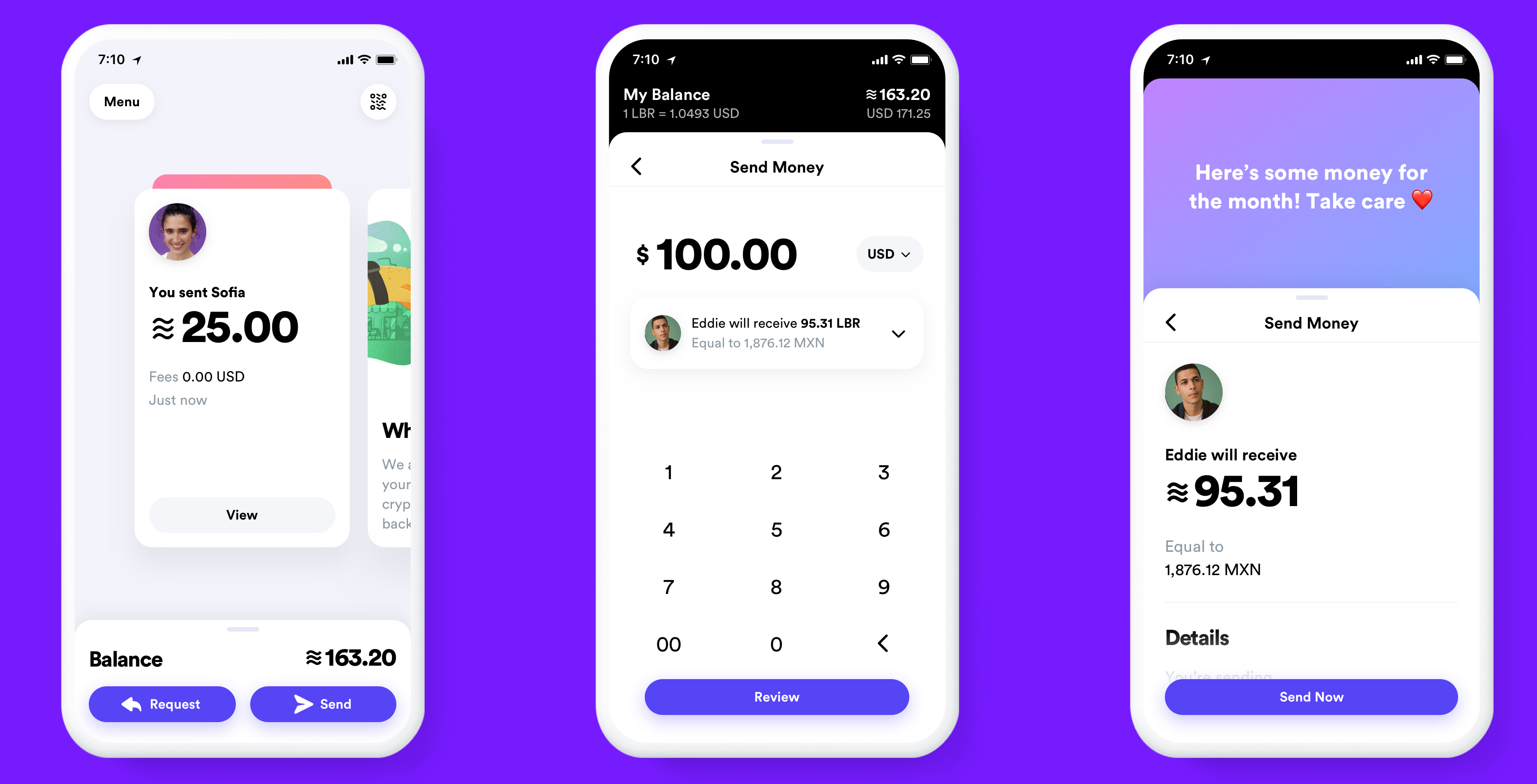
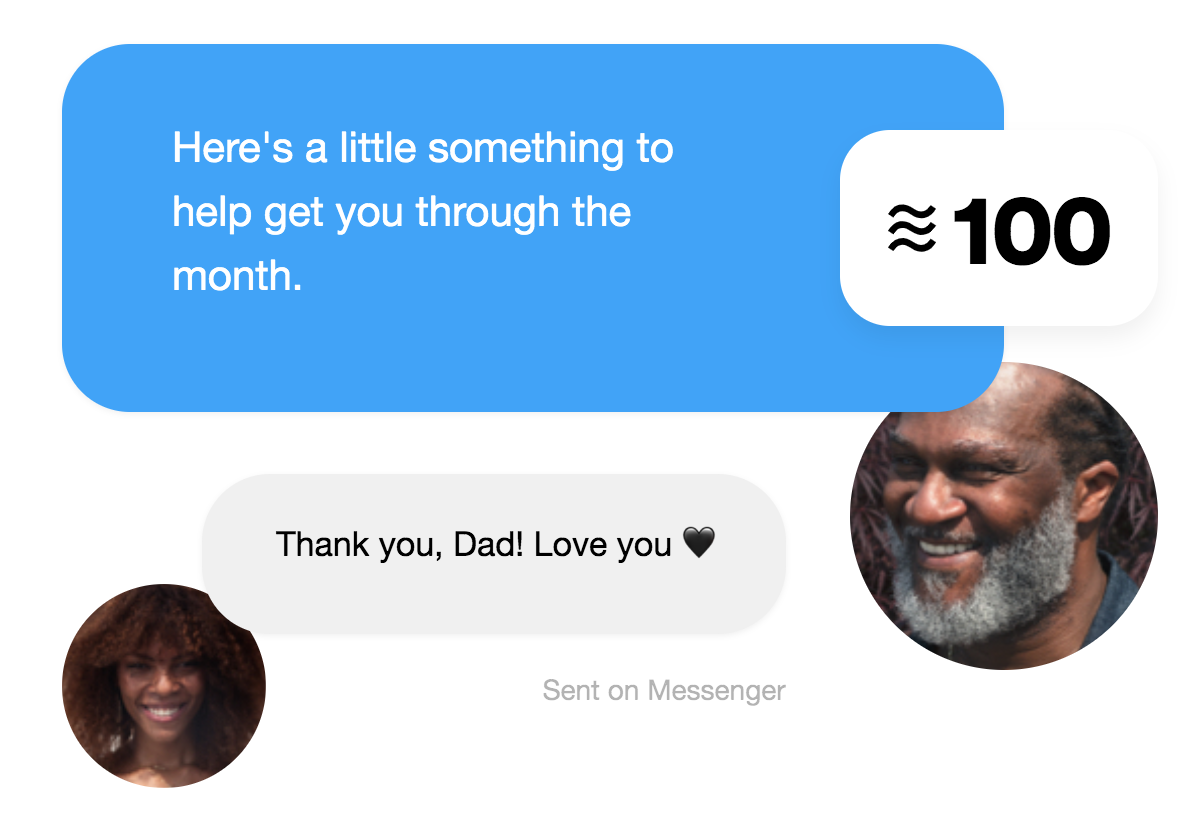
Facebook provided TechCrunch with new information on how its cryptocurrency will stay legal amidst allegations from President Trump that Libra could facilitate “unlawful behavior”. Facebook and Libra Association executives tell me they expect Libra will incur sales tax and capital gains taxes. They confirmed that Facebook is also in talks with local convenience stores and money exchanges to ensure anti-laundering checks are applied when people cash-in or cash-out Libra for traditional currency, and to let you use a QR code to buy or sell Libra in person.
A Facebook spokesperson said the company wouldn’t respond directly to Trump’s tweets, but noted that the Libra association won’t interact with consumers or operate as a bank, and that Libra is meant to be a complement to the existing financial system.”
Trump had tweeted that “Unregulated Crypto Assets can facilitate unlawful behavior, including drug trade and other illegal activity.Similarly, Facebook Libra’s “virtual currency” will have little standing or dependability. If Facebook and other companies want to become a bank, they must seek a new Banking Charter and become subject to all Banking Regulations, just like other Banks, both National and International”
In a wide-reaching series of interviews this week, the Libra Association’s head of policy Dante Disparte, Facebook’s head economist for blockchain Christian Catalini, Facebook’s blockchain project subsidiary Calibra’s VP of product Kevin Weil answered top questions about regulation of Libra. Here’s what we’ve learned (their answers were trimmed for clarity but not edited):
Would Facebook’s Calibra Wallet launch elsewhere even if it’s banned in the USA by regulators?
Calibra’s Kevin Weil: “We believe that creating a financial ecosystem that has significantly broader access where all it takes is a phone and lower transaction fees across the board is good for people. And we want to bring it to as many people around the world as we can. But as a custodial wallet we are regulated and will be compliant and we will only operate in markets where we’re allowed.
We want that to be as many markets as possible. That’s why we announced well in advance of actually launching a product — because we’ve been engaging with regulators. We’re continuing to engage with regulators and we can help them understand the effort that we’re taking to make sure that people are safe and also the value that accrues to the people in their countries when there’s broader access to financial services with lower transaction fees across the board.
TechCrunch: But what if you’re banned in the US?
Weil: “I’m hesitant to give a blanket answer. But in general, we believe that Libra is positive for people and we want to launch as broadly as possible. The world where the US does that I think would probably cause other regulatory regimes to also be concerned about it. I think that’s very much a bridge that we’ll cross when we get there. But so far we’re having frank, open and honest discussions with regulators. Obviously, that continues next week with David testimony. And I hope it doesn’t come to that, because I think that Libra can do a lot of good for a lot of people.”
TechCrunch’s Analysis: The US House subcommittee has already submitted a letter to Facebook requesting that it cease development of Libra and Calibra until regulators can better examine it and take action. It sounds like Facebook believes a US ban on Libra/Calibra would cause a domino effect in other top markets, and therefore make it tough to rationalize still launching. That puts even more pressure on the outcome of July 16th and 17th’s congressional hearings on Libra with the head of Facebook’s head of Calibra David Marcus.
How will users cash-in and cash-out of Libra in person?
We already know that Facebook’s own Libra wallet called Calibra will be baked into Messenger and WhatsApp plus have its own standalone app. There, those with connected bank accounts and government ID that go through a Know Your Customer (KYC) anti-fraud/laundering check will be able to buy and sell Libra. But a big goal of Libra is bring the unbanked into the modern financial system. How does that work?
Calibra’s Kevin Weil: “Because Libra is an open ecosystem, any money exchange business or entrepreneur can begin supporting cash-in/cash-out without needing any permission from anyone associated with the Libra Association or member of the Libra Association. They can just do it. Today in a lot of emerging markets [there’s a service for matching you with someone to exchange cryptocurrency for cash or vice-versa called] LocalBitcoins.com and I think you’ll see that with Libra too.
Second, we can augment that by by working with local exchanges, convenience stores and other cash-in/cash-out providers to make it easy from within Calibra. You could imagine an experience in the Calibra app or within Messenger or WhatsApp, where if you want to cash in or cash out, you’ll pop up a map that highlights physical locations around that allow you to do it. You select one that’s nearby, you select an amount, and you get a QR code that you can take to them and complete the transaction.
I’d imagine that most of these businesses that we work with will support Libra more broadly, so even if we get these deals started it will benefit the whole ecosystem and every Libra wallet, not just Calibra.”
TechCrunch: Have you struck relationships with any convenience store operators or money exchangers like Western Union or MoneyGram, or Walgreens, CVS or 7/11? Are you in talks with them yet?
Weil: “I probably shouldn’t comment on any specific deals but we’re in conversation with a lot of the folks you might think, because ultimately being able to move between Libra and your local currency is critical to driving adoption and utility in the early days . . . If you’re banked there are easier ways to do that. If you’re not banked and you’re in cash — those are the people we really want to serve with Libra — we’re working very hard to make that process easy for people.”
TechCrunch’s analysis: This approach will let Calibra largely avoid the complicated and potentially error-prone process of KYCing people in person or handing out cash by offloading the responsibility and liability to other parties.
How will Libra stop fraud or laundering while offering access to unbanked users without ID?
Weil: “There are very important populations that don’t have an ID. People in a refugee camp may not, as an example, and we want Libra to be serve them. So this is one example of many of why it’s important that Calibra isn’t the only option for people who want to participate in the Libra ecosystem . . . Others of these will be run by local providers and they have programs to meet customers face-to-face and other ways to serve people and even KYC them that we may not . . . We’re not going be the only wallet, we don’t want to be the only wallet.
This is one of the reasons NGOs have bene members of the Libra association from the start, because we want to encourage the monetization of identity processes both through working with governments issuing credentials for more people and also making use of new types of information for identity and authentication. We hope this process will hep the last mile problem.
In the case of a non-custodial wallet, the user isn’t trusting anyone. The way the regulations have worked and this is evolving as we speak. The on-ramps and off-ramps to the crypto world are regulated and they have direct customer relationships and it’s their responsibility to KYC people. In our case we’ll be a custodial wallet and we’ll KYC people. There are a number of wallets in the Bitcoin or Ethereum ecosystem — non-custodial wallets that don’t have a direct relationships with the users. . . They have to get that Bitcoin somehow. Usually they’re going through an exchange where usually as part of the process they’re KYC’d.
In a lot of emerging markets you have LocalBitcoins.com where you can find a representative or agent who will meet you in person and exchange cash for bitcoin in whatever market you have to be in. And I believe that they just started making sure that they KYC everyone,but they’re doing it in person. And they have more flexibility in how they do it then you might otherwise. I think there are lots of ways that this will happen and the fact that Libra is an open ecosystem will enable people to be entrepreneurial about it.
There are lots an lots of people who are underserved by today’s financial ecosystem who have government ID. So even with requiring everyone go through a KYC process, we’ll be able to serve many, many people who are not well-served by today’s financial ecosystem. We want to find ways to support people who can’t KYC and the important part is that Calibra will fully interoperate with any other wallet, including ones that people in local markets are using because it’s a better fit for their needs.”
TechCrunch: Through that interoperability, if someone with an non-custodial wallet receives Libra and then sends it a Calibra wallet user, does that mean you Libra coming into Calibra from users who weren’t KYC’d and could be laundering money?
Weil: So it’s part of the regulatory situation that’s evolving as we speak. There’s something called the Travel Rule . . . If there’s a transfer above a certain value you have to make sure that you understand both who the sender is, which you do if they’re using a custodial wallet, and who the receiver is. These are evolving regulations, but it’s something that obviously we’re going to make sure that we implement as regulations solidify.”
TechCrunch’s Analysis: Calibra appears to be inviting regulation that it can strictly abide by rather than trying to guess at what the best approach is. But given it’s unclear when concrete rules will be established for transfers between non-custodial wallets and custodial wallets, or for in-person cashing, Facebook and Calibra may need to establish their own strong protocols. Otherwise they could be guilty of permitting the “unlawful behavior” Trump describes.
How will Libra be Taxed?
Dante Disparte of Libra: “Taxing of digital assets is something that’s being designed at the local level and at the jurisdiction level. Our view of the world is that like with any form of money or any form of payment or banking, the onus in terms of compliance with tax is with the individual user and consumer, and the same would hold true broadly here.
We expect that the many, many wallets and financial services providers building solutions on the Libra blockchain would begin to provide tools that make it much easier than it is today [to calculate and file taxes] for digital assets and cryptocurrencies more generally . . . There’s plenty of time between now and Libra hitting the market to begin defining this more strictly at the jurisdictional level among providers.
TechCrunch’s Analysis: Again, here Facebook, Calibra, and Libra association are hoping to avoid shouldering all the responsibility for taxes. Their position is that just as you have to take the initiative of paying your taxes whether or not you use a Visa card or your bank’s checks to transact, it’s on you to pay your Libra taxes.
TechCrunch: Do you think in the United States that it’s reasonable for the government to ask that Libra transactions be taxed?
Disparte: “Tax treatments of digital assets broadly hasn’t been entirely clarified in most places around the world. And we hope that this is something that this project and the ecosystem around it helps to clarify.
Tax authorities will see a benefit from Libra at the consumption level and at the household level, while some cryptocurrencies have avoided taxes until the point they tried to cash out. But the nature of it and the lack of speculation and its design we think should give it a light tax treatment the way you would find with traditional currencies.”
Christian Catalini of Facebook: “Cryptocurrencies are taxed right now every time you have a sale on the differences in gains and losses. Because Libra is designed to be a medium of exchange, those gains and losses are likely to be very tiny relative to your local currency . . . Sales tax would likely be implemented the exact same way on Libra as it is today when you pay with a credit card.
At launch giving current regulations, the Calibra wallet will have to track every purchase and sale of Libra for a US user and those differences will have to be reported on tax day. You can think of the losses, albeit they may be very small gains and losses relative to USD, as similar to the what people do today when they have a Coinbase account with Bitcoin.
The sales tax I think could be implemented in the exact same way as it today with any other sort of digital payment, it would be no different. If you’re buying goods or services with Libra you’ll be paying sales tax the same way as if you used a different form of payment. Like today when you see a percentage, that is the sales tax on your total.”
Disparte: “Maybe the best way to frame how taxes work all over the world is that it’s not up to Libra, Calibra, Facebook or any company to make that determination. It’s up to regulators and authorities.”
TechCrunch: Does Calibra already have plans in place for how to handle sales tax?
Weil: “That’s also a pretty rapidly evolving part of the regulatory ecosystem right now. It’s really an ongoing discussion. We will do whatever the regulation says we need to do.”
TechCrunch’s Analysis: Here we have the firmest answers of our interviews. Facebook, Calibra, and the Libra Association believe the proper approach to taxes is that Libra transactions carry a country’s traditional sales tax, and that Libra you hold in your wallet will have to pay taxes based on the Libra stablecoin’s value (that’s pegged to a basket of international currencies) relative to the US dollar.
If the Libra Association recommends all wallets and transactions follow these rules and Calibra builds in protocols to handle these taxes simply, at least the government can’t argue Libra is a method of dodging taxes and everyone paying their fair share.
Sage is giving reviewers, chefs and other experts and publishers a central place to share all their content.
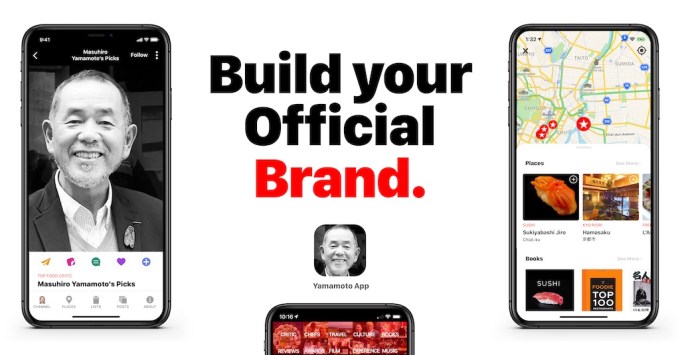
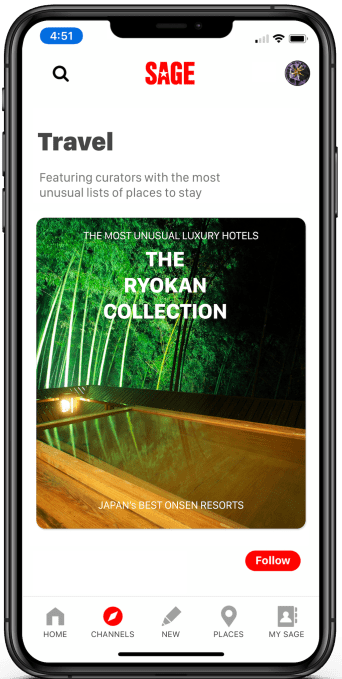
To do this, the startup has created a new product called Sage Plus for Experts, which isn’t open to the public yet, but is accepting signups from those aforementioned travel experts — the kinds of experts who can share content around things to do, food, drinks, experiences and shopping.
Founder and CEO Samir Arora (who previously led Mode Media/Glam Media) suggested that a Sage profile can serve as the center of a creator or publisher’s online presence. And eventually, it could become the foundation for them to build their own personal direct-to-consumer brand.
In the announcement, Arora said the product was designed to answer “a simple question”: “Why does the internet not offer a simple way to show recommendations by real experts or the authentic experiences and products by the brands we trust and love?”
Back in 2017, when he first told me about his vision for Sage in 2017, Arora said his goal was to create a reliable source for location data. In an interview earlier this month, he said the plan to focus on verified sources eventually led him to this new product.
“We started to say that the only way to have verified information is to go backwards, to verify the sources of information — the journalists,” he said.
To do that, Sage starting curating a list of trusted experts, and it started working with those experts, who Arora said were asking for something like this. He showed me how someone could come onto the Sage service and quickly connect their social media accounts and author pages —after that, the profile updates automatically.
So there’s no technical expertise required, and after the initial setup, no additional work — though if they want to, experts can also post reviews and lists made specifically for Sage. They can even publish their Sage profile as a separate mobile app, and start monetizing through things like bookings and merchandise sales.
In some cases, the profile will already exist, and the expert simply needs to claim it.
“We’ve been manually curating sources while training an AI to reliably to go out into the world to find people who are professionally in this business,” Arora said.
He added that Sage’s list has already grown to 5 million experts, with 200,000 active profiles. The active experts include food critic Masuhiro Yamamoto (who you may know from “Jiro Dreams of Sushi”).
Ultimately, all expert content goes back into the broader Sage platform, and it will allow the startup to recommend trustworthy publishers and provide travel recommendations on what to do and where to go.
Bloomberg reported last April that Amazon was working on a home robot codenamed ‘Vesta’ (after the Roman goddess of the hearth and home) last year, and now the publication says that development on the project continues. Plus, the report includes new details about the specifics of the robot, including that it will indeed support Alexa and have wheels to help it move around. My terrible artist’s rendering of what that could look like is above.
The plan for Vesta was apparently to release it this year, but it’s not yet quite ready for mass production, according to Bloomberg’s sources. And while it could end up mothballed and never see the light of day, as with any project being developed ahead of launch, the company is said to be putting more engineering and development resources into the team working on its release.
Current prototypes of the robot are said to be about waist-high, per the report, and make their way through the world aided by sensor-fed computer-vision. It’ll come when you call thanks to the Alexa integration, per an internal demo described by Bloomberg, and should ostensibly offer all the same kind of functionality you’d get with an Echo device, including calling, timers and music playback.
For other clues as to what Vesta could look like, if and when it ever launches, a good model might be Kuri, the robot developed by Bosch internal startup Mayfield Robotics which was shuttered a year ago and never made it to market. Kuri could also record video and take photos, play games and generally interact with the household.
Amazon is reportedly looking to offer an Echo that more directly competes with high-end speakers like the Sonos line of device of Apple’s HomePod, according to a new report from Bloomberg. The speaker should be released sometime next year, according to the sources cited in the report, and will be somewhat wider than the existing Echo models (perhaps more akin to the Echo Sub, pictured above), packing in four separate tweeters to help boost the song quality.
It will, of course, also offer access to the company’s Alexa voice assistant, which is what has propelled Echo to its current level of success. Bloomberg notes that it’s also likely to work better for the high-fidelity audio version of Amazon’s music streaming service that has previously been reported to be in the works.
This could make for an interesting working relationship with some of Amazon’s existing partners, including Sonos, since it sounds like this will be a direct competitor. Newer Sonos speakers, including the Sonos One and Sonos Beam, support Alexa voice commands out of the box. While both Echo devices and Sonos support multi-room streaming and speaker grouping, Sonos has always had far superior audio quality when compared to the Echo hardware – albeit at a premium price.
Sonos, meanwhile, is gearing up to launch speakers powered by its technology with Ikea, with the Symfonisk line that is set for release in August. Smart speakers are a busy space with a lot of money and interest from many companies big and small, but Amazon has a lot working in its favor if it can also produce something that wins on high-quality audio at a reasonable price.