13 November 2019

The 5 Bluetooth Earbuds With Long Battery Life


long-last-battery-earbuds

Bluetooth earbuds sound great on paper. They’re tiny, there are no wires to contend with, and they look fab in your ear.

But they have one glaring drawback—the battery. You don’t want to be halfway through a long journey only to discover that you’re out of juice. As such, you need to make sure you buy Bluetooth earbuds with long battery life.

But which are the best wireless earbuds with long battery life? Keep reading to learn more.

1. Powerbeats Pro

powerbeats pro wireless earphones

Battery Life: 9 hours of continuous playback

If you value high-quality sound, slick design, and earbuds with long battery life, the Powerbeats Pro should be near the top of your shopping list.

The buds offer approximately nine hours of continuous audio playback. If you also buy the charging case, you can enjoy more than 24 hours of playback. Better yet, if you find your batteries running low and in need of a quick top-up, just five minutes of charging will give you 1.5 hours of additional playback time.

A few other features help to justify the high cost of the Powerbeats Pro. For example, the buds are IPX4 sweat and water-resistant, thus making them ideal for a long workout. They also have adjustable ear hooks to keep them in place during vigorous exercise. The earbuds will even recognize when you place them in your ears and will start playback automatically.

2. OnePlus Bullets Wireless 2

OnePlus Bullets Wireless 2 OnePlus Bullets Wireless 2 Buy Now On Amazon $132.00

Battery Life: 14 hours of continuous playback

If you want Bluetooth earbuds with even longer battery life, check out the OnePlus Bullets Wireless 2. They provide listeners with 14 hours of continuous playback. And like the Powerbeats Pro, there’s also a quick charge feature; 10 minutes of charging will give you 10 hours of playback. Keep in mind, however, that if you like to listen to your music with the volume turned up to the maximum, you’ll see less battery life than advertised.

The OnePlus Bullets Wireless 2 headphones are a single unit, as they are joined with a behind-the-neck strap. They are also magnetic, allowing you to connect them together for easy storage. And when you do clip the buds together, playback will automatically stop. It’s a great way to ensure you don’t run the battery down accidentally.

The sound quality of the OnePlus Bullets Wireless 2 is also excellent. Each earbud has a Knowles Balanced Armature Driver and a 10mm dynamic driver, thus letting them pick up the softest trebles and the lowest basses. And you can even jump between two simultaneously paired devices thanks to an in-line control button.

3. Mifo 05 Bluetooth Wireless Earbuds

Mifo 05 Bluetooth Wireless Earbuds Mifo 05 Bluetooth Wireless Earbuds Buy Now On Amazon $79.99

Battery Life: 7 hours of continuous playback

When you’re looking for Bluetooth earbuds with long battery life, the headline figure of seven hours for the Mifo 05 Bluetooth Wireless Earbuds might not immediately catch your attention. It’s a decent amount, but only half of what the OnePlus Bullets Wireless 2 provide. The earbuds come into their own, however, when you also consider the charging case.

The case comes with a 2600mAh battery that can provide a mammoth 100 hours of continuous playback. That’s way more than anything else on the market. For example, the charging case for the Sennheiser True Wireless earphones is 600mAh, while the Sony WF 1000X’s charging case is 850mAh. And incredibly, the charging case can recharge itself in just one hour.

Some of the other best features on the Mifo 05 Bluetooth Wireless Earbuds include smart pairing, a Bluetooth 5 chipset, compatibility with Siri, Alexa, and Google Assistant, 3D stereo sound, and dynamic drivers in each bud.

4. JLab Audio Epic Executive Earbuds

JLab Audio Epic Executive Earbuds JLab Audio Epic Executive Earbuds Buy Now On Amazon $98.99

Battery Life: 10 hours of continuous playback

The JLab Audio Epic Executive Earbuds are one of the few wireless earbuds with long battery life that also provide active noise cancellation (ANC). With the ANC turned on, they will last for seven hours. If you’re happy to stick with passive noise cancellation, you can expect to enjoy 11 hours of continuous playback. The headphones also ship with a 3.5mm headphone jack adaptor, so even if you’re caught short and run out of battery, you will still have a way to tune in and listen to your audio.

Like the OnePlus Bullets Wireless 2 headphones, the JLab Audio Epic Executive Earbuds use a neck strap to keep the earphones in place. They use Bluetooth 4.1 that has a range of 30 feet and have a water and dust-proof rating of IP54. You’ll also get a travel case, several different sized earbuds, and ear cushions in the box. The ear cushions are ideal for periods of prolonged listening.

5. Senso Bluetooth Wireless Headphones

Senso Bluetooth Wireless Headphones Senso Bluetooth Wireless Headphones Buy Now On Amazon $24.96

Battery Life: 8 hours of continuous playback

If you are looking for the best budget wireless earbuds with long battery life, you should consider the Senso Bluetooth Wireless Headphones. They provide eight hours of continuous playback, and while some of the other earbuds on our list provide longer battery life, none of them can match the Senso model on price.

The earbuds have an IPX7 waterproof rating, ergonomically designed ear hooks, and a 30-foot Bluetooth 4.1 range. If we had one criticism of the Senso Bluetooth Headphones, it would be the design. Sadly, they look like a budget pair of earphones. We’ve seen enough cheap headphones to know that it doesn’t necessarily have to be this way. Still, if the design isn’t important to you, the Senso earbuds come highly recommended.

Should You Focus on Bluetooth Earbuds With Long Battery Life?

For some people, using wireless earbuds with long battery life is essential. If you know that you spend a lot of time on the road, you need to be able to use them for hours without fretting about how much juice is left.

However, if you don’t need long battery life, don’t let it be the main thing that drives your purchase decision. Make sure you also consider design, comfort, and sound quality.

To learn more about the options available to you, make sure you check out the best wireless earphones for all budgets.

Read the full article: The 5 Bluetooth Earbuds With Long Battery Life


Read Full Article

How to Update Google Play Services on Android


update-google-play-services

Want to learn how to update Google Play services? If Play Services doesn’t update, you probably can’t use many of your favorite apps. This means your phone is near useless, so you’ll want to run a Google Play services update as soon as possible.

Let’s look at what Google Play services is, how to update it properly, and why you can’t update it sometimes.

What Is Google Play Services?

First, here’s a quick explanation of what Google Play services actually is.

Google Play services is a program that allows apps to interface with Google’s software, like Gmail, Google Search, and the Google Play Store. Without Google Play services running, you cannot use any of Google’s first-party apps.

Those who can’t update it can still use alternative Android app markets, like Amazon’s App Store, F-Droid, and others. If your phone won’t update to the latest version of Google Play, you can oftentimes get the apps you need through a process known as sideloading.

But before you give up on installing Google Play services, here’s how to get it running on most Android tablets, TV boxes, and smartphones (with a few exceptions).

How to Update Google Play Services

Most of the time, Google Play services should update on its own without issue. You’ll only need to look into a Google Play services app update if something get stuck.

Here’s how to install the latest version of Google Play services on your device manually.

1. Check Your Internet Connection

A flaky internet connection is the number one cause for Play Services not updating. Make sure you’re connected to a stable Wi-Fi network when you try to update.

If you’re still having problems, restart your device to clear up any temporary issues. Failing that, you should reboot your router.

2. Wipe Google Services Cache

Wiping Google Play services’ temporary file storage location, or cache, is the best way to resolve update issues. To do this, perform the following steps (which may vary slightly depending on your version of Android and device).

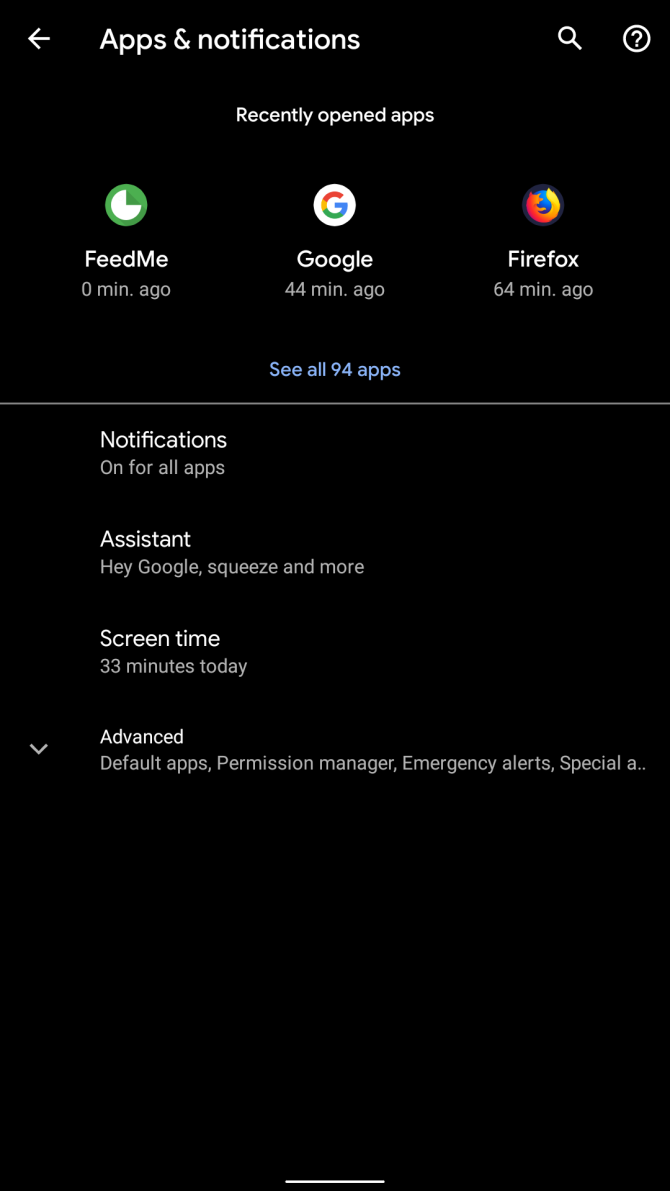
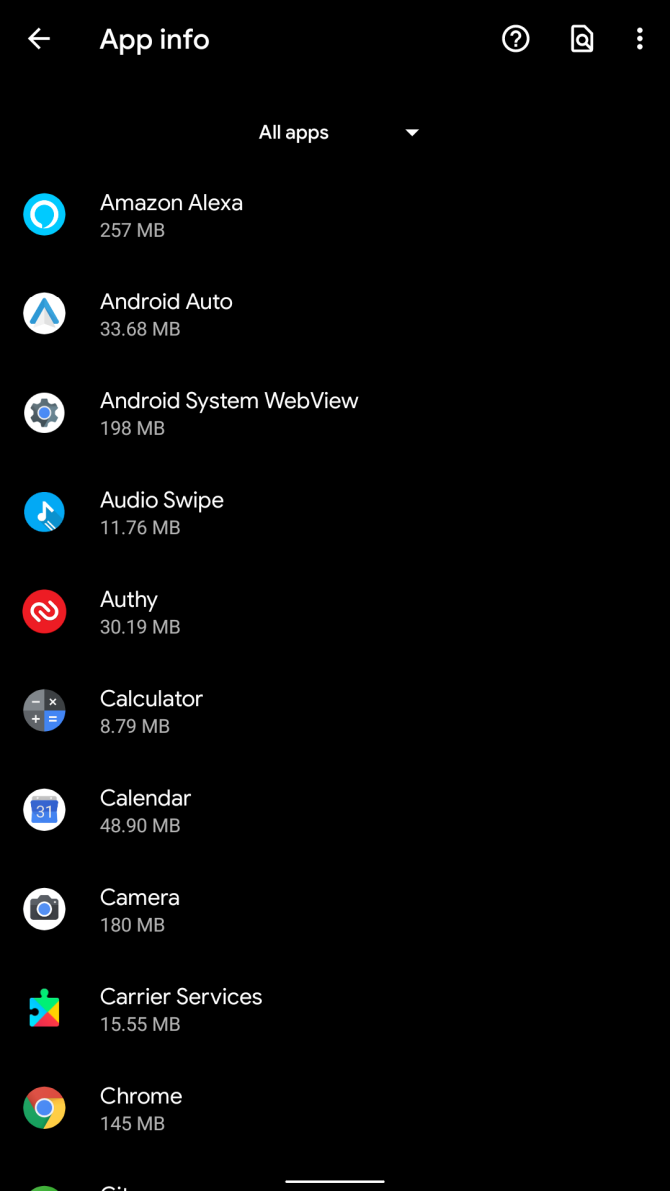
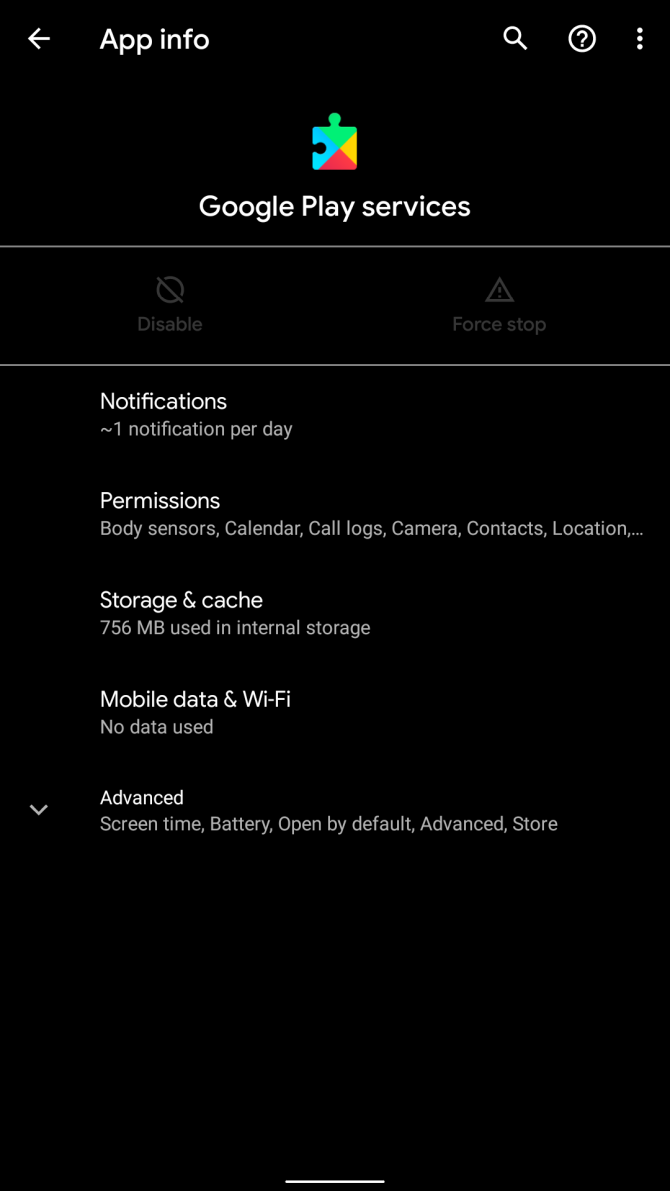
First, go to Settings > Apps & notifications. Next, tap See all X apps (the screenshot below shows All 95 apps).

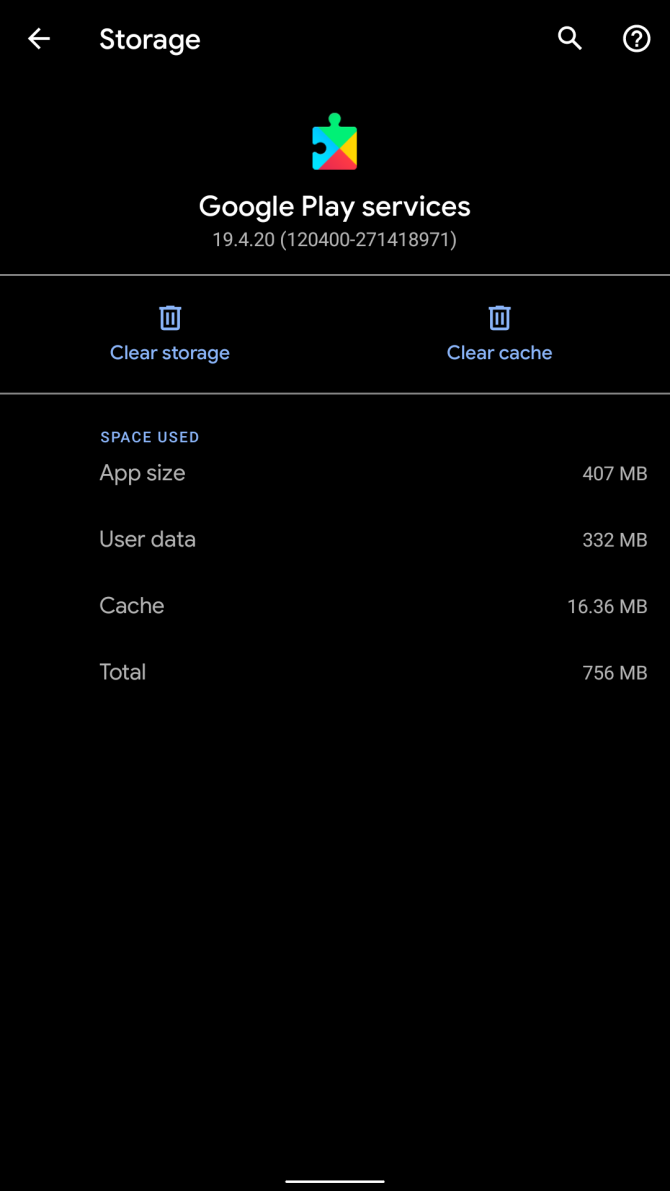
From the list, find and tap on Google Play services. Then choose Storage & cache from the list of options on its app page. Finally, hit Clear cache on the resulting menu.

Once you’ve done this, restart your device. If it doesn’t help, repeat the above steps but select Clear storage instead.

3. Force an Update of Play Services

After restarting, you should try to force an update of Play Services. You shouldn’t need to do this in most cases, but it’s worth a try if you continue to experience issues.

To do this, visit the Google Play services entry in Settings as mentioned above. Expand the Advanced section and tap App details to open its page on the Play Store. If you’re on your phone, you can open the Google Play services Play Store page to jump right to it. The green button will show Deactivate if you’re up-to-date and Update if you can install a new version.

You also can do this by visiting Play Store in a web browser and signing in with your Google account. Open the above link to the Google Play services page on Google Play, and check for an update there.

Google Play Services in the web browser

For Advanced Users: Install Google Play Services Beta

The above should work in most situations. But if you’re desperate, installing a beta version (an experimental update that hasn’t been fully tested) of Google Play services may force an update.

We don’t recommend this option except as a last resort. At best, it might make your device functional again. But if this method works, it will not update you to the latest version of Google Play services. It will instead update to an experimental version of the software—which may break many of your apps.

The process is simple, and is best done on a desktop or laptop where you’re logged into the primary Google account associated with your device. First, navigate to the Google Play Services Public Beta Program page. On that page, follow the link under the Subscribe using the opt-in URL header and you’ll see the below. Click Become a tester to join.

become a google play tester

Once you’ve signed up, Google will push beta versions of Play services to your device automatically. You can try to force them by following step three of the above process.

If you change your mind, you can leave the program at any time. Visit the Google Play services beta opt-out page to drop out. However, this may require that you uninstall Play Services before it functions normally again.

When You Can’t Update Google Play Services

If you fall into one of these categories, your phone probably won’t be able to update Google Play services using the method outlined above.

Android 4.0 and Below Can’t Update Google Play Services

As of 2018, Google no longer supports Android 4.0 Ice Cream Sandwich or below. That means if you own an Android device running one of those version, you can’t install or update Google Play services. These users can either install a custom ROM or try sideloading Google Play Store alternative as mentioned earlier.

Unregistered Phones Can’t Update Any of Google’s Software

If you purchased your device in India, China, the Philippines, Vietnam, or elsewhere in East or Southeast Asia, there is a chance it came with an unlicensed (or “uncertified”) version of Google Play services. Google recently blocked access to the Play Store for many of these users.

However, the company also left the door open to registration. However, the registration process requires jumping through a few hoops. Jump down to the Device Registration section below for info on how to do this.

Heavily Modified Android Devices

If you’ve installed a custom version of Android or modified its system directory through rooting, there are too many variables to consider when something goes wrong. The instructions provider here won’t be of much help.

Device Registration: Fix “Device Is Not Registered With Google” Error

Google Framework Services ID input window

In order to use Google’s software, such as Google Play, Gmail, and Google Calendar, device manufacturers must obtain Google’s permission. Some manufacturers don’t bother with this, and instead install uncertified copies of Google’s software on their smartphones. Google began cracking down on this practice on devices some time ago.

Unlicensed versions of Android can still update Google Play services. However, you will need to first register your device with Google. The process is easy; it requires visiting Google’s Uncertified Device Registration page.

Once you’re here, you’ll need to acquire your device’s Framework Android ID. The easiest way to do this is using the Device ID app. Due to your issue, you probably don’t have access to Google Play. Thus, you’ll need to download the APK manually and sideload it to install.

After you’ve retrieved it from the app, input the Google Services Framework Android ID into the Uncertified Device Registration page. The process is not immediate; it may take several hours. Once registered with Google, you then should be able to manually install Google Framework Services, which will allow you to continue using (and updating) Google Play services.

Downloading the Google Play Services APK

Hopefully this helped you update Play Services without much hassle. If you need more info than just getting Google Play services to update, we have another guide that might help you.

Check out our detailed instructions for fixing Google Play issues. It also includes tips on legitimate websites that host the android installation files for Google Play services (as well as other essential Play Store software infrastructure). However, we don’t recommend manual installation in all cases. This comes with risks, such as getting a malware infection or destroying your device. Additionally, a manual install can take hours of your time. Sometimes upgrading your device is the only cost-effective option.

Read the full article: How to Update Google Play Services on Android


Read Full Article
Xbox Game Bar Not Working? Try These Troubleshooting Tips for Windows 10


xbox-game-bar-issues

Recording and streaming games on Windows 10 has never been easier thanks to the build-in Xbox Game Bar. It features tools for recording game activity and it’s also a great way to share footage and upload your greatest gaming achievements with the webcam and mic.

But what if it stops working? The Xbox Game Bar is, unfortunately, a little buggy. Here’s how to deal with Xbox Game Bar errors and start recording and sharing game footage once again.

Know About the Xbox Game Bar

Press the Windows + G key to open the Xbox Game Bar on the desktop over your game.

The Xbox Game Bar in Windows 10 is part of the Xbox gaming experience on Microsoft’s desktop OS. It’s available alongside the Xbox Console Companion as a way to bring console-like gaming to Windows.

Xbox Game Bar in Windows 10

So, you get access to your Xbox gamertag, achievements (many of which are available in Windows games), and even the ability to stream games from your Xbox to Windows.

The Xbox Game Bar sits alongside this, bringing the ability to record your gameplay to Windows without third-party software. Unfortunately, however, the Xbox Game Bar occasionally fails to work correctly. So, what can you do about this?

Typical Xbox Game Bar Issues in Windows 10

Problems you might encounter range from the Xbox Game Bar not opening when requested to video not being recorded.

Along the way, you might find that the app causes weird pop-up messages or won’t stream video.

Most issues with the Xbox Game Bar app are related to the app settings. As such, they can be resolved by disabling the app, resetting, repairing, or uninstalling, or simply tweaking the registry.

Note, however, that extreme Xbox Game Bar issues—those that refuse to be resolved in normal ways—require drastic action. Namely, a full system reset or repair.

Hopefully, it won’t get that far.

Xbox Game Bar Recording and Screenshot Errors

Trying to record videos of your gameplay, or take screenshots, and you find the Xbox Game Bar isn’t playing ball? You can encounter these four common Xbox Game Bar problems, to begin with:

  • Some games don’t allow recording. In this scenario, you won’t be able to record with the Game Bar.
  • If a recording is allowed, but it refuses to work, try another tool. For Steam games, you can broadcast using the app, but you’ll need a third-party tool to record.
  • The Game Bar can vanish in a full-screen game. Just use the WIN+Alt+R key combination to start recording. Use the same shortcut to stop.
  • Screenshots may not work using the Game Bar for similar reasons. For example, you may be running some protected content on your computer (e.g., protected by DRM). Try closing this, or using a different Windows desktop screenshot tool.

Restart Windows 10 and Clean Boot Your Computer

One way to fix problems with the Xbox Game Bar is to restart Windows 10.

Click Start > Power > Restart and wait while your computer reboots. When you’ve logged back into Windows, the Xbox Game Bar should work.

Another way to fix this is to clean boot your computer. Not to be confused with booting into Safe Mode, a clean boot starts with a minimal set of drivers.

Unlike Safe Mode, you can use a clean boot to determine which app or service is causing a problem. A clean boot gives you more control over what software is running.

To perform a clean boot in Windows 10:

  • Sign in to your computer as an administrator
  • Click Start and type msconfig
  • In the results, click System Configuration
  • Find the Services tab, and check the box labeled Hide all Microsoft services
  • Click Disable all
  • Next, click Startup then Open Task Manager
  • In the Startup tab here, select each item then Disable
  • Close task manager
  • On the System Configuration, click Startup, then OK

To finish, reboot the computer. Try the Xbox Game Bar and see if it works as intended. If it does, disable or remove any apps installed since the Game Bar last worked correctly.

Note that misusing System Configuration can cause problems with your computer. So stick to these instructions.

Solving the Xbox Game Bar “ms-gamingoverlay link” Error

One particularly stupid Windows 10 error occurs thanks to the Xbox Game Bar. Either launching a game or the Game Bar itself results in the error message:

“You’ll need a new app to open this ms-gamingoverlay link”

The Xbox Game Bar ms-gamingoverlay error

This appears to be due to a problem with the Windows Store, but there is a simple fix.

Open Start and enter game bar then in the results, click App settings.

Look for the option that starts Record game clips at the top of the window and switch this to Off.

Disable the Xbox Game Bar

The “ms-gamingoverlay” error will no longer appear. Hurrah!

The downside, however, is that you can no longer use the Xbox Game Bar.

Mixer Streaming Won’t Work

If you’re trying to stream from the Xbox Game Bar to Mixer, we’ve got bad news for you. As of October 2019, Mixer broadcasting is no longer available.

As there isn’t much information about this online beyond Microsoft’s own troubleshooting page, it’s difficult to say why.

However, with recent Xbox Game Bar issues following Windows Update 1903, it’s possible the broadcast feature is broken. Worse still, it might not be reinstated.

Unfortunately, the only solution to this is to broadcast to another service.

Repair, Reset, and Uninstall the Xbox Game Bar

If you don’t have any issues listed above but the Xbox Game Bar has suddenly stopped working, try these fixes. Use them one at a time, in the order presented.

1. Repair the Xbox Game Bar

It’s easy to repair the Xbox Game Bar. Press Start and enter game bar to display the app, then choose App Settings.

Check the app settings of the Xbox Game Bar

Look for Repair and click the button. Wait while the Xbox Game Bar is repaired by Windows.

2. Reset the Xbox Game Bar

Similarly, you can reset the Game Bar. This is like a Windows reset, but based purely on the app. To do this, navigate to the App Settings screen for Xbox Game Bar, this time clicking Reset.

Again, wait while the app is reset, then try using it again.

3. Disable Xbox Game Bar

Another option is to disable the Xbox Game Bar. This won’t repair it but will at least stop you using it. To do this…

  1. Press WIN+R to open the Run box. Enter regedit then OK.
  2. Next, browse to HKEY_CURRENT_USER\SOFTWARE\Microsoft\Windows\CurrentVersion\GameDVR (you can copy this string and paste it into the Registry Editor address bar).
  3. Right-click AppCaptureEnabled and select DWORD, then set the Value to 0. This will disable the feature.
  4. Browse to HKEY_CURRENT_USER\System\GameConfigStore. Right-click GameDVR_Enabled and select DWORD, again changing the value to 0.

(Should you need to re-enable, change the DWORD values back to 1.)

Reinstall Xbox Game Bar

Now, this option is pretty extreme, intending that you uninstall then reinstall the Game Bar.

Begin by right-clicking Start then select Windows PowerShell (Admin). Next, copy and paste this command:

Get-AppxPackage *xboxapp* | Remove-AppxPackage

The Game Bar will be removed from Windows. Restart your computer to complete the action. With the system back up, open the Windows Store and reinstall Xbox Game Bar.

If this doesn’t work and your Xbox Game Bar is still unresponsive, consider drastic action. It’s time to learn how to reset and repair Windows 10.

Xbox Game Bar: Fixable, But Don’t Rely on It

Following a strong start, the Xbox Game Bar has become a fixture for many Windows 10 gamers. But sadly, it’s not perfect and it’s prone to bugs or unpredictable behavior. The good news is that the Xbox Game Bar can be fixed.

If you’re lucky.

To be honest, Microsoft shouldn’t be shipping an app that is so flakey. While most of these fixes will work most of the time, none are guaranteed. Indeed, you might end up abandoning the Xbox Game Bar altogether.

If you do, try these alternative Windows game record and broadcast apps.

Read the full article: Xbox Game Bar Not Working? Try These Troubleshooting Tips for Windows 10


Read Full Article

Review: Samsung’s Space Monitor is handsome and minimal — if you have the desk for it


When Samsung announced the Space Monitor, I knew in an instant that it was going to be something I had to try out in person. Now that I’ve had time to do so, I’m happy to say it’s much as advertised, a streamlined and solid monitor with a smart new design — but not necessarily one for everybody.

Samsung Space Monitor

Pros:

  • Clever space-saving design
  • Quiet, attractive look
  • Solid color out of the box

Cons:

  • Doesn’t rotate and height depends on distance from wall
  • Sub-par viewing angles
  • Doesn’t work with every desk

Price: $400 (27-inch); $500 (32-inch)

We don’t review a lot of monitors at TechCrunch — none, really. This was more of a curiosity to me. I’m interested in design and monitors are usually ugly at best. But I was impressed with Samsung’s approach here and wanted to see if it worked in real life.

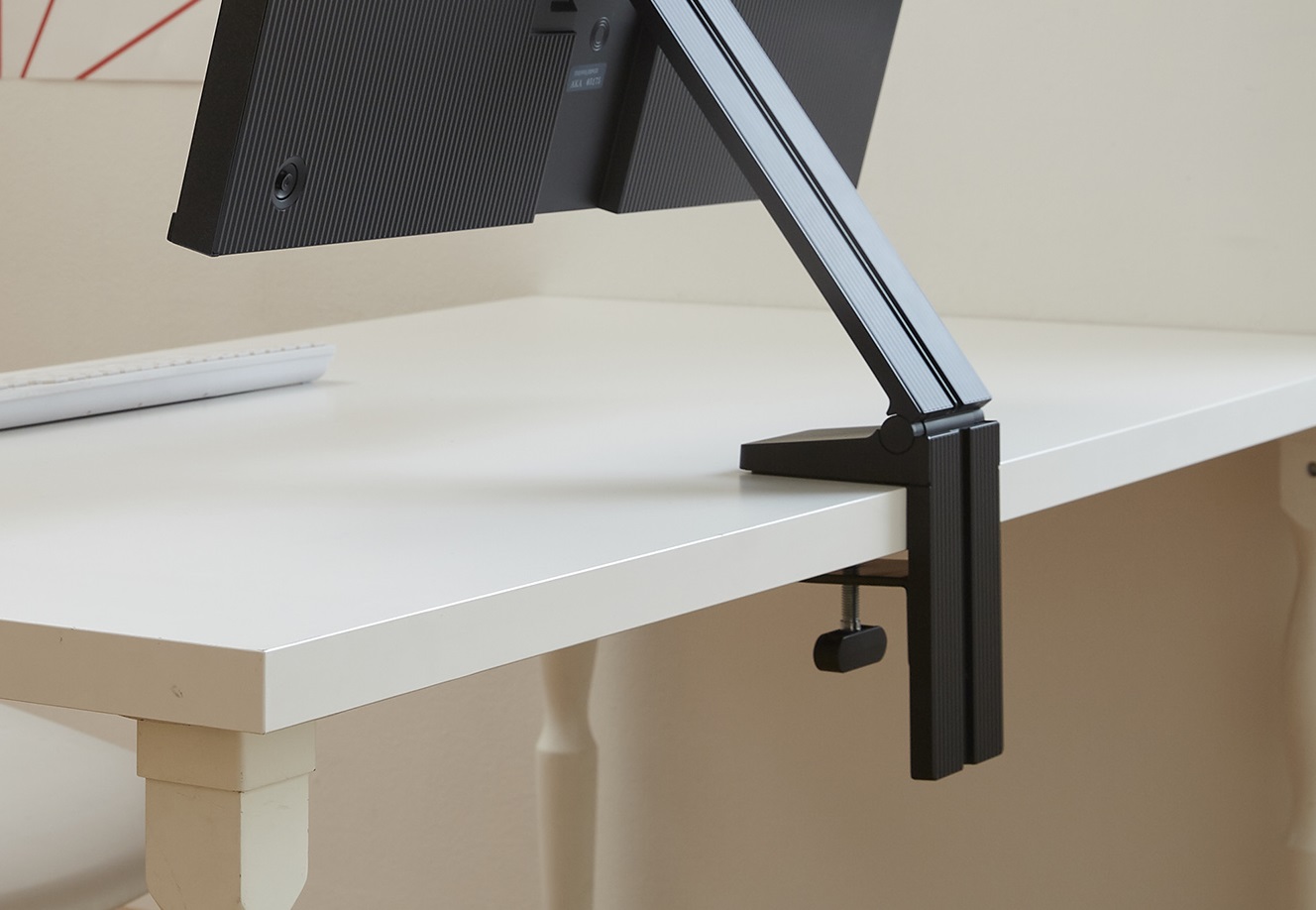
The big advance of the Space Monitor is its very low-profile mount, which grips the edge of your desk on the wall side and can be folded up flat against it. It can rotate up and down, the monitor tilting to taste — not so far as the Surface Studio but with that same general range of motion.

The monitor itself comes in two varieties: a larger 32-inch 4K one and a smaller 27-inch one at 2560×1440. I reviewed the smaller one, as the large one has a lower refresh rate and I really don’t have any use for 4K in my workflow.

The ideal situation for this thing is a relatively small work space where having the monitor actually sitting on your desk kind of invalidates all the space around it. With the Space Monitor, the stand is flush with the wall, clearing up the area below and in front of it even when it’s folded outwards. It’s easier than piercing the wall for a free-floating display

The performance of the monitor, as far as I am able to tell, is good but not great. The colors are vibrant and the default settings are solid, if perhaps a little warm (easily adjusted, of course). The refresh rate goes up to 144 Hz, which is more than enough for gaming, and can easily be tweaked to 120 for those of us who are very picky about video pulldown and other deep frame rate stuff.

One thing that isn’t impressive is the viewing angle. I feel like the sweet spot for this monitor is far narrower than on the Dell Ultrasharp IPS panel I’ve used for years. If you’re not sitting directly in front of it, you’re going to get color and brightness falloff at the edge you’re farthest from.

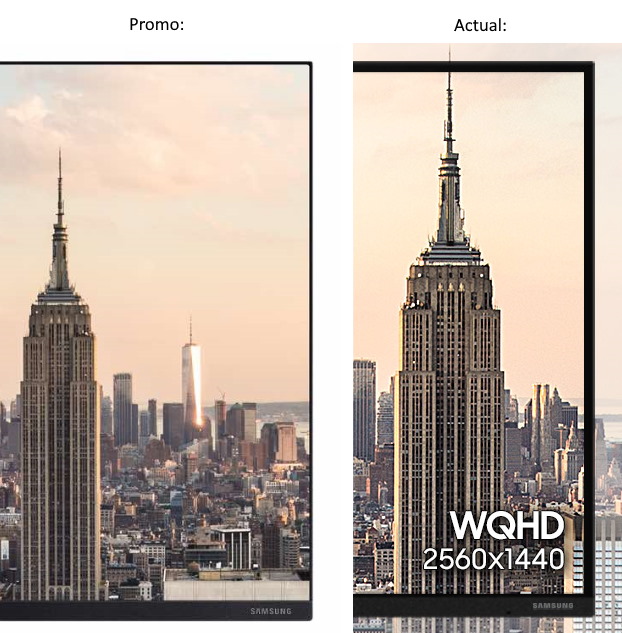
The bezel is narrow, a bit more than a quarter inch, a little thicker on the bottom side. It’s also nearly flush on the top and sides so you don’t feel like the bezels protrude towards you. All in all it’s a very handsome and understated design, as these things go. It’s worth noting that Samsung appears to have fudged the press imagery a bit and the microscopic bezel you see in official images is not actually what you get.

Installation isn’t quite as easy as just setting something down on your desk, but if you have a compatible desk, it’s literally as easy as sliding the clamp on and tightening it. A custom cable (optional, but convenient) combines HDMI and power into one, and fits into a groove on the back of the stand, eliminating clutter.

But you’ll want to take a good look at your desk to make sure it is compatible. I didn’t, and had to jury-rig a solution.

Basically, unless your desk is more or less solid and has a ledge that the clamp can close down on, you might have a problem. My desk is solid and about an inch and a half thick, but has a sort of wall that juts down about two more inches. I removed and reattached the bottom part of the clamp so it could just barely be slipped around the wall, but then the screw wouldn’t reach the bottom surface of the desk, so I had to fill the gap with a book. (It’s okay, I’ve got lots.)

The stand is plenty stiff and the monitor stays exactly where you’ve put it, but it is a little wobbly — understandable given that it sits at the very tip of a 14-inch-long arm. I only really noticed when I was typing very hard or bumped the desk, when I noticed it wobbled more and longer than the Dell on its traditional stand.

Now, if you’ve looked closely at the way this monitor and stand is set up, you may have noticed something else: this thing can’t rotate. Yes, unfortunately, the nature of the Space Monitor means that it must always be parallel to the desk edge it’s attached to, and can only move directly perpendicular to it. There is also no way to slide the monitor up and down, or rather to do so you must also move it towards or away from you.

For some this is unacceptable. And although it’s fine for me as a primary monitor, it would never work as a secondary one, like the Dell I now have angled toward me adjacent to the Samsung.

That does significantly limit its use cases, and the spaces in which it works well. But I still feel it’s a great option for some. If you have limited space and plan to primarily work from the sweet spot directly in front of it, this is a solid monitor big enough for productivity, movies, and games.

For those seeking a low-profile, space-saving alternative to the usual monitors, the Space Monitor is a great option. But for multiple-monitor setups or people who shift the angle a lot, it probably isn’t the best. At $400 it has strong competition from the usual suspects, but for some people the slight increase in image quality or the ability to slide the monitor up and down isn’t worth losing the desk space or having a clunky design. The Space Monitor is available now, at Samsung’s site or your usual electronics retailer.


Read Full Article
The AI stack that’s changing retail personalization


Consumer expectations are higher than ever as a new generation of shoppers look to shop for experiences rather than commodities. They expect instant and highly-tailored (pun intended?) customer service and recommendations across any retail channel.

To be forward-looking, brands and retailers are turning to startups in image recognition and machine learning to know, at a very deep level, what each consumer’s current context and personal preferences are and how they evolve. But while brands and retailers are sitting on enormous amounts of data, only a handful are actually leveraging it to its full potential.

To provide hyper-personalization in real time, a brand needs a deep understanding of its products and customer data. Imagine a case where a shopper is browsing the website for an edgy dress and the brand can recognize the shopper’s context and preference in other features like style, fit, occasion, color etc., then use this information implicitly while fetching similar dresses for the user.

Another situation is where the shopper searches for clothes inspired by their favorite fashion bloggers or Instagram influencers using images in place of text search. This would shorten product discovery time and help the brand build a hyper-personalized experience which the customer then rewards with loyalty.

With the sheer amount of products being sold online, shoppers primarily discover products through category or search-based navigation. However, inconsistencies in product metadata created by vendors or merchandisers lead to poor recall of products and broken search experiences. This is where image recognition and machine learning can deeply analyze enormous data sets and a vast assortment of visual features that exist in a product to automatically extract labels from the product images and improve the accuracy of search results. 

Why is image recognition better than ever before?

retail and artificial intelligence


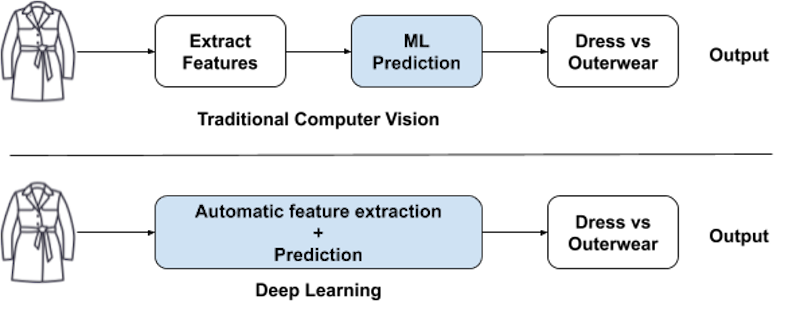
While computer vision has been around for decades, it has recently become more powerful, thanks to the rise of deep neural networks. Traditional vision techniques laid the foundation for learning edges, corners, colors and objects from input images but it required human engineering of the features to be looked at in the images. Also, the traditional algorithms found it difficult to cope up with the changes in illumination, viewpoint, scale, image quality, etc.

Deep learning, on the other hand, takes in massive training data and more computation power and delivers the horsepower to extract features from unstructured data sets and learn without human intervention. Inspired by the biological structure of the human brain, deep learning uses neural networks to analyze patterns and find correlations in unstructured data such as images, audio, video and text. DNNs are at the heart of today’s AI resurgence as they allow more complex problems to be tackled and solved with higher accuracy and less cumbersome fine-tuning.

How much training data do you need?

12 November 2019

Google’s CallJoy phone agent for small businesses gets smarter, more conversational


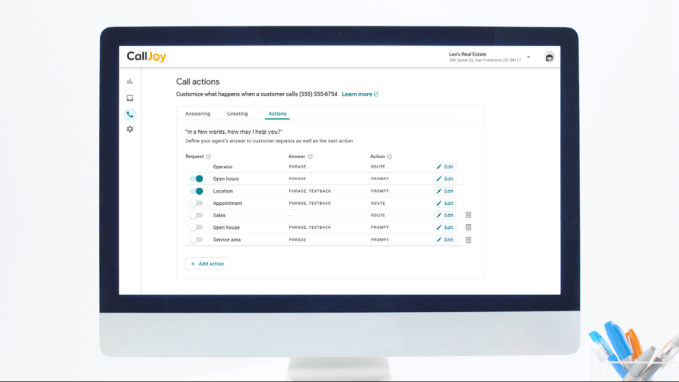
Earlier this year, Google’s in-house incubator launched CallJoy, a virtual customer service phone agent for small businesses that could block spammers, answer calls, provide callers with basic business information, and redirect other requests like appointment booking or to-go orders to SMS. Today, CallJoy is rolling out its first major update, which now enables the computer phone agent to have more of a conversation with the customer by asking questions and providing more information, among other improvements.

Originally, CallJoy could provide customers with information like the business hours or the address, or could ask the customer for permission to send them a link over text message to help them with their request. With the update, CallJoy’s phone agent can answer questions more intelligently. 

This begins by CallJoy asking the customer, “can I help you?,” which the customer then responds to, as they would usually. Their answer allows CallJoy to offer more information than before, based on what the caller had said.

For example, if a caller asked a restaurant if they had any vegetarian options, the phone agent might respond: “Yes! Our menu has vegetarian and vegan-friendly choices. Can I text you the link to our online menu?”

This isn’t all done through some magical A.I., however. Instead, the business owner has to program in the sort of customer inquiries it wants CallJoy to be able to respond to and handle. While some, like vegetarian options, may be common inquiries, it can be hard to remember everything that customers ask. That where CallJoy’s analytics could help.

The service already gathers call data — like phone numbers, audio and call transcripts– into an online dashboard for further analysis. Business owners can tag calls and run reports to get a better understanding of their call volume, peak call times, and what people wanted to know. This information can be used to better staff their phone lines during busy times or to update their website or business listings, for example. And now, it can help the business owner to understand what sort of inquiries it should train the CallJoy phone agent on, too.

Once trained, the agent can speak an answer, send a link to the customer’s phone with the information, or offer to connect the caller to the business’s phone number to reach a real person. (CallJoy offers a virtual phone number, like Google Voice, but it can ring a “real” phone line as needed to get a person on the line.)

Another feature launching today will allow business owners to implement CallJoy as they see fit.

Some business owners may prefer to answer the phone themselves and speak to their customers directly, for example. But they could still take advantage of a service like this at other times — like after hours or when they’re too busy to answer. The updated version now allows them to program when CallJoy will answer, including by times of day, or after the phone rings a certain number of times, for example.

The business owner will also receive a daily email recap of everything CallJoy did, so they know how and when it was put to use.

The product to date has been aimed at small business owners, who can’t afford the more expensive customer service phone agent systems. Instead, it’s priced at a flat $39 per month.

A spokesperson for CallJoy says the service has signed up “thousands” of small businesses since its initially invite-only launch in May 2019. 

Google’s Area 120 incubator is a place for Google employees to try out new ideas, while still operating inside Google instead of leaving for a startup. It’s considered a separate entity — some the apps produced by Area 120 don’t even mention their Google affiliation in their App Store descriptions, for instance. CallJoy, however, has received more of a spotlight than some. It’s even being featured on Google’s main corporate blog, The Keyword, today. However, if CallJoy makes the leap to Google — something that hasn’t been decided yet — it wouldn’t be the first Area 120 project to do so.

Area 120’s Touring Bird recently landed inside Google as did learn-to-code app Grasshopper and others.

We understand that joining Google is something that’s still on the table for CallJoy, but it’s not at the point of making that switch just yet.


Read Full Article

Facebook pilloried over iPhone ‘secret camera access’ bug


Facebook has faced a barrage of concern over an apparent bug that resulted in the social media giant’s iPhone app exposing the camera as users scroll through their feed.

A tweet over the weekend blew up after Joshua Maddux tweeted a screen recording of the Facebook app on his iPhone. He noticed that the camera would appear behind the Facebook app as he scrolled through his social media feed.

Several users had already spotted the bug earlier in the month. One person called it “a little worrying”.

Some immediately assumed the worst — as you might expect given the long history of security vulnerabilities, data breaches and inadvertent exposures at Facebook over the past year. Just last week, the company confirmed that some developers had improperly retained access to some Facebook user data for more than a year.

Will Strafach, chief executive at Guardian Firewall, said it looked like a “harmless but creepy looking bug.”

The bug appears to only affect iPhone users running the latest iOS 13 software, and those who have already granted the app access to the camera and microphone. It’s believed the bug relates to the “story” view in the app, which opens the camera for users to take photos.

One workaround is to simply revoke camera and microphone access to the Facebook app in their iOS settings.

Despite the apparent widespread concern from users on social media, Facebook did not respond to repeated requests for comment from TechCrunch. That said, Facebook vice president of integrity Guy Rosen tweeted this morning that it “sounds like a bug” and the company was investigating.

“I guess it does say something when Facebook trust has eroded so badly that it will not get the benefit of the doubt when people see such a bug,” said Strafach.


Read Full Article

The case against Grace Hopper Celebration


We’ve heard the criticisms that there were fewer black women speakers than white men at Grace Hopper Celebration in the past, but event organizers heard our complaints and created an entire conference pathway and new grants for “women of color from underrepresented groups and women from untapped pathways.”

We feel better now that our panels include hijabi and transgender women. The work done by women of color and others to broaden our understanding of diversity and inclusion in these spaces cannot go without recognition.

But at the end of it all, my question after a long day of panels and handshakes is, why? What are we really doing here? What ideas are we planting and fostering behind our massive paywall? Are we breaking down barriers for future generations, or simply congratulating ourselves for reaching the upper echelons of women who have vaulted them? Are we pushing to change toxic systems, or asking women to change themselves to navigate them?

Who are we benefiting and elevating with our efforts?

What we can say about the majority of corporate women is that we are currently wealthy and educated. What we can say about many corporate women in the American tech sector is that we are white or Asian-American, heterosexual, abled and a plethora of other dimensions of privileged. Through most of our women in tech events, we self-select into a space where others are educated like us, or aspire to be educated like us, and erect barriers to the tune of thousands of dollars and up to a week off from work/school. Conferences tout scholarships to offset the cost of attendance for the up and coming generation of tech women, but often times those students are required to show existing proclivities to STEM.

Extending resources to students who already have exposure to STEM biases our outreach to those with privilege already; low-income schools in California are four times less likely to offer AP computer science A courses than high-income schools, according to an independent study done by the Kapor Center. Unfortunately, it’s hard to make a case to allocate resources any other way when these events rely on corporate sponsorship and attendance and a business case must be made for return on investment (re: tech talent pipeline).

The following is a (non-comprehensive) list of recommendations for improving the way we build power as women in tech:

1. Increase economic accessibility by supporting smaller conferences

Attending a conference costs more than its ticket price, so increasing accessibility must be more comprehensive than offering scholarships. Some examples of questions to ask ourselves as organizers: will attendees with mobility needs spend more than others for their travel and lodging? Are students who receive financial aid more fearful about taking days off?

At first glance, these questions seem like they can be addressed by throwing money at the problem — more scholarships for disabled and lower-income attendees, easy! But trying to level the playing field in this manner is an exercise in futility; bringing a few lucky underprivileged people into our space does little to address the underlying hierarchy. A better way to look at it is to ask how we can make the benefits available to those of us with privilege equally accessible to those with less.

Smaller, regional events usually cost less to host and attend and spread value more widely. New speakers can practice leadership, attendees can network with professionals in their local area, and students can receive more attention and mentorship. Resources move into local communities and nonprofits instead of into recruiting pipelines for tech giants. Some examples of regional conferences targeting minorities but with more granular goals are CodeNewbies, AfroTech and Take Back Tech. These are the efforts we need to support if we want to effectively grow power in our communities that don’t already have it.

2. Focus on systemic change

If every takeaway from your event is how women can change their actions, then it might be a shallow event. Women and others are not held down because we cry at work, or because we take maternity leave, but because of how those around us perceive those things. Challenging ourselves to change our perceptions is more difficult but ultimately more valuable than stifling our authentic choices and personality to be more convenient.

It’s important to ask ourselves why we, a group of traditionally mistreated professionals, are gathering. Why are we sharing our stories of vulnerability and to what end are we building our collective strength? Marginalized people coming together helps consolidate our power so that we can change the system we’re in. It’s a form of collective action — when dozens of women want maternity leave, their employer is more inclined to provide it than when one woman asks alone. When multiple women talk to each other and realize they’ve been harassed by the same co-worker, they feel empowered to do something about it. We organize and gather so we can change injustices.

Conversations where the whole room may not agree with you can be more impactful than the ones that earn you the most laughs and nods. Challenge your audience; discomfort is where we grow. If you’re holding an event for allies, make them earn the title of ally. Catch yourself when you fall to the instinct of making everyone feel good when your goal is to make a difference.

3. Support grassroots-led change instead of corporate-lead change

Let’s not forget who the greatest winners are after a Women @ Qualcomm weekend, a Microsoft Women in Technology Event or Grace Hopper Celebration — the event organizer.

They recruit from the highly qualified pool of attendees while cultivating positive PR for valuing diversity, gaining much more overall than any one individual, though a single person may stand to gain from the opportunity. Companies have made a major push for students and employees from underrepresented groups to stay in the “tech talent pipeline.” As from any affirmative action, there are positive outcomes from that, but there are also studies that find that the pipeline has not addressed deeper issues with workplace cultures, power asymmetries, and harassment.

Put another way, companies often recruit diversity in ways that bring value to themselves without taking responsibility for the quality of life of those within the pipeline. It’s important to remind ourselves that these are not purely philanthropic goals for corporations and that recruitment and retention are to their benefit. At the very least, we’re entitled to substantive policy change in exchange for our labor.

Grassroots and community-led change is better than corporate-led change if our goal is to empower and further the opportunities for women. We must create opportunities for leadership and support efforts that truly build our strength. We should be fearless in asking for real change. By all means, do the work within the companies and within the mainstream conferences if that empowers you, but be wary of the ways that you might be keeping power in already powerful communities and keep your goals in sight. Don’t be afraid to ask why, even for things that seem to have the best of intentions. Even well-meaning systems can perpetuate harmful power dynamics if those of us within them aren’t constantly questioning and pushing back.


Read Full Article

Highlights from the 2019 Google AI Residency Program


This fall marks the successful conclusion to the fourth year of the Google AI Residency Program. Started in 2016 with 27 individuals in Mountain View, CA, the 12-month program has grown to nearly 100 residents from nine locations across the globe. Program participants have gone on to great success in PhD programs, academia, non-profits, and industry. Many have also become full-time Google researchers.

The program’s latest installment was our most successful yet, as residents advanced progress in a broad range of research fields, such as machine perception, algorithms and optimization, language understanding, healthcare and many more. Below are a handful of innovative projects from some of this year’s alumni.
  • A large-scale study on cross-lingual transfer in massive multilingual neural machine translation models (recently highlighted as part of this post), trained on billions of sentence pairs from more than 100 languages in order to significantly improve translation for both low- and high-resource languages.
    Visualization of the clustering of encoder representations of all modeled languages, based on representational similarity. Encoder representations of different languages cluster according to linguistic similarity. Languages are color-coded by their linguistic family.
  • A generative model for Scalable Vector Graphics (SVGs), which can be used to aid designers in generating fonts.
  • Top: Unlike pixel representations of icons (right), in this case a "6", SVGs (left; middle) are scale-invariant representations. Bottom: By modelling SVGs directly, we can aid artists in quickly and intuitively iterating over typography designs.
  • A method to learn GANs using discrepancy divergence, a measure that accounts for both the loss function and hypothesis set to provide theoretical learning guarantees.
  • As more generators are added to the DGAN ensemble more modes in the real distribution are covered. From left to right: 1 generator, 5 generators, and 10 generators.
  • A likelihood ratio method for deep generative models that effectively corrects for confounding background statistics to improve out-of-distribution (OOD) detection, and a new benchmark dataset for OOD detection in genomics.
  • Log-likelihood (left) and log likelihood-ratio (right) of each pixel for Fashion-MNIST. The likelihood is dominated by the “background” pixels, whereas the likelihood ratio focuses on the “semantic” pixels and is thus better for OOD detection.
  • A study showing when label smoothing helps, focusing on its impact on calibration of predictions, representations learned by the penultimate layer and effectiveness of knowledge distillation.
  • 2D-projection of representations of three CIFAR100 classes. Without label smoothing, examples are spread, but with label smoothing each example is encouraged to be equally distant to the clusters of the other classes, attenuating intra-class variation and inter-class similarity structure.
The successes of our AI residents go beyond academic publishing. Their achievements include:
  • Organizing a workshop, bringing together experts in theoretical physics and deep learning, to explore how tools from physics can shed light on the theory of deep learning.
  • Founding Queer in AI, an organization for fostering a community of queer researchers and raising awareness of queer issues in AI/ML.
  • Organizing a hands-on Tensorflow tutorial on using Deep Learning for Natural Language Processing.
  • Automatically learning neural net architectures with AdaNet, an open-source, TensorFlow-based framework.
  • Developing Coconet, the model behind the first AI-powered Doodle (created to celebrate renowned German composer and musician Johann Sebastian Bach).
Also, beginning with the next program cycle, residents will be hosted for a duration of 12 months, with the option of extending up to 18 months! This exciting shift comes as part of our effort to improve the overall program experience and outcomes for residents as the program continues to grow and scale.

If you are interested in joining our fifth cohort, applications for the 2020 Google AI Residency program are now open! Visit g.co/airesidency/apply for more information on how to apply. Please submit your application as soon as possible, as we will be considering candidates on a rolling basis. Please see g.co/airesidency for more resident profiles, past resident publications, blog posts and stories. We can’t wait to see where the next year will take us, and hope you’ll consider joining our research teams across the world!

The Visual Task Adaptation Benchmark


Deep learning has revolutionized computer vision, with state-of-the-art deep networks learning useful representations directly from raw pixels, leading to unprecedented performance on many vision tasks. However, learning these representations from scratch typically requires hundreds of thousands of training examples. This burden can be reduced by using pre-trained representations, which have become widely available through services such as TensorFlow Hub (TF Hub) and PyTorch Hub. But their ubiquity can itself be a hindrance. For example, for the task of extracting features from images, there can be over 100 models from which to choose. It is hard to know which methods provide the best representations, since different sub-fields use different evaluation protocols, which do not always reflect the final performance on new tasks.

The overarching goal of representation research is to learn representations a single time on large amounts of generic data without the need to train them from scratch for each task, thus reducing data requirements across all vision tasks. But in order to reach that goal, the research community must have a uniform benchmark against which existing and future methods can be evaluated.

To address this problem, we are releasing "The Visual Task Adaptation Benchmark" (VTAB, available on GitHub), a diverse, realistic, and challenging representation benchmark based on one principle — a better representation is one that yields better performance on unseen tasks, with limited in-domain data. Inspired by benchmarks that have driven progress in other fields of machine learning (ML), such as ImageNet for natural image classification, GLUE for Natural Language Processing, and Atari for reinforcement learning, VTAB follows similar guidelines: (i) minimal constraints on solutions to encourage creativity; (ii) a focus on practical considerations; and (iii) challenging tasks for evaluation.

The Benchmark
VTAB is an evaluation protocol designed to measure progress towards general and useful visual representations, and consists of a suite of evaluation vision tasks that a learning algorithm must solve. These algorithms may use pre-trained visual representations to assist them and must satisfy only two requirements:
    i) They must not be pre-trained on any of the data (labels or input images) used in the downstream evaluation tasks.
    ii) They must not contain hardcoded, task-specific, logic. Alternatively put, the evaluation tasks must be treated like a test set — unseen.
These constraints ensure that solutions that are successful when applied to VTAB will be able to generalize to future tasks.

The VTAB protocol begins with the application of an algorithm (A) to a number of independent tasks, drawn from a broad distribution of vision problems. The algorithm may be pre-trained on upstream data to yield a model that contains visual representations, but it must also define an adaptation strategy that consumes a small training set for each downstream task and return a model that makes task-specific predictions. The algorithm’s final score is its average test score across tasks.
The VTAB protocol. Algorithm A is applied to many tasks T, drawn from a broad distribution of vision problems PT. In the example, pet classification, remote sensing, and maze localization are shown.
VTAB includes 19 evaluation tasks that span a variety of domains, divided into three groups — natural, specialized, and structured. Natural image tasks include images of the natural world captured through standard cameras, representing generic objects, fine-grained classes, or abstract concepts. Specialized tasks utilize images captured using specialist equipment, such as medical images or remote sensing. The structured tasks often derive from artificial environments that target understanding of specific changes between images, such as predicting the distance to an object in a 3D scene (e.g., DeepMind Lab), counting objects (e.g., CLEVR), or detecting orientation (e.g., dSprites for disentangled representations).

While highly diverse, all of the tasks in VTAB share one common feature — people can solve them relatively easily after training on just a few examples. To assess algorithmic generalization to new tasks with limited data, performance is evaluated using only 1000 examples per task. Evaluation using the full dataset can be performed for comparison with previous publications.

Findings Using VTAB
We performed a large scale study testing a number of popular visual representation learning algorithms against VTAB. The study included generative models (GANs and VAEs), self-supervised models, semi-supervised models and supervised models. All of the algorithms were pre-trained on the ImageNet dataset. We also compared each of these approaches using no pre-trained representations, i.e., training “from-scratch”. The figure below summarizes the main pattern of results.
Performance of different classes of representation learning algorithms across different task groups: natural, specialized and structured. Each bar shows the average performance of all methods in that class across all tasks in the group.
Overall we find that generative models do not perform as well as the other methods, even worse than from-scratch training. However, self-supervised models perform much better, significantly outperforming from-scratch training. Better still is supervised learning using the ImageNet labels. Interestingly, while supervised learning is significantly better on the Natural group of tasks, self-supervised learning is close on the other two groups whose domains are more dissimilar to ImageNet.

The best performing representation learning algorithm, of those we tested, is S4L, which combines both supervised and self-supervised pre-training losses. The figure below contrasts S4L with standard supervised ImageNet pre-training. S4L appears to improve performance particularly on the Structured tasks. However, representation learning yields a much smaller benefit over training from-scratch groups other than the Natural tasks, indicating that there is much progress required to attain a universal visual representation.
Top: Performance of S4L versus from-scratch training. Each bar corresponds to a task. Positive-valued bars indicate tasks where S4L outperforms from-scratch. Negative bars indicate that from-scratch performed better. Bottom: S4L versus Supervised training on ImageNet. Positive bars indicate that S4L performs better. The bar colour indicates the task group: Red=Natural, Green=Specialized, Blue=Structured. We can see that additional self-supervision tends to help on structured tasks beyond just using ImageNet labels.
Summary
The code to run VTAB is available on GitHub, including the 19 evaluation datasets and exact data splits. Having a publicly available set of benchmarks ensures the reproducibility of results. Progress is tracked with the public leaderboard, and the models evaluated are uploaded to TF Hub for public use and reproduction. A shell script is provided to perform adaptation and evaluation on all the tasks, with a standardized evaluation protocol making VTAB readily accessible across the industry. Since VTAB can be executed on both TPU and GPU, it is highly efficient. One can obtain comparable results with a single NVIDIA Tesla P100 accelerator in a few hours.

The Visual Task Adaptation Benchmark has helped us better understand which visual representations generalize to the broad spectrum of vision tasks, and provides direction for future research. We hope these resources are useful in driving progress toward general and practical visual representations, and as a result, affords deep learning to the long tail of vision problems with limited labelled data.

Acknowledgements
The core team behind this work includes Joan Puigcerver, Alexander Kolesnikov, Pierre Ruyssen, Carlos Riquelme, Mario Lucic, Josip Djolonga, Andre Susano Pinto, Maxim Neumann, Alexey Dosovitskiy, Lucas Beyer, Olivier Bachem, Michael Tschannen, Marcin Michalski, Olivier Bousquet, and Sylvain Gelly.

Small rockets are the next space revolution | Peter Beck

Small rockets are the next space revolution | Peter Beck

We're in the dawn of a new space revolution, says engineer Peter Beck: the revolution of the small. In a talk packed with insights into the state of the space industry, Beck shares his work building rockets capable of delivering small payloads to space rapidly and reliably -- helping us search for extraterrestrial life, learn more about the solar system and create a global internet network.

Click the above link to download the TED talk.

Mozilla partners with Intel, Red Hat and Fastly to take WebAssembly beyond the browser


Mozilla, Intel, Red Hat and Fast today announced the launch of the Bytecode Alliance, a new open-source group that focuses on “creating new software foundations, building on standards such as WebAssembly and WebAssembly System Interface (WASI).”

Mozilla has long championed WebAssembly, the open standard that allows browsers to execute compiled programs in the browser. This allows developers to write their applications in languages like C, C++ and Rust and have those programs execute at native speed, all without having to rely on JavaScript, which would take much longer to parse and execute, especially on mobile devices.

Today, support for WebAssembly is part of all of the major browser engines. Companies like Figma and Autodeskhave experimented with it or are using it in production. I do not get the sense that mass adoption of the technology is near, though, and the barrier to entry is high for most developers. Indeed, today’s announcement probably marks the first time I’ve heard about WebAssemly this year.

The mission of this new group goes beyond the browser, though. It wants to establish “a capable, secure platform that allows application developers and service providers to confidently run untrusted code, on any infrastructure, for any operating system or device, leveraging decades of experience doing so inside web browsers.” The argument here is that there is plenty of potential for WebAssembly outside of the browser because it allows untrusted code components to interact with trusted code inside of a sandboxed environment. Indeed, a Mozilla spokesperson noted that WebAssembly has generated more interested from businesses who are interested in this use case than from the traditional application developers and web technologists. Hence this new alliance.

When Mozilla and others launched the WebAssembly format, Microsoft and Google were also part of that group. They are not members of the new Bytecode Alliance, though.

Some of the code that the various members are contributing to the Alliance include Wasmtime, a runtime for WebAssemble and WASI, as well as Fastly’s Lucet, Intel’s WebAssembly Micro Runtime and code generator Cranelift.

“WebAssembly is changing the web, but we believe WebAssembly can play an even bigger role in the software ecosystem as it continues to expand beyond browsers,” explained Luke Wagner, Distinguished Engineer at Mozilla and co-creator of WebAssembly. “This is a unique moment in time at the dawn of a new technology, where we have the opportunity to fix what’s broken and build new, secure-by-default foundations for native development that are portable and scalable. But we need to take deliberate, cross-industry action to ensure this happens in the right way.


Read Full Article

S’More is a new dating app that looks to suspend physical attraction for something more


According to former Chappy Managing Director Adam Cohen Aslatei, “something more” is one of the most common pieces of feedback that dating apps get from their users. That’s where S’More comes in.

S’More was founded by Aslatei to provide a dating app to users that goes beyond superficial looks.

Here’s how it works:

Rather than scrolling through a feed and swiping left and right, users are served five suggested profiles each day. Unlike other dating apps, user profiles on S’More consist of icons, rather than pictures and text, which reveal characteristics about the profile’s owner. For example, a user might put that they’re seeking romance, interested in hiking, and got an education from this or that university, all in the form of little tile icons.

When a user interacts with those icons — S’More calls this a ‘wink’ — more visual pieces of the profile start to unblur and unlock, revealing a profile photo and unlocking the person’s social media feeds, etc.

These interactions also unlock the ability to have a conversation, if they’re reciprocated, which creates a match.

As users continue to interact with others on the platform, S’More learns about what they’re looking for in a relationship and optimizes for those factors when suggesting other profiles.

“The greatest challenge is resetting expectations for consumers,” said Cohen Aslatei. “We know that the swiping mechanism largely doesn’t work, but we’re providing another option which is, if you truly want to get to know someone, suspend physical judgement before you decide if you like them.”

The company plans to generate revenue through a freemium model, charging users extra to access a Discover page on the app, allowing them to interact with and save more profiles than the allotted five per day.

Moreover, S’More asks all users to rank one another, not as prospective mates but as users of the platform. The hope is that the public-facing user rating promotes a healthy, safe environment for all users to meet and connect without the abuse that’s so common on dating apps. Ratings are also determined by a user’s activity on the platform and how complete their profile is.

The company also requires that users who register take a selfie for ID verification right at the point of signing up.

S’More is launching in beta to Boston and the D.C. area with plans to launch in New York soon.


Read Full Article