09 November 2019

How to Use Your Android Phone as an IP Webcam


Looking for a way to put your old Android phone to use? Need an IP camera to stream live footage of events over the internet, but can’t afford an actual IP camera?

Several apps are available to turn your Android device into an IP webcam. Within minutes, you’ll be using it to share video footage across the internet to friends, family, or maybe just yourself.

Use Android as an IP Webcam

A typical Android smartphone, old or new, comes with at least one camera. Meanwhile, the Android operating system lets developers create apps that do almost anything. This makes Android an ideal platform for use as an IP webcam.

All you need to do is enable Wi-Fi, find the right app, set it up, then position your Android device as required. The result is a steady IP webcam picture streamed across the web. You can view the footage in any browser.

Webcam vs. IP Webcam: What’s the Difference?

It’s possible to set your phone up as a standard webcam, as well as an IP webcam. But what is the difference?

Well, a webcam is a camera that’s connected via USB or built into your computer or other device. Its purpose is to record video and photos, either for local use or on a video chat program like Skype. On a secure system, the webcam cannot be accessed over the web without your permission. Interestingly, you can also use your Android device as a PC webcam.

An IP camera, meanwhile, is a device intended for streaming video footage across the internet. For example, this might be a traffic cam or another static camera that’s publicly accessible. Alternatively, it could be a security camera you can access remotely.

The difference is clear: a webcam can have multiple purposes, whereas an IP camera is intended for remote viewing.

Keep reading to learn how to turn your Android phone into an IP camera.

How to Use Android as an IP Webcam With an App

Several IP camera apps are available for Android. For this project, we’ve determined that the most useful option is IP Phone Camera, by Deskshare. If your phone has an internet connection, this app will turn the device into an IP camera.

IP Phone Camera has in-app purchases, but you don’t need these for the basic IP camera functionality.

Download: IP Camera (Free, in-app purchases available)

IP Phone Camera’s Key Features

Using IP Phone Camera? You’ll see it offers three options:

  1. Wi-Fi: Directly broadcast to any browser-equipped device on the same network
  2. Mobile hotspot: If your Android phone supports wireless tethering (it probably does), broadcast over your ad-hoc mobile hotspot
  3. Mobile data: This paid feature lets you view the webcam from anywhere in the world

The app also offers control options, allowing you to manipulate the camera from the browser. You can:

  • Adjust brightness
  • Enable flashlight
  • Zoom in/out
  • Auto-focus
  • Rotate
  • Switch between front and back cameras

These are all useful remote configuration tools to help you get the best picture possible from your Android IP webcam.

Configure the IP Phone Camera App

As noted above, you have a few options, but it’s worth using Wi-Fi first to get to grips with the app.

So with IP Phone Camera installed, select Wi-Fi on the main screen (or in the Settings menu), then hit Start Broadcasting. Use the Plus and Minus buttons to zoom in and out of the subject.

Note some of the other options in the Settings screen. Here, you can set the app to automatically Start broadcasting on app launch, as well as Broadcast in grayscale mode to save bandwidth. There’s also a Require password option, but that’s only available with the Premium subscription for the app.

To upgrade, tap the menu button, then Upgrade. There’s a free seven-day trial, then the option to pay $2.49 a month or $21.49 per year.

Access Your IP Webcam via Any Browser

If you’re viewing the Android IP webcam from within your wireless network, use the URL displayed on the broadcast screen. This is formatted as an IP address with a port number, such as 192.168.1.103:6677.

There’s also a secondary option, in case you use Deskshare’s Security Monitor Pro desktop software for Windows. This premium app gives additional functionality, but in most cases, you probably won’t need the $70 software.

For the mobile internet streaming option, meanwhile, the URL to visit is ipphonecamera.deskshare.com.

View your IP camera in your browser

All you need to do is copy the URL into any browser on your computer or other network-connected device. If you’re using the mobile internet option for streaming, the app will display the credentials needed to access the feed.

Controlling the IP Webcam Remotely

The app’s browser console includes an easy-to-use touch-friendly panel of controls. Here you can control the zoom and brightness level, rotate the camera, and enable the camera light if necessary.

You can also hit Switch Camera to flip between front and back cameras on your Android device. You’ll spot a Record Video feature, too, but this is limited to users of Security Monitor Pro.

Positioning Your IP Camera

With everything set up, you’ll need to position the smartphone carefully. You have several options here:

  • Basic desktop stand: Use this to place your phone on a flat surface
  • Smartphone tripod: Provides a steady picture
  • Smartphone tripod with flexible legs: Intended to let you place your phone anywhere
  • Windshield-mounted phone holder: Usually found in cars, ideal for attaching your phone to glass or metal surfaces

Narrow down your options with our guide to the best smartphone tripods.

Your Android IP Webcam Is Ready to Use

With the software installed, the phone carefully positioned, and it streaming video across the web, your IP camera is ready to use. Perhaps you’re using it to observe your property, or you might have it set up as a baby monitor. Or perhaps you just want to capture events outside your home or in the street, and share them with the world.

Note that there is lag using this app; the local network lag is less than viewing IP webcam footage over mobile internet. Using your Android IP camera as a security cam? Here’s how to build a full security camera network with smartphones.

Read the full article: How to Use Your Android Phone as an IP Webcam


Read Full Article

How to Make Flash Games Run Faster: 8 Tips That Work


download-play-flash-games

Find that Flash games are running slow on your computer? While Flash has long been a popular platform for browser games thanks to its ubiquity, it often suffers from poor performance as well.

If you experience hang-ups and crashes while playing, we’ll explain how to make Flash games run faster so you can enjoy your favorites at a normal frame rate.

1. Toggle Hardware Acceleration

Flash Player Hardware Acceleration

Flash Player, like many pieces of software, supports a function called hardware acceleration. This allows the GPU inside your video card to handle certain functionality instead of software doing it through the CPU.

In many cases, this is helpful, as your GPU is more powerful and can more efficiently complete these tasks. But if you have a weak graphics card, it could limit your performance and be a reason why Flash is running slowly.

To enable or disable hardware acceleration for Flash Player, right-click on a Flash game and select Settings. On the window that appears, click the far left tab that shows a play button inside a monitor. You’ll see a single option labeled Enable hardware acceleration here.

If it’s enabled and you’ve experienced problems, uncheck the box and see if that helps speed up Flash games. On most modern systems, hardware acceleration should work well, but it’s worth testing it both ways to see which feels better.

2. Adjust the Quality Level

Flash Select Quality

When wondering how to speed up Flash games, you might have overlooked another built-in setting Flash Player offers. After right-clicking on Flash content, you’ll see a Quality entry in the menu. This allows you to choose from High, Medium, and Low graphical quality.

In our experience, this option doesn’t appear all the time. For instance, it didn’t show up when right-clicking the main menu of Rogue Soul, but it did appear when we right-clicked the introduction of Frog Fractions.

Thus, you may need to play around with your game to make it appear. Any computer that’s even somewhat modern should be able to play games on High, but it’s worth adjusting if Flash games still run poorly for you.

3. Play in Another Browser

One of the common causes for low game FPS is having too many programs running in the background. The same principle holds true when playing Flash titles in your browser.

If Flash games are lagging in Chrome, it might be because you have dozens of tabs open and loads of extensions installed. These all eat up resources that your game could otherwise use.

Cleaning up your browser is never a bad idea; even fully closing and reopening it can have a positive effect. But if you don’t want to bother with this, an easier way is to try playing in another browser. You might find that’s all it takes to speed up Flash games. Then you can keep that browser in a vanilla state and reserve it just for playing Flash games.

Note that Google Chrome blocks Flash by default. You’ll need to enable Flash in Chrome to play games in that browser.

4. Review In-Game Settings

Flash Game Change Quality

Some Flash games offer visual options inside their menus. These may be overall Quality selectors, or perhaps allow you to turn off certain graphical elements. Give these a look if your game performance is still poor.

Fancy visual effects like enhanced shadows aren’t necessary to play a game, so you should disable them for a better experience.

5. Let Flash Games Store More Information

Flash Player Local Storage

Another variable worth changing in the Flash settings menu is the Local Storage option. This allows you to set how much information Flash content can store on your machine.

Again, right-click inside a Flash game and choose Settings. For this option, select the tab that has a folder and green arrow. You’ll see a prompt allowing you to confirm or deny permission for the site to store info on your computer.

Flash is also supposed to show you a panel here that allows you to adjust the amount of storage it uses. However, this only appears at certain times; it didn’t show this in our testing. You can visit the Adobe Flash Player Global Storage Settings page to adjust this value universally.

Select the icon showing a folder with a globe behind it, then drag the slider to choose how much space websites can use. The default is 100KB, but you can increase this to 1MB, 10MB, or even Unlimited.

6. Try Zooming In

While a bit unconventional, zooming in your display can sometimes help make Flash games run faster. The idea is that the less you can see in the game, the less information your computer has to process. It’s the same reason why a game runs smoother at 1080p than 4K.

In most browsers, you can zoom in by holding Ctrl and either pressing the Plus (+) key or scrolling the mouse wheel up. To go back, you can hold Ctrl and hit Minus (-) or scroll the mouse wheel down to zoom back out. Hit Ctrl + 0 (zero) to reset the zoom back to default.

You’ll notice that some Flash games restrict the game window size but allow you to zoom the contents of the game in or out. This might not have a great effect on every game, but it’s worth a try if nothing else has worked yet. A lot of the time you don’t need to see the whole screen anyway, so it becomes a useful workaround.

7. Clear the Flash Cache

Flash Player Windows Settings

As a further troubleshooting step, you can clear the data that Flash stores to start anew. This will obviously remove any data sites have saved for games, which may include preferences and game progress such as high scores.

To clear Flash data, type Control panel into the Start menu to open it. If you see Category in the top-right, click that and change it to Small icons or Large icons. Next, select Flash Player from the list.

On the Storage tab, click Local Storage Settings by Site to view all sites that have saved Flash info. Select one and hit Remove to erase all its data. To clear everything at once, hit Delete All on the main Storage page and confirm your choice.

Try your chosen Flash game again after this and see if it runs any better.

8. Try Downloading the Flash Game

The two major factors leading to poor Flash performance are Flash Player itself and the browser it’s running in. We’ve shared some tips for both, but you can eliminate the browser from the equation by downloading Flash content and running it offline.

See our guide on downloading Flash games and playing them locally to give this a try.

Why Do Flash Games Run So Slow? Now You Know

We’ve gone over several ways to make browser Flash games run faster. However, you should keep in mind that Flash is an aging technology.

On one hand, this is good news because pretty much all modern computers have the power to smoothly run Flash games. Thus, if Flash games still run slowly for you after applying these tips, you may need to upgrade your computer.

However, Adobe plans to retire Flash at the end of 2020. Because the runtime is on its way out, Flash will continue to fall out of favor, and Flash games will become harder to access.

As a replacement, check out fun HTML5 browser games that don’t require Flash.

Read the full article: How to Make Flash Games Run Faster: 8 Tips That Work


Read Full Article

The 7 Best Home Wireless Intercom Systems and Devices


home-wireless-intercom

Yelling down the stairs to attract the attention of your family or housemates is a thing of the past. Today, there are plenty of wireless intercom systems and devices that are ideal for home use.

But which products are the best? Which wireless intercom system should you buy? Here are the best home wireless intercoms for your home.

1. Amazon Echo Show

Amazon Echo Show Amazon Echo Show Buy Now On Amazon $129.99

It’s easy to overlook the intercom capabilities of an Amazon Echo Show. In truth, in-home wireless communication is not the device’s main purpose. Instead, it is primarily designed to be a visual interface for Alexa. You can use it to see feedback from your smart home, watch videos, and even follow the news.

However, if you have more than one Echo Show in your home, you can use them to not only talk to each other but to also see a live video feed of what’s going on in another room. The downside is the price. The new Echo Show 8 costs more than $100. If you plan to put a screen in all your most-used rooms, the bill could quickly spiral.

2. Hosmart Wireless Intercom System

Hosmart Wireless Intercom System Hosmart Wireless Intercom System Buy Now On Amazon $199.99

If you’d prefer a more traditional approach to intercoms, check out the Hosmart Wireless Intercom System. You get six units in the box and can place them wherever you want in the home. Unlike the Amazon Echo Show, it does not rely on Wi-Fi to work.

Instead, it operates on its own frequency range; 462.62 to 467.61 MHz. Each unit has a range of half a mile. As such, the Hosmart product is one of the best wireless intercom systems to use if you have a large plot of land and want to create a network between lots of different points within it.

The system allows private unit-to-unit communications, or you can use a single unit to broadcast a message to all the other boxes simultaneously. The boxes can also be used as an always-on baby monitor. You don’t even need to put it near a wall connection; they have built-in batteries that last for 10 hours on a single charge.

3. Qniglo Wireless Intercom System

Qniglo Wireless Intercom System Qniglo Wireless Intercom System Buy Now On Amazon $54.95

The Qniglo Wireless Intercom System is similar to the Hosmart Wireless Intercom System. It has a half-mile range, nine channels, and a built-in microphone and speaker. The big difference is that you can buy the Qniglo product on a unit-by-unit basis. For people who just want to hook together a couple of rooms, that’s preferable to shelling out on six Hosmart units, so you will be able to save some money.

Other notable features include an automatic answer mode (so a unit will accept a call instantly and without ringing) and an always-on hands-free VOX function (so you don’t need to press the call button to start communicating). There’s also a group calling feature. It lets you broadcast to all the units in your intercom simultaneously, even if the individual units are running on different channels. Such functionality could be vital in the case of an emergency.

4. VTech DM221 Audio Baby Monitor

VTech DM221 Audio Baby Monitor VTech DM221 Audio Baby Monitor Buy Now On Amazon $27.99

Most people are familiar with the concept of a baby monitor. They let new parents keep an eye on their youngsters without needing to be in the same room as them around the clock. However, have you ever considered the benefits of using a baby monitor as a regular wireless intercom system?

Naturally, there will be a trade-off on features. You’re not going to have multiple channels and half-mile ranges. On the positive side, however, an entry-level baby monitor is considerably cheaper than even the most budget wireless intercom system.

One device worth considering is the VTech DM221 Audio Baby Monitor. It has a 1,000-foot range, support for two-way talking, and DECT 6.0 to help eliminate white noise and interference. VTech also makes more expensive baby monitors, including ones with a screen, in case you’d like a bit of additional functionality.

5. SAMCOM FTAN30A Wireless Intercom System

SAMCOM FTAN30A Wireless Intercom System SAMCOM FTAN30A Wireless Intercom System Buy Now On Amazon $129.90

SAMCOM is another company that makes several home wireless intercom systems. For the perfect balance between price and features, we suggest the SAMCOM FTAN30A. It has a range of 1,500 feet and works across 20 channels. And, like the Hosmart product we discussed earlier, the system has a built-in 2200mAh battery. With a run-time of 27 hours of continuous use, it’s ideal for when you don’t have a nearby electricity source.

The SAMCOM FTAN30A does not require Wi-Fi and is compatible with some of the company’s other intercom models, including the FTAN20AA desktop system and the FPCN10A, FPCN30A, and FPEN10A two-way radios. You can buy the SAMCOM FTAN30A Wireless Intercom System in packs of two, three, six, eight, 12, or 18.

6. Arcshell Rechargeable Two-Way Radios

Arcshell Rechargeable Two-Way Radios Arcshell Rechargeable Two-Way Radios Buy Now On Amazon $64.99

Like baby monitors, two-way radios provide much of the same functionality as a two-way radio at a lower cost. Of course, two-way radios are also portable—they’re ideal for people who like pottering in the garden or fiddling in a garage. The Arcshell Rechargeable Two-Way Radios have 16 channels, 1,500mAh rechargeable batteries, and an eight-hour battery life during continuous usage.

Importantly for an intercom system, they also have VOX mode, meaning you can use the radios as baby monitors or always-on intercoms. The devices even come with earpieces, meaning you can easily chat in private to other people in your home without having your conversations overheard. In ideal conditions (i.e. flat with no obstacles), the radios have a mammoth five-mile range.

7. Nucleus Anywhere Intercom

Nucleus Anywhere Intercom Nucleus Anywhere Intercom Buy Now On Amazon $747.99

The Nucleus Anywhere Intercom is the second system on our list with a screen. Each Nucleus unit includes a 120-degree HD camera that lets you see the whole room and everyone in it. Better still, Nucleus supports Amazon Alexa, which allows you to listen to music in stereo, get the news and weather, and control other smart devices.

You can connect an unlimited number of Nucleus devices to a single system. You can also use the Nucleus to communicate with others outside of your home when they use the free Nucleus mobile companion app.

The Best Wireless Intercom for Your Home

All the best wireless intercoms systems we’ve discussed in the article attend to different needs. Make sure you think about the number of devices you need, where you will use them, the range you need, and the features you need before you hit the buy button.

If you decide to make the best use of tech you already own, make sure you check out how to use your Amazon Echo as an intercom.

Read the full article: The 7 Best Home Wireless Intercom Systems and Devices


Read Full Article

Recombination And Reionization


Recombination And Reionization

Ex-Facebook CPO Chris Cox now advises on climate & campaign tech


Chris Cox’s motivational speeches were at the heart of Facebook’s new employee orientation. But after 14 years at the social network, the Chief Product Officer left in March amidst an executive shake-up and Facebook’s new plan to prioritize privacy by moving to encrypt its messaging apps. No details on his next projects were revealed.

Now the 37-year-old leader will be putting his inspirational demeanor and keen strategy sense to work to protect the environment and improve the government. Today at Wired25 conference, Cox finally shared more about his work advising political technology developer for progressives Acronym, and climate change-tracking satellite startup Planet Labs. He also explained more about the circumstances of his departure from social network’s C-suite.

SAN FRANCISCO, CALIFORNIA – NOVEMBER 08: Chris Cox attends the WIRED25 Summit 2019 – Day 1 at Commonwealth Club on November 08, 2019 in San Francisco, California. (Photo by Phillip Faraone/Getty Images for WIRED)

On how he felt leaving Facebook, Cox said “part of the reason I was okay leaving was that after 2016 I’d spent a couple years building out a bunch of the teams that I felt were most important to sort of take the lessons that we learned through some of 2016 and start to put in place institutions that can help the company, be more responsible and be a better communicator on some of the key issues.”

As for what specifically drove him to leave, Cox explained that “It wasn’t something where I felt I wanted to spend another 13 years on social media. Mark and I saw things a little bit differently . . . I think we are still investigating as an industry, how do you balance protecting the privacy of people’s information and continuing to keep people safe” Cox said. On whether moving towards encryption was part of that, he said he thinks encryption is “great: and that “It offers an enormous amount of protection” but noted “it certainly makes things more complicated” on the privacy vs safety balance.

Cox was asked about the major debate about whether Facebook should allow political advertising. “We think political advertising can be good and helpful. It often favors up and comers versus incumbents.” Still, on fact-checking, he said “I’m a big fan” even though Facebook isn’t applying that to political ads. He did note that “I think the company should investigate and is investigating micro targeting . . . if there’s hundreds of variants being run of the creative then it’s tricky to get your arms around what’s being said.” He also advocated for more context in the user interface distinguishing political ads. 

Chris Cox speaks at Wired25

Since leaving Facebook, Cox has been advising a group called Acronym which is helping to build out the campaign and messaging technology stack for progressive candidates. Cox has also been working to advise San Francisco startup Planet Labs which is using satellite imagery to track climate change.

Cox concluded that the technology industry can lead on both fronts to create the world we want to live in.


Read Full Article

Facebook’s first experimental apps from its ‘NPE Team’ division focus on students, chat & music


This July, Facebook announced a new division called NPE Team which would build experimental consumer-facing apps, allowing the company to try out new ideas and features to see how people would react. It soon thereafter tapped former Vine GM Jason Toff to join the team as a product manager. The first apps to emerge from the NPE Team have now quietly launched. One, Bump, is a chat app that aims to help people make new friends through conversations, not appearances. Another, Aux, is a social music listening app.

Aux seems a bit reminiscent of an older startup, Turntable.fm, that closed its doors in 2013. As in Turntable.fm, the idea with Aux is that of a virtual DJ’ing experience where people instead of algorithms are programming the music. This concept of crowdsourced DJ’ing also caught on in years past with radio stations that put their audiences in control of the playlist through their mobile app.

Later, streaming music apps like Spotify experimented with party playlists, and various startups launched their own guest-controlled playlists.

The NPE Team’s Aux app is a slightly different take on this general idea of people-powered playlists.

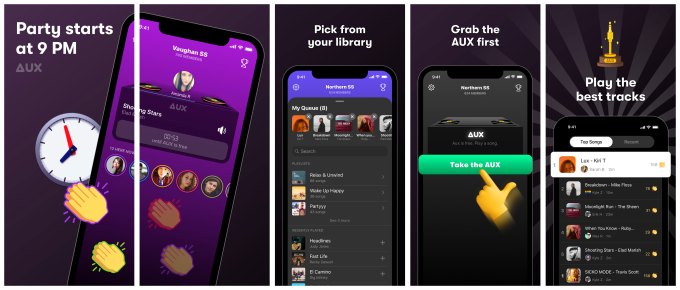
The app is aimed at school-aged kids and teens who join a party in the app every day at 9 PM. They then choose the songs they want to play and compete for the “AUX” to get theirs played first. At the end of the night, a winner is chosen based on how many “claps” are received.

As the app describes it, Aux is a “DJ for Your School” — a title that’s a bit confusing, as it brings to mind music being played over the school’s intercom system, as opposed to a social app for kids who attend school to use in the evenings.

Aux launched on August 8, 2019 in Canada, and has less than 500 downloads on iOS, according to data from Sensor Tower. It’s not available on Android. It briefly ranked No. 38 among all Music apps on the Canadian App Store on October 22, which may point to some sort of short campaign to juice the downloads.

The other new NPE Team app is Bump, which aims to help people “make new friends.”

Essentially an anonymous chat app, the idea here is that Bump can help people connect by giving them icebreakers to respond to using text. There are no images, videos or links in Bump — just chats.

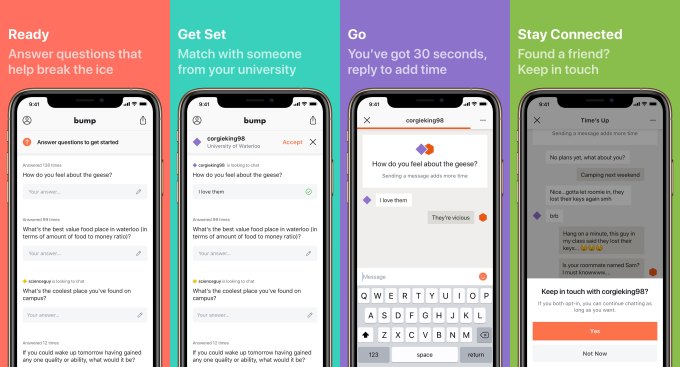
Based on the App Store screenshots, the app seems to be intended for college students. The screenshots show questions about “the coolest place” on campus and where to find cheap food. A sample chat shown in the screenshots mentions things like classes and roommate troubles. 

There could be a dating component to the app, as well, as it stresses that Bump helps people make a connection through “dialog versus appearances.” That levels the playing field a bit, compared with other social apps — and certainly dating apps — where the most attractive users with the best photos tend to receive the most attention.

Chats in Bump take place in real time, and you can only message in one chat at a time. There’s also a time limit of 30 seconds to respond to messages, which keeps the chat active. When the chat ends, the app will ask you if you want to keep in touch with the other person. Only if both people say yes will you be able to chat with them again.

Bump is available on both iOS and Android and is live in Canada and the Philippines. Bump once ranked as high as No. 252 in Social Networking on the Canadian App Store on September 1, 2019, according to Sensor Tower. However, it’s not ranking at all right now.

What’s interesting is that only one of these NPE Team apps, Bump, discloses in its App Store description that the NPE Team is from Facebook. The other, Aux, doesn’t mention this. However, both do point to an App privacy policy that’s hosted on Facebook.com for those who go digging.

That’s not too different from how Google’s in-house app incubator, Area 120, behaves. Some of its apps aren’t clear about their affiliation with Google, save for a link to Google’s privacy policy. It seems these companies want to see if the apps succeed or fail on their own merit, not because of their parent company’s brand name recognition.

Facebook hasn’t said much about its plans for the NPE Team beyond the fact that they will focus on new ways of building community and may be shut down quickly if they’re not useful.

Facebook has been asked for comment about the new apps and we’ll update if one is provided.


Read Full Article

Facebook’s first experimental apps from its ‘NPE Team’ division focus on students, chat & music


This July, Facebook announced a new division called NPE Team which would build experimental consumer-facing apps, allowing the company to try out new ideas and features to see how people would react. It soon thereafter tapped former Vine GM Jason Toff to join the team as a Product Manager. The first apps to emerge from the NPE Team have now quietly launched. One, Bump, is a chat app that aims to help people make new friends through conversations, not appearances. Another, Aux, is a social music listening app.

Aux seems a bit reminiscent of an older startup, Turntable.fm, that closed its doors in 2013. As in Turntable.fm, the idea with Aux is that of a virtual DJ’ing experience where people instead of algorithms are programming the music. This concept of crowdsourced DJ’ing also caught on in years past with radio stations who put their audiences in control of the playlist through their mobile app.

Later, streaming music apps like Spotify experimented with party playlists, and various startups launched their own guest-controlled playlists.

The NPE Team’s Aux app is a slightly different take on this general idea of people-powered playlists.

The app is aimed at school-aged kids and teens who join a party in the app every day at 9 PM. They then choose the songs they want to play and compete for the “AUX” to get theirs played first. At the end of the night, a winner is chosen based on how many “claps” are received.

As the app describes it, Aux is a “DJ for Your School” — a title that’s a bit confusing, as it brings to mind music being played over the school’s intercom system, as opposed to a social app for kids who attend school to use in the evenings.

Aux launched on August 8, 2019 in Canada, and has less than 500 downloads on iOS, according to data from Sensor Tower. It’s not available on Android. It briefly ranked No. 38 among all Music apps on the Canadian App Store on October 22, which may point to some sort of short campaign to juice the downloads.

The other new NPE Team app is Bump, which aims to help people “make new friends.”

Essentially an anonymous chat app, the idea here is that Bump can help people connected by giving them icebreakers to respond to using text. There are no images, videos or links in Bump — just chats.

Based on the App Store screenshots, the app seems to be intended for college students. The screenshots show questions about “the coolest place” on campus and where to find cheap food. A sample chat shown in the screenshots mentions things like classes and roommate troubles. 

There could be a dating component to the app, as well, as it stresses that Bump helps people make a connection through “dialog versus appearances.” That levels the playing field a bit, compared with other social apps — and certainly dating apps — where the most attractive users with the best photos tend to receive the most attention.

Chats in Bump take place in real-time, and you can only message in one chat at a time. There’s also a time limit of 30 seconds to respond to messages, which keeps the chat active. When the chat ends, the app will ask you if you want to keep in touch with the other person. Only if both people say yes will you be able to chat with them again.

Bump is available on both iOS and Android and is live in Canada and the Philippines. Bump once ranked as high as No. 252 in Social Networking on the Canadian App Store on September 1, 2019, according to Sensor Tower. However, it’s not ranking at all right now.

What’s interesting is that only one of these NPE Team apps, Bump, discloses in its App Store description that the NPE Team is from Facebook. The other, Aux, doesn’t mention this. However, both do point to an App privacy policy that’s hosted on Facebook.com for those who went digging.

That’s not too different from how Google’s in-house app incubator, Area 120, behaves. Some of its apps aren’t clear about their affiliation with Google, save for a link to Google’s privacy policy. It seems these companies want to see if the apps succeed or fail on their own merit, not because of their parent company’s brand name recognition.

Facebook hasn’t said much about its plans for the NPE Team beyond the fact that they will focus on new ways of building community and may be shut down quickly if they’re not useful.

Facebook has been asked for comment about the new apps and we’ll update if one is provided.


Read Full Article

Daily Crunch: YouTube redesigns its homepage


The Daily Crunch is TechCrunch’s roundup of our biggest and most important stories. If you’d like to get this delivered to your inbox every day at around 9am Pacific, you can subscribe here.

1. YouTube’s homepage redesign focuses on usability, giving you control over recommendations

The company announced an updated, cleaner design that does away with information density, instead giving more room to the videos and their titles. Other new features include an “Add to Queue” option on the desktop, a desktop version of YouTube’s stop suggesting feature and more.

The design changes, which started rolling out yesterday, are focused on the desktop and tablet versions of YouTube, not the YouTube mobile website or app.

2. Disney+ will launch in the UK, Germany, Italy, France and Spain in March 2020

Disney has revealed more details about its international streaming plans. Keep in mind, though, that Disney+ won’t be exactly the same in every territory, thanks to rights/licensing deals that may already be in place.

3. How Microsoft is trying to become more innovative

Across the board, the company is trying to find ways to become more innovative, especially around its work in AI. Microsoft is unusually open about this process, too, and actually made it a focus at this week’s Ignite conference. (Extra Crunch membership required.)

4. Alibaba to invest $3.3B to bump its stake in logistics unit Cainiao

Alibaba is doubling down on its logistics affiliate Cainiao, two years after acquiring a majority stake in the firm. The Chinese giant said today it would invest an additional 23.3 billion yuan (about $3.33 billion) to raise its equity in Cainiao to 63%.

5. Kepler achieves a world-first for satellite broadband with 100Mbps connection to the Arctic

This is the first time there’s been a high-bandwidth satellite network for any central Arctic ground-based use, Kepler says, and this connection isn’t just a technical demo: it’s being used for the hundreds of researchers in the MOSAiC team.

6. Google hires former Disney and Star executive to head its India business

Sanjay Gupta previously served as a managing director at Disney India and Disney-owned Star. He’ll be replacing Rajan Anandan, who left the company to join VC fund Sequoia Capital.

7. Sir Martin Sorrell’s Silicon Valley charm offensive

Sir Martin Sorrell has enjoyed huge success, having built the world’s biggest advertising conglomerate, WPP, over 32 years. He’s also out for revenge, after he left WPP due to allegations of misconduct.


Read Full Article

Vape lung ‘breakthrough’ suggests lethal culprit in THC products could be vitamin E acetate


Official word has come down from federal authorities on one potential cause of the mystery illness affecting vape users: Vitamin E acetate, a chemical found in some vaping products that has been demonstrated to linger in the lungs long afterwards. The finding has been called a “breakthrough” but is far from the last word on the situation.

Sadly, the condition has already claimed the lives of at least 39 people, and more than 2,000 cases have been reported collectively from every state but Alaska. At present the only advice offered has been to stop vaping altogether.

In a media teleconference, the heads of the investigation from the Centers for Disease Control and Prevention explained the basis for pointing the finger at Vitamin E acetate. The substance was cited as a possible problem early on but only recent testing has established it as a bona fide suspect, the team explained.

Samples taken from the lungs of 29 victims of the condition were sent in from 10 different states, and vitamin E acetate was found in all of them. “These findings provide direct evidence of vitamin E acetate as the primary site of injury within the lungs,” said Anne Schuchat, principal deputy director of the CDC.

Although she agreed that this evidence is a “breakthrough,” she noted that it is at present merely a correlative finding — more research is required to establish causation, namely the mechanism of harm, though other work has been done in that area.

“Previous non-CDC research suggests that when vitamin E acetate is inhaled, it may interfere with normal lung function,” she said.

“It’s important to note that these findings do not rule out other possible compounds or ingredients that may be causing these lung injuries,” she continued. “There may be more than one cause of the outbreak.”

Equally important are the statistics involved with the sources of the substances in question. As mentioned earlier in the investigation, a huge proportion of those suffering from this condition were using THC products, and specifically ones acquired through unregulated channels like street dealers.

The vitamin E acetate may have been added for the purpose of essentially cutting the product, Schuchat mentioned in response to a question on the call.

“That may be done for the illicit purpose, or the profit purpose, of diluting the materials, making it look nice and perhaps not having to use as much THC or other active ingredients,” she said.

Other potentially dangerous chemicals have been identified in vape products when heated and aerosolized, including many that even the creators might not have predicted.

Knowing a potential culprit doesn’t get at the heart of the problem, which would be that this chemical (perhaps among others) has already built up over months or years in the lungs of frequent vape users. Treatment is a parallel line of research, but knowing at least one substance responsible should be helpful.

The CDC’s previous advice still stands, the officials noted: They advise avoiding vaping altogether, since there are very few controls at present over what ingredients are allowed in vape products, and what must be declared on the packaging, or indeed whether those declarations are in any way accurate.


Read Full Article

I ran digital ads for a presidential campaign, and Twitter is right to ban them


As the digital director for Congressman Seth Moulton’s 2020 presidential campaign, I was responsible for everything the campaign did on the internet: the emails you claim to hate, the videos we hoped would go viral, the online infrastructure that supported organizers in the field, and more. But our biggest investment of both time and money, by far, was in digital advertising.

For our campaign and many others, digital ads were the single biggest expense outside of payroll. Yet these ads are terrible for campaigns, toxic for democracy and are even bad for the companies who profit off them. Last week, Twitter CEO Jack Dorsey took a bold first step in banning political ads — Facebook CEO Mark Zuckerberg and Google CEO Sundar Pichai should follow suit.

Digital ads are one of the most important channels for acquiring new supporters and serving them that all-important question: “Will you chip in $10, $5, or whatever you can to support our campaign? Even $1 helps!” When the Democratic National Committee announced in February that presidential candidates would need a minimum of 65,000 individual donors to qualify for the first two debates, acquiring these small dollar donors became a do-or-die priority for campaigns.

The trouble is, when 25 campaigns are competing in a Democratic donor market that had just five competitors in 2016, and when each campaign is desperate to acquire new donors, prices go up. Way up.

We — and I suspect many others — routinely ran what were supposed to be revenue-generating ads at a loss, spending $10, $20, or even $30 in order to acquire one new donor and their contribution of as little as $1. This is a terrible deal for campaigns: they hemorrhage cash in order to lose money acquiring more, costing weeks or months of valuable runway, all while Facebook pockets the difference. At scale, the consequence is massive: the remaining 18 Democratic candidates have already spent over $53 million on Facebook and Google this cycle, most of it these kinds of ads.

This is $53 million — plus millions more from prolific former candidates like Sen. Kirsten Gillibrand and Gov. Jay Inslee — which would have otherwise been invested in infrastructure to turn out voters and help Democrats in November no matter who is the nominee. Instead, it went straight into Facebook and Google’s coffers.

These ads are toxic to our democracy.

Due to short online attention spans, the character limits that enforce them and the engagement algorithms that act as gatekeepers to the digital world, campaigns must distill complex issues down to a two sentence pseudo-essence that would leave even debate moderators unsatisfied. And if you want to have a prayer of anyone clicking on your ad, it had better be as inflammatory as possible — people click when they’re angry.

The easiest way to do this is to simply make things up, something most campaigns would never consider, but which Zuckerberg made clear in congressional testimony this week his platform would happily enable. Companies like Facebook and Google force us to present voters with a world that is black and white, in which all nuance is distraction, and in which civic engagement is something that can be done from your phone for just $1 (Unless you’d like to make this a monthly recurring donation? Your support has never been more crucial!). This does not an informed, healthy democracy make.

Political ads are not even good for the companies that serve them. On a quarterly earnings call the same day as Dorsey’s announcement, Zuckerberg estimated that political ads run by candidates would make up just 0.5% of Facebook’s 2020 revenue. Assuming similar performance to the previous 12 months, in which Facebook earned $66 billion, this would be about $330 million in political ad revenue.

In exchange, Facebook has earned itself years of bad PR, increased regulatory risk as congressional leaders are beginning to see it as a national security problem, and even existential risk as leading presidential candidate Sen. Elizabeth Warren has vowed to break up the company if elected. All over revenues that hardly even justify the opportunity cost of Zuckerberg’s hours of preparation for congressional hearings.

So who benefits from these kinds of ads? Those who want to create a chaotic information environment in the United States in which facts are subjective, reality is ephemeral and the only information you can trust comes from the people manipulating social media to feed it to you. It is therefore no surprise that one of the first organizations to condemn Dorsey’s decision was the Russian state-sponsored media outlet Russia Today.

Presented with a choice between minuscule revenues and existential risk, between patching a bug in American democracy and abetting Russian propaganda, Dorsey made a wise choice for both his bottom line and his country. Zuckerberg and Pichai would do well to follow his lead.


Banning digital political ads gives extremists a distinct advantage


Jack Dorsey’s announcement that Twitter will no longer run political ads because “political messages reach should be earned, not bought” has been welcomed as a thoughtful and statesmanlike contrast to Mark Zuckerberg’s and Facebook’s greedy acceptance of “political ads that lie.” While the 240-character policy sounds compelling, it’s both flawed in principle and, I fear, counterproductive in practice. 

First: like it or hate it, the U.S. political system is drowning in money. In 2018, a non-presidential year, it is estimated that over $9B was spent on the U.S. elections. And unless laws change, more will continue to flow. Banning digital ads will not reduce the amount of money in politics, and will simply shift it to less transparent channels. In an ideal world, it would be great if all “political messages were earned and not bought,”  but that is not how our system works. Candidates, Super PACs, C4s and others already allow the majority of their budgets to be swallowed up by other, less visible, accountable and cost-effective, channels — including television, mail, telephone, and radio.

More likely, at least some of the money will end up with even less transparent organizations that aren’t deemed “political,” but very much are. 

Second, banning digital political ads will not only hurt the very candidates people should want to help, it will also damage our democratic process. Analog mediums are significantly more expensive and inefficient than digital ones, so candidates who have a lot of money and/or have spent time cultivating their followings will continue to dominate. In other words, incumbent candidates, rich people and reality TV stars enjoy an outsized advantage when digital advertising is denied. 

A recent Stanford study found that, at the state house level, more than 10 times as many candidates advertise on Facebook than advertise on television. The research found that digital ads lowers advertising costs, which expands the set of candidates for whom advertising — and thus the potential to reach voters and seriously contest an election — is a real possibility. 

Lesser well-known, but often highly-qualified candidates at the state, local and federal level are precisely the people who have been celebrated for their new perspectives, creative ideas and commitment to shake up the system. People who put their heads down, do good work in their communities and decide to run because they want to make a difference will be the ones that are disadvantaged. 

You know who gets plenty of earned media opportunities? Donald Trump. He will be fine. In fact, he will be better than fine because we’ve just handed him and more extremist candidates like him a distinct advantage.

Democracy is about the combination of free speech and transparency. As the old adage goes, sunlight is the best disinfectant, so here are a few ideas that would be more effective than a ban:

  • Adding a “nutrition label” to political ads offers a more accessible, understandable and consistent way to identify the identities of the funder, their location, their budget and their target audience. This should be easily accessed, in any political ad via one click, just like we know where to find nutrition information on food we buy. 
  • Enhance “consumer beware” acknowledgments so that if digital political ads remain exempt from fact-checking (as they mostly are on television), platforms have a duty to make that clear with visual signals and user education.

Ultimately, decisions about what is permissible political speech and appropriate distribution and targeting is too important to be left to technology platforms and their conceptions of the public interest.

Do we want Google, Facebook and Twitter making the rules for all political ads and being responsible for enforcing them? What we need is a true oversight body — one with teeth. If non-political advertisers make false claims about their own products or those of their competitors, they can be fined by the FTC. This is an acknowledgment, not only that consumers need accurate facts, but also that companies can not police themselves. This is far too much power for them. 

This isn’t a way to let technology companies off the hook, as there is plenty more they can do as noted above. But we need a truly independent organization overseeing political ads — the rules that govern them and holding organizations accountable to following those rules. Is this the FEC? I’m not sure.

As I write this today, I worry that no agency truly has the capacity or the expertise to create these rules and challenge bad campaign practices. We should remedy this post-haste and get to finding true solutions. The alternative seems easier and even principled to fight for, but the unintended consequences will be swift — a government full of the types of people who we say we don’t want. 


Read Full Article

08 November 2019

Popular Android phones can be tricked into snooping on their owners


Security researchers have found several popular Android phones can be tricked into snooping on their owners by exploiting a weakness that gives accessories access to the phone’s underlying baseband software.

Attackers can use that access to trick vulnerable phones into giving up their unique identifiers, such as their IMEI and IMSI numbers, downgrade a target’s connection in order to intercept phone calls, forward calls to another phone or block all phone calls and internet access altogether.

The research, shared exclusively with TechCrunch, affects at least 10 popular Android devices, including Google’s Pixel 2, Huawei’s Nexus 6P and Samsung’s Galaxy S8+.

The vulnerabilities are found in the baseband firmware, the software that allows the phone’s modem to communicate with the cell network, such as making phone calls or connecting to the internet. Given its importance, the baseband is typically off-limits from the rest of the device, including its apps, and often come with command blacklisting to prevent non-critical commands from running. But the researchers found that many Android phones inadvertently allow Bluetooth and USB accessories — like headphones and headsets — access to the baseband. By exploiting a vulnerable accessory, an attacker can run commands on a connected Android phone.

“The impact of these attacks ranges from sensitive user information exposure to complete service disruption,” said Syed Rafiul Hussain, one of the co-authors of the paper, in an email to TechCrunch.

Hussain and his colleagues Imtiaz Karim, Fabrizio Cicala and Elisa Bertino at Purdue University and Omar Chowdhury at the University of Iowa are set to present their findings next month.

“The impact of these attacks ranges from sensitive user information exposure to complete service disruption.”
Syed Rafiul Hussain, Purdue University

Baseband firmware use a special language, known as AT commands, which control the device’s cellular functions. These commands can be used to tell the modem which phone number to call. But the researchers found that these commands can be manipulated. The researchers developed a tool, dubbed ATFuzzer, which tries to find potentially problematic AT commands.

In their testing, the researchers discovered 14 commands that could be used to trick the vulnerable Android phones into leaking sensitive device data, and manipulating phone calls.

But not all devices are vulnerable to the same commands or can be manipulated in the same way. The researchers found, for example, that certain commands could trick a Galaxy S8+ phone into leaking its IMEI number, redirect phone calls to another phone and downgrade their cellular connection — all of which can be used to snoop and listen in on phone calls, such as with specialist cellular snooping hardware known as “stingrays.” Other devices were not vulnerable to call manipulation but were susceptible to commands that could be used to block internet connectivity and phone calls.

The vulnerabilities are not difficult to exploit, but require all of the right conditions to be met.

“The attacks can be easily carried out by an adversary with cheap Bluetooth connectors or by setting up a malicious USB charging station,” said Hussain. In other words, it’s possible to manipulate a phone if an accessory is accessible over the internet — such as a computer. Or, if a phone is connected to a Bluetooth device, an attacker has to be in close proximity. (Bluetooth attacks are not difficult, given vulnerabilities in how some devices implement Bluetooth has left some devices more vulnerable to attacks than others.)

“If your smartphone is connected with a headphone or any other Bluetooth device, the attacker can first exploit the inherent vulnerabilities of the Bluetooth connection and then inject those malformed AT commands,” said Hussain.

Samsung recognized the vulnerabilities in some of its devices and is rolling out patches. Neither Huawei nor Google provided comment at the time of writing.

Hussain said that iPhones were not affected by the vulnerabilities.

This research becomes the latest to examine vulnerabilities in baseband firmware. Over the years there have been several papers examining various phones and devices with baseband vulnerabilities. Although these reports are rare, security researchers have long warned that intelligence agencies and hackers alike could be using these flaws to launch silent attacks.


Read Full Article