12 April 2019

Israel’s Beresheet spacecraft is lost during historic lunar landing attempt


Israel’s SpaceIL almost made history today as its Beresheet spacecraft came within an ace of landing on the surface of the Moon, but suffered a last minute failure during descent. Israel missed out on the chance to be the fourth country to make a controlled lunar landing, but getting 99 percent of the way there is still an extraordinary achievement for private spaceflight.

Beresheet (“Genesis”) launched in February as secondary payload aboard a SpaceX Falcon 9 rocket, and after a month and a half spiraling outward, entered lunar orbit a week ago. Today’s final maneuver was an engine burn meant to bring down its relative velocity to the Moon, then brake to a soft landing in the Mare Serenitatis, or Sea of Serenity.

Everything was working fine up until the final moments, as is often the case in space. The craft, having made it perfectly to its intended point of descent, determined that all systems were ready and the landing process would go ahead as planned.

They lost telemetry for a bit, and had to reset the craft to get the main engine back online… and then communication dropped while only a handful of kilometers from the surface. The “selfie” image above was taken from 22 km above the surface, just a few minutes that. The spacecraft was announced as lost shortly afterwards.

Clearly disappointed but also exhilarated, the team quickly recovered its composure, saying “the achievement of getting to where we got is tremendous and we can be proud,” and of course, “if at first you don’t succeed… try, try again.”

The project began as an attempt to claim the Google Lunar Xprize, announced more than a decade ago, but which proved too difficult for teams to attempt in the timeframe specified. Although the challenge and its prize money lapsed, Israel’s SpaceIL team continued its work, bolstered by the support of Israel Aerospace Industries, the state-owned aviation concern there.

It’s worth noting that Beresheet did enjoy considerable government support in this way, it’s a far cry from any other large-scale government-run mission, and can safely be considered “private” for all intents and purposes. The ~50-person team and $200 million budget are laughably small compared to practically any serious mission, let alone a lunar landing.

I spoke with Xprize’s Founder and CEO, Peter Diamandis and Anousheh Ansari respectively, just before the landing attempt. Both were extremely excited and made it clear that the mission was already considered a huge success.

“What I’m seeing here is an incredible who’s who from science, education, and government who have gathered to watch this miracle take place,” Diamandis said. “We launched this competition now 11 years ago to inspire and educate engineers, and despite the fact that it ran out of time it has achieved 100 percent of its goal. Even if it doesn’t make it onto the ground fully intact it has ignited a level of electricity and excitement that reminds me of the Ansari Xprize 15 years ago.”

He’s not the only one. Ansari, who funded the famous spaceflight Xprize that bore her name, and who has herself visited space as one of the first tourist-astronauts above the International Space Station, felt a similar vibe.

“It’s an amazing moment, bringing so many great memories up,” she told me. “It reminds me of when we were all out in the Mojave waiting for the launch of Spaceship One.”

Ansari emphasized the feeling the landing evoked of moving forward as a people.

“Imagine, over the last 50 years only 500 people out of seven billion have been to space — that number will be thousands soon,” she said. “We believe there’s so much more that can be done in this area of technology, a lot of real business opportunities that benefit civilization but also humanity.”

It’s only icing on the cake that this landing should occur on the same day as SpaceX’s (delayed, and assuming they don’t postpone again) Falcon Heavy launch, which is another huge step forward for private spaceflight and access to orbit and beyond.

Congratulations to the SpaceIL team for their achievement, and here’s hoping the next attempt makes it all the way down.


Read Full Article

Sharp goes clamshell with its folding phone concept


The beauty of the foldable is 2019 is that there’s no consensus yet on the “right” way to do things. We’ve seen a number of different takes on the space as the year has progressed, and no two are exactly the same.

Keep in mind that this device from Sharp is still very much a concept. And even if it does come to market, it’s still going to be tough to get your hands on the product here in the States, as Sharp has a virtually non-existent mobile footprint. Still, it’s nice to see someone going full clamshell.

So far, the Motorola RAZR patent and one of several TCL concepts are the closest we’ve seen. Ultimately the form factor is less about maximizing screen space than it is minimizing pocket real estate, with the unfolded prototype measuring a not-crazy 6.18 inches. There’s also a nice bit of nostalgia baked in for those of us who remember the days before every phone was a smart one.

Sharp certainly knows how to make a display, and while I don’t expect any phone from the company to set the world on fire, there’s probably something in the return of the clamshell, after all.


Read Full Article

Tinder becomes the top-grossing, non-game app in Q1 2019, ending Netflix’s reign


For the first time in years, Netflix is no longer the top grossing, non-game mobile app. Instead, that title now goes to dating app Tinder. The change in position is not surprising, given Netflix’s decision in December to stop paying the so-called “Apple tax.” That is, it no longer allows new users to sign up and subscribe to its service through its iOS application.

The change was said to cost Apple hundreds of millions in lost revenue per year, given that Netflix’s app had been the world’s top-earning, non-game app since Q4 2016. Now, instead of giving up its 15 to 30 percent cut of subscription revenue, new users have to sign up through Netflix’s website before they can use the app on mobile devices, including both iOS and Android. (Netflix had dropped in-app subscriptions on Android earlier.)

App store intelligence firm Sensor Tower estimated Netflix had earned $853 million in 2018 on the iOS App Store. A 30 percent cut would have been around $256 million. However, after the first year, subscription apps only have to pay out 15 percent to Apple. But Netflix had a special deal, according to John Gruber — it only had to pay 15 percent from the get-go.

In any event, it’s still a large sum. And one large enough to end Netflix’s reign at the top of the revenue charts.

In Q1 2019, Sensor Tower estimates Netflix pulled in $216.3 million globally, across both the Apple App Store and Google Play, down 15 percent quarter-over-quarter from $255.7 million in Q4 2018.

Meanwhile, Tinder’s revenue has climbed. In the first quarter, it saw revenue grow by 42 percent year-over-year, to reach $260.7 million, up from $183 million in Q1 2018.

That put it at the top, according to both Sensor Tower and App Annie’s estimates.

Beyond Tinder, Line and Line Manga, the rest of the top grossing, non-game apps in Q1 2019 were also focused on streaming, music and video, in Sensor Tower’s analysis. This included Tencent Video (No. 3), iQIYI (No. 4), YouTube (No. 5), Pandora (No. 6), Kwai (No. 7) and Youku (No. 10).

Meanwhile, the top downloaded, non-game apps in the quarter were largely those focused on social media, messaging and video. This included, in order: WhatsApp, Messenger, TikTok, Facebook, Instagram, SHAREit, YouTube, LIKE Video, Netflix and Snapchat.

tiktok ios icon

TikTok, notably, has held onto its No. 3 position, having grown its new users 70 percent year-over-year, by adding 188 million in Q1. The growth was driven by India, where 88.6 million new users joined the app, compared with “just” 13.2 million in the U.S. — or 181 percent year-over-year growth.

To date, Sensor Tower has seen the app installed more than 1.1 billion times. (But keep in mind that’s not total users — many people install it on multiple devices. Nor is it monthly active users. On that front, the app has 500 million monthly actives as of the end of its third quarter 2018.)

TikTok also did well on the revenue side thanks to in-app purchases, though not well enough to start ranking in the top charts. User spending was 222 percent higher in Q1 2019 versus Q1 2018, reaching an estimated $18.9 million worldwide.

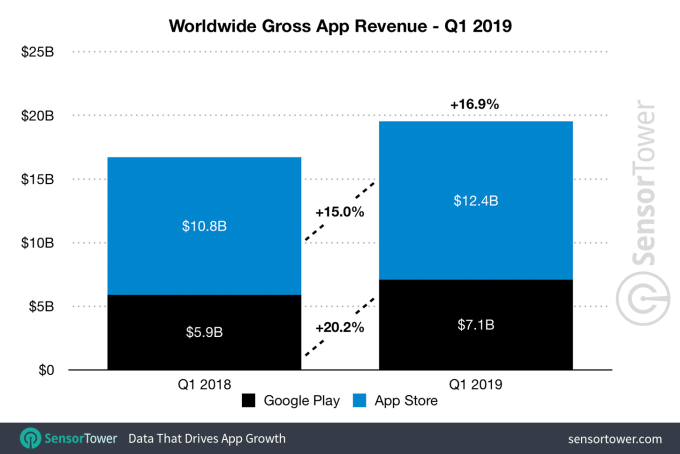
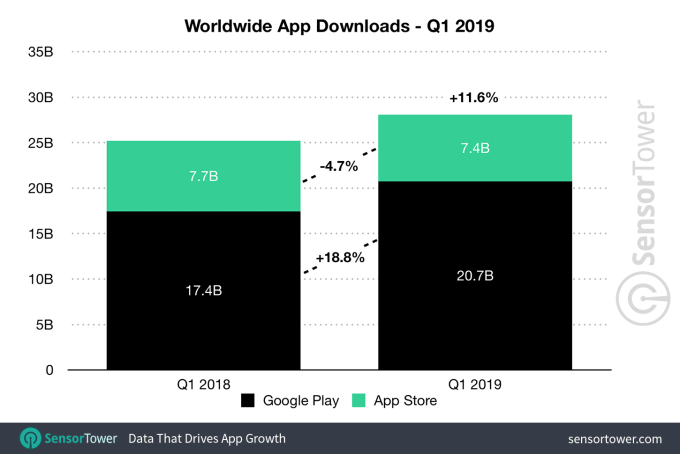
Overall, Apple’s App Store accounted for 64 percent of revenue in Q1, with consumer spending reaching $12.4 billion compared to Google Play’s $7.1 billion. New app downloads slowed on iOS in Q1, decreasing 4.7 percent year-over-year, to 7.4 billion, while Google Play downloads grew 18.8 percent to 20.7 billion.


Read Full Article

11 April 2019

LinkedIn adds celebrate, love, insightful and curious reactions to spur more engagement


Sometimes a “like” in social media doesn’t give the full picture, or you’re just not inspired enough to write a fuller response. Today, LinkedIn addressed that issue on its own platform, with the introduction of four new reactions people can use in response to posts in their timelines. In addition to “like,” you can now react in four other ways to posts with icons that indicate “celebrate,” “love,” “insightful” and “curious.”

I find it “curious” and “insightful” that there isn’t a “haha” among them. Not many laughs or entertainment to be found on LinkedIn, I guess?

The reactions are rolling out globally to the company’s nearly 600 million users starting today, to both the desktop and mobile apps.

LinkedIn’s rollout comes in the wake of similar moves on other social platforms, perhaps most noticeably on Facebook, which launched an expanded set of reaction buttons more than three years ago. LinkedIn has never been one for jumping quickly to new trends, but this nevertheless shows that it’s listening and understands that it has to provide more to users to make its platform more dynamic, to help spur more engagement (and in turn more people posting to the platform).

LinkedIn product manager Cissy Chen notes that the company based its selection of reactions on the kinds of conversations that people are already having on LinkedIn (and probably the kinds of conversations that LinkedIn would like to continue to encourage), and also what people were writing most commonly when providing one to two-word terse responses.

Typically, posts range from people announcing new professional roles or milestones to sharing learnings from somewhere else — hence the leaning to two reactions giving encouragement, and two more contemplative reactions.

LinkedIn’s wider goals in providing tools like this are to continue to get more users engaged on its platform.

In the years since Microsoft acquired the company, I’d argue that the iterations the company has made to different aspects of its service have decreased somewhat. That makes it more open to other companies coming in and creating more useful and modern replacements in some of its most lucrative areas of business, such as recruitment.

On the other hand, platforms like Facebook have been quick to add ever more features and functionality. While Facebook is far from providing the same kind of recruiter tools, or database of working professionals and their experience, its own efforts in recruitment services and mentoring are direct competitors to LinkedIn’s social tools for the working world, and provide a kind of lite alternative. So for LinkedIn to continue to keep people around, and to attract new users who might otherwise consider alternatives, even incremental additions like this one can make a difference.


Read Full Article

WTF is Baillie Gifford?


The SoftBank Vision Fund has been screaming from the venture headlines the last few months, driven by eye-popping rounds (and valuations!) into some of the most notable startups around the world. Yet, SoftBank isn’t the only player rapidly buying up the cap tables of top startups. Indeed, another firm, more than a century old, has been fighting for that late-stage equity crown.

Baillie Gifford.

… Who the what?

When our fintech contributor Gregg Schoenberg interviewed Charles Plowden, the firm’s joint senior partner, about the firm’s prodigious investing, we realized that we have never gone in-depth on one of the most influential investors in Silicon Valley. So here goes.

Baillie Gifford is a 110-year-old asset management firm based out of Edinburgh, Scotland, and has long had a penchant for pre-IPO tech companies. The firm was an early investor into some of the world’s most valuable private and public tech companies, boasting a roster of portfolio companies that includes unicorns from nearly all generations in modern tech, including everything from Amazon, Google, and Salesforce to Tesla, Airbnb, Spotify, newly-public Lyft, Palantir, and even Space X.

Baillie Gifford’s reach stretches way beyond the 280/101 corridor. The firm has an extensive history of investing across geographies, with one of its first and most successful investments coming from an early entry into Chinese e-commerce titan Alibaba. More recently, Baillie Gifford even held a stake in recently IPO’d Chinese electric autonomous vehicle manufacturer NIO, and one the firm’s largest current holdings is South African internet conglomerate Naspers — who itself is an active investor and developer of emerging market tech infrastructure.

The firm’s low profile belies its aggressive capital deployment strategy. According to data from Pitchbook, Baillie Gifford was involved in roughly 20 deals in 2019 and was involved as a lead or participant in transactions worth over $21 billion in aggregate total deal size — beating out behemoth Tiger Global who tallied roughly $13.25 billion on the same metric.

The firm has about $2 billion focused on private companies, so while it is aggressive in getting into later-stage rounds, it is not nearly operating at the scale of say the Vision Fund or Tiger Global. While the asset manager primarily focuses on public-equity investing, the firm has participated in investment rounds as early as Series A according to Pitchbook and CrunchBase data.

Overall, the firm manages $221 billion in assets under management as of January 2019.

As one of the earliest asset managers to invest in pre-IPO tech companies, Baillie Gifford has sourced investments through its long-standing reputation as an investor. The firm first began really diving into private tech investing in the wake of the dot-com bubble. The firm doubled down on the tech sector at a time when few others were investing and sifted through the blood bath to find cheap entryways into companies that are now amongst the world’s largest.

Today, however, the landscape is undoubtedly much different. Tech companies now make up four of the top five largest companies in the world by market cap, and seven out of the top ten. Now, everyone wants a piece of the pie and there seems to be more checks being thrown at founders than most can even fit in their wallets.

With more capital at their fingertips than ever before, founders are opting to keep their startups private for longer in order to avoid the stress of having to deal with short-term public market investors who are more often than not looking for the first opportunity to cash out. So why, amongst so much choice, do companies continue to partner with Baillie Gifford?

Plowden has some insights on that front in our interview, but the summary is that Baillie Gifford just sees itself as a partner. Unlike its peers and most investment managers, Baillie Gifford has no outside shareholder owners to report to. As a partnership, wholly-owned and run by just 44 partners, the firm doesn’t face the organizational constraints that beset most firms that manage billions and billions in assets.

The result? In short, Baillie Gifford has quietly been making a killing, and probably drinking some good scotch along the way as well.


Read Full Article

Instagram bug showed Stories to the wrong people


Today in “Facebook apps are too big to manage”, a glitch caused some users’ Instagram Stories trays to show Stories from people they don’t follow.

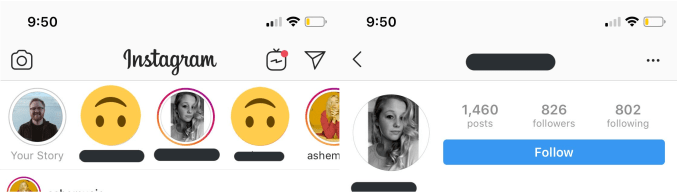
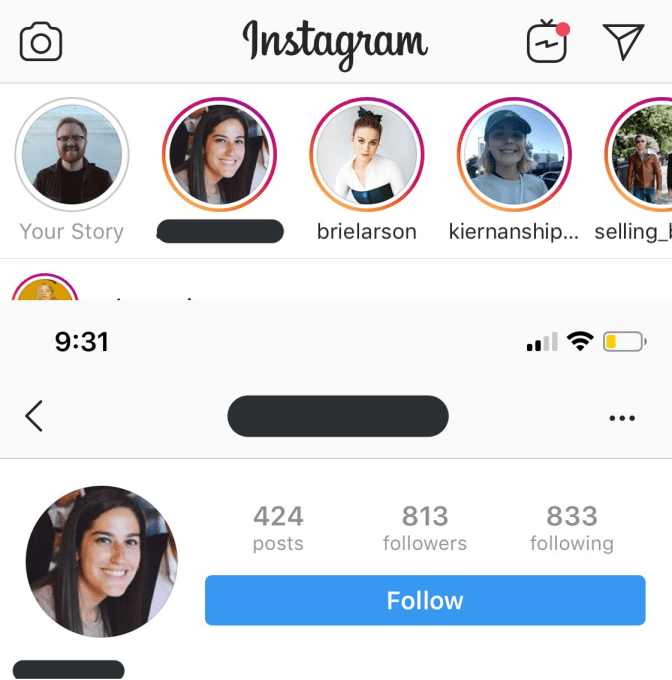
TechCrunch first received word of the problem from Twitter user InternetRyan who was confused about seeing strangers in his Stories Tray and tagged me in to investigate. The screenshots below show people in his Stories tray who he doesn’t follow, as proven by the active Follow buttons on their profiles. TechCrunch inquired about the issue, and 22 hours later Instagram confirmed that a bug was responsible and it had been fixed.

Instagram is still looking into the cause of the bug but says it was solved within hours of being brought to its attention. Luckily, if users clicked on the profile pic of someone they didn’t follow in Stories, Instagram’s privacy controls kicked it and wouldn’t display the content. Facebook Stories wasn’t impacted. But the whole situation shakes faith in the Facebook corporation’s ability to properly route and safeguard our data, including that of the 500 million people using Instagram Stories each day.

An Instagram spokesperson provided this statement: “We’re aware of an issue that caused a small number of people’s Instagram Stories trays to show accounts they don’t follow. If your account is private, your Stories were not seen by people who don’t follow you. This was caused by a bug that we have resolved.”

The problem comes after a rough year for Facebook’s privacy and security teams. Outside of all its scrambling to fight false news and election interference, Facebook and Instagram have experienced an onslaught of technical troubles. A Facebook bug changed the status update composer privacy setting of 14 million users, while another exposed up to 6.8 million users unposted photos. Instagram bugs have screwed up follower accounts, and made the feed scroll horizontally. And Facebook was struck by its largest outage ever last month, after its largest data breach ever late last year exposed tons of info on 50 million users.

Facebook and Instagram’s unprecedented scale make them extremely capital efficient and profitable. But that size also leaves tons of surfaces susceptible to problems that can instantly impact huge swaths of the population. Once Facebook has a handle on misinformation, its technical systems could use an audit.


Read Full Article

Instagram bug showed Stories to the wrong people


Today in “Facebook apps are too big to manage”, a glitch caused some users’ Instagram Stories trays to show Stories from people they don’t follow.

TechCrunch first received word of the problem from Twitter user InternetRyan who was confused about seeing strangers in his Stories Tray and tagged me in to investigate. The screenshots below show people in his Stories tray who he doesn’t follow, as proven by the active Follow buttons on their profiles. TechCrunch inquired about the issue, and 22 hours later Instagram confirmed that a bug was responsible and it had been fixed.

Instagram is still looking into the cause of the bug but says it was solved within hours of being brought to its attention. Luckily, if users clicked on the profile pic of someone they didn’t follow in Stories, Instagram’s privacy controls kicked it and wouldn’t display the content. Facebook Stories wasn’t impacted. But the whole situation shakes faith in the Facebook corporation’s ability to properly route and safeguard our data, including that of the 500 million people using Instagram Stories each day.

An Instagram spokesperson provided this statement: “We’re aware of an issue that caused a small number of people’s Instagram Stories trays to show accounts they don’t follow. If your account is private, your Stories were not seen by people who don’t follow you. This was caused by a bug that we have resolved.”

The problem comes after a rough year for Facebook’s privacy and security teams. Outside of all its scrambling to fight false news and election interference, Facebook and Instagram have experienced an onslaught of technical troubles. A Facebook bug changed the status update composer privacy setting of 14 million users, while another exposed up to 6.8 million users unposted photos. Instagram bugs have screwed up follower accounts, and made the feed scroll horizontally. And Facebook was struck by its largest outage ever last month, after its largest data breach ever late last year exposed tons of info on 50 million users.

Facebook and Instagram’s unprecedented scale make them extremely capital efficient and profitable. But that size also leaves tons of surfaces susceptible to problems that can instantly impact huge swaths of the population. Once Facebook has a handle on misinformation, its technical systems could use an audit.


Read Full Article

Google loses its chief diversity officer


Google’s chief diversity officer, Danielle Brown, has left the company. Brown, who became Google’s CDO in June 2017 after serving in a similar role at Intel, announced today that she’s joined payroll and benefits startup Gusto to lead its chief people operations.

In Brown’s LinkedIn post announcing the job change, she noted that she will have the opportunity to “engage and support an internal team” as well as “influence how we build our product to drive positive change around critical issues like diversity, compliance, and employee engagement for millions of workers in the U.S.”

For Google, this means Melonie Parker will step into the role of CDO, following a nine-month stint as Google’s head of diversity. In a statement to TechCrunch, Google VP of People Operations Eileen Naughton said:

We’re grateful to Danielle for her excellent work over the past two years to improve representation in Google’s workforce and ensure an inclusive culture for everyone. We wish her all the best in her new role at Gusto. We’re fortunate to have a deep bench of experienced leaders and are delighted that Melonie Parker, who has been our Head of Diversity, Equity and Inclusion, will step up to become Google’s Chief Diversity Officer and Director, Employee Engagement. Melonie has 20 years of HR experience, and a passion for improving workforce representation and inclusion. We’re deeply committed to this work and have made progress, but there’s more we need to do.

Perhaps it’s no surprise that, following one diversity-related issue after another (anti-diversity manifesto, sexual harassment allegations, employee-led walkouts, etc), Google’s chief diversity officer has decided to seek out potential greener pastures.

It’s also worth noting that Google has been through its fair share of diversity leads. In 2016, then-Google head of diversity Nancy Lee left the company, saying she was retiring. However, Lee has since joined electric scooter startup Lime as its chief human resources officer.

Google is currently 68.4 percent male, 54.4 percent white, 39.8 percent Asian, 3.3 percent black, 5.7 percent Latinx and 0/8 percent Native American, according to its most recent diversity report.


Read Full Article

Samsung Galaxy Fold pre-orders open tomorrow


There are early adopters, and then there are early adopters. Anyone who bites the bullet and picks up Samsung’s $1,980 and up Galaxy Fold falls into the former category. And then there are those who’ll be the first to Samsung’s site when the company opens up pre-orders on its inaugural foldable tomorrow.

Samsung is really squeezing as much out of this as possible — and understandably so. This thing was a long time in the making. Yesterday, it announced that it had begun mass production on foldable OLEDs for the device. A couple of weeks back, it showed its fold testing in action via video.

As for the devices themselves, we haven’t seen much beyond what Samsung showed off on-stage at an event in San Francisco earlier this year. That includes the behind-glass debut at Mobile World Congress a week later — certainly not the same sort of confidence Huawei displayed with its own device announced at that show.

Not the kind of thing that lends a lot of confidence to such a pricey purchase, but such is the plight of the early early adopter.

The Galaxy S10 5G, meanwhile (a product we’ve actually seen in person, mind), will be available through the company’s site next month.


Read Full Article

How to Build an Online Brand as a Freelancer


freelancer-online-brand

When you’re a freelancer trying to snag a potential client, you need to do a lot of outreach. These days most of that outreach happens online.

If you’re using social media to secure freelancing gigs, you need to think about how you “visually” brand yourself. The face that you show to others online is important.

In this article we explain the steps freelancers need to consider when building an online brand.

1. Think About What You Want Your Brand to Say

Branding as a Freelancer Think About What You Want to Say

What do you want your visual “style” to say about you as a freelancer? Are there certain topics you want to be associated with? How about words or colors? Or trends?

These are all questions you need to ask yourself when you’re designing your online brand. Branding is long-term, and once it gets cemented in your audience’s mind as “your look” it’s difficult to change course.

You can change your brand years down the road, but those changes need to be incremental. They still need to tie into your original persona, otherwise readers will get confused.

For example: If your company is called “T”, you can change the color of the “T” and your audience will still be able to make the connection.

If you suddenly change your name to “S” you’ve lost that searchability connected to your original name. It’s for reasons like this that you need to be careful about your choices.

2. Keep Your Screen Name Consistent

Branding as a Freelancer Keep Your Name Consistent

When you’re active across multiple platforms it’s important to keep your screen name consistent.

Your handle doesn’t need to be a direct rehash of your full name, but it does need to have some sort of structure to it so people can find you. Again, think about searchability.

Because we’re no longer in the days of the early internet, you might not be able to snag the exact handle that you want. This isn’t the end of the world.

All you have to do is pick something close, or a variation on a theme. If you can’t find a name that is close to what you want, this is where visual branding comes in.

3. A Good Profile Picture Is Invaluable

Branding as a Freelancer Have a Good Profile Picture

One of the easiest ways to make sure your branding is consistent is to have a profile picture that easily conveys the idea of what you offer as a person. It’s used to tell clients something about your working style—not so much “I can do this skill”.

Are you friendly or approachable? Are you a perfectionist, or into geeky things?

All of this can be conveyed through a good profile picture. If you’re an illustrator you can create your own logo, but a lot of the time these questions can be solved with a good headshot.

Think “LinkedIn profile,” but a little less stuffy.

Make sure you have good lighting, a good camera, and the patience to take 20-30 pictures of yourself until you find the right pose.

This consistent profile picture also conveys the idea that this social media account belongs to you—even if your screen name is slightly different on other platforms.

4. Have a Common Header Image and Color Scheme

Branding as a Freelancer Have a Good Header Image

Most social media platforms come with 2-3 graphic elements:

  • A profile picture
  • A header image
  • Your color scheme

We’ve already discussed the profile picture and why it’s so important, but it’s equally important to have a matching header.

Like your profile, you want this header image to represent you, and for it to be consistent.

Be careful, however—you can’t just pull random images off of Google. Make sure you have permission to use them, otherwise you can get in trouble when it comes to copyright.

If you have access to the program, here’s how Adobe Stock can help you find the perfect image.

Additionally, keeping that color scheme consistent helps to convey a theme or mood. A good example of this is how the color green is often associated with the environment.

5. Make Sure Your Image Dimensions Are Correct

Branding as a Freelancer Correct Image Dimensions

When uploading your pictures you need to make sure they have the proper dimensions.

Nothing looks worse than a picture that’s so big that parts of it are cut out. It’s also terrible when an image is so small that it gets resized and looks fuzzy.

When uploading a picture, keep in mind both general web specs and the specific dimensions for each platform.

Most images are safe for web use if they are in the JPEG or PNG formats. However, the dimensions for headers and profile pictures can change from site to site. Make sure you double-check them before uploading.

6. Make Sure Your Website Is Easy to Use

Branding as a Freelancer Have an Easy-To-Use Website

If you’re a freelancer you will need a blog or website to showcase your portfolio.

When setting one up, make sure it’s as easy as possible to navigate. Have a logical order to the items that are displayed on your page. If there’s a lot of text, make sure it’s easy to read.

If there are a lot of visuals, make sure those images are fast to load. You don’t want them getting in the way of people finding information.

7. Have a Consistent Bio

Branding as a Freelancer Have a Consistent Bio

Last but not least, make sure your bios on your website and social media pages are identical or almost identical to one another.

This helps to convey the idea that, “Yes, this is me”. It also helps you state what you do as a freelancer.

Keep your bio to 2-3 sentences max, and talk about who you are, what you do, and one thing you like.

Humor is fine, but make sure that this humor is “safe for work”. It makes your platform more accessible for people who may be viewing your bio in public.

Put Your Best Face Forward

By keeping these steps in mind you’ll be able to avoid some of the most common mistakes when it comes to branding as a freelancer.

You’ll also be able to make the most of social media outreach, and once these items are in place you can focus on content creation and building a community. After all, if you showcase yourself well and your product is stellar, you should be able to attract attention fairly quickly.

Are you looking for more information on what kind of photos you can use in your social media headers? Then check out our list of the best sites for free high-resolution stock images.

Read the full article: How to Build an Online Brand as a Freelancer


Read Full Article

Malware Scams Are on the Rise: How to Spot a Fake Tech Support Scam


malware-scams

Have you received an email or phone call telling you that your computer is infected with malware? It sounds scary, like there’s a serious problem with your computer. And the caller offers to fix the problem for you, if only you’ll pay the fee for their tech support.

This is an increasingly common type of scam which targets people who are worried about losing access to their computer due to a virus. Unscrupulous scammers will make up problems with your computer and take your money for a fix you don’t need.

We’ll show you how to spot and avoid these fake tech support scams.

How Tech Support Scammers Contact You

Tech Support Scam Popup

There are a variety of ways that tech support scammers will try to convince you that your computer is infected with malware. Often you will receive a phone call or an email from someone who claims to be a representative of Microsoft. They’ll tell you that they have identified a threat on your computer, or that they have detected suspicious activity on your account.

Sometimes they will say that your computer has a virus or has malware. Other times they’ll say that someone is trying to hack or access your computer without your permission. Or they might say that your computer is in need of optimization or updating.

They’ll then tell you that you need to get this problem fixed or that your computer will stop working. Sometimes they’ll say that if you don’t fix the problem you will lose all your files like your photos or your music.

An alternative version of the scam uses popups on websites. When you visit a dodgy site, a popup will appear like the one above saying that a virus has been detected. These popups can be cleverly designed to look just like real Windows popups or error screens.

What Happens When You Respond to a Tech Support Scam

If you respond to these scams by calling the phone number provided, one of two things will happen. The first and most common option is that the scammers will sell you software they say will fix the problem. They will direct you to a website where you put in your credit card details and download the “security software”.

When you run the fake security software, often it will do nothing at all but will give you a message saying that your computer is now free of malware so you think it worked. Other times, the software can actually install real malware onto your computer.

The second option is that the person on the phone will tell you they need to remote access into your computer. They will instruct you to give them access to your computer in real time, while you are on the phone, and then they will take control of your computer.

They will pretend to be fixing your “malware”, but in reality they are installing software onto your computer which can be used to steal your identity or credit card details.

You should only ever let someone your really trust like a friend or a family member have remote access to your computer. Learn more about how to use remote access safely and securely.

How to Tell a Real Malware Issue From a Fake One

The only way that you can tell if your computer has malware on it is if you check it for yourself. You should never believe an email, telephone call, or chat message which tells you that you have malware.

Remember that Microsoft will never contact you in these ways to inform you of a problem with your computer. If someone calls you claiming to be a Microsoft representative, they are almost certainly lying.

The messages you receive can look scary. They can say that a serious threat has been detected, that urgent action is required, or that you are in danger of losing all your files. But this is all untrue, intended to scare you into handing over money for “support” that you don’t need.

If you want a quick and simple way to detect malware for yourself, you can use Windows Defender in Windows 10. This is a built-in suite which offers real-time protection and detection of malware.

What to Do If You Really Have a Malware Problem

If you do find that you have malware on your computer, don’t panic. You can easily fix the problem yourself using free tools that are available online like Malwarebytes. Or you can use Microsoft’s free and official Windows Malicious Software Removal Tool.

For step by step instructions on cleaning malware off your computer, see our Complete Malware Removal Guide.

Watch out for Related Scams Even From Reputable Companies

You might think that these types of tech support scams would only be created by disreputable companies. If you go to a well regarded and well known office or PC store, you wouldn’t think that you could be the victim of a scam.

Unfortunately that’s not the case. In 2019 alone there have been two examples of well known stores offering fake tech support to their customers.

Recently, two big names in office products, Office Depot and support.com, have paid $35 million to settle a lawsuit. The lawsuit alleged that both companies participated in a malware scam. They offered a “PC Health Check Program” to their customers, but this program always reported that it had found malware even when it hadn’t.

Customers were then tricked into paying for the companies to remove the non-existent “malware” from their machines.

A second related issue arose last year in Britain with the Currys PC World chain. For years the retailer charged customers an extra £40 on top of the price of a new laptop for “pre-configuration” which they had not requested. This charge was for the inclusion of a USB stick for recovery.

In fact, users can easily perform a factory reset or use system restore on Windows 10 without any additional software.

This proves that you need to be careful of any offers of paid tech support, even from “trustworthy” companies.

Don’t Fall for Tech Support Scams

The best way to avoid tech support scams is to learn about malware protection yourself. Don’t believe phone calls or emails that claim to come from Microsoft which warn you that your machine is infected. Perform your own malware scans using free tools which can detect and remove any malware that you do find.

To keep your computer safe from malware in the future, you should also use some kind of malware protection software. To find suitable software, check our list of the best security software for Windows 10 malware protection.

Image Credit: AndreyPopov/Depositphotos

Read the full article: Malware Scams Are on the Rise: How to Spot a Fake Tech Support Scam


Read Full Article

How to Run Android Games on Windows or Mac With Nox

What Is KaiOS and Why Is It the 3rd Most Popular Mobile OS?


whats-kaios

Smartphone sales and the growth of online services have begun to stagnant throughout the globe. In the search for the next chunk of users, companies like Google are being forced to explore new avenues.

One of those is reaching regions where smartphones are still largely inaccessible. A new mobile operating system called KaiOS promises to solve that conundrum. It has already outpaced iOS in emerging countries such as India and bagged funding of $22 million from Google.

So what is KaiOS and why are so many companies pushing for it?

What Is KaiOS?

KaiOS is a mobile operating system for feature phones. It’s built on top of Boot to Gecko, a community-driven successor to Firefox OS. Since it’s a web-based platform, KaiOS doesn’t need a lot of power to run and has a minimum memory requirement of just  256MB.

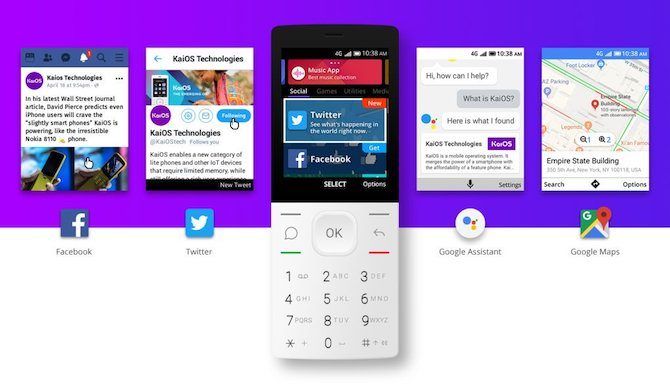
KaiOS promises to bring modern apps such as WhatsApp to people who had never owned a smartphone. Thus, its interface is designed for the so-called dumbphones with physical keys and non-touch screens. To ensure data-oriented companies are able to gain from this, KaiOS does offer all the connectivity options including 4G/LTE, NFC for payments, Dual-SIM compatibility, and Wi-Fi.

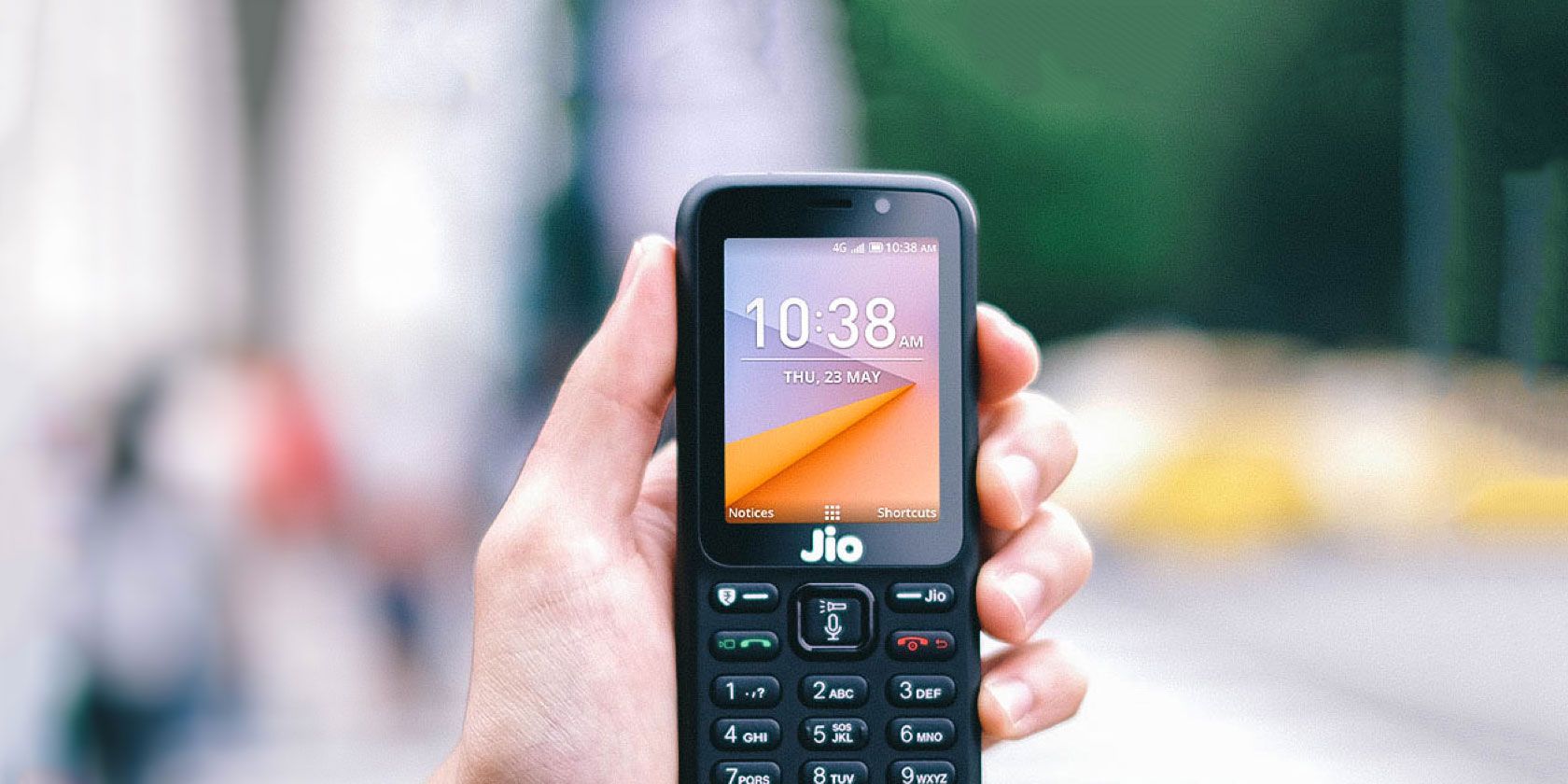
KaiOS-powered feature phones are priced aggressively too since manufacturers don’t need to worry about high-end specifications. Its biggest success, Reliance’s JioPhone, sells in India for about $20.

How KaiOS Differs

The reason why KaiOS grew in popularity among tech companies is its HTML5 app store. That has allowed developers to easily build powerful web apps for KaiOS. The majority of other feature phones today come with proprietary Java-based software and hence, demand more resources for creating dedicated apps.

In addition, KaiOS has an open environment. As such, it’s available across the globe from several brands like Nokia, Reliance, Alcatel, and more. So companies can simply build one app and upload it to the KaiOS app store for widespread distribution in emerging countries.

Which Apps Does KaiOS Support?

KaiOS’ app store hosts tens of titles, some of which you might be familiar with. These apps, of course, don’t offer the same set of functionality they do on smartphones. Only the basics are covered. For instance, you can’t live-stream from the Facebook or Twitter apps.

At the time of writing, KaiOS offers:

  • Facebook
  • Twitter
  • YouTube
  • Google Maps
  • Google Assistant
  • Google Search
  • WhatsApp (OEM dependent)
  • The Weather Channel
  • A few Gameloft games like Danger Dash and Real Football Runner

The store has a handful of other generic apps which are developed by KaiOS itself. There’s one for checking the weather called KaiWeather, QR Reader for scanning codes, and more.

What Is Google and Facebook’s Interest in KaiOS?

KaiOS apps

Google and Facebook were among the first to port their services to KaiOS. But why are they bothering with bringing their apps to feature phones at all?

The answer to that is straightforward. Big tech companies primarily generate revenue from their advertising network. More users translate to more data and advertisers. With smartphone sales plummeting, these giants are turning to feature phones in a hope to expand their user base.

By signing up early, they’re essentially trying to get a head-start before the competition catches up. They want to be the first online destination for KaiOS’ demographic which will mostly include users who are using the internet for the first time.

Both Google and Facebook have, over the years, introduced new features and language support for emerging countries. Google Assistant, for instance, can now talk in Hindi, the most widely-used Indian language.

Google has gone even as far as investing over $20 million in KaiOS and secured the role of the default voice assistant. Phones such as the JioPhone 2 also have special hardware buttons for invoking the Assistant. Plus, KaiOS has added deep-level integrations.

So you can simply say “message Dave on WhatsApp” or “Check in on Facebook” and the software will take care of the rest.

Who Is KaiOS For?

KaiOS’ target audience is the entry-level segment and places where smartphones still haven’t gone mainstream. KaiOS is also meant for customers with low literacy rates who find it difficult to navigate on a touchscreen. The available apps have been developed keeping that in mind and can be completely operated through physical buttons.

What’s more, KaiOS phones are excellent options for people who’d like to detox and break their smartphone addiction. You’ve got all your essential apps like Google Maps but the small display and keypads will restrict you from spending too much time on them.

Another use case for such phones is kids. You can buy a KaiOS feature phone without worrying about them staring at their phones constantly. Compatibility with the majority of leading online services, means they can stay connected with you and their friends.

Senior citizens will find KaiOS appealing as well. It’s simple, can be connected to the internet for apps like WhatsApp, and won’t overwhelm them with constant alerts and popups.

Best KaiOS Phones to Buy

Nokia 8110 Google Assistant

If you’re interested in buying a KaiOS phone, you have a few options depending on where you live. Here are the best KaiOS phones with their availability:

  • Alcatel Go Flip 2 (U.S.A., Canada)
  • JioPhone 2 (India)
  • HMD Global Nokia 8110 (most countries except for the U.S.A.)
  • Cat B35 (Europe)

But for people aren’t necessarily interested in KaiOS, there are many other feature phones to consider.

Turn an Android Phone Into a Dumb Phone

Backed by major companies and boasting an open platform, KaiOS certainly seems like the future of feature phones. But for people looking into dumb phones to take a break from their smartphone, there’s a better option.

One that doesn’t require you to invest in a new phone and still experience the limitations. Here’s how to turn a smartphone into a dumb phone.

Read the full article: What Is KaiOS and Why Is It the 3rd Most Popular Mobile OS?


Read Full Article

What Is IPTV and Is It Legal?


iptv-legal

With the current trend towards cord cutting, “IPTV” has become an increasingly common buzzword. People want to watch live channels on their televisions and IPTV provides a solution.

But what is IPTV? And, more importantly, is IPTV legal? As ever with legal questions, the answer is somewhat nuanced. Let’s take a closer look at the issues involved.

What Is IPTV?

Internet Protocol Television (IPTV) is a catch-all term for any television that’s broadcast over the web rather than via more traditional means.

There are actually many different forms of IPTV. These include:

  • Online-only TV providers like Sling TV, DirecTV, and PlayStation Vue.
  • TV networks’ apps such as BBC iPlayer and FOX Now which offer both live TV and on-demand videos.
  • Online-only TV channels such as Cheddar TV.
  • Websites that offer free live TV.
  • Plugins for apps like Kodi, Plex, and Emby.
  • Third-party subscription IPTV services.

Finally, even though they are not broadcasting live, on-demand video services such as Netflix and Amazon Prime Video also fall under the IPTV umbrella.

Is IPTV Legal?

And so, to the main question: Is IPTV legal? The answer: It depends.

Let’s work through some of the different types of IPTV that we looked at in the previous section to determine whether or not they’re legal.

Firstly, the online-only TV providers. Naturally, they are entirely legal. All of the channels are fully licensed from their respective source.

Indeed, there’s a surprising amount of overlap between the different services and existing telecoms companies. Hulu is part-owned by Disney, AT&T, and Comcast. AT&T also owns DirecTV, and Dish owns Sling TV.

TV networks’ own apps and online-only TV channels are also both entirely legal (though you should be aware that circumventing the apps’ geo-blocking efforts is often against the terms and conditions and could result in a ban).

In the final three categories—websites, plugins, and third-party subscription services—things start to become less clear.

IPTV Websites

illegal iptv site

Some websites offer legal IPTV streams for free. Two common examples are USTVNow in the United States and TVPlayer in the U.K.

Both offer some live TV channels for free with the option to increase the number available for a monthly fee.

However, there are plenty of websites that offer live TV streams without owning the requisite rights. Lots of sports fans who are desperate to see their team in action will be familiar with them.

These are on the wrong side of the law. The developers of such sites can—and have been—hauled up in courts across the U.S. and Europe. Often, the judges have handed down custodial sentences.

IPTV Plugins

One of the main attractions of apps like Plex and Kodi is the availability of plugins. Many of the plugins provide access to IPTV streams.

Some plugins are offered by the official companies, some third-party apps use APIs to legal provide IPTV streams, and some—such and Exodus on Kodi—are downright illegal.

In the United States, plugins like Exodus are illegal under the “inducement rule.” It is a test created in a 2005 Supreme Court ruling which states that a company or website can be held accountable for distributing unlicensed content if it clearly encourages users to infringe a copyright.

Illegal IPTV Subscription Services

iptv provider

The final category is IPTV subscription services. If you know where to look on sites like Reddit, you will be able to find dozens of IPTV providers who charge anything from $5/month to $20/month for access to live TV channels from around the world.

Often the providers are surprisingly sophisticated, with web apps, apps for devices like Android TV and Roku, and even fully-fleshed out TV guides.

It goes without saying that these services are illegal. The providers of such services are putting themselves at risk of prosecution. There is a clear precedent for authorities preferring to open legal proceedings against the uploaders rather than the downloaders.

Watching Illegal IPTV as an End-User

As an end-user, there are a few different legal arguments at play.

Watching Illegal IPTV in Europe

In Europe, watching illegal streams has been definitively illegal since an April 2017 decision by the EU Court of Justice. It ruled that streaming copyrighted content without the correct permissions or subscriptions is breaking the law.

There are now numerous examples of volume litigation across the continent. If a copyright holder discovers the IP address of someone who’s watching an illegal stream, they can take out a court order to force the user’s ISP to release their personal information. From there, the rights holders will contact the viewer and threaten them with court action unless they pay a settlement.

Dig around in a few online forums, and you can find stories from people who have incurred heavy fines.

Watching Illegal IPTV in the United States

In the United States, there’s an oft-repeated trope that streaming copyrighted material is not illegal. The argument claims it’s only illegal if you download it.

This is entirely false.

By watching any video that requires buffering, you are technically downloading illegal content onto your computer and are thus in breach of the law. Some services will even make an entire temporary copy of the video in a cache.

And that’s where the legal gray area arises. For a copy, the copy has to be visible for more than a transitory period of time. The amount of time that qualifies as “transitory” is not defined in law and has not been tested in the courts.

Of course, even if you’re in breach, the likelihood of a copyright owner chasing a single user through the courts is small.

But beware, while the chances may be slim, there have been some cases whereby a company did sue an individual, presumably in a bid to publicly make an example of them. And lest we forget that in 2012, the Recording Industry Association of America (RIAA) famously successfully sued a woman for $220,000 for illegally downloading 24 songs.

Do You Have Any Legal Defense?

reddit iptv

Let’s preface this by saying that we’re not lawyers. So you shouldn’t take this as definitive legal advice.

That said, one of the few arguments you can make if you’re caught watching illegal IPTV is to invoke the notion of “safe harbor,” as the Digital Millennium Copyright Act outlines.

Safe harbor protects intermediaries against infringements of which they are not aware. Some legal experts have argued that the same logic could be extended to end-users.

If you could prove that you didn’t know you were watching illegal streams, you might be OK. But there’s certainly no guarantee. And if a judge seizes your laptop, and computer forensic experts can prove a history of searching for such streams, you’d quickly lose your argument.

Other Legal Questions

In conclusion, some IPTV is legal, and some isn’t. You need to be alert so you can spot the illegal services and stay on the right side of the law. If you don’t, you could quickly land in trouble with your ISP, or worse, a copyright holder.

If you’d like to learn more about the legal aspects of technology, we have other content you should read. Here’s our article discussing the legality of Kodi and here’s our guide to copyright vs. copyleft.

Read the full article: What Is IPTV and Is It Legal?


Read Full Article

How to Run a Linux Desktop Using the Windows Subsystem for Linux


run-linux-windows-subsystem

Running Linux alongside Windows has proven to be increasingly useful over the years. But dual-booting can be difficult to manage while setting up a virtual machine comes some stability issues.

One solution is to use the Windows Subsystem for Linux, but this comes without a desktop environment. So, why not just install the Linux distribution you own?

Here’s how to run a Linux desktop within Windows using the Windows Subsystem for Linux.

What Is the Windows Subsystem for Linux?

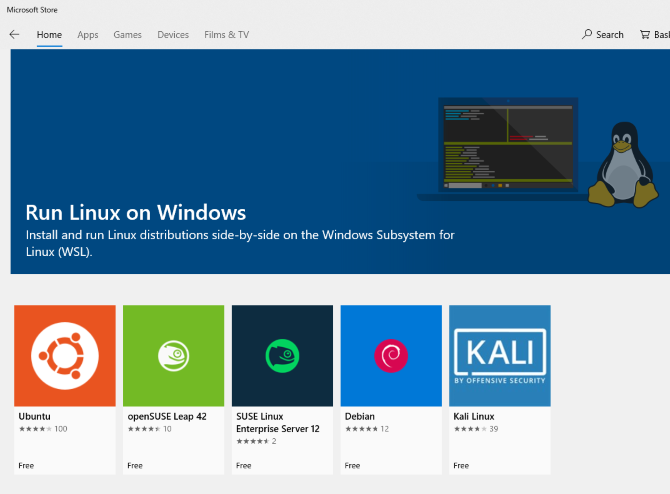
In case you were unaware, with the 2018 Fall Creators Update Windows 10 shipped with the Windows Subsystem for Linux. This is an optional feature that can be easily installed, which supports the installation of the Linux operating systems available in the Windows Store.

Install Linux on Windows

It basically means that you can open a Linux terminal in Windows and install and run Linux software.

No virtual machine is required and there is no dual booting.

The problem with Windows Subsystem for Linux, however, is that it is purely a command line experience. There is no desktop. For power users, this probably won’t be a problem, but as Linux has a wide selection of desktop environments, it does seem a bit of an oversight.

Fortunately, you can now install a Linux desktop in Windows, as long as you have first set up the Windows Subsystem for Linux.

Make Sure Windows 10 Is Compatible

Before proceeding, here’s the important bit: you need to be running a 64-bit version of Windows.

You can check this in Settings > System > About, where you’ll find the System type entry. To proceed, this should read “64-bit operating system”. If not, and you’re running 64-bit hardware, you’ll need to upgrade Windows 10 from 32-bit to 64-bit.

Check Windows version

Another prerequisite is that you need to be running Windows 10 build 14393 or later. You can check this in the same About screen, listed under Windows specifications. Look for the OS build—if it is higher than 14393, you can use the Windows Subsystem for Linux. If not, simply run a Windows Update.

Once Windows 10 is compatible, it’s time to follow our guide to installing the Windows Subsystem for Linux.

With that set up, it’s time to add a desktop.

Install a Linux Desktop in Windows

If you have set up the Windows Subsystem for Linux already, click Start and enter bash. Click the first option (the bash run command) to start using Linux. The following steps assume you installed Ubuntu as your preferred Linux operating system.

Start by running an update and upgrading Ubuntu:

sudo apt update
sudo apt upgrade

While this upgrade is running, head to Sourceforge to download and install the VcXsrv Windows X Server utility. (Other X Servers are available for Windows, including Xming and MobaXterm. For the remainder of this guide, we’ll be using VcXsrv.)

An X server lets you access a Linux application or desktop environment’s graphic user interface (GUI). Linux systems rely on X for displaying the desktop, but it can also be used across a network.

Ensure your X window server is installed before proceeding. The next step is to install your Linux desktop.

Many Linux desktop environments (LDEs) are available. We’re going to keep things simple and install a lightweight environment called LXDE. To install, input:

sudo apt install lxde

Following installation of LXDE, input this command

export DISPLAY=:0
export LIBGL_ALWAYS_INDIRECT=1

This instructs Linux to display the desktop through the X server. So, when you run the X Server program you downloaded above, you’ll see the Linux desktop environment.

We used VcXsrv which features the XLaunch tool. Click this to view the X Display Settings window and select One large window or One large window without titlebar. Look for the Display number while you’re there and set it to 0.

Set up an X server in Windows

Click Next, then select Start no client to ensure the XLaunch starts only the server, allowing you to start the Linux desktop later. Click Next again, then Finish. You might first like to click Save configuration to save it.

Configure an X server in Windows

Ready to launch your Linux desktop? In the command line, enter the command to start your preferred LDE. For LXDE, for example, use:

startlxde

The Linux desktop environment should then appear!

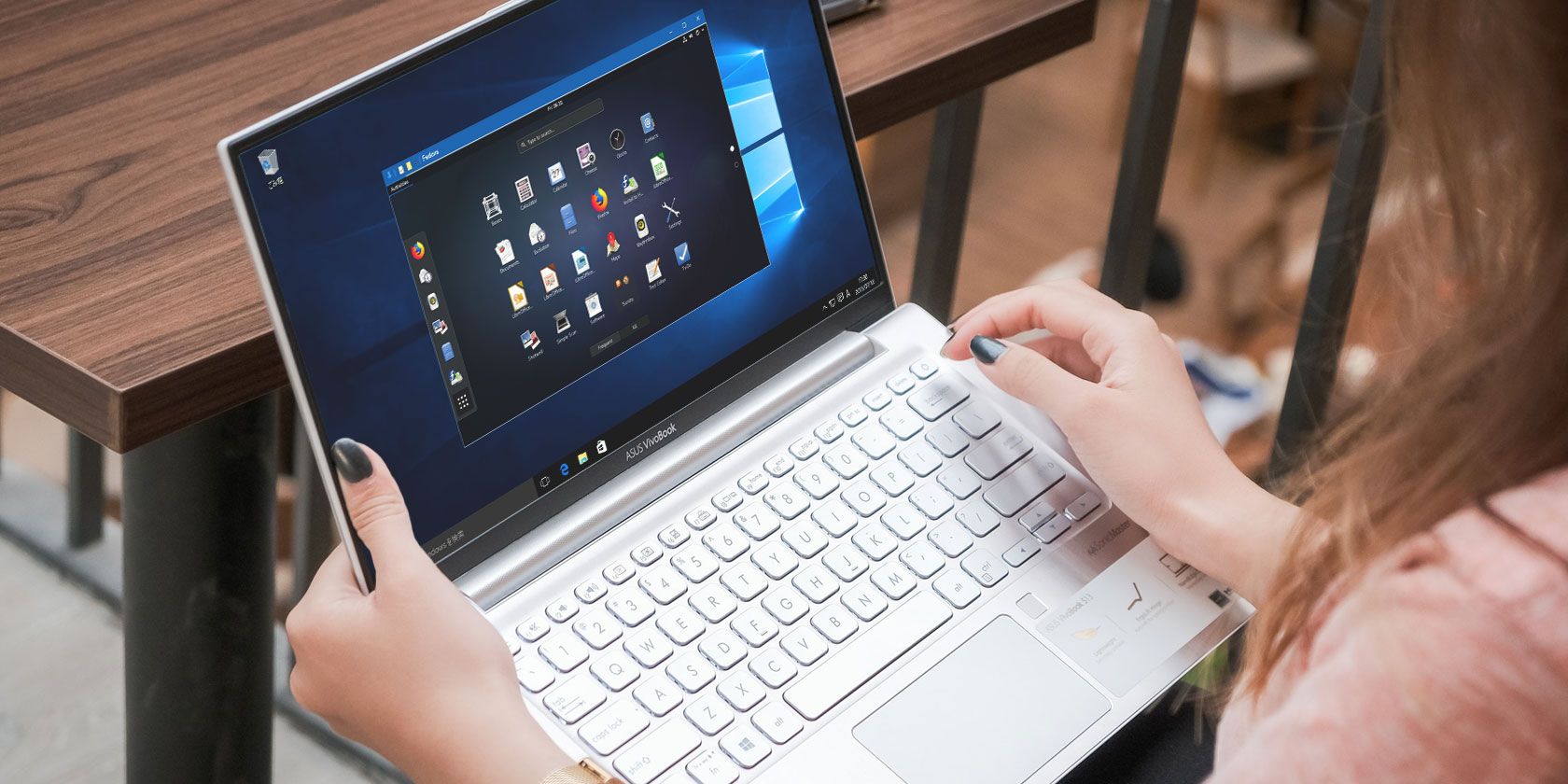
Linux desktop in Windows

You can now run any of the preinstalled Linux software and even install new apps and utilities.

Don’t Want a Linux Desktop? Just Install an App

In addition to installing a Linux desktop, you can simply install a Linux desktop app from Windows 10. This is useful if you consider installing a full desktop for one to be overkill.

For example, to install the Rhythmbox media player and run it in Linux on Windows, use:

sudo apt install rhythmbox

Ensure that you have set the export command:

export DISPLAY=:0

Then simply run the app from the Bash prompt:

rhythmbox

The media player will launch, ready for you to browse for a library.

Run Linux apps in Windows with Windows Subsystem for Linux

Now, in this case, you would obviously need to add some media files into the Linux environment on your computer. You might do this by installing a browser and downloading files, or simply by hooking up a USB drive with media files on.

After connecting the USB drive, remember to mount it (this example uses D: as the drive letter):

sudo mount -t drvfs D: /mnt/d

When you’re done, you’ll need to unmount the drive before removal. This ensures the integrity of the data on the drive.

sudo umount /mnt/d

While it’s possible to browse your Windows folders from within the Linux apps, no actual files can be opened. This is a shortcoming of the Windows Subsystem for Linux, albeit one that protects both the Windows and Linux environments from damage.

Linux in Windows: The Ultimate Convergence!

The Windows Subsystem for Linux makes it simple to run Linux software on a Windows PC. There’s no need to worry about virtual machines or the pain of dual booting.

With a Linux desktop installed, the convergence is almost complete. It’s a great way to get to grips with Linux from the comfort of the Windows desktop.

Want to learn more? Here’s how to get started with Linux.

Read the full article: How to Run a Linux Desktop Using the Windows Subsystem for Linux


Read Full Article