23 September 2018

Seven reasons not to trust Facebook to play cupid


This week Facebook has launched a major new product play, slotting an algorithmic dating service inside its walled garden as if that’s perfectly normal behavior for an ageing social network.

Insert your [dad dancing GIF of choice] right here.

Facebook getting into dating looks very much like a mid-life crisis — as a veteran social network desperately seeks a new strategy to stay relevant in an age when app users have largely moved on from social network ‘lifecasting’ to more bounded forms of sharing, via private messaging and/or friend groups inside dedicated messaging and sharing apps.

The erstwhile Facebook status update has long been usurped by the Snapchat (and now Instagram) Story as the social currency of choice for younger app users. Of course Facebook owns the latter product too, and has mercilessly cloned Stories. But it hardly wants its flagship service to just fade away into the background like the old fart it actually is in Internet age terms.

Not if it can reinvigorate the product with a new purpose — and so we arrive at online dating.

Facebook — or should that be ‘Datebook’ now?! — is starting its dating experiment in Colombia, as its beta market. But the company clearly has ambitious designs on becoming a major global force in the increasingly popular online dating arena — to challenge dedicated longtime players like eHarmony and OkCupid, as well as the newer breed of more specialized dating startups, such as female-led app, Bumble.

Zuckerberg is not trying to compete with online dating behemoth Tinder, though. Which Facebook dismisses as a mere ‘hook up’ app — a sub category it claims it wants nothing to do with.

Rather it’s hoping to build something more along the lines of ‘get together with friends of your friends who’re also into soap carving/competitive dog grooming/extreme ironing’ than, for e.g., the raw spank in the face shock of ‘Bang with Friends‘. (The latter being the experimental startup which tried, some six years ago, to combine Facebook and sex — before eventually exiting to a Singapore-based dating app player, Paktor, never to be heard of again. Or, well, not until Facebook decided to get into the dating game and reminded us all how we lol’d about it.)

Mark Zuckerberg’s company doesn’t want to get into anything smutty, though. Oh no, no, NO! No sex please, we’re Facebook!

Facebook Dating has been carefully positioned to avoid sounding like a sex app. It’s being flogged as a tasteful take on the online dating game, with — for instance — the app explicitly architected not to push existing friends together via suggestive matching (though you’ll just have to hope you don’t end up being algorithmically paired with any exes, which judging by Facebook’s penchant for showing users ‘photo memories’ of past stuff with exes may not pan out so well… ). And no ability to swap photo messages with mutual matches in case, well, something pornographic were to pass through.

Facebook is famously no fan of nudes. Unsurprisingly, then, nor is its buttoned up dating app. Only ‘good, old-fashioned wholesome’ text-based chat-up lines (related to ‘good clean pieces of Facebook content’) here please.

If you feel moved to text an up-front marriage proposal — feeling 100% confident in Facebook’s data scientists’ prowess in reading the social media tea leaves and plucking your future life partner out of the mix — its algorithms will probably smile on that though.

The company’s line is that dating will help fulfil its new mission of encouraging ‘time well spent’ — by helping people forge more meaningful (new) relationships thanks to the power of its network (and the data it sucks out of it).

This mission is certainly an upgrade on Facebook’s earlier and baser interest in just trying to connect every human on planet Earth to every other human on planet Earth in some kind of mass data-swinging orgy — regardless of the ethical and/or moral consequences (as Boz memorably penned it), as if it was trying to channel the horror-loving spirit of Pasolini’s Salò. Or, well, a human centipede.

But that was then. These days, in its mid teens, Facebook wants to be seen as grown up and a bit worth. So its take on dating looks a lot more ‘marriage material’ than ‘casual encounters’. Though, well, products don’t always pan out how their makers intend. So it might need to screw its courage to the sticking place and hope things don’t go south.

From the user perspective, there’s a whole other side here too though. Because given how much baggage inevitably comes with Facebook nowadays, the really burning question is whether any sensible person should be letting Mark Zuckerberg fire cupid’s arrows on their behalf?

He famously couldn’t tell malicious Kremlin propaganda from business as usual social networking like latte photos and baby pics — so what makes you think he’s going to be attuned to the subtle nuances of human chemistry?!

Here are just a few reasons why we think you should stay as far away from Facebook’s dalliance with dating as you possibly can…

  1. It’s yet another cynical data grab
    Facebook’s ad-targeting business model relies on continuous people tracking to function — which means it needs your data to exist. Simply put: Your privacy is Facebook’s lifeblood. Dating is therefore just a convenient veneer to slap atop another major data grab as Facebook tries to find less icky ways to worm its way back and/or deeper into people’s lives. Connecting singles to nurture ‘meaningful relationships’ is the marketing gloss being slicked over its latest invitation to ask people to forget how much private information they’re handing it. Worse still, dating means Facebook is asking people to share even more intimate and personal information than they might otherwise willingly divulge — again with a company whose business model relies upon tracking everything everyone does, on or offline, within its walled garden or outside it on the wider web, and whether they’re Facebook a user or not.
    This also comes at a time when users of Facebook’s eponymous social network have been showing signs of Facebook fatigue, and even changing how they use the service after a string of major privacy scandals. So Facebook doing dating also looks intended to function as a fresh distraction — to try to draw attention away from its detractors and prevent any more scales falling away from users’ eyes. The company wants to paper over growing scepticism about ad-targeting business models with algorithmic heart-shaped promises.
    Yet the real underlying passion here is still Facebook’s burning desire to keep minting money off of your private bits and bytes.
  2. Facebook’s history of privacy hostility shows it simply can’t be trusted
    Facebook also has a very long history of being outright hostile to privacy — including deliberately switching settings to make previously private settings public by default (regulatory intervention has been required to push back against that ratchet) — so its claim, with Dating, to be siloing data in a totally separate bucket, and also that information shared for this service won’t be used to further flesh out user profiles or to target people with ads elsewhere across its empire should be treated with extreme scepticism.
    Facebook also said WhatsApp users’ data would not be mingled and conjoined with Facebook user data — and, er, look what ended up happening there…!!
    ————————————————————————————————–>

    And then there’s Facebook record of letting app developers liberally rip user data out of its platform — including (for years and years) ‘friend data’. Which almost sounded cosy. But Facebook’s friends data API meant that an individual Facebook user could have their data sucked out without even agreeing to a particular app’s ToS themselves. Which is part of the reason why users’ personal information has ended up all over the place — and in all sorts of unusual places. (Facebook not enforcing its own policies, and implementing features that could be systematically abused to suck out user data are among some of the many other reasons.)
    The long and short history of Facebook and privacy is that information given to it for one purpose has ended up being used for all sorts of other things — things we likely don’t even know the half of. Even Facebook itself doesn’t know which is why it’s engaged in a major historical app audit right now. Yet this very same company now wants you to tell it intimate details about your romantic and sexual preferences? Uhhhh, hold that thought, truly.

  3. Facebook already owns the majority of online attention — why pay the company any more mind? Especially as dating singles already have amazingly diverse app choice…
    In the West there’s pretty much no escape from Facebook Inc. Not if you want to be able to use the social sharing tools your friends are using. Network effects are hugely powerful for that reason, and Facebook owns not just one popular and dominant social network but a whole clutch of them — given it also bought Instagram and WhatsApp (plus some others it bought and just closed, shutting down those alternative options). But online dating, as it currently is, offers a welcome respite from Facebook.
    It’s arguably also no accident that the Facebook-less zone is so very richly served with startups and services catering to all sorts of types and tastes. There are dating apps for black singlesmatchmaking services for Muslims; several for Jewish people; plenty of Christian dating apps; at least one dating service to match ex-pat Asians; another for Chinese-Americansqueer dating apps for women; gay dating apps for men (and of course gay hook up apps too), to name just a few; there’s dating apps that offer games to generate matches; apps that rely on serendipity and location to rub strangers together via missed connections; apps that let you try live video chats with potential matches; and of course no shortage of algorithmic matching dating apps. No singles are lonely for dating apps to try, that’s for sure.
    So why on earth should humanity cede this very rich, fertile and creative ‘stranger interaction’ space, which caters to singles of all stripes and fancies, to a social network behemoth — just so Facebook can expand its existing monopoly on people’s attention?
    Why shrink the luxury of choice to give Facebook’s business extra uplift? If Facebook Dating became popular it would inexorably pull attention away from alternatives — perhaps driving consolidation among a myriad of smaller dating players, forcing some to band together to try to achieve greater scale and survive the arrival of the 800lb Facebook gorilla. Some services might feel they have to become a bit less specialized, pushed by market forces to go after a more generic (and thus larger) pool of singles. Others might find they just can’t get enough niche users anymore to self-sustain. The loss of the rich choice in dating apps singles currently enjoy would be a crying shame indeed. Which is as good a reason as any to snub Facebook’s overtures here.
  4. Algorithmic dating is both empty promise and cynical attempt to humanize Facebook surveillance
    Facebook typically counters the charge that because it tracks people to target them with ads its in the surveillance business by claiming people tracking benefits humanity because it can serve you “relevant ads”. Of course that’s a paper thin argument since all display advertising is something no one has chosen to see and therefore is necessarily a distraction from whatever a person was actually engaged with. It’s also an argument that’s come under increasing strain in recent times, given all the major scandals attached to Facebook’s ad platform, whether that’s to do with socially divisive Facebook ads, or malicious political propaganda spread via Facebook, or targeted Facebook ads that discriminate against protected groups, or Facebook ads that are actually just spreading scams. Safe to say, the list of problems attached to its ad targeting enterprise is long and keeps growing.
    But Facebook’s follow on claim now, with Dating and the data it intends to hold on people for this matchmaking purpose, is it has the algorithmic expertise to turn a creepy habit of tracking everything everyone does into a formula for locating love.
    So now it’s not just got “relevant” ads to sell you; it’s claiming Facebook surveillance is the special sauce to find your Significant Other!
    Frankly, this is beyond insidious. (It is also literally a Black Mirror episode — and that’s supposed to be dysfunctional sci-fi.) Facebook is moving into dating because it needs a new way to package and sell its unpleasant practice of people surveillance. It’s hoping to move beyond its attempt at normalizing its business line (i.e. that surveillance is necessary to show ads that people might be marginally more likely to click on) — which has become increasingly problematic as its ad platform has been shown to be causing all sorts of knock-on societal problems — by implying that by letting Facebook creep on you 24/7 it could secure your future happiness because its algorithms are working to track down your perfect other half — among all those 1s and 0s it’s continuously manhandling.
    Of course this is total bunkum. There’s no algorithmic formula to determine what makes one person click with another (or not). If there was humans would have figured it out long, long ago — and monetized it mercilessly. (And run into all sorts of horrible ethical problems along the way.)
    Thing is, people aren’t math. Humans cannot be made to neatly sum to the total of their collective parts and interests. Which is why life is a lot more interesting than the stuff you see on Facebook. And also why there’s a near infinite number of dating apps out there, catering to all sorts of people and predilections.
    Sadly Facebook can’t see that. Or rather it can’t admit it. And so we get nonsense notions of ‘expert’ algorithmic matchmaking and ‘data science’ as the underpinning justification for yet another dating app launch. Sorry but that’s all just marketing.
    The idea that Facebook’s data scientists are going to turn out to be bullseye hitting cupids is as preposterous as it is ridiculous. Like any matchmaking service there will be combinations thrown up that work and plenty more than do not. But if the price of a random result is ceaseless surveillance the service has a disproportionate cost attached to it — making it both an unfair and an unattractive exchange for the user. And once again people are being encouraged to give up far more than they’re getting in return.
    If you believe that finding ‘the one’ will be easier if you focus on people with similar interests to you or who are in the same friend group there’s no shortage of existing ‘life avenues’ you can pursue without having to resort to Facebook Dating. (Try joining a club. Or going to your friends’ parties. Or indeed taking your pick from the scores of existing dating apps that already offer interest-based matching.)
    Equally you could just take a hike up a mountain and meet your future wife at the top (as one couple I know did). Safe to say, there’s no formula to love. And thankfully so. Don’t believe anyone trying to sell you a dating service with the claim their nerdtastic data scientists will hook you up good and proper.
    Facebook’s chance of working any ‘love magic’ will be as good/poor as the next app-based matchmaking service. Which is to say it will be random. There’s certainly no formula to be distilled beyond connecting ‘available to date’ singles — which dating apps and websites have been doing very well for years and years and years. No Facebook dates necessary.
    The company has little more to offer the world of online dating than, say, OkCupid, which has scale and already combines the location and stated interests of its users in an attempt to throw up possible clicks. The only extra bit is Facebook’s quasi-bundling of Events into dating, as a potential avenue to try and date in a marginally more informal setting than agreeing to go on an actual date. Though, really, it just sounds like it might be more awkward to organize and pull off.
    Facebook’s generic approach to dating is also going to offer much less for certain singles who benefit from a more specialized and tailored service (such as a female-focused player like Bumble which has created a service to cater to women’s needs; or, indeed, any of the aforementioned community focused offerings cited above which help people meet other likeminded singles).
    Facebook appears to believe that size matters in dating. And seems to want to be a generic giant in a market that’s already richly catering to all sorts of different communities. For many singles that catch-all approach is going to earn it a very hard left swipe.
  5. Dating takes resource and focus away from problems Facebook should actually be fixing
    Facebook’s founder made ‘fixing Facebook’ his personal priority this year. Which underlines quite how many issues the company has smashing through its plate. We’re not talking little bug fixes. Facebook has a huge bunch of existentially awful hellholes burning through its platform and punching various human rights in the process. This is not at all trivial. Some really terrible stuff has been going on with its platforms acting as the conduit.
    Earlier this year, for instance, the UN blasted Facebook saying its platform had became a “beast” in Myanmar — weaponized and used to accelerate ethnic violence against the Rohingya Muslim minority.
    Facebook has admitted it did not have enough local resource to stop its software being used to amplify ethnic hate and violence in the market. Massacres of Rohingya refuges have been described by human rights organizations as a genocide.
    And it’s not an isolated instance. In the Philippines the country has recently been plunged into a major human rights crisis — and the government there, which used Facebook to help get elected, has also been using Facebook to savage its critics at the same time as carrying out thousands of urban killings in a bloody so-called ‘war on drugs’.
    In India, Facebook’s WhatsApp messaging app has been identified as a contributing factor in multiple instances of mob violence and killings — as people have been whipped up by lies spread like lightning via the app.
    Set against such awful problems — where Facebook’s products are at very least not helping — we now see the company ploughing resource into expanding into a new business area, and expending engineering resource to build a whole new interface and messaging system (the latter to ensure Facebook Dating users can only swap texts, and can’t send photos or videos because that might be a dick pic risk).
    So it’s a genuine crying shame that Facebook did not pay so much close attention to goings on in Myanmar — where local organizations have long been calling for intelligent limits to be built in to its products to help stop abusive misuse.
    Yet Facebook only added the option to report conversations in its Messenger app this May
    So the sight of the company expending major effort to launch a dating product at the same time as it stands accused of failing to do enough to prevent its products from being conduits for human rights abuses in multiple markets is ethically uncomfortable, to say the least.
    Prospective users of Facebook Dating might therefore feel a bit queasy to think that their passing fancies have been prioritized by Zuckerberg & co over and above adding stronger safeguards and guardrails to the various platforms they operate to try to safeguard humans from actual death in other corners of the globe.
  6. By getting involved with dating, Facebook is mixing separate social streams
    Talking of feeling queasy, with Facebook Dating the company is attempting to pull off a tricky balancing act of convincing existing users (many of whom will already be married and/or in a long term relationship) that it’s somehow totally normal to just bolt on a dating layer to something that’s supposed to be a generic social network.
    All of a sudden a space that’s always been sold — and traded — as a platonic place for people to forge ‘friendships’ is suddenly having sexual opportunity injected into it. Sure, the company is trying to keep these differently oriented desires entirely separate, by making the Dating component an opt-in feature that lurks within Facebook (and where (it says) any activity is siloed and kept off of mainstream Facebook (at least that’s the claim)). But the very existence of Facebook Dating means anyone in a relationship who is already on Facebook is now, on one level, involved with a dating app company.
    Facebook users may also feel they’re being dangled the opportunity to sign up to online dating on the sly — with the company then committed itself to being the secret-keeping go-between ferrying any flirtatious messages they care to send in a way that would be difficult for their spouse to know about, whether they’re on Facebook or not.
    How comfortable is Facebook going to be with being a potential aid to adultery? I guess we’ll have to wait and see how that pans out. As noted above, Facebook execs have — in the past — suggested the company is in the business of ‘connecting people, period’. So there’s perhaps a certain twisted logic working away as an undercurrent and driving its impulse to push for ever more human connections. But the company could be at risk of applying its famous “it’s complicated” relationship status to itself with the dating launch — and then raining complicated consequences down upon its users as a result. (As, well, it so often seems to do in the name of expanding its own business.)
    So instead of ‘don’t mix the streams’, with dating we’re seeing Facebook trying to get away with running entirely opposite types of social interactions in close parallel. What could possibly go wrong?! Or rather what’s to stop someone in the ‘separate’ Facebook dating pool trying to Facebook-stalk a single they come across there who doesn’t responded to their overtures? (Given Facebook dating users are badged with their real Facebook names there could easily be user attempts to ‘cross over’.)
    And if sentiments from one siloed service spill over into mainstream Facebook things could get very messy indeed — and users could end up being doubly repelled by its service rather than additionally compelled. The risk is Facebook ends up fouling not feathering its own nest by trying to combine dating and social networking. (This less polite phrase also springs to mind.)
  7. Who are you hoping to date anyway?!
    Outside emerging markets Facebook’s growth has stalled. Even social networking’s later stage middle age boom looks tapped out. At the same time today’s teens are not at all hot for Facebook. The youngest web users are more interested in visually engaging social apps. And the company will have its work cut out trying to lure this trend-sensitive youth crowd. Facebook dating will probably sound like a bad joke — or a dad joke — to these kids.
    Going up the age range a bit, the under ~35s are hardly enamoured with Facebook either. They may still have a profile but also hardly think Facebook is cool. Some will have reduced their usage or even taken a mini break. The days of this age-group using Facebook to flirt with old college classmates are as long gone as sending a joke Facebook poke. Some are deleting their Facebook account entirely — and not looking back. Is this prime dating age-group suddenly likely to fall en masse for Facebook’s love match experiment? It seems doubtful.

    And it certainly looks like no accident Facebook is debuting Dating outside the US. Emerging markets, which often have young, app-loving populations, probably represent its best chance at bagging the critical mass of singles absolutely required to make any dating product even vaguely interesting.
    But in its marketing shots for the service Facebook seems to be hoping to attract singles in the late twenties age-range — dating app users who are probably among the ficklest, trickiest people for Facebook to lure with a late-stage, catch-all and, er, cringey proposition.
    After that, who’s left? Those over 35s who are still actively on Facebook are either going to be married — and thus busy sharing their wedding/baby pics — and not in the market for dating anyway; or if they are single they may be less inclined towards getting involved with online dating vs younger users who are now well accustomed to dating apps. So again, for Facebook, it looks like diminishing returns up here.
    And of course a dating app is only as interesting and attractive as the people on it. Which might be the most challenging hurdle for Facebook to make a mark on this well-served playing field — given its eponymous network is now neither young nor cool, hip nor happening, and seems to be having more of an identity crisis with each passing year.
    Perhaps Facebook could carve out a dating niche for itself among middle-age divorcees — by offering to digitally hand-hold them and help get them back into the dating game. (Although there’s zero suggestion that’s what it’s hoping to do with the service it debuted this week.)
    If Zuckerberg really wants to bag the younger singles he seems most interested in — at least judging by Facebook Dating’s marketing — he might have been better off adding a dating stream to Instagram.
    I mean, InstaLovegram almost sounds like it could be a thing.

Read Full Article

22 September 2018

10 Most Popular Types of YouTube Video You Can Make Today


popular-type-youtube

You’ve probably watched a lot of YouTube videos over the years. You will have seen plenty of ads, plus unboxing videos, makeup tutorials, music videos, and reaction videos. Amongst others.

But what if you want to switch from merely watching YouTube videos to making YouTube videos? If you want to start a YouTube channel today, these are the most popular types of video you can make.

Top Video Types for Your YouTube Channel

Getting started with YouTube is easy; finding success is far more difficult. While the majority of the most-watched YouTube videos are music promos, there are plenty of other genres to choose from:

  1. Unboxing videos
  2. Timelapse videos
  3. Video game walkthroughs
  4. Tutorials (on virtually any subject)
  5. Product reviews (e.g. hardware, makeup, etc.)
  6. Fan videos
  7. Reaction videos (people love watching others being thrilled/disappointed)
  8. Cute cats and dog videos
  9. Celebrity gossip
  10. The basic video blog (vlog)

Let’s take a look at each of these options in turn.

1. Unboxing Videos

Considered one of the most unusual types of YouTube video, unboxing videos shows you opening a box and describing its contents. Bizarrely, this video genre is hugely popular, and relatively easy to make. All you need is an unopened box full of tech/makeup/toys, etc. and a camera carefully placed to capture it.

As long as you’re talking while the unboxing takes place, you should be able to produce a video that people will enjoy and respond to. Note that some unboxing videos have a soundtrack, rather than a commentary, but these tend to be shorter.

Our tutorial to producing an unboxing video people will enjoy will give you more information on how to get started.

2. Timelapse Videos

The simplest way to make a movie like this is with a timelapse app on your smartphone. However, it’s also popular to edit existing videos to look like timelapses.

Whichever option you try, you’ll often get amazing results, which is why the videos prove so popular. Many creators share their timelapse videos, however, so choosing your subject carefully is important.

Timelapse videos might be anything from a Lego construction to the building of a genuine building (such as the new World Trade Center), and even the creation of art, like the hyperrealism in the video above.

3. Video Game Walkthroughs

Like gaming? With the help of a screen capture device (or a video camera) you can pass on your expertise on a particular game (or level) and entertain people at the same time. Video games as a spectator sport is a relatively new phenomenon, but immensely popular. Take Twitch, where millions of gamers gather every month. Some gamers have even become celebrities as a result.

YouTube has its own version, YouTube Gaming, where gamers can stream or upload their gaming activity. Unlike Twitch, these videos will remain on the site long-term.

Our guide to streaming games from a PC will get you started on Windows. If you’re using an Android device, Google Play Games can help you record and upload your videos. Console owners can capture their game recordings using built-in software. (Older consoles will need third party hardware.)

4. How To/Tutorials

YouTube is a regular destination for anyone looking for a way to do something. It might be technical help for dealing with problems upgrading to Windows 10 or something less computer-related, such as learning the basics of carpentry.

Do you have a skill, ability, or technique that you are happy to demonstrate? Making a how-to video is the best way to share that skill with the world.

You might do a simple screencast (essentially recording your PC’s desktop) or opt for a more personal, camera-facing approach. This latter option might result in a quite a bit of work filming and editing. However, as long as you have editing tools and ability, the results should be good.

5. Product Reviews

Related to the unboxing videos, product reviews are simple to produce. However, it’s easy to get carried away, so make notes in advance. After all, you don’t want to be left without anything to say.

While first impressions are the domain of the unboxing, product reviews should go more in depth. For example, include reflections upon your experiences with the product. It doesn’t matter whether it’s a new frying pan, a bike, or a collection of pencils—it’s up to you!

Best of all, you can film a product review with a single camera. Although you might like to add some photos and captions into the video to polish the finished production.

6. Fan Videos, Reviews, and Commentaries

Another popular option is the fan video. This might be speculation (or a review) on your favorite TV show, movie or book series, or even a commentary.

Popular franchises under discussion in such videos include Star Wars, Game of Thrones, Harry Potter, and Doctor Who. Of course, there is no reason to limit yourself to these, but you should take a few minutes to research the opposition. It’s always good to know the type of video people are enjoying.

Best of all, the production is minimal. All you need is a webcam or digital video camera, and the ability to talk about the show or movie you like.

7. Reaction Videos

Perhaps as surprising as the unboxing video, the reaction video is a popular option that is simple to produce. On the other hand, however, it is potentially the slowest to produce, depending on how you set it up, what tools you use, and what you’re reacting to.

We’ve previously produced a tutorial on creating reaction videos, and these can be made with anything from a computer webcam to a smartphone app.

As long as you can somehow combine what you’re watching with your reaction, the results should be good.

8. Cute Animals

We’ve all seen videos of cats, dogs, birds, and even pigs doing unbelievably cute things.

Incredibly, this type of video often goes viral. After all, everybody loves cute, everybody loves dogs (even cats), and we all love to share animals doing funny things.

So, if you have a pet who is a bit of a character, take the time to film them. Set a regular schedule of filming to catch something cute; close moments are good, as are feeding times.

9. Celebrity Rumors and Gossip

Something that everyone loves to do is talk about other people, especially when those people are famous (and probably rich and attractive too).

As a result, celebrity gossip videos are incredibly popular on YouTube. After all, some people just need to find out what Ed Sheeran had for lunch, how George Clooney works out, and why Lady Gaga is planning to wear a hat made from Play-Doh.

Celebrity gossip videos might take the basic to-camera, vlog approach, or they might be clips of the celebrities in question. You can then add a voice-over talking about what they gossip is, why you think it’s important, and what it might mean to their career.

10. Vlog

Got something to say? Vlogging, or video blogging, is a great way to find an audience of people who share similar views. Vlogs are incredibly popular among millennials, so if you fit into this demographic (Generation Xers are less likely to vlog, or find an audience) then this is a strong option.

Note that you don’t have to be political in your videos. Just like a blog, vlogs can be about anything, and say anything. In the example above, Maddie Moate demonstrates where rubber comes from. Her vast collection of explainer videos have helped her become a successful YouTuber. As a result, Maddie has presented three series of the children’s factual TV show Do You Know?.

However, be aware that the vlogging competition is strong. Anyone with a smartphone, tablet, or laptop, can make a vlog. So, be authentic and honest, pick topics people are interested in, but also offer alternative viewpoints. Try not to be intentionally outrageous to gain clicks; instead, offer reasoned views and arguments that commenters will want to engage with.

Get started with our guide to the best vlogging equipment.

Other Video Types to Consider

You’ve probably seen other video types, such as pranks, bad karaoke, and mashups do well. These are all fine, but not necessarily things that you can start making right away after you finish this post (pranks are particularly tricky to setup and record, and more likely to land you in trouble).

Once you’ve started building an audience for your videos, it’s worth building your brand. One way to do this is to make a cool YouTube video introduction, which can be done using free tools.

Read the full article: 10 Most Popular Types of YouTube Video You Can Make Today


Read Full Article
5 Common Cryptocurrency Scams and How to Avoid Them


cryptocurrency-scams

How do you avoid cryptocurrency scams? The easiest way is just to stay at home and don’t play with your hard-earned cash. But if you’re determined to invest in the somewhat risky world of cryptocurrency, there are a few common scams you should be aware of.

As with any scam, being caught out is going to hit you hard. We don’t want that. Here are five common scams to watch out for.

1. Shady or Insecure Exchanges

The explosive popularity of Bitcoin and other altcoins has seen a huge rise in cryptocurrency exchanges. They all want your attention and, more significantly, the transaction fees that come with handling your purchases.

However, there aren’t many completely trustworthy cryptocurrency exchanges. Popular exchanges have been known to completely disappear overnight, taking all the cryptocurrency with them.

If you’re entirely new to cryptocurrency, you might not have heard of Mt. Gox. This was an early cryptocurrency exchange that at one point accounted for over 70 percent of all Bitcoin transactions worldwide. One morning in February 2014, Mt. Gox suspended trading. It later surfaced that 850,000 Bitcoins had been stolen (valued at $450 million at the time, over $3.5 billion as of this writing) and remains one of the world’s worst cryptocurrency hacks.

A Short List of Somewhat Trusted Exchanges

I’m not one to spread FUD without offering you some good news: there are some excellent exchanges out there. I hold a number of altcoins myself, and I’ve never had any trouble with any exchange listed below. Of course, this is all subjective, but my experiences are relatively uniform with other cryptocurrency enthusiasts.

  • Coinbase: Support for Bitcoin, Ethereum, and Litecoin.
  • Kraken: Support for Bitcoin, Ethereum, Litecoin, Monero, and other popular altcoins. Some smaller altcoins too, such as Augur, and Stellar Lumens.
  • Bittrex: Support for almost every coin you can think of, and more you’ve never heard of. The only drawback is the company’s notoriously slow customer service.
  • Cryptopia: Support for a ridiculously large number of coins, also features an extremely low transaction fee.

Remember, do your own due diligence before placing any amount of Bitcoin or altcoins on an exchange.

My final tip is to not keep your cryptocurrency stored on an exchange. Transfer those coins to an offline wallet at the end of the day—it only takes a short amount of time to send them back to an exchange for trading. If you’re going to really get into cryptocurrency, consider upgrading to a cryptocurrency hardware wallet.

2. Pyramid and Ponzi Schemes

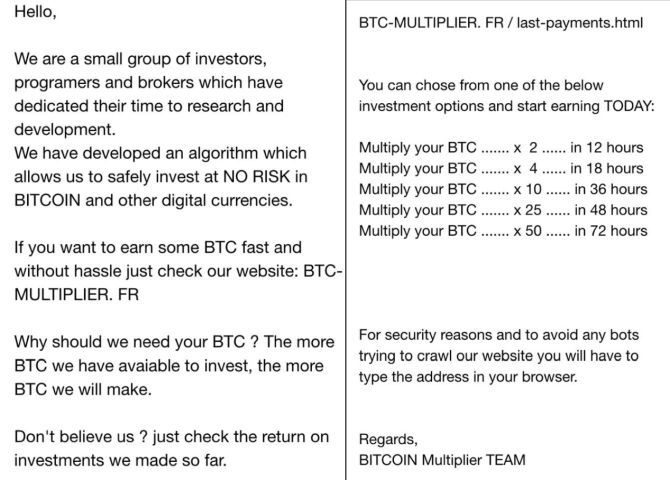
bitcoin multiplier scam

In the spring of 2017, a Mumbai-based company called OneCoin was delivering a sales pitch to a room of investors. Indian financial enforcement officers raided the meeting, ultimately jailing 18 OneCoin representatives for operating a cryptocurrency Ponzi scheme. At the time of their arrest, OneCoin had already moved over $350 million through a payment processor.

Investors had been duped through a combination of enthusiastic upselling, lack of knowledge of the technology in front of them, and a lot of positive media coverage (of both the project and booming cryptocurrency prices). A lot of people lost a lot of money.

We like to think we’re clever enough to spot a scam when it’s in front of us. But cryptocurrency is creating new scams, using jargon and technology most people have never heard of, let alone truly understand. Even grasping the basics of blockchain technology and smart contracts is difficult for the layman.

3. Pump and Dump Schemes

Many prominent financial experts have also dismissed cryptocurrency as a scam. While some compare Bitcoin to other safe haven investments, such as gold, others believe it is merely a speculator’s heaven, ripe for pumping and dumping.

Bitcoin has a market capitalization of over $110 billion at the time of writing. It would be very difficult to directly manipulate the price. But smaller altcoins are extremely vulnerable to a standard pump and dump.

In many ways, the thousands of smaller altcoins have taken the place of penny stocks, albeit with a technological edge. Furthermore, there are several groups dedicated to this exact practice. They hold a monthly vote to choose an altcoin with a tiny market capitalization, and descend.

4. Initial Coin Offerings

Initial Coin Offerings (ICOs) are the IPOs of the cryptocurrency world. Cryptocurrency startups create initial coin offerings to raise substantial amounts of money. However, many of them vastly overestimate the value of their startup. Others are simply elaborate pump and dump schemes.

The Securities and Exchanges Commission (SEC) is extremely wary of ICOs. It offers the following warnings:

  • There is often a lack of accurate or current information about a coin.
  • Questions often arise concerning the accuracy of publicly available information, including press releases and media coverage.
  • There are questionable trading practices, such as insider trading, market manipulation, and more.

Of course, this doesn’t actually always protect potential investors from scam ICOs, as we saw earlier with OneCoin. Due to the market hysteria surrounding ICOs, and the potential for large short-term profits, many scammers are attempting to profit. Alternatively, companies announce their ICO before the technology is truly ready.

Note: Learn more about the SEC’s stance on ICOs.

The DAO

When The DAO (a decentralized autonomous organization named for the acronym) completed their 2016 ICO, raising over $34 million, experts hailed it as a success. That was until some users exploited a vulnerability in the DAO code, and siphoned one-third of The DAO’s funds to another account. To return the funds to the original account, the Ethereum community had to agree to a hard fork, tearing the cryptocurrency in half.

DAO is now delisted from major exchanges and is seen as a major factor in the (much needed) close scrutiny of the SEC in cryptocurrency ICOs.

Not All ICOs Are Bad

Again, I don’t want to spread FUD without giving some really positive ICO information.

For example, Filecoin raised over $200 million for their decentralized storage system based on blockchain technology. Filecoin had some seriously impressive backers, too, including Winklevoss Capital (owned by the Winklevoss twins), Sequoia Capital, and Andreessen Horowitz.

There are also a number of very promising ICOs on the horizon—but as we have just seen, it’s difficult to know exactly what to trust without considerable research.

ICO Ban

ICOs have also made the (cryptocurrency) news after both China and South Korea took steps to ban them. According to Reuters, The South Korean Financial Services Commission said that institutions and individuals conducting business relating to an ICO “stern penalties.”

This move comes after the Chinese government banned all ICOs, calling them “illegal fundraising.” China is also worried about the power cryptocurrency gives its citizens. Decentralized anonymous currency in the form of ICOs (and other altcoins) could easily “disrupt their social order.” China has previously banned Bitcoin and cryptocurrency related activity, each time causing a slump in global markets.

5. Some Coins Don’t Actually Exist

In August 2017, the City of London Police shut down a “cryptocurrency business” that was cold-calling people to sell fake digital currency. Victims were cold-called and persuaded to purchase non-existent cryptocurrencies. Nine victims came forward to the UK firm, Action Fraud, with combined losses exceeding £150,000.

The man who allegedly set up the scam used a central London address, in the financial center, to lend the scam authenticity.

Real investors will not cold-call you to offer an opportunity, cryptocurrency or not. If you receive a call asking for your investment in a project, note the name of the caller, the company name and address, and put the phone down. Your next call should be to the SEC to report potential securities fraud.

Impersonators

A growing threat comes from social media. Prominent cryptocurrency company accounts are being impersonated on Twitter and Facebook. The scam pages directly contact individuals, asking for investment in their project, or to buy discounted Bitcoin or Ethereum. The addresses provided belong to the scammers.

Is Cryptocurrency Bad?

No. Far from it.

But any burgeoning technology will attract unscrupulous individuals—especially if that technology involves anonymity and can lead to high returns.

The key to staying safe in cryptocurrency is research. There are always unfortunate individuals that take the plunge and will fall victim to fraud. Things that seem too good to be true probably are. Some cryptocurrency day traders do make vast amounts of money—but they know what they’re doing. And many of them have trading, buying, and selling Bitcoin and other altcoins since the very early days of cryptocurrency.

Remember, start small, and only invest what you can afford to lose.

Image Credit: Krivosheevv/Depositphotos

Read the full article: 5 Common Cryptocurrency Scams and How to Avoid Them


Read Full Article
The 8 Best Noise-Canceling Headphones for Audiophiles

How to Set Up Your Own WAMP Server


A great many websites are run using a trio of services: Apache, MySQL, and PHP. It is a tried and tested combination which works phenomenally well, most of the time. Usually, to gain access to this trifecta, you need to purchase web hosting. The web hosting runs on a remote server that is highly likely running some form of Linux.

However, wouldn’t it be easier if you could bring the service trio to your computer to run locally? A WAMP server does just this. Read on to find out how to set up a WAMP server on your Windows 10 machine.

What Is a WAMP Server?

First thing first: what is a WAMP server? WAMP stands for Windows Apache, MySQL, and PHP. Compare this to LAMP (Linux Apache, MySQL, and PHP) or MAMP (Mac Apache, MySQL, and PHP).

A WAMP server, then, is a web development environment for Windows. Instead of requiring access to a server featuring Apache, MySQL, and PHP, a WAMP server creates a local environment. The local environment lets web developers continue their work offline, as well as test features before rolling them out into live environments. (Here’s how to create a virtual web development environment.)

Apache, MySQL, and PHP are all available for individual download. Each service has a Windows installer. (How to install MySQL on Windows 10 explains more) However, you then have to configure each service. And while countless tutorials show you exactly how to do this, a WAMP server automates a decent proportion of the configuration.

How to Install and Set Up WampServer

For the rest of the article, I’ll talk about WampServer, the official installation. Using WampServer is often the fastest and easier way. Plus, it has a lot of online support, too. Let’s set it up!

Step 1: Download and Install WampServer

Head to the official WampServer site and download the latest version for your operating system type (32 or 64-bit) At the time of writing, WampServer 3 includes Apache 2.4, MySQL 5.7, and PHP 5.6. When the download completes, run the installer.

The installer makes it clear that you should not install WampServer over an existing version. The default installer options should suffice for most users, but you must install WampServer in the root of the directory (e.g. C:\wamp or C:\wamp64). I would recommend changing the default browser to something more modern than internet Explorer. Similarly, if you want to select a different Notepad option, go ahead.

Please note that WampServer does not work on FAT32 or exFAT drive partitions. It only works on an NTFS drive. Also, WampServer 3 will not run on Windows XP because it uses Apache 2.4.X as well as requiring Microsoft Visual C/C++ Redistributable 2015 (VC14).

(Of course, you shouldn’t be running Windows XP in this day and age…)

Step 2: Configure WampServer

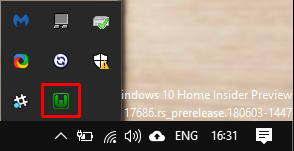
When the installation process completes, you can launch WampServer. When you first run it, you’ll spot a black command window. It will only flash on your screen for a few seconds, before disappearing. When the Windows Firewall notification appears, allow WampServer to connect using your private network. Your next port of call is the system icon tray where WampServer is lurking.

Head to the tray. If the WampServer icon is green, your WampServer services are active and ready for use. If the icon is red or orange, it means something on your system is interfering with WampServer. The best course of action is to restart your system, then open WampServer again. Skype is known to interfere with WampServer, as are some games that use Port 80 to communicate with the internet.

When the icon is green, you can head to your browser. Type http://localhost in the address bar and press Enter. All being well, this will display the WampServer homepage, like so:

From here you can access tools such as phpinfo and phpMyAdmin, as well as the official Apache and PHP documentation. Furthermore, when you create a new project, it will appear on this homepage under Your Projects. The same goes for Your Aliases, but these are for your project databases.

Step 3: Create Your First WampServer Project

Now to make your first WampServer project. In the following example, you will install WordPress to WampServer for local access.

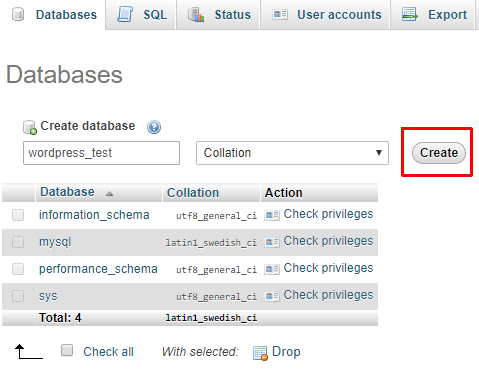
Create a blank MySQL database for your new site. Select phpMyAdmin from the WampServer http://localhost page. The default username is root, and there is no password (you can fix this in a moment—even though its local, you should still keep security practices). After logging in, select Databases from the menu bar. Enter a name for your database, and press Create.

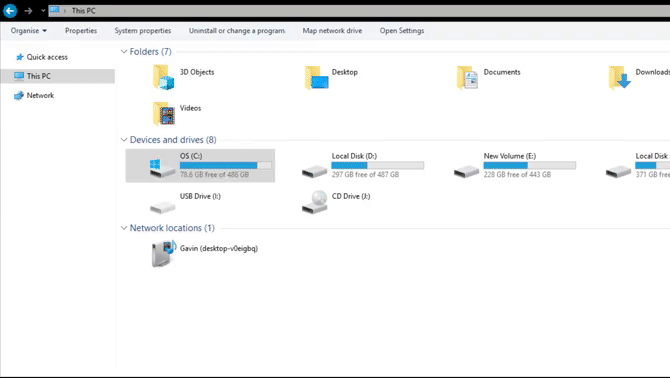
Next, install WordPress. If you left the WampServer installation to its default settings, you will find your project folder at C:\wamp\www or C:\wamp64\www.

Head to the www folder, then right-click and select New > Folder from the context menu. Name the folder “WordPress.” Download the latest version of WordPress and extract the contents of the archive into the wamp\www\WordPress\ folder.

wampserver create wordpress folder project

Now to check if the WordPress installation is working.

Type http://localhost/wordpress in your web browser address bar and press Enter. You should find the WordPress site Index, from which you can select wordpress/. The WordPress installer should start automatically and guide you through the installation process. (The username and password are the same as the MySQL login, and you just created the database name.)

All being well, you will reach the Run the installation screen. From here, you fill in your website information, after which you can access your WordPress dashboard using the Log in button.

Congratulations! You just finished creating your first WampServer project using WordPress. However, if you want another project, check our our tutorial on how to host a WordPress site on a Raspberry Pi (using a LAMP server).

WampServer Advanced Settings

WampServer is highly customizable depending on your requirements.

PHP Customization

Depending on the type of program you attempt to install on WampServer, you may require additional extensions that are not loaded by default. WampServer has a long list of pre-installed PHP settings and scripts for you to choose from.

Head to the WampServer tray icon, then to PHP > PHP Extensions, and make your selection.

Apache Customization

You can customize your Apache settings from the same WampServer tray icon, such as custom and pre-installed modules, which alias you are working with, the Apache version (if you have multiple installed), and more.

MySQL Customization

One of the first MySQL changes to make is to add a password to your root account. You’re not at immediate risk because your site is local, but it is better to change this right now, so you don’t forget. And let’s face it, security is serious, and you’d be a fool not to add a password, just in case.

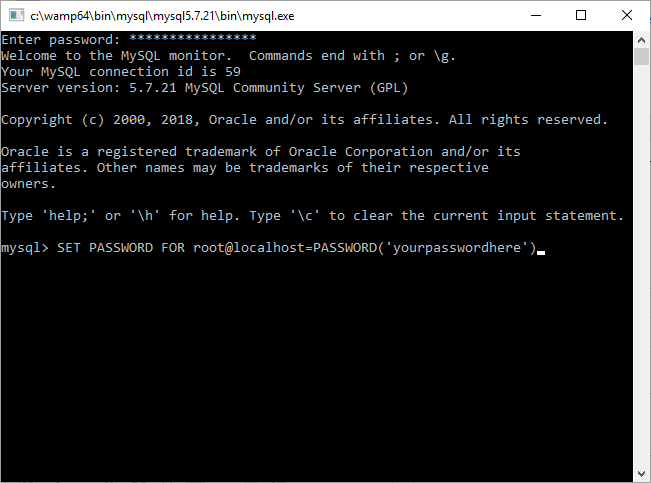
Head back to the WampServer tray icon. Select MySQL > MySQL console. The username is still root, and there is no password. Enter the following command:

SET PASSWORD for root@localhost=PASSWORD('yourpasswordhere')

You have now set a password for your root account.

Go Forth and WampServer!

Now you are up and running, you can really start playing around with installations, custom settings, and more. Or simply get to know MySQL, Apache, and PHP better, through trial and error. Alternatively, check out our list of the most important SQL commands for any programmer worth their salt.

Read the full article: How to Set Up Your Own WAMP Server


Read Full Article
5 Ways to Transfer Files From One Computer to Another

How to Print From Your iPhone or iPad: A Simple Guide

You Can Now Download PlayStation Now Games


If you’re a PlayStation Now subscriber you can now download games as well as stream them. This change makes PS Now an option for people who don’t have a fast or reliable enough internet connection to sign up for a pure streaming-based service.

Sony launched PlayStation Now in 2014 as a cloud-based gaming subscription service. Like a “Netflix for Games,” PS Now allows you to play hundreds of games on demand for a subscription fee. And just like Netflix, PlayStation Now is now getting downloads.

Streaming Games Is for Suckers

In a PlayStation Blog post, Sony explains how a PS Now subscription now includes the option to both stream and download games. The only caveat being the need to connect to the internet every few days to “verify your PS Now subscription,” regardless.

Almost all PS4 games offered through PS Now will be available to download, as well as the remastered PS2 games. Sony doesn’t mention PS3 games though, so titles such as Fallout 3, Red Dead Redemption, and the Uncharted series will still need to be streamed.

Allowing users to download PS Now games should solve some of the problems associated with PlayStation Now. Streaming games means you need to have a consistently fast internet connection, whereas downloads mean you can play offline instead.

The only issue is existing subscribers who have started streaming games and who now want to continue playing offline. This means having to transfer your file from the cloud to your console. Thankfully, Sony details the whole process in the video above.

Sony Catches Up With Microsoft

In some ways this is Sony playing catch-up with Microsoft. In 2017, Microsoft launched the Xbox Game Pass, which offers an ever-changing lineup of downloadable games for a monthly fee. Which made Sony’s streaming offering look a little dated by comparison.

Read the full article: You Can Now Download PlayStation Now Games


Read Full Article
How Much Are You Worth? 5 Salary Calculators for Freelancers and Developers


salary-calculator

Finding your actual worth isn’t that easy. You always wonder if you could be paid more than you are, if your colleagues and peers have a better salary, or if the industry has left you behind. If you’re a developer, a part of a tech startup, or a freelancer, you can find answers with these few tools.

Jobs in the IT and technology industry have a few peculiar factors in the current employment market. You are more likely to get offers of hourly contract work, short-term freelance projects, or offers of equity to join a startup. These five websites and calculators can help you negotiate a better salary.

Dev Salary (Web): Salary Comparison for Startups and Tech Companies

Dev Salary shows payscales of programmers at top tech companies and startups

When you’re a developer, you are bound to think about what you would earn if you worked for one of the technology giants or a hot startup. Dev Salary has collected data from over 6,000 startups to give you an idea of your potential earnings.

This list includes some of the biggest names, like Google, Facebook, and Amazon. It also includes some smaller startups that only you might have heard about, so don’t be shy in searching their database.

The search parameters also let you get a little more specific about the type of role you do (fullstack engineer, mobile developer, and so on), and the location you work from. Naturally, you’ll get a bit more if your skills include computer programming jobs in demand right now.

A free account only shows you the top three results for any sort of search, and you can pay to view the full list. But as with any type of job, salary comparisons are only indicators, so the pro account won’t be worth it for most job seekers.

Stack Overflow’s Salary Calculator (Web): For Developers (With Job Listings)

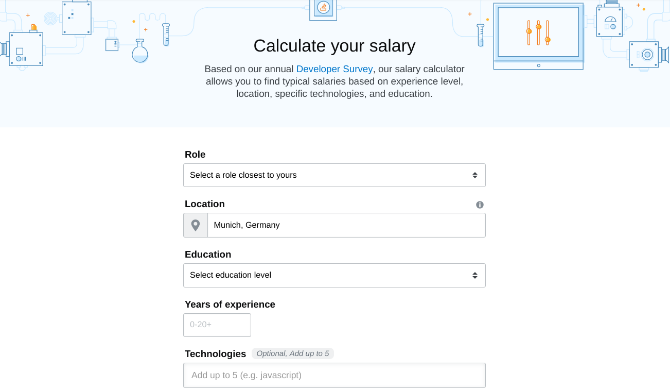
Stack Overflow's salary calculator is a great start to find out what your programming skills are worth

If you’re a programmer or developer, chances are you have ended up on Stack Overflow at some point. It’s one of the best Stack Exchange communities, giving you answers about anything related to programming. Stack Overflow has had a jobs listing for some time, and you can use that data to find a bit about what you might be worth.

It’s a really simple calculator, but when you need a ballpark figure to start negotiations, this should be your first stop. You select a role that’s closest to what you do at your job, add your education and experience, and the location you’re in. If you have additional programming skills, throw those in too.

Stack Overflow’s calculator will show you what people in different percentile are earning. It’s up to you to judge which category of those you fall in, but it shouldn’t be too hard if you’re realistic with yourself.

Additionally, Stack Overflow has one of the internet’s best job-search listings for developers and programmers, so you’ll immediately see other firms to apply to in case you think you’re underpaid.

Hourly Rate Calculator (Web): Fill the Blanks, Calculator Does the Rest

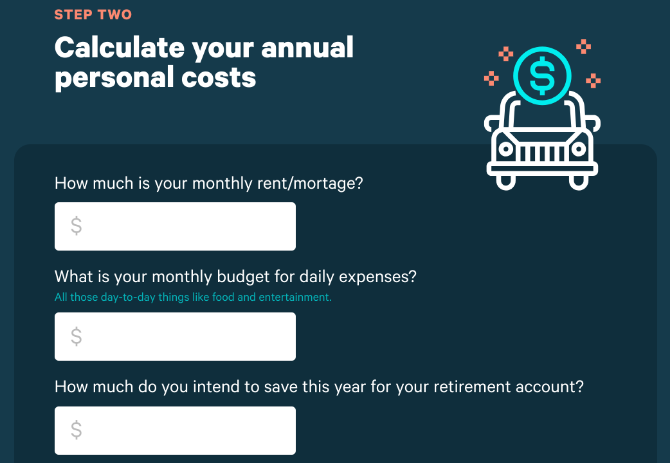
Pastel's Hourly Rate Calculator helps you find a fair wage without forgetting to account for someting

For a lot of freelance roles, you will be asked for an hourly rate. This does not mean you divide your targetted income by the number of hours you wish to work every day. You might lose out on money with that, so use Pastel’s calculator to ensure you’re paid fairly.

The calculator asks you a series of questions, that determine four major expenses: your annual business costs, your annual personal costs, your billable hours, and profits and taxes. It’s a nice way of splitting up your finances and arriving at a logical number. It’s what an online financial advisor would tell you to do.

Once you enter all the metrics, you’ll find out what your hourly rate is. Now you can stick by this, and use the best time-tracking app with it to ensure you are paid exactly what you are worth.

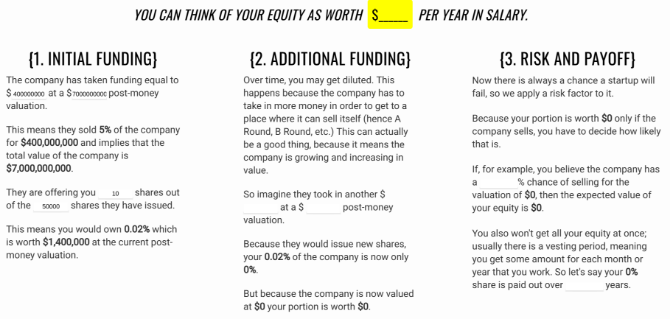
Salary or Equity (Web): Layman’s Guide to What Equity Is Worth

A layman's guide to whether you should take equity or salary

Technology startups usually want to hire employees who want to grow with the company. Startups will often offer a piece of “equity” as part of your overall salary package, which basically means a share in the company. How much is that equity really worth?

Salary or Equity simplifies this complicated topic for the layman. A quick Google search about your company will give you the information this calculator needs. Companies have to disclose their funding details, so you will easily find how much money they raised, at what valuation, and the shares they issued. Then it’s just a matter of putting in what they offered you.

The calculator then tells you how much part of the company you would own, and what it is worth at the current valuation. The next step asks you about additional funding, guessing the potential future about how much extra money the company could take, and what your shares would mean then. The third and final step is about risk and payoff, helping you calculate how much the shares would be worth if the company was sold.

Going through the step-by-step process of Salary or Equity is a much more realistic way to figure out what the company is offering you, and whether you should take the equity (for long-term gains) or ask for a lesser amount in salary (for short-term gains).

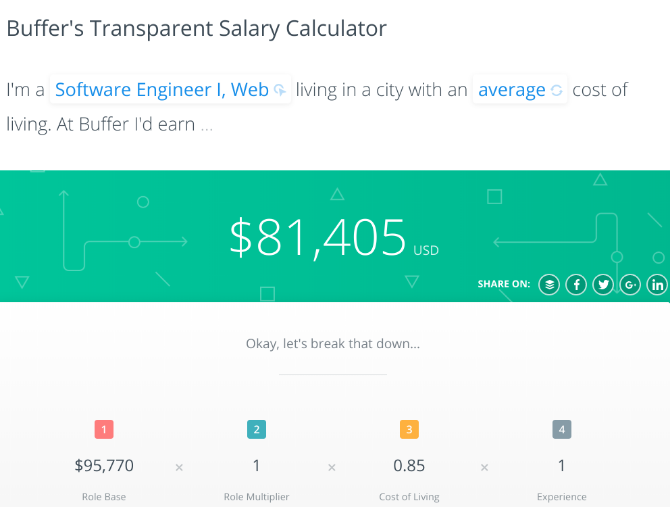
Buffer’s Transparent Salary Calculator (Web): One Company Opens Up Their Data

Buffer's transparent salary calculator shows what you can make in similar jobs

Buffer, one of the best ways to schedule posts on social media, is an admirable startup with some new ways of thinking. The company has an entirely transparent salary system, publishing what every employee makes. And they also have a calculator for you to see what you could make working at Buffer.

Buffer’s Transparent Salary Calculator has different job roles for you to calculate with, like leadership, administration, engineering, marketing, product, and more. You then add which location you stay in (or the closest one), which immediately calculates a cost-of-living multiplier for cities around the world. Finally, your experience is another multiplier, to ensure you are rewarded for your years of service.

Put all the things together and you’ll find out what you earn at Buffer, with a clear explanation of why. It’s also a nice base to use as a comparison in a salary negotiation with someone else.

Find Your Day Rate (And Other Useful Tools)

Knowing your hour rate is excellent for those who work on small projects that are billable by the hour. But for other types of freelance jobs, it’s better to calculate a daily rate and cover yourself for other expenses and unexpected situations.

If you are an independent worker, there are freelancer unions and free contracts that can help provide legal protection and save you from employees who don’t pay on time (or at all). Bookmark or download these essential apps and sites for every freelance professional, you never know when you might need one.

Read the full article: How Much Are You Worth? 5 Salary Calculators for Freelancers and Developers


Read Full Article
Microsoft Brings Skype Calls to Amazon Echo


Amazon recently unveiled a slew of new products, most of which are Alexa-enabled devices designed to make your home smarter. The message is simple and clear… Alexa is going to be everywhere. And now Microsoft wants a piece of the action.

Microsoft and Amazon have been working together for some time, and, as a result, earlier this year Cortana and Alexa learned to talk to each other. Now, with Alexa and Cortana getting on famously, Microsoft is upping the ante by adding Skype to the mix.

Bringing Skype Calling to Your Amazon Echo

In a nutshell, Microsoft is bringing Skype calling to Alexa devices. Once it has been rolled out, anyone who owns an Amazon Echo will be able to “easily communicate with their friends and family from their Echo devices, simply using [their] voice.”

If you own an Echo you will be able make outgoing calls, both voice and video, and accept incoming Skype calls. You’ll also be able to make SkypeOut calls to standard phone lines. However, unlike Skype-to-Skype calls, SkypeOut calls cost money.

Seeing as Alexa is is a voice-activated personal assistant it should come as no surprise to discover Skype has its own voice commands. To make a call just say, “Alexa, call [Name] on Skype. And answering a call is as simple as saying, “Alexa, answer”.

According to Microsoft, Skype calling on Alexa will “begin rolling out later this year.” In the meantime you can cast your eye over all of the new Echo devices and decide whether it’s time to upgrade to an Echo Show purely for Skype video calls. It probably isn’t.

Further Reading for Alexa Noobs and Veterans

If the integration of Skype has piqued your interest into all things Alexa you should check out our review of the original Amazon Echo. Or if you’re already in the game check out some of these creative uses for your Amazon Echo and Alexa.

Read the full article: Microsoft Brings Skype Calls to Amazon Echo


Read Full Article
How Smart Contracts Using Blockchain Really Work


smart-contracts-blockchain

A smart contract is a piece of code that works with a blockchain to enforce the terms of a particular contractual agreement. They allow trusted transactions to take place between anonymous parties, thereby creating a transaction record that’s transparent, traceable, and irreversible—all the while eliminating the need for third-party middlemen.

Sounds great! But how does a smart contract really work?

What Is a Smart Contract?

Even though smart contracts feel like new technology, they were first proposed back in 1994 by American computer scientist, Nick Szabo. (Nick Szabo is alleged to be Satoshi Nakamoto, the creator of Bitcoin, but he vehemently denies it.) Szabo’s paper theorizes smart contracts as a “computerized transaction protocol that executes the terms of a contract.” Put forth way ahead of their time, many of Szabo’s proposals have now become the central features of a modern smart contract.

Smart contracts help people by facilitating the exchange of things by way of computer code. In a sense, smart contracts are glorified examples of “when X takes place, do Y” code. Blockchain-based contracts bring the control of financial transactions back into the hands of users and vendors (away from institutions like banks) while ensuring there is a permanent record of those transactions.

Unfortunately, the term itself—“smart contract”—causes confusion. When you think of a traditional contract, you think of a signed piece of paper that outlines details of a legal agreement. A smart contract doesn’t just outline but enforces the terms of an agreement using cryptographic code linked to the blockchain.

5 Examples of How Smart Contracts Work

While smart contracts are predominantly associated with Ethereum, Bitcoin has always had basic smart contract support. It’s just that Bitcoin’s limited programming language made it difficult to create worthwhile smart contracts. Ethereum later came in and took up the mantle with smart contracts based on an easier-to-code programming language.

Here are a few examples to help get a better sense of how smart contracts work:

Example 1: You’re running a campaign to create a blockchain-based Kickstarter equivalent (in fact, Acorn Collective does just this). The smart contract automatically collects fees up until the project funding goal is met, and if the goal isn’t met by the deadline the smart contract returns funds to supporters.

Example 2: The US voting system faces intense scrutiny due to claims of hacking and tampering. A smart contract system using immutable blockchain technology would be more secure than current electronic voting booths. Follow My Vote is a blockchain-based voting platform that “embodies all the characteristics that a legitimate voting system requires: security, accuracy, transparency, anonymity, freedom, and fairness.” Voters use government IDs, a webcam, and a computer to remotely log in and cast their vote.

Example 3: uPort uses Ethereum smart contracts to manage and protect your identity. For instance, if you’re traveling across borders and have uploaded your passport documents to uPort, you can choose to only reveal the information required at passport control, and only after you verify the information the agent is requesting. The contract rejects any attempt to overreach data, limiting the amount of data that can be revealed.

Example 4: A Midasium Contract is a “digital representation of the mutual agreements contained in a traditional real estate contract.” Midasium creates self-executing and self-enforcing real estate contracts that move bank funds, title deeds, and reconcile payments. Midasium contracts remove the need for costly third-party intermediaries. Better still, users can convert their Midasium smart contracts into regular paper contracts at any time for legal purposes.

Example 5: Another great smart contract implementation is the AXA fizzy flight compensation partnership. Instead of having to wait weeks for claims processing, AXA fizzy gives direct compensation. You purchase cheap flight insurance through AXA, who uploads your record to fizzy. In turn, fizzy records your purchase on the Ethereum blockchain. Your smart contract is connected to global air traffic databases, so as soon as your flight is delayed by two hours, compensation automatically triggers.

Once a smart contract is written, it’s uploaded to the Ethereum Virtual Machine (EVM). The EVM is like a universal runtime propagate out to every connected Ethereum node, where each node can check that the conditions of the smart contract have been met. If so, the nodes respond accordingly and carry out the smart contract’s instructions.

Going beyond, smart contracts aren’t just useful as specialized contract tools—they also pave the way for decentralized apps, and that’s one of the main reasons why there’s so much excitement around the ongoing development of smart contracts. Learn more about this in our What Is a Decentralized App? article.

Can You Trust a Smart Contract?

Remember, a smart contract is:

  • Self-executing
  • Self-verifying
  • Self-enforcing
  • Immutable

Smart contracts save money by removing third-party entities from the equation and allowing parties to deal with each other face-toface. Yet while that sounds great in theory, for many people, using a third-party intermediary isn’t always about cost—it’s about security. In the case of a smart contract, how can you trust it if you didn’t write the code for it?

Once the smart contract writes its transaction to the blockchain, it’s publicly recorded for all to see. That record cannot be erased, and anyone can double-check it at any time. But when the smart contract executes, it carries out the instructions exactly as it was coded to do, and it’s this part that has people worried.

In principle, contracts based on “if-then” agreements make sense because there are constant inputs and verifiable outputs that can be confirmed—but the confirmation itself still relies on verification, and in many cases will require human arbitration. That’s when the human factor comes back into play, along with trust issues.

Smart contracts are still young. They aren’t without flaws, and the technology still needs a lot of work.

In fairness, trust in smart contracts can be enhanced with interdependence. In other words, we can create trust in smart contracts with more smart contracts. It’s smart contracts all the way down.

Smart contracts can be set up so that verification of conditions is dependent on the preceding contract, and so on. Also, smart contract oracles can submit real-world data to the blockchain for use in smart contract verification. Smart contract oracles play an important role in smart contract trust, and will continue to do so.

Smart Contracts Are the Future

Smart contracts will become more useful as cryptocurrency and blockchain evolve. The questions being asked of smart contracts are part of that evolution.

Right now, the technology is new and the boundaries are unknown. Regular users (especially those who aren’t already exposed to cryptocurrency and blockchain) might find it difficult to trust digitized contracts that they can’t touch, feel, or even modify after execution. But give it enough time and we’ll soon see the power of smart contracts in action.

Read the full article: How Smart Contracts Using Blockchain Really Work


Read Full Article
7 Ways to Create a Bulleted List in Excel


excel-text-tips

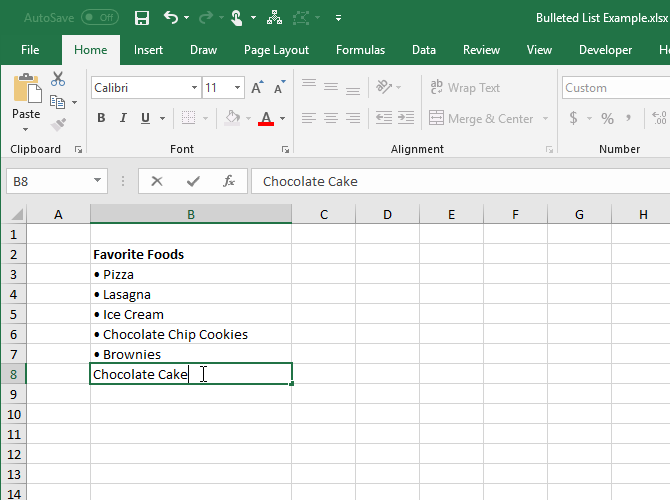
Creating a bulleted list in Excel isn’t as straightforward as it is in Word. There is no Bullets button on the ribbon in Excel. What if you want to add a bulleted list to a worksheet?

Today we’ll show seven ways to create a bulleted list in Excel.

1. Create a Bulleted List Using Keyboard Shortcuts

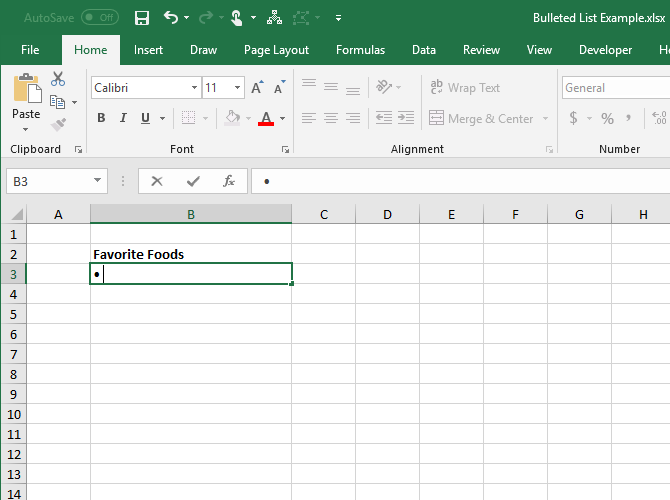
The simplest way to create a bulleted list is to use a keyboard shortcut to enter a bullet character into a cell.

Select the cell you want to type a bullet in and press either Alt + 7 or Alt + 0149 for a solid bullet or Alt + 9 for a hollow bullet. When typing the numbers in these shortcuts, you must use the number pad on your keyboard.

If you’re using a laptop without a number pad, you may be able to turn on Num Lock to emulate a number pad. Not all laptops have the Num Lock key. If yours has one, it would probably be on one of the function keys. You can either press Shift + Num Lock or Fn + Num Lock. Then, the numbers for the “number pad” will be on some of the letter and number keys on the right side of the keyboard.

If you don’t have access to a number pad at all, don’t worry. The next section shows you how to enter bullets into cells without using the number pad.

Type a bullet using a keyboard shortcut in Excel

2. Create a Bulleted List Using the Symbol Dialog Box

If you don’t have a physical or emulated number pad on your keyboard, or if you forget the keyboard shortcuts for bullets, you can use the Symbol dialog box.

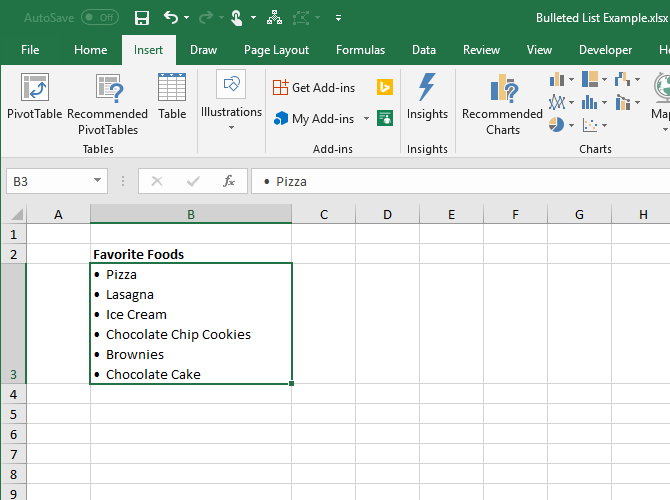
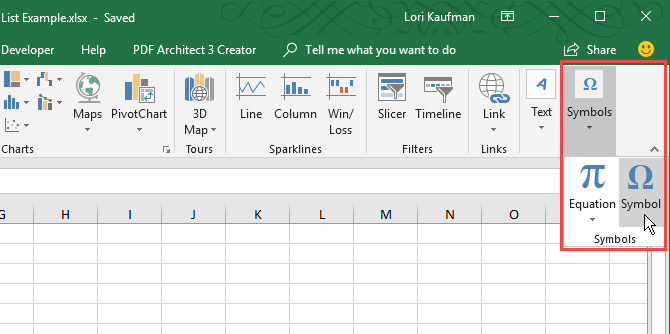
On the Insert tab, go to Symbols > Symbol in the Symbols section. If your Excel window is big enough, you can click the Symbol button in the Symbols section directly, without clicking the Symbols button first.

Click Symbols on the Insert tab in Excel

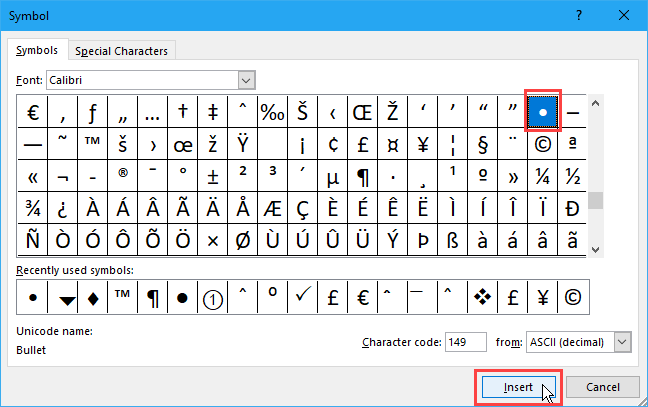
The default font Calibri is automatically selected in the Font dropdown list, but you can select a different font.

Select the symbol you want to use for your bullets and click Insert. Then, click Close.

Select a bullet on the Symbol dialog box in Excel

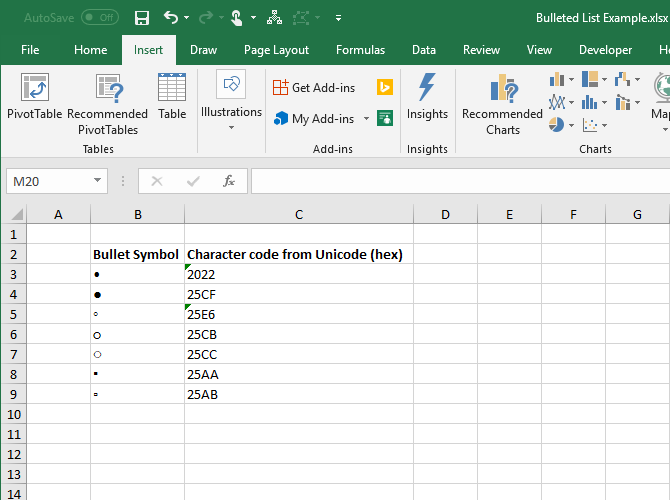
If you have difficulties finding a bullet icon among other symbols, we’ve provided some bullet symbols you might want to use in the image below. On the Symbol dialog box, first select Unicode (hex) from the from dropdown list. Then, type one of the codes shown in the image below into the Character code box.

Bullet symbols and character codes in hex in Excel

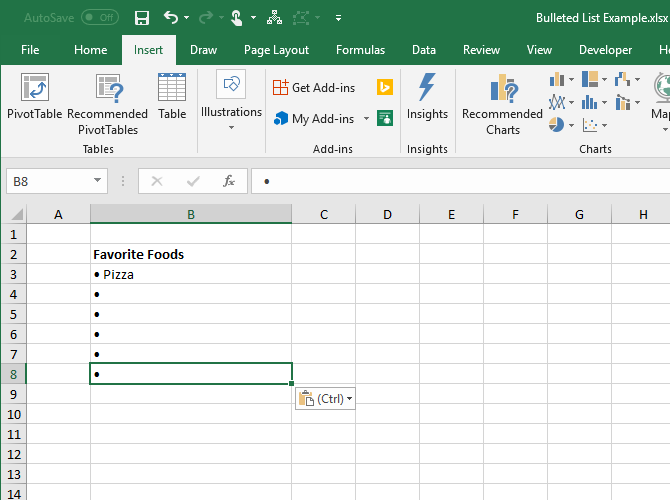
Type one or two (or more) spaces after the bullet in the cell.

Then, copy and paste the bullets to the other cells and add your text.

Copy and paste a bullet to other cells in Excel

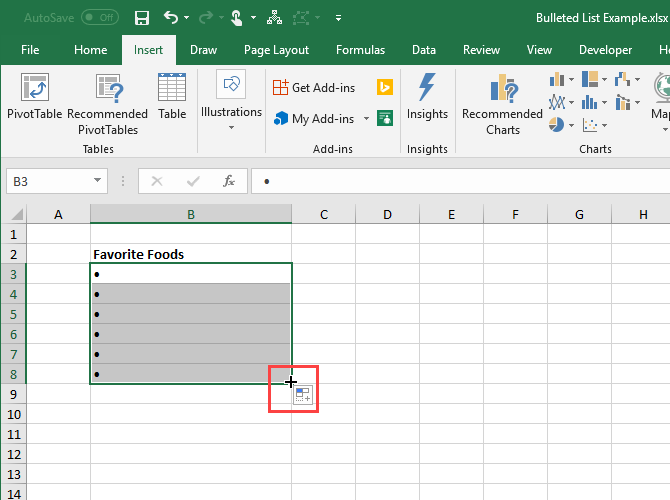
To quickly populate other cells in the same column with bullets, enter a bullet in the first cell and then use the Fill Handle to automatically copy and paste the bullet into the other cells.

Use AutoFill in Excel to copy and paste bullets

3. Create a Bulleted List Using a Custom Format

If you need to create a long bulleted list, you can use a custom number format to make it faster add bullets to your list items.

If you don’t have a number pad, first insert a bullet into a cell you’re not using and then copy it.

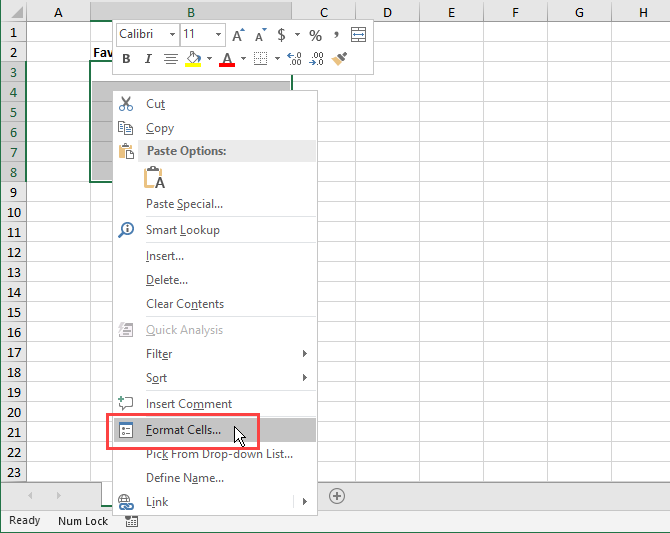
Select the cells you want to add bullets to. They can be empty or already have text. Then, right-click on the selected cells and select Format Cells, or press Ctrl + 1.

Select Format Cells from the context menu in Excel

On the Number tab, select Custom under Category.

In the Type box, either paste the bullet you copied or use one of the keyboard shortcuts we showed you to type a bullet. Then, type a space or two (or more) and the @ character.

Click OK. The new type is automatically applied to the selected cells.

Create a custom format for bullets in Excel

Now when you want to add bullets to cells, select the cells you want to add bullets to. Then, press Ctrl + 1 to open the Format Cells dialog box, select Custom under Category on the Number tab, and select the new Type you created.

Add text after bullets in cells in Excel

4. Create a Bulleted List in a Single Cell

To enter a bulleted list into a single cell, double-click on the cell and use a keyboard shortcut or the Symbol dialog box to insert a bullet. Type the number of spaces you want and then the text you want for the first bullet point.

Press Alt + Enter to go to the next line in the cell. Then, enter another bullet, one or more spaces, and the text for your second bullet point.

Repeat for each bullet point, pressing Alt + Enter at the end of each line. Then, press Enter when you’re done creating the list.

Create a bulleted list in a single cell in Excel

5. Create a Bulleted List by Copying It From Word

If you created a bulleted list in Microsoft Word, or another word processor like LibreOffice Writer, that you want to add to your spreadsheet, select the list in that program and press Ctrl + C to copy it.

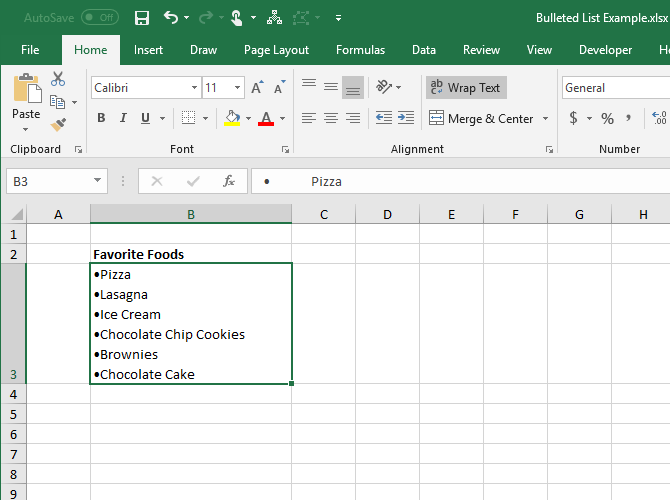
To insert the entire list into a single cell, double-click the cell, and press Ctrl + V. There may not be any spaces between the bullets and the text on each line, but you can fix that by putting the cursor where you want and adding spaces.

Bulleted list copied from Word to a single cell in Excel

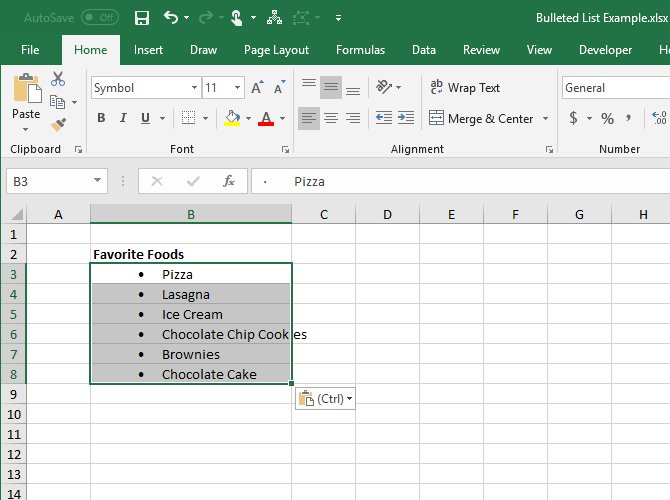
To insert each item in the list into separate cells, select the cell where you want to insert the first item and press Ctrl + V.

You may have to adjust the spacing in each cell.

Bulleted list copied from Word to multiple cells in Excel

6. Create a Bulleted List Using a Function

To add bullets to multiple cells at a time, you can also use a function. The CHAR function takes a character code and displays the character that corresponds to that code in the cell. We’re going to work with codes in Windows. (Character codes on a Mac will differ but the use of the CHAR function is the same.)

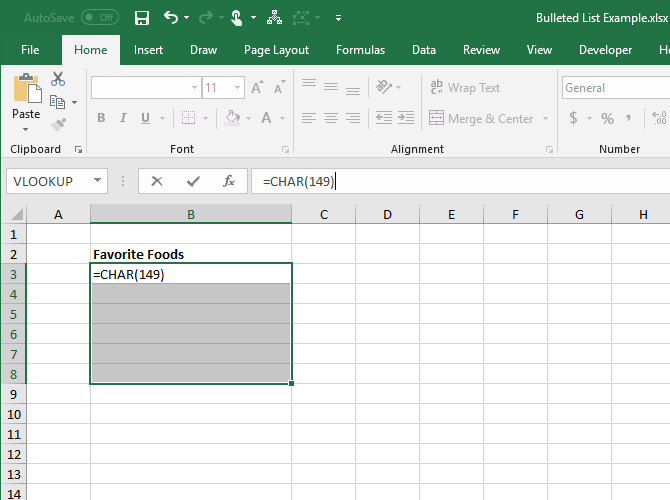
To enter a solid bullet character in multiple cells in Excel for Windows, select the cells and click in the Formula bar. Type the following function and press Ctrl + Enter:

=CHAR(149)

Enter the CHAR function for a bullet in a cell in Excel

All the selected cells are populated with the solid bullet character.

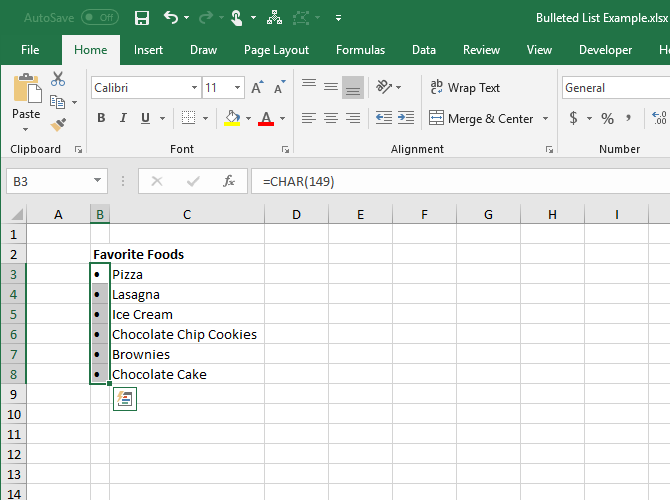
When using this method, you’ll have to put the text for each bulleted item in the column to the right of the bullets, like we did in the image below.

CHAR function entered into cells in Excel

You can build a bulleted list in one column using the CHAR function in a formula. This method is useful if you already have a list of items in another column without bullets.

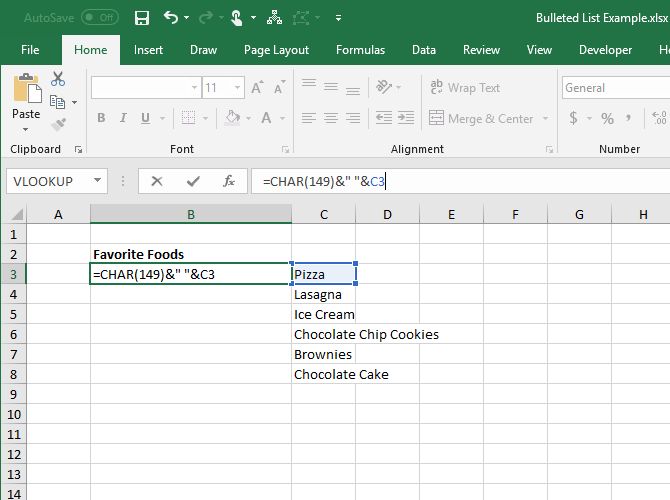
Select the cell to contain the first item with the bullet character. Then, enter the following formula, replacing “C3” with the cell reference for the first item in the other column.

=CHAR(149)&" "&C3

This formula concatenates a solid bullet character, one space, and the value of the referenced cell (C3 in our case). You can enter more than one space between the quotes if you want.

Create a bulleted list from items in another column in Excel

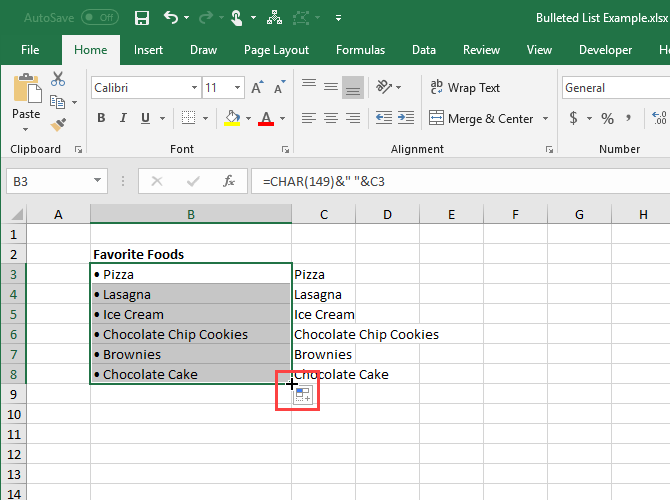
To copy the formula to the rest of the cells where you want the list, select the cell where you just entered the formula. Then, drag the AutoFill box in the lower-right corner of the cell down over the cells you want to fill.

When you release the mouse button, the formula is copied to those cells with the appropriate cell references for each row.

With the formulas, you cannot delete the items from the other column, because they’re still being referenced in the formulas. But we’ll solve that by converting the formulas to values.

Use AutoFill in Excel to copy a formula to other cells

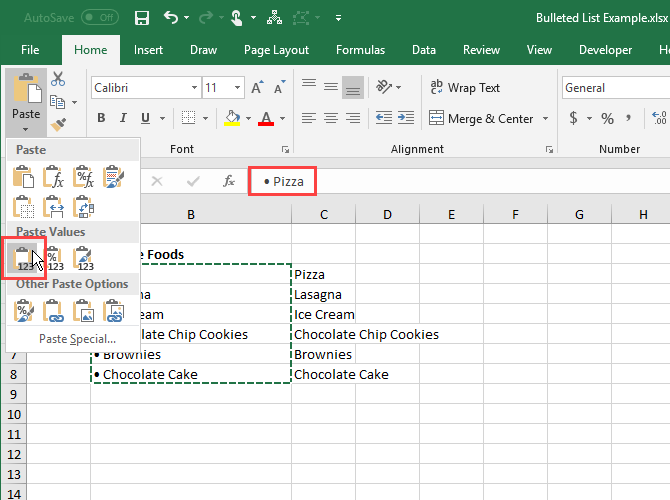
To convert the formulas to values, select the cells containing the formulas and press Ctrl + C to copy them.

Click the bottom half of the Paste button in the Clipboard section of the Home tab. Then, click the first button under Paste Values.

Excel replaces the formulas in the cells with the concatenated values.

Paste Values only in Excel

7. Create a Bulleted List Using Special Fonts

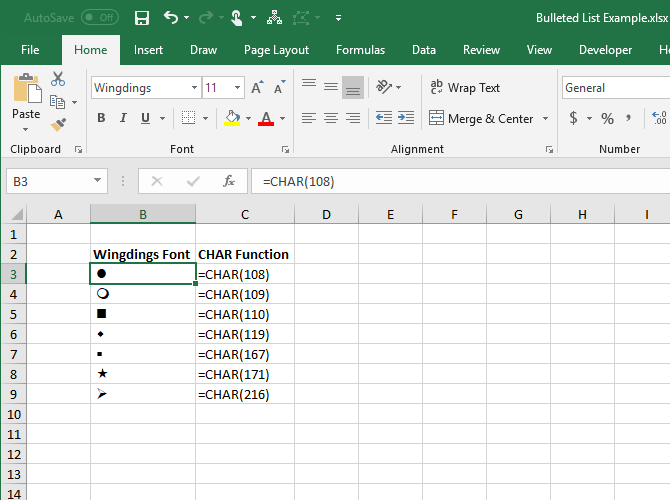
Windows comes with some special fonts that are just symbols, like Wingdings and Webdings. Wingdings has some symbols that make some nice bullets.

To insert a bullet character into cells using a symbols font, first select the cells. Then, in the Font section on the Home tab, change the font to Wingdings.

Select the first cell you want to enter a bullet into and type a lowercase “L” (l) to enter a large solid bullet, a “w” to enter a small solid bullet, or one of the other letters shown in the following image to enter other styles of bullets. Do the same for the other cells you changed to the Wingdings font.

Letters in the Calibre font and the equivalent symbols in the Wingdings font in Excel

To use this method, you must put the bullet characters in their own cells in the column to the left of the items in your list because of the symbol font you’re using on the cells with the bullets. Then, change the width of the column containing the bullets to the width of the bullets.

Create a bulleted list in Excel using the Wingdings font

You can choose from more bullet symbols using the CHAR function with the Wingdings font. The image below shows the CHAR function values for various kinds of bullet characters.

When using the CHAR function with the Wingdings font, you must enter the CHAR function first in a non-symbol font and then change the font of the cell(s) to Wingdings.

Symbols in the Wingdings font using the CHAR function in Exel

That’s all! You can also create other types of lists in Excel to make data entry easier.

Read the full article: 7 Ways to Create a Bulleted List in Excel


Read Full Article
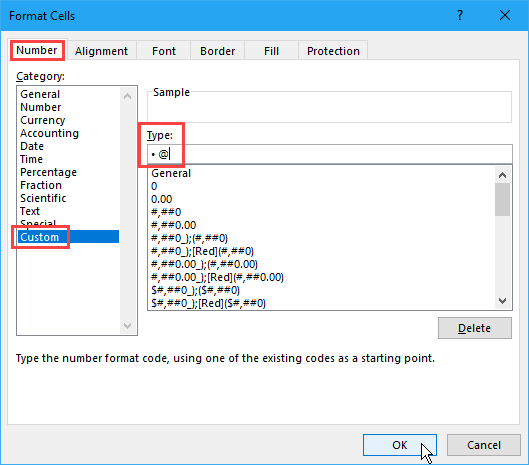
How to Connect an Android Phone to a TV: 7 Methods That Work (Not Just HDMI)

Buying Wireless Headphones? 6 Things You Need to Know

5 Dirt Cheap Desktop Computers for Students

Instagram denies it’s building Regramming. Here’s why it’d be a disaster


Instagram tells me Regramming, or the ability to instantly repost someone else’s feed post to your followers like a retweet, is “not happening”, not being built, and not being tested. And that’s good news for all Instagrammers. The denial comes after it initially issued a “no comment” to The Verge’s Casey Newton, who published that he’d seen screenshots of a native Instagram resharing sent to him by a source.

Regramming would be a fundamental shift in how Instagram works, not necessarily in terms of functionality, but in terms of the accepted norms of what and how to post. You could always screenshot, cite the original creator, and post. But the Instagram has always about sharing your window to the world — what you’ve lived and seen. Regramming would legitimize suddenly assuming someone else’s eyes.

And the result would be that users couldn’t trust that when they follow someone, that’s whose vision would appear in their feed. Instagram would feel a lot more random and unpredictable. And it’d become more like its big brother Facebook whose News Feed has waned in popularity – Susceptible to viral clickbait bullshit, vulnerable to foreign misinformation campaigns, and worst of all, impersonal.
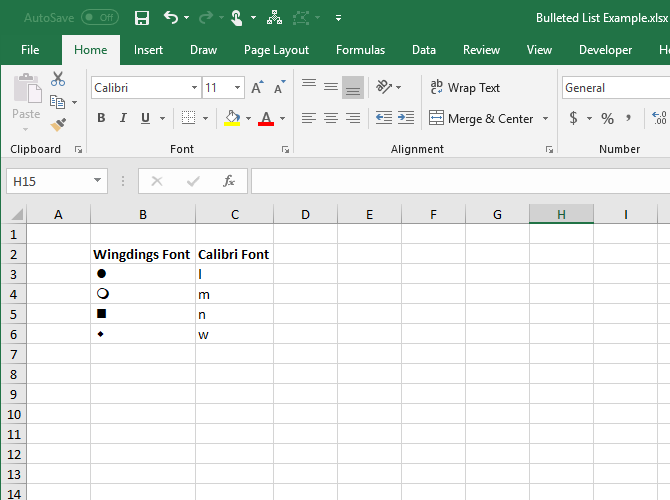
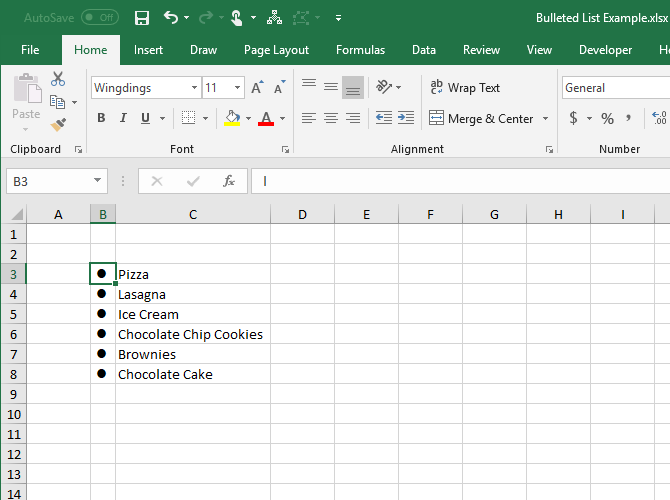
Photographer: Andrew Harrer/Bloomberg via Getty Images

Newton’s report suggested a Instagram reposts would appear under the profile picture of the original sharer, and could regrams could be regrammed once more in turn, showing a stack of both profile thumbnails of who previously shared it. That would at least prevent massive chains of reposts turning posts into all-consuming feed bombs. It could certainly widen what appears in your feed, which some might consider more interesting. It could spur growth by creating a much easier way for users to share in feed, especially if they don’t live a glamorous life themself. And Instagram’s algorithm could hide the least engaging regrams.

These benefits are why Instagram has internally considered building regramming for years. CEO Kevin Systrom told Wired last year “We debate the re-share thing a lot . . . But really that decision is about keeping your feed focused on the people you know rather than the people you know finding other stuff for you to see. And I think that is more of a testament of our focus on authenticity”.

See, right now, Instagram profiles are cohesive. You can easily get a feel for what someone posts and make an educated decision about whether to follow them from a quick glance at their grid. What they share reflects on them, so they’re cautious and deliberate. Everyone is putting on a show for Likes, so maybe it’s not quite ‘authentic’, but at least the content is personal. Regramming would make it impossible to tell what someone would post next, and put your feed at the mercy of their impulses without the requisite accountability. If they regram something lame, ugly, or annoying, it’s the original author who’d be blamed.

Instagram already offers a demand release valve in the form of re-sharing posts to your Story as stickers

Instagram already has a release valve for demand for regramming in the form of the ability to turn people’s public feed posts into Stickers you can paste into your Story. Launched in May, you can add your commentary, complimenting on dunking on the author. There, regrams are ephemeral, and your followers have to pull them out of their Stories tray rather than having them force fed to them via the feed. Effectively, you can reshare others’ content, but not make it a central facet of Instagram or emblem of your identity. And if you want to just make sure a few friends see something awesome you’ve discovered, you can send them people’s feed posts as Direct messages.

Making it much easier to repost to feed instead of sharing something original could turn Instagram into an echo chamber. It’d turn Instagram even more into a popularity contest, with users jockeying for viral distribution and a chance to plug their SoundCloud mixtapes like on Twitter. Personal self-expression would be overshadowed even further by people playing to the peanut gallery. If you want to discover something new and unexpected, there’s a whole Explore page full of it.

Newton is a great reporter, and I suspect the screenshots he saw were real, but I think Instagram should have given him the firm denial right away. My guess is that it wanted to give its standard no comment because if it always outright denies inaccurate rumors and speculation, that means journalists can assume they’re right when it does ‘no comment’.

But once Newton published his report, backlash quickly mounted about how regramming could ruin Instagram. Rather than leaving users worried, confused, and constantly asking when the feature would launch and how it would work, the company decided to issue firm denials after the fact. It became worth diverging from its PR playbook. Maybe it had already chosen to scrap its regramming prototype, maybe the screenshots were just of an early mock-up never meant to be seriously considered, or maybe it hadn’t actually finalized that decision to abort until the public weighed in against the feature yesterday.

In any case, introducing regramming would risk an unforced error. The elemental switch from chronological to the algorithmic feed, while criticized, was critical to Instagram being able to show the best of the massive influx of content. Instagram would eventually break without it. There’s no corresponding urgency fix what ain’t broke when it comes to not allowing regramming.

Instagram is already growing like crazy. It just hit a billion monthly users. Stories now has 400 million daily users and that feature is growing six times faster than Snapchat as a whole. The app is utterly dominant in the photo and short video sharing world. Regramming would be an unnecessary gamble.


Read Full Article