You surely know how important your resume is when you’re searching for a job. Whether you’re just graduating college or making a change in your career, your resume needs to be sharp and concise. Plus, it should look attractive to grab attention.
The problem is, writing your resume takes time and it’s not always easy. If you want to get a great result in no time, you can consider creating a resume with Zety.
What Is Zety?
Zety is an online resume builder that’s slick, easy to use, and most of all, professional. It features lots of smooth templates to help you craft the best resume, expert tips for improving, and even tracking tools to find out if employers are viewing your resume.
Our overhauled guide on how to address a resume will help you get it right, from your professional title to your social media links and everything in between! Check it out and let us know what you think! #careeradvicehttps://t.co/DNYk9qO19G
Best of all, if you’re not sure how to make a resume, the generator will walk you through the process. You can customize the font, spacing, and similar, but don’t have to worry about formatting issues like in Word.
Getting Started
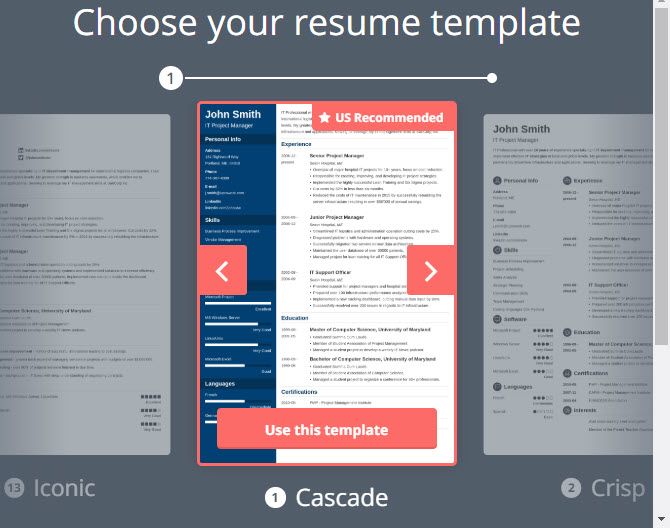
You can start making a polished resume right away. Head to Zety’s homepage and click Create My Resume Now. You’ll then see several templates to choose from. Click Use this template when you’ve found your favorite.
Next, choose a color scheme for the template. You’ll see several options that you can click to preview. Hit Use this color to confirm your choice.
After this, you’ll jump into Zety’s online resume editor.
Building Your Resume in a Resume Builder
Now you can start building your resume. Use the tabs along the top to access the various features.
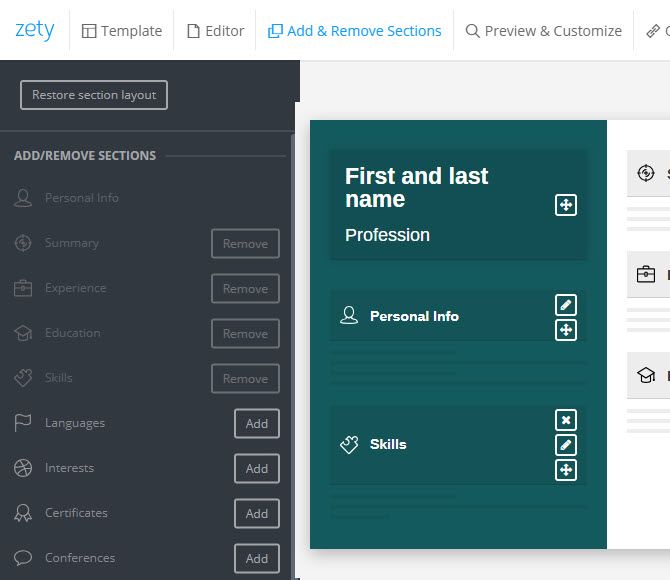
Start with the Add & Remove Sections header. Here, you can easily add and remove types of information to get your resume just right. Use the left sidebar to add more sections, then you can resize, move around, rename, and remove sections on the left.
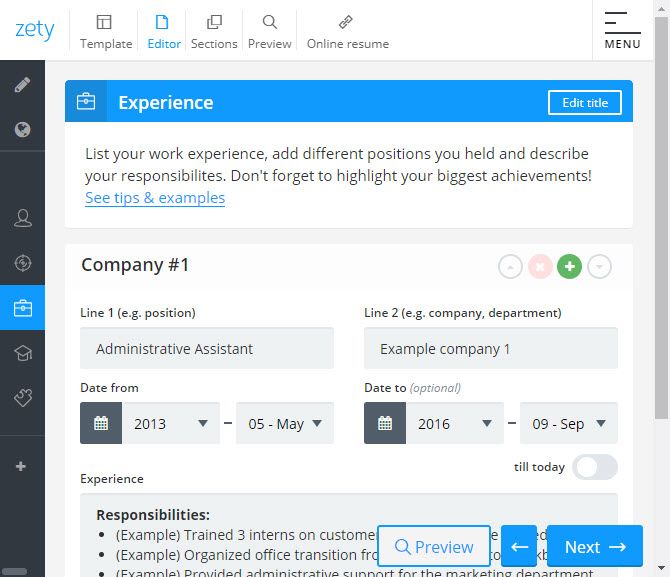
Once you’ve got your sections set up, jump to the Editor tab. Here, you can enter the actual information for your resume. Next, switch between sections on the left, and use the clearly labeled sections to fill in the data as you go.
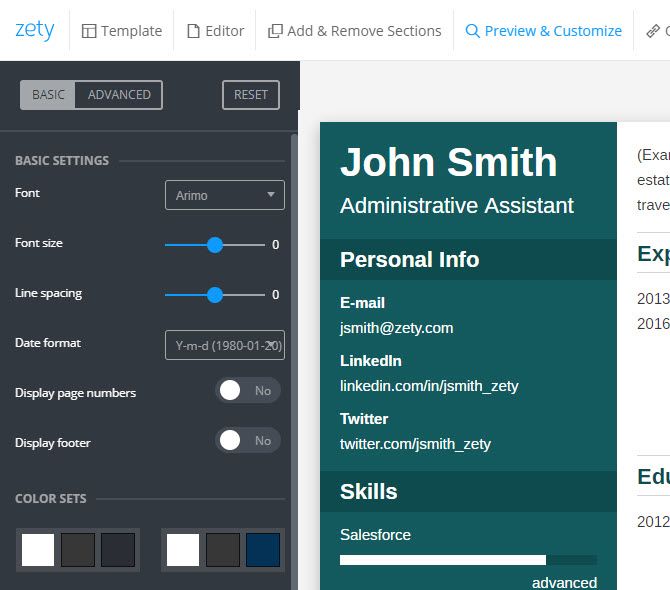
On the Preview & Customize screen, you can see how your finished resume looks. Use the options on the left to change the font and font size, toggle page numbers, change the color, and more. You can open the Advanced section for more options.
Saving, Sharing, and Pricing
To save your resume, you’ll need to sign up for a free account. An account also lets you come back and make changes at any time.
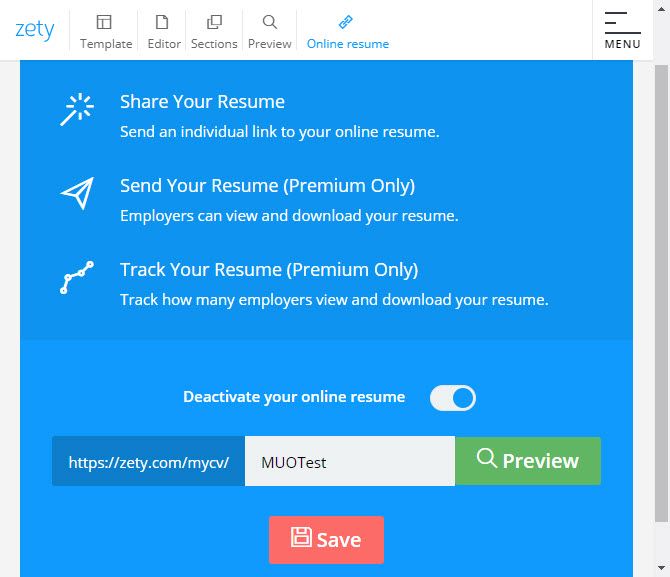
Aside from building your resume, Zety also makes it easy to share. Click the Online resume tab at the top of the editor and you can Activate your online resume. This gives you a unique URL that you can share anywhere to give others access to your resume.
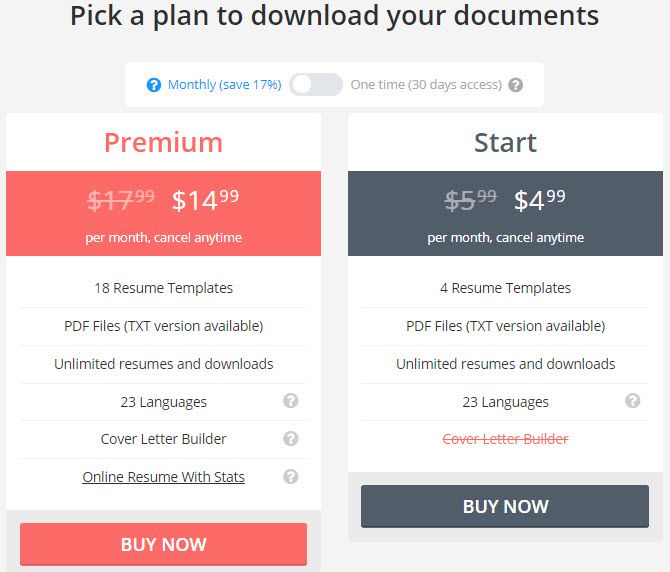
You can create documents for free, but you’ll need to subscribe to a Zety plan to download them and access more features. You can choose between two monthly plans: Start and Premium.
Start gives access to four resume templates, PDF downloads, and unlimited resumes. The Premium plan builds on this with 18 templates, plus a cover letter builder to match your resume. You’ll also get expanded tools for the online resume feature, allowing you to send your resume to employers and track how many of them view it.
If you only need access to the service for a short time, you can buy a 30-day plan for either choice.
Rock Your Resume
Zety is a powerful yet straightforward online resume builder. It lets you create a professional document in a short time, giving you the power to make it look exactly as you like without fiddling in a word processor. Give it a try if you’re struggling to make your resume stand out.
Google will partner with Renault-Nissan-Mitsubishi, the largest auto alliance in the world by vehicle sales, to put Android-based infotainment systems into millions of cars, the companies told Wall Street Journal. The alliance’s next-generation infotainment system and dashboard displays will use Android and launch in 2021.
Drivers will be able to access Google’s maps, app store and voice assistant from their vehicle’s dashboards. The new partnership is a giant step forward for Google’s ambitions to get its operating system into more cars (the alliance sold a combined 5.5 million vehicles in the first half of this year, putting it ahead of Volkswagen and Toyota Motor).
The alliance’s executives told WSJ that they decided on the partnership because many of their customers are accustomed to using Google Maps and other apps and prefer sticking with them instead of using software developed by automakers when they drive.
Auto executives have also become more comfortable with Google, which made its software open source in 2007. Kal Mos, the alliance’s vice president of connected vehicles, told the Wall Street Journal that “the trust was built in the last few years.”
By partnering with Google, Renault-Nissan-Mitsubishi ups the ante on rival automakers to partner with tech companies instead of developing their own software ecosystems. While this may win customers over, it also means potentially ceding control over valuable user data to companies like Google and Apple. Mos told WSJ that Google will have access to data collected from its in-car apps, but must ask for user permission first.
Other automakers that are already integrating Google apps into their vehicles include Volkswagen, which put Google Earth into the Audi’s in-car navigation system, and Volvo Cars, which said its next in-car infotaintment system will run on Android.
Most of the apps we use every day rely on cloud infrastructure. But who looks after those servers? Certified engineers, that’s who. Thanks to the growth of cloud computing, these highly-paid professionals are in demand. The Ultimate MCSE Certification Training Bundle can help you join the talent pool, with four courses working toward the official Windows Server exams. You can grab the training now for $49 at MakeUseOf Deals.
Cloud Management
Many technical careers are only open to people with a relevant college degree. But cloud computing isn’t like that — anyone with the right skills can find a good job.
This bundle can help you start a lucrative new career, even if you have zero experience with code. Through concise video tutorials, you learn how to maintain servers and networks to professional standards.
The courses show you how to configure local storage systems, react to incoming threats, build in redundancies, and manage advanced networks. At the same time, you work toward four different Microsoft Certified Solutions Expert (MCSE) certifications. These awards are highly respected around the world.
The bundle includes 61 hours of content, and you get a certificate of completion at the end of each course. With lifetime access included, you can learn at your own pace and return to the courses at any time.
Your Twitter prayers are answered! Well, maybe not the prayers about harassment or the ones about an edit tweet button, but your other prayers.
Today in a series of tweets, the company announced that it had heard the cries of its various disgruntled users and will bring back a form of the pure chronological timeline that users can opt into. Twitter first took an interest in a more algorithmic timeline three-ish years ago and committed to it in 2016.
4/ So, we’re working on providing you with an easily accessible way to switch between a timeline of Tweets that are most relevant for you and a timeline of the latest Tweets. You’ll see us test this in the coming weeks.
Some users were under the impression that they were living that algo-free life already by toggling off the “Show the best Tweets first” option in the account settings menu. Unfortunately for all of us, unchecking this box didn’t revert Twitter to ye olde pure chronological timeline so much as it removed some of the more prominent algorithmic bits that would otherwise be served to users first thing. Users regularly observed non-chronological timeline behaviors even with the option toggled off.
As Twitter Product Lead Kayvon Beykpour elaborated, “We’re working on making it easier for people to control their Twitter timeline, including providing an easy switch to see the most recent tweets.”
Nostalgic users who want regular old Twitter back can expect to see the feature in testing “in the coming weeks.”
We’re ready to pull the switch, just tell us when.
Spotify has quietly raised the number of songs you can download to listen to offline. While most Spotify users spend their time streaming music, it’s also possible to download songs to listen to offline. And this makes that option a lot more attractive.
You Can Now Download More Spotify
You could previously download a maximum of 3,333 songs per device on up to three devices for a total of 9,999 songs. Now, you can download a maximum of 10,000 songs per device on up to five devices for a total of 50,000 songs.
Wtf Spotify just notified me that I’ve reached the maximum number of offline downloads ? how is this possible, I’m hurt
Rolling Stone seems to have been the first publication to notice the change, which happened with the most recent Spotify update. And it means that users who had already hit the 3,333 songs/device limit can now start downloading music again.
Spotify said: “At Spotify, we’re always working on improving the experience for our users. We can now confirm that we have increased the number of offline tracks per device — from 3,333 on three devices to 10,000 tracks per device for up to five devices.”
Unfortunately, there’s still no sign of Spotify lifting the limit of the number of songs you can have in your library at any one time. That still stands at 10,000, much to people’s annoyance. Luckily, our look at common Spotify problems offers a solution.
Other Streaming Services Are Available
This is a nice gesture from Spotify, as this was one of those arbitrary limits that seemed to exist for no reason. It may also be Spotify acknowledging that its users want to download more music to listen to offline rather than burn through their data.
WHILL, the startup known for creating sleek, high-tech personal mobility devices, announced today that it has closed a $45 million Series C. The funding will be used for expanding into new international markets, as well as developing new products for large venues, including airports and “last-mile” sidewalk transportation. The round’s lead investors were SBI Investment, Daiwa Securities Group and WHIZ Partners, with participation from returning investors INCJ, Eight Road Ventures, MSIVC, Nippon Venture Capital, DG Incubation and Mizuho Capital.
This brings WHILL’s total funding so far to about $80 million. Founded in Tokyo in 2012, WHILL plans to open a branch in the European Union and enter 10 new European countries. It also plans to start working with partners on developing autonomous capabilities for its mobility devices, senior marketing manager Jeff Yoshioka told TechCrunch. The company will build its own sensors and cameras to use in its “mobility as a service” program, which allows users to control vehicles and call customer service through a mobile app.
One of WHILL’s biggest projects is developing an autonomous personal mobility device system for airports. Yoshioka says that an estimated 20 million people request wheelchairs in U.S. airports each year. This means they need to wait for an airline employee to bring a wheelchair to them and then push them from check-in to their gates. At the same time, it doesn’t give users a lot of flexibility.
The system that WHILL has in mind, on the other hand, would allow individuals to use an app to summon a mobility device over to them. Then they can go wherever they want — coffee shops, restrooms, shops — before heading to the gate without an assistant. Once they are done with the device, it will return to a docking station on its own. WHILL has already begun testing a similar program at Tokyo International Airport in partnership with Panasonic.
Yoshioka says WHILL will most likely pursue distribution partnerships with U.S. airlines, which are responsible for supplying and maintaining the wheelchair systems in American airports, and airports to build the necessary infrastructure.
Along with airports, WHILL wants to bring its technology to other large venues, including shopping malls and sports arenas, as well as create a system for last-mile transportation. Yoshioka notes that “there are already a lot of companies out there like LimeBike and MoBike that offer bikes and electric scooters, but there’s nothing out there for people with disabilities who can’t use those devices.”
Instead, many rely on Ubers or public transportation even for short distances. Like the airport system, WHILL’s last-mile sidewalk system will use autonomous electric vehicles that can be called to users with an app. It faces unique challenges, however, because WHILL’s devices are larger and more expensive than bikes or electric scooters, so the company needs to find safe places to dock them that are still accessible to people with limited mobility. Yoshioka says WHILL likely will focus on partnering with commercial properties to create indoor docking stations.
WHILL’s largest market is still Japan, where it has between 4,000 to 5,000 resellers. In its home market, WHILL’s devices are subsidized by the government and also available for rent. In the U.S., however, many customers need to purchase devices out-of-pocket. To make their products more accessible, WHILL launched the less expensive Model Ci (called the Model C in Europe and Japan) earlier this year. While there is still plenty of room for innovation in the wheelchair market, the Model Ci and other WHILL products compete with devices like the iBot, which can climb stairs, and the Trackchair, designed for off-road use. WHILL’s current products can’t climb stairs, but they do have the advantage of being designed for both indoor and outdoor use, giving users more flexibility, says Yoshioka.
“We don’t necessarily see [the other companies] as direct competitors. They definitely do impact sales, because people might want something that climbs stairs instead of having better outdoor capabilities, but I think overall it’s very beneficial for the industry,” Yoshioka adds. “As a company that’s trying to disrupt the industry, it’s nice to have them around because it pushes the industry forward and opens eyes for other manufacturers.”
In software development, a fork is a branching or splitting of code into separate projects. Cryptocurrency forks happen all the time, and there’s generally nothing to worry about.
As all blockchain projects (what is blockchain?) involve software of some kind, that’s what we mean when we talk about forking. By forking a project, you are taking a copy of the code at a specific moment in time, and then building on that code as a separate project.
An example of a fork is Bitcoin and Bitcoin Cash. Bitcoin Cash started from the Bitcoin codebase, but now runs as an independent project. Any changes made to Bitcoin do not transfer across to Bitcoin Cash, and each set of tokens are separate.
Forking doesn’t have to be a bad thing. Many companies fork their own software. This could be to maintain support for two very different operating systems, for example, or to maintain an old or outdated version alongside a more up-to-date version.
Cryptocurrency forks are no different to any other software fork. For example, developer A believes a blockchain project should do X, but developer B believes it should do Y. If X and Y are too far removed from each other, developer A or B may choose to make a fork. Each developer can go and develop their own features without interfering with each other.
Forks may also happen with risky or experimental features.
If the developers get along with each other, or an agreement or compromise occurs, the forked version may merge back into the original code later on, or the original code might be abandoned in favor of the new, forked code.
This all sounds good, but what’s it got to do with cryptocurrency users like you and me? Well, as many cryptocurrency projects are open source, forks can and do happen all the time—sometimes for legitimate reasons (like improved speed or security), sometimes for selfish reasons (like making mining easier on certain hardware).
Hard Forks vs. Soft Forks in Cryptocurrency
A soft fork often involves minor code changes. This could be terminology or changes which don’t alter the way a given blockchain operates. Soft forks are often non-intrusive and can co-exist alongside the unforked version.
With soft forks, miners may choose to switch to the new code. As there are no major changes, any nodes running older software should still be able to accept blocks generated by the new nodes—however, new nodes will reject blocks generated by old nodes. If enough miners switch to the forked version, there won’t be enough nodes on the old code to get any transactions processed. The new nodes would all reject the blocks by the old nodes, forcing them to switch over.
Here’s where it gets problematic: If a soft fork is risky or unpopular, miners may not switch to it. If only a minority of nodes run the new code, it may die out and get replaced in the code.
A hard fork is often much more troublesome. Hard forks usually need the whole network to switch over to the new code. If some nodes were to run the unforked code, the nodes may generate data in different ways and fall out of sync. While it is possible to run hard-forked and unforked nodes on the same blockchain together, it’s rarely done. Each set of nodes would reject each other, and you’d get into a heap of trouble.
So much trouble, in fact, that blockchain developers may insist that every node upgrades to the fork. This is often done at a date in the future after the mining of a specific block. This allows every node time to upgrade.
If a hard fork happens in the code but some developers disagree with the change, things can get messy. The miners themselves may find themselves in the middle of a bitter battle and be forced to pick a side. If things get really bad, a brand new project may arise—based on the original code, with the changes made by the hard fork. The unforked code continues as it always has, and the hard forked code has to start again.
This is called a chain split, and such a divorce of code can often be bad news. The original project may lose supporters, nodes, or financiers to the hard-forked project, but the new project may also need to find a source of revenue or a collection of nodes to run the network. This bitter battle rarely ends well for either party.
When a chain split happens, the developers may choose to keep a copy of the records alongside the code, meaning anyone who has tokens on the original network will also have tokens on the new network. Free cryptocurrency may sound awesome, but there are some potential hazards that can severely impact such a project.
Without careful fork management, network users may be able to double spend coins. If a transaction happens before the fork but does not get recorded until after the fork, you may have tokens on the new network which were not present on the old network. For this reason, most hot wallets, exchanges, and nodes will stop processing transactions for a small maintenance window before and after the designated forking time.
If you’re using your own secure cryptocurrency wallet, you may need to migrate your coins depending on the fork.
Cryptocurrency Forks: Wrapped Up
One of the core values behind public, open-source cryptocurrency projects is security. Forking often increases security, but hard forks can be problematic.
If you’re a cryptocurrency user, you often won’t have anything to worry about. If you’re a miner running your own nodes, then you’ll need to keep track of the project’s development status and current community consensus.
What are your experiences with forking? Maybe you’ve been running a node when a fork happens, or perhaps you’re the person on the development team making the fork. Let us know in the comments section below!
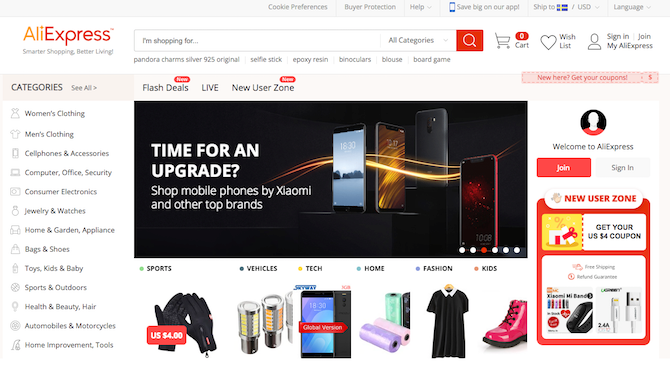
AliExpress is the international arm of the Chinese retailing giant AliBaba, aiming to challenge online giants like Amazon and eBay.
But is it safe to shop there? How long will items take to arrive, and what happens if they don’t? Is AliExpress legit? And are you more likely to be the victim of fraud if you shop there? Here are the answers you need.
What Is AliExpress?
If you’re not familiar with AliExpress, here’s a quick primer: it’s a huge online retailer owned by The Alibaba Group, a multi-billion dollar corporation that started as a business-to-business buying and selling portal. It has since expanded to business-to-consumer, consumer-to-consumer, cloud computing, and payment services, as well.
To give you an idea of just how big Alibaba is, they reported over $25 billion in sales on Singles’ Day (November 11) 2017.
AliExpress is Alibaba’s online consumer marketplace for international buyers (while TaoBao is for China). It allows small businesses in China to sell to customers all over the world. Just like Amazon, you can find just about anything there. Unlike Amazon, all of the sellers on AliExpress are a third party: AliExpress itself does not sell anything. They just provide the marketplace.
Why Is AliExpress So Cheap?
If you browse some of the products on AliExpress, you’ll probably notice right away that many of the prices are really low. Why is this? There are two different distinct possibilities, both of which you’ll find in abundance on the site.
First, there’s the possibility that you’re buying directly from a manufacturer, which reduces the cost of selling to you. Costs for production in China are quite a bit lower than in other countries. The lax enforcement of intellectual property laws may also contribute. A lot of electronics (like this 4WD Arduino robot we built) have fantastic prices on AliExpress, because they’re made in China and you can buy them direct, avoiding the retail markup added by a middle-man.
The second possibility for an item being extremely cheap is that its either counterfeit, or fraudulent (or semi-fraudulent, as in the case of the GooPhone I5). China is known as a hotbed of counterfeit production, and AliExpress is no exception. You can get all sorts of counterfeit items there, from electronics to clothing. Some sellers have also been known to defraud buyers by tricking them into paying before they receive an item and then disappearing with the money.
Of course, being able to tell the difference is crucial.
How Long Does AliExpress Take to Deliver?
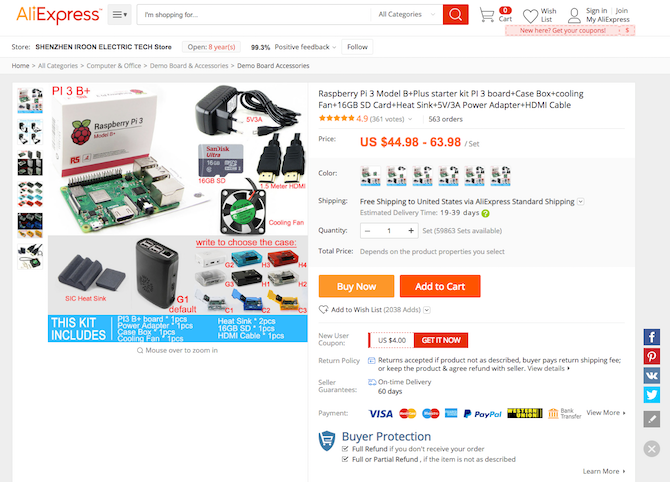
All items on AliExpress have an estimated delivery time on the product page, and it’s usually anywhere from 20 to 60 days. Yes, two months is an awfully long time to wait for something you’ve bought online! In my experience, about two weeks is the average time it takes most items to arrive, but you certainly need patience to buy direct from China.
Be aware that this will be even slower at certain times of the year, like Chinese New Year (around the start of February), and Single’s Day (11/11). I once made the mistake of buying some Christmas presents during the Single’s Day sale: a few of them didn’t arrive until the middle of January.
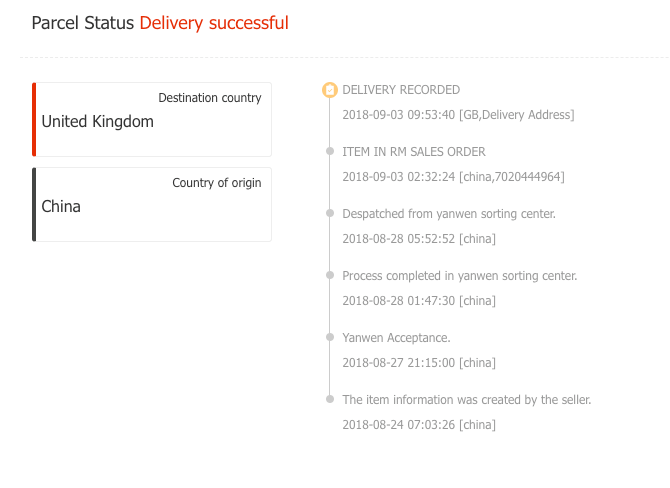
Nearly all shipments (even those with free shipping) will have a tracking number once shipped, but it may take a week to actually dispatch before a tracking number is added. After that, you should be able to follow the package as it floats around various Chinese postal centers, and after a long wait, arrives in your local country’s customs clearance office.
If you don’t have a tracking number after 10 days, you should reach out to the seller. You won’t be able to open an official non-delivery dispute until the maximum delivery time has been exceeded though.
In six years and thousands of dollars worth of shopping on AliExpress, I’ve only had to open two cases for non-delivery. One could be tracked to my local customs office, but had been sitting there for a month. The seller offered to send it again, and sure enough, I actually received both packages about a month later. Another was never dispatched, and there was no tracking number. AliExpress issued a full refund.
The Hidden Cost of AliExpress: Import Taxes
If you’re new to having an item shipped to your country from abroad, you may not have a clear idea of the import taxes involved; or that sellers will often attempt to bypass those taxes on your behalf.
Nearly all countries have an import tax: a percentage value of the cost of the goods being imported that must be paid to your government when bringing something into the country. In the EU, this is a 20% VAT that’s levied on nearly everything. It’s your legal responsibility to pay this, and the shipping company will pay on your behalf, then issue you the bill. They’ll also charge you a handling fee for the privilege; that’s another flat rate $10-15. Of course, this means that a $10 bargain gadget may not be such a bargain once the $2 tax and $10 handling fee is added on.
How to print cash courtesy of HMRC and Royal Mail. (1) Buy charity tee-shirt, cost £15.47. (2) Charge customs duty of £11.07 on it. Thieves!
Many people are shocked to find these hidden charges, and end up leaving a bad review for the seller. As a consequence, you’ll find most sellers will automatically mark any packages as a low value “gift”, bypassing import duties. To be clear: this is illegal. You should pay your taxes. But unless you’re trying to pull off a large scale fraud, it’s not the sort of illegal which will actually land you in trouble.
Note that if you were trying to deliberately import something without paying the duty, you would need to do so using the slow, free shipping method. Express couriers like DHL have stricter rules and won’t carry packages marked as a gift. If something can only be shipped by express, factor in at least another 20% of the cost to pay on arrival before your package can be released.
What About AliExpress’s Quality of Goods?
In most cases, the goods you buy will be the same as those in the high street. However, sometimes you may find yourself unhappy with the product. For instance, perhaps the thickness of material for that dress is not as you expected. In that case, you should be realistic when contacting the sellers.
Unless there’s something specific in the listing that you can point to as being incorrect, simply not liking the goods you bought is not a good reason to demand a refund. So what can you do if you’re not happy?
Chalk it up to experience, and don’t buy from that seller again. If the item was actually delivered, and the product description and photo are accurate, AliExpress themselves won’t assist.
You might be able to negotiate a partial refund. If your first instinct was to review the product as 1-star, this is almost certainly no longer an option. Ratings are important, and may be your only bargaining tool.
You might be tempted to return the goods, but be very careful with this. Shipping something back to China may cost more than you paid for the item in the first place, and that cost won’t be refunded. Tracking items sent back into China is unreliable at best, and sometimes they can just disappear entirely at the Chinese customs office.
Be realistic about the price you’re paying. Check out some YouTube videos for an idea of the kind of quality to expect (apparently, “AliExpress haul videos” is a thing now).
The Real Danger of AliExpress: Fraudsters
AliExpress and Alipay are solid systems when it comes to security. They’re not invincible, but nothing is—and their track record is a good one, so you can be confident that you’re no more likely to have any of your information stolen via one of these services than you are using a more familiar service like Amazon or eBay (remember, even eBay has had a massive data leak).
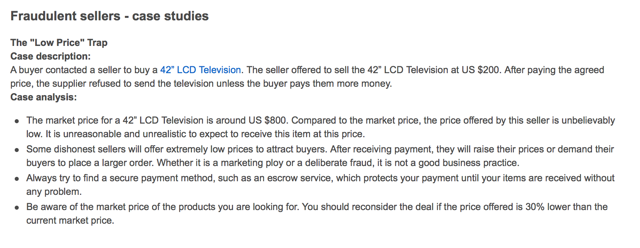
However, there is one gaping hole in AliExpress: the merchant approval process. I can’t say what sort of process there is, as only merchants from mainland China are allowed to sell on the site, but there have been a lot of reports of scams on the site. So many, in fact, that the AliExpress Security Center has a section of fraud case studies and tips on how to avoid fraud when buying from their site.
So how do you stay safe from fraudsters and scammers when shopping on AliExpress? The same way you do everywhere else. Here are four tips—if you follow them, you should have no problems.
1. If the Price Sounds Too Good to Be True, It Probably Is
Scammers reel you in with the promise of a once-in-a-lifetime deal (this is one of the strategies used in the recent spate of eBay fraud). Check other sites to see what the going rate is for whatever you want to buy, to make sure that the price on AliExpress isn’t far too low. If it is extremely low, you’re probably buying a counterfeit product or being set up for a scam. For non-branded goods, savings of up to 75% compared to a high street retail store are not unusual.
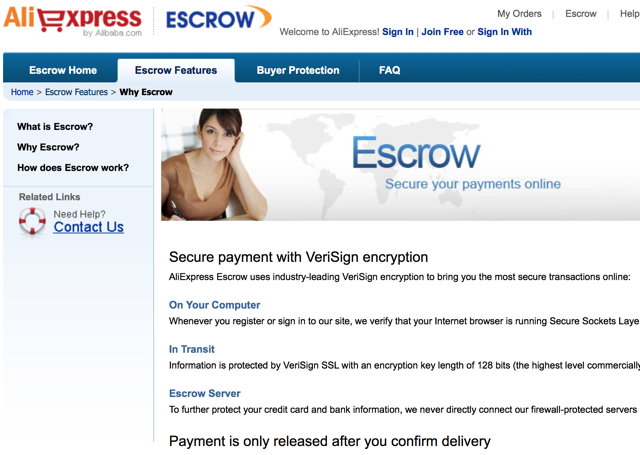
2. Use AliPay’s Escrow Service
Escrow protects you in a number of ways. First, your credit card details aren’t given to the seller, so you don’t have to worry about them stealing your identity, or going on a shopping spree with your card. Second, the payment isn’t released to the seller until you’ve confirmed that you’ve received your purchase. So if you get scammed, you can just get an easy refund from AliExpress, and not have to go through the long, painful, and probably hopeless refund process with the seller.
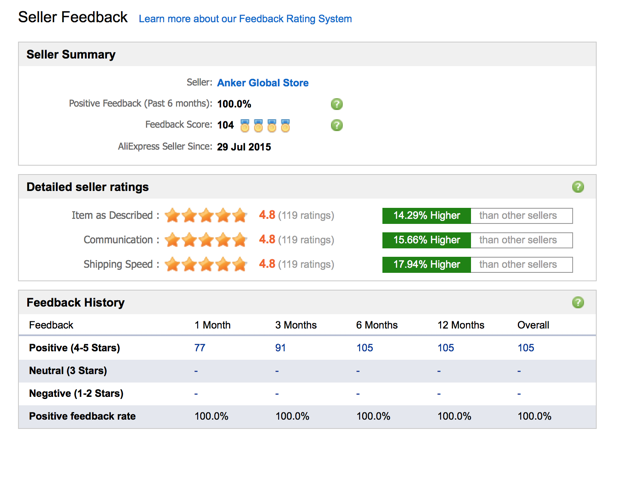
3. Check the Seller’s Feedback Before Buying
If a seller has a bad reputation for defrauding buyers, there will likely be evidence in their feedback and reviews. Be wary of sellers with any mentions of not delivering or sending sub-par goods. In the time I’ve spent on AliExpress, I’ve seen mostly positive reviews, and I’ve never had a problem getting what I’ve ordered. But it’s still important to be on the lookout.
4. Check Your Order Carefully When You Receive It
Because the escrow system allows you to withhold payment until you’ve received your order, you can confirm that you got what you paid for. Make sure everything is included, that it looks like what you ordered, and that, if you bought a brand-name item, it doesn’t look like a fake. Once you’ve marked an item as received, you have 15 days in which you can still open a dispute about the goods.
5. Never Buy Branded Goods on AliExpress
Branded goods are offered special protection in most countries. If you purchase fake goods, and your package is inspected, they will be seized. If you bought a lot of those goods and it looks like you might be trying to sell them on, expect a knock at the door from customs officials.
6. Be Careful With Storage and Memory Components
It’s a common scam even if you’re buying from a Shenzhen market stall, but even easier to pull off online. You buy a memory stick that reports itself to be 64Gb when put into Windows Explorer, but it’s actually a lot less. The firmware has been hacked, but you won’t know until you actually try to use the whole drive. The scammer is long gone with your money.
If you’re willing to risk it anyway, be sure to test the drive with a tool like h2TestW as soon as you receive it.
So, Is AliExpress Safe to Shop On?
The evidence suggests that shopping on AliExpress is indeed safe. However, be careful and be realistic. This is the same for any other online marketplace. Some, like Amazon, offer you more protections than others, but if you’re willing to pay attention to what you’re doing to save a lot of money, AliExpress is a fantastic option.
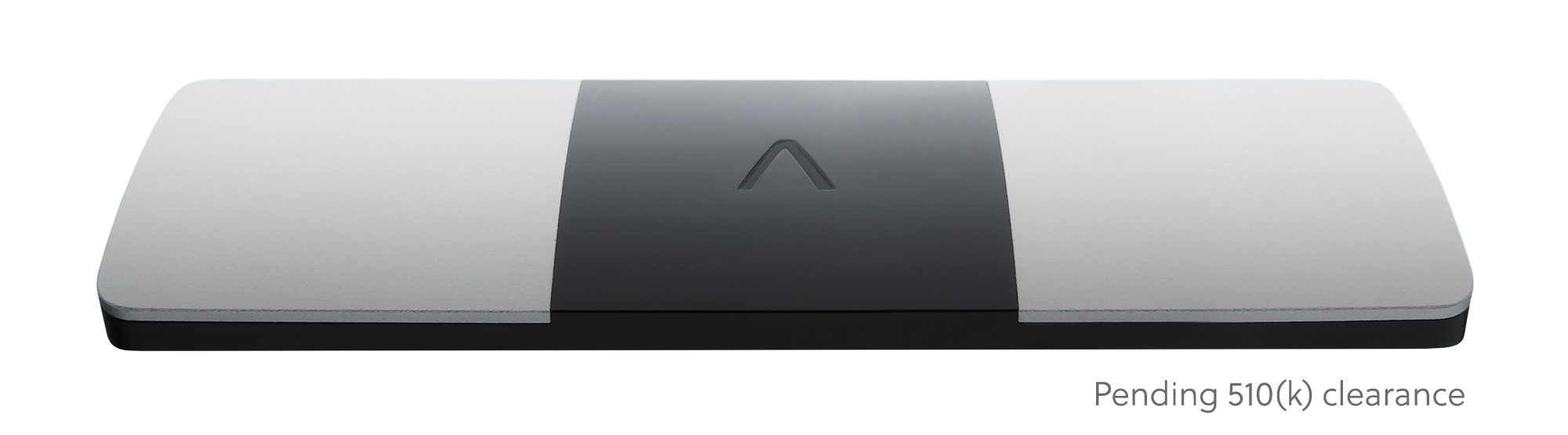
Apple’sannouncement last week of a Watch with an FDA-approved ECG reader to track heart health looked to be the undoing of original ECG reader company AliveCor. But, to prove it still has a hearty pulse, AliveCor tells TechCrunch it is coming out with a “never-before-seen” 6-lead electrocardiogram (ECG), pending FDA approval.
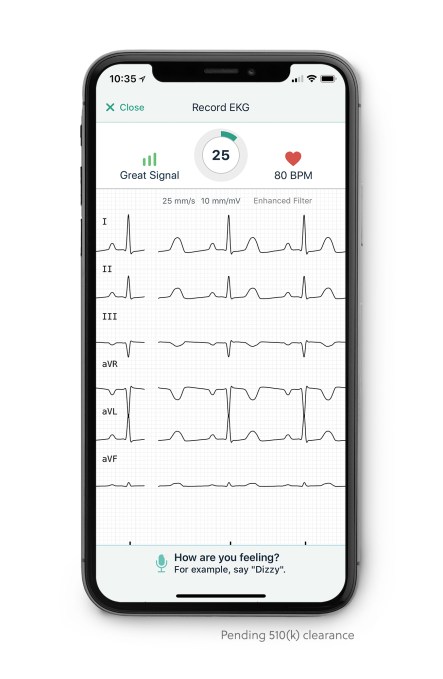
In a care clinic, a patient typically has 12 leads, or stickers placed across their chest to pick up data from their heart. However, other ECG readers typically have one or two leads. The Apple Watch places a single lead system on the wrist. The 6-lead ECG reader is, in theory, more accurate because there are more sensors picking up more information, which could be critical in saving lives.
AliveCor’s and the Apple Watch’s current function is to pick up AFib — or the detection of an irregular heart beat. AliveCor announced earlier this month it had received FDA-approval to use its ECG readers to detect a rare but dangerous blood condition called hyperkalemia.
With 6-lead ECG readers, the AliveCor device could also pick up about 100 different diseases, according to CEO Vic Gundotra, who rattled off a bunch of long-worded maladies I can’t even begin to pronounce but he’s hoping his reader will soon be able to detect.
However, one important detection would be ST elevation — one of the key factors associated with the onset of a heart attack and which could get a person on their way to the hospital before they start displaying other physical symptoms.
Of course, Apple — which already holds 17 percent of the wearables market — could easily decide it, too, needs to add a 6-lead ECG reader to the Watch and beat AliveCor’s market yet again. But Gundotra shrugs at that suggestion.
“They could but we have some pretty good patents in the space,” he told TechCrunch, adding “Apple has done me a great service, actually. We’re a small company but you are talking to me, calling about this [because of their announcement].”
No formal name has been announced yet for the 6-lead product, but AliveCor will be working with the FDA on the regulatory pathway for it and hopes to bring it to over-the-counter consumers by 2019.
If you’ve been using Spotify’s free plan to stream music, you know it carries a sleek interface, tons of music, great discovery features, and more.
You’ve probably wondered whether paying for Spotify Premium is worth a monthly subscription, or if you’re better off sticking to the free plan to save money. Let’s look at what each tier offers, and decide if Spotify Premium is worth the extra investment.
Spotify Free Benefits
Spotify Free is your ticket to Spotify’s massive collection of music without paying a dime. All you need is a Spotify account (you can log in with Facebook).
You can access it using the Spotify apps for Windows, Mac, and your iPhone or Android device, along with the Spotify web app available across all platforms.
On desktop, you won’t feel too limited by Spotify Free. Free lets you choose any artist, album, playlist, or song that you’d like to listen to. Aside from ads every few songs, Spotify doesn’t lock anything out of its free tier. If you’re into social features, you’ll have full access to song sharing and checking out what your friends are listening to.
On mobile, it gets a bit more restrictive. Using an iPhone or Android device, you’ll still have access to the Spotify catalog, but you’re forced to listen to everything in Shuffle mode. That means you can’t listen to an album straight through. However, some select Spotify playlists let you choose songs on-demand.
However, if you’re on an iPad or Android tablet, you’ll enjoy the same on-demand access to music as on desktop. Of course, it still has ads, but you’ll be able to listen to any playlist or album without shuffling.
Using Spotify Free, you must be online to listen to music. This means no listening in airplane mode to save data, though Spotify Free does have a Data Saver mode.
Spotify Free has a few other small restrictions on mobile. You can’t follow friends, access Spotify Radio, add local files, or watch videos. You’re also limited to six skips per hour when shuffling.
Spotify Premium Benefits
Upgrading to Spotify Premium is where Spotify really shines. Premium is the only paid tier that Spotify offers; it dropped the old Unlimited plan years ago. With Premium, you don’t see any ads (audio or visual) at all.
Spotify has ads about how great their service is without ads.
Aside from removing the ads, Premium also unlocks full access on your mobile devices. You can listen to any song anytime on your phone the same way that you listen on your desktop. Since you’re not limited to shuffling anymore, you can skip tracks, access Radio, and see everything the app has to offer.
You’ll also enjoy the high-quality streaming that Premium offers. By default, the player runs at 160kbps on desktop; Premium allows you to up this to 320kbps, which is about the best compression rate you’ll actually notice.
For mobile, Low quality is 24kbps, Normal quality is 96kbps, High quality is 160kbps, and Extreme quality is 320kbps. Free users can select Normal or High, but only Premium lets you select Extreme on mobile. You can adjust the settings for streaming and saving offline independently.
Speaking of which, Premium’s other huge benefit is offline listening. This allows you to save up to 3,333 songs each on three different devices. You can save any album or playlist for offline listening. The caveat is that you must go online once every 30 days to keep your offline music valid. This is just a check so that Spotify knows you’re still a Premium member.
Finally, Premium allows you to use Spotify Connect, which controls Spotify music across multiple devices. With Connect, you can control what’s playing on your laptop using your smartphone, or pair Spotify with dedicated hardware, such as speakers or your PS4. This is a great feature for controlling the tunes at a party and makes for seamless transitions between listening on your phone and computer.
The standard price for Spotify Premium is $10/month. While there’s no legitimate way to get Spotify Premium for free, you can get discounts in a few ways.
Spotify’s Family Plan
The most discounted Premium option is the Spotify Family plan. This shareable account lets you add up to six people for a grand total of $15/month. This means that the more people you add, the less the cost per person. Everyone maintains their own account, so there are no usage conflicts or having someone mess with your playlists.
Spotify states that everyone on a Family Plan must live at the same address. While it only uses the honor system to verify this, some have reported Spotify asking for proof of residence from those on a family plan. It’s up to you whether you’re OK with violating the rules to join up with a few buddies.
I'm such a clutch friend. I bought the Spotify family pack just so my friends could have premium
If you’re a student (at an eligible university, with proof), you can get Premium for just $5/month using Spotify Student. Spotify sweetens this deal by including subscriptions to Hulu and Showtime as well. Since Hulu’s Limited Commercials plan normally costs $8/month and Showtime is $11/month, you’re getting quite the deal.
If you like the idea of this bundle but aren’t a student, check out the Spotify Premium plus Hulu plan. For $13/month, you get access to Spotify Premium and Hulu Limited Commercials, which saves you $5/month compared to buying them separately.
Spotify Premium Trials and Promotions
If you want to try before you buy, there’s a 30-day free trial of Premium that you can check out anytime. Doing so requires entering payment information, and Spotify will automatically renew the subscription after your month is up. Head into your account settings to shut that off so you aren’t charged if you decide Spotify isn’t for you.
Keep an eye out for Spotify promotions, too. The company often offers three months of Premium for just $1, but these only apply for users who have never tried Premium before. Sometimes, other companies offer discounts on Spotify Premium. For instance, Sony offers 10% off Premium if you’re a PlayStation Plus member.
How to Upgrade to Spotify Premium
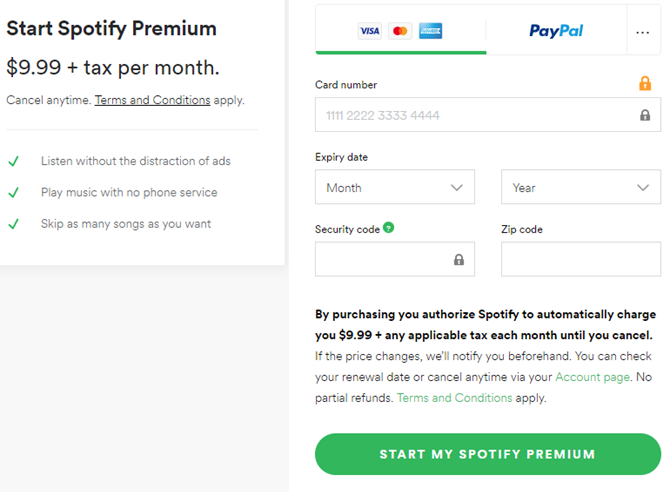
When you’re ready to make the jump to Premium, just head to the Spotify Premium page. Click Get Spotify Premium and you’ll need to sign into your account if you’re not already. Proceed through the payment with your credit card or PayPal, and you’ll become a Premium member.
You’ll then have access to Premium on all the devices you use your Spotify account on.
It’s important to note that if you’re an iPhone user, do not subscribe to Premium through the Spotify app on iOS. Apple takes a cut of every in-app purchase from the App Store, so if you sign up on your iPhone Spotify Premium is $13/month instead of the usual $10/month. Avoid this ridiculous charge and use Spotify’s website to upgrade if you choose to do so.
Is Spotify Premium Worth It?
If you use Spotify with any frequency during the month, Spotify Premium is a great investment. For the price of one digital album per month, you get high-quality music, the ability to save music to your phone (which could pay for itself in data charges), and no ads to interrupt.
With a Family Plan, it becomes an even more attractive deal. Even with just two or three people, paying $7.50/month or $5/month is an awesome deal for unlimited music streaming.
I'm mad at myself for waiting this long to sign up for Spotify premium. So worth it. @Spotify
It’s not odd at all to get your music almost exclusively from Spotify. It saves space on your computer because you don’t have to amass a huge collection of MP3s. You can check out a new artist and decide you don’t like it without wasting $10, plus it’s easy to share music with friends and access your collection across multiple devices.
There are only two scenarios in which Spotify Premium isn’t worth the cost: you already subscribe to another music streaming service, or you only use Spotify a little bit each month. If you already have a massive music collection and only use Spotify to check out a new artist here and there, you might not care about the ads or mobile access. In that case, Premium wouldn’t be worth the cost.
Spotify Premium Is a Great Deal
Stop spending $10 on every album you buy and get access to millions of songs that you can listen to anytime, anywhere, and as much as you want. Spotify Premium is the ultimate app for anyone who likes music, and is one premium app that’s worth paying for.
Daily Burn, the online fitness brand owned by IAC, launched a new iPhone app today devoted to the popular workout style known as HIIT (high-intensity interval training).
Daily Burn already offers a general training app, but the company says it’s planning a whole series of vertical workout apps, starting HIIT Workouts. The is “bringing personalized workout training to every member tailored to their interests.”
If you’re wondering exactly what HIIT is, the individual exercises may be familiar, but as a DailyBurn article puts it, it’s all combined into “quick, intense bursts of exercise, followed by short, sometimes active, recovery periods.”
There’s no shortage of HIIT workout apps, or HIIT workouts in broader fitness apps (for example, I’ve tried out several through my Fitbit Coach subscription). But Daily Burn points to the combination of guided video workouts (so you’re less likely to mess things up) with a specific focus on HIIT. Plus, the workouts are tailored to your goals and endurance levels.
“We spent months researching how people interact with their phones, and combined it with Daily Burn’s world-class fitness and streaming expertise to create a best in class HIIT app that is effective and fun,” said Daily Burn CEO Tricia Han in the announcement. “With personalized workouts led by expert trainers and optimized for mobile, members have access to top instructors, progress reports and a supportive community in the palm of their hand.”
Instagram is embracing its true identity as a mail-order catalog. The question will be how much power merchants will give Instagram after seeing what its parent Facebook did to news outlets that relied on it. In a move that could pit it against Pinterest and Wish, Instagram is launching Shopping features across its app to let people discover and consider possible purchases before clicking through to check out on the merchant’s website.
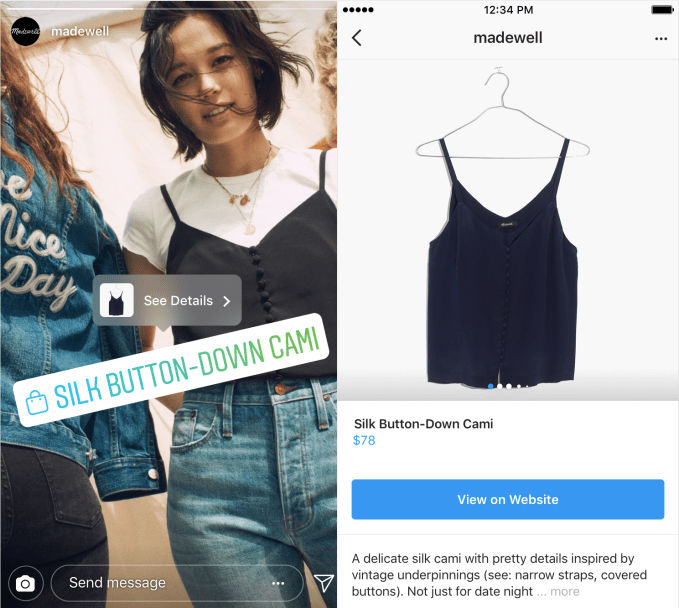
Today, Instagram Explore is getting a personalized Shopping channel of items it thinks you’ll want most. And it’s expanding its Shopping tags for Instagram Stories to all viewers worldwide after a limited test in June, and it’s allowing brands in 46 countries to add the shopping bag icon to Stories that users can click through to buy what they saw.
Instagram clearly wants to graduate from where people get ideas for things to purchase to being a measurable gateway to their spending. 90 million people already tap its Shopping tags each month, it announced today. The new features could soak up more user attention and lead them to see more ads. But perhaps more importantly, demonstrating that Instagram can boost retail business’ sales for free through Stories and Explore could whet their appetite to buy Instagram ads to amplify their reach and juice the conversion channel. With 25 million businesses on Instagram but only 2 million advertisers, the app has room to massively increase its revenue.
For now Instagram is maintaining its “no comment” regarding whether it’s working on a standalone Instagram Shopping app as per a report from The Verge last month. Instagram first launched its Shopping tags for feeds in 2016. It still points users out to merchant sites for the final payment step, though, in part because retailers want to control their relationships with customers. But long-term, allowing businesses to opt in to offering in-Instagram checkout could shorten the funnel and get more users actually buying.
Shopping joins the For You, Art, Beauty, Sports, Fashion and other topic channels that launched in Explore in June. The Explore algorithm will show you shopping-tagged posts from businesses you follow and ones you might like based on who you follow and what shopping content engages you. This marks the first time you can view a dedicated shopping space inside of Instagram, and it could become a bottomless well of browsing for those in need of some retail therapy.
With Shopping Stickers, brands can choose to add one per story and customize the color to match their photo or video. A tap opens the product details page, and another sends them to the merchant’s site. Businesses will be able to see the number of taps on their Shopping sticker, and how many people tapped through to their website. Partnerships with Shopify (500,000+ merchants) and BigCommerce (60,000+ merchants) will make it easy for retailers of all sizes to use Instagram’s Shopping Stickers.
What about bringing Shopping to IGTV? A company spokesperson tells me, “IGTV and live video present interesting opportunities for brands to connect more closely with their customers, but we have no plans to bring shopping tools to those surfaces right now.”
For now, the new shopping features feel like a gift to merchants hoping to boost sales. But so did the surge of referral traffic Facebook sent to news publishers a few years ago. Those outlets soon grew dependent on Facebook, changed their news room staffing and content strategies to chase this traffic, and now find themselves in dire straights after Facebook cut off the traffic fire hose as it refocuses on friends and family content.
Retail merchants shouldn’t take the same bait. Instagram Shopping might be a nice bonus, but just how much it prioritizes the feature and spotlights the Explore channel are entirely under its control. Merchants should still work to develop an unmediated relationship directly with their customers, encouraging them to bookmark their sites or sign up for newsletters. Instagram’s favor could disappear with a change to its algorithm, and retailers must always be ready to stand on their own two feet.
Instagram is embracing its true identity as a mail-order catalog. The question will be how much power merchants will give Instagram after seeing what its parent Facebook did to news outlets that relied on it. In a move that could pit it against Pinterest and Wish, Instagram is launching Shopping features across its app to let people discover and consider possible purchases before clicking through to check out on the merchant’s website.
Today, Instagram Explore is getting a personalized Shopping channel of items it thinks you’ll want most. And it’s expanding its Shopping tags for Instagram Stories to all viewers worldwide after a limited test in June, and it’s allowing brands in 46 countries to add the shopping bag icon to Stories that users can click through to buy what they saw.
Instagram clearly wants to graduate from where people get ideas for things to purchase to being a measurable gateway to their spending. The new features could soak up more user attention and lead them to see more ads. But perhaps more importantly, demonstrating that Instagram can earn retail businesses revenue for free through Stories and Explore could whet their appetite to buy Instagram ads to amplify their reach and juice the conversion channel.
For now Instagram is maintaining its “no comment” regarding whether it’s working on a standalone Instagram Shopping app as per a report from The Verge last month. Instagram first launched its Shopping tags for feeds in 2016. It still points users out to merchant sites for the final payment step, though, in part because retailers want to control their relationships with customers. But long-term, allowing businesses to opt in to offering in-Instagram checkout could shorten the funnel and get more users actually buying.
Shopping joins the For You, Art, Beauty, Sports, Fashion and other topic channels that launched in Explore in June. The Explore algorithm will show you shopping-tagged posts from businesses you follow and ones you might like based on who you follow and what shopping content engages you. This marks the first time you can view a dedicated shopping space inside of Instagram, and it could become a bottomless well of browsing for those in need of some retail therapy.
With Shopping Stickers, brands can choose to add one per story and customize the color to match their photo or video. A tap opens the product details page, and another sends them to the merchant’s site. Businesses will be able to see the number of taps on their Shopping sticker, and how many people tapped through to their website. Partnerships with Shopify (500,000+ merchants) and BigCommerce (60,000+ merchants) will make it easy for retailers of all sizes to use Instagram’s Shopping Stickers.
What about bringing Shopping to IGTV? A company spokesperson tells me, “IGTV and live video present interesting opportunities for brands to connect more closely with their customers, but we have no plans to bring shopping tools to those surfaces right now.”
For now, the new shopping features feel like a gift to merchants hoping to boost sales. But so did the surge of referral traffic Facebook sent to news publishers a few years ago. Those outlets soon grew dependent on Facebook, changed their news room staffing and content strategies to chase this traffic, and now find themselves in dire straights after Facebook cut off the traffic fire hose as it refocuses on friends and family content.
Retail merchants shouldn’t take the same bait. Instagram Shopping might be a nice bonus, but just how much it prioritizes the feature and spotlights the Explore channel are entirely under its control. Merchants should still work to develop an unmediated relationship directly with their customers, encouraging them to bookmark their sites or sign up for newsletters. Instagram’s favor could disappear with a change to its algorithm, and retailers must always be ready to stand on their own two feet.
Starting out in crypto can feel daunting, but purchasing your first Bitcoin (or any other altcoin) is much easier than you think.
For most first-time buyers, Coinbase is pretty much the cryptocurrency exchange of choice to use because Coinbase is secure, easy to navigate, and packed with decent features that’ll make things easier. Here’s our guide to purchasing your first cryptocurrency using Coinbase.
What Is Coinbase?
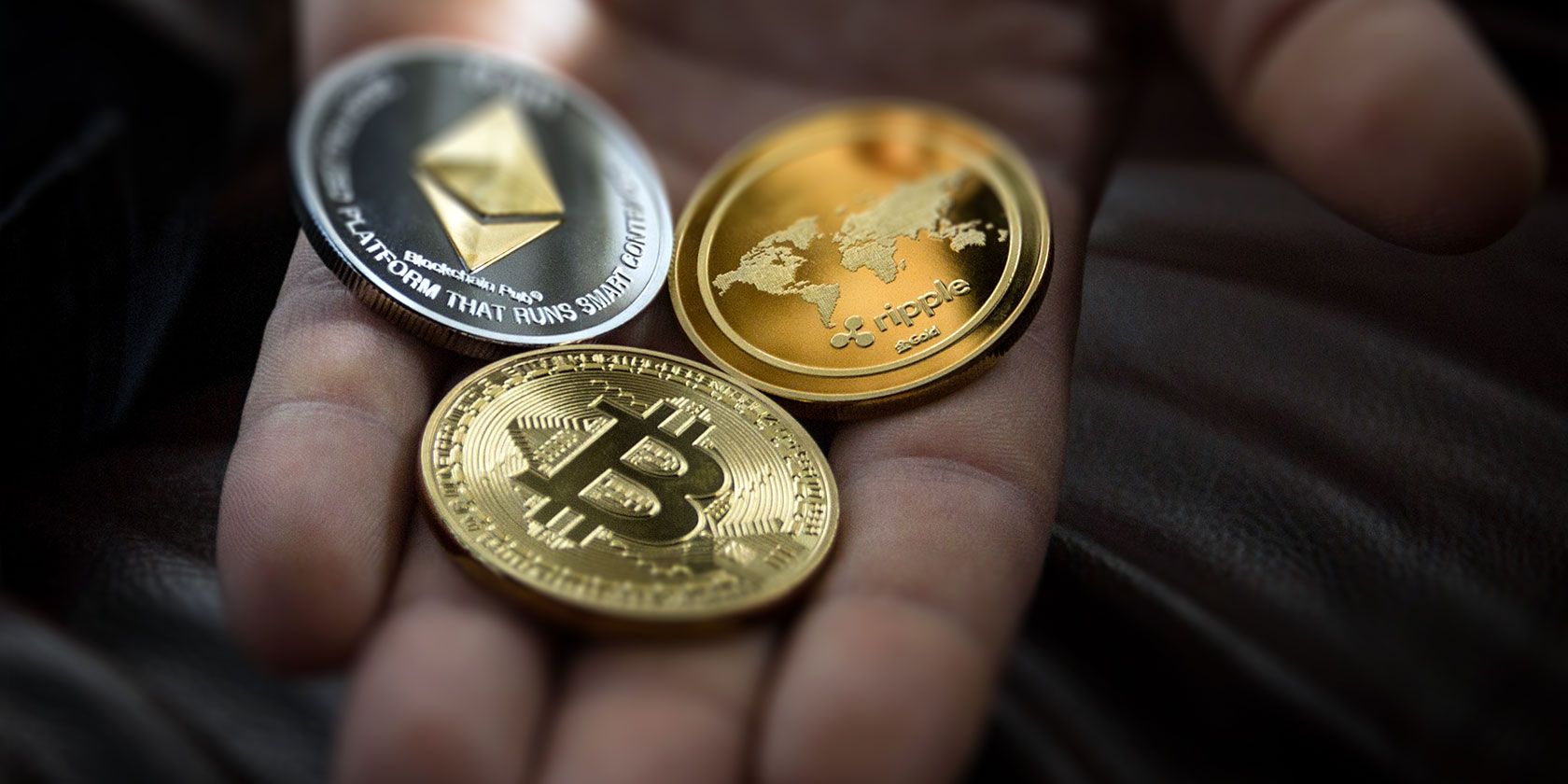
Coinbase is a cryptocurrency broker. Coinbase trades several cryptocurrencies in exchange for regular fiat currency:
Bitcoin
Bitcoin Cash
Ethereum
Ethereum Classic
Litecoin
Coinbase is definitely one of the easiest cryptocurrency brokers to use. It is also one of the most popular crypto-brokers. However, before other crypto-users jump on me: Coinbase is by no means the best crypto-broker.
The thing is, Coinbase has a number of stop-checks in place for new users, and that means it’s forgiving. You can use Coinbase as temporary storage for your cryptocurrency, but you shouldn’t use it for long-term storage. For that, you’d be better off with a cryptocurrency cold wallet instead.
Step 1: Create a Coinbase Account
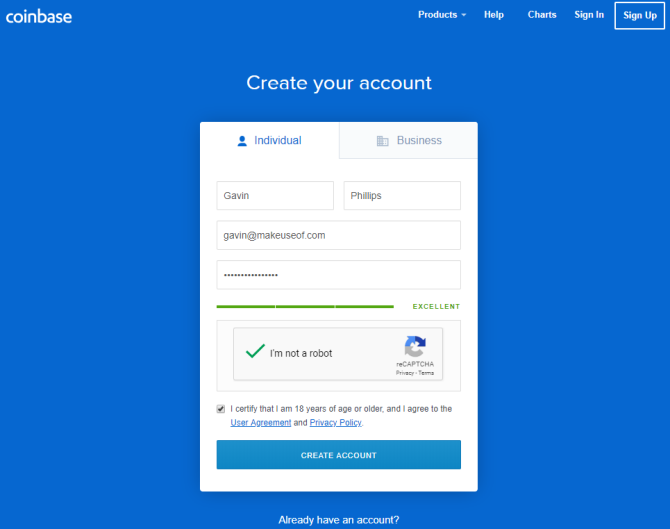
Head over to Coinbase and hit the Sign-up button in the top-right corner.
Enter your details in the account creation panel. Use a strong single-use password. Then head to your email account and verify your email address.
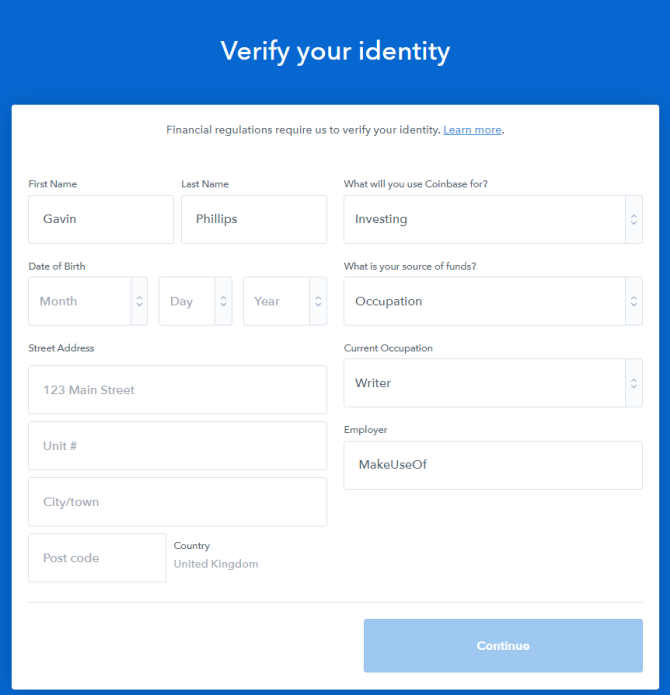
When you come back to the Coinbase site, you need to add a phone number to secure your account. Coinbase then sends you a verification code. Next up, add your personal information. The information Coinbase requires varies slightly by locale, but you will need to confirm your date of birth, an address, your source of funds, and so on.
Finally, you need to use an official photocard document to complete your verification. In the US, Coinbase only accepts state-issued driving licenses or identification cards. A US passport is not acceptable. However, outside the US, Coinbase will accept your passport.
Account verification time varies hugely. Coinbase verified the account I’m using for this tutorial within five minutes, but I have other Coinbase accounts that use the same verification image and phone number. Coinbase may request extra information from you, so be sure to check your email account frequently.
What Is Coinbase Pro?
Coinbase Pro is Coinbase’s crypto-exchange, formerly known as GDAX. You use Coinbase Pro for “advanced” cryptocurrency trading. In this case, advanced means more options than the regular Coinbase site. For instance, you can make a purchase order for a price above or below the current market rate for a cryptocurrency, or directly trade your Bitcoin for Litecoin (or the other cryptocurrencies Coinbase and Coinbase Pro support).
Step 2: Add a Payment Method
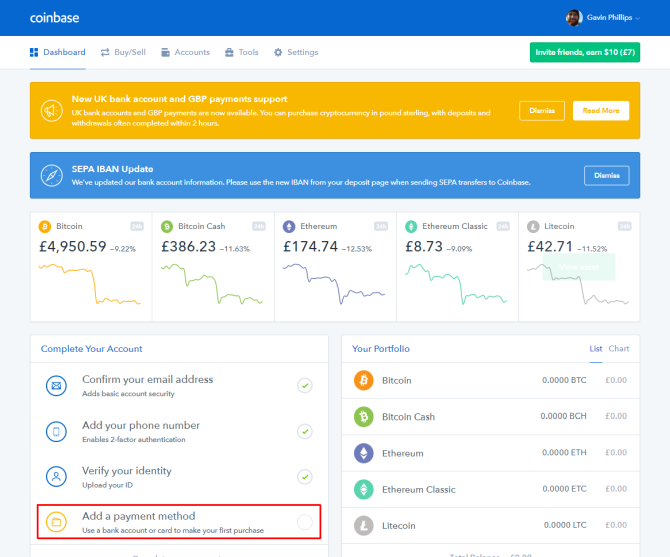
When your Coinbase account finally verifies, you arrive at the Coinbase dashboard. The dashboard displays the current price of the cryptocurrencies available for purchase through Coinbase, your current portfolio, and any information regarding account updates. For instance, you can see in the image below that Coinbase recently added support for several UK bank accounts.
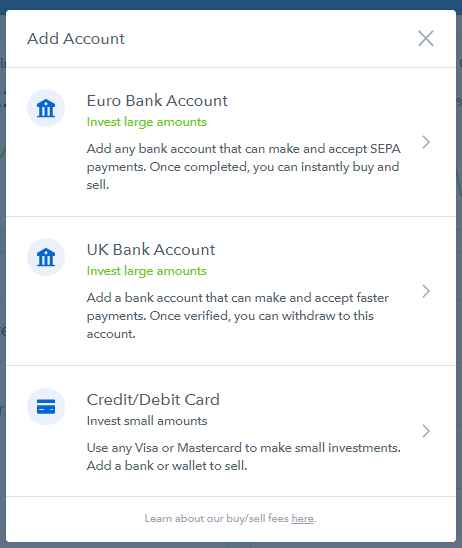
In the bottom-right corner, select Complete your account. Depending on your locale, you now have two or three options:
US residents can add: a bank account, their debit card, or add details for a wire transfer.
UK and EU residents can add: an EU bank account, a UK bank account, or a debit card. Furthermore, UK and EU residents can use SEPA payments or make instant crypto purchases using a 3D Secure debit or credit card.
Note that Coinbase no longer supports the linking of new credit cards! Also, some credit card providers are refusing cryptocurrency purchases or adding additional charges to existing cards. Coinbase won’t remove existing credit cards but does suggest using a debit card or regular bank account instead.
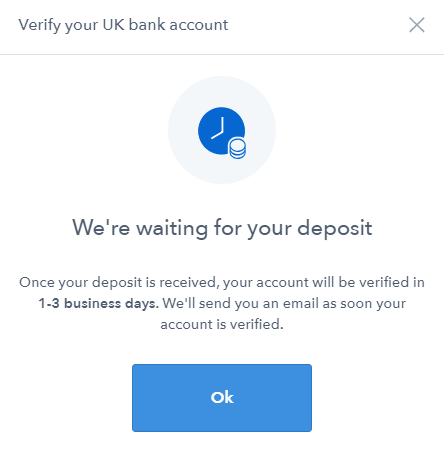
Debit cards and bank account come with a small verification charge. Unfortunately, the account verification process can also take up to three business days.
Step 3: Buy Cryptocurrency Using Coinbase
Once Coinbase verifies your bank account or debit card, and you have some funds available, you can purchase some cryptocurrency. Coinbase is a crypto-broker that exchanges Bitcoin, Bitcoin Cash, Ethereum, Ethereum Classic, and Litecoin.
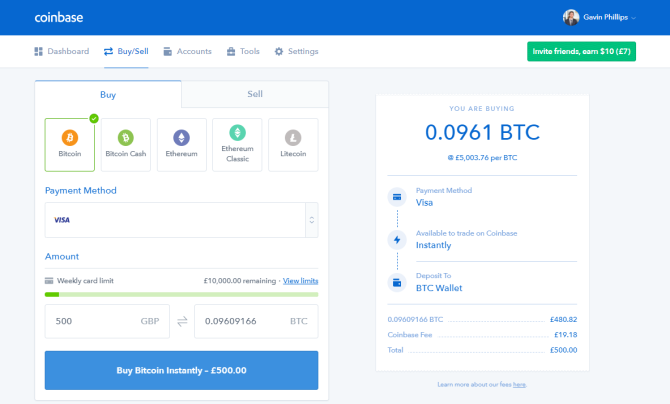
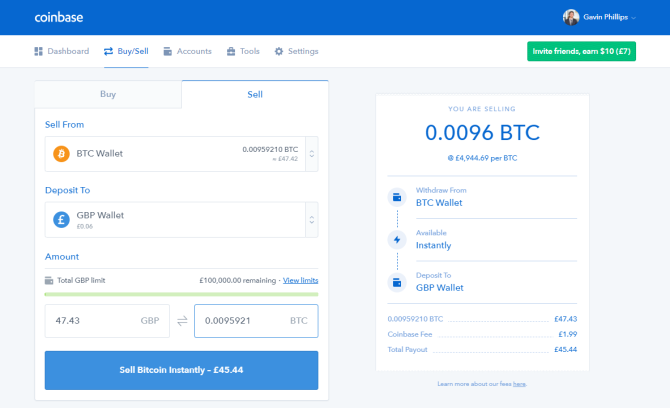
Select Buy/Sell from the Coinbase dashboard. Select the cryptocurrency you want to purchase. Enter either the amount of cryptocurrency you want to buy in your local currency. Alternatively, if you have a specific amount of cryptocurrency you want to buy regardless of cost (for example, 1.2 BTC), enter that and then check the cost.
When satisfied, press the Buy Cryptocurrency button at the bottom of the panel. The description of this button changes depending on your payment method. I’m using my authorized debit card in the UK, meaning I can make an instant purchase of any of Coinbase’s cryptocurrencies. Payment methods have different delays.
When you head back to your Coinbase dashboard, your portfolio will show your new cryptocurrency, and your Recent Activity panel should show your purchase.
Step 4: Sell Cryptocurrency Using Coinbase
Want to sell the cryptocurrency you bought? Head back to the Buy/Sell tab.
Using the Sell From drop-down menu, select your cryptocurrency. Then, from the Deposit To drop-down menu select the currency wallet where you want to deposit your funds. Note that you have to deposit your funds to a currency account before withdrawing to your bank account.
Just like the purchasing panel, you can enter either the amount of cryptocurrency you want to sell in your local currency or specify the amount of cryptocurrency. The cryptocurrency box also has a Sell Max button you can use to enter the maximum account of cryptocurrency while accounting for Coinbase’s transaction fee.
Step 5: Withdraw Funds From Coinbase
Once your funds clear into your Coinbase local current wallet, you can withdraw them from the site entirely, back into your bank account.
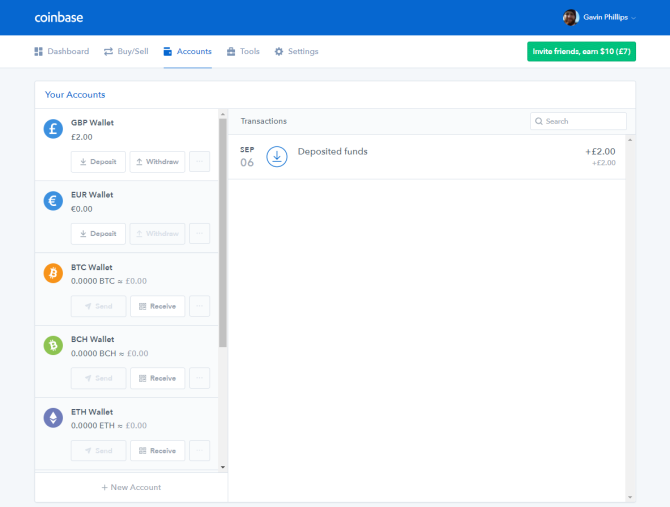
Select Accounts from the Coinbase dashboard. It will display your current holdings across all of your accounts. Find the local currency you want to withdraw and hit the Withdraw button. The withdraw panel pops up and asks for the amount you want to withdraw. It also has a Withdraw All option. Select the bank account you want to withdraw your Coinbase funds to and press Continue.
It can take up to five business days before your funds appear in your local currency account. In my experience, it is usually faster than that, but don’t depend on withdrawing funds to pay a pending bill on its due date.
Congrats, you’ve bought your first cryptocurrency!
Coinbase is a great place to start your cryptocurrency adventure, even if it does leave a little to be desired in some areas. Its interface is easy to use, it offers the core cryptocurrencies you need to get started, and it’s secure enough that you don’t have to worry.
In 2014, Google launched an app called Inbox by Gmail. This was designed to introduce new innovations to the way we manage emails, and lived alongside Gmail. Now, four years on, Google has decided to cull Inbox so that Gmail can flourish unopposed.
Inbox Secedes to Gmail
For those who use it on a daily basis Inbox is the app Gmail should have been. Inbox made the laborious task of managing emails easier, even on the go. It was easy on the eye, and offered innovative features to make emailless of a chore.
Over the past 4 years you’ve helped us make email better. We’ve brought popular Inbox features to @Gmail helping 1B+ people get more done. Thank you.
We’ll be focusing on Gmail & saying bye to Inbox at the end of March 2019. Here’s a transition guide ? https://t.co/6dOxgExpbm
Google rolled out a major update to Gmail in April 2018. And with most of the best features of Inbox now present and correct in Gmail, Google considers Inbox to be surplus to requirements. Google explains its reasons for killing Inbox in a post on The Keyword:
“As we look to the future, we want to take a more focused approach that will help us bring the best email experience to everyone. As a result, we’re planning to focus solely on Gmail and say goodbye to Inbox by Gmail at the end of March 2019.”
Realizing that this is going to upset Inbox users, Google has created a guide to moving from Inbox to Gmail. While it’s pretty short and sweet, it details the Inbox features now in Gmail and offers alternatives for those features which aren’t. Yet.
Reports suggest that no one from the Inbox team is being laid off, so the same people who built and managed Inbox will now be working on improving Gmail. Which hopefully means Google will continue to experiment with the business of email management.
Make Email Great Again
With almost all of the best features of Inbox now integrated into Gmail, this shouldn’t be too much of a wrench for Inbox users. After a period of adjustment they should find the new Gmail perfectly adequate for their email needs.
However, Inbox has proved to be a fertile testing ground for new features, and that’s where we’re likely to feel the loss. Unless Google is planning on experimenting with new email features directly in Gmail, email may be about to become boring again.










 However, one important detection would be



 Today, Instagram Explore is getting a personalized Shopping channel of items it thinks you’ll want most. And it’s expanding its Shopping tags for Instagram Stories to all viewers worldwide after a