13 April 2018

Is It Time Facebook Offered a Paid Version With No Ads?


In his testimony before the US Senate Judiciary and Commerce committee, Facebook founder and CEO Mark Zuckerberg suggested a paid version of Facebook is a possibility.

What would a paid version of Facebook look like? And is it time we started paying for Facebook to stop the social network harvesting our data?

What Mark Zuckerberg Said…

During the hearings, Mark Zuckerberg made a couple of interesting points about a possible paid version of Facebook—this despite the fact that he received extensive training prior to meeting legislators to ensure he chose his words carefully.

Zuckerberg was asked whether his objectives are the same now as when he made earlier statements stating that Facebook would always be free. As reported by The Verge, Zuckerberg replied:

“There will always be a version of Facebook that is free. It is our mission to try to help connect everyone around the world and bring the world closer together. In order to do that, we believe we need to deliver a service that everyone can afford.”

It’s the particular phrase “version of Facebook” that hints to many that there could be a paid version planned for the future.

Later in the hearing, Zuckerberg was asked about Facebook COO Sheryl Sandberg’s recent comments about a paid Facebook product. Sandberg had told The Today Show that the company doesn’t offer users the option to opt out of ads or data collection because “that would be a paid product.”

In the hearings, as reported by CNBC, Zuckerberg clarified:

“I think what Sheryl was saying is in order to not run ads at all we would need some sort of business model. To be clear, we don’t offer an option today for people to pay to not show ads.”

And further on:

“We think offering people an ad-supported service is the most aligned with our mission of trying to connect everyone in the world, because we want to offer a free service that everyone can afford. That’s the only way we can reach billions of people.”

Facebook Is Free, So Why Should I Pay?

facebook paid version

The simple answer to this question is a paid version could help protect your privacy. Even though we have an extensive guide to Facebook privacy, we know there’s only so much each individual use can do. No matter how many settings you tweak, the social network still retains an incredible amount of data about you, even when you aren’t on Facebook and just browsing the web casually.

The recent controversy surrounding the Cambridge Analytica scandal has exposed just how much data Facebook stores about its users. The company and its supporters have always said that this is a necessity in order to offer a free service that is funded by ads.

In an article on BuzzFeed, science fiction writer Ted Chiang recently wrote that Facebook’s goal isn’t to connect you to your friends, it’s to show you targeted ads.

So here’s the counter to that: a paid version of Facebook that is ad-free and thus does not require the company to track its users and store personal data in order to make money.

About Those Facebook “Premium” Ads…
facebook gold ads

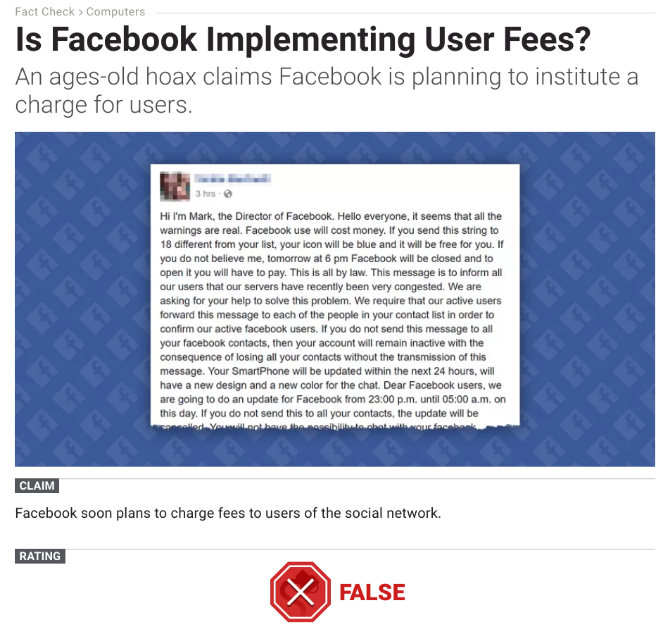
The chances are you have seen a few ads in the past claiming to be offering a paid version of Facebook with extra features and data protection.

This premium version of Facebook is often called “Facebook Gold”. In case you didn’t know, this is a Facebook scam and there isn’t any such premium version right now.

If you have signed up for any such service, please disconnect it immediately. If you paid for it, please reverse the transaction, check your credit card, and update your passwords and PIN numbers just to be safe.

Facebook Shouldn’t Be an All-or-Nothing Choice

We’ve established that there isn’t currently a paid version of Facebook available. Which means you have the choice to either use it as is, or delete Facebook entirely. There are plenty of reasons to not delete Facebook, but unless you do you’re stuck with it in its current form.

But is there another way?

After growing as big as it has done, Facebook owes its users more varied choices than the current binary. One shouldn’t have to give up large portions of one’s privacy on the internet to use an essential service in the modern world.

Yes, Facebook needs to make money. So why doesn’t the social network offer an actual choice to those who are willing to pay for it? What it lost in ad revenue could be made up by subscription fees.

Facebook Already Offers a Paid Version for Companies
facebook workplace

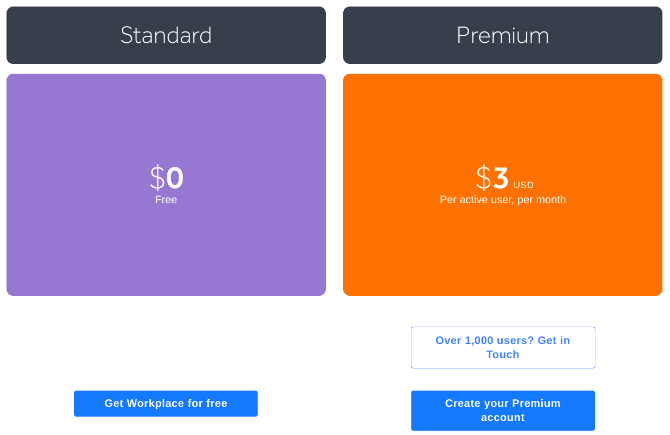
We already know Facebook isn’t opposed to paid tiers. Workplace by Facebook is a private social network for business, offering both an ad-supported free version and an ad-free paid premium version.

As you can see by Facebook Workplace’s pricing, the ad-free paid version costs $3 per user per month, for companies with up to 1,000 employees. For companies with over 1,000 employees, the price drops to $1 per user per month.

This is one of those things you should know about Facebook, but most people seem to be unaware of Facebook Workplace. The company doesn’t heavily advertise Workplace’s model of offering free and paid tiers because people would start asking awkward questions about why such a system isn’t available for the regular version of Facebook we all know and love put up with.

How Much Would a Paid Version of Facebook Cost?

facebook paid version

Workplace by Facebook actually represents good value for money, but don’t expect to pay anywhere near as low as $3/month for ad-free access to the regular version of Facebook.

In 2013, Twitter co-founder Biz Stone took to Medium to pitch “Facebook Premium,” an ad-free version of Facebook that would cost $10/month. Others have suggested Facebook adopts a subscription-based model similar to Spotify’s, where you can access everything Facebook has to offer for $10/month or $100/year.

Facebook Should Be Forced to Offer a Paid Version

facebook data

Taking all of this into consideration there seems to be a genuine case for a paid version of Facebook. But don’t count on it happening any time soon. Despite Zuckerberg’s apparent slip-up, the company will fight it for as long as it can. So much so that we may need government intervention to make it happen.

According to The Economist, the world’s new most valuable resource is data, not oil. And with over 2 billion monthly active users, Facebook is currently the king of data, sucking it up at a rate of knots. This data is simply too valuable for Facebook to voluntarily offer to give it up. And that should concern us all.

Unless governments around the world band together to force Facebook to offer a paid version of its service to users, it’s simply not going to happen. So it seems that regulation, in this case, is a necessity. Especially if we want Facebook to stop influencing elections around the world.


Read Full Article

Tinder Matched? What to Do Next and How to Stay Safe

The Roadie 2 tuner ups your guitar game


The first Roadie tuner was a modern marvel. An automatic guitar tuning system, the little device connected to your phone to listen to your guitar strings and then set them to the proper tuning using an internal motor. The new model, the $129 Roadie 2, is even cooler.

I’ve been using the Roadie 2 for a few months now and I’m hooked. I was never a good player or tuner – my ear wasn’t quite right and even with tools I couldn’t get my guitars exactly in tune. Now, however, with the Roadie 2 I just place the winding end on the pegs and press a button. A quick pluck of the string and you’re tuned in seconds.

The Roadie 2 is completely self-contained and charges via USB-C. It has a built-in vibration sensor that can also asses the current string and change the tuning accordingly. The system also allows you to add multiple stringed instruments – you can set up profiles for your electrics and acoustics and even your banjo. You can also tune them to standard or even open tunings. The high-torque motor spins the pegs quickly and effortlessly and you can wind and unwind your instruments as well.

The team kickstarted the Roadie 2 last March and began shipping this year. I’ve been using it to tune my guitars since I got it and it’s worked quite well except for one unfortunate incident while winding – and overwinding – a kid’s guitar. An app included with the package lets you control the instruments and the tunings.

I know some guitarists can tune to the sound of overhead fluorescent lights and still others are OK with a quick listen to a digital tuner. I’m neither of those. The Roadie 2, then, is a godsend for those of us cursed to the never-ending torment of being really bad at guitar. At least now I can be really good at tuning.

[gallery ids="1621701,1621702,1621703,1621704"]

Read Full Article

Podcasting app Anchor can now find you a cohost


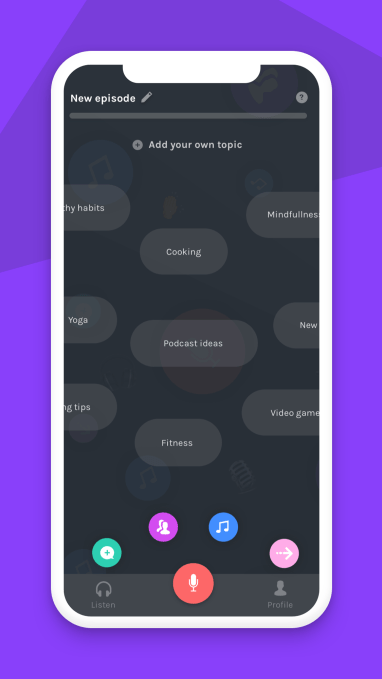
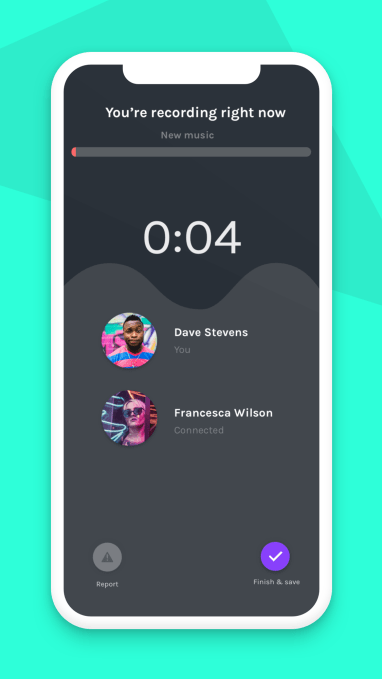
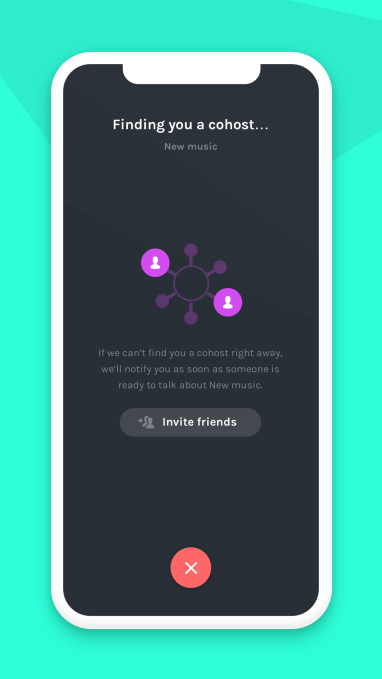
Fresh off its relaunch as an app offering a suite of tools for podcasters, Anchor today is rolling a new feature that will make it easier for people to find someone to podcast with: Cohosts. As the name implies, the app will now connect you – sometimes immediately, if people are available – with another person who’s interested in discussing the topic you’ve chosen.

The result is a more engaging podcast where a conversation is taking place between two people, rather than a monologue.

“We give people the ability to choose a topic that they want to talk about on their podcasts, and the product will get to work trying to match you up with someone who wants to talk about the exact thing,” explains Anchor CEO Mike Mignano.

At first, Anchor will try to match you with someone who’s also currently in the app, he says. If it’s not able to do that, then it will notify you when it finds a match through an alert on your phone.

“We’ve developed an intelligent matching system to make sure there’s a high likelihood that you get matched up with someone that wants to talk at the same time,” Mignano notes.

The topics users select can be either broad – like politics – or narrow and hyper-specific, the company says.

One you’ve been offered a connection to a cohost, you have 30 seconds to meet in the app and decide how you want to get started. The recording will then start automatically, and will continue for up to 15 minutes. Both users will receive a copy of the recording and can choose to publish it to their own podcast right away, or save it for later.

After the recording, podcasters rate each other with a simple thumbs up or down. (If down, you’ll need to select a reason in case Anchor needs to step in and review bad behavior. Bad actors will no longer be permitted to use the service.)

If both give each other a thumbs up, though, they’ll automatically be favorited on each other’s account, so they can find each other again. Next time they want to record, they’ll have the option to team up through Anchor’s “Record with Friends” feature, where there’s no time limit.

Those who are highly rated will also get better ranked in the matching algorithm, Anchor notes.

If a podcaster has a particular topic in mind – like wanting to discuss Stephen King novels, for example – Mignano continues, they’re very likely to return to the app when they get a match, the team found during testing.

The Cohosts feature was beta tested with a small subset of users prior to today’s launch, but the company declines to share how many users tested it or how many people are currently using the app to create podcasts.

However, the app’s big makeover which took place in February basically turned Anchor into a different kind of app – so it’s still establishing a new user base.

While before, the app was focused on recording audio, Anchor 3.0 is meant to be a podcasting suite in your pocket. The new version includes recording features with no time limits, a built-in library of transition sounds, tools for adding music, support for voice messages (a call-in like feature), free hosting, and a push button experience for publishing to share your podcast to all the top platforms.

Matching cohosts in teams of two may just be the start.

Mignano hints that a future version of Anchor may include more flexibility on the number of cohosts. “You can imagine us doing something like, if the user specifies the topic, they can indicate how many people they want to have a conversation with,” he teases.

The new feature recalls Anchor’s roots as a platform for social audio.

“It’s something we’ve been thinking about for a while, says Mignano. “If you think back to Anchor 2.0 – and 3.0, as well – we’ve always wanted to make Anchor a little more interactive than a standard podcasting platform. To us, democratizing audio doesn’t just mean making it easier to create. It also means modernizing the format by making it more shareable, easier to interact with, short form, etc.,” he says.

The Cohosts feature is rolling out today in Anchor’s app.


Read Full Article

Podcasting app Anchor can now find you a cohost


Fresh off its relaunch as an app offering a suite of tools for podcasters, Anchor today is rolling a new feature that will make it easier for people to find someone to podcast with: Cohosts. As the name implies, the app will now connect you – sometimes immediately, if people are available – with another person who’s interested in discussing the topic you’ve chosen.

The result is a more engaging podcast where a conversation is taking place between two people, rather than a monologue.

“We give people the ability to choose a topic that they want to talk about on their podcasts, and the product will get to work trying to match you up with someone who wants to talk about the exact thing,” explains Anchor CEO Mike Mignano.

At first, Anchor will try to match you with someone who’s also currently in the app, he says. If it’s not able to do that, then it will notify you when it finds a match through an alert on your phone.

“We’ve developed an intelligent matching system to make sure there’s a high likelihood that you get matched up with someone that wants to talk at the same time,” Mignano notes.

The topics users select can be either broad – like politics – or narrow and hyper-specific, the company says.

One you’ve been offered a connection to a cohost, you have 30 seconds to meet in the app and decide how you want to get started. The recording will then start automatically, and will continue for up to 15 minutes. Both users will receive a copy of the recording and can choose to publish it to their own podcast right away, or save it for later.

After the recording, podcasters rate each other with a simple thumbs up or down. (If down, you’ll need to select a reason in case Anchor needs to step in and review bad behavior. Bad actors will no longer be permitted to use the service.)

If both give each other a thumbs up, though, they’ll automatically be favorited on each other’s account, so they can find each other again. Next time they want to record, they’ll have the option to team up through Anchor’s “Record with Friends” feature, where there’s no time limit.

Those who are highly rated will also get better ranked in the matching algorithm, Anchor notes.

If a podcaster has a particular topic in mind – like wanting to discuss Stephen King novels, for example – Mignano continues, they’re very likely to return to the app when they get a match, the team found during testing.

The Cohosts feature was beta tested with a small subset of users prior to today’s launch, but the company declines to share how many users tested it or how many people are currently using the app to create podcasts.

However, the app’s big makeover which took place in February basically turned Anchor into a different kind of app – so it’s still establishing a new user base.

While before, the app was focused on recording audio, Anchor 3.0 is meant to be a podcasting suite in your pocket. The new version includes recording features with no time limits, a built-in library of transition sounds, tools for adding music, support for voice messages (a call-in like feature), free hosting, and a push button experience for publishing to share your podcast to all the top platforms.

Matching cohosts in teams of two may just be the start.

Mignano hints that a future version of Anchor may include more flexibility on the number of cohosts. “You can imagine us doing something like, if the user specifies the topic, they can indicate how many people they want to have a conversation with,” he teases.

The new feature recalls Anchor’s roots as a platform for social audio.

“It’s something we’ve been thinking about for a while, says Mignano. “If you think back to Anchor 2.0 – and 3.0, as well – we’ve always wanted to make Anchor a little more interactive than a standard podcasting platform. To us, democratizing audio doesn’t just mean making it easier to create. It also means modernizing the format by making it more shareable, easier to interact with, short form, etc.,” he says.

The Cohosts feature is rolling out today in Anchor’s app.


Read Full Article

6 Common Annoying Photoshop Issues and How to Fix Them


Photoshop can rightly be considered Adobe’s pride and joy. One of the most used image editing programs available, it’s a treasure trove of all the tools, techniques, and libraries a graphic designer could ever want.

That said, it’s also probably one of the most annoying pieces of software to use. That’s especially true for beginners, who aren’t familiar with the software’s maze-like user interface.

In this article we detail a number of the most common Photoshop annoyances, and how to fix them.

Note: This article won’t cover keyboard commands, which are absolutely vital for every Photoshop aficionado. But we’ve already covered Photoshop keyboard shortcuts before, and you may want to check out that article before continuing.

1. Change Measurement to Pixels

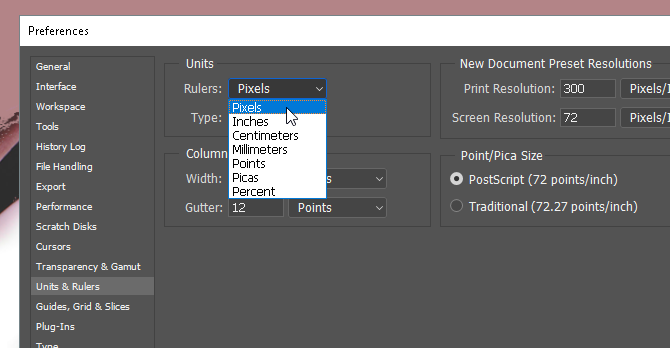
By default or chance, you might find yourself using inches as a unit of measurement rather than pixels in Photoshop. This can be very annoying when you’re dealing with work designed for the web rather than for print.

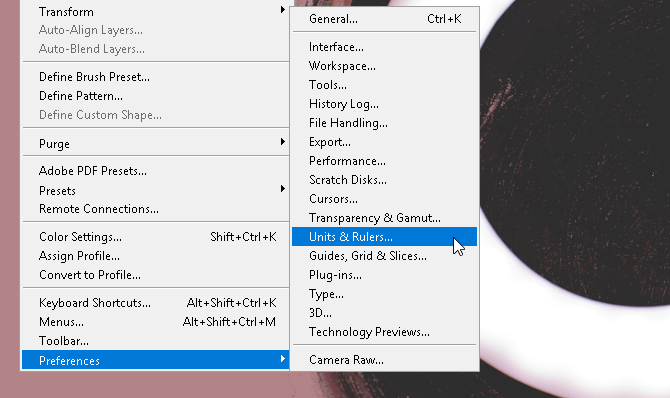
To change, click on Edit, mouse over Preference, and click Units & Rulers. You can also open the Preferences window by typing Ctrl + K and selecting the Units & Rulers section on the side menu.

units and rulers

From the Preferences window, change the Rulers setting to Pixels using the drop down menu.

pixel preferences

Click OK and you should now have all of your selection measurements as pixels.

2. Rule of Thirds Guidelines

Most people choose not to work with grid lines when using Photoshop, even though they can be of help when creating (particularly free form) graphic works. You can change this immediately by creating a rule of thirds guideline which you can access using a simple keyboard macro.

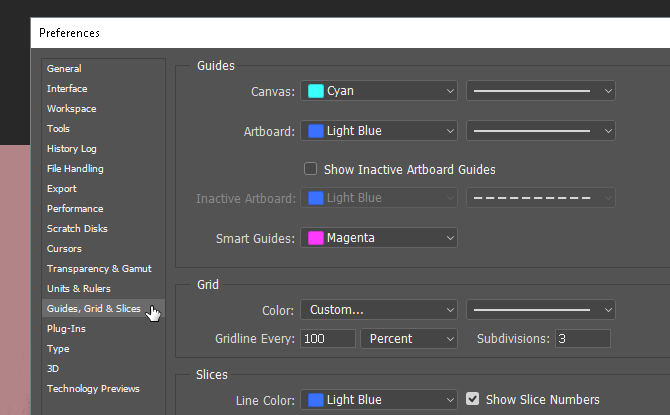
First, press Ctrl + K on your keyboard to open your Preferences window. Then, select the Guides, Grid & Slices option in the side menu.

grids and slices

In the Grid section, change what you have to the following: Gridline Every to 100 and Percent, and Subdivisions to 3. Then, hit OK. That’s it. Now, you can access a quick and simple rule of thirds guide by pressing Ctrl + Tilde on your keyboard whenever it suits you.

rule of thirds

If you’d like to have a measurement counter all of the time while you work, you can also press Ctrl + R on your keyboard to open a ruler that displays pixel information on your art board at all times.

3. Pen Tool Practice

If you have ever seen impressive Photoshop artwork, you can rest assured it required the pen tool. The pen tool is not only one of the most versatile Adobe tools out there—available on most Adobe software products—it’s also one of the hardest to learn to use well.

After all, Adobe products are designed for and cater mostly to professionals. Considering there’s no real official tutorial for it, and using the Pen tools assumes you’re already familiar with creating and editing shapes free hand, most people simply don’t bother.

bezier game

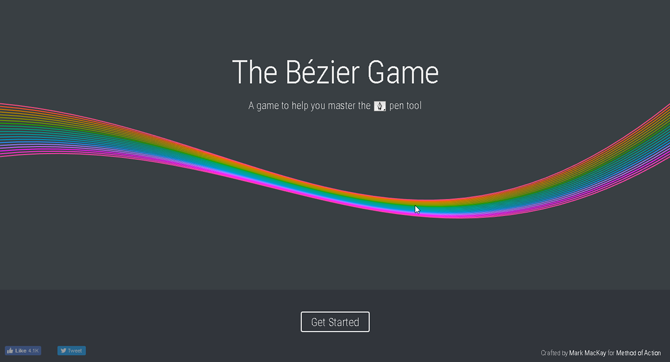
To get used to drawing freehand, try The Bezier Game by Mark MacKay. A simple and sophisticated interactive game, all you have to do is create simple shapes using the pen tool. It’s simple, quick, and will surely teach you a few things if you’re new to the pen tool game.

bezier game circle

Trust me when I say that playing this simple game will extend your knowledge and ability of the pen tool by a surprising amount. Especially if you’re just starting out with digital drawing techniques.

4. Proper Image Rotation

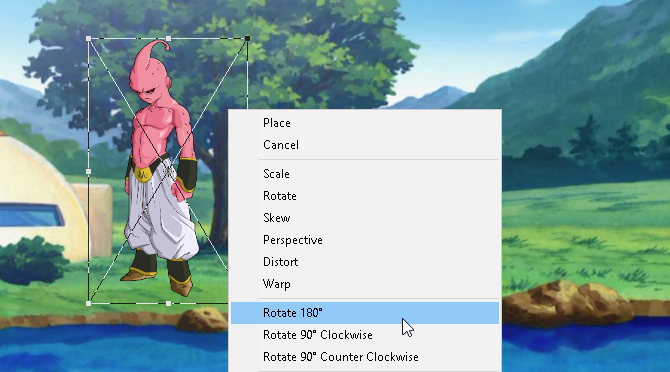
Stop trying to rotate your image using the Image adjustment page. You’ll only end up rotating the whole art board, and feeding your bad habit. To rotate, move, or skew your image, use the Transform tool.

Place your image, select it, and then press Ctrl + T on your keyboard. A box should open around your image. Then, right-click the image and select your option.

rotation

Unfortunately, most users will try to rotate images using the Image option (causing unnecessary anguish any time) or other options along the toolbar. As plentiful as Photoshop’s tools are, try to wander from your art board as little as possible.

5. Bird’s Eye View

Most of the time you’ll spend in Photoshop—especially when you’re new to Photoshop—is looking at and editing small details in a project. It can be a serious pain, too, considering you constantly have to zoom in and out when finishing an entire canvas.

Unless you use the hand tool. If you’ve zoomed in on a part of your design and want to zoom in the same amount on another spot, simply press and hold H, click and drag your cursor, and place the magnifying square on any other place on your art board.

photoshop hand tool

Now you don’t have to keep zooming in and out manually to finish your project.

6. Smart Object Layering

Let’s say, for example, you’re applying filters to a layer to make it look good. Typically, if you made a mistake, you’d have to revert every filter and reapply to get it looking good.

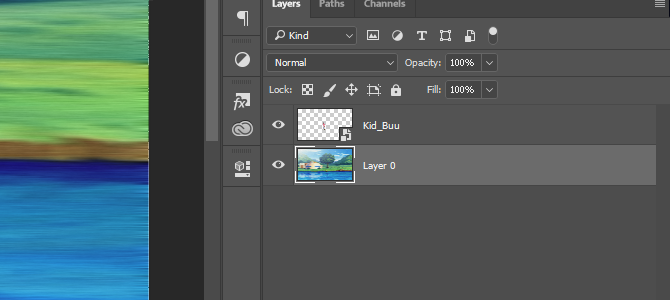
What if you forget the specific value of a filter, or a filter entirely? What if a filter is giving you issues, but you don’t know which it may be? All of these issues can be fixed by converting your layer to a Smart Object. To show the difference, here’s an image of a simple layer scheme:

layering

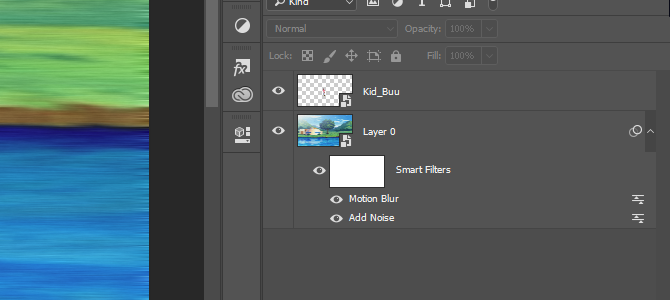
Smart objects allow users to list the growing modifications they commit to a layer, and allow users to modify, delete, or create any modification without losing track. To convert a layer into a smart object, right-click the layer name and select Convert to Smart Object. A small icon should appear in your layer thumbnail.

layering smart

Now you should have a smart object as your layer. To view or delete a filter, just click on the eye icon to the left of the listing. To modify options, double-click on the levels icon on the right.

It’s Not You, It’s Photoshop

Photoshop is one of the most powerful and prolific applications around. That said, it won’t hold your hand throughout the learning process. It takes years to weave your way through all of it. So, if you ever have a problem with Photoshop, bear in mind that you might just need to adjust some settings rather than give up on Photoshop altogether.

Hopefully, this short list of Photoshop annoyances has fixes some of your woes. And even if you run into some more annoyances down the line, don’t give up, as Photoshop is a powerful tool once you get the hang of using it.

Image Credit: eggeeggjiew/Depositphotos


Read Full Article

Google is testing self-destructing emails in new Gmail


Google is working on a brand new design for the web version of Gmail. Yesterday, I published screenshots of the new design. TechCrunch’s tipster Chaim also discovered an interesting new feature in the new Gmail. You’ll soon be able to send expiring emails.

Working on an email service is hard as you have to be compatible with all sorts of email providers and email clients. But it doesn’t seem to be stopping Google as the company is now evolving beyond the simple POP3/IMAP/SMTP protocols.

Based on those screenshots, expiring emails work pretty much like expiring emails in ProtonMail. After some time, the email becomes unreadable.

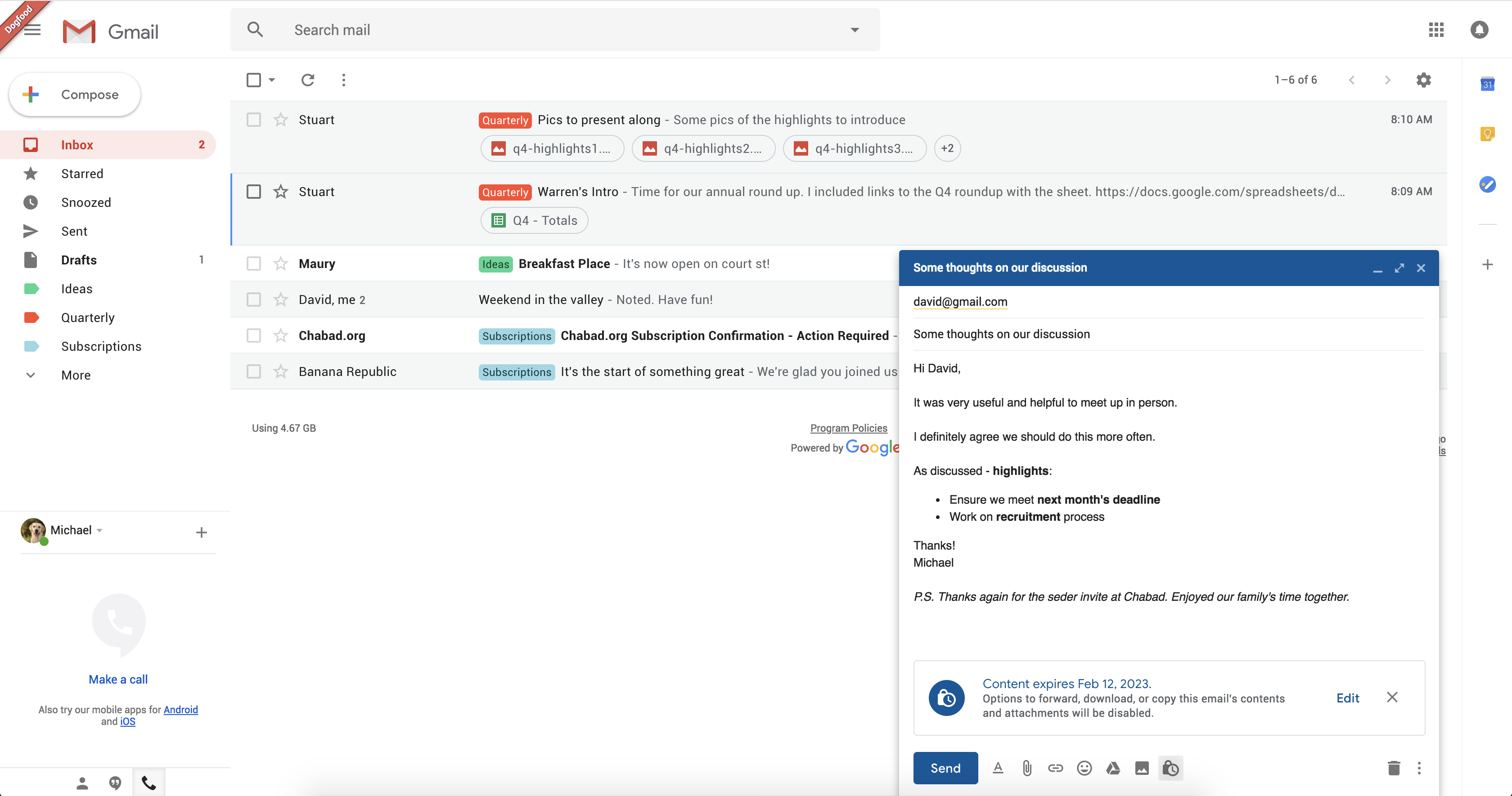
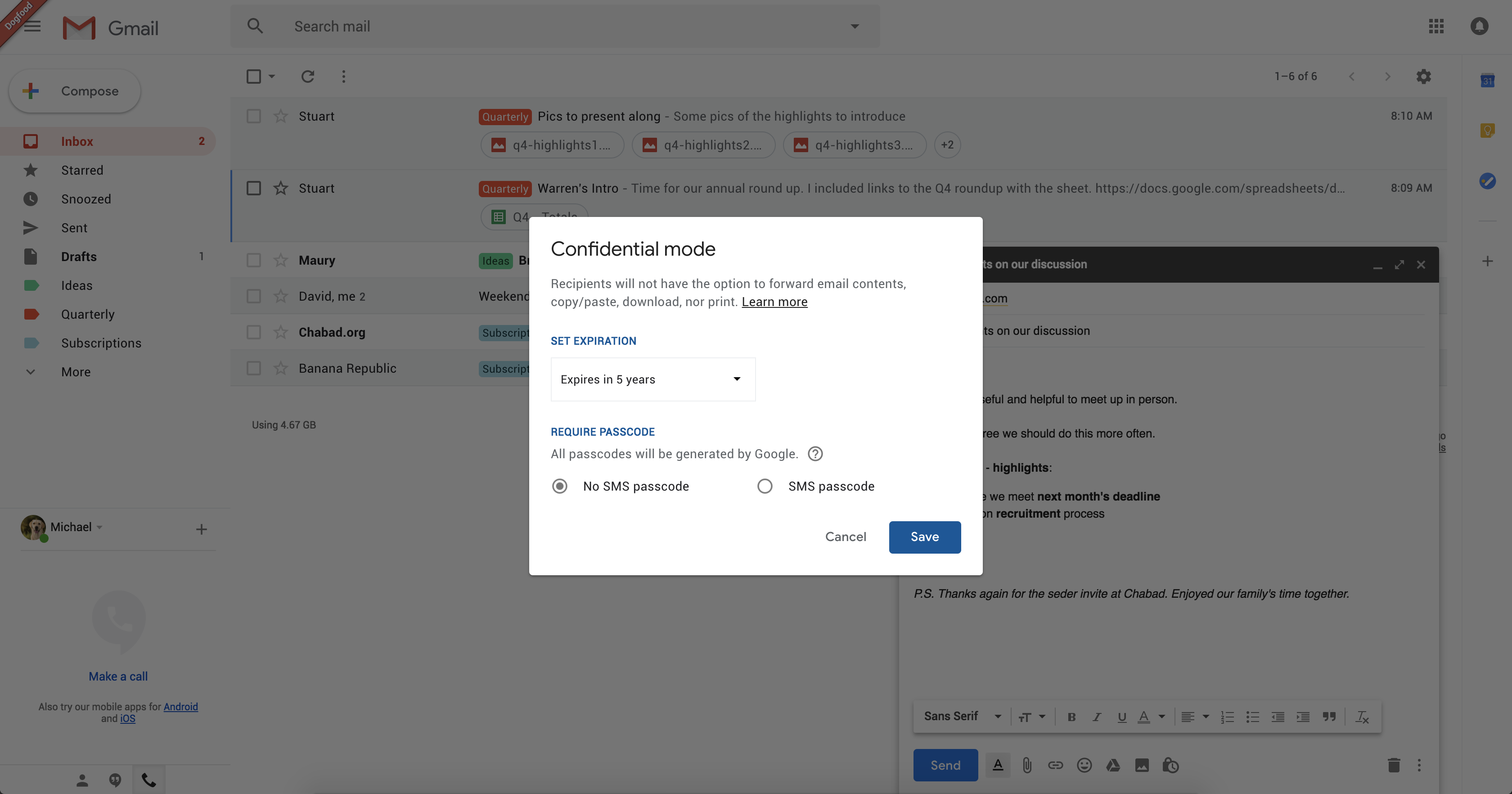
In the compose screen, there’s a tiny lock icon called “confidential mode”. It says that the recipient won’t be able to forward email content, copy and paste, download or print the email.

You can configure the expiration date so that your email disappears after 1 week, 1 month, multiple years, etc. You can also ask your recipient to confirm their identity with a passcode sent via text message. This sounds like a great way to associate email addresses with phone numbers and improve Google’s ads.

When our tipster clicked on “Learn more”, it opened Google’s help articles but the page was not found. The feature isn’t ready for prime time just yet.

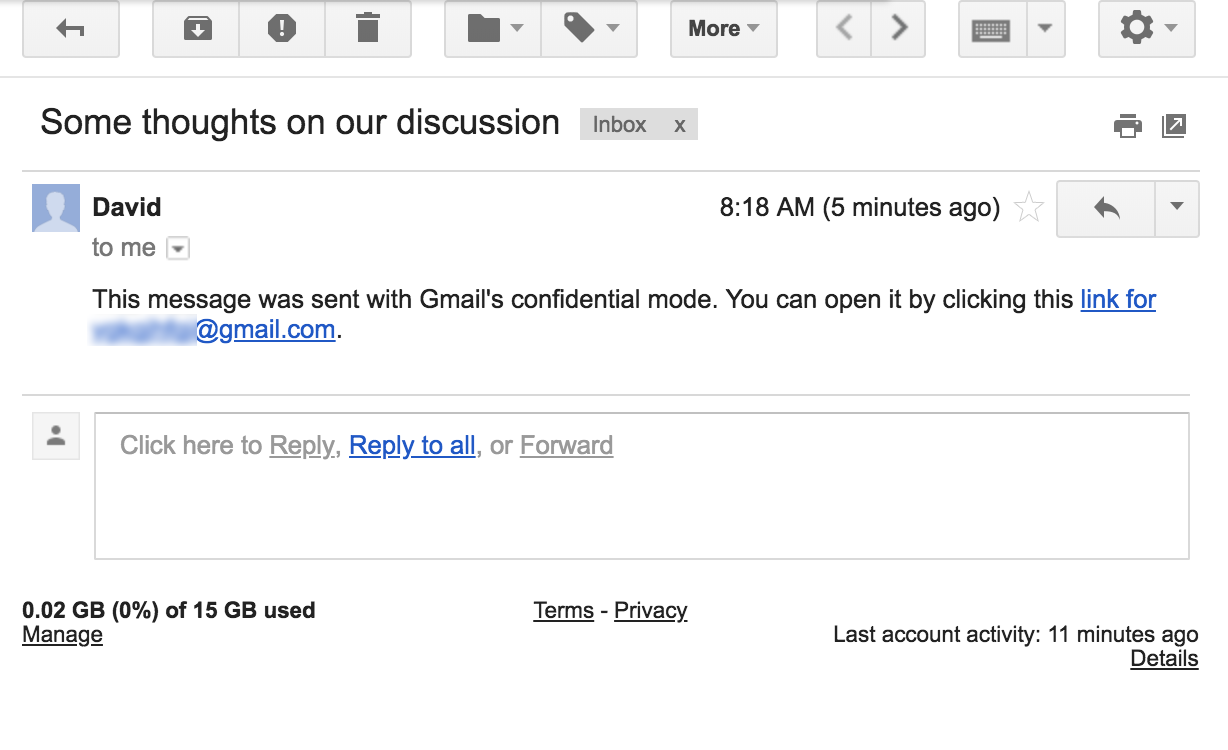
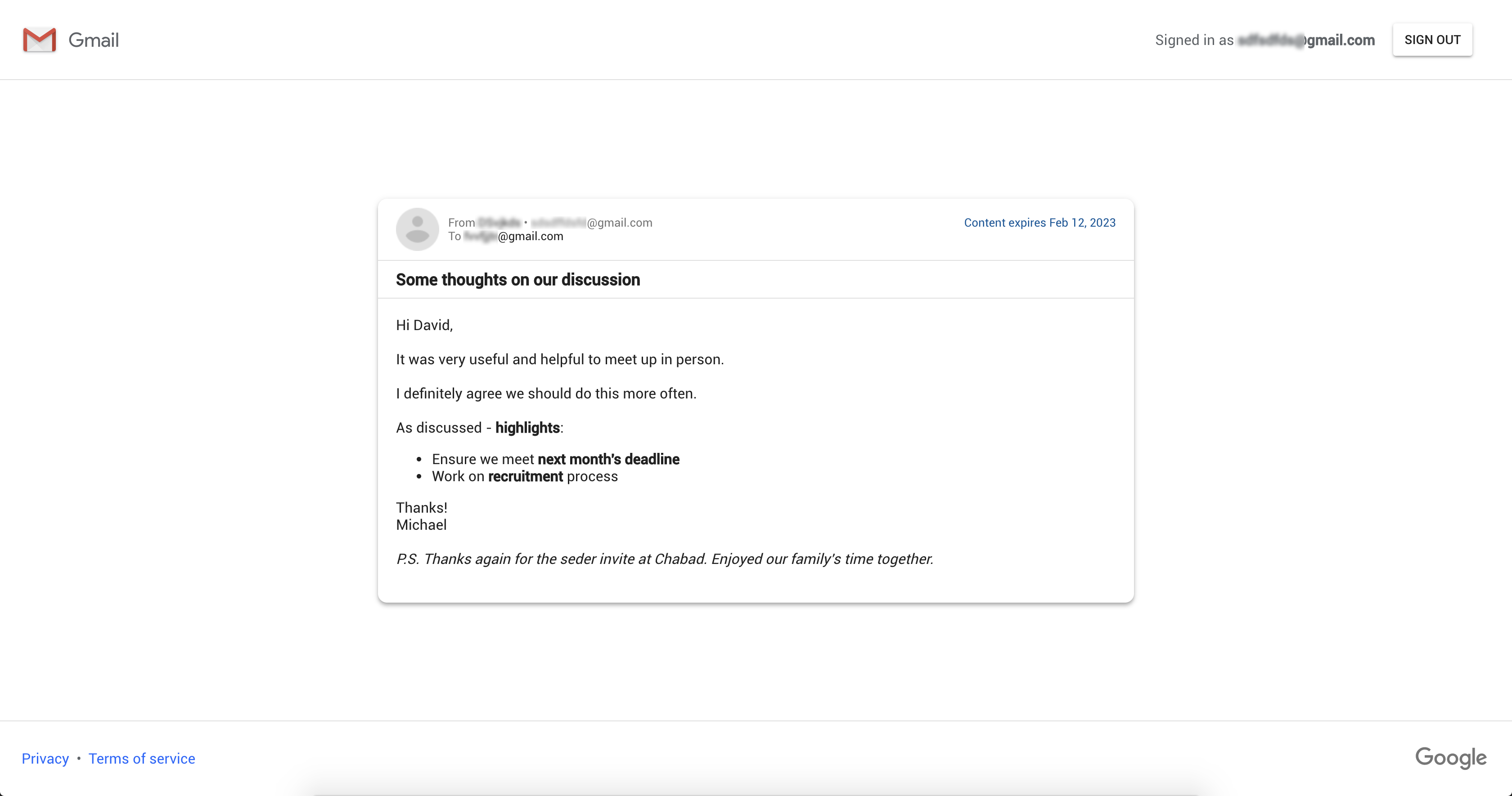
On the recipient’s side, the person was using the existing version of Gmail and received a link to view the confidential email. The recipient had to log into their Google account once again to view the content. When viewing the confidential message, copy and paste as well as the print feature were disabled — it didn’t stop our tipster from taking a screenshot of the email though.

It’s unclear if this feature is going to be compatible with non-Gmail users as the company asks you to confirm your Google account to view the confidential message. It’s also unclear if the integration is going to work better in the future when everybody is using the new Gmail.

For instance, when a ProtonMail user sends an expiring message to another ProtonMail user, it looks like a regular email in the inbox. After the message expires, it is automatically deleted from the inbox and the sender’s outbox.

In Gmail’s current implementation, it sounds like Google simply generates an email with a link. The message behind the link disappears after a while, but not necessarily the intermediate email.

It’s also worth noting that Google doesn’t mention end-to-end encryption anywhere. A “confidential” message doesn’t have to be encrypted. It’s likely that Google could still see the content of that message and comply with warrants. Once again, Google said that the new Gmail is going to come out in a few weeks. Confidential emails could be released at the same time or at a later date.


Read Full Article

Telegram hit with block in Russia over encryption

CyberGhost vs. TunnelBear: Which VPN Is Better for You?


CyberGhost and TunnelBear are two of the best VPN options to consider if you want better internet privacy, increased security when using public Wi-Fi, access to region-blocked content, and many of the other benefits of using a proper VPN.

Both are paid services—CyberGhost has a seven-day free trial and TunnelBear caps data to 500MB per month for free users—but we wouldn’t have it any other way because paid VPNs are the only ones you should be using.

The only question is, which VPN service is right for you? Here’s our side-by-side comparison of CyberGhost and Tunnelbear to help you decide.

Price and Availability

CyberGhost

cyberghost vs. tunnelbear - CyberGhost plans

CyberGhost has a single premium VPN plan ($12/mo) with a hefty discount if you buy one year upfront ($6/mo) and a massive discount if you buy two years upfront ($3.50/mo). All of this with a 30-day money-back guarantee.

With CyberGhost, you can use up to 5 concurrent devices, each equipped with an active VPN connection. CyberGhost’s network provides around 1,200 servers across 59 countries worldwide on every continent except Antarctica.

The paid plan allows for unlimited bandwidth and traffic.

TunnelBear

cyberghost vs. tunnelbear - TunnelBear plans

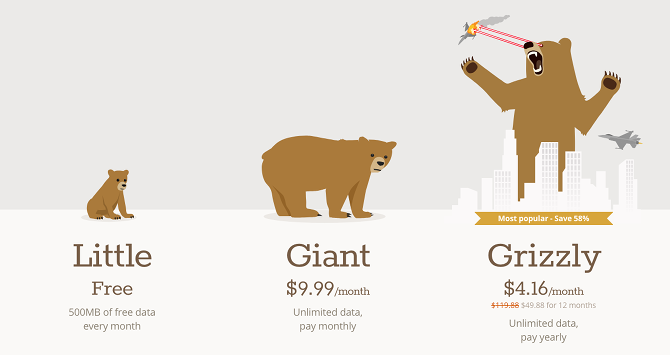
TunnelBear has a single premium VPN plan ($10/mo) with a significant discount if you buy one year upfront ($4.16/mo). This makes it slightly more affordable than CyberGhost, but not enough to be a deciding factor. TunnelBear does not offer a money-back guarantee or refunds of any kind.

With TunnelBear, you also get to use up to 5 concurrent devices with active VPN connections on all of them. TunnelBear’s network isn’t as wide as CyberGhost’s, but is still respectable at 22 countries. The actual number of servers is unknown.

The paid plan allows for unlimited bandwidth and traffic.

Ease of Use

CyberGhost

cyberghost vs. tunnelbear - CyberGhost ease of use start button

CyberGhost is available on Windows, Mac, Linux, Android, iOS, and most routers.

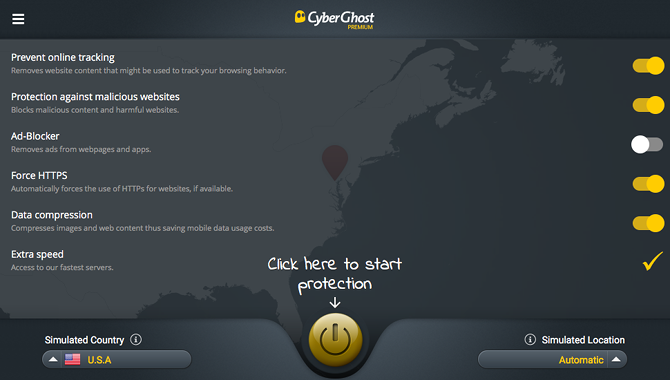
Using the CyberGhost client could not be easier. The installation process is a breeze, and the app itself sits out of the way in the system tray. You have the option of auto-launching on system startup, auto-establishing connection on launch, and starting minimized so you don’t even notice it.

There’s really nothing to “set up” with CyberGhost. You can toggle settings right in the dashboard, and when you’re ready, just click the big “Click Here to Start” button. If you want to connect to a specific country or server, it’s right there too.

TunnelBear

cyberghost vs. tunnelbear - TunnelBear extension

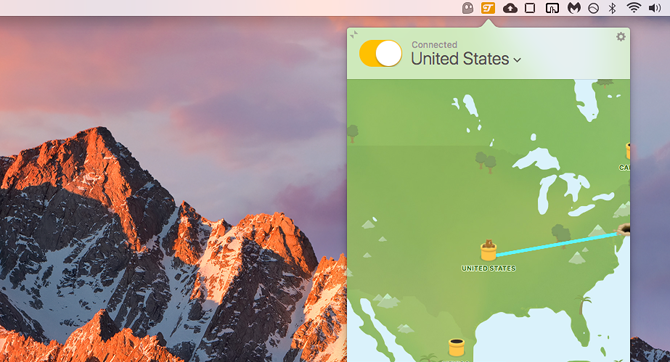
TunnelBear is available on Windows, Mac, Android, and iOS. It can also be used as browser extensions for Chrome and Opera if you only want your web traffic to go through a VPN connection without affecting apps outside your browser.

The interface is different, but TunnelBear is just as easy to use as CyberGhost. It sits in the system tray, and clicking the icon brings up a dashboard where you can select a country and toggle the connection on or off. Not much else you need to do.

Speed and Performance

We compared normal internet speed with speeds when connected to CyberGhost and TunnelBear, and we used three different speed testing services: Speedtest, TestMyNet, and Speakeasy.

A normal non-VPN connection:

  • Speedtest: 27.3 Mbps / 6.0 Mbps
  • TestMyNet: 20.0 Mbps / 5.4 Mbps
  • Speakeasy: 25.5 Mbps / 5.8 Mbps

A CyberGhost connection:

  • Speedtest: 27.2 Mbps / 5.5 Mbps
  • TestMyNet: 23.9 Mbps / 4.0 Mbps
  • Speakeasy: 24.0 Mbps / 5.3 Mbps

A TunnelBear connection:

  • Speedtest: 25.7 Mbps / 5.7 Mbps
  • TestMyNet: 20.4 Mbps / 4.6 Mbps
  • Speakeasy: 24.3 Mbps / 5.2 Mbps

Due to the laws of physics and how the internet works, there will always be some variance when testing the speed of a connection. And because these VPNs are encrypted, we’d expect to see a slight decrease in speed when connected.

That is indeed what we see here. All things considered, both CyberGhost and TunnelBear offer excellent speed and performance.

Security and Privacy

CyberGhost

CyberGhost defaults to the OpenVPN protocol on all supported platforms, which is the strongest and most secure VPN protocol currently available. If you don’t want to use the CyberGhost client, you can establish a VPN connection through some other means using OpenVPN, L2TP/IPSec, PPTP, or IPSec protocols.

CyberGhost supports 256-bit AES encryption.

Importantly, CyberGhost has a strict no-logging policy: IP addresses, server connections, login and logout times, traffic data, and all other information that gets transmitted through their servers are completely ignored—neither observed nor recorded. The only piece of recorded data is a once-per-day check to see if you used CyberGhost that day, and this information is deleted within 24 hours.

Other important features include DNS and IP leak protection as well as an automatic killswitch that halts your entire internet connection if the VPN connection is interrupted (to prevent the accidental transmission of unprotected traffic). CyberGhost is based in Romania, which is a privacy-safe country.

TunnelBear

TunnelBear defaults to the OpenVPN protocol when used on Windows, Mac, and Android but resorts to the IKEv2 when used on iOS. There is a severe privacy-related downside with IKEv2, so we recommend avoiding it whenever possible.

TunnelBear supports 256-bit AES encryption.

Meanwhile, TunnelBear does log some data: OS version, client app version, whether you connected this month, how much data you used this month, and payment/transaction information. The following data is NOT logged: IP addresses, DNS queries, or traffic content.

Other important features include Vigilant Mode (which blocks all incoming and outgoing traffic if TunnelBear’s connection is interrupted) as well as Trusted Networks (TunnelBear automatically turns on if you ever connect to a network that isn’t on your trusted networks list). TunnelBear is based in Canada, which is a five-eyes country.

Other Features and Considerations

CyberGhost

CyberGhost DOES successfully bypass region blocking on Netflix but does NOT for Hulu. It will allow access to region-blocked content on most other sites.

CyberGhost DOES support torrenting for paid users on all of their servers except those located in the United States, China, Russia, and Singapore.

Other useful features of CyberGhost include: the option to remove ads and trackers when browsing the web, protection against malware-ridden websites, forced usage of HTTPS, and web traffic compression to use less data.

TunnelBear

Unfortunately, TunnelBear does NOT bypass region blocking on Netflix or Hulu, but does work for accessing region-blocked content on most other sites.

TunnelBear also does NOT support torrenting. All peer-to-peer file sharing ports are blocked when connected.

However, it does have an optional feature called GhostBear that “scrambles” your VPN connection so that governments and ISPs have a harder time detecting that you’re behind a VPN—but is only available in the Windows, Mac, and Android clients.

CyberGhost vs. TunnelBear: The Winner Is…

While neither VPN service is bad, one of them is clearly superior—and that one is CyberGhost, which is negligibly more expensive but offers these benefits:

  • Based in a privacy-safe country
  • More servers across more countries
  • Available on Linux and routers
  • OpenVPN on all supported platforms, including iOS
  • Strict no-logging policy
  • DNS and IP leak protection
  • Supports torrenting and bypasses Netflix’s region blocking!

The only reasons you might prefer Tunnelbear is if you need the GhostBear feature to prevent governments and ISPs from detecting VPN usage, or if you really want the Trusted Networks feature (which is admittedly quite convenient).

But for our money, we prefer CyberGhost. The 2-year plan is one of the cheapest plans you’ll find among top-tier VPN providers, and that’s the one we recommend.


Read Full Article
iLife V8s: The Best Budget Robot Cleaner Just Got Better (Review & Giveaway!)

Privacy Shield now facing questions via legal challenge to Facebook data flows


The Irish High Court has referred for a second time a legal challenge to Facebook’s EU-US data transfers to Europe’s top court, seeking a preliminary ruling on a series of fundamental questions pertaining to the clash between US mass surveillance law and EU citizens’ fundamental privacy rights.

The sustainability of the EU-US Privacy Shield mechanism — which thousands of companies rely on to expedite transfers of personal data across the Atlantic — looks to be at stake.

The case is based on a 2013 complaint by lawyer and privacy campaigner Max Schrems against Facebook (and other tech giants) related to US surveillance law. Schrems drew on information about US intelligence agency practices and systems for sucking up data that had been revealed by NSA whistleblower, Edward Snowden.

In 2015, a landmark ECJ judgement overturned a long-standing EU-US data transfer mechanism, called Safe Harbor, as a result of his legal action.

Schrems then updated his complaint, this time focusing exclusively on Facebook and addressing a secondary EU-US data transfer mechanism that’s still being used, called Standard Contractual Contracts (SCCs).

SCCs are used by Facebook to transfer data between its European entity, Facebook Ireland, and Facebook USA — essentially via a contract in which Facebook USA pledges to follow EU privacy principles.

The Irish High Court court issued an underlying judgement on the updated complaint last October, deciding to refer legal questions over this EU-US data transfer mechanism to Europe’s top court, as it had with Schrems’ original complaint.

The court has backed the view that US government surveillance practices involve a mass processing of personal data.

It’s a finding that clashes with fundamental European privacy rights. And this core legal clash is the Gordian knot that US tech giants — including Facebook — are now bound up with as a consequence of domestic surveillance law granting the US government swingeing rights to suck up data from “electronic communication service providers”.

Incompatibility between two separate and distinct legal regimes and data priorities (in simple terms, EU vs US law on data boils down to protection for privacy vs retention for security) was the reason for the 2015 strike down of the 15-year-old Safe Harbor arrangement, following Schrems’ original complaint.

It’s also why the replacement EU-US Privacy Shield mechanism, which only started operating in August 2016, remains precariously placed — with the Trump administration doing nothing to enhance privacy protections as EU lawmakers want.

On the contrary; earlier this year president Trump signed into law another six years of the controversial warrantless surveillance law — aka Section 702 of the Foreign Intelligence Surveillance Act (FISA).

Yet last fall year EU lawmakers were still lobbying publicly for a sympathetic reform of FISA 702 — i.e. which would include privacy provisions for foreigners’ data.

In the event US lawmakers failed to reform surveillance law even where domestic targets are concerned, renewing a controversial legal loophole that provides U.S. intelligence agencies with a means for the warrantless surveillance of American citizens.

Privacy reforms that consider the rights of foreigners don’t even appear to register as a debate-worthy concept on the floor of the US Senate and House — which spells big trouble for the sustainability of EU-US transatlantic data flows. And means this issue will inexorably continue to be brought before EU judges — as has happened again here.

The court that invalidated Safe Harbor will now have to consider how its follow up meshes with several similar points of law vis-a-vis US mass surveillance practices. And whether a targeted application of EU law might be possible.

It’s even possible the entire Privacy Shield mechanism could come unstuck — if so it would be years sooner than its predecessor, given it’s not even reached its second birthday yet.

In all the Irish court has referred 11 questions to the ECJ for a judgement — seeking guidance on a range of fine-grained points around whether rights afforded to EU citizens are being adequately protected by the current data transfer mechanisms and regimes, including Privacy Shield and SCCs; how to determine which rules and regulations take precedence across borders and/or where legal priorities clash and overlap; and whether, in cases of rights violations caused by surveillance law, data protection authorities have to suspend data flows or whether they can use discretion to not do so.

Schrems’ original hope with the 2015 complaint was that the Irish Data Protection Commissioner would suspend only Facebook’s use of SCCs. And he continues to advocate for targeted suspension of data flows if a company falls under US mass surveillance laws — i.e. rather than a blanket strike down of underlying mechanisms.

However the DPC took the unusual move of deciding to go to court — raising concerns about the validity of the entire SCCs mechanism.

Here are the last three points the court has referred to the ECJ, including where it references Privacy Shield:

9.      (1) For the purposes of Article 25(6) of the Directive, does Decision (EU) 2016/1250 (“the Privacy Shield Decision”) constitute a finding of general application binding on data protection authorities and the courts of the member states to the effect that the US ensures an adequate level of protection within the meaning of Article 25(2) of the Directive by reason of its domestic law or of the international commitments it has entered into?

(2) If it does not, what relevance, if any, does the Privacy Shield Decision have in the assessment conducted into the adequacy of the safeguards provided to data transferred to the United States which is transferred pursuant to the SCC Decision?

10. Given the findings of the High Court in relation to US law, does the provision of the Privacy Shield ombudsperson under Annex A to Annex III of the Privacy Shield Decision when taken in conjunction with the existing regime in the United States ensure that the US provides a remedy to data subjects whose personal data is transferred to the US under the SCC Decision that is compatible with Article 47 of the Charter?

11. Does the SCC Decision violate Articles 7, 8, and/or 47 of the Charter?

In a statement on the court’s reference to the ECJ, Schrems said: “While I was of the view that the Irish Data Protection Authority could have decided over this case itself… I welcome that the issue will hopefully be dealt with once and forever by the Court of Justice. What is remarkable, is that the High Court also included questions on the ‘Privacy Shield’, which has the potential for a full review of all EU-US data transfer instruments in this case.”

Without a legal solution to the clash, Schrems suggests it might be required for US companies to entirely split their US and global services and ensure no data is passed.

An incoming update to the EU’s data protection rules, called GDPR, steps up privacy enforcement potential significantly — with far higher fines possible for data violations when it comes into force on May 25.

“In the long run the only reasonable solution is to cut back on mass surveillance laws,” he said. “If there is no such political solution between the EU and the US, Facebook would have to split global and US services in two systems and keep European data outside of reach for US authorities, or face billions in penalties under the upcoming EU data protection regulation. Previously such a technical solution was done for financial data in the SWIFT case, where European data is now solely stored in Europe.”

“Given the case law, the question in this case does not seem to be if Facebook can win it, but to what extent the Court of Justice will prohibit Facebook’s EU-US data transfers and which approach they will take to remedy the conflict of EU privacy protections and US surveillance,” Schrems added.

A Facebook spokeswoman told us the company has nothing to add to its prior statement on the Irish High Court judgement from October, when it said:

Standard Contract Clauses provide critical safeguards to ensure that Europeans’ data is protected once transferred to companies that operate in the US or elsewhere around the globe, and are used by thousands of companies to do business. They are essential to companies of all sizes, and upholding them is critical to ensuring the economy can continue to grow without disruption.

This ruling will have no immediate impact on the people or businesses who use our services. However it is essential that the CJEU now considers the extensive evidence demonstrating the robust protections in place under Standard Contractual Clauses and US law, before it makes any decision that may endanger the transfer of data across the Atlantic and around the globe.

How long the ECJ will take to deliver its preliminary judgement on the referral remains to be seen — and it’s possible the process could take multiple years — but in the case of the original Schrems complaint the judges only took a little over a year to return their landmark verdict striking down Safe Harbor. So they have shown they are willing to move quickly to defend EU privacy rights against the threat of mass surveillance.


Read Full Article
How to Check the Power Output of a USB Port


Given so many devices now power themselves using a USB connection, it’s important to know how much power the USB port on your laptop can supply. If a device tries to draw more power than the port can supply, you risk killing the port—or even starting an electrical fire

Not all USB ports are created equal. Your machine might have a mix of USB 2.0 and USB 3.0 connections, each of which might have different outputs. Knowing a USB plug’s power output also helps to determine if there are any problems with your ports. For example, if a port is not charging gadgets as quickly as normal, you might discover its power supply is not as high as it should be.

Thankfully, it’s easy to measure a USB port’s power output.

How to Check the Power Output of a USB Port

To check the power output of a USB port on Windows, download the free USBDeview. It’s a portable app, so no installation necessary.

Once you fire up the app for the first time, you will see a complete list of all the USB devices that you have ever used, as well as a list of your USB ports. The ports which are currently active on your machine are highlighted using a green checkbox.

To see the details of a USB port, double-click on its name. You will see all the information about the port, including when it was last used, whether it is safe to unplug any currently-connected device, and a whole lot more.

You need to locate the Power field. It will show you how many milliamperes the port can supply.

If you would like to learn about electrical safety, we covered the topic in more detail when we looked at the safety of Kodi boxes.


Read Full Article
How to Check and Reset File Associations in Windows 10


File extensions are vital because they tell your computer what programs can open a file. Normally, you don’t have to do much with them in Windows aside from setting your default programs.

However, sometimes you’ll find that a file extension doesn’t open in the right program. Or maybe you want to double-check what app is set as default for a certain type of file. Here’s a quick guide to managing and resetting file associations in Windows 10.

How to Check/Reset File Associations in Windows 10

Windows 10 File Associations

  1. Open the Settings panel, using Win + I as a keyboard shortcut if you like.
  2. Select the Apps entry, and choose Default apps on the left sidebar.
  3. Here, you’ll see the apps you have set as default for common tasks like emailing, listening to music, and more. Click one to change it.
  4. To look over the complete list of file associations, scroll down a bit and click Choose default apps by file type. This will let open a huge list of file extensions, many of which you’ve probably never heard of. You can select any entry to change its associated program.
  5. The Choose default apps by protocol menu lets you select apps to handle certain URL protocols, like Mailto and FTP. In most cases, these change when you adjust default apps, so you shouldn’t have to make many changes.
  6. If you choose Set defaults by app, you’ll see all the types of files a certain app can open. This lets you easily change defaults when you notice a program opens when it shouldn’t, or vice-versa.
  7. Should you find that your file associations are completely messed up, you can click the Reset button to change everything back to the defaults. This includes Microsoft’s “recommendations”, so you’ll need to change your default browser back from Edge, as well as the other categories like photos, videos, and email.

For more, see our complete guide on fixing file type associations.


Read Full Article
Disney Launches ESPN+ for Cord-Cutting Sports Fans


Disney has launched ESPN+, a streaming subscription service aimed squarely at sports fans. ESPN+ offers lots of content, but it’s being pitched as an accompaniment to ESPN’s cable channels rather than a replacement. Still, cord-cutters should see what’s on offer.

Cord-cutters the world over have a lot of different options to choose from these days. From the big names such as Netflix and Hulu to some rather niche streaming services. Sadly, sports aren’t present on these services, leaving a vacuum waiting to be filled.

ESPN+ Offers a Mixed Bag of Sporting Content

To this end, Disney has launched ESPN+. This is a streaming service for sports fanatics. You don’t need to download a new app; ESPN+ is part of the redesigned ESPN app. However, ESPN+ content will only be made available to those willing to pay for it.

The asking price is $4.99/month or $49.99/year. For that you’ll get one Major League Baseball and one National Hockey League game every day, 250 Major League Soccer games, plus live coverage of golf, cricket, rugby, and tennis.

You’ll also get original content such as the 30 for 30 documentary series, a new studio show called Detail, which sees Kobe Bryant analyzing basketball, and Draft Academy, which follows the top prospects as they enter the 2018 NFL Draft.

While that’s a lot of content, most sports fans will have noticed the distinct lack of NFL and NBA games, which will remain part of the main ESPN package. This is because ESPN still makes most of its money from the cable companies, leaving little room for maneuver.

To be fair to ESPN, despite our headline the company itself isn’t describing ESPN+ as a service for cord-cutters. ESPN sees this as an extension of the main ESPN offerings, with content designed to complement, rather than replace, the traditional cable channels.

At Least ESPN+ Is Free to Try for 30 Days

Even if the content doesn’t appeal, ESPN+ buys you ad-free access to the ESPN website and app. You won’t see any display ads, or pre-roll or post-roll ads on ESPN. You’ll still see ads broadcast during live events, but ESPN+ is essentially YouTube Red for sports.

ESPN+ is available exclusively in the United States on Android, iOS, Apple TV, Chromecast, Fire TV, and the web. Disney is offering a 7-day free trial to everyone, but if you sign up before April 18 you’ll get 30 days to test the service for free.


Read Full Article
Facebook Stories adds funky AR drawing and Instagram’s Boomerang


You’ll soon be able to draw on the world around you and shoot back-and-forth Instagram Boomerang GIFs with the Facebook Camera. Bringing additional creative tools to the Facebook Camera could make it a more popular place to shoot content and help the company compete with Snapchat.

“We wanted to give people an easy way to create with augmented reality and draw in the world around them” says John Barnett, a Facebook Camera Product Manager about the feature it calls “3D drawing”. It’s rolling out to users over the coming weeks. Matt Navarra first spotted the features.

With AR drawing, you can scribble on the world around you, then move your camera and see the markings stay in place. It’s a fun way to add graffiti that only exists inside your screen. You can add the drawings before or while you’re recording, allowing you to draw on something out of frame, then pan or unzoom to reveal it. Facebook will eventually add more brushes beyond the pastel gradient colors seen here.

Facebook tells me the technology understands the corners and objects in the room to create a 3D spec. Facebook could that use that to detect surfaces like walls and tables to wrap the drawing onto them. Currently, it only does that when it’s confident about the object recognition, such as in optimal light conditions.

Since drawing is a universal language, the feature could make AR easy to use for younger users and Internet novices. Facebook launched its AR effects at F8 last April, and has recently added AR tracker target experiences that are triggered by real-world posters or QR codes. It all started with the company acquiring fledgling AR masks startup MSQRD in 2016.

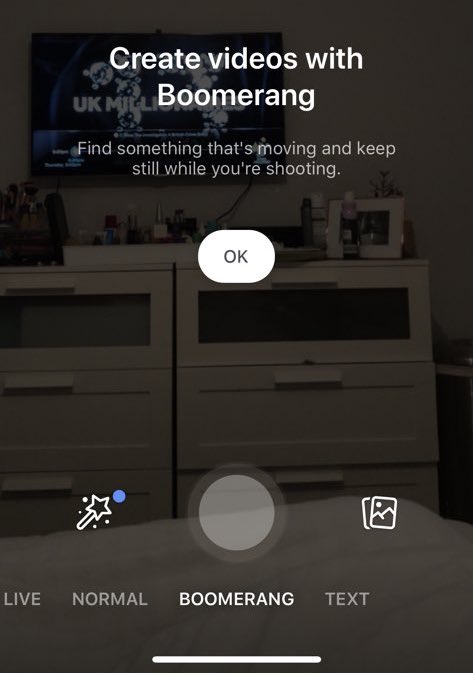
Facebook added looping GIF creation to the Facebook Camera a year ago, but those can feel a bit jarring since they start back at the beginning once they end. Some users no longer have that GIF option, so it’s potentially being replaced by Boomerang’s established brand and more silky back-and-forth animated video clips. Facebook confirms that this feature is now rolling out to the Facebook Camera.

As we reported last week, Facebook is determined to make Stories work. Despite the criticism of it being a rip-off of Snapchat and redundant given Instagram Stories, Facebook is trying new ways to make Stories more popular an accessible. That includes tests of Stories as the default destination for content shot with the Facebook Camera, showing bigger tiles with previews of Stories atop the News Feed, and showing a camera and camera roll preview window when you open the status composer. Those, combined with these new features, could give Facebook Stories a boost in utility and visibility.

Facebook believes social media is on an inevitable journey from text to photos to videos to Stories equipped with augmented reality. Since Snapchat refused its acquisition offers, Facebook is now on a quest to evolve into an AR company rather than having to buy a big one. It remains to be seen whether users think AR is a novelty or a core utility, but Facebook won’t wait to find out.


Read Full Article
Facebook Stories adds funky AR drawing and Instagram’s Boomerang


You’ll soon be able to draw on the world around you and shoot back-and-forth Instagram Boomerang GIFs with the Facebook Camera. Bringing additional creative tools to the Facebook Camera could make it a more popular place to shoot content and help the company compete with Snapchat.

“We wanted to give people an easy way to create with augmented reality and draw in the world around them” says John Barnett, a Facebook Camera Product Manager about the feature it calls “3D drawing”. It’s rolling out to users over the coming weeks. Matt Navarra first spotted the features, and provided a copy of the video at the bottom of this post.

With AR drawing, you can scribble on the world around you, then move your camera and see the markings stay in place. It’s a fun way to add graffiti that only exists inside your screen. You can add the drawings before or while you’re recording, allowing you to draw on something out of frame, then pan or unzoom to reveal it. Facebook will eventually add more brushes beyond the pastel gradient colors seen here.

Facebook tells me the technology understands the corners and objects in the room to create a 3D spec. Facebook could that use that to detect surfaces like walls and tables to wrap the drawing onto them. Currently, it only does that when it’s confident about the object recognition, such as in optimal light conditions.

Since drawing is a universal language, the feature could make AR easy to use for younger users and Internet novices. Facebook launched its AR effects at F8 last April, and has recently added AR tracker target experiences that are triggered by real-world posters or QR codes. It all started with the company acquiring fledgling AR masks startup MSQRD in 2016.

Facebook added looping GIF creation to the Facebook Camera a year ago, but those can feel a bit jarring since they start back at the beginning once they end. Some users no longer have that GIF option, so it’s potentially being replaced by Boomerang’s established brand and more silky back-and-forth animated video clips. Facebook confirms that this feature is now rolling out to the Facebook Camera.

As we reported last week, Facebook is determined to make Stories work. Despite the criticism of it being a rip-off of Snapchat and redundant given Instagram Stories, Facebook is trying new ways to make Stories more popular an accessible. That includes tests of making Stories the default destination for content shot with the Facebook Camera, showing bigger tiles with previews of Stories atop the News Feed, and showing a camera and camera roll preview window when you open the status composer. Those, combined with these new features, could give Facebook Stories a boost in utility and visibility.

Facebook believes social media is on an inevitable journey from text to photos to videos to Stories equipped with augmented reality. Since Snapchat refused its acquisition offers, Facebook is now on a quest to evolve into an AR company rather than having to buy a big one. It remains to be seen whether users think AR is a novelty or a core utility, but Facebook won’t wait to find out.


Read Full Article

The Story of iPhone X’s Notch and How It’s Influencing Phone Designs


Reviews for the Apple iPhone X have primarily been positive since the handset was first announced in September 2017. Opinions about the device’s so-called “notch” have been polarizing, however.

Let’s look at the iPhone X’s most controversial hardware feature. We’ll also examine how Apple’s competitors are now embracing similar notches on their future mobile devices and what Cupertino plans on doing with the notch on upcoming mobile devices.

What Is the iPhone X Notch and What Does It Do?

The black housing notch on the iPhone X resides at the top of the smartphone. Inside, it contains the device’s all-new front-facing TrueDepth camera system, which powers the iPhone’s Face ID facial recognition tool. The notch also includes the components necessary for Apple’s Animoji feature, which remains exclusive to iPhone X.

iPhone X Notch Close-up

As you can see from the following quotes taken soon after the phone was announced, reactions to the notch were mixed, at best:

  • The Daring Fireball’s John Gruber called it offensive, as well as “ungainly and unnatural.”
  • The Verge suggested the notch was an “odd design choice.”
  • After some reflection, Mashable said “the notch might turn out to be the iPhone X’s best feature.”

As an early iPhone X buyer, I hated the notch—for the first few days, anyway. In time, however, I began to accept it, and now somewhat embrace it. Yes, the hardware array takes up some space. Nonetheless, it doesn’t get in the way when browsing the web or using my favorite apps.

I’ve also grown to believe the notch is necessary from a design perspective. Why? Because its distinct look makes the costly iPhone X immediately recognizable, which is vital to both users and Apple alike.

As Mashable explains:

“It’s so distinctive that it will become that one little thing that separates the iPhone owners from owners of, well, all other phones. On the iPod, it was the white colored earphones and cables. On the MacBook, it’s the Apple logo on the back. And on the iPhone, it’s going to be the notch.”

Expanding on this, the arrival of the iPhone X notch reminds me of Apple’s signature home button, which launched on the original iPhone way back in 2007. This input tool, like the notch, was heavily criticized in the early days for taking up precious real estate on the device.

This criticism didn’t keep it from popping up on all iPhone and iPad models since then, until the button-less iPhone X launched in November 2017.

Competitors Are Now Embracing the Notch

As the iconic proverb goes, imitation is the sincerest form of flattery. Therefore, it shouldn’t come as much of a surprise that other smartphone makers are now embracing the notch concept on some of their products.

OnePlus, for example, will include a notch on the OnePlus 6. Perhaps because of the iPhone X criticism, OnePlus 6 users will have to option to black out the side of the screen around the notch, thereby hiding it.

The Huawei P20 and Huawei P20 Pro, two of the first non-iPhones to include a notch, also allow this. Meanwhile, the ZenFone 5 includes a notch and the LG G7 could as well.

OnePlus 6 Notch Options

There’s also the Essential Phone, which has the distinction of being the first smartphone to embrace a notch. It arrived in May 2017, four months before the iPhone X.

Do you need more proof of the notch’s popularity? Android P, the successor to Android Oreo, is also catering to cutout smartphone designs like the notch. As CNET confirms:

“Android is the dominant mobile software on the planet, powering 85 percent of smartphones shipped globally, according to IDC. So Google’s big focus on notches signals a change in where hardware design is headed.”

Not everyone is joining in the notch parade, however. The biggest Android device maker on the planet, Samsung, didn’t include a notch on the Galaxy S9 or Galaxy S9 Plus. When announcing the new models in early 2018, the company jabbed, “And as always, you know, there’s no notch.”

Changes Coming to the iPhone X’s Notch

As you can see above, the notch concept in smartphone design is alive and well and doesn’t look like it’s going away anytime soon. Nonetheless, it does appear Apple plans to adjust the look of the notch on future iPhones.

Some 2018 reports suggest Apple will place the cameras and sensors associated with the notch on in a different location beginning in 2019, thereby removing the need for a notch. Other reports, however, suggest the notch will remain, but with a smaller footprint.

As I’ve already mentioned, despite early concerns, I like the iPhone X notch, although there is room for improvement.

If there’s one aspect I’d like to see changed about the notch, it’s the color. The black notch looks fine when you’re using the phone vertically. However, it’s a different story when the iPhone X is horizontal. It’s been my experience that the placement of the notch is most noticeable when you’re watching a video in this position.

In a perfect world, I’d love to see Apple introduce a notch on future iPhones that changes its look based on the content you’re viewing. I’m not sure whether this would be possible. However, we’re talking about Apple here—it’s a company known for thinking differently.

The Notch Is Here, Get Used to It

Some folks will never get past the look of the iPhone X notch. For those people, there are plenty of other options available, even from Apple. The iPhone 8 and iPhone 8 Plus don’t have notches, after all. And despite the strong push, not all upcoming Android smartphones will have a notch either.

(And you can always download iPhone X notch wallpaper that hides the notch.)

While it may tinker with the design, Apple isn’t likely to remove the notch altogether on future iPhones. The company’s TrueDepth camera and Face ID technology are likely to expand to other products in the future, including next-generation iPads and perhaps Macs. If a notch is necessary to bring those features and tools to other products, Apple will do so, regardless of some criticisms.

There’s more to learn about the iPhone X, which you can learn more about in our guide to mastering the iPhone X.


Read Full Article

Are hardware makers doing enough to keep Android phones secure?


For all the good of Android’s open-source approach, one of the clear and consistent downsides is that the onus to issue software updates falls on the manufacturer. That can mean frustration for those waiting for the latest and greatest feature updates — and in some cases, it can put your phone at risk with delayed or missed security updates.

A pair of researchers at Security Research Labs recently shared a study with Wired highlighting some of these risks. The team’s findings are the result of testing 1,200 Android handsets from all the major manufacturers over the course of two years, examining whether manufacturers had offered the security patches as advertised.

According to SRL, missed security patches were discovered on a wide range of different handsets across manufacturers. Sony and Samsung were both flagged as having missed some security patches — in some cases in spite of reporting that they were up to date. “It’s almost impossible for the user to know which patches are actually installed,” one of the researchers told the site.

Xiaomi, Nokia, HTC, Motorola and LG all made the list, as well, while TCL and ZTE fared the worst in the study, with, on average, not having installed more than four of the patches they claimed to have installed on a given device.

In a statement provided to TechCrunch, Google pointed to the importance of various different means used to secure the Android ecosystem. The company believes that the SRL findings might not tell the full story when it comes to keeping devices secure.

“We would like to thank Karsten Nohl and Jakob Kell for their continued efforts to reinforce the security of the Android ecosystem,” the company writes. “We’re working with them to improve their detection mechanisms to account for situations where a device uses an alternate security update instead of the Google suggested security update. Security updates are one of many layers used to protect Android devices and users. Built-in platform protections, such as application sandboxing, and security services, such as Google Play Protect, are just as important. These layers of security—combined with the tremendous diversity of the Android ecosystem—contribute to the researchers’ conclusions that remote exploitation of Android devices remains challenging.” 

The company also pointed us to this year in review post, which sheds a bit more light on the matter.


Read Full Article
Duolingo Helps Language Learners Level Up


Duolingo has been helping people learn languages for several years. And with 25 million users and 31 courses—you can even learn to speak Klingon—Duolingo needs to keep innovating. Thankfully, the company is doing just that, with an all-new levelling system.

While everyone starts learning a new language enthusiastically, this can turn into frustration as things become more difficult. Duolingo was already countering that with a varied skill tree and an element of fun, but this new levelling system goes even further.

Crown Levels Let You Double Down on Skills

Previously, Duolingo offered a simple progression system. Lessons were separated into themes, and you would complete one before moving onto the next, more difficult, one. With Crown Levels, you can still do that, or you can double down on a particular theme.

Each skill now has five levels. Complete one, and you earn a crown. You can then choose to move onto another aspect of the language, or delve deeper into that skill. This means casuals can just learn the basics, while advanced users can challenge themselves.

Duolingo isn’t stopping there either. The company is also working on new types of lessons to complement the usual listening, speaking, and typing. So you’ll soon have to deal with phonetics and multiple choice questions designed to test you further.

At the time of writing around half of all Duolingo users are using the new system. However, Crown Levels will be rolling out to everyone within the next few weeks. Some people may struggle to comprehend the changes, but most people will embrace them.

Giving People Choice When Learning Languages

These improvements give Duolingo users more choice when it comes to learning a new language. They can now choose which path to follow and their target fluency level. And for anyone that struggles, Duolingo has provided users with a Crowns FAQs.

This increased level of choice and freedom is important when some people just want to learn a few key phrases to get by on vacation, while others want to learn a language inside and out in order to converse with distant friends and family.


Read Full Article