Live Intraday Trading on 4-May-2020
Please click on the following link to view full post.
https://intradayguruji.blogspot.com/2020/05/live-intraday-trading-on-4-may-2020.html
Via http://intradayguruji.blogspot.com
05 May 2020

Plex Adds Crackle Content to Its Free Streaming Service
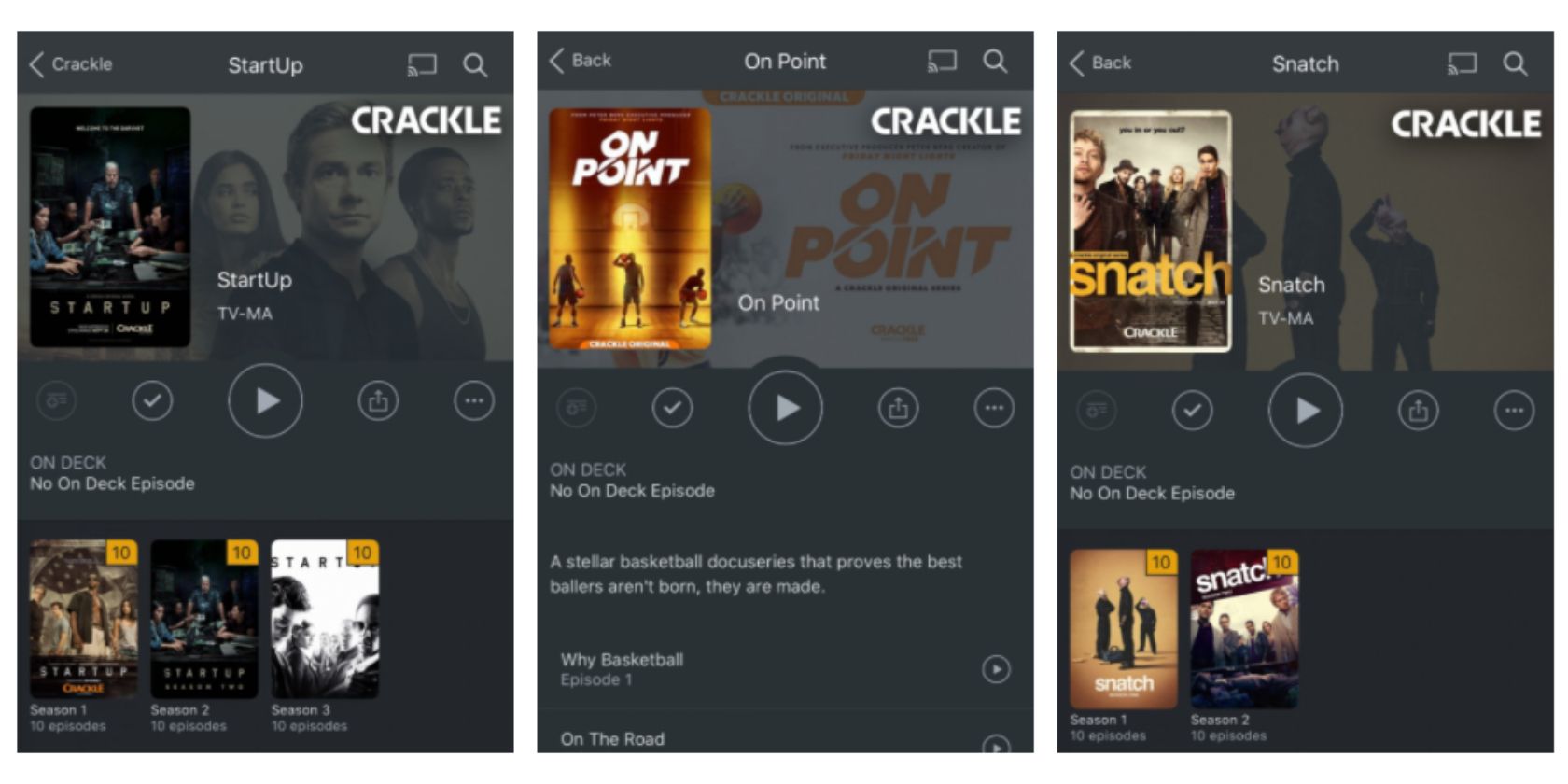
Plex has added Crackle content to its free streaming service. Which is the ad-supported Plex Free Movies and TV. This means that Plex users in the US suddenly have access to thousands more TV shows, movies, and documentaries for free.
In December 2019, Plex launched its own free streaming service. This is full of movies, TV shows, and documentaries, all of which are free to watch. However, Plex has partnered with Crackle to bring thousands more free titles to viewers in the US.
How to Watch Crackle Content on Plex
It should be noted that most of Crackle’s catalog is older movies and TV shows you’ve probably already seen. However, there are some big names, with movies including Captain Phillips and The Illusionist, and TV shows including Hell’s Kitchen and Roseanne.
As is the fashion these days, Crackle has already produced its own original content. This includes On Point, a docuseries following high school basketball players, and Yelawolf: A Slumerican Life, which takes you on tour with the hip-hop pioneer.
Plex claims that as a result of its partnership with Crackle, “Plex users in the US will now be able to stream more individual movies than you can stream on Netflix.” Which is a bold claim but an intriguing one for those who don’t mind watching ads.
We’ve got a ton of titles new to Plex this month. Enjoy big-screen hits such as Captain Phillips, Failure to Launch, Patriot Games, The Usual Suspects, Bulletproof Monk, and more.
And of course, it’s all free, so start streaming now! (US only.) https://t.co/cgbpyPBuRW pic.twitter.com/AhY7lRELf4
— Plex (@plex) May 1, 2020
To watch Crackle content on Plex, just open the Movies & TV section of the Plex app. There you’ll find all of the movies and TV shows offered by Crackle, organized in various different ways. Just click on a title and tap Play to start streaming it for free.
The Best TV Shows to Watch on Crackle
While Plex is only offering Crackle content in the US, the company claims to be “working on new partnerships to deliver even more free streaming content to all our friends around the world in the coming weeks.” Or you could just use a VPN instead.
This is a great deal for Plex users, who can now watch even more content for free just for putting up with the occasional commercial break. And if you’re new to Crackle and unsure where to start, we have listed the best free TV shows to watch on Crackle.
Read the full article: Plex Adds Crackle Content to Its Free Streaming Service
Read Full Article
5 Lesser-Known Free Online Image Editing Tools to Replace Photoshop

Adobe Photoshop is the king of image editors and it costs a pretty penny. But don’t worry, there are other online photo editors like Photoshop that work in your browser on any platform and are also free.
No, we aren’t talking about the usual popular online Photoshop alternatives like PicMonkey, Pixlr, SumoPaint, and others. Instead, we’re focusing on relatively little-known image editors that make it easy for anyone to apply basic effects on their photos.
Naturally, none of these apps are going to be as powerful and full-featured as Photoshop itself. Adobe has hundreds of engineers working on a single product, while these online apps are usually labors of love.
But each of these does a great job to become a free Photoshop alternative online.
1. Photopea (Web): The Best Free Photoshop Alternative Online

There is no debate about this. Forget about Pixlr, forget about SumoPaint, forget about anything else you’ve tried. Once you use Photopea, you can’t go back. It’s the best free online editor like Photoshop, even giving you a similar look and feel.
There are detailed tutorials available for it so that you can learn how to use any feature. All the popular Photoshop features are available, like clone stamp, layers, filters, and so on. You can even open a PSD file or save an image as PSD.
Photopea’s best part is that it does all its computation offline, so your pictures are never sent to the cloud. Open the website and that’s it, the rest of the work is happening on your computer. That not only makes it faster than working online but also protects your data.
Photopea has been around for some time, but never really got its due. With its regular updates to add new features, it has been gaining more popularity. Hop on this bandwagon now. Chromebook users should especially give this one a whirl.
2. Mara.Photos (Web): Swiss Army Knife of Tools and Effects

Mara slipped under most people’s radar when it launched, but it’s a brilliant and simple image editing app. If you’re looking for a free online Photoshop alternative, it mimics many of the bigger software’s features through a whole bunch of effects, filters, and tools.
First, you need to select the effect you want to apply. You can find all the options listed on the homepage. There are the common image editing options like Resize, Crop, Rotate, Type, Pop, Vintage, Art etc.
You will also find many other features like Bulge/Pinch, Wave, Splitter, Color Tint, Bump, Palette Extractor, Optimize Palette, GIF Editor, APNG/AWebP Editor, Mirror, Kaleidoscope, ASCII Art, 3D Anaglyph, Glitcher, RAW, EXIF, PNG Metadata, Steganography, ANSI Art, and even a Vector Graphics Editor.
You can then upload the image from your desktop, cloud drive, or share a URL. Each effect has multiple tweaks you can make, choosing how deeply to apply the effect. And yes, once you apply an effect, you can transfer the image to another tool or effect.
The simple interface is great for novices, making Mara among the easiest online Photoshop alternatives for basic photo editing.
3. Remove BG (Web): Automatically Remove Backgrounds of Photos

Remove BG is one of the best single-purpose online photo-editing apps available. It’s almost magical. In Adobe Photoshop, the magic wand tool lets you select the main subject of an image and then remove the background in the picture. Well, Remove BG is the free online Photoshop alternative to do that in any browser.
You have to try it out to see how well it works. Upload a picture from your computer or paste a URL. Remove BG will work on it for a few minutes and then you’ll get a result of the before and after version of the picture. You can download and save it to your computer for free, without any watermark. It’s fantastic.
Remove BG is by far the best free Photoshop alternative online we’ve seen for this feature. Others don’t offer the same accuracy or make you pay to remove watermarks. Bookmark this web app, you’ll need it.
4. Image Toolbox (Web): Easy Batch Image Resizing and Converting

Photoshop’s scripts make it easy to resize a batch of images quickly. If you want a free online Photoshop alternative for that, Image Toolbox has your back.
The web app lets you resize a bunch of images at the same time. You can resize them based on specific resolutions for width or height, or by percentage of the original picture.
At the same time, Image Toolbox can also convert all images to JPEG or PNG, depending on what you want. As always, you can choose the quality of the JPEG or PNG file, which determines the file size too.
One nice feature is that you don’t need to re-upload the pictures if you don’t get it right the first time. There’s an option to “Re-edit and retry”, which saves the time and energy of uploading a huge number of images a second time to get it right. That’s a smart online photo editor offering a key feature of Photoshop.
5. Promo Social Media Image Resizer (Web): Every Social Size, All at Once

Photoshop scripts make it easy to convert one image into several different sizes for different social media uses in one click. Promo created a handy online photo editor like Photoshop to make this free and simple.
It’s surprisingly easy to use. First, upload a picture or add it from a URL. Then scroll down to select the types of image sizes you want. Promo has templates for everything you’d need in Facebook, Twitter, Instagram, YouTube, Pinterest, LinkedIn, Snapchat, Email and Blog, and Google Display Network. These include every type of profile picture, cover image, story, and other space where you can upload the image.
The downloaded package of zipped files has the image type in the file name, so it’s easy to know what to upload where. It’s a fantastic tool that makes life much easier.
More Modern Online Photo Editors
The multitude of options and features in Photoshop isn’t for everyone. Many people need something simpler. For them, these free online Photoshop alternatives are a much better option as it doesn’t require deep knowledge of image editing.
In fact, the new trend seems to be to make online photo editors like Photoshop but without the confusing interface. You’ll get all the features and tools, but a simpler way to apply them.
The new Pixlr X and Pixlr E and the super-simple Doka are but two examples of such free and modern online photo editors that you should check out.
Read the full article: 5 Lesser-Known Free Online Image Editing Tools to Replace Photoshop
Read Full Article
How to Create Custom Windows Desktop Icons With Rainmeter

Do you think the default Windows icons are underwhelming? Do you long for something more unique?
Rainmeter is arguably the best customization tool for Windows. It’s great for creating custom icons and entire custom skins. Your imagination and experience with the software is the only limitation as to what you can do with the custom icons.
The best part about Rainmeter icons? Whether you’d like to use the fantastic fan-made icons already at your disposal or want to create custom icons yourself, everyone can experience the satisfaction of custom desktop icons with Rainmeter. Here’s how!
How to Create Rainmeter Custom Icons
Rainmeter icons are some of the simplest skins to make but can also have the most substantial impact on your desktop. You can add custom Rainmeter icons for any program, app, or file path you want. All of those programs and files that never appear using the default Windows search option are suddenly a single click away.
It is best to learn how to create an icon before beginning to download and install icon sets. Since Rainmeter skin settings are text-based, learning your way around Rainmeter skins will help you get the most out of your skins.
That way, you can download and edit skins at your leisure instead of relying on already-made ones. Rainmeter has a very active user base, after all!
Create a Rainmeter Icon
You’ll need two items to create a Rainmeter skin: an image file and a Rainmeter (INI) skin file.
Head to the Rainmeter folder within your Documents folder, which is created by default when you install Rainmeter. Then, create a folder within this directory to hold your icons. Name it whatever you’d like.
Now you need to place your two files within this folder. Double-click your newly created folder, right-click an empty space within this directory, and select New > Text Document. Input the following:
[Rainmeter]
Update=1000
LeftMouseUpAction=["[address]"]
[Background]
Meter=Image
ImageName=[image file name].png
W=[width]
H=
PreserveAspectRatio=1
Save this document with the INI extension (for example, muologo.ini) and not with the usual TXT extension. Head to File > Save As. Under Save as type, select All Files. Enter your file name, then change the TXT extension to INI.
This will allow Rainmeter to recognize your skin. You’ll have to replace the three bold parameters above.
- [address]—Copy the file path of your choice here, within the two quotation marks. The LeftMouseUpAction parameter signifies the action is committed whenever the user left-mouse clicks the icon.
- [image file name]—Input the name of your image file, which should be in the same directory as your INI file, here. This will allow Rainmeter to call the image for your icon.
- [width]—Specify the width, measured in pixels by default, next to your W parameter. Since our PreserveAspectRatio parameter is set to 1, the width will determine both the width and height of your icon. If you leave width blank, your image will appear in its native resolution.
Your Rainmeter folder should look something like the following:

Icons can, of course, be considerably more complex (especially if they provide a large icon library and additional functions). However, you now know and understand the basic format for Rainmeter icon creation.
Placing Your Rainmeter Icon
Now that you’ve created your icon, it’s time to place it. First, ensure that you have your INI and image file in the same folder. Next, click Refresh All in the lower left-hand side of your Manage Rainmeter window.
Then, browse to your newly created icons folder. This folder should be located under the Active skins section in your Rainmeter window.

Click on the drop-down menu beside your icon folder name (MUO Icon, as written in the example above), and you should see your INI skin file.

If you don’t see the INI skin file, ensure you’ve added the INI extension to your file. Once you’ve found your INI file, double-click the file or select Load from the Rainmeter window. You should now see your skin on the desktop: if not, remember to ensure your files are both placed and configured correctly.

That’s how to create icons in Rainmeter!
The Best Rainmeter Custom Icon Sets
While it’s great to know how to create a custom Rainmeter icon, you don’t have to create them all from scratch. As you might expect, the Rainmeter custom icon creation scene has a lot of options. Here are some of the best Rainmeter icon sets for you to check out.
1. Honeycomb
Honeycomb is one of the most popular Rainmeter custom icon sets. For the beginner Rainmeter guru, Honeycomb is a must. The Honeycomb icon set provides stylish, high-quality hexagonal icons for various programs, folders, and websites.

The Honeycomb library is extensive. The developers continually refine Honeycomb to create more complex and feature-packed icons. Additionally, Honeycomb + GGL will provide users with similar, custom Rainmeter icons with an additional mouse-over effect. The mouse-over effect will add a background to your desktop, reflecting the icon you choose.

If you need a few Rainmeter icons to spice up your desktop, Honeycomb is a great way to go.
2. Circle Launcher
Another fantastic, simple icon is Circle Launcher. If you don’t appreciate the definite line aspect of Honeycomb, you should give the Circle Launcher set a try.

It does everything you’d want from a beginner icon set, and nothing you don’t.
3. Silmeria Dock—Honeymoon
A simple-yet-sophisticated drawer icon set, Silmeria Dock—Honeymoon provides a simple interface for users to add, take away, and rearrange their icons.

Remember, you can then change whatever aspect of these icons/icon docks you prefer.
4. Vivid Launcher
A magnificent addition to the Rainmeter folds, Vivid Launcher is a highly customizable icon launcher with a neat mouse-over effect to boot.

Vivid Launcher’s icons, along with its mouse-over feature, are easy to change as well. Simply right-click the skin and select SETTINGS to modify.
Once you find an icon set or Rainmeter skin you like, find out how to create a custom Rainmeter theme for your entire desktop.
Use Flaticon for Custom Icon Image Sets
The following are not Rainmeter skins. At least, not yet. When you begin creating your custom icon sets, you’ll need plenty of icon images. That’s where websites like Flaticon come into play.

Flaticon provides users with beautiful, often free, icon images of all shapes and sizes. Best of all, they provide multiple image formats for any icon projects you take up.
What’s Your Favorite Rainmeter Icon Set?
Rainmeter allows users to create and customize their icons, offering endless possibilities. That includes options for laypeople and code-monkeys alike. Create your own icon and share it. Use someone else’s. That’s what makes Rainmeter fantastic.
You don’t have to stop there, either. We’ve previously shown you how to use Rainmeter to create a Parallax desktop, a 3D hologram, and an interactive live wallpaper.
Read the full article: How to Create Custom Windows Desktop Icons With Rainmeter
Read Full Article
Tumblr now removes reblogs in violation of its hate speech policy, not just the original posts
Tumblr is making a change to how it deals with hate speech on its blogging platform. The company announced today it will also remove the reblogs (repostings) from any blogs that were suspended for violating its policies around hate speech. Already, the company says it’s identified nearly 1,000 blogs that were banned for blatant violations of its hate speech rules. Most of these blogs contained Nazi-related content, it said. This week, Tumblr began to remove all the reblogs from these previously banned sites, as well — a number totaling 4.47M individual posts.
In an announcement, Tumblr explains its reasoning behind the decision to also remove the reblogged material:
We’ve listened to your feedback and have reassessed how we can more effectively remove hateful content from Tumblr. In our own research, and from your helpful reports, we found that much of the existing hate speech stemmed from blogs that have actually already been terminated. While their original posts were deleted upon blog termination, the content of those posts still lived on in reblogs. Those reblogs rarely contained the kind of counter-speech that serves to keep hateful rhetoric in check, so we’re changing how we deal with them.
In other words, it saw no value in allowing the hate speech to live on in this reposted state, as the majority of the reblogs weren’t engaged in providing what Tumblr referred to as “educational” or “necessary counter-arguments” to the hate speech.
When asked if it did, in fact, remove reblogs of an educational nature, Tumblr said it used human moderators to determine which content was in violation and which was not. Any blogs containing “productive counter-conversations” or “educational blogs” were not removed as part of this process, we’re told.
In addition, Tumblr says that moving forward, it will evaluate all blogs suspended for hate speech and consider mass reblog deletion when appropriate.
The company consulted with outside experts — including Center for Democracy and Technology, Brennan Center for Justice, EFF, and Stanford tech policy academic Daphne Keller — to determine the right course of action. Ultimately, Tumblr believes the new approach is aligned with the recommended best practices around hate speech it has been advised to adopt.
“We are, and will always remain, steadfast believers in free speech. Tumblr is a place where you can be yourself and express your opinions. Hate speech is not conducive to that,” the company’s announcement read. “When hate speech goes unchecked, it eventually silences the voices that add kindness and value to our society. That’s not the kind of Tumblr any of us want.”
Tumblr also noted its decisions it’s making aren’t being left up to A.I. and algorithms. Instead, Tumblr asks users to flag hate speech they come across for review by Tumblr’s Trust & Safety team.
As expected, there’s a debate about the policy taking place in the comments of the Tumblr post about the changes. On one side are those who support the idea of companies enforcing policies around the sort of content they do not want to host. On the other, are the free speech advocates who see any such policy as a form of censorship.
The effort to take more action on hate speech follows Tumblr’s 2018 decision to ban porn from its platform after getting kicked out of Apple’s App Store for hosting the content. Similarly, hosting hate speech reblogs could cause problems with Apple’s own rules.
Tumblr has made few changes since its acquisition by WordPress owner Automattic from (TechCrunch parent) Verizon in 2019. But its earlier decisions to clean up its site have had a negative impact on its traffic.
Its significantly devalued price point at the time of the Automattic deal was attributed to its decision to remove NSFW content. Almost every meaningful metric was down year-over-year since the ban, including total visitors, uniques, average site visit, traffic, daily active users, and more. Meanwhile, the younger demographic who used to populate Tumblr in the millions have largely moved on to expressive, video-centric social platforms, like TikTok and Twitch.
Tumblr’s Community Guidelines haven’t been updated to include its decision to remove reblogs of hate speech, but its full hate speech rules can be viewed here.

Read Full Article
All product creators can learn something from Jackbox Games’ user experiences
During this period of shelter-in-place, people have had to seek out new forms of entertainment and social interaction. Many have turned to a niche party series made by a company best known for an irreverent trivia game in the ’90s called “You Don’t Know Jack.”
Since 2014, the annual release of the Jackbox Party Pack has delivered 4-5 casual party games that run on desktop, mobile and consoles that can be played in groups as small as two and as large as 10. In a clever twist, players use smartphones as controllers, which is perfect for typing in prompts, selecting options, making drawings, etc.
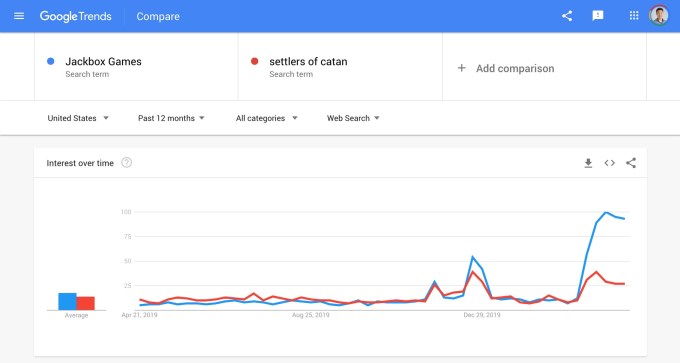
The games are tons of fun and perfect for playing with friends over video conference, and their popularity has skyrocketed, as indicated by Google Trends. I polled my own Twitter following and found that nearly half of folks had played in the last month, though a full third hadn’t heard of Jackbox at all.
How do these games work?
There are more than 20 unique games across Jackbox Party Packs 1-6, too many to explain — but here are three of the most popular:
- Fibbage: A twist on the traditional trivia game, players are asked to invent an answer to a question of obscure knowledge (e.g. “a Swedish man who works as a dishwasher receives disability benefits due to his unusual addiction to ____.”) Then all the invented answers are mixed in with the truth and players must select the real answer while avoiding fakes. You earn points for guessing correctly and for tricking other players (the answer is “heavy metal”).
Read Full Article

Google Meet shows up in Gmail inboxes, a few years too late
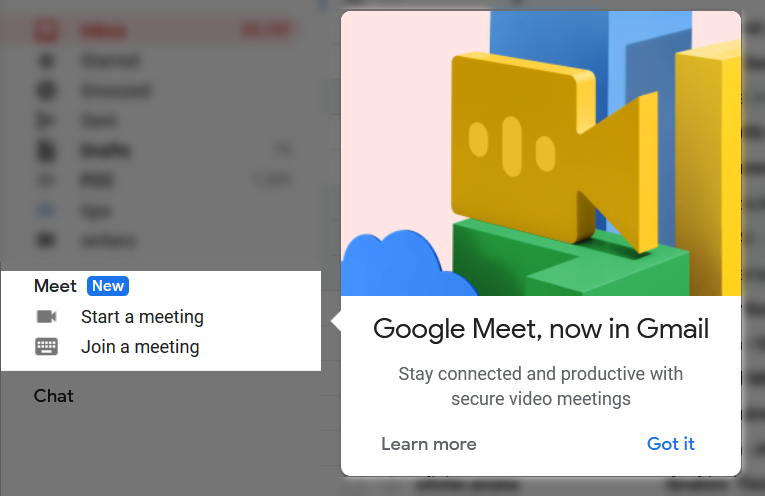
Google Meet — the video call service formerly known as Hangouts Meet, which itself was an offshoot from Hangouts, not to be confused with Google Chat, Duo, Allo, or any of the company’s other communications products — is finally making its debut on Gmail accounts, where it probably should have been since 2010.
Everyone with a Google account has access to Meet as of a few days ago, when Google removed most of the restrictions that made the product a go-to for many business customers but a non-starter for everyone else.
As they announced then, anyone with a Google account can make calls with up to 100 people, for up to an hour. The option to do so will appear on the sidebar, where one will can start a meeting and invite participants in a pop-up browser window — it’s quite fast and a dial-in and PIN are provided immediately — or join an existing meeting using a code.
 It’s a welcome improvement, to be sure. But it’s also something that on reflection one wonders why Google hasn’t had there for years.
Despite running one of the world’s largest communications platforms and owning its most popular operating system, person to person communication has always been something of a puzzler for Google. Every couple years the company debuts a new and ill-advised app or service that’s confusingly branded, competes with its existing offerings, and isn’t even available for most people to use. Sometimes they even do two at once!
This experimental approach (unsuccessfully aping the old, weird Google) wasn’t a problem when there was the only pressure was the usual trickle of enterprise and startup innovations that Google could easily bat down from its high seat. But the coronavirus pandemic produced a tsunami of demand for video calling that suddenly threw the competition into gear.
As we have seen, Zoom emerged as the dark horse winner, despite serious security issues and other general murkiness.
The secret was, of course, simplicity: one or two clicks and it “just works.” While Microsoft, Google, Facebook, and other major tech companies have seen huge gains, and startup efforts like Houseparty and Discord have also spiked, Zoom’s ubiquity is such that people speak of “doing a Zoom call on Google” or “we can do a Zoom meeting on Skype.” It’s the ultimate insult.
As a strategy by Google to acquire users, this expansion of Meet is months too late, and as an attempt to salvage its dignity, years too late. After the execution of Reader and the utter boondoggle that was Google+, the company will forever be considered as having a gun in each hand, one pointed at users and one at its own foot. Sorry, do I seem bitter?
At the same time, it’s quite clear that Google has the capability to create a simple, cross-platform, universal video calling service. After all, it offered one for years: GChat.
It’s not really clear what happened to this popular, practical service, which unsurprisingly lived exactly where Meets now lives, and provided a similar (if simpler) service. Now is not the time to reopen the case of GChat or the dozens of other beloved products Google has sent to the big datacenter in the sky, but it’s worth considering what might have been the case had the company simply, as it said it wanted to, “put more wood behind fewer arrows” and made that service the one, developing and adding to it as it has with Maps and Search.
GChat would be open in every browser (in the omnipresent Gmail tab), able to launch personal or business meetings instantly (as Meet can now), and it would be on every phone as well, the way Google’s most popular apps, like Maps, are. As a (mostly) trusted, presumably encrypted chat and occasional multimedia app, it could have taken the wind out of WhatsApp and Messenger’s sails, rivaled iMessage, and perhaps even given rise to the more decentralized social network the company seemed to want to build some years back.
Ah well. “Of all sad words of tongue or pen, the saddest are these: ‘It might have been.’ ”
Enjoy Meet, if you can, and while it lasts.

Read Full Article
Sam Altman backs ‘video-first’ dating app Curtn
As the quarantine dramatically transforms social and romantic lives, a new dating app advised by Grindr founder Joel Simkhai and former YC chief Sam Altman is aiming to capitalize on the skyrocketing popularity of video chat.
CEO Brenden Strauss hopes his NYC-based startup Curtn can approach video calling in a mindful way during a time when so many people are sheltering in place and significantly cutting back on social interactions. Video chat can offer a temporary alternative for users that might otherwise meet up in the real world for a first date.
“What’s going on right now has entirely changed the dating game,” Strauss tells TechCrunch. “As people are struggling to connect, we’re giving people a better way to connect while they’re physically apart.”
The app is pushing video as its differentiating factor, encouraging users to create short videos for their dating profiles and aiming to move conversations to video chat after users match. Most of the major dating apps have had a complicated relationship with rich media over the past several years, moving away from sending pics or videos in favor of sidestepping the associated expenses and potential for abuse.

Bumble launched video calling in early 2019; Tinder does not support video communications.
While the company presents users with the ability to video chat with new matches, one user must get the okay from the other inside the app if they’re interested in making a call. Strauss says the team has built in reporting features from the beginning so that once bad actors pop up, they can be handled quickly.
“Safety is our top priority,” Strauss says. “The last thing we want is for this to turn into Chatroulette.”
Strauss and CTO Benjamin Honig have some noteworthy advisors to help them build a next-gen dating app. For one, Strauss’ boyfriend Joel Simkhai is the co-founder of Grindr and was one of his biggest inspirations for building out the app, he says. Former YC president and current OpenAI CEO Sam Altman is also serving as an advisor and is one of the startup’s first investors.
The team has raised a small ($425,000) pre-seed round of investment to get the app ready to share with the world.
The app’s launch is a crucial time for the company to make a splash, capitalizing on the renewed interest in video chatting apps across the board. During an earnings call this past week, Facebook CEO Mark Zuckerberg said time on group video chats had increased 1,000%. Last week, Houseparty shared they had received 50 million sign-ups in the past month.
Strauss says the team has been building out a marketing strategy with a spread of social media influencer partnerships.
Curtn’s biggest challenge is reaching critical mass and acquiring a network of users across different geographies that can encourage widespread usage of the app. The app is casting a wide net, aiming to court users of any and all sexual orientations. For the time being, users of the service only receive 10 matches per day, an effort to limit the geographic spread of suggestions and make the most of the early user base.
With video calling continuing to be a rare feature for dating apps, Curtn hopes it can own the feature and make the most of how the quarantine is shifting user habits.

Read Full Article
UK’s coronavirus tracing app strategy faces fresh questions over transparency and interoperability
The UK’s data protection watchdog confirmed today the government still hasn’t given it sight of a key legal document attached to the coronavirus contacts tracing app which is being developed by the NHSX, the digital transformation branch of the country’s National Health Service.
Under UK and EU law, a Data Protection Impact Assessment (DPIA) can be a legal requirement in instances where there are high rights risks related to the processing of people’s information.
Last month the European Data Protection Board strongly recommended publication of DPIAs in the context of coronavirus contacts tracing apps. “The EDPB considers that a data protection impact assessment (DPIA) must be carried out before implementing such tool as the processing is considered likely high risk (health data anticipated large-scale adoption, systematic monitoring, use of new technological solution). The EDPB strongly recommends the publication of DPIAs,” the pan-EU data protection steerage body wrote in the guidance.
Giving evidence to the human rights committee today, UK information commissioner Elizabeth Denham confirmed that her department, the ICO, is involved in advising the government on the data protection elements of the app’s design. She said the agency has been provided with some technical documents for review thus far. But, under committee questioning, she reserved any firmer assessment of the rights impacts’ of the government’s choice of app design and architecture — saying the ICO still hasn’t seen the DPIA.
“I think that is on the verge of happening,” she said when asked if she had any idea when the document would be published or provided to the ICO for review.
“Having that key document — and the requirement for the NHXS to do that, and provide that to me and to the public — is a really important protection,” Denham added. “Especially when everything’s happening at pace and we want the public to take up such an app, to help with proximity and notification.
“The privacy notice and the DPIA will both need to be shared with us and I do know that NHSX plans to also publish that so that they can show the public — be transparent and accountable for what they’re doing.”
The NHSX has given a green light for the ICO to audit the app in future, she also told the committee.
Coronavirus contacts tracing applications are a new technology which, in the UK case, entail repurposing the Bluetooth signals emitted by smartphones to measure device proximity as a proxy for calculating infection risk. The digital tracing process opens a veritable pandora’s box of rights risks, with health data, social graph and potentially location information all in the mix — alongside overarching questions about how effective such a tech will prove in battling the coronavirus.
Yesterday the BBC reported that the NHSX will trial the tracing app in the Isle of Wight this week.
“As we see the trial in the Isle of Wight we’ll all be very interested to see the results of that trial and see if it’s working the way that the developers have intended,” added Denham.
At a separate parliamentary committee hearing last week NHSX CEO, Matthew Gould, told MPs that the app could be “technically” ready to deploy nationally within two to three weeks, following the limited geographical trial.
He also said the app will iterate — with future versions potentially asking users to share location data. So while the NHSX has maintained that only pseudonymized data will be collected and held centrally — where it could be used for public health “research” purposes — there remains a possibility that data could be linked to individual identities, such as if different pieces of data are combined by state agencies and/or if the centralized store of data is hacked and/or improperly accessed.
Privacy experts have also warned of the risk of ‘mission creep’ down the tracing line.
Today the Guardian reported that the government is in talks with digital identity startups about building technology to power so called ‘immunity passports’, as another plank of its digital response to the coronavirus. Per the report, such a system could combine facial recognition technology with individual coronavirus test results so a worker could verify their COVID-19 status prior to entrance to a workplace, for example. (A spokeswomen for Onfido confirmed to TechCrunch that it’s in discussions with the government but added: “As you’d expect these are confidential until publicly shared.”)
Returning to the coronavirus tracing app, the key point is that the government has opted for a system design that centralizes proximity events on an NHSX-controlled server — when or if a user elects to self-report themselves suffering from COVID-19 symptoms (or does so after getting a confirmed diagnosis).
This choice to centralize proximity event processing elevates not just privacy and security questions but also wider human rights risks, as the committee highlighted in a series of questions to Denham and Gould today — pointing out, for example, that Denham and the ICO have previously suggested that decentralized architectures would be preferable for such high rights risk technology.
On that Denham said: “Because I’m the information commissioner, if I were to start with a blank sheet of paper [it] would start with a decentralized system — and you can understand, from a privacy and security perspective, why that would be so. But that does not, in any way, mean that a centralized system can’t have the same kind of privacy and security protections. And it’s up to the government — it’s up to NHSX — to determine what kind of design specifications the system needs.
“It’s up to government to identify what those functions and needs are and if those lead to a centralized system then the question that the DPIA has to answer is why centralized? And my next question would be how are the privacy and security concerns addressed? That’s what a DPIA is. It’s about the mitigation of concerns.”
Apple and Google are also collaborating on a cross-platform API that will support the technical functioning of decentralized national tracing apps, as well as baking a decentralized and opt-in system-wide contacts tracing into their own platforms.
The tech giants’ backing for decentralized tracing apps raises interoperability questions and technical concerns for governments that choose to go the other way and pool data.
In additional details for the forthcoming Exposure Notification API, released today, the tech giants stipulate that apps must gain user consent to get access to the API; should only gather the minimum info necessary for the purposes of exposure notification, and only use it for a COVID-19 response; and can’t access or even seek permission to access a device’s Location Services — meaning no uploading location data (something the NHSX app may ask users to do in future, per Gould’s testimony to a different parliamentary committee last week. He also confirmed today that users will be asked to input the first three letters of their postcode).
A number of European governments have now said they will use decentralized systems for digital contacts tracing — including Germany, Switzerland and the Republic of Ireland.
The European Commission has also urged the use of privacy preserving technologies — such as decentralization — in a COVID-19 contacts tracing context.
Currently, France and the UK remain the highest profile backers of centralized systems in Europe.
But, interestingly, Gould gave the first sign today of a UK government ‘wobble’ — saying it’s not “locked” to a centralization app architecture and could change its mind if evidence emerged that a different choice would make more sense.
Though he also made a point of laying out a number of reasons that he said explained the design choice, and — in response to a question from the committee — denied the decision had been influenced by the involvement of a cyber security arm of the UK’s domestic intelligence agency, GCHQ.
“We are working phenomenally closely with both [Apple and Google],” he said. “We are trying very hard in the context of a situation where we’re all dealing with a new technology and a new situation to try and work out what the right approach is — so we’re not in competition, we’re all trying to get this right. We are constantly reassessing which approach is the right one — and if it becomes clear that the balance of advantage lies in a different approach then we will take that different approach. We’re not irredeemably wedded to one approach; if we need to shift then we will… It’s a very pragmatic decision about what approach is likely to get the results that we need to get.”
Gould claimed the (current) choice of a centralized architecture was taken because the NHSX is balancing privacy needs against the need for public health authorities to “get insight” — such as about which symptoms subsequently lead to people subsequently testing positive; or what contacts are more risky (“what the changes are between a contact, for example, three days before symptoms develop and one day before symptoms develop”).
“It was our view that a centralized approach gave us… even on the basis of the system I explained where you’re not giving personal data over — to collect some very important data that gives serious insight into the virus that will help us,” he said. “So we thought that in that context, having a system that both provided that potential for insight but which also, we believe provided serious protections on the privacy front… was an appropriate balance. And as the information commissioner has said that’s really a question for us to work out where that balance is but be able to demonstrate that we have mitigations in place and we’ve really thought about the privacy side as well, which I genuinely believe we have.”
“We won’t lock ourselves in. It may be that if we want to take a different approach we have to do some heavy duty engineering work to take the different approach but what I wanted to do was provide some reassurance that just because we’ve started down one route doesn’t mean we’re locked into it,” Gould added, in response to concern from committee chair, Harriet Harman, that there might only be a small window of time for any change of architecture to be executed.
In recent days the UK has faced criticism from academic experts related to the choice of app architecture, and the government risks looking increasingly isolated in choosing such a bespoke system — which includes allowing users to self report having COVID-19 symptoms; something the French system will not allow, per a blog post by the digital minister.
Concerns have also been raised about how well the UK app will function technically, as it will be unable to plug directly into the Apple-Google API.
While international interoperability is emerging as a priority issue for the UK — in light of the Republic of Ireland’s choice to go for a decentralized system.
Committee MP Joanna Cherry pressed Gould on that latter point today. “It is going to be a particular problem on the island of Ireland, isn’t it?” she said.
“It raises a further question of interoperability that we’ll have to work through,” admitted Gould.
Cherry also pressed Denham on whether there should be specific legislation and a dedicated oversight body and commissioner, to focus on digital coronavirus contacts tracing — to put in place clear legal bounds and safeguards and ensure wider human rights impacts are considered alongside privacy and security issues.
Denham said: “That’s one for parliamentarians and one for government to look at. My focus right now is making sure that I do a fulsome job when it comes to data protection and security of the data.”
Returning to the DPIA point, the government may not have a legal requirement to provide the document to the ICO in advance of launching the app, according to one UK-based data protection expert we spoke to. Although he agreed there’s a risk of ministers looking hypocritical if, on the one hand, they’re claiming to be very ‘open and transparent’ in the development of the app — a claim Gould repeated in his evidence to the committee today — yet, at the same time, aren’t fully involving the ICO (given it hasn’t had access to the DPIA); and also given what he called the government’s wider “dismal” record on transparency.
Asked whether he’d expect a DPIA to have been shared with the ICO in this context and at this point, Tim Turner, a UK based data protection trainer and consultant, told us: “It’s a tricky one. NHSX have no obligation to share the DPIA with the ICO unless it’s under prior consultation where they have identified a high risk and cannot properly manage or prevent it. If NHSX are confident that they’ve assessed and managed the risks effectively, even though that’s a subjective judgement, ICO has no right to demand it. There’s also no obligation to publish DPIAs in any circumstances. So it comes down to issues of right and wrong rather than legality.
“Honestly, I wouldn’t expect NHSX to publish it because they don’t have to,” he added. “If they think they’ve done it properly, they’ve done what’s required. That’s not to say they haven’t done it properly, I have no idea. I think it’s an example of where the concept of data ethics bumps into reality — it would be a breach of the GDPR [General Data Protection Regulation] not to do a DPIA, but as long as that’s happened and we don’t have an obvious personal data breach, ICO has nothing to complain about. Denham might expect organisations to behave in a certain way or give her information that she wants to see, but if an organisation’s leadership wants to stick rigidly to what the law says, her expectations don’t have any powers to back them up.”
On the government’s claim to openness and transparency, Turner added: “This isn’t a transparent government. Their record on FOI [Freedom of Information] is dismal (and ICO’s record on enforcing to do something about that is also dismal). It’s definitely hypocritical of them to claim to be transparent on this or indeed other important issues. I’m just saying that NHSX can fall back on not having an obligation to do it. They should be more honest about the fact that ICO isn’t involved and not use them as a shield.”


Read Full Article
04 May 2020
10 Interesting Things You Can Learn on YouTube

Stuck indoors? You can turn around your frustration and pick up skills to learn and master. YouTube is just a click away and more than a billion videos on every topic imaginable are there for you to learn from.
Maybe, you aren’t sure about a new thing you would like to learn. Take on a 30-Day learning challenge and see where it takes you. If it’s somewhere fun, then you can experiment with other interesting topics.
To help you out, here are some cool things you can learn on YouTube. But first, here’s a tip…
Make Learning a Habit
Watch the Khan Academy video above for a dash of motivation in one minute flat.
YouTube is a fish-market on a Sunday morning. But in those 300 hours of video uploaded to YouTube every minute, there are many gems you can hook that few other sites can rival. You can learn on the go and you can learn in 61+ languages. You can learn virtually anything. I selected the ten videos below keeping three things in mind:
- These skills can be learned and practiced in under a day.
- The skills can be applied anywhere with everyday equipment.
- All these ten skills can make you seem smarter than your friends.
So, let’s put the three rules to the test with these ten interesting things you can learn to do on YouTube.
1. Improve Critical Thinking With the Socratic Method
Why is it important? A skill that can help us make better decisions and not jump to conclusions.
Critical thinkers will be in greater demand as AI takes over the mundane chores. It starts by observing important details, questioning assumptions, investigating data sources, removing biases, and the most difficult—outside the box thinking.
One of the techniques involved in critical thinking is the Socratic Method. YouTube has quite a few videos on this, but the one above is a quick introduction.
Critical thinking is also a big part of Common Core standards in schools. The Common Core focuses on developing the critical-thinking, problem-solving, and analytical skills students will need to be successful from here on.
2. Save Time with Mental Math Skills
Why is it important? A life skill you can use in a corporate boardroom or when helping your 10-year old with their homework.
For most of us, math and fun don’t belong in the same sentence. Calculator apps do their bit to solve our math fears. Even then, mental math skills are the best weightlifting exercise for the brain. Mental math is not too difficult to learn and you can impress anyone within a few seconds.
Arthur T. Benjamin devotes an entire playlist to it and shows how it can be simple and fun. This human calculator might just inspire you to take a second look at what you were taught.
3. Pay Attention to Your Writing with Proofreading
Why is it important? Because one tiny mistake can spoil anything from a memo to a term paper.
One of the golden rules of life is to always check your writing before you turn it in. We ignore proofreading because we become lazy and trust our hands and eyes too much. Some self-editing tips can help all of us become better writers.
4. Create Beautiful Calligraphy Envelopes
Why is it important? Snail mail isn’t extinct and first impressions count.
You have some special invites to send. Printing envelopes is the easy way out and can be easily done on any printer. Calligraphy is a cool skill you can learn to add that extra bit of flourish.
All it takes is a few differently sized envelopes to practice on and the video tutorial above. It may not come off perfectly the first time, but the results will eventually show up.
When there are too many mails to send out, then calligraphy might not cut it. Learning how to mail merge in Word or Excel can help rescue you from the anxiety of mass mailing.
5. Understanding Color Theory
Why is it important? Matching colors helps you do everyday stuff like using makeup or painting your house in the right colors.
You can understand color theory in less than an hour and there are apps to help you with color choices too. But do learn color theory because it will help develop your eye for the right combinations. It also gets easier on YouTube because of the visual nature of videos and the umpteen applications you can find with the tutorials.
Want a deeper understanding of basic concepts like hue and saturation, and how it affects color balance? Watch this entire playlist on Color Theory.
6. Learn to Read Nutritional Info on Food Labels
Why is it important? You can make better decisions about the food you consume.
Some tiny bits of knowledge can have a lifetime’s worth of impact. Reading the nutrition facts on food labels on the back of containers is one of them.
Serving sizes and nutrient information is just like knowing the amount and type of fuel you need for your car. Maybe, more so because your health needs more work than a car.
The FDA has a thorough explanation of the food label on its site and this Q&A YouTube video helps with a better understanding of your diet.
7. How to Cook Perfect Eggs
Why is it important? For starting your day quickly with an easy egg breakfast.
Eggs can get you through any emergency in life. And cooking the perfect egg is one of the easiest skills even beginner cooks can master. It may not look like a big deal, but cook one sunny side up and it can be the start of a perfect day.
Eggs are comfort food and once you learn the timing that goes into cooking them, search for a video that teaches you how to flip them in the pan.
8. Start Your Day by Making Your Bed to Perfection
Why is it important? It’s an example of how little things matter.
Admiral William H. McRaven once gave a popular commencement address on how making your bed first thing in the morning can be life changing. Look it up on YouTube.
Also, take at the video above and many more that teach you this less regarded but an important life skill.
9. Cut and Trim Your Own Hair
Why is it important? Stay well-groomed when you cannot go to a hairdresser.
You can be one snip away from a hair mishap but cutting your own hair is still a nice DIY skill to learn. YouTube has lots of advice and the video above is the most popular one yet with a million plus views.
It helps to have a head-to-toe body groom shaver, but there are other videos too that show you easy self-haircuts with a scissor and comb.
10. Learn Things in Plain English
Why is it important? Because learning interesting things need not be complex.
Confounded by Daylight Savings Time or what the heck is an Electoral College? YouTube channels like CGP Grey, Crash Course, and In a Nutshell (Kurzgesagt) come to the rescue with simplified explanations of the most complex topics.
Just to illustrate the value, watch the video above that explains the Coronavirus.
Once you get hooked, YouTube has a lineup of fascinating channels to educate your mind.
Learn a New Skill in Your Free Time
When you have a few minutes to spare, you can work your way through these videos and decide the skills you want to work on. After all, true learning is only useful when you transfer it to your own life rather than just use these YouTube videos for entertainment.
YouTube is an educational hub in itself. So, if you are serious about diving deeper into DIY skills then take a look at these Chrome extensions that can help you learn better on YouTube.
Image Credit: Sergey Nivens/Shutterstock, leromin/Shutterstock
Read the full article: 10 Interesting Things You Can Learn on YouTube
The Best Free Homeschool Printables and Templates for Parents

Whether you’re homeschooling your children temporarily or planning to make it permanent, you could probably use a little help. This is where templates and printables come in.
A template or printable can help you jumpstart a document rather than build it from scratch. Most times we think of using these for business. But these homeschool templates and printables are just what parents need to make teaching at home easier.
Homeschool Schedule Templates
One of the most important documents you can compose for homeschooling is a schedule. This lets you plan each day’s lessons and activities along with breaks.
If you use Microsoft Excel or Google Sheets, the following two class schedule templates from Vertex42 are terrific. Both templates are available in Excel and Google Sheets.
Each template gives you seven days per week along with two tabs for how you want to break down your days. So if you want to schedule lessons in 15-minute increments or prefer 30-minutes, you have both options.
What’s nice about these editable templates is that you can type in all the lessons and activities each week and then save, share, or print them.
New Class Schedule Template

Class Schedule Template

Printable Homeschool Schedules
If you prefer to use a blank printable homeschool schedule and add lessons and activities by hand, Vertex42 offers similar templates as PDFs or for Microsoft Word.
You can find these on the same webpage as the other templates under Printable Weekly Class Schedules.

Homeschool Homework Planner Templates
To help your elementary or high school students, consider giving them a weekly homework planner template. Also from Vertex42, you can choose the style that’s best for your child. Each includes a checklist for homework and a schedule.
If you think they’d take advantage of typing in their homework plans in Excel, Google Sheets, or Word, you can download this first template. It includes two tabs in the spreadsheet versions for in-school and homeschool students. The difference between the two are the start and end times for the days.

Printable Homework Planners
Alternatively, there are two printable PDFs available; one for high school students and the other specifically for homeschool students. Like the template above, the difference is in the times for each day.

If your child prefers to go digital, take a look at this list of study planner apps for mobile devices.
Lesson Plan Templates
For your own planning as a parent who is now a teacher, consider using a lesson plan template. With this option for Microsoft Word from Class-Templates, you can plan out your lesson objectives, a summary of tasks or actions, materials you need, references, and take-home tasks.

Printable Lesson Plans
If you’d rather print a few lesson plan sheets and jot down the items instead, you can grab the PDF version of this lesson plan from the same website.
Alternatively, head to TemplateLab and check out their big collection of PDF lesson plans ready for printing.

Homeschool Printable Worksheets
If you’re looking for free homeschool printable worksheets, you’re in luck because there is a wonderful source.
Printable Worksheets is a site that offers free printables by subject, grade, and type.
For math, science, social studies, literature, and more, you can print crossword worksheets. You can download and view the crosswords and answers keys. Some subjects like math and science are broken down by grade level.
For children in kindergarten all the way through 12th grade, you can grab crossword worksheets for each and every subject.

And if you prefer to browse by worksheet type, the site offers unscrambles, paragraph and sentence writing, and flashcards in addition to its popular crosswords worksheet.

Homeschool Report Card Templates
Another template you’ll need for homeschooling your child is a report card template. A2ZHomeschooling offers a couple of templates that differ per the application you’ll use.
For Microsoft Excel, check out this report card template. It comes complete with subjects ranging from math and science to health and handwriting. You’ll also see explanations of grades and symbols, and areas for attendance and work habits and character.

For Google Docs (or as a download for Microsoft Word from Google Docs), you can use this next homeschool report card template. Similar to the above template, this one has standard courses, electives, and an attendance record. You can easily add the final grade per term.
Also, the template gives you a course resources and activity log sections.

Printable Progress Report Form
Maybe what you really need is a printable progress report form that you can complete by hand. This option can be downloaded as a PDF. It gives you spots for recording progress by subject with dates and marks.

Homeschool Transcript Template
If your child is in high school, then this homeschool transcript template might be just what you need.
You can complete the Student Academic Record section with the school year, grade level, course names and descriptions, credits, grades, and GPA.
The template also gives you areas for tracking dual enrollment and honors classes, testing information, activities and achievements, and attendance.

You’ll also find helpful information for calculating GPA for standard and honors courses along with the yearly and cumulative GPA.
Homeschool Diploma Template Printables
To certify that your child successfully completed their high school education, you may need a homeschool diploma template.
The Pros and Cons of Homeschooling website offer two diplomas to pick from; one is 6 by 8 inches and the other is 8.5 by 11. Just complete the diploma with your child’s name the date, and your signature.

GPA Calculator
This next handy sheet is for calculating GPA. So while it’s technically not a template, it’s certainly essential for correctly calculating your child’s GPA, working scenarios to see how it affects their GPA, and keeping a record of grades and cumulative GPA.

It’s Never Too Late to Use a Template
Your homeschooling job may already be underway, but it’s never too late to start using a template. You might be using blank paper or notes for some of these types of documents or haven’t even considered using some of them at all.
Either way, you can prepare for next week’s lessons better using these homeschool templates and printables.
For an additional organization tool and notebook rolled into one for homeschooling, check out the advantages of using OneNote for school.
Read the full article: The Best Free Homeschool Printables and Templates for Parents
An NLU-Powered Tool to Explore COVID-19 Scientific Literature
Due to the COVID-19 pandemic, scientists and researchers around the world are publishing an immense amount of new research in order to understand and combat the disease. While the volume of research is very encouraging, it can be difficult for scientists and researchers to keep up with the rapid pace of new publications. Traditional search engines can be excellent resources for finding real-time information on general COVID-19 questions like "How many COVID-19 cases are there in the United States?", but can struggle with understanding the meaning behind research-driven queries. Furthermore, searching through the existing corpus of COVID-19 scientific literature with traditional keyword-based approaches can make it difficult to pinpoint relevant evidence for complex queries.
To help address this problem, we are launching the COVID-19 Research Explorer, a semantic search interface on top of the COVID-19 Open Research Dataset (CORD-19), which includes more than 50,000 journal articles and preprints. We have designed the tool with the goal of helping scientists and researchers efficiently pore through articles for answers or evidence to COVID-19-related questions.
When the user asks an initial question, the tool not only returns a set of papers (like in a traditional search) but also highlights snippets from the paper that are possible answers to the question. The user can review the snippets and quickly make a decision on whether or not that paper is worth further reading. If the user is satisfied with the initial set of papers and snippets, we have added functionality to pose follow-up questions, which act as new queries for the original set of retrieved articles. Take a look at the animation below to see an example of a query and a corresponding follow-up question. We hope these features will foster knowledge exploration and efficient gathering of evidence for scientific hypotheses.

Semantic Search
A key technology powering the tool is semantic search. Semantic search aims to not just capture term overlap between a query and a document, but to really understand whether the meaning of a phrase is relevant to the user’s true intent behind their query.
Consider the query, “What regulates ACE2 expression?” Even though this seems like a simple question, certain phrases can still confuse a search engine that relies solely on text matching. For example, “regulates” can refer to a number of biological processes. While traditional information retrieval (IR) systems use techniques like query expansion to mitigate this confusion, semantic search models aim to learn these relationships implicitly.
Word order also matters. ACE2 (angiotensin converting enzyme-2) itself regulates certain biological processes, but the question is actually asking what regulates ACE2. Matching on terms alone will not distinguish between “what regulates ACE2 ” and “what ACE2 regulates.” Traditional IR systems use tricks like n-gram term matching, but semantic search methods strive to model word order and semantics at their core.
The semantic search technology we use is powered by BERT, which has recently been deployed to improve retrieval quality of Google Search. For the COVID-19 Research Explorer we faced the challenge that biomedical literature uses a language that is very different from the kinds of queries submitted to Google.com. In order to train BERT models, we required supervision — examples of queries and their relevant documents and snippets. While we relied on excellent resources produced by BioASQ for fine-tuning, such human-curated datasets tend to be small. Neural semantic search models require large amounts of training data. To augment small human-constructed datasets, we used advances in query generation to build a large synthetic corpus of questions and relevant documents in the biomedical domain.
Specifically, we used large amounts of general domain question-answer pairs to train an encoder-decoder model (part a in the figure below). This kind of neural architecture is used in tasks like machine translation that encodes one piece of text (e.g., an English sentence) and produces another piece of text (e.g., a French sentence). Here we trained the model to translate from answer passages to questions (or queries) about that passage. Next we took passages from every document in the collection, in this case CORD-19, and generated corresponding queries (part b). We then used these synthetic query-passage pairs as supervision to train our neural retrieval model (part c).
 |
| Synthetic query construction. |
Hybrid Term-Neural Retrieval Model
To improve our system we built a hybrid term-neural retrieval model. A crucial observation is that both term-based and neural models can be cast as a vector space model. In other words, we can encode both the query and documents and then treat retrieval as looking for the document vectors that are most similar to the query vector, also known as k-nearest neighbor retrieval. There is a lot of research and engineering that is needed to make this work at scale, but it allows us a simple mechanism to combine methods. The simplest approach is to combine the vectors with a trade-off parameter.
 |
| Hybrid Term and Neural Retrieval. |
Availability and Community Feedback
The COVID-19 Research Explorer is freely available to the research community as an open alpha. Over the coming months we will be making a number of usability enhancements, so please check back often. Try out the COVID-19 Research Explorer, and please share any comments you have with us via the feedback channels on the site.
Acknowledgements
This effort has been successful thanks to the hard work of many people, including, but not limited to the following (in alphabetical order of last name): John Alex, Waleed Ammar, Greg Billock, Yale Cong, Ali Elkahky, Daniel Francisco, Stephen Greco, Stefan Hosein, Johanna Katz, Gyorgy Kiss, Margarita Kopniczky, Ivan Korotkov, Dominic Leung, Daphne Luong, Ji Ma, Ryan Mcdonald, Matt Pearson-Beck, Biao She, Jonathan Sheffi, Kester Tong, Ben Wedin


Subscribe to:
Posts (Atom)