Pathogen Resistance
Facebook has diverted from its policy of not fact-checking politicians in order to prevent the spread of potentially harmful coronavirus misinformation from Brazilian President Jair Bolsonaro. Facebook made the decisive choice to remove a video shared by Bolsonaro on Sunday where he claimed that “hydroxychloroquine is working in all places.” That’s despite the drug still undergoing testing to determine its effectiveness for treating COVID-19, which researchers and health authorities have not confirmed.
“We remove content on Facebook and Instagram that violates our Community Standards, which do not allow misinformation that could lead to physical harm” a Facebook spokesperson told TechCrunch. Facebook specifically prohibits false claims regarding cure, treatments, the availability of essential services, and the location or intensity of contagion outbreaks.

BBC News Brazil first reported the takedown today in Portuguese. In the removed video, Bolsonaro had been speaking to a street vendor, and the President claimed “They want to work”, in contrast to the World Health Organization’s recommendation that people practice social distancing. He followed up that “That medicine there, hydroxychloroquine, is working in all places.”
If people wrongly believe there’s an widely-effective treatment for COVID-19, they may be more reckless about going out in public, attending work, or refusing to stay in isolation. That could cause the virus to spread more quickly, defeat efforts to flatten the curve, and overrun health care systems.
This why Twitter removed two of Bolsonaro’s tweets on Sunday, as well as one from Rudy Giuliani, in order to stop the distribution of misinformation. But to date, Facebook has generally avoided acting as an arbiter of truth regarding the veracity of claims by politicians. It notoriously refuses to send blatant misinformation in political ads, including those from Donald Trump, to fact-checkers.
Last week, though, Facebook laid out that COVID-19 misinformation “that could contribute to imminent physical harm” would be directly and immediately removed as it’s done about other outbreaks since 2018, while less urgent conspiracy theories that don’t lead straight to physical harm are sent to fact-checkers that can then have the Facebook reach of those posts demoted.
Now the question is whether Facebook would be willing to apply this enforcement to Trump, who’s been criticized for spreading misinformation about the severity of the outbreak, potential treatments, and the risk of sending people back to work. Facebook is known to fear backlash from conservative politicians and citizens who’ve developed a false narrative that it discriminates against or censors their posts.


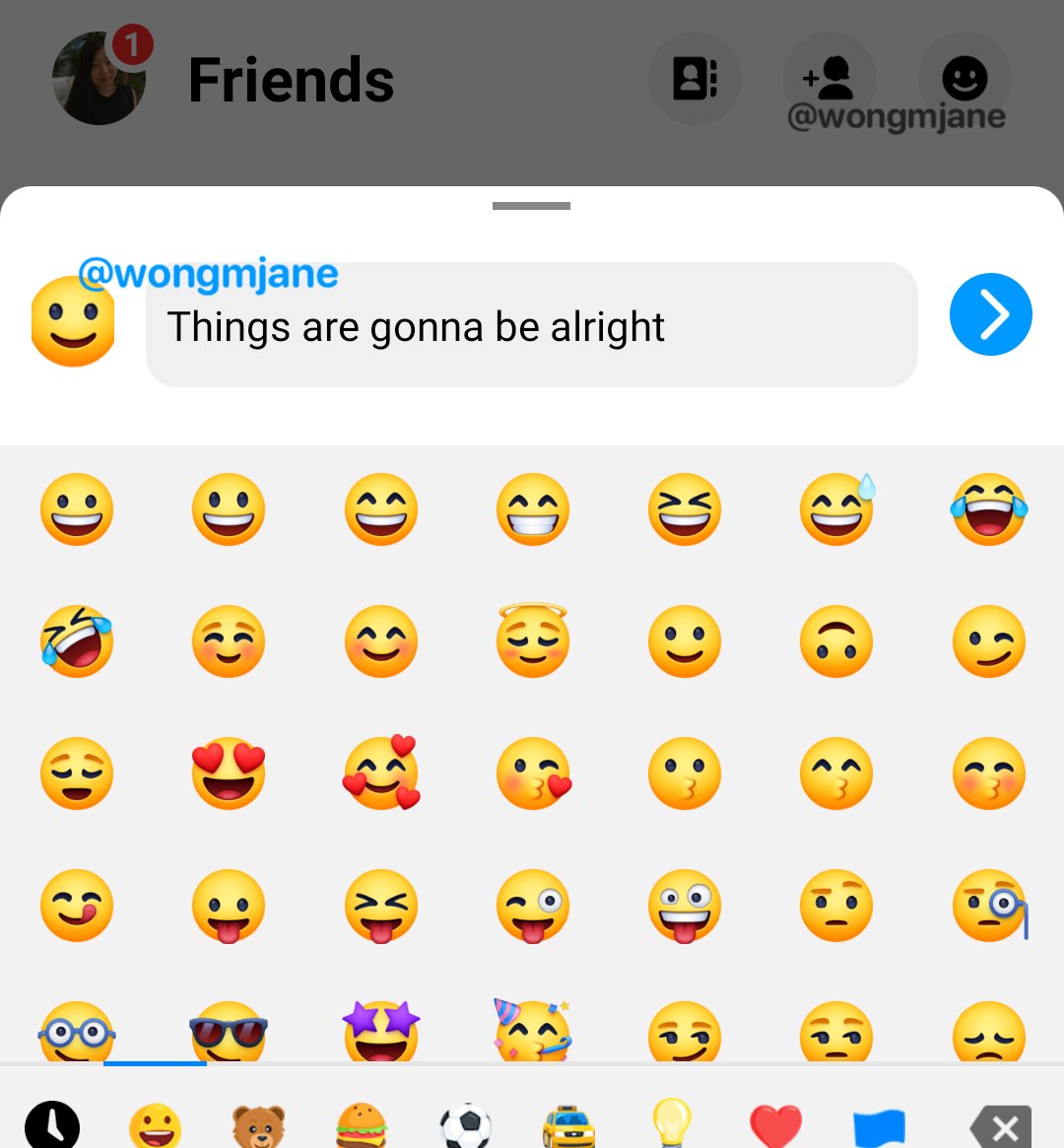
Facebook Messenger could soon automatically tell your closest friends you’re at the gym, driving, or in Tokyo. Messenger has been spotted prototyping a ported version of the Instagram close friends-only Threads app’s Auto Status option that launched in October.
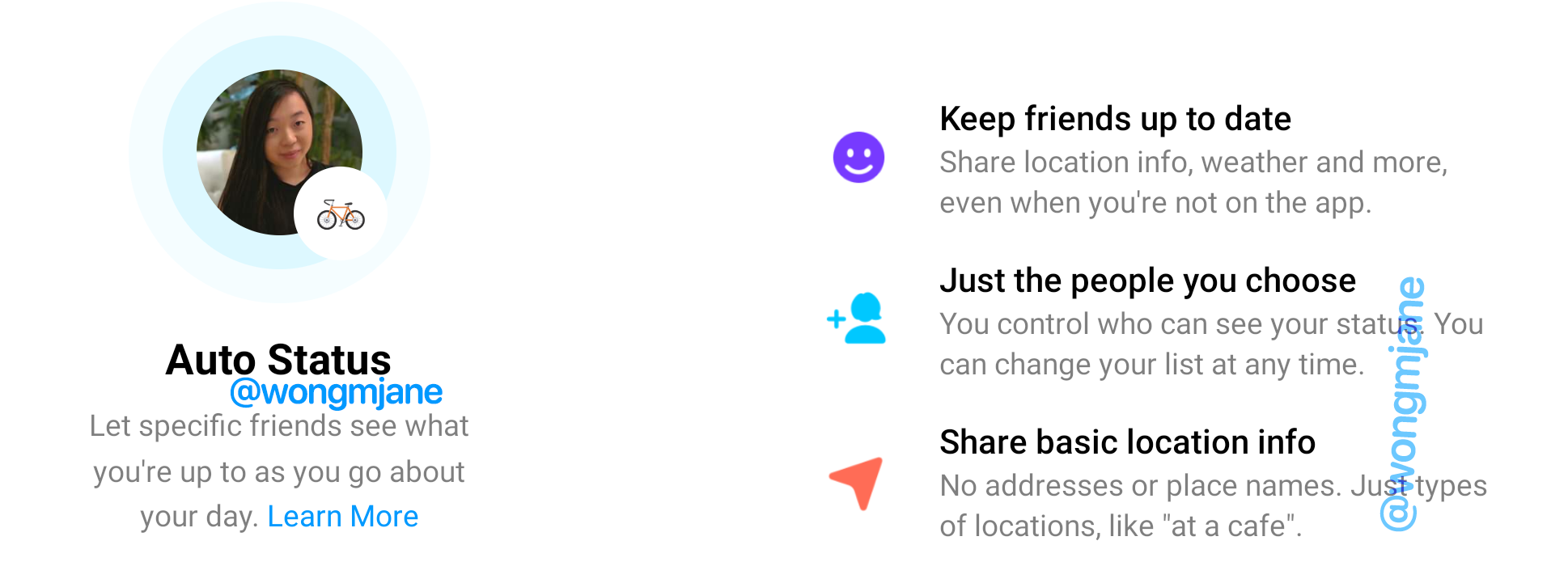
The unreleased Messenger feature would use your location, accelerometer, and battery life to determine what you’re up to and share it with a specific subset of your friends. But instead of sharing your exact coordinates, it overlays an emoji on your Messenger profile pic to indicate that you’re at the movies, biking, at the airport, or charging your phone.

It’s unclear if or when Messenger might launch Auto Status. But if released, the feature could become Facebook’s version of the AOL Away Message, allowing people to stay in closer touch without the creepiness of exact location sharing. It might also help people coordinate online or offline meetups by revealing what friends are up to. Auto Status creates an ice breaker, so if it says a close friend is “at a cafe”, or “chilling” you could ask to hang out.
Back in 2016, I wrote about how exact location sharing had failed to become mainstream because knowing where someone is doesn’t tell you their intention. What matters is whether they’re free to interact with you, which none of the social networks offered.
A few products like Down To Lunch and Free have came and went in the meantime. Snapchat’s Snap Map and its acquisition Zenly both doubled down on precise location sharing, yet still we’re often stuck home wondering if anyone we care about is similarly bored and might want to hang out.
Facebook has been experimenting in this space since at least early 2018, when its manual Emoji Status was spotted. That allowed you to append an emoji of your choosing to your Messenger profile pic. Then in October Facebook introduced Auto Status, but only in the Instagram side-app Threads.
Some users were initially creeped out by the idea of Facebook relaying battery status. But Instagram director of Product Management Robby Stein explained to me that since you might not respond to a message if your phone goes dead or is left on the charger, it’s useful info to relay to friends who might be wondering what you’re doing.
 Then earlier this month, reverse engineering master and constant TechCrunch tipster Jane Manchun Wong revealed a new, unreleased version of Emoji Status hidden in Messenger’s Android code. Then today, Wong showed off how she similarly spotted Facebook trying to port Auto Status to Messenger. That would bring the feature to over one billion monthly users compared to the relatively small base for Threads.
With Auto Status, you can “Let specific freidns see what you’re up to as you go about your day. Share location info, weather, and more, even when you’re not in the app.” Auto Status is only visible to a special list of friends you can change at any time, similar to Instagram Close Friends. And the feature shares “no addresses or place names. Just types of locations, like “at a cafe”. Movement (driving, biking, walking), venue (at the movies, airport), cities (in Tokyo), and battery status (low battery, charging), are some of categories of what Auto Status shares.
A Facebook Messenger communications representative confirmed to TechCrunch that the Auto Status feature was being prototyped by Messenger, noting that “We’re always exploring new features to improve your Messenger experience. This feature is still in early development and not externally testing.” The company also tweeted the statement.
One of the biggest unsolved problems in social networking and messaging remains knowing whether friends are free to chat or hang out without having to ask them directly. Reaching out at the wrong time only to be ignored or rejected can feel awkward, intimidating, and discourage connection later. But if you have a vague idea of what a close friend is up to, you can more deftly plan when to message them, and be more likely to get to spend time together in person or just online.
That could be a cure to the loneliness that endless feed scrolling by ourselves can leave us feeling.


Facebook Messenger could soon automatically tell your closest friends you’re at the gym, driving, or in Tokyo. Messenger has been spotted prototyping a ported version of the Instagram close friends-only Threads app’s Auto Status option that launched in October.
The unreleased Messenger feature would use your location, accelerometer, and battery life to determine what you’re up to and share it with a specific subset of your friends. But instead of sharing your exact coordinates, it overlays an emoji on your Messenger profile pic to indicate that you’re at the movies, biking, at the airport, or charging your phone.
It’s unclear if or when Messenger might launch Auto Status. But if released, the feature could become Facebook’s version of the AOL Away Message, allowing people to stay in closer touch without the creepiness of exact location sharing. It might also help people coordinate online or offline meetups by revealing what friends are up to. Auto Status creates an ice breaker, so if it says a close friend is “at a cafe”, or “chilling” you could ask to hang out.
Back in 2016, I wrote about how exact location sharing had failed to become mainstream because knowing where someone is doesn’t tell you their intention. What matters is whether they’re free to interact with you, which none of the social networks offered.
A few products like Down To Lunch and Free have came and went in the meantime. Snapchat’s Snap Map and its acquisition Zenly both doubled down on precise location sharing, yet still we’re often stuck home wondering if anyone we care about is similarly bored and might want to hang out.
Facebook has been experimenting in this space since at least early 2018, when its manual Emoji Status was spotted. That allowed you to append an emoji of your choosing to your Messenger profile pic. Then in October Facebook introduced Auto Status, but only in the Instagram side-app Threads.
Some users were initially creeped out by the idea of Facebook relaying battery status. But Instagram director of Product Management Robby Stein explained to me that since you might not respond to a message if your phone goes dead or is left on the charger, it’s useful info to relay to friends who might be wondering what you’re doing.
Then earlier this month, reverse engineering master and constant TechCrunch tipster Jane Manchun Wong revealed a new, unreleased version of Emoji Status hidden in Messenger’s Android code. Then today, Wong showed off how she similarly spotted Facebook trying to port Auto Status to Messenger. That would bring the feature to over one billion monthly users compared to the relatively small base for Threads.
With Auto Status, you can “Let specific freidns see what you’re up to as you go about your day. Share location info, weather, and more, even when you’re not in the app.” Auto Status is only visible to a special list of friends you can change at any time, similar to Instagram Close Friends. And the feature shares “no addresses or place names. Just types of locations, like “at a cafe”. Movement (driving, biking, walking), venue (at the movies, airport), cities (in Tokyo), and battery status (low battery, charging), are some of categories of what Auto Status shares.
A Facebook Messenger communications representative confirmed to TechCrunch that the Auto Status feature was being prototyped by Messenger, noting that “We’re always exploring new features to improve your Messenger experience. This feature is still in early development and not externally testing.” The company also tweeted the statement.
One of the biggest unsolved problems in social networking and messaging remains knowing whether friends are free to chat or hang out without having to ask them directly. Reaching out at the wrong time only to be ignored or rejected can feel awkward, intimidating, and discourage connection later. But if you have a vague idea of what a close friend is up to, you can more deftly plan when to message them, and be more likely to get to spend time together in person or just online.
That could be a cure to the loneliness that endless feed scrolling by ourselves can leave us feeling.


The United States Environmental Protection Agency (EPA) announced on Thursday that it is temporarily relaxing enforcement of environmental regulations and fines during the COVID-19 outbreak. The “enforcement discretion policy” applies retroactively to March 13, with no end date set yet.
The new policy follows lobbying from industries including oil and gas, which told the Trump administration that relaxed regulations will allow them to more efficiently distribute fuel during the outbreak, but because it is broadly written, it could potentially influence companies’ actions in a large range of industries, including tech.
It may also create new challenges for researchers and scientists, since while the policy is in effect, companies are being asked only to make data from monitoring available to the EPA if requested by the agency.
The EPA said the policy “addresses different categories of noncompliance differently.” For example, the EPA said it will not seek penalties for noncompliance with monitoring and reporting “that are the result of the COVID-19 pandemic,” but that it still expects public water systems to provide safe drinking water.
“EPA is committed to protecting human health and the environment, but recognizes the challenges resulting from efforts to protect workers and the public from COVID-19 may directly impact the ability of regulated facilities to meet all federal regulatory requirements,” said EPA administrator Andrew Wheeler in the agency’s announcement.
The policy places more onus for adhering to environmental regulations on the private sector. Depending on how the policy is carried out and how long it lasts, it may impact the work of tech companies that are developing tools to measure air pollution (for example, Google’s “Project Air View,” which launched last year to provide air quality data gathered with startup Aclima’s sensors to scientists and researchers), or that focus on environmental monitoring and compliance.
Susan Parker Bodine, the assistant administrator for enforcement and compliance assurance at the EPA, wrote in a memo about the policy that “in general, the EPA does not expect to seek penalties for violations of routine compliance monitoring, integrity testing, sampling, laboratory analysis, training, and reporting or certification obligations in situations where the EPA agrees that COVID-19 was the cause of the noncompliance and the entity provides supporting documentation to the EPA upon request.”
In July 2019, data released by the EPA showed that the number of unhealthy air days in major U.S. cities had increased over the past two years, even as combined emissions of major air pollutants fell.
Critics say that the policy will not only result in more pollution, but also make it impossible to fully assess the environmental damage.
In a statement to the Hill, Cynthia Giles, who headed the EPA’s Office of Enforcement during the Obama administration, said the new policy “tells companies across the country that they will not face enforcement even if they emit unlawful air and water pollution in violation of environmental laws, so long as they claim that those failures are in some way ‘caused’ by the virus pandemic. And it allows them an out on monitoring too, so we may never know how bad the violating pollution was.”

Meetup, the social networking platform designed to connect people in person, is being spun out from shared office space provider WeWork, the company confirmed on Monday. The site is being sold to AlleyCorp and other private investors for an undisclosed sum, but one that’s reportedly far less than the $156 million acquisition price WeWork paid for the social network back in 2017.
Fortune (paywalled) was first to break the news of Meetup’s sale. The company has also now put out a press release with further details.
Meetup, which has operated for two-and-a-half years as a WeWork subsidiary, will divest itself from its parent company and continue to operate, it says. The site today serves 49 million registered members and more than 230,000 organizers who create an average of 15,000 in-person events per day.
Even before the COVID-19 pandemic, Meetup had been struggling. The company in November announced a round of layoffs amid other cost-cutting measures. And these had followed earlier cuts of 10% of staff during acquisition negotiations.
With the COVID-19 pandemic now in full force, fewer people than ever are willing and able to meet in-person, leading to Meetup to position itself today as a place for groups to meet “online during times of crisis,” its release said. That remains to be seen.
The investor groups in Meetup’s latest acquisition are led by Kevin Ryan’s AlleyCorp and also include other “mission-driven private funds” and “accomplished technology executives,” the company claims.
The deal will see Ryan joining Meetup as chairman of the Board. David Siegel will remain Meetup CEO and board member, and will continue to lead the company.
Meetup groups will continue to operate, as will Meetup’s enterprise business solution, Meetup Pro, which has been used by over 1,500 clients to date, including Adobe, Google, Microsoft Azure, IBM, Twitter and Looker, among others.
“This acquisition provides the long-term capital to ensure that Meetup focuses on what is most important: the organizers who make Meetup successful, our passionate members, and our dedicated employees,” said David Siegel, CEO of Meetup, in a statement. “We are excited to continue on our mission of empowering personal growth through real human connections, and I’m happy to have brought in a team of smart investors who share and support the same values,” he said.
WeWork’s intention to sell off Meetup was previously known. Unfortunately for the longtime social network, it was one of several casualties arising from WeWork’s larger troubles.
It’s unclear, however, what the future holds for Meetup. Though the government lockdown policies may eventually end, consumers’ appetite for getting together in real-life groups with people they first met online may not be as strong as it was before. Meetup may have to shift more of its focus to supporting online-only groups — a market that’s today dominated by Facebook Groups, or niche apps catering to specific categories, like Peanut for moms or Nextdoor for neighbors, for instance.
“We are confident in the enormous potential of the business and Meetup’s mission of bringing people together in substantive ways,” said AlleyCorp’s Ryan, in a statement. “We are very excited to collectively serve and grow Meetup’s extensive and incredibly engaged user base.”


Muslim matchmaking app Muzmatch is getting (slightly) involved with video: It’s adding a button to enable users to request a video chat with a prospective match’s father.
If the user impresses on camera, the dad can grant a ‘Dad Verified’ badge to add to their profile — as an added layer of parental vetting for a community that’s seriously focused on finding a life partner.
YC backed Muzmatch has been building out a community-sensitive approach to app-based swipe-to-match ‘dating’ for Muslims for around five years at this stage, broadening its early focus on the UK and the US to include Muslim majority markets last year. In January it passed the 2 million user mark globally, up from 1.5M last summer.
Back in July, when we chatted to founder Shahzad Younas, video was on his mind — though his preoccupation was on how to incorporate “elements of video” in a sensible and safe way for a user base that’s intent on finding serious connection for the purpose of marriage. Muzmatch users definitely aren’t interested in casual dating or hook-ups. So “simple video” wasn’t on the cards, he said then.
In the event Muzmatch is starting by opening an indirect video chat channel between a potential match and a parent — to augment existing chaperone elements within the app, such as an optional wali/guardian feature for female users (which lets them elect to have their in-app chats emailed to a third party).
To access the new video dad chat feature — which must surely rank as one of the most nerve-wracking types of live chats available in the broad-brush dating app world right now — a Muzmatch user needs to navigate to their chat options and tap on the Dad Verification button.
Be warned: This will immediately trigger a video call with a potential partner’s dad. Evidently it’s not a button to be pressed when casually dressed or lost for words.
Unlike the wail/guardian chaperone feature, the Dad Verification button is universally available to both male and female users — so both sides of the community of users can opt to seek the approbation of a match’s father to advance their suit, per Muzmatch.
It’s not clear whether the startup is manually verifying a user’s dad is who they say they are. We’ve asked for more on that.
“To support the women who are complaining that men simply aren’t as serious about marriage anymore and the ones who have been ghosted and led on, the revolutionary Dad Verified feature will allow both men and women on muzmatch to check if their match is ready for marriage by getting them to speak to their father and get the seal of approval,” it writes in a press release.
It’s the latest tweak for the app which underwent some spring cleaning in January.
A v3.0 launch then brought updates to the interface, including support for richer profile content; a new card layout to showcase potential matches; and a cleaner view of matches/unmatches. Browsing and discovery, explore and chat also got a refresh at that point. But with dad video chats Muzmatch is taking a bigger step in the hopes of bringing its community along for the ride — and fending off growing competition for its target users in the process.
Zooming out, while dating apps are facing a curious time right now, as a result of the coronavirus crisis putting a dampener on face-to-face meet-ups with so much of the world under de facto house arrest, such physical restrictions seem likely to offer less of a disruption to Muslim dating apps — where the focus is on remote courtship to establish if there’s a marriage connection, rather than applying digital chatter as an accelerant for meeting in person.

While the origins of its coronavirus testing program were muddled by President Trump’s misleading announcements attributing its efforts to Google and inflating its scale, Alphabet’s Verily health sciences subsidiary has established and grown its community-based California testing initiative, deploying drive-up testing sites and ramping the number of tests completed from just over 1,200 last Wednesday to over 3,700 as of Saturday.
The Verily team detailed its progress in a new blog post, and CNBC reported last week that it has brought on 1,000 new volunteers from Google and other Alphabet companies to help increase its testing efforts and bring testing sites to new areas. In total, there are four testing sites in operation across California, which took two weeks to set up.
That’s a lot accomplished in not a lot of time, and Verily now wants to pass on the benefits of its experience and lessons learned. It put together guidelines and resources for anyone else looking to set up a community-based testing initiative (assuming they have access to qualified laboratories, testing supplies and healthcare professionals) and provided them for anyone to download.
The guide includes various documents, including workflows for everyone involved in the drive-through testing process, as well as the type of personal protective equipment needed, and how to organize and deploy on-site staff. There’s even full testing signage kits ready for download and printing.
These guide materials were created by Verily’s Project Baseline team, working in partnership with California’s Department of Public Health and other state governing and regulatory bodies, and they represent input from Stanford Medicine as well. Overall, the guide is intended as a way to help Verily spread the benefit of its experience, at a pace that it just can’t match via its own efforts to scale.
The company is definitely still looking to scale its own testing sites, however, and to launch new ones. This guide could help others make the most of its experience as it does so, though they’ll require a lot of access to specialized resources to replicate, even with the benefit of information shared by a team with first-hand knowledge of the challenges that mobile COVID-19 testing entails.


The words “bleeding edge” suggest considerable risk. But a system that’s always improving and updating has its benefits. You might see gains in speed and security, for example. If you like that sort of thing (and are willing to take a bit of a risk), here are five of the most bleeding edge Linux distros for you to try.

The choice might be surprising, considering Debian’s reputation of being the opposite of bleeding edge Linux. And for good reason. Debian Stable, the standard version of Debian, provides users with time-tested software containing relatively few bugs. While this means that you’ll generally have a nice experience, your software won’t be up-to-date.
To test and refine all this code, Debian makes use of two other branches of software with different levels of stability. The first is called Testing. The packages inside it are frozen on a schedule and set to become the next stable version of Debian. The next is called Sid, or Unstable. Sid is a rolling release version of Debian that continuously receives the latest software.
Sid is bleeding edge Debian, without sacrificing much of what Debian great.
Despite its name, Debian Sid is still quite reliable. The main difference is that much of its stability comes from upstream instead. For example, instead of Debian fixing any bugs for the version of Firefox in Sid, the community relies on Mozilla rolling out these improvements. Contrast this with Testing or Stable, where the Debian team has further refined the packages.
Installing Sid takes a bit of package manager know-how. Debian doesn’t really supply an actual install image for it. Instead, you need to upgrade your currently running system, ideally from Debian Testing, to make the process smoother. That way, you’ll have to update fewer things than upgrading from Debian Stable.
If you enjoy the experience Debian provides, but want your whole system to be bleeding edge, Sid is your best choice.

If you like the flexibility and user-friendliness of openSUSE but enjoy the benefits of newer software, Tumbleweed might be for you. Tumbleweed is one of the easiest bleeding edge rolling release distributions to get up and running.
There are two versions of openSUSE: Leap and Tumbleweed. Leap is the stable version that shares a base with SUSE Linux Enterprise. Software in Leap “leaps” forward roughly once a year. In contrast, new software updates tumble along in Tumbleweed continuously.
Unlike Debian Sid, openSUSE positions Tumbleweed as more of an alternate way to enjoy openSUSE rather than an unstable experience for more adventurous users. There’s a proper installation image so that you can install this bleeding edge desktop directly, as simply as you would a distro like Ubuntu and Fedora.
openSUSE has a few peculiarities that further distinguish it from other options. The distro uses YaST, a one-size-fits-all tool for system administration and configuration. Also, openSUSE doesn’t shy away from including a bunch of pre-installed software.
openSUSE is known for is its excellent support for the Plasma desktop. That’s something for KDE fans to keep in mind. Tumbleweed can be an alternative to KDE Neon whose software is even more up-to-date.

openSUSE and Fedora share some key similarities. They’re supported by competing enterprise-oriented companies, SUSE and Red Hat respectively. They’re also the two largest distros to use the RPM package format. So it’s fitting that both have a bleeding edge version of their operating systems.
For Fedora, this cutting edge version is called Rawhide. Rawhide is the place for testing new software, both for fixing bugs and getting an early look at the latest code. Packages receive steady updates, with new versions of programs rolling out very quickly.
This doesn’t mean that Rawhide is unusable. One of Fedora’s practices is to provide stable versions of software (as in they won’t release programs still in beta). That means all of the code comes from upstream developers intended for everyday use.
Similar to openSUSE and the KDE Plasma desktop, Fedora is known for its top-notch GNOME implementation. If you’re a fan of GNOME, Rawhide is a way to see the newest changes in GNOME.
Gentoo is a rolling release distro where you compile software specifically for your machine. Thing is, installing Gentoo is not for newcomers or the faint of heart.
By default, it is actually quite stable. Gentoo focuses more on flexibility than being bleeding edge. This is because you compile programs directly on your computer rather than download a pre-compiled binary like you would on most other distros. Gentoo has a stable (arch) and unstable (~arch) release system, with the latter option disabled by default.
Gentoo is not for people unfamiliar with Linux. Gentoo takes a lot of manual work, as even app updates require compilation.
There are certainly benefits to this model. By compiling most of your software, Gentoo lets you trim your system down further than other operating systems. You can strip programs of unwanted features, for example. This might also yield potential speed gains. You also gain a thorough understanding of how Linux works, which might appeal to programmers.
It’s also easy for Gentoo to mix and match between stable and unstable packages. This means that you can choose what parts of your system you want to be on the bleeding edge. Compare this to Fedora or Debian, where mixing unstable and stable versions of programs is not recommended.
If you’re willing to take some time to learn and compile your software, Gentoo might be for you. Alternatively, you could try something that makes Gentoo easier to install, such as Sabayon.

Similar to Gentoo, Arch Linux is known for being a little hard to install. The Arch disc image is just a terminal with a few tools to get you started. On the bright side, like openSUSE Tumbleweed, it comes bleeding edge by default. Arch strives to keep programs as modern as possible without breaking things.
Arch’s philosophy of giving responsibility to the user for managing system administration means that users are required to do a little more to their operating system than other alternatives. For example, on Debian, program services start up automatically. In Arch, you need to enable them manually.
There are two streams of package releases: stable and testing. You can expect the stable programs to be about as up-to-date as any of the other choices above. For those even more adventurous though, the testing repositories await.
Arch Linux is also home to something called the Arch User Repository, a huge collection of programs that simplifies installing software not available from official Arch channels. There are many packages that live on the bleeding edge there.
If you enjoy manual control over your own system, as well as the benefits of new software, Arch is a viable option. Alternately, if you want to install Arch without the fuss, you could always go for Arch-based operating systems such as Manjaro.
There are always risks with using an operating system that by design is always changing. As such, it’s important to take some precautions. You need to have a plan in place for when things go wrong.
A simple place to start is to back up your hard disk drive regularly, just in case.
Read the full article: 5 Linux Operating Systems That Offer Bleeding Edge Updates

Netflix allows you to download movies and shows to watch offline with the Netflix app for Windows 10. But where is the Netflix download folder?
Finding the location of your Netflix downloads is necessary to solve this puzzle. However, remember that Netflix doesn’t give you the option to change the download location. Also, the company doesn’t allow you to browse to the place where your downloads are saved.
If your drive is filling up fast, you can manually move the downloads to another location. When you want to watch them again, just copy them back to the original location.
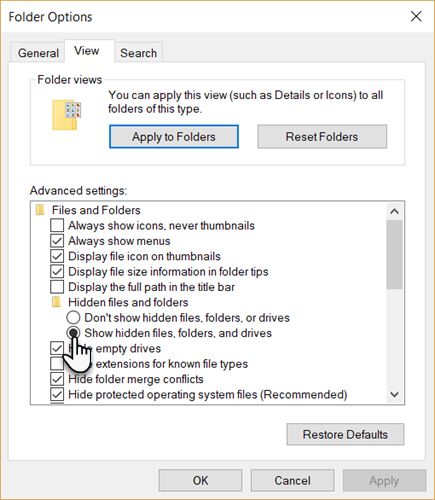
C:\Users\[USERNAME]\AppData\Local\Packages\4DF9E0F8.Netflix_mcm4njqhnhss8\LocalState\offlineInfo\downloadsHere [USERNAME] is the Windows folder with your current username.
It might sound obvious but you can also copy-paste C:\Users\ and then select the folder with your username. Just append the file path after that to get to the folder without drilling down into the hierarchy.
The Netflix download folder will be empty if you have never downloaded any movies or shows with the Windows 10 Netflix app. However, once you download something you’ll see a bunch of files here. The largest will belong to the actual media file.
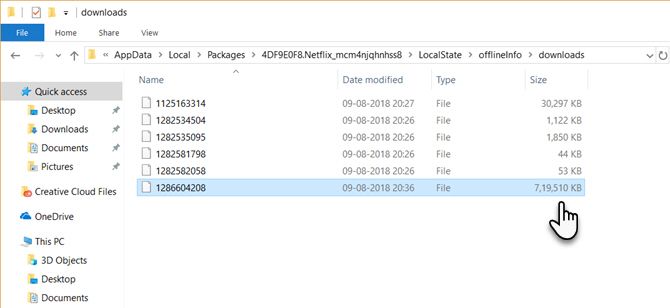
Notice that there are no file names that will help you identify the movie or show. Rename the largest file and Netflix will no longer recognize them. Also, you cannot play them with any media player except the Netflix app.
You can delete the files and reclaim some of the space on your hard drive. But that can be done from within the app as well.
Until Netflix adds a few more file management features, at least the location can help you manage your hard drive space when it starts to run out.
Space becomes a more critical issue on phones. So check out our previous article to find out where Netflix downloads files to on an Android device and then save space by moving Netflix content to an SD card.
Read the full article: Where to Find the Netflix Download Folder on Windows 10

The world can be a dark place, full of violence, disease, and death. However, movies can be a wonderful escape from that. Dark comedies are especially good at this, since they make light of those subjects and find the hilarious in the bleak.
Netflix is full of dark comedy films. And to help you decide what to watch, we’ve rounded up the best dark comedies on Netflix. These movies are full to the brim with gallows humor, sure to make you smile despite the serious themes.
The Lobster is directed by Yorgos Lanthimos, who also created the Oscar-winning film The Favourite. If you can believe it, The Lobster is even more absurd than that, though it’s just as wonderful and darkly comedic.
The film stars Colin Farrell, in a world where people are given 45 days to find true love while staying at a strange hotel. If they don’t, they are turned into an animal and released into the woods. Rachel Weisz also stars, so the two pair up and test their relationship.
If you want something more traditional, check out the best romantic comedies on Netflix.
I Don’t Feel at Home in This World Anymore is a dark comedy that is almost too easy to relate to. In a nutshell, it’s about anyone of us having a bad day, when you encounter just one too many annoying people.
The story revolves around the main character, who, together with a geeky neighbor, goes on a vigilante quest to retrieve her grandmother’s silverware. Follow their dark and dangerous, but also deeply hilarious, adventure featuring some amateur criminals and flying ninja stars.
The Death of Mr. Lazarescu is a Romanian film about a man who is sent to hospital following a spout of dizziness. He’s then sent between hospitals, with each doctor diagnosing something different and lacking any sympathy for the titular star.
The film is shot naturally so that it almost seems like a documentary, which makes it even more affecting. Despite Mr. Lazarescu’s frustration and pain, and the biting commentary of the health system, it still manages to raise a morbid smile.
Are you tired of seeing evil hillbillies in Halloween horror flicks on Netflix? Have you had enough of seeing the same old clichés in movies? Meet Tucker and Dale, two redneck friends who are just trying to enjoy their vacation and relax at their cabin when a group of students mistake them for psychotic killers.
Tucker and Dale vs. Evil has plenty of gore in it, a ton of genuinely hilarious jokes, and even a life lesson of never prejudging a man just because he looks (or even acts) a certain way.
A Serious Man is often overlooked when discussing films created by the Coen brothers, but it’s well worth watching. It’s set in the 1960s and follows a Jewish physics teacher whose life falls apart in every way, causing him to question the beliefs he holds dear.
Despite the low-key and small scale of the story, A Serious Man is a powerful exploration of religion. As you might imagine, that’s a topic perfect for the Coens to mine for comedic and poignant nuggets. This is a real treat of a movie.
The Ballad of Buster Scruggs is a western anthology film that features an excellent cast across six short stories. The tales include a singing cowboy, a gold-seeking prospector, and a bank robber.
Each of the vignettes is different from one another, but all of them feature themes of violence and death. Despite that, they manage to achieve a level of poignancy too. Plus, of course, you will be chuckling all the way through, despite the macabre tone.
If you liked Juno then you should also enjoy Young Adult, since it’s produced by the same creative team. Charlize Theron leads as Mavis Gary, a divorced and alcoholic ghost writer who tries to strike up a romance with her ex-boyfriend. The only problem is, he’s married and has a newborn baby.
Theron is always on top form and it’s equally true here. She superbly portrays the power and emotion of this flawed individual. Despite her depressing life, there’s still lots of laughter to be had in this great dark comedy movie.
In Life After Beth, Zach’s world is rocked when his girlfriend, Beth, suddenly dies. Equally as shocking is when Zach discovers that Beth is actually alive. Or, at least, is partly alive, since her grave is now empty. However, she doesn’t seem to be acting like her old self.
Aubrey Plaza gives a great performance as Beth and brings some unlikely heart to this zombie dark comedy film. Though it’s not groundbreaking, Life After Beth is still enjoyable and offers something different from the usual The Walking Dead-type zombie tropes.
Swiss Army Man is utterly bizarre in the best way possible. Perhaps all you need to know about this movie is that it stars Daniel Radcliffe as a farting corpse.
OK, it’s much more than that. Paul Dano plays a man who is lost and alone on an island and attempts suicide. However, a corpse washes ashore, and he soon discovers that he can manipulate the corpse to do all sorts of things—including riding it like a jet ski or using a certain male body part as a compass. Weird, wild, and immensely watchable.
War on Everyone is a twisted buddy cop comedy, where the two cops are crooked and do everything in their power to frame criminals. However, things take a turn for the worse when they try to blackmail the wrong person, and it isn’t long before they lose control.
This movie is directed by John Michael McDonagh, who also directed the dark comedies, The Guard and Calvary. War on Everyone features debauchery, biting wit, and seriously warped police officers. What more could you want?
While it’s true that dark comedies make it easier to process the shocking events of today’s reality, in the end it all comes down to your personal taste. So, while we hope you enjoy these dark comedies, there’s no guarantee you will.
If you want some more traditional laughs, you might enjoy the best British comedies to watch on Netflix.
Read the full article: The 10 Best Dark Comedies to Watch on Netflix

Moving data from one computer to another is easy when you have USB storage, and even easier when you can access said storage remotely. TeamViewer is a simple solution that lets you grab files from external USB drives no matter where you are, whether you’re across the office or on the other side of the country.
Let’s explore TeamViewer, what it can do, and how to use TeamViewer’s USB remote features to access an external drive from anywhere.
TeamViewer is a handy tool for remotely accessing other computers and devices. Not only can you remotely control another PC with it, but you can also use the USB devices attached to it. Whether you want to check in on a USB webcam you have plugged in, or you wish to use a connected printer, TeamViewer is an excellent program for this use case.
TeamViewer’s USB passthrough capabilities are very impressive but don’t be intimidated. It’s straightforward to set up TeamViewer’s ability to access a USB storage drive on another computer. As such, TeamViewer is a fantastic option if you want to grab files from a hard drive while you’re out and about.
Setting up TeamViewer is a breeze; assuming no technical hiccups get in the way, you should get connectivity in around five minutes.
To share a USB external drive over TeamViewer, first download TeamViewer on the PC you want to access. TeamViewer also has an Android and an iOS app if you’re going to use your mobile phone to access your PC. There are other ways to remotely control your computer from your phone, but TeamViewer is one of the easiest and most elegant options.
During the setup, be sure to select “personal use” if you’re using it for yourself, as this gives you free use of the service.

Once TeamViewer is installed, open the software. At the bottom, you’ll see a connection indicator. When this indicator turns green and “Ready to connect (secure connection)” appears, you’re good to go. Yes, that’s all the setup TeamViewer needs for its basic features!
Downloads: TeamViewer for PC | Android | iOS (Free with paid business licenses)
Now that TeamViewer is up and running on the target computer, you need to install it on the device that will access the target device. If you’re going to do this from another computer, repeat the installation steps above.
For the sake of this article, we’ll be connecting via the TeamViewer Android app instead. The steps are identical to the PC version, but the user interface differs slightly.
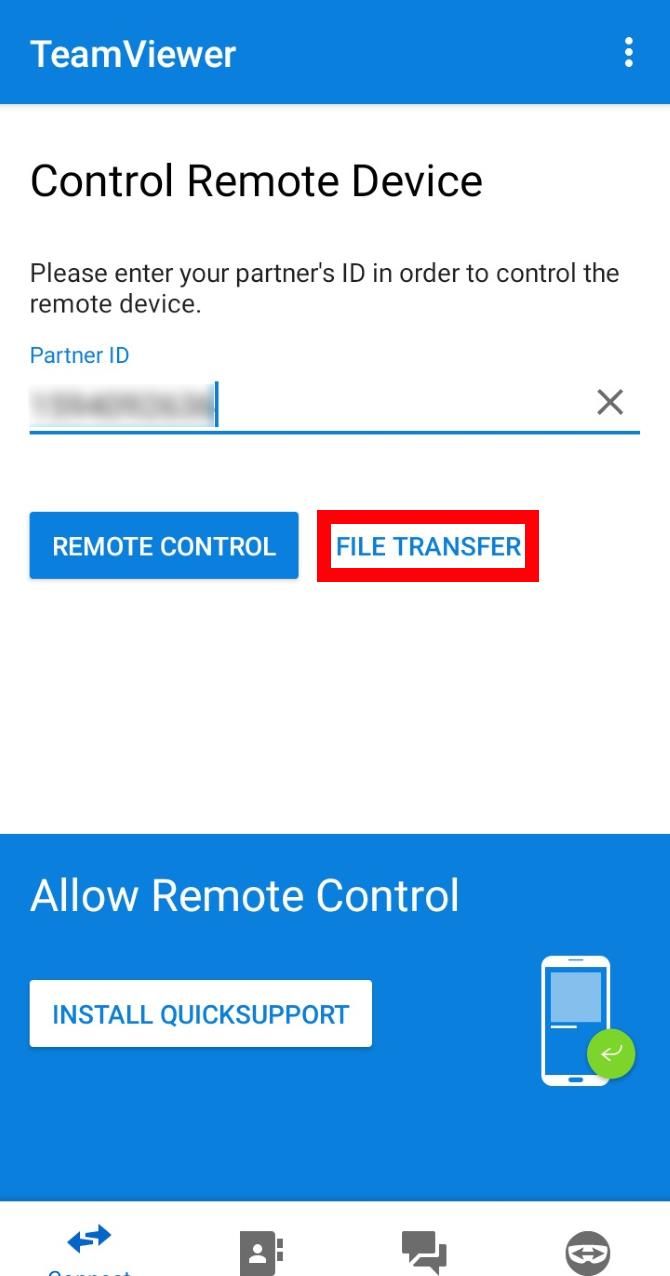
Once you have TeamViewer running on the other device, type the target’s ID under the Partner ID section, but don’t progress just yet. You can find the target’s ID under Your ID on its TeamViewer window.
Before you progress, take note that you have two options for connecting. You can select Remote control and you’ll gain control of the target device, which is useful for grabbing files.
However, if you want to access the USB storage device on the target device exclusively, it’s easier to use the File transfer option instead. This feature focuses only on the target’s file system, removing the need to control the target PC fully.
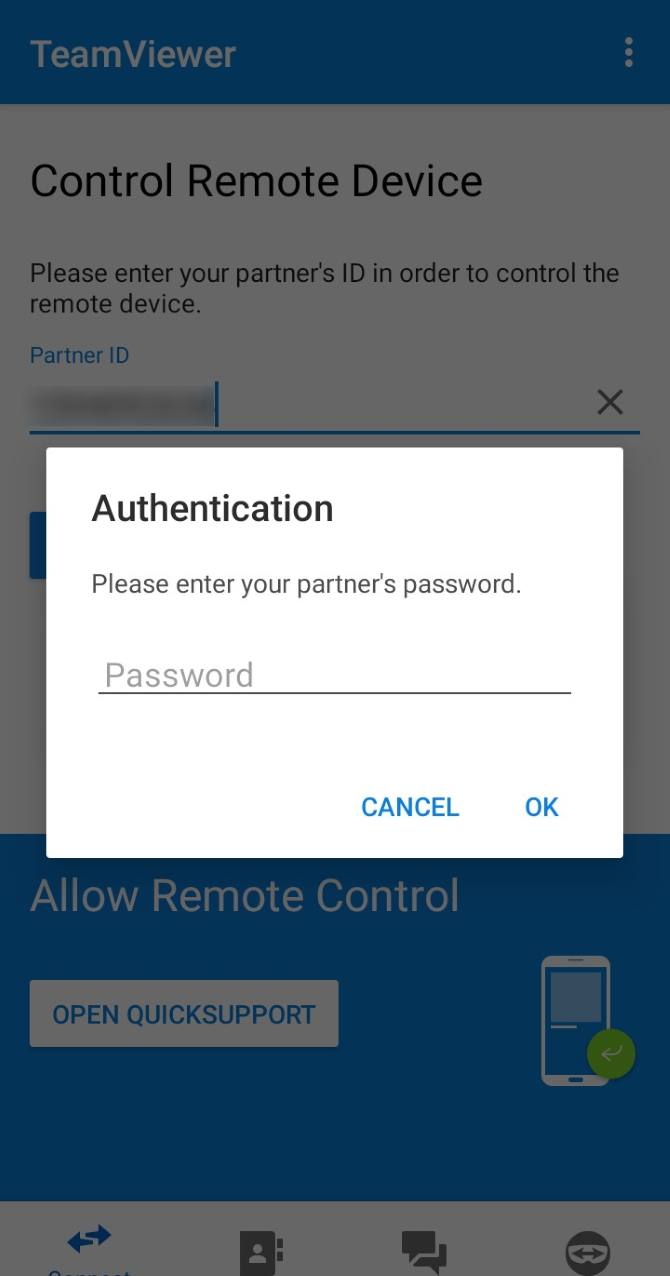
When you select File transfer, TeamViewer asks for a password. You can find the password on the target computer’s window, under its ID.
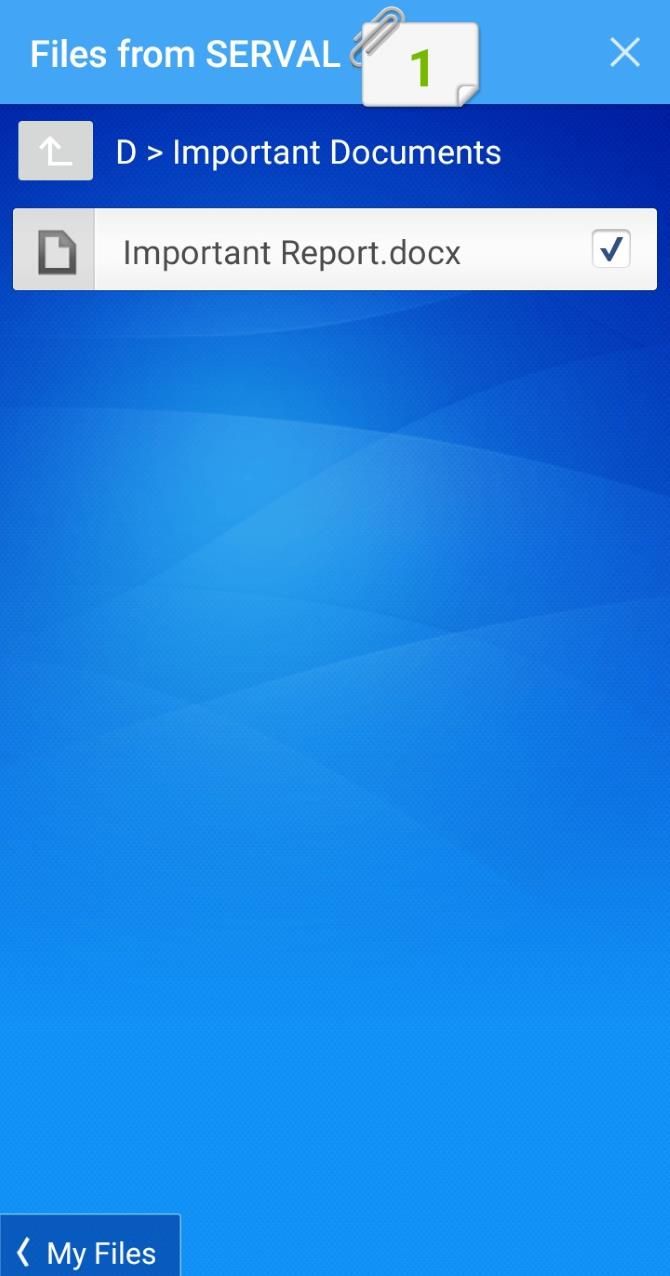
Once you enter the details, TeamViewer should connect to your target PC. Now you can point TeamViewer toward your external USB drive to access your files.
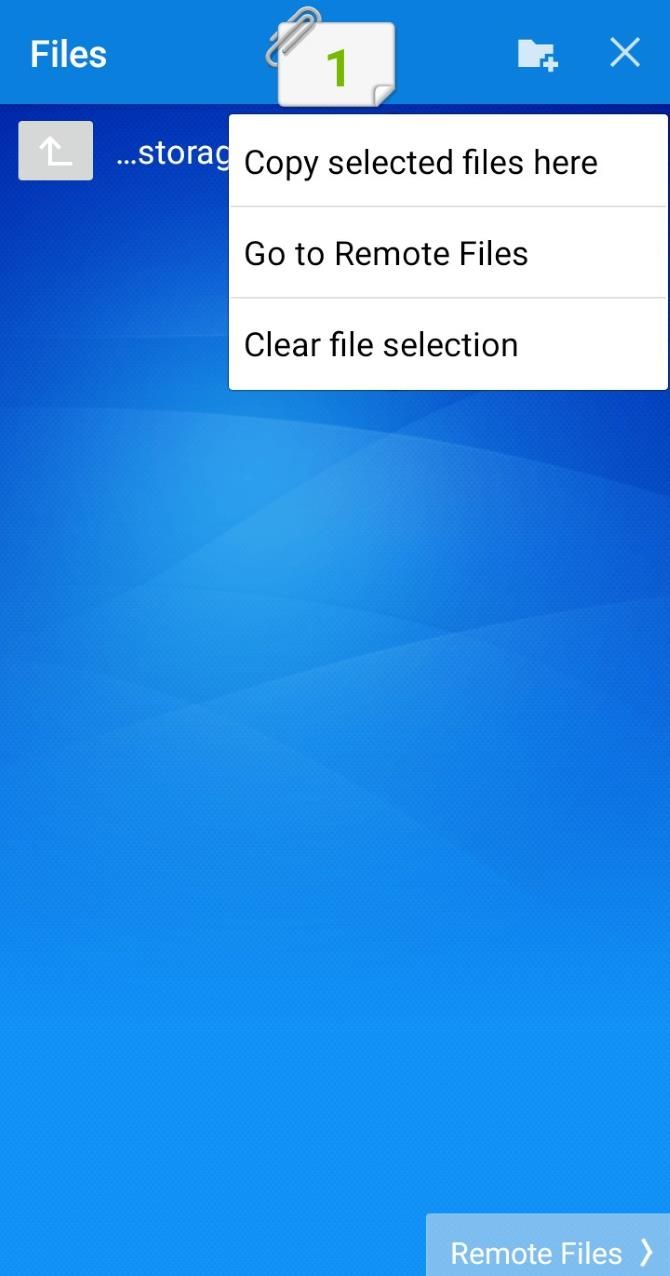
If you connected via mobile, select the files on the target PC that you want to copy over. Then, once you’re done selecting, go back to your Android’s file system and choose the download destination. Tap the numbered file icon at the top, then select Copy selected files here.
If you connected via PC, you should see a file transfer screen showing both your computer’s file system and the target’s. Navigate to the folder where you want to send to and copy from, then use the Send and Receive buttons to transfer files from one folder to the other.

TeamViewer is handy for one-time use, but if you’re using it repeatedly, it can get annoying. TeamViewer will keep the same ID every time you boot it up, but the password will randomize. This isn’t ideal if you try to access TeamViewer on the go and forget the new password.
To avoid this problem, you can do one of two things; set a personal password you can always use or create an account you can add as a trusted account.
If you want to set a personal password that never changes, hover over the password field on the target computer. Click the arrow button that appears nearby, then select Set personal password.

Under Personal password (for unattended access), enter the password you want to use.

You can now use this personal password in place of the randomized one, regardless of what the randomized password is.
To add yourself as a trusted user, you need to create an account with TeamViewer. Making an account is a good idea if you plan on using TeamViewer a lot, as every device you sign in to will appear on a master list. No more entering long IDs!
Once you’ve made your account, click the box that says Grant easy access. The app should now say your account has easy access.

Now, sign in to your account on your other devices. If you connect to the target computer via the Computers & Contacts menu, you can choose to connect without using a password. Note that if you try to connect through the ID as we covered above, you may still need to enter a password.
TeamViewer is a fantastic tool for remotely controlling USB devices, and USB drives are no different. By using TeamViewer’s file transfer feature, you can quickly grab the files you need regardless of where you are.
If you like the idea of remotely controlling USB devices, why not try USB over Ethernet?
Read the full article: How to Remotely Access USB Storage With TeamViewer

Are you in the mood to Netflix and chill with someone special? Then you’ve come to the right place. Netflix is a great place for date night movies perfect for couples to watch on the sofa.
In this article, we list the best movies for couples and date night movies for when you want nothing more than to Netflix and chill. Enjoy!
The original meaning of “Netflix and chill” is to watch Netflix with someone with the hopes of hooking up. However, the meaning changes depending on who you ask—since some people interpret it as literal relaxing. However, it’s commonly understood as a Netflix date night: either with your partner or someone new.
With that in mind, here are the best date night movies or Netflix and chill movies to catch on the streaming service…
To All The Boys I’ve Loved Before was a breakout success when this teen rom-com was released in 2018, followed by its sequel in 2020. The story is based on the novel of the same name, following a high school student who has a penchant for writing letters to her crushes that she never sends.
However, her world turns upside down when her little sister finds her stash of letters and delivers them to each of the crushes she’s had—including her sister’s longtime boyfriend. In order to avoid dealing with this particular crush, she starts pretending to date a schoolmate who wants to make his ex jealous.
While the teen drama is definitely at a peak in this movie, the story has some wonderful, tender moments that come with finding your first love.
Watch To All The Boys I’ve Loved Before on Netflix
Falling Inn Love is a slightly different twist on the city-girl-in-small-town rom-com setup. Christina Milian plays Gabriela, an American who, after losing her job and boyfriend, wins a New Zealand inn through an online competition.
However, the inn turns out to be in a state of disrepair and Gabriela needs to enlist the help of a local contractor. Expect tons of romantic tension and a journey of self-discovery for Gabriela.
Watch Falling Inn Love on Netflix
Always Be My Maybe combines the comedic talent of Ali Wong and Randall Park in a charming tale of childhood best friends reconnecting despite their lives taking very different directions.
Sasha and Marcus (played by Wong and Park respectively) were inseparable until a heated fight after the death of Marcus’s mother pushed them apart. However, the two reconnect when Sasha—now a celebrity chef—returns to open a new restaurant. When Sasha breaks up with her fiance, Marcus sees a chance to pursue the relationship he sabotaged when they were teenagers.
However, things get more complex when Keanu Reeves enters the picture as Sasha’s new boyfriend. The story is filled with tons of laughs, poignant moments, and one of the best Keanu Reeves cameos you’ll ever see.
Watch Always Be My Maybe on Netflix
If you’re looking for a different, bittersweet love story, Irreplaceable You is filled with tear-jerking moments and heartfelt reflections on true love. The story follows Abbie and Sam, childhood sweethearts who’ve finally decided to get engaged.
But what Abbie thought were signs of pregnancy turn out to be stage four cancer. The heartbreaking revelation puts their whole life on hold. Abbie decides to cope by searching for a new love for Sam. However, this only pushes Sam away in the little time they have left together.
The film has some hard-hitting lessons on making the best of the time you have—and you’ll be lucky if you make it through with dry eyes.
Watch Irreplaceable You on Netflix
About Time is a romantic movie that blends the fantasy of time travel with lessons about family and savoring life. In the film, protagonist Tim finds out from his father that all the men in his family have the ability to travel back in time.
Tim uses this newfound power to rewrite the regrets in his dating life, eventually meeting and marrying Mary. As life continues, however, traveling back becomes trickier—since his actions in the past could rewrite the future. He has to choose between living in the past and continuing with his unknown but promising future.
Starring two-time Academy Award winner Hilary Swank alongside Gerard Butler, Lisa Kudrow, among many others, P.S. I Love You is another bittersweet romance movie.
In the film, Swank and Butler play a married couple who suffer a significant loss (he dies). Following this, she receives a series of gifts and messages from him (arranged before his death), all ending with the words, “P.S. I Love You”.
Examining how love can transcend death, P.S. I Love You will leave you smiling at the end.
Watch P.S. I Love You on Netflix
Isn’t It Romantic is a romantic comedy that satirizes all other romantic comedies. However, rather than taking a dark humor approach, it gleefully pokes fun at romantic tropes while offering a feel-good story overall.
After a head injury, architect Natalie (who despises romantic comedies) wakes up to find herself in a world filled with romantic comedy tropes. This includes a handsome billionaire suddenly developing an intense interest in her, a pop-song soundtrack, and a PG-13 swearing filter.
The only way to leave this strangely perfect yet infuriating world involves Natalie finding genuine love.
Watch Isn’t It Romantic on Netflix
This highly rated romantic comedy follows high school student Alex Truelove, who is in the middle of a typical high school romance with his best friend. However, as the pair discuss taking things to the next level, Alex’s certainty waivers when he begins feeling a connection with someone new. The catch: this someone new is another guy, Elliot.
This not only makes Alex question his relationship, but also his sexuality. The journey of Alex’s self-discovery is filled with laughs, tenderness, and a fresh take on the typical teen romance movie.
Watch Alex Strangelove on Netflix
Three years ago, Adam DeVine’s Noah met Alexandra Daddario’s Avery for the first time. Though Noah felt love at first sight, Avery thought otherwise. In the present day, at Avery’s engagement party with another guy, Noah thinks back to when the two of them met and wonders why they never dated.
A strange glitch with a photo booth transports Noah back in time, to see if different actions could make him and Avery end up together. But things aren’t as straightforward as he’d hoped.
Watch When We First Met on Netflix
In this drama by Spike Jonze, Joaquin Phoenix develops a relationship with Scarlett Johansson’s Samantha. The only problem? Samantha is an intelligent computer personified through a female voice. The film also stars Amy Adams, Rooney Mara, and Olivia Wilde.
Part romance, part science-fiction, Her takes you down paths you probably won’t expect. The film is ideally suited for watching on the sofa with your significant other. In the end, it’s a story about how relationships shape our world, for better or worse.
So there you have it. We’ve provided the Netflix, now all you have to do is chill. There are lots of movies about love and romance on Netflix, with more added each month. The films mentioned above should make you laugh, smile, and, if your night goes according to plan, get lucky.
Are you craving even more movies? We’ve also covered other ways to find great movies. If, on the other hand, you’re spending time alone, you might want to check out these films to watch if you’re single on Valentine’s Day.
Image Credit: AndreyPopov/Depositphotos
Read the full article: Netflix and Chill: The 10 Best Date Night Movies for Couples

Having multiple email addresses is so common today that most people want to check all of their email accounts on their computer in one place.
It’s also essential to know how to remove email addresses for accounts you no longer use. For example, if you have a Gmail address for work and leave that job, you’ll want to remove that Google account on Mac.
Here, we’ll show you how to add and remove email accounts on your Mac.
If the email account you’re adding is from an email provider like Google, Yahoo, or iCloud, Mail will automatically add your email account with just your email address and password.
Otherwise, if you’re using an email address from an internet service provider (ISP), you may have to enter the email account settings manually.
To set up your email account manually, you need to know your user name (generally your full email address), the Incoming Mail Server, and the Outgoing Mail Server. If you don’t know these, either look them up or contact your email provider.
You must also choose IMAP or POP for your email account. IMAP stands for Internet Message Access Protocol, while POP is short for Post Office Protocol. These protocols allow you to receive emails using a third-party app such as Mail.
If you access your email on multiple devices, like your computer, phone, and tablet, you should use IMAP. Emails and folder structures are stored on the server and only copies are stored locally on your devices. Using IMAP ensures that all your devices see the same emails and folder structures.
POP is an older protocol, but can be useful if you want to download and store emails (not copies) locally on your device. Email downloaded using POP is available even when you’re not connected to the internet.
POP is also a good way to have a backup of all your email. However, if you choose POP in an email client on a mobile device, you most likely won’t be able to create and use folders to organize your email.
If you use POP in an email client on your computer, make sure you set the option to leave a copy of the downloaded email on the server. That way, you can download your email to your computer and still receive the same messages on your mobile devices.
Two-factor authentication (2FA) is a security method that provides additional security when signing into online accounts. When using it, you must prove your identity in two different ways. One of these is the usual password, which can be compromised in several ways.
The second level of security on your account with 2FA requires you to not only know something (a password), but to also have something, like your phone. This makes it much harder for someone to hack into your account.
If you’re adding an email account that has two-factor authentication enabled, such as a Gmail account, you must get an app-specific password before adding your email account to Mail.
An app-specific password is a code generated by the email service or provider. This code is used in place of your normal password when adding the email account to Mail, or any other third-party email client. Your email provider should have instructions on how to get an app-specific password for your email account.
You can add an email account on your Mac in the Mail app or in System Preferences. The result is the same using either method; we’ll show you both.
To add an email account using the Mail app, open it and go to Mail > Add Account from the menu bar.
Select the type of email account you’re adding and follow the prompts.

If you don’t see your account type on the list, select Other Mail Account. Choose Continue after you decide.
If you select Other Mail Account, the system will still try to add the email account automatically. The following dialog box displays if the account name and password cannot be verified.

Enter the additional information as discussed above and select IMAP or POP. Next, click Sign In.
If your email account verifies, you’re asked which apps you want to use with the new account. Select the apps you want to use and click Done. Note that your email account may not support all the apps listed.
Your email account displays under Inbox in Mail. By default, the email address displays as the description for the account. To change this, right-click on the account under Inbox and select Edit from the popup menu.
Select the email account you want to rename. Next, enter a new Description and close the dialog box.

You can also add email accounts to your Mac via System Preferences. Adding an Internet Account adds the account to the Mail app on your Mac and the setup is the same.
Click the System Preferences icon in your Dock or head to Apple menu> System Preferences from the menu bar. Then select Internet Accounts. Select the type of email account you want to add and follow the prompts. Choose Add Other Account if you don’t see your type of email in the list.

By default, the email address displays as the description for the account. However, you can change this like you can in the Mail app.
Go back to System Preferences > Internet Accounts. Then select the account you want to rename and click the Details button. Enter a new description and click OK.

If you have an email account on your Mac you no longer use, you can delete or deactivate it.
Click the System Preferences icon in your Dock or go to Apple menu > System Preferences from the menu bar. Then open Internet Accounts.
If you want to remove the account completely, select it in the list and click the minus sign below the list. Confirm this action by clicking OK.

You can also make an account inactive by unchecking all associated apps for the account. If you want to use some of the available apps but not email, uncheck Mail in the list while leaving the apps you want to use checked.

Mail on macOS is a great email app for connecting and managing all of your accounts. So if you want to add an Exchange account or remove a Google account on your Mac, Apple Mail makes it easy.
For more help with Mail, check out these rules to help deal with email for you or some Mac Mail productivity tips.
Read the full article: How to Add and Remove Email Accounts on Mac