Starting next month, Google will enforce new policies for ads related to abortion in the United States, United Kingdom and Ireland. Google will now require advertisers that want to run ads with abortion-related keywords to apply for certification as an organization that does, or does not, provide abortions. If their ads are approved, they will run with an automatically-generated disclaimer identifying which category they fall into.
The announcement of the new policies comes less than two weeks after the Guardian reported that Google had provided $150,000 in free advertising through its grant program for non-profits to the Obria Group, an anti-abortion group that runs crisis pregnancy centers, or organizations that provide services like pregnancy tests, ultrasounds and counseling, but ultimately seek to deter people from getting abortions.
According to the Guardian, the ads placed by the Obria Group were misleading and made it appear as though their centers provide abortions, a tactic used by many crisis pregnancy centers. Google’s new policies also come as several states, including Missouri, Alabama, Georgia, Mississippi, Kentucky and Ohio have passed, or are seeking to pass, extremely restrictive laws limiting access to abortion.
Google did not mention crisis pregnancy centers or the new legislation in its policy update announcement, but the new rules may help limit the appearance of misleading ads. Before running ads with abortion-related keywords, advertisers must first submit an application to Google saying whether or not they provide abortions. If it is approved, their ads will run with automatically-generated in-ad disclaimers that says the advertiser either “provides abortions” or “does not provide abortions.” The disclosures will appear on the ads across all Search ad formats.
Google’s existing policies about abortion-related ads, which list countries where such ads are not allowed, or only allowed to run on a limited basis, will remain in place. (Abortion-related ads don’t appear on the Google Display Network.)
Google has already been criticized for allowing misleading ads related to abortion, including five years ago after an investigation by NARAL Pro-Choice American into ads for crisis pregnancy centers, the same issue reported by the Guardian this month. Misinformation about abortion is rampant, so this is a step in the right direction, but it remains to be seen how effective Google’s new policy will be in combating a long-standing problem.
At just 26, Waiz Rahim is supposed to be involved in the family business, having returned home in 2016 with an engineering degree from the University of Southern California. Instead, the young entrepreneur is plotting to build the Amazon of Bangladesh.
Deligram, Rahim’s vision of what e-commerce looks like in Bangladesh, a country of nearly 180 million, is making progress, having taken inspiration from a range of established tech giants worldwide, including Amazon, Alibaba and Go-Jek in Indonesia.
It’s a far cry from the family business. That’s Rahimafrooz, a 55-year-old conglomerate that is one of the largest companies in Bangladesh. It started out focused on garment retail, but over the years its businesses have branched out to span power and energy and automotive products while it operates a retail superstore called Agora.
During his time at school in the U.S., Rahim worked for the company as a tech consultant whilst figuring out what he wanted to do after graduation. Little could he have imagined that, fast-forward to 2019, he’d be in charge of his own startup that has scaled to two cities and raised $3 million from investors, one of which is Rahimafrooz.
Deligram CEO Waiz Rahim [Image via Deligram]
“My options after college were to stay in U.S. and do product management or analyst roles,” Rahim told TechCrunch in a recent interview. “But I visited rural areas while back in Bangladesh and realized that when you live in a city, it’s easy to exist in a bubble.”
So rather than stay in America or go to the family business, Rahim decided to pursue his vision to build “a technology company on the wave of rising economic growth, digitization and a vibrant young population.”
The youngster’s ambition was shaped by a stint working for Amazon at its Carlsbad warehouse in California as part of the final year of his degree. That proved to be eye-opening, but it was actually a Kickstarter project with a friend that truly opened his mind to the potential of building a new venture.
Rahim assisted fellow USC classmate Sam Mazumdar with Y Athletics, which raised more than $600,000 from the crowdsourcing site to develop “odor-resistant” sports attire that used silver within the fabric to repel the smell of sweat. The business has since expanded to cover underwear and socks, and it put Rahim’s mind to work on what he could do by himself.
“It blew my mind that you can build a brand from scratch,” he said. “If you are good at product design and branding, you could connect to a manufacturer, raise money from backers and get it to market.”
On his return to Bangladesh, he got Deligram off the ground in January 2017, although it didn’t open its doors to retailers and consumers until March 2018.
E-commerce through local stores
Deligram is an effort to emulate the achievements of Amazon in the U.S. and Alibaba in China. Both companies pioneered online commerce and turned the internet into a major channel for sales, but the young Bangladeshi startup’s early approach is very different from the way those now hundred-billion-dollar companies got started.
Offline retail is the norm in Bangladesh and, with that, it’s the long chain of mom and pop stores that account for the majority of spending.
That’s particularly true outside of urban areas, where such local stores almost become community gathering points, where neighbors, friends and families run into each other and socialize.
Instead of disruption, working with what is part of the social fabric is more logical. Thus, Deligram has taken a hybrid approach that marries its regular e-commerce website and app with offline retail through mom and pop stores, which are known as “mudir dokan” in Bangladesh’s Bengali language.
A customer can order their product through the Deligram app on their phone and have it delivered to their home or office, but a more popular — and oftentimes logical — option is to have it sent to the local mudir dokan store, where it can be collected at any time. But beyond simply taking deliveries, mudir dokans can also operate as Deligram retailers by selling through an agent model.
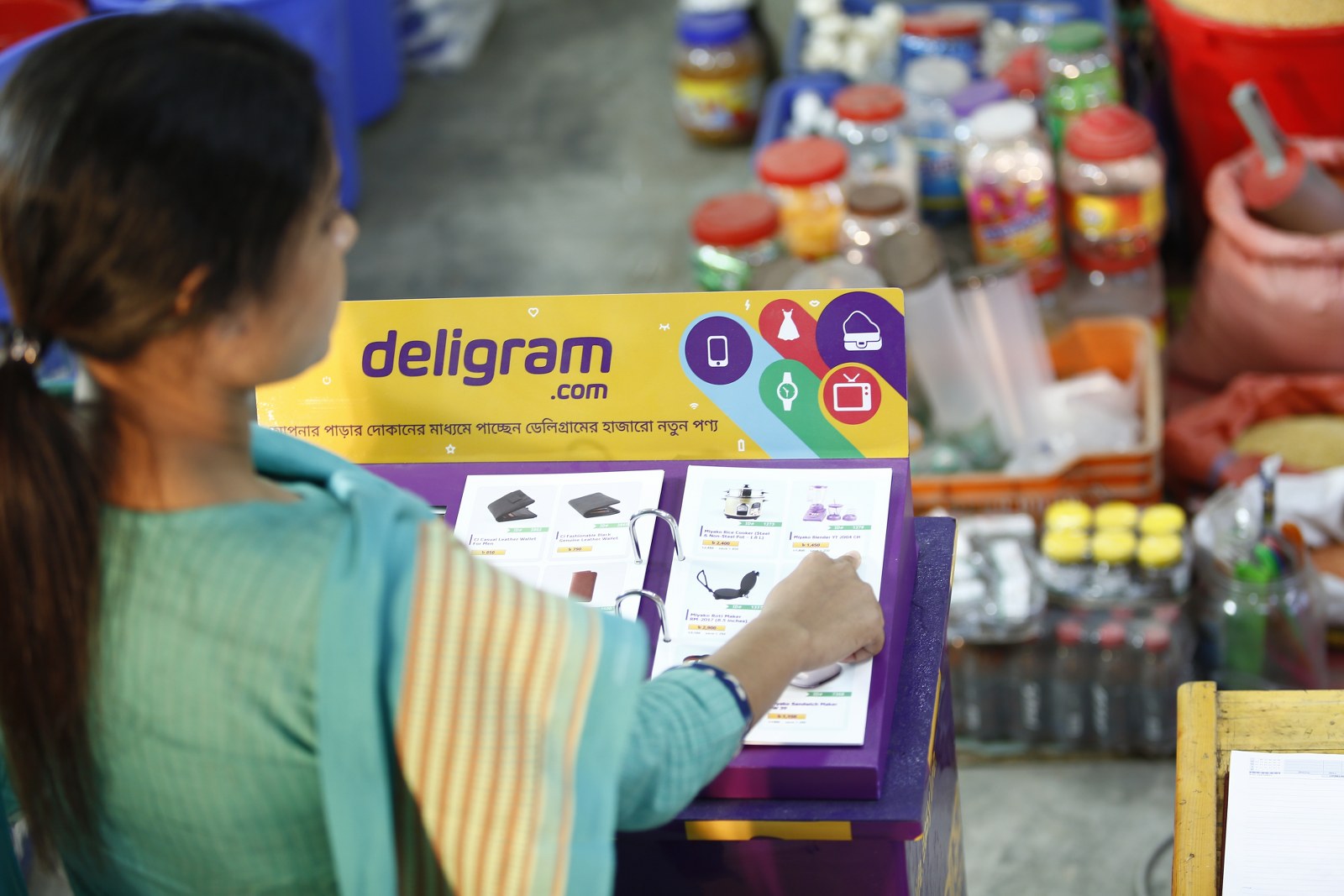
That’s to say that they enable their customers to order products through Deligram even if they don’t have the app, or even a smartphone — although the latter is increasingly unlikely with smartphone ownership booming. Deligram is proactively recruiting mudir dokan partners to act as agents. It provides them with a tablet and a physical catalog that their customers can use to order via the e-commerce service. Delivery is then taken at the store, making it easy to pick up, and maintaining the local network.
“We’ll tell them: ‘Right now, you offer a few hundred products, now you have access to 15,000,’ ” the Deligram CEO said.
Indeed, Rahim sees this new digital storefront as a key driver of revenue for mudir dokan owners. For Deligram, it is potentially also a major customer acquisition channel, particularly among those who are new to the internet and the world of smartphone apps.
This offline-online model — known by the often-buzzy industry term “omnichannel” — isn’t new, but in a world where apps and messaging is prevalent, reaching and retaining users is challenging, particularly in emerging markets.
“It’s not easy to direct people to a website today, and the app-first approach has made it hard,” Rahim said. “We looked at how companies in Indonesia and India overcame these challenges.”
In particular, he studied the work of Go-Jek in Indonesia, which uses an agent model to push its services to nascent internet users, and Amazon India, which leans heavily on India’s local “kirana” stores for orders and deliveries.
In Deligram’s case, the mudir dokan picks up sales commission as well as money for every delivery that is sent to their store. Home deliveries are possible, but the lack of local infrastructure — “turn right at the blue house, left at the white one, and my place is third from the left,” is a common type of direction — makes finding exact locations difficult and inefficient, so an additional cost is charged for such requests.
E-commerce startups often struggle with last-mile because they rely on a clutch of logistics companies to fulfill orders. In a rare move for an early-stage company, Deligram has opted to run its entire logistics process in-house. That obviously necessitates cost and likely provides significant growing pains and stress, but, in the long term, Rahim is betting that a focus on quality control will pay out through higher customer service and repeat buyers.
A prospective Deligram customer flips through a hard copy of the company’s product brochure in a local store [Image via Deligram]
Startups on the rise in Bangladesh
Rahim’s timing is impeccable. He returned to Bangladesh just as technology was beginning to show the potential to impact daily life. Bangladesh has posted a 7% rise in GDP annually every year since 2016, and with an estimated 80 million internet users, it has the fifth-largest online population on the planet.
“We are riding on a lot of macro trends; we’re among the top five based on GDP growth and have the world’s eighth-largest population,” Rahim told TechCrunch. “There are 11 million people in middle income — that’s growing — and our country has 90 million people aged under 30.”
“An index to track the growth of young people would be [capital city] Dhaka… you can just see the vibrancy with young people using smartphones,” he added.
That’s an ideal storm for startups, and the country has seen a mix of overseas entrants and local ventures pick up speed. Alibaba last year acquired Daraz, the Rocket Internet-founded e-commerce service that covers Pakistan, Bangladesh, Myanmar, Sri Lanka and Nepal, while the Chinese giant also snapped up 20% of bKash, a fintech venture started from Brac Bank as part of the regional expansion of its Ant Financial affiliate.
Uber, too, is present, but it is up against tough local opposition, as is the norm in Asian markets.
That’s because Bangladesh’s most prominent local startups are in ride-hailing. Pathao raised more than $10 million in a funding round that closed last year and was led by Go-Jek, the Indonesia-based ride-hailing firm valued at more than $9 billion that’s backed by the likes of Tencent and Google. Pathao is reportedly on track to raise a $50 million Series B this year, according to Deal Street Asia.
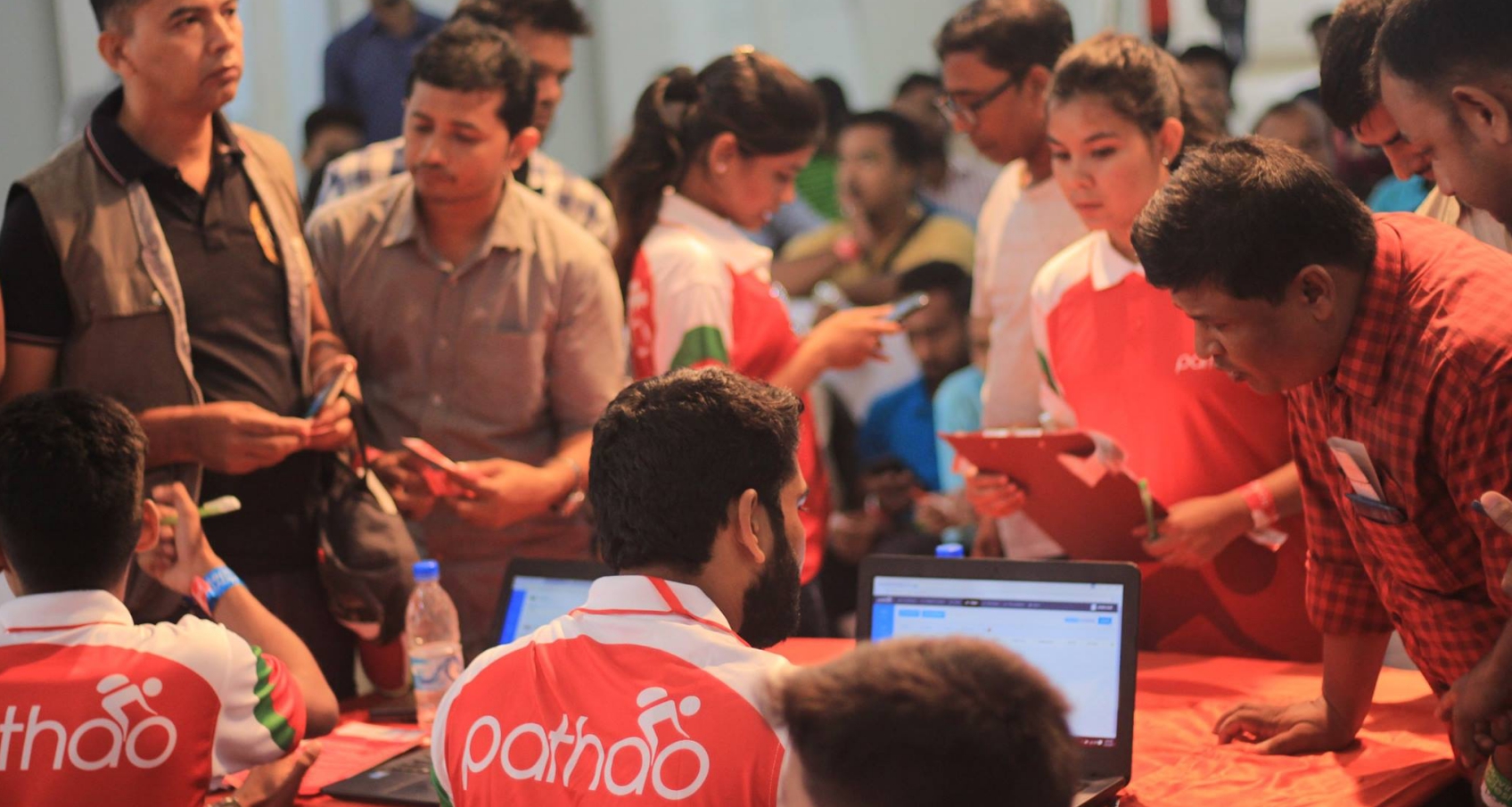
Pathao is one of two local companies that competes alongside Uber in Bangladesh [Image via Pathao]
Its chief rival is Shohoz, a startup that began in ticketing but expanded to rides and services on-demand. Shohoz raised $15 million in a round led by Singapore’s Golden Gate Ventures, which was announced last year.
Deligram has also pulled in impressive funding numbers, too.
The startup announced a $2.5 million Series A raise at the end of March, which Rahim wrote came from “a network of institutional and angel investors;” such is the challenge of finding a large check for a tech play in Bangladesh. The investors involved included Skycatcher, Everblue Management and Microsoft executive Sonia Bashir Kabir. A delighted Rahim also won a check from Rahimafrooz, the family business.
That’s not a given, he said, admitting that his family did initially want him to go to work with their business rather than pursuing his own startup. In that context, contributing to the round is a major endorsement, he said.
Rahimafrooz could be a crucial ally in future fundraising, too. Despite an improving climate for tech companies, Bangladesh’s top startups are still finding it tough to raise money, especially with overseas investors that can write the larger checks that are required to scale.
“I think the biggest challenge is branding. Every time I speak with new investors, I have to start by explaining where Bangladesh is, or the national metrics, not even our business,” Pathao CEO Hussain Elius told TechCrunch.
“There’s a legacy issue. Bangladesh seems like a country which floods all the time and the garment sector going down — that’s a part of the story but not the full story. It’s also an incredible country that’s growing despite those challenges,” he added.
Pathao is reportedly on track to raise a $50 million Series B this year, according to Deal Street Asia. Elius didn’t address that directly, but he did admit that raising growth funding is a bigger challenge than seed-based financing, where the Bangladesh government helps with its own fund and entrepreneurial programs.
“It’s hard for us as we’re the first ones out there, but it’ll be easier for the ones who’ll follow on,” he explained.
Still, there are some optimistic overseas watchers.
“We remain enthusiastic about the rapidly expanding set of opportunities in Bangladesh,” said Hian Goh, founding partner of Singapore-based VC firm Openspace — which invested in Pathao.
“The country continues to be one of the fastest-growing economies in the world, underpinned by additional growth in its garments manufacturing sector. This has blossomed into an expanding middle class with very active consumption behavior,” Goh added.
Growth plans
With the pain of fundraising put to the side for now, the new money is being put to work growing the Deligram business and its network into more parts of Bangladesh, and the more challenging urban areas.
Geographically, the service is expanding its agent reach into five more cities to give it a total of seven locations nationwide. That necessitates an increase in logistics and operations to keep up with, and prepare for, that new demand.
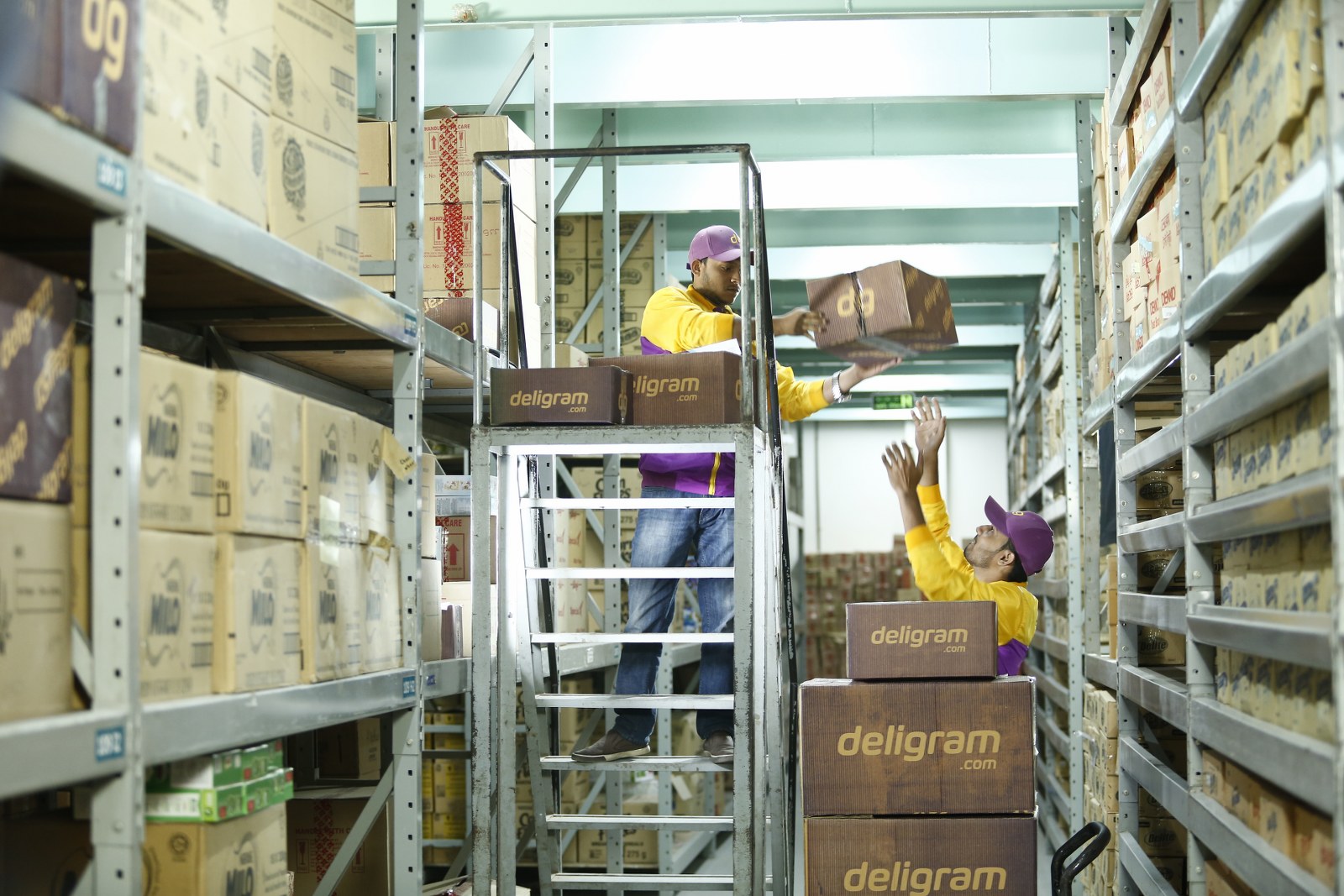
Deligram workers in one of the company’s warehouses [Image via Deligram]
Rahim said the company had handled 12,000 orders to date as of the end of March, but that has now grown past 20,000 indicating that order volumes are rising. He declined to provide financial figures, but said that the company is on track to increase its monthly GMV volume by six-fold by the end of this year. Electronics, phones and accessories are among its most popular items, but Deligram also sells apparel, daily items and more.
Interestingly, and perhaps counter to assumptions, Deligram started in rural areas, where Rahim saw there was less competition but also potentially more to learn through a more early-adopter customer base. That’s obviously one major challenge when it comes to growth, and now the company is looking at urban expansion points.
On the product side, Deligram is in the early stages of piloting consumer financing using its local store agents as the interface, while Rahim teased “exciting IOT R&D projects” that he said are in the planning stage.
Ultimately, however, he concedes that the road is likely to be a long one.
“Over the last 18-20 years, modern retail hasn’t made much progress here,” Rahim said. “It accounts for around 2.5% of total retail, e-commerce is below 1% and the long tail local stores are the rest.”
“People will eventually shift, but I think it’ll take five to eight years, which is why we provide the convenience via mom and pop shops,” he added.
It’s harvest season for Southeast Asia’s full-stack food delivery startups. Following on from Singapore’s Grain raising $10 million, so Malaysia-based Dahmakan today announced a $5 million financing round of its own.
The money takes the startup to $10 million raised to date — its last round as $2.6 million last year — and it comes via new investors U.S-based Partech Partners and China’s UpHonest Capital and existing backers Y-Combinator, Atami Capital and the former CEO of Nestlé who was an angel investor. The round was closed earlier this year but is now being announced alongside this expansion play.
It is going all in on ‘cloud kitchen’ model of using unwanted retail space to cook up meals specifically for digital orders, which is entirely its business since it handles all processes in house rather than through a marketplace model.
Already, in its home town of Kuala Lumpur, Malaysia, Dahmakan has introduced ‘satellite’ hubs that will allow it to serve customers located in different parts of the city more efficiently. The service already fares better than rivals like FoodPanda, Grab Food and (in Thailand) GoJek’s GetFood service because customers order ahead of time from a fixed menu with scheduled delivery times, but there’s room to do better and more.
“The way that we are thinking about it is that we are 18 months ahead of the competition in terms of the cloud kitchen model. Most are only starting to build out clusters of mini kitchens (150sqft) or so without leveraging too much AI in terms of product development, procurement or automation in machinery,” Dahmakan COO and co-founder Jessica Li told TechCrunch.
“What we’ve figured out is how to scale food production for thousands of deliveries while maintaining quality and keeping costs at 30 percent below comparable restaurant prices,” she added, explaining that the company plans to add “new brands and new products” using the satellite hub approach.
A serving of Ayam Penyet, Indonesian smashed chicken
Dahmakan is looking to extend its reach in Southeast Asia, too.
Li said the immediate priority is domestic growth in Malaysia with the service set to expand in Penang and Johor Bharu during the third quarter of this year. Beyond that, she revealed that Dahmakan plans to move into Singapore and Indonesia before the end of 2019.
Food delivery is quickly becoming the new ride-hailing war in Southeast Asia as Grab and Go-Jek, which have raised the most money in the region, pour capital into space. Quite why they are doing so isn’t entirely clear. Food could be a channel for loyalty (if such a thing can exist in incentive-led verticals) and user engagement for ride-hailing or other parts of their so-called “super app” services, but, either way, it is certainly distorting the market by flooding users with promotions.
That’s not necessarily a bad thing for startups like Dahmakan and Grain which have grown in a more sustainable and responsible manner. They benefit from more people using food delivery in general, while they may also become attractive acquisition targets in the future.
Like Grain, Dahmakan puts a focus on healthy eating, which stands in contrast to the typical junk food orders that others in the space serve through their marketplace of restaurants. That certainly helps them stand out among certain audiences, and it’ll be interesting to see what new products and brands that Dahmakan is hatching to capitalize on the flood of attention food delivery is seeing..
This is certainly only the start. A Google-Temasek report on Southeast Asia published last year forecasts that the region’s food delivery market will grow from an estimated $2 million last year to $8 billion in 2025. That four-fold prediction is larger than the growth forecast for ride-hailing, although the latter is larger.
“That’s faster than any other region even China,” Li said.
A report from Google and Temasek predicts huge growth for ride-hailing and food delivery services in Southeast Asia
Phone sales have been trending downward for some time now. There are a number of reasons for this — many of which you can read about in this piece I published last week. The creeping cost of premium handsets is pretty high on that list, which flagships now routinely topping $1,000 from many of the big names.
The big smartphone makers have begun to react to this, with budget flagship alternatives like the iPhone XR, Galaxy S10e and Pixel 3a. A new crop of mid-range flagships, however, are giving them a run for their money and serving as an important reminder that a quality handset doesn’t need to be priced in the four digits.
The Honor 20 Pro fits nicely in the latter camp, joining the likes of the recently announced OnePlus 7 Pro and Asus ZenFone 6 in demonstrating that premium specs can still be had for what was once considered a reasonable flagship price.
Of course, before we get into specifics of pricing with the newly announced handset, it bears mentioning whether Honor, a brand owned by Huawei, will actually ever make it to the States. That’s all pretty complicated — like Donald Trump in a trade war with with China complicated. The pricing on the London-launched Pro version is €599, putting it at around $670.
The phone’s got Huawei’s latest and greatest Kirin 980 processor, coupled with a 6.26-inch display with hole punch cutout and a quartet of rear-facing cameras. Those include a wide angle with 117 degree shots, 48 megapixel main, telephoto and a macro, which is an interesting addition to the standard array. The Pro’s out at some point in the June or July timeframe.
Huawei bans aside, it will be interesting to see how this new crop of more affordable premium devices impacts the rest of the big names up top.
Pandora has finally released a native desktop app. Pandora for Mac is available right now, with Pandora for Windows coming soon. While the Pandora desktop app isn’t yet as fully featured as the mobile app, it beats using Pandora through a web browser.
What to Expect From the Pandora Desktop App
This is the first time Pandora has offered a native desktop app, with third-party apps previously filling the void. As detailed on the Pandora Blog, the Pandora desktop gives you (almost) everything you’re used to from the mobile app, as well as a few new features:
Keyboard controls to play, pause, replay, skip, shuffle, and thumbs-up and thumbs-down songs.
On-screen notifications that detail the music (including the artist, album, and song) that’s currently playing.
App-based controls for the new Pandora Modes feature. Pandora Modes lets you customize the music you hear using selectable “modes”.
Starting today, Mac users can enjoy their personalized Pandora experience through our new desktop app—with features like on-screen song notifications and app-based controls for our new Pandora Modes feature. Learn more: https://t.co/5aDMXSMnpE
Pandora for Mac is available across all tiers. The only prerequisite is macOS 10.10 and above. Pandora for Windows is still being worked on, with Pandora asking everyone to “stay tuned for the launch of our new Pandora desktop app for Windows!”
The one thing currently missing from the Pandora desktop app is podcasts. Which is strange given how popular podcasts are becoming across streaming services. Pandora itself lets you stream SiriusXM shows as podcasts, but not on desktop, apparently.
The Pandora Desktop App Is Clean and Uncluttered
The Pandora desktop app is a simple, straightforward way to listen to music. It isn’t as packed with features as either the Pandora mobile app or the likes of Spotify or Apple Music. But if you prefer a clean, uncluttered style it should suit you well.
Pandora may not be as popular or as exciting as Spotify or Apple Music, but the company has rolled out a number of new features in recent years. The biggest being Pandora Premium, which even boasts Spotify-like curated playlists.
Phone numbers are a little like fingerprints; they can reveal a lot about a person, for example, their name or where they live. If you received a call from a number you don’t recognize, the following resources can help you identify the caller before you ring them back.
The Limits of an Online Phone Number Search
Several online tools let you reverse lookup and possibly identify who a phone number is registered to.
Unfortunately, you will run into several limitations with any phone number identification:
It’s almost impossible to find out the identity of the person behind a mobile phone number for free. Though with North American numbers, you can at least find where the number was registered.
Moreover, many “free” services will try to sell you their service, even if it is possible to find the information for free elsewhere.
Some countries, including the UK and Australia, have restricted the reverse lookup of phone numbers. So if you’re trying to find a number from these countries, you’re out of luck.
Phone numbers can go out of service or change owners. Since it can take some time for a service to catch up on these changes, you can never fully rely on the information you find online.
With those restrictions in mind, let’s look at the best strategies to check for the origin or owner of a phone number.
Top Sites to Find a Phone Number
1. Google
This is the brute force method of identifying a phone number, but it’s quick, easy, and completely free. If the call is from an official or otherwise public source, a search engine like Google or DuckDuckGo might come up with every last detail about the location and owner of the phone number.
The screenshot below, for example, shows the Google result when searching for the number of the National Do Not Call Registry.
Your Google search did not amount to much, so what next?
Bonus: Find Out Where the Phone Number Is From
Before you can choose the best service to identify the owner of a phone number, let’s narrow it down to a specific location first. You can skip this step if you recognize the country and area code. For automatic location lookup, you can also skip ahead and try the first online tool listed below.
Generally, a North American phone number consists of 10 digits. The first three digits represent the area code, meaning you can use these numbers to narrow down the location of the number. An easy way to do this is to type the three digits followed by the phrase “area code” into a Google search.
It’s a little more complicated if you’ve received a call from an international number. You should see a much longer number, including a country code, which can be anywhere from one (e.g. +1 for USA and Canada) to three (e.g. +506 for Costa Rica) digits long. Just as outlined above, head over to Google, type in the number with the phrase “country code”, and you’ll get an instant answer.
To find out more about the number’s location within a country, you’ll need to learn more about how their phone numbers work. For example, area codes in Germany generally start with a zero and can be three to five digits long, such as 030 for Berlin or 0711 for Stuttgart. In a long distance call from Germany (country code +49), however, the number should show up as +49-711-xxxxxx, i.e. omitting the zero from the area code.
Now that you have a better idea of where the phone number is from, choose a service that covers this location.
Whitepages is one of the most established online services to find people and phone numbers in the US. Use this website to do a reverse lookup for North American landline and mobile numbers. Just enter the number in the Phone search field and hit Enter.
If Whitepages does not have an entry, it will give you some basic details about the number, such as its location and spam or fraud risk.
Note: Whitepages offers monthly subscription packages for users located in the United States. Premium users will gain access to additional information, like mobile phone numbers and full address history. This is one of the more trustworthy services you’ll encounter when trying to look up a phone number online.
Location: International, but primarily North America
Do you suspect that you’re receiving unsolicited calls from a scammer, telemarketer, or a pollster? Then this is the service you should try. Enter the number in the search field and hit Search.
WhoCallsMe will tell you everything it knows about this number, including its location and any reports it has collected from other users. Once you’ve entered a number, you can contribute to the service’s database by leaving your own notes about the caller.
This tool can quickly help you look up the location of North American phone numbers. Just type in the phone number, hit Search, and wait for Searchbug’s data on this number.
If they can’t find a public record for this number, you’ll at least learn whether this is a toll-free, landline, or mobile number and possibly where the caller is located.
Note: Searchbug will try to charge you for additional information, like the full name of the owner of the phone number, though you might be able to find it for free online.
This site is similar to Searchbug, but it works with international numbers, too. It appears to offer more information for free, including current and past addresses associated with a phone number; I suspect it pulls this data from Whitepages. I also had the impression it was more up-to-date than its competitors, such as ReversePhoneLookup or SpyDialer.
It’s not easy to find the owner of a phone number, including their name and location. But hopefully, you have a better idea of who’s given you an unsolicited call.
Everyone knows Clippy. But are you friends with Pilcrow? If you are, then you know more about Microsoft Word than most people do. Do you know about “widow lines”? The extended clipboard?
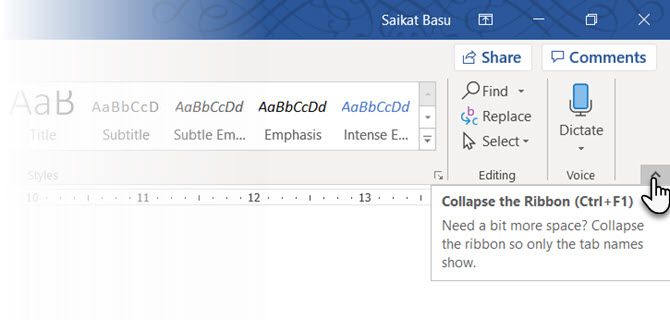
Writers want peace. The visual clutter of MS Word features gave rise to a legion of distraction-free editors and undisturbed peace. But if you love Word, you can use a quick shortcut to hide the visual clutter of the Ribbon. Press Ctrl + F1 to toggle the Ribbon from view.
Tweak it by clicking on Ribbon Display Option and selecting Auto-hide Ribbon. That’s the little arrow next to the minimize button on top.
Distraction free reading is a more specialized feature in Word from version 2013 onwards. Though, it was there in Word 2010, too. Designed for touch-enabled tablets, the Read Mode works well on an everyday laptop as well. Access it just as quickly with an ALT + W-F (Press W & F simultaneously).
Optionally, use the default buttons:
(On the Ribbon menu) View > Read Mode.
(On the Status Bar) The Read Mode button on the right.
Double-tap with your finger or double-click with your mouse to zoom in and make graphics like tables, charts and images fill the screen.
2. Reorganize with the Outline View
Outlining your main ideas and completing that first draft quickly is the surefire tip for writing productivity. If used well, the Outline View can increase your productivity with large documents by 50%.
Go to View > click the Outline button on the Ribbon.
Outline View helps you fine-tune the organization of complex documents by reordering text blocks and nine levels of headings. Outline View brings up a special toolbar called Outlining with controls for promoting or demoting selected text. Use the controls to hide or display selected text.
Want to get to a specific point in a long document? Switch to Outline View and jump to a specific heading level.
Want to draft quickly? Plan out the main sections on Outline View and then switch to the other layouts to write the body.
Want to reorganize a report by moving huge blocks of text? Drag and drop a heading to move not only that heading but all the sub-levels under it and the body text. Use the upward-downward arrows to work them.
Want to quickly format headings? Use Headlines 1, 2, and 3 instead of changing the size and using uppercase.
3. Use Word as a Quick Brainstorming Tool
Double-click anywhere and begin typing. You don’t need to bother with positioning a cursor if you don’t want to. This is the closest MS Word comes to freestyle writing. Click and Type has existed since Word 2002. The feature works only in the Print Layout view or in Web Layout view.
Though this is very useful for inserting text and graphics, you can also use it for impromptu brainstorming as a freeform mindmapping tool.
4. Convert Tables to Graphs in 3-Steps
Take your pick—a neatly formatted table with lots of data OR a nicely done chart visualizing that data for you?
Being visual creatures, it is often a no-brainer to opt for the latter. Word makes it easy to convert tabular information into a chart. When you don’t have too much of tabular data, create a chart in Word instead of over-killing with Excel. Select the table with the data and follow three steps…
1. Click on the Insert tab on the Ribbon.
2. Click the Object tool within the Text group and open the Object dialog box.
3. From the list of Object Types, choose Microsoft Graph Chart. Click OK.
Word displays the tabular data as a neat column chart. Modify the datasheet that appears.
You can also format this graph with a different chart type. Double-click your chart. Right-click in the white space that’s within the bounding box of the graphic and select Chart Type.
And you think that only Excel formulas are amazing. The Equation Editor has always been an important feature of MS Word. In the latest versions of Word, it is simply known as Equation (available from Insert > Symbols Group > Equation).
Choose Insert > Equation > Insert New Equation.
Use the Equation Toolbar to design your own advanced equations for mathematics, physics, or chemistry. Word gives you many well-known equations to insert with just a click.
6. Hold 24 Items in the Clipboard
The Office clipboard can hold 24 items and it inter-operable between all Office files. In the Home tab, click the little drop-down arrow next to Clipboard to reveal the panel on the left. For the shortcut, press Ctrl+C twice to open the Clipboard Panel.
This holding capacity enables you to cut and copy multiple elements and move them anywhere within the document or between open Office programs.
Use the clipboard’s Options to control its functions. For instance, you can disable the Show Status Near Taskbar When Copying that displays the number of items you’ve copied in the bottom-right corner of the Word window. It is on by default.
7. Translate Languages on the Go
Microsoft Office uses Microsoft Translator to handle all translations. Use the Translate feature from the Review tab. Translate a word or a sentence. Or, translate the entire document and display it in a separate Word document.
The Translator tab appears on the right and you can choose and change languages. Use this sidebar to highlight each word and explore their meaning in full.
8. Beautify Fonts with Kerning
Kerning adjusts the space between two individual letters for a better visual look. When designing a document, each typeface requires its own specific kerning. Kerning becomes important when you are designing with large fonts on Word, e.g. an ebook cover.
Word has kerning switched off by default, and normally you don’t need to bother with it. But let’s say you need to submit a five-page homework. Save effort by increasing the width between the letters instead of writing fluff!
Click the little pop-out arrow on Font (on the Home tab). Alternatively: click Ctrl+D. Go to the Advanced tab. Select the checkbox for Kerning for fonts. Experiment by entering a small point size in the box. Remember some typefaces and font sizes don’t look good with kerning.
If you really want to get better with kerning and fonts, try out the Kern Type game we mentioned in a previous article on Font Games.
9. Inspect Your Document
Today, an important MS Word feature is collaboration but you have to pay attention to security too. The Document Inspector in Word helps you check your document for any information you want to keep private.
Whenever you create or even edit a document, some user information gets added to the file automatically. The Document Inspector helps you erase this kind of information before sharing a document.
To access the Document Inspector:
Go to File > Info > Inspect Document > Check for Issues > Inspect Document.
Inspect hidden content by selecting the checkboxes. After the inspection, any categories with sensitive data gets an exclamation mark. A Remove All button for each category removes the data and finalizes the document.
Office Support takes you step by step on how to use the Document Inspector.
10. Take the Benefits of Hidden Text
Oh yes. This feature is truly hidden. Hidden Text is a non-printing character attribute that has its usefulness. Hiding text can be useful in many situations:
Create a simple quiz by hiding the answers.
Control the layout for some specific printing job by inserting hidden text.
Print two versions of a document. In one, hide portions of text. You don’t need to create two copies or delete any part of the document.
Temporarily hide confidential information that you don’t want others to see.
Hide or Unhide Text
Select the text you want to hide or the hidden text.
Click Home > Font Dialog box > Font > Select or clear the Hidden check box.
Print Hidden Text: Go to the File tab > Options > Display > Select the Hidden text check box > Select the Print hidden text check box > Click Ok.
Non-printing characters are “formatting marks” which enables the user to troubleshoot and finetune the layout of a document.
For instance, words need to be single-spaced; your paragraphs have to be spaced with correct line breaks; all tabs should be lined up; table cells have to be formatted neatly; pagination has to flow, etc.
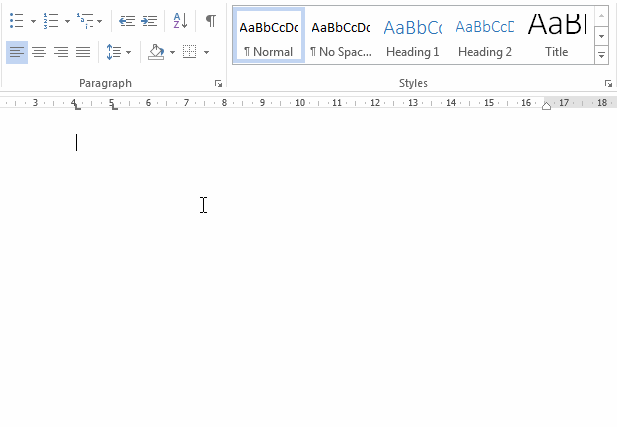
Pilcrows, tab-markers, spaces, line breaks, page breaks, object anchors, and hidden text are just some of the non-printing elements that are handy for controlling the layout of a Word document. Display the non-printing characters by clicking the Pilcrow button on the Home tab. Alternatively, press Ctrl + *.
Did you know about the annual Microsoft Office Championship? The participants are the experts at using the suite—and you can bet they have found faster or more efficient ways to use tools like Word for their day to day jobs. Probably, there’s a champion inside you.
Solid state drives (SSDs) are faster, more stable, and conserve less power than traditional Hard Disk Drives (HDDs). But SSDs aren’t flawless, and can fail before their expected life span of five to seven years.
It’s best to be prepared for an eventual failure. If you know how to tell if an SSD is failing and how to protect yourself, you won’t be a victim of SSD problems.
How Do SSDs Fail?
Unlike in HDDs, there are no physical moving platters in SSDs, so it’s immune from old hard disk issues. However, while the storage component itself isn’t susceptible to mechanical failure, other components are.
SSDs require a capacitor and power supplies, which are vulnerable to malfunctions—especially in the case of a power surge or a power failure. In fact, in the case of a power failure, SSDs have been known to corrupt existing data too, even if the drive itself hasn’t failed completely.
The other possible problem with SSDs is that they have limited read/write cycles, an issue that exists with all kinds of flash memory.
Now, all that being said, SSDs should last many years on average so you shouldn’t worry or be paranoid. In fact, if you bought an SSD in the last couple of years, then research has shown that new SSDs are less susceptible to these read/write problems than old ones.
Either way, the read/write cycle will affect whether you can write to your SSD. Since you’ll still be able to read your data, it can all be retrieved. However, you’ll still want to know when it is nearing the end of its life so that you can upgrade.
Here are the important symptoms to be aware of.
How to Check the Health of an SSD
The incessant whirring or ticking of an HDD is an easy way to know if it’s failing. However, unlike HDDs, SSDs won’t make a noise to tell you that something is going wrong.
The most hassle-free and reliable way to find out if your drive is running smoothly is to install software which checks it and silently monitors it for flaws. Windows users might want to try CrystalDiskMark while macOS users can take a look at Smart Reporter Lite.
Download: CrystalDiskMark for Windows (Free) Download: Smart Reporter Lite for macOS (Free)
Apart from that, here are some signs to watch out for, symptoms of a bad drive, and what you can do about it.
1. Errors Involving Bad Blocks
Much like “bad sectors” on HDDs, there are “bad blocks” on SSDs. This is typically a scenario where the computer attempts to read or save a file, but it takes an unusually long time and ends in failure, so the system eventually gives up with an error message.
The common symptoms of bad blocks are:
A file cannot be read or written to the hard drive.
Your PC/file system needs to be repaired.
Active applications often freeze up and crash.
Frequent errors while moving files.
Generally running slow, especially while accessing large files.
In case you see any of these symptoms, the best idea is to run Crystal Disk Mark or Smart Reporter Lite or Hard Disk Sentinel and check if there are any physical problems with your drive. If there are, then back up your files right away and start shopping for a replacement SSD.
Download: Hard Disk Sentinel for Windows | Linux (Free)
2. Files Cannot Be Read or Written
There are two ways in which a bad block can affect your files:
The system detects the bad block while writing data to the drive and thus refuses to write data.
The system detects the bad block after the data has been written and thus refuses to read that data.
In the first scenario, your data has never been written, so it isn’t corrupted. Usually, the system will resolve it automatically. In case it doesn’t, you can probably fix this by attempting to save the file in a different location, or by copying it to the cloud, restarting your computer, and then saving it back to your drive.
In the second scenario, unfortunately, your data can’t be easily retrieved. You can try some methods to recover data from a failed SSD, but don’t get your hopes up. Bad blocks usually mean that whatever data contained on those blocks is lost for good.
3. The File System Needs Repair
Ever seen an error message like this pop up on your screen, on either Windows or macOS? Sometimes this can happen simply because of not shutting down your computer properly. However, other times, it can be a sign of your SSD developing bad blocks or a problem in the connector port.
Thankfully, the resolution is easy. Windows, macOS, and Linux come with built-in with repair tools for a corrupt file system. Upon such an error, each OS will prompt you to run their respective tool, so follow the steps and repair the file system.
There is a chance of losing some data in this process and recovering it might be difficult. It’s yet another good reason to back up all your files periodically.
4. Frequent Crashes During Boot
If your PC is crashing during the boot process but works fine after hitting the reset button a couple of times, then your drive is likely to blame. It might be a bad block or the sign of a dying drive, so it’s best to back up your data before you lose any of it.
To test whether it’s the drive, download and run one of the aforementioned diagnostic tools. If you have backed up your data, you can also try formatting your drive and reinstalling the OS.
5. Your Drive Becomes Read-Only
It’s not that common, but some users have experienced this one. Your SSD might refuse to let you perform any operations that require it to write data to disk. However, it can still work in read-only mode. For all intents and purposes, the drive appears dead, but surprise, your data can still be recovered!
Before you throw away an SSD that you think has failed, try connecting it as an external hard drive or a secondary hard drive to another computer. Make sure you don’t boot the operating system from the SSD; you need to use the computer’s main drive for that.
In case the SSD is still functioning in read-only mode, you can retrieve all your files before securely erasing the SSD.
How to Extend the Life of Your SSDs
If your SSD is on the verge of failure, or if you’ve owned one for over five years, then the safest thing to do would be to start shopping for a replacement. Meanwhile, you can do a few things to extend its lifespan till you get a replacement:
Avoid extreme temperatures from affecting the drive. Ensure good cooling in your PC.
Avoid power outages and any electric fluctuations.
Free up some extra space on your SSD so it can move data from bad blocks.
Our verdict of the Mipow Power Cube X:
A functional and beautifully designed charger. Well built, but a little overpriced for the features and battery capacity.710
The Mipow Power Cube X is a Qi wireless charger, but it also sports a detachable 5000 mAh power bank for wireless charging on the go. Currently retailing for $79, and available in a choice of black or white color schemes. Is this the one charger to rule them all? Read on to find out.
Don’t forget to enter our giveaway contest at the end of this review, where you can win a Power Cube X, courtesy of Mipow.
Design and Features
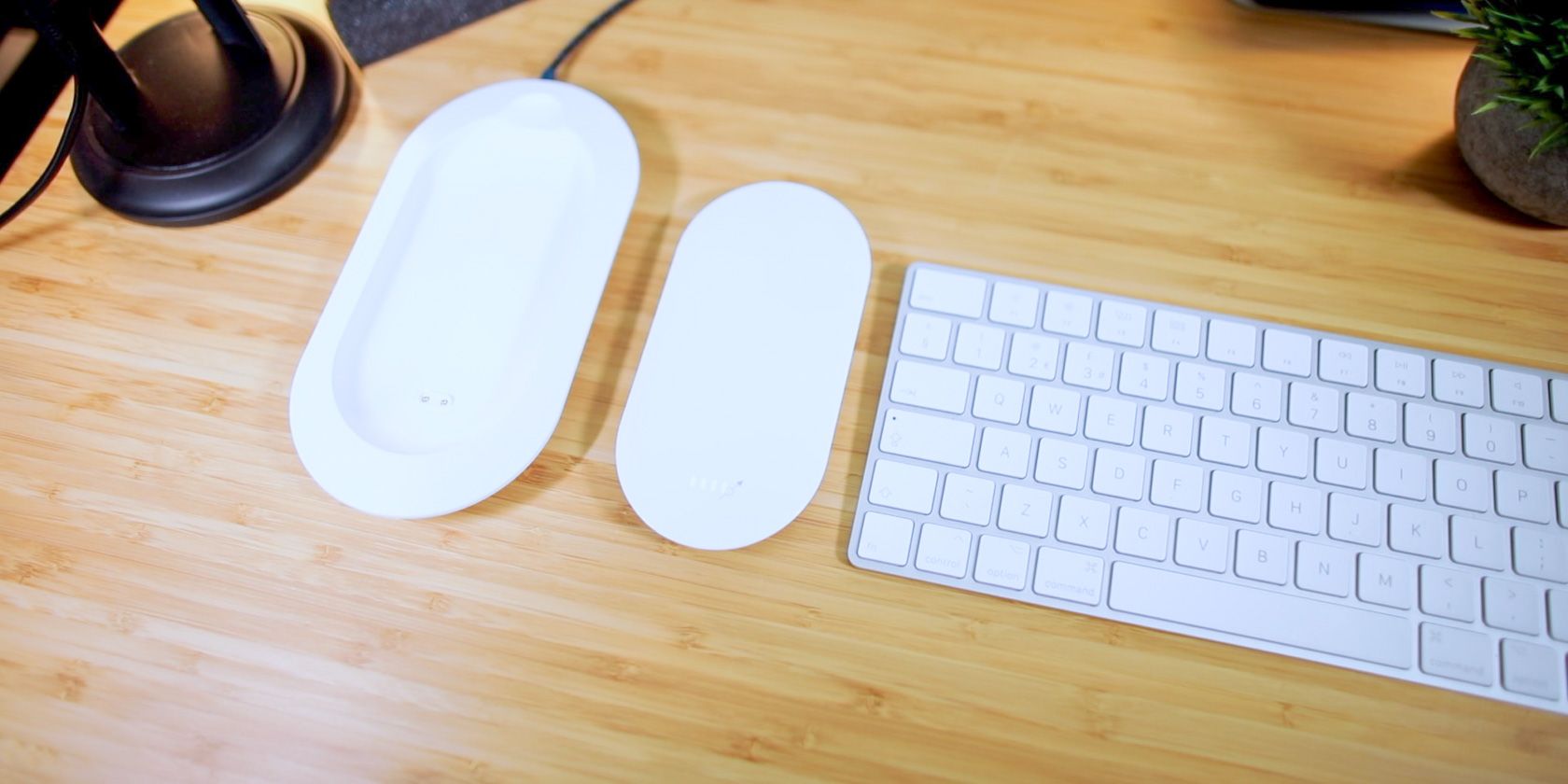
This charger and power bank comprises of two parts. The Power Cube itself contains the battery and wireless charging components. This contains status lights, along with a USB Type-A output port, and a USB Type-C input port, for charging the battery. This sleek battery is very smooth. The rear is brushed aluminum alloy, while the front is glossy plastic. It doesn’t appear to attract fingerprints immediately. The rear of the battery also houses a proprietary two pin charging/power delivery connection. This is used in conjunction with the dock to simultaneously charge the battery, and supply power to any devices charging wirelessly.
The Power Cube X Smart Dock is reminiscent of a children’s toy. Its plain matte finish and rubber feet ensure stability on any surface. This dock houses a USB Type-C port for its main power input, along with another USB Type-A port, so you can pass through the power to charge wired devices too.
Aside from the charging connection to the battery, there’s not much else to look at. The smooth battery-shaped groove in this dock ensures the battery sits almost flush with the surface. The top edge contains an inset channel to make battery removal an easy task.
Both the Power Cube X and dock feel well designed. The smart dock measures 7.32 x 3.85 x 0.74 inches (186 x 98 x 19 mm) and weighs 4.93 oz (140g). The power cube itself weighs 4.23 oz (120g), and measures 5.66 x 2.79 x 0.59 inches (144 x 71 x 15 mm). This is quite large for such a low capacity power bank (5000mAh), but don’t forget this also houses the Qi wireless charging technology.
It features foreign object protection, so only suitable devices receive power. It also has over-charge protection so your phone battery won’t explode once it reaches 100% charge.
Inside the box, you’ll find a USB Type-C to Type-A charging cable, along with a protective bag for the battery itself. You’ll need to supply your own mains charger. Don’t forget to read our guide to USB cable types if you’re not sure what your phone uses.
Specifications
Battery capacity: 5000 mAh
Cycle life: >300
Output voltage/current: 5V/3A
Wireless output voltage/current: 5V/1A
This total output current of 3 amps is ample, and should provide enough power to charge all but the largest of phone batteries in a reasonable time. Unfortunately, the wireless output voltage and current of 1 amp is rather low for a device made in 2019. Sure, it will charge your phone, but slowly. The Qi specification allows for higher current delivery, so this lower wireless power output is outdated. Still, if you’re charging your phone overnight, or using the wireless charger as a mini cradle for your device throughout the day, you shouldn’t encounter any problems running out of charge.
This 5000 mAh capacity is on the low side, but it should be sufficient for one to two charges, depending on your mobile device.
This cycle life of “greater than 300 charges” is only OK. Premium battery packs can often handle over 1000 charge cycles, so the fact that Mipow won’t commit to a higher number of claimed power cycles perhaps illustrates where they may have cut corners on quality.
Using the Power Cube X
This charger is super simple to use. Once charged, or mounted in the dock and actively charging, you can place your phone on top to begin charging. As mentioned above, the reduced current available when wirelessly charging means modern devices take that little bit longer to fully charge. Using a Google Pixel 3 XL, Android alerts me that “this device is charging slowly”.
One quirk I noticed is that wireless charging does not often begin when using the battery alone. To initiate a charge, you have to “wake up” the charger by touching it until a light appears. Once awake, devices charge without issue. This is not a problem when the battery is connected to the dock.
Wireless charging requires your mobile devices to sit at a specific angle and orientation. Your phone won’t charge if you haphazardly throw it on to the charger, without care for its orientation. This isn’t the fault of Mipow, it’s just a limitation of the underlying Qi wireless charging technology. Still, it’s something to be aware of. You can read more about why this happens in our wireless charging technology guide.
This charger makes a very faint noise when charging wirelessly, and this only happens when a device is charging wirelessly. It’s very faint, and you’ll need to hold your ear almost next to the charger, but it’s there. This isn’t likely to cause many problems with your sleep as it’s so quiet, and it’s nothing like the high-pitched whine you sometimes hear with cheap chargers. When no device is wirelessly charging, the Power Cube X is silent.
Should You Buy the Mipow Power Cube X?
It’s difficult to fully recommend the Power Cube X. While it’s undoubtedly a beautifully designed and well-made product, it’s a little expensive for what you get. You can easily buy a wireless charger and higher capacity power bank for less money. Many of the issues with speed are due to the limitations of Qi wireless charging itself, but many alternative wireless chargers use the newer standards for faster charging of your tech.
That said, it’s a wonderful piece of design and engineering. If you want to reduce the number of cables and devices in your life, or are looking for a well-designed charger to live on your desk or bedside unit, then the Power Cube X is a solid choice. We’d like to see a mains adapter included in the box and an increase in the battery capacity in the future, but this is still an excellent product.
If you’d like to win a brand new Mipow Power Cube X in white with Smart Dock, then enter our giveaway contest below!