22 November 2018

The Best Nintendo Switch Black Friday Deals


nintendo-switch-accessories

Looking to pick up a Nintendo Switch this Black Friday? You’ve come to the right place.

We’ve rounded up the best Nintendo Switch deals around. Whether you want to get the console, accessories, or games, check these out.

The Best Nintendo Switch Console Deals

Nintendo Switch and Mario Kart 8 Deluxe Bundle

There’s only one major Switch console deal this Black Friday. It’s the standard $300 price, but includes a digital copy of Mario Kart 8 Deluxe. Mario Kart 8 Deluxe is a must-have Switch title and costs $60 on its own, so this represents a solid savings.

Since Nintendo isn’t known for offering major discounts on its consoles, this is the best Nintendo Switch Black Friday deal you’ll find value-wise. If you have no interest in the game, you could always sell it.

Additionally, if you get this bundle at GameStop, the company is offering an extra $50 gift card with any console purchase. While it’s still not a cash discount, this will almost pay for a full-price game like Super Smash Bros. Ultimate.

Find this deal at: Best Buy, Walmart, Amazon, GameStop, Target

Nintendo Switch and Headset/Case Bundle

If you’d rather have some accessories with your new Switch instead of a game, check out this deal.

For a bit more at $330, you get the Switch console plus an official carrying case and a Turtle Beach headset. It also includes $90 in Kohl’s Cash you can put towards other holiday spending.

As the Switch is portable, it’s smart to have a case to protect it from damage. And headphones let you hear your favorite games more clearly whether you’re on the go or at home. Check out the best Switch accessories for more.

Find this deal at: Kohl’s

The Best Nintendo Switch Accessories Deals

The Nintendo Labo is a cardboard construction toy. It lets you craft items that interact with the Switch system and the Joy-Con controllers.

The three available Labo kits normally cost between $60 and $70 apiece. But until December 1, you can get two Labo kits for just $99 from Best Buy. This would make a great gift for any young Nintendo Switch owner.

Find this deal at: Best Buy

The Best Nintendo Switch Game Deals

If you need some new games for your Switch, you’ll find some discounts for Black Friday. In addition to Nintendo’s Cyber Deals on digital games, here are some physical copy highlights:

  • Bayonetta 2 at Best Buy ($40): This is one of the best action games ever made, and includes the first Bayonetta to boot. It’s a great price for two awesome titles.
  • Crash Bandicoot N. Sane Trilogy at Best Buy | Walmart ($25): Relive some nostalgia with three remastered PS1 platformer classics in one package.
  • Donkey Kong Country: Tropical Freeze at Walmart ($35): This is one of the best platformers of the modern age. If you missed it on the Wii U, it’s a must-buy for your Switch.
  • Mario + Rabbids Kingdom Battle at Best Buy ($20): This strategy game’s mashup of characters was a surprise hit, and you can check it out for a steep discount.

What Will You Buy?

This is a sampling of the best Nintendo Switch Black Friday deals. You’re bound to find something at a great price, whether you’re new to the system or need some games.

Though they haven’t been announced yet, we’ll likely see digital deals on the Nintendo eShop too. Browse our list of the best Nintendo Switch games so you know what to look out for on the big day.

Read the full article: The Best Nintendo Switch Black Friday Deals


Read Full Article

Half a million Android users tricked into downloading malware from Google Play


More than half a million users have installed Android malware posing as driving games — from Google’s own app store.

Lukas Stefanko, a security researcher at ESET, tweeted details of 13 gaming apps — made by the same developer — which were at the time of his tweet downloadable from Google Play. Two of the apps were trending on the store, he said, giving the apps greater visibility.

Combined, the apps surpassed 580,000 installs before Google pulled the plug.

Anyone downloading the apps were expecting a truck or car driving game. Instead, they got what appeared to be a buggy app that crashed every time it opened.

In reality, the app was downloading a payload from another domain — registered to an app developer in Istanbul — and installed malware behind the scenes, deleting the app’s icon in the process. It’s not clear exactly what the malicious apps do; none of the malware scanners seemed to agree on what the malware does, based on an uploaded sample to VirusTotal. What is clear is that the malware has persistence — launching every time the Android phone or tablet is started up, and has “full access” to its network traffic, which the malware author can use to steal secrets.

We reached out to the Istanbul-based domain owner, Mert Ozek, but he did not respond to our email. (If that changes, we’ll update).

Google spokesperson Scott Westover confirmed that the apps “violated our policies and have been removed from the Play Store.”

It’s another embarrassing security lapse by Google, which has long faced criticism for its backseat approach to app and mobile security compared to Apple, which some say is far too restrictive and selective about which apps make it into its walled garden.

Google has spent years trying to double down on Android security by including better security features and more granular app permission controls. But the company continues to battle rogue and malicious apps in the Google Play app store, which have taken over as one of the greatest threats to Android user security. Google pulled more than 700,000 malicious apps from its app store last year alone, and has tried to improve its back-end to prevent malicious apps from getting into the store in the first place. 

And yet — clearly — that isn’t enough.


Read Full Article

LinkedIn cuts off email address exports with new privacy setting


A win for privacy on LinkedIn could be a big loss for businesses, recruiters, and anyone else expecting to be able to export the email addresses of their connections. LinkedIn just quietly introduced a new privacy setting that defaults to blocking other users from exporting your email address. That could prevent some spam, and protect users who didn’t realize anyone who they’re connected to could download their email address into a giant spreadsheet. But the launch of this new setting without warning or even a formal announcement could piss off users who’d invested tons of time into the professional networking site in hopes of contacting their connections outside of it.

TechCrunch was tipped off by a reader that emails were no longer coming through as part of LinkedIn’s Archive tool for exporting your data. Now LinkedIn confirms to TechCrunch that “This is a new setting that gives our members even more control their email address on LinkedIn. If you take a look at the setting titled “Who can download your email”, you’ll see we’ve added a more detailed setting that defaults to the strongest privacy option. Members can choose to change that setting based on their preference. This gives our members control over who can download their email address via a data export.”

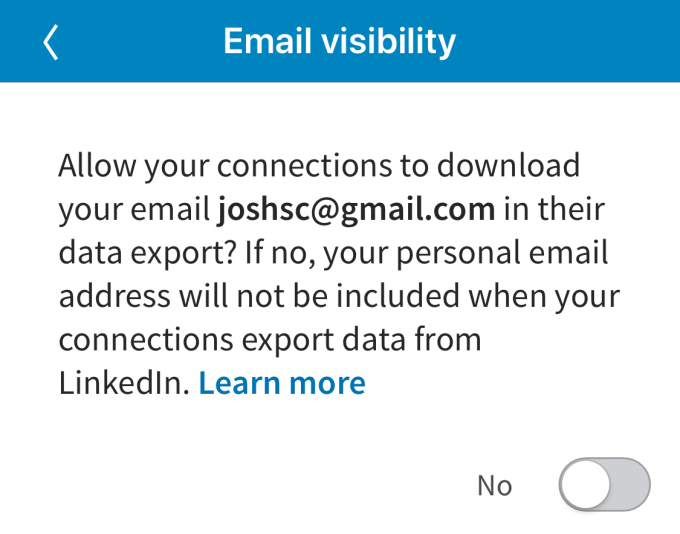
That new option can be found under Settings & Privacy -> Privacy -> Who Can See My Email Address? This “Allow your connections to download your email [address of user] in their data export?” toggle defaults to ‘No’. Most users don’t know it exists since LinkedIn didn’t announce it, there’s merely been a folded up section added to the Help center on email visibility, and few might voluntarily change it to ‘Yes’ since there’s no explanation of why you’d want to. That means nearly no one’s email addresses will appear in LinkedIn Archive exports any more. Your connections will still be able to see your email address if they navigate to your profile, but they can’t grab those from their whole graph.

Facebook came to the same conclusion about restricting email exports back when it was in a data portability fight with Google in 2010. Facebook had been encouraging users to import their Gmail contacts, but refused to let users export their Friends’ email addresses. It argued that users own their own email addresses, but not those of their Friends, so they couldn’t be downloaded — though that stance conveniently prevented any other app from bootstrapping a competing social graph by importing your Facebook friend list in any usable way. I’ve argued that Facebook needs to make friend lists interoperable to give users choice about what apps they use, both because it’s the right thing to do but also because it could deter regulation.

On a social network like Facebook, barring email exports makes more sense. But on LinkedIn’s professional network where people are purposefully connecting with those they don’t know, and where exporting has always been allowed, making the change silently seems surreptitious. Perhaps LinkedIn didn’t want to bring attention to the fact it was allowing your email address to be slurped up by anyone you’re connected with given the current media climate of intense scrutiny regarding privacy in social tech. But trying to hide a change that’s massively impactful to businesses that rely on LinkedIn could erode the trust of its core users.


Read Full Article

Facebook has poached the DoJ’s Silicon Valley antitrust chief


Facebook has recruited Kate Patchen, a veteran of the U.S. Department of Justice who led its antitrust office in Silicon Valley, to be a director and associate general counsel of litigation.

Patchen takes up her post amid ongoing scandals and reputation crises for her new employer, joining Facebook this month according to her LinkedIn profile.

The move was spotted earlier by the FT, which reports that Facebook also posted a job listing on LinkedIn for a “lead counsel” in Washington to handle competition issues two weeks ago — suggesting a broader effort to bulk up its in-house expertise.

Patchen brings a wealth of experience on the antitrust topic to her new employer, having spent 16 years at the DoJ, where she began as a trial attorney before becoming an assistant chief in the antitrust division in 2014. Two years later she was made chief.

We reached out to Facebook about the hire and it acknowledged our email but did not immediately provide comment on its decision to recruit an specialist in antitrust enforcement.

The social media giant certainly has plenty playing on its mind on this front.

In 2016 it landed firmly on lawmakers’ radars and in hot political waters when the extent of Kremlin-funded election interference activity on the platform first emerged. Since then a string of security and data misuse scandals have only dialled up the political pressure on Facebook.

Domestic lawmakers are now most actively discussing how to regulate social media. Although competition scrutiny is increasing on big tech in general, with calls from some quarters to break up platform giants as a fix for a range of damaging impacts.

The FT notes, for example, that democratic lawmakers recently introduced legislation to address “the threat of economic concentration”. And the sight of Democrats pushing for tougher competition enforcement suggests the party’s love affair with Silicon Valley tech giants is well and truly over.

In Europe competition regulators have already moved against big tech, issuing two very large fines in recent years against Google products, with more investigations ongoing.

Amazon is also now on the Commission’s radar. While, at a national level, EU competition regulators have been paying increasing attention to how the adtech industry is dominated by the duopoly of Google and Facebook.

Patchen, meanwhile, joins Facebook at the same time as some long-serving veterans are headed out the door — including public policy chief, Elliot Schrage.

Schrage’s departure has been in train for some months but a leaked internal memo we obtained this week suggests he’s being packaged up as a convenient fall guy for a freshly cracked public relations scandal.

Last month Facebook announced it was hiring more new blood: Former deputy prime minister of the UK, Nick Clegg, to be its new head of global policy and comms — with Schrage slated then to be staying on in an advisory capacity.

In other recent senior leadership moves Facebook CSO Alex Stamos also left the company this summer. While chief legal officer, Colin Stretch, announced he would leave at the end of the year.

But according to a Recode report this month Stretch has now put his exit on hold — until at least next summer — apparently deciding to stay to help out with ongoing legal and political crises.


Read Full Article

Google Assistant iOS update lets you say ’Hey Siri, OK Google’


Apple probably didn’t intend to let competitors take advantage of Siri Shortcuts this way, but you can now launch Google Assistant on your iPhone by saying “Hey Siri, OK Google”.

But don’t expect a flawless experience — it takes multiple steps. After updating the Google Assistant app on iOS, you need to open the app to set up a new Siri Shortcut for Google Assistant.

As the name suggests, Siri Shortcuts lets you record custom phrases to launch specific apps or features. For instance, you can create Siri Shortcuts to play your favorite playlist, launch directions to a specific place, text someone and more. If you want to chain multiple actions together, you can even create complicated algorithms using Apple’s Shortcuts app.

By default, Google suggests the phrase “OK Google”. You can choose something shorter, or “Hey Google” for instance. After setting that up, you can summon Siri and use this custom phrase to launch Google’s app.

You may need to unlock your iPhone or iPad to let iOS open the app. The Google Assistant app then automatically listens to your query. Again, you need to pause and wait for the app to appear before saying your query.

This is quite a cumbersome walk-around and I’m not sure many people are going to use it. But the fact that “Hey Siri, OK Google” exists is still very funny.

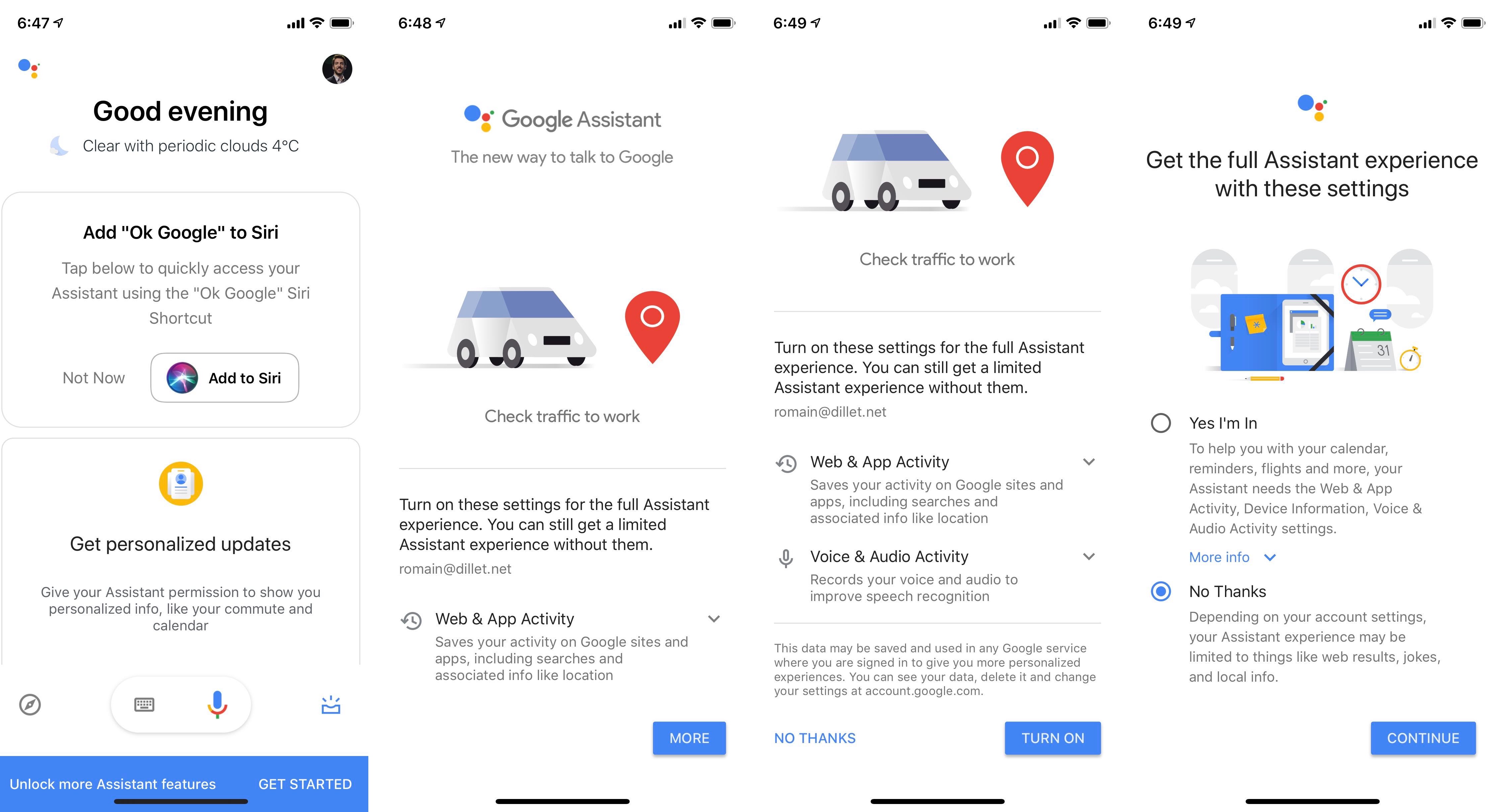
On another note, Google Assistant is still the worst when it comes to your privacy. The app pushes you to enable “web & app activity”, the infamous all-encompassing privacy destroyer. If you activate that setting, Google will collect your search history, your Chrome browsing history, your location, your credit card purchases and more.

It’s a great example of dark pattern design. If you haven’t enabled web & app activity, there’s a flashy blue banner at the bottom of the app that tells you that you can “unlock more Assistant features”.

When you tap it, you get a cute little animated drawing to distract you from the text. There’s only one button that says “More”. If you tap it, the “More” button becomes “Turn on” — many people are not even going to see “No thanks” on the bottom left.

It’s a classic persuasion method. If somebody asks you multiple questions and you say yes every time, you’ll tend to say yes to the last question even if you don’t agree with it. You tapped on “Get started” and “More” so you want to tap on the same button one more time. If you say no, Google asks you one more time if you’re 100 percent sure.

So make sure you read everything and you understand that you’re making a privacy tradeoff by using Google Assistant.


Read Full Article

Google Assistant iOS update lets you say ’Hey Siri, OK Google’


Apple probably didn’t intend to let competitors take advantage of Siri Shortcuts this way, but you can now launch Google Assistant on your iPhone by saying “Hey Siri, OK Google”.

But don’t expect a flawless experience — it takes multiple steps. After updating the Google Assistant app on iOS, you need to open the app to set up a new Siri Shortcut for Google Assistant.

As the name suggests, Siri Shortcuts lets you record custom phrases to launch specific apps or features. For instance, you can create Siri Shortcuts to play your favorite playlist, launch directions to a specific place, text someone and more. If you want to chain multiple actions together, you can even create complicated algorithms using Apple’s Shortcuts app.

By default, Google suggests the phrase “OK Google”. You can choose something shorter, or “Hey Google” for instance. After setting that up, you can summon Siri and use this custom phrase to launch Google’s app.

You may need to unlock your iPhone or iPad to let iOS open the app. The Google Assistant app then automatically listens to your query. Again, you need to pause and wait for the app to appear before saying your query.

This is quite a cumbersome walk-around and I’m not sure many people are going to use it. But the fact that “Hey Siri, OK Google” exists is still very funny.

On another note, Google Assistant is still the worst when it comes to your privacy. The app pushes you to enable “web & app activity”, the infamous all-encompassing privacy destroyer. If you activate that setting, Google will collect your search history, your Chrome browsing history, your location, your credit card purchases and more.

It’s a great example of dark pattern design. If you haven’t enabled web & app activity, there’s a flashy blue banner at the bottom of the app that tells you that you can “unlock more Assistant features”.

When you tap it, you get a cute little animated drawing to distract you from the text. There’s only one button that says “More”. If you tap it, the “More” button becomes “Turn on” — many people are not even going to see “No thanks” on the bottom left.

It’s a classic persuasion method. If somebody asks you multiple questions and you say yes every time, you’ll tend to say yes to the last question even if you don’t agree with it. You tapped on “Get started” and “More” so you want to tap on the same button one more time. If you say no, Google asks you one more time if you’re 100 percent sure.

So make sure you read everything and you understand that you’re making a privacy tradeoff by using Google Assistant.


Read Full Article

21 November 2018

10 Best Things to Buy on Black Friday That Save You the Most Money

The Best eBay Black Friday Deals in 2018


ebay-black-friday

Slated for November 23, Black Friday is best known for knock-down, drag-out fights in brick and mortar stores. That doesn’t mean you have to line up early in the morning and struggle to get the best deals. Instead, you could turn to a site like eBay and benefit from some good deals from the comfort of your own home.

In an effort to make sure you’re fully prepared for Black Friday, we’ve put together a guide to what deals to look out for on eBay. And like we’ve said in the past, there are certain things you should buy on Black Friday to make sure that you’re getting a great deal including laptops, tablets, TVs, video games and consoles, and cameras.

When to Log On?

eBay started dropping its Black Friday deals long before November 23. But as is the case with most Black Friday deals, sale items are limited in quantity so something that might have been available at the time of writing could already be out of stock.

Your best bet is to jump on eBay’s Black Friday sales page right now and see what you can find. It also appears that the deals will keep on coming long after Black Friday has come and gone.

(And if you’ve completely missed the boat and Black Friday is long over—remember—eBay actually offers year-round daily deals.)

One thing to note about the eBay deals: All discount percentages are based on the retail price. So, when you find a great deal that’s 70% off, you might very well find a similar deal from another retailer, so be sure to do a quick search to make sure you’re getting the best deal.

Laptops

laptop-ebay-black-friday

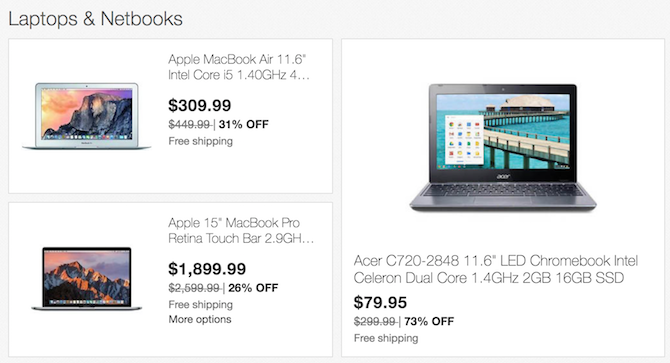
If you’re in the market for a new laptop, eBay has some solid deals. Whether you’re looking for a Windows laptop, a MacBook, or a Chromebook, you’ll find brand new and refurbished options. But when selecting a laptop, be sure to ask yourself if buying a cheaper laptop model is a waste of money.

If the laptops are refurbished, you can expect the discounts to come with some cosmetic blemishes and signs of use in some of the laptops including scratches, scuffs, dents, and dead pixels. (And the bigger the discount, the more likely it’s a refurbished device.)

If you need help figuring out which laptop is right for you, consider these guides:

Tablets and eReaders

tablet-ebay-black-friday

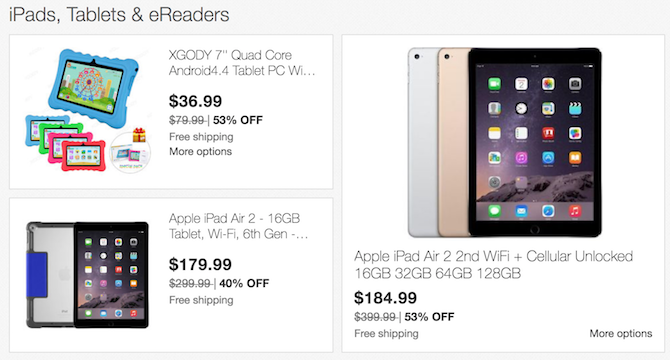
You’ll find the full range of iPads, from the iPad Mini to the iPad Pro, in all sorts of configurations including dirt-cheap first gen models, along with Samsung and Amazon Fire tablets, but no Kindles to speak of.

If you pick up a tablet that’s great for reading books, you’ll also want to keep an eye out for the best eBook subscription services.

TV, Video, and Home Audio

Among the best deals you can find on Black Friday are the discounted TV prices. Along with TVs, eBay is also offering deals on other home entertainment products like Bluetooth and smart speakers.

Video Games, Consoles, and Movies

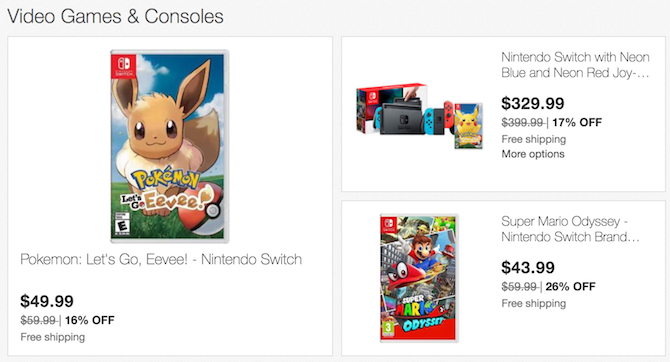
video-game-ebay-black-friday

Xbox consoles aren’t significantly discounted on eBay this year (at least not yet), but there are a few decent PlayStation console deals as well as Xbox and PlayStation games and accessories to choose from.

If you’re planning on buying a PlayStation controller, you might want to pick one of the 6 best PS controllers out there, some of which are among this year’s eBay Black Friday deals.

Cameras

The cameras available on eBay are a mixed bag of DSLR bodies and bundles, as well as a few mirrorless cameras, but not as many as we’d like to see.

The Canon Rebel T6, for example, which is also one of the best cheap cameras to buy, comes as part of a bundle with two kit lenses, the 18-55 and the 75-300. Now if we’re being completely frank, these are not great lenses. The body alone will cost you around $300 anywhere else, but this set will set you back around $400 with eBay’s Black Friday deal. If you’re just getting started and don’t want to splurge on nicer lenses, this might be a good place to start.

Smartphones

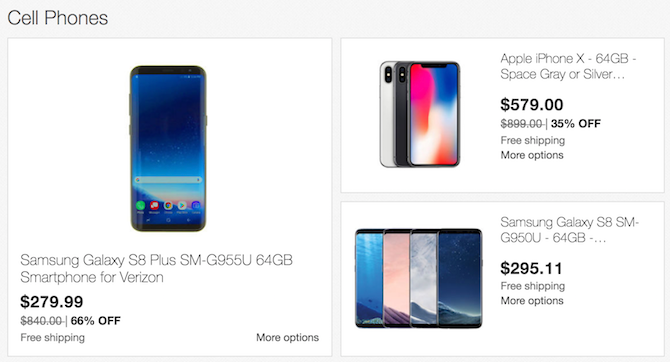
smartphone-ebay-black-friday

Popular phone models from Apple and Samsung are available on eBay, as well as some cheaper brands like Huawei and LG.

Home Appliances & Smart Home

If you’ve been thinking about bringing some smart technology into your home, or even any small home appliances, Black Friday is a great chance to do just that.

More Black Friday Tips and Deals

eBay isn’t the only place to look for great Black Friday deals. There will be plenty of deals for gamers on Black Friday and Cyber Monday. With so many great deals to choose from, you’ll definitely want to do your homework and make sure that you are getting the best deal possible.

eBay isn’t the only site already doling out the Black Friday sales. Amazon’s 2018 Black Friday deals are live all week, as are Costco’s Black Friday TV deals and GameStop’s Black Friday sales.

Other stores like Target are offering a sneak peek into the deals you’ll get on Black Friday

There are also sites to help you find the best Black Friday ads for the year. These sites offer up all the necessary information like business hours, as well as great online deals you can get without leaving your couch.

Read the full article: The Best eBay Black Friday Deals in 2018


Read Full Article

The 6 Best Cheap Gaming Monitors to Buy on Black Friday

12 Striking Dark Wallpaper Sites That Are Perfect for Your Desktop


dark-wallpapers

The computer desktop is a personal space, and so you get to do it up with your choice of wallpapers. Desktop wallpapers reveal something about our natures. The kind of mood you are in. Science says that the choice of colors affect how we think and feel. Maybe also light or the absence of it. So how do you feel about dark desktop wallpapers?

The obvious benefit of using dark backgrounds on your desktop is that all your icons and folders stand out in contrast. They make text easier to read. For instance, a dark motivational wallpaper spotlights the inspiring message scribbled on it.

So let’s look at a few high-quality free dark-themed wallpapers for your desktop.

1. Wallpapers Craft

Dark Wallpapers from WallpaperCraft

The better wallpaper sites allow you to choose a wallpaper according to your screen resolution. They also have multiple categories for you to choose from. Wallpapers Craft could be on the shortlist. The catalog of dark wallpapers gives you 1000+ wallpapers to choose from. Sort them by the number of downloads or ratings for the best pick.

I am partial to the light, sky, stars background you see in the above screenshot.

Download: Light, Sky, Stars Wallpaper

2. Pexels

Grey Shark Wallpaper

You can create your own desktop wallpapers. I suppose designing dark wallpapers is easier than most. Take a dark background and then customize it with your own motivational message or a reminder.

One of my favorite sites to go for dark backgrounds is Pexels. Take this photo of a grey shark for instance. The download button will let you pick from four resolutions or a custom one (which can warp the photo).

Download: Grey Shark Wallpaper

3. Wallpapers Wide

Gothic Lion Dark Wallpaper

Come here to grab wallpapers in every category you can think of. Also available are Retina wallpapers and backgrounds for dual or triple monitor setups. Set the aspect ratio and resolution filters as you go hunting.

Download: Gothic Lion

4. Unsplash

Observing Space Desktop Wallpaper

Unsplash is another popular stock photography website. It has carved its own special place in the hearts of wallpaper hunters. The collection of dark photos I linked to is just one example of the sets you can expect to find. You can also pick from this excellent collection of black wallpapers.

Search the site with a keyword like “dark photos” or “dark desktop wallpapers” or something more specific. Every photo you find on Unsplash is licensed under Creative Commons Zero.

Download: Observing Space

5. InterfaceLIFT

InterfaceLIFT Dark Desktop Wallpaper

The navigation and the ease with which you can find wallpapers makes one come back here. For instance, I can find a wallpaper of the exact hue and a resolution that fits my device. The site also automatically detects this resolution for you. And did I mention that this is also one of the larger wallpaper sites out there?

Download: Empire of the Lights

6. WallHaven

Dark Forest Wallpaper from WallHaven

Go to this excellent wallpaper site and browse the “dark” tag. The treasure trove of 4000+ wallpapers covers landscapes, portraits, and fantasy art. Try this sight of a dark forest on your desktop. Does it pull you in?

Download: Dark Forest Wallpaper

7. Adorable Wallpapers

Dark Knight Wallpaper

This wallpaper site has a good collection of dark wallpapers. I stumbled on to this site when hunting for high-definition Dark Knight wallpapers. Everything about this caped crusader is dark and the popularity of his movies (and film posters) ensures that people will peek over your shoulder at your display.

Download: Dark Knight Wallpapers (55 in total)

8. Psiu Puxa

Deep Space Starburst

You can set a real-time photo of the Earth as your desktop background. But go just a few million miles more into deep space for genuine space photos that are just right as dark desktop wallpapers.

This site brings you handpicked wallpapers from all over the universe thanks to photos sourced from NASA and other space agencies. Dig into the collection and gather a few from the darkest corners of the galaxies.

Download: Deep Space

9. HD Wallpapers

Darth Vader Dark Wallpaper

HDWallpapers.net is a huge repository of desktop wallpapers. A separate “Dark” wallpaper category isn’t on the list but you can easily find a few gems with the search box. The multiple resolutions on offer makes sure that all your devices are well-covered. Why not use a common wallpaper for all of them?

Download: Darth Vader Lighting a Cigarette

10. jmd.im

Black Wallpaper

The initials belong to multidisciplinary designer Jean-Marc Denis. He has created a small but stunning wallpaper series of black images by juxtaposing space, scale, textures, shapes, camera angles, and light. You can download all of them in a single ZIP file.

Use them on your desktop or Android phone. If you like minimalist desktop setups, you will love these.

Download: Black VII

11. Wllppr

Monochrome Wallpaper

This wallpaper community site can cover your desktop, Macs, iPhones, iPads, and Android devices. Search for dark wallpapers and use the high resolution (4k and 5k) wallpapers to customize your devices. Pick the right device first with the sidebar filter first.

Download: Monochrome dune

12. DeviantArt

Evil Desktop Wallpaper

Type “dark wallpaper” into the DeviantArt search bar and you will be flooded with 100,000+ results to wade through. For your own sake try a more precise search on the world’s largest online art community. The downside is that you might not always get it in your resolution. The upside is that you have more than enough to choose from.

Download: Evil Wallpaper

Plenty More Dark Wallpapers to Choose From

These are just a few of the well-known wallpaper sites you can bookmark. You can beachcomb with these Google Images hacks too. It can be a great jump point to chase down the right desktop background.

A dark wallpaper or theme can squeeze more out of your battery if it’s an AMOLED (also known as OLED) display. Computer displays are usually LCD and the presence of the backlight negates any battery saving benefits. But a dark Windows theme (with a dark wallpaper included) can do its bit to reduce eye strain.

For me, the mysterious and murky look of a dark wallpaper is enough to appeal on its own. If you can find a dark wallpaper to inspire you every day, then it’s the best of all worlds.

Read the full article: 12 Striking Dark Wallpaper Sites That Are Perfect for Your Desktop


Read Full Article

Deepfakes Explained: The AI That’s Making Fake Videos Too Convincing


deepfakes-explained

Seeing is believing. Well, at least that was the case before we realized that people could doctor videos to propel hoaxes and rewrite history. While we’ve found ways to debunk most hoax images, there is one technological development that is gaining pace so rapidly we may soon no longer know how to tell what’s real and what’s fake.

Deepfakes change everything we thought possible in terms of doctored videos. Here’s all you need to know about them…

What Are Deepfakes?

The term deepfakes comes from a combination of the words “deep learning” and “fakes”. This is because artificial intelligence software trained in image and video synthesis creates these videos. This AI can superimpose the face of one subject (the source) onto a video of another (the target). More advanced forms of the technology can synthesize a completely new model of a person using the source’s facial gestures and images or video of the subject they wish to impersonate.

The technology can make facial models based upon limited visual data, such as one image. However, the more data the AI has to work off of the more realistic the result is.

This is why politicians and celebrities are such easy targets for deepfakes since there is so much visual data available online that the software can use. Since deepfake software is available on open-source platforms, people on the internet are continually refining and building upon the work of others.

The Origins of Deepfake AI Technology

The technology behind deepfakes was developed for a multitude of purposes. Much like Photoshop, the software has professional, entertainment, and hobbyist uses. And just like Photoshop, despite the creator having no malicious intentions in creating the software, this hasn’t stopped people from using it for malicious purposes.

Face-swapping technology was initially mainly used in the movie industry. One of the most famous instances is in the 2016 film Rogue One: A Star Wars Story. In the movie, filmmakers used face-swapping and video synthesis technology to recreate the character Grand Moff Tarkin. A younger version of Princess Leia was also created in the film. In both instances, models of the original actors’ faces were superimposed onto stand-in actors.

Apps like Snapchat also use face-swapping technology to create fun filters for users. The developers behind these apps continually refine face detection and tracking to apply these filters more effectively.

Meanwhile, others have developed video synthesis tools to create holograms for educational purposes. For example, one project developed video and facial synthesis software so that the testimony of Holocaust survivors could be presented as interactive holograms at a museum.

Why Deepfakes Are Making People Nervous

When people realized that scammers and people playing hoaxes used Photoshop to create fake images, we had to become more skeptical about what we considered proof. Luckily, there were many ways to detect whether an image was fake, even with the naked eye.

In addition to this, creating a convincing doctored image in Photoshop is relatively labor-intensive. Not just anyone can slap together two images and make them look realistic.

But deepfakes are different. Machine learning makes life easier, but in this case, it makes fakery significantly easier. Firstly, the software is widely and freely available. FakeApp, for example, is a popular choice for creating deepfakes. You don’t need advanced skills to apply a face-swap, the software will do it for you.

Since AI and deep learning help create deepfakes, the tech also improves and becomes more convincing at an alarming rate. It won’t be long before these edits aren’t visible to the naked eye.

In a world rife with fake news, convincing deepfakes could prove to be a chaotic force against what we believe to be true.

The rise of deepfakes is also taking place at a time when AI voice synthesis is advancing quickly too. Not only can AI generate fake videos, but it can also generate voice models for people.

This means that you wouldn’t need an impersonator to make it sound like a politician is making an outrageous statement.  You can train AI to mimic their voice instead.

The Consequences of Deepfakes

People already use deepfakes for malicious purposes. People often used FakeApp to create fake videos of celebrity actresses engaged in adult content.

Gal Gadot, Daisy Ridley, and Emma Watson are just a few of the actresses targeted by fake adult videos. These deepfakes swap actresses’ faces into videos by adult film stars.

While several platforms and certain adult websites have banned these types of videos, more appear each day. In fact, some websites specifically create deepfake celebrity adult videos based on user requests.

In most countries, no laws deal with this kind of content yet, making it difficult to control.

While we’re still some way away from the dystopia ruled by misinformation and false video evidence that we see in movies like The Running Man, we are already all too familiar with the effects of fake news.

Deepfakes can be a powerful tool in spreading misinformation. No one has been framed for a crime or faked their death using deepfakes, but what happens when it becomes difficult to tell which videos are truly real?

The consequences of deepfakes used for political purposes is two-fold. Firstly, it makes fake news much easier to spread. Videos are more likely than text or images to convince people that something fictitious actually happened.

People already believe headlines from fake websites with no evidence backing their story. Suddenly, fake stories will have “evidence” showing politicians confessing to wrongdoings or making outrageous statements.

On the other hand, deepfakes could also embolden politicians when dodging accountability. They could always easily claim that an audio or video recording is actually a deepfake.

How Are We Fighting Deepfakes?

While many tech companies are taking their time to reign in deepfakes, a variety of people are developing tools to combat malicious fake videos. AI can fight hackers and cybercrime, but it’s also useful for detecting AI tampering in videos.

The AI Foundation created a browser plugin called Reality Defender to help detect deepfake content online. Another plugin, SurfSafe, also performs similar checks. Both these tools aim to help internet users discern fact from fiction.

Fact-checking websites like Snopes also expanded to calling out doctored videos. But they don’t yet have the tools to automatically detect deepfakes.

Even the US Department of Defense invested in software to detect deepfakes. After all, what would happen if a convincing video of a world leader appeared online, declaring war or a missile launch against another country? Governments need tools to quickly verify the legitimacy of a video.

Machine Learning’s Unintended Consequences

There’s no doubt that AI technology and deep machine learning improve our lives in many ways. But the technology also has unintended consequences.

While bad data is a major hindrance to machine learning algorithms, the human element also plays a role. It’s difficult to predict how people may use certain technology for malicious purposes. You can find out more about machine learning and past mistakes in our guide to machine learning algorithms and why they go wrong.

Read the full article: Deepfakes Explained: The AI That’s Making Fake Videos Too Convincing


Read Full Article

Chromecast vs. Roku: Which One Is Best for You?


roku-vs-chromecast

When it comes to streaming media devices, we’re spoilt for choice. There are dozens of products vying for our attention, and in this article we’ll pitch Chromecast vs Roku.

Chromecasts are perennially popular, but they face stiff competition from some of Roku’s products. Which product is right for you depends on which features are most important to you.

Which Roku Device Should You Use?

Roku is forever tweaking its product line. In 2017, Roku launched new hardware, which was done with the goal of simplifying its lineup. However, the company’s list of gadgets has ballooned again with the reintroduction of the Roku Premiere.

Today, there are six devices that you could reasonably consider to be a direct competitor to the Chromecast. They are the Roku Express, Roku Express +, Roku Premiere, Roku Premiere +, Roku Streaming Stick, and Roku Streaming Stick +.

The only Roku product that isn’t a Chromecast competitor is the Roku Ultra. This is a set-top box rather than a dongle. As such, it will not form part of this article.

So, let’s talk about the six Roku products and contrast them to the Chromecast over a few key areas.

Chromecast vs. Roku: Cost

The cheapest of the six Roku products is the Roku Express; it costs $29. The most expensive device is the Streaming Stick +, which will set you back $59. That means there’s only $30 difference covering all six Roku dongle devices.

The standard Chromecast costs $35. That’s the same price as a Roku Express + and just $4 cheaper than the re-released Roku Premiere. A Chromecast Ultra, which adds 4K support, costs $69.

If you want to buy a Chromecast or a Roku so you can cut the cord, the narrow spread of prices means costs shouldn’t be a significant consideration. After all, the average cable bill in the US is more than $100/month; you could buy any of the models and still save money.

Chromecast vs. Roku: User Interface

chromecast vs roku tv screen

The biggest difference between the Chromecasts and the various Roku products is the user interface.

Roku devices run Roku OS. There’s an on-screen interface with channels, a store, a settings menu, and search functionality.

Chromecasts do not offer an on-screen interface. They’ll simply mirror your phone, tablet, or computer screen on the TV.

You set up and manage your Chromecast via the Google Home app. Which is available on Android and iOS.

Chromecast vs. Roku: Connections

All the devices connect to your television via an HDMI port.

The only exception is the Roku Express +. In addition to HDMI connectivity, it also offers composite A/V ports. If you have an older TV that doesn’t have HDMI ports, the Express + is the only device that will work for you.

Chromecast vs. Roku: Picture Quality

Three Roku products—the Express, Express +, and Streaming Stick—only offer standard 1080p HD video. The other three devices—the Premiere, Premiere +, and Streaming Stick +—all offer 4K video and high dynamic range (HDR).

Of the two Chromecast products, only the more expensive Chromecast Ultra supports 4K.

Before you run off and buy a 4K model, stop and think. Firstly, does your TV even support 4K? It’s not yet commonplace across mid- and low-end products.

Secondly, do you actually watch 4K content? Remember, many popular streaming services will charge you more if you want to stream in 4K.

For example, the cheapest Netflix plan is $7.99/month, whereas the 4K plan is $13.99/month. And, even if you pay for 4K access, not all the shows and movies are available in 4K.

Chromecast vs. Roku: Controls

All Roku devices come with their own remote control. The three cheapest models have a simple remote; it lets you control your Roku and little else. The three premium models ship with a voice remote.

As you’d expect, the voice remote lets you search for content verbally. However, it also includes a TV power button and volume controls, meaning you can dump your TV remote and have fewer gadgets lying around.

Roku also sells more powerful remotes individually. There’s the Enhanced Voice Remote (with a headphone jack for private listening) and the Gaming Remote (which includes specific gaming buttons).

Lastly, you can download a Roku app on both Android and iOS. It lets you control your device and switch between the various Roku devices in your home easily.

In contrast, Chromecast devices are controlled entirely from your mobile device or computer. Because they cast your screen, any inputs you make locally will be reflected in what you see on your TV.

Some apps—such as Netflix—are cast-enabled. You just need to hit the in-app Cast button to start watching. Others, like Amazon Prime Video, are not cast-enabled. Luckily, there are a few workarounds that let you watch Amazon Prime Video using Chromecast.

Chromecast vs. Roku: Content

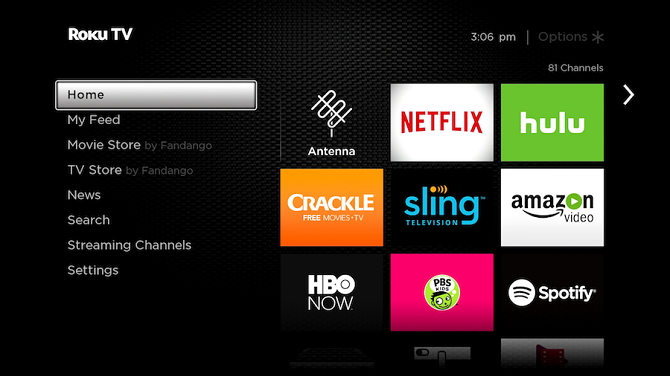
chromecast vs roku apps list

According to Roku’s literature, there are more than 500,000 channels you can install on your device.

Of course, a large percentage of these aren’t worth the time of day, but you’ll be able to find all big hitters like Spotify, Hulu, Sling, Netflix, Amazon Video, and so on.

Roku also has a near-endless collection of private channels. We’ve covered some of the best private channels on Roku, as well as how to install private channels on Roku if you would like to learn more.

Chromecast devices are different. Not all apps are Chromecast-enabled, meaning you’ll sometimes have to manually cast your entire screen. If you’re streaming from mobile, it has a negative impact on your battery life. Additionally, you won’t be able to use your phone for anything else while the casting is taking place; it might not be a suitable arrangement for you.

Furthermore, some apps won’t successfully stream even if you cast your entire screen. If they rely on Silverlight, Flash, QuickTime, or VLC, they will not work.

Chromecast vs. Roku: Additional Features

ethernet adaptor chromecast

Roku devices and Chromecasts both have some extra features that might help to tip the scales, depending on what’s important to you.

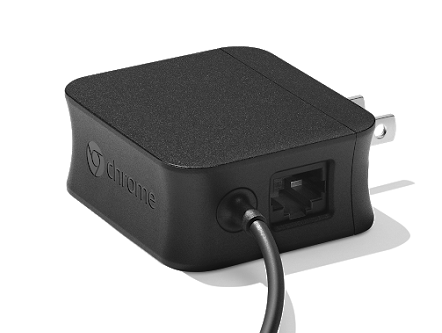
The Chromecast Ultra has an ethernet port. Using it should provide a faster and smoother streaming experience. The only Roku device with an ethernet port is the Ultra, but as explained previously, we haven’t included the Ultra in this showdown.

Roku devices are Miracast-enabled. Miracast is often touted as a replacement for HDMI. It means you can mirror Android and Windows screens directly to your TV. Sadly, you will not find Miracast on Apple devices.

Lastly, since September 2018, Roku OS has supported Google Assistant. It means you can use any Google Assistant device, such as Google Home, to search for and play content on your Roku device.

Chromecast vs. Roku: And the Winner Is…

A lot of your decision will depend on which products you already have in your home, which ecosystems you are tied into, and how you plan to use your device.

Broadly speaking, if you’re looking for a platform-agnostic way to cut the cord, you should buy a Roku. Whereas if you just want to stream the occasional TV show or movie to your TV, you should buy a Chromecast instead.

To learn more about the two devices, check out our tips to get more out of your Roku and our tips to get more out of your Chromecast.

Read the full article: Chromecast vs. Roku: Which One Is Best for You?


Read Full Article

10 Awesome Mac Apps for Students to Help You Succeed


mac-apps-students

Whether you’re starting a new school year, adjusting to another semester, or just need help getting through the rest of the year, this list of apps for Mac is just for you.

Planning, writing, studying, organizing, and focusing is much easier on your computer with the right tools. Here are the best Mac apps for students.

Plan Your Schedule, Assignments, and Homework

One of the most essential parts of a successful student life is planning. From your classes to assignments and more, these student planners will keep you organized.

1. myHomework
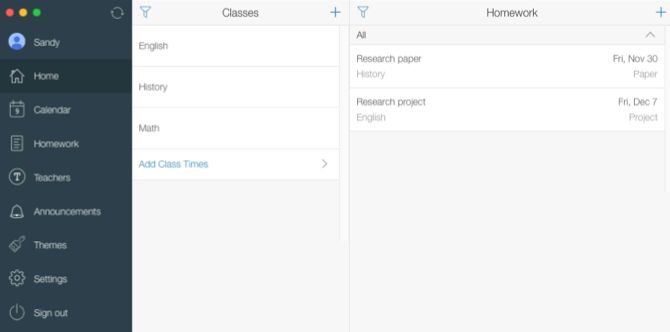
myHomework on Mac

With myHomework, you’ll never lose track of your classes, schedule, or homework. The app gives you a clear view of your course schedule, a calendar showing what’s due when, and a homework section for all your assignments.

Create reminders and repeating tasks, color-code your classes for easy viewing, and see your student overview in one simple app. And if your professors use Teachers.io, you can connect to that for announcements and assignments.

Download: myHomework (Free, subscription available)

2. iStudiez Lite
iStudiez Lite on Mac

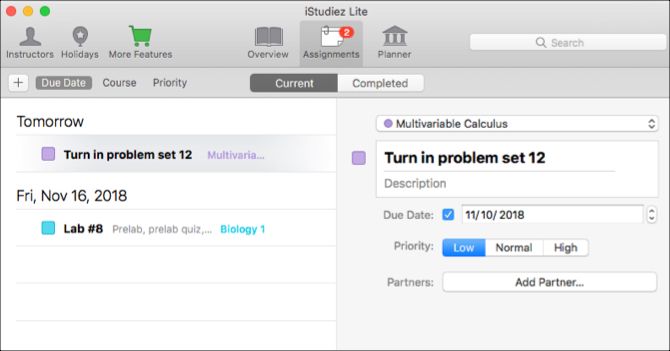
Another great student planner is iStudiez Lite. You can view your calendar by day or week and see tasks due at a glance. The assignments section is flexible, so you can view what’s due by date, course, or priority.

The app also offers an area to set up holidays when school isn’t in session, a progress bar for your semester, and a way to connect instructors from your contacts list. You can click on a class to view dates and times plus the room number and professor. It also lets you add notes, assignments, or convert to an exam.

Download: iStudiez Lite (Free)

Create and Study With Flashcards

Flashcards are terrific study tools. These apps let you create your own flashcard decks, share them with others, or browse decks that might fit your topics.

3. PAL Flashcards
PAL on Mac

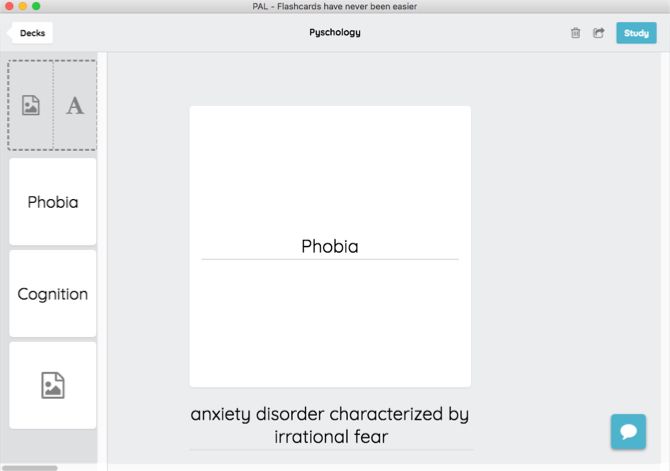
PAL is a cool flashcard app that gives you a few samples to start with, but lets you create and import your own decks as well. You can use text or images when creating your cards, which makes it handy for any course.

When it’s time to review your cards, just hit the Study button and test yourself. PAL also lets you share your flashcard decks with fellow students by sending a link. If you want a basic, easy flashcard app for Mac, this is it.

Download: PAL Flashcards (Free)

4. Flashcard Hero Lite
Flashcard Hero Lite on Mac

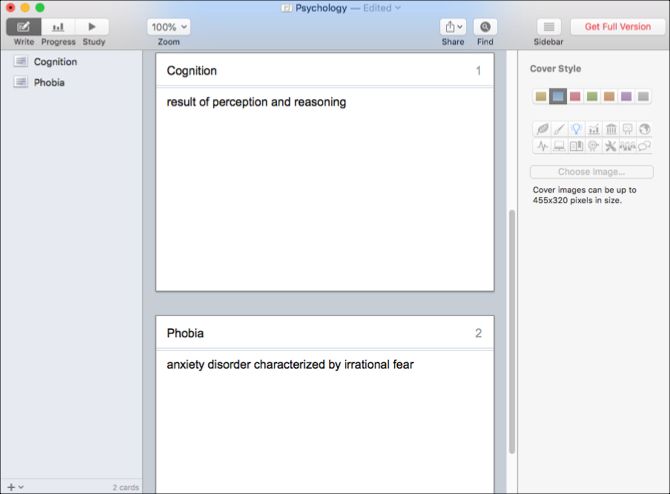
Flashcard Hero Lite is another great flashcard app. Create cards, decks, and topics with just a click. And if you like to be a little creative with your flashcards, the app lets you format text and use lists in your answers.

At study time, you can use the Memorize, Type, or Multiple Choice features. You can adjust the deck for a more productive study session by using your iPhone as a remote, use text-to-speech, and shuffle the cards. Flashcard Hero Lite also gives you a progress section to check out.

Download: Flashcard Hero Lite (Free, premium version available)

Write and Take Notes With Helpful Tools

Every student is familiar with writing. Make writing on your Mac easier—whether it’s papers, essays, or notes—with these tools.

5. Grammarly
Grammarly on Mac

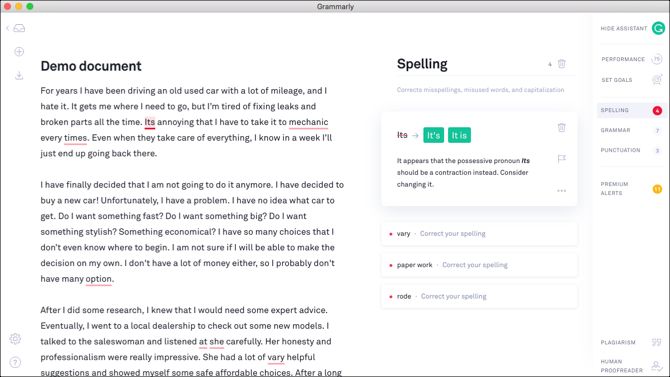
You may be familiar with Grammarly due to its popular browser extensions that help you avoid spelling and grammar mistakes. But the company also offers a Mac app that does more than that. You can use it as a full writing tool with built-in spelling and grammar features.

Create a new document or import one to get started. As you work on your document, you’ll see alerts for spelling and grammar issues at the top and can click for details. You can adjust the settings to show word count and increase the font size. You can also view your performance stats and set goals. Grammarly on Mac provides a really solid writing experience that helps you avoid errors.

Download: Grammarly (Free, subscription available)

6. Bear
Bear on Mac

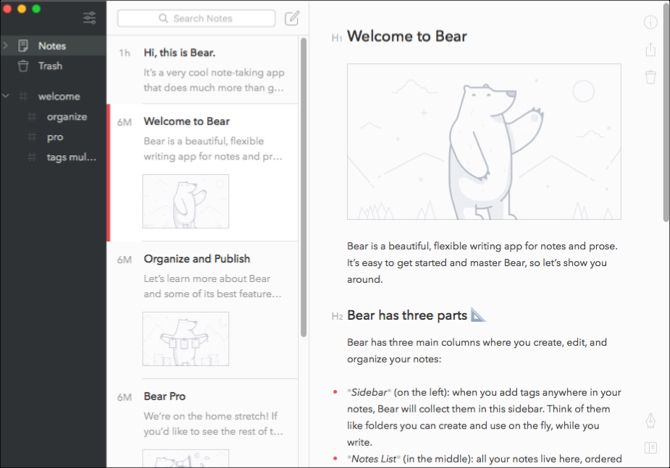
Another terrific writing tool on Mac is Bear. While you may think it’s just another note-taking app, there’s more to Bear than meets the eye. You can create full documents with headings, font formatting, lists, and even code for programmers.

Bear lets you change to a distraction-free experience, send or share your papers quickly, and view stats like word, character, and paragraph counts. Read time and creation/modification dates are also present. You can adjust the settings in Bear for sorting, shortcuts, fonts, lines, paragraphs, and more. We’ve compared Bear to Apple Notes if you’re interested in more.

Download: Bear (Free, subscription available)

Organize Projects and Thoughts With Mind Maps

A mind map is a handy tool for organizing your thoughts in a visual way. Maybe you have a large team project to collaborate on, an in-depth paper to write, or just need to brainstorm ideas. These mind map apps make it easy.

7. SimpleMind Lite
SimpleMind Lite on Mac

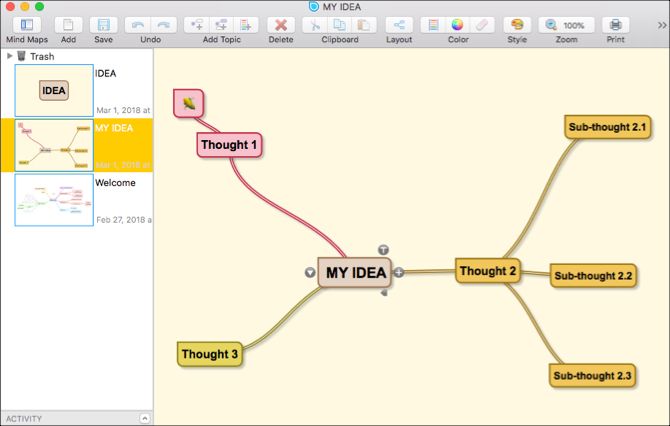
SimpleMind Lite is one of the easiest ways to create mind maps. The interface is intuitive with a nice toolbar at the top. Add your nodes, use custom colors or palettes, and adjust the style. You can choose from a variety of styles like bright colors, chart, grayscale, and colors on black to get started.

The app gives you zoom and print options, clipboard features, freeform or horizontal layouts, and a distraction-free mind mapping feature.

Download: SimpleMind Lite (Free) | SimpleMind ($30)

8. Junkyard
Junkyard on Mac

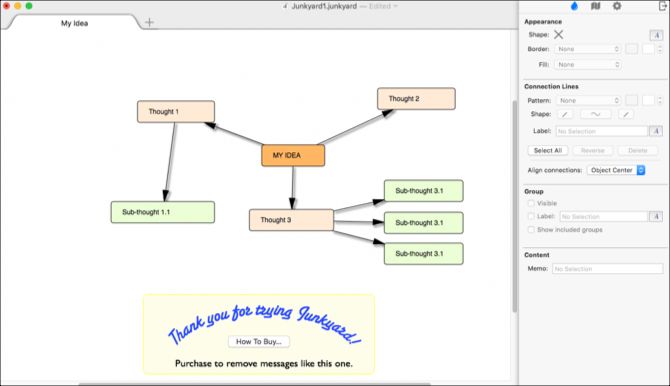
If you like to work with an outline view in addition to the visual map, check out Junkyard. Open up the sidebar and start creating your map with a click. You can pick from various font styles and colors, and adjust the alignment and layout easily.

When you want to see your outline, just click its button in the sidebar. You can even export and print your outline, which is great for a written view of your assignment or project. Junkyard does display an ad at the bottom of the window, but unlike similar apps, you receive all features for free. You can remove the ad via in-app purchase.

Download: Junkyard (Free)

Stay Focused and Take Breaks

Whether you’re studying or writing an essay, staying focused is key to completing your task. But breaks are important to your mental health as well. These focus timers help you try the Pomodoro technique on your Mac.

9. Be Focused
Be Focused on Mac

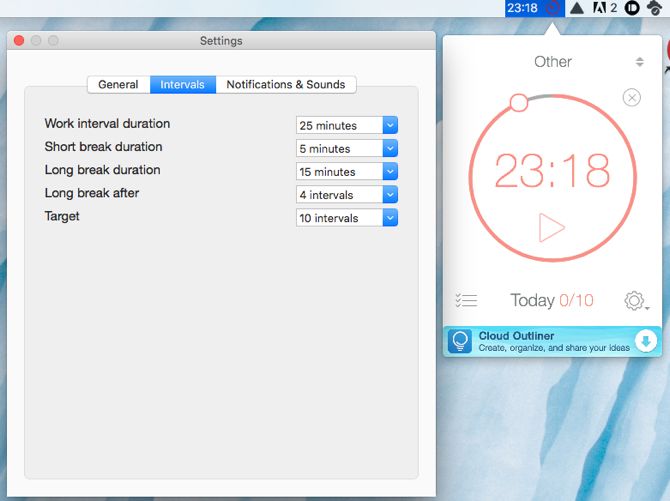
A focus timer should be super simple, and Be Focused is just that. Click to open the app, which pops into your menu bar. Then click once more to start the timer at its default of 25 minutes.

If you want to track specific tasks, you can add those and use the timer for each. This is a great way to see which subjects or assignments you’re spending the most time on. The app includes settings for your work, long and short break intervals, sounds and notifications, and handy shortcuts.

Download: Be Focused (Free)

10. Red Hot Timer
Red Hot Timer on Mac

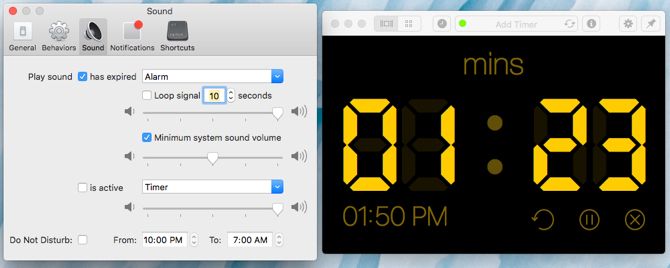
Another excellent focus timer option is Red Hot Timer. When you open the app, just type in the amount of time you want and the timer starts. The display shows a large digital countdown clock, which you can customize to include four different timers.

Other handy features include a menu bar icon, automatic starts and tops, various notification sounds, a Do Not Disturb mode, multiple notification options, and task shortcuts.

Download: Red Hot Timer (Free)

Your Student Life, Simplified by Useful Apps

It’s never too early or too late to get your computer prepared for school. Your life as a student can be a bit easier with the right tools to help you out with planning, organizing, focusing, and more.

We also have you covered with Chrome extensions for students and apps every student needs on their iOS device.

Read the full article: 10 Awesome Mac Apps for Students to Help You Succeed


Read Full Article
How to Fix a Laptop Keyboard That’s Not Working

Update Your Address


Update Your Address

Facebook appeals UK data watchdog’s £500k Cambridge Analytica fine


Facebook has said it will appeal against a £500,000 penalty issued by the UK’s data watchdog this summer following a lengthy investigation into the Cambridge Analytica data misuse scandal.

Facebook told the regulator an estimated one million UK users were among the 87M of its users whose private data was harvested by Dr. Aleksandr Kogan and his company Global Science Research — which passed the data to the now defunct political consultancy, Cambridge Analytica.

In July, the ICO announced it intended to fine Facebook the maximum possible amount under the UK’s old data protection regime — saying it was “clear” the company had contravened the law “by failing to keep users data safe” when its systems allowed Kogan’s app to scrape Facebook user data.

It confirmed the penalty a month ago, with commissioner Elizabeth Denham saying then: “Facebook failed to sufficiently protect the privacy of its users before, during and after the unlawful processing of this data. A company of its size and expertise should have known better and it should have done better.”
Although the text of its October decision includes the admission that the ICO had not found evidence that any UK Facebook users’ data had actually been passed to Kogan.

“Facebook has asserted that the only individuals whose personal data was used in this way [shared by Kogan with third parties including Cambridge Analytica] were US residents,” it writes on this, before adding that even if Facebook’s assertion is correct some US residents would also have been UK users “from time to time” (e.g. if visiting the UK) — and thus would fall under its remit.
It also pointed to “serious risk” to UK users’ data being material to its decision, writing: “Dr. Kogan and/or GSR were put in a position where they were effectively at liberty (if they so chose) to use the personal data of UK residents for such purposes, or to share such data with persons or companies who would use it for such purposes.”

On that basis, Facebook appears to be resting its appeal against the ICO decision on its own assertion to the ICO that there’s no evidence of UK users’ data being used.

Commenting on its decision to appeal against the ICO’s fine in a statement, Anna Benckert, its EMEA VP & associate general counsel, said:

We have said before that we wish we had done more to investigate claims about Cambridge Analytica in 2015. We made major changes to our platform back then and have also significantly restricted the information app developers can access. And we are investigating all historic apps that had access to large amounts of information before we changed our platform policies in 2014.

The ICO’s investigation stemmed from concerns that UK citizens’ data may have been impacted by Cambridge Analytica, yet they now have confirmed that they have found no evidence to suggest that information of Facebook users in the UK was ever shared by Dr Kogan with Cambridge Analytica, or used by its affiliates in the Brexit referendum.

Therefore, the core of the ICO’s argument no longer relates to the events involving Cambridge Analytica. Instead, their reasoning challenges some of the basic principles of how people should be allowed to share information online, with implications which go far beyond just Facebook, which is why we have chosen to appeal.

For example, under ICO’s theory people should not be allowed to forward an email or message without having agreement from each person on the original thread. These are things done by millions of people every day on services across the internet, which is why we believe the ICO’s decision raises important questions of principle for everyone online which should be considered by an impartial court based on all the relevant evidence.

We’ve reached out to the ICO for comment. Update: An ICO spokesperson said: “Any organisation issued with a monetary penalty notice by the Information Commissioner has the right to appeal the decision to the First-tier Tribunal. The progression of any appeal is a matter for the tribunal. We have not yet been notified by the Tribunal that an appeal has been received.”

Last month Denham explained the decision to impose the maximum penalty on Facebook by saying: “We considered these contraventions to be so serious we imposed the maximum penalty under the previous legislation. The fine would inevitably have been significantly higher under the GDPR. One of our main motivations for taking enforcement action is to drive meaningful change in how organizations handle people’s personal data.”

This summer her office issued its first ever enforcement notice under the new GDPR data protection regime against Canadian data firm AIQ, which had supplied software and services to the disgraced Cambridge Analytica.

But last month the ICO issued a narrower enforcement notice, replacing the earlier notice, after AIQ appealed.


Read Full Article

Affetto is the wild boy head robot of your nightmares


Affetto is a robot that can smile at you while it pierces your soul with its endless, dead state. Created by researchers at Osaka University, this crazy baby-head robot can mimic human emotions by scrunching up its nose, smiling, and even closing its eyes and frowning. Put it all together and you get a nightmare from which there is no sane awakening!

Android robot faces have persisted in being a black box problem: they have been implemented but have only been judged in vague and general terms,” study first author Hisashi Ishihara says. “Our precise findings will let us effectively control android facial movements to introduce more nuanced expressions, such as smiling and frowning.”

We last saw Affetto in action in 2011 when it was even more frightening than it is now. The researchers have at least added some skin and hair to this cyberdemon, allowing us the briefest moment of solace as we stare into Affetto’s dead eyes and hope it doesn’t gum us to death. Ain’t the future grand?

The goal, obviously, is to lull humans into a state of calm as the rest of Affetto’s body, spiked and bladed, can whir them to pieces. The researchers write:

A trio of researchers at Osaka University has now found a method for identifying and quantitatively evaluating facial movements on their android robot child head. Named Affetto, the android’s first-generation model was reported in a 2011 publication. The researchers have now found a system to make the second-generation Affetto more expressive. Their findings offer a path for androids to express greater ranges of emotion, and ultimately have deeper interaction with humans.

The researchers investigated 116 different facial points on Affetto to measure its three-dimensional movement. Facial points were underpinned by so-called deformation units. Each unit comprises a set of mechanisms that create a distinctive facial contortion, such as lowering or raising of part of a lip or eyelid. Measurements from these were then subjected to a mathematical model to quantify their surface motion patterns.

Pro tip: Just slap one of these on your Roomba and send it around the house. The kids will love it and the cat will probably die of a heart attack.


Read Full Article