29 September 2018

Everything you need to know about Facebook’s data breach affecting 50M users


Facebook is cleaning up after a major security incident exposed the account data of millions of users. What’s already been a rocky year after the Cambridge Analytica scandal, the company is scrambling to regain its users trust after another security incident exposed user data.

Here’s everything you need to know so far.

What happened?

Facebook says at least 50 million users’ data may be at risk after attackers exploited a vulnerability that allowed them access to personal data. The company also preventively secure 40 million additional accounts out of an abundance of caution.

What data were the hackers after?

Facebook CEO Mark Zuckerberg said that the company has not seen any accounts compromised and improperly accessed — although it’s early days and that may change. But Zuckerberg said that the attackers were using Facebook developer APIs to obtain some information, like “name, gender, and hometowns” that’s linked to a user’s profile page.

What data wasn’t taken?

Facebook said that it looks unlikely that private messages were accessed. No credit card information was taken in the breach, Facebook said. Again, that may change as the company’s investigation continues.

What’s an access token? Do I need to change my password?

When you enter your username and password on most sites and apps, including Facebook, your browser or device is set an access tokens. This keeps you logged in, without you having to enter your credentials every time you log in. But the token doesn’t store your password — so there’s no need to change your password.

Is this why Facebook logged me out of my account?

Yes, Facebook says it reset the access tokens of all users affected. That means some 90 million users will have been logged out of their account — either on their phone or computer — in the past day. This also includes users on Facebook Messenger.

When did this attack happen?

The vulnerability was introduced on the site in July 2017, but Facebook didn’t know about it until this month, on September 16, 2018, when it spotted unusual activity. That means the hackers could have had access to user data for a long time, as Facebook is not sure right now when the attack began.

Who would do this?

Facebook doesn’t know who attacked the site, but the FBI is investigating, it says.

However, Facebook has in the past found evidence of Russia’s attempts to meddle in American democracy and influence our elections — but it’s not to say that Russia is behind this new attack. Attribution is incredibly difficult and takes a lot of time and effort. It recently took the FBI more than two years to confirm that North Korea was behind the Sony hack in 2016 — so we might be in for a long wait.

How did the attackers get in? 

Not one, but three bugs led to the data exposure.

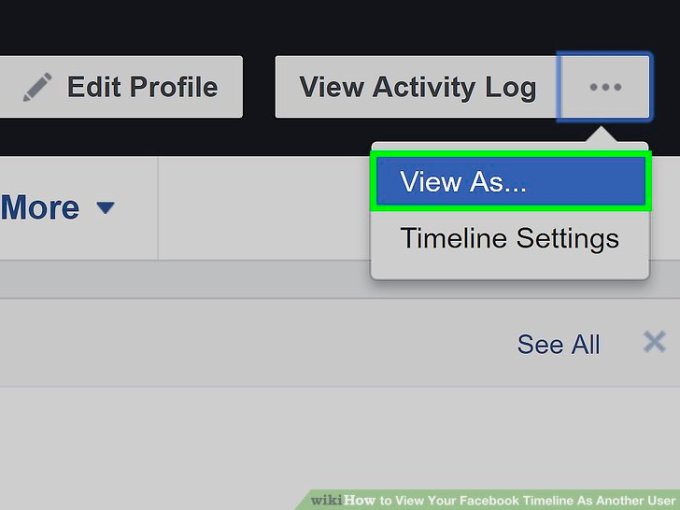
In July 2017, Facebook inadvertently introduced three vulnerabilities in its video uploader, said Guy Rosen, Facebook’s vice president of product management, in a call with reporters. When using the “View As” feature to view your profile as someone else, the video uploader would occasionally appear when it shouldn’t display at all. When it appeared, it generated an access token using the person who the profile page was being viewed as. If that token was obtained, an attacker could log into the account of the other person.

Is the problem fixed? 

Facebook says it fixed the vulnerability on September 27, and then began resetting the access tokens of people to protect the security of their accounts.

Will Facebook be fined or punished?

If Facebook is found to have breached European data protection rules — the newly implemented General Data Protection Regulation (GDPR) — the company can face fines of up to four percent of its global revenue.

However, that fine can’t be levied until Facebook knows more about the nature of the breach and the risk to users.

Another data breach of this scale – especially coming in the wake of the Cambridge Analytica scandal and other data leaks – has some in Congress calling for the social network to be regulated. Sen. Mark Warner (D-VA) issued a stern reprimand to Facebook over today’s news, and again pushed his proposal for regulating companies holding large data sets as ““information fiduciaries” with additional consequences for improper security.

FTC Commissioner Rohit Chopra also tweeted that “I want answers” regarding the Facebook hack. It’s reasonable to assume that there could be investigators in both the U.S. and Europe to figure out what happened.

Can I check to see if my account was improperly accessed?

You can. Once you log back into your Facebook account, you can go to your account’s security and login page, which lets you see where you’ve logged in. If you had your access tokens revoked and had to log in again, you should see only the devices that you logged back in with.

Should I delete my Facebook account?

That’s up to you! But you may want to take some precautions like changing your password and turning on two-factor authentication, if you haven’t done so already. If you’re weren’t impacted by this, you may want to take the time to delete some of the personal information you’ve shared to Facebook to reduce your risk of exposure in future attacks, if they were to occur.


Read Full Article

How (Not) to Upgrade to the Latest Windows 10 Version


windows-10-upgrade-cancel

Windows 10 build 1809 is coming to your PC soon. The official release date is October 2, 2018, but the rollout could take many months. We’ll show you how you can get the latest feature update right now or how to delay it for as long as possible, in case you don’t want to upgrade.

Which Version of Windows Do You Have?

First, find out which version of Windows you’re running right now.

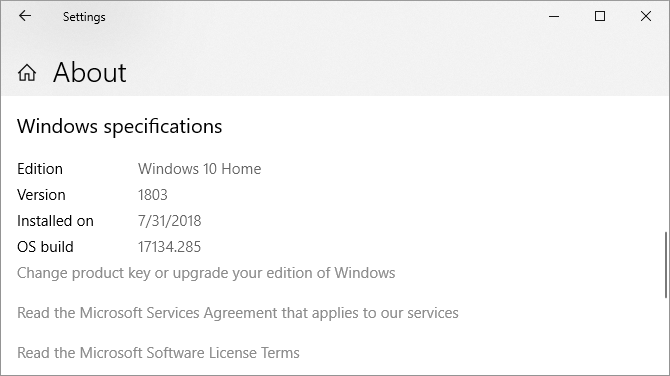
If you’re running Windows 10, go to Start > Settings > System > About and check what it says under Windows Specifications.

How to find out which Windows version or edition you're using.

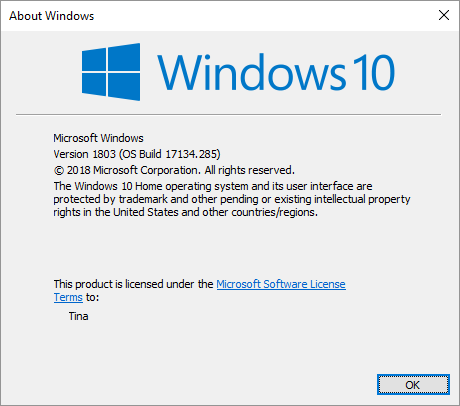
For a quick check that works on any version of Windows, press Windows + Q, type winver, and hit Enter.

How to quickly find out which Windows version and edition you're on.

If you’re still on Windows 7 or 8, the only way to upgrade to Windows 10 now is to buy a copy and install it. Earlier this year, Microsoft closed the loophole that permitted a free Windows 10 upgrade.

How Not to Upgrade Windows 10

Not upgrading to the latest version of Windows 10 remains a sensible choice. You’ll maximize your time on a stable installation and avoid bugs. Whether you can temporarily delay the Windows 10 October 2018 Update depends on your Windows edition.

Windows 10 Home

As a Home user, you can temporarily disable Windows Update by setting your internet connection to metered.

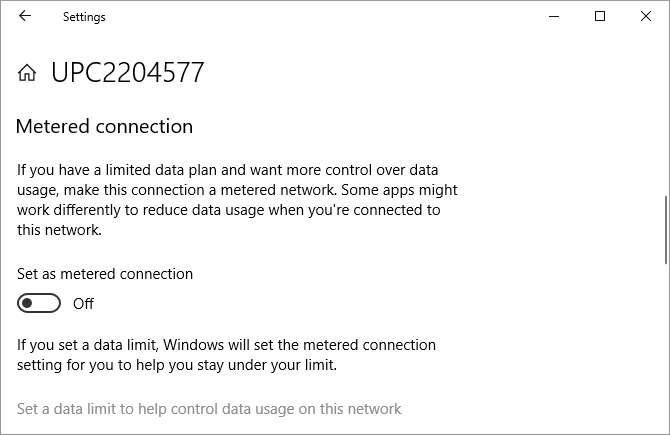
Go to Start > Settings > Network & Internet > Wi-Fi, select the network you’re connected to, and switch the slider under Set as metered connection to On. This path now also works for Ethernet connections. As soon as you connect to an unmetered Wi-Fi or LAN network, Windows Update will start downloading updates again.

How to set a metered Wi-Fi or Ethernet connection on Windows 10 Home.

Unfortunately, this is just a temporary workaround. Though it could take many weeks, you should prepare for the impending upgrade that Windows Update will eventually drop on you.

Windows 10 Pro, Education, and Business

If you’re on one of these Windows 10 editions, you have the luxury of temporarily deferring feature updates.

To pause updates completely for up to 35 days, head to Settings > Update & Security > Windows Update > Advanced options and under Pause Updates, move the slider into the On position. Note that once updates resume, you will have to install the latest updates before you can pause Windows Update again.

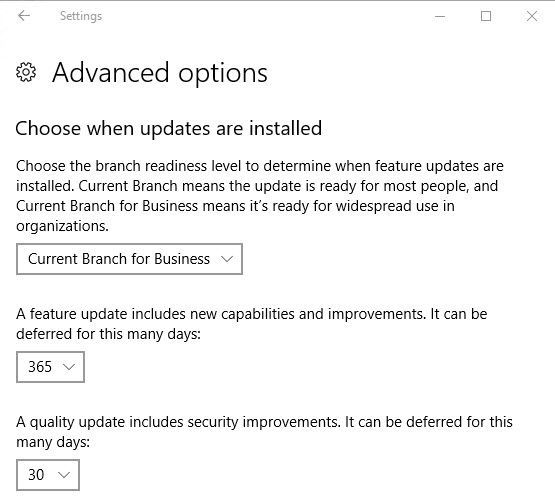
To defer updates, stay in the Advanced options window. Under Choose when updates are installed, select for how many days you want to defer the feature update; the maximum is 365 days. Unless you don’t want to receive security updates, select zero days for quality updates.

Windows 10 Defer Updates

Did the update download, but you’re not ready to install, yet? You can postpone it once more for one week. Go to Settings > Update & Security > Windows Update and select Restart options. Here you can schedule a time and date for the pending update, up to 7 days in the future.

Preparing Your Windows 10 Upgrade

To upgrade to the October 2018 Update, you should be on version 1803, also known as the April 2018 Update. If that’s your Windows version, you’re good to go. Before you upgrade, however, check off these pre-installation To-Dos:

  1. Create a Windows recovery drive.
  2. Back up your product keys.
  3. Enable System Restore.
  4. Back up your important data.

With Windows, you never know what could go wrong. So be prepared and do your Windows housekeeping. You’ll find detailed instructions in our article on what to do before you upgrade to the Windows 10 Fall Creators Update.

The Latest Builds: Become a Windows Insider

As Windows Insider, you’ll always run the latest Windows 10 builds. It’s the fast lane to new features, but you also risk facing countless bugs and problems with the operating system. Are you up for the challenge?

How to Join the Windows Insider Program

To become a Windows Insider, you have to go through the following steps:

  1. Sign up for the Windows Insider Program. You’ll need a Microsoft account.
  2. Make sure you sign into Windows using your Microsoft account: Go to Start > Settings > Accounts > Your info to change how you sign in.
  3. Enroll your Windows 10 computer: Go to Start > Settings > Update & Seurity > Windows Insider Program > Get started to opt in.

You’ll have to link your Microsoft account and choose a Windows Update branch. We recommend the slow ring.

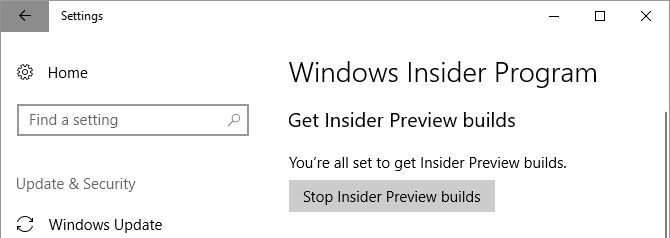
Twice a year, when the Windows Insider build aligns with the latest build that Microsoft is rolling out to the public (the RTM build), you’ll be able to exit the Insider program without having to reinstall. When that’s the case, head to Start > Settings > Update & Security > Windows Insider Program and click Stop Insider Preview builds.

Windows 10 Stop Insider Preview Builds

The Latest Stable Release of Windows 10

Being a Windows Insider means you’ll often run buggy versions of Windows 10. The safe choice is to wait for a stable release of Windows 10 and use one of the following upgrade routes.

Upgrade to Windows 10 Version 1809 via Windows Update

When your computer is ready to upgrade, you’ll receive the October 2018 Update through Windows Update. It’s worth being patient. If Microsoft doesn’t have reliable data for your hardware or if Insiders with your specs experienced lots of issues, the update may not roll out to your system for some time.

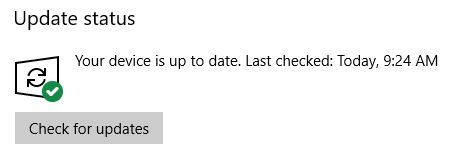
To check whether you’re ready to upgrade, head to Start > Settings > Update & Security > Windows Update and click Check for updates. Once the upgrade has downloaded, you’ll see it listed here.

Windows 10 Check for Updates

Before you can upgrade to a new build, however, you’ll have to install any pending security updates. Make sure you didn’t pause or defer feature updates under Advanced options.

Manually Install Windows 10 Using the Media Creation Tool

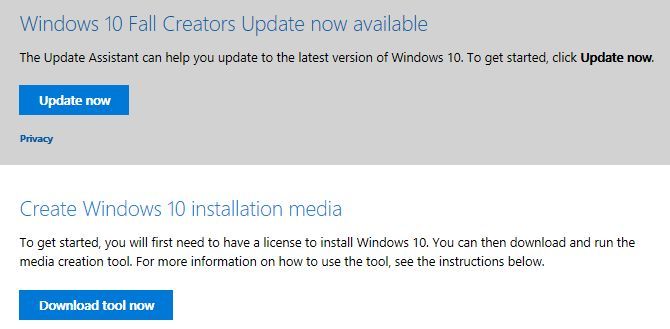
If Windows Update doesn’t think it’s your turn yet, you can force the upgrade using Microsoft’s Windows 10 Media Creation Tool (open this link in Microsoft Edge).

You can click the Update now link to launch the Update Assistant and initiate the upgrade directly from the website.

Windows 10 Manual Installation

Or click Download tool now to prepare Windows 10 installation media for a clean install.

Please refer to the article linked in the previous paragraph for a step-by-step guide to using the Windows 10 Media Creation tool.

Windows 10 Media Creation Tool

Should You Upgrade Windows 10?

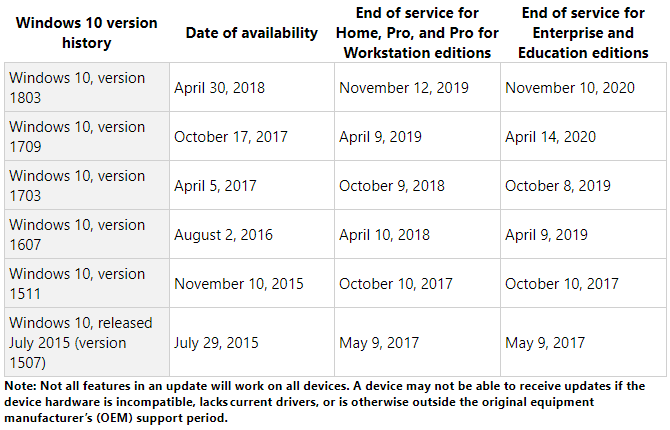
It depends on which version of Windows you’re currently using. Generally, Microsoft will stop supporting each Windows 10 version 18 months after its initial release.

For how long is my Windows version supported with security updates?

Windows 10 Home, Version 1709 or 1803

You should wait until the upgrade is available through Windows Update. And even then, it’s safer to defer the feature update and wait a little longer until Microsoft has fixed common bugs. Although you can roll back to your previous Windows version for 10 days (previously 30 days), it’s not worth the hassle.

Moreover, if you’re presently running the Windows 10 Fall Creators or April 2018 Update, you’ll continue to receive security patches until April or November 2019, respectively. There’s no rush to update right now, so take your time.

Older Windows 10 Home Versions

The only time you should upgrade is when support for your current Windows 10 version ends. But this won’t happen for many years.

The original Windows 10 release, version 1507, as well as versions 1511 (Fall Update), 1607 (Anniversary Update), and 1703 (Creators Update) have all reached their end of service. If you’re still running one of these versions, you’re no longer receiving security patches and should upgrade immediately.

If your machine supports the October 2018 Update and you’re on a Windows 10 version prior to 1803, we’d recommend waiting for the release of the latest feature update and then upgrading manually using the Windows Media Creation Tool, as described above.

Should you be stuck on an older version because your machine can’t upgrade, there’s a silver lining! For systems that see a “Windows 10 is no longer supported on this PC” error while trying to upgrade, Microsoft has extended support until 2023.

Microsoft introduced this exception for PCs using Intel’s Clover Trail processor, but it might extend to other unsupported hardware as well.

“To keep our customers secure, we will provide security updates to these specific devices running the Windows 10 Anniversary Update until January of 2023, which aligns with the original Windows 8.1 extended support period.”

Windows 10 Enterprise and Education Editions

Windows 10 Enterprise and Education users can add an additional six months to the dates above. Earlier this year, Microsoft said:

“Windows 10 version 1511, 1607, 1703 and 1709 will continue to receive monthly servicing updates at no-cost for a period of 6 months past the end of service dates. The security-only updates are available through all normal channels including: Windows Update (WU/WUfB), WSUS, the Update Catalog, and enterprise management solutions and are delivered as standard cumulative update packages.”

And:

“Some versions of Enterprise and Education editions will have an option for an additional paid extension for eligible volume licensing customers. Customers should reach out to their Microsoft account team for more information about a paid program.”

Welcome to the Future of Windows

The good news is that the latest Windows 10 version will hijack your computer for only around 30 minutes. Microsoft has optimized the installation process and enabled many installation steps to run in the background. This means you can continue to use your machine for a lot longer before you have to restart.

Once you’ve successfully upgraded to the Windows 10 October Update, double-check all your privacy-related settings and restore your preferences. You might also want to set up or disable new features.

Read the full article: How (Not) to Upgrade to the Latest Windows 10 Version


Read Full Article

Facebook Hack Affects 50 Million Accounts


Around 50 million Facebook users may have had their accounts accessed as part of a major security breach. This is thanks an unknown party or parties exploiting a vulnerability in Facebook’s code and stealing access tokens as a result.

Facebook isn’t having a great year, with the Cambridge Analytica scandal and Mark Zuckerberg’s subsequent (and very awkward) appearance before Congress. This led to calls for people to #DeleteFacebook, and millions are thought to have done so.

And now Facebook has a major security breach on its hands…

Facebook Suffers a Serious Security Breach

As explained in a post on Facebook Newsroom, Facebook discovered a security breach on September 25, 2018. Around 50 million accounts were directly affected, with a further 40 million accounts secured as a precaution.

The attacker had discovered a flaw in Facebook’s code which is thought to have been introduced to its video upload tool in July 2017. This affected the “View As” feature, which allows you to see how your Facebook profile looks to other users.

Thus, the attacker was able to steal access tokens, which are the digital keys that let you stay logged into Facebook without having to enter your password every time. With these access tokens the attacker could potentially take over people’s accounts.

Unfortunately, Facebook doesn’t yet know “whether these accounts were misused or any information accessed.” At this early stage of the investigation the social network also doesn’t know “who’s behind these attacks or where they’re based.”

Facebook Takes Action to Protect Its Users

Facebook has taken decisive action. First, it has fixed the vulnerability and informed law enforcement. Secondly, it has reset the access token of everyone potentially affected. Third, it has temporarily disabled the “View As” feature.

If you’re one of the 90 million people who have had their access tokens revoked you’ll need to log back into Facebook. You’ll also see a notification at the top of your News Feed explaining the situation. But beyond that, neither you or Facebook can do any more.

Maybe It Is Time to Delete Facebook After All

While any security breach resulting from a vulnerability in a company’s code is serious, it looks like this could have been a lot worse. And while 50 million people is a huge number it’s a drop in the ocean when you consider Facebook has 2 billion users.

Still, this sorry saga is likely to reinvigorate the campaign to persuade people to delete Facebook. Making our article listing reasons not to delete Facebook suddenly relevant again. And we doubt this will be the last time either.

Read the full article: Facebook Hack Affects 50 Million Accounts


Read Full Article

How to Get More Matches on the Bumble Dating App

Introducing the Kaggle “Quick, Draw!” Doodle Recognition Challenge


Online handwriting recognition consists of recognizing structured patterns in freeform handwritten input. While Google products like Translate, Keep and Handwriting Input use this technology to recognize handwritten text, it works for any predefined pattern for which enough training data is available. The same technology that lets you digitize handwritten text can also be used to improve your drawing abilities and build virtual worlds, and represents an exciting research direction that explores the potential of handwriting as a human-computer interaction modality. For example the “Quick, Draw!” game generated a dataset of 50M drawings (out of more than 1B that were drawn) which itself inspired many different new projects.

In order to encourage further research in this exciting field, we have launched the Kaggle "Quick, Draw!" Doodle Recognition Challenge, which tasks participants to build a better machine learning classifier for the existing “Quick, Draw!” dataset. Importantly, since the training data comes from the game itself (where drawings can be incomplete or may not match the label), this challenge requires the development of a classifier that can effectively learn from noisy data and perform well on a manually-labeled test set from a different distribution.

The Dataset
In the original “Quick, Draw!” game, the player is prompted to draw an image of a certain category (dog, cow, car, etc). The player then has 20 seconds to complete the drawing - if the computer recognizes the drawing correctly within that time, the player earns a point. Each game consists of 6 randomly chosen categories.
Because of the game mechanics, the labels in the Quick, Draw! dataset fall into the following categories:
  • Correct: the user drew the prompted category and the computer only recognized it correctly after the user was done drawing.
  • Correct, but incomplete: the user drew the prompted category and the computer recognized it correctly before the user had finished. Incompleteness can vary from nearly ready to only a fraction of the category drawn. This is probably fairly common in images that are marked as recognized correctly.
  • Correct, but not recognized correctly: The player drew the correct category but the AI never recognized it. Some players react to this by adding more details. Others scribble out and try again.
  • Incorrect: some players have different concepts in mind when they see a word - e.g. in the category seesaw, we have observed a number of saw drawings.
In addition to the labels described above, each drawing is given as a sequence of strokes, where each stroke is a sequence of touch points. While these can easily be rendered as images, using the order and direction of strokes often helps making handwriting recognizers better.

Get Started
We’ve previously published a tutorial that uses this dataset, and now we're inviting the community to build on this or other approaches to achieve even higher accuracy. You can get started by visiting the challenge website and going through the existing kernels which allow you to analyze the data and visualize it. We’re looking forward to learning about the approaches that the community comes up with for the competition and how much you can improve on our original production model.

Acknowledgements
We'd like to thank everyone who worked with us on this, particularly Jonas Jongejan and Brenda Fogg from the Creative Lab team, Julia Elliott and Walter Reade from the Kaggle team, and the handwriting recognition team.

The 7 Best Cheap Computer Chairs for Students on a Budget

Facebook hack could hasten regulation as Sen. Warner says Congress must “step up”


Senator Mark Warner has issued a stern reprimand to Facebook over today’s revelation that 50 million users had their access token stolen by a hacker. “This is another sobering indicator that Congress needs to step up and take action to protect the privacy and security of social media users” Warner writes. As I’ve said before – the era of the Wild West in social media is over.”

In July, Warner published an expansive policy paper outlining where he believes regulation is necessary for social media companies. He proposes that companies holding large data sets be regulated as “information fiduciaries” with additional consequences for improper security. He suggests requirements for data portability and interoperability that would allow users to export their personal information and use it elsewhere if they were unsatisfied with their treatment by a social media giant. He also suggests applying similar rules to Europe’s GDPR including a requirement that breaches be disclosed within 72 hours of discovery. Notably, Facebook did disclose this hack within that window.

Facebook’s “View As” tool has been disabled following the hack. It let users see how their profile looked to a certain other user

The breach saw sophisticated hackers combine three Facebook bugs in its video uploader, user profile, and “view as” privacy feature to generate and steal the access tokens that allow users to stay logged into Facebook between sessions. These could be used to take over user accounts and take actions on their behalf. Facebook reset the access tokens of the 50 million users impacted and another 40 million who’d had their accounts viewed through the “view as” tool this year, which means they’ll have to log back into Facebook but won’t need to change their password.

The bugs stem from code pushed back in July, but Facebook only discovered the issue Tuesday afternoon as the hackers tried to scale up the attack to steal more tokens. Facebook patched the issue last night and this morning announced it was investigating, though it currently doesn’t have enough information to determine the source of the attack.. It’s already notifed the FBI, as well as the Irish Data Protection office since the breach has GDPR implications. On a call with reporters, CEO Mark Zuckerberg repeatedly called the problem “serious”. But beyond recounting the steps Facebook is taking to address this breach, he didn’t have a good answer for why users should still trust Facebook with their data.

Always quick to pounce on privacy issues, Warner has become one of the strongeest Democratic critics of the social network. He’s seemingly inherited the position of tech watchdog from former-Senator Al Franken. He’s weighed in on recent social media bias and election interference, Google’s plan to launch censored search in China, White House cybersecurity plans and more. With technology becoming an ever more important and dangerous part of people’s lives, Warner seems to see an opportunity to both protect his constituents and advance his career by demonstrating his expertise and ferocity.

This hack could be by Warner as strong evidence that social media companies like Facebook are not voluntarily doing enough to protect uses’ security and privacy. If regulation around security, portability, and interoperability is enacted, it could cost Facebook money for compliance, slow dow the pace of engineering innovation at the company, and make it more vulnerable to competitors. Right now, it’s tough for users to easily switch to another social network, which insulates Facebook from its PR problems becoming user growth problems. But if ditching Facebook for a competitor becomes simpler, it might force the company to treat its users better.

The Senator Mark Warner’s full statement can be found below:

STATEMENT OF U.S. SEN. MARK R. WARNER

~ On Facebook hack ~ 

WASHINGTON – U.S. Sen. Mark R. Warner (D-VA), Vice Chairman of the Senate Select Committee on Intelligence and co-chair of the Senate Cybersecurity Caucus, released the following statement on the announcement by Facebook that it discovered a security issue affecting almost 50 million accounts:

“The news that at least 50 million Facebook users had their accounts compromised is deeply concerning. A full investigation should be swiftly conducted and made public so that we can understand more about what happened.

“Today’s disclosure is a reminder about the dangers posed when a small number of companies like Facebook or the credit bureau Equifax are able to accumulate so much personal data about individual Americans without adequate security measures.

“This is another sobering indicator that Congress needs to step up and take action to protect the privacy and security of social media users. As I’ve said before – the era of the Wild West in social media is over.”

To kick start the debate around social media legislation, Sen. Warner in July released a white paper containing a suite of potential policy proposals for the regulation of social media.


Read Full Article

28 September 2018

How to Factory Reset Your iPhone and iPad

Block.Party raises $10M, will adapt Settlers of Catan to its blockchain game console


Blok.Party, the company the upcoming PlayTable game console, announced today raised $10 million in new funding. It’s also unveiling a big content partnership, where Blok.Party will create its own version of the popular board game Settlers of Catan.

I first wrote about Blok.Party and PlayTable earlier this year, when co-founder and CEO Jimmy Chen first laid out his vision to use blockchain technology to build a console that can recognize real-world objects (like figurines and cards), creating a hybrid between tabletop and video gaming.

The idea may have sounded a little abstract at the time, but it got a lot clearer when Chen dropped by the TechCrunch New York office to play a couple rounds of Catan with me.

I’ll admit that I hadn’t played in a while, but it was clear from the start that PlayTable saved us some setup time — instead of putting all the pieces of the physical board together, you play on a digital representation of the board. Most of the pieces are digitized too, and we used and traded our cards using smartphones. But there is a physical “robber” pieces, because Chen said this allows the robber’s movement to remain “a very visceral experience … that a digital version can’t ever capture.”

It may not be too long before you get to try this out for yourself, at least if you’re among the 100,000 pre-orders Blok.Party has received so far. Chen said the company will start shipping its first devices this fall.

He added that Catan, like many of the other games built for PlayTable, will be priced at around $20.

“For us, it’s not about trying to compete based on price,” Chen said. “We’re trying to compete based on experience.”

The new funding comes from crypto fund JRR Capital and other investors. Chen said the company will use the money to continue scaling the product, including further software development and building out the library of games.

At the same time, he emphasized that although Blok.Party is manufacturing the initial devices, his vision is to achieve real scale through partnerships with hardware manufacturers, who will build their own PlayTable consoles. Apparently, some of those discussions are already underway.

“Our strategy is to always have [our own] hardware program running to continually do research,” Chen said. “What I’ve discovered is that keeping a hardware program running is not that expensive. The expensive part is when you try to scale the program.”


Read Full Article

Google Helps You Plan Your Next Vacation


google-plan-summer-vacation

Google is continuing on its mission to help us all plan our vacations more efficiently. Its latest efforts are designed to bring the various elements involved in planning a vacation together using the whole of Google, including Search, Maps, and Trips.

Vacations Can Be a Pain to Plan

In February 2018, Google aligned its vacation planning tools. The company realized that unless you pay a premium for a package holiday, there are so many elements involved that vacations can be a pain to plan. And now it’s improving its planning tools again.

Google explains the most recent changes in a post on The Keyword. The overarching theme is stitching your trip plans together across Google. And that’s the point. Google wants to be the one tool to rule them all when it comes to vacation planning.

Improving Your Vacation Planning Toolset

The first improvement allows you to resume planning where you left off. This means that even if you haven’t booked anything, when you search for a popular travel destination Google will show you relevant suggestions in Search.

As you start booking parts of your holiday Google will further customize your search results. For example, if you’ve already booked a hotel in Rome, the next time you search for Rome Google will show you flight prices, the weather, and any events taking place.

Google is also expanding your ability to track flight prices during the holidays. The company already offers this for Thanksgiving, but will now extend this through Christmas and New Year. This should save you paying over the odds for a flight.

Last but not least, Google wants to help you choose a hotel based on its location. To enable this Google is assigning each hotel a location score based on information pulled from Google Maps. You can then pick a hotel based on its proximity to your interests.

Making It Easier to Plan Your Vacation

Individually these changes are all fairly minor, but when combined they add up to a collection of tools almost guaranteed to make it easier to plan your next vacation. As long as you’re willing to give Google access to all of this information about your trip.

Read the full article: Google Helps You Plan Your Next Vacation


Read Full Article

What Is “Five Eyes” Surveillance? VPN Users, Beware!


five-eyes-surveillance

If you’ve ever used a VPN, or are concerned about online privacy, you’ve probably stumbled across references to “Five Eyes,” “Nine Eyes,” and “14 Eyes.”

But what exactly do these surveillance alliances do? And can they affect the security of your VPN service?

What Is Five Eyes?

Five Eyes is a nickname for the United Kingdom–United States of America Agreement (UKUSA).

Despite the official name, UKUSA agreement consists of five countries. They are the UK, US, Canada, Australia, and New Zealand. The deal has its origins in a World War II intelligence-sharing agreement between Britain and America.

Five Eyes has given birth to many of the most notable privacy scandals in recent years, including PRISM, XKeyscore, and Tempora.

Today, its powers are scarily wide-ranging. According to the Electronic Frontier Foundation, the five governments can force any “communications service provider” (including ISPs, social media platforms, email providers, cell phone networks, and more) to:

  • Insert malware on its users’ devices.
  • Ignore existing laws in pursuit of Five Eyes directives.
  • Interfere with people’s user experience.
  • Provide governments with new product designs in advance.
  • Provide user information as requested in secret warrants.

What Is Nine Eyes?

Nine Eyes is another intelligence sharing agreement. It’s grown out of the original Five Eyes alliance. It includes all the Five Eyes members, plus Denmark, France, the Netherlands, and Norway.

Its powers and dedication to information sharing is broadly the same as the Five Eyes agreement.

What Is 14 Eyes?

The 14 Eyes agreement adds a further five countries to the list: Germany, Belgium, Italy, Spain, and Sweden.

Interestingly, both France and Germany have been close to becoming full Five Eyes members in 2009 and 2013 respectively. The two agreements both fell through for various reasons.

Lastly, it’s important to mention Israel and Singapore. Israel reportedly enjoys observer status with the main Five Eyes group, while Singapore has partnered with the group but is not an official member.

What Does This Mean for VPNs?

Given the sweeping powers granted by the three agreements, what impact does it have on your VPN service?

It’s all a question of jurisdiction. When talking about a VPN provider’s jurisdiction, there are three things to consider:

  • Local laws: Some countries outright ban VPN usage.
  • Company location: The state in which the VPN provider is registered and has its physical offices.
  • Server location: VPN providers typically offer servers in many different countries.

From a surveillance perspective, the two things you need to worry about are the company location and the company servers.

A VPN provider with either a physical address, or servers in the countries listed, could be compelled to hand over any information it has, including connection logs and browser traffic. The country might even monitor a VPN server’s inbound and outbound traffic. Worse still, the governments can forbid the provider from even notifying the affected customers; you lose the chance to respond to the invasion of privacy.

And, of course, due to the very nature of the agreements, once your information has been acquired by one country, it’s in the system. Ultimately, it could be shared with the other countries if they request it.

If security is your main priority, you shouldn’t use a VPN that’s domiciled in one of the Five, Nine, or 14 Eyes countries. Nor should you connect to servers in one of those countries using a VPN provider from a non-14 Eyes member.

If you really need to use a VPN provider from one of the Five, Nine, or 14 Eyes member countries (for example, due to a unique feature), make sure you select one that explicitly does not keep logs. However, not even that can adequately protect you.

For example, you don’t need to look any further than the once-popular US-based email provider, Lavabit.

When the FBI found out Edward Snowden had used the service, it requested the company’s logs. The company did not keep logs, so the FBI instead issued a subpoena for the SSL keys. The keys would have given the FBI access to metadata and unencrypted content for all Lavabit users.

To its credit, rather than hand over the information, Lavabit opted to shut down. You cannot be so confident that your VPN provider would be equally willing to fall on its sword.

VPNs in Surveillance Countries: Which to Avoid

A surprising number of mainstream VPN providers have their headquarters in one of the participating countries. Here are a few popular ones to watch out for:

  • Hotspot Shield
  • StrongVPN
  • Private Internet Access
  • LiquidVPN
  • IPVanish
  • HideMyAss
  • SaferVPN
  • VPNSecure
  • Getflix
  • UnoTelly
  • Mullvad
  • PrivateVPN

To reiterate, these services aren’t necessarily bad. If your main reason for using a VPN is to circumvent geo-blocking on Netflix and other online services, you might have no choice but to sign up.

However, if you want a VPN for its security benefits, you should look elsewhere.

Which VPNs Do We Recommend?

If you want to avoid a VPN company that’s located in either a Five, Nine, or 14 Eyes territory, MakeUseOf recommends either ExpressVPN or CyberGhost.

ExpressVPN

Express VPN is based in the British Virgin Islands and thus is not subject to any of the three surveillance sharing agreements.

Other key features include an automatic kill switch (to prevent VPN leaks), split tunneling, service-wide encryption, zero-knowledge DNS, and 148 server locations across 94 countries.

Use this link to get up to 49% off of ExpressVPN!

CyberGhost

CyberGhost is a Romanian company and, therefore, is also not subject to the 14 Eyes information sharing requirements.

You’ll have access to unlimited bandwidth and traffic, DNS and IP leak protection, 256-bit AES encryption, support for OpenVPN, L2TP-IPsec, and PPTP protocols, and simultaneous connections on up to seven devices at the same time.

Both providers have servers in the US and UK, meaning you can still use them to access localized websites and services. Just remember to switch back to a non-14 Eyes country as soon as you no longer need access to the geo-blocked content.

Use this link to get a special discount for CyberGhost!

Learn More About VPNs

If you take away one thing from this article, learn to value the importance of thorough research. Many VPN providers are quick to profess how wonderful they are; if you look at each provider’s homepage, you will find it difficult to unearth the differences. However, dig a little deeper, and you’ll soon discover that some providers are much more secure than others.

If you’d like to learn more before signing up for a VPN provider, check out our articles on the best VPNs for Kodi, the best VPNs according to Reddit, and the best VPNs for Chrome.

Image Credit: antonprado/Depositphotos

Read the full article: What Is “Five Eyes” Surveillance? VPN Users, Beware!


Read Full Article

Spotify ends test that required family plan subscribers to share their GPS location


Spotify has ended a test that required its family plan subscribers to verify their location, or risk losing accessing to its music streaming service. According to recent reports, the company had sent out emails to its “Premium for Family” customers which asked them to confirm their locations using GPS. The idea here is that some customers may have been sharing Family Plans, even though they’re not related, as a means of paying less for Spotify by splitting the plan’s support for multiple users. And Spotify wanted to bust them.

Spiegel Online and Quartz first reported this news on Thursday.

Of course, as these reports pointed out, asking users to confirm a GPS location is a poor means of verification. Families often have members who live or work outside the home – they may live abroad, have divorced or separated parents, have kids in college, they may travel for work, or any other number of reasons.

But technically, these sorts of situations are prohibited by Spotify’s family plan terms – the rules require all members to share a physical address. That rule hadn’t really been as strictly enforced before, so many didn’t realize they had broken it when they added members who don’t live at home.

Customers were also uncomfortable with how Spotify wanted to verify their location – instead of entering a mailing address for the main account, for instance, they were asked for their exact (GPS) location.

The emails also threatened that failure to verify the account this way could cause them to lose access to the service.

Family plans are often abused by those who use them as a loophole for paying full price. For example, a few years ago, Amazon decided to cut down on Prime members sharing their benefits, because they found these were being broadly shared outside immediate families. In its case, it limited sharing to two adults who could both authorize and use the payment cards on file, and allowed them to create other, more limited profiles for the kids.

Spotify could have done something similar. It could have asked Family Plan adult subscribers to re-enter their payment card information to confirm their account, or it could have designated select slots for child members with a different set of privileges to make sharing less appealing.

Maybe it will now reconsider how verification works, given the customer backlash.

We understand the verification emails were only a small-scale test of a new system, not something Spotify is rolling out to all users. The emails were sent out in only four of Spotify’s markets, including the U.S.

And the test only ran for a short time before Spotify shut it down.

Reached for comment, a Spotify spokesperson confirmed this, saying:

“Spotify is currently testing improvements to the user experience of Premium for Family with small user groups in select markets. We are always testing new products and experiences at Spotify, but have no further news to share regarding this particular feature test at this time.”


Read Full Article

How to Play MP3 and Other Audio Files on a Raspberry Pi


raspberry-pi-audio-player

Costing as little as $5, you can turn any Raspberry Pi into a whole host of useful devices: a Minecraft server, a retro gaming station, a desktop PC, or even a homemade laptop.

But how useful is it for playing music and audio files?

The Raspberry Pi as a Media Player

Not only can you use a Raspberry Pi as a Kodi media center, a Raspberry Pi can also play music. Thanks to the audio out port (see below), you can pipe music through to a dedicated speaker or simple headphones. With HDMI, you can even send audio to your TV (which you probably already knew).

But how do you play MP3s on Raspberry Pi without installing Kodi first?

Several tools can be installed on Raspbian (or whatever Raspberry Pi operating system you’re using) to play MP3, FLAC, OGG, even WAV files on your Raspberry Pi. With the right software, you might even be able to set up playlists and subscribe to podcasts!

Copying MP3 Files to Your Raspberry Pi

To get started playing MP3 or other audio files on your Raspberry Pi, you’ll need to either download some (via the browser), or copy them across.

You have several options for copying data to your Pi:

  • Transfer files with a USB stick
  • Upload files to your cloud account and download to the Pi
  • Transfer using an external hard disk drive
  • Copy data to the /boot/partition on your Pi’s microSD card
  • Transfer data via SSH using a desktop SFTP app (such as FileZilla)

Find full details on all of these methods using our guide to transferring data between a Raspberry Pi and desktop PC.

Outputting Sound From Your Raspberry Pi

While HDMI is probably adequate, you might want to use the A/V socket on your Raspberry Pi. This might be the case if your HDMI cable doesn’t carry sound, for example, or the monitor speakers are faulty.

The Raspberry Pi 2 and later has a 3.5mm A/V port for use with audio and video TRRS compatible RCA cables. While the colors may not match those on your TV (some swapping around is required), the results are good. It’s thanks to this connector that the Raspberry Pi can be hooked up to old TVs for authentic retro gaming experiences.

In addition to video and audio, the port can also output audio only. A standard headphone jack can be connected, for example, as can a speaker. (For the best results, use a powered loudspeaker.)

Playing Audio in the Command Line With omxplayer

You should find omxplayer is already bundled with your Raspberry Pi. If not, use:

sudo apt update
sudo apt install omxplayer

Run from the terminal, omxplayer has a help file that you can check using:

omxplayer -h

However, to get started, all you need to know is the file path and filename of the audio file you wish to play.

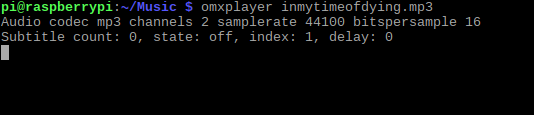
In this example, I’ve copied an MP3 file (Led Zeppelin’s “In My Time of Dying”) to my Raspberry Pi and play it with omxplayer:

omxplayer inmytimeofdying.mp3

It’s really as simple as that:

Play MP3s on Raspberry Pi with omxplayer

However, as you’ll discover when checking the help notes for omxplayer, you can do so much more, such as specify a particular route for the audio. To send the file through your HDMI cable, for example, use the audio pass-through switch, -o:

omxplayer -o hdmi [AUDIO_FILENAME]

You could also use the both command to play the audio through HDMI and the local output. The possibilities for audio (and video) playback with omxplayer are considerable, so once you get to grips with it you’ll find it a great tool to have to hand.

Playing Audio on a Desktop PC With VLC

If you would rather use a desktop computer to enjoy audio on your Raspberry Pi, the best option is VLC Player. Capable of playing all manner of media, VLC Player will play audio in virtually any format.

To install VLC, open a terminal and use:

sudo apt update
sudo apt install vlc

Wait for the software to download and agree to installation:

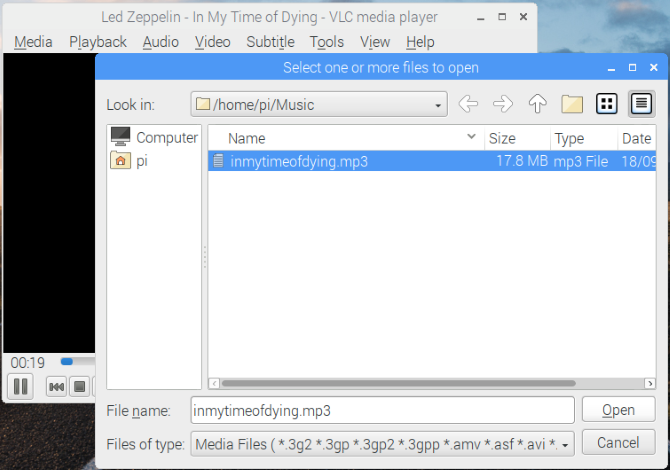
Play audio in Raspbian with VLC Player

Note: VLC Player on the Raspberry Pi comes in two flavors. There is the main version, for easy installation, and the source version that can be compiled with hardware acceleration for better performance. You probably won’t need hardware acceleration for playing audio, although it might come in useful for high-definition video.

That’s all you need to do. The app will be added to a new menu subfolder called Sound & Video. Launch VLC from the desktop when you’re ready to playback your favorite audio tracks. (By the way, check out our tips on the best hidden VLC features.)

Enjoy Music With Your Raspberry Pi

It doesn’t take long to get music and audio playing on your Raspberry Pi. In fact, the main problem you’ll face is organization. So when you’re migrating your audiobooks or albums to your Pi’s storage, make sure everything is sorted correctly.

Believe us, having multiple directories labeled “Disc 2” is going to cause a lot of problems when you’re searching for a particular song!

Of course, you have other options to play music with your Raspberry Pi. Installing Plex will turn the Raspberry Pi into a media server and player for your home network.

Read the full article: How to Play MP3 and Other Audio Files on a Raspberry Pi


Read Full Article

The new Wear OS starts hitting smartwatches


Google’s in a tough spot with Wear OS. It’s been four and half years since the operating system arrived as Android Wear, and while plenty of manufacturers have tried their hand at devices, the operating system has failed to make a large dent on the smart watch category. Apple continues to dominate the space, while top competitors Samsung and Fitbit have opted to go in-house with their operating systems.

In February, Android Wear got a modest 2.0 update, and the following month, the operating system got a full on rebrand. “We’re now Wear OS by Google, a wearables operating system for everyone,” the company said at the time. Even with all of that movement over the past year, Wear OS is still in need of an upgrade. By a number of early accounts, the 2.1 update, which is starting to roll out to user, is a strong step in that direction.

This latest version brings new swipe gestures, prioritizing notifications, settings, Google Fit and Assistant. Those last two are also getting some key upgrades, helping bring the company’s health and AI offerings up to speed with the competition.

While the smartwatch play has appeared fairly stagnant at times, it’s important to remember as Android celebrates its 10th anniversary, that the smartphone OS wasn’t exactly a rousing success out of the gate. In the meantime, Apple, Fitbit and the like have proven that smartwatches do have some staying power, and once again analysts are bullish on the category.

Earlier this month, meanwhile, Qualcomm reaffirmed its commitment to Wear OS by showcasing its chip architecture promising extended battery life. It seems as if enough players are involved and hopeful in Wear OS to keep it going, but there’s still a lot of work to be done if it’s going to break out of the looming shadow of the Apple Watch.


Read Full Article

Nielsen: U.S. smart speaker adoption grew to 24% in Q2 2018, 4 in 10 own more than one


In the second quarter, the adoption of smart speakers – like Amazon Echo and Google Home devices – grew to 24% in the U.S., up from 22% the prior quarter, according to new data from Nielsen, released this week. The measurement firm took a look at how consumers were using their speakers, when, as well as how many were buying multiple devices.

The firm found that 4 out of 10 smart speaker owners have more than one device – a sizable percentage that points to consumers finding enough value in their first device to add more throughout the home.

The living room is the most popular location for smart speaker placement (63%), followed by the bedroom (35%), and then the kitchen (28%).

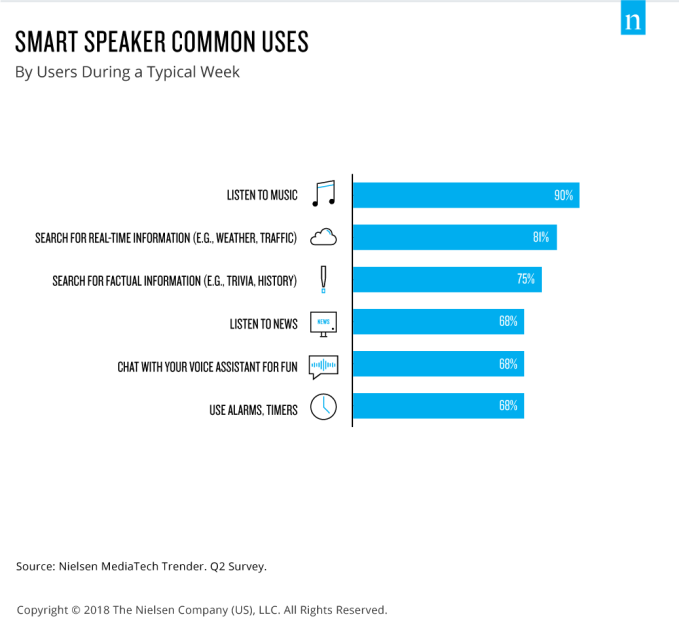
This is not surprising, given that the primary use case for the devices is music streaming, with 90% of smart speaker owners saying that stream music at least once per week.

Searching for real-time information like weather or traffic, followed by searches for historical facts were the next most popular activities, at 81% and 75%, respectively. News was tied for fourth place, with 68% listening in a typical week.

68% also said they chatted with their assistant for fun and used alarms and timers.

That so many people are chatting with their smart assistants, like Alexa and Google Assistant, in a more playful capacity is worth noting here. It’s not enough for these voice platforms to be good and finding and retrieving information and taking actions, they have to do that with some personality, too. Amazon has even gone so far as to give Alexa her own opinions on things like pets, beer, movies, colors, and more, which change from time to time.

Smart speakers are also acting as a bit of an extension of our mobile devices, the report said. Nielsen found that consumers were syncing data from their phones to the voice-based devices for things like audio streaming (53%) and shopping apps (52%), and more. This latter figure seems to indicate that many are, in fact, using their smart devices for shopping-related activities, despite earlier reports that downplayed shopping’s connection with smart speaker devices.

A recent report from The Information, citing leaked Amazon data, claimed that consumers were not making purchases through Echo devices. However, it seems that consumers are taking a first step towards purchase – list making – through Alexa. When the sale later goes through, however, it’s on the web, mobile web, or in the native app, not directly from the speaker. Whether or not that’s actually impacting sales, or just offering consumers a different way to create their purchase reminders, still remains to be seen. But there is a connection between the devices and the shopping app, this data shows.

Consumers were also found to use their smart speakers more often on weekends, and in the afternoons increasing as it got later in the evening, the survey said.

Also notable is that consumer sentiment towards their smart speakers is highly positive.

75% said they’d like to learn how to do more with the devices, and 72% said they would recommend them or purchase them as a gift for family and friends.

The data in the report comes from a new Nielsen consumer tracking survey called MediaTech Trender, which aims to understand consumer sentiment and behavior around emerging technologies, like smart speakers, VR, and other platforms. This particular survey was conducted among 2,000 U.S. consumers, and will continue to be done on a quarterly basis.


Read Full Article
11 Great Apple Watch Bands That Won’t Break the Bank

Lyft unveils second annual diversity report


Lyft has released its second annual diversity report outlining the gender and racial breakdown of its 4,000-person workforce.

At a glance, little has changed from last year’s report, which was the first time the $15 billion ride-hailing company disclosed its diversity stats. Forty percent of Lyft’s workforce is female, a slight decrease from last year’s 42 percent, and about 33 percent of its leadership is female, a 3 percent decrease year-over-year. Fifty-two percent of its employees are white, down from 63 percent. Its leadership team remains mostly white and male.

It’s worth noting that Lyft roughly doubled in size in the last 12 months, according to Nilka Thomas, its vice president of talent and inclusion. The company is growing rapidly as it prepares for a 2019 initial public offering. This week, reports emerged that it was in talks with J.P. Morgan to lead its IPO and that it had more than doubled revenue in the first six months of 2018 to $909 million on a net loss of $373 million.

[gallery ids="1722278,1722279,1722280,1722281,1722282,1722283"]


The company has made several notable hires this year, too, including a whole bunch of former Tesla employees. Thomas, for her part, joined Lyft in March just months before the company brought in another $600 million and continued its hiring craze. She’s responsible for global hiring, diversity and inclusion, workplace policy and employee relations.

Thomas told TechCrunch that considering such immense growth at Lyft this past year, she’s pleased with the latest report.

“In hypergrowth, what tends to happen is you have a bias toward speed and diversity can suffer,” Thomas said.

Before joining Lyft, Thomas spent 13 years at Google, most recently as its director of global diversity, integrity and governance. In the six months since she was hired, Thomas has helped launch an internal database that gives employees access to the racial and gender diversity data of different teams across the company, a sort of diversity report card updated in real time. Thomas says the goal is to make sure a manager’s numbers don’t get lost in the bigger picture and to keep them accountable as Lyft continues to hire.

Thomas has also maintained a focus on Lyft’s culture. Though it’s great for companies like Lyft or Uber to disclose diversity data, it means nothing if they aren’t providing employees from underrepresented backgrounds resources to succeed. With that in mind, Thomas has piloted a program called R.I.C.H. — Race, Identity, Culture and Heritage — a group for Lyft employees to learn how to have difficult conversations surrounding race in the workplace.

“In the era of #MeToo, we want to make sure that we’ve gone beyond what our compliance obligations are,” she said. “We are really sensitive to what can happen to marginalized and vulnerable groups.”

Last year, Lyft was recognized by the Human Rights Campaign for its work on corporate equality. The company has implemented a Gender Inclusion and Affirmation Policy that promises to provide an inclusive environment for transgender people and supports various nonprofits through its Round Up & Donate program. Last month, Girls Who Code, an organization focused on closing the gender gap in tech, announced it had raised $1 million from Lyft rider donations.

Uber, for its part, hired its first-ever chief diversity officer, Bo Young Lee, earlier this year under chief executive Dara Khosrowshahi’s lead. In its first diversity report since both Khosrowshahi and Lee were hired, Uber showed slight progress, though the company still has no black and brown people in tech leadership roles.

At TechCrunch Disrupt SF in September, TechCrunch’s Megan Rose Dickey spoke to both Khosrowshahi and Lee. Khosrowshahi, in a wide-ranging discussion, said Uber is “really trying to shift the culture of the company going forward.” Lee, for her part, told Dickey she’s working tirelessly to integrate Uber’s new cultural norms.

Both Uber and Lyft — in fact, most of the highly valued unicorn companies in Silicon Valley and the Fortune 500 powerhouses — have a long way to go before establishing equitable cultures and hiring practices.

“This challenge expands across the entire industry, in part because we’ve normalized the problem,” Thomas said. “We have a pretty dire status quo.”


Read Full Article
Stanislav Petrov Day


Stanislav Petrov Day

Can You Trust Your Browser With Credit Card Information?


browser-creditcard-safety

You’re shopping online; you find the perfect item, proceed to checkout, and pay. Your browser remembers your username. It might even remember your password, based on what you’ve entered in the past.

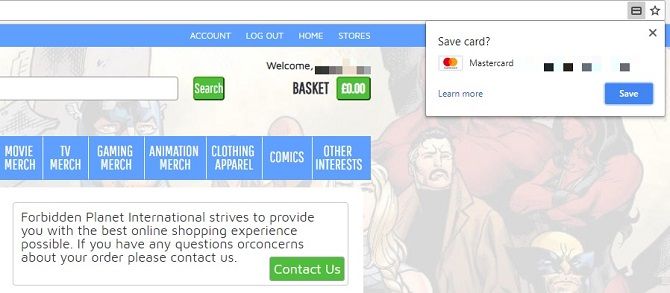
But then it asks whether you want it to save your credit card information. Can you trust your browser with keeping that secure? Should you avoid Autofill altogether? And how can your browser keep your financial data safe when you’re visiting websites?

What Exactly Is Autofill?

We trust our browsers with a huge amount of data, mostly because we feel we have to. You must have confidence that your browsing history, for instance, won’t be leaked en masse. Yet many of us are wary of the private information collected and used for advertising.

Nonetheless, we become complacent and let Autofill (a feature in web browsers like Google Chrome) and Autocomplete do the hard work for us.

No one likes filling in forms, and so Autofill will add in your email, phone number, and address for you if you want. You have to have this function turned on, of course—we’ll come back to this later on because you’ll need to know how toggle settings. Most mainstream browsers do this, notably Google Chrome, Safari, and Microsoft Edge, which boast the lion’s share of the market.

You can also use Autocomplete on Opera and Mozilla Firefox, both of which are especially well-known for their focus on maintaining your privacy.

You might think this is all done through cookies stored automatically, but implementation is more complex than that. It’s not simply a case of storing information: it’s also about presenting it in the appropriate fields.

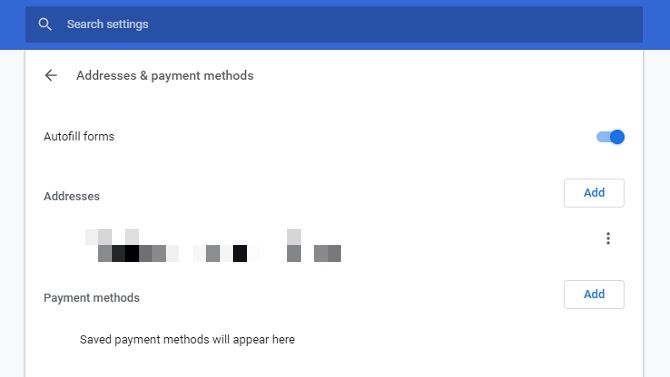
There’s a section devoted to Autofill on your browser, so you can add in your credit or debit card information and rely on that in future. On Chrome, all you need to do is visit chrome://settings/autofill and enter payment methods.

But wait. Before you do that, you should know the dangers…

Should You Use Autofill for Payment Methods?

The problem with using Autofill for credit card information isn’t about trusting your browser. It’s about hackers gaining access to this through phishing sites.

Phishing is simply a fraudulent means of obtaining personal information. Websites set up by cybercriminals may have text boxes for basic information which we regularly give up anyway. Despite the value of personal data, we often submit our names and email addresses. They don’t feel like a valuable commodity anymore because we use them to sign up for social networks, online shops, and newsletters.

If you’ve got Autofill turned on, these text boxes will be automatically filled in. But some phishing sites have hidden elements. These won’t be seen by users, but dig into a page’s script, and malicious code reveals secret intents. These trick your Autofill function into adding private data which you’ve not approved of on the site but have within your browser.

Not all browsers do this. Chrome and Firefox only add credit card details into boxes you specifically click on. If a form element isn’t visible, then you don’t click in the box, so Autofill doesn’t relinquish any further data.

That’s not the only concern, though. Your main worry should be: what happens if someone else gets access to your browser?

This is possible in a couple of notable ways. The first is simple. Someone uses the same device. You probably trust the people you share a computer with, but junked or recycled hardware can be a serious security threat. Ideally, you’ll clean all data from any devices you’re passing on.

Another means is, once more, through phishing. Take Vega Stealer for example. This malware was spread through an email campaign primarily targeted at the marketing and PR sector. Vega Stealer’s main purpose was to collect details stored within Chrome and Firefox, i.e. cookies and credentials stored for Autofill.

Essentially, you store data locally, but that doesn’t mean a third-party can’t access it.

Can You Trust Your Browser to Transmit Data?

If you can’t entirely trust your browser to Autocomplete your financial details, how can you trust it with payment details at all?

Browsers recognize that they have a duty of care. If they don’t look after users, those disgruntled customers will switch to one of their competitors.

Data sent between your device and a site’s server should be encrypted. This means private information is rendered unreadable to anyone without the correct decryption key, i.e. your password. Check a site is secure by looking at the URL; if it reads “HTTPS”, that extra “S” stands for “Secure”.

You could also use a Virtual Private Network (VPN), which acts as a tunnel between two destinations. Picture a tunnel between your PC and the website you’re using. No other parties can look at what’s going through that tunnel unless they’re at either end-point. VPNs even protect your data when your device is connected to a public network.

As VPNs go, we highly recommend ExpressVPN (save up to 49% off using this link) and CyberGhost.

VPNs are typically a regular expense, but Opera has one already built-in. It’s not turned on by default, so you’ll need to go to the browser settings, then Privacy and security > Enable VPN.

Sadly, other browsers don’t boast this same feature. This is partly because VPNs stop the collection of cookies, which many consider enhance your online experience—though, as Vega Stealer demonstrates, they can also be exploited.

And let’s not forget that you don’t have a choice but to trust your browser to some degree. If you shop online, you must have confidence that your browser takes the necessary security measures. Otherwise, you’re reduced to solely visiting bricks-and-mortar stores.

How Do You Turn Off Autofill?

The process is different depending on the browser you use. Still, it’s typically very easy to do. On Chrome, for example, click on the vertical ellipsis in the top right-hand corner then go on Settings. Or take a shortcut by going to chrome://settings/autofill.

From there, you can turn Autofill off completely, or just instruct Chrome not to collect payment methods. Our look at Autofill’s privacy implications explains how to disable this feature in all mainstream browsers.

Read the full article: Can You Trust Your Browser With Credit Card Information?


Read Full Article

Small in Size, Big on Features: P1 Mini Projector Review (and Giveaway)