17 September 2018

Facebook expands bug bounty program to include third-party apps and websites


Facebook announced this morning it’s expanding its bug bounty program – which pays researchers who find security vulnerabilities within its platform – to now include issues found in third-party apps and websites. Specifically, Facebook says it will reward valid reports of vulnerabilities that relate to the improper exposure of Facebook user access tokens.

Typically, when a user logs into another app using their Facebook account information, they’re able to decide what information the token and, therefore, the app can access and what actions it can take.

But if the token becomes compromised, users’ personal information could be misused.

Facebook says it will pay a minimum reward of $500 per vulnerable app or website, if the report is valid. The company also noted it wasn’t aware of any other programs offering rewards of this scope for all eligible third-party apps.

If a vulnerability is determined to be legit, Facebook will then work with the affected app developer or website operator to fix their code. Any apps that don’t comply with Facebook’s request to address the issue will be suspended from the platform until the problem has been solved and undergoes a security review.

In addition, Facebook says it will revoke all the access tokens that could have been compromised in order to prevent potential misuse. If it believes anyone has actually been impacted by the problem, it will notify them, if need be.

The company spells out what sort of information researchers (the white hat hackers) should include in their reports in order to receive the reward. It also says it’s only accepting reports where the bug is discovered by passively viewing data sent to and from a device and the affected app or website – not through any more of manipulation on the researchers’ part.

The news comes at a time when Facebook is still dealing with the fallout from the Cambridge Analytica scandal, which compromised the personal data from as many as 87 million Facebook users. This was followed by news this summer that a quiz app had been leaking data on 120 million users for years.

Since then, the company has been tightening its API platform, reviewing all apps, suspending hundreds of apps deemed suspicious, rolling out tools to help people better manage their apps, and more.

As a part of those changes, Facebook said earlier this year that its bug bounty program would be expanded.

Separately from this new program, the company now also runs a Data Abuse Bounty program which rewards first-hand knowledge of third-parties that collect user data in order to pass it off to malicious parties.

“We would like to emphasize that our bug bounty program does not replace the obligations on app developers to maintain appropriate technical and organizational measures to protect personal data — either regulatory obligations (for example, if the app developer is a data controller for the purposes of GDPR) or the rigorous controls we require through our terms of service and policies that apply to all developers on the Facebook platform,” wrote Dan Gurfinkel, Facebook Security Engineering Manager, in an announcement.

More details on the program are here.


Read Full Article

Endless OS May Be the Best Linux Version for New Computer Users


endless-os-linux

Linux appeals to a certain kind of computer user: if you like computers enough to read about or tinker with them in your free time, then there’s a good chance you’ll find something to like about Linux. Otherwise, you will probably consider it too much work to bother.

Endless Computer’s Endless OS aims to provide a complete desktop experience that’s versatile enough to serve families. Is this the ideal way to introduce newcomers to Linux?

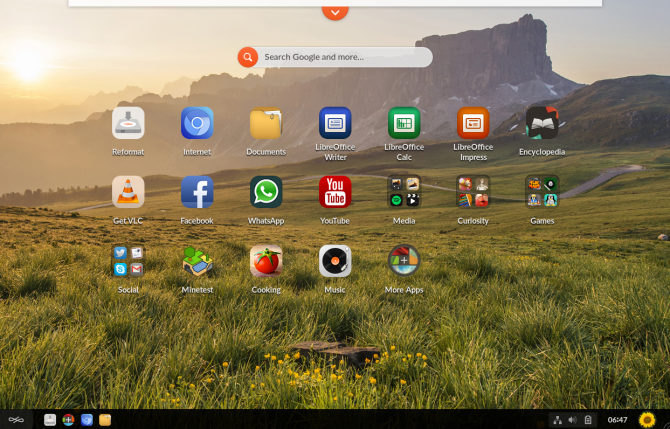
Endless OS home screen and app drawer

What Makes Endless OS Different?

It’s not that Linux is complicated. The operating system may have that reputation, but these days the various desktop interfaces have long provided an experience that’s easy for savvy computer users to dive right into. But there are elements of the experience that are rough around the edges, such as installing software.

Endless Computer’s mission is to design an operating system that’s easy-to-use, and useful from the moment you turn it on, whether or not you have internet access. For that reason, the desktop comes with 100 apps preinstalled.

For someone like me, who uninstalls most bundled software regardless of whether I’m on Linux, Android, or Windows, this doesn’t sound like a bonus. But I’m not the target audience. Endless OS is intended to work regardless of whether you have an internet connection, or whether you know how to install software or not.

How to Get Endless OS

There are multiple ways to get your hands on Endless:

  • Download the OS as an ISO file from the Endless website. This is the traditional way of installing a Linux-based operating system. It involves flashing the ISO file to a USB flash drive and using that stick to install Endless alongside or as a replacement for your existing OS.
  • Purchase an Endless computer. The website lists several models, such as the Endless One, the Endless Enterprise, and several versions of the Endless Mission. These are small, relatively low-power machines that cost around as much as an Android tablet.

Getting Started With Endless OS

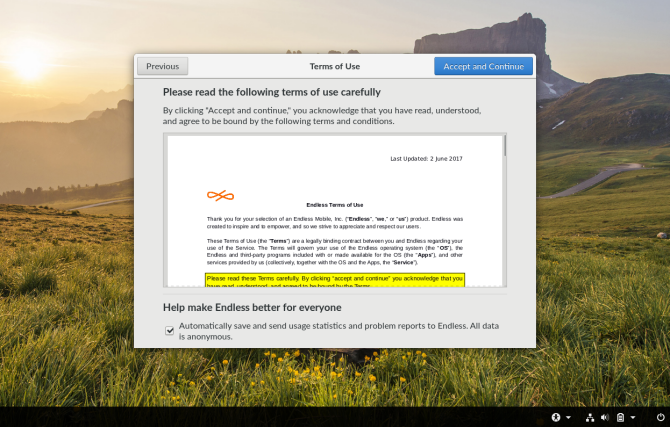
Endless OS isn’t quite like most other Linux-based operating systems. For starters, you have to sign an end user license agreement. That won’t take most users by surprise, but as a long-time Linux user, it did give me pause.

Endless OS end user license agreement

Moving on, the installation is straightforward. You have two options, a base version that comes in under 2GB, and a full version that is closer to 15GB. The latter comes with many apps preinstalled, allowing you to hit the ground running without an internet connection. That’s the version I tried.

After installation, Endless OS again distinguishes itself from most other Linux-based OSes by making system files read-only. This way only app updates can tinker with them. This approach comes with some security benefits and is more akin to the way Chrome OS operates.

The Endless OS Interface

The Endless OS desktop feels like the combination of a mobile device with a traditional desktop. An app drawer sits in the background, where it’s always open. Any apps you open cover up the drawer. They also appear in the taskbar along the bottom.

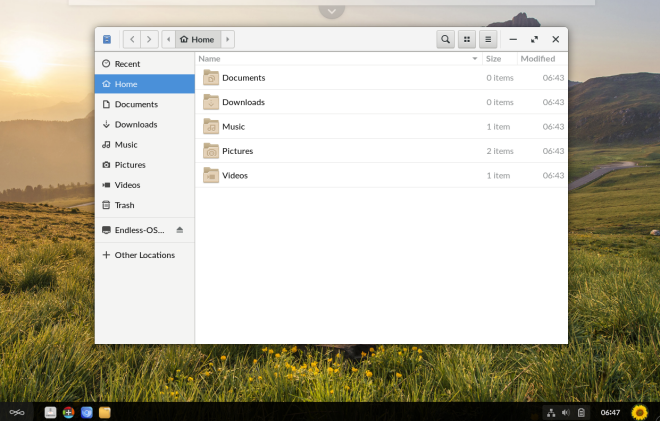
File manager open on the Endless OS desktop

Endless OS is based on Debian. It uses the GNOME desktop, which you will notice when you open the file manager, system settings, the app store, and traditional Linux software.

The taskbar offers few surprises. Favorite and open apps appear along the bottom. System indicators, the clock, and user accounts occupy the bottom-right. The launcher in the bottom-left shows or hides the desktop background, where the app launcher resides.

The home screen lets you search the web without opening a browser. You can arrange apps into groups, and a few come included by default.

Using Apps on Endless OS

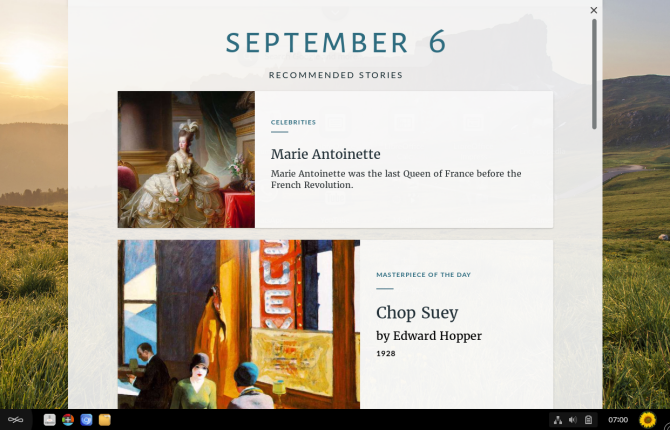
A tab at the top opens “Recommended Stories,” which provide highlights and links to content from your installed apps.

Endless OS "Recommend Stories" highlights content

Here is where using Endless OS starts to get interesting for me. Perusing the content revived memories of opening offline encyclopedia apps in the past. Though as someone who came of age just as these apps were falling out of fashion in favor of the internet, exploring vast amounts of offline content felt both nostalgic and novel.

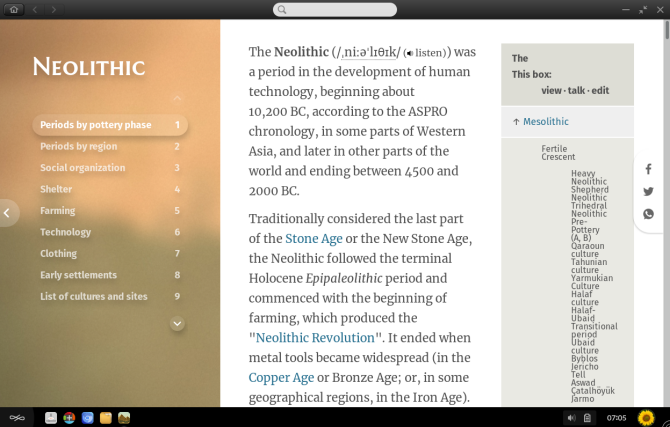
Much of the content Endless provides comes from Wikipedia, but the company has packaged information into several distinct apps. History for historical information, Geography for landscapes and countries, plus Celebrities for well-known figures (past and present alike).

Endless OS History app detailing the Neolithic era

Endless doesn’t stop with Wikipedia. The OS functions as a showcase of free culture content. A Textbook app, for examples, comes with FlexBooks from the C-12 Foundation. There is content from Khan Academy and videos to help students with various subjects. This is much of the reason the initial download is so big.

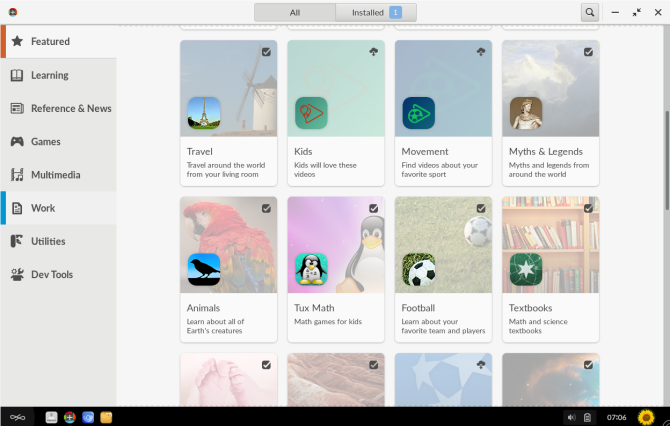
Selecting the “More Apps” option on the home screen opens up the app store, which is an Endless version of GNOME Software.

Here Endless mixes apps designed for Endless OS with web apps and software designed for the traditional Linux desktop. A symbol distinguishes between apps you already have and those that require a download.

The Endless OS app store

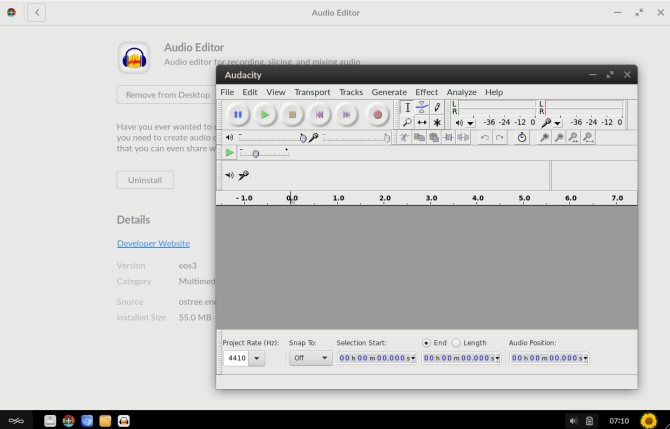
The store mixes traditional apps with Endless-specific apps. Audacity, for example, is the recommendation for editing audio. It opens in a window and functions as it would on other Linux-based OSes.

VLC audio editor open on the Endless OS desktop

Many popular apps often come as web apps rather than software designed for Endless OS. The Duolingo app is a packaged up version of the Duolingo website.

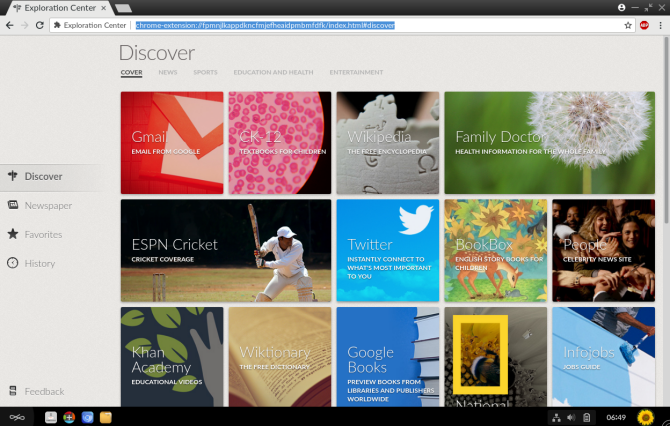
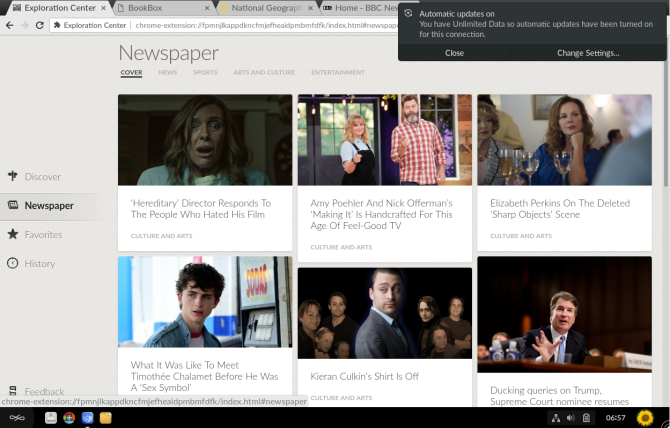
Chromium is the default web browser. Here you will find an “Exploration Center” that provides links to popular news sites and social networks. The news categories fills you in on headlines from around the world. There are also tabs listing your favorite sites and the pages you’ve visited.

Exploration Center open within the Chromium web browser on Endless OS

Using Endless OS Offline

As promised, Endless OS provides much to see and do without an internet connection. As long as you download the larger, 15GB version, you have access to offline Wikipedia content and various books. You also have the full LibreOffice suite for getting work done.

Naturally, you can’t read news or visit social media without an internet connection. You also have to wait until you reconnect to download updates. When I saw a notification detecting an internet connection with unlimited data, it reminded me of the kind of environment Endless OS is targeting.

A notification detecting unlimited data displays on Endless OS

Should You Use Endless OS?

Endless OS delivers on its promise of providing a Linux-based desktop that is both simple and useful. I see this as a great experience for a first-time computer user, regardless of their age. For the time being, this is the Linux-based OS I would recommend.

While it doesn’t provide many new apps in the traditional sense (such as photo managers or video editors), Endless OS has much see. It’s an innovative use of Linux that differs from the more common approach of redesigning interfaces and recreating apps.

Would I recommend Endless to an experienced computer user? It depends on what you’re after. If you’re coming from a Linux background, you may be frustrated by the lack of certain apps and the inability to manipulate system files to add them yourself.

Depending on the job you’re doing, all that Endless provides may come off more as a distraction than useful. Fortunately, there are no shortage of other Linux-based desktops that may be better suited to your needs.

Read the full article: Endless OS May Be the Best Linux Version for New Computer Users


Read Full Article

12 Echo Dot Accessories to Supersize Your Dot

The Complete InMotion Web Hosting Review for Beginners


inmotion-hosting-review

Need somewhere to host your website? Finding a web host, whether you’re new to running a site or looking for a new home for your website, is often difficult. With so many hosts, and hosting options, researching the right host can slow down your move, or even put it off completely.

Here’s how InMotion Hosting can make hosting a site simple for beginners and experts alike. Get up to 50% off using this special link!

Time to Pay for Web Hosting?

At some stage, every website owner takes the decision to pay for hosting.

Perhaps your site has got along fine; it might be a blog hosted freely on WordPress.com or Blogger. Perhaps you use cloud storage to host your website, or perhaps your website is embedded within a single URL thanks to the Itty Bitty method.

Whatever the case, signing up to pay for web hosting is quite a big decision. Often, webmasters are tempted to pay as little as possible, and the results usually correspond with that low outlay. Instead, we’d suggest paying just a little bit more to make sure you don’t end up wasting your Sunday trying to deal with an uncommunicative web host who has decided to delete your website (trust me, it’s a bad way to end your weekend).

While various options are available, InMotion Hosting is a particularly good example of an affordable web host with good customer support.

Get Started With InMotion Hosting: Choose a Package

To sign up with InMotion Hosting, you’ll need to choose the right type of hosting for your needs. These different hosting packages come with various benefits and advantages, based upon the type of site you plan to run. For instance, a busy site will require more bandwidth than a small personal blog.
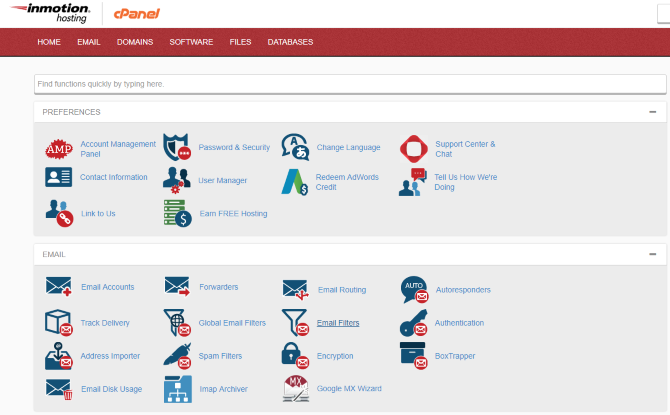
InMotion Hosting's cPanel

Similarly, a site with thousands of hourly visitors will typically require a dedicated server, rather than shared hosting.

As this is a beginner’s guide, we’re assuming you’re setting up a basic static site or WordPress blog. For these purposes, you should use InMotion Hosting’s WordPress Hosting Package. This is available from $8.99 a month, with the option to upgrade hosting as your site becomes more popular.

With this package, you’ll get a free domain for running one website. It’s suitable for 20,000 unique monthly visitors and comes with 40GB of SSD storage. This gives everything a speed increase, as SSDs are faster than traditional hard disk drives.

This package also offers unlimited bandwidth, unlimited email accounts, and the BoldGrid WordPress building framework. If you have little to no web design experience, this drag and drop system can help you design your own layout. Check the BoldGrid website for more information.

InMotion hosts all options on Linux servers. Unusually, InMotion Hosting doesn’t offer a Windows Server option. If this is a must have for you, look for a different reputable web host. Check InMotion Hosting’s main page for other hosting options.

How Does InMotion’s Subscription Compare?

InMotion Hosting is already a popular option for anyone wishing to launch a website, or move their site from another host. But does it really give good value?

With five packages on offer, you’re immediately going to spot that InMotion Hosting is more expensive than its competitors. Big names like GoDaddy and HostGator offer a more complicated range of options, however, and it’s easier to find yourself stuck between different packages.

With InMotion Hosting, the limited choice makes it simpler for you to choose the right package and get the best deal. For example, WordPress hosting on InMotion is (at the time of writing) $7.26 a month. Meanwhile, you can find a similarly optimized experience on GoDaddy for as little as $3.99 a month, or $4.99 with greater bandwidth. (GoDaddy also offers packages for managing multiple sites).

Similarly, Hostgator offers WordPress plans from just $2.75 a month. However, its packages are apparently the same as the standard plan, so there’s little obvious optimization.

The Benefits of InMotion Hosting’s Plans

These sites (and others) aside, InMotion Hosting offers some important benefits, which we think goes towards justifying the price. First, and most importantly, is the level of customer service.
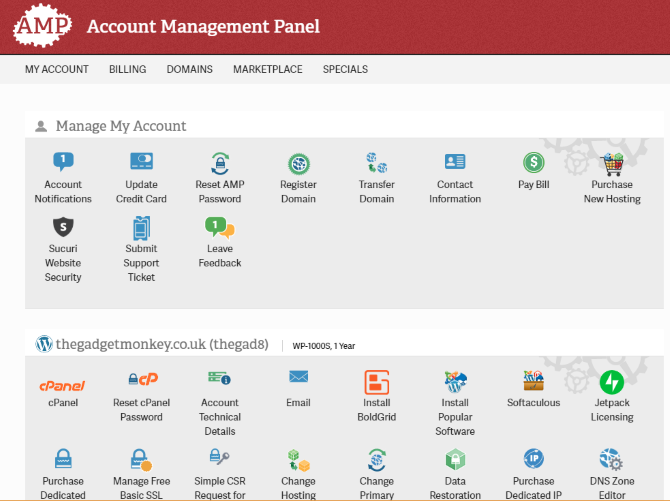
InMotion Hosting's Account Management Panel

I’m not the only one on the MakeUseOf team who’s been stuck in endless circular online support conversations, seemingly unable to solve the most simple of problems. No one wants this. Fortunately, that’s not the experience you’ll find with InMotion Hosting.

A couple of minor issues sprung up while I was setting up my site. I sent an email outlining the problems, and they were quickly dealt with. In 13 years of running websites, I’ve never had such good service.

The second benefit is the quality of the customer portal, the Account Management Panel. Here you can tweak account details and access the cPanel backend for your website. Many hosts make this part of the experience unnecessarily complex, and a little disorienting. Fortunately, that’s not the case with InMotion Hosting.

Easy Site Setup

InMotion Hosting makes setting up your site really simple. If you need to create a static site, you can simply upload the pages through cPanel.

But what if you want something more complicated? Fortunately, InMotion Hosting offers scripts to install pretty much any type of website, from blogs and forums to wikis, e-commerce tools, image galleries, video hosting, and much more. (Note that hosting your videos as an alternative to YouTube can quickly become expensive.)
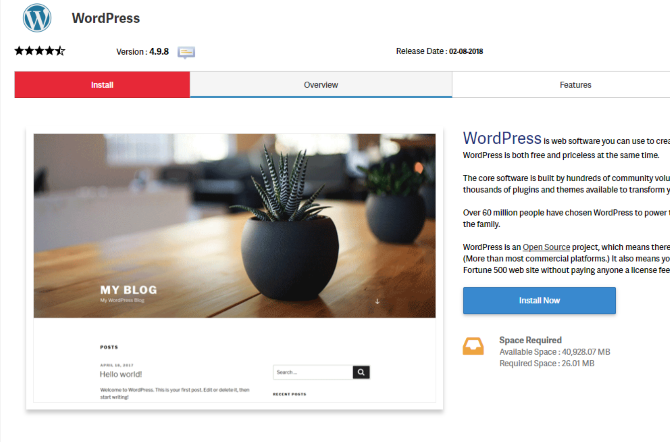
Install WordPress on InMotion Hosting

All you need to do is identify what you want to install and click Install Now. You can do this from the main cPanel with popular scripts, or install other web software via the full list.

Note that if you opted for the WordPress Hosting, the popular blogging software will come preinstalled for you. You’ll also receive the login details via email.

Migrate Your Website to InMotion Hosting

If you haven’t purchased a domain name with your signup, you can easily migrate an existing domain to InMotion.

All you need to do is request the correct name server address, then log into your domain registrar account. Here, simply replace the existing name servers with the InMotion Hosting replacements. If you make a mistake, you should be able to revert to the original name servers without too much trouble.

Presumably, you also have a website attached to the domain. In this situation, you should back up your site’s files, export any databases, and basically have a copy of the site ready to migrate. InMotion Hosting provides detailed steps for anyone wishing to move their existing site to new hosting.

Need Email? Try InMotion Hosting Webmail

Once your website is set up, it might be smart to have an email address with the same domain. InMotion Hosting offers email, with a straightforward user interface to help you create addresses, add passwords, and set mailbox quotas.
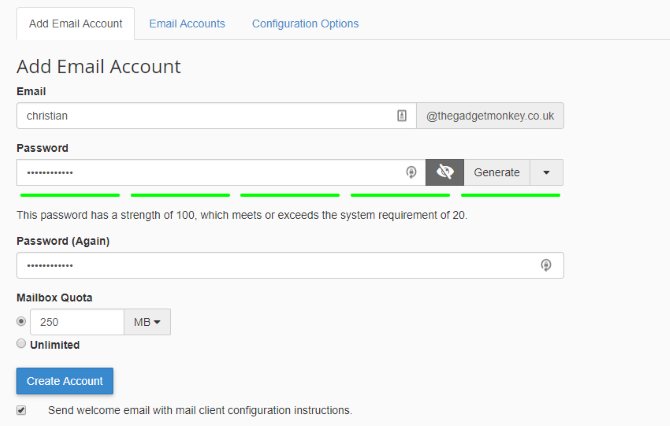
Create an email account for your domain

Once created, you have two choices.

  1. Access emails via your usual email client: this is simple enough, and the email system can email instructions to aid with this.
  2. Install the WebMail Lite script via cPanel: this is a webmail solution, along the lines of Gmail or Outlook.com, where you can collect emails in your browser.

The easier option is to rely on WebMail Lite. Just remember to configure your email account once you’ve set it up. Usefully, WebMail Lite works with any IMAP-enabled account, so you could use it as your primary email application!

Need a New Web Host? Try InMotion Hosting

With good-quality customer service, easy site setup, and a monthly subscription reflecting the quality of hosting and support, InMotion Hosting is an excellent option for any individual looking for a new or first web host. Get up to 50% off using this special link!

Migration options are straightforward, and the range of web applications to choose from is considerable. In short, if you need a high-quality web host that you can rely on, but are limited by a low budget, InMotion Hosting should be at the top of your list.

While many good free web hosting services exist, if you have big aspirations for your site, give them a boost with InMotion Hosting.

Read the full article: The Complete InMotion Web Hosting Review for Beginners


Read Full Article

Natural Cycles contraception app told to clarify pregnancy risks


A multi-month investigation by Sweden’s Medical Products Agency into a number of unwanted pregnancies among users of ‘digital contraception’ app Natural Cycles has been closed after the startup agreed to clarify the risk of the product failing.

But, on the self-reported data front, the agency said it was satisfied the number of unwanted pregnancies is in line with Natural Cycles’ own clinical evaluations which are included in the certification documentation for the product.

In its marketing and on its website Natural Cycles describes the app-based system as “93% effective under typical use” — a finding that’s based on a clinical study it conducted of more than 22,000 of its users.

The investigation by Sweden’s MPA began around eight months ago, after a number of users in Natural Cycle’s home market had reported unwanted pregnancies to a local hospital — which then reported the app to the regulator.

The Natural Cycles app uses an algorithm to track fertility by monitoring the user’s menstrual cycle. The process requires women take their body temperature at least several times a week, and do so first thing in the morning, inputting the data into the app which is designed to adapts its ‘fertile’ or ‘not fertile’ predictions to each user’s cycle.

Several users have reported falling pregnant while using the app. But the proportion of women who have done so (at least in Sweden) is in line with efficacy rates reported by Natural Cycles, according to the regulator’s assessment.

Earlier this year the MPA said it had received “approximately 50 complaints” related to unwanted pregnancies in users of the app. But late last week it announced it had concluded its assessment of the app — which it said focused on “product safety, instructions for use and post market surveillance documentation in order to confirm if the product is in compliance with regulations”.

As well as looking at parts of the certification documentation for Natural Cycles, the agency says it assessed monthly reports of unwanted pregnancies among active app users in Sweden, covering a six-month period — with pregnancy data supplied by the company itself on a month by month basis during the first half of 2018.

The agency found the number of reported unwanted pregnancies reported by users to be in line with Natural Cycles’ certification documents for the product, finding a failure rate in typical use of 6.9%.

But it also asked the company to clarify the risk of unwanted pregnancies in instructions for the app.

“Our conclusion is that the number of unwanted pregnancies during the assessed time period is consistent with data shown in the clinical evaluation included in the certification documentation. Since it is important that a contraception app is correctly used, we requested the manufacturer to clarify the risk of unwanted pregnancies in the instructions for use and in the app. These issues have been addressed by Natural Cycles and thereby our review is completed,” said Mats Artursson, investigator at the agency in a statement.

As we reported earlier this year, the startup has lent heavily on aggressive social media marketing of its novel ‘digital contraception’ method — which has sometimes appeared to downplay the risk of failure for what is undoubtedly a relatively complex contraception option, given it requires users to consistently self-monitor (and accurately measure their body temperature) as well as use alternative contraception on days when the app informs them they are fertile.

Natural Cycles admits that factors such as illness, disrupted sleep, drinking alcohol and having an irregular menstrual cycle can have a negative impact on the accuracy of its algorithmic fertility predictions. And says itself that the method is not a suitable contraception choice for every individual.

Nor does the app offer any protection against STDs — unless users combine it with additional barrier methods of contraception.

But despite that, until very recently on its website (and in some of its marketing) Natural Cycles has been making the misleading claim that its contraception app is “99% effective” if used “perfectly”. (Perfect use implying, well, superhuman use.)

And just last month the company was wrapped on the knuckles by the UK’s Advertising Standards Authority — which banned one of its social media ads for being misleading, also warning the company against exaggerating the efficacy of the app in preventing pregnancies.

The assessment by the Swedish MPA looks to have reached similar conclusions about certain aspects of the claims Natural Cycles’ has been making for the app.

When we covered the ASA’s ruling last month Natural Cycle’s website still included the misleading 99% ‘perfect use’ claim — within this confusingly worded paragraph: “With using the app perfectly, i.e. if you never have unprotected intercourse on red days, Natural Cycles is 99% effective, which means 1 woman out of 100 get pregnant during one year of use.”

It’s since scrubbed the paragraph from its website, focusing solely on the 93% effective stat — on which it now writes: “Natural Cycles is 93% effective under typical use, which means that 7 women out of 100 get pregnant during 1 year of use. Typical use effectiveness takes into account all possible reasons for becoming pregnant while using the app: from having unprotected sex on a red day, to the app wrongly attributing a green day or the chosen method of contraception on a red day having failed.”

It’s not clear whether Natural Cycles removed the 99% ‘perfect use’ claim as a result of the ASA ruling — or following the Swedish MPA’s assessment. (We’ve asked the company to clarify the exact changes it made related to the MPA’s findings, which the regulator also says relate to software versioning, and will update this story with any response.)

Its app gained certification as a contraception in the EU in February 2017, and went on to gain FDA clearance (via a De Novo classification request) this summer — giving the product a major credibility boost, even as regulatory clearances still come with plenty of caveats. (In the FDA‘s case it warns that: “Users must be aware that even with consistent use of the device, there is still a possibility of unintended pregnancy.”)

It’s also worth noting that it’s still the case that Natural Cycles has not carried out a randomized control trial to more robustly prove out the efficacy of the product, i.e. by using standard scientific methods.

Instead, users must rely on the findings of its self-selecting clinical study of its own users — which may have its own weaknesses, given that, for example, any user who fails to report an unwanted pregnancy to Natural Cycles would not be reflected in the data it’s providing to regulators.

Commenting on the conclusion of the Swedish MPA’s investigation in a statement, Natural Cycles CEO Raoul Scherwitzl said: “We are pleased that the MPA has concluded its investigation, following a review of our real-world effectiveness data. There has been a lot of discussion about this investigation, and we hope that it will provide some reassurance to women to see eminent bodies like the Swedish MPA and the US FDA in alignment based on the strength of our clinical evidence. We never doubted the effectiveness of our product since the number of reported pregnancies is monitored closely on a monthly basis — this is an ongoing responsibility that we commit to as part of operating in a regulated environment.”


Read Full Article
The 7 Best Video Editors for Chromebook


chromebook-video-editing

Chromebooks are more than mere glorified web browsers. They’re fantastic machines that can perform many of the same tasks as Windows and macOS.

One of those tasks is video editing. Since Android apps became available on Chrome OS, the number of video editing apps available for your Chromebook has exploded.

So, without ado, here are several worthwhile video editors for Chromebooks.

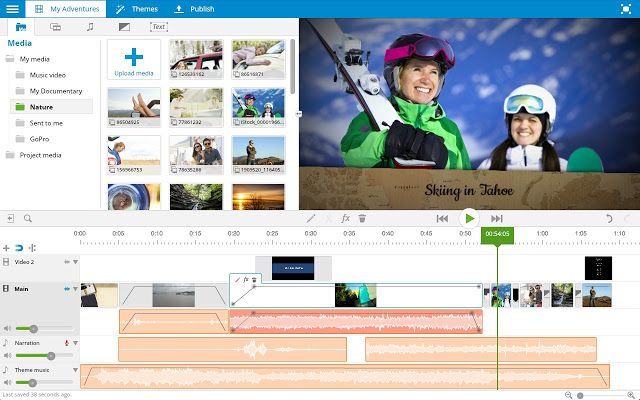
1. WeVideo

WeVideo

The popular web-based video editor WeVideo has an official app in the Chrome Web Store.

The app earns plaudits for its ease-of-use. Video editing can be complicated for beginners, but WeVideo’s accessible interface means even total novices can create respectable footage.

Another feature that makes the app shine is the presence of a vast library of sound effects, transitions, and video effects. They are all free to use.

WeVideo can work with videos up to 5GB in size. You can upload the video into the app from your Chromebook or cloud services like Dropbox and Google Drive.

The only downside of the free version of the app is a watermark on your video. If you plan on using the video in a professional setting, you’ll want to upgrade to the $4.99/month Power plan.

Because WeVideo is web-based, you will need an internet connection to use the service.

Download: WeVideo (Free)

2. PowerDirector

All new Chromebooks—as well as some older ones—can now install the Google Play Store and run Android apps. As such, users have far more video editing options available to them than they did previously.

If your Chromebook supports Android apps, you need to check out PowerDirector. It’s one of the best video editors for Android.

The Android version of PowerDirector isn’t as full-featured as the desktop edition of the app, but it still has more than enough functionality for the vast majority of users.

The app deploys a timeline editor that lets you easily add effects, create slow-motion sequences, and insert sound and voiceovers. PowerDirector also supports other common video editing tools like fading, transparencies, and blue/green screen.

PowerDirector is free to use, but you’ll need to pay $4.99/month to unlock all the features.

Download: PowerDirector (Free)

3. Google Photos

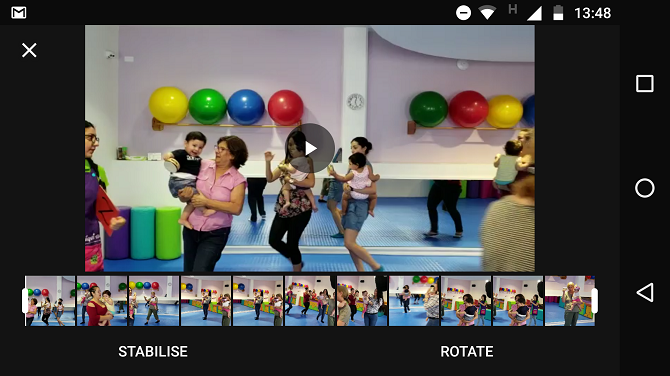
Google Photos Video

Not everyone needs a feature-laden editing suite. If you just want to do some simple trimming and enhancing, see whether the Google Photos movie editor meets your needs.

The app offers video stabilization and cutting. You can also flip the saved version of the video between landscape and portrait.

To edit a video using Google Photos, click on the Edit icon in the bottom center of the window. Then drag the ends of the video’s timeline to trim it.

Sadly, Google Photos is only available if your Chromebook supports Android apps. There is no version of the app in the Chrome Web Store, and you cannot edit videos through the web version of the app.

Download: Google Photos (Free)

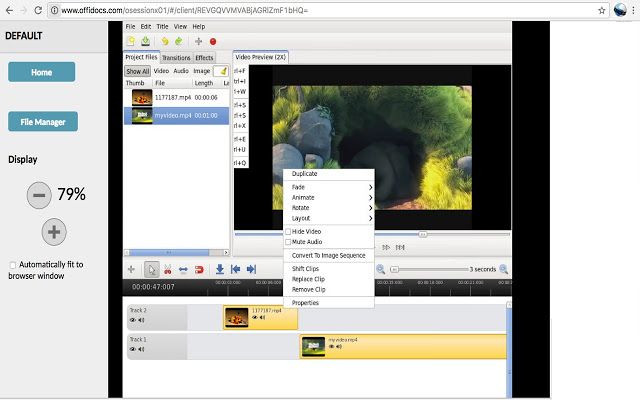
4. OpenShot

OpenShot

If you’re a Linux user, you will have heard of OpenShot. It’s one of the best video editors available on the operating system. It’s also one of the best video editors for Chromebook.

Chromebook users can download the open source OpenShot extension from the Chrome Web Store. It will let you create edit videos via its web app if you have an internet connection.

The editor itself boasts an impressively long feature list. You can resize, scale, trim, snap, rotate, and cut your videos, use image overlays and watermarks, create transition lumas and masks, and add scrolling motion picture credits.

OpenShot also supports many video and audio codecs, including WebM (VP9), AVCHD (libx264), HEVC (libx265), LAME, and AAC.

The app is free to use.

Download: OpenShot (Free)

5. Magisto

Magisto is well-established as one of the best video editing apps on Android; it’s been Google Play Editor’s Choice many times. Therefore, if you own one of these Chromebooks that support Android apps, you should give it a try.

It’s squarely aimed at social media users who want to post their exploits to the various networks and who aren’t skilled video editors in the traditional sense.

Using a smart AI, Magisto can create professional-looking videos from the videos, pictures, and music on your device. You can also add your own text and effects.

Because it’s predominantly designed for social networks, Magisto lets you easily share your creations from directly within the app. Facebook, Instagram, YouTube, Google+, Twitter, WhatsApp, and Vimeo are all supported.

Download: Magisto (Free)

6. KineMaster

Another app that brings the best of Android over to Chrome OS is KineMaster. It’s a professional video editing app.

The app support multi-layer videos and offers frame-by-frame trimming, hue, brightness and saturation controls, audio filters, royalty free music, color LUT filters, and 3D transitions.

The free version of Kinemaster available to everyone, but like WeVideo, it will place a watermark in the corner of your creations.

You can upgrade to the pro version from within the app. It removes the watermark and adds access to the KineMaster Asset Store. It’s a vast repository of visual effects, overlays, music, and more.

Download: Kinemaster (Free)

7. VivaVideo

Our final recommendation from the Chrome Web Store is VivaVideo.

The app manages to walk a fine line between fun and professional. For example, you can add stickers, GIFs, funny sound effects, and other social media-friendly gimmicks, but can simultaneously trim, edit, and enhance your video using VivaVideo’s wide range of tools.

Edits such as transitions, adding text, merging and splitting videos, changing the speed, and reverse playback are all supported.

As with the other apps we have recommended from the Chrome Web Store, VivaVideo requires an internet connection to function.

Download: VivaVideo (Free)

Learning How to Edit Videos Better

These seven video editors for Chromebook target a diverse spectrum of users. If you’re a novice video editor, perhaps it’s time you picked up some video editing skills? While apps like Magisto are fun, your creations will be infinitely more impressive if you can use one of the more professional apps recommended above.

If you’d like to learn more about editing videos, make sure to check out our article detailing how to edit videos like a pro.

Read the full article: The 7 Best Video Editors for Chromebook


Read Full Article
Zortrax launches a new high-speed, high-resolution printer, the Inkspire


Zortrax has launched a new printer, the Inkspire, that prints using an LCD to create objects in high-quality resin in minutes. The printer – essentially an upgrade to traditional stereolithography (SLA) printers – uses a single frame of light to create layers of 25 microns.

Most SLA printers use a laser or DLP to shine a pattern on the resin. The light hardens the resin instantly, creating a layer of material that the printer then pulls up and out as the object grows. The UV LCD in the $2,699 Inkspire throws an entire layer at a time and is nine times more precise than standard SLA systems. It can print 20 to 36 millimeters per hour and the system can print objects in serial, allowing you to to print hundreds of thousands of small objects per month.

“The printer is also perfect for rapid prototyping of tiny yet incredibly detailed products like jewelry or dental prostheses. But there are more possible applications,” said co-founder Marcin Olchanowski. “Working with relatively small models like HDMI cover caps, one Zortrax Inkspire can 3D print 77 of them in 1h 30min. 30 printers working together in a 3D printing farm can offer an approximate monthly output of 360,000 to over 500,000 parts (depending on how many shifts per day are scheduled). This is how Zortrax Inkspire can take a business way into medium or even high scale production territory.”

The printer company, which is now one of the largest in Central Europe, explored multiple technologies before settling on this form of SLA printing.

“At the early stage of this project we were investigating the technology itself, and it seemed very unlikely we were able to create such a device,” said Olchanowski. “We tried SLA and DLP but we were not happy with these technologies. We perceived them undeveloped. But, step by step, we succeeded. We see huge prospects of development for resin 3D printing technology, because nowadays customers expect the higher quality of printed models.”

The company sells 6,500 printers yearly and will see $13.7 million in revenue this year. They are also selling resins for their new printers and they will ship in about two months.

Printers like the Inkspire are a bit harder to use than traditional extruder-based printers like Makerbots. However, the quality and print speed is far better and paves the way to truly 3D-printed production runs for one-off parts.


Read Full Article
OnePlus is developing its own smart TV


Smartphone upstart OnePlus’s upcoming 6T flagship promises to bring changes — it’ll see it ditch the headphone jack and sport an in-screen fingerprint reader — but first there’s something else. OnePlus is developing its first smart TV.

CEO Pete Lau revealed the details today, explaining that the device will mark the five-year-old company’s next step to “building a connected human experience.”

“For most of us, there are four major environments we experience each day: the home, the workplace, the commute, and being on-the-move. The home – perhaps the most important environment experience – is just starting to enjoy the benefits of intelligent connectivity,” he wrote on the company’s website.

“We want to bring the home environment to the next level of intelligent connectivity. To do this, we are building a new product of OnePlus’ premium flagship design, image quality and audio experience to more seamlessly connect the home,” Lau added.

Shenzhen-based OnePlus has distinguished itself from a raft of Chinese mobile wannabees with some beautifully designed and well-functioning devices — eight phones to date — while it has developed its own Android-based OS and branched out into headphones. It has seen particular success in India, where it has beaten Samsung and Apple to become the country’s top ‘premium’ smartphone brand, and it has also landed a carrier distribution deal in the U.S. — something that has alluded larger rivals Huawei and Xiaomi. That’s impressive for such a young business.

It has tinkered around before. OnePlus co-founder Carl Pei previously told TechCrunch that the company had developed (and then abandoned) a number of prototype devices outside of phones before, but the TV project is very real. That said, the company is opening it up to its community of five million registered users who will be given the opportunity to name it. You can find more details about that in the announcement post here.


Read Full Article

Amazon taps Getty to provide images for visual searches on the Echo Show and Echo Spot


On the heels of the Getty family regaining control of Getty Images, reportedly for about $3 billion, the company is announcing a move to expand use of its images to a wider set of eyeballs. It will now work with Amazon to provide images from its catalog of 200 million digital images to populate searches on its screen-based Echo Show and Echo Spot devices.

The deal also comes amid rumors of a supposed launch of a screen-based Google Home device (made by the king of search, Google) to compete with the Echo Show, ahead of the holiday season.

It’s not clear if the Getty deal will mean that those building skills for the Echo devices will also be able to tap the Getty catalog, or if this is just for Amazon’s basic search feature — or something in between. We have contacted Amazon and Getty to ask and will update this post as we learn more.

As Getty describes it, the images will appear to enhance how Alexa — Amazon’s AI-based assistant — responds to users’ queries “to shape the visual style of Alexa.”

“Our premier collection of editorial, creative and archival content is a natural fit for Amazon’s Echo products, bringing best-in-class visuals to Echo users,” said Peter Orlowsky, SVP of strategic development, Getty Images, in a statement. “We are honored to unite with Echo’s screen-based products and to use our deep library of content to give Alexa her best look yet.”

Searches will include both current affairs as well as general knowledge. (Some examples Getty gives: pictures of the winners from the Academy Awards as an answer to “who won”; pictures of cities in answer to “What’s the capital of this or that country”; pictures of a recent touchdown or football goal; and so on.)

The deal is an interesting move for a few reasons. For Amazon, it will give the company a wide catalog of images to compel people to use (and buy!) the Echo Show and Echo Spot either in addition to or even instead of the lower-priced audio-only echo devices.

Last year after the Echo Show launched, there was some early criticism that there weren’t enough compelling Skills (Echo apps) being built for the screen-based device. While there are more of these Skills now, the voice-based Echo speakers continue to be the company’s mainstay product — even if it appears that Google Home sales have more recently outpaced those of the Echo — and so this could potentially help Amazon find its feet and sales groove with the screen-based products.

There is also an interesting play here in terms of how Amazon hopes to get an early advance on visual search and establishing a stronger basic app for it for its devices. A year ago, we reported that Google was working on a screen-based Home competitor to the Echo Show, and now reports say that this is likely to make an appearance before the holidays this year.

That means there is a very strong case for Amazon to get its own product in order and looking a little more impressive before Google — a search giant first and foremost — steals a march.

On the side of Getty, the company has for years been trying out different ideas to generate revenues from its vast image catalog. Many of these haven’t really panned out — as evidenced by the fact that the Getty family picked up an asset for $3 billion from an owner that had paid $3.3 billion for it — but the sheer numbers associated with the business — over 300 million images, 200 million digitised — also indicate that there is an inherent value as well.

This, in effect, gives Getty a shot (sorry for the pun) at providing another way of making its assets relevant and valuable, as a lever to help Amazon compete against the mighty Google.

It’s notable to me that the press release had no statement directly from Amazon in it. I’ve asked Amazon for a comment, but as you can see from other integrations — such as last week’s news from Mapillary — sometimes Amazon prefers to remain a silent partner in its collaborations in order to keep its feature and product cards close to its collective chest.


Read Full Article

Go-Jek plans to raise $2B more for Southeast Asia ride-hailing battle


Indonesia’s Go-Jek is planning to raise $2 billion from investors to fuel its ride-hailing battle with Grab in Southeast Asia.

Go-Jek raised $1.5 billion earlier this year from investors that include Chinese trio Tencent, Meituan and JD.com, as well as Google, Allianz and Singapore sovereign fund Temasek. Now it is planning to raise a further $2 billion, two sources with knowledge of details told TechCrunch, as it seeks to expand on numerous fronts.

Those plans include both extending the scope of its services in Indonesia — where beyond rides it offers services on demand and financial products — and moving into new markets. The company recently went live in Vietnam, its first expansion, and it has plans to enter Thailand, the Philippines and Singapore this year.

Bloomberg first reported the fundraising plans, although a source told TechCrunch that the deal is far from being done. Existing investors — which also include KKR and Warburg Pincus — are likely to provide the new capital.

Word of Go-Jek’s financing plan comes after Grab raised $2 billion this summer, including a $1 billion contribution from Toyota. The Singapore-based company — which bought out Uber’s business earlier this yearrecently said it plans to raise a further $1 billion before 2018 is out.

That money is likely to be spent on Grab’s ongoing strategy to broaden into services. That’s seen Grab follow Go-Jek’s lead and move into groceries, on-demand services and fintech as part of a desire to be Southeast Asia ‘super app’ for a broad range of local services.

Grab is also doubling down on Indonesia, where it recently announced plans to invest $250 million in local startups. While Go-Jek is largely seen as the dominant player in Indonesia, which is Southeast Asia’s largest economy and the world’s fourth most populous country, Grab claims to handle 65 percent of all rides and transactions in the country.

Go-Jek’s most recent valuation was $5 billion. Investors valued Grab at $11 billion when its recent round closed in August.


Read Full Article

How to Take Control of Annoying iPhone Notifications With iOS 12

How watchOS 5 Makes Your Apple Watch Even Better


watchos-5-better

The next generation of Apple Watch software is here. Along with iOS 12, Apple has made watchOS 5 available to download for everyone.

Apple Watch wearers will notice a number of different improvements and handy additions that continue to make the wearable device even better. Here’s a roundup of the new features in watchOS 5.

All About Activity

While there are a wide variety of third-party Apple Watch apps to track a workout, Apple’s own built-in tools are taking a big step up.

In the Workout app, you can now select from two new types of exercise—hiking and yoga. After selecting either one of those, the Apple Watch will track active calories and exercise minutes.

Speaking of workouts, watchOS 5 will now automatically detect a number of different popular workout types. You’ll see a notification on the Watch to confirm the workout and give correct credit.

And there’s no need to worry about forgetting to end a workout. After a short period when no activity is detected, a notification will allow you to end the workout or switch to another type.

watchOS 5 Running Features

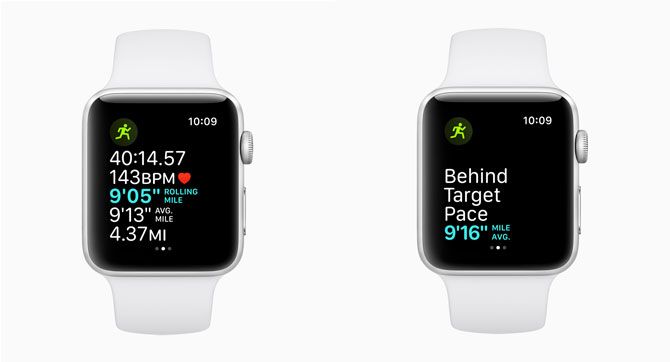
Runners will also be happy to take advantage of several new features. The steps per minute feature will work for indoor or outdoors walks and runs. When running outside, a vibrating pace alarm will let runners know if they are ahead or behind of their selected pace without needing to look down at the watch screen.

A rolling pace mile will also show runners the pace for the immediately preceding mile, along with the average or current pace. That will help give runners a better idea of how they are fairing.

watchOS 5 Activity Competitions

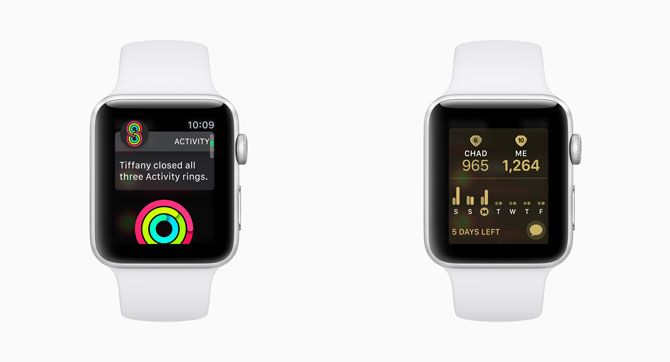
You can also now do more than just share activity data with friends and family. Apple Watch wearers can invite another person to battle in a one-on-one activity competition. These last seven days and offer points for closing rings. Special notifications will also help motivate you to a victory.

Say Hello to Walkie-Talkie and a Podcasts App

watchOS 5 Walkie Talkie

Apple Watch users are getting another way to communicate in watchOS 5 with the new Walkie-Talkie feature.

Just like the old-school devices, you can talk with friends and family using Wi-Fi or any LTE-enabled Apple Watch.

On the Apple Watch, using the Walkie-Talkie app, you’ll add a specific contact to communicate with. When ready to talk, just select the contact and tap and hold the Talk button to speak. When you’re done, take your finger off of the screen.

You can also opt to turn off availability for Walkie-Talkie at any time through the app.

watchOS 5 Podcasts

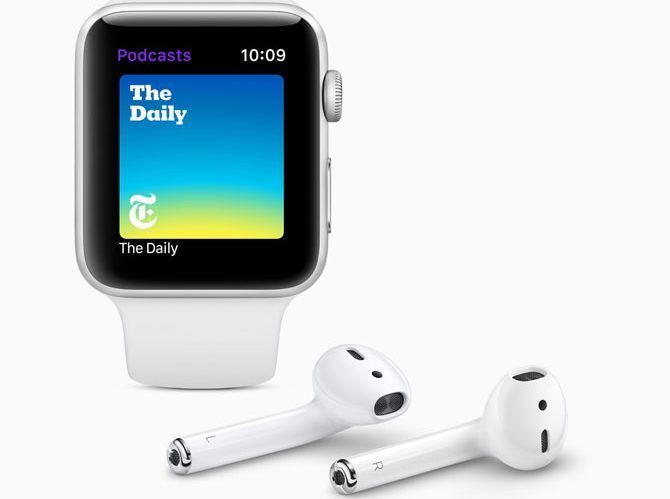
Apple is also bringing its great Podcasts app to the small screen of the Apple Watch. When starting Podcasts, it will show episodes that you’ve downloaded to the Watch or those on your iPhone.

It’s easy to download a podcast episode to the Apple Watch or stream it with the LTE-enabled version. You can then listen with Apple’s AirPods or other Bluetooth headphones.

Using Siri on the Apple Watch, you can even subscribe to a podcast or start playback of an episode.

As a nice touch, a new syncing feature will allow users to partially listen to a podcast on the Watch and then pick up where they left off on an iPhone or iPad.

A Better Siri Watch Face

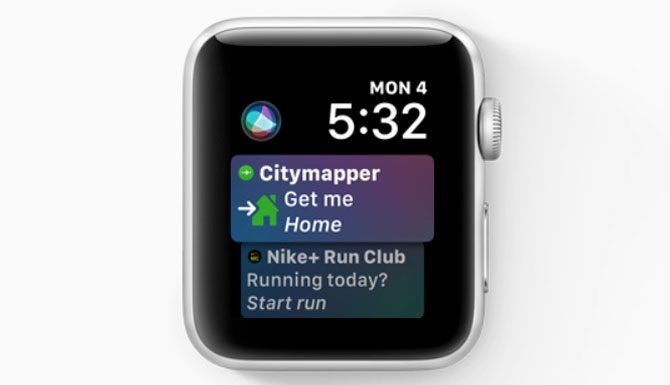
watchOS 5 Siri Face
The Siri watch face continues to stand among the variety of watch faces available to customize the Apple Watch. And it’s getting even better in watchOS 5 thanks to a dose of machine learning.

Some of the new additions you’ll notice include heart rate information after a workout, commute times, and scores from favorite sports teams. Siri Shortcuts, a major new addition to iOS, will also appear at the correct time of the day.

Third-party apps can now also provide information for the face. Apple says apps like Nike+ Run Club, Glow Baby, and Mobike will support the face, and you can expect many other popular choices as well.

Other Notable Improvements

We’ve covered the major upgrades in watchOS 5, but you’ll find plenty of little touches too.

  • Talking to Siri is now even easier. Instead of needing to say “Hey Siri,” just raise your wrist to talk with the virtual assistant. You can also change the volume of Siri using the Settings app.
  • The Control Center on your Apple Watch is now customizable. Swipe up from a watch face, then scroll down to the bottom and select Edit. From here you can move the icons in any order you like.
  • Instead of dealing with notifications one at a time, watchOS 5 groups information from the same app together. You can open or clear all notifications from one group with just a tap.
  • Selecting the Do Not Disturb icon in Control Center now brings up a number of options. Along with simply turning the mode on, you can enable it for an hour, until tomorrow morning, or until you leave the current location.

watchos5-more-features

  • When tapping on some links in Messages and Mail, you can now view web content on the Watch screen. The content shows in the best format for the small screen, and can utilize Reader Mode as well.
  • While there are definitely some better options available for the Apple Watch, the stock Weather app now shows wind direction, wind speed, air quality, and UV index.
  • Instead of needing to carry around a college ID, the Apple Watch can now step in and provide students quick access to places around the campus, pay for meals, and more. Students at Duke, the University of Alabama, and the University of Oklahoma can take advantage of the feature starting this fall. A number of other universities will join the program before the end of 2018.

Update Your Watch Now

If you haven’t already updated to watchOS 5, it’s available for every version of the Apple Watch except the original Series 0 that hit the market in 2015.

Head to the companion Watch app on your iPhone and select the My Watch tab. Then choose General > Software Update and follow the prompts. To update, you’ll need to have an Apple Watch on its charger with more than 50 percent battery life remaining.

While the Apple Watch continues to get even better with each new software release, there are a number of lesser-known Apple Watch features that can help power up the wearable device. You should also make sure to install the best Apple Watch apps.

Read the full article: How watchOS 5 Makes Your Apple Watch Even Better


Read Full Article

How to Delete Older Emails in Gmail Automatically


Microsoft Outlook has an interesting Auto-Sweep feature that lets you automatically deletes older email messages from specific senders after a certain period of time. You can also set up rules that mark older emails as read or you can move emails to different folders based on conditions.

Gmail offers you filters but these filters only work on new incoming emails. You can’t set up a filter in Gmail that will, say, auto-purge all old newsletters emails from your mailbox. Or a filter that will apply a different label to emails after a specific number of days and also mark them as read.

Delete older emails in Gmail

Gmail Auto Purge – Delete Old Mails Automatically

Email Studio is a new Gmail add-on that can help keep your Gmail mailbox lean and tidy with the built-in auto-purge feature. Here are some examples of rules that you can set up for your Gmail with the help of Email Studio:

  • Delete all emails that were received more than a month ago and are from specific senders or are in a specific folder.
  • Archive and “Mark as Read” all emails in the inbox folder that are more than 3 months old.
  • Star emails that are in the “follow up” folder and received more than 2 weeks ago.
  • Permanently remove all emails from the Gmail trash and the spam folder after 2 days. (Gmail will only clear your spam and trash after 30 days).
  • Apply the label “follow up” to all starred emails after a week or a month.

The auto-purge utility also includes an email unsubscriber to help you easily remove your email address from unwanted mailing lists and other bulk emails.

How to Enable Auto-Purging in Gmail

To get started, install the Email Studio add-on (video). Next, switch to the Gmail website and open any email message in your inbox. You’ll see the Email Studio icon in the right sidebar.

Open Email Studio, log in with your Gmail account and then choose the “Email Cleanup” tool from the list of available options. Click on “Add new rule” and set up a rule.

Gmail Delete

There are two parts – you specify a condition and then you specify an action that will be performed on messages that match your condition.

For setting conditions, you can even specify advanced Gmail search operators like newer_than or has:attachment or larger_than to exactly match the Gmail messages that you wish to archive, trash or move to another folder.

Once you have created a rule, click the Save button and Email Studio will launch in the background. It will auto-run every hour, like a cron job, and perform the specified action on email messages that match your condition. There’s no need for you to run the rules manually.

Email Studio is free for basic use but if you wish to create multiple sets of purge rules, please switch to the premium version. It includes email scheduler, forwarder and auto-responder and costs $29 per year.

The post How to Delete Older Emails in Gmail Automatically appeared first on Digital Inspiration.


Mobile social network Path, once a challenger to Facebook, is closing down


It’s that time again, folks, time to say goodbye to a social media service from days past.

Following the shuttering of Klout earlier this year, now Path, the one-time rival to Facebook, is closing its doors, according to an announcement made today. (Yes, you may be surprised to learn that Path was still alive.)

The eight-year-old service will close down in one month — October 18 — but it will be removed from the App Store and Google Play on October 1. Any remaining users have until October 18 to download a copy of their data, which can be done here.

Path was founded by former Facebook product manager Dave Morin, and ex-Napster duo Dustin Mierau and Shawn Fanning. The company burst onto the scene in 2010 with a mobile social networking app that was visually pleasing and — importantly — limited to just 50 friends per user. That positioned it as a more private alternative to Facebook with some additional design bells and whistles, although the friend restriction was later lifted and then removed altogether.

At its peak, the service had around 15 million users and it was once raising money at a valuation of $500 million. Indeed, Google tried to buy it for $100 million when it was just months old. All in all, the startup raised $55 million from investors that included top Silicon Valley names like Index, Kleiner Perkins and Redpoint.

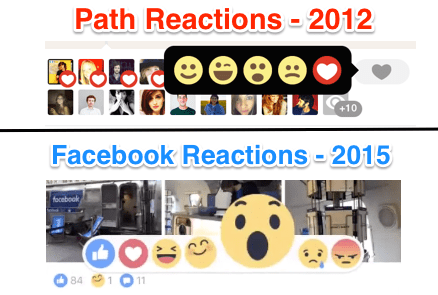
Facebook ultimately defeated Path, but it stole a number of features from its smaller rival

But looks fade, and social media is a tough place when you’re not Facebook, which today has over 1.5 billion active users and aggressively ‘borrowed’ elements from Path’s design back in the day.

Path’s road took a turn for the worse and the much-hyped startup lost staff, users and momentum (and user data). The company tried to launch a separate app to connected businesses and users — Path Talk — but that didn’t work and ultimately it was sold to Korea’s Kakao — a messaging and internet giant — in an undisclosed deal in 2015. Kakao bought the app because it was popular in Indonesia, the world’s fourth-largest population where Path had four million users, and the Korean firm was making a major play for that market, which is Southeast Asia’s largest economy and a growing market for internet users.

However, Path hasn’t kicked on in the last three years and now Kakao is discarding it altogether.

“It is with deep regret that we announce that we will stop providing our beloved service, Path. We started Path in 2010 as a small team of passionate and experienced designers and engineers. Over the years we have tried to lay out our mission: through technology and design we aim to be a source of happiness, meaning, and connection to our users,” the company said in a statement.

Thanks Aulia


Read Full Article

Beverages


Beverages

16 September 2018

Uber fires up its own traffic estimates to fuel demand beyond cars


If the whole map is red and it’s a short ride, maybe you’d prefer taking an Uber JUMP Bike instead of an UberX. Or at least if you do end up stuck bumper-to-bumper, the warning could make you less likely to get mad mid-ride and take it out on the driver’s rating.

This week TechCrunch spotted Uber overlaying blue, yellow, and red traffic condition bars on your route map before you hail. Responding to TechCrunch’s inquiry, Uber confirmed that traffic estimates have been quietly testing for riders on Android over the past few months and the pilot program recently expanded to a subset of iOS users. It’s already live for all drivers.

The congestion indicators are based on Uber’s own traffic information pulled from its historic trip data about 10 billion rides plus real-time data from its drivers’ phones, rather than estimates from Google that already power Uber’s maps.

If traffic estimates do roll out, they could make users more tolerant of longer ETAs and less likely to check a competing app since they’ll know their driver might take longer to pick them up because congestion is to blame rather than Uber’s algorithm. During the ride they might be more patient amidst the clogged streets.

Uber’s research into traffic in India

But most interestingly, seeing traffic conditions could help users choose when it’s time to take one of Uber’s non-car choices. They could sail past traffic in one of Uber’s new electric JUMP Bikes, or buy a public transportation ticket from inside Uber thanks to its new partnership with Masabi for access to New York’s MTA plus buses and trains in other cities. Cheaper and less labor intensive for Uber, these options make more sense to riders the more traffic there is. It’s to the company’s advantage to steer users towards the most satisfying mode of transportation, and traffic info could point them in the right direction.

Through a program called Uber Movement, the company began sharing its traffic data with city governments early last year. The goal was to give urban planners the proof they need to make their streets more efficient. Uber has long claimed that it can help reduce traffic by getting people into shared rides and eliminating circling in search of parking. But a new study showed that for each mile of personal driving Uber and Lyft eliminated, they added 2.8 miles of professional driving for an 180 percent increase in total traffic.

Uber is still learning whether users find traffic estimates helpful before it considers rolling them out permanently to everyone. Right now they only appear on unshared UberX, Black, XL, SUV, and Taxi routes before you hail to a small percentage of users. But Uber’s spokesperson verified that the company’s long-term goal is to be able to tell users that the cheapest way to get there is option X, the cheapest is option Y, and the most comfortable is option Z. Traffic estimates are key to that. And now that it’s had so many cars on the road for so long, it has the signals necessary to predict which streets will be smooth and which will be jammed at a given hour.

For years, Uber called itself a logistics company, not a ride sharing company. Most people gave it a knowing wink. Every Silicon Valley company tries to trump up its importance by claiming to conquer a higher level of abstraction. But with advent of personal transportation modes like on-demand bikes and scooters, Uber is poised to earn the title by getting us from point A to point B however we prefer.


Read Full Article