28 August 2018

Trump rage-tweets Google alleging search ‘bias’


While several tech giants have found themselves in President Trump’s crosshairs since he took office, he has just unleashed what looks to be his most sustained attack on Google to date — firing off a couple of tweets at ~5.30am Washington DC time to rail against what he claims is algorithmic bias in the results the search engine serves up if someone types in “Trump News”.

No, the president did not use the four-syllable word “algorithmic”. But presumably he hadn’t even inhaled his first Coke of the day yet.

In his rage tweets, Trump makes the specific allegation that “96% of results on “Trump News” are from National Left-Wing Media”, without citing his source for the claimed datapoint. He then makes the further unsubstantiated claim that: “Google & others are suppressing voices of Conservatives and hiding information and news that is good.”

The Guardian suggests the 96% claim is a reference to an article posted at the weekend by the website PJ Media whose self-described “not-scientific” study of the top 100 Google News results for the search term “Trump” apparently suggested “a pattern of bias against right-leaning content”.

Trump ends the pair of tweets with a warning that the “situation will be addressed” — without specifying exactly what he plans to do. Which is pretty much trademark Trump Twitter policy-on-the-hoofing. Even as the wider political context around his administration, with whispers of impeachment in the air, implies that any loud public complaints by Trump about negative headlines related to himself are an attempt to distract attention from the legal hot waters now boiling around him. But whatevs.

Here are the tweets in all their rage-filled glory:

We’ve reached out to Google for comment.

Ironically, testing out a search for “Trump News” after Trump’s Google flaming tweets, I was served the below result, with the well-known right wing news organization Fox News bagging the very first result in the Top Stories slot, so er… 

It’s unclear whether Trump is aware that Google search results can vary depending on the individual doing the searching. And, well, if Trump is seeing lots of bad news about himself (when he searches for news about himself) let’s just say we’re sure that Freud would have had a field day unpicking the knotted implications of Trump having such navel-gazing obsession with news sources he continually professes to hate and claims are “fake”. But, again, whatevs.

Of course most of what Trump is claiming here is flagrant nonsense — especially as his cancerous catchphrase of ‘fake news’ gets liberally slapped on anything he disagrees with, regardless of whether it’s true or not.

But one thing he’s saying is more or less true: Google is arguably “controlling what we can & cannot see”, given the company has a dominant share of the search market in the West (and a massively dominant one in Europe), and that most Internet users will never click beyond page one of the search results it serves. Or even browse beyond the top few results.

So, essentially, the hierarchies of information that Google’s algorithms create can and do surface or sediment information. Or, in other words, if it’s not on page one of Google it’s barely there.

Another example of Google’s power over what can and cannot be seen: In Europe, in recent years, the company now selectively de-indexes certain search results related to individuals on request (after it has reviewed a request and made a decision), in order to comply with a legal ruling by the EU’s top court (the so-called ‘right to be forgotten‘) — making it less likely that a specific data-point about a non-public individual will be broadly visible in the region.

The fact that a single company has such power over the accessibility of information (and potential to shape opinion) should concern us.

Especially as Google’s algorithmic engines are proprietary black boxes and there is no or little independent oversight of whether its information shaping is fair or even appropriate. (Again in Europe the company has been charged with promoting its own products in shopping related searches over and above rivals — and has had to make changes to the product search results it displays to comply with the antitrust ruling, though it disputes and is legally appealing the regulator’s decision.)

So Trump has at least correctly identified that Google can and does wield huge power via the popularity of its information retrieval platform.

Even as the claim he’s also selectively, self-interestedly amplifying — i.e. ‘96% biased’ — is entirely unsubstantiated, having been based on a single non-scientific survey carried out by an American conservative news blog. So judge appropriately.

Above that, the notion that any commercial company in the West, let alone one so prominent and mainstream as Google, would knowingly and systematically embed political bias into its algorithms to make them less useful for a very large swathe of its potential users is, frankly, ridiculous.

If anything, tech platforms tend to have the opposite problem; They serve up too tightly personalized stuff, risking shrinking users’ ideological horizons by feeding people a political mono-diet. (Which may help explain the Trump phenomenon itself, but I digress.)

Nonetheless, the president has continued to make tech firms his Twitter punchbags. Just last month, for example, he accused Twitter of “shadow banning” Republican users. A claim the company quickly denied, writing: “We do not shadow ban. You are always able to see the tweets from accounts you follow (although you may have to do more work to find them, like go directly to their profile). And we certainly don’t shadow ban based on political viewpoints or ideology.”

Safe to say, as the headlines about Trump get worse Trump’s rage will grow and the tweets will surely flow.


Read Full Article

Microsoft Launches Xbox All Access for $22/Month


Microsoft has announced a new way of buying an Xbox One. Called Xbox All Access, it allows gamers who may be struggling to fund an all-out purchase the chance to buy an Xbox One over two years. And at the end of the two years you own the console outright.

What Is Xbox All Access?

Xbox All Access is a monthly subscription that buys you everything you need to get gaming. For $21.99/month for an Xbox One S and $34.99 for an Xbox One X, you’ll get a brand new console, plus 24 months of both Xbox Live Gold and the Xbox Game Pass.

There are no upfront costs, and the hardware is offered at 0% APR. So you’re spreading the cost of buying a new Xbox One over 24 months. The Xbox Live Gold subscription will bag you free games, and the Xbox Game Pass buys you access to 100 titles.

The Pros and Cons of Xbox All Access

There are some clear pros and cons to Xbox All Access. The pros are the chance to own an Xbox One right now without having to pay upfront costs, and the potential saving you’ll make if you were planning to subscribe to Xbox Live Gold and Xbox Game Pass.

However, the cons are the fact that the price of an Xbox One is likely to drop within the next two years, potentially eradicating any saving. Plus the fact you’ll be paying for the Xbox Game Pass, which isn’t something most Xbox One owners bother doing.

Powered by Dell Preferred Account

According to Xbox Wire, Xbox All Access is “a limited-time offer available only in the U.S. at a Microsoft Store near you while supplies last.” It’s also limited to “qualified customers” which means people who apply and are approved for a Dell Preferred Account.

If you’re tempted to sign up to Xbox All Access, first, learn the differences between the Xbox One X and Xbox One S. You should then consider which is best: Xbox Live Gold or PlayStation Plus? And finally you should read all about the Xbox Game Pass.

Read the full article: Microsoft Launches Xbox All Access for $22/Month


Read Full Article

How to Back Up Any Folder With OneDrive (No Matter Where It Is)


windows10-onedrive

Microsoft OneDrive, the cloud storage and sharing solution built into Windows 10, has continued to grow. Now it’s better integrated into the OS and gains features somewhat regularly.

One of the newest is its ability to back up folders outside of OneDrive. This helps solve one of the biggest pain points with cloud storage—that it only syncs data you place inside its specific folder.

Here’s how to back up your most important outside folders with OneDrive.

How to Back Up Any Folder Using OneDrive

OneDrive-Folder-Protection

  1. Click the OneDrive icon in the System Tray at the bottom-right corner of your screen (you may need to expand this area using the arrow icon). Select More > Settings.
  2. Jump to the Auto Save tab and click the Update folders button to access the new feature. If you don’t see this, check back a bit later to see if Microsoft rolled it out to you yet.
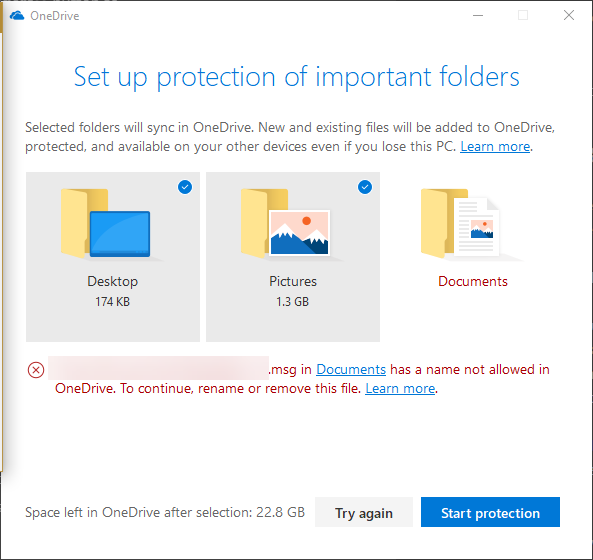
  3. Next, you’ll see the Protection screen. Here, you can choose to back up your Desktop, Pictures, and Documents folders. If you have any items in these folders that cause an issue, you’ll see an alert and won’t be able to proceed until you take care of them. See Microsoft’s help page on this to review types of invalid files. One of the most common is that OneDrive can’t back up PST files.
  4. Review the Space left in OneDrive after selection and make sure you’re happy with how you’re using your space. Click Start protection and OneDrive will begin syncing those folders.

Once OneDrive uploads the contents of these folders, you can access them from anywhere you sign into OneDrive. This includes the apps on your phone, the web portal, and other PCs. In fact, enabling this one two computers will sync the contents of each folder.

Essentially, this lets you sync files to OneDrive even if they’re not in the right folder. It’s convenient, but we still recommend a proper backup solution to really protect your files. Cloud storage sync like this isn’t a perfect backup solution because it will sync mistakes too.

Read the full article: How to Back Up Any Folder With OneDrive (No Matter Where It Is)


Read Full Article

Huawei bags Apple’s 2nd place spot in global smartphone sales: Gartner


Another analyst has Huawei overtaking Apple in the global smartphone rankings for the second quarter this year. The latest figures from Gartner put Huawei ahead on sales to end users in Q2.

Overall, Gartner says sales of smartphones to end users grew 2% in the quarter, to reach 374 million units.

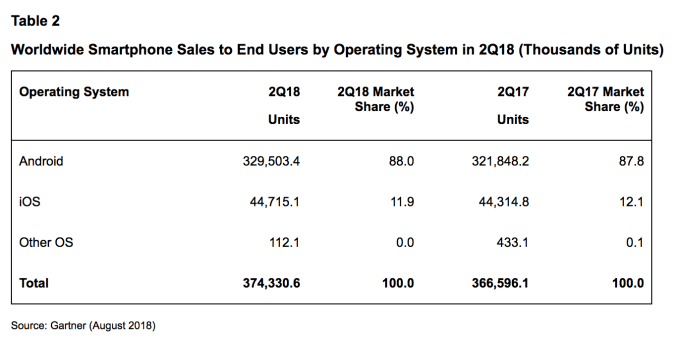
The analyst pegs the Chinese smartphone maker with a 13.3% marketshare, saying it sold ~49.8M devices in the quarter, up from 9.8% in the year before quarter — ahead of Apple, which it calculates took an 11.9% marketshare (down from 12.1% in Q2 2017), selling ~44.7M iPhones.

According to Gartner’s figures, Samsung also lost share year-over-year — declining 12.7% in the quarter.

The Galaxy smartphone maker retained its no.1 spot in the rankings, with 19.3% in Q2 (vs 22.6% in the equivalent quarter last year) and ~72.3M devices sold. Though Gartner notes it’s being squeezed by “ever-growing competition from Chinese manufacturers”, while slowing demand for its flagships are squeezing its profitability. Not a happy combination.

In recent years Huawei has been one of a handful of Chinese OEMs bucking the trend of a slowing global smartphone market. And Gartner’s data suggests Huawei’s smartphone sales grew 38.6 per cent in the second quarter.

As we noted earlier this month, when other analysts reported Huawei outstripping Apple on smartphone shipments in Q2, the handset maker has built momentum for its mid-range Honor handset brand while performing solidly at the premium end too, with devices such as the P20 Pro (albeit while copypasting Apple’s iPhone X ‘notch’ screen design in that instance.)

“Huawei continues to bring innovative features into its smartphones and expand its smartphone portfolio to cover larger consumer segments,” said research director Anshul Gupta in a statement. “Its investment into channels, brand building and positioning of the Honor devices helped drive sales. Huawei is shipping its Honor smartphones into 70 markets worldwide and is emerging as Huawei’s key growth driver.”

For Apple the quarter was a flat one (0.9% growth), though that’s to be expected given Cupertino structures its mobile release cycle around a big-bang annual smartphone refresh in the fall, ahead of the holiday quarter, rather than releasing devices throughout the year.

Even so, Gupta noted that Apple is also facing growing competition from Chinese brands, which in turn is amping up pressure on the company to innovate its handsets to keep increasingly demanding consumers happy by delivering “enhanced value” in exchange for the iPhone’s premium price.

And recent reports have suggested Apple is prepping a number of iPhone design changes for fall, including a splash of color.

“Demand for the iPhone X has started to slow down much earlier than when other new models were introduced,” he added, sounding another note of concern for Apple.

Fourth placed Chinese OEM Xiaomi is one device maker putting pressure on longer term players in the smartphone market. In Q2 Gartner reckons the company sold ~32.8M devices, carving itself an 8.8% marketshare — up from 5.8% in the year ago quarter.

The analyst’s data also shows Google’s Android operating system further extending its lead over Apple’s iOS in Q2, securing 88% market share vs 11.9% for iOS.

While the smartphone market is no longer a simple duopoly on the device maker front, with Huawei elbowing past Apple to bag the second spot in the global rankings, it remains very much the opposite story where smartphone operating systems are concerned.

And Gartner’s data now records the ‘other’ category of smartphone OSes at a 0.0% marketshare, down from 0.1% in the year ago quarter…


Read Full Article

Missing High Performance Power Plan on Windows? Here’s the Fix


Windows offers you a variety of power plans. Depending on your situation, they let you customize the way your machine uses power to either extend the battery life or squeeze more performance out of your computer.

The native power plan, which wrings the most juice out of your computer, is called High Performance. However, it’s not always visible, leading many users to assume its not an option on their machine. Fortunately, it’s easy to fix the missing plan and make it visible again.

How to Fix a Missing High Performance Power Plan

Firstly, check to see whether your High Performance power plan is visible. Right-click on the battery icon in the Taskbar and select Power Options. You may need to click on Show Additional Plans to see the full list.

If the High Performance plan isn’t there, you need to create it. Follow the step-by-step instructions below:

  1. Right-click on the battery icon in the taskbar and select Power Options.
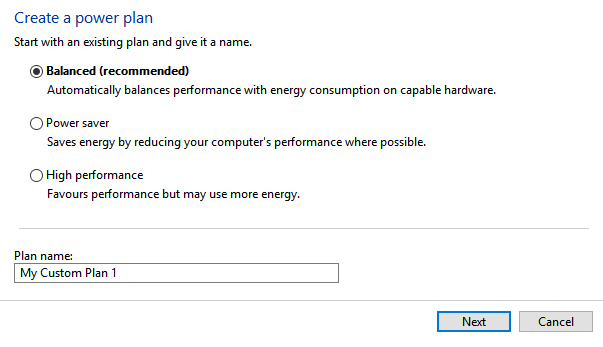
  2. In the panel on the left-hand side of on the window, click on Create a power plan.
  3. Click on the checkbox next to High Performance.
  4. At the bottom of the window, give your new plan a name.
  5. When you’re ready, click on Next.
  6. The plan will now be reactivated.

To select the High Performance plan, return to the Power Options menu and mark the checkbox next to the name of the plan you just created.

For more Windows power tricks, check out our article on how to save battery life in Windows 10 with power throttling.

Read the full article: Missing High Performance Power Plan on Windows? Here’s the Fix


Read Full Article

How to Use the Hidden Measurement Converter in Microsoft Word


It’s not uncommon to come across an unfamiliar measurement standard in a Microsoft Word document.

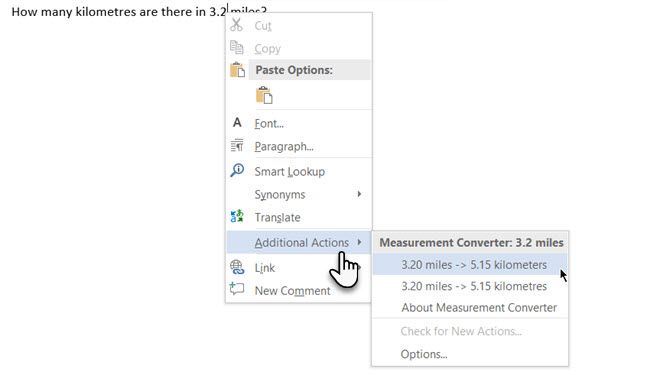
But did you know that Word 2016 can convert the same measurement into a measurement system of your choice with a right click? Microsoft Office calls them Built-in Actions and it is hidden inside Word Options.

How to Use Built-In Actions in Microsoft Word

Microsoft Word Measurement Converter

The Built-in Actions accomplish some common tasks you may do in a Word document. For instance, you may want to convert a measurement or insert an address quickly. Or even send an instant message to someone. Built-in Actions can be added to the right-click menu which makes them instantly available.

Follow these steps to enable the Built-in Actions:

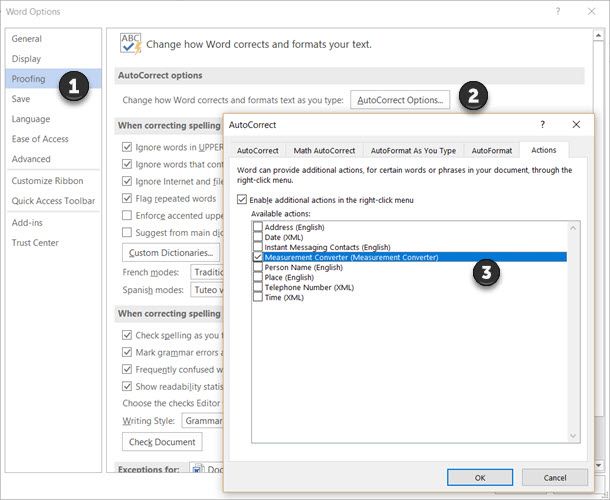
  1. Go to the File tab > click Options > Proofing.
  2. Click the AutoCorrect Options button. In the Options dialog, select the Actions tab. Check the Enable additional actions in the right-click menu box.
    Built in Actions in Microsoft Word
  3. Select the specific actions in the Available Actions list. Click OK.
  4. Now, when you work in a document and come across an unfamiliar unit of measurement (for example, miles), just right-click the value. Click on Additional Actions and click the right conversion from a pop-up list of measurement options.

Microsoft Office includes Built-in Actions for Microsoft Word, Outlook, and PowerPoint. This can be a real time-saver when a document from another region uses different measurement units. There are other Built-In Actions also and this Microsoft Support article runs through them for your benefit.

The measurement conversion is a tiny hidden feature in Microsoft Word.  But make those seconds count as you go through a complicated Word document.

Image Credit: dennizn/Depositphotos

Read the full article: How to Use the Hidden Measurement Converter in Microsoft Word


Read Full Article

How to Learn a Foreign Language by Immersion Using Flowlingo

Google is supercharging its Tez payment service in India ahead of global expansion


Google launched its Tez paymen app in India a year ago, and now the company is giving the service major push into retail as it prepares to expand it to other parts of Asia and beyond.

The app itself is being rebranded to Google Pay — bringing it in line with Google’s global payment service, which is available in 20 countries — but there are more tangible updates on their way. Most notably, Google is plotting to turn Tez Google Pay into an all-encompassing payment app for India.

The service started out in bank-based payments before adding bill and utility payments and messaging, but now Google is planning an extended push into retail, both online and offline. Economic Times recently reported on the rebrand and expansion.

The service already supports payments with some 2,000 apps and websites, including Goibibo and RedBus, but it is adding to that number and planning ‘deep’ integration with partners such as Uber and ticketing service BookMyshow. Google is also focusing on offline, and it said it is in the process of adding in-store payment support with a range of retail brands that will include Big Bazaar, e-Zone, and FBB.

Tez competes with dedicated payment services like Paytm and Mobikwik, and also WhatsApp — the Facebook-owned service that is India’s top messaging app but has struggled to win approval to launch an upcoming payment service due to concerns around its lack of a local office.

Already, Google’s service has made progress. The Tez app has pulled in 55 million downloads, and Google said it has racked up 750 million transactions with an annual run rate of over $30 billion. That, it said, has motivated it to look at overseas expansion opportunities.

Google’s India-based Tez service has been rebranded to Google Pay

Beyond the retail push, the service formerly known as Tez will also expand to cover micro-loans, bringing it into direct competition with startups like ZestMoney — which just closed an investment from Xiaomi this week.

Google said it has partnered with a number of India-based banks — including HDFC Bank, ICICI Bank, Federal Bank, and Kotak Mahindra Bank — to offer “pre-approved” loans to customers “in a matter of seconds” through the Google app.

These will be smaller than typical loans, especially those in the West. Loans on services like ZestMoney typically cover one-off purchases like electronics, education fees and more, CEO Lizzie Chapman told TechCrunch in a recent interview.

Finally, Google also plans to expand Tez Google Pay overseas. That means both adding Tez features to the Google Pay service worldwide, and taking the India-based service into new parts of Asia. That’ll require plenty of localization since the Indian version is heavily based around the country’s UPI payment system — which doesn’t translate overseas — but it’s a step in the right direction.

Google isn’t saying too much about which markets it might move into but you’d imagine Southeast Asia, which as plenty of similarities with India, will be top of mind.


Read Full Article

Google Go search app for emerging markets can now read out website content


Google has lit the news canon at its annual India event which takes place in New Delhi today. The company just introduced a subtle new AI-powered feature for its Google Go search app: website reading. You can bet this is the first of many product announcements to come out today.

The U.S. firm introduced Google Go — which is essentially a data-light search app for emerging markets — last year, and this new feature is designed to increase its appeal across India, particularly for non-English audiences.

A quick refresher: Hindi and English are the official national languages of India, but its billion-plus population is hugely diverse with more than 20 other languages recognized. The majority of those living in urban India are comfortable with English, but companies are increasingly aware that they need to cater to other tongues in order to offer even basic online services to the rest (majority) of the country.

Google isn’t alone in adopting this approach — it is actually a relative laggard — but now it is trying to help translate the web with this new Google Go feature.

Google said the addition can make website reading just like watching TV or listening to the radio. The feature reads out text in one of 28 supported languages whilst highlighting each word on the page as it goes. The firm said it uses AI to seek out the most important information on a web page, and also to play it back in each language.

There are obvious use cases for activities that pull attention away from reading, such as cooking, but more widely the feature is seen as part of Google Go’s general approach to making information more accessible to those who are relatively inexperienced when it comes to using the internet.

“The new feature is inspired by user research in India, where we heard from people how important it is to understand information effortlessly. Especially for people coming online for the first time, consuming long-form text on a small device can be difficult and time-consuming. With this new feature, you can just press play and follow along,” the company wrote in a statement.

It added that it is looking into ways to add the feature to other Google apps in the future, so stayed tuned.


Read Full Article
Google adds new features to help U.S. veterans find jobs or highlight their businesses


Google wants to make the transition back into civilian life smoother for U.S. military veterans by adding tools that help them find jobs or promote their businesses.

One new feature is an initiative of Grow with Google, the company’s career development program. It helps veterans discover job openings relevant to the skills they learned while serving by entering the phrase “jobs for veterans” into Google’s search engine along with their military job codes. Employers and job boards can also enable the feature on their own sites by using Google’s Cloud Talent Solution, a machine-learning based job search platform.

In a Google announcement, Matthew Hudson, a Google Cloud program manager and former Air Force civil engineer who served three tours in Iraq and Afghanistan, wrote that veterans often miss out on opportunities because “there isn’t a common language that helps recruiters match a veteran’s experience with the need for their skills and leadership in civilian jobs. As a result, 1 in 3 veterans—of the roughly 250,000 service members who transition out of the military each year—end up taking jobs well below their skill level.”

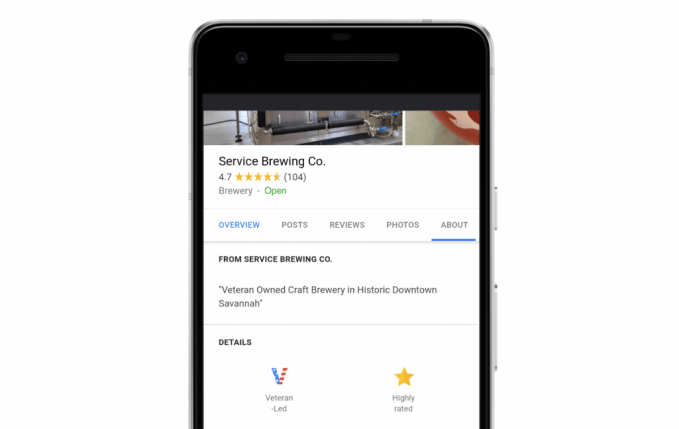
For veterans who founded, own or lead a business, Google has added a new attribute to help identify them on Google My Business, Google Maps and mobile search listings. In a blog post, Google data scientist and former U.S. Army staff sergeant Sean O’Keefe wrote that more than 2.5 million businesses in the U.S. are majority-owned by veterans. The “Veteran-Led” attribute badge will appear on Google business listings alongside other attributes like “Has Wifi” or “Family Friendly.”

The company also said Google.org, its charity initiative, will grant $2.5 million to the United Service Organizations (USO) to provide IT training, career support and Google Support Professional Certification, a course designed to prepare people for entry-level IT support jobs.


Read Full Article

Transfer Media Files to iOS in Seconds with WALTR 2 for $19


From hit TV series to free ebooks, there are countless ways to enjoy media on your iOS devices. However, trying to transfer these files to your phone or tablet via iTunes is a painful process. WALTR 2 is a great alternative — this well-reviewed app lets you send files to your iOS devices wirelessly in seconds. It can even handle tricky conversions. Right now, you can get WALTR 2 for just $19 at MakeUseOf Deals.

Instant Sync

Back in the old days, iTunes was a music library. But over the years, Apple has turned the app into a lumbering beast. If you’re fed up with iTunes, WALTR 2 should be on your wish list. This app lets you send files to your iPhone, iPad, or iPod with the minimum of fuss.

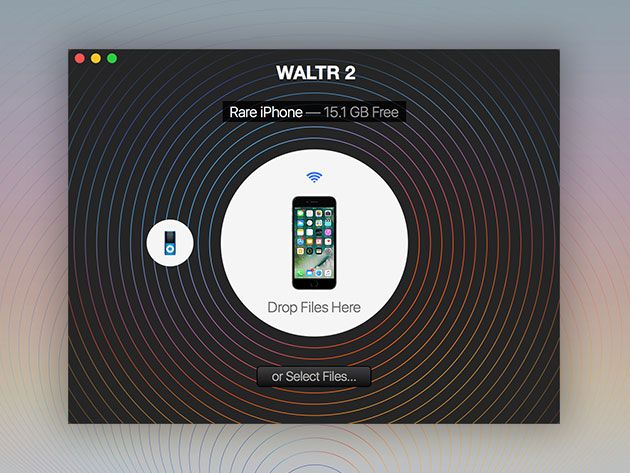
To make a transfer, you simply drag and drop your files into WALTR. The app can handle all kinds of media, including movies, TV shows, music, documents, ebooks, ringtones, and more. The transfer happens in seconds via Wi-Fi, and WALTR retains all the author and titles data. It even syncs with your Apple Music subscription.

If you want to transfer a file type that isn’t compatible with iOS, WALTR will convert it on the fly. What’s more, the original quality is always retained — you can even enjoy 4K videos at 60fps.

Bypass iTunes for $19

WALTR 2 is normally $39.95, but you can grab the app now for just $19 on Mac or Windows.

Read the full article: Transfer Media Files to iOS in Seconds with WALTR 2 for $19


Read Full Article

5 Film Recommendation Sites to Find New Movies to Watch or Stream


film-recommendation-sites

The most asked question for the modern multimedia addict is, “What should I watch tonight?” If you’re in the mood for a movie instead of a TV show, these sites will help you find the right pick. And that includes going to the theater too.

Largely though, you will be looking for streaming options. Even though Amazon Prime or Netflix do their best to deduce what you want to watch, they won’t always get it right. These third-party sites do a great job of recommending a film based on your tastes, on finding common ground for date night or uncovering movies you may have missed.

What Movie Should I Watch Tonight (Web): One-Line Descriptions

what movie should i watch tonight film recommendations

Let’s start with a website whose name is the question on your mind. What Movie Should I Watch Tonight (WMSIWT) has been around since 2010, providing quick one-line introduction to some of the most watchable films.

The idea of this site is that there are no bad movies listed on it. Each film is a recommendation from the editor, Kevin Yaun. Yaun’s one-line descriptions take some time to get accustomed to, but once you get what he’s going for, they’re a treat. Take Deadpool for example, which is described as “The superhero of dark humor and spandex.” You can click any movie to view the trailer or follow the Watch Now link to find which streaming service it’s on.

You can also find similar movies by clicking or searching for any film. Yaun’s “Collections” are an excellent way to narrow down choices too, with themes like “road trip movies” or “badass bank robbers”. You will definitely find something to watch with this site.

Flickmetrix (Web): The Best Filters to Find Streaming Movies

flickmetrix movie recommendations cinesift

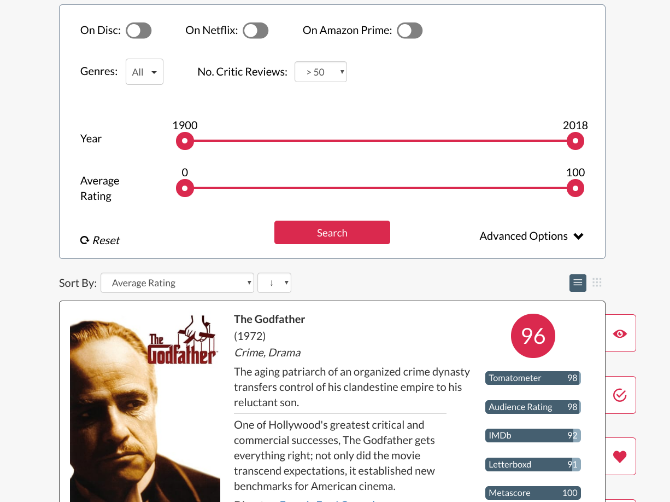
If you use Netflix or Amazon Prime (or both), then Flickmetrix is the best solution to find a film when you know exactly what you want to see. It has a ton of different filters to sort the list of recommended movies.

You can filter movies by their ratings on IMDb, Rotten Tomatoes, Metacritic, and Letterboxd. You can choose which streaming service you want to watch it on. And there are other options like genres to include or exclude, the year the film was released, or its primary language. Set it all up and you’ll get a neat list of recommended films with essential information, like a short description, the director and the cast, and a link to the trailer.

If the site feels familiar, that’s because Flickmetrix used to be called Cinesift. The name has changed and so has a lot of other things, including the ability to create an account and add movies to your watchlist, or mark them as seen so they don’t pop up again.

Date Night Movies (Web): Find Common Ground Between Two FIlms

find common film to enjoy with date night movies

Don’t go by the “Date Night” name. This web app works for any situation where you and someone else can’t decide which movie to watch, and want to find something you will both enjoy.

Add two movies to the app and it will spit out a line of recommendations that are somewhere between the two choices. You can sort this line by source too, if you specifically want something that’s available on Netflix or Amazon Prime, or even if you want to watch a free film on YouTube.

Click on any movie to find out more information about it, like a description or the actors in it. Date Night Movies surprisingly skips mentioning the director, which can be a huge influencer at times.

Movie of the Night (Web): Only One Recommendation

simplest movie recommendation site movieofthenight

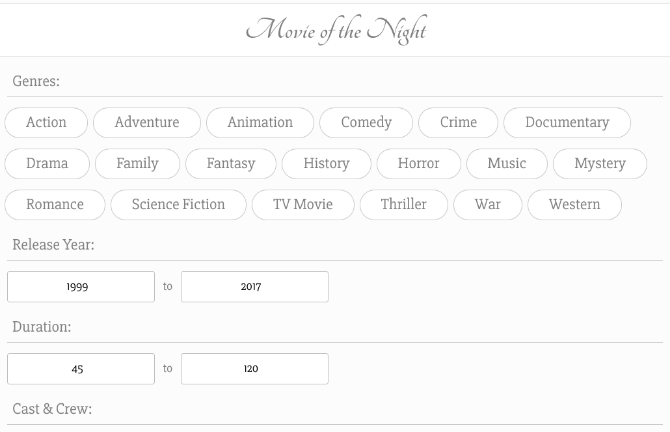
Once you set your parameters and search, all of the aforementioned sites give you a series of recommendations. That isn’t really helping you quickly figure out something to watch. So Movie of the Night makes it simpler and gives you only one recommendation.

First, pick the genres you are interested in. It’s fine to pick multiple genres. In fact, you will get better results if you do that. Next, say how old the movie can be, and how long it can be. Finally, if you want, add a few of your favorite directors or actors. One other filter lets you choose only English films, and there is an option to skip adult movies. You can skip any of these steps, or use them all.

Click the “Get Recommendation” button and Movie of the Night will give you a single film recommendation, with its description, cast and crew, and a link to its trailer. If you’ve already seen it, click the button again. It’s simple and hassle-free.

Popcornic (Web): Endless Series of New Film Trailers

popcornic watch new movie trailers endlessly

If you want to watch something released recently, try Popcornic first. The website plays a series of trailers, one after another, showing films playing right now or released in the past few months. You’re guaranteed something fresh.

It’s a nice leanback experience, going from trailer to trailer to find new films that catch your attention. You don’t have to remember any names, since the History tab tracks every trailer you played. Each movie also offers a link to its Metacritic page, in case you want to see what people had to say about it before putting down your money to go watch it.

Oh yes, for some of the films, you’ll need to go to a movie theater. Others might already be available on some streaming sites, or released exclusively for them. But chances are, you are going to discover something that’s still playing in a cinema near you.

Another Great Choice, and Something for Netflix Fans

Between these sites, you should be able to find a film to watch tonight that you will thoroughly enjoy. One of MakeUseOf’s other favorites for recommendations is A Good Movie To Watch (AGMTW), which we have talked about a few times before, so don’t forget to check that out too.

AGMTW has expanded its scope to include Amazon Prime as well, but for most people, Netflix still remains the king of good video streaming content. If you’re a subscriber, try these ways to find good movies and shows on Netflix.

Read the full article: 5 Film Recommendation Sites to Find New Movies to Watch or Stream


Read Full Article
Hating the wrong tech people for the right reasons


The slings and arrows aimed at tech’s titans these days are almost too numerous to count. Jeff Bezos: squandering money on space while exploiting warehouse employees. Mark Zuckerberg: complicit in everything from genocide to the death of democracy. Larry Page and Sergey Brin: in bed with China and the military. Elon Musk: where even to begin?

Tim Cook has mostly escaped the brickbats, but if Steve Jobs were still with us, it seems plausible he’d be the biggest target of all. And the list goes on from there, of course.

Let’s not kid ourselves: a lot of this criticism is warranted. Amazon should treat its warehouse workers better. Facebook should have seen the new form of information warfare coming from further away, recognized it when it was happening, and responded much faster and more decisively. Google shouldn’t have come as close as it did to implementing Project Maven. Tesla should … well … should basically be less of a mess.

More generally, the tech sector is vastly more important than it used to be, both as a segment of the economy and as an intimate part of people’s lives, and the tech industry’s responsibilities are, accordingly, vastly greater than they were. People should be more critical of us, and more watchful. We should more carefully consider the consequences of our actions and inactions.

And yet. It’s hard to shake the sense that a lot of the criticism aimed at tech titans is because they are so visible, not because they are actually responsible. Bezos and Musk get an amazing amount of flak for their efforts at private space exploration. This just seems bizarre. You may not agree that space exploration is an important, and possible critical, field of human endeavor, but surely you can agree that people might believe this in good faith, and that it’s not just — at the most extreme and laughable edge of those criticisms — the patriarchy in action.

Also, it’s hard to ignore the fact that, on a relative shoestring, SpaceX and Blue Origin have been making meaningful advances (such as self-landing reusable boosters, and the cost-per-kilogram-to-orbit of the Falcon Heavy) which NASA has failed to make directly with its $19 billion budget — which in turn, as Canadian astronaut Chris Hadfield points out, is less than twice what America spends on Halloween every year.

And if people are upset about tech billionaires squandering money, why on earth aren’t they up in arms, in mobs with pitchforks and torches, enraged by the financial industry? The financial industry which consumes 30% of all US corporate profits, compared to 10% thirty years ago. Of course, in exchange for that extra fifth of all profits, it gives us … uh … well, nothing, really; it just takes.

Similarly, there are fewer hedge-fund billionaires than there used to be, thankfully, but there are still an astonishing number of these people who are, in essence, very smart parasites who contribute nothing. “8 percent of the 400 wealthiest people in America is a big number for a group that arguably doesn’t contribute any economic activity.” Indeed — and, from the same article:

Hedge fund managers are different from other rich people in this way: Theirs is extremely liquid wealth. Other billionaires’ holdings are often locked up in assets that cannot be sold as easily, such as real estate or company shares. Because hedge fund managers are essentially in a cash business, these managers are able to buy sports teams and other high-priced toys by writing a check.

There’s a reason why there have been no mobs on Wall Street since the Occupy movement dissipated, and it is, I think, sadly, learned helplessness and despair. People don’t protest the parasites of the financial industry, or the military-industrial complex, or the bizarre cost disease that infects the US economy, or other aspects of our economy which are far, far more damaging than even the worst aspects of the tech industry, because they no longer believe that anything can be done about them. It’s sad but understandable.

In a way, it speaks well of technology that it attracts such criticism. It means that we’re incompatible with learned helplessness and despair, because for all of our (many) flaws, ours is still essentially an industry of hope, and one which actually builds and contributes thing rather than siphoning value. As mentioned, a lot of the criticisms are merited, and we should absorb them, consider them, and act upon them.

But at the same time let’s not pretend that tech is in any way Public Enemy No. 1, or that we represent all that is wrong with the world, or that tech people are uniquely and specially terrible, or that we should be the primary focus of criticism re how the world works, just because we are particularly striking and visible. If you want to deal with the enemies of a better world in order of importance, then I’m afraid you’re going to need to start elsewhere.


Read Full Article

What Is Email Spoofing? How Scammers Forge Fake Emails

Facebook comms VP Rachel Whetstone is heading to Netflix


In Facebook’s latest high profile departure, corporate communications lead Rachel Whetstone will leave for a top PR role at Netflix. Whetstone joined Facebook about a year ago after leaving a similar position running communications at Uber during some of the company’s most fraught days. Prior to Uber, Whetstone worked for Google as its SVP of communications and public policy.

Facebook confirmed Whetstone’s departure, which was first reported by Recode. “It’s been amazing to be able to learn from one of the best over this last year,” FB Comms VP Caryn Marooney said in a statement provided to TechCrunch. “We are grateful for what Rachel has brought to our team and we know she will have continued success at Netflix”.

Whetstone won’t be leaving Facebook for another few months still as the company prepares for the transition. After her departure, Caryn Marooney will return to leading Facebook’s global communications team, a role she shared during Whetstone’s time with the company.

In a separate statement today, Netflix welcomed its new hire. “Rachel is a proven communications leader and a strong addition to the Netflix team,” said Netflix CEO Reed Hastings in a statement. “Her deep knowledge and international expertise will be invaluable as we bring Netflix and its expanding lineup of original content to an increasingly global audience.”

At Netflix, Whetstone will replace former PR head Jonathan Friedland who created his own PR crisis at the company earlier this summer when he was fired for his use of a racial slur.


Read Full Article
Introducing a New Framework for Flexible and Reproducible Reinforcement Learning Research


Reinforcement learning (RL) research has seen a number of significant advances over the past few years. These advances have allowed agents to play games at a super-human level — notable examples include DeepMind’s DQN on Atari games along with AlphaGo and AlphaGo Zero, as well as Open AI Five. Specifically, the introduction of replay memories in DQN enabled leveraging previous agent experience, large-scale distributed training enabled distributing the learning process across multiple workers, and distributional methods allowed agents to model full distributions, rather than simply their expected values, to learn a more complete picture of their world. This type of progress is important, as the algorithms yielding these advances are additionally applicable for other domains, such as in robotics (see our recent work on robotic manipulation and teaching robots to visually self-adapt).

Quite often, developing these kind of advances requires quickly iterating over a design — often with no clear direction — and disrupting the structure of established methods. However, most existing RL frameworks do not provide the combination of flexibility and stability that enables researchers to iterate on RL methods effectively, and thus explore new research directions that may not have immediately obvious benefits. Further, reproducing the results from existing frameworks is often too time consuming, which can lead to scientific reproducibility issues down the line.

Today we’re introducing a new Tensorflow-based framework that aims to provide flexibility, stability, and reproducibility for new and experienced RL researchers alike. Inspired by one of the main components in reward-motivated behaviour in the brain and reflecting the strong historical connection between neuroscience and reinforcement learning research, this platform aims to enable the kind of speculative research that can drive radical discoveries. This release also includes a set of colabs that clarify how to use our framework.

Ease of Use
Clarity and simplicity are two key considerations in the design of this framework. The code we provide is compact (about 15 Python files) and is well-documented. This is achieved by focusing on the Arcade Learning Environment (a mature, well-understood benchmark), and four value-based agents: DQN, C51, a carefully curated simplified variant of the Rainbow agent, and the Implicit Quantile Network agent, which was presented only last month at the International Conference on Machine Learning (ICML). We hope this simplicity makes it easy for researchers to understand the inner workings of the agent and to quickly try out new ideas.

Reproducibility
We are particularly sensitive to the importance of reproducibility in reinforcement learning research. To this end, we provide our code with full test coverage; these tests also serve as an additional form of documentation. Furthermore, our experimental framework follows the recommendations given by Machado et al. (2018) on standardizing empirical evaluation with the Arcade Learning Environment.

Benchmarking
It is important for new researchers to be able to quickly benchmark their ideas against established methods. As such, we are providing the full training data of the four provided agents, across the 60 games supported by the Arcade Learning Environment, available as Python pickle files (for agents trained with our framework) and as JSON data files (for comparison with agents trained in other frameworks); we additionally provide a website where you can quickly visualize the training runs for all provided agents on all 60 games. Below we show the training runs for our 4 agents on Seaquest, one of the Atari 2600 games supported by the Arcade Learning Environment.
The training runs for our 4 agents on Seaquest. The x-axis represents iterations, where each iteration is 1 million game frames (4.5 hours of real-time play); the y-axis is the average score obtained per play. The shaded areas show confidence intervals from 5 independent runs.
We are also providing the trained deep networks from these agents, the raw statistics logs, as well as the Tensorflow event files for plotting with Tensorboard. These can all be found in the downloads section of our site.

Our hope is that our framework’s flexibility and ease-of-use will empower researchers to try out new ideas, both incremental and radical. We are already actively using it for our research and finding it is giving us the flexibility to iterate quickly over many ideas. We’re excited to see what the larger community can make of it. Check it out at our github repo, play with it, and let us know what you think!

Acknowledgements
This project was only possible thanks to several collaborations at Google. The core team includes Marc G. Bellemare, Pablo Samuel Castro, Carles Gelada, Subhodeep Moitra and Saurabh Kumar. We also extend a special thanks to Sergio Guadamarra, Ofir Nachum, Yifan Wu, Clare Lyle, Liam Fedus, Kelvin Xu, Emilio Parisoto, Hado van Hasselt, Georg Ostrovski and Will Dabney, and the many people at Google who helped us test it out.

9 Simple Tweaks to Speed Up Firefox Immediately


Nearly all web browsers have similar speeds when actually browsing the web, so “speed” actually comes down to the performance and how you use the program. Whether you’re already a Firefox user or switching from Chrome to Firefox, this guide will tell you how to speed it up.

We’ll be sticking to the latest stable version of Firefox for this one. While Firefox on Android has some cool features too, this article focuses on the desktop browser.

You should obviously use the latest and greatest version of Firefox. We believe it’s the best browser for Linux and has enough in it to be your favorite on Windows or macOS.

Download: Mozilla Firefox for Windows | macOS | Linux (Free)

1. Enable Hardware Acceleration

enable hardware acceleration in firefox

The new Firefox Quantum can take advantage of your computer’s GPU to load pages faster and play online videos more smoothly. But for quite a few computers, this isn’t enabled by default. So check that first.

  1. Go to about:preferences
  2. In General, scroll down to Performance
  3. Uncheck the box for Use recommended performance settings
  4. Check the box for Use hardware acceleration when available

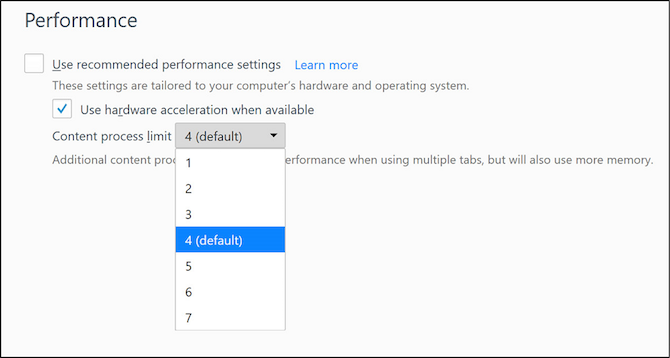
You’ll also see another option under it called Content process limit. If your computer has a dedicated GPU and more than 8GB of RAM, raise this beyond 4. Otherwise, leave it to the default 4 value. Generally speaking, raise it to 5 for 16GB RAM, 6 for 32GB RAM, and 7 for 64GB RAM.

Hardware acceleration and content process are the first things you should check if Firefox runs slow while other browsers run fast.

2. Disable Data Collection and Telemetry

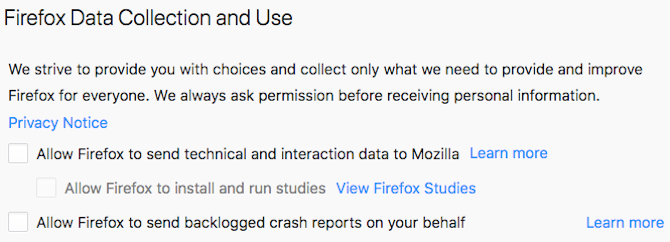
firefox disable data collection

Firefox continually collects anonymous data about how you use the browser. It then sends that data to its servers, to improve features in the browser. Don’t worry, this isn’t compromising your privacy, but it does make Firefox slower.

You can stop Firefox from doing this with a couple of simple tweaks.

First, you need to disable Data Collection in Firefox:

  1. Go to about:preferences
  2. Go to Privacy & Security, and scroll down to Firefox Data Collection and Use
  3. Uncheck all boxes in this section
  4. Restart Firefox

Behind the scenes, Firefox uses something called Telemetry to send that data across. To disable Telemetry, you will need to dive into about:config settings.

3. Essential About:Config Tweaks

You can change intricate settings in Firefox through its accessible Configs menu. We’ve featured a few essential Firefox tweaks already, but this time, we’re going to concentrate only on those that make the browser work faster.

How to Access and Use About:Config

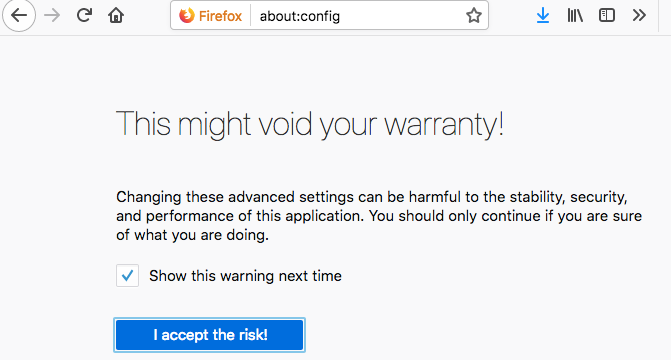
firefox about config warranty confirmation

  1. Open a New Tab
  2. Type about:config in the URL bar
  3. Click I’ll be careful, I promise
  4. Search for any string mentioned below
  5. Double-click value to change the value of any field
  6. Click anywhere else to save the changes

Once you’re in about:config, change the following preferences to the denoted value so that your Firefox runs faster.

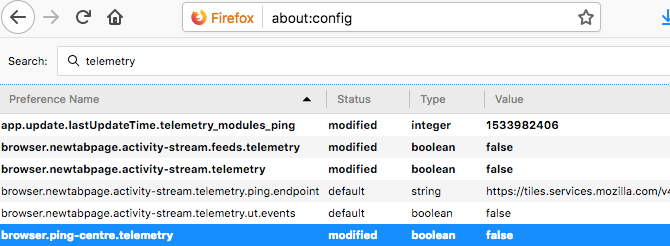
Change or disable telemetry in Firefox

  • Set browser.download.animateNotifications to False
  • Set security.dialog_enable_delay to 0
  • Set network.prefetch-next to False (Only on slow internet connections)
  • Set browser.newtabpage.activity-stream.feeds.telemetry to false
  • Set browser.newtabpage.activity-stream.telemetry to false
  • Set browser.ping-centre.telemetry to false
  • Set toolkit.telemetry.archive.enabled to false
  • Set toolkit.telemetry.bhrPing.enabled to false
  • Set toolkit.telemetry.enabled to false
  • Set toolkit.telemetry.firstShutdownPing.enabled to false
  • Set toolkit.telemetry.hybridContent.enabled to false
  • Set toolkit.telemetry.newProfilePing.enabled to false
  • Set toolkit.telemetry.reportingpolicy.firstRun to false
  • Set toolkit.telemetry.shutdownPingSender.enabled to false
  • Set toolkit.telemetry.unified to false
  • Set toolkit.telemetry.updatePing.enabled to false

Your Firefox should now be visibly faster, as you have just disabled unnecessary animations, stopped the countdown timer when you’re installing extensions, and told it to stop preloading web pages when you’re on a slow connection.

4. Disable Accessibility Services

firefox disable accessibility options

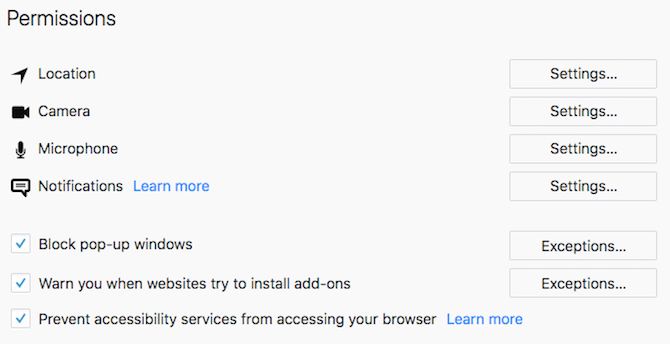
Firefox Quantum is always monitoring your browser through something called Accessibility Services. It’s useless for anyone who doesn’t need assistive technologies for physical impairments.

Here’s how to safely disable Accessibility Services in the new Firefox:

  1. Go to about:preferences
  2. Go to Privacy & Security, and scroll down to Permissions
  3. Check the box for Prevent accessibility services from accessing your browser
  4. Restart Firefox when prompted

5. Download Speed Tweaks for Firefox Quantum

download speed tweaks to speed up firefox

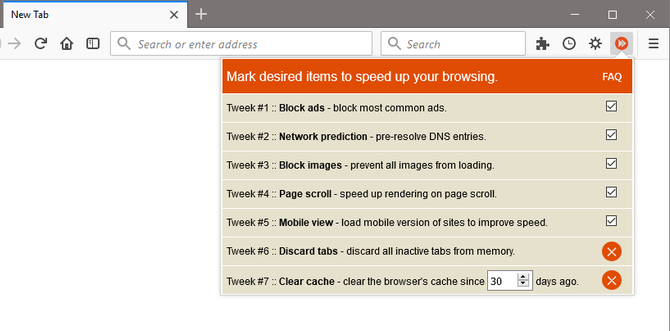
With almost every browser, there are a few common tricks to speed up performance. You could manually do all of that or let a handy extension called Speed Tweaks take care of it.

None of the seven tweaks are selected by default, so you will have to check what you want to use. The tricks include:

  • Block common ads by default
  • Pre-solve DNS entries
  • Block all images from loading by default
  • Speed up page rendering while scrolling
  • Load the mobile version of websites
  • Discard inactive tabs to save memory
  • Clear the browser cache

It’s a quick and simple fix for a faster browser, and you can toggle any setting on and off when you want.

Download: Speed Tweaks for Firefox (Free)

6. Remove Built-in Firefox Add-ons

The new version of Firefox integrates add-ons like Pocket out of the box, whether you want them or not. Removing them can speed up the browser’s startup time and memory usage.

We’ve shown you how to remove these Firefox integrations, but here are the quick shortcuts if you don’t need step-by-step instructions from the article:

  • In about:config, set reader.parse-on-load.enabled to False
  • In about:config, set reader.parse-on-load.force-enabled to False
  • In about:config, set browser.pocket.enabled to False
  • In about:config, set loop.enabled to False

7. Switch to Bookmarklets

Use bookmarklets instead of add-ons in firefox

We’ve been saying this for quite some time now, but you should seriously consider the benefits of using bookmarklets instead of extensions or add-ons. Bookmarklets are lighter, safer, and work just as well as several popular add-ons.

For instance, you can ditch the Pocket add-on and install the Pocket bookmarklet to stop Firefox wasting RAM on Pocket till the moment you actually need to add a new page. Yup, otherwise, that extension is taking up RAM even if you don’t use it.

We have a large list of bookmarklet alternatives to add-ons, so start replacing those extensions!

8. Manage Your Tabs

Apart from extensions, the other thing that really slows down the browser is the number of tabs you have open. It’s all right to have several tabs open, but you need to manage them correctly to ensure Firefox doesn’t start crawling. Funnily, you’ll need to accomplish this is with two add-ons.

Auto Tab Discard

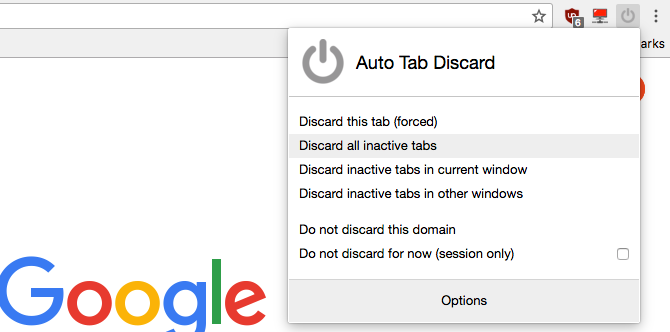
Auto Tab Discard extension for Firefox

You keep a lot of tabs open, but you don’t always need them all the time. Auto Unload Tab will automatically stop that tab from taking up CPU cycles, RAM, or from reloading. Right-click in the tab or the extension icon to see a context menu with all the options you need. You can add individual tabs or certain sites to the blacklist so that they are ignored by Auto Unload Tab.

It’s one of the must-have add-ons for faster web browsing.

Download: Auto Tab Discard for Firefox (Free)

OneTab

Firefox-Onetab

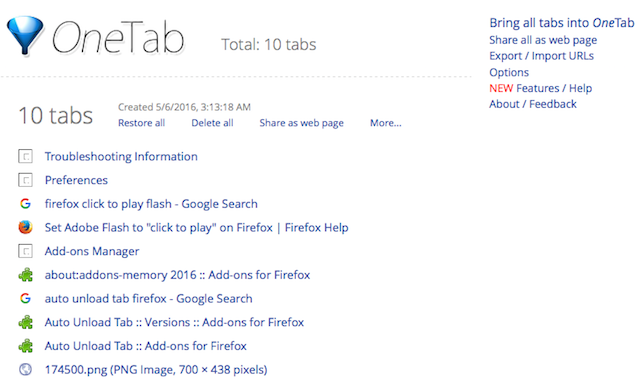
Available on all major browsers, OneTab is one of the brilliant ways to manage tabs without losing them. One click of the OneTab icon and it will close all open tabs and and generate them as a list. You can reopen all tabs in another click, or just save the list so that it can be opened later.

It’s a simple way to keep your browser light without dumping any open tab and desperately searching for it later.

Download: OneTab for Firefox (Free)

9. Refresh Firefox to Start From Scratch

how to refresh firefox

The first time you installed Firefox, it was much faster, right? Browsers get slower with age. If you want to go back to the feel of that fresh installation, Firefox Quantum has an easy way to do that.

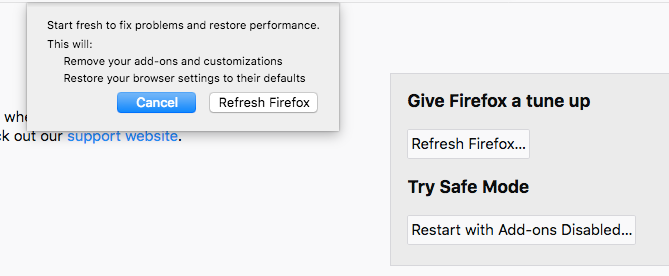
You can Refresh Firefox to remove all add-ons you downloaded and customizations you’ve made. It will also restore your browser settings to default.

Here’s how to Refresh Firefox:

  1. Open a new tab and go to about:support
  2. Click Refresh Firefox in the Give Firefox a tune up box
  3. Click Refresh Firefox again in the dialog prompt that pops up to confirm your decision

More Firefox Productivity With Tab Management

These tips and tricks are excellent ways to speed up your slow Firefox browser. But the most common reason your browser runs slow is the tabs. Unless you make an effort to handle your tabs well, none of these tweaks will have a long-lasting effect. So whatever you do, make sure you learn tab management in Firefox Quantum.

Read the full article: 9 Simple Tweaks to Speed Up Firefox Immediately


Read Full Article

Hangouts Chat, Google’s Slack competitor, gets emoji reactions


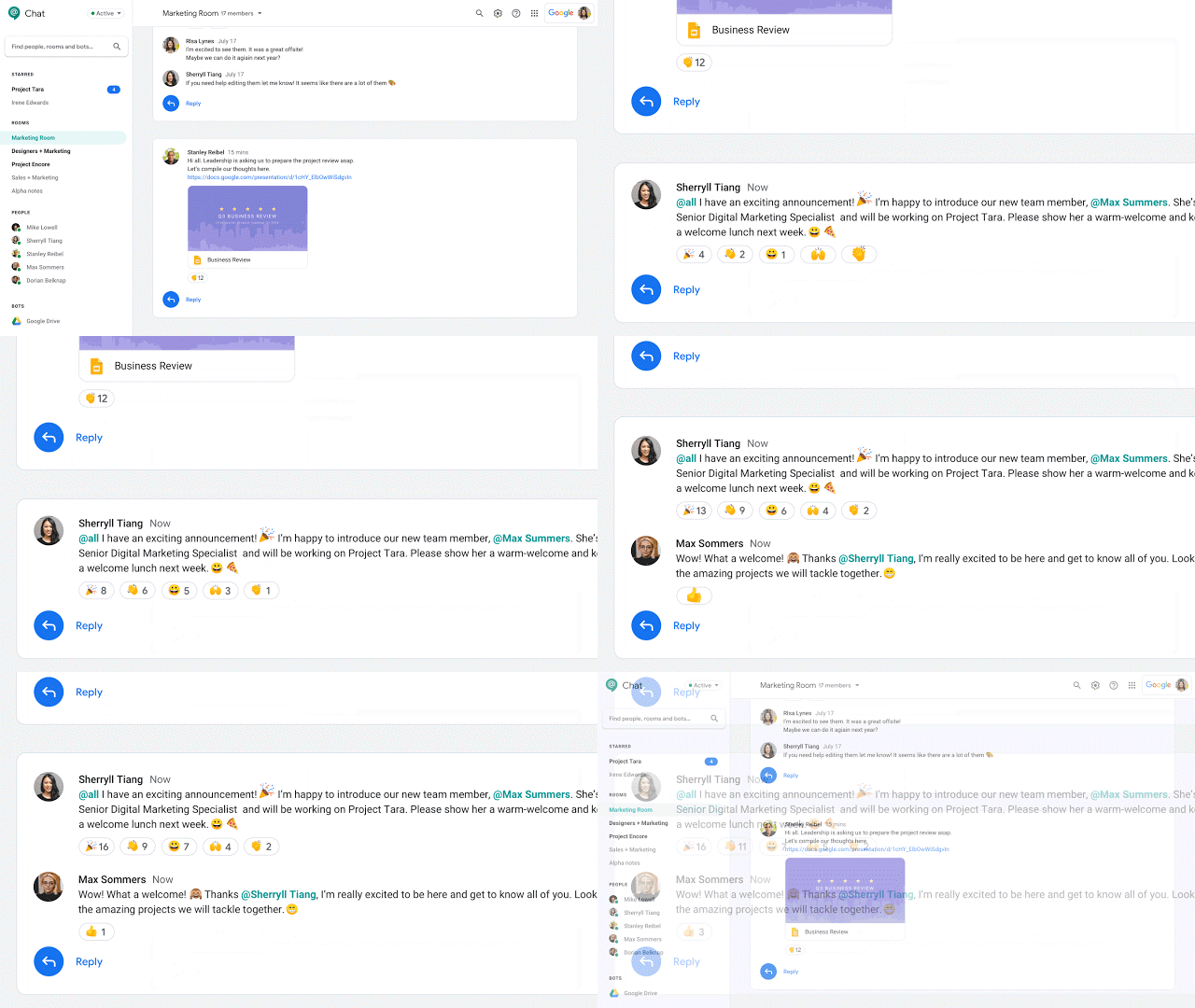
Hangouts Chat, Google’s business-focused Slack competitor is getting emoji reactions. That’s a feature that Slack has long had, so if anything, today’s move makes Hangouts Chat even more Slack-like than before.

Hangouts Chat, you may remember, is very different from Hangouts, Google’s chat app for regular users which at one point was supposed to be superseded by Allo. But then Allo failed and so the future of Hangouts remains uncertain. Hangouts isn’t getting emoji reactions today, though, that’s Hangouts Chat.

There’s really not much more to be said about this new feature. It works just like you’d expect and just like in Slack, this update allows you to now quickly add a thumbs-up emoji to all those comments in Hangouts Slack Chat that you couldn’t care less about but where internal politics dictate that you should say something (or, in Google-speak: “communication styles at work are evolving, and expressive communication modes are oftentimes preferred over simple text”). You could also use them for a quick internal poll or to acknowledge a request where typing ‘yes’ would’ve felt like too much work.
Either way, these new emoji reactions are now rolling out to all G Suite users. Google expects that everybody will have access to them within the next three days.


Read Full Article