10 July 2018

Timehop Reveals Independence Day Data Breach


Timehop, the popular social media memory jogger, has suffered a security breach. The result is that 21 million Timehop users have potentially had some of their data breached. However, Timehop is trying to assure users it now has everything under control.

For those unfamiliar with Timehop, it’s an app which resurfaces your old social media posts, reminding you what you were doing on this day years ago. Yes, it’s Facebook Memories, but for Facebook, Twitter, Instagram, Foursquare, and others.

Timehop Deals With a Network Intrusion

Timehop “experienced a network intrusion” on July 4, 2018. The company identified the issue, and interrupted the breach while it was in progress. However, in the two hours it took Timehop’s engineers to lock out the attackers, some user data was accessed.

According to Timehop, this data includes the names, email addresses, and phone numbers of up to 21 million users. However, it doesn’t include private/direct messages, financial data, or social media or photo content. In other words, it could have been worse.

Crucially, none of the memories Timehop stores were accessed. However, the keys that let Timehop access your old posts were compromised. So Timehop has deactivated them all, and you’ll have to log in and re-authenticate each service you have linked to Timehop.

If you used a phone number to log in to Timehop you should also take steps to ensure your number cannot be ported. This means contacting your mobile provider and asking them to add a PIN to your account or to limit the portability of your phone number.

Follow Common Sense Security Precautions

As always with these kinds of incidents we have to accept Timehop’s version of events and assurances that the damage is limited. Unfortunately, all we can do is follow Timehop’s advice to log back in and follow the common sense security precautions.

Timehop is just one of a number of tools you can use to dig up your old social media posts. And that’s on top of Facebook Memories (formerly On This Day) and Instagram archiving your old Stories. Just remember that not all memories are good ones.

Read the full article: Timehop Reveals Independence Day Data Breach


Read Full Article

Facebook was never ephemeral, and now its Stories won’t have to be


Before Snapchat made social media about just today, Facebook made it about forever. The 2011 “Timeline” redesign of the profile and keyword search unlocked your past, encouraging you to curate colorful posts about your life’s top moments. That was actually an inspiration for Snapchat, as its CEO Evan Spiegel wrote in its IPO announcement that “We learned that creativity can be suppressed by the fear of permanence.”

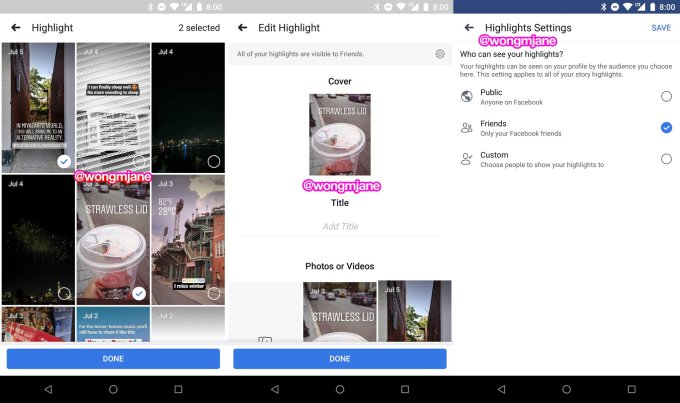
Now Facebook is finding a middle ground by optionally unlocking the history of your Stories that otherwise disappear after 24 hours. Facebook will soon begin testing Stories Highlights, the company confirmed to TechCrunch. Similar to Instagram Stories Highlights, it will let you pick your favorite expired photos and videos, compile them into themed collections with titles and cover images and display them on your profile.

The change further differentiates Facebook Stories from the Snapchat Stories feature it copied. It’s smart for Facebook, because highly compelling content was disintegrating each day, dragging potential ad views to the grave with it. And for its 150 million daily users, it could make the time we spend obsessing over social media Stories a wiser investment. If you’re going to interrupt special moments to capture them with your phone, the best ones should still pay dividends of self-expression and community connection beyond a day later.

Facebook Stories Highlights was first spotted by frequent TechCrunch tipster Jane Manchun Wong, who specializes in generating screenshots of unreleased features out of the APK files of Android apps. TechCrunch inquired about the feature, and a Facebook spokesperson provided this statement: “People have told us they want a way to highlight and save the Stories that matter most to them. We’ll soon start testing highlights on Facebook – a way to choose Stories to stay on your profile, making it easier to express who you are through memories.”

These Highlights will appear on a horizontal scroll bar on your profile, and you’ll be able to see how many people viewed them just like with your Stories. They’ll default to being viewable by all your friends, but you can also restrict Highlights to certain people or make them public. The latter could be useful for public figures trying to build an audience, or anyone who thinks their identity is better revealed through their commentary on the world that Stories’ creative tools offer, opposed to some canned selfies and profile pics.

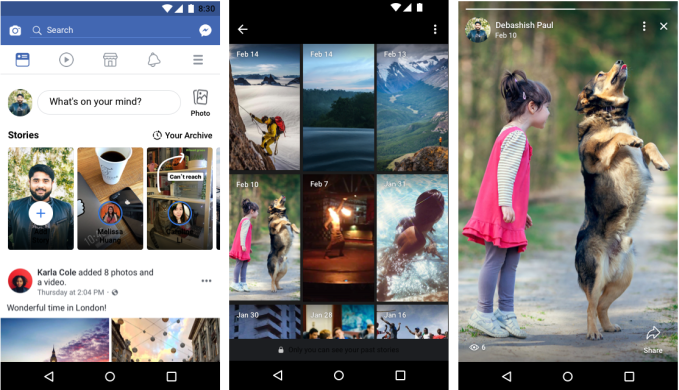
Facebook paved the way for Highlights by launching the Stories Archive in May. This automatically backs up your Stories privately to your profile so you don’t have to keep the saved versions on your phone, wasting storage space. That Archive is the basis for being able to choose dead Stories to show off in your Highlights. Together, they’ll encourage users to shoot silly, off-the-cuff content without that “fear of permanence,” but instead with the opportunity. If you want to spend a half hour decorating a Facebook Story with stickers and drawing and captions and augmented reality, you know it won’t be in vain.

Facebook Stories constantly adds new features, like this Blur effect I spotted today

While many relentlessly criticize Facebook for stealing the Stories from Snapchat, its rapid iteration and innovation on the format means the two companies’ versions are sharply diverging. Snapchat still lacks a Highlights-esque feature despite launching its Archive-style Memories back in July 2016. Instead of enhancing the core Stories product that made the app a teen phenomenon, it’s concentrated on Maps, gaming, Search, professional Discover content, and a disastrously needless redesign.

Facebook’s family of apps seized on the stagnation of Snapchat Stories and its neglect of the international market. It copied whatever was working while developing new features like Instagram’s Superzoom and Focus portrait mode, the ability to reshare public feed posts as quote tweet-style Stories and the addition of licensed music soundtracks. While writing this article, I even discovered a new Facebook Stories option called Blur that lets you shroud a moving subject with a dream-like haze, as demonstrated with my dumb face here.

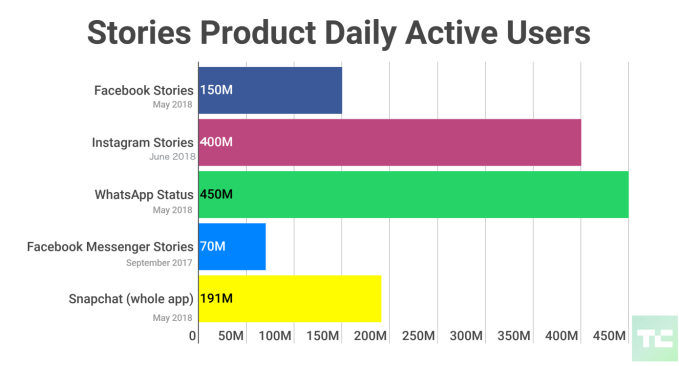
The relentless drive to add new options and smooth out performance has paid off. Now Instagram has 400 million daily Stories users, WhatsApp has 450 million and Facebook has 150 million, while Snapchat’s whole app has just 191 million. As Instagram CEO Kevin Systrom admitted about Snapchat, “They deserve all the credit.” Still, it hasn’t had a megahit since Stories and AR puppy masks. The company’s zeal for inventing new ways to socialize is admirable, though not always a sound business strategy.

At first, the Stories war was a race, to copy functionality and invade new markets. Instagram and now Facebook making ephemerality optional for their Stories signals a second phase of the war. The core idea of broadcasting content that disappears after a day has become commoditized and institutionalized. Now the winner will be declared not as who invented Stories, but who perfected them.


Read Full Article

The Best Web Hosting Services


best-web-hosting

Are you looking for the best web hosting services? Whether you need to host a small personal blog or a major corporate website, this article will help you identify the best web hosts to use.

Finding the best web hosting service isn’t as straightforward as searching Google and going with the one that offers the lowest price. There are a lot of issues to consider, including the reasons why you need hosting and how you intend to use it.

Here’s what you need to consider when choosing the right host for your needs, along with several recommendations of the best and most reputable web hosting services.

What Do You Need in a Web Host?

Before choosing your web host, you’ll need to think about your requirements. Consider the following concerns and decide the importance of each item according to what kind of site you’re putting up:

  • Speed: How responsive do you need your site to be? It may not matter if your personal site takes a few seconds to load, but if you want to run an e-commerce hub, those few seconds can turn away potential customers.
  • Bandwidth: How much data will be transferred every month? This is tied to how many visitors you expect to have on your website at any given time and how many bandwidth-intensive elements you’ll have (e.g. images, videos, file downloads require much more bandwidth than simple text).
  • Storage Space: How many pages are on your website? And more importantly, how many images, videos, and documents will reside on your server? You should first consider whether you could use free image hosting services. If you can’t, consider efficiently resizing your images to minimize storage concerns.
  • Technical Support: How tech-savvy are you? Is this your first website ever? Do you have trouble figuring out how to make changes to your site? Or do you only need help when the server is down? The more support you need, the more it’ll cost you.

Once you have a clear picture of your needs, you can work your way through the following list and identify which web hosting service is best for you.

The Best Shared Web Hosting Services

When multiple websites are hosted on a single physical server it is called shared web hosting. These plans are ideal for personal blogs or small websites where storage space and low monthly costs are more important than bandwidth and performance.

InMotion Hosting

best web shared vps dedicated hosting services

InMotion Hosting is mentioned under every hosting category listed in this article, and for good reason: InMotion offers excellent value plans for all types of hosting needs.

You’ll find the standard shared web hosting offerings, such as unlimited disk space and monthly bandwidth, plus a complimentary domain, data backups, and website transfers. You also get access to cPanel loaded with tools and apps that help you maintain your site.

MakeUseOf readers can get the Launch plan at a special discount of only $3.99/mo (normally $6.39/mo). For more performance, you might consider the Power plan at $5.99/mo (normally $8.49/mo), which allows up to 6 websites on one account, unlimited disk space, and up to 100 subdomains. The Pro plan at $13.99/mo (normally $14.71/mo) offers all that plus unlimited MySQL databases and unlimited websites on one server.

Get the special discount for these InMotion Hosting plans by using this link.

Bluehost

best web shared vps dedicated hosting services

Want reliable web hosting at rock-bottom cost? Bluehost’s Basic plan gets you 50GB of storage for your site, 5 email accounts with 100MB storage each, and up to 25 subdomains. The Plus plan allows for unlimited websites, unmetered storage, unlimited email accounts, and unlimited domains.

Like most web hosts, Bluehost offers cPanel for management, a simple site deployment feature, and e-commerce support (shared SSL, shopping carts, etc.).

Normally the Basic plan would cost you $3.95/mo for the first year, but MakeUseOf readers can get a special discounted price of $2.95/mo. Similarly, the Plus plan’s normal price of $5.95/mo drops down to $5.45/mo. Get the special discount for these Bluehost plans by using this link.
Media Temple

best web shared vps dedicated hosting services

Media Temple promises to alleviate short-term traffic-spike concerns with its service. It’s much more expensive, but the peace of mind it offers can’t be understated.

The service has its own control panel (not cPanel), so this may not be ideal for seasoned users who are used to cPanel. But for anyone who is new to web hosting, it’s easy to understand and simple to use.

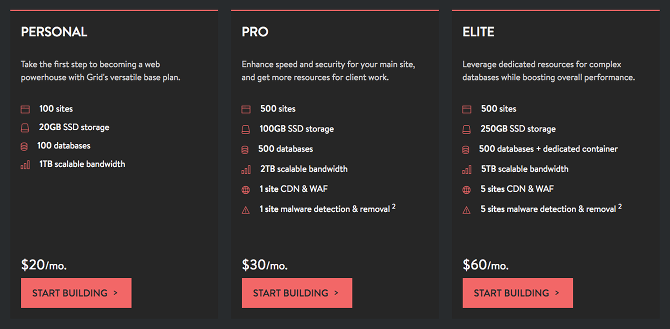
Starting at $20/mo for the Personal plan, you get 20GB of SSD storage, 1TB of bandwidth that conveniently scales for short-term spikes, up to 100 websites, and comes pre-installed with the software you need to run highly-functional websites, including PHP, Perl, and Python. It comes with CloudFlare, one-click app installations, and better overall hardware.

MakeUseOf readers can use the following exclusive sign-up code to receive 20 percent off new hosting accounts with Media Temple: makeuseof20

SiteGround

best web shared vps dedicated hosting services

SiteGround is a solid option if you don’t have much web hosting experience. Start off with the StartUp plan at $3.95/mo to get 10GB of storage and enough bandwidth to handle up to 10,000 visitors a month. You get a free domain name, unlimited emails, cPanel and SSH access, and even CloudFlare support.

If you’re getting around 25,000 visits a month, you can get the GrowBig plan which starts at $5.95/mo for 20GB storage. This includes one free year of SSL certificate, better speed with SuperCacher, and “priority” technical support.

If your site is booming with 100,000 visits a month, the GoGeek plan is available for $11.95/mo. This includes 30GB of space, all the features of the other plans, plus “geeky advanced features” like fewer accounts sharing your server and more advanced hardware for better performance.
Namecheap

best web shared vps dedicated hosting services

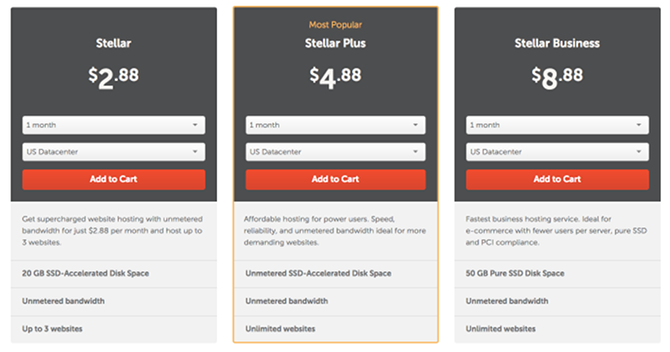
Namecheap is one of the best options for first-timers who want to test the waters of web hosting. The Stellar plan starts at an unbeatable price of $2.88/mo.

For that price, you get 20GB of HDD storage, unlimited bandwidth, up to 3 domains and 50 subdomains, cPanel for management, 50 email accounts, support for CloudFlare, and all kinds of other additional software.

When you need to expand, you can upgrade to the Stellar Plus plan for $4.88/mo (unmetered HDD storage and unlimited websites) or the Stellar Business plan for $8.88/mo (50GB of SSD storage).

Not to mention the fact that Namecheap’s support is matchless among budget-level web hosts. And the performance is excellent for what you pay—much better than some web hosts that cost twice as much. It’s why we consider Namecheap to be one of the best cheap web hosting providers.

The Best Virtual Private Server Hosting

When your site starts to get a lot more traffic—we’re talking over 10,000 visits per day—it’s time to move beyond shared hosting to the next step up, which is a virtual private server.

With a VPS, you basically have an entire virtual server to yourself. It isn’t shared with other customers so you get full access to all the CPU and RAM allotted to you, and you get full control of the server so you can install all kinds of third-party software and restart the server whenever you want.

Note: These are managed VPS plans, meaning that the hosting provider’s administrators “manage” the server for you (e.g. regular updates, data backups, reboot crashes, fix issues) so you don’t have to worry. Unmanaged plans are much cheaper but we don’t recommend them because they’re riskier and require a lot more technical know-how.

InMotion Hosting

best web shared vps dedicated hosting services

Never to be outdone, InMotion Hosting offers SSDs as part of their VPS hosting. There aren’t quite as many customized choices here as you might find with other VPS providers—only three VPS plans—but what you do get is impressive. Uptime is excellent, and response times with tech support are lightning fast.

The VPS-1000HA-S plan offers an impressive 75GB of storage space, 4GB of RAM, and 4TB of bandwidth for $29.19/mo. The VPS-2000HA-S plan bumps it up to 150GB of storage space, 6GB of RAM, and 5TB of bandwidth for $47.39/mo. And the top VPS-3000HA-S plan gives a whopping 260GB of storage space, 8GB of RAM, and 6TB of bandwidth for $69.34/mo.

MakeUseOf readers can get the following special discounted rates: $27.99/mo for the VPS-1000HA-S plan, $44.99/mo for the VPS-2000HA-S plan, and $64.99/mo for the VPS-3000HA-S plan. Get the special discount for these InMotion Hosting plans by using this link.
Media Temple

best web shared vps dedicated hosting services

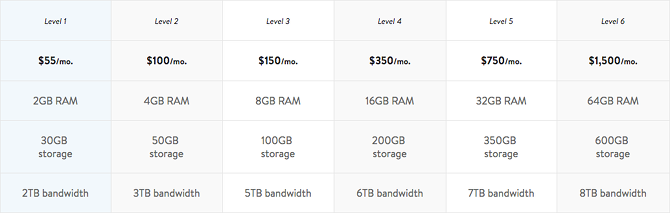
Media Temple offers users the option to go with an unmanaged Linux-based VPS for $30/mo or managed VPS solutions ranging from $55/mo to $1,500/mo.

Whether you choose managed or unmanaged, you can then pick between six levels of hosting that offer an array of features. Level 1 is the base $55/mo plan with 30GB of storage, 2GB of RAM, and 2TB of bandwidth. The most popular option is Level 3 with 100GB of storage, 8GB of RAM, and 5TB of bandwidth for $150/mo.

The cost may seem prohibitive, but Media Temple is up-front about their prices: the price you sign up with today will be the same price when you renew the following year. No surprises.

MakeUseOf readers can use the following exclusive sign-up code to receive 20 percent off new hosting accounts with Media Temple: makeuseof20
DigitalOcean

best web shared vps dedicated hosting services

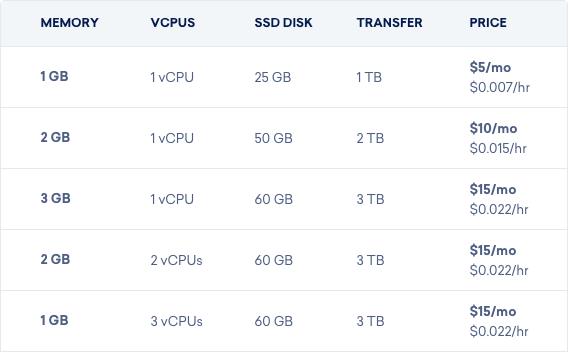
We praised DigitalOcean as the best unmanaged VPS host for newbies several years ago and we still stand by that today. It’s newbie-friendly for three reasons: excellent support, a massive knowledgebase of helpful articles, and a pay-as-you-use model that’s extremely affordable.

It also comes with a bunch of apps that you can one-click install, including LAMP, WordPress, Drupal, Joomla, and MediaWiki. The only downside is that you’ll want to learn Linux to make full use of DigitalOcean’s flexibility.

The cheapest plan is only $5/mo and grants 25GB of storage, 1GB of RAM, and 1TB of bandwidth. You won’t find many VPS hosts at that price, and the ones you do find won’t be very good. You can also scale up to 3840GB of storage, 192GB of RAM, and 12TB of bandwidth for $960/mo. In other words, lots of room to grow.

You can also turn your server on-and-off at will, which allows you to take advantage of hourly pricing instead of monthly pricing. If you turn your server off for two weeks, for example, you’d only pay for half of the month.

Note: DigitalOcean only offers unmanaged VPS hosting. Unless you have a background or interest in Linux, you may prefer to pay more for a managed VPS.

Linode

best web shared vps dedicated hosting services

Linode is a cloud-based hosting solution that not only lets you immediately deploy a customized Linux VPS in under a minute, but lets you geographically position that server anywhere in the world.

It’s a unique service meant for people who love using Linux, complete with your choice of distributions like Ubuntu, CentOS, openSUSE, and more. You get kernel and root access, a dedicated IP address, easy configuration and disk cloning, two-factor authentication, and other cool features you’re sure to love if you’re a Linux user.

Plans range from $5/mo for the low-end plan (25GB of storage, 1GB of RAM, and 1TB of bandwidth) all the way up to $960/mo for the top plan (3840GB of storage, 192GB of RAM, and 20TB of bandwidth). High RAM plans also exist, with the most expensive being $960/mo for 340GB of storage, 300GB of RAM, and 9TB of bandwidth.

Note: Linode only offers unmanaged VPS hosting. Unless you have a background or interest in Linux, you may prefer to pay more for a managed VPS.

The Best Dedicated Server Hosting

So, you’re getting so much traffic that even VPS hosting isn’t enough to keep your site up? Fear not. That just means you’ve outgrown the VPS tier of web hosting and it’s time to move into the big leagues with dedicated server hosting.

What is a dedicated web hosting plan? Your website is hosted on a private server that’s fully dedicated to your website. No other website shares your machine, not even as a virtual machine. You get all of the CPU, RAM, and system resources.

Of course, this usually comes with a hefty price, so dedicated hosting should only be a concern for serious websites that are pulling in millions of pageviews per month.

InMotion Hosting

best web shared vps dedicated hosting services

InMotion Hosting’s Essential dedicated server plan offers 500GB of SSD (or 1TB of HDD) storage, 8GB of RAM, and 6TB of bandwidth, all for a starting price of $105.69/mo. The Advanced server plan is the next step up with 500GB of SSD (or 2TB of HDD) storage, 16GB of RAM, and 10TB of bandwidth starting at $166.59/mo.

But if you have a booming website with a lot of steady traffic, you can go all the way up to the CC-2000 server plan. This gives you 3x1TB of SSD storage, 64GB of RAM, and 15TB of bandwidth starting at $519.49/mo.
Media Temple

best web shared vps dedicated hosting services

Just as with its shared and VPS hosting solutions, Media Temple offers some of the most powerful dedicated server options at an affordable price. All of them come with an impressive 1TB of SSD storage, 128GB of RAM, and 10TB of bandwidth.

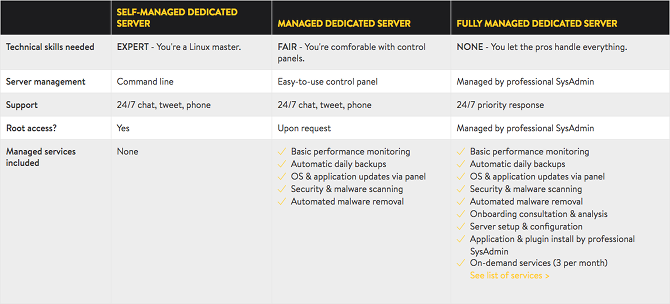
Dedicated hosting starts at $2,000/mo for the self-managed plan, $2,500/mo for the managed plan with Plesk or cPanel, and $2,699/mo for the fully managed plan with 24/7 priority response technical support.

MakeUseOf readers can use the following exclusive sign-up code to receive 20 percent off new hosting accounts with Media Temple: makeuseof20

SingleHop

best web shared vps dedicated hosting services

If you need flexibility and options, SingleHop is the hosting service you’ll want.

SingleHop’s dedicated server plans start at $179/mo for 2x240GB of SSD storage, 8GB of RAM, and 10TB of bandwidth. Or bump the specs up to 32GB of RAM for $219/mo. Or go even further with 4x1TB of SSD storage and 64GB of RAM for just $300/mo.

If that’s still not enough, you can always schedule a consultation and customize your dedicated server according to your needs. SingleHop boasts 24-hour technical support, your own dedicated account team, and a 90-minute hardware replacement time.

Choosing the Right Hosting Service for You

When a free or very cheap web hosting plan just isn’t cutting it anymore, it’s time to upgrade to a paid hosting service. This list should give you a head start toward purchasing the best hosting service that’ll ensure your website serves up the best service for all of your visitors.

Image Credit: Mmaxer via Shutterstock

Read the full article: The Best Web Hosting Services


Read Full Article

Facebook was never ephemeral, and now its Stories won’t have to be


Before Snapchat made social media about just today, Facebook made it about forever. The 2011 “Timeline” redesign of the profile and keyword search unlocked your past, encouraging you to curate colorful posts about your life’s top moments. That was actually an inspiration for Snapchat, as its CEO Evan Spiegel wrote in its IPO announcement that “We learned that creativity can be suppressed by the fear of permanence.”

Now Facebook is finding a middle ground by optionally unlocking the history of your Stories that otherwise disappear after 24 hours. Facebook will soon begin testing Stories Highlights, the company confirmed to TechCrunch. Similar to Instagram Stories Highlights, it will let you pick your favorite expired photos and videos, compile them into themed collections with titles and cover images, and display them on your profile.

The change further differentiates Facebook Stories from the Snapchat Stories feature it copied. It’s smart for Facebook, because highly compelling content was disintegrating each day, dragging potential ad views to the grave with it. And for its 150 million daily users, it could make the time we spend obsessing over social media Stories a wiser investment. If you’re going to interrupt special moments to capture them with your phone, the best ones should still pay dividends of self-expresson and community connection beyond a day later.

Facebook Stories Highlights was first spotted by frequent TechCrunch tipster Jane Manchun Wong, who specializes in generating screenshots of unreleased features out of the APK files of Android apps. TechCrunch inquired about the feature, and a Facebook spokesperson provided this statement: “People have told us they want a way to highlight and save the Stories that matter most to them. We’ll soon start testing highlights on Facebook – a way to choose Stories to stay on your profile, making it easier to express who you are through memories.”

These Highlights will appear on a horizontal scroll bar on your profile, and you’ll be able to see how many people viewed them just like with your Stories. They’ll default to being viewable by all your friends, but you can also restrict Highlights to certain people or make them public. The latter could be useful for public figures trying to build an audience, or anyone who thinks their identity is better revealed through their commentary on the world that Stories’ creative tools offer, opposed to some canned selfies and profile pics.

Facebook paved the way for Highlights by launching the Stories Archive in May. This automatically backs up your Stories privately to your profile so you don’t have to keep the saved versions on your phone, wasting storage space. That Archive is the basis for being able to choose dead Stories to show off in your Highlights. Together, they’ll encourage users to shoot silly, off-the-cuff content without that “fear of permanence”, but instead with the opportunity. If you want to spend a half hour decorating a Facebook Story with stickers and drawing and captions and augmented reality, you know it won’t be in vain.

Facebook Stories constantly adds new features, like this Blur effect I spotted today

While many relentlessly criticize Facebook for stealing the Stories from Snapchat, its rapid iteration and innovation on the format means the two companies’ versions are sharply diverging. Snapchat still lacks Highlights-esque feature despite launching its Archive-style Memories back in July 2016. Instead of enhancing the core Stories product that made the app a teen phenomenon, it’s concentrated on Maps, gaming, Search, professional Discover content, and a disastrously needless redesign.

Facebook’s family of apps seized on the stagnation of Snapchat Stories and its neglect of the international market. It copied whatever was working while developing new features like Instagram’s Superzoom and Focus portrait mode, the ability to reshare public feed posts as quote tweet-style Stories, and the addition of licensed music soundtracks. While writing this article, I even discovered a new Facebook Stories option called Blur that lets you shroud a moving subject with a dream-like haze, as demonstrated with my dumb face here.

The relentless drive to add new options and smooth out performance has paid off. Now Instagram has 400 million daily Stories users, WhatsApp has 450 million, and Facebook has 150 million, while Snapchat’s whole app has just 191 million. As Instagram CEO Kevin Systrom admitted about Snapchat, “They deserve all the credit.” Still, it hasn’t had megahit since Stories and AR puppy masks. The company’s zeal for inventing new ways to socialize is admirable, though not always a sound business strategy.

At first, the Stories war was a race, to copy functionality and invade new markets. Instagram and now Facebook making ephemerality optional for their Stories signals a second phase of the war. The core idea of broadcasting content that disappears after a day has become commoditized and institutionalized. Now the winner will be declared not as who invented Stories, but who perfected them.


Read Full Article

Why MacBook Keyboards Break So Easily (And How to Fix Jammed Keys)

How to Stop Auto-Playing Flash and HTML5 Videos in Chrome


stop-autoplaying-video

Auto-playing videos are everywhere on the modern web. They take up bandwidth, make a lot of noise, and slow down your Chrome browser, all without you ever choosing to watch them. Here’s how to stop them for good.

In the most recent update, Google Chrome 66 included the ability to block these autoplaying videos, most of which are based on HTML5. Chrome would remember which sites you stopped an autoplaying video on, and subsequently block those sites from serving such videos to you. But Chrome developers removed this because it conflicted with browser-based games.

While it’s likely that Google will reintroduce this in future Chrome updates, for now, you need a workaround. Deep in the settings of the Chrome browser, you can find options to switch off autoplaying videos.

How to Stop Autoplay Videos on Chrome

stop auto-playing videos flash html5 chrome

If you are using Chrome on Windows, macOS, Linux, or Chrome OS, you will need to access this setting through the hidden tweaks of Chrome flags. These are deep settings in Chrome, unavailable unless you know where to look.

Here’s how to disable HTML5 autoplaying videos in Chrome:

  1. Save any unsaved information from an open tab that you want because we will have to restart Chrome in this series of steps.
  2. Open a new tab in Chrome.
  3. Type or copy-paste the text in bold, and press Enter: chrome://flags/#autoplay-policy
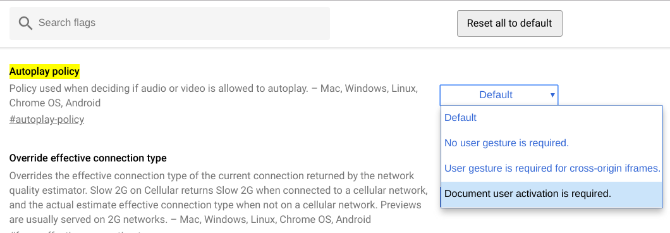
  4. Next to “Autoplay Policy”, the button will be set to Default. Click that button and choose Document user activation is required.
  5. A pop-up bar at the bottom will say “Your changes will take effect the next time you restart your device” along with a button saying Relaunch Now. Click the Relaunch Now button.
  6. Chrome will restart, and videos will no longer autoplay!

This method will also no longer show pop-up videos at a corner of the screen, like the ones you see on CNET.com.

For any video actually embedded in the page you are visiting, click the play button and it will begin as normal.

Use an Extension to Stop Autoplaying Videos

Generally, I don’t recommend telling people to install an extension in Chrome if it’s something that can be done through Chrome’s settings. After all, extensions slow down your browser.

But in case you feel more comfortable with an extension than fiddling around with Chrome flags, try Disable HTML5 Autoplay.

Download: Disable HTML5 Autoplay for Chrome (Free)

The developer is quite clear about saying that he is no longer working on this extension since Google is now trying to tackle the problem itself. While Chrome 66 had to roll back that feature, this is on Google’s to-do list.

Still, the extension works well for now, so if you would rather not change Chrome’s settings, use it. When a stable version of Chrome can disable autoplaying videos by default, uninstall the extension.

How to Stop Autoplay Videos on Chrome Mobile

stop auto-playing videos flash html5 chrome

On Chrome for Android, things work a little differently. You don’t need to dive into the Chrome flags to change this option, it will work through the regular Settings.

  1. Tap the three-dot Menu icon.
  2. Go to Settings > Site Settings > Media > Autoplay.
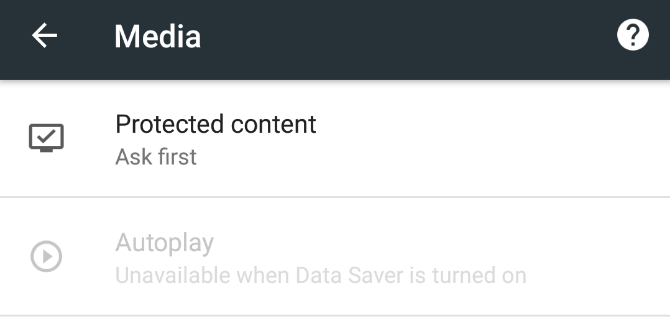
  3. It will be set to “Allow sites to automatically play muted videos (recommended)” with a blue toggle. Tap the toggle to turn it grey, and the text under it should read “Blocked”.

As with the desktop version, you can now click any video to play it.

This method does not work Chrome for iOS though. In fact, there doesn’t seem to be any method to stop autoplaying videos while using Chrome on an iPhone or iPad. If you’re an Android user, go further with these Chrome power user tips for Android.

Use Chrome Data Saver to Stop Autoplaying Videos

stop auto-playing videos flash html5 chrome

If either of these methods seems a bit difficult for you, there’s another option. Google’s Chrome Data Saver function automatically stops such autoplaying videos.

On Desktop: Data Saver isn’t built into Chrome desktop, so you will have to install it as an extension, and then enable it.

  1. Download: Data Saver for Chrome (Free)
  2. Click the extension’s icon in your Chrome’s toolbar, and ensure it has a blue tick, which means it is enabled.

On Android: The Data Saver is already built in for Chrome on Android, so you don’t need to install a separate extension.

To enable Chrome Data Saver, go to the three-dot Menu > Settings > Data Saver and toggle it On.

How to Disable Flash in Chrome

stop auto-playing videos flash html5 chrome

Adobe Flash has a lot of problems, and thankfully, it is slowly being phased out of the internet and replaced with HTML5. But some sites still use Flash, and you need to block them.

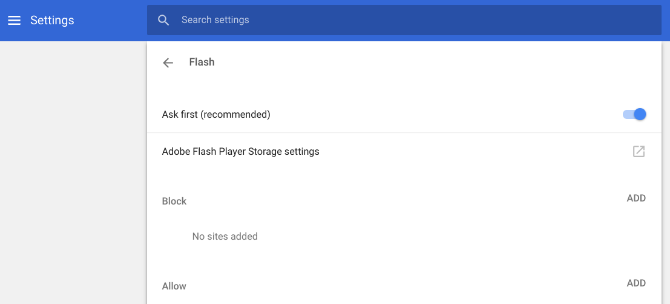
In a helpful move, Chrome now does not let any website serve you Flash-based elements by default. It will always ask for permission first.

But you can also go nuclear. Here’s how to disable Flash in Chrome:

  1. Go to Settings > Advanced > Privacy and Security > Content Settings.
  2. Click the entry for Flash.
  3. Click the blue toggle to change from Ask First (recommended) to Blocked.

With that, you will have completely blocked Flash from running on Chrome. This is an extreme option, and will also disable things like the best free browser games. I would actually recommend keeping it at Ask First, and allowing Flash only on select sites.

Adobe is killing Flash in 2020, so you aren’t missing out on much if you don’t use it. But you still need it for certain sites on the desktop, like streaming high-definition sports.

Note: This method is only needed for the desktop version of Chrome. Both iOS and Android don’t support Flash, so there is no need to disable Flash in Chrome mobile.

Finally, Automatically Mute New Tabs

One of the annoying problems with autoplaying videos is the sound. If you don’t mind the video but just want the sound to not startle you, use this other method to automatically mute new tabs in Chrome or Firefox.

Read the full article: How to Stop Auto-Playing Flash and HTML5 Videos in Chrome


Read Full Article

Google at ICML 2018


Machine learning is a key strategic focus at Google, with highly active groups pursuing research in virtually all aspects of the field, including deep learning and more classical algorithms, exploring theory as well as application. We utilize scalable tools and architectures to build machine learning systems that enable us to solve deep scientific and engineering challenges in areas of language, speech, translation, music, visual processing and more.

As a leader in machine learning research, Google is proud to be a Platinum Sponsor of the thirty-fifth International Conference on Machine Learning (ICML 2018), a premier annual event supported by the International Machine Learning Society taking place this week in Stockholm, Sweden. With over 130 Googlers attending the conference to present publications and host workshops, we look forward to our continued collaboration with the larger ML research community.

If you're attending ICML 2018, we hope you'll visit the Google booth and talk with our researchers to learn more about the exciting work, creativity and fun that goes into solving some of the field's most interesting challenges. Our researchers will also be available to talk about TensorFlow Hub, the latest work from the Magenta project, a Q&A session on the Google AI Residency program and much more. You can also learn more about our research being presented at ICML 2018 in the list below (Googlers highlighted in blue).

ICML 2018 Committees
Board Members include: Andrew McCallumCorinna CortesHugo LarochelleWilliam Cohen
Sponsorship Co-Chair: Ryan Adams

Accepted Publications
Predict and Constrain: Modeling Cardinality in Deep Structured Prediction
Nataly Brukhim, Amir Globerson

Quickshift++: Provably Good Initializations for Sample-Based Mean Shift
Heinrich Jiang, Jennifer Jang, Samory Kpotufe

Learning a Mixture of Two Multinomial Logits
Flavio Chierichetti, Ravi KumarAndrew Tomkins

Structured Evolution with Compact Architectures for Scalable Policy Optimization
Krzysztof Choromanski, Mark Rowland, Vikas Sindhwani, Richard E Turner, Adrian Weller

Fixing a Broken ELBO
Alexander Alemi, Ben Poole, Ian FischerJoshua DillonRif SaurousKevin Murphy

Hierarchical Long-term Video Prediction without Supervision
Nevan Wichers, Ruben Villegas, Dumitru ErhanHonglak Lee

Self-Consistent Trajectory Autoencoder: Hierarchical Reinforcement Learning with Trajectory Embeddings
John Co-Reyes, Yu Xuan Liu, Abhishek Gupta, Benjamin Eysenbach, Pieter Abbeel, Sergey Levine

Well Tempered Lasso
Yuanzhi Li, Yoram Singer

Programmatically Interpretable Reinforcement Learning
Abhinav Verma, Vijayaraghavan Murali, Rishabh Singh, Pushmeet Kohli, Swarat Chaudhuri

Dynamical Isometry and a Mean Field Theory of CNNs: How to Train 10,000-Layer Vanilla Convolutional Neural Networks
Lechao XiaoYasaman BahriJascha Sohl-DicksteinSamuel SchoenholzJeffrey Pennington

On the Optimization of Deep Networks: Implicit Acceleration by Overparameterization
Sanjeev Arora, Nadav Cohen, Elad Hazan

Scalable Deletion-Robust Submodular Maximization: Data Summarization with Privacy and Fairness Constraints
Ehsan Kazemi, Morteza Zadimoghaddam, Amin Karbasi

Data Summarization at Scale: A Two-Stage Submodular Approach
Marko Mitrovic, Ehsan Kazemi, Morteza Zadimoghaddam, Amin Karbasi

Machine Theory of Mind
Neil Rabinowitz, Frank Perbet, Francis Song, Chiyuan Zhang, S. M. Ali Eslami, Matthew Botvinick

Learning to Optimize Combinatorial Functions
Nir Rosenfeld, Eric Balkanski, Amir Globerson, Yaron Singer

Proportional Allocation: Simple, Distributed, and Diverse Matching with High Entropy
Shipra Agarwal, Morteza ZadimoghaddamVahab Mirrokni

Path Consistency Learning in Tsallis Entropy Regularized MDPs
Yinlam Chow, Ofir NachumMohammad Ghavamzadeh

Efficient Neural Architecture Search via Parameters Sharing
Hieu Pham, Melody Guan, Barret ZophQuoc LeJeff Dean

Adafactor: Adaptive Learning Rates with Sublinear Memory Cost
Noam Shazeer, Mitchell Stern

Learning Memory Access Patterns
Milad HashemiKevin SwerskyJamie Smith, Grant Ayers, Heiner Litz, Jichuan Chang, Christos Kozyrakis, Parthasarathy Ranganathan

SBEED: Convergent Reinforcement Learning with Nonlinear Function Approximation
Bo Dai, Albert Shaw, Lihong Li, Lin Xiao, Niao He, Zhen Liu, Jianshu Chen, Le Song

Scalable Bilinear Pi Learning Using State and Action Features
Yichen Chen, Lihong Li, Mengdi Wang

Distributed Asynchronous Optimization with Unbounded Delays: How Slow Can You Go?
Zhengyuan Zhou, Panayotis Mertikopoulos, Nicholas Bambos, Peter Glynn, Yinyu Ye, Li-Jia Li, Li Fei-Fei

Shampoo: Preconditioned Stochastic Tensor Optimization
Vineet Gupta, Tomer Koren, Yoram Singer

Parallel and Streaming Algorithms for K-Core Decomposition
Hossein Esfandiari, Silvio LattanziVahab Mirrokni

Can Deep Reinforcement Learning Solve Erdos-Selfridge-Spencer Games?
Maithra RaghuAlexander Irpan, Jacob Andreas, Bobby Kleinberg, Quoc Le, Jon Kleinberg

Is Generator Conditioning Causally Related to GAN Performance?
Augustus OdenaJacob BuckmanCatherine OlssonTom BrownChristopher OlahColin RaffelIan Goodfellow

The Mirage of Action-Dependent Baselines in Reinforcement Learning
George TuckerSurya Bhupatiraju, Shixiang Gu, Richard E Turner, Zoubin Ghahramani, Sergey Levine

MentorNet: Learning Data-Driven Curriculum for Very Deep Neural Networks on Corrupted Labels
Lu Jiang, Zhengyuan Zhou, Thomas Leung, Li-Jia LiLi Fei-Fei

Loss Decomposition for Fast Learning in Large Output Spaces
En-Hsu Yen, Satyen KaleFelix Xinnan YuDaniel Holtmann-RiceSanjiv Kumar, Pradeep Ravikumar

A Hierarchical Latent Vector Model for Learning Long-Term Structure in Music
Adam RobertsJesse EngelColin RaffelCurtis HawthorneDouglas Eck

Smoothed Action Value Functions for Learning Gaussian Policies
Ofir NachumMohammad NorouziGeorge TuckerDale Schuurmans

Fast Decoding in Sequence Models Using Discrete Latent Variables
Lukasz KaiserSamy BengioAurko RoyAshish VaswaniNiki ParmarJakob UszkoreitNoam Shazeer

Accelerating Greedy Coordinate Descent Methods
Haihao Lu, Robert Freund, Vahab Mirrokni

Approximate Leave-One-Out for Fast Parameter Tuning in High Dimensions
Shuaiwen Wang, Wenda Zhou, Haihao Lu, Arian Maleki, Vahab Mirrokni

Image Transformer
Niki Parmar, Ashish Vaswani, Jakob Uszkoreit, Lukasz Kaiser, Noam Shazeer, Alexander Ku, Dustin Tran

Towards End-to-End Prosody Transfer for Expressive Speech Synthesis with Tacotron
RJ Skerry-Ryan, Eric Battenberg, Ying Xiao, Yuxuan Wang, Daisy Stanton, Joel Shor, Ron Weiss, Robert Clark, Rif Saurous

Dynamical Isometry and a Mean Field Theory of RNNs: Gating Enables Signal Propagation in Recurrent Neural Networks
Minmin Chen, Jeffrey Pennington,, Samuel Schoenholz

Style Tokens: Unsupervised Style Modeling, Control and Transfer in End-to-End Speech Synthesis
Yuxuan Wang, Daisy Stanton, Yu Zhang, RJ Skerry-Ryan, Eric Battenberg, Joel ShorYing Xiao, Ye Jia, Fei Ren, Rif Saurous

Constrained Interacting Submodular Groupings
Andrew CotterMahdi Milani FardSeungil YouMaya Gupta, Jeff Bilmes

Reinforcing Adversarial Robustness using Model Confidence Induced by Adversarial Training
Xi Wu, Uyeong Jang, Jiefeng Chen, Lingjiao Chen, Somesh Jha

Interpretability Beyond Feature Attribution: Quantitative Testing with Concept Activation Vectors (TCAV)
Been Kim, Martin Wattenberg, Justin Gilmer, Carrie Cai, James Wexler, Fernanda Viégas, Rory Sayres

Online Learning with Abstention
Corinna CortesGiulia DeSalvoClaudio GentileMehryar Mohri, Scott Yang

Online Linear Quadratic Control
Alon CohenAvinatan HasidimTomer KorenNevena LazicYishay MansourKunal Talwar

Competitive Caching with Machine Learned Advice
Thodoris Lykouris, Sergei Vassilvitskii

Efficient Neural Audio Synthesis
Nal Kalchbrenner, Erich Elsen, Karen Simonyan, Seb Noury, Norman Casagrande, Edward Lockhart, Florian Stimberg, Aäron van den Oord, Sander Dieleman, Koray Kavukcuoglu

Gradient Descent with Identity Initialization Efficiently Learns Positive Definite Linear Transformations by Deep Residual Networks
Peter Bartlett, Dave Helmbold, Phil Long

Understanding and Simplifying One-Shot Architecture Search
Gabriel BenderPieter-Jan KindermansBarret ZophVijay VasudevanQuoc Le

Approximation Algorithms for Cascading Prediction Models
Matthew Streeter

Learning Longer-term Dependencies in RNNs with Auxiliary Losses
Trieu TrinhAndrew DaiThang LuongQuoc Le

Self-Imitation Learning
Junhyuk Oh, Yijie Guo, Satinder Singh, Honglak Lee

Adaptive Sampled Softmax with Kernel Based Sampling
Guy Blanc, Steffen Rendle

Workshops
2018 Workshop on Human Interpretability in Machine Learning (WHI)
Organizers: Been Kim, Kush Varshney, Adrian Weller
Invited Speakers include: Fernanda ViégasMartin Wattenberg

Exploration in Reinforcement Learning
Organizers: Ben EysenbachSurya BhupatirajuShane Gu, Junhyuk Oh, Vincent Vanhoucke, Oriol Vinyals, Doina Precup

Theoretical Foundations and Applications of Deep Generative Models
Invited speakers include: Honglak Lee

Avoid Google and Bing: 7 Alternative Search Engines That Value Privacy


google-bing-alternatives

Google and Bing might be the web’s most popular search engines, but they’re both a disaster from a privacy standpoint. They routinely harvest your data and use it in more ways than you care to imagine.

Is search engine privacy important to you? If so, you should consider using one of these alternative search engines instead.

What Kinds of Data Are Google and Bing Collecting?

Before we establish the best search engines for user privacy, let’s take a moment to look at what’s wrong with Google and Bing.

They will record and/or store four pieces of information every time you enter a query:

  • IP address: It can reveal information about your location.
  • A Cookie: Cookies let the search engine trace search queries back to your machine.
  • Your search query: Lets the search engine show you targeted ads.
  • Date and time of query: Gives the provider insight into what information you want and when you want it. Again, companies use it for targeted ads.

And it’s not just Google and Microsoft that have access to this information. Some search providers will sell your data to third-parties, and they will all hand over your information to the NSA and other similar entities on request.

So, which search engines should you use instead?

1. DuckDuckGo

Avoid Google, and try DuckDuckGo instead for a more private experience

DuckDuckGo is the most well-established privacy-focused search engine, and enjoys more brand recognition than the other search engines on this list.

It doesn’t track or log any of your information, and the service doesn’t even use anonymous identifiers to link searches together; it won’t know whether two searches originated from the same machine. According to DuckDuckGo’s CEO, Gabriel Weinberg:

“If the FBI comes to us, we have nothing to tie back to you.”

The engine uses 400 sources to find results, but most hits are pulled from Yahoo, Bing, and Yandex. Google results are not included.

DuckDuckGo also has some unique non-privacy features, such as “Bangs.” By typing an exclamation point in front of a search query, you can search other sites directly. We’ve covered some of DuckDuckGo’s best bangs if you would like to learn more.

2. StartPage

Try StartPage for private search results

One of DuckDuckGo’s most significant downsides is that it does not pull results from Google Search. Purely from a results standpoint, Google’s engine is the best in the business, meaning its absence from DuckDuckGo is to the service’s detriment.

If you’d rather see Google’s results for your query, you should check out StartPage. Don’t worry; Google won’t be able to see anything that reveals your identity. It just sees a lot of traffic coming from StartPage’s servers. StartPage pays Google for the results and doesn’t send any user identifiers or IP addresses.

StartPage also provides a proxy feature. It’ll stop individual websites from seeing your IP address. The only negative is that pages will load more slowly if you use it.

Lastly, you can use non-US and non-EU servers if privacy laws in those regions worry you.

3. SearX

SearX is a private alternative to Google search

Parts of DuckDuckGo’s source code are open source, but SearX is entirely open source. As such, you can dig down into the code and make sure the company is delivering on its privacy promises.

And because SearX is open source, you can also set up and run your own instance of it. Doing so gives you a foolproof guarantee that your data is not being logged.

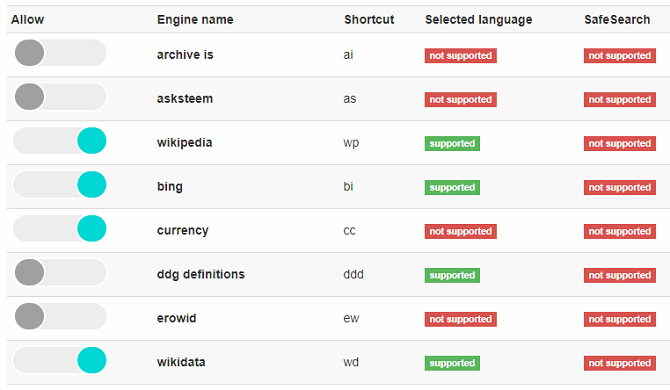
Functionally, SearX is a metasearch engine, meaning it aggregates data from a number of other search engines then provides you with the best mix available. Results from several of the other search engines on this list—including DuckDuckGo, Qwant, and StartPage—are available. You can customize the engines that SearX uses to find results in the Preferences menu.

SearX is also the first search engine on this list that’s both ad- and affiliate-free. Ads on the other services don’t track or use your data, but their absence here is a welcome benefit.

4. Qwant

Is Qwant capable of providing you with private search results?

Qwant is recommended by PrivacyTools.io. It’s one of the leading campaigners against state-sponsored data recording, so its endorsement holds considerable weight.

Unlike DuckDuckGo, Qwant’s servers are in France. As such, they benefit from the EU’s stricter data protection laws.

It’s rapidly growing in popularity thanks to Qwick search shortcuts (which work like DuckDuckGo’s Bangs) and an impressive results pages that displays news stories, trending people, events, and other interesting stories independently from each other.

5. Swisscows

Swisscows search engine tool keeps your web searches private

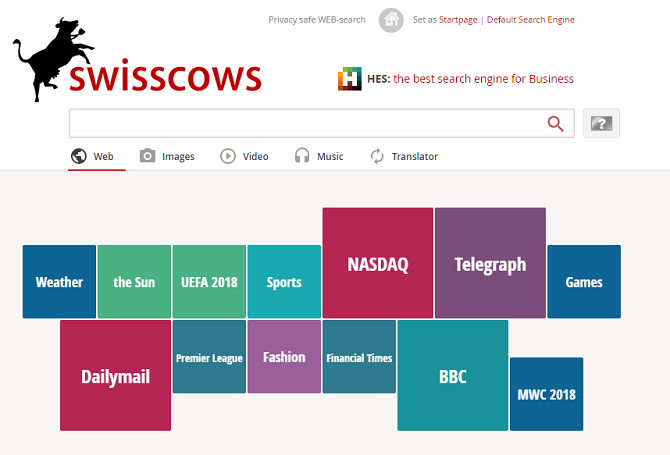
Formerly known as Hulbee, Swisscows makes the list thanks to its focus on family-friendly private searches. Results with adult themes are excluded from the results entirely, and there are no settings to override that behavior.

Swisscows does not store any personal data, IP addresses, search queries, or other identifiers. And as an added bonus, all of its servers are in Switzerland—a country with some of the strictest privacy laws in the world.

The site uses Bing’s search engine for its results, so you can be confident you’re going to see high-quality and relevant answers to your query.

It’s important to note that Swisscows uses machine learning to assess the context of your search keywords and thus provide better results. It shouldn’t have any impact on the safety of your data, but it might be a turn-off for the most privacy-conscious users.

6. Peekier

Peekier is a great alternative to

Peekier offers all the usual privacy protections. It doesn’t store your IP address, browser’s user agent, search history, or unique IDs. It does save your queries for a limited period of time, but Peekier cannot trace them back to you.

The service deserves a mention thanks to the innovative and unique way it shows the results. Peekier uses your display’s full width to show results in a card format. It makes a refreshing change from the traditional way of displaying results, which often waste a lot of space.

Each result offers a snapshot of the website in question. The snapshot is a PNG image that’s no more than 80 KB, so it doesn’t impact on the performance of the site.

7. Disconnect

Unlike the other search engines we’ve discussed, Disconnect does not show results on its own page. Instead, it merely routes your query through its servers to anonymize you, then displays the results in whichever search engine you’ve selected.

In fact, Disconnect doesn’t even have a page from which you can conduct a search. You need to download and install its browser add-on. It is possible to search through the add-on using a JavaScript applet on Disconnect’s homepage, but it’s a finicky process. We don’t recommend using it in that way. Stick to the website.

Disconnect makes its money from a premium VPN service, so there are no ads or affiliate codes wrapped up in your results. We’ve covered some of Disconnect’s other features if you’re interested in knowing more.

Don’t Rely on Incognito Mode (or Private Browsing)

Incognito Mode is not a viable way to protect your online privacy. The way companies like Google and Microsoft describe it is often deceitful.

Sure, if you use an Incognito Mode, your browser will not record your search in its history, and it won’t download any cookies. However, the search engine will still have access to the types of data we mentioned earlier, and entities like your ISP or Wi-Fi network provider will still see your search terms.

For maximum privacy, you should use one of the above search engines provides in conjunction with a VPN like ExpressVPN or CyberGhost.

Read the full article: Avoid Google and Bing: 7 Alternative Search Engines That Value Privacy


Read Full Article

09 July 2018

Stargazing 2


Stargazing 2

How to Add Smart Features to Your Old Car With These 10 DIY Projects

Dish Hopper devices get Google Assistant functionality


After promising up the feature for the better part of a year, Dish’s Hopper line just got Google Assistant functionality. The feature brings hands-free control to the receivers, allowing for the standard array of functionality like play, pause, fast forward and rewind, along with content search.

Here are a handful of examples from Google,

  • “Turn on my Hopper”
  • “Tune to channel 140”
  • “Show me home improvement shows”
  • “Open Game Finder on Hopper”
  • “Rewind 30 seconds” “Pause” and “Resume”
  • “Record Game of Thrones on Hopper”

You get the idea.

Dish announced the feature back at CES — I’m not sure eight months qualifies as “soon” in terms of software updates, but there you go. The feature works with Hoppers that are paired with Assistant-enabled devices like Google Home smart speakers and Android handsets. Apparently the company rolled the feature out to about one-percent of users last week as a kind of large-scale test. 

Dish has supported Alexa for some time, on the other hand. Last May, the company brought the hands-free skill to Hopper, and added support for its Joey receivers back in October. Amazon’s assistant also added DVR recording capability for Dish, TiVo, DIRECTV and Verizon this March.


Read Full Article
Snapchat code reveals team-up with Amazon for “Camera Search”


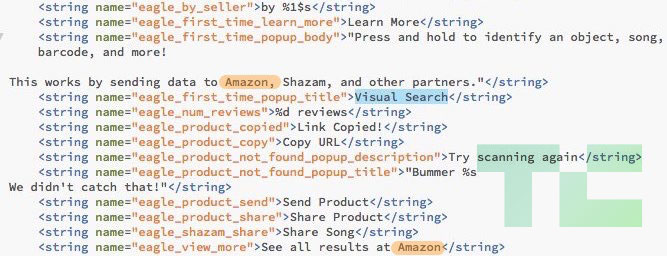
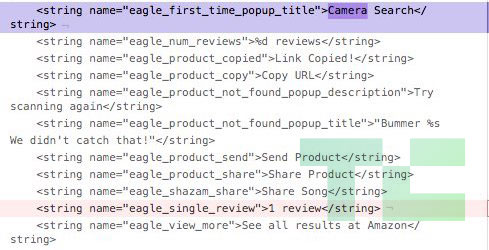
Codenamed “Eagle”, Snapchat is building a visual product search feature that deliver users to Amazon’s listings. Buried inside the code of Snapchat’s Android app is an unreleased “Visual Search” feature where you “Press and hold to identify an object, song, barcode, and more! This works by sending data to Amazon, Shazam, and other partners.” Once an object or barcode has been scanned you can “See all results at Amazon”.

Visual product search could make Snapchat’s camera a more general purpose tool for seeing and navigating the world, rather than just a social media maker. It could differentiate Snapchat from Instagram, whose clone of Snapchat Stories now has over twice the users and a six times faster growth rate than the original. And if Snapchat has worked out an affiliate referrals deal with Amazon, it could open a new revenue stream. That’s something Snap Inc direly needs after posting a $385 million loss last quarter and missing revenue estimates by $14 million.

TechCrunch was tipped off to the hidden Snapchat code by app researcher Ishan Agarwal. His tips have previously led to TechCrunch scoops about Instagram’s video calling, soundtracks, Focus portrait mode, and QR Nametags features that were all later officially launched. Amazon didn’t respond to a press inquiry before publishing time. Snap Inc gave TechCrunch a “no comment”, but the company’s code tells the story.

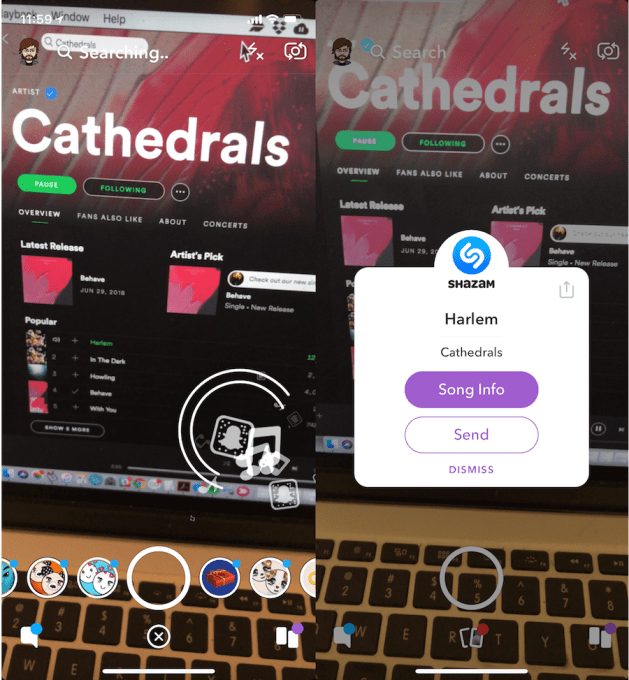
Snapchat first dabbled in understanding the world around you with its Shazam integration back in 2016 that lets you tap and hold to identify a song playing nearby, check it out on Shazam, send it to a friend, or follow the artist on Snapchat. Project Eagle builds on this audio search feature to offer visual search through a similar interface and set of partnerships. The ability to identify purchaseable objects or scan barcodes could turn Snapchat, which some view as a teen toy, into more of a utility.

What’s Inside Snapchat’s Eagle Eye

Snapchat’s code doesn’t explain exactly how the Project Eagle feature will work, but in the newest version of Snapchat it was renamed as “Camera Search”. The code lists the ability to surface “sellers”, and “reviews”, “Copy URL” of a product, and “Share” or “Send Product” to friends — likely via Snap messages or Snapchat Stories. In characteristic cool kid teenspeak, an error message for “product not found” reads “Bummer, we didn’t catch that!”

Eagle’s visual search may be connected to Snapchat’s “context cards” which debuted late last year and pull up business contact info, restaurant reservations, movie tickets, Ubers or Lyfts, and more. Surfacing a context card within Snapchat of details about ownable objects might be the first step to getting users to buy them…and advertisers to pay Snap to promote them. It’s easy to imagine context cards being accessible for products tagged in Snap Ads as well as scanned through visual search. And Snap already has in-app shopping.

Being able to recognize what you’re seeing makes Snapchat more fun, but it’s also a new way of navigating reality. In mid-2017 Snapchat launched World Lenses that map the surfaces of your surroundings so you can place 3D animated objects like its Dancing Hotdog mascot alongside real people in real places. Snapchat also released a machine vision-powered search feature last year that compiles Stories of user submitted Snaps featuring your chosen keyword, like videos with “puppies” or “fireworks” even if the captions don’t mention them.

Snapchat was so interested in visual search that this year, it reportedly held early stage acquisition talks with machine vision startup Blippar. The talks fell through with the UK augmented reality company that has raised at least $99 million for its own visual search feature, but which recently began to implode due to low usage and financing trouble. Snap Inc might have been hoping to jumpstart its Camera Search efforts.

Snap calls itself a Camera Company, after all. But with the weak sales of its mediocre v1 Spectacles, the well-reviewed v2 failing to break into the cultural zeitgeist, and no other hardware products on the market, Snap may need to redefine what exactly that tag line means. Visual Search could frame Snapchat as more of a sensor than just a camera. With its popular use for rapid-fire selfie messaging, it’s already the lens through which some teens see the world. Soon, Snap could be ready to train its eagle eye on purchases, not just faces.

In related Snapchat news:


Read Full Article

How to Remove the Vocals From Any Song Using Audacity


remove-vocals-from-song

Do you want to create an instrumental version of your favorite song? Perhaps you need to make a backing track? Or do you have a song you produced but don’t have the original tracks for, and need to make a change to the vocal track?

Whatever the case, you can remove the vocals from any song with Audacity, a free and open source digital audio workstation. And in this article we’ll detail how to achieve this.
What to Know Before Removing Vocals From Songs

Before we proceed, let’s get a few things out of the way.

If you’re going to strip vocals from songs you don’t own, then that needs to be for personal use only. Using a self-made voice-free version of a track (e.g. as a backing track for a live performance) wouldn’t be appropriate.

On the other hand, you might have some self-made audio that you need to strip voice from in order to create some ambience. Or you may have some original music that you’ve lost the original recordings for, and need to remove the vocals.

With Audacity, you have a couple of different ways to remove vocal tracks from a song, depending on how the vocals are placed in the mix:

  1. Vocals in the middle: Most songs are mixed in this way, with the voice in the center, or just slightly to the left or right, with instruments around them, creating the stereo effect.
  2. Vocals in one channel: Typically songs from the 1960s use this approach, when stereophonic sound was still being explored in the studio.

We’ll look at applying each of these options below. Don’t forget to head to the Audacity website to download and install your own copy of Audacity (for Windows, Mac, or Linux) before proceeding. If you have a copy already, make sure you’re using the feature-packed Audacity 2.2.0 (or later).

Vocal removal in Audacity is possible thanks to a built-in function, making it just as simple as removing background noise from an audio track.

Note: In addition to these native options, you can also use these third-party voice removal plugins to remove vocals from a track. Each has its own instructions for applying the filter to remove vocals.

Stereo Track Vocal Removal With Audacity

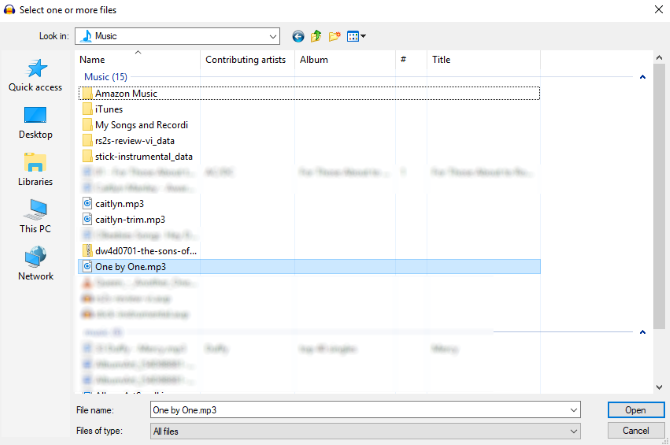
Open a file in Audacity

Begin by opening the audio file you wish to edit (File > Open).

Once loaded, play the track; make sure you can identify the areas where vocals appear. It’s a good idea to have some familiarity with the track before proceeding.

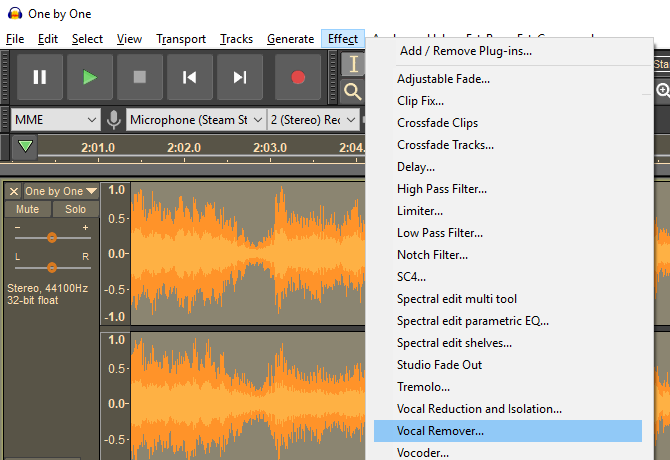
Audacity effects menu

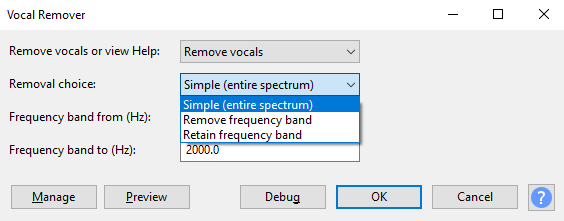
Next, select the track (click the header on the left, or press Ctrl + A) and choose Effects > Vocal Remover. You have three options for removal: Simple, Remove frequency band, and Retain frequency band. Start with Simple, and use the Preview button to check how this might be applied.

Remove vocals from music in Audacity

If you’re satisfied, click OK to proceed; otherwise, try the other options, previewing the track until you’re happy with the expected results. Note that if you accidentally apply vocal removal with the wrong settings, you can undo it with Ctrl + Z or Edit > Undo.

When you’re done, use the File > Save Project option to retain the changes. To create a new MP3 file, use File > Save other > Export as MP3.

Note that you’ll probably never achieve a perfect vocal-free track. You’ll need to accept a trade-off between some vocal artefacts and a lower quality, muddier instrumental track.

Removing Vocals From Stereo/Mono Dual Track

If the mix has the vocals on one channel, it’s far easier to strip them away.

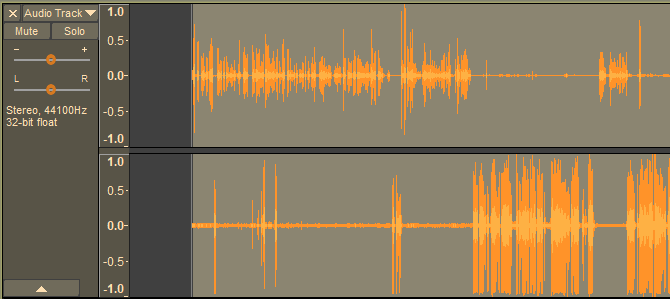
Begin by finding the Audio Track dropdown menu on the track header, and selecting Split stereo track. This will create a second track for your audio. Play the audio, using the Mute button on each track to determine which track is carrying the vocals.

Remove vocals on old stereo tracks

Once you’ve worked it out, all you need to do next is delete the channel with the vocals on. Click X on the track header to do this. Again, listen back to the track to check the results are to your approval.

While a simpler and more effective option than using the Vocal Remover tool, this method can only be used on comparatively few songs.

Need Vocal-Free Music? Try These Options

Using Audacity (or an Audacity alternative) isn’t the only way to strip vocals from audio. It’s a good DIY option, but if you’re dissatisfied with the results, you may be end up frustrated.

The good news is, it isn’t uncommon for songs to be released with accompanying instrumental tracks. Such tracks are often found on special edition albums. Some movie soundtracks might also feature instrumentals of featured songs.

You might also consider the easier option of getting hold of some karaoke tracks. Many of these can be found on YouTube, although there are various other places where you can get hold of them. Karaoke tracks are still sold on CD too, so don’t overlook this old-school option.

More Options That Aren’t Audacity

By now you should have successfully removed the vocal track from your song of choice. The results may be good or not so good, but either way the vocals will be gone.

Alternatively, you might have preferred to track down a karaoke CD with the same song included, vocals already removed. Or you’ve found an instrumental version of the song in question.

However, if you’ve done it yourself using Audacity, just consider how powerful this free piece of software is. In short, it’s as versatile as the various paid alternatives, such as Adobe Audition. Audacity does far more than vocal removal, too.

We’ve previously looked at how to use Audacity, which can be used for editing podcasts, converting vinyl albums to MP3, and creating sound effects.

Read the full article: How to Remove the Vocals From Any Song Using Audacity


Read Full Article