26 June 2018

EveryTeam raises $3M to create a living internal company lexicon


As companies get bigger and bigger, all the critical information about a company — even its mission and culture statements — can get lost in a massive pile of Google Docs or files strewn across dozens of collaboration tools, making it nearly impossible to find. That’s where the team behind EveryTeam hopes to step in and clean things up.

EveryTeam serves as a sort of hub for all of the documents and core information about a company — a kind of living library that adapts over time and can easily suck in new information as it comes about. The idea is that employees might not necessarily be going to the same internal portal for that information, or might not be updating that portal, and the information continues to sit across multiple different buckets within a company. The company came about from former GitHubbers Todd Berman, Connor Sears, and Scott Goldman, which are looking to bring that same level of collaboration and simplicity to access to internal employee information. The startup said it has raised $3 million in a seed round from Harrison Metal, Upside Partnership, Index Ventures and Greylock Partners.

“People end up creating content in them but struggling to maintain content in these [internal communications] tools,” CEO Todd Berman said. “Whether they’re using a combination of Google Docs, or Dropbox Paper, or Confluence, there’s tons of people trying to do a lot of different things here. A lot of these tools are focused on the creation, where people felt there was a lot of opportunity. But for our potential customers, the issue is that their content is all over the place. it’s not in one spot.”

EVERYTEAM TOP
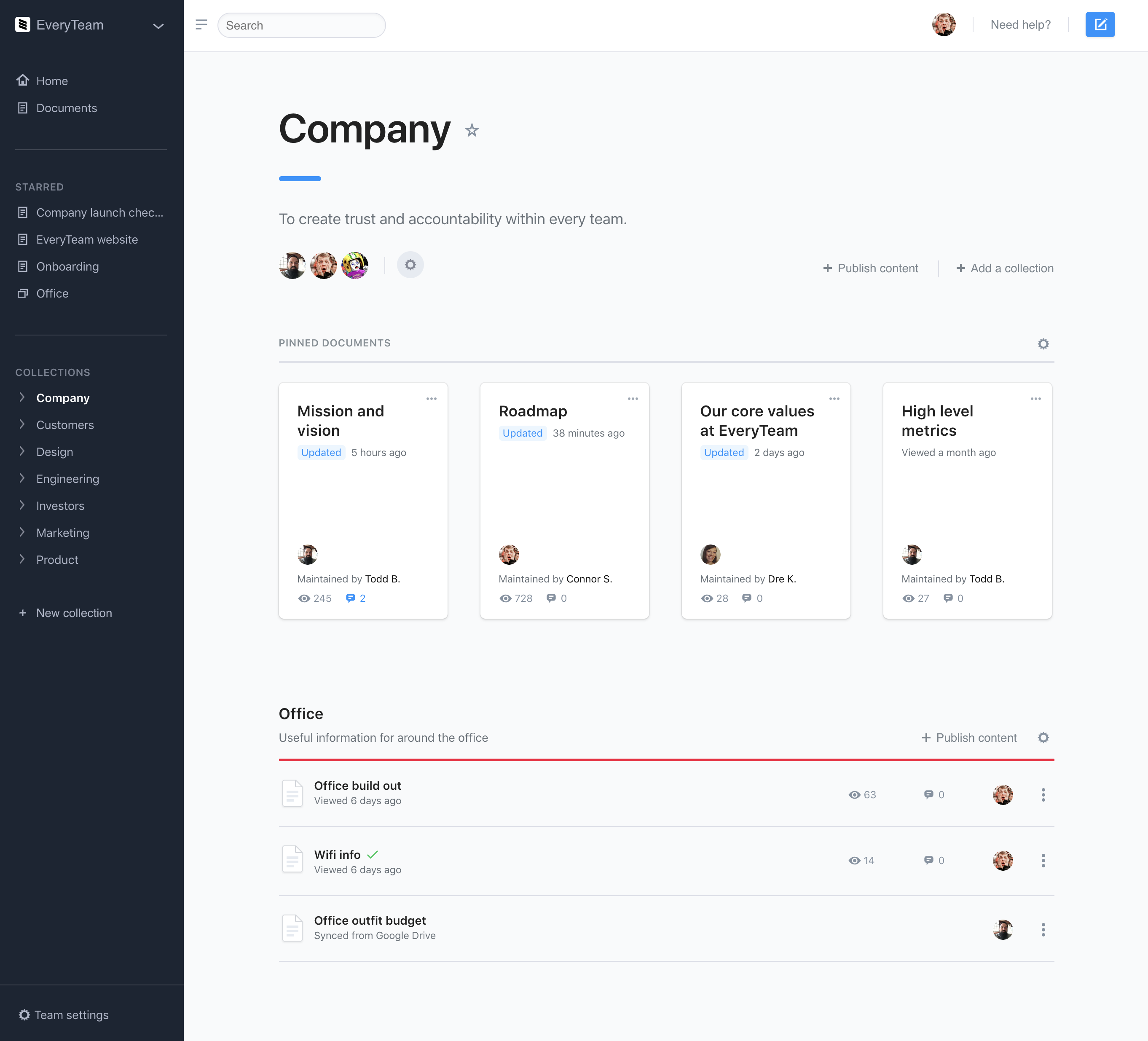
 

EveryTeam works to surface up those kinds of critical employee documents that are probably fine to just exist in some Google Drive somewhere very early on — which might include the information for the WiFi or the schedule for office snacks. But as more and more docs flow in, EveryTeam has to parse through all of those and ensure that the right important ones are surfaced up in front of everyone, especially as they become more and more important over time. For larger and large companies, that content management can get out of control and devolve into a lot of messages across the organization just to find a single document. EveryTeam integrates with GitHub, Google Drive, Dropbox, Figma, and Airtable among others.

“It ends up looking in a lot of cases like how GitHub works — GitHub is a tool to maintain, curate and publish software. You’re publishing source code, but a lot of the workflows feel very natural and feel very similar. Ultimately, where we ended up from a product perspective is, it’s more about being a layer on top of these services [like Box] to provide a plane of organization.”

EveryTeam isn’t the only startup looking to rethink the internal employee wiki. Slite, another startup looking to create an intelligent internal notes tool that can serve as a hub of information for employees, also said it raised $4.4 million earlier this year. The idea there is to bring the Slack-like simplicity that has become popular among employees — at least, at the startup level — to a variety of different areas that haven’t changed in a while. Internal note-taking, and that Wiki functionality, is one. EveryTeam decided to work with the idea that content is just going to exist all over the place anyway, and try to fit into the employee workflow that way.

“You want to curate and expose content that exists in ten to 12 different tools you use every day,” Berman said. “Ultimately, that’s part of my day-to-day flow. I’m usually in four to five web apps. When [some tools] take the Slack model they often get very focused on recency, and that determines an arbiter of value.[You have to think], what is the desire path for a document that becomes load-bearing in the company. It starts off a little weird, people edit it, it ideates and matures, and it stands the test of time. How do you create an application that helps that happen.”


Read Full Article

Microsoft Brings Visual Search to Your Smartphone


Microsoft has added Visual Search to Bing’s mobile apps, meaning you can now use it on your smartphone. Visual Search is essentially Microsoft’s answer to Google Lens, while Pinterest also offers visual discovery tools. Still, it’s better late than never.

What Is Bing Visual Search?

Visual Search allows you to search for information about the objects you capture in images without having to pick the right keywords and type them into Bing manually. You can use Visual Search on photos in your camera roll or that you’ve just taken.

Using Microsoft’s examples, if you take a photo of a flower you don’t recognize, Visual Search will provide more information about the flower. And if you find a sofa you like the look of but can’t afford, Visual Search will find similar styles for those on a budget.

This new and improved version of Visual Search is available on the Bing app on iOS and Android, Microsoft Edge for iOS and Android, and the Microsoft Launcher for Android. Microsoft states that Visual Search will be coming to Bing.com in the future as well.

Vince Leung, product lead for Bing Images at Microsoft, said:

“Sometimes, it is almost impossible to describe what you want to search for using words. While there have been strides for many years to get to this point, with the advent of cloud computing we are able to accelerate our ability to make sense out of pixels.”

Microsoft Gives People Options

Microsoft may be a little late with this, but competition is always good for consumers. So, while the average Android user is unlikely to switch from Google Lens to Bing Visual Search, we should applaud Microsoft for giving people the option to do so.

Speaking of Google’s alternative to Bing Visual Search, if you haven’t yet played around with it, here are some interesting things to do with Google Lens. And Google Lens is just one of the many amazing Google Photos features you should be using.

Read the full article: Microsoft Brings Visual Search to Your Smartphone


Read Full Article

Digital campaigning vs democracy: UK election regulator calls for urgent law changes


A report by the UK’s Electoral Commission has called for urgent changes in the law to increase transparency about how digital tools are being used for political campaigning, warning that an atmosphere of mistrust is threatening the democratic process.

The oversight body, which also regulates campaign spending, has spent the past year examining how digital campaigning was used in the UK’s 2016 EU referendum and 2017 general election — as well as researching public opinion to get voters’ views on digital campaigning issues.

Among the changes the Commission wants to see is greater clarity around election spending to try to prevent foreign entities pouring money into domestic campaigns, and beefed up financial regulations including bigger penalties for breaking election spending rules.

It also has an ongoing investigation into whether pro-Brexit campaigns — including the official Vote Leave campaign — broke spending rules. And last week the BBC reported on a leaked draft of the report suggesting the Commission will find the campaigns broke the law.

Last month the Leave.EU Brexit campaign was also fined £70,000 after a Commission investigation found it had breached multiple counts of electoral law during the referendum.

Given the far larger sums now routinely being spent on elections — another pro-Brexit group, Vote Leave, had a £7M spending limit (though it has also been accused of exceeding that) — it’s clear the Commission needs far larger teeth if it’s to have any hope of enforcing the law.

Digital tools have lowered the barrier of entry for election fiddling, while also helping to ramp up democratic participation.

“On digital campaigning, our starting point is that elections depend on participation, which is why we welcome the positive value of online communications. New ways of reaching voters are good for everyone, and we must be careful not to undermine free speech in our search to protect voters. But we also fully recognise the worries of many, the atmosphere of mistrust which is being created, and the urgent need for action to tackle this,” writes commission chair John Holmes.

“Funding of online campaigning is already covered by the laws on election spending and donations. But the laws need to ensure more clarity about who is spending what, and where and how, and bigger sanctions for those who break the rules.

“This report is therefore a call to action for the UK’s governments and parliaments to change the rules to make it easier for voters to know who is targeting them online, and to make unacceptable behaviour harder. The public opinion research we publish alongside this report demonstrates the level of concern and confusion amongst voters and the will for new action.”

The Commission’s key recommendations are:

  • Each of the UK’s governments and legislatures should change the law so that digital material must have an imprint saying who is behind the campaign and who created it
  • Each of the UK’s governments and legislatures should amend the rules for reporting spending. They should make campaigners sub-divide their spending returns into different types of spending. These categories should give more information about the money spent on digital campaigns
  • Campaigners should be required to provide more detailed and meaningful invoices from their digital suppliers to improve transparency
  • Social media companies should work with us to improve their policies on campaign material and advertising for elections and referendums in the UK
  • UK election and referendum adverts on social media platforms should be labelled to make the source clear. Their online databases of political adverts should follow the UK’s rules for elections and referendums
  • Each of the UK’s governments and legislatures should clarify that spending on election or referendum campaigns by foreign organisations or individuals is not allowed. They would need to consider how it could be enforced and the impact on free speech
  • We will make proposals to campaigners and each of the UK’s governments about how to improve the rules and deadlines for reporting spending. We want information to be available to voters and us more quickly after a campaign, or during
  • Each of the UK’s governments and legislatures should increase the maximum fine we can sanction campaigners for breaking the rules, and strengthen our powers to obtain information outside of an investigation

The recommendations follow revelations by Chris Wylie, the Cambridge Analytica whistleblower (pictured at the top of this post) — who has detailed to journalists and regulators how Facebook users’ personal data was obtained and passed to the now defunct political consultancy for political campaigning activity without people’s knowledge or consent.

In addition to the Cambridge Analytica data misuse scandal, Facebook has also been rocked by earlier revelations of how extensively Kremlin-backed agents used its ad targeting tools to try to sew social division at scale — including targeting the 2016 US presidential election.

The Facebook founder, Mark Zuckerberg, has since been called before US and EU lawmakers to answer questions about how his platform operates and the risks it’s posing to democratic processes.

The company has announced a series of changes intended to make it more difficult for third parties to obtain user data, and to increase transparency around political advertising — adding a requirement for such ads to continue details of how has paid for them, for example, and also offering a searchable archive.

Although critics question whether the company is going far enough — asking, for example, how it intends to determine what is and is not a political advert.

Facebook is not offering a searchable archive for all ads on its platform, for example.

Zuckerberg has also been accused of equivocating in the face of lawmakers’ concerns, with politicians on both sides of the Atlantic calling him out for providing evasive, misleading or intentionally obfuscating responses to concerns and questions around how his platform operates.

The Electoral Commission makes a direct call for social media firms to do more to increase transparency around digital political advertising and remove messages which “do not meet the right standards”.

“If this turns out to be insufficient, the UK’s governments and parliaments should be ready to consider direct regulation,” it also warns. 

We’ve reached out to Facebook comment and will update this post with any response.

A Cabinet Office spokeswoman told us it would send the government response to the Electoral Commission report shortly — so we’ll also update this post when we have that.

The UK’s data protection watchdog, the ICO, has an ongoing investigating into the use of social media data for political campaigning — and commissioner Elizabeth Denham recently made a call for stronger disclosure rules around political ads and a code of conduct for social media firms. The body is expected to publish the results of its long-running investigation shortly.

At the same time, a DCMS committee has been running an inquiry into the impact of fake news and disinformation online, including examining the impact on the political process. Though Zuckerberg has declined its requests for him to personally testify — sending a number of minions in his place, including CTO Mike Schroepfer who was grilled for around five hours by irate MPs and his answers still left them dissatisfied.

The committee will set out the results of this inquiry in another report touching on the impact of big tech on democratic processes — likely in the coming months. Committee chair Damian Collins tweeted today to say the inquiry has “also highlighted how out of date our election laws are in a world increasingly dominated by big tech media”.

On its forthcoming Brexit campaign spending report, an Electoral Commission spokesperson told us: “In accordance with its Enforcement Policy, the Electoral Commission has written to Vote Leave, Mr Darren Grimes and Veterans for Britain to advise each campaigner of the outcome of the investigation announced on 20 November 2017. The campaigners have 28 days to make representations before final decisions are taken. The Commission will announce the outcome of the investigation and publish an investigation report once this final decision has been taken.”


Read Full Article

How to Unlock the Emoji Library in Chrome on Desktop PCs


You can’t get away from emojis these days, even if you wanted to. They are so ubiquitous that there was even an (admittedly terrible) movie made about them in mid-2017. No, seriously, it’s awful. Don’t watch it.

Like it or not, what started as a smartphone-only fad as now become a massive part of our online language. We’ve almost gone full circle back to Egyptian hieroglyphics.

This poses a problem for desktop users. Unless you’re “lucky” enough to own a Mac with a touch bar, there’s no easy way to type emojis on a desktop machine. Thankfully, there’s a new tool in Google Chrome that aims to make typing emojis a little less tedious. Let’s take a closer look.

How to Enable Chrome’s Emoji Library

Chrome’s built-in emoji library is available on Windows, Mac, and Chrome OS. To use it, you first need to install the Canary version of Chrome. It’s the developmental version of the browser and is prone to breakage. But don’t worry, you can run the stable release and the Canary version at the same time.

Note: If you’re using a Chromebook, you’ll need to change the entire OS onto the development channel.

When you’re ready, follow the instructions below:

  1. Type chrome://flags/ into Chrome’s address bar and hit Enter.
  2. Scroll down to Emoji Context Menu.
  3. Click on Enable.
  4. Restart Chrome.

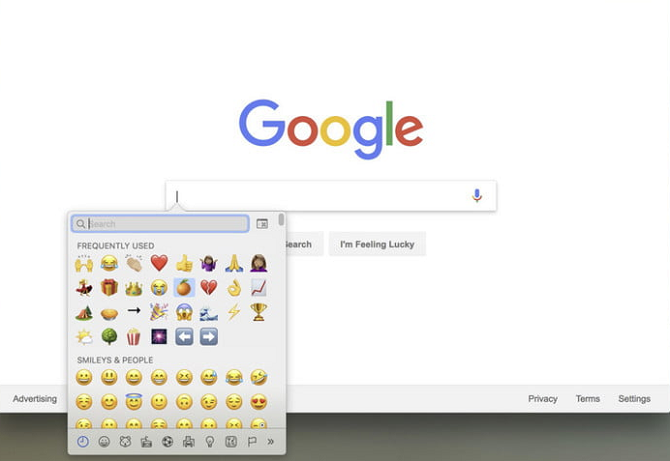
The emoji library will be available wherever you see a text field. Just right-click in the text field and click on Emoji to access the library.

The library is part of the native on-screen keyboard and works like Gboard, so it’s not going to be as easy as typing regular characters, but it’s still a lot better than going hunting in one of the online emoji repos.

And remember, if you’re using Windows, you can type emojis outside of Chrome using the on-screen touch keyboard.

Read the full article: How to Unlock the Emoji Library in Chrome on Desktop PCs


Read Full Article

How to Identify Any Font on Any Web Page the Easy Way


How many fonts do you see on a daily basis? Most people probably come across hundreds on various websites, desktop programs, and mobile apps. During this, you may come across a new font that you’ve never seen but want to use. In these cases, identifying the font so you can track it down later is essential.

We’ve shown you how to identify fonts in images, but what about fonts used on websites? A simple Chrome extension makes it easy.

How to Identify Any Font on Any Web Page

WhatFont-Website-Font-Checker

  1. Install the free WhatFont Chrome extension.
  2. Open a web page containing the font you want to check out.
  3. Click the WhatFont icon in the upper-right corner of your Chrome taskbar. This will enter a “font scanning” mode to provide you with information about the fonts on the page.
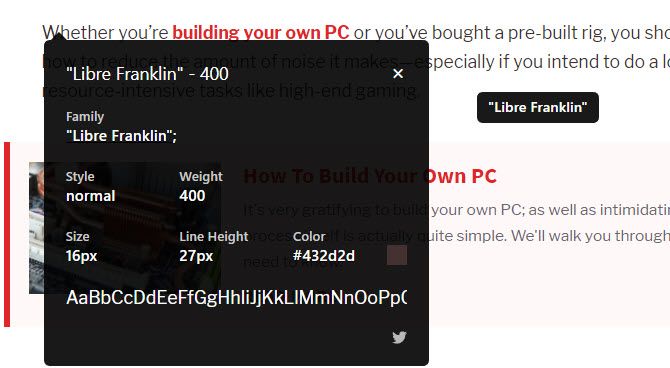
  4. Simply mouse over the font you want to see more about to see its name. To learn more information, click the text.
  5. You’ll see a window with full details about the font. This includes the Style, Size, Color, and a sample of the alphabet in that font. Click the color square to change the Color value from hex to RGB. You can also click the Twitter icon to tweet out a link to the page, which is essentially an ad for the extension.
  6. To stop checking fonts, just click the WhatFont extension icon again.

Once you’ve found out what the font is, you can download it for your own use. You’ll find tons of websites offering free fonts. Sites like DaFont and Font Squirrel are good first stops.

Just make sure that when you download a font, you don’t accidentally download malware instead. Check for fake download buttons and stick to trusted download sites. Most modern fonts are either OTF or TTF, so don’t open any fonts that are in EXE format! They’re usually viruses.

Read the full article: How to Identify Any Font on Any Web Page the Easy Way


Read Full Article

How to Purchase Items Found in Instagram Posts and Stories

25 June 2018

CBS to stream NFL games on mobile


CBS today announced an expanded agreement with the NFL which will allow it to stream NFL ON CBS games through its over-the-top service, CBS All Access, through 2022. The deal includes, for the first time, rights to stream the games on mobile devices. The changes will begin this season, and will additionally include the ability for TV Everywhere subscribers (those who have an existing pay TV subscription) to stream the games on mobile, too.

According to the network, the entire 2018 NFL ON CBS season, including Super Bowl LIII, will stream live on CBS All Access across all platforms. This includes not only mobile devices and the web, but also on media streaming devices like Roku, Apple TV, Chromecast, Android TV, Fire TV, and game consoles like Xbox One and Playstation, plus Samsung Smart TVs.

The games will also be available to those who chose to subscribe to CBS All Access through Amazon’s a la carte TV service, Amazon Channels.

CBS already had streaming rights to NFL games, starting in the 2016 season. But Verizon [disclosure: TC parent by way of Oath] held exclusive mobile streaming rights to games until their deal expired with the 2017 season. That change has broadened access to NFL games on mobile.

For example, Fox’s multi-year deal for Thursday Night Football also included mobile rights, Variety reported. Verizon is now streaming games through Yahoo, Go90 and other properties on mobile. And NBCU and ESPN have Sunday and Monday Night Football deals that involve mobile streaming, the site also noted.

For the NFL, it needs to broaden access to games on mobile devices to address issues with lower ratings that’s, in part, attributed to cord cutting.

And for CBS, access to the games on mobile could give its streaming service a boost in the wake of what may be slowing growth, and the mistake of putting too much pressure on the “Star Trek” prequel to deliver subscribers. “Star Trek: Discovery” has underwhelmed some fans, leaving it with a 4.7 out 10 user score on Metacritic, and a lot of negative reviews on IMDb.

In other words, CBS can’t count on those core Trek fans to subscribe to All Access just to watch the new show, as it may have hoped.

Bringing in NFL fans could help with sign-ups – as will being available on Amazon Channels, which accounts for some 55% of direct-to-consumer subscriptions, according to reports.

“We are excited to extend our partnership with CBS as it aligns perfectly with our goal of providing NFL fans with greater opportunities to watch NFL games across digital devices,” said Hans Schroeder, Chief Operating Officer of NFL Media and Business, in a statement about the CBS deal. “The 2018 season will mark a new era for NFL fans with unprecedented access to NFL games across digital platforms.”


Read Full Article

QLED vs. OLED vs. MicroLED: Which TV Display Tech Is the Best?


qled-oled-tv

The battle of LEDs and LCDs is over. The new TV format war is between three new technologies: QLED, OLED, and MicroLED. It’s a confusing naming scheme, but the difference is actually easy to understand.

Here’s what you need to know first:

  • Samsung is the force behind QLED, which stands for Quantum Dot LED.
  • LG created OLED, which stands for Organic LED.
  • Samsung is also the force behind MicroLED.

As always, LED stands for light-emitting diode. In case there are any other terms you need to familiarize yourself with, we have a TV terms jargon buster guide.

It’s About Backlighting vs. Self-Lighting

Until now, LED TVs and LCD TVs were marketing jargon for different types of LCD. In an LCD TV, a single “pixel” cannot light itself. It requires backlighting by a panel of LEDs.

The crucial difference between QLED, OLED, and MicroLED is this backlighting:

  • Samsung’s QLED does not have pixels that can light themselves, so it is an extension of current LCD TV technology.
  • LG’s OLED has pixels that illuminate themselves, so it’s a new type of technology.
  • Samsung’s MicroLED also has pixels that illuminate themselves, so it’s a new type of technology, but slightly different from LG’s OLED.

Samsung QLED: LCD-LED in a New Avatar

Samsung QLED Graph

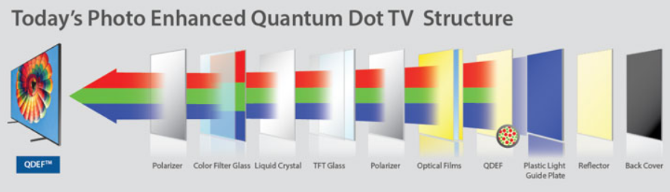
For years, regular LCD and LED TVs have used a series of thin layers from the backlight to the polarizer. Samsung has introduced a new layer in this series, which is the Quantum Dot filter.

This filter is unsurprisingly made of quantum dots, which are basically particles that take the incoming light from the backlight and turn it into simple RGB colors. After this, the colors travel further and interact with other layers to create the images that you see on screen.

But by simplifying to these basic colors, the color accuracy of those images is far better. Specifically:

  • The added quantum dot filter improves color accuracy by up to 90 percent from today’s LED TVs.
  • It also allows for up to 2,000 nits of brightness, which means you get better HDR performance.
  • Without each pixel being able to turn on and off, the black levels and contrast ratio remains the same as the best-quality LED-LCD TVs today.
  • Viewing angles are what you’d get on current TVs; they’re not as wide as OLED or MicroLED.

Note: Samsung and its quantum dot supplier Nanosys said they are working on QLED that emits its own light, removing the need for backlighting. This technology is expected sometime between 2021 and 2023.

LG OLED: The Best TV Display Tech Today

While Samsung focuses on QLED for now, LG has championed OLED technology. OLED displays are fairly common on smartphones, but it’s difficult to make them at the large size that a TV requires.

Samsung continues to make OLEDs for phones, but couldn’t manage to scale them up for TVs. LG used a different manufacturing method and achieved TV-sized OLED screens.

Now, LG’s OLED TVs are the gold standard. Yes, they are really expensive. But if you want the best TV today, that’s going to be an LG OLED unit. This is because:

  • Each pixel of an OLED TV can glow or dim on its own, resulting in much better black levels and improved contrast ratio.
  • OLED TVs have excellent viewing angles and color quality. While they can’t get as bright as 2,000 nits, the HDR quality is fantastic nonetheless.
  • OLEDs have consistently topped the review ratings of CNET, which has the best TV-testing facilities and staff among all media organizations.
  • Much like plasma TVs in the past, OLED TVs can be suspect to screen burn-in.
  • OLED TVs consume more power than QLED or LED-LCD TVs.

Sony OLED: Building on LG’s Success

After being on the fence for some time, Sony has thrown its weight behind OLED technology. Sure, LG manufactures the base OLED panel required for such TVs, but a lot more goes into making a good TV.

Once Sony gets the OLED panel from LG, it’s Sony’s job to fine-tune the other components that will ensure the OLED panel performs at its finest. Sony was renowned for picture quality from its famed BRAVIA engine on LED-LCDs. For OLEDs, Sony is launching a new processor, the X1 Ultimate. It hasn’t become available in any TV so far, and if I were you, I’d wait till it was.

Right now, Sony has only one new-generation OLED TV, the Sony A8F, which uses the previous-generation X1 Extreme processor. From demos at CES 2018, the X1 Ultimate is expected to deliver much better images, especially for HDR performance.

In summary:

  • Hold off on a Sony purchase for now. Wait for its new line of OLED TVs to hit the market.
  • The current OLED model, the Sony A8F, has got good reviews. If you’re a Sony fan and can’t wait for a new TV, go for it.
  • If the Sony brand loyalty isn’t important to you, LG has better OLED TVs at the moment.

Samsung MicroLED: The Future of TV Displays

The other big news from CES 2018 was Samsung’s new technology, MicroLED. And it made a bang with a gargantuan 146-inch TV that Samsung simply calls “The Wall”. MicroLED combines the best of QLED and OLED, while adding even more.

Like OLEDs, MicroLEDs have pixels that emit their own light. Each pixel is a combination of quantum dot red, green, and blue LEDs that can turn off or on individually. The end result is black levels, contrast ratio, and viewing angles of OLED, along with the color accuracy and brightness of QLED.

Samsung also says MicroLED TVs are modular, in that you can change the TV’s size. For example, “The Wall” is made up of 4-inch panels stuck together. You could potentially buy more 4-inch MicroLED panels from Samsung and increase the size of your TV, instead of buying a whole new TV.

But all these possibilities are way in the future. Right now, Samsung has not yet figured out how to decrease the size of these panels for a mass-market TV of popular 55-inch or 65-inch sizes. They only plan to release “The Wall” in 2018, and at an exorbitant price. It will take another 3-5 years, or maybe more, for MicroLED TVs for regular consumers.

Which Type of TV Should You Buy Now?

For anyone looking for a new TV right now, OLED might be a bit of a stretch. The cheapest OLED and QLED TVs cost upwards of $1,500, and between those, I’d go with an OLED right now. For an average TV, stick with the LED-LCDs.

To make your decision easier, we’ve put together a guide for the best affordable 4K HDR TVs.

Read the full article: QLED vs. OLED vs. MicroLED: Which TV Display Tech Is the Best?


Read Full Article

Teachers can put Chromebooks on lockdown when giving Classroom quizzes


Technology’s heavy hitters are in Chicago this week, showing off their latest ed-tech offerings at International Society for Technology in Education conference. For Google, that means some key updates to Classrooms, the free, browser-based educational software that’s currently used by “over 30 million students” globally, by its count.

The app is getting a number of tweaks, including, most notably, more control over quizzes. The Google Forms Quiz now features a “locked mode,” which prohibits students from surfing the web or opening apps until the answers are submitted — in other words, it stops them from cheating on the machine, while taking a test.

Interestingly, this is the first feature added to the app that’s exclusive to managed Chromebooks — i.e. those devices that are sold with the sole purpose of being used in the classroom. That marks a change for the app, which is otherwise open and platform agnostic, for any machine that can access the web. The reason here seems pretty straight-forward, of course — locking users out of other apps requires a lot more system control than more standardized features.

Also new is a Classwork page, which is designed to be a sort of go-to destination for both teachers and students, organizing questions and assignments in a single destination. Among other things, that information can now be organized by topic or unit, whereas everything was previously just categorized by date. The new People page, meanwhile. lets teachers add and remove fellow teachers, students and guardians, while other tweaks have been made to the Stream and system settings pages.

Microsoft also used the occasion to announce new lesson plans from partners like the BBC and an Aquatic DLC for Minecraft: Education Edition.


Read Full Article

Google Earth now lets you measure distances and areas


Only a few years ago, Google Earth was the only practical way to see all of Google’s satellite and 3D imagery. These days, Google Maps pretty much offers all of the mapping features that casual users need, but Google continues to quietly develop Earth and today, the company announced that it is adding a measurement tool to the service on the web (today), Android (later this week) and iOS (‘coming soon’).

Now that’s obviously not an earth-shattering new feature, especially given that you have long been able to measure distance with a virtual ruler in Google Maps, too. But the addition of an additional feature for measuring area seems useful, especially for students.

As is so often the case, more than anything, the launch of this new feature is a reminder of how much overlap there often is between Google products — and not just in the chat app category. Indeed, seeing this announcement was the first time I thought about Google Earth in years, I think. And while Google Earth has a few features that Maps doesn’t currently offer, including tours, for the most part, there doesn’t really seem to be a need for the web and mobile versions of Earth these days. And why is Google adding an area measurement tool to Earth, but not to Maps?


Read Full Article
5 Reasons Why Snapchat Is the New Facebook


snapchat-new-facebook

You might have noticed that Snapchat is gaining ground on Facebook. While Facebook remains the most popular mainstream social network in the world, Snapchat is still growing at an alarming rate and now boasts over 158 million daily users. Twitter is terrified of Snapchat, and Facebook should be too.

Remember MySpace? Facebook obliterated it. Could Snapchat dethrone the technological giant that has dominated the media landscape for the better part of a decade? It looks likely, and here are a few reasons why.

1. Snapchat Boasts a Younger Demographic

Everyone likes a bandwagon. If you see something becoming popular, you’re naturally intrigued about it and why all of these people seem to love it. A lot of people like to be early adopters, as if downloading the app before others is a badge of honor.

Others just see it for its convenience in keeping up with mates. After hearing the question, “Are you on Snapchat?” numerous times, you’ll probably cave in (unless you’re a hipster who doesn’t like to conform). It’s the snowball effect.

Snapchat claims to reach over 40 percent of Americans aged between 18 and 34 every day. In fact, Snapchat is the favorite social platform of teenagers. With such an incredible market share, it’s seen by many as the next evolutionary step for social networking.

Facebook risks becoming seen as stuffy, and frequented by older generations. It’s only natural: each age group adopts media in new ways. Close Encounters of the Third Kind was 2001: A Space Odyssey for youngsters in the 1970s and 1980s. Harry Potter was the new Adventures of Narnia. It’s feasible that Snapchat is Facebook for a new generation.

2. Snapchat Is Less Time-Consuming

The average amount of time spent each day on social platforms continues to increase year-on-year. In 2017, the average adult in the USA spent a whopping 41 minutes on Facebook. Compare that to 26 minutes on Snapchat. These figures, from eMarketer, are projected to increase a minute each year in 2018 and 2019.

It’s easy to argue that there’s more on Facebook to attract our attention. However, Snapchat’s userbase is more actively engaged; eMarketer notes that time spent with a network includes multi-tasking. In effect, this means that users might have Facebook open, but are actually looking at something else.

This could be true of Snapchat, of course, but as snaps only appear for a maximum of 10 seconds, it’s unlikely. The Chat function, too, encourages engagement (especially compared to the number of people on Facebook using it merely to pass the time).

In our battle against social media’s dominance over our lives, a less time-consuming alternative should be applauded.

3. Snapchat Is More Video-Oriented

Here’s an area in which Snapchat is doing better already. In 2016, 10 billion videos were watched via Snapchat daily, compared to Facebook’s 8 billion. This is an astonishing statistic considering Snapchat doesn’t yet boast even half the number of users as Facebook.

What accounts for this? It’s probably the Stories feature, which lets friends view videos and images for 24 hours after they were uploaded.

The above stats don’t include the length of videos watched. The limit used to be 10 seconds. In 2017, that increased to 60 seconds; it’s played in 10-second steps, which skews any recent figures. You can edit these segments, so if you did something embarrassing in the middle, you can delete that part.

Nonetheless, this ably demonstrates the immediacy of Snapchat—and its capacity to spread messages. Consumers retain around 95 percent of messages conveyed by video, in comparison to just 10 percent when it comes to text. Snapchat has fewer users, but they appear to engage more with content.

By 2019, it’s projected that video traffic will account for 80 percent of all consumer traffic online. As a growing market, Snapchat knows how to target the right audience and update its functionality accordingly.

4. Login With Snapchat vs. Login With Facebook

All of this evidence might make you think that Snapchat operates in a different arena to Facebook. The latter is a primarily text-based feed; the former is largely about images and videos, and caters for a younger demographic.

However, Snapchat’s latest move puts it square up against Facebook. You can use the app to easily log into other services.

This is something you’ve been able to do in the past through Google accounts and (you guessed it) Facebook. The move means convenience for Snapchat users, and direct competition for other social networks.

You can use your Bitmoji and stickers across different platforms, meaning greater exposure for Snapchat. One of the feature’s launch partners is Tinder, the app which helps users find dates (but is rubbish at finding friends). It’s a canny idea, uniting brands with similar aesthetics. The language of Snapchat will permeate to other mediums too, as Stories can be embedded into websites.

What’s more, if you compare the policies of Facebook and Snapchat, even just on this issue alone, Snapchat comes out on top. Why? Because Snapchat limits the amount of personal data available to third parties.

5. People No Longer Trust Facebook

We can argue about whether any social media works to protect your personal data from slipping into the wrong hands. But right now, the spotlight is definitely on Facebook.

Its privacy policies are being called into question with alarming frequency. It turns out that Facebook’s privacy scandals can be a good thing, as they result in a lot of people re-evaluating what they put online.

That means some users inevitably look elsewhere, preferably for a platform that’s more transparent with personal details. Snapchat, then, is a major contender here.

The network is famous for not targeting its users with personalized ads. In fact, in 2015, Evan Spiegel, Snapshot’s founder, stated how such things concern him, saying:

“I got an ad this morning for something I was thinking about buying yesterday, and it’s really annoying. We care about not being creepy.”

This naturally bodes well for consumers’ rights. Things could change in the future, of course, but an app that has solid privacy policies built into its foundations is surely a good sign.

The Future of Social Media Is Snapchat

Despite the evidence perhaps you’re not sold on the idea of Snapchat being the new Facebook just yet. After all, Facebook has been around for a long time, and over 2 billion people worldwide remain loyal to the social network.

Nonetheless, Snapchat is easy to get into, and growing as a result. And if you need a hand getting to grips with it, here is our complete guide to Snapchat, which is suitable for both beginners and veterans.

Read the full article: 5 Reasons Why Snapchat Is the New Facebook


Read Full Article

Anker Mars II projector promises solid summer fun


Anker, a popular if battery and cable company, recently announced the Mars II projector under its Nebula brand. The company, which primarily sells via Amazon, is expanding out of batteries and cables and is now creating audio and other portable AV gear. This compact, battery-powered DLP projector is their latest creation and it has found a place of honor at our family barbecues.

The projector is actually an Android 7.1 device stuffed into a case about as big as a Bluetooth speaker. A physical lens cap slides down and turns on the system and you control everything from he included remote or the buttons on the top of the device. You can also download an app that mimics a mouse and keyboard for choosing videos and information entry. It projects at a maximum of 300 lumens and projects at 720p. You can also connect an HDMI device like a game console or stick in a USB drive full of videos to view on the fly.

Again, the real benefit here is the ability to stream from various apps. I have YouTube, Netflix, Plex, and other apps installed and you can install almost any other Android app you can imagine. It has speakers built in and you can cast to it via Miracast but you cannot insert a Chromecast.

If all you want to do is throw up a little Santa Clarita Diet or Ice Age on a sheet in the back yard, this thing is perfect. Because the brightness is fairly low you need solid twilight or a partially dark room to get a good picture. However, the picture is good enough and it would also make a great presentation device for a closed, dark conference room. Because of its small size and battery life – four hours on a charge – it makes for a great alternative to a full-sized projector or even a standard TV.

At $539 the Mars II is priced on par with other 720p projectors. The primary use case – connecting a computer or console via HDMI – works quite well but streaming user experience is a bit of a mixed bag. Because Anker didn’t modify the Android installation much further than adding a few default apps, some apps require a mouse to use and others can be controlled via the arrow keys on the remote or body of the device. This means that some apps – like Plex, for example – let you pick a video via the arrow keys but require you to press the “mouse” button to begin simulating a mouse cursor on the screen. It’s a bit frustrating, especially in poor lighting conditions.

One of the interesting features is the automatic focus system. Instead of fiddling with a knob or slider, you simply point this at a surface and the system projects a bullseye focus ring until the picture is in focus. The focus changes any time you move the device and sometimes it gets caught up if the screen or projector are moving. However in most cases it works perfectly fine.

Like most portable projectors you aren’t buying the Mars II to watch 4K video in 5.1 surround sound. You buy it to offer an alternative to sitting on the couch and watching a movie. That means this is great for on-the-road business presentations, campouts, outdoor movie viewing, and sleepovers. It is cheap and portable enough to be almost disposable and it’s not as heavy and hot as other, larger devices. In short, it can go anywhere, show anything, and works really well. Anker also makes the Mars, a more expensive 1080p device, but this one works just fine for about $400 less – a big drop in just about a year of brisk sales. It’s nice to see a good, low-cost manufacturer dabble in the world of complex consumer electronics and come up with a product that is truly useful and fun.

[gallery ids="1662668,1662666,1662665,1662662,1662661"]

Read Full Article
7 Ways to Silence a Loud and Noisy Gaming Computer

Winnie raises $4 million to make parents’ lives easier


An app that has the needs of modern-day parents in mind, Winnie, has now raised $4 million in additional seed funding in a round led by Reach Capital. Other investors in the new round include Rethink Impact, Homebrew, Ludlow Ventures, Afore Capital, and BBG Ventures, among others. With the new funds, Winnie has raised $6.5 million to date.

The San Francisco-based startup, which begun its life as a directory of kid-friendly places largely serving the needs of newer parents, has since expanded to become a larger platform for parents.

Winnie was founded by Bay Area technologists, Sara Mauskopf, who spent time at Postmates, Twitter, YouTube and Google, and Anne Halsall, also from Postmates and Google, as well as Quora and Inkling.

As new parents themselves, they built Winnie out a personal need to find the sort of information parents crave – details you can’t easily dig up in Google Maps or Yelp.

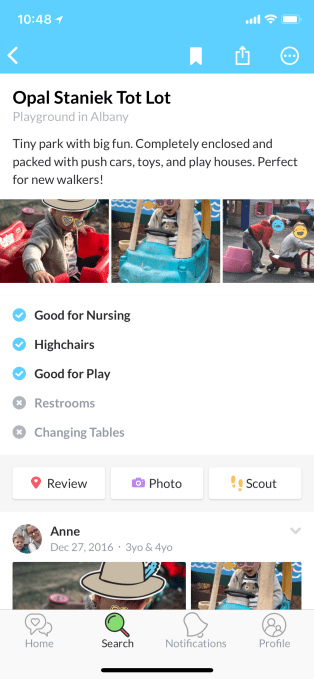
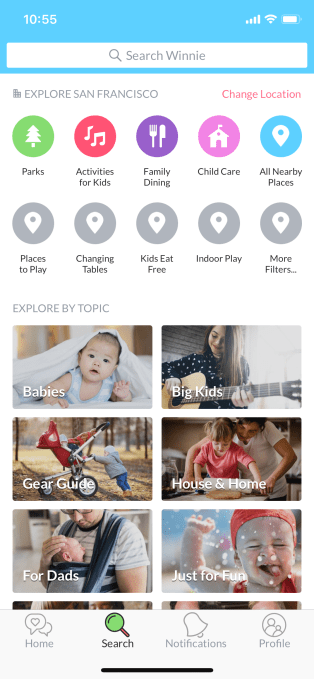
For example, you can use Winnie to find nearby kid-friendly destinations like museums or parks, as well as those that welcome children with features like changing tables in restrooms, wide aisles in stores for stroller access, areas for nursing, and other things.

Winnie serves as a good example of what investing in women can achieve. Somehow, the young, 20-something men that receive the lion’s share of VC funding had never thought up the idea of app that helps new parents navigate the world. (I know, shocking, right?) And yet, the kind of questions that Winnie tries to answer are those that all parents, at some point, are curious about.

The data on Winnie is crowd-sourced, with details, ratings and reviews coming from other real parents. Listings in San Francisco may be more fleshed out than elsewhere, as that’s where Winnie got its start. However, the app is now available in 10,000 cities across the U.S., and has just surpassed over a million users.

In more recent months, Winnie has been working to expand beyond being a sort of “Yelp for parents,” and now features an online community where parents can ask questions and participate in discussions.

“The crowdsourced directory of family-friendly businesses is still a huge component of what we do…and this has grown to over 2 million places across the United States,” notes Winnie co-founder and CEO Sara Mauskopf. “But we also have these real-time answers to any parenting question from this authentic, supportive community,” she says, referring to Winnie’s online discussions.

The idea is that parents will be searching the web for answers to questions about toddler sleep issues or good local preschools or breastfeeding help, and Winnie’s answers will come up in search results, similar to other Q&A sites like Quora or Yahoo Answers.

“A lot of younger millennial parents are turning to Google to find answers to these questions,” adds Winnie co-founder and CPO Anne Halsall. “So we want to have the answer to these questions at the ready, and we want to have the best page. That’s an example of something that’s yield a lot of traffic for us, just because no one else had that data before Winnie,” she says.

Related to this expansion, Winnie is also serving this data across platforms, including – obviously – the web, in addition to its native app on iOS and Android. The hope is that, with the growth, business owners will come in to claim their pages on Winnie.com, too, and update their information.


In the near-term, the founders say they’ll put the funding to use building out more personalization features.

“As a technology company, we have a unique opportunity to give you this really tailored experience that grows with your family over time – so as your children are getting older, and you’re entering new phases of development, our product’s adapting and putting relevant information in front of you,” Halsall says. 

Data on businesses serving the needs of parents with older kids – like summer camps or driver’s ed classes, for example – are the kind of things Winnie will focus on as it grows to include information for more parents, instead of just those with younger children and babies.

Winnie will also use the funds to hire additional engineers to help it scale its platform.

Esteban Sosnik from Reach Capital joined Hunter Walk from Homebrew on Winnie’s board as a result of the funding.

The app is a free download for iOS and Android, and is available on the web at Winnie.com.


Read Full Article
Winnie raises $4 million to make parents’ lives easier


An app that has the needs of modern-day parents in mind, Winnie, has now raised $4 million in additional seed funding in a round led by Reach Capital. Other investors in the new round include Rethink Impact, Homebrew, Ludlow Ventures, Afore Capital, and BBG Ventures, among others. With the new funds, Winnie has raised $6.5 million to date.

The San Francisco-based startup, which begun its life as a directory of kid-friendly places largely serving the needs of newer parents, has since expanded to become a larger platform for parents.

Winnie was founded by Bay Area technologists, Sara Mauskopf, who spent time at Postmates, Twitter, YouTube and Google, and Anne Halsall, also from Postmates and Google, as well as Quora and Inkling.

As new parents themselves, they built Winnie out a personal need to find the sort of information parents crave – details you can’t easily dig up in Google Maps or Yelp.

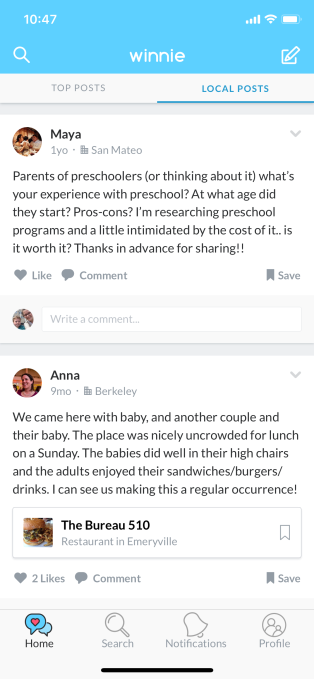
For example, you can use Winnie to find nearby kid-friendly destinations like museums or parks, as well as those that welcome children with features like changing tables in restrooms, wide aisles in stores for stroller access, areas for nursing, and other things.

Winnie serves as a good example of what investing in women can achieve. Somehow, the young, 20-something men that receive the lion’s share of VC funding had never thought up the idea of app that helps new parents navigate the world. (I know, shocking, right?) And yet, the kind of questions that Winnie tries to answer are those that all parents, at some point, are curious about.

The data on Winnie is crowd-sourced, with details, ratings and reviews coming from other real parents. Listings in San Francisco may be more fleshed out than elsewhere, as that’s where Winnie got its start. However, the app is now available in 10,000 cities across the U.S., and has just surpassed over a million users.

In more recent months, Winnie has been working to expand beyond being a sort of “Yelp for parents,” and now features an online community where parents can ask questions and participate in discussions.

“The crowdsourced directory of family-friendly businesses is still a huge component of what we do…and this has grown to over 2 million places across the United States,” notes Winnie co-founder and CEO Sara Mauskopf. “But we also have these real-time answers to any parenting question from this authentic, supportive community,” she says, referring to Winnie’s online discussions.

The idea is that parents will be searching the web for answers to questions about toddler sleep issues or good local preschools or breastfeeding help, and Winnie’s answers will come up in search results, similar to other Q&A sites like Quora or Yahoo Answers.

“A lot of younger millennial parents are turning to Google to find answers to these questions,” adds Winnie co-founder and CPO Anne Halsall. “So we want to have the answer to these questions at the ready, and we want to have the best page. That’s an example of something that’s yield a lot of traffic for us, just because no one else had that data before Winnie,” she says.

Related to this expansion, Winnie is also serving this data across platforms, including – obviously – the web, in addition to its native app on iOS and Android. The hope is that, with the growth, business owners will come in to claim their pages on Winnie.com, too, and update their information.


In the near-term, the founders say they’ll put the funding to use building out more personalization features.

“As a technology company, we have a unique opportunity to give you this really tailored experience that grows with your family over time – so as your children are getting older, and you’re entering new phases of development, our product’s adapting and putting relevant information in front of you,” Halsall says. 

Data on businesses serving the needs of parents with older kids – like summer camps or driver’s ed classes, for example – are the kind of things Winnie will focus on as it grows to include information for more parents, instead of just those with younger children and babies.

Winnie will also use the funds to hire additional engineers to help it scale its platform.

Esteban Sosnik from Reach Capital joined Hunter Walk from Homebrew on Winnie’s board as a result of the funding.

The app is a free download for iOS and Android, and is available on the web at Winnie.com.


Read Full Article
Folding Phones Are Coming: Surface Phone, Samsung Galaxy X, and More


foldable-phones

Samsung and Microsoft are seemingly in a race to launch the first truly usable foldable phone.

Apple might release a foldable iPhone by 2020. Lenovo-Motorola has already shown off one working concept. And one of the biggest Chinese brands, ZTE, has amazed the world with the first dual-screen phone available for sale right now.

This trend could be the biggest smartphone innovation in years, finally adding a “Wow!” factor that has been missing in mobiles since the first iPhone in 2007. Think about it: Imagine an iPhone that stretches out into an iPad!

So how long will it take for this to happen? How far are the companies from actually bringing this technology to the market? Let’s take a look at the upcoming world of folding phones, and the one handset that is already available.

The Two Types of Folding Phones

To understand foldable phones, you need to understand the technology behind them. Largely speaking, there are two approaches to make a phone that folds:

  1. Use a bendable screen and flexible circuit boards that fold or stretch as required.
  2. Use two or more screens connected at the seams, like a multi-monitor setup.

Right now, the two-screen model is already available in a phone made by ZTE. It uses traditional smartphone components, while adding a second screen that extends the primary screen.

Meanwhile, manufacturers have figured out how to make bendable displays and even demonstrated them. But to turn this into a phone that regular people can use is still a work in progress.

As for flexible circuit boards, those are much more realistic today. You can easily pick up a flexible PCB for your own projects.

Samsung Galaxy X: The Best Foldable Phone Design

Samsung Galaxy X Prototype

Right now, the rumored Samsung Galaxy X has the best chance of being the first truly usable foldable phone. Samsung is currently the world’s largest manufacturer of OLED displays. Plus, it has already made and demonstrated flexible OLED screens at trade expos.

It’s not surprising that Samsung is at the forefront of foldable phones. After all, it’s created four generations of Galaxy Edge phones since the first Galaxy S6 Edge. These devices pioneered the bending screen, and a foldable display is a natural extension of the technology.

It is as tricky to make the foldable display into a touchscreen display, but Samsung showed it has mastered this in demonstrations at CES and Mobile World Congress. The largest size screen demonstrated was 4.5 inches.

Samsung Foldable Screen Prototype

So far, Samsung’s patents suggest a phone that folds in on itself rather than expanding the screen size. But these are only the patents that have surfaced so far; the company is likely to work on a handset that increases the screen estate.

The head of Samsung’s mobile business, DJ Koh, has confirmed the company is making a bendable phone. Multiple news reports have suggested that Koh and his team want to fine-tune the user experience before releasing it.

Thus there are few details available about the Samsung Galaxy X, with new reports suggesting it will cost upwards of $1,800. Importantly, even the release date isn’t confirmed. The most trusted rumor so far is that Samsung will unveil the Galaxy X at Mobile World Congress 2019.

But take these rumors with a pinch of salt; they are rumors after all.

Surface Phone “Andromeda”: Microsoft’s Comeback?

Surface Phone Prototype

The other rumor going around is that Microsoft is launching its own foldable phone. It goes by two code names: the Surface Phone or Surface Andromeda. According to Thurrott, the device is scheduled for release in 2018.

That said, I wouldn’t put too much stock in these rumors. Companies file patents all the time, and only a fraction of them end up becoming real. The Surface Phone would be great, but remember, Microsoft has killed Windows Phone. So if a Surface Phone launches, it would presumably run Android.

ZTE Axon M: A Foldable Phone You Can Buy Now

A few nondescript companies have shown off foldable phones for some time, but the dream became real with the ZTE Axon M. ZTE is a giant in China, and has been expanding to other markets in recent years.

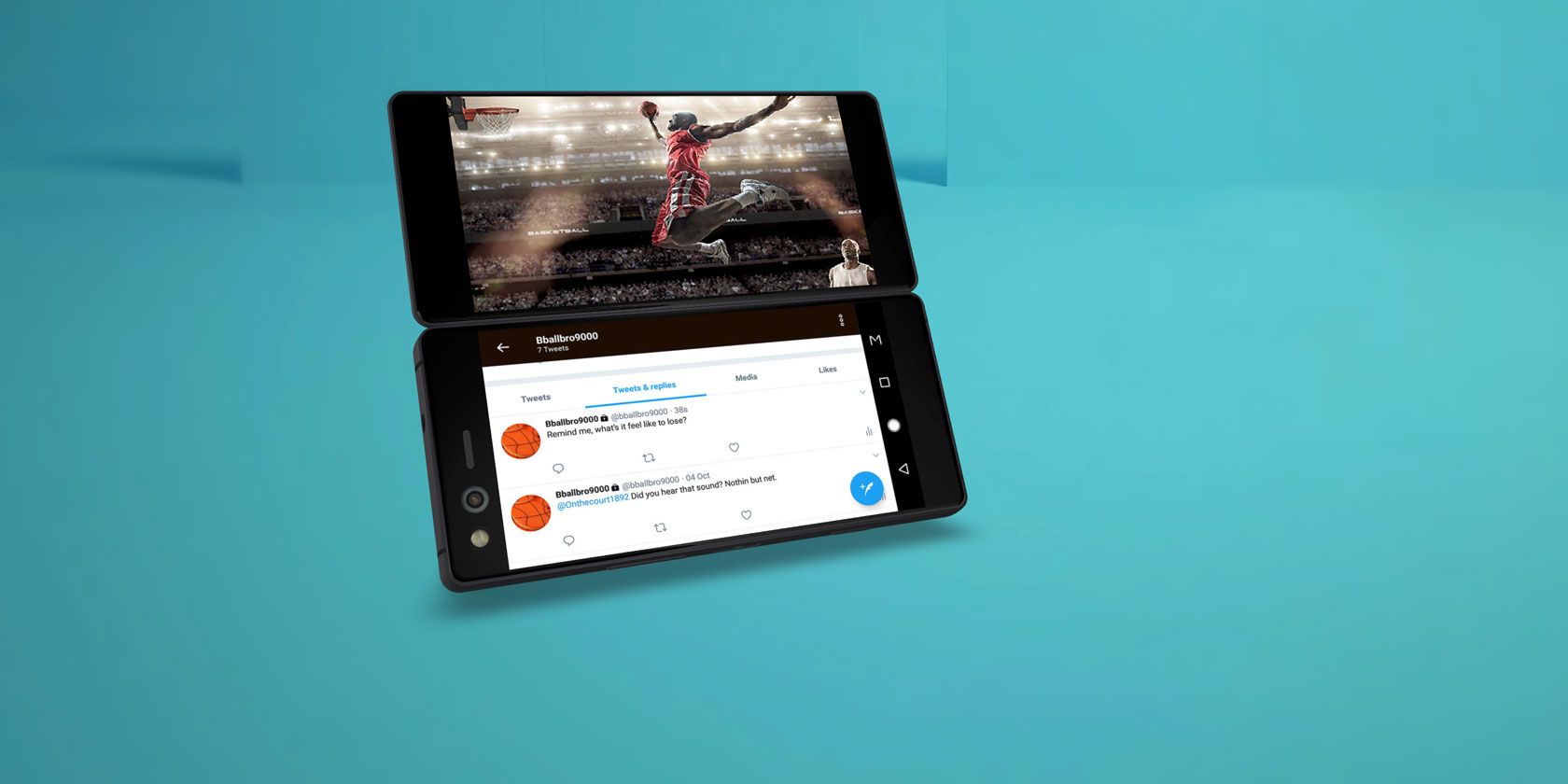
The Axon M is a functional phone that you can actually buy today. Its second screen sits on the back, and flips out to connect to your main screen with a satisfying click. With that, you get a dual-monitor setup on your phone.

You can use the two screens in tandem, so the image extends across both. Otherwise, you can use separate apps on each screen. As the above video shows, certain apps make smart use of the dual screen, such as watching a YouTube video on one while reading the comments on the other. Both screens can show the same video too, so you and a person sitting across from you can watch the same movie.

With the Axon M, ZTE is innovating on the software front rather than hardware. You will see a small bezel between both screens, so it’s not a seamless display. But with software that makes two screens truly useful on a phone, the Axon M is a winner.

The ZTE Axon M is only available from AT&T in the US, and costs $725 from AT&T or Best Buy. You can also purchase it between $666 and $866 on AliExpress. We recommend familiarizing yourself with AliExpress and reviewing our tips for safe shopping there before making any purchase on AliExpress, though.

Lenovo CPlus: The Phone You Wear as a Watch

The other handset demonstrated so far comes from Lenovo, which showed off a flexible phone at CES 2016 called the CPlus. The cool part? It bends to wrap around your wrist like a watch.

The most impressive part about the CPlus is that the whole phone bends, not just one part of it. This means Lenovo has figured out ways to make a functional phone that bends, while still using rigid parts like batteries.

But the CPlus remains a concept, as Lenovo hasn’t uttered another peep about it. Don’t expect this to come to stores before the Samsung Galaxy X.

What About a Foldable iPhone-iPad?

And finally, the big question. Will we see a foldable iPhone? If you believe Bank of America Merrill Lynch, then you’ll see one by 2020.

“Our checks also suggest that Apple is working with suppliers on a foldable phone (that potentially could double up as a tablet) for launch in 2020,” the bank told its clients, according to CNBC.

This seems to indicate that it would be an iPhone that folds out into an iPad, which could actually make the tablet useful again.

While You Wait for a Foldable Phone…

Right now, you can get the foldable screen experience with the ZTE Axon M. But true bendable, folding phones seem to be at least a year away, and probably won’t hit the mainstream for two more years.

So while you wait, your best option is an edge-to-edge display phone like the iPhone X or its alternatives.

Read the full article: Folding Phones Are Coming: Surface Phone, Samsung Galaxy X, and More


Read Full Article

Apple reportedly working on next-gen, water-resistant AirPods


Apple is reportedly working on a new, likely more expensive, set of AirPods with noise-cancellation, according to Bloomberg.

The report cites people familiar with the matter, who said that Apple is exploring making the AirPods water resistant. That said, you still don’t want to go swimming with these things, as the rumored water resistant AirPods would be more likely to only stand up against perspiration and rain rather than being submerged.

Bloomberg said that one source suggested Apple could add biometric sensors to the next-gen AirPods, furthering the company’s health tracking efforts. Sources also say that the updated AirPods would come with a new case that is compatible with the Apple’s new wireless charging pad.

As it stands now, AirPods cost $159 in the U.S. The new, rumored pair of in-ear wireless headphones will likely cost more, allowing Apple to price AirPods the same way it prices iPhones, offering a more expensive high-end model and a low-end model like the iPhone SE.

This news comes in the middle of a big year for Apple’s auditory efforts.

On the one hand, Apple’s Amazon Echo competitor, the HomePod, was delayed quite a bit following its announcement. Bloomberg says Cupertino is already hard at work developing a new model.

Apple is also reportedly working on over-the-ear headphones. The headphones would be Apple-branded, and would be on the higher-end of the spectrum with Boze and Sennheiser. The company already sells over-the-ear headphones via Beats, which Apple acquired in 2014 for $3 billion.


Read Full Article

3 Useful Tools to Improve Google Drive’s Security and Privacy


improve-google-drive-security-privacy

Google dominates many aspects of our digital lives: emails, internet search, navigation, cloud storage, and so much more. That domination demands trust.

Can you trust Google with your documents, pictures, and memories? How do they keep your private files secure when you pass the baton of trust and upload your files to Google Drive?

Well, Google encrypts your files when your data is resting (as well as in transit too). Is Google Drive’s integrated encryption enough to keep your private files safe from harm? Let’s find out.

How Does Google Drive Encryption Work?

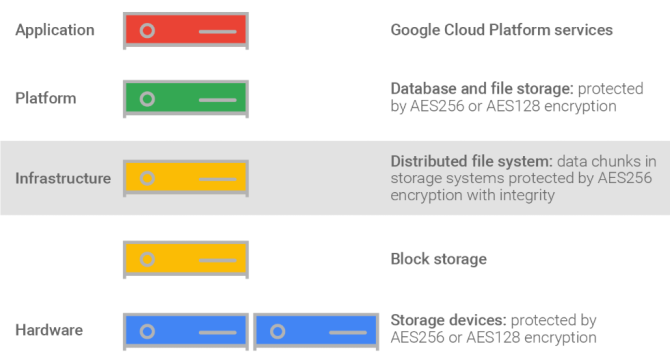
Google Drive uses AES-256 to protect file transfers, and AES-128 to encrypt your files at rest. AES is a very secure encryption algorithm without any currently feasible attacks, and is the current US Government encryption standard.

Your Google Drive account, then, keeps your files extremely secure when the upload completes and when your files are at rest.

How Google Drive Encryption Keeps You Safe

Incoming data is split into chunks, then Google Drive encrypts each chunk with a unique data key. The data key is then further encrypted with a specific key encryption key (wrapping the data encryption key) and stored by Google.

In addition to the double set of encryption keys, you can also protect your Google Drive with two-factor authentication (2FA), and you can use that 2FA with a secure password manager to add another layer of security.

In truth, there is no easy way to show you how Google Drive encryption works or what it looks like in a folder. Google purposefully doesn’t provide forward-facing information for Google Drive customers within the Google Drive environment. Like many things “Google,” it just works.

The system does have a few minor flaws, though.

Google Drive’s Biggest Issue: Privacy

Google Drive’s encryption has two main issues:

  1. During the upload process, your file has TLS protection. TLS stands for Transport Layer Security and is designed to protect data in transit. However, when your data arrives at the gates of your Google Drive, it is momentarily decrypted before being encrypted again. Why? Google rapidly scans and analyzes the file before encrypting it. There is very little chance of leakage, but it is still a slight flaw.
  2. You are never in control of the encryption keys, meaning you never have 100 percent control over your Google Drive data. Of course, you have 100 percent control in decision making—if you don’t like losing control of your encryption keys, read on for some solutions.

Yes, your files are secure with Google Drive. Yes, Google encrypts them internally. But no, that doesn’t mean Google isn’t using you for advertising (it is their business model, after all). The bottom line is that if you’re using a free Google product, then you have no true expectation of complete privacy.

The big question is: “Does it matter to you?”

I use Google Drive all the time. It’s a great and easy to use bridge between my desktop and laptop. However, I don’t use it for sensitive files, and realistically, nor should you. Other, more secure options are available.

Alternatively, there are tools you can use to increase your Google Drive privacy and security further.

Tools for Google Drive Security and Privacy

You can bulk out your Google Drive encryption using a client-side encryption tool. What does that mean?

Well, instead of sending your files as-is to Google, you encrypt them on your own system first, then send them to your Google Drive. Check out these useful encryption tools to use with Google Drive.

1. Cryptomator

Cryptomator tops this list. It is free, open source, has no backdoors, and requires no user registration. Better still, it is easy to set up and works on Windows, macOS, various Linux distributions, iOS, and Android (the Android and iOS apps aren’t free, however).

Cryptomator uses transparent encryption to make it feel like nothing extra is happening to your files, keeping your productivity at the same level. The major difference is the addition of a Cryptomator vault. The vault resides on your Google Drive, but you have a virtual hard drive to access and modify your files. Cryptomator encrypts each file you add to the virtual hard disk individually. Meaning if you only edit a Word document, only the Word document changes. The rest of your files remain encrypted at all times.

Cryptomator is a free, open source project—but it is donationware. Small donations keep amazing projects like Cryptomator ticking over, so do consider supporting if possible.

Download: Cryptomator for Windows | Mac | Linux (Free)
Download: Cryptomator for Android ($4.99)
Download: Cryptomator for iOS ($3.99)

2. Boxcryptor

Next up, Boxcryptor. Boxcryptor is a free product, but with limitations. For instance, the Boxcryptor free subscription grants users access to the basic Boxcryptor version, a single cloud provider, and only two devices.

Furthermore, Boxcryptor is proprietary software (closed-source, in other words). The lack of access to the Boxcryptor source code for analysis of weaknesses and backdoors is a major issue for some. However, there are as yet no indications as to any issues.

Boxcryptor creates a virtual drive on your system, then automatically adds any cloud providers to the drive. The Boxcryptor drive acts like an extra layer on top of your existing files, letting you view, edit, and save your encrypted files on-the-fly. Boxcryptor automatically encrypts any cloud files or folders within the drive, as well as those added in the future.

As for security, Boxcryptor uses AES-256 with RSA-4096 to encrypt your files. They are phenomenally secure.

Download: Boxcryptor for Windows | Mac | Android | iOS (Free with premium plans)

3. Rclone with Crypt

Rclone is a command line program to sync files and directories from Google Drive (and a long list of other services, too). Rclone is open source and offers a huge range of control and customization in their cloud service sync process.

In that, the crypt function allows you to encrypt your Google Drive files on your system before syncing. The video below is a thorough walk-through of how to do this.

Rclone with Crypt is an advanced tool. It takes a bit of setting up but once done grants you extensive control.

Download: Rclone for Windows (64-bit) | Windows (32-bit) | Linux (64-bit) | Linux (32-bit) (Free)

Google Drive Is Secure, But Not Entirely Private

You now understand a little more about how Google encrypts its cloud services. Your documents are secure, albeit lacking privacy. There are a few options available to expand your security and privacy.

Your Google Drive always has one weak-link: you. Users like you and me are always the potential weak link, and that is something only improved with better security education.

Read the full article: 3 Useful Tools to Improve Google Drive’s Security and Privacy


Read Full Article