17 May 2013

The New Google Maps, Now Available


By now, you've probably received the invitation to try the new Google Maps. It's not available without an invitation and it's likely that it won't replace the classic Google Maps very soon.


Depending on your computer and the browser you're using, you may not see the Google Earth view and other 3D features. WebGL features require Windows Vista/7/8, Mac OS 10.8.3+, Chrome OS, the latest versions of Chrome, Firefox and up-to-date graphics drivers. This page explains what's the lite mode and provides links for the lite mode and the full 3D mode.


Probably the most impressive feature in the new interface is the Google Earth integration that doesn't require a plugin. It looks great, even if it doesn't includes all the features of the desktop software. Earth view replaces the old satellite view, which is only available in the lite mode.


If you want to find "how Google Maps went from a flat map where Greenland looks bigger than Africa to a beautifully realistic 3D globe", Evan Parker from Google shares the story. From the Google Earth plugin to MapsGL and the new Earth view, it took almost 7 years to make Google Earth work smoothly in your browser.


Another impressive feature is the "Explore" box at the bottom of the page that combines Street View, panoramas and static photos. It's the best way to find interesting places and explore them from your armchair.


Standard maps look better, colors are softer, labels are easier to read. Google Maps finally has permalinks that automatically update in the address bar, so it's easier to share pages and bookmark them (permalinks only work in the new Google Maps, but you can also use the URLs generated by the old Google Maps).


You can no longer find a contextual menu when you right-click, so features like "directions to/from here", "zoom in/out", "center map here" are missing. Now you can click any place on the map and you'll get a small info pane below the search box that shows the address and lets you get directions and go to Street View. Double click to zoom in, use the mouse wheel or the "+"/"-" buttons.


The new Google Maps simplified navigation and removed many useful features like the zoom level bar, panning, "show my location" and the Street View Pegman. Layers like Wikipedia, weather, webcams, photos, videos, previous searches are no longer available, while transit, traffic and bicycling can be found in the "getting around" box.


"My Places" is not part of the new Google Maps interface. Click the "options" icon in the black navigation bar, select "My Places" and you'll go back to the old interface. It's a trick that lets you temporarily switch to the old interface. You can also click "classic maps".


The new full-screen interface places all the navigation controls on top of the map and invites you to explore the map. To get directions, mouse over the search box and click "directions". To find a place, use the search box. The transitions are smooth and Google Maps uses a simplified version of Google Instant: you're automatically sent to the place you've selected without having to press Enter. You can even find your contacts on the map.


You can restrict the results to places from top reviewers or your Google+ circles. Google emphasizes the reviews from your Google+ circles, so search results are personalized. Results are placed on the map and this is disconcerting: you don't know which one to click. Mouse over the results to get some information, click them to get even more information. It's a strange way to display search results, since you don't know which one is better. Google used to rank the results and ranking was an important component of local search. You can click "go to list of top results", but you're sent to a different page that includes other results and the list isn't comprehensive.


I don't like the new interface for directions because the step-by-step directions are no longer displayed automatically. You need to click "step-by-step" and you're sent to a different page. Switching between the suggested routes is more intuitive because all of them are displayed on them map and you can compare them. Google also includes transit directions, which have a simplified interface that summarizes information. There's also a new button for flight search, but it's limited to a few countries (United States, United Kingdom, France, Italy, Spain, and the Netherlands). Printing directions requires an additional click and you can no longer hide the map or include maps for all steps.


The new Google Maps requires a lot more resources, especially more RAM, so it's not a great idea to use it if you have an old computer. Earth View and Street View use a lot of memory, so don't be surprised if you see this:


The new Google Maps builds on the MapGL experiment, does away with plugins and has a cleaner interface that's better suited for mobile devices. Unfortunately, it's a memory hog and basic features like local search and directions are cumbersome.


How To Import Outlook.Com Contacts To Gmail


CLICK HERE TO SEE FULL POST


Back in July 2012, Microsoft launched Outlook.com webmail service with an intention to replace its Hotmail with a modern email service. The fresh UI, best in class anti-spam engine, and smart options to organize the inbox easily make Outlook.com the best Microsoft webmail service yet. The team behind Outlook.com has been adding new features to [...]

What Is HTML5, And How Does It Change The Way I Browse? [MakeUseOf Explains]


Over the past few years, you may have heard the term HTML5 every once in a while. Whether you know anything about web development or not, the concept can be somewhat nebulous and confusing. Obviously, it’s the next step in the line of HTML, but what exactly does it do? Why is there so much excitement around it? And why does it matter for you?


HTML, or HyperText Markup Language, is the most important element of the World Wide Web. It’s the language used to describe what a webpage should look like. However, HTML on its own is pretty boring because it can only deliver static pages; in order to meet the growing demand for more impressive web features, HTML has been coupled with plugins like CSS, Flash, Java, Silverlight, etc.


It has become something of a bloated mess and different browsers implement those features in their own ways. HTML5 is meant to solve HTML’s big problems for a cleaner and more efficient web.


HTML: An Overview


HTML as we know it today is called HTML4 and it was first published way back in 1997. Yes, that means we’ve been running on HTML4 for over 15 years now which is an eternity in tech time. Around 2000, a parallel markup language called XHTML started development and that’s been in use as well over the years, mostly due to the stricter standards that it imposes. In general, though, the two are pretty similar.


The problem with HTML4 is its limited functionality. It must be extended through plugins, like Flash, to provide more than simple text and images. Many video players, for example, were created and maintained on the Flash platform and embedded into HTML pages. Many web apps were developed using Java and embedded as well.


With all of these plugins, it becomes hard to maintain proper standards. Ideally, every browser should display every page on the web in the same way in order to deliver the same experience to every user. To display the same results on multiple browsers, web developers typically need to implement quick fixes and hacks in various portions of their site to accommodate different rendering processes. This gets cumbersome after a while.


On a more practical note, web pages that require plugins like Flash and Java end up using much more CPU and RAM. Ever wondered why your browser uses so much of your computer’s resources? A lot of it can be attributed to these HTML extensions. This is one reason why Apple has disabled Flash support on their mobile devices (to save on battery life).


What Exactly Is HTML5?


HTML4 has worked well, but it obviously has a number of flaws. The team behind HTML5 has a certain high-level plan for the next step in HTML, which means that HTML5 must be built on the following principles:


  • Less dependence on plugins for functionality.

  • Scripting should be replaced with markup whenever possible.

  • Device independence (i.e., available on all devices and providing the same end experience).

  • Public development process so people can see what’s going on.


More specifically, HTML5 adds a whole bunch of new markup tags:


  • <header> and <footer> tags to help you isolate the tops and bottoms of content blocks. Can be used more than once on a single page.

  • <article> tag which identifies a specific, singular piece of content, e.g., a blog post or a user comment.

  • <nav> tag to specify which sections should be considered navigational blocks.

  • <section> tag that lets you define a generic section of content; similar to the currently existing <div> tag.

  • <audio> and <video> tags to mark the inclusion of audio or video content.

  • <canvas> tag that lets you draw graphics using a separate scripting language.

  • <embed> tag to embed external content or applications into the page.


HTML5 also deprecates some tags: <acronym>, <applet>, <font>, <frame>, <frameset>, <noframes>, and a handful of others.


The full standards specification for HTML5 is planned to be completed by 2014, but HTML5 has made lots of progress already and it can be used to implement site features even today. The full standards specification for HTML5.1 is planned to be completed by 2016.


Why HTML5 Matters For You


As a web user, you will benefit from HTML5 because it fixes the most glaring problems in HTML4. Web sites will have better web standards, which will result in more efficient content and improved performance. As HTML5 is adopted across the board, web pages should start to load faster, less bandwidth should be used, and battery life on mobile devices ought to last longer.


Plus, you won’t have to keep so many plugins like Flash and Java updated. I hate it when I constantly have to update so many addons and plugins across multiple browsers. And what happens when one of them is the wrong version? Sites stop working and frustration ensues. All of that should be dealt away with when HTML5 becomes the main standard.


If you’re just a regular web user and you have no intentions of coding or maintaining your own web site, then you don’t have to do anything to enjoy HTML5’s awesome features. All major browsers today support HTML5 to a large degree and you’ve probably been taking advantage of it already without knowing. Just keep your browser updated and you’ll be good to go.


And if you’re a web developer, HTML5 will make everything simpler and easier for you. If all goes well, you won’t have to deal with edge cases in web design since all browsers will need to adhere to the same standards.


Conclusion


HTML5 is the future of web browsing and it will surely revolutionize the way we surf the Internet. Even under the limited nature of HTML4, developers have created some mind-boggling web sites, so it’ll be interesting to see what sort of neat advancements they’ll make with the functionality of HTML5.


Hopefully now you can see HTML5 in a clearer light and see why it’s been hyped up as much as it has. You can further your learning on these ten websites too that show you what HTML5 is all about. If you have any questions, please ask in the comments and I’ll do my best to answer you.


Image Credits: HTML5 Via Shutterstock, HTML Code Via Shutterstock, HTML5 Tag Cloud Via Shutterstock, Guy On Laptop Via Shutterstock


The post What Is HTML5, And How Does It Change The Way I Browse? [MakeUseOf Explains] appeared first on MakeUseOf.


Google Search Evolution


I found a great paragraph in a Google page about Gmail actions:


"Google Search is evolving from surfacing search results to answering questions. With Voice Search and Natural language queries, users can speak or type questions they have and see highly structured information cards in Search."


That changes how people interact with Google Search, how Google Search pages look, how queries are processed and what people expect from Google. When Google will be able to answer complex questions, to summarize long pages, use inferences to find new information and truly understand human language, you'll no longer need a browser for most searches. A Google search button can be embedded in any smart device from watches, fridges to smart glasses and cars.


In a recent video, Matt Cutts tries to predict the future of Google search: "It ought to be able to go out and take multiple sources of information and figure out how to combine those together and fuse or synthesize that information. And it should really be able to handle difficult syntax. So moving up the chain towards not just data or knowledge, but analysis, towards wisdom."


Gmail Actions


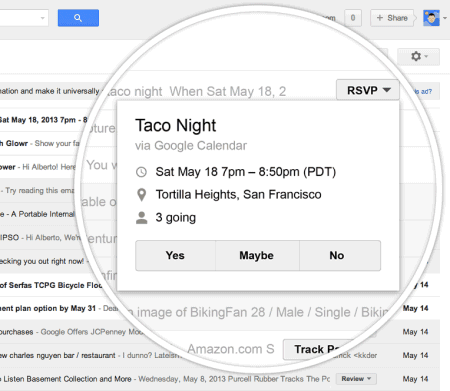
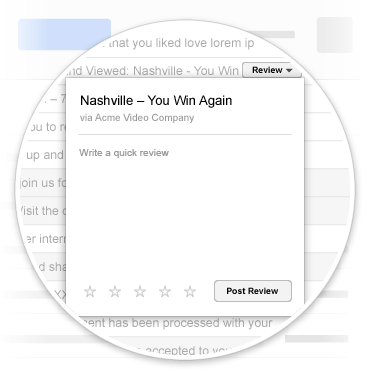
Wouldn't it be nice to deal with an email message without having to read it? Sure, you can read the subject line and archive the message, delete it or flag it as spam, but what happens when you receive notifications for online orders, flights, hotel reservations, reviews?


Gmail introduced quick action buttons that are placed next to the subject line in a list of messages. "These buttons appear next to certain types of messages in your inbox and let you take action on an email without ever having to open it. For example, you can RSVP to your friend's party invitation or rate that restaurant you went to last night all right from the inbox. You'll be checking things off that to-do list in no time."


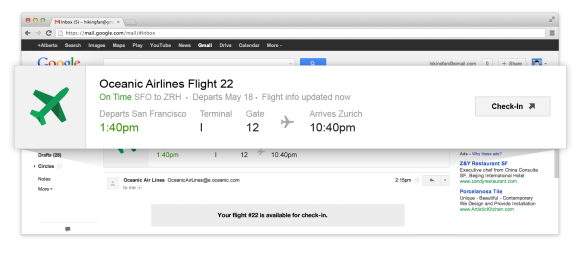
For flight notifications, Gmail has a special card displayed above the message that includes real-time information about the flight and a "check-in" button.


Google detects the type of message and tries to extract the most important action, but you can help Google by adding schema.org markup to the mail you're sending. Right now, Gmail support 4 quick actions (invitations, reviews, one-click actions and links to other pages) and one interactive card (flights). Now that Google includes Gmail results in Google search (Field Trial) and uses Gmail data to show Google Now notifications, the structured markup is even more useful.


Gmail actions "will roll out over the next few weeks" and I'm sure this will be a very useful addition to Google Apps for Business. What kind of quick actions and interactive cards would you like to see?


16 May 2013

Galaxy S4, Nexus Edition


Google didn't announce a new Nexus device at Google I/O, but you'll still get something close to a Nexus phone: Samsung Galaxy S4, unlocked, with LTE support for T-Mobile and AT&T, Google software and quick updates. It will be available on June 26 from Google Play US for $649.


"This is a Samsung Galaxy S4 with the same software experience we ship on our Nexus devices. It's Google's take on Android and it feels awesome on the S4," said Google VP Hugo Barra.


It's good news for everyone. Google can sell a powerful LTE phone that doesn't compete with Nexus 4 because it's more expensive. Samsung has access to Google's software updates, so there's less work to keep up with the new Android versions. Developers can buy a Nexus version of the most popular Android phone and can even use a MicroSD card. People who want to buy a Galaxy S4, but don't like Samsung's TouchWiz software, no longer have to rely on custom ROMs. Projects like CyanogenMod will do a better job of supporting Galaxy S4. Even if you buy the regular Galaxy S4, you'll get better software, whether you stick with Samsung's software or you install a custom ROM.


Samsung manufactured 2 other Nexus phones (Nexus S - 2010, Galaxy Nexus - 2011) and a Nexus tablet (Nexus 10 - 2012).


Preview the New Google Maps


Until Google sends invites that let you preview the new Google Maps interface, check the MoreThanAMap site to see the new maps. It's a site that shows demos for various Google Maps API features, but the "base maps" demos are the most interesting because you can see the new map tiles.


"For the last decade, we've obsessed over building great maps—maps that are comprehensive, accurate, and easy to use," says Google.


You can also check the new colors, the new icons for local business and the corresponding cards.


The new Street View powered by WebGL:


{ Thanks, Florian K. }


Google Play Apps and Services, the New Android Updates


Many people expected to hear some information about a new Android version at the Google I/O keynote. Google decided to focus on new development tools, Google Play Store, Google Play Music and new APIs for Google Play Services.


Actually Google focused on the things it can control and quickly update. Google Play Services is automatically installed by Google Play Store and it adds new APIs that Android apps can use, regardless of the Android version (Play Services requires Android 2.2+). That's a great way to deal with Android fragmentation and it allows Google to announce APIs that can be used by any app and that can reach almost any Android device.


"Devices running Android 2.2 and newer and that have the Google Play Store app automatically receive updates to Google Play services. Enhance your app with the most recent version of Google Play services without worrying about your users' Android version," suggests Google.


For example, Google Play Games services can be used by any Android game to provide features like saving state, leaderboards, achievements, auto-matched players, real-time multiplayer. These services can also be used on iOS and for web apps, so they're even more useful. If Google added these features in Android 4.3, few people could use them and few developers would update their games to support them. Most likely, only Nexus devices would be updated to Android 4.3 shortly after the announcement, while other devices would be updated in 6 months or later or maybe never. Android 4.2 was launched 6 months ago and only 2% of the Android devices run it.


New Android versions are still important, but Google has some other meaningful ways to make Android better. Most Google apps are available in the Play Store and can be updated without waiting for a new Android version. Chrome, Google Search (with Voice Search and Google Now), Google Maps, Google Hangouts, Google Calendar, Google Play Music and the other Play apps can be improved and change the way you use your Android device. Play Services can improve entire categories of apps, add features that improve battery life, make notifications more useful, improve Google+ and Google Maps integration.


Android's flexibility is a double-edged sword. In this case, detaching system apps and APIs from the operating system is a huge advantage and makes new Android versions less important.


How To Save Office 2010 Documents To SkyDrive By Default


CLICK HERE TO SEE FULL POST


Ever since the release of official SkyDrive client for desktop, millions of Windows users have been using the cloud storage service from Microsoft to keep a backup of crucial documents, pictures, and other files. As you may know, Microsoft Office 2013 offers an option to quickly save documents to your SkyDrive account. If you are [...]

Add Facebook Trusted Contacts To Ensure You Can Recover Your Account


facebook trusted contactsDo you stay in touch with close friends and family via Facebook? How would you feel if you were suddenly locked out of Facebook?


It happens all the time. People forget their password, accounts get hacked, or Facebook decides they have violated the Terms of Service and bans them. And when they try to recover their account, they realize that phone numbers or email addresses they once provided for a potential security check are long out of date. So what can they do to recover their Facebook account?


The Problem


Facebook is notorious for its impersonal customer support. Instead of offering a human to talk to, they prop their online Help Center with admittedly excellent instructions on how to recover your account – in theory. Unfortunately, many cases are special and can not be solved with an automated system. Consequently, Facebook must have been overwhelmed with people trying to contact them in person and cases that required proof of identity. Users have been frustrated with the lack of human assistance and report that it took Facebook weeks to process documents and unlock their accounts.


facebook trusted contacts


To address this dilemma, Facebook has now introduced a security feature that let’s your close friends help you recover your account. Facebook previously announced a featured called Trusted Friends , which was available during an initial testing period from October 2011 until early 2012. What they have released now is an overhauled version, which lets you designate friends as Facebook trusted contacts ahead of time, rather than selecting them only when you can no longer access your account. Making your friends confirm your identity is a smart move on Facebook’s part!


How To Add Facebook Trusted Contacts


Trusted Contacts can be added and changed anytime via Security Settings. Click Edit next to Trusted Contacts and click Choose Trusted Contacts.


facebook trusted friends


Then type in the names of friends you trust. For example I have added my sister and friends I am regularly in touch with through Facebook or otherwise.


facebook trusted friends


Next you need to enter your password to confirm the changes.


facebook trusted friends


When you have successfully completed this step, your Facebook trusted contacts will show up under Security Settings. You can edit or remove them anytime.


facebook trusted friend tool


How To Recover Your Account with Trusted Contacts


From the Facebook Homepage, click Forgot your password? on the top right. Then find your account via your email address, phone number, username or full name. When using your own full name, you may also have to enter a friend’s full name, so Facebook can find the right account. Once it does, Facebook will offer to send a link to reset your password to your email address(es). Since I found my account using my Gmail address, it also offered me the use of the Google account to reset my password.


facebook trusted friend tool


Click No longer have access to these? if you cannot access your email. You will then be asked to confirm an email address you can access, although that won’t be necessary to recover your account.


facebook trusted friend tool


In the next step you can reveal your trusted contacts. You need to personally contact three of them, ask them to visit https://www.facebook.com/recover so they receive your recovery codes, collect these codes, and enter them in the form to recover access to your account.


facebook trusted contacts


Words Of Caution


Choose your trusted friends wisely. In some places hacking a person’s account is a kind of sport. If you have three close friends who know each other and could potentially team up to play a mischievous trick on you, reconsider. Who can you really trust?


Ask yourself…


  • Who would you trust with the key to your apartment?

  • Who can you get in touch with outside Facebook and without access to your email account?


The above are your minimum requirements. If you know three or more people who qualify and don’t know each other or would never play a mean trick on you, you have found the perfect candidates to be added as Facebook trusted contacts.


Conclusion


Trusted Contacts are a last resort to recovering your account and probably the most dicey one. And just like any other recovery option, you have to keep them current. What if your friendship ends, your friend stops using Facebook, or cannot be reached for a significant amount of time? Frankly, I think it’s easier to enable Facebook Two Factor Authentication and make sure your backup email addresses and phone numbers are up to date. However, having yet another extra security net doesn’t hurt, but I wouldn’t rely only on Trusted Contacts.


Other Ways To Secure Your Facebook Account


Don’t forget the other basic ways of securing your Facebook account:


Double-check your General Account Settings. Make sure your primary email address is current and add secondary email addresses. Set a secure password. Check your Mobile Settings and add another mobile phone number. Set up Facebook Login Approvals and install the Code Generator on your Android. And finally add Trusted Contacts.


Has your Facebook account ever been hacked and how did you recover it? How do you make sure this never happens (again)?


The post Add Facebook Trusted Contacts To Ensure You Can Recover Your Account appeared first on MakeUseOf.