06 November 2020

TikTok takes down some hashtags related to election misinformation, leaves others


As social media platforms struggle to get U.S. election misinformation under control with varying degrees of success, TikTok has taken new actions to stop people from searching and browsing select hashtags associated with misinformation and conspiracies related to the U.S. election results.

The video app has redirected some hashtags — including #RiggedElection, #SharpieGate and others — where users have been publishing election misinformation. And it has taken down various videos making claims of “election fraud.

However, based on our scans of the app and other election-related hashtags today, it’s clear that it’s still an uphill battle for TikTok in terms of getting a handle on violating content.

Because of TikTok’s size and scale, even smaller videos from unknown publishers can rack up thousands of views before they disappear.

Media Matters, for example, reported yesterday it was able to identify 11 examples of election misinformation spreading across TikTok, with more than 200,000 combined views. The videos shared conspiracies that ranged from unfounded “magic ballot” narratives to the completely untrue allegations that Arizona poll workers handed out markers to Trump voters so their votes wouldn’t count.
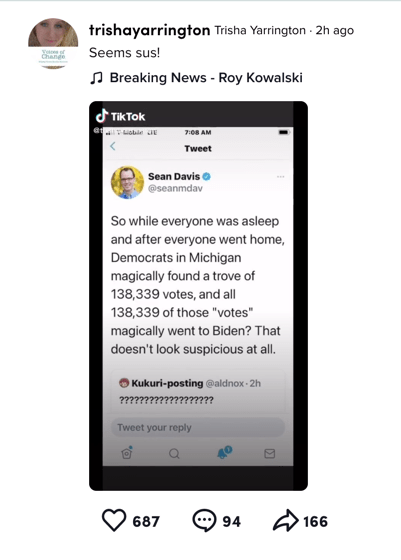
Image Credits: TikTok screenshot via Media Matters

TikTok says all the videos Media Matters reported have since been removed except one where a user made a premature declaration of victory. That one was shadowbanned — meaning its discoverability on the platform was reduced. It also has a banner pointing to authoritative information about the election results.

These individual takedowns are a drop in the bucket compared to the number of videos that are still out there making claims of election fraud. And, so far, TikTok has only removed a small number of hashtags on this subject.
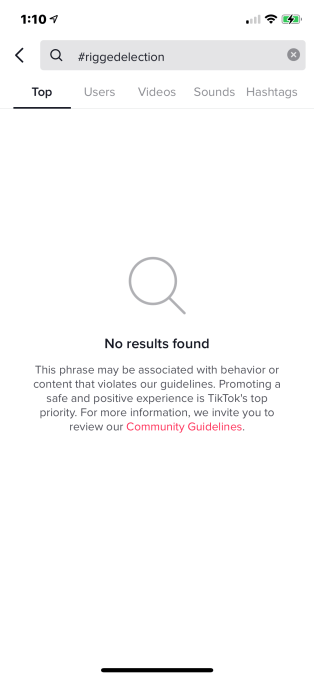
Image Credits: TikTok screenshot via TechCrunch

TikTok confirmed it has removed content and redirected searches for the hashtag #RiggedElection as of yesterday. Now, when you try to find videos flagged with this term in the app, you’ll get to a blank page with a notification that says the search term “may be associated with behavior or content that violates our guidelines.” The page also provides a link to TikTok’s Community Guidelines.

“Promoting a safe and positive experience is TikTok’s top priority,” the message reads.

This is the same playbook that TikTok recently used to address the spread of QAnon-related content on its platform. By redirecting searches and hashtags, it makes misinformation harder to find.

While TikTok declined to share an exhaustive list of hashtags it has taken action on during the elections, we found a few hashtags that returned either no results — like #RiggedElection and #SharpieGate — as well as those that returned only a small handful videos, or what TikTok considers “counter speech.”

The TikTok community will often create videos with counter speech or other content related to a misinformation-related hashtag. In these videos, they’ll provide factual information or will dispute the claims being made in another video. TikTok says this sort of counter speech doesn’t violate its policies. That’s why you may see videos listed under hashtags that would otherwise be associated with misinformation, as opposed to seeing the hashtag entirely silenced.

We also found some lesser-used hashtags like #RepealtheSteal and #VeritasArmy, which have been seen on Twitter, were not showing on TikTok at all. (However, upon reaching out to TikTok, the company chose to redirect these hashtags, too.)

A popular misinfo hashtag, #StoptheSteal, was also not available, but its variation, #StoptheStealing, had seven videos.

Many other hashtags were being used, too, as of the time of writing, including #VoterFraud (and its misspelling #VoterFruad), #DemsCheat, #CorruptElection, #ElectionCorruption, #StoptheStealing, #ElectionFraud (and misspelling #ElectionFruad), #CrookedJoeBiden, #CrookedDems, #Fraud (and its misspelling #Fruad), #Rigged, #Rigged2020, #MailinBallots, #CoupdEtat, #ElectionMeddling, #DemocratsAreDestroyingAmerica and #BallotHarvesting, to name a few.

While some hashtags had little content, many were filled with videos that weren’t just expressing their political views — they were making claims of election fraud. Combined, these hashtags have tens of millions of views, or even more.
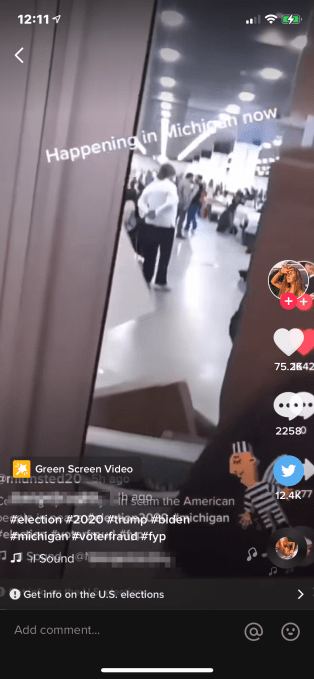
Image Credits: TikTok screenshot, video republished previously removed content; screenshot via TechCrunch

For example, when we searched for the hashtag #VoterFraud (20.9 million views), we first encountered videos posted in the months leading up to Election Day that were responding to the Republican-driven claims of voter fraud associated with mail-in ballots.

But many videos under this hashtag have been published by Trump supporters this week, and are videos where the supporters are directly disputing the election results.

Among the videos we found were those reposting videos TikTok had already taken down. These included videos featuring Trump supporters’ protests against or for the counting of ballots in various states, calling them proof of election fraud.

In other videos, users opine about how Trump’s lawsuits will prove fraud took place and win him re-election. They sometimes use screenshots of website vote tallies as their “proof.”
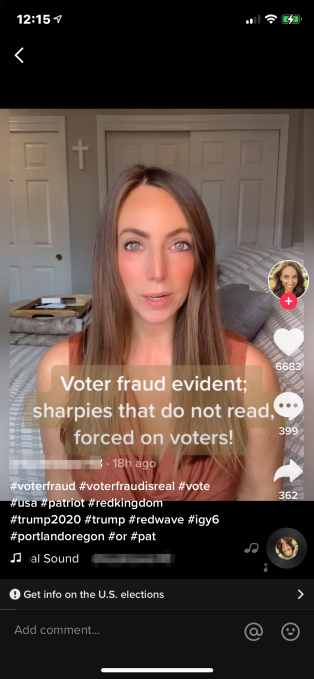
Image Credits: TikTok app screenshot via TechCrunch

We also saw videos using text labels overtop their video footage. The text was used to make their claims of election fraud, while the video itself may have them talking in more measured terms about their disappointment with the election results. (It’s unclear if this is a viable workaround to avoiding rule enforcement, however.)

TikTok says its list of blocked hashtags continually grows as new terms and phrases emerge and it’s able to determine how the terms are being used on its platform. It also said it block more election misinformation hashtags in the hours, days and weeks to come.

To be clear, TikTok’s decision to keep this sort of content online doesn’t make it much different from other social networks.

During election season, Facebook and Twitter have taken to labeling election misinformation from high-profile accounts (like Trump’s). Facebook even ran in-app notifications to inform users that votes are still being counted. But both platforms today still easily allow users to click through on a wide range of hashtags that promote this idea of election fraud or rigged results.

TikTok may not much be doing much better, overall, in addressing the sizable amount of content promoting election misinformation on its video network. But TikTok’s ban of top election misinformation hashtags works differently from hashtag bans on other social networks.

Once TikTok has made the decision to ban a term like “SharpieGate,” for example, the content won’t be surfaced whether you use the hashtag symbol (#) itself or not. Facebook, on the other hand, may ban the hashtag specifically, but not the term entirely. That means you can still find content about SharpieGate on its platform — even if it’s largely posts and videos from news organizations.

#SharpieGate was also among the hashtags Facebook began blocking today related to election misinformation. It also blocked #StoptheSteal and a related group.


Read Full Article

Facebook blocks hashtags for #sharpiegate, #stopthesteal election conspiracies


Facebook today began to block select hashtags which were being used to share misinformation related to the 2020 U.S. presidential election.

Now, searches for the hashtags #SharpieGate is being blocked on the social network. Another election conspiracy hashtag #stopthesteal is also blocked on Facebook, with a note saying some of its content goes against the platform’s community standards. The #stopthesteal hashtag has been promoted by Donald Trump Jr. and other Trump campaign associates on Twitter.

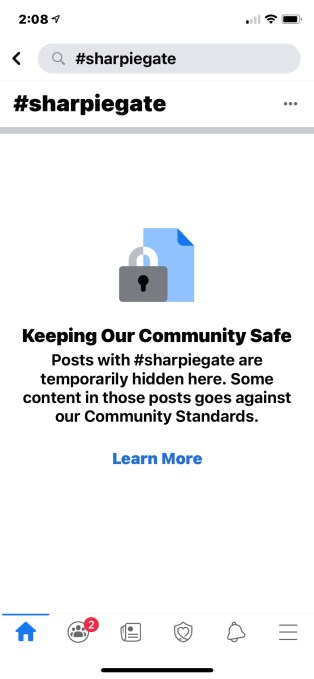
Instead of taking users to search results for the hashtag in question, Facebook presents a page where it explains that posts with the hashtag are being “temporarily hidden.” This message also explains that “some content in those posts goes against our Community Standards,” and offers to direct users to its guidelines under a “Learn More” link.

Image Credits: Facebook screenshot via TechCrunch

Though TechCrunch found select election misinformation hashtags had been banned, there were still many others that would direct users to content that pushed conspiracies disputing the election results or outright calling them fraudulent.

For example, hashtags like #RiggedElection, #Rigged, #ElectionFraud, #ElectionMeddling and others still worked, and even directed users to content associated with QAnon conspiracies, at times — despite Facebook’s earlier ban on QAnon content, which extended to many associated hashtags.

Given that Facebook allowed QAnon content to spread for years, it’s notable that the company moved to block election misinformation hashtags in a matter of days. That indicates Facebook is capable of addressing viral misinformation somewhat quickly — it just has historically chosen not to do so.

As for the hashtags themselves, Sharpiegate had already been thoroughly debunked, both by news outlets and election officials. In a letter posted to Twitter, the Maricopa County Board of Supervisors debunked the claims that the use of sharpies would invalidate ballots. Because the ballots are printed with offset columns, the use of sharpies is allowed and would not cause bleed-through or other issues.

The claim was first made Tuesday in a video posted to Facebook in which a woman claims poll workers were encouraging some voters to use sharpies in order to invalidate their ballots. That video is now flagged on Facebook with a “false information” label and requires users to click through to watch it.

In addition to its hashtag bans, Facebook today also removed a group, “Stop the Steal,” that had been organized to delegitimize the election process, the company told BuzzFeed reporter Ryan Mac.

President Trump is leaning heavily into a false narrative that suspicious polling place behavior and late-arriving ballots are part of a Democratic plot to thwart his reelection chances. In a speech from the White House early Wednesday morning, Trump declared premature victory, raising baseless concerns that mail-in ballots, which were expected to lean heavily Democratic, were somehow improper as they erased some of his early gains. “We were getting ready to win this election,” Trump said. “Frankly, we did win this election.”

On Twitter, many of Trump’s recent tweets promoting unfounded election conspiracies have been hidden from view and placed behind a misinformation warning. Those hidden tweets also have likes, retweets and comments restricted in order to limit their ability to spread in a viral way. On Facebook, the president’s posts alleging fraud at voting sites are not called out directly as misinformation. Instead, Facebook pairs them with informational labels reminding users that vote-by-mail ballots are trustworthy or noting that election officials follow “strict rules” around processing and counting ballots.

Facebook so far has not responded to a request for comment about its new hashtag bans, but they’re observable within the Facebook app on both the desktop and mobile app as of the time of writing.


Read Full Article

Revolution Cooking’s R180 Smart Toaster delivers smarter, faster toasting – for a price


A lot of the past decade in smart home gadgets has been figuring out just how smart we actually want our appliances to be. In a lot of cases when it comes to cooking, the old ways are best, and smart features tend to just complicate things. The new Revolution Cooking R180 High-Speed Smart Toaster ($299.95) strikes the right balance, delivering genuinely useful tech-enabled goodies, without any of the things you don’t need in a toaster – like an internet connection.

The basics

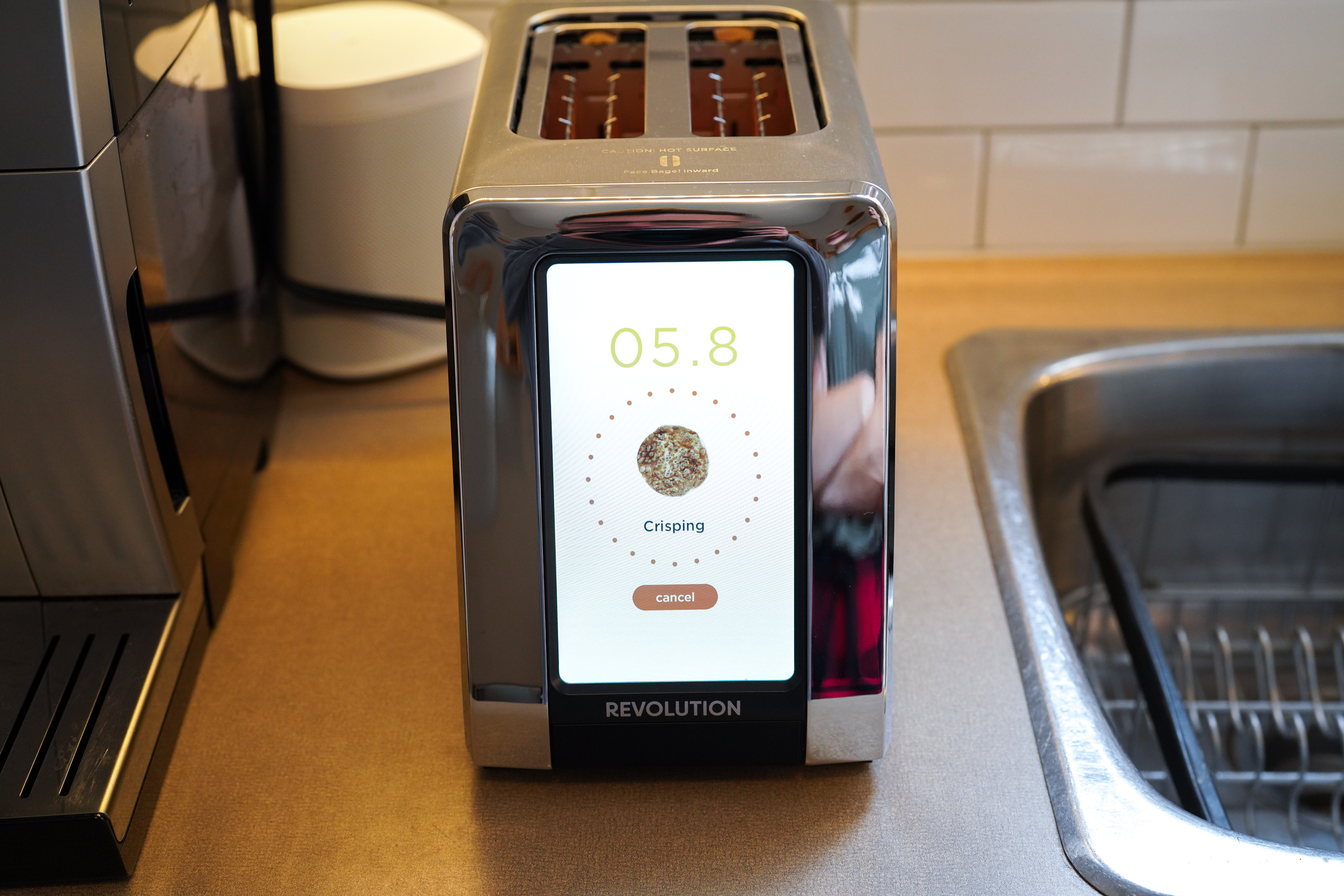
Revolution Cooking’s R180’s most immediately apparent feature is its large, prominent touchscreen display. The screen replaces your typical hardware controls, including buttons and switches, and gives you visual feedback about the toasting process when it’s underway. This is definitely part of the ‘smart’ of the R180’s Smart Toaster designation, but the company’s ‘InstaGlo’ heating technology might be better described as its primary differentiator.

In terms of basic specs, this is a two-slice toaster with slots that are wide enough to accommodate bagels and burger buns pretty easily. It has selectable modes for bagels, sliced bread, English muffins, waffles and toaster pastries (like pop-tarts). You can choose between three different heating modes, including ‘fresh,’ ‘frozen’ and ‘reheat’, and there are seven different darkness levels for browning.

There’s a standby clock display option for when the toaster isn’t in use, and the toaster can provide reminders occasionally to nudge you to remove and empty the crumb tray.

Design and performance

Image Credits: Darrell Etherington

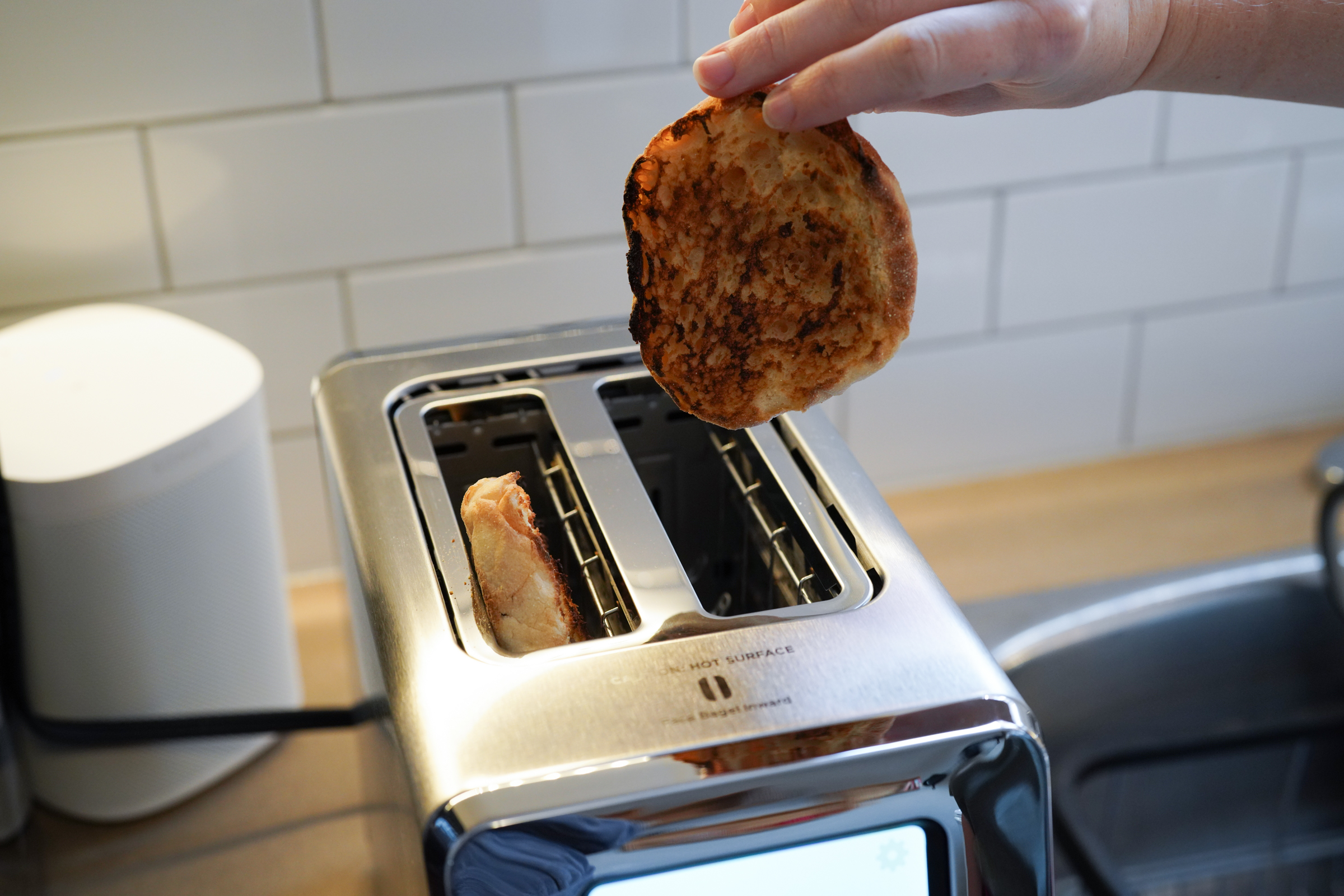
The industrial design of the Revolution R180 is good, without being wacky or overly futuristic. It’s basically a brushed stainless steel rectangle, with a sloped chrome front face and the large touchscreen display. The toaster unquestionably looks good sitting on a counter, however, and the slant of its front is a nice touch for ensuring prime visibility and touchscreen control access when you’re using it from a standing position. It’s also relatively compact, and won’t take up too much room if you’re concerned at all about counter real estate.

The display is big and bright, and uses capacitive touch so it’s very responsive in terms of input detection. The nice thing about the interface is that even though it’s digital, it keeps things simple – everything you need is on one screen, with a standard cog icon hiding settings that let you do neat but unnecessary things like setting the time and choosing between an analog or digital virtual clock face for the sleep screen.

Using the R180 Smart Toaster is easy – there’s no internet connection to set up or app to install, you just plug it in and it starts up, presenting you with the bread type/browning level/heating mode selection screen. Tap the image associated with what you want to toast, or scroll left and right to reach others, select from the three modes and tap the browning level that corresponds with what color you want the toasted item to mostly closely resemble (the image above updates to reflect this) and hit the ‘Start’ button and you’re off to the races.

Image Credits: Darrell Etherington

And it really is a race: The Revolution toaster is faster than most. I was perhaps expecting even faster given the company’s marketing claims, but there’s no question that it’s speedier than your average toaster. The other big claim that Revolution makes is about toasting quality, as it promises not to dry out your bread, and provide better-tasting end products, even with tricky toasting situations like a combo dethaw and brown.

Here’s the thing: I wasn’t even really aware of these claims the first time I tried out the review unit they sent, and me and my partner both instantly noted about how anything toasted in the R180 seemed not nearly as dried out as in our existing Breville toaster. And yet, the toasted parts were crisp and golden at the same time. Surprising as it might sound, Revolution’s claims bear out – the Smart Toaster really does make better-tasting toast.

Bottom line

A $300 two-slice toaster definitely seems like an extravagance – and to be clear, it is – but premium non-smart toasters already stretch the limits of most home appliance budgets, and Revolution’s main claim to superiority is achieving a crunchy exterior while leaving the inside soft and not dried out, and it does this with aplomb. The touchscreen almost certainly adds to the cost, but it does provide a clear and easy-to-understand interface for setting desired toast goals, and it’s a pretty good-looking countertop clock when not in use. In short, Revolution’s Smart Toaster is just smart enough, and smart where it counts, for a smart appliance – but expensive enough that it’s worth taking a long, hard think about just how much you love toasted things.


Read Full Article

Alibaba passes IBM in cloud infrastructure market with over $2B in revenue


When Alibaba entered the cloud infrastructure market in earnest in 2015 it had ambitious goals, and it has been growing steadily. Today, the Chinese ecommerce giant announced quarterly cloud revenue of $2.194 billion. With that number, it has passed IBM’s $1.65 billion revenue result (according to Synergy Research market share numbers), a significant milestone.

But while $2 billion is a large figure, it’s one worth keeping in perspective. For example, Amazon announced $11.6 billion in cloud infrastructure revenue for its most recent quarter, while Microsoft’s Azure came in second place with $5.9 billion.

Google Cloud has held onto third place, as it has for as long as we’ve been covering the cloud infrastructure market. In its most recent numbers, Synergy pegged Google at 9% market share, or approximately $2.9 billion in revenue.

While Alibaba is still a fair bit behind Google, today’s numbers puts the company firmly in fourth place now, well ahead of IBM. It’s doubtful it could catch Google anytime soon, especially as the company has become more focused under CEO Thomas Kurian, but it is still fairly remarkable that it managed to pass IBM, a stalwart of enterprise computing for decades, as a relative newcomer to the space.

The 60% growth represented a slight increase from the previous quarter’s 59%, but basically means it held steady, something that’s not easy to do as a company reaches a certain revenue plateau. In its earnings call today, Daniel Zhang, chairman and CEO at Alibaba Group said that in China, which remains the company’s primary market, digital transformation driven by the pandemic was a primary factor in keeping growth steady.

“Cloud is a fast-growing business. If you look at our revenue breakdown, obviously, cloud is enjoying a very, very fast growth. And what we see is that all the industries are in the process of digital transformation. And moving to the cloud is a very important step for the industries,” Zhang said in the call.

He believes eventually that most business will be done in the cloud, and the growth could continue for the medium term as there are still many companies who haven’t made the switch yet, but will do so over time.

John Dinsdale, an analyst at Synergy Research says that while China remains its primary market, the company does have a presence outside the country too, and can afford to play the long game in terms of the current geopolitical situation with trade tensions between the U.S. and China.

“Alibaba has already made some strides outside of China and Hong Kong. While the scale is rather small compared with its Chinese operations, Alibaba has established a data center and cloud presence in a range of countries, including six more APAC countries, US, UK and UAE. Among these, it is the market leader in both Indonesia and Malaysia,” Dinsdale told TechCrunch.

In its most recent data released a couple of weeks ago prior to today’s numbers, Synergy broke down the market this way: “Amazon 33%, Microsoft 18%, Google 9%, Alibaba 5%, IBM 5%, Salesforce 3%, Tencent 2%, Oracle 2%, NTT 1%, SAP 1% – to the nearest percentage point.”


Read Full Article

Apple releases iOS 14.2 with new emojis and accessibility feature that locates people with LiDAR


Apple has released iOS 14.2 today. It includes multiple new features as well as some important bug fixes and security updates. Among other things, this release introduces over 100 new emojis.

You’ll find a transgender flag, a smiling face with tear, pinched fingers, two people hugging, some insects and animals, a disguised face and more. When it comes to new variations, there will be a Mx Claus, a gender-inclusive alternative to Santa Claus and Mrs. Claus. Tuxedos are no longer limited to men and veils are no longer limited to women — you’ll be able to send an emoji with a woman wearing a tuxedo and a man wearing a veil.

Today’s release also includes a new accessibility feature for blind users who have an iPhone 12 Pro and Pro Max. Thanks to the built-in LiDAR sensor, you can use your iPhone to detect the presence of and distance to people in the view of the iPhone’s camera.

While it is still useful beyond the COVID-19 pandemic, you can use it to receive an alert when there’s someone in front of you that is more than six feet away, and another one if they come closer to you. In addition to stereo audio alerts, you can set up a haptic pulse that goes faster as the person gets closer.

TechCrunch’s Devin Coldewey has more details on the new feature:

iOS 14.2 also adds some minor features, such as new wallpapers, headphone audio level notifications when the volume is too high and redesigned controls for AirPlay.

When Apple introduced the HomePod Mini, the company talked about a new Intercom feature that lets you interact with another Apple user in your house. Today’s software updates add Intercom support for the iPhone, iPad, Apple Watch, AirPods and CarPlay.

If you have AirPods, you can now enable optimized battery charging. It works like optimized battery charging on your iPhone. If you plug your AirPods before going to bed, they won’t charge at full speed. Instead, your iPhone can tell your AirPods to charge to 100% right before you wake up — it should improve your battery life.

Apple is also releasing iPadOS 14.2 and watchOS 7.1. Apple Watch users in South Korea and Russia can now try out the ECG feature with recent Apple Watch models.

Before updating, back up your device. Make sure your iCloud backup is up to date by opening the Settings app on your iPhone or iPad and tapping on your account information at the top. Alternatively, you can plug your iOS device into your computer to do a manual backup in iTunes or the Finder. Once this is done, you should go to the Settings app, then ‘General’ and then ‘Software Update.’

Here’s the full iOS 14.2 changelog:

iOS 14.2 includes the following improvements for your iPhone:

  • Over 100 new emoji, including animals, food, faces, household objects, musical instruments, gender-inclusive emoji, and more
  • Eight new wallpapers in both light and dark mode versions
  • Magnifier can detect people nearby, and report their distance using the LiDAR sensor included in iPhone 12 Pro and iPhone 12 Pro Max
  • Support for iPhone 12 Leather Sleeve with MagSafe
  • Optimized battery charging for AirPods to slow the rate of battery aging by reducing the time your AirPods spends fully charged
  • Headphone audio level notifications to alert you when audio level could impact your hearing
  • New AirPlay controls to stream entertainment throughout your home
  • Intercom support with HomePod and HomePod mini using iPhone, iPad, Apple Watch, AirPods, and CarPlay
  • Ability to connect HomePod to Apple TV 4K for stereo, surround sound, and Dolby Atmos audio
  • Option to provide statistics about Exposure Notifications, without identifying you, to participating Public Health Authorities

This release also fixes the following issues:

  • Apps could be out of order on the Home Screen dock
  • Camera viewfinder may appear black when launched
  • The keyboard on the Lock Screen could miss touches when trying to enter the passcode
  • Reminders could default to times in the past
  • Photos widget may not display content
  • Weather widget could display the high temperature in Celsius when set to Fahrenheit
  • Next-hour precipitation chart description in Weather could incorrectly indicate when precipitation stops
  • Voice Memos recordings are interrupted by incoming calls
  • The screen could be black during Netflix video playback
  • Apple Cash could fail to send or receive money when asked via Siri
  • Apple Watch app may unexpectedly close when opened
  • Workout GPS routes or Health data are prevented from syncing between Apple Watch and iPhone for some users
  • Audio is incorrectly labeled as "Not Playing” in the CarPlay Dashboard
  • Devices could be prevented from charging wirelessly
  • Exposure Notifications is disabled when restoring iPhone from iCloud Backup or transferring data to a new iPhone using iPhone Migration

For information on the security content of Apple software updates, please visit this website: https://ift.tt/1UO9Pxs


Read Full Article

Apple releases iOS 14.2 with new emojis and accessibility feature that locates people with LiDAR


Apple has released iOS 14.2 today. It includes multiple new features as well as some important bug fixes and security updates. Among other things, this release introduces over 100 new emojis.

You’ll find a transgender flag, a smiling face with tear, pinched fingers, two people hugging, some insects and animals, a disguised face and more. When it comes to new variations, there will be a Mx Claus, a gender-inclusive alternative to Santa Claus and Mrs. Claus. Tuxedos are no longer limited to men and veils are no longer limited to women — you’ll be able to send an emoji with a woman wearing a tuxedo and a man wearing a veil.

Today’s release also includes a new accessibility feature for blind users who have an iPhone 12 Pro and Pro Max. Thanks to the built-in LiDAR sensor, you can use your iPhone to detect the presence of and distance to people in the view of the iPhone’s camera.

While it is still useful beyond the COVID-19 pandemic, you can use it to receive an alert when there’s someone in front of you that is more than six feet away, and another one if they come closer to you. In addition to stereo audio alerts, you can set up a haptic pulse that goes faster as the person gets closer.

TechCrunch’s Devin Coldewey has more details on the new feature:

iOS 14.2 also adds some minor features, such as new wallpapers, headphone audio level notifications when the volume is too high and redesigned controls for AirPlay.

When Apple introduced the HomePod Mini, the company talked about a new Intercom feature that lets you interact with another Apple user in your house. Today’s software updates add Intercom support for the iPhone, iPad, Apple Watch, AirPods and CarPlay.

If you have AirPods, you can now enable optimized battery charging. It works like optimized battery charging on your iPhone. If you plug your AirPods before going to bed, they won’t charge at full speed. Instead, your iPhone can tell your AirPods to charge to 100% right before you wake up — it should improve your battery life.

Apple is also releasing iPadOS 14.2 and watchOS 7.1. Apple Watch users in South Korea and Russia can now try out the ECG feature with recent Apple Watch models.

Before updating, back up your device. Make sure your iCloud backup is up to date by opening the Settings app on your iPhone or iPad and tapping on your account information at the top. Alternatively, you can plug your iOS device into your computer to do a manual backup in iTunes or the Finder. Once this is done, you should go to the Settings app, then ‘General’ and then ‘Software Update.’

Here’s the full iOS 14.2 changelog:

iOS 14.2 includes the following improvements for your iPhone:

  • Over 100 new emoji, including animals, food, faces, household objects, musical instruments, gender-inclusive emoji, and more
  • Eight new wallpapers in both light and dark mode versions
  • Magnifier can detect people nearby, and report their distance using the LiDAR sensor included in iPhone 12 Pro and iPhone 12 Pro Max
  • Support for iPhone 12 Leather Sleeve with MagSafe
  • Optimized battery charging for AirPods to slow the rate of battery aging by reducing the time your AirPods spends fully charged
  • Headphone audio level notifications to alert you when audio level could impact your hearing
  • New AirPlay controls to stream entertainment throughout your home
  • Intercom support with HomePod and HomePod mini using iPhone, iPad, Apple Watch, AirPods, and CarPlay
  • Ability to connect HomePod to Apple TV 4K for stereo, surround sound, and Dolby Atmos audio
  • Option to provide statistics about Exposure Notifications, without identifying you, to participating Public Health Authorities

This release also fixes the following issues:

  • Apps could be out of order on the Home Screen dock
  • Camera viewfinder may appear black when launched
  • The keyboard on the Lock Screen could miss touches when trying to enter the passcode
  • Reminders could default to times in the past
  • Photos widget may not display content
  • Weather widget could display the high temperature in Celsius when set to Fahrenheit
  • Next-hour precipitation chart description in Weather could incorrectly indicate when precipitation stops
  • Voice Memos recordings are interrupted by incoming calls
  • The screen could be black during Netflix video playback
  • Apple Cash could fail to send or receive money when asked via Siri
  • Apple Watch app may unexpectedly close when opened
  • Workout GPS routes or Health data are prevented from syncing between Apple Watch and iPhone for some users
  • Audio is incorrectly labeled as "Not Playing” in the CarPlay Dashboard
  • Devices could be prevented from charging wirelessly
  • Exposure Notifications is disabled when restoring iPhone from iCloud Backup or transferring data to a new iPhone using iPhone Migration

For information on the security content of Apple software updates, please visit this website: https://ift.tt/1UO9Pxs


Read Full Article

05 November 2020

Google and Walmart face growth hurdles as India caps payments transactions


Google and Walmart have a new challenge ahead of them as they race to expand the reach of their payments apps in India: They won’t be permitted to grow beyond a limit.

National Payments Corporation of India (NPCI), the body that operates the widely popular UPI payments infrastructure, said Thursday evening that it will enforce a cap to ensure that no single payments app processes more than 30% of UPI transactions in a month.

The payments body said the move is aimed at addressing the “risks” and “protecting the UPI ecosystem as it further scales up.” The change goes into effect in January 2021.

UPI is a payments infrastructure built by large banks in India and is backed by the Indian government. It has become the most popular digital payments method in the country in recent years.

The cap of 30% will be calculated based on total volume of UPI transactions processed in the preceding three months, it added.

The move, described by an industry executive as the most absurd thing they have heard in months in India, will severely impact Google and Walmart, whose respective apps already process more than 35% of UPI transactions each.

In fact, Walmart’s PhonePe processed more than 40% of about 2 billion transactions on UPI network last month.

It remains unclear how any payments app will comply with this limit. Let’s say PhonePe or Google Pay has already processed about 650 million transactions in three weeks. Would it just switch off UPI payments on their app for the remainder of the month?

More to follow…


Read Full Article

TikTok tests a Learn tab to showcase education and how-to videos


How-to videos have been some of the most popular content on YouTube over the years, and now, to grow engagement and the pool of users that it appeals to, the upstart video app TikTok is getting in on the action, too.

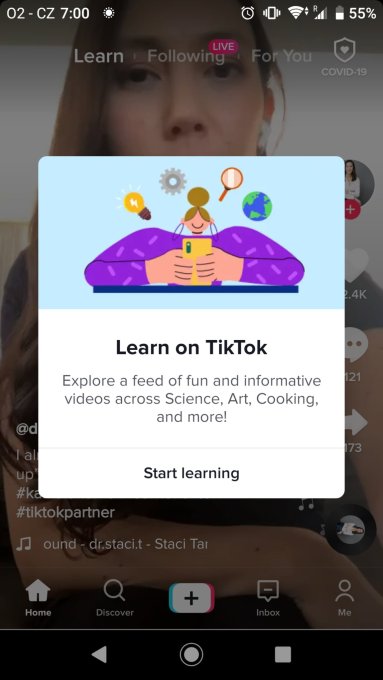
After launching a dedicated “Learn On TikTok” hashtag (#LearnOnTikTok) earlier this summer with a slate of premium creators producing videos for it, multiple users and social media watchers (thanks Matt) are reporting sightings of a new menu item called “Learn.”

Featured prominently alongside “For You” and “Following” at the top of the homescreen, TikTok describes Learn as a place to discover how-to and informative videos posted by users that take viewers through making food, producing art, how scientific processes work, and more.

The Learn feed seems to have disappeared overnight: from what we understand it’s still being tested.

Image Credits: Lena Koppova (opens in a new window)(opens in a new window)In any case, its emergence coincided with the company yesterday launching a new promotional campaign for educational content discoverable through the #LearnOnTikTok hashtag.

(And in the original announcement for Learn On TikTok content, TikTok noted that it is “exploring additional ways to showcase the rich offering of instructional content that’s thriving on the platform,” which includes “building a creator learning portal that will provide insights, tools, and best practices on how to create quality content on TikTok,” so the Learn tab may have been a test of how that will look and work.)

These are not TikTok’s first or only efforts in the realm of education.

Aside from its self-referential audience-created educational videos — it’s the best platform for learning TikTok dances, for learning about the latest song-based memes, watching comedic mishaps as people try to explain something, etc. — the company has been cultivating an image as a go-to platform for learning more serious things, not just messing around.

It’s been pushing that even harder this year than ever, both as TikTok itself faces ire from authorities for having a more potentially harmful influence; and as more people turn to their screens during the Covid-19 pandemic.

This has included formal efforts like partnering up with institutions, and encouraging students to create educational content.

@cambridgeuniversityCan #cars talk to each other? #learnontiktok #cambridgeuniversity #cambridge #artificialintelligence #driverless♬ HAPPY SUMMER ADVENTURE – Sergey Wednesday

It’s also included dedicating $50 million specifically to a creator fund to promote educational videos; and reportedly a whopping $5 billion educational fund as part of a deal to keep from getting shut down in the US over national security concerns (Bytedance, the owner of TikTok, has disputed the idea of the fund).

This has also included soft diplomacy, where teachers are using TikTok as a way of being more relatable to their audience of TikTok-loving students.

At its heart, doing more in education is a natural move for TikTok. Video is a huge learning tool, as YouTube and many others have demonstrated, and it connects with the app’s younger audience while also creating more reasons for why others might also want to use it — but also somewhat opportunistic.

Education is a good look, and its push in India was coming at a time when the company was first starting to face backlash over its content (it didn’t help: it’s currently banned there).

Meanwhile, its US Creative Learning Fund and those reports of a $5 billion education fund — accurate or not — emerged just as the company was working on hammering out a deal — which might include its Chinese owner Bytedance ceding control of the app — to keep it from getting banned outright in the US over national security concerns. (That story is still ongoing.)

Learn On TikTok — which officially was announced this summer — is heavy on user-generated content from TikTok’s wider base, with videos ranging pretty widely, from pottery making to make-up tips, and learning pig Latin to folding origami pigs.

But alongside this, TikTok is now populating the hashtag with a lot of premium content. Working with publishers like Self and WWD, professional organizations, non-profit institutions, and influential personalities (Bill Nye and Neil deGrasse Tyson in the science arena, chef José Andrés, Lilly Singh and Tyra Banks), TikTok is also curating and cultivating content made specifically for TikTok to broaden people’s minds and experiences.

“I’m excited to partner with TikTok,” Nye said at the time that his deal was announced. “Looking forward to doing some science on the small screen— the real small screen— the one on your phone…”

All of this is to say that there is a lot of opportunity, but probably some more growing pains to come for TikTok and the people using it to teach and learn.

We will update this story as we learn more ourselves…


Read Full Article

WhatsApp now lets you post ephemeral messages, which disappear after 7 days


Facebook recently announced that WhatsApp passed the whopping milestone of 100 billion messages sent per day, but not everyone wants those chats to stick around forever. Now, Facebook’s wildly popular messaging app with 2 billion users is adding a feature to give people more control on how their words and pictures live within the app. From today, messages — including photos and videos — can now be marked to disappear after 7 days.

The feature is being rolled out globally across Android and iOS starting today, WhatsApp said. While it’s starting with a 7 day lifespan, it is already looking at playing around with the time limits.

“We will keep an eye on feedback about how people are using it and liking it and see if it needs adjusting in the future,” a spokesperson said. “For now we are starting with seven days, because it feels like a nice balance between the utility you need for global text based conversations and the feeling of things not sticking around forever.”

And just to be clear, the 7-day limit will exist regardless of whether the message gets read or not. (The clock starts counting when the message is sent, as it does on other apps like Telegram.)

“The way it’s currently designed is to give the sender confidence that after 7 days their message is gone. The messages have no concept of being seen, for them to disappear, so they will disappear regardless of read status,” said the spokesperson.

Users can turn on the feature for direct messages, but in groups it’s the admin that has to enable disappearing messages for it to work.

Although today is the “official” announcement, eagle-eyed WhatsApp watchers had spotted the company posting FAQs on the feature some days ago. And tests of the feature actually first started to appear — and,  fittingly, disappear — as early as March of this year.

This isn’t WhatsApp’s first rodeo with disappearing content.

In 2017, the company first dabbled in the idea with the launch of Status — an encrypted clone of Snapchat’s Stories feature, which let people set up short updates on themselves — in the form of some text and/or a GIF — as essentially a “profile” for all of their contacts to see for a set period of 24 hours, with the Statuses existing in their own tab in the app separate from your chats.

It’s not clear how popular the Status feature is these days: we’ve reached out to ask. Anecdotally, I’ve seen younger people using it a lot, where it lives as a proxy, pared-down version of updating your status on Facebook or Snapchat, older people less so.

WhatsApp said that one of the reasons it’s taken its developers so long to bring the ephemeral feature to the wider chat experience is in part because of the encrypted aspect of the app:

“[End-to-end encryption] was partly why it took us so long to implement this feature, because we wanted to retain the e2e capabilities that WhatsApp users expect and love,” the spokesperson said.

But in any case it’s a very long time in coming.

Ephemerality has been one of the most radical and sticky features in messaging in years — it has now been around for close to a decade. And it has arguably been the defining feature for one of the runaway, viral hits of the genre, Snapchat — so much so that clones of the feature have popped up in a number of other apps, from those focused first and foremost on privacy like Signal and Telegram, through to those that are aimed at more casual consumer audiences, like WhatsApp today.

And there could be signs that Facebook is may be looking to roll this out in other apps in its stable, too. Earlier this year it tested disappearing messages in Instagram. However in Messenger the most recent tests for disappearing text seem to be from 2015.

The new disappearing messaging feature is coming amid some other notable additions in the app that appear to be in aid of the general purpose of giving more control to users.

Earlier this week, WhatsApp announced that it would enable a new storage feature in the app: specifically, an easier way to control how and where photos and other media that you are sent live. This is especially important for active (but perhaps not deep) users of the app, who find their storage is getting gobbled up by innocuous GIFs, photos and videos sent over the app by friends and acquaintances. At the same time, it has also been beefing up the services it offers to businesses, and testing out business models for charging them, one way to stick to their commitment not to put ads into the service.

As with the storage changes, the new disappearing feature will not be switched on for users by default: you have to proactively change the settings.


Read Full Article

How To Back Up And Print Android Messages


There are many reasons you may want to keep a copy of your Android text messages, whether it be a digital copy on your computer or a hard copy in the form of a printout. Backing up your messages to your PC means that if anything should happen to your device itself, you still have […]

The post How To Back Up And Print Android Messages appeared first on ALL TECH BUZZ.


Top 5 Apps for Entertainment at Home


Never have virtual pastimes been as necessary as during the 2020 pandemic that has left much of the world’s population more isolated than ever before. This is why we looked into the best mobile apps that you could install on your phone or tablet to get you through days and help you keep entertained and […]

The post Top 5 Apps for Entertainment at Home appeared first on ALL TECH BUZZ.


Do You Still Need a VPN for Your Already Encrypted iPhone


Even though Apple has taken tremendous steps to ensure that an incident like the iCloud leak from 2014 does not happen again, iPhone users still need to be wary about protecting their device. The tech giant may have taken the necessary steps to safeguard your privacy and data online, but you will need to take […]

The post Do You Still Need a VPN for Your Already Encrypted iPhone appeared first on ALL TECH BUZZ.


DJI’s pint-sized Mavic Mini gets camera and connection upgrades


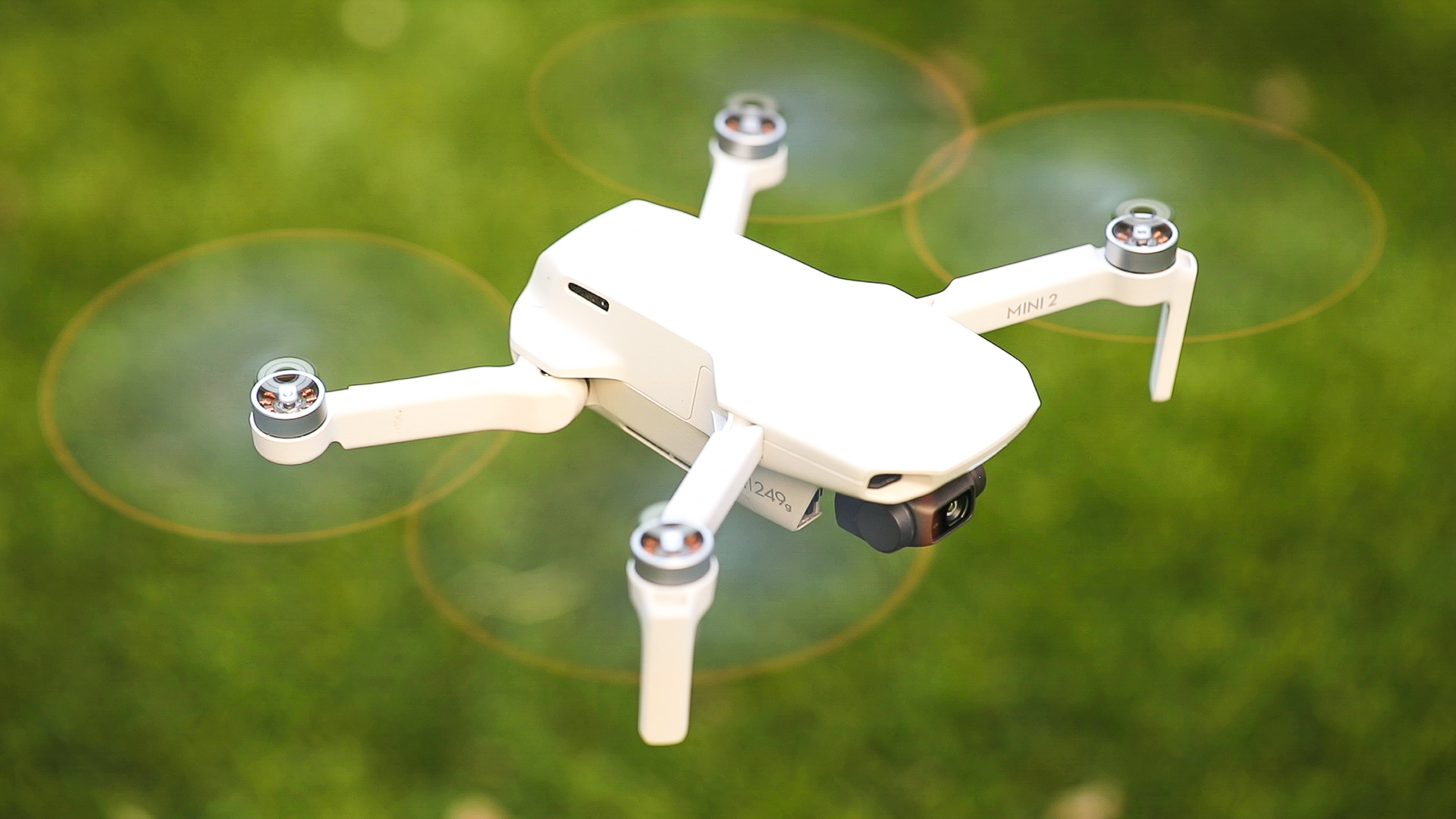
We dug DJI’s Mavic Mini when the drone arrived last year. As Matt noted in his review, “It packs everything critical to be a quality drone. It has a good camera, good range and a good controller. It holds up well in the wind and is quick enough to be fun.” Today, DJI improves two of those things with the arrival of the Mini 2.

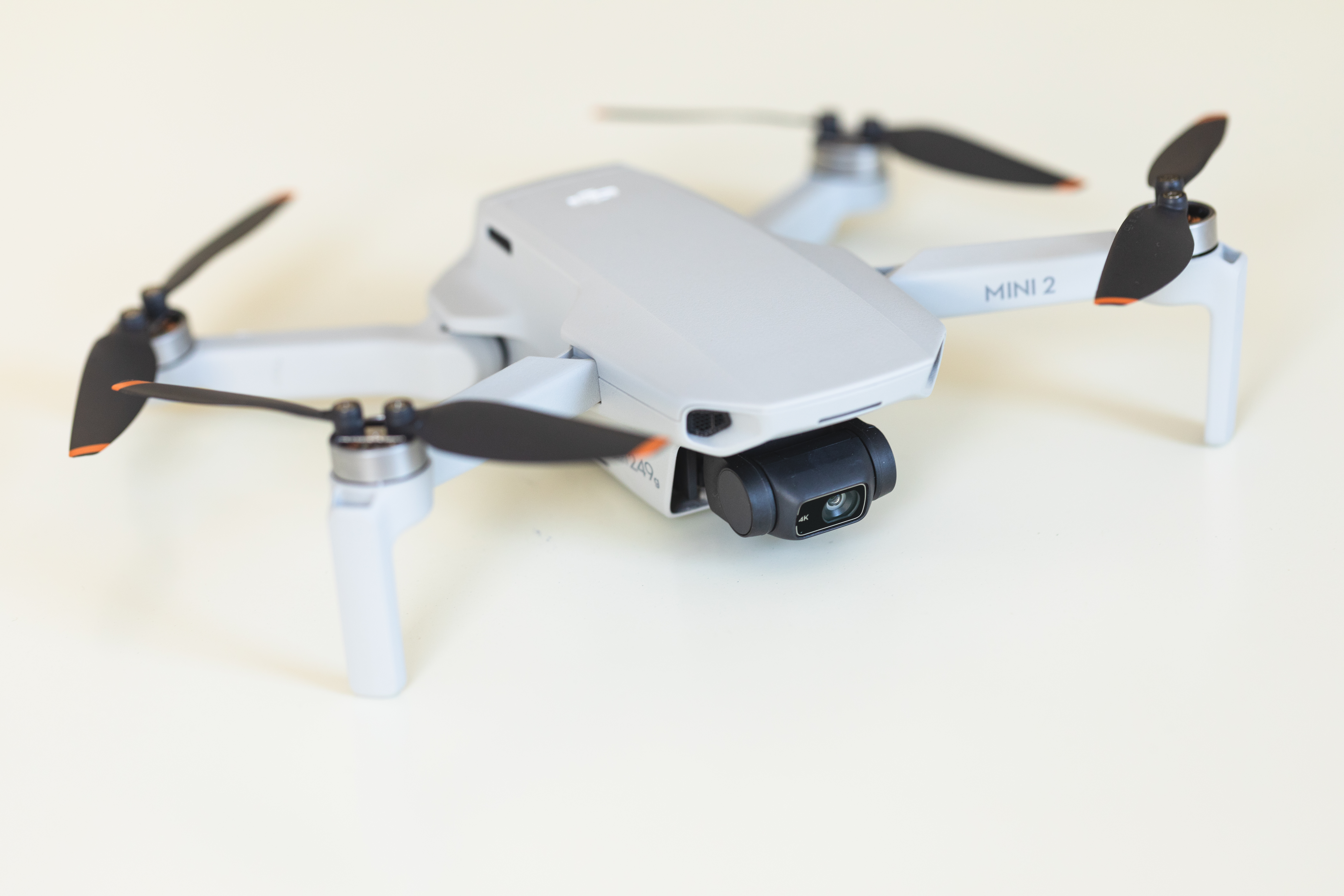
The new version, which hits retail today, is more refinement than redefinition. This is one of those cases where that’s perfectly fine, as the first release was a solid one, owing to the learnings of several generations of DJI and Mavic drones. The size and weight are essentially the same here. The Mini 2 weighs 249 grams — which comes out to about 0.55 pounds. It folds up and can be stashed away in a bag.

Image Credits: Gregory Manalo

The camera is probably the biggest upgrade here. The system is now capable of shooting 4K videos at 30 FPS. Stills, meanwhile, are 12-megapixels, and there’s 4x digital zoom (which DJI says is capable of up to 2x and still offer lossless quality). I suspect zoom is going to be a continued spot for improvement on these systems, going forward.

The other big change is the arrival of DJI’s proprietary OcuSync wireless technology — specifically OccuSync 2.0 here. The technology is also available on the latest Mavic Air. Per DJI:

OcuSync 2.0 is DJI’s world-renowned transmission technology responsible for ensuring stable, long distance, and reliable connection between the remote controller and the drone. Dual-frequency technology automatically switches between channels to help against interference.

Image Credits: Gregory Manalo

Among other things, the upgrade means a transmission rate of 19 km — around 150% of the range its predecessor delivered. Though DJI has to remind you here that you really ought to keep the tiny drone in your line of sight while operating. The battery should give you a solid 31 minutes (a slight improvement over the original’s stated 30-minute flight time).

DJI’s preprogrammed image capture is always a highlight. There are five quick-shot modes (Dronie, Helix, Rocket, Circle, Boomerang), three panoramas (Sphere, 180 and Wide-Angle) and two image modes (Triple Shot and Timed Shots).

Image Credits: Gregory Manalo

There’s a bit of a notable price bump here. The system now starts at $449 (up from $399), which includes the drone, remote and a single battery; $599 will get you two additional batteries, a charging hub and a carrying case — a solid addition.


Read Full Article

YouTube removes ads from, but won’t pull, ‘Trump Won’ video following backlash


This year’s presidential election has already proven to be a considerable test of the U.S. democratic system. It’s also been doing a fine job testing the systems behind leading social networks four years after a rather disinformation-ridden election. Twitter today has proven to be reasonably swift — if not entirely proactive — in its push to label problematic information.

Video, which is largely considered more difficult to police, has been another story on many of these sites. At issue are videos like One American News Network’s (OAN) “Trump Won.” Posted this morning, the report echoes the president’s earlier sentiment that he has both won the election and that states and/or the Democratic Party are attempting to “steal the election.” As of this writing, the election has, emphatically, not been decided.

YouTube parent Google had earlier outlined potential violations in the lead up to the election, noting that it would:

Remov[e] content that contains hacked information, the disclosure of which may interfere with democratic processes, such as elections and censuses. For example, videos that contain hacked information about a political candidate shared with the intent to interfere in an election. Removing content encouraging others to interfere with democratic processes, such as obstructing or interrupting voting procedures. For example, telling viewers to create long voting lines with the purpose of making it harder for others to vote.

After outreach, the company told the press that the video is not in violation of its Community guidelines, but added that it has pulled ads from the content.

“Our Community Guidelines prohibit content misleading viewers about voting, for example content aiming to mislead voters about the time, place, means or eligibility requirements for voting, or false claims that could materially discourage voting,” a spokesperson told TechCrunch. “The content of this video doesn’t rise to that level. All search results and videos about this election — including this video — surface an information panel noting that election results may not be final and we are continuing to raise up authoritative content in search results and recommendations. Additionally, we remove ads from videos that contain content that is demonstrably false about election results, like this video. We will continue to be vigilant in the post-election period.”

The video now also sports a “U.S. Elections” module below that notes, “Results may not be final. See the latest on Google,” directing users to a search page. In a separate post, it notes that it, “aim[s] to surface videos from experts, like public health institutions, in search results,” meaning that a video such as the one referenced above would theoretically be deprioritized in search under more authoritative outlets, including, CNN, Fox News, Jovem Pan, India Today and The Guardian.

The coming weeks and months will no doubt provide ample opportunity to assess these responses from these platforms and whether their responses ultimately did enough to address misinformation and disinformation during a particularly uncertain time in U.S. electoral history.


Read Full Article

Hands-on with Mophie’s new modular smartphone battery case


There was some confusion when the Juice Pack Connect was announced last week. I admit I was a bit confused, too. It was, no doubt, the proximity to Apple’s iPhone 12 launch that lead many to (understandably) assume that the new take on Mophie’s case is based on the handset’s new MagSafe tech.

While it seems likely that some future version of the accessory will sport that functionality, truth is there are two primary technologies at the heart of the newer, more modular battery pack: wireless charging and good old-fashioned adhesive. That means, among other things, that the system effectively works with any handset that supports Qi wireless charging.

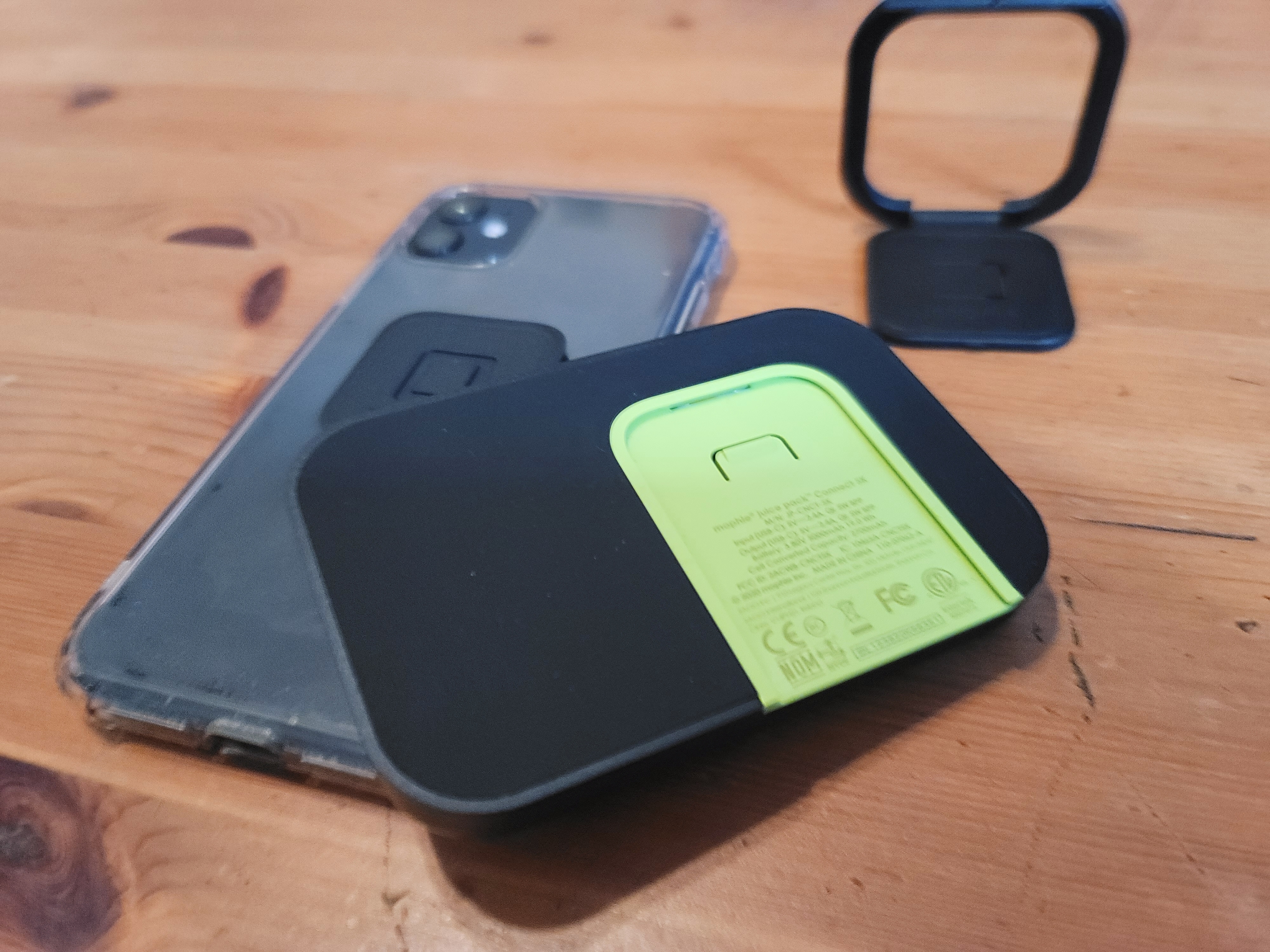
In fact, the system is actually pretty bare bones by design. There’s not even a case included in the box. You’ve got to supply your own. Instead, the system ships with the battery pack, a grip/stand and, helpfully, two adapters. That last bit is nice in case you need a do-over or plan sharing the battery with someone else.

Image Credits: Brian Heater

Installation is pretty simple. There’s even a little cardboard guide to insure you center it properly, à la the sort of frame you’d get to install a screen protector. You can install it directly onto the back of the phone, as well, but I prefer to stay noncommittal with my accessories if possible. That said, you’ll need to live with the little adapter nub on the rear of your device when other accessories aren’t attached.

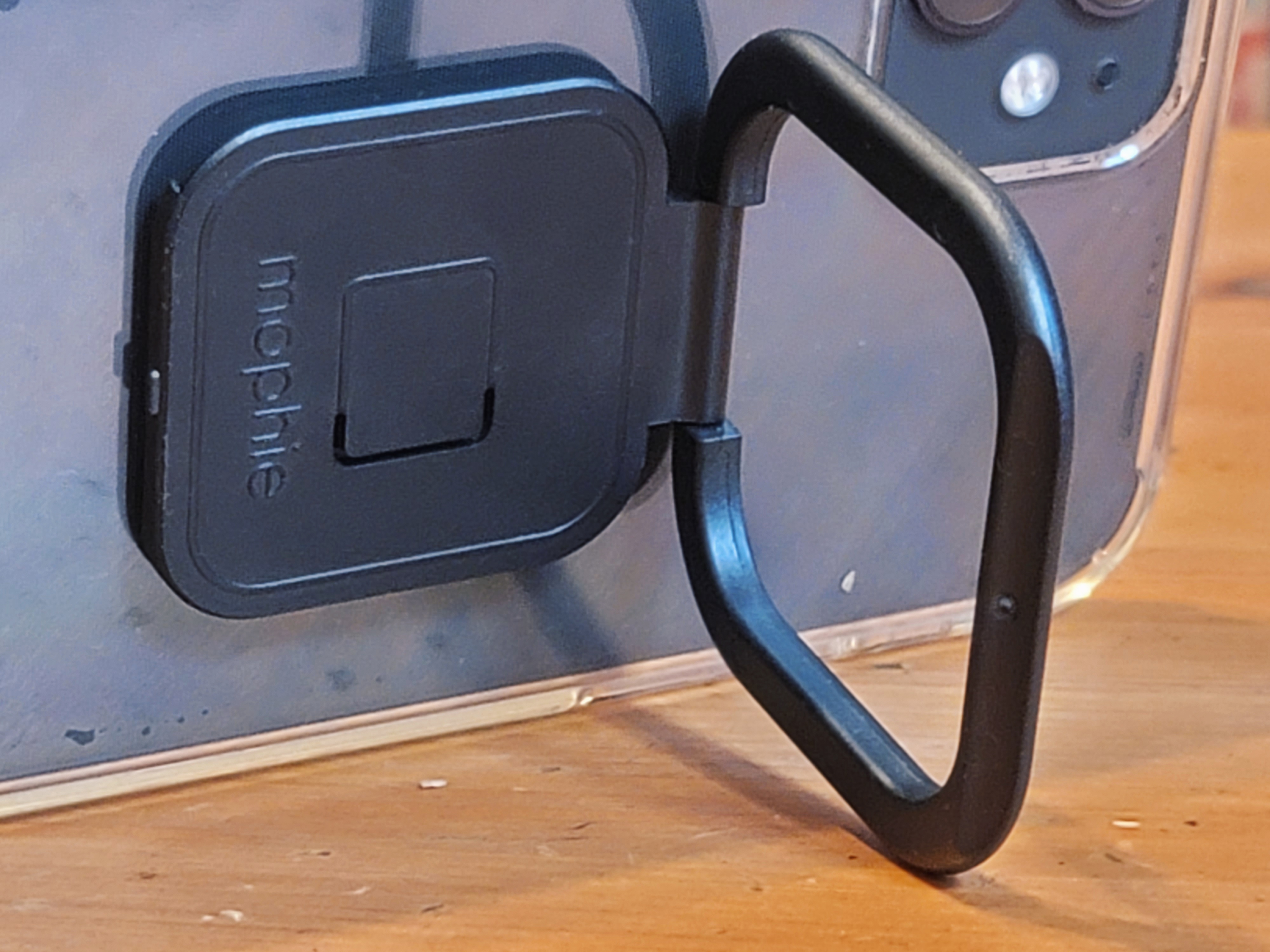
The accessories slide onto the anchor from the side. The battery pack is easily the nicest-looking part of the whole rig — and the one that most closely retains the design language of the original Juice Packs. The ring/stand is a bit cheaper-feeling and feels like a bit of an afterthought to occupy the system when not charging. One of the big trade-offs is that the more compact battery design means a smaller capacity; 5,000mAh isn’t bad, but you can find a higher capacity case for cheaper.

Image Credits: Brian Heater

The other trade-off you probably already know, which is that wireless charging is slower than the wired kind. For that reason, the system is better adapted to keeping your device alive for long stretches, rather than fast charging. That said, if you’re really in a pinch and have the right cables handy, you can charge your phone up faster via the USB-C port (which is also used to top off the battery).

The Connect Stand is serviceable. It serves better as a stand than a grip. It would be useful if the company offered something more like a Pop Socket for a more solid grip. That’s the nice thing about modularity, though — they can always add more accessories. At $80, it’s not cheap, but, then Mophie products never really are.


Read Full Article

Zynga reports record revenue and strong user growth while still losing $122M


Zynga’s revenue grew to a record $503 million (up 46% year-over-year) in the third quarter, with bookings of $628 million (up 59%), according to its latest earnings report. It also had its best mobile daily active user (31 million) and monthly active user (83 million) numbers in six years.

But things wasn’t all rosy: The company also reported a net loss of $122 million. That compares to net income of $230 million during the same period last year, though that was boosted by the sale of Zynga’s building in San Francisco. As of 4:44pm Eastern, shares were down 4.9% in after-hours trading.

Before earnings were released, CEO Frank Gibeau told me that although growth has become more normal after the pandemic caused “that huge jump” in usage during the late spring and early summer, “Engagement remains elevated and monetization remains elevated. Folks that discovered mobile gaming for the first time returned to it and kept doing it.”

The company predicted further growth in Q4, with revenue up 55% to $570 million. Gibeau said pointed to a “digital holiday” that could have big benefit in mobile gaming, with new mobile on the market, plus social distancing and lockdowns resulting in the fact that “a lot of folks aren’t going to be able to go to stores and buy gifts.”

During the third quarter, Zynga also closed its acquisition of Istanbul-based hyper-casual game publisher Rollic. Gibeau said the team is “fully integrated at this point from an operating standpoint,” but the company won’t start including Rollic in its user numbers until the next quarter.

“We are well-positioned for further M&A,” he added.


Read Full Article

Music Degrees: What You Need To Know


We all have a taste for music, and there is no doubt that no one can live without it. For many music lovers out there, it is now possible to pursue a degree in music, whether traditional or online. If you want to become a music teacher or expand your knowledge and skillset with a […]

The post Music Degrees: What You Need To Know appeared first on ALL TECH BUZZ.


04 November 2020

Twitter restricts Trump’s tweet claiming that foes would ‘steal’ the election


With key wins notched in a few states, Trump didn’t quite declare victory prematurely on social media as platforms had feared — but he did baselessly raise the specter of voter fraud.

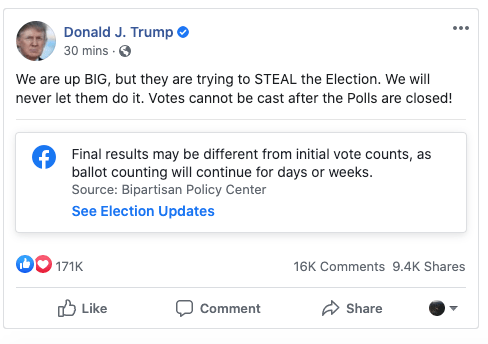
“We are up BIG, but they are trying to STEAL the Election,” Trump tweeted. “We will never let them do it. Votes cannot be cast after the Polls are closed!”

Twitter took action against the tweet quickly, placing it behind a warning and adding a misinformation label. The company explained its actions in a tweet, stating that the president’s message contained a “potentially misleading claim about an election.” As of 12AM PT the result of the presidential election remained far from clear, with both candidates holding potential paths to the presidency.

While Trump’s wording is left a bit ambiguous, the president’s tweet again appears to be attacking the integrity of vote-by-mail ballots. With mail-in ballots expected to come in slowly in some states, lagging votes may play a big part in the election outcome. That scenario was expected and does not raise any concerns over the integrity of vote tallying.

Due to a huge spike in mail-in voting related to the pandemic, results were expected to be more ambiguous on election night in 2020 than in past years, and so far that’s proven true. Social media companies began crafting new policies for the unusual circumstances of the 2020 election and its worrisome misinformation ecosystem in the months leading up to November.

Twitter also said in a September policy announcement that it would remove or label any tweets that incite unlawful activity and threaten a “peaceful transfer of power or orderly succession.” While tweets that Twitter restricts remain online, they’re placed behind a warning message that users must first click through in order to view their content. Restricted tweets also have their retweets, likes and comments disabled, reducing their reach.

On Facebook, where much of Trump’s Twitter content is reposted, his message earned a label reminding users that election night results and final results may differ, but the post was not otherwise restricted. In an email, Facebook spokesperson Tom Reynolds said that Facebook labeled the post shortly after it went up “in accordance with the policies we shared ahead of Election Day.”

The company attached a similar label to another late-night Trump post declaring “I will be making a statement tonight. A big WIN!” Facebook previously said it planned to label any posts claiming premature victory with an informational message pointing users to official election results.

Update – 12:10AM PT: 

Following spoken remarks in which Trump falsely claimed that he had won the election, Facebook said it would begin running messages to users across Facebook and Instagram noting that “votes are still being counted and a winner is not projected.”


Read Full Article