14 August 2020

Facebook tests TikTok-style video format on its main app in India


Facebook is going all in on short-form videos. After flirting with the idea in Lasso, a TikTok-clone it tested in select markets, and adding a similar feature called Reels to Instagram recently, the company is exploring a new venue for this TikTok-esque experience: The big blue app.

The company confirmed to TechCrunch that it is testing short-form videos in the Facebook app in India, its biggest market by users. In the current avatar, ‘Short Videos’ has a dedicated section within the news feed. On top of it sits the ‘Create’ button, tapping which prompts Facebook Camera to launch, and users can browse through videos by swiping up.

“We’re always testing new creative tools so we can learn about how people want to express themselves. Short form videos are extremely popular and we are looking at new ways to provide this experience for people to connect, create and share on Facebook,” a Facebook spokesperson told TechCrunch.

Matt Navarra, a social media consultant, first revealed the existence of the new test.

The test comes as Facebook continues to cash in on the absence of TikTok, the ByteDance-owned app that was banned by India in late June, in the country. Facebook launched Reels in India last month weeks before launching it to dozens of additional markets. A source familiar with the matter said the daily engagement of Facebook’s services in India has increased by more than 25% since the ban on TikTok.

Scores of local startups, including Twitter-backed ShareChat and Times Internet’s Gaana and MX Player streaming services, have launched standalone apps or integrated features to replicate the social experience TikTok provided to users in recent weeks. The local apps have claimed to have added tens of million of new users during the period.

YouTube has also rolled out a similar feature, still in testing phase, to more users in India in recent weeks.

Image: TechCrunch

The urgency in Facebook’s attempt to court users with short-form videos comes as TikTok is plotting ways to re-enter the market. ByteDance is engaging with Indian conglomerate Reliance Industries to sell stake in TikTok’s local business, TechCrunch reported earlier this week.


Read Full Article

You will surprise yourself (and other pearls of wisdom) | Daniel Alexander Jones

You will surprise yourself (and other pearls of wisdom) | Daniel Alexander Jones

"Some call me a soul sonic superstar," says Jomama Jones, the alter ego of TED Fellow and theater artist Daniel Alexander Jones. In this stunning talk and performance, Jomama Jones invites us to consider how coming undone can be the first step toward transformation. It's a powerful story of community, growth and renewal -- and how breaking apart can mean breaking open.

https://ift.tt/2XZ6xQi

Click this link to view the TED Talk

How to Distribute Your Music on Streaming Services


distribute-music-streaming

After spending countless hours writing and recording your own music, you’re probably itching to send it out into the world for other people to listen to.

This used to involve burning CDs and selling them at your gigs. But if you want people to find your music in the 21st century, you need to get it on Spotify, Apple Music, and other music streaming services instead.

In this article, we explore the various ways to distribute your music on streaming services.

How to Distribute Your Music on Streaming Services

Apple Music showing new music releases

Most music streaming services don’t deal directly with artists. Which means you need to work with an established distributor to get your music online.

Of course, signed musicians can leave it to their label to sort out the music distribution. But if you’re an unsigned or independent musician, you need to find a music distributor to work with.

Fortunately, there’s a whole host of music distribution services available to use.

Most of these services charge a small fee and put your music on all of the major music streaming services. After doing so, anyone can listen to your music and you can claim payment from the royalties.

How Do Music Distribution Services Work?

CD Baby showing list of music streaming services

Every music distribution service offers a different business model, and we’ll detail all of the options below. But generally speaking, you either pay an upfront fee or give up a percentage of your earnings to get your music on Spotify, Apple Music, iTunes, and every other major music streaming service or digital store.

You then make money from your music through royalties, sales, and streaming payouts.

You should still own all the copyright to your music after signing up for a music distribution service. But make sure you read the terms and conditions yourself to be certain.

Most distributors issue payments at regular periods or after your earnings reach a certain threshold. That said, don’t expect to make big bucks unless you get thousands of streams per month.

On average, a single stream earns you about half a cent, or less.

Music streaming accounting sample

The best distribution services show you a breakdown of where your music is getting played, how often, and on which streaming services.

You only need to sign up with a single distribution service for each musical release. That service should make your music available everywhere, although it may only be for a limited time.

For future releases, feel free to use the same service again or jump ship and try someone else.

What Are the Best Music Distribution Services?

There is an overwhelming selection of digital distribution services to choose from when you’re trying to get your music on Apple Music, Spotify, and other streaming services. To simplify matters, we’ve summarized each of the best options below.

You might notice a couple of popular distribution services missing from this list, namely TuneCore and DittoMusic. While these are both legitimate businesses with plenty of happy customers, there are enough complaints about their services that we didn’t feel comfortable recommending them.

1. CD Baby

CD Baby music distribution header

CD Baby is one of the original digital music distribution services for independent artists. It offers a simple model, in which you pay a one-time fee and give up nine percent of your distribution revenue to upload your music for life.

The fee is $9.95 for a single or $29 for an album. However, you can also choose to pay extra for a Pro release if you want CD Baby to collect extra royalties for you. If your music gets played in a lot of places, this could pay off in the long run.

There is one small catch in that you also need to provide a UPC barcode for each release. If you don’t have one—which will be the case for most people—you can buy a barcode from CD Baby for another small fee.

CD Baby makes your music available on over 150 platforms. You also get access to a professional marketing tool and can even sell physical CDs or vinyls through CD Baby’s website.

2. AWAL

AWAL music distribution header

Short for A World Artists Love, AWAL is the most exclusive service on this list. Rather than offering to distribute anyone’s music, AWAL only caters to growing artists on the verge of success.

If you already have an engaged fanbase on social media, a string of gigs in the calendar, and a manager sketching out your future, then it’s worth sending an application to AWAL to get your music distribution sorted as well.

AWAL doesn’t charge any upfront fees but takes a 15 percent commission on all your digital distribution revenue.

It earns this commission through a range of excellent services: AWAL makes your music available to stream on every major platform; you can view real-time stats for Spotify, Apple Music, and YouTube; and AWAL will go to bat for you to line up film or TV syncs and even project funding.

AWAL even pushes for streaming services to feature your music in promoted playlists. This means you might end up in the Discover playlist when people go looking for new music on Spotify.

3. Amuse

Amuse music distribution header

It’s completely free to get your music on all the major streaming platforms using Amuse. There are no fees and Amuse doesn’t even take any commission from your digital distribution revenue.

This might sound too good to be true, but Amuse makes its money by analyzing streaming trends and using that data to offer premium services or to sign popular new artists to its label.

The premium services include quicker releases, more social media integration, and profile collaborations so that your entire team can access important data.

Access to these tools comes at a cost of $5/month.

Even on the free tier, you can release your music in four weeks by uploading the tracks using the Amuse app. You also get the option to automatically split your digital revenue with anyone else who worked on the songs with you.

If you want to get your music on Spotify or Apple Music without losing any money at all, Amuse is the only option.

4. DistroKid

DistroKid music distribution header

Don’t feel put off by how basic the DistroKid website is, this is a professional music distribution service with a great reputation. It’s part-owned by Spotify, but you can use DistroKid to get your music on Apple Music, iTunes, Amazon, and every other major music streaming service or digital store as well.

To use DistroKid, you need to pay an annual fee of $19.99. This lets you upload unlimited releases throughout the year and DistroKid doesn’t take any of your distribution revenue.

However, if you ever stop paying this fee, DistroKid may remove your music from streaming services and stores in the future.

If you want your music to always remain available, you need to buy the Leave a Legacy add-on. In fact, the main downside to DistroKid is that there are several add-ons that other services already include.

For example, you also need to pay $0.99/year for each song that you want Shazam to recognize. And you need to pay $5/year for DistroKid to collect YouTube revenue for your releases.

If you plan to release a lot of music in a short space of time, this could still be a cost-effective service to use. Otherwise, you’re better off with one of the services above.

Don’t Forget to Claim Your Artist Account

Getting your music on Spotify and Apple Music is only the first step. You should also make sure you claim your artist account with these streaming services to see up-to-date streaming stats for your music.

After claiming an artist account, you can post status updates, upload a profile photo, and edit your artist bio.

Visit artists.spotify.com and artists.apple.com to claim your accounts. You’ll also want to claim your account for any other popular streaming services. Take a look at our list of the best music streaming services for audiophiles to find out where else to look.

Read the full article: How to Distribute Your Music on Streaming Services


Read Full Article

Epic Sues Apple and Google Over Fortnite App Store Ban


fortnite removed

Fortnite is a massively popular game. But that popularity hasn’t stopped both Google and Apple removing Fortnite from their app stores in a dispute over money. And in retaliation, Epic is suing both companies claiming antitrust violations.

Why Apple and Google Removed Fortnite

This all started when Epic decided to get around the App Store and Google Play’s in-app purchasing by using its own payment system. This is in violation of the rules put forth by the two companies.

Essentially, Apple and Google take a 30 percent cut from app creators when a user makes a purchase. By launching its own payment system (which the company rolled out on Thursday), Epic could get around that fee.

A Google spokesperson made a statement to The Verge on the matter:

“The open Android ecosystem lets developers distribute apps through multiple app stores. For game developers who choose to use the Play Store, we have consistent policies that are fair to developers and keep the store safe for users. While Fortnite remains available on Android, we can no longer make it available on Play because it violates our policies. However, we welcome the opportunity to continue our discussions with Epic and bring Fortnite back to Google Play.”

Apple wasn’t silent on the matter either, delivering a lengthy statement to The Verge. The company made it clear that it doesn’t intend to make an exception for Epic, regardless of how big Fortnite is:

“Today, Epic Games took the unfortunate step of violating the App Store guidelines that are applied equally to every developer and designed to keep the store safe for our users. As a result their Fortnite app has been removed from the store. Epic enabled a feature in its app which was not reviewed or approved by Apple, and they did so with the express intent of violating the App Store guidelines regarding in-app payments that apply to every developer who sells digital goods or services.”

To put it simply, Epic broke the rules in an attempt to secure itself a larger cut (and offer a discount to its users). Not thrilled with this, both Apple and Google removed the game from their stores in response.

Epic’s Lawsuit Against Apple and Google

Epic certainly wasn’t just going to sit there and do nothing. First, The Verge reported that Apple was under legal attack from Epic. Just a few hours later, The Verge discovered that the company was coming after Google as well.

There’s a lot to unpack with these lawsuits. Epic claims that Google and Apple are breaking antitrust rules with the way the firms control their application marketplaces.

Epic alleges that Apple has a monopoly in the form of the iPhone, the iOS ecosystem, and the App Store. It also says that Apple places unreasonable restrictions on the distribution of iOS apps.

The Apple case features some pretty interesting claims, and Epic got a little creative with the statements. Here’s one particular example:

“Fast forward to 2020, and Apple has become what it once railed against: the behemoth seeking to control markets, block competition, and stifle innovation.”

As this is the early stages of a legal case, it’s hard to know exactly how this will end. However, the implications could be huge. If the court find that Epic is in the right here, it could completely change how we all access Android and iOS apps. Especially those that offer in-app purchases.

Epic claims it isn’t seeking special treatment. Instead, the company is against the policies both companies use, and is seeking a change for all developers, not just itself.

The company’s Free Fortnite FAQ breaks down the company’s stance:

“We don’t seek a special exception for Epic. We firmly believe Apple’s policies must be changed for all developers. For over a decade, Apple has single-mindedly crafted and proliferated a tangled web of rules and policies to impose a 30% tax on apps while preventing competitors from offering a better deal. That’s around 10x more than what a typical transaction may cost on competing payment processing services such as Visa, Mastercard, and PayPal, which charge rates of 2.5% to 3.5%. When competition is stifled, the customer always loses.”

What Does This All Mean for You?

This is a legal battle between several massive companies.

In the long run, it could have massive implications as far as how the Google Play Store and Apple App Store run. In the short-term, it may affect your ability to play Fortnite on Android and iOS. Epic has published a FAQ breaking down the availability of the game on both platforms.

If you’re on Android, you can still download Fortnite directly. If you already have the game downloaded on iOS, you’ll still be able to play it. However, you won’t be able to update it as new content comes out. As long as you have Season 3’s 13.40 update, you’ll be good to go for a while.

If you can’t play Fortnite right now, have a look at these mobile games that let you explore the world. Especially if you’re still stuck indoors.

Read the full article: Epic Sues Apple and Google Over Fortnite App Store Ban


Read Full Article

How to Delete an Extra Page in Microsoft Word


delete-page-msword

You’ve just finished working on a Microsoft Word document. Upon giving it a quick scan before printing, you notice an extra page has sneaked its way in. No big deal; just delete it, right? Perhaps not. Extra pages can be surprisingly tricky, so let’s learn how to delete a page in Word.

If the standard methods to delete a page fail—what can you do? Today, we’re going to explain how to delete a blank page in Word. Then, we will look at a few solutions you can try if it doesn’t work.

How to Delete a Page in Word: Use the “Go To” Box

Let’s assume you don’t want to spend the next five minutes mashing the backspace button or trying to do some excessively precise mouse-work. You can use the “Go To” search feature in Find and Replace to make the process simple.

On Windows

Go To Search in Microsoft Word

Use these instructions if you’re running Windows:

  1. Click anywhere on the page you want to remove
  2. Press CTRL + G.
  3. The Find and Replace box will appear.
  4. In the left-hand panel, select Page.
  5. In the Enter Page Number field, type \page.
  6. When you’re ready, hit Enter.
  7. The page you want to delete will now be selected
  8. Press the Delete button on your keyboard.

On macOS

The instructions to delete a Word page on macOS are similar:

  1. Click anywhere on the page you want to remove.
  2. Press CTRL + Option + G.
  3. Select Page in the Find and Replace box.
  4. Type \page in the Enter Page Number box.
  5. Press Enter.
  6. Press Delete.

Because both methods rely on Word’s Go To function, you could also use a + or to jump straight to the page in question.

For example, if the page you want to delete is 12 pages above the one you’re currently looking at, typing -12 in the Enter page number box will take you there. This saves you from scrolling through multiple pages of long documents to find the one you want to remove.

Use the Navigation Pane to Delete a Page in Word

navigation pane word

It’s easy to accidentally create a blank page in Word—for instance, pressing the Page Down button will instantly bump you down one page.

If the document has lots of blank pages and your scrolling finger is getting tired, you need to turn to the Navigation Pane. To activate it, go to View > Show and tick the box next to the Navigation Pane option.

A new panel will appear on the left of the screen. By default, it will show any page headers that are in your document. However, if you click on the Pages tab, you and scroll through the thumbnails of the pages.

Clicking on a thumbnail will take you to the page within the document. From there, you can delete it as needed.

Remove a Page in Word: Troubleshooting

It’s not uncommon to see users complaining that they cannot delete a page in Word. The problem appears especially common when the blank page appears at the end of a document, but it could happen anywhere.

How can you fix it?

1. Document Margins

margins in word

An overly large page margin could be stopping you from deleting an extra page in Word. Again, it’s the type of problem you might not even notice if you’d caught a menu button my mistake.

To check, go to Layout > Margins and either choose one of the default options or enter a custom selection.

2. Paragraph Marks

paragraph marks word

If you turn on formatting marks in Word, you’ll be able to see what’s going on with your document.

To enable them, go to Home > Paragraph and click on the Show Paragraph Mark icon. Alternatively, press CTRL + *.

Once enabled, scan the blank page for paragraph marks. If you see any, delete them. Paragraph marks are hidden features in Word and sometimes you have to reveal them to solve any problems in your document.

3. Page Breaks

If your blank page is in the middle of a document rather than at the end, an errant page break is almost certainly to blame.

Turning on the paragraph marks in the method detailed above will also let you see the page breaks. Remove the page breaks and it will help to get rid of the blank page in Word as well.

4. Tables

A quirk of the way Microsoft Word works means that if your document ends with a table, Word will automatically enter a paragraph mark after it. If the table also falls at the bottom of a page, this can force an extra page to be created.

It’s impossible to delete the final mark, but there is a workaround that means you won’t need to adjust the size of the table itself. Just highlight the paragraph mark and change the font size to 1.

If the mark is still there, highlight it with the cursor, right-click, and select Paragraph in the context menu. Click on the Indents and Spacing tab and change all the spacing to zero.

And if somehow the page is still there, you can try hiding the paragraph entirely. Go to Home > Font click on the small arrow in the lower-right corner to open the pop-out menu. Locate the Effects section on the Fonts tab and mark the checkbox next to Hidden.

5. Section Breaks

page setup word

Section breaks are essential to denote the start and end of sections of different formatting within the same document.

As such, if a section break is causing a blank page, proceed with caution. You don’t necessarily want to outright delete it, as doing so could cause major formatting issues elsewhere.

The correct approach is to set the section break to Continuous. To make the change, click just after the break you want to alter, then go to Layout > Page Setup on the ribbon and launch the pop-out menu.

In the layout tab, change the Section start option to Continuous.

6. Printer Settings

If you’re getting blank pages when you print a document, but you don’t see any on-screen, your printer settings are probably to blame.

Covering every printer is beyond the scope of this article, but you should head to your printer’s Preferences page and look for the Separator page option.

Learn More About Microsoft Word

If you’ve learned something new from this article, you’ll love some of our other in-depth coverage of Microsoft Word and Office 365.

To get started, why not discover how to add and format endnotes and footnotes?

Read the full article: How to Delete an Extra Page in Microsoft Word


Read Full Article

Why Do Marriages Fail – Your Guide to Saving It


Many couples struggle to keep their marriage happy and lively. It is a bitter reality. However, happy couples explain that it takes a lot of effort and understanding to make a marriage last. There can be several reasons for a relationship to break or a marriage to fail. But some common ones are not considering […]

The post Why Do Marriages Fail – Your Guide to Saving It appeared first on ALL TECH BUZZ.


Oracle and Salesforce hit with GDPR class action lawsuits over cookie tracking consent


The use of third party cookies for ad tracking and targeting by data broker giants Oracle and Salesforce is the focus of class action style litigation announced today in the UK and the Netherlands.

The suits will argue that mass surveillance of Internet users to carry out real-time bidding ad auctions cannot possibly be compatible with strict EU laws around consent to process personal data.

The litigants believe the collective claims could exceed €10BN, should they eventually prevail in their arguments — though such legal actions can take several years to work their way through the courts.

In the UK, the case may also face some legal hurdles given the lack of an established model for pursuing collective damages in cases relating to data rights. Though there are signs that’s changing.

Non-profit foundation, The Privacy Collective, has filed one case today with the District Court of Amsterdam, accusing the two data broker giants of breaching the EU’s General Data Protection Regulation (GDPR) in their processing and sharing of people’s information via third party tracking cookies and other adtech methods.

The Dutch case, which is being led by law-firm bureau Brandeis, is the biggest-ever class action in The Netherlands related to violation of the GDPR — with the claimant foundation representing the interests of all Dutch citizens whose personal data has been used without their consent and knowledge by Oracle and Salesforce. 

A similar case is due to be filed later this month at the High Court in London England, which will make reference to the GDPR and the UK’s PECR (Privacy of Electronic Communications Regulation) — the latter governing the use of personal data for marketing communications. The case there is being led by law firm Cadwalader

Under GDPR, consent for processing EU citizens’ personal data must be informed, specific and freely given. The regulation also confers rights on individuals around their data — such as the ability to receive a copy of their personal information.

It’s those requirements the litigation is focused on, with the cases set to argue that the tech giants’ third party tracking cookies, BlueKai and Krux — trackers that are hosted on scores of popular websites, such as Amazon, Booking.com, Dropbox, Reddit and Spotify to name a few — along with a number of other tracking techniques are being used to misuse Europeans’ data on a massive scale.

Per Oracle marketing materials, its Data Cloud and BlueKai Marketplace provider partners with access to some 2BN global consumer profiles. (Meanwhile, as we reported in June, BlueKai suffered a data breach that exposed billions of those records to the open web.)

While Salesforce claims its marketing cloud ‘interacts’ with more than 3BN browsers and devices monthly.

Both companies have grown their tracking and targeting capabilities via acquisition for years; Oracle bagging BlueKai in 2014 — and Salesforce snaffling Krux in 2016.


Discussing the lawsuit in a telephone call with TechCrunch, Dr Rebecca Rumbul, class representative and claimant in England & Wales, said: “There is, I think, no way that any normal person can really give informed consent to the way in which their data is going to be processed by the cookies that have been placed by Oracle and Salesforce.

“When you start digging into it there are numerous, fairly pernicious ways in which these cookies can and probably do operate — such as cookie syncing, and the aggregation of personal data — so there’s really, really serious privacy concerns there.”

The real-time-bidding (RTB) process that the pair’s tracking cookies and techniques feed, enabling the background, high velocity trading of profiles of individual web users as they browse in order to run dynamic ad auctions and serve behavioral ads targeting their interests, has, in recent years, been subject to a number of GDPR complaints, including in the UK.

These complaints argue that RTB’s handling of people’s information is a breach of the regulation because it’s inherently insecure to broadcast data to so many other entities — while, conversely, GDPR bakes in a requirement for privacy by design and default.

The UK Information Commissioner’s Office has, meanwhile, accepted for well over a year that adtech has a lawfulness problem. But the regulator has so far sat on its hands, instead of enforcing the law — leaving the complainants dangling. (Last year, Ireland’s DPC opened a formal investigation of Google’s adtech, following a similar complaint, but has yet to issue a single GDPR decision in a cross-border complaint — leading to concerns of an enforcement bottleneck.)

The two lawsuits targeting RTB aren’t focused on the security allegation, per Rumbul, but are mostly concerned with consent and data access rights.

She confirms they opted to litigate rather than trying to try a regulatory complaint route as a way of exercising their rights given the “David vs Goliath” nature of bringing claims against the tech giants in question.

“If I was just one tiny person trying to complaint to Oracle and trying to use the UK Information Commissioner to achieve that… they simply do not have the resources to direct at one complaint from one person against a company like Oracle — in terms of this kind of scale,” Rumbul told TechCrunch.

“In terms of being able to demonstrate harm, that’s quite a lot of work and what you get back in recompense would probably be quite small. It certainly wouldn’t compensate me for the time I would spend on it… Whereas doing it as a representative class action I can represent everyone in the UK that has been affected by this.

“The sums of money then work — in terms of the depths of Oracle’s pockets, the costs of litigation, which are enormous, and the fact that, hopefully, doing it this way, in a very large-scale, very public forum it’s not just about getting money back at the end of it; it’s about trying to achieve more standardized change in the industry.”

“If Salesforce and Oracle are not successful in fighting this then hopefully that send out ripples across the adtech industry as a whole — encouraging those that are using these quite pernicious cookies to change their behaviours,” she added.

The litigation is being funded by Innsworth, a litigation funder which is also funding Walter Merricks’ class action for 46 million consumers against Mastercard in London courts. And the GDPR appears to be helping to change the class action landscape in the UK — as it allows individuals to take private legal action. The framework can also support third parties to bring claims for redress on behalf of individuals. While changes to domestic consumer rights law also appear to be driving class actions.

Commenting in a statement, Ian Garrard, managing director of Innsworth Advisors, said: “The development of class action regimes in the UK and the availability of collective redress in the EU/EEA mean Innsworth can put money to work enabling access to justice for millions of individuals whose personal data has been misused.”

A separate and still ongoing lawsuit in the UK, which is seeking damages from Google on behalf of Safari users whose privacy settings it historically ignored, also looks to have bolstered the prospects of class action style legal actions related to data issues.

While the courts initially tossed the suit last year, the appeals court overturned that ruling — rejecting Google’s argument that UK and EU law requires “proof of causation and consequential damage” in order to bring a claim related to loss of control of data.

The judge said the claimant did not need to prove “pecuniary loss or distress” to recover damages, and also allowed the class to proceed without all the members having the same interest.

Discussing that case, Rumbul suggests a pending final judgement there (likely next year) may have a bearing on whether the lawsuit she’s involved with can be taken forward in the UK.

“I’m very much hoping that the UK judiciary are open to seeing these kind of cases come forward because without these kinds of things as very large class actions it’s almost like closing the door on this whole sphere of litigation. If there’s a legal ruling that says that case can’t go forward and therefore this case can’t go forward I’d be fascinated to understand how the judiciary think we’d have any recourse to these private companies for these kind of actions,” she said.

Asked why the litigation has focused on Oracle and Saleforce, given there are so many firms involved in the adtech pipeline, she said: “I am not saying that they are necessarily the worst or the only companies that are doing this. They are however huge, huge international multimillion-billion dollar companies. And they specifically went out and purchased different bits of adtech software, like BlueKai, in order to bolster their presence in this area — to bolster their own profits.

“This was a strategic business decision that they made to move into this space and become massive players. So in terms of the adtech marketplace they are very, very big players. If they are able to be held to account for this then it will hopefully change the industry as a whole. It will hopefully reduce the places to hide for the other more pernicious cookie manufacturers out there. And obviously they have huge, huge revenues so in terms of targeting people who are doing a lot of harm and that can afford to compensate people these are the right companies to be targeting.”

Rumbul also told us The Privacy Collective is looking to collect stories from web users who feel they have experienced harm related to online tracking.

“There’s plenty of evidence out there to show that how these cookies work means you can have very, very egregious outcomes for people at an individual level,” she added. “Whether that can be related to personal finance, to manipulation of addictive behaviors, whatever, these are all very, very possible — and they cover every aspect of our lives.”

Consumers in England and Wales and the Netherlands are being encouraged to register their support of the actions via The Privacy Collective’s website.

In a statement, Christiaan Alberdingk Thijm, lead lawyer at Brandeis, said: “Your data is being sold off in real-time to the highest bidder, in a flagrant violation of EU data protection regulations. This ad-targeting technology is insidious in that most people are unaware of its impact or the violations of privacy and data rights it entails. Within this adtech environment, Oracle and Salesforce perform activities which violate European privacy rules on a daily basis, but this is the first time they are being held to account. These cases will draw attention to astronomical profits being made from people’s personal information, and the risks to individuals and society of this lack of accountability.”

“Thousands of organisations are processing billions of bid requests each week with at best inconsistent application of adequate technical and organisational measures to secure the data, and with little or no consideration as to the requirements of data protection law about international transfers of personal data. The GDPR gives us the tool to assert individuals’ rights. The class action means we can aggregate the harm done,” added partner Melis Acuner from Cadwalader in another supporting statement.

We reached out to Oracle and Salesforce for comment on the litigation.

Oracle EVP and general counsel, Dorian Daley, said:

The Privacy Collective knowingly filed a meritless action based on deliberate misrepresentations of the facts.  As Oracle previously informed the Privacy Collective, Oracle has no direct role in the real-time bidding process (RTB), has a minimal data footprint in the EU, and has a comprehensive GDPR compliance program. Despite Oracle’s fulsome explanation, the Privacy Collective has decided to pursue its shake-down through litigation filed in bad faith.  Oracle will vigorously defend against these baseless claims.

A spokeswoman for Salesforce sent us this statement:

At Salesforce, Trust is our #1 value and nothing is more important to us than the privacy and security of our corporate customers’ data. We design and build our services with privacy at the forefront, providing our corporate customers with tools to help them comply with their own obligations under applicable privacy laws — including the EU GDPR — to preserve the privacy rights of their own customers.

Salesforce and another Data Management Platform provider, have received a privacy related complaint from a Dutch group called The Privacy Collective. The claim applies to the Salesforce Audience Studio service and does not relate to any other Salesforce service.

Salesforce disagrees with the allegations and intends to demonstrate they are without merit.

Our comprehensive privacy program provides tools to help our customers preserve the privacy rights of their own customers. To read more about the tools we provide our corporate customers and our commitment to privacy, visit salesforce.com/privacy/products/


Read Full Article

8 Tips For Secure Online Payments


Over the years, online payments have become popular than ever all over the world. The undeniable fact that rotates around online transactions is that it is an easy and hassle-free process. Online payments seem to an option everywhere on the internet today, whether you’re shopping at your favorite store or playing a game on an […]

The post 8 Tips For Secure Online Payments appeared first on ALL TECH BUZZ.


Google Is Rolling Out G Suite Gmail Integration Soon


g suite gmail integration featured

Due to the COVID-19 pandemic, working from home is a part of life for many in 2020. And Google wants its suite of services to be the one you rely on most while working remotely. As such, the company is rolling out its G Suite Gmail integration across both the web and Android.

Basically, from now on, when you find yourself using Gmail, you’ll also get a heavy dose of Meet, Chat, and Rooms. This only applies to G Suite customers, so regular Gmail users won’t see any changes for now.

Meet, Chat, and Rooms Get Integrated Into Gmail

Google posted about the heavy G Suite Gmail integration on its G Suite Updates blog.

The company revealed that Gmail will now feature four distinct components, the first of which is Mail. This is the Gmail experience users already know and love. Google says nothing will change about the email experience for G Suite users with this update.

Where things change is the addition of Chat, which is G Suite’s service for sending messages to friends and colleagues. There will also be a tab for Rooms. This section is for shared chat, files, and tasks for groups. The final new section is Meet, which is Google’s Zoom competitor for face-to-face meetings.

g suite gmail integration

Obviously, these aren’t new services to G Suite, but having them integrated into Gmail is a big change. Some users might be a little annoyed if they don’t use Chat, Rooms, or Meet. However, it makes sense for Google to push its other services into its popular email app in order to leverage that popularity.

As part of this update, you’ll be able to open and co-edit a document with your team without leaving Gmail. This will make it so that you and your co-workers can get more done without needing to switch between different apps.

G Suite Gmail Integration Availability

If your team is looking forward to having G Suite integrated into their email, Google says that the new features will launch to all domains with Chat preferred enabled.

The company also said that there will be a gradual rollout, with Rapid Release domains getting it starting August 12 and rolling out over 15 days. For Scheduled Release domains, the company will roll out the updates over 15 days starting on September 1.

If you’re not sure about using Google Meet, but you don’t like Zoom, check out our list of Zoom alternatives you can use right now.

Read the full article: Google Is Rolling Out G Suite Gmail Integration Soon


You Can Now Watch Microsoft Demo the Surface Duo


A clip of the Surface Duo demo

With the Surface Duo’s launch date closing in, you may be wondering what it can achieve and how it can help you. Fortunately, Microsoft has released a video demonstration that lets you see it in action.

How to Watch the Microsoft Surface Duo Demo

The video comes to us from Microsoft, with the company publicly releasing its press briefing demonstration on YouTube. The demo covers everything the Surface Duo can do, from its fold-up design to its ability to run an app on each screen.

Even though the original intent of the video was to give information to the press, it also doubles as an in-depth breakdown of what the Surface Duo can do. As a result, whether you’re a journalist or not, if you’re curious about Microsoft’s dual-screen device, you owe it to yourself to watch the demo.

Preparing for the Surface Duo’s Launch

This video comes hot on the heels of Microsoft’s launch date confirmation. We covered this in our article revealing that the Surface Duo is being released on September 10. In addition to the release date, we talked about the device’s specifications and where you can preorder one for yourself.

However, there was one major thorn in people’s sides when the news dropped: the price tag. After the announcement, some people argued that paying $1,399 for a Surface Duo is a joke.

Which may be why Microsoft has released this demo video showing the Surface Duo in action. It’s the company saying, “Sure, it’s expensive, but it can also do this, this, and this!”

Getting Up to Speed With the Surface Range

Regardless of whether you’re excited or skeptical about the Surface Duo’s capabilities, you can now draw your own conclusions thanks to Microsoft’s video demonstration. So why not give it a watch and see if you think the Surface Duo is worthy of its price tag.

If you want to learn more about the Surface range, be sure to read about how and why the Surface Neo has been delayed.

Read the full article: You Can Now Watch Microsoft Demo the Surface Duo


Read Full Article

Google Is Rolling Out G Suite Gmail Integration Soon


g suite gmail integration featured

Due to the COVID-19 pandemic, working from home is a part of life for many in 2020. And Google wants its suite of services to be the one you rely on most while working remotely. As such, the company is rolling out its G Suite Gmail integration across both the web and Android.

Basically, from now on, when you find yourself using Gmail, you’ll also get a heavy dose of Meet, Chat, and Rooms. This only applies to G Suite customers, so regular Gmail users won’t see any changes for now.

Meet, Chat, and Rooms Get Integrated Into Gmail

Google posted about the heavy G Suite Gmail integration on its G Suite Updates blog.

The company revealed that Gmail will now feature four distinct components, the first of which is Mail. This is the Gmail experience users already know and love. Google says nothing will change about the email experience for G Suite users with this update.

Where things change is the addition of Chat, which is G Suite’s service for sending messages to friends and colleagues. There will also be a tab for Rooms. This section is for shared chat, files, and tasks for groups. The final new section is Meet, which is Google’s Zoom competitor for face-to-face meetings.

g suite gmail integration

Obviously, these aren’t new services to G Suite, but having them integrated into Gmail is a big change. Some users might be a little annoyed if they don’t use Chat, Rooms, or Meet. However, it makes sense for Google to push its other services into its popular email app in order to leverage that popularity.

As part of this update, you’ll be able to open and co-edit a document with your team without leaving Gmail. This will make it so that you and your co-workers can get more done without needing to switch between different apps.

G Suite Gmail Integration Availability

If your team is looking forward to having G Suite integrated into their email, Google says that the new features will launch to all domains with Chat preferred enabled.

The company also said that there will be a gradual rollout, with Rapid Release domains getting it starting August 12 and rolling out over 15 days. For Scheduled Release domains, the company will roll out the updates over 15 days starting on September 1.

If you’re not sure about using Google Meet, but you don’t like Zoom, check out our list of Zoom alternatives you can use right now.

Read the full article: Google Is Rolling Out G Suite Gmail Integration Soon


Read Full Article

Google Search Gets New Sports and Entertainment Features


Google Search sports update

Google Search is already incredibly powerful, but Google is making it even more useful. The company is adding some incredibly helpful features for anyone who regularly watches sports or entertainment on TV.

The new features are all about showing users where they can watch whatever they search for. It was always easy to find what time your favorite team was playing using Google, but you had to dig a little deeper to find out what channel was carrying the game. This update answers that.

What’s New in This Google Search Sports Update?

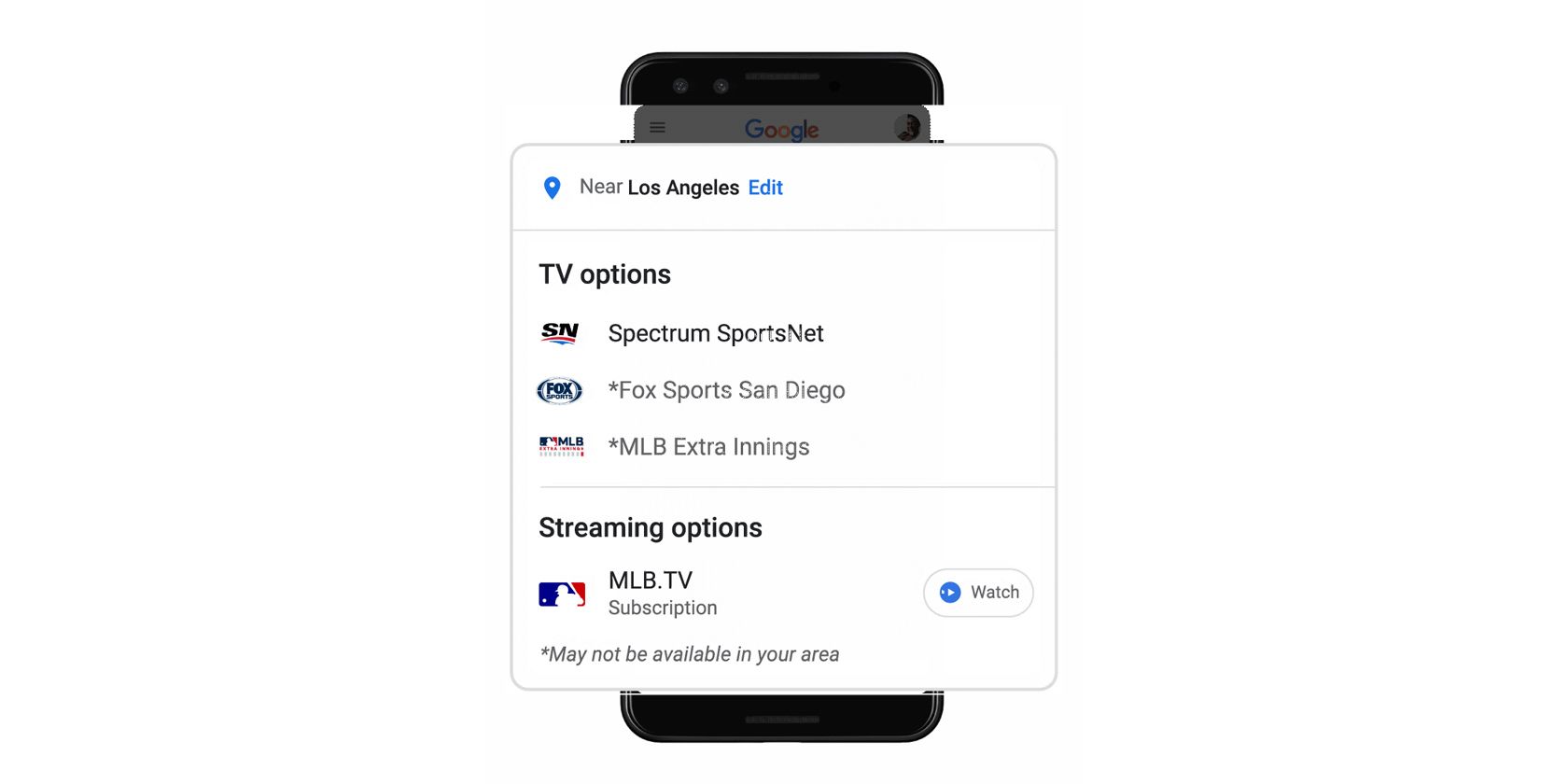
As announced on The Keyword, Google has made it so you can simply search for where to watch an upcoming game on your phone to find out what channel is carrying the game in your area. For example, you could type “where to watch the Clippers game” to find live TV options and how to tune in across a variety of cable services.

google search sports update

You could also search for something like “Yankees game” to see all of the usual features like live scores, top stories, and standings. However, with this new update, that same search query will also show you where to watch the game. All you need to do is click the Live on button to get that information.

Currently, Google is only adding this feature for MLB and NBA games, but the company intends to integrate it into other leagues as well. Additionally, Google says that it includes a variety of cable and network channels, but it will add streaming services soon.

What Do Entertainment Fans Get?

Google isn’t just limiting its Search enhancements to sports fans. If you enjoy watching TV shows, Google has something special for you.

Building upon its update that made it easier to find TV shows and movie recommendations in Search, Google is adding carousels of live content from cable and broadcast providers. You can simply type something like “what to watch” on your mobile device, and you’ll get results featuring both streaming and live TV content.

The update adds an On TV Now carousel and On TV Later carousel, which will help you find new content that’s currently airing or content coming up in the near future.

Both updates only work on mobile devices as of now.

How to Find What to Watch Next

Google is definitely offering some great new features that’ll help you find what to watch. Whether it’s live sports or television shows. However, Google Search is far from the only option. Check out the A-Z of Netflix to find the best content to watch on the streaming service.

Read the full article: Google Search Gets New Sports and Entertainment Features


Read Full Article

The 13 Best Free Mac Puzzle Games to Test Your Solving Skills


free-puzzle-games-mac

Those who enjoy puzzle games should count themselves lucky, as the genre offers a lot of variety. From the classic puzzle games to matching games and mazes, there is a wide selection of titles available for the puzzler in you.

So, if you like to sit down at your Mac and put your mind to work (without spending a fortune) we have a list of free puzzle games for you.

These puzzle games for Mac are all free, fun, and definitely worth your time and attention. So, grab your thinking cap and get ready to hone your puzzle-solving skills!

For Traditional Puzzlers

If you enjoy classic puzzle games, these freebies are for you. Match pairs, work with numbers, and assemble the pieces.

1. Mahjong Free

mahjong mac

Customize your game and play a traditional puzzler with Mahjong Free. Begin by choosing from 25 background options and a variety of tile styles. Then, sit back and enjoy the classic gameplay of Mahjong.

Mahjong Free provides options to shuffle the tiles, receive hints, and undo your last move. You can start a new game each time or pick up where you left off before. After you complete a puzzle, you move onto the next one with a different layout, for a little variety.

Download: Mahjong Free (Free)

2. Sudoku Epic

sudoku epic mac

Just pick a number and click a spot in the fun and challenging Sudoku Epic. This game offers two sizes of Sudoku with a daily challenge and Wordoku game. You can also choose your level of difficulty, which is great for expert players.

Via the game settings, you can enable highlighting of completed sets and duplicate numbers, change your input method, and display a timer. You can even adjust the tile color to your preference. Earn stars, complete goals, and enjoy Sudoku Epic for free.

Download: Sudoku Epic (Free, in-app purchases available)

3. Jigsaw Puzzles Epic

jigsaw puzzles epic mac

If you don’t have any good physical jigsaw puzzles, this option for Mac is awesome. Jigsaw Puzzles Epic lets you choose from categories like animals, nature, windmills, and lighthouses. Once you pick a category, you can select your puzzle.

Jigsaw Puzzles Epic provides options for you to rotate and choose the number of puzzle pieces. If your child is playing, you can set it for four pieces. Then, when it’s your turn, change it to 400 rotating pieces for the ultimate challenge. And for a relaxing experience, the game offers soothing background music.

Download: Jigsaw Puzzles Epic (Free, in-app purchases available)

For Teasing Your Brain

When you want to play puzzle games that tease your brain, choose one of these puzzle games for Mac. Plan your moves and think ahead while you have some fun.

4. Bind

bind mac

Leave no dot unattached or tile empty in Bind. Your goal is to connect dots of the same color by creating a path. Paths cannot overlap, all dots must be connected, and blank tiles are not allowed. Accomplish these three goals and move onto the next level.

This brain teaser provides 80 levels in its free version to keep you busy for a while, and each level is harder than the previous one. Bind has a simple concept that you have likely seen before, but still offers a challenge.

Download: Bind (Free, in-app purchases available)

5. Rail Maze

rail maze mac

If you would rather get the train to the station than connect the dots, check out Rail Maze. This is a great wild west challenge—by flipping the track tiles, rotating directional pieces, and avoiding the dreaded pirate train, you’ll accomplish your task.

Plan your moves carefully in Rail Maze because your goal is not only to get the train to the station, but to do so safely. If you crash into an obstacle you will have to start again. There are currently over 100 puzzles, offering a great challenge.

Download: Rail Maze (Free, in-app purchases available)

6. 2048 Game

2048 Game on Mac

Another game that takes planning and brings numbers to the challenge is 2048 Game. The goal is simple enough… just get to the 2048 tile. But this sliding puzzle is anything but easy. You’ll need strategy, luck, and patience to succeed.

You want same numbered tiles to touch and thus combine into a new number. As the digits add up and the number of tiles increases, so does the difficulty to reach that golden number. Use your arrow keys, trackpad, or mouse to slide the numbered tiles up, down, left, or right.

If can get to the 2048 tile without filling the board, you’ll have bragging rights over your pals. But if you can’t, just see how high you can score.

Download: 2048 Game (Free)

For Matching Three

Match-three games are a dime a dozen, but these free puzzlers stand out. You can match flowers, fish, fancy gems, or feathered friends.

7. Gardenscapes

gardenscapes mac

If you like story-based games, then Gardenscapes is one you should try. This is a match-three game with a cheerful theme. Make matches to accomplish the level goals and earn stars to spruce up the mansion garden.

The game offers hundreds of levels, tons of silly characters, and loads of challenges. You may need to match a certain number of fruits or flowers, collect acorns, or complete objectives within the time limit. Each level brings a surprise in this colorful, enjoyable puzzle game.

Download: Gardenscapes (Free, in-app purchases available)

8. Fishdom

fishdom mac

When you’re ready to move from decorating the mansion garden, create an aquarium home in Fishdom. Like Gardenscapes, this match-three game from Playrix is upbeat and delightful. You match pearls, turtles, seashells, and other watery objects.

Match more than three items to create special tiles like firecrackers and bombs to eliminate more tiles at once. As you work through the hundreds of levels, you earn coins to trade for more fish or decorations for your fish tanks. And, don’t forget to feed those fish to earn bonus coins.

Download: Fishdom (Free, in-app purchases available)

9. Cradle of Empires

cradle of empires mac

Cradle of Empires is another match-three game with a neat story and theme. Rebuild an ancient city by collecting valuable items in each level. Match flowers, fruits, gold, and other cool objects within the move limit to earn rewards and XP.

When you get stuck, use bonuses like a hammer to crash a tile or the bomb to eliminate five at once. Like similar games, matching more than three items will give you special tiles to clear rows or groups of items.

Download: Cradle of Empires (Free, in-app purchases available)

For Making Mosaics

Use your gray matter to create colorful mosaics with these puzzle games for Mac. Put tiles in the right order or pieces in the correct spots and make cool pictures.

10. Mystery Mosaics 2

mystery mosaics 2 mac

If you enjoy graph-style logic puzzles, create an amazing image in the Picross game, Mystery Mosaics 2. In over 100 levels, you must correctly place the colors according to the numbers on the grid. Each mosaic is comprised of three colors and you can only fill one color in at a time.

For those new to this genre, number indicators by the columns and rows of the grid serve as your clues. You place tiles according to those numbers. For instance, if a column has a 3 and then a 2 under it, that row contains three tiles in a row, followed by at least one space, then the other two pieces. When you finish, you can view a nifty mosaic.

As a bonus, Mystery Mosaics 2 is story-based; you use your success to build a glorious kingdom.

Download: Mystery Mosaics 2 (Free, in-app purchases available)

11. Fairytale Mosaics Beauty and the Beast

fairytale mosaics beauty and the beast mac

Another game that lets you create neat images is Fairytale Mosaics Beauty and the Beast. However, this mosaic-creating game is more of a jigsaw puzzle with a twist. You see the finished image and then need to place the pieces correctly to reconstruct it.

The twist comes with the challenge of assembling the puzzle quickly, accurately, and completely. If you do this, you will receive a key for each of these goals. Earning keys will give you coins to unlock the subsequent puzzles.

Download: Fairytale Mosaics Beauty and the Beast (Free, in-app purchases available)

For Just Plain Fun

These games may not fit with the other categories, but they may just suit your puzzle preferences. Test your dexterity skills or word-making talents with these neat puzzlers.

12. Impossible Twisty Dots

impossible twisty dots mac

Impossible Twisty Dots is one way to test your quickness, aim, and reflexes. The premise of the game is simple. Shoot the dots into the middle dot without hitting another one. Place each dot successfully and move onto the next level.

It sounds easy, so now you’re wondering where the “impossible” part comes in, right? The center dot that you aim for twists or turns and slows down or speeds up without notice. You might be preparing to aim when, suddenly, the dot twists—causing you to hit another. When this happens, you must start the level again.

Impossible Twisty Dots offers thousands of levels to test your skills.

Download: Impossible Twisty Dots (Free, in-app purchases available)

13. Word Wow Big City

word wow big city mac

It wouldn’t be a puzzle game list without at least one word challenge. Word Wow Big City is a great free Mac game that is part word game and part puzzle game. Your goal for each level is to create words with the letters shown in order to move the worm to the bottom of the building.

You create words of three or more letters to blow up blocks and clear the worm’s path. The nice part is that the letters do not have to touch, but the catch is that you have limited time. So, plan carefully and select words with letters that will help the little worm. You’ll play through many challenging levels within each neat building setting.

Download: Word Wow Big City (Free, in-app purchases available)

Challenge Yourself With These Puzzle Games for Mac

Puzzle games come in all shapes and sizes, from word games to number challenges. So there’s sure to be at least one or two free puzzle games for Mac on this list that will be the perfect fit for you.

And if you enjoy other types of challenges as well, check out the best role-playing games for Mac.

Read the full article: The 13 Best Free Mac Puzzle Games to Test Your Solving Skills


Read Full Article

13 August 2020

How to Download More Voices for Windows Narrator


speech-to-text-windows

Windows Narrator is one of several accessibility functions in Windows 10. It serves as a simple screen reader for users with visual impairments.

But even if you don’t need it for that reason, you may still find Windows Narrator useful. To that end, you might wish to download and install Windows Narrator voices other than the default. We’ll show you how to easily get new Windows 10 Narrator voices for text-to-speech (TTS).

How to Change the Windows Narrator Voice

You actually don’t have to go outside Windows to get new Narrator voices, as it does include a few extras besides the default. To change them, go to Settings > Ease of Access > Narrator. Under Personalize Narrator’s voice, choose a new voice from the dropdown box.

Windows Narrator Voices

In addition to changing the voice sound, you can adjust other aspects of it too. Use the sliders to Change voice speed, voice pitch, and voice volume. There are many more options about how the Narrator works below, but they’re not directly related to the voice.

By the way, aside from the Narrator, there are other ways to make your computer read documents to you.

Downloading New Windows 10 Narrator Voices

In recent versions of Windows 10, Microsoft added the ability to download more Narrator voices from inside Settings. However, this is really just a shortcut to download more voice packs for other languages.

You should see an Add more voices link underneath the Choose a voice box on the settings page mentioned above. If you don’t see this, download the latest version of Windows 10 from Microsoft and check again.

When you click Add more voices, you’ll jump to the Speech tab of the Time & Language section of Settings. Scroll down to find the Manage voices section, where you can click Add voices again. This will bring up a list of languages that you can download voice packs for.

Manage Voices Windows 10

Obviously, languages that you don’t know are of little use to you as Narrator voices. But you can get some use out of these by downloading variations of your language in other regions. For example, if you live in the US, you can download the English (Australia) pack to use voices that have an Australian accent.

Once you download a pack, it will appear in the Installed voice packages section. Close the Settings app, then go back to the Narrator options and you can choose voices from the new pack you downloaded.

More Third-Party Windows Narrator Voice Options

If none of the above options work for you, you’ll have to turn to third-party tools for more text-to-speech voices. Microsoft’s page on customizing the Narrator recommends several third-party speech synthesizer software tools that you can use to add more voices. These all support SAPI 5, and include:

While most of these tools aren’t free, if you need a high-quality screen reader or voice, they’re worth paying for. Once you add the tools to your system, you can select their voices using the same menu above. Give Zero2000’s free text-to-speech voices a try if you don’t want to pay.

And for the reverse of this, check out the best free speech-to-text tools for Windows.

Read the full article: How to Download More Voices for Windows Narrator


Rumors, trust and vaccines | Heidi Larson

Rumors, trust and vaccines | Heidi Larson

Why do people distrust vaccines? Anthropologist Heidi Larson explores how medical rumors originate, spread and fuel resistance to vaccines worldwide. While vaccines cannot escape the "political and social turbulence" that surrounds them, she says, the first step to stopping the spread of disease is to talk to people, listen and build trust.

https://ift.tt/3ivjaKS

Click this link to view the TED Talk

How to Group Watch Plex Together With Friends Online


plex-tricks-tips

The growth of movie downloading paired with the crippling consequences of 2020’s COVID-19 pandemic means fewer people than ever are watching movies with their friends. People just don’t go to theaters any more.

That’s had a knock-on effect on the social aspect of movie watching. Going to see a brand new movie in a packed cinema can be an exhilarating experience. You don’t get that experience sat on your sofa.

Thankfully, it’s possible to watch Plex together with your friends. The functionality is available from directly within the app using Watch Together, or from a third-party tool called SyncLounge.

Plex’s Watch Together Feature

First, let’s take a look at the native Plex tool for watching videos with friends. Called Watch Together, it’s officially still in the experimental stage. However, the feature appears to work flawlessly and the interface is easy to use. It definitely gets the MakeUseOf stamp of approval.

Who Can Use Plex’s Watch Together?

plex watch together users

While Plex’s Watch Together feature remains in beta, it’s free to use for all Plex users. However, this may change when it’s launched officially. Plex’s own documentation appears to suggest that Watch Together will remain free if you only want to stream content from Plex’s free, in-house, ad-supported streaming service. However, if you want to stream content from your own library, it seems likely that you’ll need to subscribe to Plex Pass.

At the time of writing, you’ll need to have an Android, Android TV, Apple TV, iOS, or Roku device to be able to use Watch Together. You cannot use Watch Together from the web app.

How Many People Can Tune In Using Watch Together?

plex watch together lobby

Officially, Plex hasn’t named a limit of the number of users (although we’re sure one exists).

In practice, however, the amount who can sync content together will depend on the Plex Media Server’s hardware, your network connection, your disk speed, and the video quality.

Confused? Here’s how Plex describes the user limit:

“If your Plex Media Server and network could not handle that number of users streaming things individually all at the same time, then it would also not be able to support them for Watch Together.”

Beware, trying to add too many users will lead to playback issues and the video will be unwatchable.

How to Use Watch Together on Plex

plex watch together episode

Assuming you’re using one of the supported devices, you’ll need to hit the More button (three horizontal dots) on a video’s pre-play screen, then select Watch Together from the list of options.

Next, you need to add people to your Watch Together session. You can only invite Plex users who you are “Friends” with. When you’re ready, click on the names of the friends you want to add and hit Done. To add a new friend, go to Settings > Users and Sharing > Share Libraries and enter the username or email address of the person you want to connect with.

(NB: If you just added a new friend and don’t see them in the list, you will need to restart your app to refresh the screen.)

If you’re being invited to someone else’s Plex Watch Together session, you’ll see a Watch Together row appear at the top of your app’s home screen, along with the video that’s been loaded by the host.

As users accept invitations, they’ll all appear together in a lobby. Once everyone has arrived, the host can begin playback. Only the host can control play/pause functionality once the video has started. Hosts also have sole control over different audio streams and subtitle tracks.

SyncLounge

synclounge plex

Formerly called Plex Together, SyncLounge is another great way to watch Plex together with friends.

Like Plex’s official Watch Together tool, SyncLounge will sync up your individual Plex apps so that you’re all watching the same footage at the same time.

SyncLounge Features

SyncLounge has some features that are not yet available in the official tool. For example, you can hide your Plex username when you sign into a room, you can rejoin recent rooms, and you can automatically play the next episodes when you’re binge-watching TV with friends.

We also really like the app’s user status indicators. Each user has a colored ring around their profile picture to denote sync distance, and you can even see the type of Plex client they are using if you hover over their name.

How to Use SyncLounge for Plex

synclounge sign in plex

To begin, click the Get Started link on the Sync Lounge website and enter your Plex login details. If you don’t fancy handing over your credentials, you can download the app from GitHub and run it directly on your own server.

Hosts will need to create a room and invite other people to join them. Invitees just need to accept the invite when it arrives.

Like Watch Together, only hosts can play and pause the video, change the subtitles, and change the audio.

Signing Out of SyncLounge

Don’t worry, SyncLounge isn’t the type of app that requires you to revoke access if you ever stop using it; your Plex user details are not held on the developer’s servers.

Plex’s Watch Together vs. SyncLounge

SyncLounge has some benefits over Plex’s official Watch Together tool.

Firstly, you don’t need to be “Plex buddies” to sync your content. Secondly, the Plex servers of every person connected to the room are available, thus creating a super-repo of content.

The danger, of course, is that Plex might pull the plug on the backend API that makes a third-party app possible, especially once its own Watch Together feature comes out of beta.

Longterm, we’d assume Plex’s backing of its in-house tool will help to establish it as the better product, but for now, it’s easy to make the case for SyncLounge instead.

How to Watch Other Video Apps Together With Friends

Plex isn’t the only app that lets you watch content in sync with your friends far away. Netflix subscribers should check out how to use the Netflix Party Chrome extension, and there are also plenty of ways to watch YouTube with far-away friends.

Read the full article: How to Group Watch Plex Together With Friends Online


Read Full Article