05 June 2020

Binge-Watching vs. Binge-Racing: What It Is and Why You Should Try It


binge-racing-netflix

Everyone knows about binge-watching, which is where you watch lots of episodes of a TV show in a row without a break. These days, mainly thanks to streaming, binge-watching is a mainstream activity. Because binge-watching lets you finish a show before any spoilers hit the internet.

However, have you heard of binge-racing? Which is one step up from binge-watching. Binge-racing is a competition to complete a TV show within a certain amount of time. And in this article we explain exactly what binge-racing is and what the pros and cons of binge-racing are…

What Is Binge-Racing?

Binge-watching is when you watch lots of episodes of the same TV show back-to-back. It’s long been a concept, but was really popularized with the boom of streaming services such as Netflix.

However, for television fans, binge-watching just isn’t enough any more. Now, there’s the next level, and it’s called binge-racing.

what is binge-racing?

Binge-racing is where fans commit to finish shows within 24 hours of their release.

You probably think that sounds mad. How can you possibly finish an entire TV show in 24 hours? The truth is, you can’t, unless it’s a new show with not many episodes. However, what you can do is speed through one season of a show as soon as it gets released on Netflix in your region. That’s what binge-racing is all about.

When Did Binge-Racing Begin?

Netflix coined the term in 2017. In a press release at the time, Brian Wright, Vice President of Original Series, said:

“There’s a unique satisfaction that comes from being the first to finish a story—whether it’s the final page of a book or the last, climactic moments of your favorite TV show. Netflix allows you to watch in a way you never could before, and there’s nothing better than seeing a show engage our members and ignite a passion for viewing.”

Between 2013 and 2016, the amount of people binge-racing increased more than 20 times. With Netflix now offering a wider range of content, and there being lots of other great streaming services, there’s no doubt that the amount of people binge-racing will have increased.

Binge-racing is a global phenomenon and brings a spirit of competition to proceedings. Binge-racers don’t just want to skim through the storylines, they want to be the fastest to do it. For them, the speed of watching is an achievement to be proud of. Similar to how some people speed-run their way through video games.

The Pros and Cons of Binge-Racing

If you have ever marathoned a show before, you probably know what’s good and bad about binge-watching. So let’s take a closer look at binge-racing and discuss the pros and cons of the practice.

Pro: You Get a Show Watched Quickly

If you choose to binge-race a new show, you guarantee only spending one day (and one night) on it and not an hour longer.

When you’re facing a choice between watching a great TV show or doing something productive, the chances are you’ll go for the first option. With the amount of great content available on streaming services, it becomes all too easy to procrastinate and keep choosing TV over completing work.

It might seem odd, but by choosing to take a break and watch the whole season in one go (and in under 24 hours), you’re choosing to be more productive. Rather than being distracted by this interesting show for weeks, you can get it over with quickly and get back to your normal schedule afterwards.

Pro: You Don’t See Spoilers

We all have that one friend who spoils shows and movies on social media, even when they know you haven’t seen it yet.

It goes without saying that if you’re the first one to finish a new show, you no longer have to worry about spoilers. Plus, if your friend turns out to be a binge-racer too, they’ll probably be a little too busy with their own viewing deadlines and won’t have time to spoil things for you.

Con: It’s Easy to Miss Crucial Details

One obvious downside of speeding through new shows is that you risk missing the little things that might be crucial to the plot.

In order to avoid that, we recommend taking your binge-racing seriously, planning your sessions, and being fully prepared for them. Stock up on snacks and make sure you get plenty of sleep the night before. And of course, one sure way to avoid missing small details is to have a binge-racing buddy that you can discuss the show with when you’re finished.

Con: It Can Make You Less Social

Unfortunately, if you don’t find anyone who shares your passion for binge-racing, it might make you a little less social in the long run.

You’ll become that person who has already “seen it all”. Which means that while your friends are discussing the first few episodes of that new amazing show they’ve started, all you’ll be able to do is nod and smile as you don’t want to spoil any important plot twists for them.

the number of binge-racers

However, if you do happen to find yourself a binge-racing buddy, it’s hard to imagine an experience more fulfilling. Being stuck on that same couch together for 24 hours is a great chance to bond. As long as you both have the same policies about talking (or not talking) while watching TV.

Why Become a Binge-Racer?

First, “binge-racer” is a great name. If you’re already a fan of binge-watching, why not take it one stage further?

Second, binge-racing is perfect if you want to watch more TV and can’t afford to spend too much time on all of the shows. Binge-racing will help you bring more organization into your TV viewing habits. You’ll have to be aware of new shows prior to their release. Plus, you’ll probably have to plan every single session of binge-racing in advance.

And of course, you get to be a part of a growing trend which everyone will probably be doing in the future. Especially when the robots take our jobs and leave us with more free time on our hands!

How to Find the Best Netflix Shows to Binge-Race

According to Netflix, in the past four years, the number of binge-racers all over the world has grown from 200,000 people to more than 8 million.

the most binge-raced shows

In 2017, the top 10 binge-raced shows included Gilmore Girls, The Defenders, and Stranger Things. However, it varied by country. For example, Club de Cuervos was most binge-raced in Mexico, while Ecuador were all about Fuller House. Interestingly, Canada had the most amount of members of the binge-racing club.

If you decide to jump on the bandwagon and become a binge-racer, you just need to find the right show to kick start your habit. Binge-racing is all about watching a whole series as soon as it drops, so your best bet is to keep an eye on shows coming soon to Netflix and other streaming services.

However, if there’s a show you’re keen to binge-race that has already aired, you can always watch a previous season over a weekend and still consider yourself a binge-racer.

What Shows Should You Binge-Race?

Have we managed to get you excited about this emerging television trend? Now that you know what binge-racing is and why you should consider trying it, the only thing left is to pick a show to watch.

If you need help deciding what to watch, here are the best TV shows to binge-watch when stuck indoors.

Image Credit: jameschipper/Depositphotos

Read the full article: Binge-Watching vs. Binge-Racing: What It Is and Why You Should Try It


Read Full Article

The 11 Best Free Word Game Apps to Play on Android and iPhone


When you are in the mood to play a new game on your smartphone, the options can be overwhelming. Both the Android and iOS app stores are packed full of fun and challenging games.

This is especially true when it comes to word games. So, if you’re looking for something enjoyable to play when you’re bored, here are the best free word games to play on your phone.

1. Wordscapes

Wordscapes is a game that combines creating words with a crossword puzzle. You just swipe to connect the letters to create words that fit into the crossword. Keep in mind that not all possible words are correct. They must fit into the crossword puzzle for you to progress.

If you enjoy relaxing word games, then Wordscapes is definitely one to check out. The puzzle packs are themed with beautiful imagery from sunrises to forests to oceans. The game also has a pleasant soundtrack to enhance your experience. For a casual and challenging word game, Wordscapes is fantastic.

Download: Wordscapes for Android | iOS (Free, in-app purchases available)

2. Words Crush: Hidden Themes

Another letter-connecting word game with a balanced challenge is Words Crush: Hidden Themes. You are presented with letters to connect that create words for the theme. But, the trick is that when you swipe through them, the remaining letters fall. So, be careful to connect them correctly when you have more than one of the same letter.

Try not to make mistakes, and earn stars so that you can unlock additional themes. You can head to the beach, kitchen, farm, and even outer space when you do well. Words Crush: Hidden Themes has a simple concept, but enjoyable gameplay.

Download: Words Crush: Hidden Themes for Android | iOS (Free, in-app purchases available)

3. Pictoword

Maybe when you play a word game, you like to mix pictures with it. If so, take a look at Pictoword. This out-of-the-ordinary word challenge tests your solving skills. You will see two pictures that combine to create a word. For example, one picture might be a key and the other a chalkboard. Fill in the number of letters shown to create one word based on the images.

Pictoword offers quests for you to complete for extra game goodies, so be sure to check for new ones often. You can also join the daily challenges and earn coins. Then, use those coins to obtain hints that remove or reveal letters or let you skip the puzzle. Pictoword is a great combination of picture and word game.

Download: Pictoword for Android | iOS (Free, in-app purchases available)

4. Wordalot

Another cool word game that uses pictures is Wordalot. Very different from Pictoword, Wordalot is a crossword puzzle. Your clues for each word exist within the displayed picture. So, you must open up your observational skills toolbox for this one, because it can be challenging.

To play, tap one word in the puzzle that you believe you know. Fill in the letters from the ones shown, see if you are correct, and then keep going. If you change your mind about a letter, just tap it to remove it from the puzzle. The letter set changes for each word you tap, which in itself is a hint.

Download: Wordalot for Android | iOS (Free, in-app purchases available)

5. Word Cookies

With an upbeat theme and jolly music, Word Cookies will have you baking up words to solve its puzzles. You will see spots that show how many words you can create and the number of letters in each. Then, drag though the letters at the bottom to create the correct words that fit.

Word Cookies lets you shuffle the letters or use hints when you get stuck. You will start as a Novice Chef, but with your solving expertise, you will become an Ultimate Chef in no time. The game currently has over 2,000 levels of fun to play through.

Download: Word Cookies for Android | iOS (Free, in-app purchases available)

6. WordWhizzle Search

WordWhizzle Search is similar in gameplay to Word Cookies, but contains a whopping number of levels at over 2,700. You see a theme displayed at the top and spots for words at the bottom. Swipe through the letters to create the words that both match the theme and fit the spots.

This word game is a little trickier in that you can only connect letters in straight lines. But, you can use letters more than once. The better you do, the further you progress, and the harder the game gets. For fans of word games, WordWhizzle Search provides a terrific challenge.

Download: WordWhizzle Search for Android | iOS (Free, in-app purchases available)

7. Languinis

Languinis is a matching word puzzle game that features a funky story to go along with it. Match three or more tiles to reveal letters. Then, use those letters to create words and meet the level objectives. Your ultimate goal is to free the little Languinis.

The game has well over 1,000 levels, unique boosts and power-ups, challenging gameplay, and awesome graphics and sounds. Match more than three items to create special tiles and then combine them for massive explosions. And remember, longer words and letters with higher points will get you to your objectives quickly.

Free the Languinis with your words of wisdom in this upbeat game.

Download: Languinis for Android | iOS (Free, in-app purchases available)

8. AlphaBetty Saga

If you like to stick with story-based word games, AlphaBetty Saga is a very entertaining option. It’s developed by King, the creators of Candy Crush Saga. This one takes you into a mouse world with Betty and Professor Alpha. Connect touching letters to create the highest scoring words you can and complete the level goals.

AlphaBetty Saga boasts over 100 levels with cute characters and colorful graphics. Watch your move limit and number of lives, create powerful letter tiles, and have fun with words in this cheerful game. And if you like other types of puzzle games for your smartphone, take a look at these awesome mobile puzzle game collections.

Download: AlphaBetty Saga for Android | iOS (Free, in-app purchases available)

9. Bold Moves

Bold Moves is another matching puzzle word game, but still manages a unique play style. You swipe to swap the tiles and make matches of three or more. However, your goal is to match the tiles containing letters to release them into the puzzle. The puzzle is displayed above and consists of an inspirational quote, for a nice touch.

When you release enough letters and know the answer to the puzzle, tap Solve. Then, fill in the missing letters and move onto the next level. Bold Moves offers challenging obstacles, special tiles, and helpful boosts like other, similar games.

With beautiful graphics and charming music, this word game from the Oprah Winfrey Network is a definite winner.

Download: Bold Moves for Android | iOS (Free, in-app purchases available)

10. Infinite Word Search Puzzles

Sometimes the time-tested types of word games are the most enjoyable. Infinite Word Search Puzzles brings back the enjoyment of paper puzzle books. With two game modes, you can either race against the clock or solve the puzzles at your own pace.

The game has a huge variety of single-player word search categories. Pick from topics such as animals, art, TV shows, and sports with plenty of levels within each. You can also unlock special categories by watching a video or paying to remove the ads. Infinite Word Search Puzzles is ideal for fans of this genre.

Download: Infinite Word Search Puzzles for Android | iOS (Free, in-app purchases available)

11. Alpha Omega

Alpha Omega has been on the scene for a while, and with good reason. This is a crossword-style word game (apps to help you solve crossword puzzles) and boasts some rather challenging puzzles. You receive limited hints with letters that are in the wrong order. Just tap to swap the letters, keep the hints in mind, and solve your way to the next challenge.

What makes Alpha Omega stand out, aside from its brain-teasing gameplay, are the audio and visual effects. You can select from attractive themes and enjoy the soothing soundtrack as you play. If relaxing mobile games are your favorites, then Alpha Omega is a must-play.

Download: Alpha Omega for iOS (Free, in-app purchases available)

What’s Your Favorite Type of Word Game?

This list covers the full gamut of word games, from word searches to crosswords to matching games. Many word game fanatics like all of these genres and play them avidly. If you want more games to play and learn from, try these free Google games for kids and adults alike.

Read the full article: The 11 Best Free Word Game Apps to Play on Android and iPhone


Read Full Article

6 Reasons Why You Should Start Shooting Videos in 4K


shoot-in-4k

With 8K video right around the corner, it’s strange to think that loads of people are still resisting shooting in 4K. They’re put off by concerns about large file sizes and slow editing, and the videos taking ages to upload.

However, if you haven’t made the leap to shooting in 4K yet, it really is time to do so. The old excuses no longer make any sense. Start shooting in 4K now, and you’ll thank yourself later. And here are the reasons why…

1. 4K Gives You More Options

screen sizes for 4k videos

Just because you’re shooting in 4K, that doesn’t mean you have to work in 4K. For many projects, 1080p is good enough. The benefit of shooting in 4K is a quadrupled resolution, allowing you to zoom in cleanly since you have a much better source video to work with.

This is perfect for cutting to close-ups, effectively eliminating jump-cuts from your finished product entirely. This effect can commonly be seen in single-camera interviews, where the perspective shifts between a wide full-body shot and a close-up shot of the interviewee talking.

Pull it off well and it can be used for dramatic effect to add emphasis and connect better with the subject.

You could take it a step further and apply a “Ken Burns” pan-and-zoom effect to a still shot. Imagine being able to crop or add movement to any shot you want, without losing image quality in the process. There’s no chance of you accidentally wobbling the camera, either.

You can even grab fairly high-resolution still images from your footage. They won’t look amazing, but they’re good enough to use on the web, as YouTube thumbnails, or even Instagram posts.

2. 4K Capture Looks Better

Even if your end product will be presented in 1080p, shooting 4K will deliver a higher quality downsampled image. Capturing four times the amount of information you need won’t produce an image that’s four times better looking, but the end result will be noticeably sharper.

You’ll also reduce the chance of color banding, since most cameras record 4K at a higher bitrate. That means more color detail is captured, which will vastly improve gradual changes, like deep blue skies or other solid colors.

Sometimes the camera makes all the difference. Modern mirrorless, digital SLR, and premium compact cameras like the excellent Sony RX100 VII shoot 4K using larger sensors, effectively downsampling a 6K or 8K image to 4K. The Panasonic GH5 even does 6K video and 4K video at a bitrate of 400 megabits-per-second.

Sony RX100 VII Sony RX100 VII Buy Now On Amazon $1,198.00

3. You Can Stabilize Your Footage in Post

Whatever you do with your footage, it’ll probably look better if you held the camera fairly still when you shot it. Sometimes this isn’t possible, and three-axis stabilizers like the Zhiyun Crane 2 can be pretty pricey. This is where software stabilization comes in; a feature that’s built into most modern editors.

Most generally recommend avoiding software stabilization since it works by stretching the image. For 1080p productions, 4K source material will result in software-stabilized footage with no loss in image quality whatsoever. 2K (1440p), the 720p of the 4K world, is another great compromise in order to take advantage of software stabilization.

4. You’ll Thank Yourself in the Future

more pixels

You know how 720p videos look on a 1080p screen? Do you remember what every single Wii U game looked like? Well that’s what your 1080p videos look on a large 4K panel. They have to upscale the HD video to fit the 4K screen. Some TVs are better at it than others, and the larger the display the worse it tends to look.

And the situation is not going to improve. In five years or so, when you’ve bought your new 8K TV with 16 times the resolution of HD, those 1080p videos are not going to look good at all.

You’ll regret your decision to have sacrificed image quality for storage space, especially if some of your movies contain treasured memories.

5. Storage Is Cheap

Another reason you may be resisting jumping to 4K is increased storage demands. If you’re shooting primarily on your smartphone, the answer is simple: don’t store videos on your phone long-term. They’re probably the biggest hoarder of free space in your pocket, so move them to your computer and store them safely elsewhere.

Portable hard drives like the WD Passport and Seagate Backup Plus are also cheap, and it will probably take you a while to fill up a couple of terabytes. If you combine a few cheap external drives with the best cheap cloud storage services, you’ll never have to worry about storage space again.

WD Passport 2TB Hard Drive WD Passport 2TB Hard Drive Buy Now On Amazon $64.99

If you’re really serious about video—and you want to eventually make money or more involved productions—invest in a proper storage device like a network drive with a RAID array with regular online backups.

6. You Can Work Around Hardware Limitations

macbook pro colors
Image Credit: Simon Waldherr/Flickr

A lack of editing grunt is probably the most common reason to continue shooting in 1080p. Assuming you’ve upgraded your desktop or laptop in the last few years this shouldn’t actually be as big a problem as it once was.

Your choice of video editor can play a big part. Many Mac users prefer Apple’s own tools like iMovie and Final Cut Pro since they have been designed by Apple, for Apple hardware. They are generally better optimized for the hardware than their Windows counterparts.

Windows users will have to conduct a little trial and error of the best video editors for their particular setup.

There’s also the small issue of budget. If you’re lucky enough to be using a professional editor like Adobe Premiere Pro as part of the Creative Cloud suite, you can make use of a feature called proxy editing to create lower-resolution versions of your 4K files for editing.

This will allow you to edit huge resolution files with relative ease, and Premiere will replace your files with the 4K source files for the final render.

Even older versions of Premiere Pro allow you to transcode to one-quarter or one-eighth quality on the fly, which can make a huge difference to performance. If you’re stuck editing 4K footage on an underpowered machine, you can optimize performance by:

  • Restarting your computer, then opening only your video editor.
  • Disconnecting external displays, since driving another monitor will tax your GPU.
  • Copying your files to your fastest local drive, ideally an SSD if you have one.
  • Connecting to power if you’re using a laptop for editing.

When you do finally take the plunge on a new machine that eats 4K for breakfast, you’ll be glad you have some footage to play around with.

Make the Switch Already for 4K’s Sake!

If it feels like 4K has been around for ages, that’s because it has. The benefits of a 1080p image were clear as day to an audience raised on VHS tapes and standard definition broadcasts, but 4K doesn’t seem like quite such a captivating jump.

Regardless, don’t resist the change. Buy a few spare hard drives and embrace ultra high-definition (the differences between 4K and ultra HD). In 10 years’ time we guarantee you’ll be glad you did.

Once you’ve made the switch you can set about improving your videos in other ways. Check out our guide detailing how to make your home videos look more professional for some great tips to get started.

Read the full article: 6 Reasons Why You Should Start Shooting Videos in 4K


Read Full Article
The 5 Best VPN Routers


best-vpn-routers

Everyone should be using a VPN by now. The news is consistently awash with articles detailing the abject destruction of your privacy. And once gone, it is gone forever. The trouble is that using a single VPN requires you to set up each device in your house.

Luckily, there is an alternative method. There are plenty of reasons to use a VPN. However, instead of painstakingly entering credentials on individual devices, why not upgrade to a VPN router and protect every device all at once?

Here’s what you need to know about VPN routers.

What Is a VPN Router?

Before we delve into the best VPN routers, let’s quickly establish the difference between the VPN on your laptop or smartphone and a VPN router:

  • VPN client: A VPN client on your computer protects data transmissions for that system alone. Once you sign-up and download a client, the VPN protects the individual device. Many services offer protection for multiple devices under the same subscription, but you have to download the software/app for each device.
  • VPN router: A VPN router provides the security and privacy of a regular VPN, but covers every device on the network. All of the devices in your home can simultaneously use and benefit from a VPN without fiddling around with masses of login credentials and app downloads. The tradeoff, however, is having to set up a VPN router.

VPN routers were once the sole reserve of security and network buffs. But as internet users seek to improve their privacy and security, VPN routers have become more accessible.

Different Types of VPN Router

VPN routers come in a few different flavors depending on your requirements. Almost all require you to run a custom router firmware, like DD-WRT or Tomato. These Linux-based custom router firmware projects offer far greater customization than a standard OEM setup. Support varies from router to router, depending on the manufacturer and device hardware.

In that, you have two options: Purchase a router with your firmware choice preinstalled or buy a compatible router and take matters into your own hands.

The Best VPN Routers

Without further ado, here are the best VPN routers you can lay your hands on.

1. Asus RT-AC5300

ASUS RT-AC5300 ASUS RT-AC5300 Buy Now On Amazon $295.11

The Asus RT-AC5300 is a visually impressive router that will make your friends wonder about their inferior router choices. It has eight antennas and can blast wireless signals across 5,000 square feet, making it perfect for anyone with a large home or office.

The RT-AC5300 is a tri-band router that uses Asus’s Smart Connect feature to level out demand. This means the router switches between 5GHz bands to make sure there is no network congestion.

In addition, the router packs a decent 1.4GHz dual-core CPU with a similarly decent 512MB RAM, has eight Gigabit Ethernet ports for cable connections, and uses MU-MIMO for better speeds with multiple devices. Another bonus is the USB 3.0 port for external storage devices, as well as a USB 2.0 port too.

This VPN router is an excellent choice for network intensive environments, or even just large, bandwidth-hungry families, albeit at a high cost. The RT-AC5300 supports DD-WRT but not Tomato.

2. Netgear Nighthawk R7000

Netgear Nighthawk R7000 Netgear Nighthawk R7000 Buy Now On Amazon $109.00

The Netgear Nighthawk R7000 is one of the cheapest options on this VPN router list. But cheap VPN router status aside, the Nighthawk R7000 is well worth your time. The R7000 features a 1GHz dual-core processor with 256MB RAM, as well as four gigabit Ethernet ports, a USB 3.0 port, and a USB 2.0 port.

The Nighthawk R7000 is a dual-band router, allowing it to switch seamlessly between bands. Also, the router has several Quality of Service (QoS) features to boost streaming and data throughput. For instance, you can optimize traffic for video streaming or online gaming, and so on. You also get some NAS functionality through Netgear’s ReadyShare technology, allowing you to use a large external drive as a basic NAS.

This isn’t the fastest or most powerful router on the list (most models have 802.11ac mode, but some only have “b/g/n”—do not buy any router without at least “n”). But the Nighthawk R7000 provides a cheap entry-level VPN router experience, especially if you purchase the router and flash the firmware yourself. The Nighthawk R7000 supports DD-WRT and Tomato, as well as other custom firmware. It also looks cool.

3. Asus RT-AC86U

Asus RT-AC86U Asus RT-AC86U Buy Now On Amazon $189.99

The Asus RT-AC86U is a powerful dual-band VPN router featuring 512MB RAM and a 1.8GHz dual-core processor. It comes with three high-power antennas that broadcast over a huge area, as well as packing in NitroQAM technology to boost your data transmission rates by utilizing extra wireless band capacity.

The RT-AC86U features four Gigabit Ethernet ports, a USB 3.0 port, and a USB 2.0 port. You can use Asus’s AiPlayer and AiDisk as a media server and file server in conjunction with an external hard-drive, doubling up as a NAS of sorts.

But best of all, the Asus RT-AC86U is easy to set up with your own custom VPN router firmware, with support for Asuswrt-Merlin (a customized version of Asus’s existing firmware), Tomato, and DD-WRT variants. Unfortunately, there doesn’t seem to be a retail option with a pre-installed VPN provider and custom firmware. However, there are several tutorials online that will guide you through.

  • Purchase without VPN provider or custom firmware via Amazon

4. Linksys WRT3200ACM

Linksys WRT3200ACM Linksys WRT3200ACM Buy Now On Amazon $209.99

The Linksys WRT3200ACM consistently features in roundups of the best VPN routers and for a good reason. Like the RT-AC86U, it features a powerful 1.8Ghz dual-core processor with 512MB RAM.

As well as this, the WRT3200ACM uses MU-MIMO to keep those speeds high. In addition to MU-MIMO, it utilitizes the Linksys Tri-Stream 160 technology to boost Wi-Fi speeds across wireless bands (somewhat similar to NitroQAM). The WRT3200ACM broadcasts using four antennas with an extensive range. You’ll also find a USB 3.0 port, along with a combined USB 2.0/eSATA port for plugging in peripherals.

Finally, the router supports OpenWrt and DD-WRT custom firmware, allowing you to customize your VPN router as you see fit. However, pre-installed WRT3200ACM VPN routers are available, with the ExpressVPN/OpenWrt combination one of the easiest to use. This VPN router really does have a considerable amount of support, allowing you to fine-tune your setup.

5. D-Link AC5300 DIR-895L/R

D-Link AC5300 DIR-895L/R D-Link AC5300 DIR-895L/R Buy Now On Amazon

The D-Link AC5300 DIR-895L/R comes with a 1.4GHz dual-core processor with 256MB RAM, broadcasting using eight antennas. The router is tri-band, using MU-MIMO to provide consistently high speeds to every device in your household or office, with a total theoretical combined throughput of 5,332Mbps (1,000 Mbps in 2.4GHz, plus 2,166 Mbps in 5GHz and 2,166 Mbps in 5GHz).

The DIR-985L/R also comes with four gigabit Ethernet ports, along with a USB 3.0 port and a USB 2.0 port. Like most of the other listed routers, the DIR-985L/R will function as a simple-but-effective NAS if you attach an external hard drive of sufficient size.

The AC5300 DIR-895L/R has extensive support for DD-WRT, with some support for other OpenWrt projects such as LEDE. This is a well-rounded VPN router that provides ample power for a large household with multiple devices (up to 20) or even a small office.

  • Purchase with VPN provider or custom firmware via Amazon

Which VPN Router Will You Choose?

You have five excellent VPN routers to choose from. But if these VPN routers don’t suit your requirements, there are plenty more on the market to check out.

Using a VPN router extends the protection and privacy of a regular VPN to your entire family. And with the range of online support available, setting up a VPN router is no longer a daunting task that only network savants should attempt.

Read the full article: The 5 Best VPN Routers


Read Full Article

20 Fast and Quick Mobile Games to Kill Time on Android and iPhone


mobile-games-quick-fix

When you’re sitting in a waiting room or standing in line, you don’t have time to play a lengthy game. Save those for later and check out these fast, fun, and free mobile games for a quick fix. From awesome arcade challenges to perplexing puzzlers, these games will keep you entertained.

All of the games are available for free on Android and iOS, though some contain optional in-app purchases…

Arcade Games

Arcade games have come a long way and are now available in many forms. No quarters are required to play these fun challenges.

1. iSlash Heroes

Sharpen your blade and prepare for iSlash Heroes. Your goal is to slash pieces of the board away until the meter reaches the red ribbon. The trick is to watch out for the bouncing ninja stars because if you hit one, you must begin again. The more pieces you remove, the less space there is for the stars to move.

Download: iSlash Heroes for Android | iOS (Free, in-app purchases available)

2. Fishing Break

Fishing Break is a casual, colorful, and fun challenge. You hop into your boat and travel to different watery worlds catching fish and creating a collection. Swipe to cast, then tap and hold to reel in your catch. Just be careful not to pull them in too quickly, or they may break the line. Earn coins for the fish you sell and you’ll unlock better fishing spots.

Download: Fishing Break for Android | iOS (Free, in app-purchases available)

3. Doodle Jump

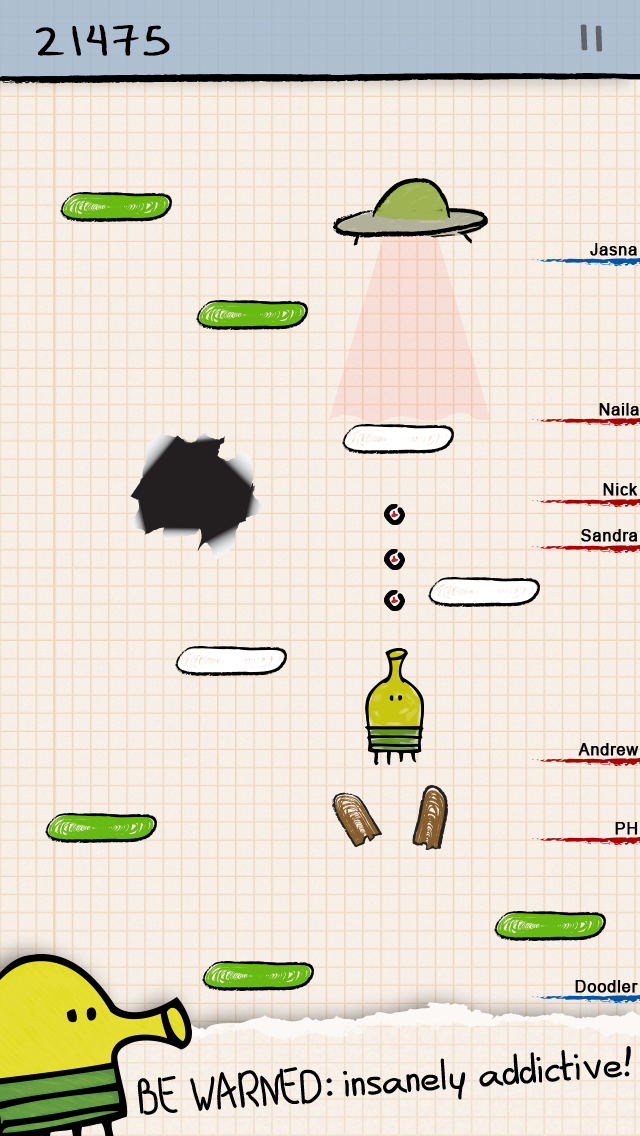
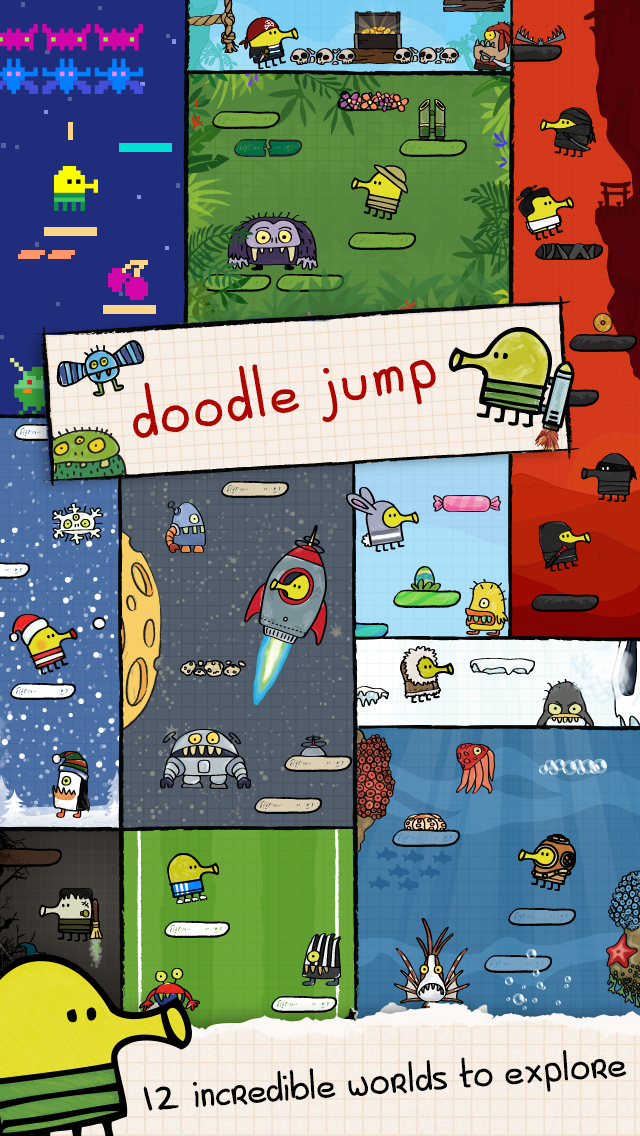
Doodle Jump has been around on smartphones for many years, but it remains just as addictive as ever. The aim is to control a little jumping creature, tilting your phone to avoid enemies and collect power-ups like jetpacks, and see how high you can get. There’s lots of different themed levels to play in, missions to complete, and global leaderboards to try to place on.

Download: Doodle Jump for Android | iOS (Free, in-app purchases available)

4. Polyforge

There are plenty of relaxing puzzle game apps for iPhone, and Polyforge is another great option. As the crystal rotates, you tap to hit each side of it with color. But be cautious, because if you hit the same side twice, you must start again. Each correct tap creates a nice music tone, but a wrong tap will give you an off-key note.

Download: Polyforge for Android | iOS (Free, in-app purchases available)

Puzzle Games

Puzzles include more than jigsaws and crosswords. With birds, balls, and dots, you can enjoy a speedy brainteaser.

5. Two Dots

Containing over 1,000 levels, Two Dots has you collect colored dots to win. Connect dots of the same color to collect and remove them from the board to reach the level goal. You have a limited number of moves and lives, can use boosts and power-ups, and enjoy gifts for checking in daily and inviting friends.

Download: Two Dots for Android | iOS (Free, in-app purchases available)

6. Angry Birds Blast

You don’t have to be an Angry Birds fan to have fun with Angry Birds Blast. In this matching game, you pop adjacent balloons of the same color to set the birds free. Each of the 250 levels has a goal and you can use boosts and power-ups if you get stuck. Make large matches to create bombs and laser guns to blast away balloons. Be strategic, because you have limited moves. Plus, be sure to play the daily challenges for helpful rewards.

Download: Angry Birds Blast for Android | iOS (Free, in-app purchases available)

7. Roll the Ball

If you enjoy slide puzzles, then Roll the Ball is one to check out. You simply slide the tiles to create a path to guide the ball to the goal. Do your best to arrange the tiles so that you can collect three stars in each level. There are no time or move limits and you can play your way through tons of levels. It’s also one of the Android games you can play offline.

Download: Roll the Ball for Android | iOS (Free, in-app purchases available)

Turn-Based Multiplayer Games

Many multiplayer games let you take your turn when you have the time. This turn-based selection is perfect for when you have minutes to spare.

8. Dice With Ellen

For a fun dice game with a Yahtzee concept and Ellen DeGeneres as the host, check out Dice with Ellen. Take turns rolling for high scores in the ones, twos, and threes as well as the full house, straight, and three-of-a-kind categories. Build up XP with your wins, choose custom dice, and challenge Ellen and her staff.

Download: Dice with Ellen for Android | iOS (Free, in-app purchases available)

9. Trivia Crack Kingdoms

Mix the original Trivia Crack game with royalty and you have Trivia Crack Kingdoms. Play against your pals to see who rules in the world of trivia. Choose a channel topic like sports or TV shows, answer correctly to earn the crowns before your opponent, and then reign supreme.

Download: Trivia Crack Kingdoms for Android | iOS (Free, in-app purchases available)

10. Word Chums

If you like Words With Friends, then you’ll love Word Chums. In the vein of Scrabble gameplay, you can take on your Facebook friends to see who’s the better wordsmith. What makes this multiplayer word game stand out is the cute characters (Chums), colorful interface, and upbeat experience. Word Chums also offers power-ups for blasting away your letters and getting high-scoring hints.

Download: Word Chums for Android | iOS (Free, in-app purchases available)

11. Draw Something

You don’t need to be the next Picasso to have fun with Draw Something. In fact, it’s funnier when your drawings aren’t the best. This game is like Pictionary, where you are given a word to draw and your friend has to guess what it is. You could be mean and draw something purposely obscure to get your friend guessing, or use all the tools and colors available to create a work of art.

Download: Draw Something for Android | iOS (Free, in-app purchases available)

Sports and Racing Games

Knock down pins in tropical locations or take a spin around the track. These games are quick and cool.

12. Bowling Crew

Bowling in your local alley is all well and good, but with Bowling Crew you can knock down pins on a boat, in a rock club, in the snowy mountains, and more. It’s a fast-paced, frenetic bowling game that is easy to pick up and play, but also has a decent learning curve so that you can master it over time. Bowling Crew also lets you play live against other players, if you want to put your skills to the test.

Download: Bowling Crew for Android | iOS (Free, in-app purchases available)

13. Subway Surfers

Swipe up to jump, down to slide, and move left and right as you charge ahead in Subway Surfers. In this upbeat, endless adventure, you’ll strap on your jetpack, hop on your hoverboard, and collect coins as you maneuver around the obstacles. Stay on top of your game, get a big score, and outrun that cop on your tail.

Download: Subway Surfers for Android | iOS (Free, in-app purchases available)

14. Horizon Chase – World Tour

There are plenty of amazing racing games to choose from and Horizon Chase – World Tour is one of them. Race laps around the track with easy controls, an awesome soundtrack, and turbo boosts. Challenge your friends and do your best to take first place. You receive two cars and five tracks in the free version and can unlock the full game for $2.99.

Download: Horizon Chase – World Tour for Android | iOS (Free, in-app purchases available)

Word Games

Put your brain to the test with word games that challenge your love of letters.

15. 7 Little Words

In 7 Little Words, you create words using blocks of letters to solve the seven clues. You can solve them in any order—shuffle the letter blocks or use a limited number of hints if you get stuck. Your goal is to make it through each level and you can stop and pick up where you left off later if necessary.

Download: 7 Little Words for Android | iOS (Free, in-app purchases available)

16. Four Letters

It takes a quick draw to succeed in Four Letters. When the four letters display, click them in the right order to spell a word. You score for each valid word you create and there are multiple answers available. The quicker you move, the better, because the challenge increases the faster you go.

Download: Four Letters for Android | iOS (Free, in-app purchases available)

17. WordBrain

In WordBrain, you swipe through the letters to create words. Those words must fill the empty slots at the bottom, so you can see how many letters each word contains. Just keep in mind that the words aren’t necessarily related. You can make as many attempts as needed to pass the level and get limited hints. The game boasts over 700 levels and will definitely puzzle even the smartest linguists.

Download: WordBrain for Android | iOS (Free, in-app purchases available)

Music Games

Combine your love of music and challenges with these upbeat and fast-paced music games.

18. SongPop 2

Do you think you know everything about music? Put yourself to the test in SongPop 2. It features over 100,000 music clips, spanning many genres and decades, and you need to try and name the artists and song titles. It’s a lot trickier than it sounds and you get bonus points the faster you answer.

Download: SongPop 2 for Android | iOS (Free, in-app purchases available)

19. Beat Blade: Dash Dance

Dive into a neon wonderland with Beat Blade: Dash Dance. Load up one of the songs and you will see blocks coming towards you. Slide your character towards them and slash them to get points, all the while moving out the way of obstacles. There are lots of great songs to choose from and it’s very addicting to try to beat your best score.

Download: Beat Blade: Dash Dance for Android | iOS (Free, in-app purchases available)

20. Infinite Tiles

As the tiles slide quickly towards you, tap them in order to build up your score. It sounds easy, but as the pace quickens, the tiles grow in number, and you need to touch multiple tiles at the same time, it soon gets tricky. You can earn coins to unlock special tracks and play on an endless mode to build up your reflexes.

Download: Infinite Tiles for Android | iOS (Free, in-app purchases available)

Free Mobile Games With No Ads or IAPs

When you have a few minutes to burn, no matter if you have an Android or iPhone, one of these fast and fun games will entertain you.

If you’re tired of seeing ads in your games or being pressured to buy things, here are the best free mobile games without ads or in-app purchases.

Image Credit: Maria Savenko/Shutterstock

Read the full article: 20 Fast and Quick Mobile Games to Kill Time on Android and iPhone


Read Full Article

How to Use SketchUp for 3D Design


howto-sketchup

Sometimes you need to describe a building in a way that can’t easily be explained in writing. Often, these structures are of the 3D variety, such as architectural models or interior design.

If you’re already familiar with 3D modeling, then you’ll definitely be aware of this more “descriptive” need. However, what if you’re just a hobbyist who wants to create 3D objects for fun? If you fall under this category, you can try SketchUp. While SketchUp does have a paid version of its app, there is a free web version for casual enthusiasts, too.

In this article, we explain what SketchUp is, what the free version offers, and how to use SketchUp if you’re brand new to the program. This is 3D modelling for everyone, including absolute beginners.

What Is SketchUp?

Trimble SketchUp

SketchUp, formerly Google SketchUp, is a 3D modeling program that was released in the year 2000. It is now owned by a company called Trimble.

As a program that is devoted to 3D modeling, SketchUp is perfect for a wide range of uses. These uses vary, from architectural design and landscaping to film and game development. With pre-fab models that you can use in your designs, this app also acts as a collective engine where you can easily build 3D structures and render them.

The History of SketchUp

The story behind SketchUp is really cool, in that it was originally designed by @Last Software. SketchUp was acquired by Google in 2006, before being passed off to Trimble in 2012.

The company behind this app designed it with the expressed purpose of creating a program that was simple to use. This simplicity was much needed, as 3D modeling programs usually have a steep learning curve.

Unfortunately, that curve can also affect who is allowed to learn a program and how fast they learn it (not the general public on a budget).

In the current era, SketchUp and its parent company have stuck to the mandate of helping you “visualize your ideas.” The company encourages its users to use sustainable design practices in their creations, and through its app you can also share your designs within the 3D SketchUp community as a whole.

While all these features are very neat, they might not be something you need to explore if you’re still learning the basics. Fortunately, SketchUp has several different plans for users to choose from, including a free version that can be accessed through the web.

Is Google SketchUp Free?

Google SketchUp Download

Yes and no. While there is a free version of Trimble’s (Google) SketchUp, it is very pared down when you compare it to the professional paid version of the app.

SketchUp Free

  • With the basic version of SketchUp, the intent of the program is to help you “discover 3D modeling.”
  • This app is web-only, which means you can only use SketchUp online.
  • You have 10GB of cloud storage for your projects, along with community support via the forums.
  • The downside to the free version is that it does not allow you to use custom styles, custom materials, performance-based designs, or the style builder tool. You also cannot use the models you are creating in the free version of SketchUp for commercial intent.

SketchUp Shop

  • In comparison, SketchUp Shop, the paid version of SketchUp for personal use, allows for basic access to custom styles.
  • It also includes more features like unlimited cloud storage and email support.
  • While SketchUp Shop does have more features, it still doesn’t give you full access to the program. Still, if you end up really loving this program, it’s worth a shot for $119/year.

SketchUp Pro

  • If you want to have full access to the program, or if you’re a professional designer, then you need to use SketchUp Pro.
  • SketchUp Pro gives you access to all features. It can also be used on desktop or through the web.
  • However, this version of the program is the most expensive by far, sitting at $299/year without accounting for seasonal sales, as can be seen in the picture above.

Our Verdict: While SketchUp is not free to use if you’re a designer, if you’re just learning the basics, this free version will work just fine. Additionally, if you use it in conjunction with our beginner’s guide to 3D printing, you’ll have every angle of your 3D modeling hobby covered.

Let’s walk through the basic interface for SketchUp’s free app.

How to Use SketchUp: A Basic Introduction

Trimble SketchUp Free

The great thing about SketchUp is that when you sign up for the free app, you’re offered a guided tour. There are also accessible help forums that will guide you through your very first 3D project, with topics ranging from using SketchUp in comics, to sharing SketchUp projects with a friend.

When you open SketchUp, you should see a “working space” with a three-dimensional axis, a horizon line, and a 2D person for scale. On the left-hand side of your screen, you will see your Toolbar (shown here in red):

SketchUp Toolbar

This Toolbar contains the items that you will need to draw. Here, you’ll be able to locate your:

  • Eraser
  • Paint tools
  • Line tools
  • Push/Pull tools
  • Move tools
  • Tape Measure tools
  • Orbit controls

At the bottom of your screen, you’ll see your Status bar. The Status bar will help you learn how to use SketchUp by clicking on the Help button to access the app’s tutorials.

SketchUp Status Bar

Finally, on the right side of the screen, you will see your Panel section. Here, you can adjust your model using different materials, components, and layers.

SketchUp Panel

To Recap:

  • Draw in SketchUp using your left-hand Toolbar.
  • Adjust your drawing with your right-hand Panel.
  • Learn how to draw with your bottom Status bar.

Try SketchUp If You’re Interested in 3D Modeling

Now that you know all about SketchUp and how to use the basic interface, you can look into the free version of the program and try it out yourself. The best thing about SketchUp is that if you decide to upgrade from Free to Shop or Pro, you can do so easily.

If you’re looking for more information on the world of 3D modeling, check out our list of the best free 3D modeling software.

Read the full article: How to Use SketchUp for 3D Design


Read Full Article

How to Spot and Avoid Tech Support Refund Scams


tech-support-refund-scam

If you receive an email letting you know about charges for a service you’ve never used, or offering a refund because the company is going out of business, you should beware. Following up with this email will very likely open you up to a scam.

These tech support refund scams are similar to the usual tech support scam, but they differ in a few ways. Let’s look at how scammers set up refund scams so you can identify the signs and stay safe.

What Is a Refund Scam?

If you’ve sold items on sites like eBay or Craigslist, you may be familiar with the core of a refund scam. In these schemes, someone “accidentally” overpays you for an item you’re selling. They then ask you to send them back the difference, but if you do, you end up losing money because they cancel the initial payment and steal what you sent.

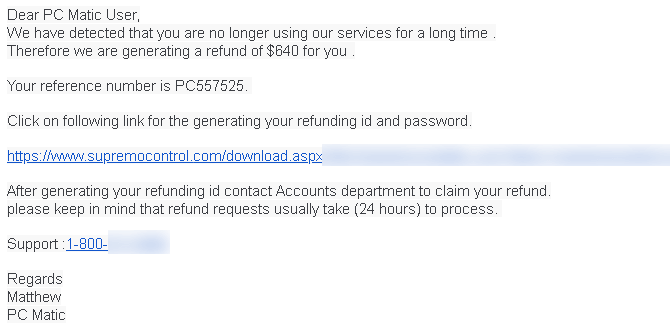
The tech support refund scam is similar, but incorporates elements of the classic tech support scam. You receive a phony email alerting you of a pending refund for some service, and when you reach out via phone, the scammers pretend to refund the money.

However, by “mistake”, they “overpay” and ask you to send them the extra money using gift cards. Sending them money in this way means you’ll never get it back.

Let’s walk through a typical tech support refund scam to see how it operates. We’ll unmask the scammers’ tricks and common methods so you know what to look for.

How Do Refund Scams Start?

Typically, this scam begins by you receiving a phony email, though you may also see a popup alert, especially if you mistype a website name.

Refund Scam Email
Image credit: PC Matic

The email will be something like the following:

  • A company offers you a refund because you haven’t used its services in a while.
  • Your bank tells you that it’s refunding a transaction because there was an issue with the payment.
  • A retailer claims that you’ve been double-charged for a purchase and thus need to contact them to resolve the error.

Knowing how to spot a phishing email goes a long way in stopping the scam here. While emails like this might look official at a glance, they almost always come from unrelated addresses, don’t contain any information specific to you, and may be full of grammatical errors.

Remember that legitimate companies will not ask you to confirm payment details via clicking a link in an email, either. However, if you proceed, what happens next?

Signing Into Your Bank With the Scammer

If you reach out to the number provided in the email, you’ll be connected with “the refund department” of “Microsoft” or whatever company the email mentioned. You might tell them that you don’t want the service on offer, in which case the “representative” will be happy to help you with the “refund” process.

They’ll guide you through installing TeamViewer, AnyDesk, or similar remote access tools so they can connect to your machine. After connecting, they might even set up unattended access to let them connect to and control your PC anytime it’s on in the future.

Now, the scammer will ask you to log into your bank’s website so they can “initiate the refund.” Once you’re signed in, they will likely ask you to note how much money is in your checking account, so you have that value in mind.

Fake Bank Login Page

The Fake “Money Transfer”

Now that the scammer has access to your online banking, the process begins. They’ll black out your screen (using the remote access software) so you can’t watch what they’re doing. They claim that this makes the connection “secure,” and may even ask you to write down a “refund code” or other meaningless info to distract you.

Now, they don’t actually transfer any money to your bank, of course. Since most people have another bank account aside from checking (such as a savings or retirement account), they’ll transfer money between your accounts to “increase” your checking balance.

Crucially, the con artist will “transfer” much more money than initially promised. So if they offered a $300 “refund,” they might move $3,300 instead.

After they do this, to disguise the fact that they just moved money between your accounts, they may edit the HTML of the website to make it look like you received a payment from the “refund department.”

The Mistake and “Repayment”

After they finish the phony “transfer,” the scammer will let you see the screen again and ask you to confirm that you “received the payment.”

When you mention that the “refund” was much more than expected, they’ll act surprised and ask you to send them back the extra money. To appear “generous,” they might say that you can keep a portion of the extra funds.

At this point, they expect the victim to ask how they can refund the money. The scammer insists that they can’t take the money back the same way they sent it, so the victim will need to go buy gift cards for iTunes, Amazon, or similar.

If you somehow believed them up to this point, this request should be a giant red flag. No legitimate company will ever ask you to pay them in gift cards. They urge you to go out and buy them right away so you don’t have time to think about it. If you refuse or ask questions, they will get angry and accuse you of stealing their money.

Should you continue on and buy the gift cards, they’ll ask for you to read the claim codes on the phone or enter them into Notepad. Once you’ve done that, they take the codes and immediately redeem them, and your money is gone.

The primary reasons that scammers ask for gift cards is because they’re almost impossible to track, unlike a bank transfer.

Refund Scam Variations and Other Tactics

We’ve described the basics of a refund scam, but each thief uses slightly different tactics.

For example, once they black out your screen, the scammer might try to put a password on your Windows account if you don’t already have one set. Using this, they can lock you out of your computer and demand payment as ransom. This is why it’s important to use a strong password for your account.

On older versions of Windows, they might use the SYSKEY function to require a password on boot. This effectively does the same as the above, by locking you out of your system.

As another variation, the scammer might install two remote access tools on your machine. For instance, they might start with AnyDesk, then use that to install TeamViewer on the victim’s computer, connect to the scammer’s PC, then switch who’s controlling who. They do this because TeamViewer has the critical screen blackout functionality. However, that software blocks outgoing connections from certain regions due to frequent scams.

If you refuse to buy the scammer gift cards, they will likely get upset. They might employ the same HTML editing trick as earlier to make it look like your bank account balance is zero, claiming that they’ve drained your account and won’t give the money back unless you pay.

Some scammers get much more upset and start looking at your photos, deleting your files, or trying to access your webcam. It’s nasty, and illustrates why you should just hang up on these crooks. Once they have remote access to your computer, you can only kick them off by disconnecting from the internet or shutting down your computer.

Don’t Let Refund Scammers Steal Your Money

As we’ve seen, refund scams are similar to tech support scams, but add a few layers that can make them confusing for people who aren’t technically inclined. Due to the nature of the “refund,” they may also target those who’ve fallen for similar scams before.

Never let someone control your computer unless you know and trust them. Certainly don’t sign into your bank account at the request of that person. And never buy gift cards as a form of payment. The scammers’ tricks are easy to understand once you know them, but have unfortunately fooled many people.

For more advice, see the telltale signs you’re on the phone with a scammer. Share these tips with those who aren’t as knowledgeable so they don’t fall victim to these vile criminals.

Read the full article: How to Spot and Avoid Tech Support Refund Scams


Read Full Article

Google says Iranian, Chinese hackers targeted Trump, Biden campaigns


Google security researchers say they’ve identified efforts by at least two nation state-backed hackers against the Trump and Biden presidential campaigns.

Shane Huntley, director for Google’s Threat Analysis Group, said in a tweet that hackers backed by China and Iran recently targeted the campaigns using malicious phishing emails. But, Huntley said, there are “no signs of compromise,” and that both campaigns were alerted to the attempts.

When reached by TechCrunch, a Google spokesperson reiterated the findings:

“We can confirm that our Threat Analysis Group recently saw phishing attempts from a Chinese group targeting the personal email accounts of Biden campaign staff and an Iranian group targeting the personal email accounts of Trump campaign staff. We didn’t see evidence that these attempts were successful. We sent the targeted users our standard government-backed attack warning and we referred this information to federal law enforcement. We encourage campaign staff to use extra protection for their work and personal emails, and we offer security resources such as our Advanced Protection Program and free security keys for qualifying campaigns.”

A spokesperson for the Biden campaign confirmed the report in a statement to TechCrunch.

“We are aware of reports from Google that a foreign actor has made unsuccessful attempts to access the personal email accounts of campaign staff,” a spokesperson said. “We have known from the beginning of our campaign that we would be subject to such attacks and we are prepared for them. Biden for President takes cybersecurity seriously, we will remain vigilant against these threats, and will ensure that the campaign’s assets are secured.”

The Trump campaign did not immediately respond to a request for comment.

Huntley said in a follow-up tweet that the hackers were identified as China’s APT31 and Iran’s APT35, both of which are known to target government officials. But it’s not the first time that the Trump campaign has been targeted by Iranian hackers. Microsoft last year blamed APT35 group for targeting what later transpired to be the Trump campaign.

Since last year’s attempted attacks, both the Democrats and Republicans improved their cybersecurity at the campaign level. The Democrats recently updated their security checklist for campaigns and published recommendations for countering disinformation, and the Republicans have put on training sessions to better educate campaign officials.

Updated with comment from the Biden campaign.


Read Full Article

04 June 2020

Twitter has a record-breaking week as users looked for news of protests and COVID-19


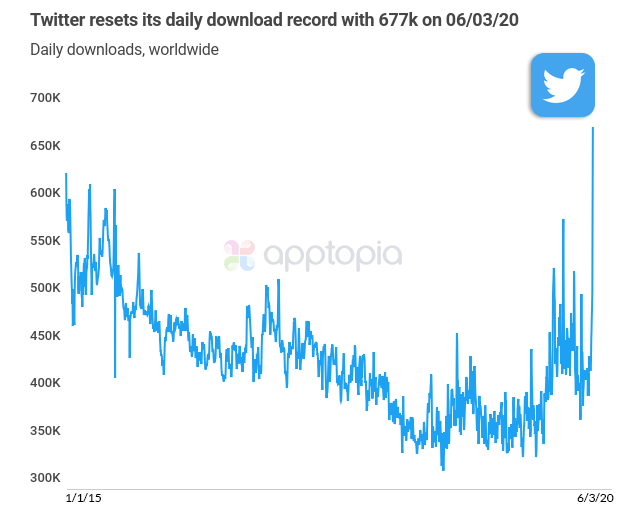
Civil unrest due to the nationwide George Floyd protests drove Twitter to see a record number of new installs this week, according to data from two app store intelligence firms, Apptopia and Sensor Tower. While the firms’ exact findings differed in terms of the total number of new downloads or when records were broken, the firms agreed that Twitter’s app had its largest-ever week, globally.

Twitter’s usage is on the rise because of the immediacy around news-sharing its platform provides. This was in particular demand amid the George Floyd protests in the U.S., as protestors used Twitter to share live images and videos of the demonstrations, the fires and looting, instances of police brutality, and more. Meanwhile, non-protestors downloaded the app in order to watch the events unfold directly and get unfiltered, breaking news.

According to data from Sensor Tower, Twitter saw just over a million installs on Monday and around 1 million new installs on Tuesday — making Monday the day seeing the most single-day installs since at least January 1, 2014, when the firm began recording app store data. At its peak, U.S. installs this week were at a four-year high. On Wednesday, Sensor Tower estimates Twitter installs declined a bit causing the app to rank slightly lower on app store global charts.

Apptopia, on the other hand, found that Twitter topped its record for installs on Wednesday with 677,000 worldwide downloads. This included a near-record download figure of 140,000 installs in the U.S., with a larger number of installs coming from international markets, including the U.K., India, Brazil, and Mexico. However, this U.S. download figure was the second-highest daily install number for the U.S. in Twitter’s lifetime, the firm said.

The truth between these two firms’ different numbers is probably somewhere in the middle. Sensor Tower routinely comes in with higher figures from Apptopia, but from a broader viewpoint, the two firms tend to see the same overall in trends. In this week’s case, they both point to a breakout week for Twitter’s mobile app download growth.

While it may seem odd that Twitter saw more installs in non-U.S. markets, it is an indication that the world is watching these events unfold. But it’s also perhaps something of a perfect storm for Twitter demand, because the civil unrest isn’t the only driver for the international installs.

Many countries are also dealing with the COVID-19 pandemic, with Brazil being particularly hard hit right now, for example. That could be fueling other increased interest in the app, given its news-driven nature.

In addition to breaking download numbers, Apptopia also noted that yesterday was a record for daily active users on Twitter in the U.S., when some 40 million people in the U.S. logged into the app.

For comparison’s sake, Twitter reported its app had 31 million “monetizable” daily active users (mDAUs) in the U.S. in Q4 2019, which grew to 33 million in Q1 2020. An mDAU isn’t exactly the same metric as a daily active user. Rather, it’s a metric Twitter invented to count the number of logged-in users on its platforms that are capable of displaying ads. However, it’s now the only way Twitter reports its user data so it’s the closest comparison that can be offered.

To what extent these spikes in installs and usage play out longer-term for Twitter remain to be seen, and we won’t know specifics until Twitter reports its updated metrics in its next quarterly earnings.


Read Full Article

Daily Crunch: Snapchat says it won’t promote Trump


Snapchat is the latest social media company to take on the president, Fitbit gets approval for its emergency ventilator and we review the new Sonos soundbar.

Here’s your Daily Crunch for June 4, 2020.

1. Snapchat is no longer promoting Trump’s posts

Snap announced that it will not be promoting content from President Donald Trump’s Snapchat account in its Discover tab, following statements from Trump last week on Twitter threatening that protestors could be met with “vicious dogs” and “ominous weapons.”

The move is particularly interesting because social media platforms tend to only discipline popular accounts when they’ve violated the rules on their own platform. In a statement, a Snapchat spokesperson said, “We will not amplify voices who incite racial violence and injustice by giving them free promotion on Discover.”

2. Fitbit gains FDA authorization for its low-cost emergency ventilator

Ventilators like Fitbit’s Flow aren’t designed to replace existing, traditional medical ventilators. Instead, they’re intended as stopgaps, to be used only when that hardware isn’t available in quantities needed to treat patients.

3. The Sonos Arc is an outstanding soundbar, on its own or with friends

Darrell Etherington says the Arc is the company’s best-ever home theater sound device. It’s designed to integrate wirelessly with your Sonos home audio system, as well as accepting audio from your TV or A/V receiver via HDMI Audio Return Channel.

4. Top cybersecurity VCs share how COVID-19 has changed investing

The cybersecurity industry remains largely unscathed. In fact, some cybersecurity businesses are doing better than ever because the industry has emerged as one of the few constants we all need — even during a pandemic. (Extra Crunch membership required.)

5. Amazon reportedly considering $2 billion stake in Indian telecom operator Bharti Airtel

Amazon may follow Facebook’s footsteps in securing a slice of India’s booming telecom market. The e-commerce giant is in early-stage talks to buy a 5% stake worth at least $2 billion in Bharti Airtel, the third-largest telecom operator in India, according to Reuters.

6. Unpacking ZoomInfo’s IPO as the firm starts to trade

What makes ZoomInfo worth $8 billion? Alex Wilhelm looks at the company’s IPO document and tries to make sense of what he calls “a goat rodeo of differing relationships and voting rights and debts.” (Extra Crunch membership required.)

7. Andreessen Horowitz launches $2.2M fund to invest in underserved founders

The Talent x Opportunity fund, which a16z says was in the works for six months, starts with $2.2 million in donations from the firm’s partners. TxO will be invested in a small group of seed-stage startups the first year and expand in size going forward.

The Daily Crunch is TechCrunch’s roundup of our biggest and most important stories. If you’d like to get this delivered to your inbox every day at around 9am Pacific, you can subscribe here.


Read Full Article