13 May 2020

Facebook launches Avatars, its Bitmoji competitor, in the U.S.


Facebook’s Avatars feature, which lets you customize a virtual lookalike of yourself for use as stickers in comments and Messenger chats, is today launching in the U.S. Essentially Facebook’s version of Snap’s Bitmoji, Avatars were first introduced last year and have been since made available in Australia, New Zealand, Europe, and Canada.

Based on early feedback, Facebook is also today expanding its range of Avatar customizations to include a variety of new hairstyles, complexions, and outfits.

Avatars may seem a little silly, but they allow for a form of self-expression that extends beyond the capabilities text and emoji alone. On digital platforms, using an avatar can be a helpful way to indicate the tone of your comment, so you’re not misinterpreted. Plus, many people like having the option of crafting a digital character that actually looks like them — meaning their candy-colored hair, piercings, glasses, goatees, sense of style, or anything else doesn’t come across when using just an emoji alone.

Initially, Facebook users will be able set up their Avatar from either the Facebook or Messenger comment composer. From here, you’ll click on the smiley face icon which takes you to stickers. You’ll then see a new option: “Make Your Avatar.”

After completing your Avatar, you can return to edit it at any time from Facebook’s Bookmark section (the three horizontal lines in the bottom-right of the Facebook mobile app.) You’ll need to click on “See More,” then “Avatars,” in the list that appears.

Today, the Avatars can be used Facebook comments and Messenger conversations, and they can be used on your Facebook Gaming profile. But soon, Facebook says Avatars will be able to be used in text posts with backgrounds.

The company isn’t yet sharing any metrics on the feature’s adoption, but did say Avatars have become particularly popular with the gaming community.

However, the source of inspiration for the feature, Bitmoji, has seen widespread adoption.

In January, Snap said 70% of its daily active users, or 147 million of its then 210 million, had made themselves a Bitmoji. The company first bought its way into the “digital persona” business back in 2016 when it picked up Bitmoji’s parent company Bitstrips for $62.5 million. It more recently launched Bitmoji TV, a Snapchat show that puts users’ Bitmoji avatars into animated situations.

Facebook hasn’t yet detailed any grand ambitions to make its Avatars more of a platform or a monetizable feature. Instead, it seems to be playing a game of catch-up with its rivals.

Though Snapchat popularized the concept, many companies have since cloned the Bitmoji phenomenon. Apple in 2018 introduced a customizable persona called Memoji to complement its existing Animoji characters, for use in iMessage and FaceTime. Samsung and Google also rolled out their own take on Bitmoji in 2018.

But despite its delayed arrival, Facebook hasn’t broken any new ground — for example, by introducing Avatars created automatically from your Facebook profile photo or those that move and react as in the popular Gen Z app, Facemoji.

Facebook says its Avatars feature will roll out to the U.S. starting today. You may not see it yet — as rollouts can take time — but should soon.


Read Full Article

How to Track Unsubscribes with Mail Merge for Gmail


Mail Merge for Gmail gives you can easy option to add an “Unsubscribe” link to all your outgoing email campaigns. When an email recipient clicks the unsubscribe link, the status of their email address is set to UNSUBSCRIBED and you will not able to send email campaigns to unsubscribed users in your future mail merge campaigns.

You can also manually resubscribe any unsubscribed contact if they have unsubscribed from your campaigns by accident.

Inside your Google Sheet, go to Addons > Mail Merge with Attachments > Configure Mail Merge and expand the section that says “Enable Email Tracking”;

Provide a Campaign Name, check the option that says “Include an Unsubscribe Link” and also provide the text of the unsubscribe link.

Mail Merge Unsubscribe Link

How Unsubscribe Works in Mail Merge

When the unsubscribe option is checked, all outgoing emails sent through Gmail Mail merge will include a remove link in the message footer automatically.  The subscriber can click the link to opt-out of your future mailing lists.

When they click the unsubscribe link, they are taken to a special landing page confirming that their request for unsubscribing has been successfully recorded.

How to View Unsubscribed User Reports

Go to Add-ons > Mail Merge with Attachments > Campaign Reports > Open and Click Reports. This will open a list of email campaigns you’ve sent through Mail Merge. Click the Unsubscribe button in any specific campaign to generate a list of all email addresses that have unsubscribed from your mailing list via that particular campaign.

This will add a new “Unsubscribe Report” sheet in your Google Spreadsheet for Mail Merge. The report will include the following data to help you analyze the campaigns that resulted in the most unsubscribes:

  • Date when the message was sent to the user
  • Date when the user unsubscribed from the mailing list
  • Email address of the unsubscriber
  • Location / IP address from where the user unsubscribed
  • Web browser (or mobile browser) of the unsubscriber.

Here’s a sample unsubscribe report generated by Mail merge.

unsubscribe-report.png


How to Resubscribe an Unsubscribed Email Address in Mail Merge


The Mail Merge for Gmail app lets you include an unsubscribe link in your email message. If a user clicks the unsubscribe link to opt-out of your mailing lists, you’ll not be able send future email campaigns to that email address.

You can always send emails to the unsubscribed user manually via Gmail but they will not be included in the email campaigns sent via Mail Merge for Gmail.

Reactivate an Email Address

If your contact has unsubscribed their email address from your mailing list accidentally, or if you manually unsubscribed a user from your email system, you can easily reset their subscriber status from withing the Mail merge app. You’ll then be able to resume sending email campaigns to the resubscribed user via Mail Merge.

Resubscribe email addresses manually

Resubscribe Contacts in Mail Merge

Open your Google Sheet, go to the addons menu, select Mail Merge with Attachments, choose Email Campaign Reports and then choose Resubscribe Contacts.

On the next screen, type one or more email addresses that you wish to reactivate for Mail Merge. You can specify up to 4 different email addresses, and each email address should be specified in its own input box.

Click the Resubscribe button to reactivate the subcriber.

Reactive Email Address


Intraday Trading Calls for 14-May-2020

Intraday Trading Calls for 14-May-2020

Please click on the following link to view full post.

https://intradayguruji.blogspot.com/2020/05/intraday-trading-calls-for-14-may-2020.html

Via http://intradayguruji.blogspot.com

Live Intraday Trading on 13-May-2020 (Profit 4900)

Live Intraday Trading on 13-May-2020 (Profit 4900)

Please click on the following link to view full post.

https://intradayguruji.blogspot.com/2020/05/live-intraday-trading-on-13-may-2020.html

Via http://intradayguruji.blogspot.com

Transfer Your Music From Google Play Music to YouTube Music


Google Play Music isn’t long for this world, with Google planning to kill the service at sometime in 2020. However, all is not lost, as Google has a ready-made replacement in YouTube Music. And now you can transfer your music from one to the other.

YouTube Music Is Replacing Google Play Music

While Google is one of the most innovative tech companies in existence, the company has a habit of killing its products and services. And so it has come to pass for Google Play Music, which is set to be shuttered in 2020 to make way for YouTube Music.

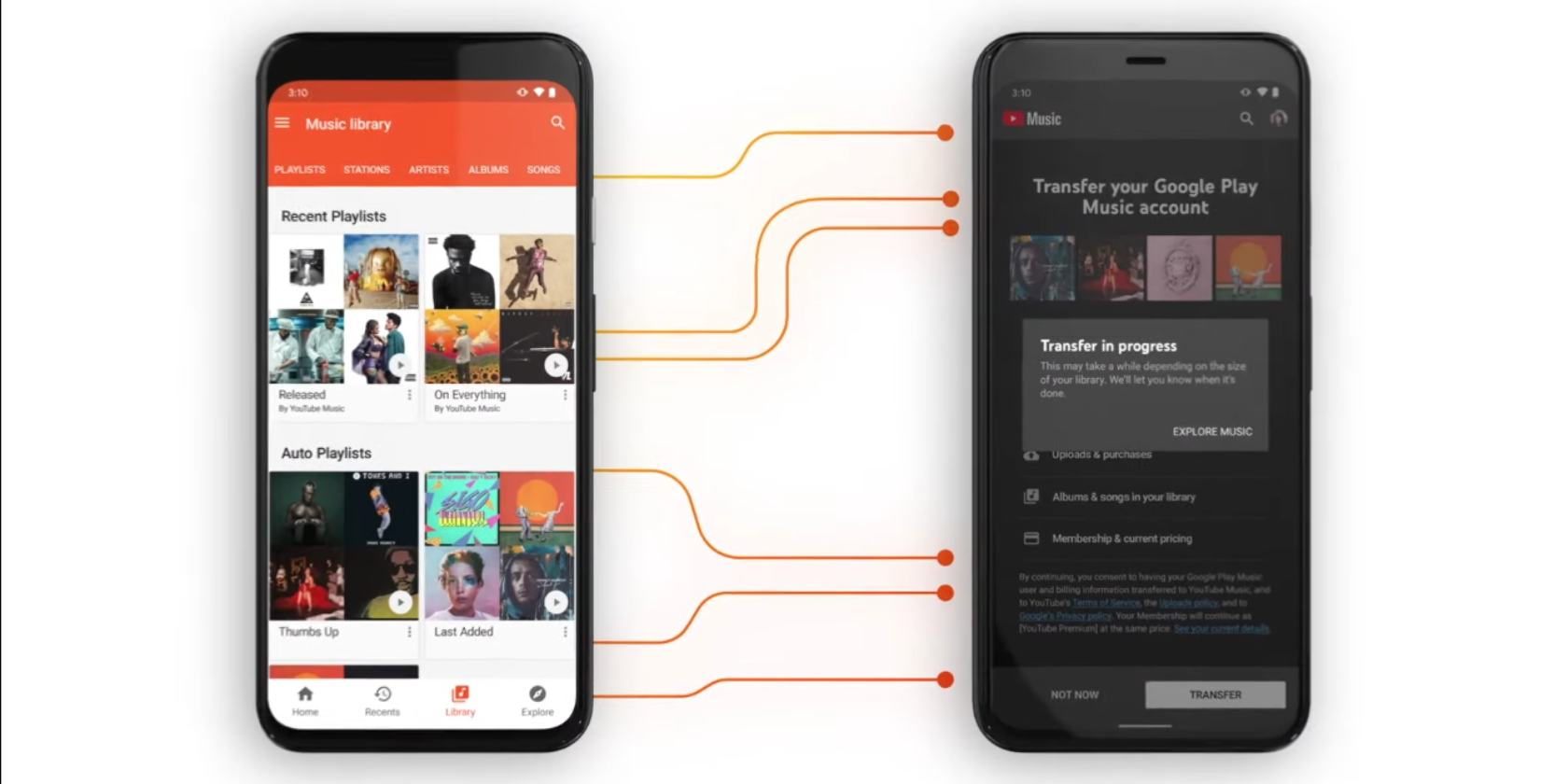
However, with the end now in sight, Google is actively encouraging you to transfer your music from Google Play Music to YouTube Music. And, as detailed in a post on the Official YouTube Blog, it has launched a quick and simple way to do so.

How to Transfer Your Music From Google Play Music to YouTube Music

You can transfer your artists, albums, songs, playlists, uploads, purchased music, and recommendations across from Google Play Music to YouTube Music. You can also transfer your podcasts to Google Podcasts by visiting this webpage.

To transfer your music from Google Play Music to YouTube Music, either visit music.youtube.com/transfer or follow the instructions below:

  1. Download the YouTube Music app for Android or iOS.
  2. Open the Settings menu and click Transfer from Google Play Music.
  3. You’ll see a list of everything you’re going to transfer.
  4. If you agree to the terms of service, click Transfer to start the process.
  5. When it’s complete, you’ll get a notification and an email letting you know.

If you can’t yet see the option to transfer your music from Google Play Music to YouTube Music, be patient, as Google is rolling this out gradually over the next few weeks.

Other Music Streaming Services Do Exist

Once you have made the switch from Google Play Music to YouTube Music, you have a number of options open to you. You can listen for free using the ad-supported version, or pay the standard $9.99/month to upgrade to YouTube Music Premium.

As keen as Google is to get everyone using YouTube Music, it’s far from the only streaming music service. So, with that in mind, here’s how to pick the best music streaming service for you, and how to move to a new music streaming service.

Read the full article: Transfer Your Music From Google Play Music to YouTube Music


Read Full Article

Xiaomi spinoff POCO’s F2 Pro undercuts Android rivals with low price and flagship features


POCO, a brand that spun out of Chinese electronics giant Xiaomi earlier this year, today launched the POCO F2 Pro smartphone as it continues its new journey as an independent firm.

The POCO F2 Pro, like its two-year-old sleeper hit predecessor Pocophone F1 smartphone, punches above its price class. It features an all-screen 6.67-inch full-HD+ AMOLED display (with 2400×1080 pixels), in-screen fingerprint scanner, support for 5G, quad-core rear camera setup and a pop-up front camera that quietly tucks away when not in use. It also features a 3.5mm headphone jack.

The smartphone comes in two variants: one with 6GB of RAM and 128GB internal storage that is priced at €499 (roughly $540), and the other that features 8GB of RAM and 256GB internal storage that costs €599 (roughly $650).

Both the variants run Android 10 and are going on sale globally starting Tuesday through Gearbest and Aliexpress e-commerce sites. POCO said it will soon begin selling the POCO F2 Pro on Amazon, Lazada and Shopee among other e-commerce sites, including its official website.

The dual-SIM card-supported smartphone, a popular feature in several Asian markets, is powered by Qualcomm’s flagship octa-core Snapdragon 865 processor, coupled with Adreno 650GPU. POCO F2 Pro also sports what the company claims to be the largest vapor chamber in any smartphone to support LiquidCool, a technology that keeps the device cool even when a user is playing high-end games such as Fortnite and PUBG.

On the camera front, the POCO F2 Pro features a 64MP Sony IMX686 sensor, which serves as the primary camera, with a 13MP ultra wide-angle lens, a 5MP macro and one 2MP depth sensor. The pop-up camera, which serves as the selfie sensor, is a 20MP lens. The rear camera setup is capable of recording videos in 8K resolution at 24fps, and 4K in 60fps.

The POCO F2 Pro, which comes in Neon Blue, Electric Purple, Cyber Grey, Phantom White, houses a 4,700mAh battery with support for fast charging, and ships with a 33W charger in the box.

POCO listed a number of additional features that other flagship Android smartphones offer, such as support for HDR10+, display brightness of 500 nits, Corning Gorilla Glass 5 that protects the screen and an IR blaster. But its display lacks support for 120Hz refresh rate — as seen on OnePlus 8T Pro that makes viewing experience extra smooth.

POCO F2 Pro is the second smartphone from the company since it spun out of Xiaomi earlier this year. The company’s first product, called Pocophone F1, launched in 2018 and was well received by the market.

At the time of the launch, Xiaomi executives said they had big plans for the POCO brand but never launched anything afterward. During the period the company also saw a big departure when Jai Mani, a senior product executive, left the firm. Earlier this year, the company launched the mid-range POCO X2 smartphone in India.

POCO executives today shared little plans on what the future holds for the firm, but assured that they are here to stay. “We’re back. It’s been awhile, but we are back,” said Angus Ng, a product marketing manager at POCO.


Read Full Article

12 May 2020

How The Bail Project is reforming criminal justice in the US | Robin Steinberg and Manoush Zomorodi

How The Bail Project is reforming criminal justice in the US | Robin Steinberg and Manoush Zomorodi

Nearly half a million people in the US are in jail right now without being convicted of a crime, simply because they can't come up with the money to pay cash bail. To try and fix this system, public defender and activist Robin Steinberg asked a straightforward question: What if we paid bail for them? In conversation with TED Radio Hour host Manoush Zomorodi, Steinberg shares how her nonprofit The Bail Project -- which uses a revolving fund to post bail for those who can't afford it -- is scaling up their efforts across the country and rolling out a new community-based model to fight mass incarceration. (This ambitious plan is part of the Audacious Project, TED's initiative to inspire and fund global change.)

Click the above link to download the TED talk.

The Wing is reportedly LG’s latest odd dual-screen smartphone concept


It seems like only yesterday that we were all complaining about the boring uniformity of smartphone designs. In the last couple of years, companies have worked to offer some alternative through dual-screen devices, foldables and a slew of concept form factors — few of which have really gained much traction. 

Even so, the LG Wing (its codename or now) offers a strange, new alternative to the push forward more screen real estate. The likely concept device have surface through Korean Herald and ET News reports, showing a 6.8-inch screen that swivels up horizontally to reveal a square four-inch display below.

This is still in the concept/leak phase, though it’s not entirely without precedent from Camp LG. Notably, the manufacturer released a bunch of of swiveling handsets over a decade ago, back in the days when phones still had buttons.

While the second screen would function as a keyboard some of the times, the versatility of the display offers interesting supplemental features like editing or viewing supplemental content. The handset would also reportedly feature a processor in the Snapdragon 7 family and a triple camera set up.

Certainly it doesn’t seem out of the realm of possibility for LG to try something new. The company has performed its share of experiments in the past. Actually getting app developers to come along for the ride, on the other hand, is another issue entirely.


Read Full Article

The new August Wi-Fi Smart Lock is now available, and it’s the connected smart lock to beat


It’s been a few years since August introduced any new hardware, but its August Wi-Fi Smart Lock, which it debuted at CES this year, is now available. This is the new flagship in the August lineup, replacing the August Smart Lock Pro as the latest and greatest feature-packed connected lock from the company, and it brings an improved design along with built-in Wi-Fi. August’s existing locks are the market leaders in easy conversion kits for existing thumbturn deadbolts, and the August Wi-Fi Smart Lock improves upon that reputation in every way.

Design

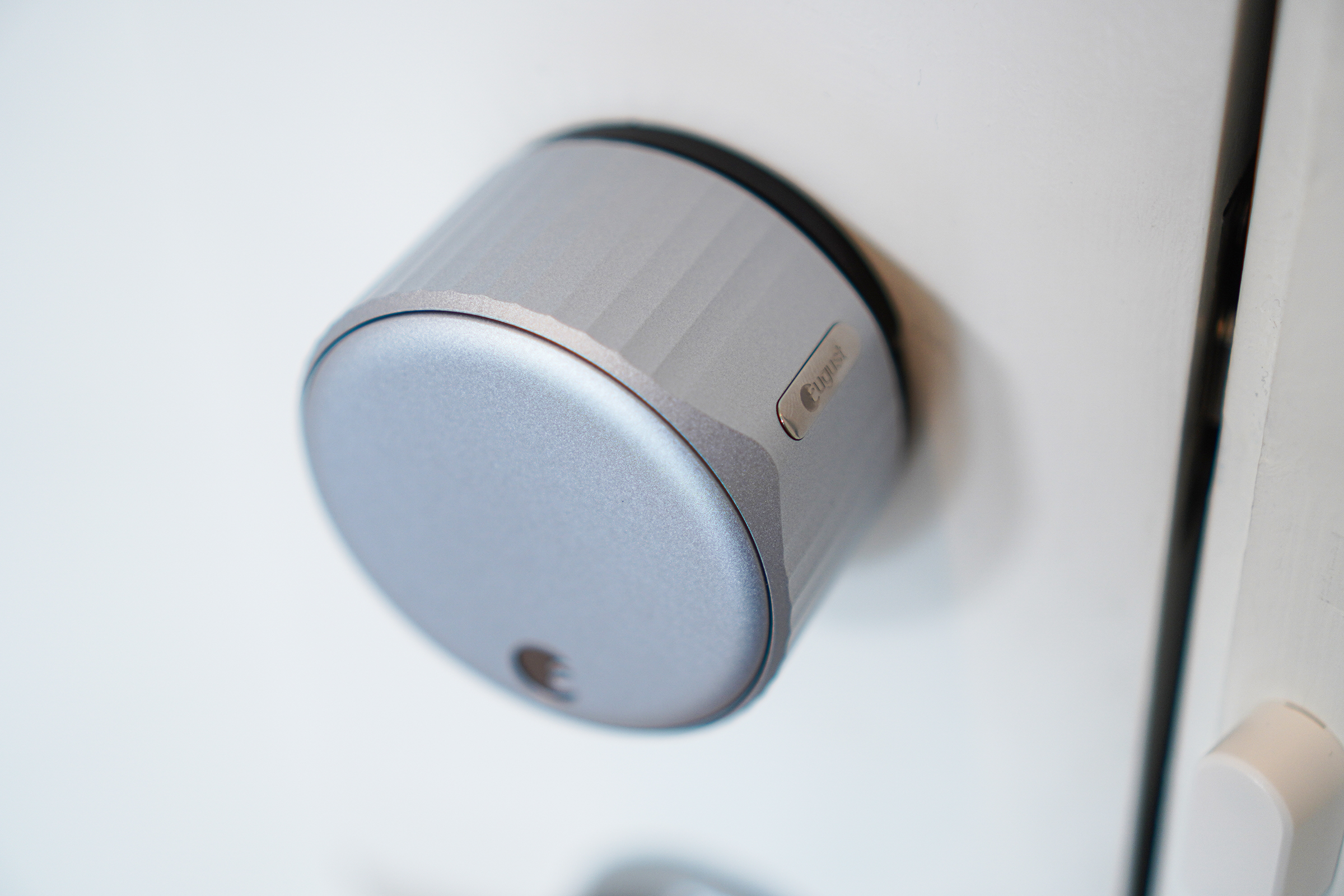
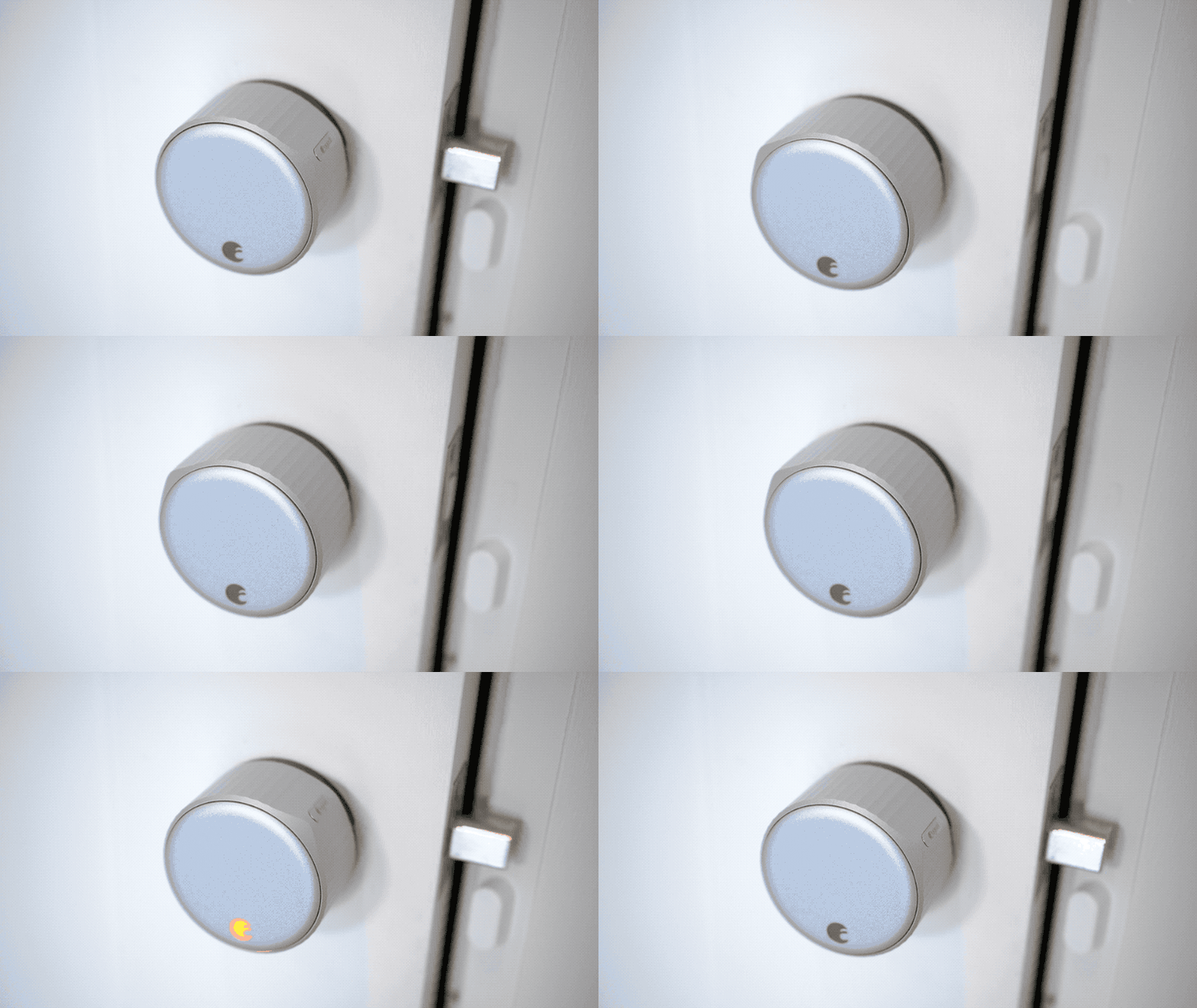
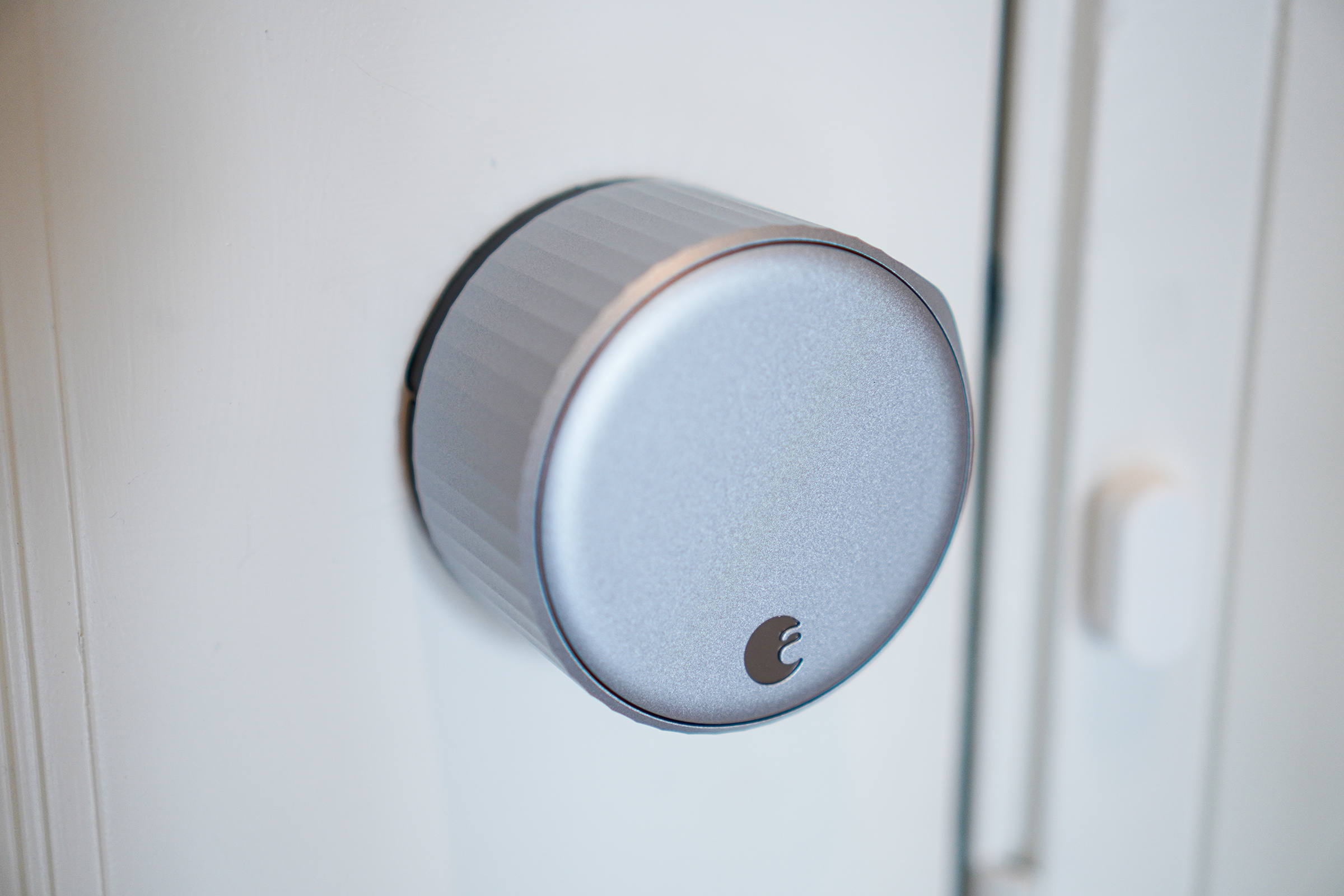
The August Wi-Fi Smart Lock has a great design pedigree already, since the company was originally co-founded by Yves Béhar. Béhar spearheaded the design of this generation as well, and the result is a look that is recognizably August, but with upgraded looks and tactile improvements, too. The satin nickel finish on my review hardware looked great and premium (it also comes in black) and the textured outer edge feels great when turning the lock to manually lock/unlock. There’s a slightly raised ‘pointer’ to provide a quick visual indicator of whether the door is locked or unlocked now as well.

The biggest design change vs. the August Smart Lock Pro, however, is that it’s quite a bit smaller. August says it’s 45% smaller by volume, in fact, and 20% slimmer front to back, and the size savings definitely show. The rather large dimensions of the Smart Lock Pro meant that it wasn’t even able to be installed on some doors, so there’s a practical, functional benefit to the change, but it also just looks a lot nicer and is less likely to stick out among the rest of your home decor.

The smaller design was made possible despite inclusion of Wi-Fi built-in in part due to the switch to CR2 batteries, which are a lot less common than the AAs used by the Smart Lock Pro, but which you should still be able to find pretty easily at a drugstore or via Amazon.

Size aside, the design still provides a great, easy to use manual turn for physically unlocking and locking your door. The install process is also still very easy, even if you’re not particularly handy. August even provides paint-safe tape in the box for securing the other side of your lock while you remove the thumb plate, and its app gives you easy instructions for matching the right included size adapter depending on your deadbolt manufacturer. Replacing my own thumb turn took about five minutes start to finish.

Features

The whole point of August’s technology is that it provides you with a way to lock and unlock your door with your phone. With the August Wi-Fi Smart Lock, that’s a lot less complicated than it has been in the past because it has Wi-Fi built-in. Previous August locks relied exclusively on Bluetooth, and required that you also purchase and own a separate Connect dongle, which plugs into a standard wall socket, to connect to the lock itself via Bluetooth and act as a bridge to your Wi-Fi network.

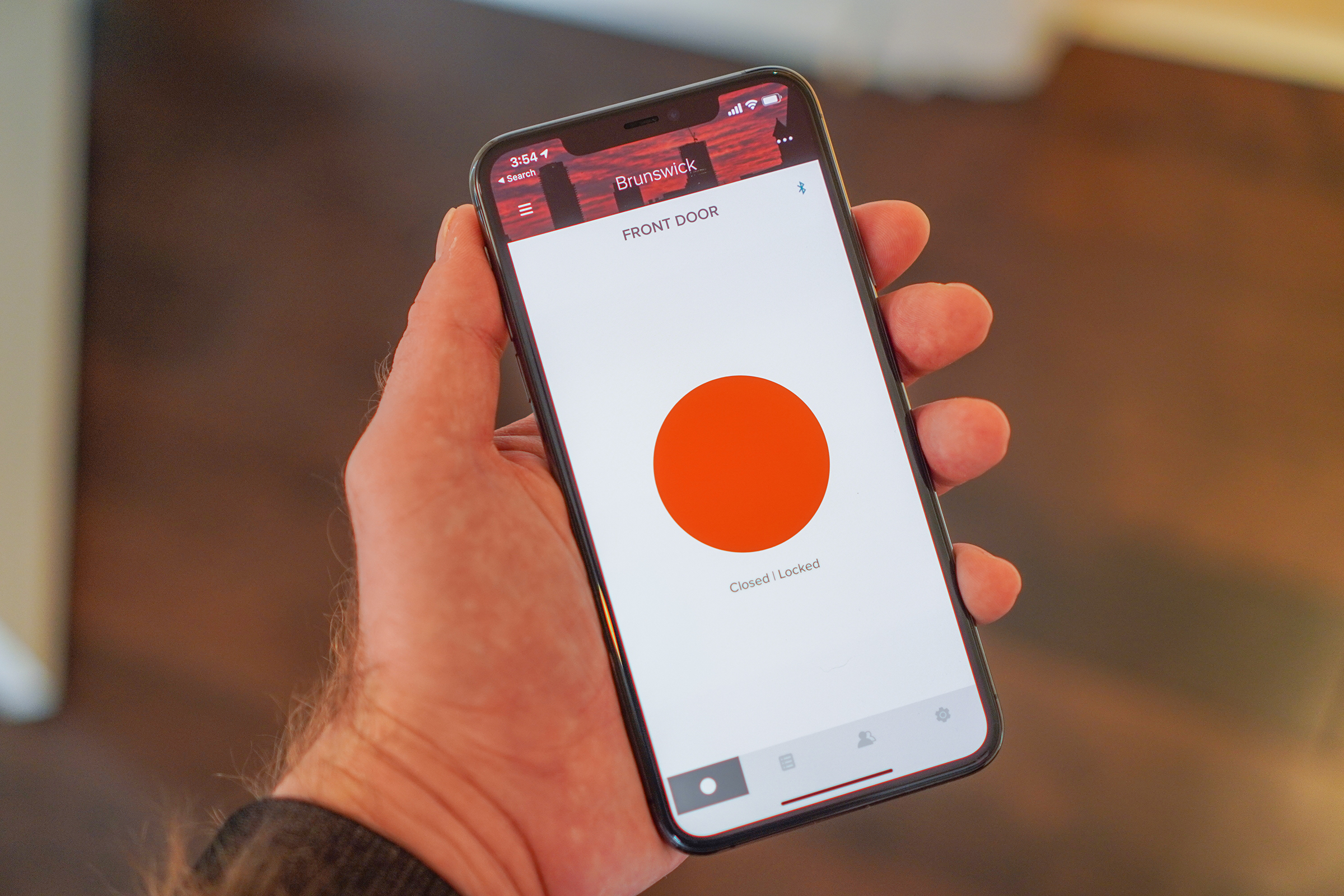
Doing away with the need for a Connect means you connect the Wi-Fi Smart Lock to your network during setup, and then it’s reachable anywhere using the August smartphone app. You can easily tap to lock and unlock the door so long as you have an active data connection, and you can do a lot more besides, including granting others access.

August allows you to provision virtual keys to friends via email (they’ll be asked to register for an account if they don’t have one). This is a popular feature for Airbnb hosts, since you can also revoke permission once you no longer want someone to have access. It’s also great for letting in neighbors to feed your pets (once travel is an option again, of course) and for giving family an easy way to check in. Plus, you can share it with other members of your households and make them owners for top-level access and controls as well.

You can also set the August Wi-Fi Smart Lock to automatically lock once you close the door, either immediately or after a set time that you can customize. This works using DoorSense, which is facilitated by a magnetic sensor that August includes in the box and that you install in your door frame upon setup.

Auto-unlock for me has worked most of the time, though I have had a few occasions where upon returning, I get a ‘Welcome home’ notification from the August app, but the door doesn’t actually unlock and I have to do so by opening the app and pressing the button. In general, however, it works well, and is a great benefit when you return home with your arms full of groceries, for instance.

Performance

The August Wi-Fi Smart Lock brings an updated design and integrated wifi, but it doesn’t change much in terms of the core functionality of August’s previous locks, and it also seems to be at least a match for prior generations when it comes to reliability. Using the app, I was consistently able to both lock and unlock the door, both within and outside of the home.

August also offers integration with voice assistants, including Alexa, Google Home and HomeKit. These I found a bit more unreliable, with at least one actual failed unlock attempt via HomeKit, but overall they also performed mostly well, with a bit more lag than doing things via the August app directly. You’re also able to unlock via voice command, though the app wisely forces you to register an authorization code to protect against manipulation, like someone trying to yell at Alexa through your door to unlock the unit.

August also offers the option to receive push notification about lock and unlock events, and stores a whole history of the lock’s usage, including door open and closed status, manual/automatic/remote locking and unlocking events, and more. It’s a great way to maintain peace of mind about who’s accessing your home, when and how.

Bottom line

August has a long history of building connected locks, and its reputation has earned it both accolades and a 2017 acquisition by leading international lock maker Assa Abloy, which operates a number of brands including Yale. This is the first lock that it has launched since that acquisition, and it’s a promising indicator that the deal hasn’t dulled their edge when it comes to August-branded product development. This is a great smart lock, with fast and easy installation and ergonomic, visually pleasing design and broad compatibility. Its auto-lock and unlock features really change the way you go about everything from running errands to walking the dog – it’s surprising how much a little convenience can make even the most mundane tasks more pleasant.

The August Wi-Fi Smart Lock is available for $249.99 via August.com and Best Buy, and will expand availability to additional retailers beginning May 17.


Read Full Article

Spotify Kids app rolls out blocking, listening history features for parents


Spotify is expanding the capabilities of its parental controls on its Spotify Kids app, aimed at children ages 3 and up on a parent’s Spotify Premium Family plan. Before, parents could only select whether the child was directed to the experience for younger or older children. Now, they’ll be able to specifically block content from their child’s account when accessing the chid’s listening history.

These features had been hinted at when Spotify Kids made its U.S. debut in March. At the time, Spotify said it heard from parents testing the app in other markets how they wanted to have even more control over the app’s included content. Though the company didn’t detail its plans then, it did say new features would involve allowing parents making more specific choices over what their child could stream.

Both new features are now included in the PIN-protected “Grown Ups” section, previously called the “Parental Settings.” Once there, a parent can select which child’s account they want to to update or view.

The Listening History option will allow them to view every track the child has streamed on the Spotify Kids app over the past 3 months. From here, a parent can also opt to select a track and block it by tapping the “block” icon next to the track in question.

These blocked tracks are then removed from the child’s account and can’t be streamed. However, parents can unblock the track further down the road if they choose, by accessing either the Listening History section or the Blocked Tracks section and tapping the red icon next to each track.

Spotify says these new features are the first step in many planned updates for its Kids application, which today includes over 8,000 kid-appropriate songs, stories, audiobooks and sounds which are curated into 125+ playlists. Though app is aimed at kids young and old, many children will age out of it around their tweens, despite its support for an “older kids” experience. That’s because kids have established some favorite artists and musical preferences by then, and the more limited catalog on Spotify Kids doesn’t deliver. Plus, the downside of hand-curation means newly emerging hits — like, say, those blowing up on TikTok — may not make an appearance on Spotify Kids until later.

While it makes sense that Spotify would focus more immediately on parental controls catering to parents of the younger children, in time being able to go the other direction — perhaps a whitelisting option or the import of pre-approved playlists — would be appreciated by parents of older kids.

The Spotify Kids app is now live across 14 global markets, including as of today, Japan and Germany.


Read Full Article

The new August Wi-Fi Smart Lock is now available, and it’s the connected smart lock to beat


It’s been a few years since August introduced any new hardware, but its August Wi-Fi Smart Lock, which it debuted at CES this year, is now available. This is the new flagship in the August lineup, replacing the August Smart Lock Pro as the latest and greatest feature-packed connected lock from the company, and it brings an improved design along with built-in Wi-Fi. August’s existing locks are the market leaders in easy conversion kits for existing thumbturn deadbolts, and the August Wi-Fi Smart Lock improves upon that reputation in every way.

Design

The August Wi-Fi Smart Lock has a great design pedigree already, since the company was originally co-founded by Yves Béhar. Béhar spearheaded the design of this generation as well, and the result is a look that is recognizably August, but with upgraded looks and tactile improvements, too. The satin nickel finish on my review hardware looked great and premium (it also comes in black) and the textured outer edge feels great when turning the lock to manually lock/unlock. There’s a slightly raised ‘pointer’ to provide a quick visual indicator of whether the door is locked or unlocked now as well.

The biggest design change vs. the August Smart Lock Pro, however, is that it’s quite a bit smaller. August says it’s 45% smaller by volume, in fact, and 20% slimmer front to back, and the size savings definitely show. The rather large dimensions of the Smart Lock Pro meant that it wasn’t even able to be installed on some doors, so there’s a practical, functional benefit to the change, but it also just looks a lot nicer and is less likely to stick out among the rest of your home decor.

The smaller design was made possible despite inclusion of Wi-Fi built-in in part due to the switch to CR2 batteries, which are a lot less common than the AAs used by the Smart Lock Pro, but which you should still be able to find pretty easily at a drugstore or via Amazon.

Size aside, the design still provides a great, easy to use manual turn for physically unlocking and locking your door. The install process is also still very easy, even if you’re not particularly handy. August even provides paint-safe tape in the box for securing the other side of your lock while you remove the thumb plate, and its app gives you easy instructions for matching the right included size adapter depending on your deadbolt manufacturer. Replacing my own thumb turn took about five minutes start to finish.

Features

The whole point of August’s technology is that it provides you with a way to lock and unlock your door with your phone. With the August Wi-Fi Smart Lock, that’s a lot less complicated than it has been in the past because it has Wi-Fi built-in. Previous August locks relied exclusively on Bluetooth, and required that you also purchase and own a separate Connect dongle, which plugs into a standard wall socket, to connect to the lock itself via Bluetooth and act as a bridge to your Wi-Fi network.

Doing away with the need for a Connect means you connect the Wi-Fi Smart Lock to your network during setup, and then it’s reachable anywhere using the August smartphone app. You can easily tap to lock and unlock the door so long as you have an active data connection, and you can do a lot more besides, including granting others access.

August allows you to provision virtual keys to friends via email (they’ll be asked to register for an account if they don’t have one). This is a popular feature for Airbnb hosts, since you can also revoke permission once you no longer want someone to have access. It’s also great for letting in neighbors to feed your pets (once travel is an option again, of course) and for giving family an easy way to check in. Plus, you can share it with other members of your households and make them owners for top-level access and controls as well.

You can also set the August Wi-Fi Smart Lock to automatically lock once you close the door, either immediately or after a set time that you can customize. This works using DoorSense, which is facilitated by a magnetic sensor that August includes in the box and that you install in your door frame upon setup.

Auto-unlock for me has worked most of the time, though I have had a few occasions where upon returning, I get a ‘Welcome home’ notification from the August app, but the door doesn’t actually unlock and I have to do so by opening the app and pressing the button. In general, however, it works well, and is a great benefit when you return home with your arms full of groceries, for instance.

Performance

The August Wi-Fi Smart Lock brings an updated design and integrated wifi, but it doesn’t change much in terms of the core functionality of August’s previous locks, and it also seems to be at least a match for prior generations when it comes to reliability. Using the app, I was consistently able to both lock and unlock the door, both within and outside of the home.

August also offers integration with voice assistants, including Alexa, Google Home and HomeKit. These I found a bit more unreliable, with at least one actual failed unlock attempt via HomeKit, but overall they also performed mostly well, with a bit more lag than doing things via the August app directly. You’re also able to unlock via voice command, though the app wisely forces you to register an authorization code to protect against manipulation, like someone trying to yell at Alexa through your door to unlock the unit.

August also offers the option to receive push notification about lock and unlock events, and stores a whole history of the lock’s usage, including door open and closed status, manual/automatic/remote locking and unlocking events, and more. It’s a great way to maintain peace of mind about who’s accessing your home, when and how.

Bottom line

August has a long history of building connected locks, and its reputation has earned it both accolades and a 2017 acquisition by leading international lock maker Assa Abloy, which operates a number of brands including Yale. This is the first lock that it has launched since that acquisition, and it’s a promising indicator that the deal hasn’t dulled their edge when it comes to August-branded product development. This is a great smart lock, with fast and easy installation and ergonomic, visually pleasing design and broad compatibility. Its auto-lock and unlock features really change the way you go about everything from running errands to walking the dog – it’s surprising how much a little convenience can make even the most mundane tasks more pleasant.

The August Wi-Fi Smart Lock is available for $249.99 via August.com and Best Buy, and will expand availability to additional retailers beginning May 17.


Read Full Article

LinkedIn ads polls and live video-based events in a focus on more virtual engagement


With a large part of the working world doing jobs from home when possible these days, the focus right now is on how best to recreate the atmosphere of an office virtually, and how to replicate online essential work that used to be done in person. Today, LinkedIn announced a couple of big new feature updates that point to how it’s trying to play a part in both of these: it’s launching a new Polls feature for users to canvas opinions and get feedback; and it’s launching a new “LinkedIn Virtual Events” tool that lets people create and broadcast video events via its platform.

Despite now being owned by Microsoft, interestingly it doesn’t seem that the Virtual Events service taps into Teams or Skype, Microsoft’s two other big video products that it has been pushing hard at a time when use of video streaming for work, education and play is going through the roof.

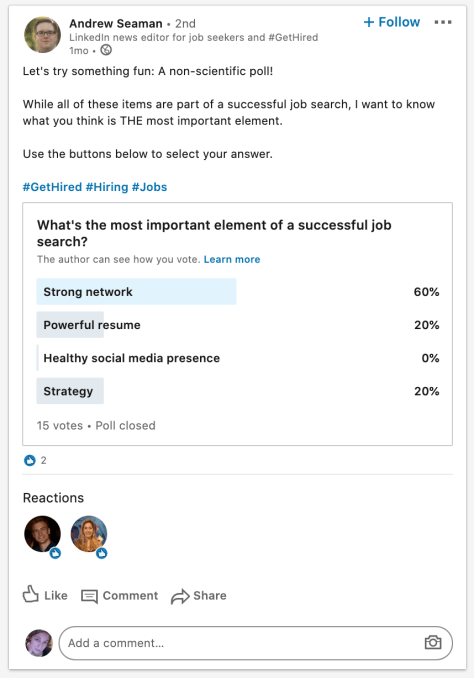
The polls feature — you can see an example of one in the picture below, or respond to that specific poll here — is a quick-fire and low-bar way of asking a question and encouraging engagement: LinkedIn says that a poll takes only about 30 seconds to put together, and responding doesn’t require thinking of something to write, but gives the respondent more of a ‘voice’ than he or she would get just by providing a “like” or other reaction.

But as with some of the other social features that LinkedIn has implemented over the years, its timing has not been quite right. With polls, you might say it’s been frustratingly late… or you might say it left the party too early.

The feature was first spotted by developer and app digger Jane Manchun Wong a couple of weeks ago, but it comes years after Twitter and Facebook have had polls in place on their platforms. I’d say it’s taken LinkedIn years to catch up, but actually it had polls in place years ago, yet chose to sunset the feature, back in 2014.

You could argue that LinkedIn miscalled the direction that social would go with engagement, or that it took too long to resuscitate the experience, or that the novelty of the concept that now worn off. Or you might say that LinkedIn has picked just the right time to bring it back, at a time when people are spending more time online than ever and are looking for more ways of varying the experience and interacting.

Two important distinctions as you can see above, however, are that you are polling a very specific audience of people in your professional circle, and those people can both respond to the poll but also include comments and reactions. Both of these set the feature as it works on LinkedIn apart from the others and should give it some… engagement.

The polls feature is getting rolled out (again) starting today.

The LinkedIn Virtual Events feature, meanwhile, falls into a similar placement as polls: it’s a way of getting people to engage more on LinkedIn, it taps into trends that are huge outside of the platform — in this case, videoconferencing — and it’s something that is coming surprisingly late to LinkedIn, given its existing product assets.

But is also potentially going to prove very popular because it’s filling a very specific need.

LinkedIn Virtual Events is a merger of two products that LinkedIn launched last year, a live video broadcasting tool called LinkedIn Live, and its efforts to foster a sideline in offline, in person networking with LinkedIn Events. The idea here is that while physical events have been put on pause in the current climate — many cities have made group activities illegal in an attempt to slow the spread of the novel coronavirus — you can continue to use LinkedIn Events to plan them, but now carry them out over the Live platform. 

Given how huge the conferencing industry has become, I am guessing that we will be seeing a lot of attempts at recreating something of those events in a virtual, online context. LinkedIn’s take on the challenge — via Virtual Events — could therefore become a strong contender to host these.

When LinkedIn first launched Events I did ask the company whether it planned to expand them online using live, and indeed that did seem to be the plan. LinkedIn now says that it “accelerated” its product roadmap — unsurprising, given the current market — to merge the two products for targeted audiences.

That’s why we accelerated our product roadmap to bring you a tighter integration between LinkedIn Events and LinkedIn Live, turning these two products into a new virtual events solution that enables you to stay connected to your communities and meet your customers wherever they are. This new offering is designed to help you strengthen relationships with more targeted audiences.

This is not a simple integration, I should point out: LinkedIn is working with third-party broadcasting partners — the initial list includes Restream, Wirecast, Streamyard and Socialive — to raise the level of production quality, which will be essential especially if you are asking people to pay for events, and if you have any hope of replicating some of the networking other features that are cornerstones of conferencing and other in-person events.

It’s also building on what has been a successful product so far for LinkedIn: the company says that Live has 23X more comments per post and 6X more reactions per post than simple native video.


Read Full Article

Xiaomi spinoff POCO’s F2 Pro undercuts Android rivals with low price and flagship features


POCO, a brand that spun out of Chinese electronics giant Xiaomi earlier this year, today launched the POCO F2 Pro smartphone as it kickstarts its new journey as an independent firm.

The POCO F2 Pro, like its two-year-old predecessor Pocophone F1 smartphone, punches above its price class. It features an all-screen 6.67-inch FHD+ AMOLED display (with 2400×1080 pixels), in-screen fingerprint scanner, support for 5G, quad-core rear camera setup, and a pop-up front camera that quietly tucks away when not in use. It also features a 3.5mm headphone jack.

The smartphone, which comes in two variants: one with 6GB of RAM and 128GB internal storage that is priced at €499 (roughly $540), and the other that features 8GB of RAM and 256GB internal storage that costs €599 (roughly $650). Both the variants run Android 10 and are going on sale globally starting Tuesday through Gearbest and Aliexpress e-commerce sites. The company said it will begin selling the phone on Amazon, Lazada, Shopee, Poco.net, and others in the coming weeks.

The dual-SIM card supported smartphone is powered by Qualcomm’s flagship octa-core Snapdragon 865 processor coupled with Adreno 650GPU. It has what it claims to be the largest vapor chamber to support LiquidCool, a technology that keeps the device cool even when high-end processor intensive operations such as games are being played.

On the camera front, the POCO F2 Pro features a 64MP Sony IMX686 sensor, which serves as the primary camera, with 13MP ultra wide-angle lens, a 5MP macro and one 2MP depth sensor. The pop-up camera, that serves as the selfie sensor, is a 20MP lens.

The POCO F2 Pro, which comes in Neon Blue, Electric Purple, Cyber Grey, Phantom White, houses a 4,700mAh battery with support for fast charging and ships with a 33W charger in the box.

More to follow…


Read Full Article

Intraday Trading Calls for 13-May-2020

Intraday Trading Calls for 13-May-2020

Please click on the following link to view full post.

https://intradayguruji.blogspot.com/2020/05/intraday-trading-calls-for-13-may-2020.html

Via http://intradayguruji.blogspot.com

Microsoft partners with Redis Labs to improve its Azure Cache for Redis


For a few years now, Microsoft has offered Azure Cache for Redis, a fully managed caching solution built on top of the open-source Redis project. Today, it is expanding this service by adding Redis Enterprise, Redis Lab’s commercial offering, to its platform. It’s doing so in partnership with Redis Labs and while Microsoft will offer some basic support for the service, Redis Labs will handle most of the software support itself.

Julia Liuson, Microsoft’s corporate VP of its developer tools division, told me that the company wants to be seen as a partner to open-source companies like Redis Labs, which was among the first companies to change its license to prevent cloud vendors from commercializing and repackaging their free code without contributing back to the community. Last year, Redis Labs partnered with Google Cloud to bring its own fully managed service to its platform and so maybe it’s no surprise that we are now seeing Microsoft make a similar move.

Liuson tells me that with this new tier for Azure Cache for Redis, users will get a single bill and native Azure management, as well as the option to deploy natively on SSD flash storage. The native Azure integration should also make it easier for developers on Azure to integrate Redis Enterprise into their applications.

It’s also worth noting that Microsoft will support Redis Labs’ own Redis modules, including RediSearch, a Redis-powered search engine, as well as RedisBloom and RedisTimeSeries, which provide support for new datatypes in Redis.

“For years, developers have utilized the speed and throughput of Redis to produce unbeatable responsiveness and scale in their applications,” says Liuson. “We’ve seen tremendous adoption of Azure Cache for Redis, our managed solution built on open source Redis, as Azure customers have leveraged Redis performance as a distributed cache, session store, and message broker. The incorporation of the Redis Labs Redis Enterprise technology extends the range of use cases in which developers can utilize Redis, while providing enhanced operational resiliency and security.”


Read Full Article

Window 10 Does Not Detect iPhone Hotspot & Cannot Connect


CLICK HERE TO SEE FULL POST

Just like Android devices, the iPhone also allows users to create a personal hotspot and connect other devices to the hotspot to access the internet. The feature is handy when you want to share your iPhone’s internet with your laptop on the move. Connecting a Windows 10 laptop to an iPhone hotspot is a straight-forward […]

The post Window 10 Does Not Detect iPhone Hotspot & Cannot Connect appeared first on Into Windows. Content from IntoWindows website.


Big Think Edge Gives You Access to 200 Video Lectures from World-Renowned Experts like Tim Ferriss


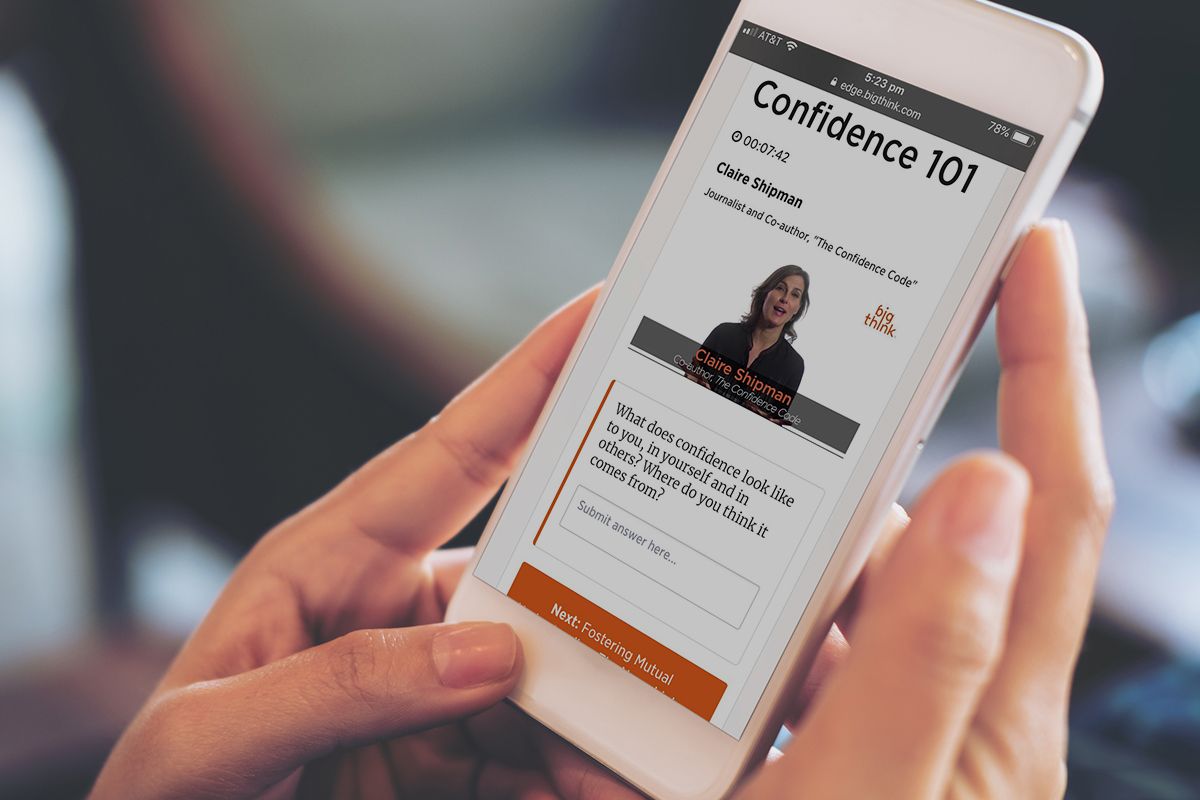
The saying, “knowledge is power”, has been around in various forms for a millennium. In today’s information economy, this turn of phrase seems more relevant than ever. To help you build your own knowledge, Big Think Edge offers over 200 lectures from the brightest minds of the 21st century — from Elon Musk to Malcolm Gladwell. You can currently get lifetime access for $159.99 at MakeUseOf Deals, saving 36% on the full price.

The Ultimate Education

While learning new skills is always valuable, absorbing big ideas and hard-earned wisdom can be even more powerful. Big Think Edge delivers both by the bucketload.

Used by Pfizer and Citi, this online library offers over 200 video lectures and 60 deep-dive lessons from Ivy League professors, entrepreneurs, Nobel Prize winners, and other world-class experts. The videos cover a variety of self-improvement subjects, from emotional intelligence to creativity and leadership.

Along with the names mentioned above, you can learn from Andrew Yang, Bryan Cranston, Sharon Salzberg, Tim Ferriss, and Sara Blakely. Big Think Edge has a total of 150 experts signed up.

As a subscriber, you get unlimited access to all the lessons on mobile and desktop devices plus bonus content.

Save 36% on Lifetime Learning

Worth $250, lifetime subscriptions are now only $159.99.

You can also get three years for $69.99 (worth $150), two years for $49.99 (worth $100), or one year for $29.99 (worth $50)

Read the full article: Big Think Edge Gives You Access to 200 Video Lectures from World-Renowned Experts like Tim Ferriss


Read Full Article

Try These 5 Unique Productivity Methods to Break Out of Boredom


Bored at Work

Finding it difficult to be productive? Try these different motivational methods and productivity techniques to reignite your ability to get things done and break out of boredom.

When your routine changes, it’s difficult to stay as productive as you were before. You need to adapt to what life and work throw at you. From classic productivity methods to a psychological course that teaches happiness, these websites, apps, and ebooks promise to kickstart your output once again.

1. newDay (Web): Reimagine Time as a 10-Hour Day

newDay productivity app reimagines a 24-hour day into 10 hours of 100 minutes each

The newDay planner completely rethinks time as you know it. Instead of planning for a 24-hour day, you will now have 15 “hours” i.e. 10 waking segments and five sleeping segments. It’s a little out there, but maybe thinking about time differently might kickstart your productivity.

Here’s how it works. Instead of 60-minute hours, your 10 waking segments will be 100 minutes each. Your five sleep segments will be 88 minutes each, which is close to the average 90-minute sleep cycle. That’s a total of 440 minutes, meeting the recommended seven hours of sleep for a healthy schedule.

For each waking segment, set an intention and follow through with it. The app tries to ignite a new focus on what you’re doing by forcing you to ditch traditional time-based productivity methods. It’s best to make this your New Tab page if you use it to keep on top of each newDay “hour.”

Of course, you aren’t throwing away the traditional clock because that’s what the rest of the world works on. So when you wake up, set the first segment’s time, and newDay will adjust it for all ten segments accordingly.

2. The Medium Method (Web): Productivity Without Ditching Pen and Paper

The Medium Method strikes a balance between using paper and digital apps for maximum productivity

Most productivity methods implore you to adopt new apps and gadgets. It’s all about ditching pen and paper and going digital. The Medium Method is a proponent of a healthy balance. The idea is to use pen and paper while also adding the benefits of technology.

It’s ironic that the method leaped to fame on the blog of one of the best to-do list apps, Todoist. Contributor Chad Hall writes about how he uses two notebooks, post-it notes, and digital apps for to-do lists, notes, and calendars.

You should read the full post to understand the intricacies and thinking behind the method, but the basic takeaway is to use notebooks and post-it notes to jot down everything.

In a nightly review, you offload these into apps. Hall specifically notes that he uses a daily sticky note to always remind him of priorities for that day.

The Medium Method is the ideal productivity technique for those who use work desks but don’t have an app system yet. You don’t need to go fully digital and paperless. There is something to be said about the act of writing tasks on paper and crossing them out, or making a quick note without worrying about formatting.

3. Work The System (Ebook): What’s Your Biological Prime Time?

Sam Carpenter's productivity book Work The System is available as a free download in all formats and audiobook too

Sam Carpenter’s productivity book Work The System is a must-read for team leaders, managers, and business owners. The principle of the book is to understand systems, both personal and professional, and optimize them.

The book teaches you how to identify linear systems and maximize them, starting with yourself.

For example, Carpenter’s book gained a lot of headlines with the “biological prime time” method. In that, he talks about how each individual’s energy levels ebb and flow at different times of the day. This is one of your personal linear systems.

Once you understand your “biological prime time” and work with that in mind, you will be more productive. In fact, based on this system, we have a free spreadsheet to discover your most productive hours.

Work The System is available as a free ebook on the official website. The link displayed on the homepage doesn’t work at the moment. But we found an older link by which you can sign up for the newsletter and get the ebook for free.

You can download it in Epub, Mobi, and PDF formats. If you share Work The System on social media, you can also download the free audiobook.

Download: Work The System (Free)

4. The Science of Well-Being (Web Course): More Happy = More Productive

Multiple studies show a distinct correlation that happier people are more productive. But with gloom and doom surrounding you in the news every day, it’s hard to maintain a happy mood. Yale University offers a free online course to change your mindset, called The Science of Well-Being.

Psychology professor Laurie Santos teaches different aspects of happiness in the four-week course. Each week requires about two hours of course-work, while you learn about misconceptions about happiness, and how our mind tricks us with expectations and biases. Finally, you’ll learn about what actually makes you happy, and how to implement happiness strategies in your daily life.

The coursework is light and easily fits into busy schedules. Along with the weekly video, Santos offers recommended reading, but none of it is essential to move to the next week’s lesson. It’s more about assimilating and mulling over what you learn from the video and putting it into practice. You can start the course whenever you want, and take it at your own pace.

5. Fear-Setting and Dreamline Calculator (Web): Apps Inspired by Tim Ferris

Practice the Tim Ferris methods of Dreamline Calculator and Fear Setting as online apps

Motivational speaker Tim Ferris often talks about two game-changing productivity techniques: Fear setting and the Dreamline calculator.

In his book The 4-Hour Workweek, he talks about how both exercises boost motivation by giving you a plan for your worst-case and dream scenarios. Both these exercises are now available as interactive web apps.

In Fear-setting, the template puts you through the six steps of facing your fears.

You’ll define, prevent, repair, assess the benefits of success and costs of inaction, and finally summarize the whole process. It takes about half an hour to really think and answer each question, but you’ll be better off for it.

The Dreamline calculator is a map of six to 12 months to achieve the lifestyle you desire.

The template asks questions that you probably haven’t thought of while dreaming big. This forces you to assess and reassess practicality, and what sacrifices you’ll need to make. But once you set that plan, you’ll feel more motivated and productive because you know the exact benefits and losses of not taking action.

Productivity for Remote Workers

A lot of people find it hard to stay productive when they’re not in the office. Remote work has its own motivational challenges, which can be addressed with the aforementioned methods. But just in case those don’t work for you, try these tips to succeed at remote work.

Read the full article: Try These 5 Unique Productivity Methods to Break Out of Boredom


Read Full Article

Try These 5 Unique Productivity Methods to Break Out of Boredom


Bored at Work

Finding it difficult to be productive? Try these different motivational methods and productivity techniques to reignite your ability to get things done and break out of boredom.

When your routine changes, it’s difficult to stay as productive as you were before. You need to adapt to what life and work throw at you. From classic productivity methods to a psychological course that teaches happiness, these websites, apps, and ebooks promise to kickstart your output once again.

1. newDay (Web): Reimagine Time as a 10-Hour Day

newDay productivity app reimagines a 24-hour day into 10 hours of 100 minutes each

The newDay planner completely rethinks time as you know it. Instead of planning for a 24-hour day, you will now have 15 “hours” i.e. 10 waking segments and five sleeping segments. It’s a little out there, but maybe thinking about time differently might kickstart your productivity.

Here’s how it works. Instead of 60-minute hours, your 10 waking segments will be 100 minutes each. Your five sleep segments will be 88 minutes each, which is close to the average 90-minute sleep cycle. That’s a total of 440 minutes, meeting the recommended seven hours of sleep for a healthy schedule.

For each waking segment, set an intention and follow through with it. The app tries to ignite a new focus on what you’re doing by forcing you to ditch traditional time-based productivity methods. It’s best to make this your New Tab page if you use it to keep on top of each newDay “hour.”

Of course, you aren’t throwing away the traditional clock because that’s what the rest of the world works on. So when you wake up, set the first segment’s time, and newDay will adjust it for all ten segments accordingly.

2. The Medium Method (Web): Productivity Without Ditching Pen and Paper

The Medium Method strikes a balance between using paper and digital apps for maximum productivity

Most productivity methods implore you to adopt new apps and gadgets. It’s all about ditching pen and paper and going digital. The Medium Method is a proponent of a healthy balance. The idea is to use pen and paper while also adding the benefits of technology.

It’s ironic that the method leaped to fame on the blog of one of the best to-do list apps, Todoist. Contributor Chad Hall writes about how he uses two notebooks, post-it notes, and digital apps for to-do lists, notes, and calendars.

You should read the full post to understand the intricacies and thinking behind the method, but the basic takeaway is to use notebooks and post-it notes to jot down everything.

In a nightly review, you offload these into apps. Hall specifically notes that he uses a daily sticky note to always remind him of priorities for that day.

The Medium Method is the ideal productivity technique for those who use work desks but don’t have an app system yet. You don’t need to go fully digital and paperless. There is something to be said about the act of writing tasks on paper and crossing them out, or making a quick note without worrying about formatting.

3. Work The System (Ebook): What’s Your Biological Prime Time?

Sam Carpenter's productivity book Work The System is available as a free download in all formats and audiobook too

Sam Carpenter’s productivity book Work The System is a must-read for team leaders, managers, and business owners. The principle of the book is to understand systems, both personal and professional, and optimize them.

The book teaches you how to identify linear systems and maximize them, starting with yourself.

For example, Carpenter’s book gained a lot of headlines with the “biological prime time” method. In that, he talks about how each individual’s energy levels ebb and flow at different times of the day. This is one of your personal linear systems.

Once you understand your “biological prime time” and work with that in mind, you will be more productive. In fact, based on this system, we have a free spreadsheet to discover your most productive hours.

Work The System is available as a free ebook on the official website. The link displayed on the homepage doesn’t work at the moment. But we found an older link by which you can sign up for the newsletter and get the ebook for free.

You can download it in Epub, Mobi, and PDF formats. If you share Work The System on social media, you can also download the free audiobook.

Download: Work The System (Free)

4. The Science of Well-Being (Web Course): More Happy = More Productive

Multiple studies show a distinct correlation that happier people are more productive. But with gloom and doom surrounding you in the news every day, it’s hard to maintain a happy mood. Yale University offers a free online course to change your mindset, called The Science of Well-Being.

Psychology professor Laurie Santos teaches different aspects of happiness in the four-week course. Each week requires about two hours of course-work, while you learn about misconceptions about happiness, and how our mind tricks us with expectations and biases. Finally, you’ll learn about what actually makes you happy, and how to implement happiness strategies in your daily life.

The coursework is light and easily fits into busy schedules. Along with the weekly video, Santos offers recommended reading, but none of it is essential to move to the next week’s lesson. It’s more about assimilating and mulling over what you learn from the video and putting it into practice. You can start the course whenever you want, and take it at your own pace.

5. Fear-Setting and Dreamline Calculator (Web): Apps Inspired by Tim Ferris

Practice the Tim Ferris methods of Dreamline Calculator and Fear Setting as online apps

Motivational speaker Tim Ferris often talks about two game-changing productivity techniques: Fear setting and the Dreamline calculator.

In his book The 4-Hour Workweek, he talks about how both exercises boost motivation by giving you a plan for your worst-case and dream scenarios. Both these exercises are now available as interactive web apps.

In Fear-setting, the template puts you through the six steps of facing your fears.

You’ll define, prevent, repair, assess the benefits of success and costs of inaction, and finally summarize the whole process. It takes about half an hour to really think and answer each question, but you’ll be better off for it.

The Dreamline calculator is a map of six to 12 months to achieve the lifestyle you desire.

The template asks questions that you probably haven’t thought of while dreaming big. This forces you to assess and reassess practicality, and what sacrifices you’ll need to make. But once you set that plan, you’ll feel more motivated and productive because you know the exact benefits and losses of not taking action.

Productivity for Remote Workers

A lot of people find it hard to stay productive when they’re not in the office. Remote work has its own motivational challenges, which can be addressed with the aforementioned methods. But just in case those don’t work for you, try these tips to succeed at remote work.

Read the full article: Try These 5 Unique Productivity Methods to Break Out of Boredom