07 May 2020

7 Fun Mobile Games Which Let You Explore the World


These days, it’s safe to say that most of us are craving some escapism. Whether you’re trapped indoors, seeking adventure, or simply desperate to go travelling, one of the best methods to explore the world is through gaming.

With that in mind, here are some fun mobile games which let you explore the world, hunt for clues, and/or traverse an alien landscape. They’re all available for Android and iOS, and many of them are completely free to play too.

1. Seashine

It’s dark. It’s mysterious. It feels like a cross between Finding Nemo and a horror flick.

In the world of Seashine, you play a lonely little jellyfish searching for your way out of a massive underwater cave. The goal? To get out of this cave before your light vanishes. If you linger for too long, you’ll get eaten by one of the bigger fish.

Don’t let the foreboding premise of this game scare you off. Seashine is really simple to play, and the fact that you’re allowed to explore a dark, fantastical world full of deep-sea, bioluminescent creatures can actually be really calming.

While you can make in-app purchases to complete the levels quicker, Seashine works just fine as a “freebie,” too.

Download: Seashine for Android | iOS (Free, in-app purchases available)

2. Feist

Do you want to play mobile games that are equal parts creepy, cute, and beautiful? Feist is an action-adventure side-scroller with animation so smooth your character moves across the screen like water.

Featuring dark fairytale undertones and delicate sound design, Feist is set in a mystical, twilight forest. You play a tiny, fur-covered creature who needs to make its way through this forest in order to save its mate. While doing so, you must avoid the more dangerous creatures that lurk in the gloom.

With pared-down controls consisting of forward, back, and jump actions, Feist is super easy to play with almost no learning curve. It’s perfect for anyone who wants an activity they can just dive right into.

Download: Feist for Android | iOS (Free, in-app purchases available)

3. Mars: Mars

While Mars: Mars is not as exploration-focused as some of the other games on this list, the gameplay itself is so compelling we’re still including it. We feel it’s a great tool that will help you find ways to escape.

A free-to-play side-scroller, the objective of Mars: Mars is dead simple:

  • When a manned space mission puts an astronaut on Mars, it’s up to you, the player, to guide this astronaut across the Martian landscape.
  • You do so by jumping from platform to platform using a jetpack.
  • If you don’t land on a platform, your astronaut explodes.

The controls for this game are very user-friendly—left tap for left booster, right tap for right. As you traverse each level, you’re also expected to collect “coins.”

Once you have enough coins, MarsCorp sends you a new astronaut with a new skill set. You can also acquire extra content through in-app purchases.

Overall, this game is great if you’re looking for something to mindlessly play late at night.

Download: Mars: Mars for Android | iOS (Free, in-app purchases available)

4. OPUS: Rocket of Whispers

Looking for mobile games to play that are overwhelmingly story-based? Check out OPUS: Rocket of Whispers, a narrative about hope and perseverance in the face of civilizational decline.

While the subject matter might be too heavy for some—it deals with the after-effects of a pandemic—we think it still deserves a mention. Following a pair of characters about 30 years after a devastating viral outbreak, the player guides their journey as they search for pieces of a broken rocket. The aim? To help the souls of the dead reach the stars via this rocket.

Best of all, you can play the game in Regular or Story Mode. The latter letting you focus exclusively on the game’s complex narrative.

NB: While OPUS is officially labeled “free with in-app purchases,” and this is technically true, you will have to buy the full game in order to play past the first “arc.”

Download: OPUS: Rocket of Whispers for Android | iOS (Free, in-app purchases available)

5. The Trail

Are you looking for vast, open-world mobile RPG games that let you explore? Do you want the ability to create a custom character, craft supplies, hunt for animals, trade objects, build a house, and interact with other players?

Then you absolutely need to check out The Trail; one of the best free-to-play games on this list.

Taking place in a vast, unspoiled wilderness that looks similar to the American west, you play a pioneer who has just landed, seeking to make a name for yourself. Once you disembark, you must make your way to Eden Falls, where you start your new life.

While the controls for this game are not as intuitive as some of the other games on this list, once you grasp them, operating The Trail becomes a breeze. The ads are also so minimal and unobtrusive that it almost feels like you’re playing paid content.

If you’re looking for other crafting games, and The Trail doesn’t do it for you, you can also check out our list of the best farming games for Android and iOS.

Download: The Trail for Android | iOS (Free, in-app purchases available)

6. Pavilion: Touch Edition

Looking for exquisite, beautifully animated exploration games that force you to use your mind in order to advance? Then you need to try Pavilion: Touch Edition, which bills itself as a puzzle-adventure.

While Pavilion is a paid game, we definitely think it’s worth the nominal cost to buy it. The goal of Pavilion is to move a small, animated character through a series of mazes. Through these mazes, you’ll explore hidden passageways, wander past crumbling staircases, and venture into abandoned temples.

You’ll also open up drawers, step on rune stones, ring bells, and turn off lights in order to achieve your goals.

While we love this game, we don’t recommend playing it late at night, especially if you’re just looking for something simple to help you relax. You’ll need to think critically about these puzzles and not mindlessly mash buttons in order to advance through the maze.

Download: Pavilion: Touch Edition for Android | iOS ($3.99)

7. Samorost 3

Last but not least is Samorost 3. Possibly our favorite game on the list. Utterly whimsical, completely escapist, and gorgeously animated, Samorost 3 is a puzzle-based adventure game. It comes across as a mix between a Studio Ghibli movie and Jim Henson’s The Dark Crystal.

In the game, you play a gnome who travels through the vastness of space in order to discover its “mysterious origins.” You do this by using a flute to speak to the creatures around you, and by exploring every nook and cranny within the game in order to locate hidden objects.

There are multiple alien worlds you can explore, and the game itself is very much a tap-and-click adventure, where you must intuitively grasp the controls in order to find clues on how to progress.

While Samorost 3 is a paid game, like Pavilion, we think it’s well worth the price.

Download: Samorost 3 for Android | iOS ($4.99)

Explore the World While Stuck At Home

While you may be stuck indoors for the time being, or lack access to a games console or PC, you can still escape into the wider world using your phone and these mobile exploration games.

And if you’re looking for other fun mobile apps to keep you entertained, check out the best virtual pet  games for your mobile.

Read the full article: 7 Fun Mobile Games Which Let You Explore the World


Read Full Article

How to Find Your FaceTime Live Photos


Snapping a Live Photo during a FaceTime call is a great way to remember your favorite conversations. A Live Photo captures the moments just before and after you hit the shutter button in FaceTime.

If you aren’t sure how to take FaceTime Live Photos—or you don’t know where they go after you snap them—here is a detailed tutorial for iPhone, iPad, and Mac.

How to Take Live Photos in FaceTime

FaceTime Live Photo shutter button on a Mac

You can take a Live Photo during a FaceTime call using the shutter button. This appears when you tap the screen on an iPhone, iPad, or iPod touch or when you hover your mouse over the FaceTime window on a Mac. It looks like two white circles, one inside the other.

In a Group chat on FaceTime for iOS, select the person’s tile you want to take a photo of, then tap the Fullscreen button to reveal the Live Photo shutter button. In a Group chat on a Mac, double-click the person you want to photograph, then click the Shutter button.

A Live Photo is better than taking a screenshot because it doesn’t capture the FaceTime user interface. It also saves a couple of seconds of video and audio from right before and after you take the photo.

How to Take a FaceTime Photo Without Telling the Other Person

When you take a Live Photo of someone using FaceTime, it sends a notification to their device to let them know that you took a picture. There’s no way to avoid sending this notification when you take a photo, but you can get around it by taking a screenshot instead.

To do so, press Volume Up along with the Side button on your iPhone or iPad (or press the Home button with the Side button on iPhone 8 and earlier). On a Mac, press Cmd + Shift + 3.

How to Enable Live Photos in Your FaceTime Settings

Before you can take a Live Photo in FaceTime, both you and the person you’re taking a photo of need to enable Live Photos in your FaceTime Settings. If you don’t want to let other people take photos of you in FaceTime, you should disable this option.

On an iPhone, iPad, or iPod touch, go to Settings > FaceTime. Scroll down and turn on FaceTime Live Photos.

FaceTime Live Photos toggle in iPhone settings

On a Mac, open FaceTime and to go FaceTime > Preferences from the menu bar. In the Settings tab, turn on the option to Allow Live Photos to be captured during video calls.

Where Do FaceTime Live Photos Go?

It’s all well and good snapping Live Photos while you’re using FaceTime, but you need to know where those photos go to enjoy them after the call. The answer is pretty simple: FaceTime photos save directly to the Photos app on your device.

To view your FaceTime Live Photos, open the Photos app and go to the Photos tab, then select the All Photos view to make sure your device doesn’t filter them out. Scroll to the date and time you took the photo to find it.

Photos app with All Photos view

You can simplify matters by viewing only your Live Photos. To do this, go to the Albums tab and look for the Live Photos album. Your iPhone, iPad, or Mac creates this album automatically as soon as you add a Live Photo to your library.

Create a Smart Album for All Your FaceTime Live Photos

If you want to keep all your FaceTime Live Photos in the same place, create a Smart Album to automatically capture them all. To create a Smart Album, you need to use the Photos app on a Mac. Unfortunately, you can’t create Smart Albums from the Photos app on an iPhone or iPad.

Click Add (+) next to My Albums in the sidebar and choose Smart Album from the popup. Name your Smart Album, then configure the following filter using the dropdown menus: Lens includes FaceTime.

FaceTime Live Photos Smart Album filters

You’ll need to type “FaceTime” into the third box, since it isn’t an option in the dropdown menu.

Click OK to create your Smart Album. Photos should fill the album with all the Live Photos you’ve captured during FaceTime calls. Any new FaceTime photos you take should also appear in the album automatically.

If you sync Photos over iCloud, this Smart Album will become available from the Albums tab on your other devices as well.

Troubleshooting FaceTime Photo Problems

There are lots of problems that might stop you from being able to snap a Live Photo during your FaceTime calls. If you can’t find the shutter button, FaceTime isn’t saving your photos, or you don’t know where the FaceTime photos go after you take them, try these troubleshooting tips to fix it.

1. Enable FaceTime Live Photos on Both Devices

To take a photo of someone during a FaceTime call, both of you need to turn on FaceTime Live Photos from your device settings. Go to Settings > FaceTime to do this. Make sure the person you’re taking a photo of checks their settings as well.

2. Open the Photos App on Your Device

When you take Live Photos in FaceTime, it automatically saves those pictures to the Photos app on your device. If you haven’t used Photos before, open it on your device to initialize the app before FaceTime can save photos.

Rows of apps on iPhone Home screen with Photos app

3. Update to the Latest Operating System

With the release of iOS 12, Apple temporarily removed the ability to take Live Photos in FaceTime. This was presumably due to a FaceTime security bug. Live Photos are back now, but you need to update your device to the latest software to use them. The person you’re taking a photo of needs to update their device to the latest software as well.

On an iPhone, iPad, or iPod touch, go to Settings > General > Software Update. On a Mac, go to System Preferences > Software Update.

Software Update System Preferences page in macOS

4. Restart Your Device

No matter what problem you’re encountering, you should always try to fix it by restarting your device. This is a remarkably effective troubleshooting step that only takes a moment to try out. Power off your iPhone, iPad, or Mac as you usually would, then wait 30 seconds before restarting it again.

5. Restart FaceTime on Your Device

Finally, try turning FaceTime off and on in your device settings. You may need to sign in to your Apple ID account again when you do this.

On an iPhone, iPad, or iPod touch, go to Settings > FaceTime and toggle the FaceTime button at the top of the screen.

FaceTime settings on iPhone

On a Mac, open the FaceTime app and go to FaceTime > Preferences from the menu bar. In the Settings tab, uncheck the box to Enable this account, then check the box again to re-enable FaceTime.

Multitask While Using FaceTime

You can check out your Live Photos without ending the FaceTime chat by swiping up (or pressing the Home button) and opening the Photos app. When you do this, FaceTime pauses your video feed until you return.

This multitasking feature still lets you talk to people and hear what they say, even though it freezes your video feed. It’s just like using another app while talking on your iPhone, making it easy to complete important tasks while speaking with other people.

Read the full article: How to Find Your FaceTime Live Photos


Read Full Article

Watch Geo-Blocked Content on Your Favorite Streaming Services With This Handy App


For most people, the last few weeks have been the perfect time to binge watch new shows and even dive into new content you would normally not watch. Maybe for some of you, you have already just about checked off every show, movie, and documentary on Netflix, Hulu, Amazon Prime, Video, and even Disney+. KeepSolid’s SmartDNS allows users to watch content that they normally are not able to access due to geo-restrictions. For $40, KeepSolid’s SmartDNS gives you access to hundreds of shows and movies on your favorite streaming services with a click of a button.

Unlock More Content

All major streaming services oftentimes designate certain shows and movies for specific regions and countries. For instance, Netflix viewers in the United States will have access to a different list of content than viewers in Germany. The KeepSolid SmartDNS is an easy-to-use proxy service that allows users to bypass geo-restrictions, thus allowing you to watch different content.

With unlimited high speed connections and wide open streaming bandwidth, stream all your new favorites in HD quality. Stream straight from devices ranging from Android, iOS, SmartTV, Mac, Windows, tvOS, Roku, PlayStation 4, and more.

Start Watching New Shows and Movies Today

This app is usually worth $239.40, but you can grab it now for just $39.99.

Prices subject to change

Read the full article: Watch Geo-Blocked Content on Your Favorite Streaming Services With This Handy App


Read Full Article

The 10 Best Free Apps to Help You Learn to Play Guitar


Learning to play guitar is much harder than it looks, but it’s also worth the effort. Learning an instrument is one of the most rewarding things you can do, but it’s tough to learn on your own without any outside help.

Thankfully, there are lots of free mobile apps you can use to learn to play guitar. These Android and iOS apps will help accelerate your learning and make you feel more confident with the guitar, even if you’re a complete beginner.

1. Real Guitar

Real Guitar is a guitar simulator. It can simulate both acoustic and electric guitars, and it works on both tablets and smartphones. It also supports multi-touch, which is crucial for playing chords, but you’ll need a device with multi-touch capabilities for that feature to work.

What’s even cooler is that it comes with track loops that you can play along to, plus a recording mode and the ability to export to MP3. This means you can actually come up with songs, play them with Real Guitar, and record them for later.

Download: Real Guitar for Android | iOS (Free, in-app purchases available)

2. Perfect Ear

While Perfect Ear isn’t a guitar-specific app, it’s extremely useful for anyone who wants to learn to play guitar (or any other musical instrument for that matter). In short, it aims to develop two crucial skills that every musician must practice: rhythm and tone.

Perfect Ear comes with dozens of interval, scale, chord, and rhythm training exercises to help you get comfortable with and understand music. It also has trainers for sight-reading, absolute pitch, and note singing. If you have trouble distinguishing different tones, you need this app.

And if you want to dive into the deep end, Perfect Ear also contains articles on music theory, which will come in handy if you ever intend to write your own songs.

Download: Perfect Ear for Android | iOS (Free, in-app purchases available)

3. GuitarTuna

There are loads of mobile apps that can help you tune your guitar, but GuitarTuna is the absolute best. It can also handle bass, ukulele, violin, cello, banjo, and a bunch of other popular string instruments, so you won’t need to find another app if you pick up another instrument later.

You pluck the guitar string, the app listens with your device’s microphone, and it shows you which note the sound is registering as. This makes it very easy to adjust your tuning as a beginner, but even as an expert this can be helpful because the app supports hundreds of alternative tunings.

Download: GuitarTuna for Android | iOS (Free, in-app purchases available)

4. smartChord

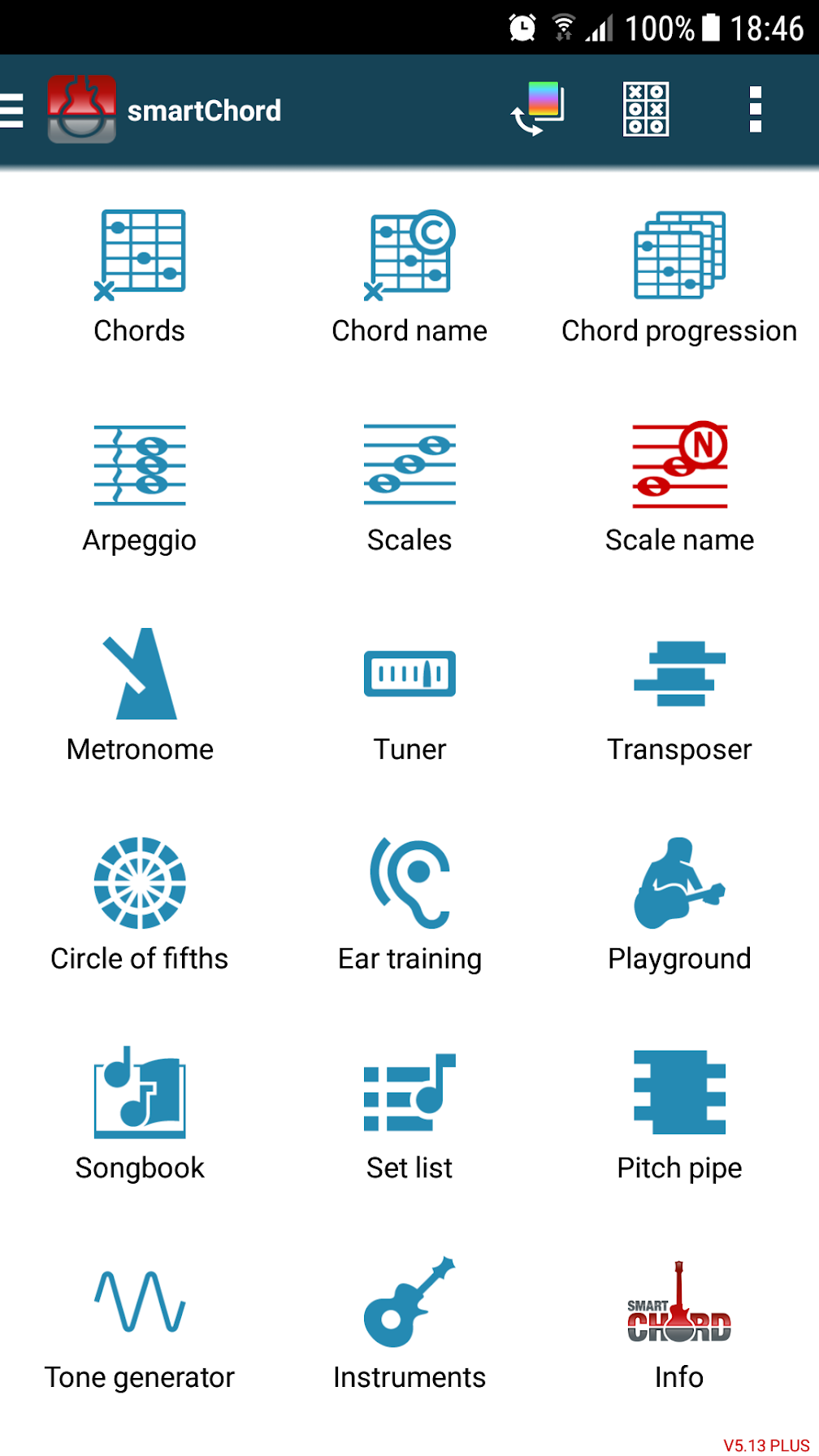
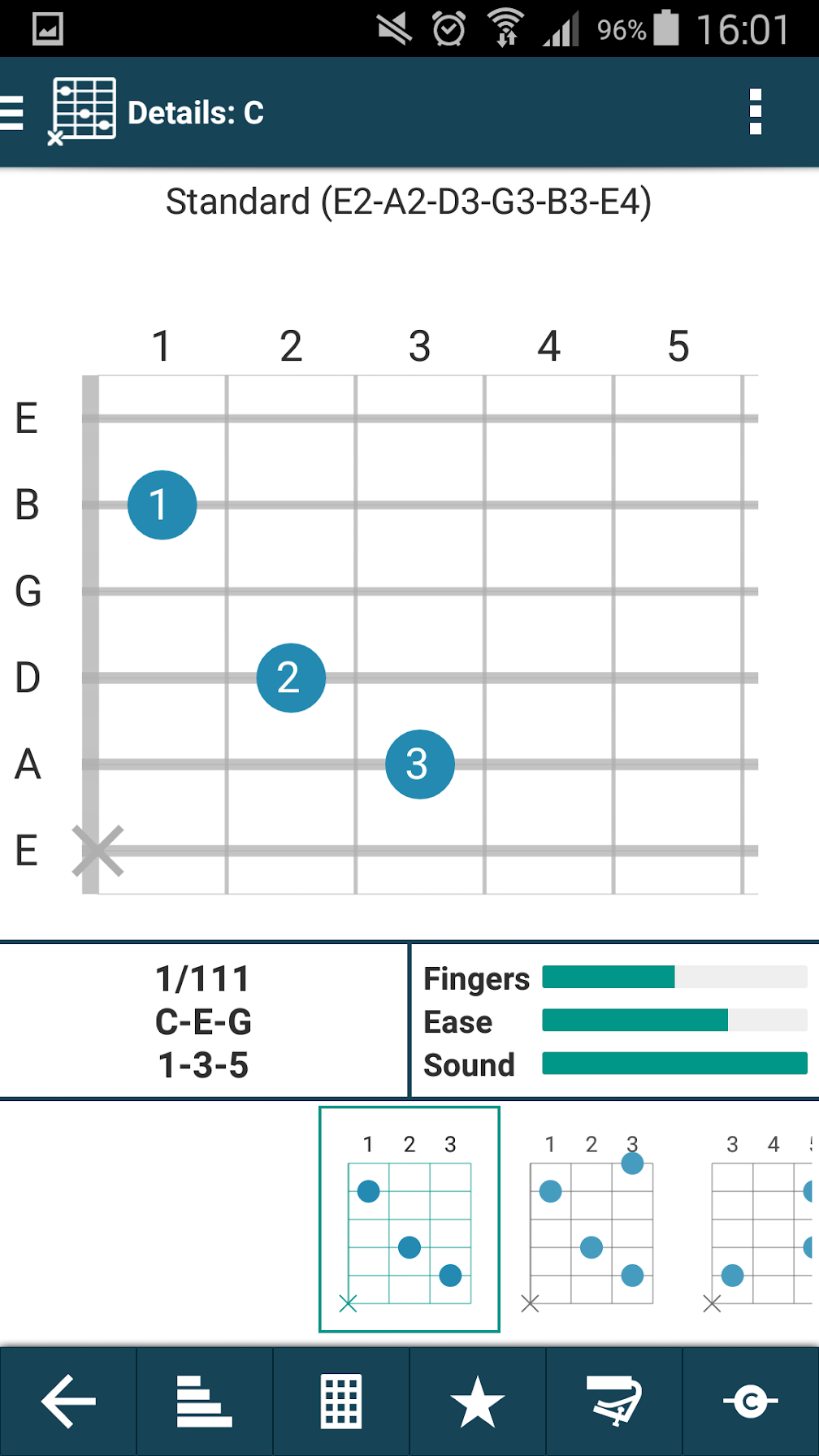
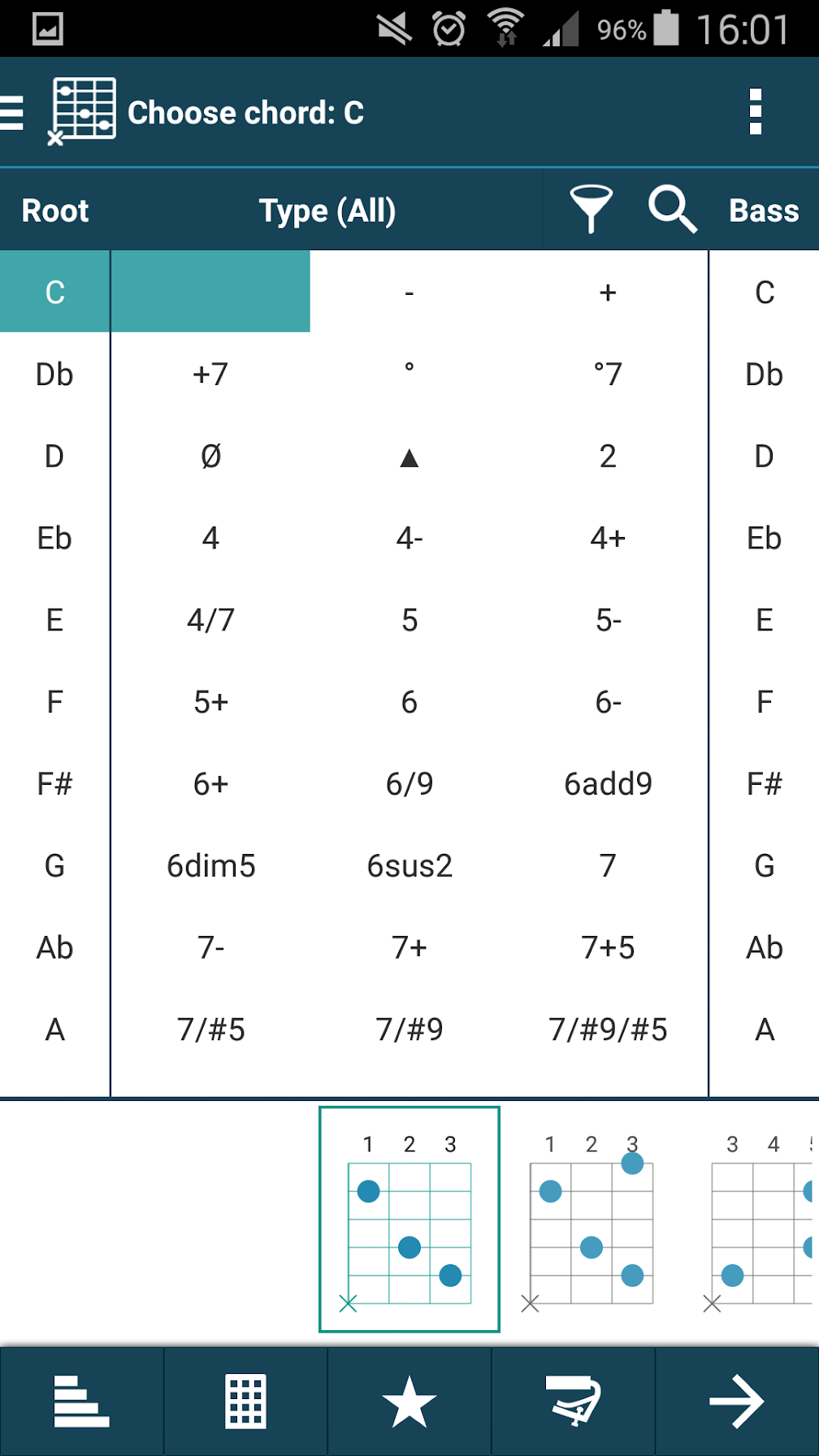
If you want an all-in-one app for guitarists, smartChord is a great choice. It started off as an app for learning all of the different chords and fingerings on the guitar fretboard but has since evolved into something more comprehensive.

The reverse chord finder is really helpful, but smartChord also has features for tone determination, hundreds of predefined tunings, dozens of different scales, a basic metronome, a virtual guitar for when you can’t lug your actual guitar around, a precise tone generator, and more.

Download: smartChord for Android (Free, in-app purchases available)

5. Metronomerous

https://youtu.be/277z2VRqP-s

Most metronome apps are too basic. They get the job done when you’re a beginner, but their limits are quickly reached as you improve your skills. As soon as you hit that point, you’ll want to start using Metronomerous, one of the best metronome apps around.

The interface may be a bit intimidating at first, but that’s only because it can do so much. It can go as far down as eighths, sixteenths, triplets, quintuplets, and septuplets. It can accent on any note down to the sixteenth or triplet note, it can mute during bars to make sure you’re on tempo, and it can even program complex beat sequences.

If you only need a basic beat, it may be overkill. But when basic isn’t good enough, Metronomerous is the only app that will give you the freedom you need.

Download: Metronomerous for Android (Free)

6. Justin Guitar

Justin Guitar is one of the best websites for learning to play the guitar. There’s a reason that every beginner guitar player is pointed towards the site. The website hosts a huge number of lessons from Justin Sandercoe, who breaks down the basics of the instrument simply, and he will have you strumming a tune in no time.

This app is a great extension of that and provides everything you could need. It has a tuner, video tutorials, interactive lessons, and over 1000 songs that you can play along to so that you can hit those chords perfectly. The app will track your progress through all of the lessons and score you as you go. So you can pick up and play right where you left off.

Download: Justin Guitar for Android | iOS (Free, in-app purchases available)

7. Yousician

Using apps to tune your guitar or learn some chords is all well and good, but how do you know that you’re actually playing the right thing? That the sound coming out of your guitar is good and your fingers are positioned properly?

While there might never be a replacement for a real teacher, Yousician gets pretty close. This app has step-by-step video guides that teach you lessons designed by music teachers, covering topics such as chords, strumming, melodies, fingerpicking, and more.

The best thing is that it actually listens to your playing and then judges your performance so you know what you’re doing right and what you’re doing wrong.

Download: Yousician for Android | iOS (Free, in-app purchases available)

8. Guitar 3D

If you are trying to learn chords—and you probably are if you’re a beginner—then Guitar 3D is a great app to help you out. It contains every chord you’ll need to get going, but the twist here is that it demonstrates them in 3D. This means that you can quickly see where your fingers should be positioned on the guitar.

Not only that, but it demonstrates the finger transitions between chord changes, which is very important when trying to learn a song. The app also highlights the strings that you need to play and offers a split-screen mode so you can see both hands clearly.

Alongside this are lessons and quizzes to test your knowledge on chords. You’ll be a chord master in no time.

Download: Guitar 3D for Android | iOS (Free)

9. Andy Guitar

Andy Guitar is another app fronted by a personable teacher. As you might guess, the instructor here is called Andy, and he guides you through loads of lessons and song tutorials, along with answering the most common questions that new guitarists ask.

Andy is a great and patient teacher. The lessons are laid out plainly and the progression is clear, so you’ll feel like you’re learning quickly. One of the great things about Andy Guitar is that it actually teaches you modern songs too. Often guitar apps tend to focus on rock classics, but Andy mixes between the likes of The Beatles and Maroon 5 with ease.

Download: Andy Guitar for Android | iOS (Free, in-app purchases available)

10. 3000 Chords

If you want a straightforward app that is packed full of every chord you’ll ever want to learn, 3000 Chords is the one for you. It isn’t as fancy as some of the other apps listed here, but it’s simple and achieves exactly what it aims to do: be a great, free database of chord diagrams.

3000 Chords not only shows you the chords, but it can also play them to you so you can match up the sound. It also has chord and ear training games so that you can learn some simple guitar theory too. Plus, and this is something often overlooked, it supports left-handed guitarists.

Download: 3000 Chords for Android (Free, in-app purchases available)

How to Find Guitar Chords for Songs

These are some of the best apps to help you learn to play guitar. And as you can never truly finish learning to play the guitar, you should find some value here regardless of your level of experience.

If you’ve got a handle on the guitar, you probably want to start playing songs that you know. To get you started, here are the best websites to find guitar chords for songs.

Image Credit: Carballo/Shutterstock

Read the full article: The 10 Best Free Apps to Help You Learn to Play Guitar


Read Full Article

The Best Free Video Editors for Windows


video-editing

Video is a common part of everyday life. People take videos on smartphones, upload them via YouTube, and share them on Facebook. You’d think, then, that free video editors would be common.

Free video editors have become serious rivals to the alternative, paid programs in both capacity and scope of editing. However, the selection remains somewhat limited.

We present the absolute best free video editors available for Windows.

Keep in mind: The following software is only as effective as your know-how, and none of the free video editors for Windows 10 are instantly intuitive.

1. Lightworks

If you’re looking for a powerful video editor, give Lightworks a look. Lightworks has been around since 1989 and has been used to edit many professional movies you’ve probably watched and enjoyed, like Pulp Fiction and Braveheart.

As you might expect, this professional-grade editor comes with a professional-grade learning curve. Lightworks is a nonlinear editor, which means it is not based on a simple A-to-B video timeline. That makes advanced edits easier, but thoroughly confuses newbies.

Add tons of effects and multi-cam editing, and you’ve got one heck of a nut to crack. If you manage it, though, you can create videos of higher quality than most other free editors.

Along with providing users with all the basics you could desire from free video editing software, Lightworks also provides a few extras like basic effects, titles, transitions, and color correction. Whether you’re a bare bones amateur or a bit more experienced, Lightworks will definitely meet your video editing needs.

The free version, unfortunately, comes with a few caveats, the most problematic being a lack of 1080p output. Free users can only output at 720p, which could be a major turn-off. If that doesn’t bother you, though, Lightworks is a solid choice.

The free version of Lightworks will allow you access for seven days, at which time you’ll have to register officially through the Lightworks website to use. You can do all this early on by registering today.

Download: Lightworks for Windows 10 (Free)

2. HitFilm Express

HitFilm is a doozy. Touting on its main page that it’s the “most powerful free editing and VFX software to date,” HitFilm doesn’t disappoint.

For one, the software has plenty of beautiful examples for you to choose from directly on their web page. Check out the linked film above. It is one of the prime examples.

Aside from a fantastic interface for laying out your clips and workflow, it also provides countless free video tutorials and visual effect possibilities by default.

Its UI is also largely reminiscent of more mainstream, paid video editing software. In that, you aren’t limited to what you can do and create within the window. The same applies feature-wise: color correction, clip cutting, VFX, and mask tracking are all within grasp with HitFilm Express.

You’ll have to sign-up for an account, and then the download link is sent to your inbox.

Download: HitFilm Express for Windows 10 (Free)

3. DaVinci Resolve

DaVinci Resolve is as close to a free, professional video editor for Windows 10 as is possible. Keep in mind that this means it takes about as much practice, time, and dedication to learn as it would any other professional video editor. However, once you can find your way around the software, you’ll never need another video editor.

There’s hardly a thing DaVinci Resolve isn’t able to do for you. But one thing it does fantastically is color grading. In fact, it’s renounced for being a standalone color correction software along with doing, well, everything else.

It also allows SD, HD, and Ultra HD output, meaning you can start, edit, and create pseudo-studio productions—polished and finalized—all in one software. While the Studio versions will, of course, cater to actual professional production settings, the alternative free version will provide more than enough functionality to keep any beginner satisfied.

Similar to HitFilm Express, you must register with the website to download the software. For more information on Windows 10 video editors, see our comparison of DaVinci Resolve and HitFilm Express.

Download: DaVinci Resolve for Windows 10 (Free)

4. Shotcut

Comparatively speaking, Shotcut is designed for the amateur video editor or someone who needs to tie together or edit short clips to create a sensible final product. It’s as easy as dragging and dropping clips and editing them by cutting and adding transitions.

If you don’t require a large, professional-grade video editor for Windows 10, but still want to put together short clips with transitions, this program is exactly for you. Better yet, its slim data size allows users of all PC specs to use the software. You don’t need a souped-up PC in order to use Shotcut. Sometimes, that can make all the difference.

Plenty of bells and whistles are great, but for specific purposes, they can border on clutter. With Shotcut, everything you need is laid out in front of you. If you require a simple free video editor for Windows 10, look no further.

Download: Shotcut for Windows 10 (Free)

5. Avidemux

Avidemux is a free and open-source video editor for Windows 10, as well as macOS and Linux.

This program is a half-step between serious video editing software, like Lightworks, and a basic video editor like the infamous Windows Movie Maker. It supports nonlinear editing, you can add subtitles, and the software’s file format lets users save all the settings associated with a project, which you can then re-applied to another project.

Scripting is available through the GUI or directly through a command line. Virtually all major video and audio formats are supported for input and output, though WMV and QuickTime are absent.

The developer’s website includes a link to a wiki and forums that will help you become familiar with the software. Although the software hasn’t received an update for over eight months at the time of writing, Avidemux is still under active development.

Download: Avidemux for Windows 10 (Free)

6. VSDC Free Video Editor

This appropriately titled editor is another solid choice for people who want a semi-professional option without having to pay a professional price tag. A nonlinear editor, VSDC allows for advanced editing techniques. The software also supports a broad range of video and audio effects like color correction, blur reduction, and volume correction.

Though still confusing for the novice, the basic interface of VSDC is a bit easier to grasp than that of Lightworks, thanks to a front-end that mimics the Microsoft ribbon interface and has a more conventional workflow.

One nice extra that may elevate VSDC above the free version of Lightworks is video output support for 1080p at 30 FPS, which is much better than its competitor’s 720p limitation. The installer is also a rather compact 37MB, making it a handy video editing app to keep on a USB stick.

Download: VSDC Free Video Editor for Windows 10 (Free)

7. OpenShot

OpenShot is a remarkable story. An open-source, free video editing tool for Windows 10 that began life as a Kickstarter campaign, OpenShot is now a popular and capable tool. It is also a handy free video editing tool that bridges the gap between the advanced video editing options and those more basic selections.

The UI is easy to navigate, using a familiar style for anyone with any video editing experience. Even if you have zero experience, the drag and drop timelines, editable properties, filters, transitions, and other effects are all only a click away.

But don’t let the simplicity of OpenShot fool you. It is a capable cross-platform video editing tool that supports a wide range of formats, rendering techniques, and more.

Download: OpenShot for Windows 10 (Free)

8. Blender

Blender is, I admit, a different breed of video editor. It’s for 3D, rather than 2D, editing. Despite that being the case, not mentioning Blender would be a serious error because of just how much 3D video editing functionality is packed into this free software.

It’s a complete education in a single program. From the first time you enter Blender, you must get to grips with its notorious and somewhat complex UI. Blender isn’t your typical video editing software: aside from the possibility of creating a mixed reality short film like the one above, you can create, edit, animate, and light 3D animations.

Learning your way through Blender can take a lot of time. After all, you’re not starting with a few clips you can trim and edit. Blender gives little by way of instruction when you first open the program and you have to learn as you go.

That includes the official Blender Youtube channel, mind you, which not only has tutorials for users but hours upon hours of talks and presentations as well. That’s on top of their official animations, which give you something to strive for if 3D animation is your forthcoming forte.

I know, I cheated a little adding a 3D animation software to the list. There’s no doubt, however, that Blender ranks head and shoulder above the competition for its 3D video editing capabilities.

And did you know you could also use Blender to create models for 3D printing?

Download: Blender for Windows 10 (Free)

Which Is the Best Free Video Editing Software for Windows 10?

Figuring out the absolute best free video editor for Windows 10 is tricky. So much of what makes a tool “the best” lies in the ability and goal of the user.

I extensively use Shotcut to make quick, basic edits to videos—but probably don’t use even half of what the software can do. In that, choosing a free video editing tool that suits your project is important. If you’re clipping together family videos as a memento, you probably don’t need a comprehensive feature film editing suite.

If you need to upgrade your computer for this, check out the best laptops for video editing. You should make sure you have a good camcorder for hobbyist use too. And don’t miss out on these free apps to split and merge video files in a crunch!

Read the full article: The Best Free Video Editors for Windows


Read Full Article

YouTube brings more ad formats and measurement to TVs


YouTube is giving advertisers a few more tools to reach consumers and measure ad effectiveness on TVs.

These tools already exist for YouTube on other platforms, but now the Google-owned video service is bringing them to connected televisions. In a blog post, it says this is in response to how YouTube viewership has grown dramatically on TVs in the past year.

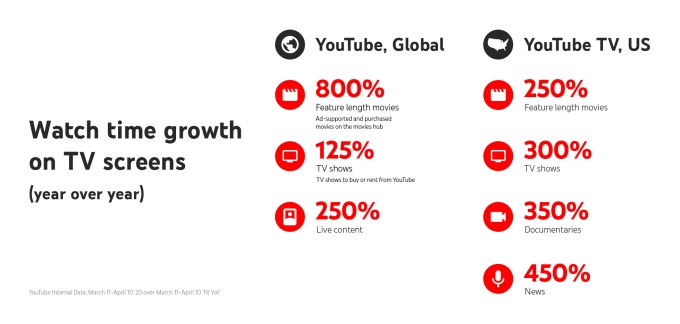
And this is growth is happening across a range of content. YouTube says that watch time for live content on TVs in has grown 250% globally, while watch time for feature-length movies via the YouTube Movies hub has grown 800%. Meanwhile, its live and on-demand TV service YouTube TV has seen watch time for shows grow 300% in the United States. And watch time for news on YouTube TV has grown 450%.

These numbers cover the period from March 11 to April 10, but since they’re year-over-year, it’s not clear how much this growth was driven by COVID-19 and resulting stay-at-home measures. Either way, YouTube is pitching its latest ad products as a way to help advertisers “navigate the streaming boom.”

First, it’s “accelerating the launch” of its Brand Lift measurement tool on TVs.

YouTube graphic

Image Credits: YouTube

Regular YouTube viewerships will likely recognize these surveys asking about you which brands or products you recognize — the idea is to measure whether YouTube ads are leading to increased recognition. YouTube will start running these surveys on the YouTube app on TVs in the coming weeks, and then launch it on YouTube TV early in Q3 of this year.

“For viewers, this means surveys are now optimized for the big screen and interactivity with a TV remote, so people can easily respond or skip the survey,” the company says.

YouTube also says that this year, it’s bringing skippable ad formats to videos that are being casted onto a TV screen.

“As casting watch time soared by over 75 percent year over year, this provides advertisers a new way to reach their audience as they embrace the evolving ways consumers are watching their favorite content,” it says.


Read Full Article

UK’s NHS COVID-19 app lacks robust legal safeguards against data misuse, warns committee


A UK parliamentary committee that focuses on human rights issues has called for primary legislation to be put in place to ensure that legal protections wrap around the national coronavirus contact tracing app.

The app, called NHS COVID-19, is being fast tracked for public use — with a test ongoing this week in the Isle of Wight. It’s set to use Bluetooth Low Energy signals to log social interactions between users to try to automate some contacts tracing based on an algorithmic assessment of users’ infection risk.

The NHSX has said the app could be ready for launch within a matter of weeks but the committee says key choices related to the system architecture create huge risks for people’s rights that demand the safeguard of primary legislation.

“Assurances from Ministers about privacy are not enough. The Government has given assurances about protection of privacy so they should have no objection to those assurances being enshrined in law,” said committee chair, Harriet Harman MP, in a statement.

“The contact tracing app involves unprecedented data gathering. There must be robust legal protection for individuals about what that data will be used for, who will have access to it and how it will be safeguarded from hacking.

“Parliament was able quickly to agree to give the Government sweeping powers. It is perfectly possible for parliament to do the same for legislation to protect privacy.”

The NHSX, a digital arm of the country’s National Health Service, is in the process of testing the app — which it’s said could be launched nationally within a few weeks.

The government has opted for a system design that will centralize large amounts of social graph data when users experiencing COVID-19 symptoms (or who have had a formal diagnosis) choose to upload their proximity logs.

Earlier this week we reported on one of the committee hearings — when it took testimony from NHSX CEO Matthew Gould and the UK’s information commissioner, Elizabeth Denham, among other witnesses.

Warning now over a lack of parliamentary scrutiny — around what it describes as an unprecedented expansion of state surveillance — the committee report calls for primary legislation to ensure “necessary legal clarity and certainty as to how data gathered could be used, stored and disposed of”.

The committee also wants to see an independent body set up to carry out oversight monitoring and guard against ‘mission creep’ — a concern that’s also been raised by a number of UK privacy and security experts in an open letter late last month.

“A Digital Contact Tracing Human Rights Commissioner should be responsible for oversight and they should be able to deal with complaints from the Public and report to Parliament,” the committee suggests.

Prior to publishing its report, the committee wrote to health minister Matt Hancock, raising a full spectrum of concerns — receiving a letter in response.

In this letter, dated May 4, Hancock told it: “We do not consider that legislation is necessary in order to build and deliver the contact tracing app. It is consistent with the powers of, and duties imposed on, the Secretary of State at a time of national crisis in the interests of protecting public health.”

The committee’s view is Hancock’s ‘letter of assurance’ is not enough given the huge risks attached to the state tracking citizens’ social graph data.

“The current data protection framework is contained in a number of different documents and it is nearly impossible for the public to understand what it means for their data which may be collected by the digital contact tracing system. Government’s assurances around data protection and privacy standards will not carry any weight unless the Government is prepared to enshrine these assurances in legislation,” it writes in the report, calling for a bill that it says myst include include a number of “provisions and protections”.

Among the protections the committee is calling for are limits on who has access to data and for what purpose.

“Data held centrally may not be accessed or processed without specific statutory authorisation, for the purpose of combatting Covid-19 and provided adequate security protections are in place for any systems on which this data may be processed,” it urges.

It also wants legal protections against data reconstruction — by different pieces of data being combined “to reconstruct information about an individual”.

The report takes a very strong line — warning that no app should be released without “strong protections and guarantees” on “efficacy and proportionality”.

“Without clear efficacy and benefits of the app, the level of data being collected will be not be justifiable and it will therefore fall foul of data protection law and human rights protections,” says the committee.

The report also calls for regular reviews of the app — looking at efficacy; data safety; and “how privacy is being protected in the use of any such data”.

It also makes a blanket call for transparency, with the committee writing that the government and health authorities “must at all times be transparent about how the app, and data collected through it, is being used”.

A lack of transparency around the project was another of the concerns raised by the 177 academics who signed the open letter last month.

The government has committed to publishing data protection impact assessments for the app. But the ICO’s Denham still hadn’t had sight of this document as of this Monday.

Another call by the committee is for a time-limit to be attached to any data gathered by or generated via the app. “Any digital contact tracing (and data associated with it) must be permanently deleted when no longer required and in any event may not be kept beyond the duration of the public health emergency,” it writes.

We’ve reached out to the Department of Health and NHSX for comment on the human rights committee’s report.

There’s another element to this fast moving story: Yesterday the Financial Times reported that the NHSX has inked a new contract with an IT supplier which suggests it might be looking to change the app architecture — moving away from a centralized database to a decentralized system for contacts tracing. Although NHSX has not confirmed any such switch at this point.

Some other countries have reversed course in their choice of app architecture after running into technical challenges related to Bluetooth. The need to ensure public trust in the system was also cited by Germany for switching to a decentralized model.

The human rights committee report highlights a specific app efficacy issue of relevance to the UK, which it points out is also linked to these system architecture choices, noting that: “The Republic of Ireland has elected to use a decentralised app and if a centralised app is in use in Northern Ireland, there are risks that the two systems will not be interoperable which would be most unfortunate.”


Read Full Article

Live Intraday Trading on 7-May-2020

Live Intraday Trading on 7-May-2020

Please click on the following link to view full post.

https://intradayguruji.blogspot.com/2020/05/live-intraday-trading-on-7-may-2020.html

Via http://intradayguruji.blogspot.com

Apple awards $10 million to rapidly scale COVID-19 sample collection kit production


Apple has awarded $10 million from its Advanced Manufacturing Fund to COPAN Diagnostics, a company focused on producing sample collection kits for testing COVID-19 to hospitals in the U.S. The money comes from the fund that Apple established to support the development and growth of U.S.-based manufacturing, but is particularly notable because to date, the fund has been used to support companies tied more directly to its own supply chain.

The $10 million award also includes Apple employing its sourcing resources to find equipment and materials for COPAN Diagnostics, including new advanced equipment the iPhone-maker is helping design itself. Funds will also be used by COPAN to expand to a larger production facility in Southern California that can output more supply, growing its run rate from around several thousand currently, to over one million kits weekly by July, according to Apple. Apple notes that it will also result in the creation of around 50 new U.S. jobs.

COPAN is a pioneer in the diagnostics world, having previously invented flocked swabs in 2003, and it currently offers the world’s leading transport medium for virus-containing clinical specimens. The investment here from Apple is focused primarily on scale, taking the existing expertise of COPAN and making it into something that can operate somewhere closer to the amazing production volumes that Apple can accomplish, in order to help address the urgent need for more testing supplies to prevent that being the bottleneck to widespread COVID-19 diagnostics in the U.S.

Apple has redirected many of its resources, including monetary donations, protective equipment sourcing, and software development resources for both symptom-checking apps and the forthcoming partnership with Google on exposure notification software, to combatting the global coronavirus crisis. This deployment of the Advanced Manufacturing Fund is yet another example of how the company can address the pandemic in a variety of ways that are unique to its global position, expertise and relationships.


Read Full Article

YouTube TV to gain 14 more ViacomCBS channels in expanded distribution deal


YouTube TV is expanding its lineup of channels thanks to a new, multi-year distribution agreement with ViacomCBS, announced this morning. The Google-owned streaming TV service is gaining 14 new ViacomCBS channels as a result of the deal, including news, sports, and entertainment offerings. It will also continue to carry CBS broadcast stations, CBS Sports Network, Pop TV, Smithsonian Channel, and The CW.

New channels including BET, CMT, Comedy Central, MTV, Nickelodeon, Paramount Network, TV Land and VH1 will arrive on YouTube TV this summer, where they’ll reach the service’s over 2 million subscribers.

Other channels, such as BET Her, MTV2, Nick Jr., NickToons, TeenNick and MTV Classic, will roll out at a later time as part of YouTube TV’s base package.

In addition, YouTube TV will continue to offer ViacomCBS’ premium subscription services, including Showtime, on its YouTube TV service and as an extended partnership on YouTube’s broader platforms.

The YouTube TV service today costs $49.99/month for a lineup of over 70 networks, including live and local sports, news, shows, movies and more, as well as an unlimited cloud DVR for recording favorites.

“We are thrilled to have reached an expanded agreement with YouTube TV that recognizes the full power of our newly combined portfolio as ViacomCBS,” said Ray Hopkins, President, U.S. Networks Distribution, ViacomCBS, in a statement about the deal. “Google has been an excellent partner, and we look forward to bringing even more of our entertainment networks to YouTube TV subscribers for the first time.”

The YouTube TV deal follows a series of distribution agreements ViacomCBS has secured over the past six months, including a new agreement with Verizon FiOS (disclosure: TechCrunch parent’s parent company is Verizon). The Verizon deal was its first carriage deal for ViacomCBS’ full portfolio of networks since the merger between Viacom and CBS closed in December.

ViacomCBS also did distribution deals with Comcast in January, and with News Corp-controlled Australian pay TV company Foxtel in March.

Meanwhile, the ViacomCBS free streaming service Pluto TV has also recently confirmed new distribution deals with TiVo and Verizon, the latter across Verizon’s wireless network, on connected TV platforms like Stream TV, and on its pay TV service, FiOS.

“We’re excited to launch ViacomCBS’ portfolio on YouTube TV this summer, ” said Lori Conkling, Global Head of Partnerships at YouTube TV, in an announcement. “Our expanded partnership delivers on our promise to offer a premium portfolio of content to our YouTube TV subscribers, as well as across the YouTube platforms.”


Read Full Article

UK eyeing switch to Apple-Google API for coronavirus contacts tracing — report


The UK may be rethinking its decision to shun Apple and Google’s API for its national coronavirus contacts tracing app, according to the Financial Times, which reported yesterday that the government is paying an IT supplier to investigate whether it can integrate the tech giants’ approach after all.

As we’ve reported before coronavirus contacts tracing apps are a new technology which aims to repurpose smartphones’ Bluetooth signals and device proximity to try to estimate individuals’ infection risk.

The UK’s forthcoming app, called NHS COVID-19, has faced controversy because it’s being designed to use a centralized app architecture. This means developers are having to come up with workarounds for platform limitations on background access to Bluetooth as the Apple-Google cross-platform API only works with decentralized systems.

The choice of a centralized app architecture has also raised concerns about the impact of such an unprecedented state data grab on citizens’ privacy and human rights, and the risk of state ‘mission creep‘.

The UK also looks increasingly isolated in its choice in Europe after the German government opted to switch to a decentralized model, joining several other European countries that have said they will opt for a p2p approach, including Estonia, Ireland and Switzerland.

In the region, France remains the other major backer of a centralized system for its forthcoming coronavirus contacts tracing app, StopCovid.

Apple and Google, meanwhile, are collaborating on a so-called “exposure notification” API for national coronavirus contacts tracing apps. The API is slated to launch this month and is designed to remove restrictions that could interfere with how contact events are logged. However it’s only available for apps that don’t hold users’ personal data on central servers and prohibits location tracking, with the pair emphasizing that their system is designed to put privacy at the core.

Yesterday the FT reported that NHSX, the digital transformation branch of UK’s National Health Service, has awarded a £3.8M contract to the London office of Zuhlke Engineering, a Switzerland-based IT development firm which was involved in developing the initial version of the NHS COVID-19 app.

The contract includes a requirement to “investigate the complexity, performance and feasibility of implementing native Apple and Google contact tracing APIs within the existing proximity mobile application and platform”, per the newspaper’s report.

The work is also described as a “two week timeboxed technical spike”, which the FT suggests means it’s still at a preliminary phase — thought it also notes the contract includes a deadline of mid-May.

The contracted work was due to begin yesterday, per the report.

We’ve reached out to Zuhlke for comment. Its website describes the company as “a strong solutions partner” that’s focused on projects related to digital product delivery; cloud migration; scaling digital platforms; and the Internet of Things.

We also put questions arising from the FT report to NHSX.

At the time of writing the unit had not responded but yesterday a spokesperson told the newspaper: “We’ve been working with Apple and Google throughout the app’s development and it’s quite right and normal to continue to refine the app.”

The specific technical issue that appears to be causing concern relates to a workaround the developers have devised to try to circumvent platform limitations on Bluetooth that’s intended to wake up phones when the app itself is not being actively used in order that the proximity handshakes can still be carried out (and contacts events properly logged).

Thing is, if any of the devices fail to wake up and emit their identifiers so other nearby devices can log their presence there will be gaps in the data. Which, in plainer language, means the app might miss some close encounters between users — and therefore fail to notify some people of potential infection risk.

Recent reports have suggested the NHSX workaround has a particular problem with iPhones not being able to wake up other iPhones. And while Google’s Android OS is the more dominant platform in the UK (running on circa ~60% of smartphones, per Kantar) there will still be plenty of instances of two or more iPhone users passing near each other. So if their apps fail to wake up they won’t exchange data and those encounters won’t be logged.

On this, the FT quotes one person familiar with the NHS testing process who told it the app was able to work in the background in most cases, except when two iPhones were locked and left unused for around 30 minutes, and without any Android devices coming within 60m of the devices. The source also told it that bringing an Android device running the app close to the iPhone would “wake up” its Bluetooth connection.

Clearly, the government having to tell everyone in the UK to use an Android smartphone not an iPhone wouldn’t be a particularly palatable political message.

One source with information about the NHSX testing process told us the unit has this week been asking IT suppliers for facilities or input on testing environments with “50-100 Bluetooth devices of mixed origin”, to help with challenges in testing the Bluetooth exchanges — which raises questions about how extensively this core functionality has been tested up to now. (Again, we’ve put questions to the NHSX about testing and will update this report with any response.)

Work on planning and developing the NHS COVID-19 app began March 7, according to evidence given to a UK parliamentary committee by the NHSX CEO’s, Matthew Gould, last month.

Gould has also previously suggested that the app could be “technically” ready to launch in as little as two or three weeks time from now. While a limited geographical trial of the app kicked off this week in the Isle of Wight. Prior to that, an alpha version of the app was tested at an RAF base involving staff carrying out simulations of people going shopping, per a BBC report last month.

Gould faced questions over the choice of centralized vs decentralized app architecture from the human rights committee earlier this week. He suggested then that the government is not “locked” to the choice — telling the committee: “We are constantly reassessing which approach is the right one — and if it becomes clear that the balance of advantage lies in a different approach then we will take that different approach. We’re not irredeemably wedded to one approach; if we need to shift then we will… It’s a very pragmatic decision about what approach is likely to get the results that we need to get.”

However it’s unclear how quickly such a major change to app architecture could be implemented, given centralized vs decentralized systems work in very different ways.

Additionally, such a big shift — more than two months into the NHSX’s project — seems, at such a late stage, as if it would be more closely characterized as a rebuild, rather than a little finessing (as suggested by the NHSX spokesperson’s remark to the FT vis-a-vis ‘refining’ the app).

In related news today, Reuters reports that Colombia has pulled its own coronavirus contacts tracing app after experiencing glitches and inaccuracies. The app had used alternative technology to power contacts logging via Bluetooth and wi-fi. A government official told the news agency it aims to rebuild the system and may now use the Apple-Google API.

Australia has also reported Bluetooth related problems with its national coronavirus app. And has also been reported to be moving towards adopting the Apple-Google API.

While, Singapore, the first country to launch a Bluetooth app for coronavirus contacts tracing, was also the first to run into technical hitches related to platform limits on background access — likely contributing to low download rates for the app (reportedly below 20%).


Read Full Article

UK eyeing switch to Apple-Google API for coronavirus contacts tracing — report


The UK may be rethinking its decision to shun Apple and Google’s API for its national coronavirus contacts tracing app, according to the Financial Times, which reported yesterday that the government is paying an IT supplier to investigate whether it can integrate the tech giants’ approach after all.

As we’ve reported before coronavirus contacts tracing apps are a new technology which aims to repurpose smartphones’ Bluetooth signals and device proximity to try to estimate individuals’ infection risk.

The UK’s forthcoming NHS COVID-19 app has faced controversy because it’s being designed to use a centralized app architecture. This means developers are having to come up with workarounds for platform limitations on background access to Bluetooth as the Apple-Google cross-platform API only works with decentralized systems.

The choice of a centralized app architecture has also raised concerns about the impact of such an unprecedented state data grab on citizens’ privacy and human rights, and the risk of state ‘mission creep‘.

The UK also looks increasingly isolated in its choice in Europe after the German government opted to switch to a decentralized model, joining several other European countries that have said they will opt for a p2p approach, including Estonia, Ireland and Switzerland.

France remains the other major backer of a centralized system for its forthcoming coronavirus contacts tracing app n the region.

Apple and Google, meanwhile, are collaborating on a so-called “exposure notification” API for national coronavirus contacts tracing apps. The API is slated to launch this month and is designed to remove restrictions that could interfere with how contact events are logged. However it’s only available for apps that don’t hold users’ personal data on central servers and prohibits location tracking, with the pair emphasizing that their system is designed to put privacy at the core.

Yesterday the FT reported that NHSX, the digital transformation branch of UK’s National Health Service, has awarded a £3.8M contract to the London office of Zuhlke Engineering, a Switzerland-based IT development firm which was involved in developing the initial version of the NHS COVID-19 app.

The contract includes a requirement to “investigate the complexity, performance and feasibility of implementing native Apple and Google contact tracing APIs within the existing proximity mobile application and platform”, per the newspaper’s report.

The work is also described as a “two week timeboxed technical spike”, which the FT suggests means it’s still at a preliminary phase — thought it also notes the contract includes a deadline of mid-May.

The contracted work was due to begin yesterday, per the report.

We’ve reached out to Zuhlke for comment. Its website describes the company as “a strong solutions partner” that’s focused on projects related to digital product delivery; cloud migration; scaling digital platforms; and the Internet of Things.

We also put questions arising from the FT report to NHSX.

At the time of writing the unit had not responded but yesterday a spokesperson told the newspaper: “We’ve been working with Apple and Google throughout the app’s development and it’s quite right and normal to continue to refine the app.”

The specific technical issue that appears to be causing concern relates to a workaround the developers have devised to try to circumvent platform limitations on Bluetooth that’s intended to wake up phones when the app itself is not being actively used in order that the proximity handshakes can still be carried out (and contacts events properly logged).

Thing is, if any of the devices fail to wake up and emit their identifiers so other nearby devices can log their presence there will be gaps in the data. Which, in plainer language, means the app might miss some close encounters between users — and therefore fail to notify some people of potential infection risk.

Recent reports have suggested the NHSX workaround has a particular problem with iPhones not being able to wake up other iPhones. And while Google’s Android OS is the more dominant platform in the UK (running on circa ~60% of smartphones, per Kantar) there will still be plenty of instances of two or more iPhone users passing near each other. So if their apps fail to wake up they won’t exchange data and those encounters won’t be logged.

On this, the FT quotes one person familiar with the NHS testing process who told it the app was able to work in the background in most cases, except when two iPhones were locked and left unused for around 30 minutes, and without any Android devices coming within 60m of the devices. The source also told it that bringing an Android device running the app close to the iPhone would “wake up” its Bluetooth connection.

Clearly, the government having to tell everyone in the UK to use an Android smartphone not an iPhone wouldn’t be a particularly palatable political message.

One source with information about the NHSX testing process told us the unit has this week been asking IT suppliers for facilities or input on testing environments with “50-100 Bluetooth devices of mixed origin”, to help with challenges in testing the Bluetooth exchanges — which raises questions about how extensively this core functionality has been tested up to now. (Again, we’ve put questions to the NHSX about testing and will update this report with any response.)

Work on planning and developing the NHS COVID-19 app began March 7, according to evidence given to a UK parliamentary committee by the NHSX CEO’s, Matthew Gould, last month.

Gould has also previously suggested that the app could be “technically” ready to launch in as little as two or three weeks time from now. While a limited geographical trial of the app kicked off this week in the Isle of Wight. Prior to that, an alpha version of the app was tested at an RAF base involving staff carrying out simulations of people going shopping, per a BBC report last month.

Gould faced questions over the choice of centralized vs decentralized app architecture from the human rights committee earlier this week. He suggested then that the government is not “locked” to the choice — telling the committee: “We are constantly reassessing which approach is the right one — and if it becomes clear that the balance of advantage lies in a different approach then we will take that different approach. We’re not irredeemably wedded to one approach; if we need to shift then we will… It’s a very pragmatic decision about what approach is likely to get the results that we need to get.”

However it’s unclear how quickly such a major change to app architecture could be implemented, given centralized vs decentralized systems work in very different ways.

Additionally, such a big shift — more than two months into the NHSX’s project — seems, at such a late stage, as if it would be more closely characterized as a rebuild, rather than a little finessing (as suggested by the NHSX spokesperson’s remark to the FT vis-a-vis ‘refining’ the app).

In related news today, Reuters reports that Colombia has pulled its own coronavirus contacts tracing app after experiencing glitches and inaccuracies. The app had used alternative technology to power contacts logging via Bluetooth and wi-fi. A government official told the news agency it aims to rebuild the system and may now use the Apple-Google API.

Australia has also reported Bluetooth related problems with its national coronavirus app. And has also been reported to be moving towards adopting the Apple-Google API.

While, Singapore, the first country to launch a Bluetooth app for coronavirus contacts tracing, was also the first to run into technical hitches related to platform limits on background access — likely contributing to low download rates for the app (reportedly below 20%).


Read Full Article

Smartwatch shipments grew during the first quarter of 2020, with Apple Watch still in first place


Despite the worldwide impact of the COVID-19 pandemic, global smartwatch shipments continued to grow during the first three months of the year, driven by online sales, says a new report by research firm Strategy Analytics.

Shipments grew 20% annually to reach 13.7 million units in the first quarter of 2020, up from 11.4 million units in the previous quarter. Apple Watch stayed in the top position, with 55% global market share, followed in second place by Samsung. Garmin rose to third place.

“Smartwatches are selling well through online retail channels, while many consumers have been using smartwatches to monitor their health and fitness during virus lockdown,” wrote Strategy Analytics senior analyst Steven Waltzer.

In the first quarter of 2020, 7.6 million Apple Watches shipped, a 23% increase from the 6.2 million shipped during the same period one year ago. Apple Watch’s market share grew from 54% to 55%.

Samsung shipped 1.9 million smartwatches, compared to 1.7 million last year, while its market share went down from 15% to 14%. Waltzer writes that Samsung’s smartwatch growth was slowed by the coronavirus lockdown in South Korea and new competition from rivals like Garmin.

Garmin took the number three position for the first time in two years, shipping 1.1 million smartwatches in the first quarter, a 38% increase from 800,000 a year ago. This grew Garmin’s share of the global smartwatch market from 7% to 8%, thanks to new models like the Venu with OLED color touchscreen.

Strategy Analytics expects global smartwatch shipments to slow in the second quarter of 2020 because of the pandemic, but recover during the second half of the year, as stores reopen and some consumers turn to smartwatches to help them monitor their health.

“Smartwatches continue to have excellent long-term prospects, as younger and older people will become more health-conscious in a post-virus world,” wrote analyst Woody Oh. “Smartwatches can monitor vital health signs, such as oxygen levels, and consumers may find comfort in having a virtual health assistant strapped to their wrist.”


Read Full Article