28 April 2020

5 Offbeat Apps to Find the Best TV Series You’ll Like to Binge Watch


Find the Best TV Series You'll Like to Binge Watch

Which TV show should you watch next? These websites and apps will help you quickly find the best TV series to stream or binge-watch based on your interests.

As events force us to spend an inordinate amount of time at home, we all seek solace on the TV. Netflix, Amazon Prime, Hulu, Disney+ and other streaming services have so many great TV shows to offer, it’s difficult to choose what to watch.

So we rounded up a different way to find the best TV series for you. A few apps recommend new shows, but there are others that recommend old ones, and even make rewatching your favorites more fun.

From lists to random and ranked episodes, get ready for wholly unproductive but entertaining times.

1. Flixi (Android, iOS): AI That Predicts What You’ll Rate a Show
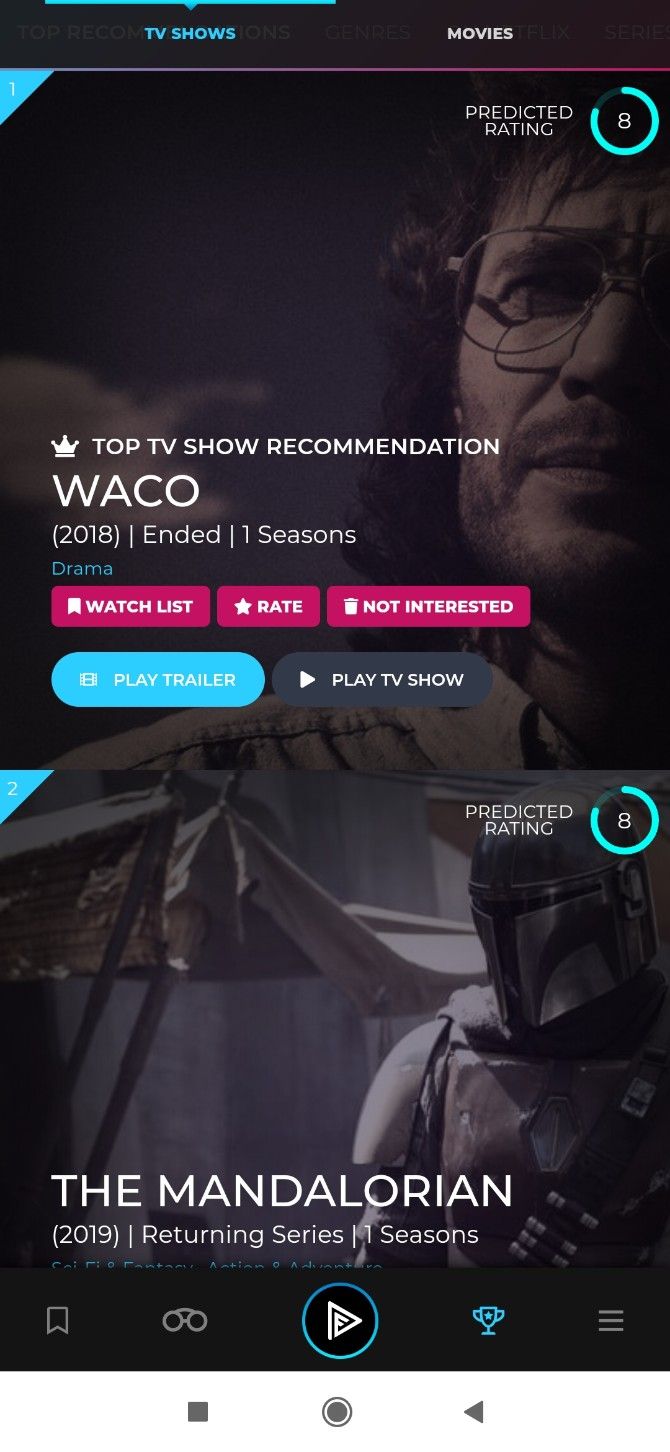
Flixi is a gorgeous movie and TV series recommendation app for mobiles. Like with many such apps, you need to first set up what you like and dislike. In a Tinder-like interface, add a rating for a TV show, swipe right to save or bookmark it for later, and swipe left to remove it for three weeks.

Once you’ve rated 25 different series on a scale of one to ten, Flixi’s AI kicks in. Instead of simple “recommendations”, it predicts what you would rate other shows. So when a friend tells you that you must watch something, you can search for it on Flixi and find out what you’re likely to rate it. Cool, eh?

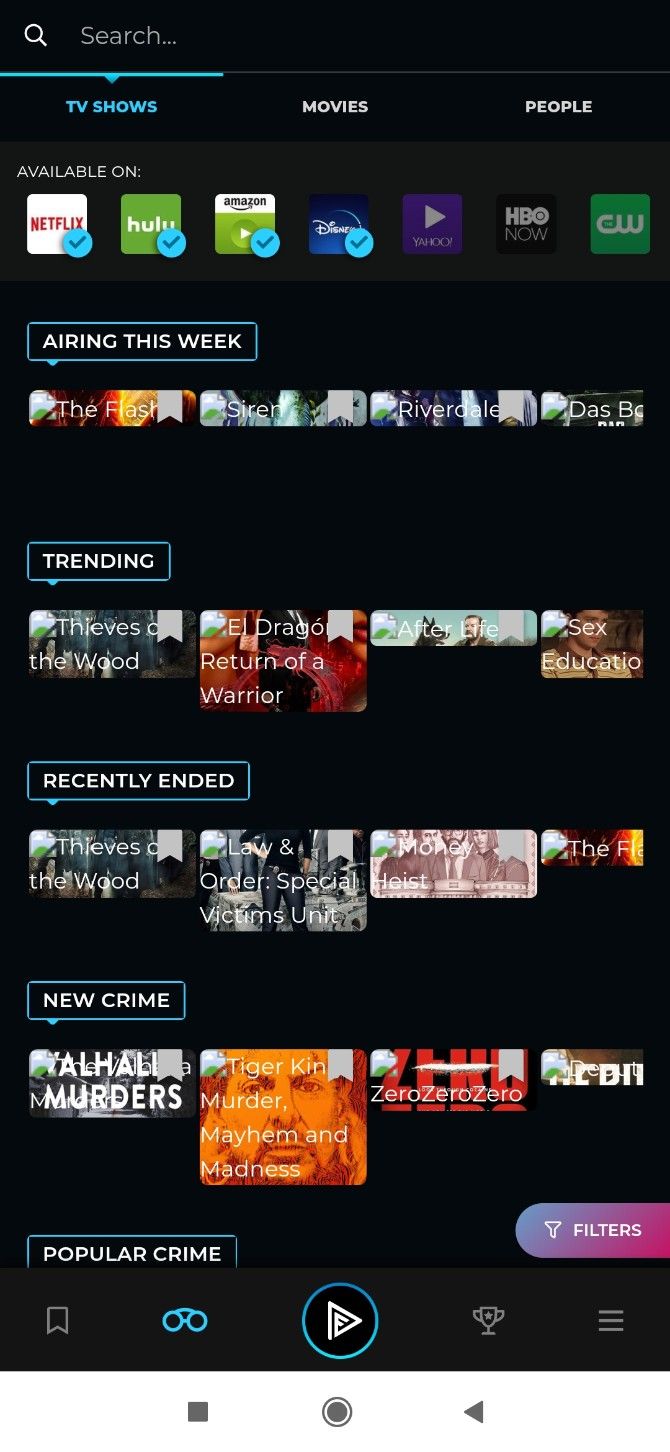
Jump to Flixi’s “discover” section to get a ton of random recommendations and lists. In one pane, you’ll see what’s airing this week, trending, shows that have recently ended, and new and popular series in your preferred genres. You can also track shows in Flixi and get reminders when new episodes are available.

Flixi also lets you choose which streaming services you subscribe to. It works with catalogs across the world, not just USA. The whole package is put together in a gorgeous interface that makes this a must-have app for those who love their TV shows.

Download: Flixi for Android | iOS (Free)

2. Episode Generator (Web) and TV Randshow (Android): Watch a Random Episode of Favorite Shows

Episode Generator picks a random episode of a TV show to watch, giving you a quick synopsis too

In these stressful times when you’re encountering something new every day, you want the comfort of familiarity. Rewatch an episode or two of your favorite TV series, it’s a great stressbuster. And these two apps will help you pick which episode to watch.

Episode Generator has a catalog of several popular sitcoms, procedural TV shows, and award-winning series. Check where you can stream a series and click it in the catalog. The website will instantly generate a random episode, with a short description.

TV Randshow asks you to add any series as your favorites. Tap a series to similarly get a random episode with a short synopsis. TV Randshow has a wider catalog as it lets you add any show from the massive TMDB database. In both tools, you can generate another random episode with a click or a tap.

It’s a bit like getting the old TV experience when you would switch to a channel to find that one of your favorite series is on air. And just for a while, you could sit back and forget about your worries while having a good time with a series you’re familiar with.

Download: TV Randshow for Android (Free)

3. Show Skimmer (Web): Find the Best Episodes of Any Show

Show Skimmer lists the top five or top ten episodes of any TV show

“Give it a few episodes, it gets better later.” How many times have you heard that? Not every show or series is good from the first episode. But it can be brilliant later. When a friend or an app recommends a series, do your research at Show Skimmer.

This website will give you a list of the top five or top ten episodes of any series (which had at least 35 episodes). The episodes are listed in chronological order since that’s the best way to view it. You can also sort the list by rating, of course. Show Skimmer doesn’t specify which sources it uses, but it’s probably some of the oft-used ones like TVDB, IMDb, Rotten Tomatoes, etc.

So you can use Show Skimmer on a show you already love to find its top-ranked episodes and rewatch them. Or you can skip ahead to the best episodes of a procedural TV series. Or you can figure out how many episodes you need to give a friend’s recommendation before you stay on it or quit.

4. No-Brainer Watchlist (Web): Trello-Like Board to Pick by Genre, Year, and Ratings

No Brainer Watchlist gives you a Trello-like kanban board to filter and sort TV shows to watch

No-Brainer Watchlist sports an interface that organized minds will love. The web app has three columns: Suggested, Picked, and Watched. Like Trello or any other Kanban board, move your selections between the three.

There’s a drop-down arrow next to Suggested, which you use to filter your choices. Choose TV Series (or movies, or both), when it was aired, if it’s available to stream, and whether you want to group the suggestions by year.

You also need to pick a minimum rating for IMDb or Rotten Tomatoes. But the biggest filter is by genre, where your multiple selections define what you want and what you don’t want.

The option to exclude certain genres is unique and amazing and will help you get recommendations you want.

Once No-Brainer Watchlist brings you the list, drag-and-drop any interesting choice into the other columns. If you hover over any title, you’ll get its synopsis and ratings. Each TV series also indicates how many seasons it has through a small number next to the title in the list itself.

5. Ranker Watchworthy (Web): What to Watch If You Love…

Ranker's Watchworthy has a series of "What to Watch If You Love" articles for a variety of TV shows

Ranker is famous for its collection of “best of” lists and challenges, which in itself will give you several recommendations. But its new Watchworthy section is particularly good if you’re looking for TV series recommendations based on a show you love.

Here’s how it works. Browse or search for a series in Watchworthy and you’ll likely find a “What to watch if you love” article. The article lays down a few rules about how to vote and a brief write-up. After that follows a list, which readers vote on. That’s where you’ll find some off-beat recommendations and suggestions.

You’ll get a big poster of the show, a brief synopsis, and how people voted for it. If the series is part of other lists on Ranker, you’ll see links to those too. The “Where to Watch” section gives you quick links if it is available to stream or rent.

Watchworthy is packed with such articles for new and old series, so you’re bound to find something that you’re in the mood for.

More Ways to Find TV Series to Binge Watch

Oh, you thought we were done? We’re not even close. The internet is packed to the brim with people, apps, and websites recommending TV series to watch. It’s all about finding one that works best for you.

For example, I like going back to Goodviews.TV, which offers charts and analytics for TV shows. You’ll find what’s trending on Twitter or Reddit, web searches, or even torrents. It’s like a Billboard chart for TV series. And it’s only one of the cool ways to find TV series to binge watch next.

Read the full article: 5 Offbeat Apps to Find the Best TV Series You’ll Like to Binge Watch


Read Full Article

Shopify launches Shop, a new mobile shopping app


While Shopify is best-known for powering the online stores of more than 1 million businesses, the company is launching a consumer shopping app of its own today, simply called Shop.

The app is actually an update and rebrand of Arrive, an app for tracking packages for Shopify merchants and other retailers, which the company says has been used by 16 million consumers already.

Shop includes those same package tracking capabilities, but it also allows consumers to browse a feed of recommended products, learn more about each brand and make purchases using the one-click Shop Pay checkout process.

Carl Rivera, the general manager of Shop, told me that the app is a response to a broader shift — not just from desktop to mobile commerce, but also from mobile web to native mobile apps. The challenge, he suggested, is that most of us only download and shop from a handful of native apps, so it can be hard for an independent brand to launch an app of their own.

“What we want to do with Shop is give them a place to call their own,” Rivera said.

Shopify Shop overview

Image Credits: Shop

Shop provides customized product recommendations to each shopper, but Rivera noted that these recommendations all come from brands that you’ve already shown an interested in, either by purchasing a product from their Shopify store or by following their profiles in the app.

He contrasted this with product recommendations on other online stores, which he said offer “a feed of products from brands you don’t know, brands you don’t care about — most these platforms are driven by advertising.” Shop, Rivera said, will not include any ads, and it will be available for free to both shoppers and brands.

He added that he’s been working on Shop “basically since I came on-board” in late 2018. However, the current COVID-19 pandemic and resulting economic crisis prompted his team (and Shopify at large) to ask “What are the things we can today to best support merchants?”

One of their answers: a feature that allows shoppers to browse local merchants, see which ones currently support delivery and in-store purchase, then make purchases to support them.


Read Full Article
Find the Exact Date When a Google Maps Image was Taken


Curious to know the exact date when Google cameras captured those aerial and street view photographs of your home (or any other address) on our beautiful planet? Well, you can find the dates easily both in Google Maps and Google Earth.

Find the capture date of Satellite Images

If you wish to know the date when satellites captured those aerial images that you see in Google Maps, you will have to use Google Earth for that. For some unknown reason, Google doesn’t display these dates on the Google Maps website or the Google Earth web app.

Google Maps Image Date

Launch the Google Earth app on your desktop, search for any location in the sidebar and, this is important, zoom in an area as much as possible. Now hover your mouse over the map and you should see the capture date of that satellite image in the status bar as seen in the above screenshot.

Finding the capture date of Street View Images

If you happen to live in a country where Google Street View is available, you can use the Google Maps website itself to determine the date when Google Street Views cars were in your area capturing pictures of the neighbourhood.

Go to maps.google.com and search for an address. Next, drag the yellow “Pegman” to any area on the Google Map to switch from aerial to street view. The image capture date will be instantly displayed in the status bar as shown in the screenshot below.

Dates in Street View Images

Unlike Google Earth, the capture dates available inside Street View images only reveal the month and year of the picture but not the exact date.

Also see: Find the Location where a photograph was taken

To summarize, you need to use Google Earth (desktop app) to determine the capture date of Aerial Images and Google Maps for finding the date of Street View images.


Former Tesla and Lyft exec Jon McNeill just launched a fund that plans to spin out its own companies


Lyft’s former COO Jon McNeill has had a fairly storied career as an operator.  A Northwestern University economics major who worked at Bain & Co. out of college, he went on to start and sell five companies before being introduced in 2015 to Elon Musk by Sheryl Sandberg and spending 2.5 years as Tesla’s president of global sales and service.

He was apparently so good at his job that Lyft’s investors asked him to join the car-share company to help it. There, he helped build up the company’s management team, got it through its public offering, then decamped last year roughly four months after its IPO and just a year after he’d joined.

At the time, the move left some shareholders scratching their heads. It also drove down the price of Lyft’s shares. Now, McNeill says he had too many ideas percolating to stay. He has so many, in fact, that he just cofounded a business that will launch other businesses.

It’s called Called DeltaV — an engineering term for a change in velocity — and the idea is to formulate startup ideas, get them up and running, then when when they’re at the Series B phase of life, seek outside funding while hanging on to roughly 80 percent of each company.

It’s a tall order, but McNeill thinks he has the team to do it.

Along with McNeill, DeltaV was founded by Karim Bousta, who spent eight years with GE before joining Symantec as a vice president, where McNeill lured him away to Tesla, then brought him to Lyft as its VP and head of operations. (Bousta more recently logged a quick five months as an operating partner with SoftBank Investment Advisors.)

DeltaV also counts as a cofounder Sami Shalabi, who spent nearly a dozen years as a top engineer at Google after it acquired a company he cofounded called Zingku; Michael Rossiter, a business operations exec who, like Bousta, worked with McNeill at both Tesla and Lyft; and Henry Vogel, who has cofounded a number of companies and was among the first partners at BCG Digital Ventures, the corporate investment firm. (Vogel was also McNeill’s roommate when the two were college freshmen.)

As important, McNeill also thinks DeltaV has the structure needed to pursue the founders’ collective vision of investing in fewer companies that they themselves start and grow. Specifically, the five have rounded up $40 million from a dozen investors — mostly family offices — for an evergreen fund. What that means: investors are committing to allow them to recycle capital, rather than aim to return it after a certain window of time. (Most traditional venture funds, for example, have a 10-year-long investment period.)

Evergreen funds have never gained much traction in the venture world, even while — or because —  they alleviate expensive management fees. Still, there are precedents for what DeltaV is trying to do and, in fact, McNeil volunteers that they largely inspired what the team has built. Indeed, after spending time with tens of accelerators, incubators, and startup studios, McNeil says he walked away the most impressed with what two firms have created:  Sutter Hill Ventures in the Bay Area and Flagship Pioneering in Cambridge, Mass.

Both operate evergreen funds, and both of which have enviable track records. Since its 2000 founding, Flagship Pioneering has formed and spun out 75 companies and 22 of them have gone public since 2013 alone, McNeill notes. Meanwhile, Sutter Hilll, a much older outfit that also sources ideas internally, then tests them against the marketplace with the help of roughly 40 in-house engineers, has founded 50 companies, at least 18 of which have gone public. (Another, the cloud-based data warehouse company Snowflake, may be Sutter Hill’s next big win. It was valued at $12.4 billion when it most recently raised a round in February, and its CEO, Frank Slootman, suggested then that the company’s next financing event would likely be an IPO.)

We don’t know the ins and outs of how Flagship or Sutter Hill are structured, and it wasn’t McNeill’s place to tell us.

But for its part, DeltaV doesn’t collect fees. Instead, its investors own a stake of the company, alongside the founders.

Further, while evergreen funds often provide limited partners with the ability to exit or change their investment in the fund every four years or so, DeltaV doesn’t restrict them at all. Investors instead have board representation and will have a say in how much is recycled versus distributed, and can distribute or shares driven by their needs, without any set windows.

Whether the arrangement proves lucrative for everyone will take take years to know, of course. Our sense of things is that DeltaV itself aims to become a public company at some point.

In the meantime, it already has four startups in the works, including one that should be out of stealth mode by early summer and another that the firm hopes to introduce to the world this fall.

The first is a pricing and profit optimization service that aims to help e-commerce players better compete with Amazon. The other is an automotive service business. McNeill wouldn’t share more than that right now, though he adds that a separate idea — one that  revolved around the gig economy and the “future of work” — has been shelved for now, given the impacts of the coronavirus

It begs the question of why McNeill thinks right now is a good time to start DeltaV. He laughed when we asked about this earlier today. He said it was certainly a surprise. In fact, he and his cofounders firmed up their plans just in January and hit the fundraising trail roughly five weeks ago, just as the United States began to come apart at the seams.

But while it forced the team to change some of their priorities in terms of the companies that Delta V eventually hopes to launch, McNeill believes in the old adage that there’s no time to start a company like during a major downturn. As he told us on a call, “We’re actually accelerating a bit in terms of making much more forward progress,” particularly where it concerns the firm’s profit-optimization startup.

As McNeill explained it, he and his cofounders “want to make this a very long-term, durable business. We want to create dozens of companies over time.” They’re all operators who know a thing or two about repeatable processes, he added. Now, he said, they’ve just codified what they’ve been doing all along.


Read Full Article
What Language Is This? 5 Tools to Identify Unknown Languages


Have you come across a language that you can’t identify? Even if you don’t speak multiple languages, it can be useful to know what a language is just by looking at it.

Let’s look at some language finder services to show you which language you’re looking at.

1. Google Translate

Google Translate Detect Language

You’ve probably used Google Translate before. But did you know that it has a “detect language” feature that lets you work with unknown languages?

To use it, copy some text in the unknown language and head to Google Translate. Paste your text in the box on the left. Above this, you should see a Detect Language option. If this doesn’t appear, click the dropdown arrow to show all supported languages and select Detect Language.

After a moment, the Detect Language text should change to [Language]—Detected. This lets you easily identify a language and see what the text says, to boot.

Google Translate offers a lot of cool features on its mobile apps, too. There you can translate handwriting or even use your camera to translate text in front of you.

2. What Language Is This?

What Language Is This

This aptly named tool identifies any language when you paste or type text into it. It doesn’t translate the text, but that’s not a big deal if you only want to know which language the text is in.

After entering your text, give it a second and you’ll see what language you have. In cases where several languages are similar, the tool will suggest possible other languages. When this happens, you should try pasting a different sample from the source so you can confirm which language it is.

3. Translated Labs Language Identifier

Translated Labs Identifier

Here’s another simple tool to help you find out about unknown languages. Simply enter some text and you’ll see its best guess instantly. The service supports 102 languages, so chances are that whatever you’re looking for is here.

There aren’t any frills, aside from the Pick a random language button if you want to challenge yourself to identify languages on your own.

4. Yandex Translate

Yandex Translate Images

Looking to detect a language from an image? Yandex Translate’s image translation tool makes this easy. Simply upload an image from your computer or drag it onto the page and the service will detect the language in the image.

Like Google Translate, auto-detect should be enabled by default. If it’s not, click the language name at the top-left and check Auto detect. The text will then change to show which language is in the image.

If you like, select the language you want to translate to on the right. Then you can click text in the image to display it in your language.

5. Language Identification Games

You’ll find many tools to help you tell what a language is that are almost identical to the above. For something a little different, why not try a website that challenges you to identify various languages? Not only is it enjoyable, but spending a bit of time with these languages will help you to identify them in the future.

LingYourLanguage is a great site for this. It allows you to play by yourself or in multiplayer mode in four difficulty levels: Easy, Regular, Hard, and Omniglot.

On each stage, you’ll hear a clip in a certain language and must pick the correct answer from a few choices. After you answer, click a language to learn a bit more about it if you like. You only have a limited number of lives, so see how high you can score!

The game contains over 2,000 samples in 80 languages, so there’s plenty to discover.

LingYourLanguage Game

Another fun game like this is Language Squad. It offers both Audio and Alphabet challenges. Audio is a lot like LingYourLanguage, and offers four difficulty levels that progressively include more languages to increase the challenge level.

Alphabet, as you’d expect, presents you with a text sample of a language and asks you to identify it from several choices. Pick from Easy or Hard mode depending on the number of languages you want in the pool.

Language Squad Language

If you’re interested in general language identification, these will help you spot certain characters and phrases more easily.

Learn Language Basics to Better Identify Them

We’ve looked at five ways to quickly identify what language you’re looking at. Whether you want to identify a picture or text on a website, it’s not hard with these resources.

If you want to take this a step further, consider learning the basics of several languages. This will increase your knowledge of the world’s tongues and help you identify the differences between languages more easily. Have a look at the best language learning apps to get started.

Image Credit: Kanko*/Flickr

Read the full article: What Language Is This? 5 Tools to Identify Unknown Languages


Read Full Article
Stay Positive With Spotify’s Daily Wellness Playlist


Spotify has launched a new playlist designed to help us all get through these troubling times. Called Daily Wellness, the playlist combines inspirational podcasts and uplifting music, providing you with a daily dose of positivity.

What to Expect From Spotify’s Daily Wellness Playlist

In a post on For the Record, Spotify announced Daily Wellness, describing it as “a personalized mix of grounding motivational podcasts and feel-good music that can help you find positivity, mindfulness, or peace throughout your day.”

The Daily Wellness playlist will be updated twice a day; in the morning and in the evening. And Spotify will be picking the content with the time of day in mind. The idea being to top and tail your day with music and playlists to either get you moving or chill you out.

In the morning, Daily Wellness will provide “positive, motivational content to kickstart your day.” This means inspirational podcasts like Daily Quote and Yoga Girl Daily, plus “personalized music to help you rise and shine.”

In the evening, Daily Wellness will provide “content that’s a bit more relaxing” to help you get a good night’s rest. The podcasts will include Daily Breath with Deepak Chopra, and poetry from The Slowdown. Alongside more personalized music picks.

How to Listen to Spotify’s Daily Wellness Playlist

Daily Wellness is now available in the US and the UK, for both free and premium users. You’ll find it on the Made for You hub in the Spotify app on mobile, web, and desktop. Spotify hasn’t yet said if and when Daily Wellness will be available in other countries.

While most of Spotify’s playlists focus on music, the streaming service is getting into podcasts in a big way. Which means you can now use Spotify’s podcast playlists to discover new podcasts. Just avoid listening to anything too heavy right now.

Read the full article: Stay Positive With Spotify’s Daily Wellness Playlist


Read Full Article

How to Use Your Android Phone as a Wireless Router


android-hotspot

The ability to use your Android phone as a Wi-Fi router can be an essential feature. Whether you’re sitting in a train station, want to avoid expensive Wi-Fi charges in a hotel, or if your internet connection goes down at home, it’s incredibly useful.

With just a few taps, you can share your phone’s data connection with a laptop or tablet. In this guide, we’ll show you how you can use your phone as a router, plus how virtual router apps for Android can help you bypass carrier restrictions.

How to Use Your Phone as a Router

First, let’s take a look at how to set up your phone as a Wi-Fi router. The feature should be available on all Android phones, unless the carrier has chosen to remove it.

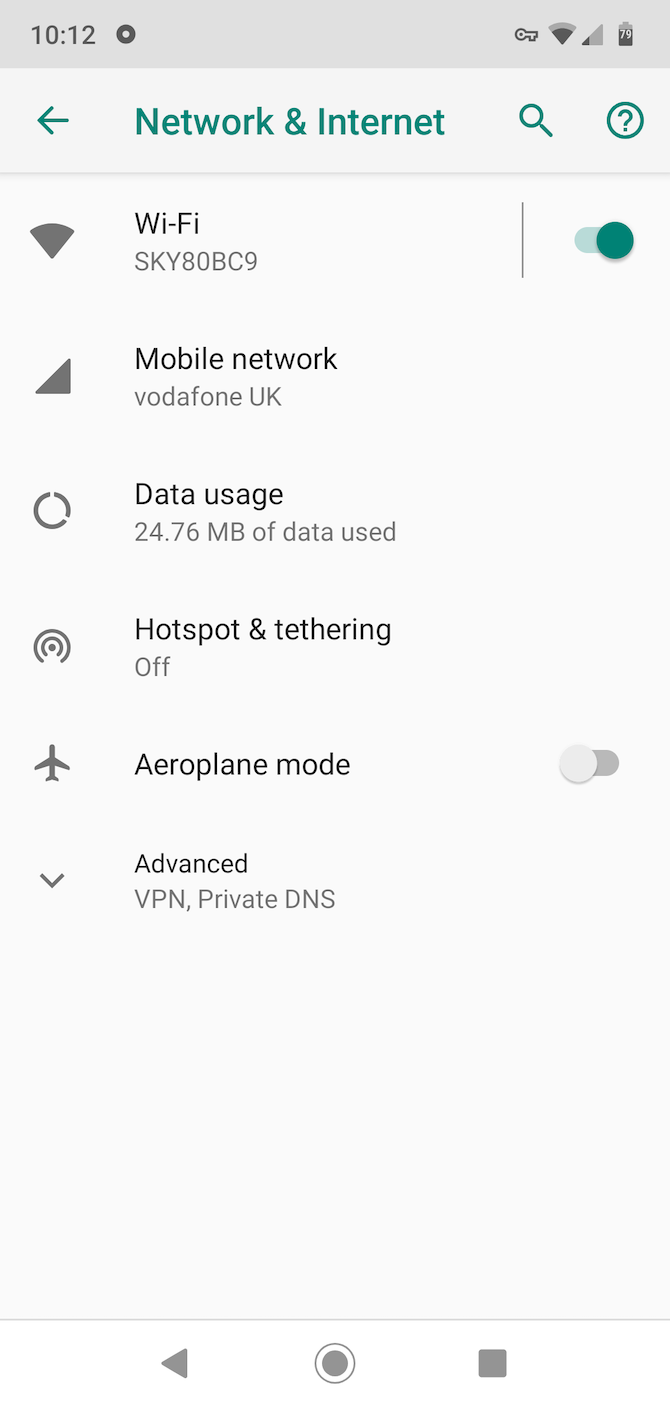
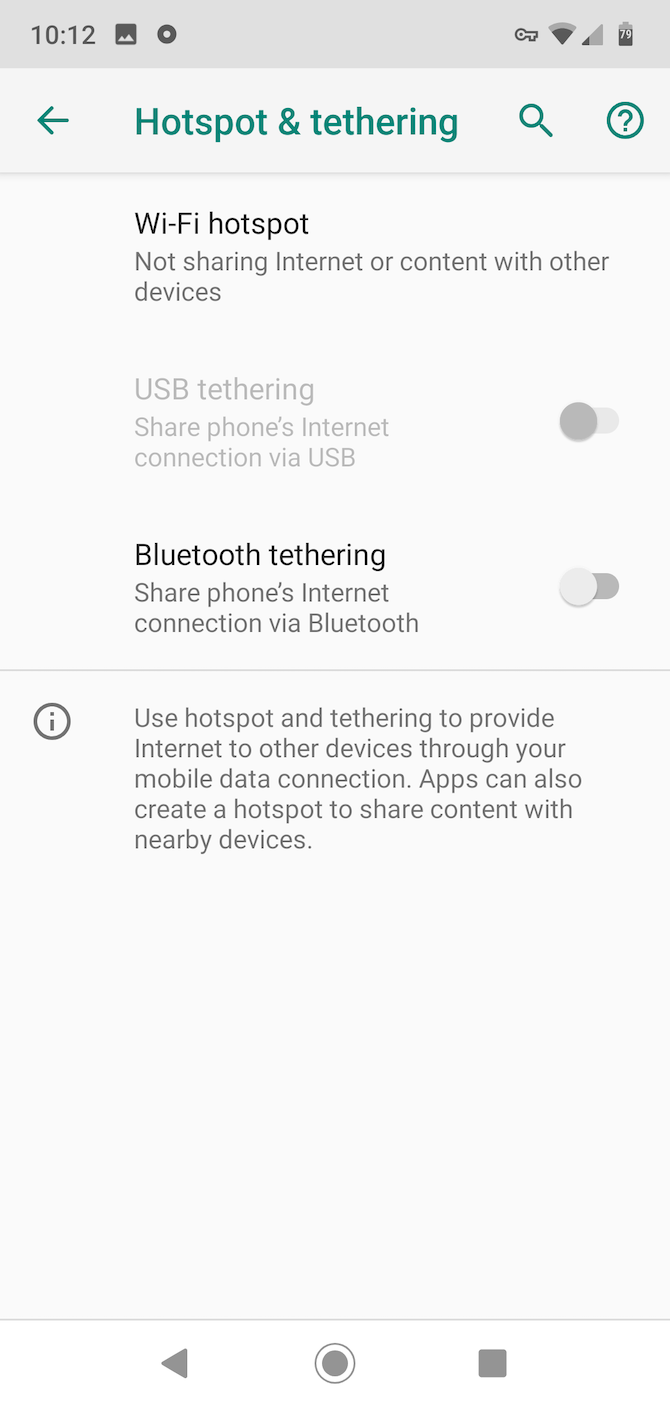
Go to Settings > Network & internet and select Hotspot & tethering. Remember that on some devices the names for these options might be different, but the core features are the same. You’ll now see all your options.

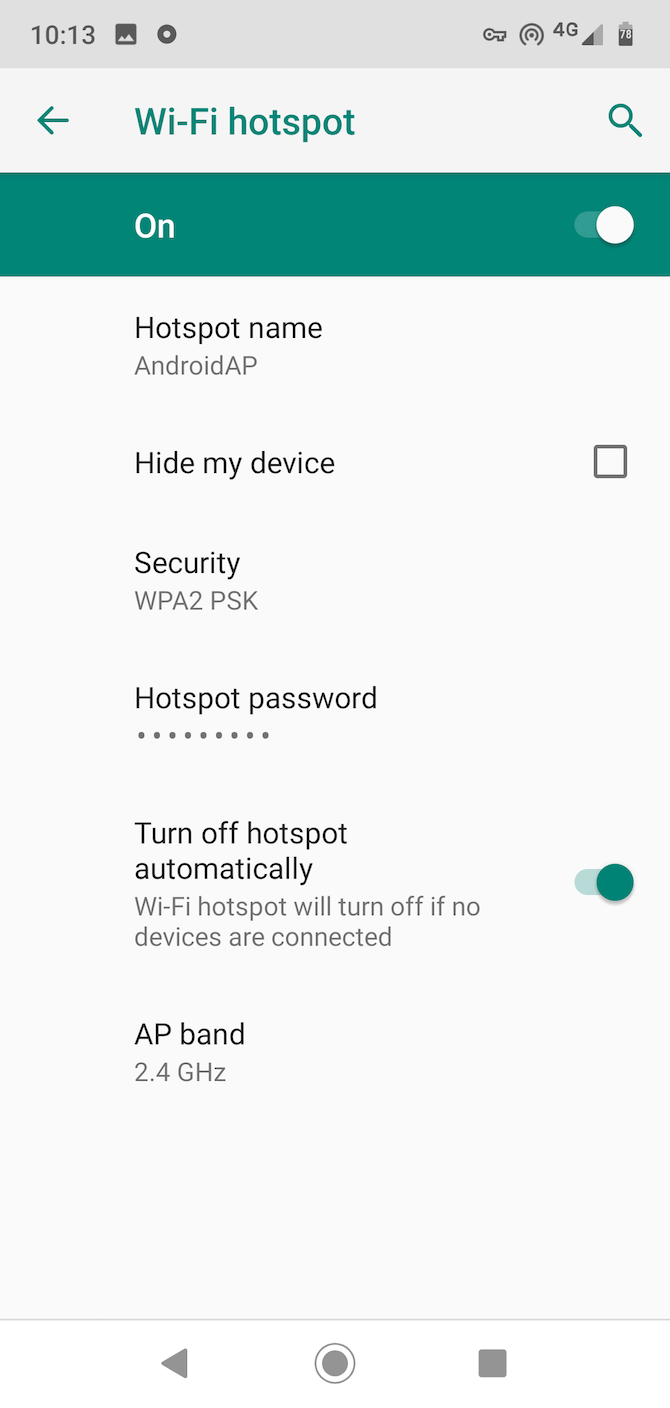
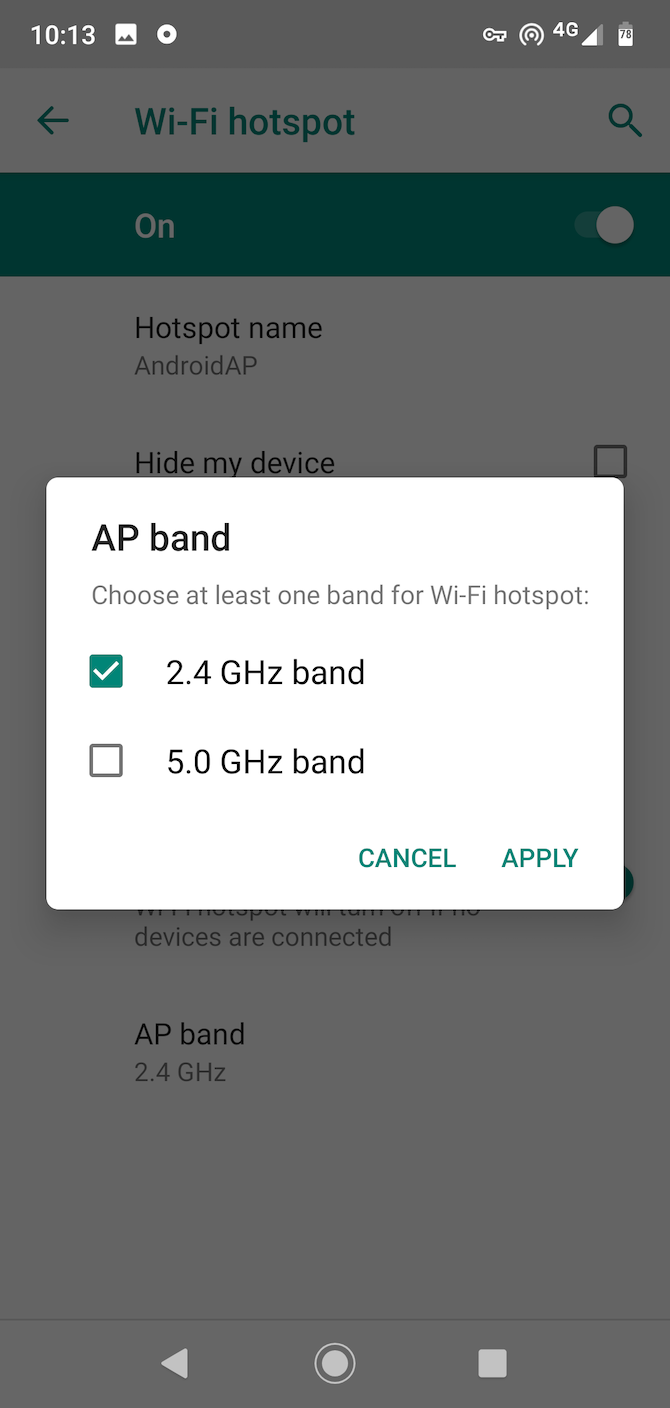
For wireless tethering, tap Wi-Fi hotspot. In the window that opens, you will see options for a network name, security, password, and network band. You can edit all of these, or you can keep them at their defaults if you prefer.

Wi-Fi Options

The Hotspot name is the SSID you’ll see when you connect to the network on your laptop or tablet. It’s a good idea to change this to something unique. That way there’s no chance of confusing your phone’s network with someone else’s nearby.

You can turn off security if you want, although this will enable anyone else within range to connect, so leave it on to keep your hotspot secure. Tap Advanced to see the rest of the settings.

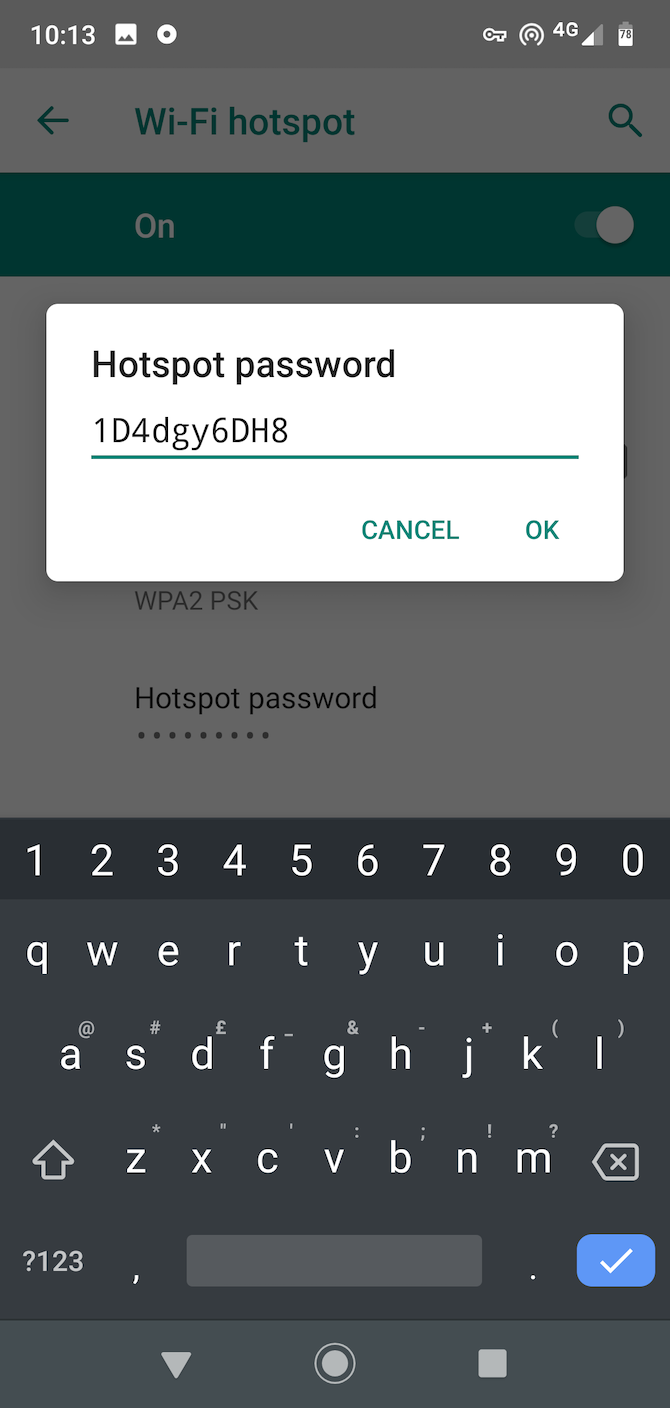
Use Hotspot password to see the password that your phone randomly created. This is the equivalent to the router label that’s normally found on the bottom of your router—only here it’s on your phone. Again, you can change the password, but there’s no real need.

The last option is the band. The 5GHz band is less prone to interference, so if you’re in a busy location with lots of other wireless networks nearby, choosing this might give you better performance. Your connecting laptop or tablet also needs to support it, though.

Finally, toggle the on/off switch to On, and you’re ready to go. You can now connect to the network on your laptop in exactly the same way as you would connect to any other Wi-Fi network.

When you’re finished, remember to turn off the Wi-Fi hotspot. This will prevent excess battery drain and data usage, and also allows your phone to connect to wireless networks again.

If Tethering Is Blocked on Android

Some carriers block the Wi-Fi hotspot feature on Android. They don’t want you using your phone’s data plan with your laptop; they’d rather sell you a separate tethering plan instead.

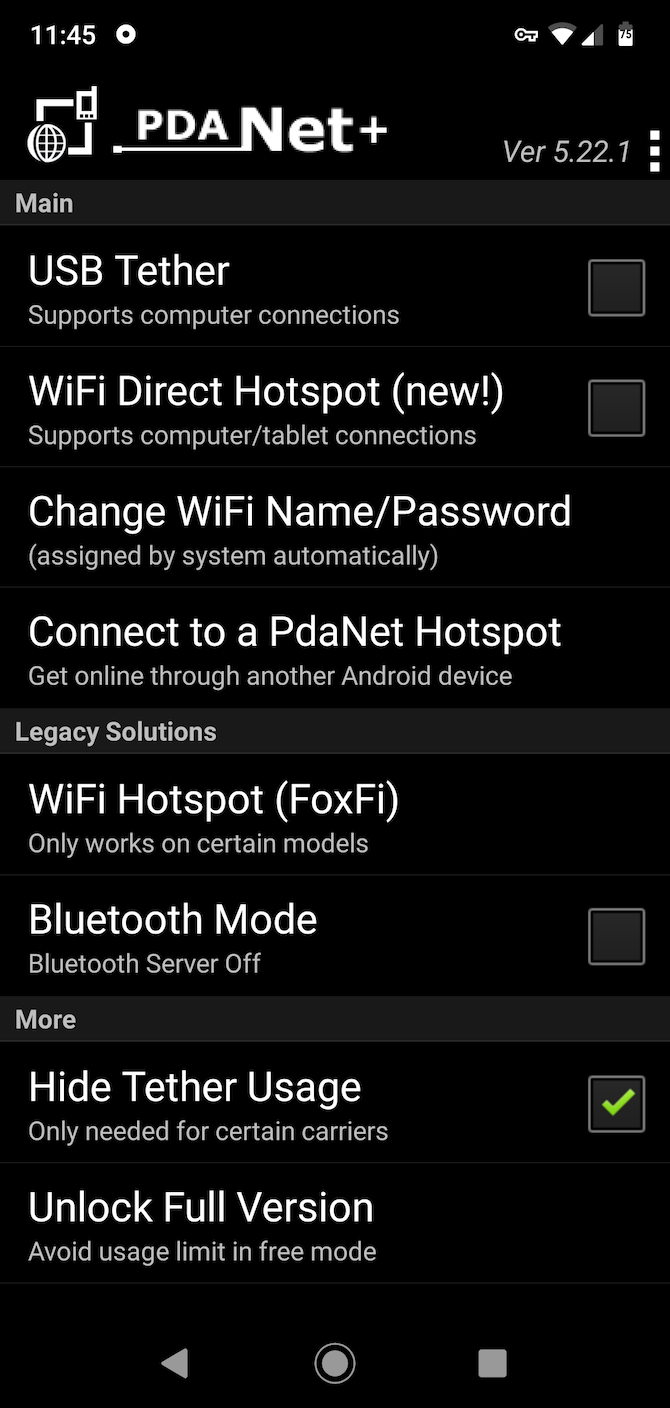
Changes made since Android 6 have made it harder for apps to bypass these restrictions. It is still possible, but you need to install a desktop companion app. The best option is PDANet+, which is free from the Play Store with usage limitations. You can fully unlock it with an in-app purchase priced at $7.99.

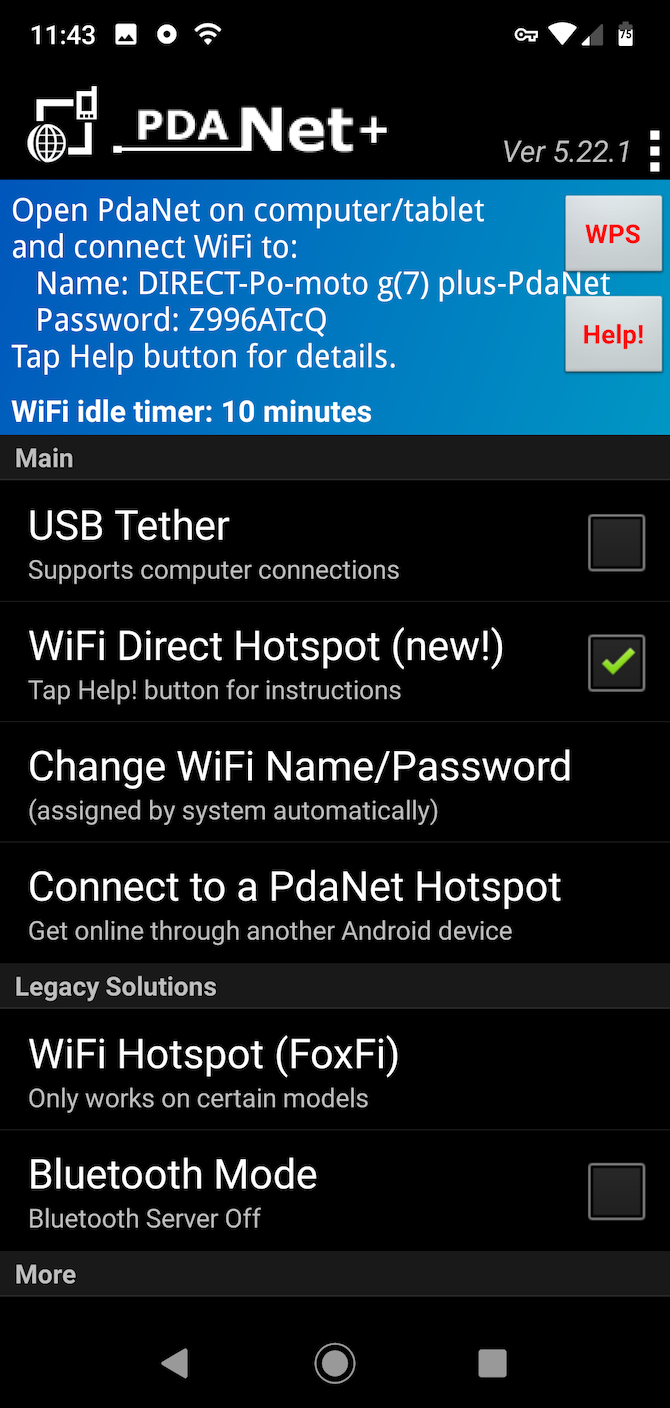
The app is easy to use. Just choose your connection mode, then fill in the username and password details in the desktop app. One other neat feature is that you can hide the fact that you’re tethering. This can be extremely useful for carriers that are strict about how you use your data plan.

This app lets you to connect to the desktop companion through Wi-Fi Direct on Windows, or with USB tethering on both Windows and macOS. It also supports a Wi-Fi Hotspot mode so you can connect any wireless device, but only on select older phones.

If PDANet+ doesn’t work for you, take a look at NetShare as an alternative, which works along similar lines. And if you’re still rocking an old phone, or want to use an old device specifically as a hotspot, take a look at Hotspot Control. It’s an old app that’s no longer in development, but it always worked well on Android 5 and earlier.

Other Ways to Tether

The Wi-Fi hotspot feature is the quickest and easiest way to turn your phone into a router. But Android comes with a couple of other tethering options as well.

Bluetooth Tethering

It’s simple to set up Bluetooth tethering. Just pair your phone with your laptop or tablet, then tap the Bluetooth tethering toggle in the Hotspot & tethering settings. When you’re done, remember to turn it off again.

Bluetooth uses less battery power than Wi-Fi, so it’s a good choice if you’re running low on power. However, it’s also likely to be somewhat slower, especially if you have an older device with an older version of Bluetooth. Another downside is that you can only tether one device at a time.

USB Tethering

Connect your phone to your PC via a USB cable and the USB tethering option becomes available. Turn it on and you can get internet access on your computer over a wired connection.

usb tethering

USB tethering is faster and more reliable than a wireless option. It also doesn’t drain your phone’s battery—in fact, your laptop will actually charge your phone. On the downside, it’s less convenient: you need to have a USB cable on hand, it only works with devices that have a USB port, and you can only use one device at a time.

Wi-Fi Access Everywhere

Now you know how to use your phone as a router with the tethering feature. As we’ve seen, some carriers hide (or even remove) the tethering options, though. Many others put restrictions on tethering. This may include blocking it outright, asking you to buy a specific plan that supports it, limiting you to a certain amount of data, or slowing down the possible speeds.

As such, using your phone as a wireless router is best seen as a last resort rather than a permanent solution. Our guide on how to find a nearby Wi-Fi hotspot to get online will show you how to find a better connection in the first place.

Read the full article: How to Use Your Android Phone as a Wireless Router


Read Full Article

The 12 Best Science TV Shows to Watch on Netflix


netflix-science-shows

Who says you can’t learn while being entertained? From chemistry and physics to the world of wildlife, here are the best science TV shows on Netflix. These educational shows for adults are perfect to watch when you’re stuck at home.

These science TV shows are all available in the US, or by using ones of the VPNs that still work with Netflix.

1. Pandemic: How to Prevent an Outbreak

It’s eerie. Netflix released Pandemic: How to Prevent an Outbreak at the end of January 2020. Days later, the coronavirus pandemic wreaked havoc across the world. This six-part series is a must-watch in today’s times.

Pandemic seems prescient as it follows scientists, doctors, and activists across the world who are all preparing for the next rapid contagion. They are convinced that a global virus could hit any day, and, in hindsight, we know they were right. As one of them says, “When we talk about another flu pandemic happening, it’s a matter of not if but when?”

The series starts off strong and the first two episodes are a compelling watch. It gets a bit broad and sometimes uninteresting, but then picks up again in time for the last episode.

2. Bill Nye Saves the World

Bill Nye “The Science Guy” is back to entertain and educate a new generation of kids (and adults). Nye’s Netflix show spans 25 episodes across three seasons. He explains topical scientific issues, debunks pseudoscience, and does a few experiments along the way. It’s one of the coolest TV series for lab experiments.

While it’s family-friendly viewing, Nye is more snarky and combative than his earlier show. Common Sense Media even advises parents that this series is better suited for teenagers than younger children, as the host pokes fun at people he disagrees with and also handles mature topics like sex.

For teens and adults alike though, it’s an entertaining balance of scientific views and public opinion.

3. Everyday Miracles

Have you noticed how much glass is around you? Every gadget with a screen, the windows, the kitchen; even entire office buildings. Spending more time at home is making us realize how many things we take for granted in daily life.

Everyday Miracles celebrates the wondrous inventions all around us by examining what life was like without them, and the stories of their invention. Materials scientist Mark Miodownik is a bundle of energy, and his enthusiasm about the world around us is infectious. Making this a great educational show for adults and kids both.

This child-friendly BBC show takes one theme for every episode, and explores it fully. For example, there is a wonderful episode on the humble razor blade, and how glass entirely changed how mankind builds everything.

4. Brain Games

The one reason to tune in to the National Geographic channel regularly is Brain Games.

Brain Games explores how the human mind is capable of tricking itself and others. The show’s greatest accomplishment is how it involves viewers and audiences. Often, you will be asked to participate in the ongoing illusion or mind trickery. It’s one of the best TV shows teaching science.

Part of the magic is Jason Silva, a fantastic host who plays both the dupe and the expert, as the situation demands. If you like math, a few of the episodes have fun with numbers. But Brain Games is not great for binge watching. Instead, we would recommend watching one or two episodes at a time.

5. White Rabbit Project

The ever-popular MythBusters is no longer available on Netflix. But the build team behind MythBusters got their own show. Hosts Kari Byron, Tory Belleci, and Grant Imahara (whom you may have seen before) conduct crazy experiments to test some wild claims.

But first, understand that this isn’t MythBusters. Think of it as an homage at best, and you’ll enjoy White Rabbit Project (WRP). If you’re expecting a spin-off, you’ll be disappointed. WRP has its own style and sensibilities, with each host bringing their own expertise to design grand experiments.

The single 10-episode season sees the team test everything from potential superpowers to intricate heists and thefts. And yes, fans of chemistry TV shows can look forward to cool and crazy lab experiments. It takes a few episodes to warm up to the hosts, but by the end of it, WRP makes you feel like you’re part of the gang.

6. 100 Humans

100 Humans is kind of a soft sciences TV show, a bit like a psychological version of Mythbusters. The fun and wacky series conducts experiments on a group of 100 anonymous people (only identifiable by their T-shirt numbers). The idea is to answer questions like what do humans find attractive, pain vs. pleasure, and so on.

Science correspondent Alie Ward and comedians Zainab Johnson and Sammy Obeid host each episode. They banter and joke around, interview the contestants and experts, and set up each experiment. To be fair, the experiments don’t always employ strict scientific conditions, so chalk this one up more as fun science than true science.

The first season has eight episodes, with about three to five experiments per episode. Start with episodes where you find the subject interesting. Once you get into the groove, you can enjoy the others too.

7. Explained

Vox Media’s short video explanations were going viral on YouTube. So Vox and Netflix teamed up to make a science TV show to simplify complex topics. Everything is based on hard facts, logic, and science. It’s like a mixture of things you need to know and things you were too afraid to ask about.

Explained focuses on a new topic in each of its 30 episodes, which last about 18 minutes. It imparts facts and data through a combination of animations and infographics that makes it easier to digest. Each episode has a new narrator and features interviews with experts on the topic.

This short science TV show has been such a success that Netflix ordered two spin-offs. The Mind, Explained is a 5-part mini series narrated by Oscar winner Emma Stone, delving into topics like memory and dreams. Sex, Explained is another 5-part mini-series narrated by singer-songwriter Janelle Monae talking about topics like attraction and birth.

8. Our Planet

Is there a better voice to describe the natural world than the dulcet tones of Sir David Attenborough? Our Planet combines the legendary British natural historian with the team behind some of his previous TV shows, including Planet Earth, The Blue Planet, and Frozen Planet. That alone is reason enough to watch this marvelous eight-part Netflix original series.

Importantly, Our Planet not only looks at wildlife but also how human beings are affecting it. It shines the harsh light on climate change and the human impact on the natural world and all living creatures. The documentary is almost a call-to-arms for us to protect important habitats and do our bit.

Each episode explores a new ecological system, and how it works in different parts of the world. It presents the marvel of life with breathtaking footage captured in a variety of ways.

9. Night on Earth

In the wild, a lot of action takes place after the sun sets. Nocturnal creatures have a much better ability to see and hear in the wild than humans. But modern technology is catching up to provide a never-before-seen look at life after dark.

In Night on Earth, low-light cameras, heat-tracking, and other technologies come together to show what happens in the moonlight. It feels strange but fascinating, and you’ll slowly get used to it. From predator attacks to mating rituals, Night On Earth has all the elements of a classic wildlife show, but with a fresh new palette.

Sometimes, the way the makers have enhanced images feels artificial, but it’s not a dealbreaker. Narrator Samira Wiley and the story-telling team do a good job of entertaining and educating. But the highlight here is not what you hear as much as what you see.

10. Edge of the Universe

Edge of the Universe on Netflix is one the best science TV shows to understand space and the universe

Bill Nye and others try to make science TV shows fun and educational. Edge of the Universe is for science nerds who know their basics, and want to know more.

This three-part series features scientists who explore one aspect of the cosmos in each episode. First, they tackle the question of alien life and habitable Earth-like planets. Next, they look at asteroids and comets, and how they formed the Earth. Finally, they look at the beginning of the universe, and how enormous it is today.

If you have ever wondered about all that lies beyond Earth, this is the TV show you need to watch. It’s a whole new way to see and explore the universe.

11. A Year in Space

Science fiction has often fed us the fantasy that one day, we’ll all be living on the moon or on Mars. But in all of those, our bodies function normally. No one has really thought about what happens to the human body without the Earth’s natural gravitational force. Watch A Year in Space to find out.

Astronaut Scott Kelly spent a year on the International Space Station conducting experiments, and as an experiment himself. His twin brother, astronaut Mike Kelly, was still back on Earth. NASA tested the brothers before, during, and after that year-long period to find out the effects of zero-gravity upon humans.

The 12-part mini-series tracks those 12 months of Kelly’s life aboard the ISS, the longest by any NASA astronaut. It also features interviews with family, friends, and NASA officials and experts, and slowly unravels what Kelly’s year could mean for the future of space exploration and living in the great beyond.

12. Conspiracy

Netflix show Conspiracy dives into the most popular conspiracy theories and challenges scientific thinking

Put on your tin foil hat and have a little fun with this one. The first conspiracy of Conspiracy is whether it’s called Conspiracy or Conspiracies. Because while the title says Conspiracy, the show’s featured image and Wikipedia page both say Conspiracies.

Now, we all know that the internet is full of websites exploring conspiracy theories. But if you value your sanity you don’t want to go trawling through those. Instead, let this 13-episode show tell you about some of the most popular conspiracy theories in different subjects.

Each episode tackles one subject. Like rock’n’roll, for example, which has several conspiracy theories attached to it, such as the rumor of Paul McCartney’s premature death. It’s not all about the theories themselves though. Science is at its best when it questions each aspect of a “fact,” and that’s what this show will make you do.

13. Behind the Curve

Behind the Curve is a must-watch documentary for anyone with a scientific bent. Over 95 minutes, director Daniel J. Clark introduces you to the world of flat-Earthers in the USA and explores the idea of whether it’s actually true.

Scientific temperament requires that you allow your deep-set notions to be challenged, and conduct experiments, observe, and draw conclusions. The documentary asks for an open mind, and talks to experts on both sides of the argument. While it’s no surprise that hard science wins out in the end, the journey is fascinating.

A fantastic scene captures the flat-Earthers conducting a common logic experiment to emphatically prove their point. And there’s an emotional story in the middle of it all, which only heightens the experience. Behind the Curve, more than anything else, teaches us how to think scientifically while maintaining empathy.

From Science TV Shows to Science Fiction Movies

If you haven’t seen any of these science TV shows yet, we would recommend starting with Our Planet. It’s one of the best cinematic experiences among those listed above. But given the current environment, Pandemic may just be the best educational show for adults available on Netflix.

It’s not all about education though, is it? You can love science and still want to be entertained. So we’ve also rounded up the best science fiction movies on Netflix.

Image Credit: Stuart Jenner/Shutterstock

Read the full article: The 12 Best Science TV Shows to Watch on Netflix


Read Full Article

Need a Pick-Me-Up? Here Are 13 of the Happiest Sites on the Web


happiest-sites

No matter the time of the year, life can sometimes be overwhelming. With the rhythm of work, exercise, appointments, family, friends, and personal obligations, it can almost feel like there’s no time or space for yourself.

Reading, painting, and playing games are all activities that will help ease your anxiety. Unfortunately, these activities also take up a lot of your time. Thankfully, there are other options.

Here are the happiest sites on the web that will instantly cheer you up.

1. 100,000 Stars

Happiest Website 100000 Stars

Sometimes—when everything else in life feels like it’s going wrong—you just need some perspective to understand that your bad day is not the end of the world. Fortunately, there’s no better way to find perspective than zooming across the galaxy to see how big it is.

100,000 Stars is a visual, interactive website that catalogs the known stars in our “stellar neighborhood.” Through this website, you can click on individual stars to see how they appear up close. Additionally, you can collect information on these stars, including their naming conventions, color, size, distance to Earth, age, and temperature.

2. Looking at Something

Happiest Website Looking at Something

Looking for happy places on the internet that can give you a soothing background screen? Try Looking at Something, a dead-simple webpage where you look at rain falling. By moving your cursor around the page, you can change the “time of day” for the rain, the direction, and the intensity.

Warning: This website has flashing graphics.

3. Recommend Me a Book

Recommend Me a Book

Recommend Me a Book is a perfect website for when you’re feeling antsy for something to read.

Choosing the right reading material is important, and Recommend Me a Book helps with this process by letting your browse through the first pages of published novels. The aim: to find a style of writing or genre that suits your mood.

There is no author listed at the bottom to influence your decision; no recommendations by other users, or GoodReads reviews. Just you and the first page.

If you like the book, you can click on the button at the bottom of the page to find out the title and author of the book, then buy it. You can also press the Next Book button at the top of the screen to select a new one.

If you’re looking for other ways to find something to read, here are some tips to help you find Kindle books for your vacation.

4. Rainy Mood

Relaxing Websites Rainy Mood App

Looking for an easy-to-use website that will immediately calm you down? Visit Rainy Mood.

To operate it, simply press the play button in the center. Instantly, you’ll be assuaged with soothing rain sounds and distant thunderstorms. It plays on a loop while you rest, relax, or focus on your current task. It’s also available as an app.

Download: Rainy Mood for Android | iOS ($2.99)

5. The Quiet Place

The Quiet Place Project

The Quiet Place website is perfect for meditation exercises. Indeed, like the intro says, “emails can wait.”

The Quiet Place was originally part of a larger platform with four different rooms, each of which was devoted to a specific function. It’s all-time favorites—The Thoughts Room and The Dawn Room—no longer seem to be functional. However, a version The Quiet Place Project is still in operation. It offers you 90 second meditation exercises.

For additional peace of mind, check out these mobile app meditation lessons.

6. A Soft Murmur

Happy Websites A Soft Murmur

Whether you’re a relaxation guru, or someone who finds it hard to stop and think, A Soft Murmur helps you strike meditation gold.

On the website, simply pick your noise effects and mix them. Choose the right volume, then press play.

Instantly, you’ll hear ambient sounds that will help you focus, calm you down, or let you feel peaceful. You can create different tracks for relaxation, sustained focus, or restful sleep.

Even better? A Soft Murmur is now available on Android and iOS.

Download: A Soft Murmur for Android | iOS (Free, in-app purchases available)

7. Do Nothing for 2 Minutes

Websites Like the Quiet Place Project Do Nothing for 2 Minutes

Looking for websites like The Quiet Place Project? Do Nothing for 2 Minutes is similar, as it’s designed for a short meditation break. The webpage consists of a counter in the center that rolls back the clock to zero, and not much else.

While that timer is counting down, the website encourages you to let your thoughts wander. There’s no browsing and no scrolling allowed; if you touch your mouse or keyboard before the timer is up, it automatically resets.

8. Flame

The Thoughts Room Alternative Flame Chrome Experiment

One of our favorite happy websites is called Flame, created by the new media artist Xiaohan Zhang. Through typing letters or words into the search bar, you can create beautiful patterns of light and sound that change positions when you move your cursor.

Each letter of the alphabet has a different shape and color associated with it. While this website is not exactly the same as the Thoughts Room, it can function as an alternative by typing into the void.

Overall, Flame is capable of some truly astonishing patterns.

9. Silk

Silk Drawing App

Silk is another universal website that will help you train your imagination, find inspiration, and do some art. It’s perfect for thoughtless, soothing drawing.

When you open the website, simply click and drag your cursor across the screen to create a pattern. Needless to say, this platform’s stylish interface combined with its interactive, neon lines is more than pleasing to the eye. Best of all, Silk is also available for iOS.

Download: Silk ($2.99)

10. Biomes

Happy Places on the internet Biomes

Want to try another website that will instantly fascinate you? Click on Biomes, an interface that will allow you to create 3D, alien-like landscapes by adjusting a set of values along an axis.

Through Biomes, you can change the colors on your grid, experiment with different wave combinations, and download your creation once you’re done with it. It’s simple, efficient, and beautiful.

11. Ribbons

Happiest Website Ribbons

What if you need an interactive wallpaper for your desktop, especially if you want to look at something soothing while cleaning the office?

Try Ribbons, an interactive experiment where “colors and geometry are procedurally generated.” Through it, the website creates beautiful, abstract art that floats across your screen. Once you open Ribbons, just click on the OK button to get things started.

12. BlahTherapy

Virtual Hug Website Blah Therapy

BlahTherapy is perfect for when you need to find someone to talk to, but you don’t know where to reach out.

If there’s something on your mind that you don’t feel like sharing with someone you know, this site will assign you to a random person. You can also choose to be a listener to help someone else out.

Best of all, chatting to strangers on the website is completely free. BlahTherapy also offers professional counseling services for a fee.

13. Pinterest

Happy Places on the internet Pinterest

Last on the list, we’re going to include a social media heavyweight that we’re pretty sure most of you have at least heard of. If you want to get lost in a world of beautiful pictures and amazing landscapes, try Pinterest.

By clicking on individual images through your home page, or by searching for specific subjects, you can continue down an endless rabbit hole of amazing imagery. It will make you long for cakes, comfortable reading spaces, virtual travel, and the great outdoors.

Visit These Happy Places on the Internet

Even when you’re feeling perfectly fine, it’s nice to know that there are tons of stress-free websites out there that you can turn to whenever you’re feeling sad or lonely. Hopefully, one of these places will become a refuge against the negative thoughts that can build up during a daily routine.

If you’re looking for other ways to relax, check out our list of the most relaxing movies on Netflix.

Image Credit: Stock-Asso/Shutterstock

Read the full article: Need a Pick-Me-Up? Here Are 13 of the Happiest Sites on the Web


Read Full Article

9 Reasons to Subscribe to Netflix This Year


subscribe-netflix-this-year

While there are legitimate reasons to avoid subscribing to Netflix, there are also plenty of reasons TO subscribe to Netflix.

The streaming service today isn’t the same Netflix of five years ago, which may be the last time you considered subscribing. So if you have previously cancelled your Netflix subscription, or have never had access to Netflix, it may be time to reconsider.

From its bevy of original content to its lack of advertising, here are our reasons why you should subscribe to Netflix this year…

1. Netflix Boasts Original Content

netflix originals content preview

Over the past few years, we’ve seen Netflix shift away from licensed content to producing its own content.

To be fair, the original TV series on Netflix are a little hit-and-miss at times. For every Narcos, Stranger Things, and Mindhunter, you get duds.

However, Netflix’s original content has improved significantly over the years, with stellar documentaries, binge-worthy original series, and even horror movies and sci-fi shows. And Netflix continues to invest heavily in original content, meaning that the variety and quality continue to grow.

Get a taste of what you can watch by checking out our roundup of the best original films on Netflix.

2. Netflix Offers More Than Movies and TV Series

netflix documentaries catalog

While feature films and TV series are what put Netflix in the headlines, Netflix actually offers a lot more than just that. You may be surprised to know how much niche content (or even fringe content) exists on the platform. It’s this content that will keep you hooked on the service.

Documentaries have become a Netflix staple, with the streaming service well known for its true crime documentaries. Comedy specials are also a regular addition to the Netflix catalog, while experimental reality shows tend to become viral hits.

Netflix has also experimented with interactive, choose-your-own-adventure content, such as You vs. Wild and Black Mirror: Bandersnatch.

3. You Won’t See Ads on Netflix

Netflix debuted in 1997, which means it has now been around for over two decades. By this point, most other companies would have injected advertising into every nook and cranny they could find. For example, Hulu and CBS All-Access are both subscription-based services with advertisements, forcing you to pay more to remove the ads.

But not Netflix. With Netflix, you don’t have to sit through 30 seconds of cringe-inducing marketing like on Hulu or YouTube. There are no mid-roll ad breaks ruining the immersion and suspense of a narrative. Just on-demand entertainment.

There is some product placement in Netflix series, something that became painfully noticeable in Stranger Things Season 3. However, product placement is just a reality of content nowadays and Netflix seems to have learned its lesson and refrained from such overt product placement in its newer content.

4. One Subscription: Multiple Viewers

netflix multiple devices

There’s a reason you hear about so many people sharing Netflix accounts. The service provides the ability to create up to five different profiles on one account.

Furthermore, Netflix doesn’t limit the number of devices on which you can install and use the Netflix app. Instead, the only limit is the number of screens you can watch Netflix on at the same time. The Basic Plan lets you only stream on one device at a time. However, with a Standard or Premium account, you can simultaneously watch on two or four separate devices, respectively.

Since Netflix analyzes your viewing habits to make recommendations, it’s nice to have one profile for yourself, another for your spouse or roommate, and more for anyone else sharing your account.

5. It’s Easy to Search Through the Netflix Library

netflix browse catalog

Netflix’s browsing features and algorithm for recommendations have never been stellar. However, the service has improved these features significantly. As of 2020, you can now see the top 10 streamed content in your country—a list that is regularly updated.

Browsing categories on the service is also easier, with the homepage split into a variety of popular categories that you can expand to explore more. On the Netflix website, you can hover over series to see their trailers and expand the preview to get more information without leaving the homepage.

Another useful feature is the ability to browse upcoming movies and series and add reminders for when they arrive on the service.

6. Netflix Is Still Relatively Affordable

netflix cost in usa

The Basic plan for Netflix only costs around $9/month. This, taking into consideration the amount of existing content and Netflix’s regular rollout of new originals, means you get access to a vast amount of content for an affordable price.

If you want to stream in HD and on two devices at once, then you’ll want the Standard plan. That’s around $14/month and costs less than some cinema tickets—unlocking an entire library of high-resolution feature films to enjoy whenever you want.

Even the highest Premium plan, available for around $16/month, is relatively affordable—especially considering it’s the starting price for some other streaming services. But most users probably don’t need it. The only extra benefits are the ability to watch certain titles in 4K Ultra HD and the ability to stream on up to four simultaneous devices.

Regardless of the plan you choose, the value-per-dollar for Netflix subscriptions is appealing.

7. You’ll Be Spending More Time at Home in 2020

2020 will be remembered as the year COVID-19 changed everything. Even when lockdowns are lifted, life won’t return to normal for months and social distancing will remain the norm for the foreseeable future.

This means that you’ll be spending a lot more time at home this year. An affordable streaming service that regularly rolls out new content alongside a vast catalog of older content provides a useful way to kill boredom while stuck at home.

8. Netflix Brings New Creators to the Global Stage

netflix independent movies

Netflix’s freedom from needing to worry about box office returns or prime-time ratings means that it has diverged from the typical Hollywood formula. This gives it the ability to fund and distribute independent content from creators outside of Hollywood and even the United States.

This has resulted in unique stories and voices entering the global stage. In 2019, Roma became the first Mexican film to win an Oscar for Best Foreign Language Film. Meanwhile the Netflix original series Orange Is the New Black has been nominated for and won multiple Emmy Awards while being celebrated for its diverse cast of women.

Netflix has also increasingly invested in International Netflix Originals, bringing global audiences critically acclaimed content such as Dark, 3%, and Kingdom. Meanwhile, discontinued foreign TV shows are often picked up and continued by the streaming service, such as the acclaimed Money Heist.

In many ways, Netflix provides access to the global stage for lesser-known creators and unique stories that may have never reached international audiences otherwise. And by subscribing to Netflix, you’re supporting this effort.

9. Netflix Allows Educational Screenings

When it comes to screenings of Netflix’s original documentaries, the streaming service grants permission to educators that want to show them to their students. This contrasts with some other studios and distributors, which require schools to buy licenses to show content to students.

While educators can’t stream family movies or series to students, the availability of documentaries provides useful educational content without requiring schools to pay for licenses.

Furthermore, when many students moved to learning from home in 2020, Netflix made some of its documentaries free to watch on YouTube. Subscribing to Netflix helps fund the continued creation of educational content like this.

So, Are You Going to Subscribe to Netflix?

So now you know the various reasons you should consider subscribing to Netflix this year. And you may even have the Netflix website open, ready and waiting.

If so, check out our ultimate guide to Netflix. And if not, check out our list of the best streaming TV services for alternatives.

Read the full article: 9 Reasons to Subscribe to Netflix This Year


Read Full Article