28 April 2020

9 Reasons to Subscribe to Netflix This Year


subscribe-netflix-this-year

While there are legitimate reasons to avoid subscribing to Netflix, there are also plenty of reasons TO subscribe to Netflix.

The streaming service today isn’t the same Netflix of five years ago, which may be the last time you considered subscribing. So if you have previously cancelled your Netflix subscription, or have never had access to Netflix, it may be time to reconsider.

From its bevy of original content to its lack of advertising, here are our reasons why you should subscribe to Netflix this year…

1. Netflix Boasts Original Content

netflix originals content preview

Over the past few years, we’ve seen Netflix shift away from licensed content to producing its own content.

To be fair, the original TV series on Netflix are a little hit-and-miss at times. For every Narcos, Stranger Things, and Mindhunter, you get duds.

However, Netflix’s original content has improved significantly over the years, with stellar documentaries, binge-worthy original series, and even horror movies and sci-fi shows. And Netflix continues to invest heavily in original content, meaning that the variety and quality continue to grow.

Get a taste of what you can watch by checking out our roundup of the best original films on Netflix.

2. Netflix Offers More Than Movies and TV Series

netflix documentaries catalog

While feature films and TV series are what put Netflix in the headlines, Netflix actually offers a lot more than just that. You may be surprised to know how much niche content (or even fringe content) exists on the platform. It’s this content that will keep you hooked on the service.

Documentaries have become a Netflix staple, with the streaming service well known for its true crime documentaries. Comedy specials are also a regular addition to the Netflix catalog, while experimental reality shows tend to become viral hits.

Netflix has also experimented with interactive, choose-your-own-adventure content, such as You vs. Wild and Black Mirror: Bandersnatch.

3. You Won’t See Ads on Netflix

Netflix debuted in 1997, which means it has now been around for over two decades. By this point, most other companies would have injected advertising into every nook and cranny they could find. For example, Hulu and CBS All-Access are both subscription-based services with advertisements, forcing you to pay more to remove the ads.

But not Netflix. With Netflix, you don’t have to sit through 30 seconds of cringe-inducing marketing like on Hulu or YouTube. There are no mid-roll ad breaks ruining the immersion and suspense of a narrative. Just on-demand entertainment.

There is some product placement in Netflix series, something that became painfully noticeable in Stranger Things Season 3. However, product placement is just a reality of content nowadays and Netflix seems to have learned its lesson and refrained from such overt product placement in its newer content.

4. One Subscription: Multiple Viewers

netflix multiple devices

There’s a reason you hear about so many people sharing Netflix accounts. The service provides the ability to create up to five different profiles on one account.

Furthermore, Netflix doesn’t limit the number of devices on which you can install and use the Netflix app. Instead, the only limit is the number of screens you can watch Netflix on at the same time. The Basic Plan lets you only stream on one device at a time. However, with a Standard or Premium account, you can simultaneously watch on two or four separate devices, respectively.

Since Netflix analyzes your viewing habits to make recommendations, it’s nice to have one profile for yourself, another for your spouse or roommate, and more for anyone else sharing your account.

5. It’s Easy to Search Through the Netflix Library

netflix browse catalog

Netflix’s browsing features and algorithm for recommendations have never been stellar. However, the service has improved these features significantly. As of 2020, you can now see the top 10 streamed content in your country—a list that is regularly updated.

Browsing categories on the service is also easier, with the homepage split into a variety of popular categories that you can expand to explore more. On the Netflix website, you can hover over series to see their trailers and expand the preview to get more information without leaving the homepage.

Another useful feature is the ability to browse upcoming movies and series and add reminders for when they arrive on the service.

6. Netflix Is Still Relatively Affordable

netflix cost in usa

The Basic plan for Netflix only costs around $9/month. This, taking into consideration the amount of existing content and Netflix’s regular rollout of new originals, means you get access to a vast amount of content for an affordable price.

If you want to stream in HD and on two devices at once, then you’ll want the Standard plan. That’s around $14/month and costs less than some cinema tickets—unlocking an entire library of high-resolution feature films to enjoy whenever you want.

Even the highest Premium plan, available for around $16/month, is relatively affordable—especially considering it’s the starting price for some other streaming services. But most users probably don’t need it. The only extra benefits are the ability to watch certain titles in 4K Ultra HD and the ability to stream on up to four simultaneous devices.

Regardless of the plan you choose, the value-per-dollar for Netflix subscriptions is appealing.

7. You’ll Be Spending More Time at Home in 2020

2020 will be remembered as the year COVID-19 changed everything. Even when lockdowns are lifted, life won’t return to normal for months and social distancing will remain the norm for the foreseeable future.

This means that you’ll be spending a lot more time at home this year. An affordable streaming service that regularly rolls out new content alongside a vast catalog of older content provides a useful way to kill boredom while stuck at home.

8. Netflix Brings New Creators to the Global Stage

netflix independent movies

Netflix’s freedom from needing to worry about box office returns or prime-time ratings means that it has diverged from the typical Hollywood formula. This gives it the ability to fund and distribute independent content from creators outside of Hollywood and even the United States.

This has resulted in unique stories and voices entering the global stage. In 2019, Roma became the first Mexican film to win an Oscar for Best Foreign Language Film. Meanwhile the Netflix original series Orange Is the New Black has been nominated for and won multiple Emmy Awards while being celebrated for its diverse cast of women.

Netflix has also increasingly invested in International Netflix Originals, bringing global audiences critically acclaimed content such as Dark, 3%, and Kingdom. Meanwhile, discontinued foreign TV shows are often picked up and continued by the streaming service, such as the acclaimed Money Heist.

In many ways, Netflix provides access to the global stage for lesser-known creators and unique stories that may have never reached international audiences otherwise. And by subscribing to Netflix, you’re supporting this effort.

9. Netflix Allows Educational Screenings

When it comes to screenings of Netflix’s original documentaries, the streaming service grants permission to educators that want to show them to their students. This contrasts with some other studios and distributors, which require schools to buy licenses to show content to students.

While educators can’t stream family movies or series to students, the availability of documentaries provides useful educational content without requiring schools to pay for licenses.

Furthermore, when many students moved to learning from home in 2020, Netflix made some of its documentaries free to watch on YouTube. Subscribing to Netflix helps fund the continued creation of educational content like this.

So, Are You Going to Subscribe to Netflix?

So now you know the various reasons you should consider subscribing to Netflix this year. And you may even have the Netflix website open, ready and waiting.

If so, check out our ultimate guide to Netflix. And if not, check out our list of the best streaming TV services for alternatives.

Read the full article: 9 Reasons to Subscribe to Netflix This Year


Read Full Article

How Much RAM Do You Really Need?


computer-memory

You probably know that RAM is an important component inside your computer, but do you know how much RAM you really need?

Let’s look at how to see your available amount of memory, how much RAM is appropriate for different types of users, and some advice if you need more RAM.

What Is RAM?

Before we look at how much RAM you need, let’s briefly review what RAM is in case you’re not familiar. Read our full overview of RAM for more background.

RAM, or random access memory, is a form of short-term storage in your computer. It’s where the operating system keeps processes for programs you currently have open. When you shut down your machine, the contents of memory clear out.

Because RAM allows for fast access, you can switch between open programs quickly. It’s much more efficient to swap between programs running in RAM than to pull them from your storage drive.

How Much RAM Do I Have?

Next we’ll see how much RAM is available in your system so you can compare it to some baselines.

On Windows 10, head to Settings > System > About. Under Device specifications, you’ll see an Installed RAM line. Note that if your System type is listed as 32-bit operating system, you can only use 4GB of RAM no matter how much you have inside. You’ll need a 64-bit copy of Windows to use more than that.

Windows Check Installed RAM

On macOS, open the Apple menu at the top-left of the screen and choose About this Mac. On the resulting Overview tab, you’ll see a line for Memory showing how much RAM you have installed.

Mac View Installed RAM

If you use Linux, you can enter the free command in a Terminal window to display RAM information. However, this displays the memory amount in kilobytes, which isn’t convenient. Use free -h instead to display the amount in gigabytes or megabytes, as appropriate.

How Much Computer Memory Do I Need?

Now that you know how much RAM your computer has, let’s look at some common amounts of memory to see how much is right for your needs.

2GB and Under: Deficient

You’re unlikely to find a modern computer that comes with just 2GB of RAM. While this amount will be able to handle working on one simple task at a time, such as basic web browsing, anything beyond barebones multitasking will cause major slowdowns on systems with 2GB of RAM.

Most cheap smartphones available today even come with more than this. You should avoid buying a computer with 2GB of RAM, and if your current machine has this little, consider upgrading when you can.

4GB of RAM: Sufficient for Basic Use

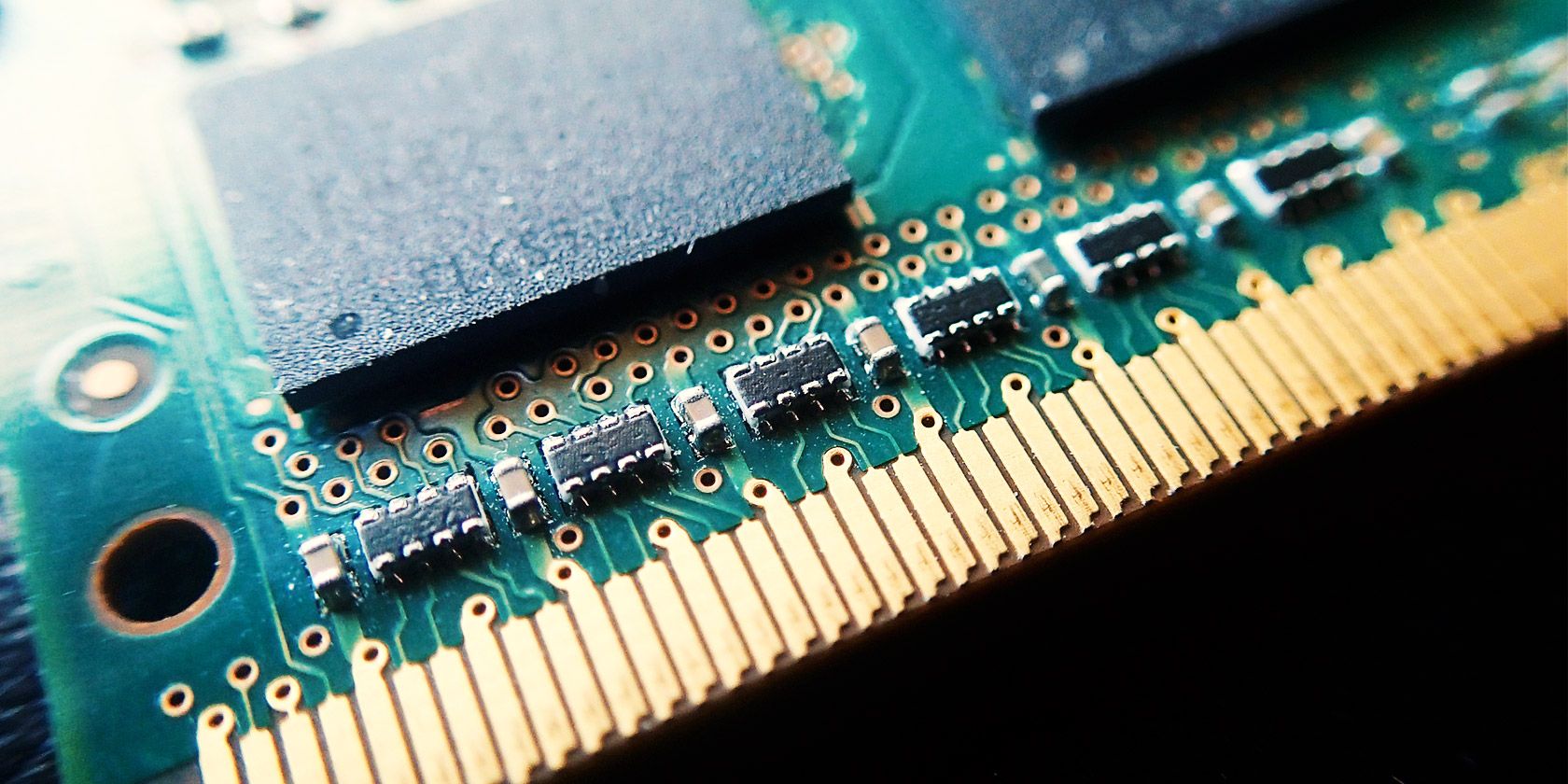
RAM installed on a PC motherboard

For a while, 4GB of RAM was considered the baseline for most computers. While the norm is moving towards 8GB now, you’ll still find some budget laptops that come with 4GB of memory. But is 4GB of RAM good?

4GB of RAM is sufficient if you only use your computer for basic tasks like web browsing, light word processing or spreadsheet work, and emailing. It’s not enough for a lot of modern video games, and will struggle if you open many Chrome tabs or run dozens of programs at once.

8GB of RAM: A Good Baseline

Most mid-range machines you’ll find today include 8GB of RAM. Notably, all of Apple’s MacBook models include at least this much.

8GB is a good modern standard for RAM. It’s enough to juggle several tasks at once without slowdown, and is sufficient for gaming too.

You’ll probably want more RAM if you often edit 4K video, stream high-end games to Twitch, or keep many resource-hungry programs open all the time. But if you’re not a heavy computer user, 8GB of RAM should work fine.

16GB of RAM: Great for Power Users

Free PC Games

16GB of RAM is a great amount if you use your computer for heavy tasks. Design software, video editing, and modern demanding games will all have more room to work with if you have 16GB of RAM.

However, it’s overkill if you don’t fit this description. Those who only open a few browser tabs and don’t play video games or work with large media files can go with less RAM.

32GB+ of Memory: Enthusiasts Only

32GB of memory or more is only necessary for extremists. If you regularly edit 4K (or higher) video and want to work on other tasks while your computer renders the files, you’ll need a huge amount of memory. For most others, it’s a waste and you could put that money towards more useful PC upgrades.

Most video games don’t need 32GB of RAM yet. Take a look at our overview of RAM for gaming if you need specific advice on building a new rig.

Video RAM Is Separate

We’ve considered general system RAM above. However, if you have a dedicated graphics card in your PC, you should know that this has its own memory. This is called video RAM, or VRAM.

VRAM holds visual information that games needs to display and efficiently passes it to your monitor. Even if you have a lot of regular RAM, game (or high-end design software) performance could suffer if you have insufficient video RAM.

Have a look at our full guide to VRAM to learn more.

How to Make Your RAM Go Further

Windows Task Manager Network Usage

The only way to make more RAM available for use is buying more for your computer. It’s relatively inexpensive and will make a big difference if you’ve been working with too little for your needs.

However, if you’re unable to upgrade your memory at the moment, you can free up available RAM on your Windows computer using a few tricks. Most important is closing programs if you’re not using them, so they don’t suck up your available RAM.

Don’t Forget About Other Computer Upgrades

If you’re looking to upgrade your current machine or build a new computer, keep in mind that RAM isn’t the only component worth shelling out for. Most of the time, unused RAM is wasted RAM. There’s no point in buying 32GB of memory when you only ever use 4GB, because the extra RAM is never active.

Before you buy, know which PC upgrades have the most impact on performance. You don’t want to load up on memory while still suffering from the bottleneck of a hard disk drive. A balanced build will serve you much better.

How Much Memory Do You Really Need?

We’ve looked at how to check the RAM in your computer, how much RAM you need for various tasks, and how to make the most of your current memory in the meantime. In summary, aim for 8GB as a baseline and 16GB of RAM if you’re a heavy user.

Thankfully, upgrading the RAM in your computer is usually straightforward. After making sure the RAM you buy is compatible, you only need to open your PC and snap it into place. Our guide to upgrading the RAM in your Mac will show you a lot more; the steps are relevant even if you have a different kind of computer.

Read the full article: How Much RAM Do You Really Need?


Read Full Article

Coronavirus Genome 2


Coronavirus Genome 2

Optimizing Multiple Loss Functions with Loss-Conditional Training


In many machine learning applications the performance of a model cannot be summarized by a single number, but instead relies on several qualities, some of which may even be mutually exclusive. For example, a learned image compression model should minimize the compressed image size while maximizing its quality. It is often not possible to simultaneously optimize all the values of interest, either because they are fundamentally in conflict, like the image quality and the compression ratio in the example above, or simply due to the limited model capacity. Hence, in practice one has to decide how to balance the values of interest.
The trade-off between the image quality and the file size in image compression. Ideally both the image distortion and the file size would be minimized, but these two objectives are fundamentally in conflict.
The standard approach to training a model that must balance different properties is to minimize a loss function that is the weighted sum of the terms measuring those properties. For instance, in the case of image compression, the loss function would include two terms, corresponding to the image reconstruction quality and the compression rate. Depending on the coefficients on these terms, training with this loss function results in a model producing image reconstructions that are either more compact or of higher quality.

If one needs to cover different trade-offs between model qualities (e.g. image quality vs compression rate), the standard practice is to train several separate models with different coefficients in the loss function of each. This requires keeping around multiple models both during training and inference, which is very inefficient. However, all of these separate models solve very related problems, suggesting that some information could be shared between them.

In two concurrent papers accepted at ICLR 2020, we propose a simple and broadly applicable approach that avoids the inefficiency of training multiple models for different loss trade-offs and instead uses a single model that covers all of them. In “You Only Train Once: Loss-Conditional Training of Deep Networks”, we give a general formulation of the method and apply it to several tasks, including variational autoencoders and image compression, while in “Adjustable Real-time Style Transfer”, we dive deeper into the application of the method to style transfer.

Loss-Conditional Training
The idea behind our approach is to train a single model that covers all choices of coefficients of the loss terms, instead of training a model for each set of coefficients. We achieve this by (i) training the model on a distribution of losses instead of a single loss function, and (ii) conditioning the model outputs on the vector of coefficients of the loss terms. This way, at inference time the conditioning vector can be varied, allowing us to traverse the space of models corresponding to loss functions with different coefficients.

This training procedure is illustrated in the diagram below for the style transfer task. For each training example, first the loss coefficients are randomly sampled. Then they are used both to condition the main network via the conditioning network and to compute the loss. The whole system is trained jointly end-to-end, i.e., the model parameters are trained concurrently with random sampling of loss functions.
Overview of the method, using stylization as an example. The main stylization network is conditioned on randomly sampled coefficients of the loss function and is trained on a distribution of loss functions, thus learning to model the entire family of loss functions.
The conceptual simplicity of this approach makes it applicable to many problem domains, with only minimal changes to existing code bases. Here we focus on two such applications, image compression and style transfer.

Application: Variable-Rate Image Compression
As a first example application of our approach, we show the results for learned image compression. When compressing an image, a user should be able to choose the desired trade-off between the image quality and the compression rate. Classic image compression algorithms are designed to allow for this choice. Yet, many leading learned compression methods require training a separate model for each such trade-off, which is computationally expensive both at training and at inference time. For problems such as this, where one needs a set of models optimized for different losses, our method offers a simple way to avoid inefficiency and cover all trade-offs with a single model.

We apply the loss-conditional training technique to the learned image compression model of Balle et al. The loss function here consists of two terms, a reconstruction term responsible for the image quality and a compactness term responsible for the compression rate. As illustrated below, our technique allows training a single model covering a wide range of quality-compression tradeoffs.
Compression at different quality levels with a single model. All animations are generated with a single model by varying the conditioning value.
Application: Adjustable Style Transfer
The second application we demonstrate is artistic style transfer, in which one synthesizes an image by merging the content from one image and the style from another. Recent methods allow training deep networks that stylize images in real time and in multiple styles. However, for each given style these methods do not allow the user to have control over the details of the synthesized output, for instance, how much to stylize the image and on which style features to place greater emphasis. If the stylized output is not appealing to the user, they have to train multiple models with different hyper-parameters until they get a favorite stylization.

Our proposed method instead allows training a single model covering a wide range of stylization variants. In this task, we condition the model on a loss function, which has coefficients corresponding to five loss terms, including the content loss and four terms for the stylization loss. Intuitively, the content loss regulates how much the stylized image should be similar to the original content, while the four stylization losses define which style features get carried over to the final stylized image. Below we show the outputs of our single model when varying all these coefficients:
Adjustable style transfer. All stylizations are generated with a single network by varying the conditioning values.
Clearly, the model captures a lot of variation within each style, such as the degree of stylization, the type of elements being added to the image, their exact configuration and locations, and more. More examples can be found on our webpage along with an interactive demo.

Conclusion
We have proposed loss-conditional training, a simple and general method that allows training a single deep network for tasks that would formerly require a large set of separately trained networks. While we have shown its application to image compression and style transfer, many more applications are possible — whenever the loss function has coefficients to be tuned, our method allows training a single model covering a wide range of these coefficients.

Acknowledgements
This blog post covers the work by multiple researchers in Google Brain: Mohammad Babaeizadeh, Johannes Balle, Josip Djolonga, Alexey Dosovitskiy, and Golnaz Ghiasi. This blog post would not be possible without crucial contributions from all of them. Images from the MS-COCO dataset and from unsplash.com are used for illustrations.

Google medical researchers humbled when AI screening tool falls short in real-life testing


AI is frequently cited as a miracle workers in medicine, especially in screening processes, where machine learning models boast expert-level skills in detecting problems. But like so many technologies, it’s one thing to succeed in the lab, quite another to do so in real life — as Google researchers learned in a humbling test at clinics in rural Thailand.

Google Health created a deep learning system that looks at images of the eye and looks for evidence of diabetic retinopathy, a leading cause of vision loss around the world. But despite high theoretical accuracy, the tool proved impractical in real-world testing, frustrating both patients and nurses with inconsistent results and a general lack of harmony with on-the-ground practices.

It must be said at the outset that although the lessons learned here were hard, it’s a necessary and responsible step to perform this kind of testing, and it’s commendable that Google published these less than flattering results publicly. And it’s clear from their documentation that the team has already taken the results to heart (although the blog post presents a rather sunny interpretation of events). But it’s equally clear that the attempt to swoop in with this technology was done with a lack of understanding that would be humorous if it didn’t take place in such a serious setting.

The research paper documents the deployment of a tool meant to augment the existing process by which patients at several clinics in Thailand are screened for diabetic retinopathy, or DR. Essentially nurses take diabetic patients one at a time, take images of their eyes (a “fundus photo”), and send them in batches to ophthalmologists, who evaluate them and return results…. usually at least 4-5 weeks later due to high demand.

The Google system was intended to provide ophthalmologist-like expertise in seconds. In internal tests it identified degrees of DR with 90 percent accuracy; The nurses could then make a preliminary recommendation for referral or further testing in a minute instead of a month (automatic decisions were ground truth checked by an ophthalmologist within a week). Sounds great — in theory.

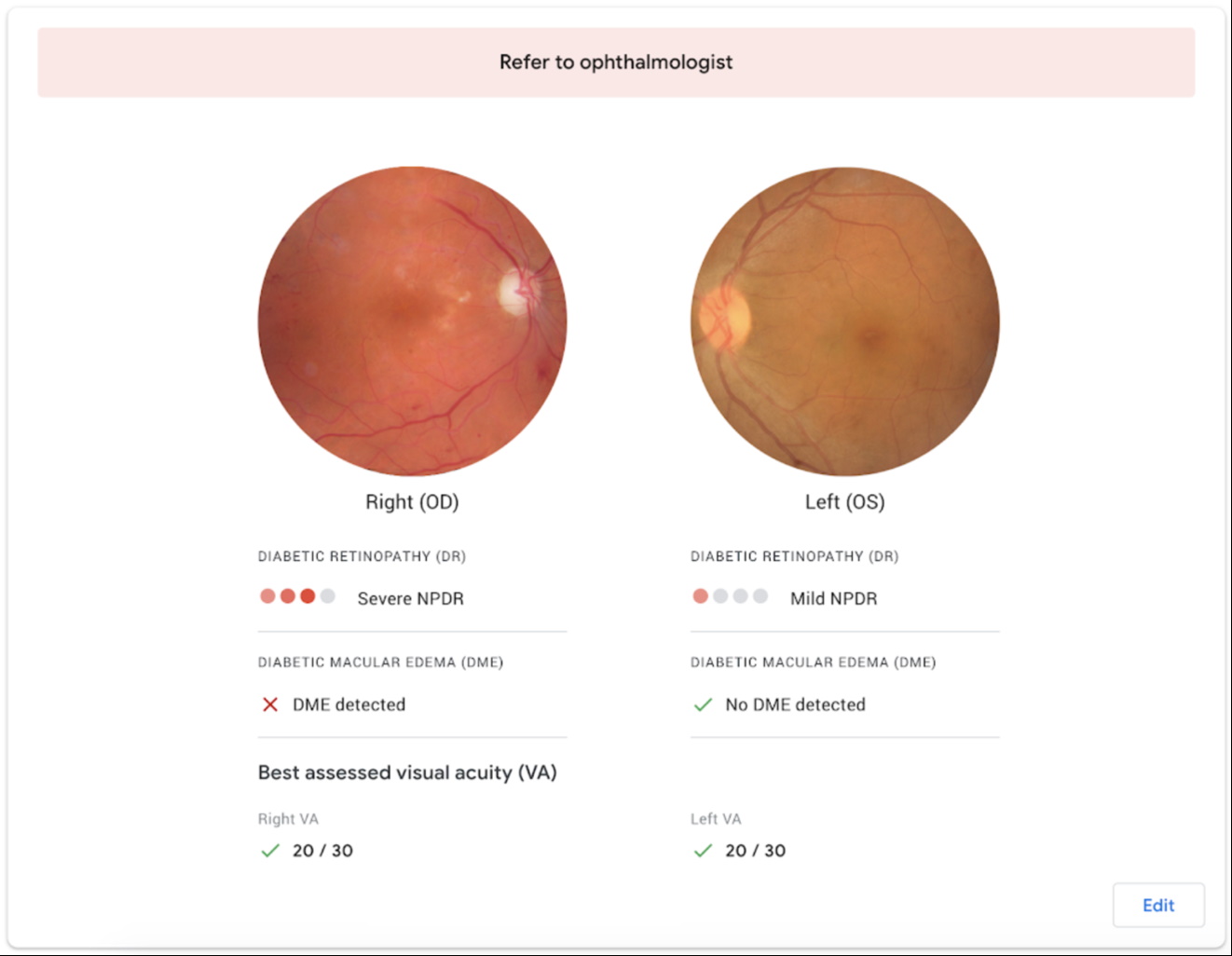
Ideally the system would quickly return a result like this, which could be shared with the patient.

But that theory fell apart as soon as the study authors hit the ground. As the study describes it:

We observed a high degree of variation in the eye-screening process across the 11 clinics in our study. The processes of capturing and grading images were consistent across clinics, but nurses had a large degree of autonomy on how they organized the screening workflow, and different resources were available at each clinic.

The setting and locations where eye screenings took place were also highly varied across clinics. Only two clinics had a dedicated screening room that could be darkened to ensure patients’ pupils were large enough to take a high-quality fundus photo.

The variety of conditions and processes resulted in images being sent to the server not being up to the algorithm’s high standards:

The deep learning system has stringent guidelines regarding the images it will assess…If an image has a bit of blur or a dark area, for instance, the system will reject it, even if it could make a strong prediction. The system’s high standards for image quality is at odds with the consistency and quality of images that the nurses were routinely capturing under the constraints of the clinic, and this mismatch caused frustration and added work.

Images with obvious DR but poor quality would be refused by the system, complicating and extending the process. And that’s when they could get them uploaded to the system in the first place:

On a strong internet connection, these results appear within a few seconds. However, the clinics in our study often experienced slower and less reliable connections. This causes some images to take 60-90 seconds to upload, slowing down the screening queue and limiting the number of patients that can be screened in a day. In one clinic, the internet went out for a period of two hours during eye screening, reducing the number of patients screened from 200 to only 100.

“First, do no harm” is arguably in play here: Fewer people in this case received treatment because of an attempt to leverage this technology. Nurses tried various workarounds but the inconsistency and other factors led some to advise patients against taking part in the study at all.

Even the best case scenario had unforeseen consequences. Patients were not prepared for an instant evaluation and setting up a follow-up appointment immediately after sending the image.

As a result of the prospective study protocol design, and potentially needing to make on-the-spot plans to visit the referral hospital, we observed nurses at clinics 4 and 5 dissuading patients from participating in the prospective study, for fear that it would cause unnecessary hardship.

As one of those nurses put it:

“[Patients] are not concerned with accuracy, but how the experience will be—will it waste my time if I have to go to the hospital? I assure them they don’t have to go to the hospital. They ask, ‘does it take more time?’, ‘Do I go somewhere else?’ Some people aren’t ready to go so won’t join the research. 40-50% don’t join because they think they have to go to the hospital.”

It’s not all bad news, of course. The problem is not that AI has nothing to offer a crowded Thai clinic, but that the solution needs to be tailored to the problem and the place. The instant, easily understood automatic evaluation was enjoyed by patients and nurses alike when it worked well, sometimes helping make the case that this was a serious problem that had to be addressed soon. And of course the primary benefit of reducing dependence on a severely limited resource (local ophthalmologists) is potentially transformative.

But the study authors seemed clear-eyed in their evaluation of this premature and partial application of their AI system. As they put it:

When introducing new technologies, planners, policy makers, and technology designers did not account for the dynamic and emergent nature of issues arising in complex healthcare programs. The authors argue that attending to people—their motivations, values, professional identities, and the current norms and routines that shape their work—is vital when planning deployments.

The paper is well worth reading both as a primer in how AI tools are meant to work in clinical environments and what obstacles are faced — both by the technology and those meant to adopt it.


Read Full Article

Hundreds of French academics sign letter asking for safeguards on contact tracing


A group of 471 French cryptography and security researchers has signed a letter to raise awareness about the potential risks of a contact-tracing app. A debate in the French parliament will take place tomorrow to talk about all things related to post-lockdown — including contact-tracing app StopCovid.

Among the group of researchers, 77 of them are affiliated with Inria, the French research institute that has been working on the contact-tracing protocol that will power the government-backed contact-tracing app, ROBERT. With this letter, it appears that Inria is conflicted about ROBERT.

“All those applications induce very important risks when it comes to protecting privacy and individual rights,” the letter says. “This mass surveillance could be done by collecting the interaction graph of individuals — the social graph. It could happen at the operating system level on the phones. Not only operating system makers could reconstruct the social graph, but the state could as well, more or less easily depending on the approaches.”

The letter also mentions a thorough analysis of centralized and decentralized implementations of contact-tracing protocols. It includes multiple attack scenarios and undermines both the DP-3T protocol as well as ROBERT.

Ahead of the debate in the French parliament tomorrow, researchers say that “it is essential to thoroughly analyze the health benefits of a digital solution with specialists — there should be important evidence in order to justify the risks incurred.”

Researchers also ask for more transparency at all levels — every technical choice should be documented and justified. Data collection should be minimized and people should understand the risks and remain free not to use the contact-tracing app.

Over the past few weeks, multiple groups of researchers in Europe have been working on different protocols. In particular, DP-3T has been working a decentralized protocol that leverages smartphones to compute social interactions. Ephemeral IDs are stored on your device and you can accept to share ephemeral IDs with a relay server to send them to the community of app users.

PEPP-PT has been backing a centralized protocol that uses pseudonymization to match contacts on a central server. A national authority manages the central server, which could lead to state surveillance if the protocol isn’t implemented properly. ROBERT is a variant of PEPP-PT designed by French and German researchers.

While the French government has always been cautious about the upsides of a contact-tracing app, there’s been little debate about the implementation. Inria, with official backing from the French government, and Fraunhofer released specifications for the ROBERT protocol last week.

Many (including me) have called out various design choices, as you have to trust your government that they’re not doing anything nefarious without telling you — a centralized approach requires a lot of faith from the end users as the government holds a lot of data about your social interactions and your health. Sure, it’s pseudonymized, but it’s not anonymized, despite what the ROBERT specification document says.

Moreover, ROBERT doesn’t leverage Apple and Google’s contact-tracing API that is in the works. France’s digital minister, Cédric O, has been trying to put some pressure on Apple over Bluetooth restrictions with a Bloomberg interview. Given that Apple and Google provide an API for decentralized implementations, they have little incentive to bow to French pressure.

On Sunday, Germany announced that it would abandon its original plans for a centralized architecture in favor of a decentralized approach, leaving France and the U.K. as the two remaining backers of a centralized approach.

France’s data protection watchdog CNIL released a cautious analysis of ROBERT, saying that the protocol could be compliant with GDPR. But it says it will need further details on the implementation of the protocol to give a definitive take on StopCovid.

The European Data Protection Supervisor (EDPS) also said on Twitter that the debate in front of the French parliament is particularly important. “Decisions will have an impact not only on the immediate future but as well on years to come,” they say.


Read Full Article

Stay-at-home order for 7 million Bay Area residents extended to end of May


A stay-at-home order for seven San Francisco Bay Area counties will be extended through the end of May due to the COVID-19 pandemic, a decision that affects 7 million residents and thousands of businesses.

The Public Health Officers of the Counties of Alameda, Contra Costa, Marin, San Francisco, San Mateo and Santa Clara as well as the City of Berkeley said in a joint statement issued Monday that it will issue revised shelter-in-place orders later this week. The new order will ease some specific restrictions for what the health officers from the seven counties described as a “small number of number of lower-risk activities.”

The stay-at-home orders were set to expire May 3. Details regarding this next phase will be shared later in the week, along with the updated order.

The seven counties are home to thousands of startups and technology companies that includes Apple, Facebook, Google, Salesforce, Twitter, Tesla and Uber.

“Thanks to the collective effort and sacrifice of the 7 million residents across our jurisdictions, we have made substantial progress in slowing the spread of the novel coronavirus, ensuring our local hospitals are not overwhelmed with COVID-19 cases, and saving lives,” the health officers said in a joint statement. “At this stage of the pandemic, however, it is critical that our collective efforts continue so that we do not lose the progress we have achieved together.”

The public health officials said Monday that hospitalizations have leveled, but more work is needed to safely re-open communities and warned that “prematurely lifting restrictions could lead to a large surge in cases.”

The health officers plan to also release a set of broad indicators used to track progress in preparedness and response to COVID-19, in alignment with the framework being used by the rest of the state.


Read Full Article

Josh Constine leaves TechCrunch for VC fund SignalFire


How do you leave the place that made you? You figure out what it made you for. TechCrunch made me a part of the startup ecosystem I love. Now it’s time to put that love into action to help a new generation of entrepreneurs build their dreams and tell their stories.

So it’s “TC to VC” for me. After 8.5 years at TechCrunch and 10 in tech journalism, I’m leaving today to join the venture team at VC fund SignalFire. I’m going to be a principal investor and their head of content.

I’ll be seeking out inspiring new companies, doing deals (when I’m eventually up to speed) and providing pitch workshops based on countless interviews for TechCrunch. Thankfully, I’ll also still get to write. We’re going to find out what founders really want to learn and produce that content to help them form, evolve and grow their companies. I’m doing my signature bounce & smile with excitement.

Where to follow my writing

You’ll still be able to follow my writing as well as my journey into VC on my newsletter Moving Product at constine.substack.com as well as on Twitter: @JoshConstine. No way I could just suddenly shut up about startups! If you’re building something, you can always reach me at joshsc [at] gmail.com

On the newsletter you can read a deeper explanation for why I picked SignalFire. I also just published the first real issue of Moving Product on how quarantine is “loaning” concurrent users to startups that will help the new wave of synchronous apps snowball to sustainability, plus commentary from top product thinkers on Facebook’s new Rooms.

Why I chose SignalFire?

I was drawn to SignalFire because it’s built like the startups I love writing about: to solve a need. Entrepreneurs need tactical advantages in areas like recruiting, where they spend most of their time, and expert advice on specific problems they’re facing.

SignalFire CEO and founder Chris Farmer

That’s why SignalFire spent six years in stealth building its recruitment prediction and market data analysis engine called Beacon. It can spot deal opportunities for SignalFire’s new $200 million seed and $300 million breakout funds while helping the portfolio hire smarter. Then SignalFire assembled more than 80 top experts, like Instagram’s founders, for its invested advisor network. Traditional funds need partners to exhaust their social capital asking for favors from friends to help their portfolio. SignalFire’s model sees its advisors share in the returns of the fund, so they’re sustainably motivated to assist.

SignalFire’s founder and CEO Chris Farmer was also willing to invest in me, figuratively. I’ve written about thousands of startups but I’ve never funded one. He and his team have offered to mentor me as I learn the art and science of investing. They also accept me for my opinionated, outspoken self. Instead of constricting my voice, the plan is to harness it to highlight new ideas and proven methods for building companies. I wrote this post on my newsletter with a deeper look at why I picked SignalFire and how its modernized approach to venture works.

What makes TechCrunch different

Of the 3,600 articles I’ve written for TechCrunch, this was the hardest.

TechCrunch gave me the platform to make an impact and the freedom to say what I believe. That’s a rare opportunity in journalism, but especially important for covering startups. TechCrunch writes about things that haven’t happened yet. There are often no objective facts by which to judge an early-stage company. Whether you decide to cover them or not, and the tone of your analysis, depends on having conviction about whether the world needs something or not, if the product is built right and if the team has what it takes.

If you rely on others’ signals about what matters, whether in the form of traction or investment, you’ll be late to the story. That means editors have to trust their writers’ intuition. At TechCrunch, that trust never wavered.

SAN FRANCISCO, CALIFORNIA – OCTOBER 04: (L-R) Snap Inc. Co-founder & CEO Evan Spiegel and TechCrunch editor-at-large Josh Constine speak onstage during TechCrunch Disrupt San Francisco 2019. (Photo by Steve Jennings/Getty Images for TechCrunch)

Eric Eldon, Alexia Tsotsis and Matthew Panzarino put their absolute faith in our team. That gave me a chance to write the first-ever coverage of startups like Robinhood before its seed round, and SnappyCam before it was acquired by Apple and turned into iPhone burst fire. My editors also never shied away from confrontations with the tech giants, like my investigation into Facebook paying teens for their data that caused it to shut down its Onavo tool, or my exposé on Bing suggesting child abuse imagery in search results that led it to overhaul its systems.

I met my wife Andee at a TechCrunch event. [Image Credit: Max Morse]

I’ll always be indebted to Eric Eldon, who gave a freshly graduated cybersociologist with no experience his first shot at blogging back at Inside Facebook. Editors like Alexia Tsotsis and Matthew Panzarino helped me develop a more critical voice without sterilizing my personality. And all my fellow writers over the years, including Zack Whittaker and Sarah Perez, pushed me to hustle, whether that meant pontificating on new product launches or exposing industry abuse. If my departure from journalism elicits a sigh of relief from the companies in my cross-hairs, I know I did my job. The TechCrunch business and events team have turned Disrupt into the tech industry’s reunion. I appreciate them giving me the chance to learn public speaking, from the most heartfelt moments to the cringiest. And really, I owe them the rest of my life, too, since I met my wife Andee at a Disrupt after-party.

Treating writing like a sport to be won kept me cranking all these years, and I’m grateful for Techmeme offering a scoreboard for extra motivation. I’ll unhumbly admit it’s nice to hang up my jersey while ranked No. 1. My gratitude to Jane Manchun Wong for furnishing so many scoops over the years, and to all my other sources. It’s been fun competing and collaborating with my favorite other reporters, and I know Taylor Lorenz, Casey Newton and Mike Isaac will keep a close eye on tech’s trends and travesties.

But most of all, I want to extend an enormous thank you to…you. To everyone who has read or shared my articles over the years. I woke up each day with a sense of duty to you, and felt proud to say “I fight for the user” like Tron. What makes this industry special is how the community refuses to treat it as zero-sum. We grow the pie together, and everyone knows their competitor today could be their future co-founder. That makes us willing to share and learn together. I believe no recession, correction or bubble-burst will change that. 

BERLIN, GERMANY – DECEMBER 12: Group Photo on stage at TechCrunch Disrupt Berlin 2019 at Arena Berlin on December 12, 2019 in Berlin, Germany. (Photo by Noam Galai/Getty Images for TechCrunch)

So I’ll leave you with a final thought that’s made my life so fulfilling: If you have the privilege or create the opportunity, turn your passion into your profession.

Specialize. Learn. Then make what you want. If you can find some niche you’re endlessly interested in, that’s growing in importance, and at least someone somewhere earns money from, you’ll become essential. Not necessarily today. But that’s the beauty of writing — it teaches you while proving to others what you’ve been taught. No matter what it is, blog about it once a week. In time you’ll become an expert, and be recognized as one. Then you’ll have the power to adapt to the future, however feels most graceful.

Keep up with my writing on my newsletter at constine.substack.com, stay in touch on Twitter, and reach out at joshsc [at] gmail.com


Read Full Article
27 April 2020

Google’s much improved Pixel Buds are finally here


The original Pixel Buds weren’t very good. No way around it. Here’s a thing I wrote about them in a review titled “A disappointing debut for Google’s Pixel Buds“: As recently as a couple of years ago, they would have been a contender for the most compelling Bluetooth headphones on the market. But given the strides much of the competition has made, they mostly land with a dull thud.”

And we weren’t alone. Google’s first attempt at wireless earbuds were met with a pretty resounding “meh,” when they arrived in 2017. It’s probably an understatement to suggest that the company went back to the drawing board on this one. The line required a rethink from the ground up.

It took another two and a half years to deliver their successor. And Google seemingly sought to wipe the slate clean entirely, even going so far as not listing a “2” in the name. The new Pixel Buds are simply Pixel Buds. Anything else you remember with that name was clearly a figment of your own imagination.

Those original Pixel Buds that definitely didn’t exist already felt outdated when they hit the market. And while a clean slate was certainly required, Google didn’t do itself any favors by waiting that long. The landscape for wireless earbuds has grown by leaps and bounds in that time. The market has been saturated and the products feel more of a necessity than a luxury.

Six months after their introduction at a Pixel event in New York, the Buds are finally available for purchase in the U.S. — in Clearly White, at least. The other, more fun colors — Oh So Orange, Almost Black and Quite Mint — are not yet on the market. A minor quibble for those who have waited this long for a decent pair of Google headphones.

Color issues aside, I’m pretty into the design language here. It feels fresh in a way most earbuds don’t — the case in particular. It would have been easy to knock-off Apple or Samsung or any number of competitors, but the new Pixel Buds manage to pull off a fresh aesthetic built on top of the same basic concept of charging case that’s essentially universal across the board, at this point.

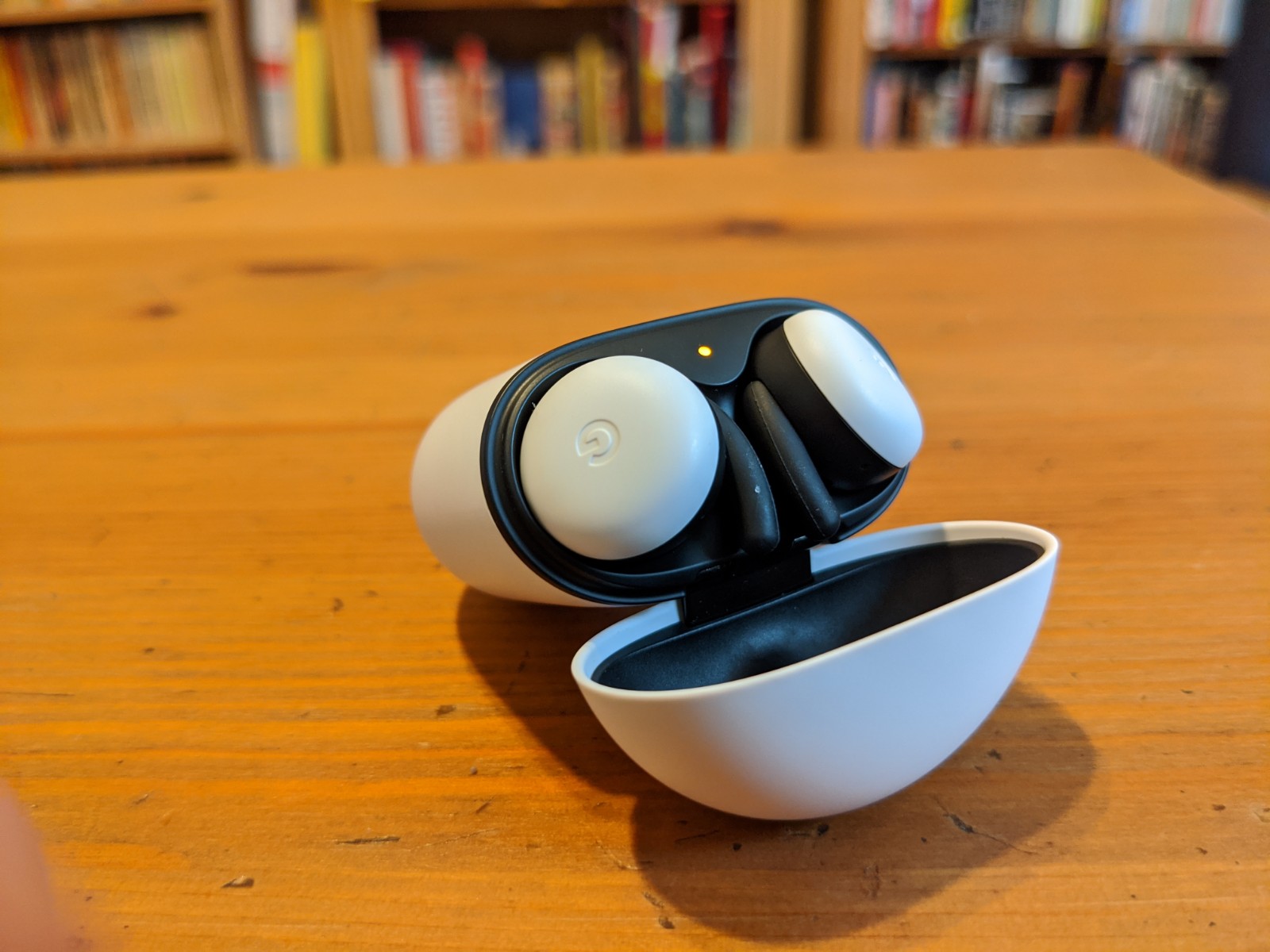
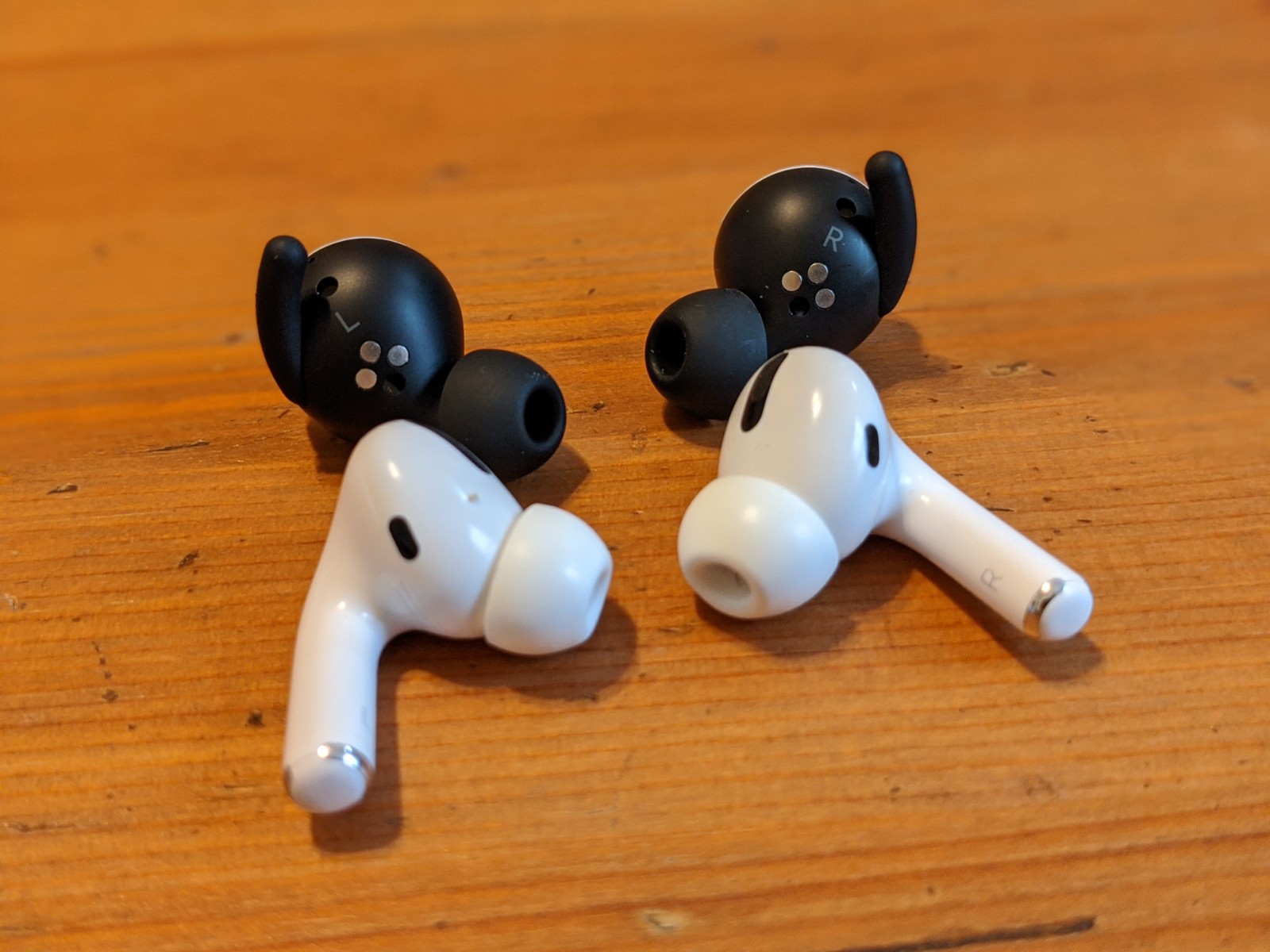
I actually prefer the matte black to the AirPod gloss. It’s better to look at and feels nice to the touch. Jury’s still out on how easily it will scratch. Full disclosure, I haven’t really left my apartment since the Buds arrived — because, well, life. The case is ovular — a flattened egg, if you will. The top of the case opens with an easy flip. There’s a black accent running around the lid, easily showing where to stick your thumb.

The case is fairly long in relation to the Buds themselves, owing, one imagines, to the size of the battery. All told, the Buds should get 24 hours with the case. There’s a USB-C port on the bottom (they’re wirelessly chargable, too) and a pairing button on the rear. The charging light flips on when open — white for full, orange for low battery.

Flipping the case open with the Buds in will also trigger a pairing dialog box on Pixel phones and other handsets running Android 6.0 and up. It’s a super simple pairing process — one akin to what you’ll get with AirPods on iOS. And once the headphones are registered to you, the box will pop up with the info on your other devices.

The Buds themselves are also aesthetically distinct from most of the competition. They feature a round button surface sporting a small, engraved Google “G.” The surface gives you space for the touch controls, which are as follows:

  • Tap to play/pause media, answer calls
  • Double tap to skip track, end/reject call, stop the Assistant
  • Triple tap to rewind/go to previous track
  • Swipe forward to increase volume
  • Swipe backward to decrease volume

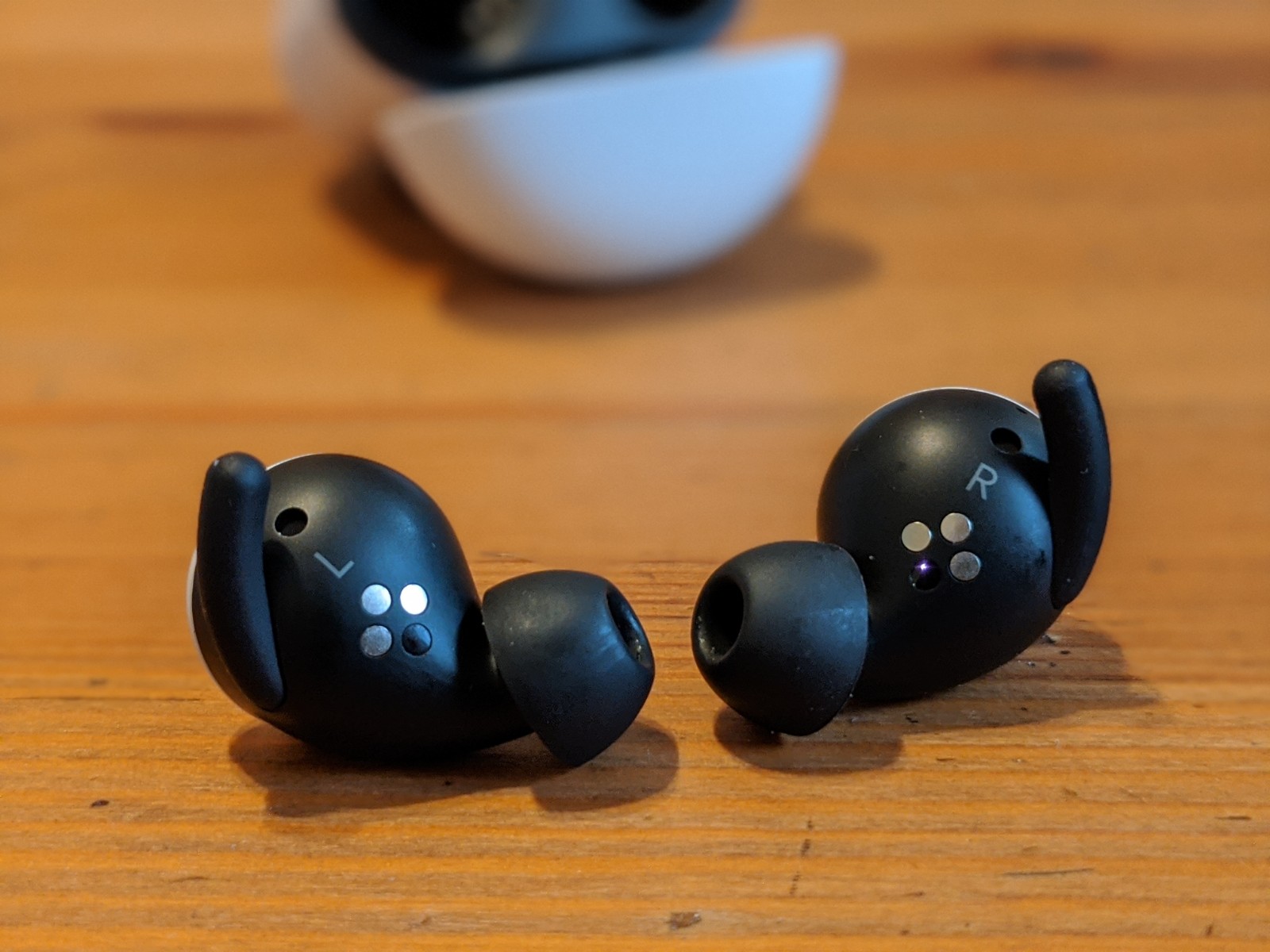
The Buds felt good in my ears with the default medium tips. There are a larger and smaller pair in the box, as well, so you can play around to get a better fit. They’ve been in for the better part of four hours and my ears feel fine — not something I can say with every pair of earbuds I’ve tested. They’re not too large or heavy, so they don’t pull on or press the ear. There’s also a small, removable silicone wing at the top to keep them in place.

The battery on the buds is a bit lacking. After the aforementioned amount of time, I just got a low battery notification on the right bud. Curiously, they’ve run down at different rates. The right is at 14%, the left at 34%. Time to stick them back in the case for a recharge.

The sound is decent. Not the best sounding pair I’ve tried and certainly not the worst. I’d say they’re pretty middle of the pack in terms of the price point. If audio is (understandably) you’re biggest concern, I’d recommend opting for a pricier model from Sony, Sennheiser or Apple’s AirPods Pro. There’s no active noise canceling here, either. The “Hey Google” microphone array works as advertised whether activated by voice or a long press with a finger. The connection was mostly solid. I was able to keep the music playing while walking into another room, though I did hit a few rough patches here and there.

At $179, the new Pixel Buds are priced close to the middle of the pack. That feels about right. The models are a big upgrade over their disappointing predecessors, but are still a pretty middle of the road choice for Android users.


Read Full Article
TikTok launches Donation Stickers, allowing creators to fundraise for coronavirus relief efforts


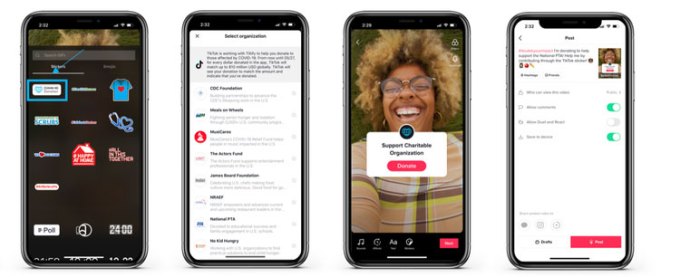
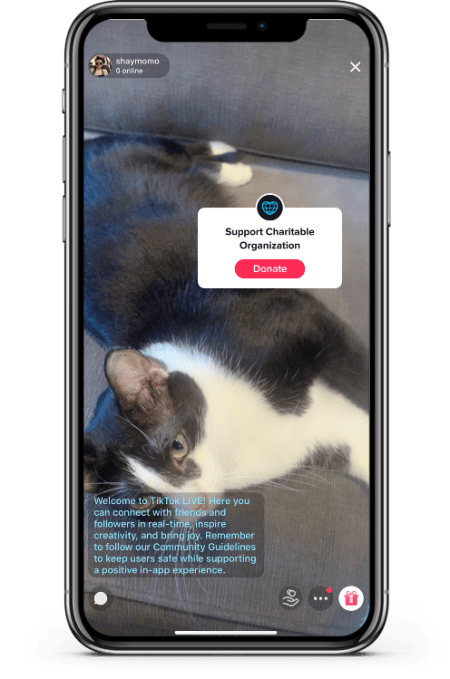
TikTok is making it easier for creators and their fans to donate to favorite charities amid the coronavirus pandemic. The company today announced the launch of a new, interactive feature, Donation Stickers, that creators can use on their videos and live streams in order to raise funds for favorite charities directly in the TikTok app. At launch, these stickers will work to support charitable partners including CDC Foundation, James Beard Foundation, Meals on Wheels, MusiCares, National PTA, National Restaurant Association Educational Foundation, No Kid Hungry, and The Actors Fund.

The stickers work like any other, in terms of being added to a video or a TikTok LIVE stream. However, when a user taps on the sticker, they’ll be guided to a pop-up window where they can make a donation to the charity the creator is fundraising for — without ever having to leave the TikTok app.

The donations themselves are being powered by charitable fundraising platform, Tiltify, which handles the payment processing for the donation transactions. Tiltify has experience with donation features embedded in live streams, having previously worked with the Twitch platform on various initiatives.

TikTok says the charitable organizations it partnered with for the launch of the feature includes those whose current missions to support vulnerable groups that are also reflective of TikTok communities.

The app today is among those being adopted by doctors, nurses and other health care workers. These medical professionals see TikTok a means of of connecting younger users with credible health information about the coronavirus outbreak and COVID-19 at a time when conspiracy theories and bogus “cures” are being marketed across social media, and even the president is making dangerous off-the-cuff remarks not backed by science.

In addition, many of the other causes supported by the Donation Stickers align with communities hit hard by coronavirus shutdowns — like actors, musicians, educators and restaurant workers, for example.

The company says it will also match donations raised through the Donation Stickers until May 27th. The hashtag #doubleyourimpact will be automatically added to videos and live streams that use the stickers, as a result.

“During this time of uncertainty, our community has come together and given back in countless ways, from applauding health care workers to sharing inspirational messages on how to stay safe and happy at home to making original coronavirus songs to spread positive messages,” wrote TikTok U.S. Head of Product, Sean Kim, in an announcement about the stickers’ launch. “We’ve been impressed and heartened by the selfless steps our community has taken to help each other, and now we’re excited to be able to give our users another way to make a positive impact.”

The addition of the stickers is one of several ways TikTok has been involved in coronavirus relief efforts. The company earlier this month pledged $250 million to support front-line workers, educators and local communities affected by the COVID-19 pandemic. It also provided an additional $125 million in advertising credits to public health organizations and businesses looking to rebuild.

The donation-matching through the new stickers will come from this $250 million fund. As part of the previously announced Community Relief Fund, TikTok is donating $4 million to No Kid Hungry and Meals on Wheels.

On May 5th through May 9th, TikTok is also hosting a week of TikTok LIVE streams focused on fundraising as a part of the “Happy At Home: #OneCommunity” nightly event.


Read Full Article
Crisis support for the world, one text away | Nancy Lublin

Crisis support for the world, one text away | Nancy Lublin

What if we could help people in crisis anytime, anywhere with a simple text message? That's the idea behind Crisis Text Line, a free 24-hour service that connects people in need with trained, volunteer crisis counselors -- "strangers helping strangers around the world, like a giant global love machine," as cofounder and CEO Nancy Lublin puts it. Learn more about their big plans to expand to four new languages, providing a third of the globe with crucial, life-saving support. (This ambitious plan is a part of the Audacious Project, TED's initiative to inspire and fund global change.)

Click the above link to download the TED talk.

YouTube and Tribeca announce We Are One, a 10-day online film festival


With COVID-19 making it unsafe to watch movies in crowded theaters, not to mention traveling for the red-carpet glamor of a film festival, many festival organizers have been looking at online alternatives.

So today, YouTube and Tribeca Enterprises (the organization behind New York City’s Tribeca Film Festival) are announcing a new event called We Are One: A Global Film Festival.

It’s not simply an online replacement for Tribeca, but aims to be a truly global event. The 10-day digital film festival will include programing curated by representatives from most of the major film festivals around the world.

We Are One kicks off on May 29 and is supposed to benefit the World Health Organization’s COVID-19 Solidarity Response Fund, as well as local relief providers.

“We are proud to join with our partner festivals to spotlight truly extraordinary films and talent, allowing audiences to experience both the nuances of storytelling from around the world and the artistic personalities of each festival,” said Pierre Lescure and Thierry Frémaux of the Cannes Film Festival (which will not be taking place this year in its “original form”) in a statement.

While the programming featured during the 10-day event hasn’t been announced yet, participating festivals include:

  • the Annecy International Animation Film Festival
  • Berlin International Film Festival
  • BFI London Film Festival
  • Cannes Film Festival
  • Guadalajara International Film Festival
  • International Film Festival & Awards Macao
  • Jerusalem Film Festival
  • Mumbai Film Festival
  • Karlovy Vary International Film Festival
  • Locarno Film Festival
  • Marrakech International Film Festival
  • New York Film Festival
  • San Sebastian International Film Festival
  • Sarajevo Film Festival
  • Sundance Film Festival
  • Sydney Film Festival
  • Tokyo International Film Festival
  • Toronto International Film Festival
  • Tribeca Film Festival
  • Venice Film Festival


Read Full Article

The 5 Best Laptop Cooling Mats


If you are using your personal laptop in your home office, you may be concerned about keeping it in top condition. When it overheats, this spells disaster for your motherboard or even your hard drive.

Nobody wants to deal with a computer in meltdown, so keeping your laptop cool is essential. Here are some of the best laptop cooling mats to keep your computer frosty.

1. Targus Portable Lightweight Chill Mat

Targus Portable Lightweight Chill Mat Targus Portable Lightweight Chill Mat Buy Now On Amazon $39.99

Targus has long been manufacturing tech peripherals that won’t tear a hole in your wallet. Their Portable Lightweight Chill Mat is one such device. The comapny’s design means it is ideal for placing on your lap. Pretty much where you’d expect your laptop to sit. You can still use it on your desk, though, if you like.

The dimensions of the Targus are 15 x 1.00 x 11.75 inches, so it doesn’t have the smallest of footprints. However, as you are using it on your knee, that won’t matter too much. Neoprene covers the plastic frame, keeping the unit’s weight at a minimum. The bottom of the Targus mat has four rubber feet to keep the mat in place on a hard, smooth surface. The top has four rubber bumpers to hold your laptop in position.

One advantage of this cooling mat is its angled construction. This relieves the stress on your wrists as you type, making it more comfortable to use. A USB powers the cooling mat’s two large fans, which plugs into the computer itself. You can also use a USB hub if your ports are a bit on the scarce side.

2. Cooler Master NotePal XL Laptop Cooling Pad

Cooler Master NotePal XL Laptop Cooling Pad Cooler Master NotePal XL Laptop Cooling Pad Buy Now On Amazon $96.00

Cooler Master’s NotePal XL Laptop Cooling Pad is quite the futuristic-looking accessory. That said, it’ll also keep your laptop cool too. The frame is made from durable plastic to ensure the mat stays lightweight. This is due to the metal mesh surface upon which you place the laptop itself. The metal mesh provides maximum airflow to the underside of your laptop. This is the area most prone to overheating.

A single large fan takes care of the cooling. With a diameter of 230mm, the fan should provide cooling to almost all of your laptop’s base. Great news, because that means it will work with a wide range of different laptops. Overall, the Cooler Master measures in at 78 x 117 x 140 mm, so it won’t take up too much prime real estate on your desk. Like the Targus, this pad is angled for your comfort. You can increase the angle using the adjustable legs hidden in the base.

A blue X-shaped LED light adds a nice visual touch to the Cooler Master option. However, one of the main highlights is the ability to use the cooling mat as a USB hub. A control panel to the rear boasts three USB 2.0 for output, a mini-USB for power in, and a micro-USB for external power. You can even adjust the fan speed if you wish. Cooler Master claims that the fan is silent, so it shouldn’t interrupt your work, either.

3. TopMate C5 Gaming Laptop Cooler

TopMate C5 Gaming Laptop Cooler TopMate C5 Gaming Laptop Cooler Buy Now On Amazon $42.99

Gaming laptops are arguably more prone to overheating than a general, everyday work laptop. This may be because the laptop is being pushed harder, performance-wise. If you use your laptop for gaming as well as working from home, then you need a dedicated cooling mat. The TopMate C5 Gaming Laptop Cooler is just the ticket. Designed specifically with gaming laptops in mind, it will ensure your valuable computer doesn’t suffer an untimely death.

Like the Cooler Master mat, the TopMate C5 features snazzy blue LEDs to light up the cooling mat. This gives it a futuristic, arcade-like feel—perfect for you to incorporate it into your gaming rig. There are no less than five fans to cool your computer, providing excellent coverage to the underside of your laptop. There are four outer fans and one larger central fan for added cooling to your computer’s core.

You can control the fans using the small LCD screen at the front of the TopMate C5. This gives you six different fan speeds and three fan operation modes. You can customize the TopMate laptop cooler further, too. Its height is adjustable in five increments, giving you plenty of angling options. A hinged flap at the bottom pops up to provide a shelf for your laptop to rest against. This stops it from taking a nose-dive towards the floor, giving you peace of mind.

4. Thermaltake Massive 20 RGB Laptop Cooling Pad

Thermaltake Massive 20 RGB Laptop Cooling Pad Thermaltake Massive 20 RGB Laptop Cooling Pad Buy Now On Amazon $49.99

Style and substance come in spades with Thermaltake’s Massive 20 RGB Laptop Cooling Pad. If you want your laptop mat to make an impression, then this is the one for you. Like the TopMate, the Thermaltake Massive 20 is intended for gaming and other workload-intensive laptops. The edges of the frame feature full 256-color LED lights, so it will look awesome sitting on your desk. Avoid laptop burnout while you jazz up your office space!

With a footprint measuring 18.5 x 14 x 1.5 inches, it isn’t the smallest on the market. However, if you’re planning on popping your prized hi-spec laptop on it, you want to make sure it can take the added weight and heat. A large metal mesh offers plenty of room for a 19-inch gaming laptop, with the airflow optimized by the supporting platter. A 200mm silent fan ensures cool air is constantly blowing against your laptop’s base.

The rear of the Thermaltake laptop cooling pad features a small control panel. With this, you can control the light, color, and fan speed. Further customization comes in the form of the angle adjustment. Three adjustable height settings can angle the Thermaltake cooling pad at 3 degrees, 9 degrees, and 13 degrees. Not only does this make it more ergonomic, but it can also increase airflow to the base of your laptop.

5. Belkin CoolSpot Laptop Cooling Pad

Belkin CoolSpot Laptop Cooling Pad Belkin CoolSpot Laptop Cooling Pad Buy Now On Amazon $91.76

Belkin’s CoolSpot Laptop Cooling Pad is designed with less intensive use in mind. If your laptop is a bit on the older side, it might struggle to perform under the increased load of working from home. As it is your line of communication with colleagues and clients, you don’t want it to suddenly self-combust. You need a cooling pad, but not an all-singing-all-dancing one.

The CoolSpot boasts a nice, flowing design. This ensures the device is ergonomic and comfortable to use. It is only 11.7 x 1.8 x 11.4 inches, so it is small and lightweight. This makes it perfect for an intermediate user. It also boasts Belkin’s unique vortex fan design. This single fan combines with the CoolSpot’s Airflow Wave design to ensure maximum cooling efficiency.

Your laptop only sits on rubber pads at the top and bottom of the CoolSpot, ensuring peak airflow below your computer. The slim design means that you can slip it into your laptop bag, making this cooling pad effortlessly portable. USB power and quiet operation ensure you can use it in the university library or your favorite coffee shop.

The Best Laptop Cooling Pad for You

The range of laptop cooling pads above should give you enough options to make the right choice when you buy. If you are working from home, then you may feel that you need to deck out the rest of your office.

If so, check out our essential home office accessories and get your workspace functioning as it should.

Read the full article: The 5 Best Laptop Cooling Mats


Read Full Article