17 April 2020

6 Ways to Connect Your Nintendo Wii to Any Type of TV


wii-connect-tv

Your Nintendo Wii is older than your new TV, and it looks as though you can’t connect the two. Will you have to sacrifice progress on Super Mario Galaxy, or are you missing something?

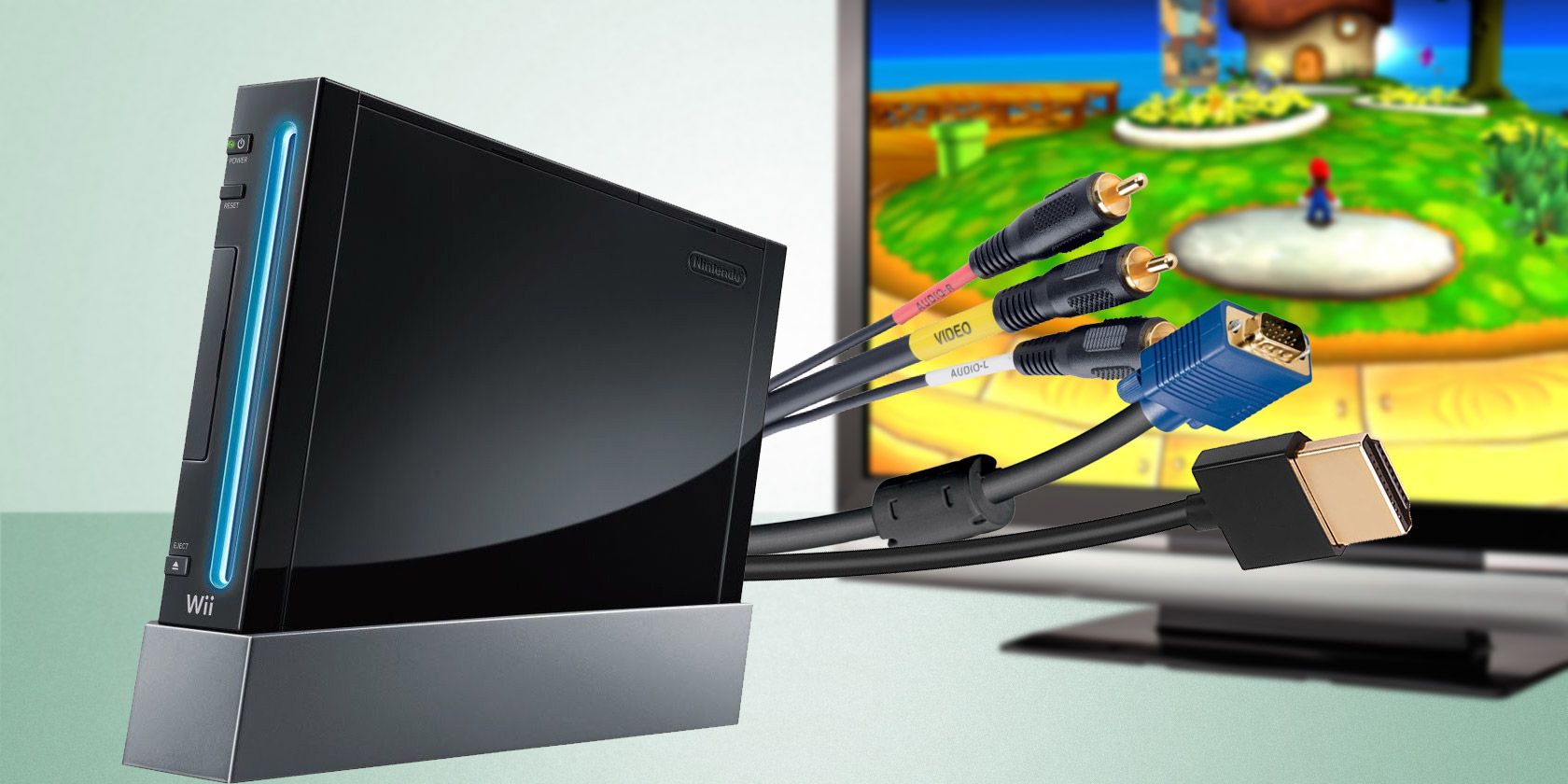
You can use all sorts of cables to connect your Wii to your TV, like RGB, VGA, and HDMI. So, in this article, we’ll explain how to connect your Nintendo Wii to your TV, regardless of what type.

My Wii Doesn’t Have the Right TV Port

You’re concerned that your Nintendo Wii doesn’t have a TV-out option that fits your new TV. However, despite first impressions, several methods of connecting the Nintendo Wii to a TV are available. These rely on the standard AV cable, which can be used to connect the Wii to a TV via:

  1. RGB
  2. S-Video
  3. SCART
  4. VGA
  5. Component
  6. HDMI

If your new TV is short of legacy inputs, or you have multiple devices vying for the same ports, the following instructions (intended for HD and HD Ready TVs) should help you to connect your Wii to almost any type of television.

Note that whichever solution you use, you’re limited to the Nintendo Wii’s maximum output resolution of 480p.

1. The Nintendo Wii’s Default TV Cables

Mcbazel Composite Audio Video AV Cable for Wii Console Mcbazel Composite Audio Video AV Cable for Wii Console Buy Now On Amazon $6.95

Shipping with the Nintendo Wii was a proprietary cable, the Wii AV Cable. This connects to the Nintendo Wii at one end, and the RCA TV inputs at the other. (Red and white are for audio; yellow is for video.)

Once connected, and the console switched on, you will be able to view the Wii using your remote’s TV/Video button. Can’t find this? Look instead for Input Select, EXT, AUX, or AV. You might also try browsing to channel 00 or 99.

This brief instruction should be all you need to get your Nintendo Wii connected to any compatible Smart TV.

2. S-Video Cables and the Nintendo Wii

Wii/Wii U - Cable - S-Video & AV Wii/Wii U - Cable - S-Video & AV Buy Now On Amazon $11.99

The Nintendo Wii can also be enjoyed with an S-Video cable connected to your TV.

The RCA connectors might also be included, giving you the option to use either depending on your TV. For S-Video connections, however, connect the red and white audio cables to your TV as well as the S-Video. Typically, these will be grouped together on the back or side of your TV (occasionally hidden behind a door).

With both TV and Wii powered up, use your remote control (see above) to find the signal from your Wii.

3. Using a SCART Connector With the Nintendo Wii

RCA to SCART adapter RCA to SCART adapter Buy Now On Amazon $6.99

Want to use the SCART connector on your TV? If you’re limited for ports, this might be a good option. SCART is easily extendable, supporting splitters and switched hubs for multiple connections, much like a USB hub.

RCA to SCART adapters aren’t as common as they used to be. If you were lucky, one might have been included with your Nintendo Wii. Otherwise, you’ll need to buy a new one.

With three inputs (red, white, and yellow) once the RCA cable is plugged in, you can connect the SCART to the back of your TV, switch the input mode, and view the SCART input channel on your TV.

4. Connecting the Nintendo Wii to a VGA Monitor

RCA to VGA adapter RCA to VGA adapter Buy Now On Amazon $12.91

Again, using an adapter, you can also connect your Nintendo Wii to a VGA monitor with an RCA to VGA breakout cable. This is particularly useful if your Wii has been relegated to a back room, for instance, or you’re using it as a PC after installing PC.

Yes, that’s right, the Wii is one of the devices on which you can install Linux.

Typical VGA monitor input

Here, simply connect the cable to the VGA input on the TV or monitor, then to your Wii’s RCA cable. Switch on the display device, and ensure that the input option is set to VGA.

5. Using Component Cable Input With the Wii

Component AV Cable for Nintendo Wii to HDTV Component AV Cable for Nintendo Wii to HDTV Buy Now On Amazon $5.87

Available for under $10, a component cable will connect the Nintendo Wii to the component input ports behind your TV. This is an increasingly rare collection of five inputs, two for audio, three for video.

With a device like the one shown, connect the red and white audio jacks into the matching inputs, and the green, blue, and red likewise. In the rare but occasional absence of matching color coding on the inputs, pay attention instead to the labels.

For audio, this means red is right, left is white. For video, green is Y, blue is Pb/Cb, and red is Pr/Cr. With the cable connected at both ends, select the correct input mode on your remote control. Note that if the TV has Progressive Scan, this will need to be enabled before you can see images from the Nintendo Wii.

You’ll also need to open Settings > Wii Settings > Screen and set the TV Resolution setting to EDTV or HDTV (480p). Next, set Widescreen Settings to Widescreen 16:9, then click Confirm.

This video explains in more detail:

Note that component inputs are found alongside the RCA inputs, as the red/white audio cables can be used for both. Make sure you get the right cables in the right ports!

6. How to Connect Your Nintendo Wii to a Smart TV With an HDMI Adapter

Wii 2 HDMI Wii 2 HDMI Buy Now On Amazon

Originally, the component cable option was the only way to connect the Wii reliably to a HDTV. However, a Wii to HDMI adapter also produces a good quality image on a Smart TV.

Just connect one to your Nintendo Wii, hook up a HDMI cable and plug it into your TV. View the output on the HDMI channel using Input Select or a similar option on your TV remote.

Connect a Nintendo Wii to the HDMI input on your Smart TV

It’s a quick, simple solution to connect your Nintendo Wii to any Smart TV using HDMI.

Dolby Surround Sound Options

Although digital audio isn’t available on the Nintendo Wii, you can still get good sound. Mono, stereo, and surround—specifically, Dolby Pro Logic II—are available, the latter providing a simulated surround sound ideal for entertainment systems with a surround sound setup.

To switch between these options, open Settings > System Settings > Sound, and make your choice. Remember to Confirm your choice when you’re done.

(Not sure about audio options? See our guide to surround sound standards.)

Easily Connect Your Nintendo Wii to Any TV

It doesn’t matter that you no longer own the TV you connected your Wii to all those years ago. Whether you’re using an old TV with SCART or relying on a HDMI converter, you can still connect your Wii to your TV.

Although 480p is the best quality resolution it can manage, all of your old games will be ready to play. Not only that, you can enjoy some classic video games with these great emulators for the Nintendo Wii.

Read the full article: 6 Ways to Connect Your Nintendo Wii to Any Type of TV


Read Full Article

Working from Home? 7 Ways to Secure Your Home Office


working-home-secure

While working from a home office means you can type away in your pajamas with your pets, it also means you’re in charge of your cybersecurity now. Sure, the businesses you work for will have defenses set up for you; but you should set up your own to protect sensitive data.

Let’s explore some ways you can fortify your home office and protect your data.

1. Use a VPN to Protect Your Connection

First of all, you should encrypt your connection. This helps stop people from snooping on your traffic, especially if you’re sending sensitive data or talking to co-workers through insecure channels.

Thankfully, this is easy to do with a VPN. These encrypt all the data sent from your computer, which means even unencrypted data packets such as HTTP have protection.

Best of all, a decent VPN will need minimal setup before you can use it. No need to fiddle with privacy settings and encryption standards. Just install the VPN, choose a server in your country, and enjoy better privacy.

Now that a VPN is encrypting your data, you can use public Wi-Fi connections without worrying about who is snooping on the network. If someone is analyzing data traffic through the Wi-Fi, they’ll only see an encrypted mess from your end.

There are plenty of other reasons for home and remote workers to use a VPN, so definitely consider getting one if you’re worried about your privacy. If you’re stuck for choice, MakeUseOf readers can save 49% on ExpressVPN.

2. Secure Your Office Router From Invaders

Next, let’s tackle your router. It’s a vital part of your home network, a gateway providing an internet connection for all your devices.

The flip side is, if an intruder gains access to your router, they’ll have access to all those devices. This includes your computers, Wi-Fi devices, and any external storage accessible over the network. As such, it’s a good idea to secure your network and protect your sensitive data.

To do this, do a hygiene check on your router’s settings. First, double-check the Wi-Fi password to see if it’s durable. Modern-day routers use strong auto-generated passwords by default, so you should be fine. If you changed the password or it’s a cheaper model of router, it’s worth checking to see if the password is tough enough.

Next, double-check the password used to log into the router. Routers have an administration control panel which you can find by accessing the IP in your web browser.

As such, be sure that your admin panel password is strong enough to withstand an attack. If you have the username and password both set as “admin,” a hacker can easily break your defenses and mess with your network.

If you find any of your passwords are on the weak side, don’t fret; there are ways you can create a strong password that you’ll actually remember.

3. Keep Your Antivirus Updated to Avoid Malware

Spies aren’t always people peering through your windows; there are plenty of digital equivalents, too. From keyloggers to screen-capture malware, there are ways someone can watch what you’re doing without being near you.

It’s a good idea to get a competent antivirus that can defend you from prying eyes. That way, you don’t end up leaking sensitive information to a hacker, who can use this info to steal your identity. There’s also the potential for intellectual property theft.

4. Keep Smart Gadgets to a Minimum

If you’re a big fan of connecting your toaster to the internet, you may be introducing security threats to your network. These smart gadgets are known to have severe security flaws, which allow hackers to gain access to your network.

No smart gadget is “too innocent,” either; The Independent reported on smart bulbs having security flaws, for instance. Hackers used these flaws to gain a foothold on the network, then distribute malware and ransomware once they’re in.

If you can’t live without turning on your kettle from another room, put your smart gadgets on another network. That way, if a hacker does gain entry through your devices, they can only see and access the other gadgets on that network.

5. Physically Secure Computers and Hardware

Now that your computer is safe from a digital attack, you can take the extra step and secure it from a physical one. Computer theft is damaging in terms of money and data loss. If you’re worried someone might steal your hardware while you’re out, you can physically secure it to dissuade thieves.

Laptops have plenty of security options, from cover locks to GPS tracking. However, what about your larger PCs? Fortunately, there are many ways to stop your home office from being stolen, with a good range of different price points.

6. Make Constant Backups of Sensitive Work

Of course, if someone does take your computer, you can always buy another one. Your data, however, isn’t so easy to replace. That’s why it’s so essential to create a backup so you can get your data back quickly and easily.

When making a backup, you can either save it to physical media (such as a memory stick) or upload it to the cloud. Putting it on a memory stick prevents hackers and companies from spying on your data, while a cloud backup is a lot harder to lose than physical storage.

If you want an online backup but you don’t want businesses snooping on your data, be sure to try the most secure cloud storage services to keep your information safe.

7. Properly Shred Sensitive Physical and Digital Documents

Once you’re finished with sensitive documents, it’s a good idea to shred them. It doesn’t matter if they’re physical or digital; either one can leak out and potentially cause damage to yourself or your business.

For physical documents, you can use a paper shredder for the job. Try not to skimp on your purchase; an inept paper shredder will do a poor job and leave documents recoverable. As the video above proves, a determined person will re-construct a document that wasn’t appropriately shredded.

But what about digital documents; why would anyone want to shred one? Unfortunately, deleting a sensitive record isn’t as easy as dragging it to the Recycle Bin.  When you delete a file by hitting the Delete key, it doesn’t entirely go away; instead, the space that it occupied is marked safe for overwriting.

If the file doesn’t get overwritten in time, someone can use data recovery tools to find the file and retrieve the intact data from it. This is great if you accidentally threw your report in the bin, and not so great if someone pores through your drive for data you thought was long gone.

Fortunately, there are “file shredders” for PCs too. When you delete a file using one of these, it overwrites the data with junk, thus erasing it forever. A good example is Eraser, which is a well-trusted and free solution for permanently destroying data.

Keeping Your Home Office Secure

Working from home has its perks, but it does mean you’re now in charge of your cybersecurity. Thankfully, you don’t need to turn your home into Fort Knox; with a few easy steps, you can keep your data safe.

If you want to go the extra step, why not learn how to set up hidden security cameras in your home?

Read the full article: Working from Home? 7 Ways to Secure Your Home Office


Read Full Article

Facebook wants content reviewers back ASAP, slows return plan for most employees


On his personal Facebook account, Mark Zuckerberg offered an update on the company’s roadmap for bringing employees back to work in the wake of the coronavirus pandemic.

In the post, he acknowledged that while it might be possible for a small portion of “critical employees” unable to do their work remotely to return sooner, the majority of Facebook’s workforce will be required to continue working from home through “at least” the end of May. The selection of employees Facebook will prioritize for the swiftest return includes content reviewers who scan the platform for things like terrorism and self-harm as well as engineers who work with complex hardware.”…Overall, we don’t expect to have everyone back in our offices for some time,” Zuckerberg wrote.

On a call in the early days of the U.S. response to the virus, Zuckerberg noted that users could expect more false positives in platform moderation with Facebook’s army of at least 15,000 content reviewers sent home. Facebook said it was leaning more heavily on AI moderation to compensate for the lack of human oversight on the platform, a strategy that Twitter and YouTube turned to in the midst of the crisis as well.

Human moderators engage in some of the the social network’s most sensitive work, flagging terrorist activity, suicidal posts, child exploitation and other forms of content with potential legal and psychological consequences.

In his post, Zuckerberg noted that even as additional teams return to the office, employees from populations vulnerable to the virus, those without childcare or anyone with other circumstances that might make their situation difficult can work remotely through the summer months. Facebook will also extend its ban on business travel through this June as the company evaluates the situation.

Zuckerberg also announced that his company would cancel any in-person events of 50 or more people through June of 2021 and planned to make some of them virtual instead, including the annual VR developer event Oculus Connect.

“… We’re slowing our plans to return to the office in order to prioritize helping the rest of our community and local economy to get back up and running first,” Zuckerberg said.

“We also know that when society does eventually start re-opening, it will have to open slowly in staggered waves to make sure that the people who are returning to work can do so safely and that we minimize the possibility of future outbreaks.”


Read Full Article

16 April 2020

Chinese startup Rokid pitches COVID-19 detection glasses in US


Thermal imaging wearables used in China to detect COVID-19 symptoms could soon be deployed in the U.S.

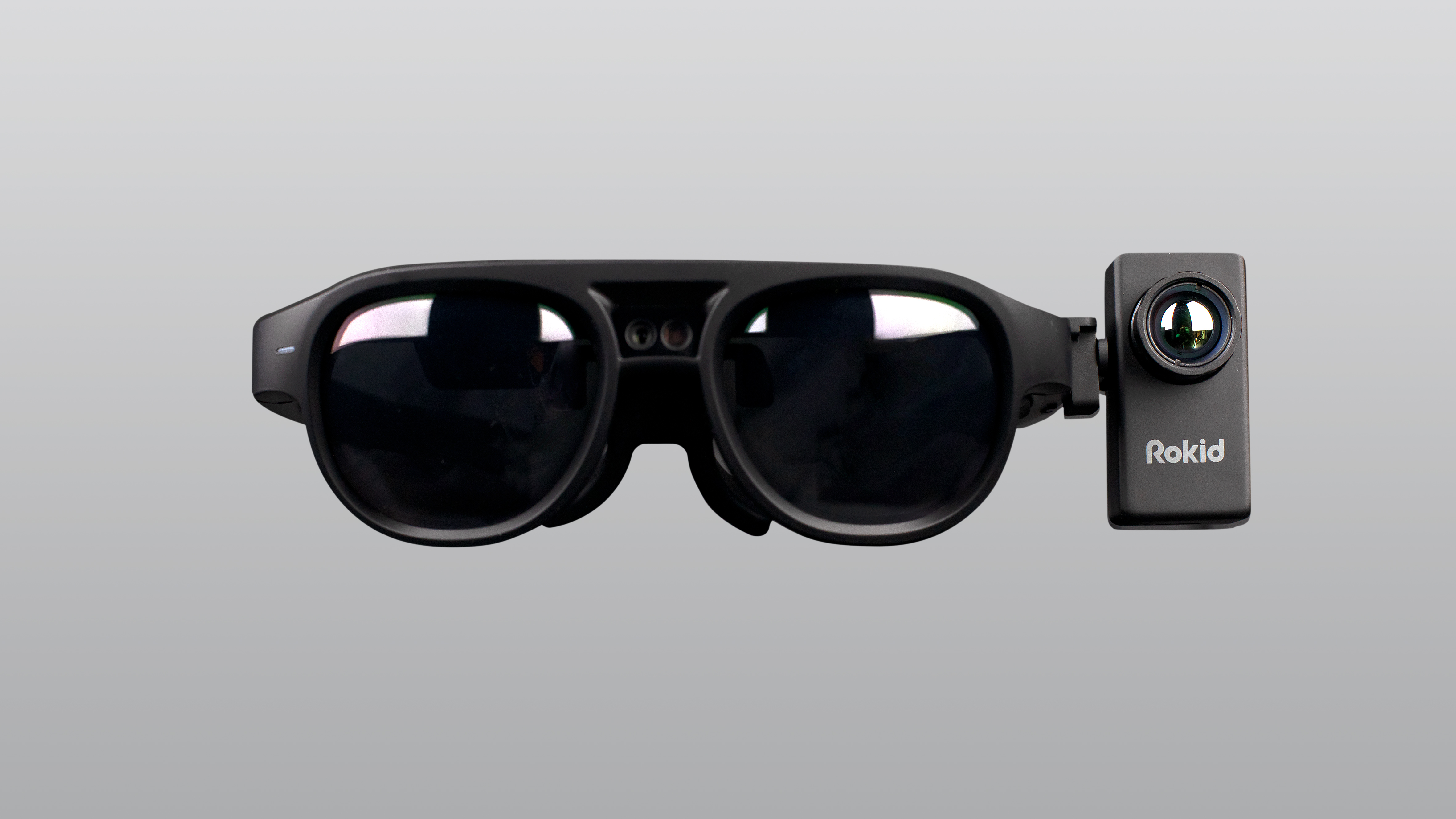
Hangzhou based AI startup Rokid is in talks with several companies to sell its T1 glasses in America, according to Rokid’s U.S. Director Liang Guan.

Rokid is among a wave of Chinese companies creating technology to address the coronavirus pandemic, which has dealt a blow to the country’s economy. 

Per info Guan provided, Rokid’s T1 thermal glasses use an infrared sensor to detect the temperatures of up to 200 people within two minutes from as far as three meters. The devices carry a Qualcomm CPU, 12 megapixel camera and offer augmented reality features — for hands free voice controls — to record live photos and videos.

The Chinese startup (with a San Francisco office) plans B2B sales of its wearable devices in the U.S. to assist businesses, hospitals and law enforcement with COVID-19 detection, according to Guan.

Rokid is also offering IoT and software solutions for facial recognition and data management, as part of its T1 packages.

Image Credits: Rokid

The company is working on deals with U.S. hospitals and local municipalities to deliver shipments of the smart glasses, but could not disclose names due to confidentiality agreements.

One commercial venture that could use the thermal imaging wearables is California based e-commerce company Weee!.

The online grocer is evaluating Rokid’s T1 glasses to monitor temperatures of its warehouse employees throughout the day, Weee! founder Larry Liu confirmed to TechCrunch via email.

On procedures, to manage those who exhibit COVID-19 related symptoms —  such as referring them for testing — that’s something for end-users to determine, according to Rokid. “The clients can do the follow-up action, such as giving them a mask or asking to work from home,” Guan said.

The T1 glasses connect via USB and can be set up for IoT capabilities for commercial clients to sync to their own platforms. The product could capture the attention of U.S. regulators, who have become increasingly wary of Chinese tech firms’ handling of American citizen data. Rokid says it doesn’t collect info from the T1 glasses directly.

“Regarding this module…we do not take any data to the cloud. For customers, privacy is very important to them. The data measurement is stored locally,” according to Guan.

Image Credits: Rokid

Founded in 2014 by Eric Wong and Mingming Zhu, Rokid raised $100 million at the Series B level in 2018. The business focuses primarily on developing AI and AR tech for applications from manufacturing to gaming, but developed the T1 glasses in response to China’s COVID-19 outbreak.

The goal was to provide businesses and authorities a thermal imaging detection tool that is wearable, compact, mobile and more effective than the common options.

Large scanning stations, such as those used in airports, have drawbacks in not being easily portable and handheld devices — with infrared thermometers — pose risks.

“You have to point them to people’s foreheads…you need to be really close, it’s not wearable and you’re not practicing social distancing to use those,” Guang said.

Rokid pivoted to create the T1 glasses shortly after COVID-19 broke out in China in late 2019. Other Chinese tech startups that have joined the virus-fighting mission include face recognition giant SenseTime — which has installed thermal imaging systems at railway stations across China — and its close rival Megvii, which has set up similar thermal solutions in supermarkets.

On Rokid’s motivations, “At the time we thought something like this can really help the frontline people still working,” Guang said.

The startup’s engineering team developed the T1 product in just under two months. In China, Rokid’s smart glasses have been used by national parks staff, in schools and by national authorities to screen for COVID-19 symptoms.

Temperature detectors have their limitation, however, as research has shown that more than half of China’s COVID-19 patients did not have a fever when admitted to hospital.

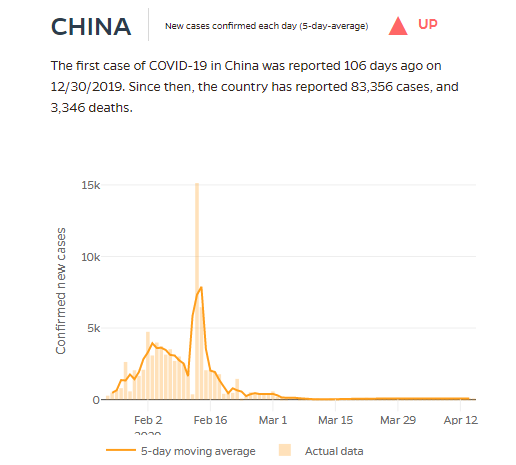
Source: Johns Hopkins University of Medicine Coronavirus Research Center

The growth rate of China’s coronavirus cases — which peaked to 83,306 and led to 3,345 deaths — has declined and parts of the country have begun to reopen from lockdown. There is still debate, however, about the veracity of data coming out of China on COVID-19. That led to a row between the White House and World Health Organization, which ultimately saw President Trump halt U.S. contributions to the global body this week.

As COVID-19 cases and related deaths continue to rise in the U.S., technological innovation will become central to the health response and finding some new normal for personal mobility and economic activity. That will certainly bring fresh facets to the common tech conundrums — namely measuring efficacy and balancing benefits with personal privacy.

For its part, Rokid already has new features for its T1 thermal smart glasses in the works. The Chinese startup plans to upgrade the device to take multiple temperature readings simultaneously for up to four people at a time.

“That’s not on the market yet, but we will release this very soon as an update,” said Rokid’s U.S. Director Liang Guan.


Read Full Article

New Google Play policies to cut down on ‘fleeceware,’ deepfakes, and unnecessary location tracking


Google is today announcing a series of policy changes aimed at eliminating untrustworthy apps from its Android app marketplace, the Google Play store. The changes are meant to give users more control over how their data is used, tighten subscription policies and help prevent deceptive apps and media — including those involving deepfakes — from becoming available on the Google Play Store.

Background Location

The first of these new policies is focused on the location tracking permissions requested by some apps.

Overuse of location tracking has been an area Google has struggled to rein in. In Android 10, users were able to restrict apps’ access to location while the app was in use, similar to what’s been available on iOS. With the debut of Android 11, Google decided to give users even more control with the new ability to grant a temporary “one-time” permission to sensitive data, like location.

In February, Google said it would also soon require developers to get user permission before accessing background location data, after noting that many apps were asking for unnecessary user data. The company found that a number of these apps would have been able to provide the same experience to users if they only accessed location while the app was in use — there was no advantage to running the app in the background.

Of course, there’s an advantage for developers who are collecting location data. This sort of data can be sold to third-party through trackers that supply advertisers with detailed information about the app’s users, earning the developer additional income.

The new change to Google Play policies now requires that developers get approval to access background location in their apps.

But Google is giving developers time to comply. It says no action will be taken for new apps until August 2020 or on existing apps until November 2020.

“Fleeceware”

A second policy is focused on subscription-based apps. Subscriptions have become a booming business industry-wide. They’re often a better way for apps to generate revenue as opposed to other monetization methods — like paid downloads, ads or in-app purchases.

However, many subscription apps are duping users into paying by not making it easy or obvious how to dismiss a subscription offer in order to use the free parts of an app, or not being clear about subscription terms or the length of free trials, among other things.

The new Google Play policy says developers will need to be explicit about their subscription terms, trials and offers, by telling users the following:

  • Whether a subscription is required to use all or parts of the app (and if not required, allow users to dismiss the offer easily).
  • The cost of the subscription.
  • The frequency of the billing cycle.
  • Duration of free trials and offers.
  • The pricing of introductory offers.
  • What is included with a free trial or introductory offer.
  • When a free trial converts to a paid subscription.
  • How users can cancel if they do not want to convert to a paid subscription

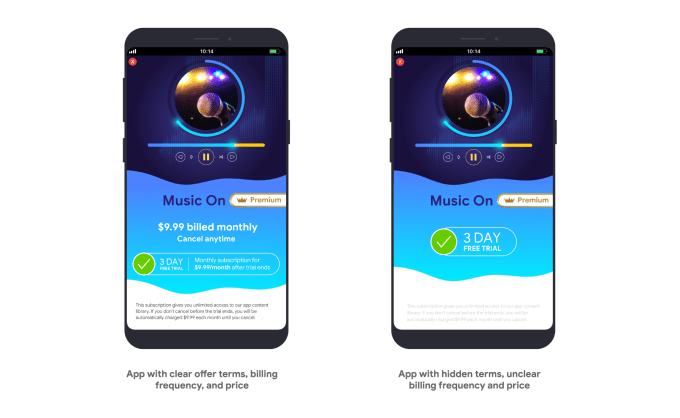
That means the “fine print” has to be included on the offer’s page, and developers shouldn’t use sneaky tricks like lighter font to hide the important bits, either.

For example:

This change aims to address the rampant problem with “fleeceware” across the Google Play store. Multiple studies have shown subscription apps have gotten out of control. In fact, one study from January stated that over 600 million Android users had installed “fleeceware” apps from the Play Store. To be fair, the problem is not limited to Android. The iOS App Store was recently found to have an issue, too, with more than 3.5 million users having installed “fleeceware.” 

Developers have until June 16, 2020 to come into compliance with this policy, Google says.

Deepfakes

The final update has to do with the Play Store’s “Deceptive Behavior” policy.

This wasn’t detailed in Google’s official announcements about the new policies, but Google tells us it’s also rolling out updated rules around deceptive content and apps.

Before, Google’s policy was used to restrict apps that tried to deceive users — like apps claiming a functionally impossible task, those that lied in their listing about their content or features or those that mimicked the Android OS, among others.

The updated policy is meant to better ensure all apps are clear about their behavior once they’re downloaded. In particular, it’s meant to prevent any manipulated content (aka “deepfakes”) from being available on the Play Store.

Google tells us this policy change won’t impact apps that allow users to make deepfakes that are “for fun” — like those that allow users to swap their face onto GIFs, for example. These will fall under an exception to the rule, which allows deepfakes that are “obvious satire or parody.”

However, it will take aim at apps that manipulate and alter media in a way that isn’t conventionally obvious or acceptable.

For example:

  • Apps adding a public figure to a demonstration during a politically sensitive event.
  • Apps using public figures or media from a sensitive event to advertise media altering capability within an app’s store listing.
  • Apps that alter media clips to mimic a news broadcast.

In particular, the policy will focus on apps that promote misleading imagery that could cause harm related to politics, social issues or sensitive events. The apps must also disclose or watermark the altered media if it isn’t clear the media has been altered.

Similar bans on manipulated media have been enacted across social media platforms, including Facebook, Twitter and WeChat. Apple’s App Store Developer Guidelines don’t specifically reference “deepfakes” by name, however, though it bans apps with false or defamatory information, outside of satire and humor.

Google says the apps currently available on Google Play have 30 days to comply with this change.

In Google’s announcement, the company said it understood these were difficult times for people, which is why it’s taken steps to minimize the short-term impact of these changes. In other words, it doesn’t sound like the policy changes will soon result in any mass banning or big Play Store clean-out — rather, they’re meant to set the stage for better policing of the store in the future.


Read Full Article

New Google Play policies to cut down on ‘fleeceware,’ deepfakes, and unnecessary location tracking


Google is today announcing a series of policy changes aimed at eliminating untrustworthy apps from its Android app marketplace, the Google Play store. The changes are meant to give users more control over how their data is used, tighten subscription policies, and help prevent deceptive apps and media — including those involving deepfakes — from becoming available on the Google Play Store.

Background Location

The first of these new policies is focused on the location tracking permissions requested by some apps.

Overuse of location tracking has been an area Google has struggled to rein in. In Android 10, users were able to restrict apps’ access to location while the app was in use, similar to what’s been available on iOS. With the debut of Android 11, Google decided to give users even more control with the new ability to grant a temporary “one-time” permission to sensitive data, like location.

In February, Google said it would also soon require developers to get user permission before accessing background location data, after noting that many apps were asking for unnecessary user data. The company found that a number of these apps would have been able to provide the same experience to users if they only accessed location while the app was in use — there was no advantage to running the app run in the background.

Of course, there’s an advantage for developers who are collecting location data. This sort of data can be sold to third-party through trackers that supply advertisers with detailed information about the app’s users, earning the developer additional income.

The new change to Google Play policies now requires that developers get approval to access background location in their app.

But Google is giving developers time to comply. It says no action will be taken for new apps until August 2020 or on existing apps until November 2020.

“Fleeceware”

A second policy is focused on subscription-based apps. Subscriptions have become a booming business industry-wide. They’re often a better way for apps to generate revenue as opposed to other monetization methods — like paid downloads, ads, or in-app purchases.

However, many subscription apps are duping users into paying by not making it easy or obvious how to dismiss a subscription offer in order to use the free parts of an app, or not being clear about subscription terms or the length of free trials, among other things.

The new Google Play policy says developers will need to be explicit about their subscription terms, trials and offers, by telling users the following:

  • Whether a subscription is required to use all or parts of the app. (And if not required, allow users to dismiss the offer easily.)
  • The cost of the subscription
  • The frequency of the billing cycle
  • Duration of free trials and offers
  • The pricing of introductory offers
  • What is included with a free trial or introductory offer
  • When a free trial converts to a paid subscription
  • How users can cancel if they do not want to convert to a paid subscription

That means the “fine print” has to be included on the offer’s page, and developers shouldn’t use sneaky tricks like lighter font to hide the important bits, either.

For example:

This change aim to address the rampant problem with “fleeceware” across the Google Play store. Multiple studies have shown subscription apps have gotten out of control. In fact, one study from January stated that over 600 million Android users had installed “fleeceware” apps from the Play Store. To be fair, the problem is not limited to Android. The iOS App Store was recently found to have an issue, too, with more than 3.5 million users having installed “fleeceware.” 

Developers have until June 16, 2020 to come into compliance with this policy, Google says.

Deepfakes

The final update has to do with the Play Store’s “Deceptive Behavior” policy.

This wasn’t detailed in Google’s official announcements about the new policies, but Google tells us it’s also rolling out updated rules around deceptive content and apps.

Before, Google’s policy was used to restrict apps that tried to deceive users — like apps claiming a functionally impossible task, those that lied in their listing about their content or features, or those that mimicked the Android OS, among others.

The updated policy is meant to better ensure all apps are clear about their behavior once their downloaded. In particular, it’s meant to prevent any manipulated content (aka “deepfakes”) from being available on the Play Store.

Google tells us this policy change won’t impact apps that allow users to make deepfakes that are “for fun” — like those that allow users to swap their face onto GIFs, for example. These will fall under an exception to the rule, which allows deepfakes which are “obvious satire or parody.”

However, it will take aim at apps that manipulate and alter media in a way that isn’t conventionally obvious or acceptable.

For example:

  • Apps adding a public figure to a demonstration during a politically sensitive event.
  • Apps using public figures or media from a sensitive event to advertise media altering capability within an app’s store listing.
  • Apps that alter media clips to mimic a news broadcast.

In particular, the policy will focus on apps that promote misleading imagery that could cause harm related to politics, social issues, or sensitive events. The apps must also disclose or watermark the altered media, too, if it isn’t clear the media has been altered.

Similar bans on manipulated media have been enacted across social media platforms, including Facebook, Twitter and WeChat. Apple’s App Store Developer Guidelines don’t specifically reference “deepfakes” by name, however, though it bans apps with false or defamatory information, outside of satire and humor.

Google says the apps currently available on Google Play have 30 days to comply with this change.

In Google’s announcement, the company said it understood these were difficult times for people, which is why it’s taken steps to minimize the short-term impact of these changes. In other words, it doesn’t sound like the policy changes will soon result in any mass banning or big Play Store clean-out — rather, they’re meant to set the stage for better policing of the store in the future.


Read Full Article

TikTok to launch parental controls globally, disable direct messaging for users under 16


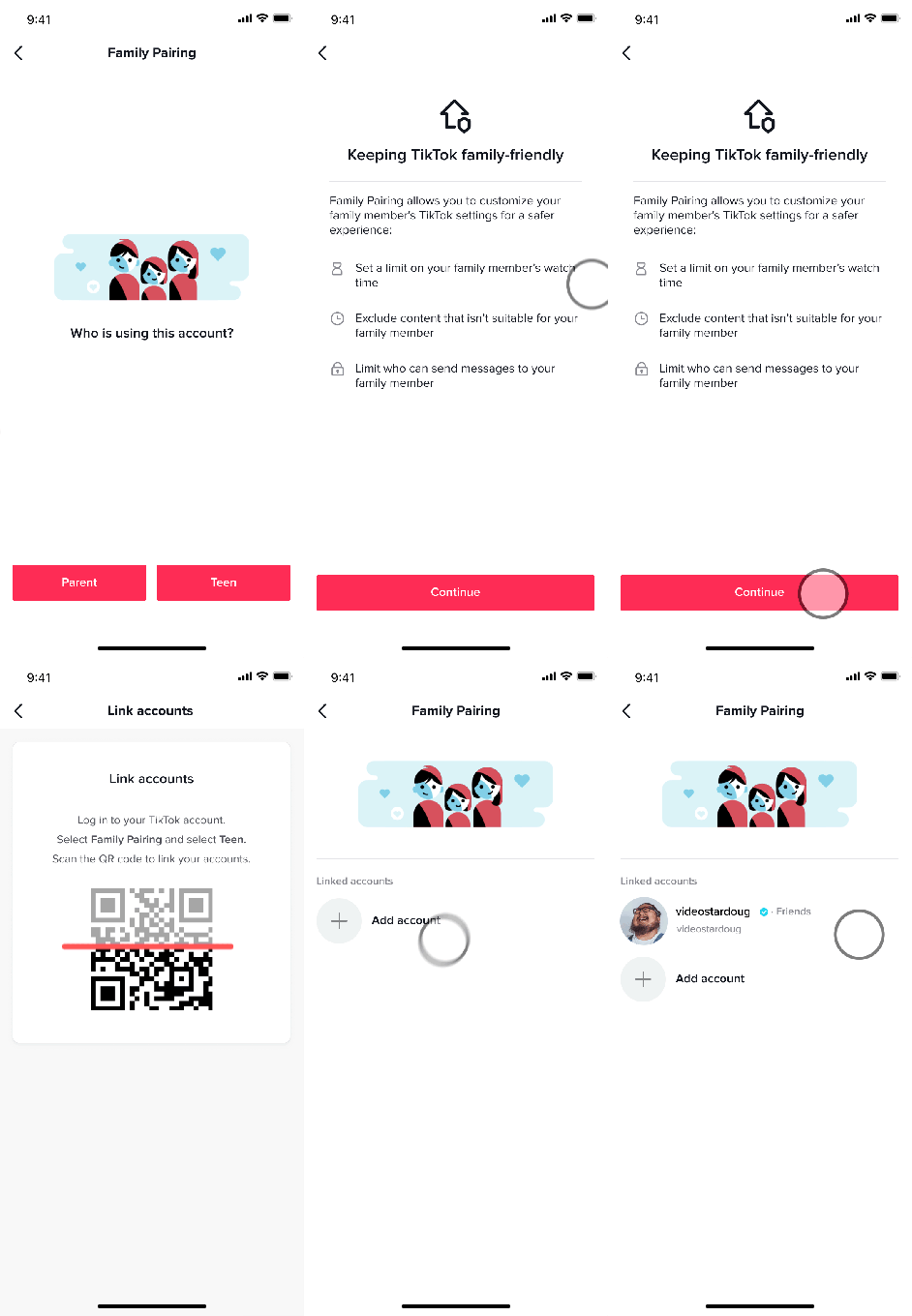
TikTok is introducing a new set of parental controls to its platform to users worldwide, including in the U.S. The features, collectively referred to as “Family Pairing,” will allow parents to set controls on Screen Time Management, Restricted Mode and Direct Messages for their teen users. It also will now disable direct messaging for users under the age of 16 in all markets. A similar set of features was launched in the U.K. in February, designed with European laws and regulations in mind.

In that market, the features were called “Family Safety Mode.”

Today is the official introduction to “Family Pairing,” but TikTok says the worldwide rollout will take place over the “coming weeks.”

To use the new controls, parents of a teenage user age 13 and older will be able to link their account to their child’s, which requires the parent to set up their own TikTok account. This will allow the parent to set controls on how long their child is able to use the TikTok app, turn on or off who the teen can direct message with and they can opt to turn on TikTok’s “restricted” mode for the child’s account in order to limit inappropriate content.

The latter is not a well-explained feature. But for an app of TikTok’s scale, it’s likely based in large part on users flagging inappropriate videos they come across. Parents should be aware, then, that this is not equivalent to setting parental controls on a video streaming app, like Netflix, or restricting what a child can download from the App Store on their phone. In other words, some inappropriate content or more adult material could slip through.

Both Screen Time Management and Restricted Mode are existing controls that TikTok users can set for themselves via the app’s Digital Wellbeing section. But with Family Pairing, the parent will be able to set these controls for their child, instead of relying on the teen to do it for themselves.

TikTok also already offered a number of controls on Direct Messaging before today, which allow users to restrict messages to only approved followers, restrict the audience or disable direct messages altogether. TikTok also blocks images and videos in messages to cut down on other issues, as well.

But with Family Pairing, parents can choose to what extent teens can message privately on the platform, if at all.

And in a move that will likely enrage teens, TikTok has now decided to automatically disable Direct Messages for any registered accounts for those under the age of 16. (Prepare to see a lot more activity and private conversations taking place in the TikTok comments section!) This change goes live on April 30.

The changes give parents far more control over their child’s use of TikTok compared with any other social media app on the market today, outside of those designed exclusively with families and children in mind. However, the parental controls are only a subset of the controls users can opt to set for themselves. For example, users can choose to make their accounts private, turn off comments and control who can duet with them, among other things.

But the options may relieve some parents’ stress about how addictive the TikTok app has become. Teen users are spending significant amounts of time on the short video app — so much that TikTok itself even launched its own in-app PSA that encourages users to “take a break” from their phone.

TikTok offers other resources for parents, as well, including educational safety videos and parental guides. 

It’s an interesting decision on TikTok’s part to launch screen time-limiting features and other restrictions amid a global pandemic, when teens are stuck at home with nothing much to do but watch videos, chat and play games. But with families at home together, there may be no better time than now to have a conversation about how much social media is too much.

“More than ever, families are turning to internet platforms like TikTok to stay entertained, informed, and connected. That was, of course, happening before COVID-19, but it has only accelerated since the outbreak began and social distancing brought families closer together,” writes TikTok director of Trust & Safety, Jeff Collins, in an announcement. “The embrace of platforms like ours is providing families with joint tools to express their creativity, share their stories, and show support for their communities. At the same time, they are often learning to navigate the digital landscape together and focused on ensuring a safe experience,” he said.

The changes follow increased scrutiny by government regulators of TikTok, owned by Beijing-based ByteDance, and the 2019 fine of $5.7 million leveraged against Musical.ly (which had been acquired by ByteDance) by the FTC for violation of U.S. children’s privacy law COPPA.

TikTok has responded to these concerns in a variety of ways, including the introduction of the TikTok Content Advisory Council; the release of new Community Guidelines; publication of its first Transparency Report; the hiring of global General Counsel; expansion of its Trust & Safety hubs in the U.S., Ireland and Singapore; and its launch of a Transparency Center open to outside experts who want to review its moderation practices.


Read Full Article

Racism has a cost for everyone | Heather C. McGhee

Racism has a cost for everyone | Heather C. McGhee

Racism makes our economy worse -- and not just in ways that harm people of color, says public policy expert Heather C. McGhee. From her research and travels across the US, McGhee shares startling insights into how racism fuels bad policymaking and drains our economic potential -- and offers a crucial rethink on what we can do to create a more prosperous nation for all. "Our fates are linked," she says. "It costs us so much to remain divided."

Click the above link to download the TED talk.

Facebook will start alerting users who have interacted with ‘harmful misinformation’ about COVID-19


Facebook this morning announced its latest step in effort to combat the spread of misinformation around the on-going COVID-19 pandemic. Chief among them is a new message targeting users who have commented on, reacted to or liked false content about the virus.

The social network will pop up a message from the World Health Organization (recently defunded by Trump) with an option to share the link or visit the WHO’s COVID-19 debunk site. “We want to connect people who may have interacted with harmful misinformation about the virus with the truth from authoritative sources in case they see or hear these claims again off of Facebook,” the company wrote in a post.

The pop-up is set to start appearing in the coming weeks. Debunks on the list include,

  • 5G mobile networks DO NOT spread COVID-19

  • Exposing yourself to the sun or to temperatures higher than 25C degrees DOES NOT prevent the coronavirus disease (COVID-19)

  • You can recover from the coronavirus disease (COVID-19). Catching the new coronavirus DOES NOT mean you will have it for life.

  • Being able to hold your breath for 10 seconds or more without coughing or feeling discomfort DOES NOT mean you are free from the coronavirus disease (COVID-19) or any other lung disease.

  • Drinking alcohol does not protect you against COVID-19 and can be dangerous

  • COVID-19 virus can be transmitted in areas with hot and humid climates

  • Cold weather and snow CANNOT kill the new coronavirus.

  • Taking a hot bath does not prevent the new coronavirus disease

  • The new coronavirus CANNOT be transmitted through mosquito bites.

You seem like a rational person who probably knew all of that, but this is Facebook we’re talking about here. So, um, better safe than sorry. The site has also added a new page called Get the Facts that curates accurate info, include media fact checks. That information will soon trickle into Facebook News, as well.


Read Full Article

Investors explain COVID-19’s impact on consumer startups


Home fitness and games as gathering places are a few of the startup verticals propelled by unprecedented shifts in behavior due to shelter-in-place orders. We surveyed the top investors in consumer and social apps to learn about 2020’s startup trends, the M&A climate, the threat of incumbents copying new entrants, underserved demographics and which features are poised to be unbundled from the biggest apps.

The Extra Crunch survey series assembles the best minds in different verticals, drawing on investors who’ve backed or worked at the companies defining their industry. For this survey, we asked how COVID-19 was affecting their investment strategies and the operations of their portfolio companies. We also dug into whether founders are more or less hopeful about being acquired, which startup ideas they wish they were being pitched and what age groups or cultures deserve new social products.

Subscribe to Extra Crunch to read the full answers to our questionnaire from funds like General Catalyst, Kleiner Perkins and Sweet Capital.

Here are the 17 leading social network VCs who participated in our survey:

Olivia Moore & Justine Moore, CRV

How much time are you spending on social right now? Is the market underheated, overheated, or just right?

It’s been a tough couple of years for new social startups — but when something hits in this space, it hits big! We’re always spending time looking at consumer social — we have a network of 200+ college scouts at campuses around the country, so we hear about (and try) new apps pretty frequently.

It is difficult for new social startups to reach any kind of meaningful scale. The average person doesn’t download any apps in a given month, and even though younger users may be more willing to try new things, they often face storage or data constraints.

We feel that the market is probably “appropriately heated.” Once a social startup is “working,” it shouldn’t struggle to raise capital, but there are probably fewer investors making large pre-launch social bets because there have been so few breakout hits recently.

How has COVID-19 impacted social startups operationally?


Read Full Article

GoPro lays off 200 employees representing 20% of the company


Action camera manufacturer GoPro has announced some massive organizational changes at the company. In particular, the company is laying off over 200 employees — it represents a 20% staff reduction.

GoPro will shut down some offices altogether. There will be offices in five geographies after the round of layoffs. The company expects to reduce operating expenses by $100 million in 2020. But it says that it’ll cut operating expenses again by $250 million in 2021. In other words, if you still have a job at GoPro, you could lose your job next year.

Behind the scene, GoPro is making some radical changes to its business model. The company is still selling cameras, accessories and subscriptions. But it is switching to a direct-to-consumer model with GoPro.com acting as the main storefront.

The company will stop selling its devices in many retail stores. GoPro will still work with select retailers in some regions as they still generate a lot of sales.

But selling directly on GoPro.com represents the future of the company, which should improve margins. They don’t have to give a cut to retailers when GoPro is acting as the retailer. In 2019, GoPro.com represented a bit more than 20% of European revenue and a bit less than 20% of revenue in the U.S.

"GoPro's global distribution network has been negatively impacted by the COVID-19 pandemic, driving us to transition into a more efficient and profitable direct-to-consumer-centric business over the course of this year," founder and CEO Nicholas Woodman wrote. "We are crushed that this forces us to let go of many talented members of our team, and we are forever grateful for their contributions."

In addition to today’s layoffs, sales and marketing expenditure will be cut down in 2020 and beyond. Woodman himself won’t take a salary for the remainder of the year. The company’s board won’t receive any cash compensation either.

GoPro has withdrawn earnings guidance for Q1 and 2020. The company now expects revenue of $119 million with a non-GAAP EPS loss of $0.30 to $0.40 per share. In pre-market trading, GoPro shares are currently trading at $2.58, 3% below yesterday’s closing price.


Read Full Article

India says video conference app Zoom is ‘not safe’


India said today Zoom is ‘not a safe platform’ as the video conference service surges in popularity in many nations including the world’s second largest smartphone market as billions of people remain stuck at home due to the coronavirus crisis.

Zoom is a not a safe platform,” the Cyber Coordination Centre (CyCord) of India’s ministry of home affairs said in a 16-page advisory. The advisory also includes guidelines for users who still wish to use Zoom for their private communications.

The move comes as several companies including Google, Apple, NASA, and Tesla have urged — or warned — their employees from using Zoom, which has amassed over 200 million users. German and Taiwan have also banned the use of Zoom in their nations. But the firm, with market cap of over $40 billion, has also come under scrutiny — and become subject of a lawsuit — after several of its security and privacy lapses emerged in recent weeks.

Zoom has been trending in India in recent weeks, too, in a surprise as enterprise services rarely get traction with consumers in the country. Several Indian ministers in India have also tweeted pictures that showed they were using Zoom in recent weeks.

The app is being downloaded more than 450,000 times a day for the last two weeks in India, research firm Apptopia told TechCrunch. This week, India also started a competition for startups to develop a secure conferencing app.

Zoom chief executive has Eric S. Yuan has apologized for the security lapses and pledged to prioritize focus on users’ privacy and security over development of new features. The firm recently also recently hired former Facebook security officer Alex Stamos as an advisor.


Read Full Article

EU lawmakers set out guidance for coronavirus contacts tracing apps


The European Commission has published detailed guidance for Member States on developing coronavirus contacts tracing and warning apps.

The toolbox, which has been developed by the e-Health Network with the support of the Commission, is intended as a practical guide to implementing digital tools for tracking close contacts between device carriers as a proxy for infection risk that seeks to steer Member States in a common, privacy-sensitive direction as they configure their digital responses to the COVID-19 pandemic.

Commenting in a statement, Thierry Breton — the EU commissioner for Internal Market — said: Contact tracing apps to limit the spread of coronavirus can be useful, especially as part of Member States’ exit strategies. However, strong privacy safeguards are a pre-requisite for the uptake of these apps, and therefore their usefulness. While we should be innovative and make the best use of technology in fighting the pandemic, we will not compromise on our values and privacy requirements.”

“Digital tools will be crucial to protect our citizens as we gradually lift confinement measures,” added Stella Kyriakides, commissioner for health and food safety, in another supporting statement. “Mobile apps can warn us of infection risks and support health authorities with contact tracing, which is essential to break transmission chains. We need to be diligent, creative, and flexible in our approaches to opening up our societies again. We need to continue to flatten the curve – and keep it down. Without safe and compliant digital technologies, our approach will not be efficient.”

The Commission’s top-line “essential requirements” for national contacts tracing apps are that they’re:

  • voluntary;
  • approved by the national health authority;
  • privacy-preserving (“personal data is securely encrypted”); and
  • dismantled as soon as no longer needed

In the document the Commission writes that the requirements on how to record contacts and notify individuals are “anchored in accepted epidemiological guidance, and reflect best practice on cybersecurity, and accessibility”.

“They cover how to prevent the appearance of potentially harmful unapproved apps, success criteria and collectively monitoring the effectiveness of the apps, and the outline of a communications strategy to engage with stakeholders and the people affected by these initiatives,” it adds.

Yesterday, setting out a wider roadmap to encourage a co-ordinated lifting of the coronavirus lockdown, the Commission suggested digital tools for contacts tracing will play a key role in easing quarantine measures.

Although today’s toolbox clearly emphasizes the need to use manual contact tracing in parallel with digital contact tracing, with such apps and tools envisaged as a support for health authorities — if widely rolled out — by enabling limited resources to be more focused toward manual contacts tracing.

“Manual contact tracing will continue to play an important role, in particular for those, such as elderly or disabled persons, who could be more vulnerable to infection but less likely to have a mobile phone or have access to these applications,” the Commission writes. “Rolling-out mobile applications on a large-scale will significantly contribute to contact tracing efforts also allowing health authorities to carry manual tracing in a more focussed manner.”

“Mobile apps will not reach all citizens given that they rely on the possession and active use of a smart phone. Evidence from Singapore and a study by Oxford University indicate that 60-75% of a population need to have the app for it to be efficient,” it adds in a section on accessibility and inclusiveness. “However, non-users will benefit from any increased population disease control the widespread use of such an app may bring.”

The toolbox also reiterates a clear message from the Commission in recent days that “appropriate safeguards” must be embedded into digital contacts tracing systems. Though it’s less clear whether all Member States are listening to memos about respecting EU rights and freedoms, as they scrambled for tech and data to beat back COVID-19.

“This digital technology, if deployed correctly, could contribute substantively to containing and reversing its spread. Deployed without appropriate safeguards, however, it could have a significant negative effect on privacy and individual rights and freedoms,” the Commission writes, further warning that: “A fragmented and uncoordinated approach to contact tracing apps risks hampering the effectiveness of measures aimed at combating the COVID-19 crisis, whilst also causing adverse effects to the single market and to fundamental rights and freedoms.”

On safeguards the Commission has a clear warning for EU Member States, writing: “Any contact tracing and warning app officially recognised by Member States’ relevant authorities should present all guarantees for respect of fundamental rights, and in particular privacy and data protection, the prevention of surveillance and stigmatization.”

Its list of key safeguards notably includes avoiding the collection of any location data.

“Location data is not necessary nor recommended for the purpose of contact tracing apps, as their goal is not to follow the movements of individuals or to enforce prescriptions,” it says. “Collecting an individual’s movements in the context of contact tracing apps would violate the principle of data minimisation and would create major security and privacy issues.”

The toolbox also emphasizes that such contacts tracing/warning systems be temporary and voluntary in nature — with “automated/gentle self-dismantling, including deletion of all remaining personal data and proximity information, as soon as the crisis is over”.

“The apps’ installation should be consent-based, while providing users with complete and clear information on intended use and processing,” is another key recommendation. 

The toolbox leans towards suggesting a decentralized approach, in line with earlier Commission missives, with a push for: “Safeguards to ensure the storing of proximity data on the device and data encryption.”

Though the document also includes some discussion of alternative centralized models which involve uploading arbitrary identifiers to a backend server held by public health authorities. 

Users cannot be directly identified through these data. Only the arbitrary identifiers generated by the app are stored on the server. The advantage is that the data stored in the server can be anonymised by aggregation and further used by public authorities as a source of important aggregated information on the intensity of contacts in the population, on the effectiveness of the app in tracing and alerting contacts and on the aggregated number of people that could potentially develop symptoms,” it writes. 

“None of the two options [decentralized vs centralized] includes storing of unnecessary personal information,” it adds, leaving the door open to states that might want their public health authorities to be responsible for centralized data processing.

However the Commission draws a clear distinction between centralized approaches that use arbitrary identifiers and those that store directly-identifiable data on every user — with the latter definitely not recommended.

They would have “major disadvantage”, per the toolbox, because they “would not keep personal data processing to the absolute minimum, and so people may be less willing to install and use the app”.

“Centralised storage of mobile phone numbers could also create risks of data breaches and cyberattacks,” the Commission further warns.

Discussing cross-border interoperability requirements, the toolbox highlights the necessity for a grab-bag of EU contacts tracing apps to be interoperable, in order to successfully break cross-border transmission chains, which requires national health authorities to be technically able to exchange available information about individuals infected with and/or exposed to COVID-19.

“Tracing and warning apps should therefore follow common EU interoperability protocols so that the previous functionalities can be performed, and particularly safeguarding rights to privacy and data protection, regardless of where a device is in the EU,” it suggests.

On preventing the spread of harmful or unlawful apps the document suggests Member States consider setting up a national system of evaluation/accreditation endorsement of national apps, perhaps based on a common set of criteria (that would need to be defined).

“A close cooperation between health and digital authorities should be sought whenever possible for the evaluation/endorsement of the apps,” it writes. 

The Commission also says “close cooperation with app stores will be needed to promote national apps and promote uptake while delisting harmful apps” — putting Apple and Google squarely in the frame.

Earlier this week the pair announced their own collaboration on coronavirus contracts tracing — announcing a plan to offer an API and later opt-in system-level contacts tracing, based on a decentralized tracking architecture with ephemeral IDs processed locally on devices, rather than being uploaded and held on a central server.

Given the dominance of the two tech giants their decision to collaborate on a decentralized system may effectively deprive national health authorities of the option to gain buy in for systems that would give those publicly funded bodies access to anonymized and aggregated data for coronavirus modelling and/or tracking purposes. Which should, in the middle of a pandemic, give more than a little pause for thought.

A note in the toolbox mentions Apple and Google — with the Commission writing that: “By the end of April 2020, Member States with the Commission will seek clarifications on the solution proposed by Google and Apple with regard to contact tracing functionality on Android and iOS in order to ensure that their initiative is compatible with the EU common approach.”


Read Full Article

Apple said to be working on modular, high-end, noise-cancelling over-ear headphones


Apple is said to be developing its own competitors to popular over-ear noise-cancelling headphones like those made by Bose and Sony, Bloomberg reports, but with similar technology on board to that used in the AirPod and AirPod Pro lines. These headphones would also include a design with interchangeable parts that would allow some modification with customizable accessories for specific uses like workouts and long-term wear, for instance.

The prototype designs of the new headphones, which are set to potentially be released some time later this year (though timing is clearly up in the air as a result of the ongoing COVID-19 crisis, and Apple’s general tendency to move things around depending on other factors), are said to feature a “retro look” by Bloomberg, and include oval ear cups which connect directly to thin arms that extend to the headband. The swappable parts include the ear pads and headband cushion, both of which are said to attach to the headphone frame using magnetic connectors.

These will support Siri on board, along with active noise cancellation and touch controls, but most importantly for iOS and Mac users, they’ll also feature the simple connection across multiple devices that are featured on AirPods and some of Apple’s Beats line of headphones.

Apple has already released Beats over- and on-ear headphone models with AirPod-like features, including cross-connectivity, and that feature onboard noise cancellation. The Bloomberg report doesn’t seem to indicate these new models would be Beats-branded, however, and their customization features would also be new in terms of Apple’s available existing options.

Bloomberg also previously reported that Apple was working on a smaller HomePod speaker as part of its forthcoming product lineup, and a new FCC filing made public this week could indicate the impending release of a success to its PowerBeats Pro fully wireless in-ear sport headphones.


Read Full Article

Build Your Career in Cybersecurity With 28 Hours of Training for Under $40


Many sectors are laying off jobs right now. But with 3.5 million unfilled jobs expected by next year, there are still loads of opportunities in the world of cybersecurity. If you would like to break into this highly-paid niche, The Ultimate Cybersecurity Certification Bundle is a great place to start. It features nine premium courses, helping you master networking, security, and ethical hacking. You can get the bundle now for only $39.99 at MakeUseOf Deals.

Upgrade Your Career

There are hundreds of different roles within the cybersecurity industry. Many jobs come with salaries in excess of $200,000 — and the best part is you don’t need a college degree.

What you do need is knowledge. This bundle provides a launchpad for your new career, with 28 hours of hands-on training. Perfect for beginners, it even helps you prepare for top IT exams.

Along the way, you learn how to test remote servers, websites, and networks using common exploits. Other courses focus on the specifics of networking, such as routing and switching. You also discover how to break into databases with SQL injections, develop socket apps using C++, and automate testing.

You learn from instructors with years of technical experience such as David Czagan, the founder and CEO at Silesia Security Lab.

Nine Courses for $39.99

This training is worth $84.91 in total, but you can grab the bundle now for just $39.99 with lifetime access included.

Read the full article: Build Your Career in Cybersecurity With 28 Hours of Training for Under $40


Read Full Article