15 April 2020

Attentive raises another $40M for mobile messaging, will invest in helping customers respond to COVID-19


Mobile messaging startup Attentive continues to bring in new funding.

The startup raised a $40 million Series B last summer, followed by a $70 million Series C at the beginning of this year. Today it’s announcing that it’s extended the Series C by another $40 million, bringing the total round size to $110 million.

CEO Brian Long (who previously founded TapCommerce with his Attentive co-founder Andrew Jones and sold the company to Twitter) told me that the new funding closed just a week ago. He said the money comes from institutional investors who had wanted to participate in the Series C, but “for whatever reason, the timing didn’t work out.”

Then, as the startup wanted to invest in new areas — particularly in response to the COVID-19 pandemic — Long reached out again. Once they saw Attentive’s numbers for the first quarter of 2020, the firms were willing to invest.

Apparently, the number of new customer sign-ups is only increasing, with Attentive now working with more than 1,000 businesses. Companies like Coach, Urban Outfitters, CB2, PacSun, Lulus and Jack in the Box use the platform to manage their mobile messaging, with tools around adding text message subscribers, creating engaging messages and tracking the results of those campaigns.

And while we’re at the beginning of what’s likely to be a dramatic slowdown in advertising and marketing, Long suggested that even if businesses pull back on acquiring new customers, they’ll still need to maintain a relationship with existing ones.

“CRM is such a critical channel for companies … email and text are the last thing you would shut down,” he said.

Sequoia Capital Global Equities and Coatue are the new investors in the Series C. Sequoia’s venture fund already led (or co-led) the Series C and the Series B, but Long said he was interested in working with the firm’s crossover fund — and with Coatue — partly because they invest in public companies as well.

Not that he has immediate plans for Attentive to go public, but he said, “It just creates optionality,” so that there are fewer financial pressures regardless of the route the company takes.

Other investors in the Series C include IVP, Bain Capital Ventures, NextView Ventures, Eniac Ventures and High Alpha.

“Attentive’s rapid growth is an indicator of how consumers are eager to find a more direct, personalize and efficient channel to interact with businesses,” said Jeff Wang, managing partner at Sequoia Capital Global Equities, in a statement. “We’ve been impressed by how quickly Attentive’s business has scaled, its strong customer momentum, and the expertise of the team. We are thrilled to increase Sequoia’s partnership with Attentive through our Global Equities fund.”

As for how Attentive is responding to COVID-19, the startup plans to create funds to help customers navigate the economic fallout. There will be more details released in the coming weeks, but Long said the idea is to launch funds focused on the e-commerce/retail, food/beverage and educational sectors, providing free access to Attentive tools and services “to help those companies get recharged.”

Long added that he hopes to grow Attentive’s headcount from 260 employees to more than 400 by the end of this year.


Read Full Article

Scanwell begins 1,000 person study for at-home antibody test for COVID-19


At-home antibody testing for COVID-19 is the subject of ample debate among the scientific and medical community, with some seeing it as a necessary step in the process of selectively re-opening parts of the economy through verification of individuals with immunity within the community, and others debating the accuracy and efficacy of currently available testing methods. Regardless of which side you’re on, it remains true that further testing is needed, and startup Scanwell has begun a sizeable study for its at-home antibody test, while it continues to work with the FDA on emergency use authorization for the diagnostic.

Scanwell is working with the state of North Carolina and Raleigh-based Wake Forest Baptist Health to distribute 1,000 of its at-home antibody test kits to a random sampling of citizens, funded in part by $100,000 from the state legislature. The sample population, chosen from the patient pool of Wake Forest Baptist Health’s system, and meant to be a statistically representative snapshot of the larger population, will get a finger-prick blood sample collection kit by mail, every month for a full year, in order to hopefully track the virus and immunity over time.

The Scanwell test can only be used for research purposes at this time, since it hasn’t yet received an emergency use authorization by the FDA. The FDA has so far specifically not authorized any at-home tests for COVID-19, including those supported by telemedicine, but it has recently updated its guidance to note that it “sees the public health value in expanding the availability of COVID-19 testing through safe and accurate tests that may include home collection,” and it says it is in the process of actively pursuing the development of tests that fit that profile in partnership with diagnostic companies.

LA-based Scanwell Health, which already provides at-home diagnostics for detecting UTIs, announced its work on securing FDA authorization for use of its at-home serological antibody test last month. The test kits can provide results in as little as 15 minutes once they’re received by diagnostic labs, but questions have been raised about the general accuracy of antibody testing overall regarding COVID-19, and there’s still some debate about the nature and duration of post-infection immunity for people who have contracted and recovered from the virus.

Better understanding immunity and who has recovered are key ingredients in any attempt to gradually relax isolation restrictions, so immunity testing is a core component that. It’s something that will be needed at scale, along with infection testing through existing molecular testing methods, and contact tracing, like the system being put in place through Apple and Google.


Read Full Article

How to Spot and Avoid COVID-19 Pandemic Phishing Scams


covid-19-phishing-scams

Phishing scams are always circulating. Scammers and hackers update their phishing strategies to fit the current news cycle to make their phishing attempts more believable. The current glut of phishing attacks focus on one thing: the COVID-19 pandemic.

Here’s how you spot a COVID-19 phishing scam and how to stay safe online during the pandemic.

How to Spot a COVID-19 Phishing Scam

The coronavirus pandemic is affecting every country in different ways. The online world, however, is still largely open for business. With that comes the threat of hackers, scammers, phishing campaigns, and malware. Just because COVID-19 is forcing people to stay home doesn’t mean that the scammers are also taking a break.

Instead, phishing campaigns are now preying on the fears of people at home, worrying about COVID-19. Scammers are deploying a range of coronavirus phishing tactics, such as “following the links for a cure,” COVID-19 tax refunds and rebates, fake health organization updates, and more.

The difficulty is, as ever, separating the digital wheat from the phishing chaff. So, here are seven coronavirus phishing scam examples you should watch out for.

1. You Might Be Infected

The security researchers over at KnowBe4 spotted a pandemic phishing scam advising potential victims that they are infected. The emails usually carry a subject line such as “COVID-19 CONTACT,” and the phishing email content suggests the reader has come into contact with a confirmed coronavirus case.

To lend the coronavirus phishing email authority, the name of a real-world hospital is used in the signature. The email also comes with a malicious Microsoft Excel attachment posing as a pre-filled hospital form. If the user enables editing in the Excel document, a macro will run, which will download and install a backdoor Trojan.

2. COVID-19 Tax Rebate or Refund

As countries scramble to contain and mitigate the pandemic, scammers are using the prospect of tax relief for individuals and businesses to launch phishing campaigns. The subject matter and style of an email depends on your locale.

In the US, COVID-19 phishing emails carrying the official IRS logo and other seemingly legitimate features are circulating. The email subject line usually contains something like “Stimulus Check,” “Stimulus Payment,” or “COVID-19 Bailout Money.” Plus, the email text will emphasize words like “stimulus,” as well as ask for payment information, to verify the check over the phone, or for other personally identifying information.

The IRS does not and will not contact taxpayers in this manner.

“We urge people to take extra care during this period. The IRS isn’t going to call you asking to verify or provide your financial information so you can get an economic impact payment or your refund faster,” said IRS Commissioner Chuck Rettig. “That also applies to surprise emails that appear to be coming from the IRS. Remember, don’t open them or click on attachments or links. Go to IRS.gov for the most up-to-date information.”

It is a similar situation in the UK. After the British government announced that it would contact taxpayers directly to confirm wage assistance schemes and payments, several pandemic phishing emails carrying the official UK government branding began circulating.

Following the link in the phishing email takes you to a website that also carries the official UK government branding. The victim is encouraged to enter their credentials to receive the payment or disclose other personally identifying information.

3. Fake Updates from Health Organizations

As so many health organizations are releasing and updating their active data, there is a steady flow of new information hitting most of us at all times. The difficulty is sifting through the reams of health data to find out which organizations to trust.

If you’re finding it difficult to find a trustworthy source, check out the best COVID-19 health news outlets for the latest updates.

Adding to the confusion are phishing emails containing seemingly accurate news updates. The scammers often use the latest news updates to create an email subject line that mimics the real world, adding authority and authenticity to the scam. It might also contain a chart or other data copied from a health organization site, too.

The following example was spotted by Proofpoint:

fake health organization covid 19 phishing

However, the email will also feature a link to an external site that will ask for personal data of some kind. Alternatively, the fake health news email will come with an attachment featuring a macro downloader that will install malware on the victim’s computer.

Staying abreast of the latest coronavirus news is important. But you should only engage with news on trusted websites or news outlets, rather than a random email appearing in your inbox.

One option is to use the Google COVID-19 microsite, The Keyword, which filters and analyses fake news relating to the pandemic. Other social media services are also combating the rise in fake pandemic news.

4. COVID-19 Safety Measures or Tricks

At some point, you’ve probably seen an advert carrying the line, “Do X with this one neat trick,” followed by the now-classic meme, “Doctors hate him!” Well, some coronavirus phishing campaigns are using a similar style.

The fake safety measures are often used in conjunction with a fake update from a health organization (see the previous section) to suggest that a doctor or healthcare professional is making the statement.

Content-wise, the email subject matter may contain something similar to “Coronavirus 2020—Safety Tips,” or “SARS-CoV-2 2020 Safety Advice from [health organization].” The email will contain an attachment purporting to list the new and amazing coronavirus safety measures. In reality, it is a phishing document that will install malware.

5. Donate Now to Help the Fight Against Coronavirus

Another classic phishing tactic, and one that pulls at the heartstrings.

The number of healthcare professionals battling COVID-19 is causing difficulties in the procurement of enough personal protective equipment (PPE). While this absolutely is an issue in facilities around the world, the doctors and nurses are not emailing you directly and asking for a donation.

Furthermore, they’re certainly not emailing you and asking for a donation toward their PPE in Bitcoin, to be sent to an anonymous Bitcoin wallet, through an unsolicited email.

Although the Tweet above comes from Action Fraud UK, the same tactic is in use in every country.

6. Offering Discount Personal Protective Equipment

Following on from phishing emails asking for donations towards PPE, you might also encounter phishing emails offering you the chance to purchase discount personal protective equipment, too.

These phishing emails are most likely to offer up protective facemasks, hand sanitizer, or other items that have been difficult to source in certain countries. The phishing email usually contains countless spelling and grammatical errors, will have very little real information, and will contain a picture copied from a Google Image search.

The phishing attempt could also contain a link to an e-commerce phishing portal, or a document listing the products as an attachment. The e-commerce portal will steal your banking information and potentially install malware, while the product listing document is likely a malware downloader and installer.

7. Targeting Those Working from Home

The number of people working from home is skyrocketing due to the pandemic. Those that can work from home are likely extremely grateful for their ongoing employment status. However, the downside is that scammers are using phishing emails focusing on those workers.

As companies switch from face-to-face communication to using email, there is the chance that a phishing email with a spoofed email address could slip through your defenses.

The difficulty for many individuals is the lack of specific training on how to spot and reject phishing emails. Some firms will have trained their employees in online security. Others will have only read about what phishing is online.

Others still will simply have no clue.

Phishing emails targeting people working from home will attempt to spoof internal emails. Scammers may attempt to mimic a human resources department or billing department for a major firm.

Spear phishing is a particular concern for people working from home.

Where a regular phishing campaign uses more of a scattergun approach, spear phishing targets an individual. The content of the phishing emails is extremely convincing, relates specifically to you and the organization you work for (or a charity you’re involved with, and so on), and will usually appear to come from within your workplace.

How to Protect Yourself From COVID-19 Phishing Attacks

Protecting yourself from coronavirus phishing attacks isn’t as difficult as it might seem. Despite the number of phishing emails spiking by over 650%, according to Barracuda Networks, most of the phishing content isn’t particularly sophisticated.

That said, vigilance is key. Here’s how you protect yourself from coronavirus phishing:

  1. Email Links. Do not click on links in emails. If you must click a link, check the URL first. You can hover your mouse cursor over the link, and it will display the address. Is it where you expect the link to go? Does the URL match the name of the organization allegedly emailing you? If you’re unsure, copy and paste the URL into NameCheck’s phishing checker. It’ll give you an instant confirmation if the URL is malicious.
  2. Refuse Email Attachments. Most phishing emails contain a malicious email attachment. The email attachment downloads and installs malware, which in turn will steal data or otherwise. Learn how you can spot and block malicious email attachments.
  3. Too Good to Be True. If the content of the email sounds too good to be true, it probably is. That means it is highly unlikely you are receiving your tax rebate weeks ahead of your neighbor. You most likely have not been singled out to receive a super special deal on N95 respirators. There are not 15 free cases of toilet roll waiting for your collection, if only you could make a deposit. The list goes on, but you get the gist.
  4. Request for Data. Is someone asking you for private information? In an email, you received out of the blue? Don’t give them any of your personal data or information. Email spoofing is a popular phishing technique, and you can learn how to spot it.
  5. Double-Check. Following on from the request for data, you can always double-check the information in the email is correct. If the suspect email comes from a health organization, complete an internet search to check its veracity. Similarly, when an email asks for a donation towards a specific cause, find out if the charity even exists. A cursory internet search can often help stop most phishing attacks before they begin.
  6. Install an Antivirus and Anti-malware. You need a line or two of defense to help you out. Consider installing an antivirus suite to protect your online activities. You could also consider installing an anti-malware solution, like Malwarebytes. This comes in two flavors: free or premium. And before you ask, yes, Malwarebytes Premium is worth the outlay.

Avoid Coronavirus Phishing and Stay Safe Online

The rise in phishing emails is unprecedented. Criminals are taking full advantage of COVID-19 in an attempt to scam as many people as possible. If you follow the tips and maintain your online vigilance, you’ll remain secure.

Staying safe is important. But entertainment is important, too, so check this extensive list of self-isolation tips, tricks, and entertainment options.

Read the full article: How to Spot and Avoid COVID-19 Pandemic Phishing Scams


Read Full Article

Digital mapping of coronavirus contacts will have key role in lifting Europe’s lockdown, says Commission


The European Commission has set out a plan for co-ordinating the lifting of regional coronavirus restrictions that includes a role for digital tools — in what the EU executive couches as “a robust system of reporting and contact tracing”. However it has reiterated that such tools must “fully respect data privacy”.

Last week the Commission made a similar call for a common approach to data and apps for fighting the coronavirus, emphasizing the need for technical measures to be taken to ensure that citizens’ rights and freedoms aren’t torched in the scramble for a tech fix.

Today’s toolbox of measures and principles is the next step in its push to coordinate a pan-EU response.

Responsible planning on the ground, wisely balancing the interests of protection of public health with those of the functioning of our societies, needs a solid foundation. That’s why the Commission has drawn up a catalogue of guidelines, criteria and measures that provide a basis for thoughtful action,” said EC president Ursula von der Leyen, commenting on the full roadmap in a statement.

“The strength of Europe lies in its social and economic balance. Together we learn from each other and help our European Union out of this crisis,” she added.

Harmonized data gathering and sharing by public health authorities — “on the spread of the virus, the characteristics of infected and recovered persons and their potential direct contacts” — is another key plank of the plan for lifting coronavirus restrictions on citizens within the 27 Member State bloc.

While ‘anonymized and aggregated’ data from commercial sources — such as telcos and social media platforms — is seen as a potential aid to pandemic modelling and forecasting efforts, per the plan.

“Social media and mobile network operators can offer a wealth of data on mobility, social interactions, as well as voluntary reports of mild disease cases (e.g. via participatory surveillance) and/or indirect early signals of disease spread (e.g. searches/posts on unusual symptoms),” it writes. “Such data, if pooled and used in anonymised, aggregated format in compliance with EU data protection and privacy rules, could contribute to improve the quality of modelling and forecasting for the pandemic at EU level.”

The Commission has been leaning on telcos to hand over fuzzy metadata for coronavirus modelling which it wants done by the EU’s Joint Research Centre. It wrote to 19 mobile operators last week to formalize its request, per Euractiv, which reported yesterday that its aim is to have the data exchange system operational ‘as soon as possible’ — with the hope being it will cover all the EU’s member states.

Other measures included in the wider roadmap are the need for states to expand their coronavirus testing capacity and harmonize tesing methodologies — with the Commission today issuing guidelines to support the development of “safe and reliable testing”.

Steps to support the reopening of internal and external EU borders is another area of focus, with the executive generally urging a gradual and phased lifting of coronavirus restrictions.

On contacts tracing apps specifically, the Commission writes:

“Mobile applications that warn citizens of an increased risk due to contact with a person tested positive for COVID-19 are particularly relevant in the phase of lifting containment measures, when the infection risk grows as more and more people get in contact with each other. As experienced by other countries dealing with the COVID-19 pandemic, these applications can help interrupt infection chains and reduce the risk of further virus transmission. They should thus be an important element in the strategies put in place by Member States, complementing other measures like increased testing capacities.

“The use of such mobile applications should be voluntary for individuals, based on users’ consent and fully respecting European privacy and personal data protection rules. When using tracing apps, users should remain in control of their data. National health authorities should be involved in the design of the system. Tracing close proximity between mobile devices should be allowed only on an anonymous and aggregated basis, without any tracking of citizens, and names of possibly infected persons should not be disclosed to other users. Mobile tracing and warning applications should be subject to demanding transparency requirements, be deactivated as soon as the COVID-19 crisis is over and any remaining data erased.”

“Confidence in these applications and their respect of privacy and data protection are paramount to their success and effectiveness,” it adds.

Earlier this week Apple and Google announced a collaboration around coronavirus contracts tracing — throwing their weight behind a privacy-sensitive decentralized approach to proximity tracking that would see ephemeral IDs processed locally on devices, rather than being continually uploaded and held on a central server.

A similar decentralized infrastructure for Bluetooth-based COVID-19 contacts tracing had already been suggested by a European coalition of privacy and security experts, as we reported last week.

While a separate coalition of European technologists and researchers has been pushing a standardization effort for COVID-19 contacts tracing that they’ve said will support either centralized or decentralized approaches — in the hopes of garnering the broadest possible international backing.

For its part the Commission has urged the use of technologies such as decentralization for COVID-19 contacts tracing to ensure tools align with core EU principles for handling personal data and safeguarding individual privacy, such as data minimization.

However governments in the region are working on a variety of apps and approaches for coronavirus contacts tracing that don’t all look as if they will check a ‘rights respecting’ box…

In a video address last week, Europe’s lead privacy regulator, the EDPS, intervened to call for a “panEuropean model ‘COVID-19 mobile application’, coordinated at EU level” — in light of varied tech efforts by Member States which involve the processing of personal data for a claimed public health purpose.

“The use of temporary broadcast identifiers and bluetooth technology for contact tracing seems to be a useful path to achieve privacy and personal data protection effectively,” said Wojciech Wiewiórowski on Monday week. “Given these divergences, the European Data Protection Supervisor calls for a panEuropean model “COVID-19 mobile application”, coordinated at EU level. Ideally, coordination with the World Health Organisation should also take place, to ensure data protection by design globally from the start.”

The Commission has not gone so far in today’s plan — calling instead for Member States to ensure their own efforts align with the EU’s existing data protection framework.

Though its roadmap is also heavy on talk of the need for “coordination between Member Statesto avoid negative effects” — dubbing it “a matter of common European interest”. But, for now, the Commission has issued a list of recommendations; it’s up to Member States to choose to fall in behind them or not.

With the caveat that EU regulators are watching very carefully how states’ handle citizens’ data.

“Legality, transparency and proportionality are essential for me,” warned Wiewiórowski, ending last week’s intervention on the EU digital response to the coronavirus with a call for “digital solidarity, which should make data working for all people in Europe and especially for the most vulnerable” — and a cry against “the now tarnished and discredited business models of constant surveillance and targeting that have so damaged trust in the digital society”.


Read Full Article

Digital mapping of coronavirus contacts will have key role in lifting Europe’s lockdown, says Commission


The European Commission has set out a plan for co-ordinating the lifting of regional coronavirus restrictions that includes a role for digital tools — in what the EU executive couches as “a robust system of reporting and contact tracing”. However it has reiterated that such tools must “fully respect data privacy”.

Last week the Commission made a similar call for a common approach to data and apps for fighting the coronavirus, emphasizing the need for technical measures to be taken to ensure that citizens’ rights and freedoms aren’t torched in the scramble for a tech fix.

Today’s toolbox of measures and principles is the next step in its push to coordinate a pan-EU response.

Responsible planning on the ground, wisely balancing the interests of protection of public health with those of the functioning of our societies, needs a solid foundation. That’s why the Commission has drawn up a catalogue of guidelines, criteria and measures that provide a basis for thoughtful action,” said EC president Ursula von der Leyen, commenting on the full roadmap in a statement.

“The strength of Europe lies in its social and economic balance. Together we learn from each other and help our European Union out of this crisis,” she added.

Harmonized data gathering and sharing by public health authorities — “on the spread of the virus, the characteristics of infected and recovered persons and their potential direct contacts” — is another key plank of the plan for lifting coronavirus restrictions on citizens within the 27 Member State bloc.

While ‘anonymized and aggregated’ data from commercial sources — such as telcos and social media platforms — is seen as a potential aid to pandemic modelling and forecasting efforts, per the plan.

“Social media and mobile network operators can offer a wealth of data on mobility, social interactions, as well as voluntary reports of mild disease cases (e.g. via participatory surveillance) and/or indirect early signals of disease spread (e.g. searches/posts on unusual symptoms),” it writes. “Such data, if pooled and used in anonymised, aggregated format in compliance with EU data protection and privacy rules, could contribute to improve the quality of modelling and forecasting for the pandemic at EU level.”

The Commission has been leaning on telcos to hand over fuzzy metadata for coronavirus modelling which it wants done by the EU’s Joint Research Centre. It wrote to 19 mobile operators last week to formalize its request, per Euractiv, which reported yesterday that its aim is to have the data exchange system operational ‘as soon as possible’ — with the hope being it will cover all the EU’s member states.

Other measures included in the wider roadmap are the need for states to expand their coronavirus testing capacity and harmonize tesing methodologies — with the Commission today issuing guidelines to support the development of “safe and reliable testing”.

Steps to support the reopening of internal and external EU borders is another area of focus, with the executive generally urging a gradual and phased lifting of coronavirus restrictions.

On contacts tracing apps specifically, the Commission writes:

“Mobile applications that warn citizens of an increased risk due to contact with a person tested positive for COVID-19 are particularly relevant in the phase of lifting containment measures, when the infection risk grows as more and more people get in contact with each other. As experienced by other countries dealing with the COVID-19 pandemic, these applications can help interrupt infection chains and reduce the risk of further virus transmission. They should thus be an important element in the strategies put in place by Member States, complementing other measures like increased testing capacities.

“The use of such mobile applications should be voluntary for individuals, based on users’ consent and fully respecting European privacy and personal data protection rules. When using tracing apps, users should remain in control of their data. National health authorities should be involved in the design of the system. Tracing close proximity between mobile devices should be allowed only on an anonymous and aggregated basis, without any tracking of citizens, and names of possibly infected persons should not be disclosed to other users. Mobile tracing and warning applications should be subject to demanding transparency requirements, be deactivated as soon as the COVID-19 crisis is over and any remaining data erased.”

“Confidence in these applications and their respect of privacy and data protection are paramount to their success and effectiveness,” it adds.

Earlier this week Apple and Google announced a collaboration around coronavirus contracts tracing — throwing their weight behind a privacy-sensitive decentralized approach to proximity tracking that would see ephemeral IDs processed locally on devices, rather than being continually uploaded and held on a central server.

A similar decentralized infrastructure for Bluetooth-based COVID-19 contacts tracing had already been suggested by a European coalition of privacy and security experts, as we reported last week.

While a separate coalition of European technologists and researchers has been pushing a standardization effort for COVID-19 contacts tracing that they’ve said will support either centralized or decentralized approaches — in the hopes of garnering the broadest possible international backing.

For its part the Commission has urged the use of technologies such as decentralization for COVID-19 contacts tracing to ensure tools align with core EU principles for handling personal data and safeguarding individual privacy, such as data minimization.

However governments in the region are working on a variety of apps and approaches for coronavirus contacts tracing that don’t all look as if they will check a ‘rights respecting’ box…

In a video address last week, Europe’s lead privacy regulator, the EDPS, intervened to call for a “panEuropean model ‘COVID-19 mobile application’, coordinated at EU level” — in light of varied tech efforts by Member States which involve the processing of personal data for a claimed public health purpose.

“The use of temporary broadcast identifiers and bluetooth technology for contact tracing seems to be a useful path to achieve privacy and personal data protection effectively,” said Wojciech Wiewiórowski on Monday week. “Given these divergences, the European Data Protection Supervisor calls for a panEuropean model “COVID-19 mobile application”, coordinated at EU level. Ideally, coordination with the World Health Organisation should also take place, to ensure data protection by design globally from the start.”

The Commission has not gone so far in today’s plan — calling instead for Member States to ensure their own efforts align with the EU’s existing data protection framework.

Though its roadmap is also heavy on talk of the need for “coordination between Member Statesto avoid negative effects” — dubbing it “a matter of common European interest”. But, for now, the Commission has issued a list of recommendations; it’s up to Member States to choose to fall in behind them or not.

With the caveat that EU regulators are watching very carefully how states’ handle citizens’ data.

“Legality, transparency and proportionality are essential for me,” warned Wiewiórowski, ending last week’s intervention on the EU digital response to the coronavirus with a call for “digital solidarity, which should make data working for all people in Europe and especially for the most vulnerable” — and a cry against “the now tarnished and discredited business models of constant surveillance and targeting that have so damaged trust in the digital society”.


Read Full Article

Google announces a Journalism Emergency Relief Fund for local newsrooms


Google is offering financial support to local newsrooms hit by the economic fallout of the COVID-19 pandemic, as part of its Google News Initiative.

The company isn’t disclosing the size of what it’s calling its Journalism Emergency Relief Fund, but in a blog post, Google VP of News Richard Gingras said the goal is to fund “thousands of small, medium and local news publishers globally,” through awards ranging from “low thousands of dollars for small hyper-local newsrooms to low tens of thousands for larger newsrooms, with variations per region.”

“Local news is a vital resource for keeping people and communities connected in the best of times,” Gingras said. “Today, it plays an even greater function in reporting on local lockdowns or shelter at home orders, school and park closures, and data about how COVID-19 is affecting daily life. But that role is being challenged as the news industry deals with job cuts, furloughs and cutbacks as a result of the economic downturn prompted by COVID-19.”

Applications for funding open now. They will be open for two weeks, at 11:59pm Pacific time on April 29.

Gingras also said Google.org will be donating $1 million total to two organizations supporting journalists, the International Center for Journalists and the Columbia Journalism School’s Dart Center for Journalism and Trauma.

The Google News Initiative (a broader effort to support journalism with an initial $300 million in funding) previously announced that it would be spending $6.5 million to support fact checkers and nonprofits that are working to fight coronavirus-related misinformation, funding that’s already led to tools like the COVID-19 Case Mapper.

Facebook has also said it’s committing $100 million ($25 million in grant funding for local coverage, plus $75 million in marketing) to support local news organizations in response to the current crisis.


Read Full Article

How to Bundle your React App in a Single File


When you create a production build for your React App, the output folder contains the main index.html file and associated JavaScript and CSS files are added in the /static/js and /static/css folders respectively.

React Build Output

If you are to combine all these JS and CSS files of React App in a single bundle, you can use gulp. Here’s how:

Go to the command line and install the gulp packages as dev dependencies in your package.json file.

npm install --save-dev gulp gulp-inline-source gulp-replace

Next, create a .env file in your project root folder and set the following environment variable to disable source maps.

INLINE_RUNTIME_CHUNK=false
GENERATE_SOURCEMAP=false
SKIP_PREFLIGHT_CHECK=true

Next, create a gulpfile.js file in the root folder.

const gulp = require('gulp')
const inlinesource = require('gulp-inline-source')
const replace = require('gulp-replace')

gulp.task('default', () => {
    return gulp.src('./build/*.html')
        .pipe(replace('.js"></script>', '.js" inline></script>'))
        .pipe(replace('rel="stylesheet">', 'rel="stylesheet" inline>'))
        .pipe(inlinesource({
            compress: false,
            ignore: ['png']
        }))
        .pipe(gulp.dest('./build'))
});

The gulp task will add the inline attribute to the <script> and the <link> tags. The inlinesource module will read these inline attributes in the html file and replace them with the actual content of the corresponding files.

Run npm run build or npx react-scripts build to create an optimized production build for your React App and then run the command npx gulp to bundle all the JS and CSS files in the static build folder into the single main html file.

React App Inline


How to Update the Library Version in Google Script


This guide explains how you can update the library version in your Google Script. It is specifically written for File Upload Forms but the steps are similar for any Apps Script Projects.

  1. Open the Google Sheet associated with your form and go to Tools > Script Editor.

Google Script Editor

  1. Inside the Script Editor, go to the Resources menu and choose Libraries

Google Script Libraries

  1. You’ll see a list of libraries used by your Google Script project. For the FormsApp library, open the Version dropdown and choose the highest version of the library. Click the Save button to upgrade your project to the new library.

Upgrade Library

  1. Next, go to the Publish menu and choose Deploy as Web App.

Deploy as Web App

  1. Choose a new project version and click update to publish a new version of your Apps Script web app.

Publish Web App

Your Google Script project is now updated to use the latest version of the included libraries.


OnePlus Unveils the OnePlus 8 and OnePlus 8 Pro Android Smartphones


OnePlus 8 Pro

OnePlus has built a reputation for producing some of the most reliable and high-end Android phones, giving much-needed competition for Samsung.

Fortunately, then, the company has unveiled its latest flagship devices; the OnePlus 8 and the OnePlus 8 Pro.

OnePlus 8

OnePlus 8

The OnePlus 8 comes equipped with a 6.55-inch 1080×2400 HD display. This edge-to-edge screen is covered in Gorilla Glass for impact protection, too. Previous OnePlus devices featured the controversial notch at the top of the display. However, the OnePlus 8 opts for a small punch hole for the selfie camera, instead.

This front-facing 16MP camera uses the Sony IMX471 sensor. The rear camera uses a three-lens arrangement, a 48MP primary sensor, a 2MP macro lens, and 16MP ultra-wide sensor.

The phone features Bluetooth 5.1, NFC, and GPS. For the first time on a OnePlus device, the OnePlus 8 and 8 Pro both support 5G networks, too.

The OnePlus 8 runs the company’s OxygenOS based on Android 10. There’s an option for either 8GB or 12GB of RAM. The phone uses the Snapdragon 865 CPU and is supported with a 4,300mAh battery.

The OnePlus 8 is available in Glacial Green, Interstellar Glow, and Onyx Black. The base configuration will be available for $799.

OnePlus 8 Pro

Following in the footsteps of other flagship manufacturers, the OnePlus 8 Pro is a larger, more expensive, and more feature-packed edition of the phone.

The device weighs 199g, making it almost 20g heavier than the OnePlus 8. However, this is to accommodate the larger 6.79-inch, 3168×1440 resolution display. To support this, the battery is also larger at 4,510mAh.

The phone shares the same CPU as its smaller sibling and is also available with 8GB or 12GB of RAM. The 48MP rear camera uses the upgraded Sony IMX689 sensor. The ultra-wide lens also receives an upgrade to 48MP.

The OnePlus 8 Pro is also available in Glacial Green and Onyx Black, alongside Ultramarine Blue. The base configuration will be available for $999.

Which Flagship Smartphone Will You Choose?

The OnePlus 8 and OnePlus 8 Pro show that the company wants to position these as flagship devices to rival those from Samsung and Apple. Both phones will be available to order from April 15, 2020 at the OnePlus Store.

It’s also noteworthy that the new smartphones will launch with 5G support. If you are concerned by the latest technology, find out whether 5G is safe or dangerous before investing.

Read the full article: OnePlus Unveils the OnePlus 8 and OnePlus 8 Pro Android Smartphones


Read Full Article

Bumble Adds New Virtual Dating Tools


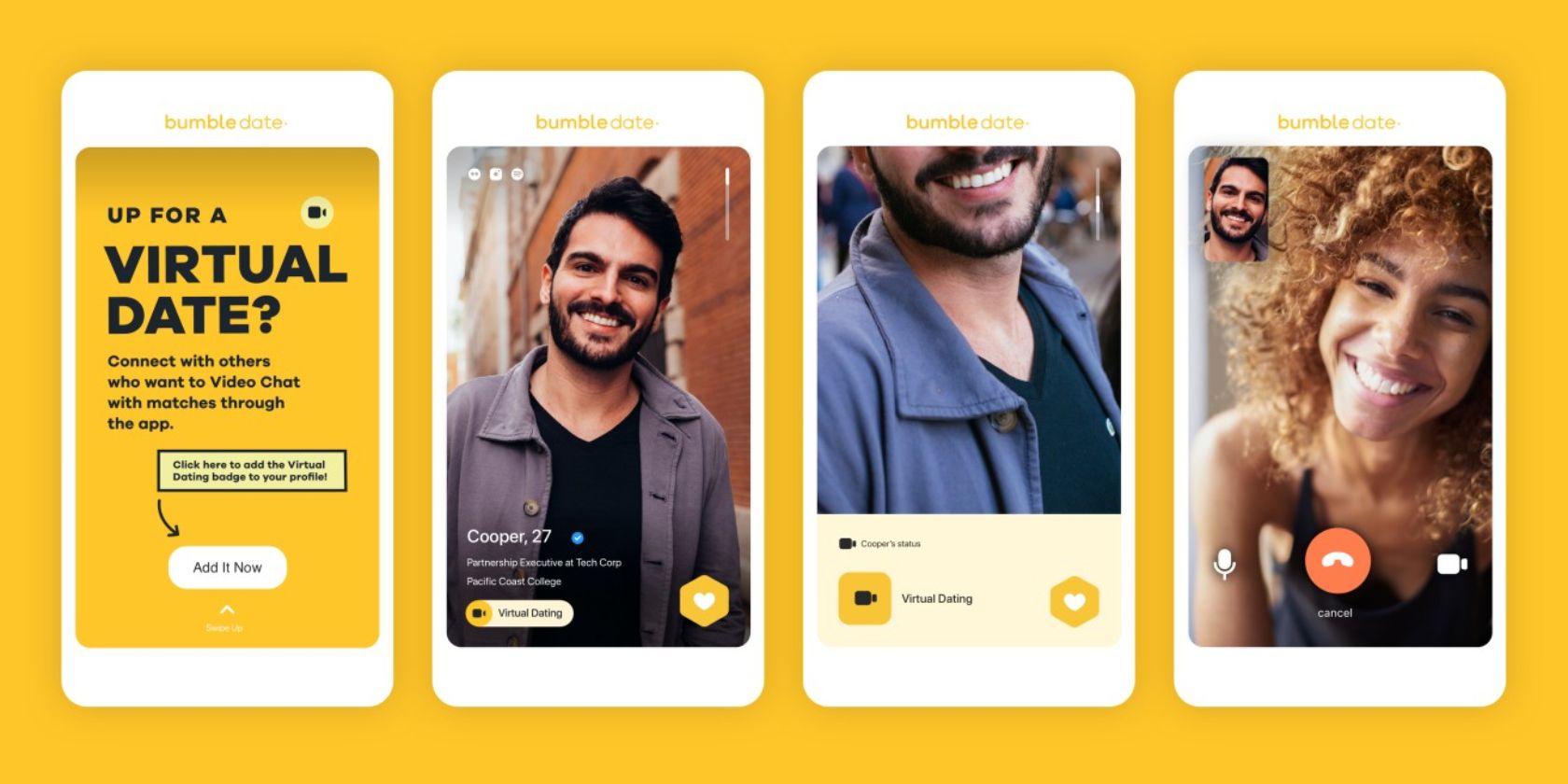
Bumble, the dating app which prides itself on doing things differently, has added new virtual dating tools. These tools are designed to help you meet new people online and build relationships with them. Even if you can’t actually meet them in real life.

How Does Dating Work During a Lockdown?

Bumble is a dating app which gained lots of users in a short time thanks to doing things differently than Tinder. One of the biggest differences is the way it requires women to make the first move, which is one of the reasons women flocked to use Bumble.

However, like all dating apps, Bumble has had its business model interrupted by the COVID-19 pandemic. With half of humanity under some kind of lockdown at the time of writing, meeting potential lovers in real-life that you met online has become impossible.

Meet Bumble’s New Virtual Dating Tools

To counter this, while also helping its users to continue forming relationships with potential partners, Bumble has launched a number of virtual dating tools. The company details these virtual dating tools in a post on Bumble.com.

First up is a Virtual Date Badge which lets people know you’re down to Video Chat. This will be displayed on your profile, and you’ll be added to the pool of people happy to Video Chat. You’ll also be able to filter matches to those displaying the Virtual Date Badge.

Next up are Audio Notes. These are short audio messages that your match can play at any time, and more than once. Bumble has also added the option to reply to specific messages, which is a standard feature on most dedicated messaging apps.

Last but not least, Bumble is allowing you to expand your Distance Filter. So, rather than being limited to matches who live within a 100-mile radius, you can move the slider all the way to the right and expand your pool of potential matches to the whole country.

How to Protect Your Privacy While Dating Online

With the prospect of meeting a new soulmate rather limited thanks to the coronavirus crisis, these new virtual dating tools could prove to be a Godsend. After all, long distance relationships can work sometimes. And this lockdown will end eventually…

Even if you’re unable to meet new people through online dating apps, you still need to keep your wits about you to avoid putting yourself at undue risk. So, with that in mind, here’s how to protect your privacy while online dating.

Read the full article: Bumble Adds New Virtual Dating Tools


Read Full Article

Turn Gmail Into a Powerful Collaboration Tool With These Apps


gmail-collaboration-tools

When it is time to collaborate with your team, there are plenty of extensive applications that can assist you. However, these days many of us still live in our inboxes. So, when you want to collaborate on emails received, those you are composing, or even hold a quick conversation, this can all be done right from your Gmail account.

Luckily, there are terrific tools and tips that can help. Let’s take a look at some of the best ones for your Gmail collaborative inbox.

Email Collaboration Tools That Can Help

1. Hiver

Hiver In Gmail

With the Hiver Gmail extension, you can manage your business right from your Gmail account by using labels, assigning tasks, delegating messages, and tracking the status of it all.

By using the shared labels, you and your team can be notified of new tasks quickly. Shared contacts allow for easier messaging, email reminders and snoozing help with follow-ups, notes allow for conversations, and reusable templates can provide your business with a uniform look.

In addition, Hiver provides a collision detection feature so that if another person in your organization is replying to a shared message, you will know it right away.

Hiver offers a free trial so that you can check out the features. Plan pricing varies for Hiver per month after the trial, based on the number of users, emails, templates, and other items.

2. Missive

Missive for Gmail In Browser

Missive is a wonderful web-based collaboration tool as it incorporates threaded chats directly in your inbox. The application also has options to snooze or archive chats, the ability to compose emails with teammates, and gives you a robust email application.

Once you sign up for a free account with Missive, you can create a group simply by entering your company name. Invite people to join, connect a current Gmail account to import your emails, and then you are on your way.

Collaborating is extremely simple. You can mention another team member to draw their attention to a particular message. Then, you can have a conversation regarding the email with a familiar text type of interface. You can also chat with your team members privately if necessary, edit messages, and attach files and photos.

For a complete email application with great features, easy collaboration, and an uncomplicated interface, Missive is a terrific choice. You can also take a look at Missive’s paid plans for additional team members and features.

3. Todoist

Todoist is easily one of the most popular task management apps and with Gmail collaboration, it is even more powerful. You can quickly convert messages into tasks, collaborate on shared projects, and check out to-do lists all from your inbox.

The application provides handy notifications, a workflow-fitting label system, comments with attachment capability, export function for iCalendar, real-time device syncing, and color-coded priority levels. All of these convenient features make collaborating directly from your Gmail inbox as easy as pie.

A standout feature of Todoist is its accessibility. You can use it on the web, your mobile devices, and as a browser extension. The application is available for free with premium and business version plan options for Todoist on a yearly subscription basis.

4. Keeping

If you and your team are Google Chrome users, then an application and Chrome extension called Keeping is one to check out for Gmail collaboration. This application is intended for businesses that provide email support and it contains an internal ticketing system.

Keeping provides a general help desk email box with open and unassigned, assigned to you, and closed sortable labels right at the top of your Gmail account. You can change a message status from open to closed, assign emails to users you set up, and use filters to see how many each user has been assigned.

The application allows for internal notes per message that your entire team can see, which is not only convenient but necessary for email support collaboration.

Keeping offers a free trial so that you can try it out. After that, there are Keeping plans available with pricing dependent on the number of users and shared mailboxes you need. As mentioned, Keeping is only available for Google Chrome.

5. Google Groups

Setting up a Google Group can help you and your team come together on ideas, topics, and emails from a collaborative inbox.

You simply create a new group, adjust basic permission settings, and invite your team. You can assign and resolve topics, manage helpful tags, and use filters to stay up to date. Posting messages and replies is easy, marking conversations as complete is done with a click, and viewing activity and obtaining a link to the stream is also very simple.

If you like to keep things uncomplicated with your business or just have a small number of team members, Google Groups is a collaborative tool to consider.

More Tools You Can Connect

1. Trello

Trello In Gmail

Trello offers its own ways to use their handy project management tool for collaboration. But if you are a Google Chrome user, there is a useful extension called Gmail-to-Trello that lets you add cards to boards. Once you install it and open an email in Gmail, you will see an Add Card button at the top. Select the button and then add the details in the pop-up window. Click the green +Trello button and you are set.

For more on using Trello with Gmail, check out our helpful guide.

2. Dropbox

Dropbox In Gmail

With Dropbox, Google Chrome users have access to an extension called Dropbox for Gmail. This helpful Dropbox tool will display the Dropbox button at the bottom of the compose email window. Just click that button, browse or search for a file or photo in the pop-up window, and then select Choose. This will send a link to that item to your recipient without you having to navigate from your inbox.

3. Google Drive

Google Drive In Gmail

For any browser that you use to access Gmail, Google Drive is an automatic option. Like with the Dropbox extension for Google Chrome, you should see a button for Google Drive at the bottom of the compose email window. Using Google Drive allows you to send either a link to the item or attach it directly to the message, giving you flexibility from your inbox.

Helpful Tips and Tricks

Collaborating with your team using Gmail does not always require you to use third-party applications or extensions. Although all of these tools are useful and wonderful options, if you have a very small team there are some simple tips and tricks you can use that already exist within Gmail.

Assign items with labels. Gmail offers helpful labels for you to keep your inbox and folders organized, but these handy tools can also be used for assigning tasks and calling attention to particular messages.

For example, you can set up color-coded labels for each member of the team. That way, both you and your team can spot emails that need attention at a glance.

Take advantage of filters. Gmail provides powerful filters that are quite useful and flexible. For instance, you can have all emails from Sue have a specific label applied and forwarded to Phil. As another example, you can have all emails with the word Project in the subject line receive a star and be marked as important.

Use the chat feature. Gmail has Google Hangouts built right into it which means you do not have to download another messenger application if your entire team uses Gmail.

You can chat via text or initiate a video or phone call with an individual or a group easily. Especially useful for remote teams, this feature allows you to collaborate throughout the day without leaving Gmail.

Be sure to check out these additional creative ways to get the most out of Google Hangouts.

Additional Tips:

  • Keep your subject lines clear and use keywords and consistency for assigning to-dos.
  • Keep your team in the loop by copying them on important messages.
  • Keep everyone up-to-date on keywords to use and the structure of subject lines.

Your Gmail Collaborative Inbox

Collaboration is key to many successful businesses. So using simple applications like Gmail with email collaboration tools like these can help your company in the long run.

For more, take a look at our power user’s guide to Gmail.

Read the full article: Turn Gmail Into a Powerful Collaboration Tool With These Apps


Read Full Article
After Installing Windows 10: 6 Things You Must Do


after-installing-windows10

Windows 10 is pretty easy to get started with, but for the best experience, there are some important things to do after installing Windows 10. Doing these takes a bit of time, but sets you up for a smoother time down the road.

Let’s look at the first things you should do after installing Windows 10. These are most important when installing it for the first time, but are worth checking after installing a major feature update, too.

1. Run Windows Update and Configure Update Settings

Even though you just installed Windows 10, chances are that some recent updates are pending. You should install these right away to make sure you have the latest features and security patches.

To check for Windows updates, open the Settings app and go to Update & Security > Windows Update.

On this page, click Check for updates and give it some time. After a few moments, it will begin to download and install updates. If there are any that require a restart, you’ll see a prompt to do so.

Windows 10 May 2019 Windows Update

Windows Update runs automatically in Windows 10. While this means less manual work on your part, it can also be a pain if it interrupts you.

Learn how to manage Windows Update to make it work smoothly in the background.

2. Upgrade Your Hardware Drivers

Computer logic board

A device driver is a piece of software that interfaces with and controls how a particular device works when connected to your system. In other words, drivers allow Windows to communicate with hardware properly.

Drivers are usually provided by hardware manufacturers, and like most software, aren’t always perfect. Sometimes they’re buggy or don’t see updates for compatibility with the latest versions of Windows.

Keeping drivers updated is important to make sure your hardware runs at optimal performance. Windows will install generic drivers for devices like keyboards and mice on its own, but you should also know how to update other important drivers, such as display drivers.

See how to find and replace outdated drivers for instructions.

3. Install Essential Windows Software

Windows 10 comes with basic apps for many purposes, but a lot of the best Windows software isn’t pre-installed. We’ve written a full guide to the Windows software that everyone should install right away.

Take a look at that for our recommendations in categories like browsers, security, image editing, messaging, and more.

4. Change Default Windows Settings

Windows 10’s out-of-the-box settings aren’t optimal for everyone. They’re usable, but you’ll probably have a better experience by tweaking them.

There’s a lot to manage in Windows 10’s Settings app, so let’s consider a few key recommended changes after a Windows 10 installation.

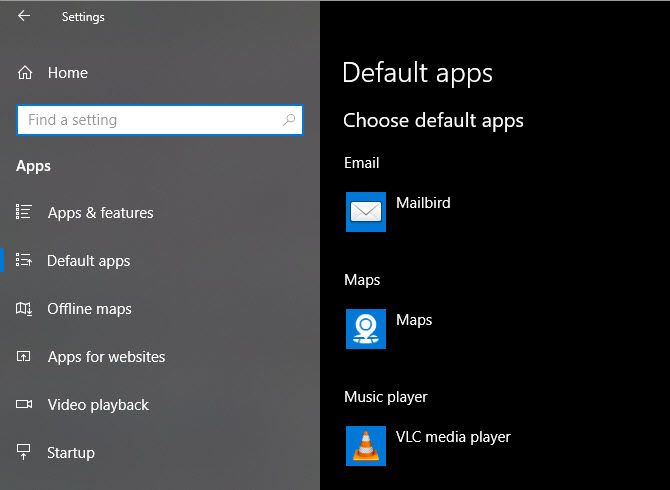
Adjust Default Apps

Windows 10 Default Apps Settings

After you’ve installed your favorite apps, you should set them to run by default. To change the preset default apps in Windows 10, perform the following:

  1. Head to Settings > Apps > Default apps.
  2. Select your preferred apps for each category, including Email, Music player, Web browser, and more.
  3. Below that, click on Choose default apps by file type to associate various programs with other file types, such as PDF, DOCX, and TXT.

See our guide to setting defaults in Windows 10 for more help with this.

Disable Unnecessary Startup Items

Windows Startup Programs Task Manager

Many apps set themselves to run at startup, which is a waste of resources and makes your computer take much longer to boot up. After you’ve installed software, you should make sure that only approved apps run at boot.

To disable unnecessary startup items in Windows 10:

  1. Open the Task Manager with Ctrl + Shift + Esc.
  2. Click More details to switch to the full view, if needed.
  3. Switch to the Startup tab.
  4. Right-click on every app you don’t want to start automatically and select Disable to prevent it from launching on startup.

We have a full guide to managing startup apps on Windows 10 if you’d like to learn more.

Optimize Power Plan Settings

power plan settings

Windows 10’s Power Plan settings allow you to tweak various aspects of the operating system that involve power usage. This is important to help laptop users save battery life, but also has useful settings for desktop users.

You can then tweak your power plan using these steps:

  1. Head to Settings > System > Power & sleep.
  2. On the right side, choose Additional power settings to open the Power Options section of the Control Panel.
  3. You’ll see several plans to choose from, including Balanced, Power Saver, and High performance. Select the plan you want, then click Change plan settings to the right to modify it.
  4. Choose the amount of time that passes before the screen turns off and the computer goes to sleep. Then click Change advanced power settings for more options.
  5. While you can review everything here, pay special attention to the settings under the Hard disk, Sleep, Power buttons and lid, Processor power management, and Display categories.
  6. Click OK to save your changes.

See how to use your Windows 10 power button for more information.

Tweak Privacy Settings

Windows 10 collects all sorts of information about how you use the operating system. This helps Microsoft improve the ever-evolving product, but many view it as an invasion of privacy. Thankfully, you can reduce or disable a lot of the telemetry functions.

Follow our complete guide to Windows 10 privacy settings for all you need to know.

Enable Night Light

Windows 10 Night Light

Windows 10 includes a built-in feature that makes your screen display warmer at night. This helps reduce the blue light that keeps you awake and makes your computer less harsh to look at when working late.

You can enable it by visiting Settings > System > Display. Enable the Night light slider and click Night light settings to change how it works. You can adjust the intensity of the effect and set it to run automatically from sunset to sunrise or during certain hours of your choice.

5. Set Up a Backup Plan

Windows 10 File History Options

You wouldn’t want to go through all this setup only to have your computer ruined by a virus or dead hard drive. It’s vital to back up your data to protect it from these and other dangers.

Consult our guide to backing up and restoring data in Windows 10 to learn everything you need to know, including how backups work, where to store them, how often you should back up data, what software to use, and much more. We’ve also explained which files you should back up and which to skip.

6. Personalize Windows 10

Windows 10 Change Wallpaper

While it’s not important as the above, you should still take some time to customize your desktop after installing Windows 10. It’s amazing what a fresh wallpaper, unique mouse cursor, and other small personalization tweaks can do to make your system feel like home.

You have plenty of options for this. For some quick changes, we’ve shown how to change the look and feel of Windows 10. To get more in-depth, try some of the best tools to customize Windows 10.

After Installing Windows 10, You’re All Set

Now you don’t have to wonder what to do after installing Windows 10. We’ve looked at the essential steps to get your system ready for everyday use. While you might still have to make small tweaks here and there, the initial setup is most of the work.

On the flip side, make sure you know what to do before installing a major Windows 10 update to minimize upgrade problems.

Read the full article: After Installing Windows 10: 6 Things You Must Do


Read Full Article

6 Real-Life Video Game Injuries and How to Avoid Them


Video games offer a wonderful escape from the real world, and are a great way to have fun and relax. There’s no doubting the benefits of playing video games. However, video game injuries, if suffered, take the enjoyment out of gaming.

While your characters will often die or be badly injured, it’s also possible for gamers themselves to suffer an injury while gaming. Some are more severe than others and common video game injuries include carpal tunnel syndrome and neck pain.

In this article, we list a number of video game injuries and explain how to avoid them.

1. Computer Vision Syndrome

Man looking at screen
Image Credit: Amateur Hub/Pexels

Computer vision syndrome isn’t specific to video games, but rather any extended periods of time spent looking at a screen close-up. However, since many games have that addicting “just one more turn” feeling, it’s likely that you will experience this: around 90 percent of people who spend more than three hours at a screen will.

It’s a condition caused by looking at a screen for so long without letting your eyes relax. Focusing on something nearby for so long puts tension on your eyes. You might notice dry or irritated eyes, blurred vision, headaches, and more as a result.

The best solution is to not play games for hours on end. You should also consciously blink if you feel your eyes getting tired and employ the 20-20-20 rule. This means that every 20 minutes, look at something 20 feet (6.1 meters) away for 20 seconds. This allows the eyes to relax.

2. Neck and Back Pain

Physical therapy
Image Credit: Jesper Aggergaard/Unsplash

Sitting is a major killer and you won’t help the situation by slouching in your chair or couch. Sitting increases the pressure on your lower back at the best of times—if your posture is poor, that pressure is greater.

This increased pressure will wear down the bones and joints. You’ll feel the pain all over your body, but primarily in the back and neck.

Ideally, you should do some exercise every day to keep your body fit. If this isn’t possible, at the very least take a break every half hour or so to get up and walk around. It will stop your body seizing up.

While gaming, ensure your posture is correct. Sit up straight, keep the TV or monitor at eye level, arms at 90 degrees, with your feet flat on the floor. You should also invest in a supportive chair if you can afford one.

3. Carpal Tunnel Syndrome

Holding games controller
Image Credit: Deeana Creates/Pexels

Carpal tunnel syndrome is when the bones and ligaments in the wrist have narrowed. This then causes the median nerve, which runs through the tunnel from your upper arm to the palm of your hand, to be pinched.

This is an issue because that tunnel is very slim. Any strain is going to be felt in your hand and cause a tingling sensation. This will then progress to numbness and pain.

One way that carpal tunnel syndrome occurs is due to repeatedly bending the wrist, like when typing or clicking the mouse, or from holding a controller for a long time.

You can wear a wrist splint at night to help keep the wrist straight. Also, you can try wrist exercises, though there’s limited evidence to their usefulness. Ideally, buy ergonomic equipment such as vertical mice to reduce the wrist strain.

4. Seizure

LED lights
Image Credit: Tayla Jeffs/Unsplash

You might have noticed that many video games come with an epilepsy warning. This is because video games were medically recorded as causing seizures in the early 1980s, after which console manufacturers were required to include epilepsy warnings with their systems.

You are only at risk of a seizure if you suffer from photosensitivity. In video games, the seizure can be brought on by aspects like lights flashing repeatedly or stripes of contrasting colors. Some games do have a setting to turn off specific elements that might cause a seizure, so do check for this.

The chance of suffering a seizure is small, but it’s still a risk. You should know if this applies to you. Speak to a doctor if so. Advice they might give you, short of not playing video games at all, is to sit further back from the screen, adjust the screen’s brightness, and be surrounded by natural light.

5. Full-Contact Injuries

Playing VR
Image Credit: David Dvorácek/Unsplash

Gaming used to be a sedentary hobby, but the advent of the Wii took many people off their couch… and swinging their bodies around wildly. News reports at the time talked of gamers who had fallen over or whacked someone in the face with a controller.

It wasn’t just people that were being damaged, but TV screens too! In fact, Nintendo had to issue advice on how to use the Wii controllers safely and started packing them in protective silicone to try to limit damage.

While the Wii is an old console now, similar physical injuries are still a risk. With virtual reality growing, it’s still possible to have a full-contact injury while gaming. Before playing, ensure that you have enough space around you and that you hold on to the controllers properly.

If you’re about to play an intense game, you might even want to stretch and warm up.

6. Obesity

Fast food
Image Credit: Christopher Williams/Unsplash

Being obese means that you’re severely overweight. While it isn’t an injury in itself, it is a condition that will lead to problems.

Children are spending less time outdoors and more time inside playing games. Leading a sedentary lifestyle is more likely to cause obesity due to the lack of physical exercise. There’s also some evidence to show that obsessive gamers eat more while gaming, even if they’re not hungry.

The easiest way to combat this is to get outside and work out. Go for a run, play a sport, or hit the gym. To ease into this, you could try some physical fitness video games, like those that get you dancing or exercising.

Work Out and Stay Active

While there’s no doubting the joys of gaming, it isn’t a hobby you should do all of the time. Many of these injuries can be avoided simply by spending less time playing games and more time being physically fit.

To help keep yourself fit and healthy, use the best workout apps to get in shape.

Read the full article: 6 Real-Life Video Game Injuries and How to Avoid Them


Read Full Article