23 March 2020

The 6 Best Cheap Computer Chairs


best-computer-chairs-students

Whether you’re creating the perfect home office setup, or need a new chair for your workplace, there’s a lot of choice out there. There are expensive models from brands like Herman Miller, but they don’t always offer the best value.

The chair you choose needs to support your posture, protecting your shoulders and lower back from harm. With that in mind, here are the best cheap computer chairs available today.

How to Buy the Perfect Computer Chair

So we know that each person needs different things from a budget computer chair, but it’s not like there is a huge range of options. Depending on your body type, work environments, budget, and other requirements, here are a few thumb rules to go by.

  1. Fabric vs. leather vs. mesh: A mesh back and seat is best if you work in a space which doesn’t have central air or air conditioning. Fabric or leather backs and seats are preferred for enclosed office spaces. And don’t buy fabric or leather upholstery in budget computer chairs, they don’t last long.
  2. The adjustment essentials: Look for a chair that lets you adjust three basic factors: the height of the seat, how far the back can tilt, and the height of the armrests.
  3. Discounted furniture resellers: If you’re on a budget, look for office furniture resellers or any other discount outlets. You might pick up a $1,000 dollar chair for $100 to $150, if you’re lucky.

Best Affordable Computer Chair:
HON Exposure

HON Exposure HON Exposure Buy Now On Amazon $256.99

Almost every site recommends the IKEA Markus as the best affordable office or computer chair. Almost. The Wirecutter says the HON Exposure is better, and given their extensive testing, it’s worth recommending.

The main reasons for choosing the HON Exposure over the Markus is its ability to adjust. As mentioned earlier, it offers the three essentials of adjustment: the arms, the height, and the tilt. But it also lets you change the seat depth, which is a small but nice feature for those who are shorter or taller than average.

But as always, you need to sit in the chair before making a decision. So find a HON shop, or an online retailer with a good returns policy, and try it out.

Alternative Affordable Computer Chair:
IKEA Markus

IKEA Markus Office Chair

If you can’t find a HON shop but it’s easier to find an IKEA, go try the IKEA Markus. And if you like it, buy it. It’s one of the internet’s favorite computer chairs, so you can’t go wrong with it.

It isn’t as adjustable as the HON Exposure, but the IKEA Markus’s tall back and firm seat cushion has its own set of fans. While The Wirecutter found HON Exposure’s seat to be better, long-term users of the IKEA Markus swear by their Homer Simpson-esque indentation.

Best Budget Computer Chair:
Smugdesk High-Back Mesh Chair

Smugdesk High-Back Mesh Chair Smugdesk High-Back Mesh Chair Buy Now On Amazon $98.99

If you spend eight or more hours in your office chair, consider getting a high-back chair with a headrest. Your neck will thank you for it. The Smugdesk High-Back Mesh Chair is one of the best-reviewed chairs on Amazon that is budget-friendly and still comes with a headrest.

The headrest is adjustable to a few inches and tilts slightly, so you can get the bit fit depending on your height. The chair also has adjustable armrests, and comes with a lumbar cushion that will mold to your body with usage, thus offering better lower back support.

It meets all the other basic requirements of a good budget chair, with its mesh back and adjustable seat height and tilt. Smugdesk has also included a Rocking Mode for relaxation.

Best Cheap Computer Chair:
AmazonBasics Mid-Back Chair

AmazonBasics Mid-Back Desk Office Chair AmazonBasics Mid-Back Desk Office Chair Buy Now On Amazon $72.49

It’d be a mistake to distrust the online retailer’s AmazonBasics line. Although the items have an entry-level price, they represent great value, too. That’s especially true of the AmazonBasics Mid-Back Office Chair. For a basic budget office or computer chair, you won’t get anything better at this price.

Sadly, it doesn’t meet the three-adjustment criteria as it lacks adjustable arms. That said, it has a nice mesh back, a decent seat—it’s a bit rigid, and you might need a new cushion after six months—and can hold up to 225 pounds.

At this price, you have to ignore any long-term warranty claims though. Sure, if things go wrong in the first week or two, Amazon will probably help you out. But six months to a year after the purchase, good luck with your clams.

Best Computer Chair With Mesh:
Herman Miller Aeron

Herman Miller Aeron Herman Miller Aeron Buy Now On Amazon $1,395.00

The Herman Miller Aeron is a medium-back chair, which means it ends below your neck and doesn’t have a headrest. But given how it gets everything else right, it’s the best medium-back you can buy.

This is among the few chairs we are comfortable recommending for those who share the chair. Make sure it fits the height and weight of those sharing it, or pick the best for yourself alone, based on the three height and weight sizes Herman Miller offers.

It’s easy to share because of how you can quickly adjust it. The lumbar support is especially worth noting, as you can change the pressure it applies at eight different points. Even with varied height and size, you’ll get the right support.

The Aeron uses a mesh back and a mesh seat, but it’s as comfortable as any leather-upholstered chair you have sat on. In fact, the Aeron’s natural curves make sure you are in the right position and don’t sit up straight at your desk, since that’s bad for you.

Best Computer Chair With Fabric and Headrest:
Steelcase Gesture

Steelcase Gesture Steelcase Gesture Buy Now On Amazon $1,222.00

Let’s take a moment to make the small distinction between “computer chair” and “office chair”. An office chair is about interacting with a desk. A computer chair is about interacting with a laptop or a PC with your arms. Steelcase seems to have got that while making the Steelcase Gesture, which has fully twist-able armrests.

When your arms form a V shape to type on the keyboard, the armrests oblige. When you’re using just a mouse with one hand, the armrest will stay straight under your hand. It’s the most-talked-about feature of the Steelcase Gesture from anyone who has used it.

It is also incredibly adjustable. You can move the seat back and forward, and up and down; you can change how far inside or outside the arms are, as well as move them up and down; and you can change the back’s tilt angle as well as tension. It’s as customizable as it can be.

Steelcase also has one little feature that Herman Miller doesn’t offer on its Aeron: a headrest. A headrest isn’t a deal-breaker, but it’s nice that Steelcase gives you the option.

Best Cheap Computer Chair for Big or Tall People:
Hercules Series 500

Hercules Series 500 Hercules Series 500 Buy Now On Amazon $261.79

Choosing the best chair for you will depend on your height and weight. Not many manufacturers make products designed for taller or larger people. However, the Hercules Series 500 can handle 500 pounds of weight for 24/7 use. There are several different models for weight and height, based on your needs.

Unfortunately, the seat depth and width isn’t adjustable, but at 22 x 22 inches, it should suffice for most users. The most appreciated part about the chair has been its extra 4-inch thick foam padded seat, which makes it comfortable for long hours. Apart from that, you get a high-back design, built-in lumbar support, and tilt-lock.

If the Hercules chair doesn’t quite suit your needs, take a look at the AmazonBasics Big & Tall Executive Chair as well.

Try the Chair Before Buying

Good chairs aren’t one-size-fits-all solutions. In fact, how a chair feels will differ wildly based on your own height, weight, and shape. So don’t buy a chair purely because it ranks highest in a list. If possible, you need to go to a store and try it yourself.

This is doubly true for budget or cheap computer chairs. When it comes to cheap parts and materials, chances are, the chair that feels right the first time you sit in it is going to be the chair that feels right for a long time. There is simply no substitute for trying before buying. If you don’t try, you might regret the purchase later.

The bottom line is, use this list to prune your choices and come up with a list of three or four options. Then go try them out, and buy what your body likes best. If you aren’t able to make it to a store, check the online retailer’s returns policy before you buy.

That said, no chair is going to protect you from the health issues of sitting too long. Even if you buy the best cheap computer chair, please make sure you take breaks from that sitting position to move around from time to time.

The Best Affordable Computer Chair

At the end of this guide, you should be able to find a cheap computer chair that protects your body from potential harms. The main thing to remember is to try out the chair yourself before buying it, whether it’s a budget buy or a premium ergonomic chair.

But remember, sitting too long is unhealthy. A break from a sitting position doesn’t have to be a break from work—especially if you use an one of these adjustable standing desks. In case you’re in a productive mood, stand up and keep working!

Read the full article: The 6 Best Cheap Computer Chairs


Read Full Article

Google Cloud launches Game Servers, a managed cloud backend for games


Google Cloud today announced the beta launch of Game Servers, a managed service that provides game developers with the usual backend services for running their games, including multi-player games, in the company’s cloud. It’s worth stressing that these are not game streaming servers but solely meant to make it easier for game developers to build, scale and manage the backend services for their games.

The service sits on top of the Agones open-source game server, a project Google and Ubisoft first announced in 2018, and the Kubernetes container orchestration platform. As Google Cloud product manager Scott Van Woudenberg also told me, the team is also reusing some parts of Anthos, Google’s service for managing multi-cloud Kubernetes clusters. And while Game Servers can currently only run on the Google Kubernetes Engine, the plan is to allow for hybrid and multi-cloud support later this year.

Quite a few gaming companies have already built their own on-premises server fleets, so just like in the enterprise, having hybrid-cloud capabilities is a must-have for a tool like this. Google will also make it easy for developers who already use Agones outside of Game Servers today to bring those servers into the same managed Game Servers ecosystem by registering them with the Game Servers API.

As Van Woudenberg noted, virtually every game now needs some kind of cloud backend, be that for multi-player features, match-making or keeping persistent game stats, for example. That’s true for indie developers and major game studios. Game Servers, ideally, will make it easier for these companies to scale their clusters up and down as needed. Game Servers also provides for A/B testing and canary tests, and in future updates, it will include integrations with the Open Match matchmaking framework.

To get started, developers still have to containerize their game servers. For those companies that already use Agones, that’s a pretty straightforward exercise, Van Woudenberg said. Others, though, need a bit more help with that and Google is working with partners to walk them through this.


Read Full Article

The weird history of the "sex chromosomes" | Molly Webster

The weird history of the "sex chromosomes" | Molly Webster

The common thinking on biological sex goes like this: females have two X chromosomes in their cells, while males have one X and one Y. In this myth-busting talk, science writer and podcaster Molly Webster shows why the so-called "sex chromosomes" are more complicated than this simple definition -- and reveals why we should think about them differently.

Click the above link to download the TED talk.

Facebook Messenger provides governments, agencies with free developer tools to combat Covid-19


Big tech has been making a huge effort to mobilize its power to help people work better together to battle the ongoing coronavirus pandemic — whether it’s creating search and information portals or making sure the most authoritative voices are surfacing above the noise, or gathering compute power to supercharge research efforts to find vaccines.

Today, it is the turn of Facebook: the company announced a number of initiatives around Messenger, its messaging platform with 1.3 billion users, to help use the service to facilitate better communication around the coronavirus outbreak. It is now partnering with developers to provide free services to government and UN health organizations to create better information tools for people to use; and it’s launching a virtual (online) hackathon to see how developers can create messaging solutions to help promote some of the important aspects of fighting the  virus, such as social distancing and more general information services.

The moves come at a critical time. Facebook hasn’t had the best couple of years when it comes to public opinion — with many users increasingly concerned about their privacy and data protection on the platform, and getting more aware of how it can be used as a tool for manipulating public opinion. But for now, there’s been a stay put on that whole mess.

Facebook has identified and been working hard to battle misinformation about the coronavirus pandemic on its site, and it has also emerged as a helpful platform when it comes how ordinary people are using it to manage  communication during the coronavirus pandemic. Many communities are turning to Facebook, and other tools that it owns like WhatsApp, to coordinate communication to help those who are self-isolating, or simply people looking for advice as they start to figure out how to work, live, educate and take care of themselves in these unprecedented circumstances.

The distancing measures that are getting put in place in many cities and countries — which include things like closing schools, restaurants, theaters, and other places where people congregate, and extend also to fully locked-down quarantines with people staying in their homes — are an unprecedented disruption of our daily lives, and that’s putting a lot of focus on communication platforms like Messenger and the internet to keep us connected.

“As is common in any crisis, people are using digital channels like Messenger to stay connected and get information from trusted health authorities that are on the front lines fighting this global pandemic,” writes Stan Chudnovsky, the VP of Messenger.

While there is no charge to put such services on Messenger at the moment, developers might normally charge organizations to build these experiences, which could include bots with automated responses to questions, or guidance on how to use Messenger to broadcast information and updates more effectively, or how to switch from automated response bots to direct conversations with live people when needed: that is the part that Facebook has now negotiated to be done for no charge.

The services are already being used by UNICEF, Pakistan’s Ministry of National Health Services, Regulations & Coordination (NHSRC), and Argentina’s Ministry of Health, which is working with Botmaker.com to answer questions from the public about the coronavirus, including advice.

As for the hackathon, it’s being organised with Devpost, and while it may sound like fun, these are often amazing testbeds to surface innovation. Yes, you might think that the most important innovation right now has to be on the drug research side, but innovation in messaging is also of huge importance as we look for ways of both keeping people informed and calm.

“Participants will be encouraged to build both global and local solutions and will receive unique access to Messenger-related content, including Facebook Live tutorials with product experts and a range of educational materials to support innovation,” Chudnovsky notes. Winners will get mentoring from Facebook engineers to help make these solutions a reality. They’ll also receive invitations to attend F8 2021, including flights and accommodations, and will be given the opportunity to participate in the F8 hackathon, he added.


Read Full Article

How to Import MailChimp Subscribers to Google Sheets


The Gmail Mail Merge addon can now import the email addresses of subscribers from your MailChimp mailing lists into Google Sheets. If you wish to send emails to your subscribers directly from Gmail, instead of using MailChimp mail servers, this is the way to go.

As a developer, you can use Google Apps Script to import subscriber lists, HTML campaigns, performance reports and any other data from MailChimp to Google Sheets for analysis. You can use the MailChimp OAuth2 library but in this example, we’ll use the developer key directly to connect to MailChimp.

Get the MailChimp Developer Key

In your Mailchimp account, navigate to the Account page. In the drop-down menu, select Extras, and then API keys. Click Create A Key and make a note of it.

Google Apps Script - Get MailChimp Audiences

const MAILCHIMP_API_KEY = '<<API_KEY_HERE>>';

// MailChimp API key includes the data center id
// that your MailChimp account is associated with
const makeHttpRequest = (endpoint, params = {}) => {
  const [, mailchimpDataCenter] = MAILCHIMP_API_KEY.split('-');
  const url = `https://${mailchimpDataCenter}.api.mailchimp.com/3.0/${endpoint}`;
  const qs = Object.keys(params)
    .map(key => `${key}=${params[key]}`)
    .join('&');
  const apiUrl = qs ? `${url}?${qs}` : url;
  const request = UrlFetchApp.fetch(apiUrl, {
    method: 'GET',
    headers: {
      Authorization: `Basic ${Utilities.base64Encode(`labnol:${MAILCHIMP_API_KEY}`)}`
    }
  });
  return JSON.parse(request);
};

const getListMembers = (id, offset) => {
  const { members } = makeHttpRequest(`lists/${id}/members`, {
    count: 100,
    offset,
    fields: 'members.email_address',
    status: 'subscribed',
    sort_field: 'last_changed',
    sort_dir: 'DESC'
  });
  return members.map(({ email_address: email }) => [email]);
};

// Get a list of all subscribers of a specific
// MailChimp mailing list, you can retrieve the email address,
// name and subscription statues of subscribers
const getMailChimpListMembers = id => {
  let hasMore = true;
  let data = [];
  do {
    const emails = getListMembers(id, data.length);
    data = [...data, ...emails];
    hasMore = emails.length > 0;
  } while (hasMore);
  return data;
};

// Get a list of all audiences / lists from MailChimp
const getMailChimpLists = () => {
  const params = { count: 10, fields: 'lists.id,lists.name', sort_field: 'date_created', sort_dir: 'DESC' };
  const { lists = [] } = makeHttpRequest('lists', params);
  return lists.map(({ id, name }) => ({ id, name, members: getMailChimpListMembers(id) }));
};

The GetMailChimpLists method will bring all the lists and associated email addresses in a JSON object that you can easily write to Google Sheets using the SpreadsheetApp service.


Sabotage


Sabotage

IBM, Amazon, Google and Microsoft partner with White House to provide compute resources for COVID-19 research


During today’s White House coronavirus task force press conference, President Trump announced the launch of a new public/private consortium to “unleash the power of American supercomputing resources.” The members of this consortium are the White House, the Department of Energy and IBM. Other companies, including Google, Amazon and Microsoft, as well as a number of academic institutions, are also “contributing lots of different things,” the president said.

While Trump’s comments were characteristically unclear, IBM provided more details, noting that it is working with a number of national labs and other institutions to offer a total of 330 petaflops of compute to various projects in epidemiology, bioinformatics and molecular modeling. Amazon, Google and Microsoft are also part of the consortium, which is being led by IBM, the White House Office of Science and Technology Policy, and the Department of Energy.

IBM and its partners will coordinate the efforts to evaluate proposals and provide access to high-performance computing resources to those that are most likely to have an immediate impact.

“How can supercomputers help us fight this virus? These high-performance computing systems allow researchers to run very large numbers of calculations in epidemiology, bioinformatics, and molecular modeling. These experiments would take years to complete if worked by hand, or months if handled on slower, traditional computing platforms,” writes Dario Gil, IBM’s Director of Research.

AWS has already dedicated $20 million to support COVID-19 research while Microsoft has already announced a number of different initiatives, though mostly around helping businesses cope with the fallout of this crisis. Google has now launched its own coronavirus website (though it’s very different from the one Trump once promised) and Alphabet’s Verily is helping Bay Area residents find testing sites if needed. It’s unclear what exactly Google and Microsoft will contribute to these current efforts, though. We’ve reached out to both companies and will update this post if we hear back.

“Today I’m also announcing the launch of a new public/private consortium organized by the White House, the Department of Energy and IBM to unleash the power of American supercomputing resources to fight the Chinese virus,” Trump, who continues to insist on calling COVID-19 ‘the Chinese virus,’ said in today’s press briefing.

“The following leaders from private industries, academia and government will be contributing and they are gonna be contributing a lot of different things, but compute primarily — computing resources to help researchers discover new treatments and vaccine. They will be working along with NIH and all of the people working on this. But tremendous help from IBM, Google, Amazon, Microsoft, MIT, Rensselaer Polytechnic Institute, the Department of Energy’s, the National Science Foundation and NASA. They are all contributing to this effort.”


Read Full Article

22 March 2020

With kids and adults staying at home, are virtual worlds ready for primetime?


We’ve been diligently following the development of virtual worlds, also known as the “metaverse,” on TechCrunch.

Hanging out within the virtual worlds of games has become more popular in recent years with the growth of platforms like Roblox and open-world games like Fortnite, but it still isn’t a mainstream way to socialize outside of the young-adult demographic.

Three weeks ago, TechCrunch media columnist Eric Peckham published an in-depth report that positioned virtual worlds as the next era of social media. In an eight-part series, he looked at the history of virtual worlds and why games are already social networkswhy social networks want more gamingwhat the next few years looks like for the industry and why isn’t it mainstream alreadyhow these virtual worlds will lead to healthier social relationswhat the future of virtual economies will be and which companies are poised for success in this new market.

Given all that has changed in just the last three weeks — who would have thought that large swaths of the knowledge economy would suddenly find themselves entirely interacting virtually? — I wanted to get a sense of what the rising popularity of virtual worlds looks like in the midst of the outbreak of novel coronavirus. Eric and I had a call to discuss this and decided to share our conversation publicly.

Danny Crichton: So let’s talk about timing a bit. You wrote this eight-article series around virtual worlds and then all of a sudden post-publication there is this massive event — the novel coronavirus pandemic — causing a large portion of the human population to stay at home and interact only online. What’s happening now in the space?

Eric Peckham: I wrote my series on the multiverse because I was already seeing a surge of interest, both in terms of consumer demand for open-world MMO games and in terms of social media giants like Facebook and Snap trying to incorporate virtual worlds and social games into their platforms. Large companies are planning for virtual worlds in a way that is actionable and not just a futuristic vision. Over the last couple of years there has also been a lot of VC investment into a handful of startups focused on building next-generation virtual worlds for people to spend time in, virtual worlds with complex societies shaped by users’ contributions.

Talking to founders and investors in the gaming space, there has been a huge increase in usage over the last few weeks as more people hang out at home playing games, whether it’s on the adult side or the kid side.

Most of these next-generation virtual worlds are still in private beta but already popular platforms like Roblox, Minecraft, and Fortnite are getting substantially more use than normal. A large portion of people stuck at home are escaping via the virtual worlds of games.

You wrote this whole analysis before you knew the extent of the pandemic — how has the outlook changed for this industry?

This accelerates the timeline of virtual worlds being a mainstream place to hang out and socialize in daily life. I think people will be at home for multiple months, not just a couple of weeks, and it’s going to change people’s perspectives on socializing and working from home.

That’s a really powerful cultural shift. It’s getting more people beyond the core gaming community excited about spending time in virtual worlds and hanging out with their friends there.

We have seen this most heavily with the youngest generation of internet users. The majority of kids 9-12 years old are users of Minecraft and Roblox who hang out there with friends after school. We’ll see that expand to older demographics more quickly than it was going to before.

One of the complaints that I’ve seen on Twitter is that even though we have one of the largest global human lockdowns of all time, all the VR headsets are basically gone. Is VR a key component of virtual worlds?

Well, you don’t need VR headsets in order to spend meaningful time with others in a virtual space. Hundreds of millions of people already do it through their mobile phones and through PCs and consoles.

This is at the heart of the gaming industry: creating virtual worlds for people to spend time in, both pursuing the mission of whatever a game is designed for but also interacting with others. Among the most popular mobile and PC games last year were massively multiplayer online (MMO) games.

Talking about gaming, one facet of the story that I thought was particularly interesting was the fact that gaming was still not that high in terms of market penetration in the population.

More than two billion people play video games in the context of a year. There’s incredible market penetration in that sense. But, at least for the data I’ve seen for the U.S., the percent of the population who play games on a given day is still much lower than the percent of the population who use social media on a given day.

The more that games become virtual worlds for socializing and hanging out beyond just the mission of the gameplay, the more who will turn to virtual worlds as a social and entertainment outlet when they have five minutes free to do something on their phone. Social media fills these small moments in life. MMO games right now don’t because they are so oriented around the gameplay, which takes time and uninterrupted focus. Virtual worlds in the vein of those on Roblox where you just hang out and explore with friends compete for that time with Instagram more directly.

Theater chains like Regal and AMC announced this week that they are entirely shutting down to wait out the pandemic. Is that going to affect these virtual world companies?

I think they are separate parts of media. Cinema attendance has been declining quite substantially for years, and the way the industry has made up for that is trying to turn cinemas into these premium experiences and increasing ticket prices. Kids are just as likely, if not more likely, to play a game together on a Friday night as they are to go to the cinema. Cinemas are less culturally relevant to young people than they once were.

We’ve seen a massive experiment in work from home, which is a form of virtual world, or at least, a virtual workplace. When it comes to popularizing virtual worlds, is it going to come from the entertainment side or the more productivity-oriented platforms?

It will come from the entertainment side, and from younger people using it to socialize, in part because there’s less fear around cultural etiquette compared to people meeting in a business setting who are worried about a virtual world context not feeling as professional. Over time, as virtual worlds become pervasive in our social lives they will become more natural places to chat with people about business as well.

As more and more people are working online and interacting virtually, a big question is how you get beyond Zoom calls or the technology that’s currently in the market for virtual conferences to something that feels more like walking around and chatting with people in person. It’s tough to do without the ability to walk around a virtual space. You can’t have those unplanned small group or one-on-one interactions with people you don’t know if you’re just boxes within a Zoom call or some other broadcast. It will be interesting to see what develops around virtual business conferences that stems from virtual world technology. I’ve seen a few teams exploring this.

Last question here, but we are looking at a major recession in the economy, and so how does the landscape of people earning money from virtual worlds change with coronavirus?

The second-to-last article in my series is about the virtual economies around virtual worlds. Any virtual world inherently has commerce and people have already been making real-world money from games and from early virtual worlds like Second Life.

Both people staying home amid the coronavirus and the recession that we seem to be entering are pressures that will push more people to look online for ways to make money. That will only increase the activity of virtual economies around some of these worlds, whether those are formally built into the game or they’re happening in a gray or black market around the games (which is more common).

Thanks, Eric.


Read Full Article

The HTML Essentials Cheat Sheet: Tags, Attributes, and More


A screenshot of HTML code

Building webpages begins with HTML. Beautifying them and making them interactive comes later. But to start creating functional static websites, you need an understanding of HTML. (Want a quick introduction to this markup language? Read our HTML FAQ.)

As part of learning the language, there’s a long list of elements you need to add to your HTML vocabulary. And this task can seem daunting at first, which is why we have come up with the following cheat sheet. It gives you an easy way to discover/understand/recall HTML elements any time you need them.

The cheat sheet covers tags and attributes for structuring webpages, formatting text, adding forms, images, lists, links, and tables. It also includes tags that were introduced in HTML5 and HTML codes for commonly used special characters.

FREE DOWNLOAD: This cheat sheet is available as a downloadable PDF from our distribution partner, TradePub. You will have to complete a short form to access it for the first time only. Download The HTML Essentials Cheat Sheet.

The HTML Essentials Cheat Sheet

Shortcut Action
Basic Tags
<html> ... </html> The first and last tag of an HTML document. All other tags lie between these opening and closing tags.
<head> ... </head> Specifies the collection of metadata for the document.
<title> ... </title> Describes the title for the page and shows up in the browser’s title bar.
<body> ... </body> Includes all content that will be displayed on the webpage.
Document Information
<base/> Mentions the base URL and all relative links to the document.
<meta/> For extra information about the page like author, publish date, etc.
<link/> Links to external elements like style sheets.
<style> ... </style> Contains document style information like CSS (Cascading Style Sheets).
<script> ... </script> Contains links to external scripts.
Text Formatting
<strong> ... </strong> OR
<b> ... </b>
Makes text bold.
<em> ... </em> Italicizes text and makes it bold.
<i> ... </i> Italicizes text but does not make it bold.
<strike> ... </strike> Strikethrough text.
<cite> ... </cite> Cites an author of a quote.
<del> ... </del> Labels a deleted portion of a text.
<ins> ... </ins> Shows a section that has been inserted into the content.
<blockquote> ...
</blockquote>
For displaying quotes. Often used with the <cite> tag.
<q> ... </q> For shorter quotes.
<abbr> ... </abbr> For abbreviations and full-forms.
<address> ... </address> Specifies contact details.
<dfn> ... </dfn> For definitions.
<code> ... </code> For code snippets.
<sub> ... </sub> For writing subscripts
<sup> ... </sup> For writing superscripts.
<small> ... </small> For reducing the text size and marking redundant information in HTML5.
Document Structure
<h1..h6> ... </h1..h6> Different levels of headings. H1 is the largest and H6 is the smallest.
<div> ... </div>
For dividing content into blocks.
<span> ... </span> Includes inline elements, like an image, icon, emoticon, without ruining the formatting of the page.
<p> ... </p> Contains plain text.
<br/> Creates a new line.
<hr/> Draws a horizontal bar to show end of the section.
Lists
<ol> ... </ol> For ordered list of items.
<ul> ... </ul> For unordered list of items.
<li> ... </li> For individual items in a list.
<dl> ... </dl> List of items with definitions.
<dt> ... </dt> The definition of a single term inline with body content.
<dd> ... </dd> The description for the defined term.
Links
<a href=””> ... </a> Anchor tag for hyperlinks.
<a href=”mailto:”> ... </a> Tag for linking to email addresses.
<a href=”tel://###-###”> ... </a> Anchor tag for listing contact numbers.
<a name=”name”> ... </a> Anchor tag for linking to another part of the same page.
<a href=”#name”> ... </a> Navigates to a div section of the webpage. (Variation of the above tag)
Images
<img />
For displaying image files.
Attributes for the <img> tag
src=”url” Link to the source path of the image.
alt=”text” The text displayed when a mouse is hovered over the image.
height=” ” Image height in pixels or percentages.
width=” ” Image width in pixels or percentages.
align=” ” Relative alignment of the image on the page.
border=” ” Border thickness of the image.
<map> ... </map> Link to a clickable map.
<map name=””> ...
</map>
Name of the map image.
<area /> The image area of an image map.
Attributes for the <area> tag
shape=” " Shape of the image area.
coords=” ” Coordinates of the map image area.
Forms
<form> ... </form> The parent tag for an HTML form.
Attributes for the <form> tag
action=”url” The URL where form data is submitted.
method=” ” Specifies the form submission protocol (POST or GET).
enctype=” ” The data encoding scheme for POST submissions.
autocomplete Specifies if form autocomplete is on or off.
novalidate Specifies whether the form should be validated before submission.
accept-charsets Specifies character encoding for form submissions.
target Shows where the form submission response will be displayed.
<fieldset> ... </fieldset> Groups related elements in the form/
<label> ... </label> Specifies what the user should enter in each form field.
<legend> ... </legend> A caption for the fieldset element.
<input /> Specifies what type of input to take from the user.
Attributes for the <input> tag
type=”” Determines the type of input (text, dates, password).
name=”” Specifies the name of the input field.
value=”” Specifies the value in the input field.
size=”” Sets the number of characters for the input field.
maxlength=”” Sets the limit of input characters allowed.
required Makes an input field compulsory.
width=”” Sets width of the input field in pixels.
height=”” Sets height of the input field in pixels.
placeholder=”” Describes expected field value.
pattern=”” Specifies a regular expression, which can be used to look for patterns in the user’s text.
min=”” The minimum value allowed for an input element.
max=”” The maximum value allowed for an input element.
disabled Disables the input element.
<textarea> ... </textarea> For capturing longer strings of data from the user.
<select> ... </select> Specifies a list of options which the user can choose from.
Attributes for the <select> tag
name=”” Specifies name for a dropdown list.
size=”” Number of options given to the user.
multiple Sets whether the user can choose multiple options from the list.
required Specifies whether choosing an option/s is necessary for form submission.
autofocus Specifies that a drop-down list automatically comes into focus after a page loads.
<option> ... </option> Defines items in a dropdown list.
value=””
Displays the text for any given option.
selected Sets default option that is displayed.
<button> ... </button> Tag for creating a button for form submission.
Objects and iFrames
<object> ... </object> Describes the embedded filetype.
Attributes for the <object> tag
height=”” The height of the object.
width=”” The width of the object.
type=”” The type of media the object contains.
<iframe> ... </iframe> An inline frame for embedding external information.
name=”” The name of the iFrame.
src=”” The source URL for the content inside the frame.
srcdoc=”” The HTML content within the frame.
height=”” The height of the iFrame.
width=” ” The width of the iFrame.
<param /> Adds extra parameters to customize the iFrame.
<embed> ... </embed> Embeds external application or plugin.
Attributes for the <object> tag
height=” “ Sets the height of the embed.
width=” “ Sets the width of the embed.
type=”” The type or format of the embed.
src=”” The source path of the embedded file.
Tables
<table> ... </table> Defines all content for a table.
<caption> ...
</caption>
A description of the table.
<thead> ... </thead> Headers for each column in the table.
<tbody> ... </tbody> Defines the body data for the table.
<tfoot> ... </tfoot> Describes the content for the table’s footer.
<tr> ... </tr> Content for a single row.
<th> ... </th> The data in a single header item.
<td> ... </td> Content within a single table cell.
<colgroup> ...
</colgroup>
Groups columns for formatting.
<col> A single column of information.
HTML5 New Tags
<header> ... </header> Specifies the webpage header.
<footer> ... </footer> Specifies the webpage footer.
<main>...</main> Marks main content of the webpage.
<article>...</article> Specifies an article.
<aside> ... </aside> Specifies sidebar content of a page.
<section>...</section> Specifies a particular section in the webpage.
<details> ... </details> For describing extra information.
<summary> ... </summary> Used as a heading for the above tag. Is always visible to the user.
<dialog>...</dialog> Creates a dialog box.
<figure>...</figure> Used for including charts and figures.
<figcaption> ... </figcaption> Describes a <figure> element.
<mark>...</mark> Highlights a specific part of the text.
<nav>...</nav> Set of navigation links on a webpage.
<menuitem>...</menuitem> A particular item from a list or a menu.
<meter>...</meter> Measures data within a given range.
<progress>...</progress> Places a progress bar and tracks progress.
<rp>...</rp> Displays text that do not support Ruby annotations.
<rt>...</rt> Displays East Asia typography character details.
<ruby>...</ruby> A Ruby annotation for East Asian typography.
<time>...</time> Identifies time and date.
<wbr> A line break within the content.
¹HTML5 Character Objects
&#34 ; OR
&quot ;
Quotation marks
&#60 ; OR
&lt ;
Lesser than sign (<)
&#62 ; OR
&gt ;
Greater than sign (>)
&#160 ; OR
&nbsp ;
Non-breaking space
&#169 ; OR
&copy ;
Copyright symbol
&#8482 ; OR
&ucirc ;
Trademark symbol
&#64 ; OR
&Uuml ;
“at” symbol (@)
&#38 ; OR
&amp ;
Ampersand symbol (&)
&#8226 ; OR
&ouml ;
Small bullet
¹Ignore space before semicolon while typing HTML character.

Build a Website for Hands-On Experience

Once you have understood the basics of HTML code and have a working knowledge of CSS and JavaScript, try your hand at building a website. Also, be sure to save our CSS3 properties cheat sheet and JavaScript cheat sheet for future use!

Read the full article: The HTML Essentials Cheat Sheet: Tags, Attributes, and More


Read Full Article

Under quarantine, media is actually social


The flood of status symbol content into Instagram Stories has run dry. No one is going out and doing anything cool right now, and if they are, they should be shamed for it. Beyond sharing video chat happy hour screenshots and quarantine dinner concoctions, our piece-by-piece biographies have ground to a halt. Oddly, what remains feels more social than social networks have in a long time.

With no source material, we’re doing it live. Coronavirus has absolved our desire to share the recent past. The drab days stuck inside blur into each other. The near future is so uncertain that there’s little impetus to make plans. Why schedule an event or get excited for a trip just to get your heartbroken if shelter-in-place orders are extended? We’re left firmly fixed in the present.

A house-arrest Houseparty, via StoicLeys

What is social media when there’s nothing to brag about? Many of us are discovering it’s a lot more fun. We had turned social media into a sport but spent the whole time staring at the scoreboard rather than embracing the joy of play.

But thankfully, there are no Like counts on Zoom.

Nothing permanent remains. That’s freed us from the external validation that too often rules our decision making. It’s stopped being about how this looks and started being about how this feels. Does it put me at peace, make me laugh, or abate the loneliness? Then do it. There’s no more FOMO because there’s nothing to miss by staying home to read, take a bath, or play board games. You do you.

Being social animals, what feels most natural is to connect. Not asynchronously through feeds of what we just did. But by coexisting concurrently. Professional enterprise technology for agenda-driven video calls has been subverted for meandering, motive-less togetherness. We’re doing what many of us spent our childhoods doing in basements and parking lots: just hanging out.

For evidence, just look at group video chat app Houseparty, where teens aimlessly chill with everyone’s face on screen at once. In Italy, which has tragically been on lock down since COVID-19’s rapid spread in the country, Houseparty wasn’t even in the top 1500 apps a month ago. Today it’s the #1 social app, and the #2 app overall second only to Zoom.

Houseparty topped all the charts on Monday, when Sensor Tower tells TechCrunch that Houseparty’s download rate was 323X higher than its average in February. It’s currently #1 in Portugal (up 371X) and Spain (up 592X) despite being absent from the chart a week earlier.

After binging through Netflix and beating the video games, all that’s left to entertain us is each other.

Undivided By Geography

If we’re all stuck at home, it doesn’t matter where that home is. We’ve been released from the confines of which friends are within a 20 minute drive or hour-long train. Just like students are saying they all go to Zoom University since every school’s classes moved online, we all now live in Zoom Town. All commutes have been reduced to how long it takes to generate an invite URL.

Nestled in San Francisco, even pals across the Bay in Berkeley felt far away before. But this week I had hour-long video calls with my favorite people who typically feel out of reach in Chicago and New York. I spent time with babies I hadn’t met in person. And I kept in closer touch with my parents on the other coast, which is more vital and urgent than ever before.

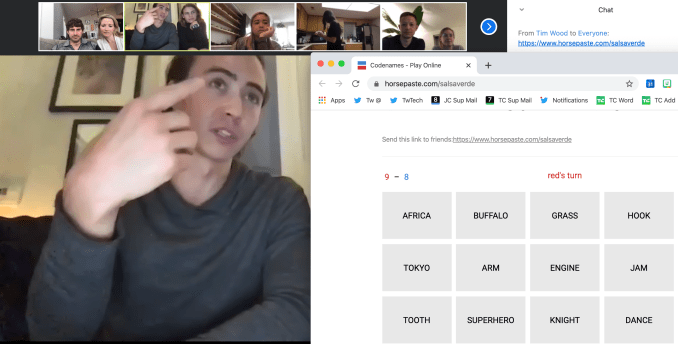
Playing board game Codenames over Zoom with friends in New York and North Carolina

Typically, our time is occupied by acquaintances of circumstance. The co-workers who share our office. The friends who happen to live in the neighborhood. But now we’re each building a virtual family completely of our choosing. The calculus has shifted from who is convenient or who invites us to the most exciting place, to who makes us feel most human.

Even celebrities are getting into it. Rather than pristine portraits and flashy music videos, they’re appearing raw, with crappy lighting, on Facebook and Instagram Live. John Legend played piano for 100,000 people while his wife Chrissy Teigen sat on screen in a towel looking salty like she’s heard “All Of Me” far too many times. That’s more authentic than anything you’ll get on TV.

And without the traditional norms of who we are and aren’t supposed to call, there’s an opportunity to contact those we cared about in a different moment of our lives. The old college roommate, the high school buddy, the mentor who gave you you’re shot. If we have the emotional capacity in these trying times, there’s good to be done. Who do you know who’s single, lives alone, or resides in a city without a dense support network?

Reforging those connections not only surfaces prized memories we may have forgotten, but could help keep someone sane. For those who relied on work and play for social interaction, shelter-in-place is essentially solitary confinement. There’s a looming mental health crisis if we don’t check in on the isolated.

The crisis language of memes

It can be hard to muster the energy to seize these connections, though. We’re all drenched in angst about the health impacts of the virus and financial impacts of the response. I certainly spent a few mornings sleeping in just to make the days feel shorter. When all small talk leads to rehashing our fears, sometimes you don’t have anything to say.

Luckily we don’t have to say anything to communicate. We can share memes instead.

The internet’s response to COVID-19 has been an international outpour of gallow’s humor. From group chats to Instagram joke accounts to Reddit threads to Facebook groups like quarter-million member “Zoom Memes For Quaranteens”, we’re joining up to weather the crisis.

A nervous laugh is better than no laugh at all. Memes allow us to convert our creeping dread and stir craziness into something borderline productive. We can assume an anonymous voice, resharing what some unspecified other made without the vulnerability of self-attribution. We can dive into the creation of memes ourselves, killing time under house arrest in hopes of generating smiles for our generation. And with the feeds and Stories emptied, consuming memes offers a new medium of solidarity. We’re all in this hellscape together so we may as well make fun of it.

The web’s mental immune system has kicked into gear amidst the outbreak. Rather than wallowing in captivity, we’ve developed digital antibodies that are evolving to fight the solitude. We’re spicing up video chats with board games like Codenames. One-off livestreams have turned into wholly online music festivals to bring the sounds of New Orleans or Berlin to the world. Trolls and pranksters are finding ways to get their lulz too, Zoombombing webinars. And after a half-decade of techlash, our industry’s leaders are launching peer-to-peer social safety nets and ways to help small businesses survive until we can be patrons in person again.

Rather than scrounging for experiences to share, we’re inventing them from scratch with the only thing we’re left with us in quarantine: ourselves. When the infection waves pass, I hope this swell of creativity and in-the-moment togetherness stays strong. The best part of the internet isn’t showing off, it’s showing up.


Read Full Article

Under quarantine, media is actually social


The flood of status symbol content into Instagram Stories has run dry. No one is going out and doing anything cool right now, and if they are, they should be shamed for it. Beyond sharing video chat happy hour screenshots and quarantine dinner concoctions, our piece-by-piece biographies have ground to a halt. Oddly, what remains feels more social than social networks have in a long time.

With no source material, we’re doing it live. Coronavirus has absolved our desire to share the recent past. The drab days stuck inside blur into each other. The near future is so uncertain that there’s little impetus to make plans. Why schedule an event or get excited for a trip just to get your heartbroken if shelter-in-place orders are extended? We’re left firmly fixed in the present.

A house-arrest Houseparty, via StoicLeys

What is social media when there’s nothing to brag about? Many of us are discovering it’s a lot more fun. We had turned social media into a sport but spent the whole time staring at the scoreboard rather than embracing the joy of play.

But thankfully, there are no Like counts on Zoom.

Nothing permanent remains. That’s freed us from the external validation that too often rules our decision making. It’s stopped being about how this looks and started being about how this feels. Does it put me at peace, make me laugh, or abate the loneliness? Then do it. There’s no more FOMO because there’s nothing to miss by staying home to read, take a bath, or play board games. You do you.

Being social animals, what feels most natural is to connect. Not asynchronously through feeds of what we just did. But by coexisting concurrently. Professional enterprise technology for agenda-driven video calls has been subverted for meandering, motive-less togetherness. We’re doing what many of us spent our childhoods doing in basements and parking lots: just hanging out.

For evidence, just look at group video chat app Houseparty, where teens aimlessly chill with everyone’s face on screen at once. In Italy, which has tragically been on lock down since COVID-19’s rapid spread in the country, Houseparty wasn’t even in the top 1500 apps a month ago. Today it’s the #1 social app, and the #2 app overall second only to Zoom.

Houseparty topped all the charts on Monday, when Sensor Tower tells TechCrunch that Houseparty’s download rate was 323X higher than its average in February. It’s currently #1 in Portugal (up 371X) and Spain (up 592X) despite being absent from the chart a week earlier.

After binging through Netflix and beating the video games, all that’s left to entertain us is each other.

Undivided By Geography

If we’re all stuck at home, it doesn’t matter where that home is. We’ve been released from the confines of which friends are within a 20 minute drive or hour-long train. Just like students are saying they all go to Zoom University since every school’s classes moved online, we all now live in Zoom Town. All commutes have been reduced to how long it takes to generate an invite URL.

Nestled in San Francisco, even pals across the Bay in Berkeley felt far away before. But this week I had hour-long video calls with my favorite people who typically feel out of reach in Chicago and New York. I spent time with babies I hadn’t met in person. And I kept in closer touch with my parents on the other coast, which is more vital and urgent than ever before.

Playing board game Codenames over Zoom with friends in New York and North Carolina

Typically, our time is occupied by acquaintances of circumstance. The co-workers who share our office. The friends who happen to live in the neighborhood. But now we’re each building a virtual family completely of our choosing. The calculus has shifted from who is convenient or who invites us to the most exciting place, to who makes us feel most human.

Even celebrities are getting into it. Rather than pristine portraits and flashy music videos, they’re appearing raw, with crappy lighting, on Facebook and Instagram Live. John Legend played piano for 100,000 people while his wife Chrissy Teigen sat on screen in a towel looking salty like she’s heard “All Of Me” far too many times. That’s more authentic than anything you’ll get on TV.

And without the traditional norms of who we are and aren’t supposed to call, there’s an opportunity to contact those we cared about in a different moment of our lives. The old college roommate, the high school buddy, the mentor who gave you you’re shot. If we have the emotional capacity in these trying times, there’s good to be done. Who do you know who’s single, lives alone, or resides in a city without a dense support network?

Reforging those connections not only surfaces prized memories we may have forgotten, but could help keep someone sane. For those who relied on work and play for social interaction, shelter-in-place is essentially solitary confinement. There’s a looming mental health crisis if we don’t check in on the isolated.

The crisis language of memes

It can be hard to muster the energy to seize these connections, though. We’re all drenched in angst about the health impacts of the virus and financial impacts of the response. I certainly spent a few mornings sleeping in just to make the days feel shorter. When all small talk leads to rehashing our fears, sometimes you don’t have anything to say.

Luckily we don’t have to say anything to communicate. We can share memes instead.

The internet’s response to COVID-19 has been an international outpour of gallow’s humor. From group chats to Instagram joke accounts to Reddit threads to Facebook groups like quarter-million member “Zoom Memes For Quaranteens”, we’re joining up to weather the crisis.

A nervous laugh is better than no laugh at all. Memes allow us to convert our creeping dread and stir craziness into something borderline productive. We can assume an anonymous voice, resharing what some unspecified other made without the vulnerability of self-attribution. We can dive into the creation of memes ourselves, killing time under house arrest in hopes of generating smiles for our generation. And with the feeds and Stories emptied, consuming memes offers a new medium of solidarity. We’re all in this hellscape together so we may as well make fun of it.

The web’s mental immune system has kicked into gear amidst the outbreak. Rather than wallowing in captivity, we’ve developed digital antibodies that are evolving to fight the solitude. We’re spicing up video chats with board games like Codenames. One-off livestreams have turned into wholly online music festivals to bring the sounds of New Orleans or Berlin to the world. Trolls and pranksters are finding ways to get their lulz too, Zoombombing webinars. And after a half-decade of techlash, our industry’s leaders are launching peer-to-peer social safety nets and ways to help small businesses survive until we can be patrons in person again.

Rather than scrounging for experiences to share, we’re inventing them from scratch with the only thing we’re left with us in quarantine: ourselves. When the infection waves pass, I hope this swell of creativity and in-the-moment togetherness stays strong. The best part of the internet isn’t showing off, it’s showing up.


Read Full Article