12 March 2020

Cloud gaming platform Shadow brings its new plans to the US


Blade, the French startup behind Shadow, announced plans to overhaul its subscription tiers back in October. The company is now bringing the new plans to the U.S. with a new entry tier at $11.99 per month as well as more powerful options in the coming months.

Shadow is a cloud computing service for gamers. For a monthly subscription fee, you can access a gaming PC in a data center near you. Compared to other cloud gaming services, Shadow provides a full Windows 10 instance. You can install anything you want — Steam, Photoshop or Word.

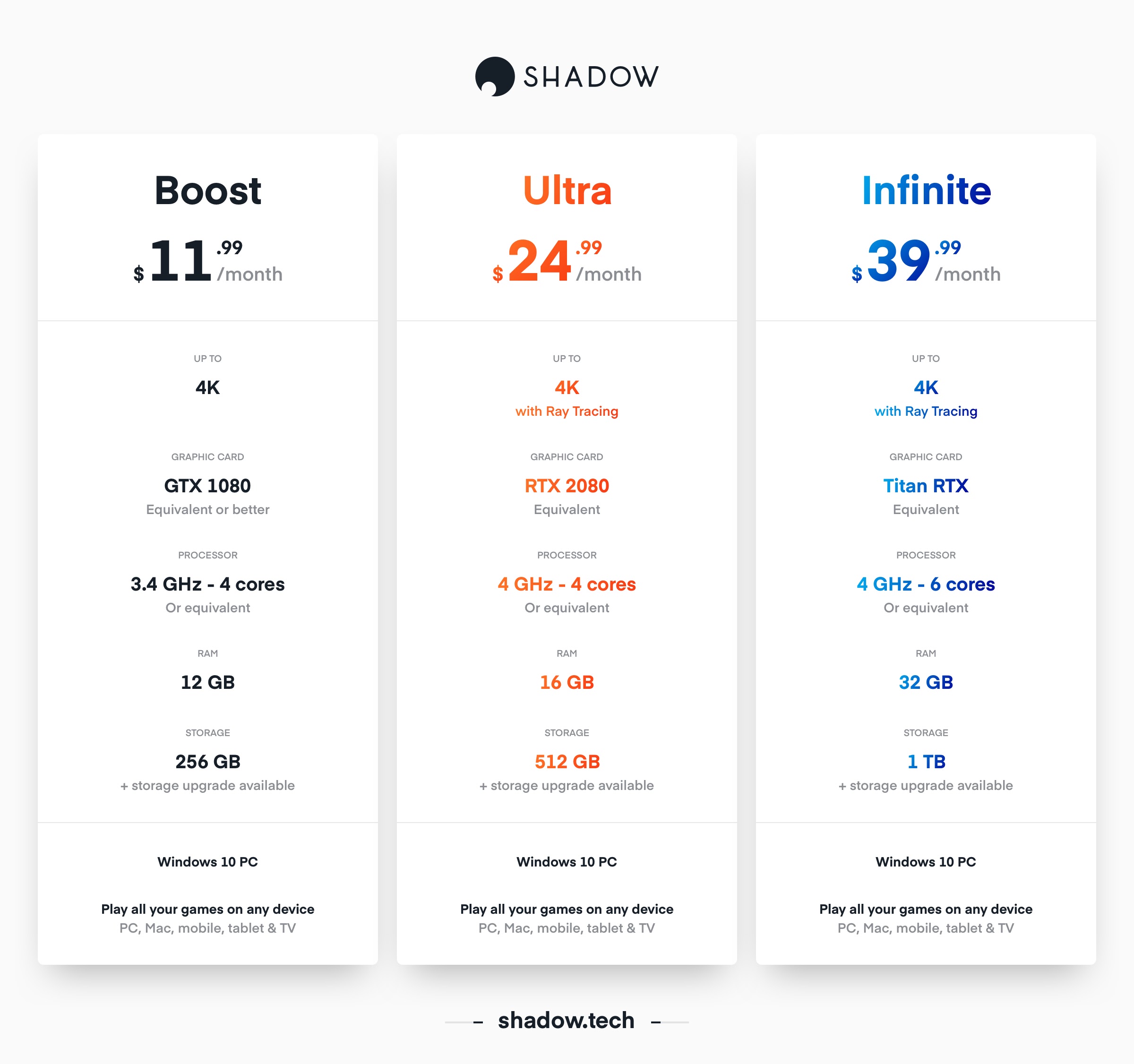
The current subscription tier, now called Shadow Boost, offers the same performance for a lower price. You get an Nvidia GTX 1080 GPU, 3.4GHz with 4 cores CPU, 12GB of RAM, 256GB of storage. It costs $11.99 per month if you sign up to a 12-month plan or $14.99 per month if you pay on a monthly basis.

Later this year, Shadow will also offer two additional plans:

  • Shadow Ultra: Nvidia RTX 2080 GPU, 4GHz with 4 cores CPU, 16GB of RAM, 512GB of storage
  • Shadow Infinite: Nvidia Titan RTX GPU, 4 GHz with 6 cores CPU, 32GB of RAM, 1TB of storage

These plans will cost $24.99 and $39.99 per month respectively if you subscribe to a 12-month plan — or $29.99 and $49.99 per month on a monthly basis.

Shadow Ultra and Shadow Infinite will roll out gradually starting this summer — only a limited number of users will be able to subscribe at first.

It’s worth noting that you’ll be able to add an option to get more storage with any plan. Storage plans include 256GB of SSD performance — anything above that will perform like a more traditional HDD.

The company now has four data centers in the U.S., which means that anybody in the U.S. can now access the service — not just people living on the West Coast or the East Coast.

In Europe, Shadow has had issues rolling out the new plans. While the company originally promised to deliver the new options in February, users who pre-ordered the new plans will only be able to access their new instance by the end of the summer.

Shadow offers apps for Windows, macOS, Linux, Android and Apple devices. Apple recently pulled Shadow’s apps from the App Store on iOS, iPadOS and tvOS. The company is still trying to find a solution with Apple to re-release the apps in the App Store.

In other news, the startup has signed a strategic partnership with LG Electronics. Details are thin, but LG is now a shareholder of the company. LG will also offer Shadow with some of its products.


Read Full Article

Tree planting search engine Ecosia is getting a visibility boost in Chrome


Ecosia, a not-for-profit search engine which uses ad generated revenue to fund planting trees, is set to get a visibility boost in Chrome. A change Google is making to its chromium engine will see it added as a default search engine choice in up to 47 markets for the version 81 release of Google’s web browser.

Ecosia will soon be included on Chrome’s default search engine list in several major markets, including the UK, US, France and Germany — alongside the likes of Google Search, Bing, DuckDuckGo and Yahoo!

It’s the first time the not-for-profit search engine will have appeared in Chrome’s default search engine choice list. And while users of Chrome can always navigate directly to Ecosia to search, or download an extension to search via it directly in the browser’s URL bar, those active steps require prior knowledge of the product. Whereas being listed as a default option in Chrome means Ecosia will be put in front of people who aren’t yet familiar with it.

The Berlin-based search engine said Google Chrome’s selection of default search engines is based on search engine popularity rankings in different markets.

The full list of markets where it will be offered as a choice in the v81 release is: Argentina, Austria, Australia, Belgium, Bahrain, Brunei, Bolivia, Brazil, Canada, Switzerland, Chile, Colombia, Costa Rica, Germany, Denmark, Ecuador, Spain, Faroe Islands, France, Guatemala, Croatia, Hungary, Ireland, Iceland, Italy, Lebanon, Liechtenstein, Luxembourg, Mexico, Nicaragua, New Zealand, Oman, Panama, Peru, Philippines, Puerto Rico, Portugal, Paraguay, Sweden, El Salvador, Taiwan, United States, United Kingdom, Uruguay, Venezuela and Vietnam.

The shift comes after what Ecosia said was a record year of usage growth for its search engine — with monthly active users rising from 8 million to 15 million during 2019.

The company dedicates 80% of advertising profits to funding reforestation projects in biodiversity hotspots around the world, and says it has planted 86 million+ trees since it was founded back in 2009 — a total it’s expecting will grow as a result of Google’s decision to include Ecosia as a default choice.

Commenting in a statement Ecosia CEO Christian Kroll said: “Ecosia’s growth over the last year shows just how invested users are in the fight against the climate crisis. Everywhere, people are weighing up the changes they can make to reduce their carbon footprint, including adopting technologies such as Ecosia. Our addition to Chrome will now make it even easier for users to help reforest delicate, at-risk and often devastated ecosystems, and to fight climate change, just by using the internet.”

“It’s also good news for user choice and fairness,” he added, pointing to recent research which he said indicates that providing a choice of search engines has the potential to increase the collective mobile market share of Google alternatives by 300-800%.

“It’s important that there are independent players in the market that don’t just exist for profit. We put our profits into tree planting and we are also focused on privacy, so users can have a positive impact on the environment while having greater control over their personal information.”

The chromium update will also see rival search engines DuckDuckGo and Yahoo added as a default in more markets when the v81 release of Chrome is pushed out.

These are the latest revisions to Chrome’s search engine defaults. But in a major shift this time last year Google quietly expanded the choice of search product in a way that gave the biggest single boost to the visibility of pro-privacy search engine rival DuckDuckGo.

It said then that the changes derived from “new usage statistics” from “recently collected data.”

But the company’s business had been facing rising attention over privacy and competition concerns.

As, indeed, Google still is…

In Europe, meanwhile, antitrust enforcement around how Google operates its Android smartphone platform has already forced the tech giant to offer a choice screen that surfaces alternative search engines and web browsers alongside its own products.

In 2018 the EU’s competition competition concluded Google had violated antitrust rules by requiring Android device makers pre-install its own search and browser apps. It was fined $5BN and ordered to cease the infringement — initially responding with a choice screen prompt that appeared to select products based on marketshare. Before announcing it would move to a ‘pay-to-play’ auction model to assign the non-Google slots on the screen starting early this year.

Rival search engines including Ecosia, DuckDuckGo and French pro-privacy search engine Qwant have been highly critical of this pay-to-play switch — hitting out at the limited slots and sealed bid auction structure Google devised. And DuckDuckGo has remained critical despite winning a universal slot on the screen early this year.

Ecosia chose to boycott the auction entirely — telling the BBC in January it’s at odds with the spirit of the Commission ruling.

“Internet users deserve a free choice over which search engine they use and the response of Google with this auction is an affront to our right to a free, open and federated internet. Why is Google able to pick and choose who gets default status on Android?” Kroll said then.

Asked for current Android usage metrics the company told us Ecosia’s total daily active users on Google’s platform have grown from 489,422 this time last year to 1,245,777 now — a 155% year over year rise in DAUs.

Though it remains to be seen whether Google’s shift to a paid auction model which Ecosia is not participating in — given doing so would require the not-for-profit to spend money paying Google to appear as a choice rather than ploughing those revenues into planting more trees — will put a dampener on Ecosia’s Android growth this year.

A spokesman for Ecosia pointed us to statcounter figures that estimate it took a 0.22%market share of mobile search in Europe between February 2019 and February 2020.

On desktop the search engine takes a higher regional share, per statcounter, account for 0.5% of desktop searches.

Overall, across mobile and desktop, Google’s share of the European search market over the same period is 93.83% vs 0.33% for Ecosia.


Read Full Article

Create Great Presentations in Minutes With SlideHeap’s Template Library


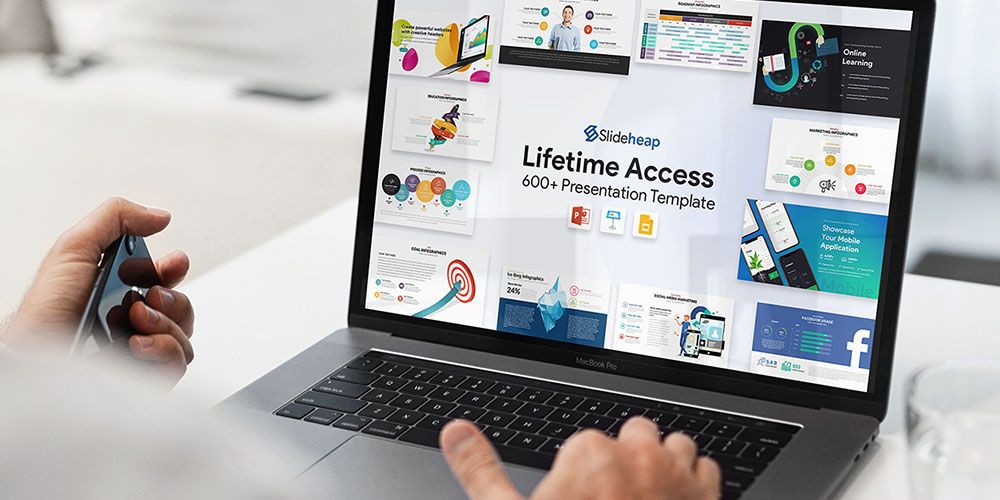
When you are trying to impress investors or win over potential clients, how you present is very important. Using the basic templates provided by Microsoft will not help your cause. If you want to look professional every time, SlideHeap can help. This huge library gives access to more than 600 slide templates created by professional designers, covering 25 different markets. You can get a lifetime subscription now for $29 at MakeUseOf Deals.

Better Slides

According to the best-selling science author, Dr. John Medina, most people tend to tune out of presentations after ten minutes. Backing up your script with well-designed slides makes it much easier to keep your audience engaged.

With SlideHeap, you have high-quality slide templates at your fingertips. This online library offers a huge range of premium designs for Microsoft PowerPoint, Keynote, and Google Slides. The selection includes simple lists, infographics, timelines, and more.

All the templates are customizable, meaning you can tweak the layout and change the colors as required. In addition, you get access to over 1,000 icons which you can add to your presentation.

Lifetime Access for $29

It’s worth $490, but you can currently get lifetime access to the SlideHeap library for $29 including unlimited downloads.

Read the full article: Create Great Presentations in Minutes With SlideHeap’s Template Library


Read Full Article

The 8 Best Free Alternatives to The New York Times


Do you consider yourself a regular New York Times reader, but can’t afford to pay for a subscription? There are some ways to get around the paywall, but for the most part, you’ll need some sort of subscription to read regularly. If you’re looking for a free alternative to the Grey Lady there are more than a few that offer quality, well-written reporting.

Not just any paper offers an alternative to The New York Times, as readers will expect a certain level of quality. The list below attempts to include only the best websites like The New York Times, so keep reading to see if you can find a replacement for your daily news source.

1. The Guardian

The Guardian homepage

The Guardian is a UK-based paper that has slowly been building up readers around the world with its in-depth international reporting. Expect to find well-written reporting over a wide range of subjects.

As a newspaper that seems dedicated to building up its brand internationally via the internet, it’s unlikely The Guardian will be behind a paywall anytime soon. While it’s probably not an alternative to the Times for domestic politics in America, it’s still worth checking out.

2. NPR

NPR Website

NPR is sometimes better known for its shows about fictional small-town Minnesota and car repair than it is for its journalism. It is a broadcaster so NPR may not be an alternative to the New York Times in many respects, but don’t let that fool you; NPR does a lot of quality reporting, making its website a great place to look to keep up with world events.

Even better, there’s the NPR Web App for reading and listening to all of the day’s top stories. It’s the closest rival to the amazing NY Times app I’ve found so far. Or if standard websites are more your thing, you can simply use the NPR site to read the latest news.

3. USA Today

USA Today Sites Like The New York Times

USA Today has become one of the most popular publications in the United States. It has proven itself as one of the best newspapers like The New York Times. Although the publication focuses mainly on news within the United States, it still reports on major world events.

That said, USA Today is a trustworthy news source that reports on politics, current events, technology, and the economy. The Opinion section of the site is the only biased part of the site. Here, you’ll find intriguing op-ed articles that will open your eyes to new perspectives. In addition to a stream of daily news stories, USA Today also has active entertainment and sports sections.

4. Newsweek

Newsweek Sites Like The New York Times

Newsweek formerly limited the number of articles you could read, but it broke down that paywall in 2016. Fortunately, you can now read most articles on the site, with the exception of the Newsweek Magazine articles.

On the homepage, you’ll see an array of world and US news stories. Look to the right side of the page, and you’ll see an area dedicated to opinion pieces. Every article offers accurate, in-depth reporting that can definitely compete with The New York Times.

5. Reuters

Reuters Sites Like The New York Times

Reuters is an international news source with a focus on business and financial news. The site’s home page shows the current status of the stock market, and also has a variety of news stories related to economics and large companies.

However, Reuters doesn’t solely focus on finances—you’ll find reports on world news and politics as well. One of the most unique parts about Reuters is The Wire, a real-time log of current events happening around the world.

6. Associated Press News

Associated Press News Sites Like The New York Times

The Associated Press News offers the latest stories from across the United States and around the world. Since the Associated Press is a nonprofit news agency, it’s unlikely that it’ll ever put up a paywall. Its not-for-profit policy doesn’t affect the quality of the articles at all—you can still expect plenty of well-written, detailed reports.

If you’re looking for some of the best fact-checking websites, the Associated Press is one of them. The website features a Fact Check section where you can look to get the truth on twisted reports. Associated Press is a great unbiased site like The New York Times, and you’ll definitely want to add it to your daily reading list.

7. The Hill

The Hill Sites Like The New York Times

The Hill is a newspaper headquartered in Washington, DC. Thanks to its close proximity to the White House, its reporters can quickly get the scoop on the happenings within the US government. While its website has a section dedicated to general news, it’s mostly focused on Congress, the House of Representatives, the Senate, and the presidential campaign.

Under the Policy tab, you’ll find news related to the country’s stand on issues relating to national defense, energy, transportation, cybersecurity, and more. Despite its frequent reports on political news, The Hill remains unbiased—it only wavers from its nonpartisan views in its stories labeled as opinion articles.

8. Time

Time Magazine Sites Like The New York Times

Time is another site like The New York Times that was once blocked by a paywall. It has since lifted the paywall, giving its readers unlimited access to the entire site’s stories. However, Time still requires you to pay if you’d like the digital editions of the magazine on your tablet and smartphone.

Time reports on US politics, current happenings, and world events. You can even expect interesting articles related to science, health, and technology. The longform section of Time is also worth a read—you’ll find engaging, personal stories that offer a much-needed break from your typical news story.

Discover More Websites Like The New York Times

While these sites are like The New York Times, they’re still not exact replicas. You might love the look and reporting style of The New York Times, but the above sites will have to suffice. The harsh paywall on The Times’ site severely limits your ability to read the news, and the above sites serve as viable replacements.

If you read national and world news all day, it’s easy to become depressed by what you see. In this case, you should bookmark these enjoyable funny news sites that can save your day.

Read the full article: The 8 Best Free Alternatives to The New York Times


Read Full Article

The Best Region-Free Players for DVD or Blu-Ray Discs


region-free-players

Although most of us now use a streaming service like Netflix or Amazon Prime, physical media still has a place in many homes.

Whether it’s a collection built in the pre-streaming era, or you prefer the security of owning the physical product, you’ll need a player for your DVD and Blu-Ray discs.

However, DVD and Blu-ray discs often come region-coded. Luckily, region-free DVD and Blu-ray players, which allow you to play DVDs and Blu-ray discs from around the world, are plentiful.

Why Buy a Region-Free DVD or Blu-ray Player?

A region-free DVD or Blu-Ray player ensures complete physical media compatibility. For instance, DVDs from North America come encoded as Region 1 DVDs and Region A Blu-Rays. While Blu-Ray discs are more commonly released as region-free or all-region, not all Blu-ray discs are region-free. Moreover, most DVDs remain region-locked.

The problem is that a region-free DVD or Blu-Ray player costs a premium. A region-free DVD player retails for about the same price as a region-locked Blu-ray player. Yet the advantages outweigh the price jump. Frequent travelers can pick up a DVD or Blu-Ray from anywhere and are guaranteed it will play.

A region-free player is also an excellent investment for fans of foreign films and shows. Plus, you can purchase the cheapest copy of a movie or series, if it’s less expensive in another country.

1. Panasonic S700EP-K

Panasonic S700EP-K Panasonic S700EP-K Buy Now On Amazon $59.01

The Panasonic S700EP-K is an excellent region-free DVD player. Panasonic’s player sports 1080p upconversion via an HDMI output. Onboard you’ll find PAL and NTSC video signal switching. In addition to its HDMI output, there’s a front USB port for playing video files.

Although the player appears affordable, that is partly due to its lack of Blu-ray support. It also doesn’t come with a display on the front. While it excels at affordability, there’s no internet connectivity available either. However, the S700EP-K is still a great value DVD player.

2. Pioneer DV-3052

Pioneer DV3052 Pioneer DV3052 Buy Now On Amazon

If you value a front display with your region-free DVD player, then you should consider the Pioneer DV-3052. Like the Panasonic S700EP-K, this player is also sub-$100, making it one of the best affordable DVD players. The device can remember where you left off, too.

On the whole, DVDs are an older format, so, surprisingly, the DV-3052 supports other digital media, too. There is a front-mounted USB port. Using this, you can attached any USB storage and play your videos, display your photos, or even listen to MP3s.

The Pioneer DV-3052 supports HDMI, as well as the older RCA cable, too. If you connect via the HDMI output, then the player will upscale your DVDs to 1080p. There isn’t an HDMI cable included, though, so you’ll need to purchase one separately.

3. LG BP175

LG BP175 LG BP175 Buy Now On Amazon $148.99

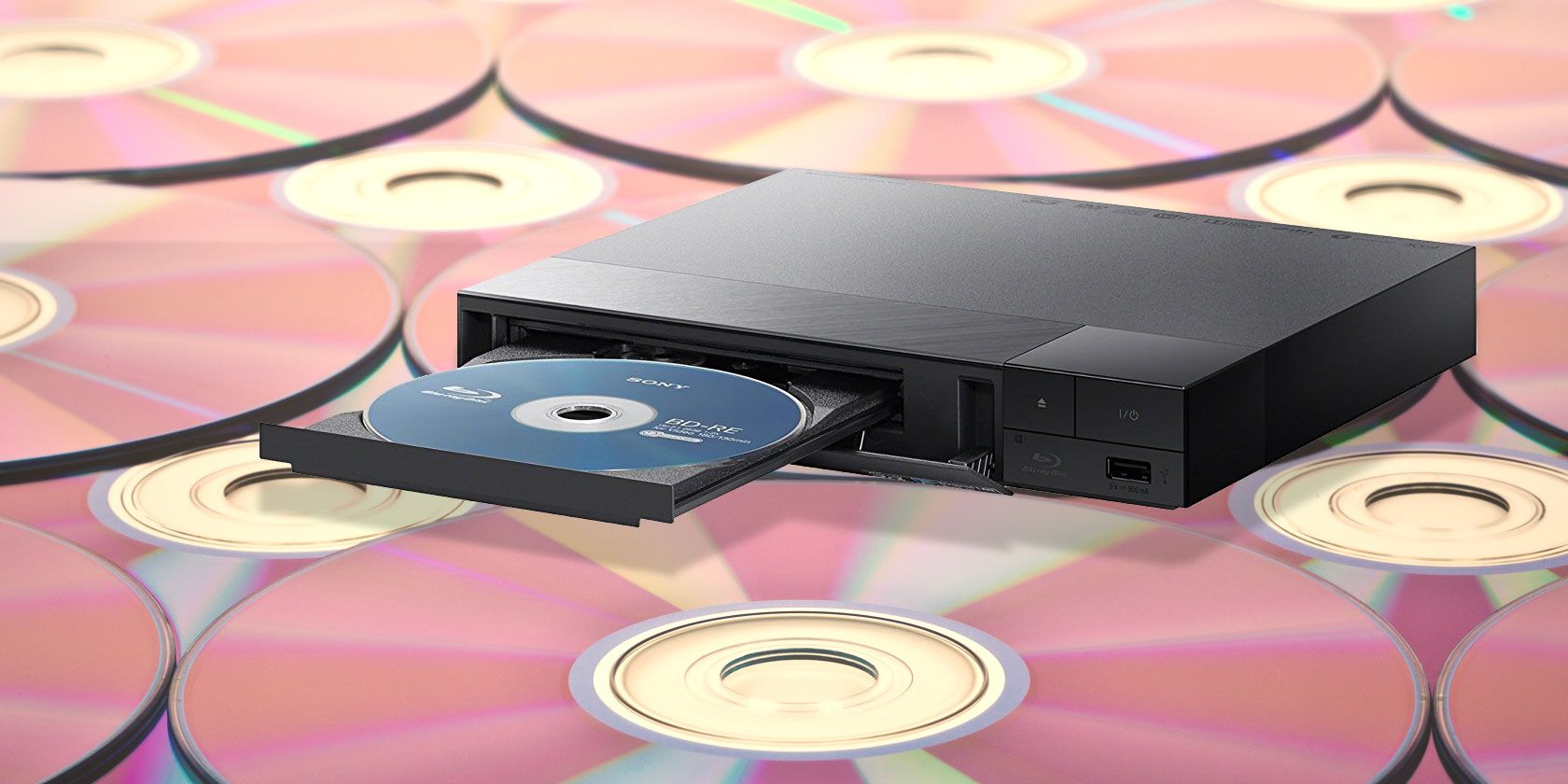
For region-free Blu-Ray players, the LG BP175 clocks in around the price of a standard Blu-Ray player. You get region-free Blu-Ray and DVD playback and 1080p video. Additionally, the BP175 includes a front-facing USB port for digital content via external hard drives and flash drives.

The player also supports internet streaming services, including Netflix, Pandora, Spotify, Hulu, and YouTube. This is thanks to the device’s wired internet connection via the included Ethernet port. As with most Blu-ray players, the LG BP175 uses Dolby audio technology.

4. Sony BDP S3200

Sony BDP S3200 Sony BDP S3200 Buy Now On Amazon $159.00

The Sony BDP S3200 offers Blu-Ray and DVD playback plus streaming support. With the BDP S3200, you can stream from the likes of Netflix, Hulu, and YouTube. This makes it one of the best region-free Blu-Ray players available, especially as it comes with a built-in Wi-Fi connection.

Sony includes a front USB port for multimedia playback. Unfortunately, there’s no display on the device. However, it does support Miracast technology, so you can mirror your smartphone’s display to your TV using the S3200 player. The device comes equipped with HDMI Audio 7.1-channel output, too.

5. Sony S3700E

Sony S3700E Sony S3700E Buy Now On Amazon $155.00

If you need 4K upscaling and 3D playback, the Sony S3700E region-free Blu-Ray player is the best device available. It’s loaded with a premium feature set. There’s 4K upscaling and 3D playback, as well as built-in Wi-Fi. This player supports a wide range of media, too. Alongside Blu-ray discs and DVDs, you can play CDs as well.

To expand your options even further, there is a USB port on the front of the S3700E. The device comes equipped with Dolby TrueHD & DTS-HD Master Audio for high-quality audio output as well. The Sony S6700 does sport PlayStation Now for playing games sans-console, and even supports the PlayStation DualShock 4 controller.

Which Region-Free Disc Player Should You Buy?

Although there are several options for region-free players, these are the best available. We’d suggest getting a region-free Blu-Ray player as opposed to a DVD player simply for the increased library. You’ll have access to region-protected Blu-Ray discs as well for just slightly more than a region-free DVD player.

Despite the options, you may still decide that you no longer need a physical media library. If that’s the case, you should check out the best tools for ripping DVDs and Blu-rays to your computer before dismantling your collection.

Read the full article: The Best Region-Free Players for DVD or Blu-Ray Discs


Read Full Article

The 10 Best Free Ebook Download Sites


Free ebook downloads are hard to find unless you know the right websites to visit. This article lists some of the best sites that offer free ebooks for you to read.

1. Overdrive

overdrive homepage

Overdrive is the cleanest, fastest, and most legal way to access millions of ebooks—not just ones in the public domain, but even recently released mainstream titles.

There is one hitch though: you’ll need a valid and active public library card or to be a student to have access to these free ebooks. Overdrive works with over 30,000 public libraries in over 40 different countries worldwide. In addition to free ebook checkouts, you can also listen to audiobooks for free.

If you can access the service, you will have instant access to the latest The New York Times Bestsellers. The list is updated weekly, so you will never miss out on a hot read.

2. Library Genesis

library genesis homepage

Library Genesis is a search engine for free reading material, including ebooks, articles, magazines, and more. As of this writing, Library Genesis indexes close to 3 million ebooks and 60 million articles. It would take several lifetimes to consume everything on offer here.

Both fiction and non-fiction are covered, spanning different genres and types.

Since it’s a search engine. browsing for books is almost impossible. The closest thing you can do is use the Authors dropdown in the navigation bar to browse by authors, and even then, you’ll have to get used to the terrible user interface of the site overall.

It’s better to search instead for a particular book title, author, or synopsis. The Advanced Search lets you narrow the results by language and file extension.

The legality of Library Genesis has been in question since 2015 because it allegedly grants access to pirated copies of books and paywalled articles, but the site remains up and open to the public.

3. Centsless Books

centsless books hompage

Unlike the other sites on this list, Centsless Books is a curator-aggregator of free Kindle books available on Amazon. Its mission is to make it easy for you to stay on top of all the free ebooks available from the online retailer.

Note that some of the “free” ebooks listed on Centsless Books are only free if you’re part of Kindle Unlimited. Unfortunately, Kindle Unlimited might not be worth the money.

NB: Since Centsless Books tracks free ebooks available on Amazon, there may be times when there is nothing listed. If that happens, try again a few days later.

4. Project Gutenberg

gutenberg homepage

Another of the best free ebook download sites is Project Gutenberg. It’s a charity endeavor, sustained through volunteers and fundraisers, that aims to collect and provide as many high-quality ebooks as possible. Most of its library consists of public domain titles, but it has other stuff too if you’re willing to look around.

As of this writing, Gutenberg has more than 60,000 free ebooks on offer. They are available for download in EPUB and MOBI formats (some are only available in one of the two), and they can be read online in HTML format.

You can browse the library by category (of which there are hundreds), by most popular (which means total download count), by latest (which means date of upload), or by random (which is a great way to find new material to read).

5. ManyBooks

manybooks homepage

ManyBooks is a nifty little site that’s been around for over a decade. Its purpose is to curate and provide a library of free and discounted fiction ebooks for people to download and enjoy.

Much of its collection was seeded by Project Gutenberg back in the mid-2000s, but it has since taken on an identity of its own with the addition of thousands of self-published works that have been made available at no charge.

Downloads are available in dozens of formats, including EPUB, MOBI, and PDF, and each story has a rating out of five stars.

6. Feedbooks

feedbook listing

Feedbooks is a massive collection of downloadable ebooks: fiction and non-fiction, public domain and copyrighted, free and paid. While over 1 million titles are available, only about half of them are free.

The split between “free public domain ebooks” and “free original ebooks” is surprisingly even. A big chunk of the public domain titles are short stories and a lot of the original titles are fanfiction. Still, if you do a bit of digging around, you’ll find some interesting stories.

Most of the ebooks are available in EPUB, MOBI, and PDF formats. They even come with word counts and reading time estimates, if you take that into consideration when choosing what to read.

7. PDFBooksWorld

pdfbooksworld homepage

Between the three major ebook formats—EPUB, MOBI, and PDF—what if you prefer to read in the latter format? While EPUBs and MOBIs have basically taken over, reading PDF ebooks hasn’t quite gone out of style yet, and for good reason: PDFs offer universal support across platforms and devices.

If you want to stick to PDFs only, then you’ll want to check out PDFBooksWorld. While the collection is small at only a few thousand titles, they’re all free and guaranteed to be PDF-optimized. Most of them are literary classics, like The Great Gatsby, A Tale of Two Cities, Crime and Punishment, and so on.

For other formatting issues, we’ve covered everything you need to convert ebooks between different file types.

8. Open Library

open library homepage

Open Library offers an easily searchable directory of all the free ebooks that are available on The internet Archive. You might be surprised at the number of books available. The total library is pushing towards 1.5 million items.

On the Open Library’s homepage, you can readily find the books in which you might be interested thanks to the scrollable categories. Some of the most popular categories include Romance, Kids, and History. You can even find some textbooks lurking in the catalog.

The site is open source and anyone can edit the information available for each book.

9. Free-Ebooks.net

free-ebooks homepage

Free-Ebooks.net offers thousands of free ebooks. The content is broadly split into six categories: Fiction, Non-Fiction, Romance, Sci-Fi, Self Help, and Business.

To be able to download free ebooks from Free-Ebooks.net, you will need to sign up for an account. An account is free to create. Once you have an account, you can download up to five free titles every month.

In addition to English, books are available in dozens of other languages.

10. International Children’s Digital Library

childrens library homepage

If your child is a bookworm, you could find yourself spending masses of cash on new titles. Unless, that is, you find a reliable source of free ebooks for kids. As such, the International Children’s Digital Library is a godsend for anyone who has young readers in the house.

Books are available in a variety of lengths and reading difficulty levels. You can even search by criteria that might stimulate kids, such as the color of the cover. Each book is listed in a specific category for easy searching.

Titles are available in four languages—English, Persian, German, and Yiddish.

More Ways to Find Free Ebooks

Don’t forget about Amazon Prime. Specifically, Prime Reading, which grants access to thousands of free ebooks in addition to all of the other amazing benefits of Amazon Prime.

Start a free 30-day trial of Amazon Prime and start reading today!

Now that you have a bunch of ebooks waiting to be read, you’ll want to build your own ebook library in the cloud.

Read the full article: The 10 Best Free Ebook Download Sites


Read Full Article
Desperate to exit, a $10B price tag for Magic Leap is crazy


Augmented reality headset maker Magic Leap has struggled with the laws of physics and failed to get to market. Now it’s seeking an acquirer, but talks with Facebook and medical goods giant Johnson & Johnson led nowhere according to a new report from Bloomberg’s Ed Hammond.

After raising over $2 billion and being valued between $6 billion and $8 billion back when it still had momentum, Hammond writes that “Magic Leap could fetch more than $10 billion if it pursues a sale” according to his sources. That price seems ridiculous. It’s the kind of number a prideful company might strategically leak in hopes of drumming up acquisition interest, even at a lower price.

Startups have been getting their valuations chopped when they go public. The whole economy is hurting due to coronavirus. Augmented Reality seems less interesting than virtual reality with people avoiding public places. Getting people to strap used AR hardware to their face for demos seems like a tough sell for the forseeable future.

No one has proven a killer consumer use case for augmented reality eyewear that warrants an expensive and awkward-to-wear gadget. Our phones can already deliver plenty of AR’s value while letting you take selfies and do video chat that headsets can’t. My experiences with Magic Leap at Sundance Film Festival last year were laughably disappointing, with its clunky hardware, ghostly projections, and narrow field of view.

Apple and Facebook are throwing the enduring profits of iPhones and the News Feed into building a better consumer headset. Snapchat has built intermediary glasses since CEO Evan Spiegel thinks it will be a decade before AR headsets see mainstream adoption. AR rivals like Microsoft have better enterprise experience, connections, and distribution. Enterprise AR startup Daqri crashed and burned.

Magic Leap’s CEO said he wanted to sell 1 million of its $2300 headset in its first year, then projected it would sell 100,000 headsets, but only moved 6,000 in the first six months, according to a daming report from The Information’s Alex Heath. Alphabet CEO Sundar Pichai left Magic Leap’s board despite Google leading a $514 million funding round for the startup in 2014. Business Insider’s Steven Tweedie and Kevin Webb revealed CFO Scott Henry and SVP of creative strategy John Gaeta bailed in November. The company suffered dozens of layoffs. It lost a $500 million contract to Microsoft last year. The CEOs of Apple, Google, and Facebook visited Magic Leap headquarters in 2016 to explore an acquisition deal, but no offers emerged.

Is AR eyewear part of the future? Almost surely. And is this startup valuable? Certainly somewhat. But Magic Leap may prove to be too little too early for a company burning cash by the hundreds of millions in a market newly fixated on efficiency. A $10 billion price tag would require one of the world’s biggest corporations to believe Magic Leap has irreplicable talent and technology that will earn them a fortune in the somewhat distant future.

The fact that Facebook, which does not shy from tall acquisition prices, didn’t want to buy Magic Leap is telling. This isn’t a product with hundreds of millions of users or fast-ramping revenue. It’s a gamble on vision and timing that looks to be coming up snake eyes. It’s unclear when the startup would ever be able to deliver on its renderings of flying whales and living room dinosaurs in a form factor people actually want to wear.


One of Magic Leap’s early renderings of what it could supposedly do

With all their money and plenty of time before widespread demand for AR headsets materializes, potential acquirers could likely hire away the talent and make up the development time in cheaper ways than buying Magic Leap. If someone acquires them for too much, it feels like a write-off waiting to happen.


Read Full Article

Desperate to exit, a $10B price tag for Magic Leap is crazy


Augmented reality headset maker Magic Leap has struggled with the laws of physics and failed to get to market. Now it’s seeking an acquirer, but talks with Facebook and medical goods giant Johnson & Johnson led nowhere according to a new report from Bloomberg’s Ed Hammond.

After raising over $2 billion and being valued between $6 billion and $8 billion back when it still had momentum, Hammond writes that “Magic Leap could fetch more than $10 billion if it pursues a sale” according to his sources. That price seems ridiculous. It’s the kind of number a prideful company might strategically leak in hopes of drumming up acquisition interest, even at a lower price.

Startups have been getting their valuations chopped when they go public. The whole economy is hurting due to coronavirus. Augmented Reality seems less interesting than virtual reality with people avoiding public places. Getting people to strap used AR hardware to their face for demos seems like a tough sell for the forseeable future.

No one has proven a killer consumer use case for augmented reality eyewear that warrants an expensive and awkward-to-wear gadget. Our phones can already deliver plenty of AR’s value while letting you take selfies and do video chat that headsets can’t. My experiences with Magic Leap at Sundance Film Festival last year were laughably disappointing, with its clunky hardware, ghostly projections, and narrow field of view.

Apple and Facebook are throwing the enduring profits of iPhones and the News Feed into building a better consumer headset. Snapchat has built intermediary glasses since CEO Evan Spiegel thinks it will be a decade before AR headsets see mainstream adoption. AR rivals like Microsoft have better enterprise experience, connections, and distribution. Enterprise AR startup Daqri crashed and burned.

Magic Leap’s CEO said he wanted to sell 1 million of its $2300 headset in its first year, then projected it would sell 100,000 headsets, but only moved 6,000 in the first six months, according to a daming report from The Information’s Alex Heath. Alphabet CEO Sundar Pichai left Magic Leap’s board despite Google leading a $514 million funding round for the startup in 2014. Business Insider’s Steven Tweedie and Kevin Webb revealed CFO Scott Henry and SVP of creative strategy John Gaeta bailed in November. The company suffered dozens of layoffs. It lost a $500 million contract to Microsoft last year. The CEOs of Apple, Google, and Facebook visited Magic Leap headquarters in 2016 to explore an acquisition deal, but no offers emerged.

Is AR eyewear part of the future? Almost surely. And is this startup valuable? Certainly somewhat. But Magic Leap may prove to be too little too early for a company burning cash by the hundreds of millions in a market newly fixated on efficiency. A $10 billion price tag would require one of the world’s biggest corporations to believe Magic Leap has irreplicable talent and technology that will earn them a fortune in the somewhat distant future.

The fact that Facebook, which does not shy from tall acquisition prices, didn’t want to buy Magic Leap is telling. This isn’t a product with hundreds of millions of users or fast-ramping revenue. It’s a gamble on vision and timing that looks to be coming up snake eyes. It’s unclear when the startup would ever be able to deliver on its renderings of flying whales and living room dinosaurs in a form factor people actually want to wear.


One of Magic Leap’s early renderings of what it could supposedly do

With all their money and plenty of time before widespread demand for AR headsets materializes, potential acquirers could likely hire away the talent and make up the development time in cheaper ways than buying Magic Leap. If someone acquires them for too much, it feels like a write-off waiting to happen.


Read Full Article

You Can Now Use Multiple Signatures in Gmail


Google is giving you the option to create and use multiple signatures in Gmail. This will enable you to create different signatures for different situations, so you can use a different signature in an email to your boss as you would in an email to a co-worker.

How to Create and Use Different Signatures in Gmail

Google announced that Gmail now supports multiple email signatures in a post on the G Suite Updates Blog. The company explains that multiple signatures gives you the flexibility to use different signatures across a range of different situations.

These different situations include “communicating across teams, organizations, or products,” “communicating across languages,” and “using different default signatures for new emails and replies.” Essentially, it puts more options at your fingertips.

To create multiple signatures, open Gmail, then click the Cog icon > Settings. Then, scroll down to Signature and select Create New. Here, you can create as many signatures as you want, varying them up so that they can be employed as and when needed.

To use multiple signatures, when composing a new email, click the Pen icon to open the signature menu. Then choose which signature you want to use on that particular email. You can also click Manage Signatures to add, edit, or remove signatures.

How to Create a Professional Email Signature

This might not be the biggest feature Google has ever added to Gmail, but it could be an extremely useful one. Especially if you’re the type of person who likes to use a signature on all of your emails, and employ different personas depending on the recipient.

Email signatures are a useful tool that many people aren’t taking advantage of. Which is a mistake, as they can make your communications look that little bit more professional. With that in mind, here are some tips for creating the perfect email signature.

Image Credit: Cairo/Flickr

Read the full article: You Can Now Use Multiple Signatures in Gmail


Read Full Article

How to Improve Your Photography Skills Using Reddit


reddit-photography

Reddit can help you improve your photography skills. There are some great subreddits dedicated to photography. And if you pick out the best advice, Reddit can help make you a better photographer.

To help you get started, we’ve compiled a list of the best photography subreddits. All of which can help you take better photographs with whatever camera you have to hand.

1. Photography

The Photography Subreddit

This subreddit is the mothership for photographers of all hues. More than 2.4 million members make this the most-subscribed photography subreddit.

With so much going on, it can feel a little congested. However, you can get shares that might not fit into any of the other photography subreddits. As the sidebar says, this may not be a good place to upload your photos, but it’s a great meeting place to discuss everything else related to photography.

To get the idea, read through the Info Threads on the right that are a collection of the most important discussions. Also, go over to the Photographs subreddit which works as a sister community to this one.

Read: Ex-Stanford professor puts his entire digital photography course online for free.

2. Beginning Photography

Beginning Photography Subreddit

Beginner photographers may feel crowded out from the other subreddits for photography by advanced amateurs or professionals. Therefore, this subreddit is more suited for newbies and amateurs.

Air your learning gaps, but do keep in mind that asking for feedback on your photos is frowned upon. You can use many of the other subreddits down below for photo critiques.

Read: The Beginning Photography Wiki

3. Photo Class for 2020

Photo Class 2020 Subreddit

If you are new to photography, the Photo Class subreddit for this year will give you something to do with weekend assignments. You can take inspiration from members who completed those assignments. It doesn’t matter if the posts have died down.

The class began in January, but you can hop on anytime. This subreddit is a great place to go when you need a few project ideas to challenge yourself with. You can then compare your work to those who have previously submitted theirs.

Reddit also has a collection of similar photography classes for the previous years. Check them out too if you need more ideas.

Read: Go back to the Reddit Photo Class that began in 2011. The site gives you 30 lessons covering the basics of photography.

4. AskPhotography

AskPhotography Subreddit

If you have a question about anything dealing with photography—digital or otherwise—then you’ll find the answer in the /r/askphotography subreddit.

This is a massive hub for newbie and veteran photographers alike, and is also one of the best locations for online photography discussions.

Don’t be shy about asking what you need to ask, but do browse and search the subreddit before submitting any questions to make sure they haven’t been asked and answered before.

Read: Can photography be an antidote for anxiety?

5. Cameras

A Subreddit On Cameras

Even before you take up photography, the chatter of which camera is the best will take over your thoughts. It’s often the camera you have in your hands. But that’s never a satisfactory answer when so many camera bodies and lenses compete for your attention.

The Cameras subreddit is a magnet for these discussions. Go crazy over new cameras, compare cameras, and find the best lenses, gear, and accessories.

Read: Learn where to begin with this guide to buying a lens.

6. ITookAPicture

ITookaPicture Subreddit

If practice makes progress, contributing to this photo-filled subreddit will get you closer to your goals much quicker than you might expect. In a way, it borrows from photography ideas that task users with taking one photo every day or week for a year.

The difference is that the ITookAPicture subreddit is updated more often and is a little bit more relaxed, allowing participants to increase or decrease their efforts as they wish.

Overall, it’s a great place to post works in progress and ask for feedback without the anxiety of a formal critique. And you can stay on as a lurker too while learning about different photography techniques and styles.

Read: The Wiki index is a compilation of all contests and their winning entries.

7. PhotoCritique

PhotoCritique subreddit

Some photography subreddits are only geared towards amateur photographers. Others are there for professional and aspiring photographers, and the PhotoCritique subreddit is one of those. In fact, it’s considered one of the best places to go for honest feedback.

A lot of the information on this subreddit is meant to be taken as a tool for learning, but because the critiques are rarely sugarcoated, you should only start participating when you have a good bit of experience and some thick skin.

Read: The finer points of leaving thoughtful critiques.

8. Edit Vs. Raw

Edit vs. Raw Subreddit

Looking at finished photos can awe and overwhelm you. But you should remember that some of the most beautiful shots go through post-processing to finetune what the lens cannot capture.

So, if you are asking why your photographs don’t look that stunning then this young subreddit is here to provide some inspiration. The threads are all about comparisons between straight-out-of-the-camera shots and post-processed photos.

At the very least, the photos will push you towards the next two subreddits on the list and improve your skills with Adobe Photoshop and Lightroom.

Read: Spot the effect of a clean camera sensor on a photograph.

9. PostProcessing

Post-Processing Subreddit

Post-processing is a lot about theory and style and less about the filters at your disposal. Anyone who wants to learn how to produce a photo in a particular style will find this community helpful.

Just browse around and search for threads that involve questions like your own and you’ll find a lot of helpful tips and advice. A lot of photos are also cross-posted on the Before and After Edits subreddit too.

Read: The Post-processing megathread

10. Lightroom

The Lightroom Subreddit

The Lightroom subreddit is a place for photographers to discuss the technical details of post-processing with Adobe Lightroom. This includes light settings, file organization, geotagging, screen calibration, and more.

You’ll find various questions are asked and answered with links to outside sources that can help, particularly concerning the Adobe suite for the desktop and mobile. There are also several posts that provide links to free Lightroom presets to use.

The advice here is perhaps not as useful until you’ve started dabbling in post-processing, but once you do, this is a must-visit. Pair this with the large Photoshop subreddit to have two critical photography communities to fall back on.

Read: Look for the best tips to learn Lightroom for free.

Start Improving Your Photography Skills Now

You will discover many more photography subreddits as you narrow down the kind of photographs you want to take. Start with the most important photography tips for beginners and then go from there.

Reddit is a useful tool for improving your photography skills, but don’t be a Reddit lurker. Contribute and help others. And if you want to jump all-in then it pays to know what Reddit Karma is and how to earn it.

Read the full article: How to Improve Your Photography Skills Using Reddit


Read Full Article