18 February 2020

The 9 Best Alternatives to Apple’s Official Magic Keyboard


mac-keyboards

The Apple Magic keyboard is a quality keyboard, but it’s not for everyone. It’s also not that cheap. While you might have got one with your brand new Mac, it’s not the only option you have if you’re looking for a new keyboard to pair with your MacBook Pro or Mac Mini.

Unlock the free "Most Useful Mac Keyboard Shortcuts" cheat sheet now!

This will sign you up to our newsletter

Enter your Email

You might prefer mechanical switches or want a wireless keyboard for Mac that you can use with other devices. No matter what type you prefer, if you’re in search of the best keyboard for Mac, these choices are a great place to start.

1. Das Keyboard Model S Professional for Mac

Das Keyboard Model S Professional for Mac Das Keyboard Model S Professional for Mac Buy Now On Amazon $118.98

They’re not everyone’s cup of tea, but mechanical keyboards provide a tactile experience that many touch typists are fond of. The Das Keyboard Model S is a sleek mechanical model that uses Cherry MX Blue switches with gold contacts. These provide the most “click” in a button press of the entire Cherry MX line.

While some mechanical keyboards are relatively barebones affairs, this one is not. In addition to the standard keys, which use the Mac keyboard layout, this has media keys, including volume and playback control. An onboard USB hub means you don’t have to reach far to plug in your phone or other accessories.

2. Das Keyboard 4 Professional for Mac

Das Keyboard 4 Professional for Mac Das Keyboard 4 Professional for Mac Buy Now On Amazon $169.00

Das Keyboard is a major name when it comes to Mac compatible keyboards of the mechanical variety, so it shouldn’t come as a surprise to see them appear twice on this list. While the Model S uses Cherry MX Blue switches, the Das Keyboard 4 Professional uses Cherry MX Brown, which are softer and quieter while still providing a tactile click to let you know you pressed the key.

Like the Model S, this edition has media keys and a full number pad. It also has an onboard USB hub. While the Model S only has a USB 2.0 hub, this model includes a faster USB 3 hub. The aluminum top panel makes the keyboard tough and sleek-looking, making it one of the best keyboards for Mac you’ll find.

3. Keychron K2 RGB Wireless Mechanical Gaming Keyboard

Keychron K2 RGB Wireless Mechanical Gaming Keyboard Keychron K2 RGB Wireless Mechanical Gaming Keyboard Buy Now On Amazon $84.99

If you want a mechanical keyboard for Mac with the exciting RGB lighting you’ll find on many PC keyboards, your options are limited. That said, the Keychron K2 RGB Wireless Mechanical Gaming Keyboard has a lot going for it. For starters, you don’t often find wireless mechanical keyboards.

You also get your choice of switches. While this uses Gateron switches instead of the more popular Cherry MX switches, you get your choice of blue, brown, or red switches. These are roughly equivalent to Cherry MX offerings, with blue being the clickiest, red being the most quiet, and brown being somewhere in between.

4. Velocifire M87 Mac Layout Mechanical Keyboard

Velocifire M87 Mac Layout Mechanical Keyboard Velocifire M87 Mac Layout Mechanical Keyboard Buy Now On Amazon $59.99

Mechanical keyboards are generally on the expensive side, but there are affordable options as well. The Velocifire M87 is a mechanical model that is a little more slimmed-down than some of the other options we’ve covered. It doesn’t feature Cherry MX or even Gateron switches, but if you want to try a mechanical keyboard for Mac, this is a good place to start.

This uses the standard Mac keyboard layout but doesn’t have the number pad. If you don’t work with numbers, this can be a positive, as it means a smaller physical footprint. The switches are brown-style, meaning it’s not so loud that it will bother anyone else around you.

5. Logitech K750 Wireless Solar Keyboard for Mac

Logitech K750 Wireless Solar Keyboard for Mac Logitech K750 Wireless Solar Keyboard for Mac Buy Now On Amazon $53.99

If you don’t count Apple’s own models, the Logitech K750 Wireless Solar Keyboard is often mentioned as one of the best wireless keyboards for Mac users. It has a Mac-style layout, plus it’s a super-thin, stylish addition to your desk. Even better, it’s solar-powered, so you don’t have to worry about plugging it in or changing batteries.

This model uses concave keycaps, which is nice for touch typists. It also has a dedicated key for Launchpad, top-mounted on/off switch, and a handy indicator light to show you if it’s getting enough sunlight. I’ve used these keyboards a lot over the years, and never found a situation where it didn’t receive enough light to stay charged.

6. Macally Ultra-Slim USB Wired Computer Keyboard

Macally Ultra-Slim USB Wired Computer Keyboard Macally Ultra-Slim USB Wired Computer Keyboard Buy Now On Amazon $48.99

If you want the look and feel of the Apple Magic Keyboard without the so-called Apple tax, the Macally Ultra-Slim USB Wired Keyboard gets you most of the way there. Specifically, this is similar to the model with the number pad. It’s plastic and feels a little lighter, but the style is close.

This model uses standard scissor-style keys, unlike the Apple butterfly keyboard that has caused so many problems in MacBooks. The keys are fairly responsive, but they don’t feel exactly like the Magic Keyboard. That said, it gets pretty close.

7. Macally Slim USB Wired Small Compact Mini Computer Keyboard

Macally Slim USB Wired Small Compact Mini Computer Keyboard Macally Slim USB Wired Small Compact Mini Computer Keyboard Buy Now On Amazon $29.99

The Macally Slim USB Wired Small Compact Mini Computer Keyboard is similar to the above model, only without the number pad. As mentioned earlier, some people will see this as a positive since this model takes up less space on a desk, making more room for a mouse or even a cup of coffee.

As with the other Macally model, this looks the most like an Apple Magic Keyboard from far away. Get close, and you’ll notice it’s plastic, not aluminum, though it does look fairly similar.

8. Logitech K380 Multi-Device Bluetooth Keyboard

Logitech K380 Multi-Device Bluetooth Keyboard Logitech K380 Multi-Device Bluetooth Keyboard Buy Now On Amazon $29.99

If you need a keyboard that can work with multiple devices, the Logitech K380 Multi-Device Bluetooth Keyboard is worth checking out. The small, circular keys will take some getting used to, but the benefits might be worth it. In addition to your Mac, this keyboard can work with your iPhone, iPad, and even Android devices.

It doesn’t stop there either. If you want an easier time typing on your Apple TV, you can use this keyboard with that too. For easy switching, you can connect to up to three devices at a time. That means this might be the best keyboard for your MacBook Pro if you also want to control your other Apple hardware.

9. Anker Ultra Compact Profile Wireless Bluetooth Keyboard

Anker Ultra Compact Profile Wireless Bluetooth Keyboard Anker Ultra Compact Profile Wireless Bluetooth Keyboard Buy Now On Amazon $16.99

If you want a Bluetooth keyboard that matches your Apple hardware better than the Logitech keyboard, take a look at the Anker Ultra Compact Profile Wireless Bluetooth Keyboard. This rechargeable keyboard will work with your Mac, plus iOS, Android, and even Windows devices.

Don’t worry though, this still has a Mac keyboard layout, so you don’t have to worry about pressing the wrong keys.

The Best Apple Keyboard Replacement

There are a lot of options out there other than the Apple Magic Keyboard. Whether you’re after the best Mac keyboard or another Mac-compatible keyboard, we’re sure you’ll find a great Apple keyboard alternative here.

Apple also produces the defacto-standard Mac mouse, the Magic Mouse. However, before you go searching for a Magic Mouse alternative, be sure to check out the things you need to know when buying a mouse.

Read the full article: The 9 Best Alternatives to Apple’s Official Magic Keyboard


Read Full Article

8 Practical Ways to Clean Up Your Instagram


cleanup-instagram

When you joined Instagram, it probably felt new and exciting. Now, years later, you may be finding it more annoying than anything. You could abandon Instagram altogether, but there is an alternative.

In this article, we offer some practical ways to clean up your Instagram. This includes unfollowing people who no longer interest you, and deleting old photos that longer represent you or your life.

1. Unfollow Accounts You Never Interact With

The chances are that you follow more accounts than you should. Scrolling through a bunch of junk to see what you’re interested in is a waste of time, so you should start by unfollowing some accounts.

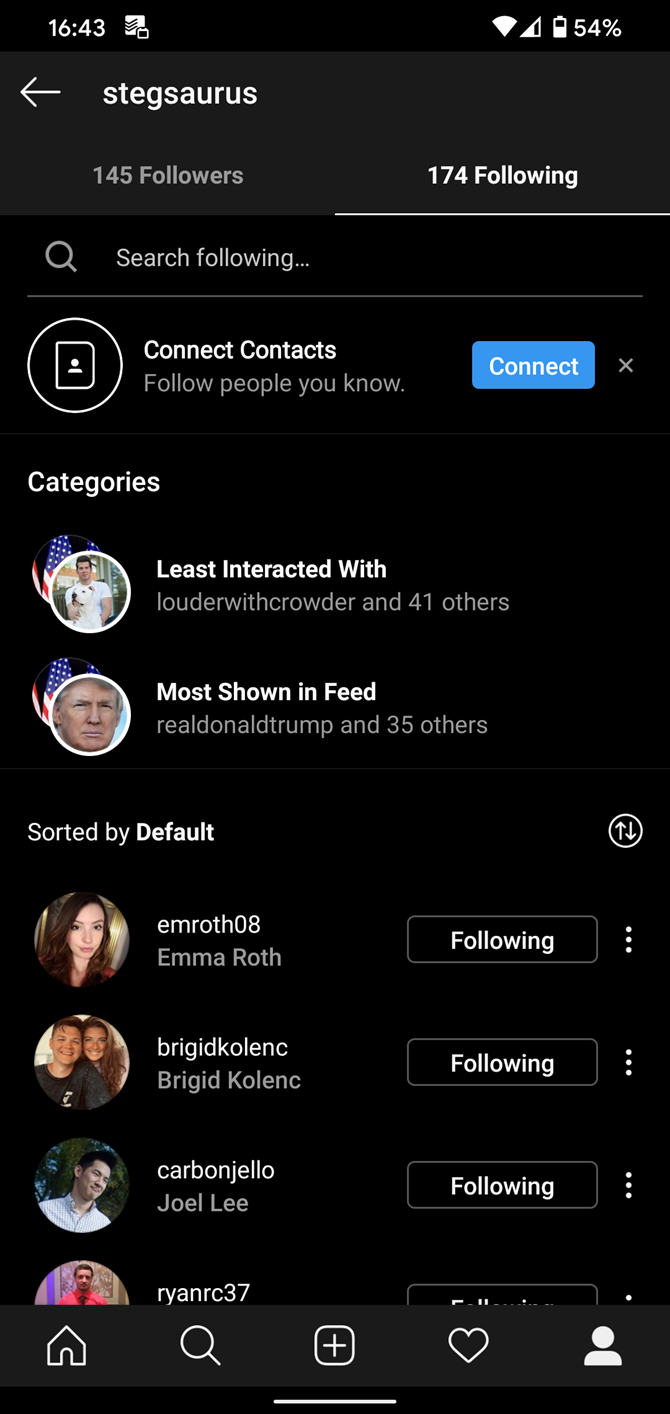
To help with this, Instagram now shows you which accounts you rarely interact with. Take a look by tapping the Profile icon in the bottom-right of Instagram to show your profile. Then, tap Following to see a list of everyone you follow.

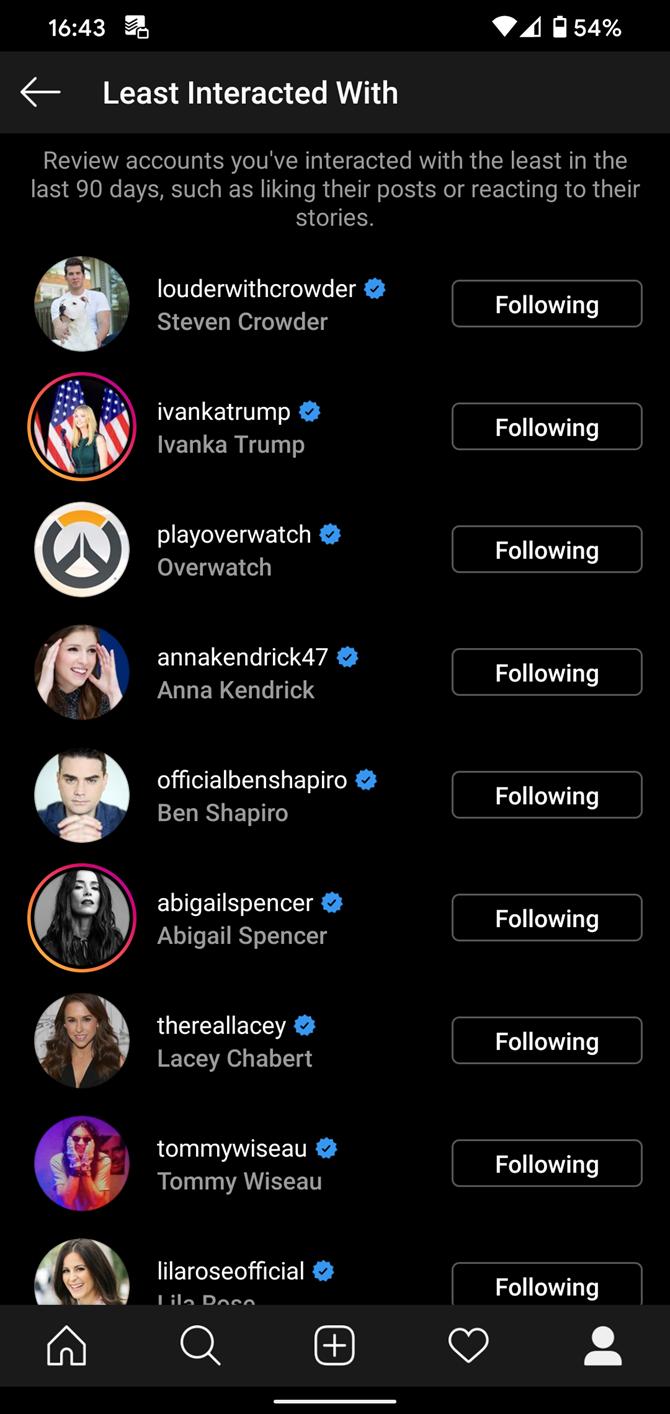
At the top of the list, you’ll see Categories, including Least Interacted With and Most Shown in Feed. These lists will reveal the accounts whose posts you rarely like or comment on, and which accounts are filling up your feed.

You can use this as a guide to who to unfollow on Instagram. If you haven’t interacted with an account for a few months, you probably won’t miss them. The same goes for the accounts posting more often than necessary.

2. Delete or Archive Old Photos

We’ll cover more about making Instagram a better place to browse shortly, but it’s also important to review your own profile. You’ll feel more confident when you know that your page represents you well.

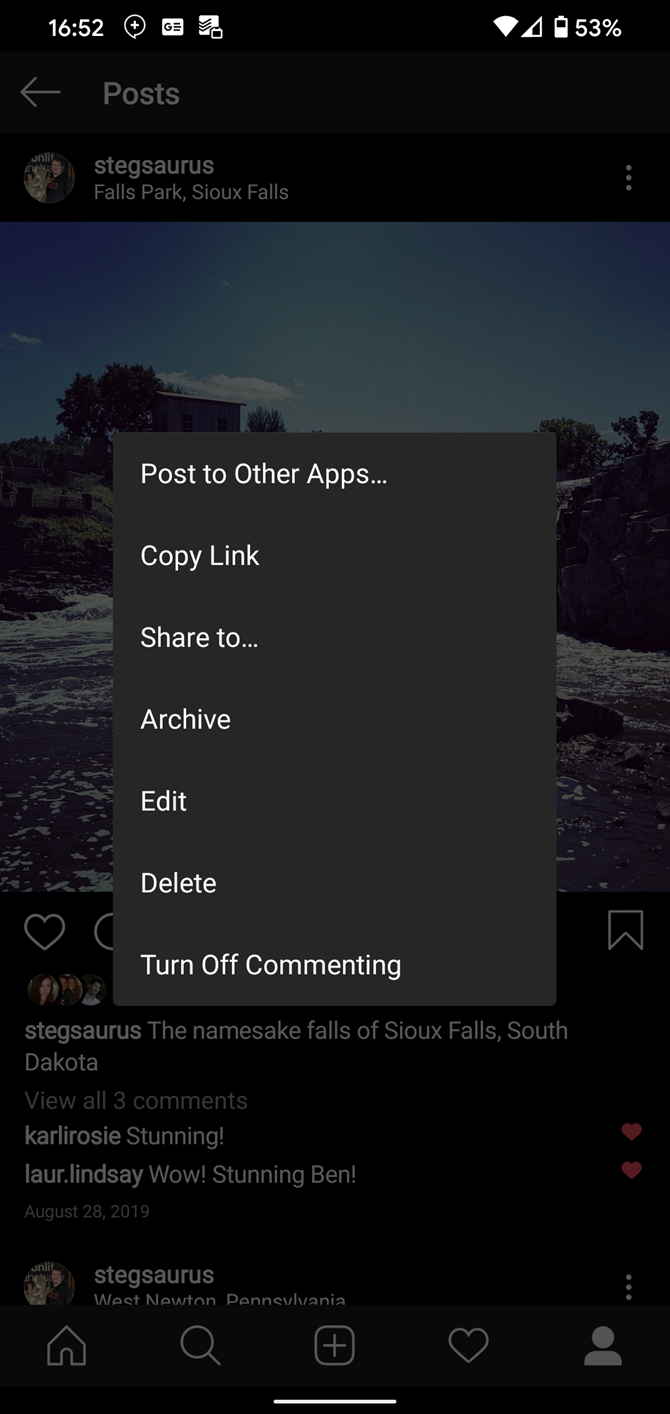
To that end, you should take a look through your page and consider deleting or archiving some photos. Maybe you uploaded pictures years ago that are low-quality, or have embarrassing images that reflect poorly on you. Removing these from your page lets you display only your strongest content.

To erase a photo, select it on your page, and hit the three-dot Menu button in the top-right of the post. Choose Delete and confirm your choice. Doing this permanently deletes the photo and all related information with no option to recover it, so make sure you’re certain before deleting.

Archiving is a less severe option. When you archive a photo or video (available from the same menu), the post disappears from your public profile. However, you can still view your archived posts.

Tap the three-bar Menu button at the top-right of your profile page, then select Archive. Change the dropdown at the top of this page to Posts Archive and you’ll see all archived posts.

Tap the Menu button next to an archived photo and choose Show on Profile to restore it. This preserves all likes, comments, and other information.

3. Update Your Bio and Other Personal Info

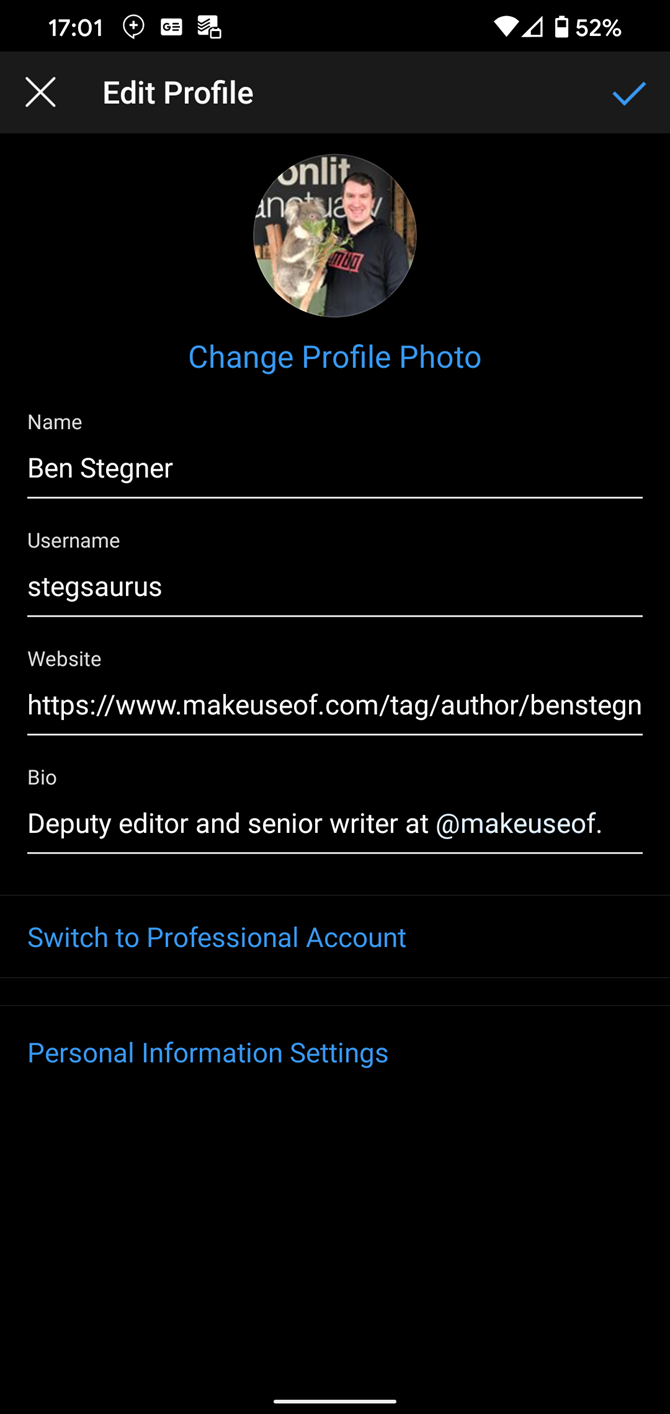
The next step in touching up your profile is making sure your personal info is correct. Visit your page and tap Edit Profile to adjust anything that’s out of date.

This lets you change your name, username, website link, and bio. Plus, if you haven’t changed your profile picture in a while, this is a great time to freshen that up.

4. Mute Stories or Posts You Don’t Care About

Did you know that you can mute stories from people you follow without hiding their regular posts? This is great for accounts that post dozens of stories and fill up your feed. Conversely, you can also mute posts and keep stories active.

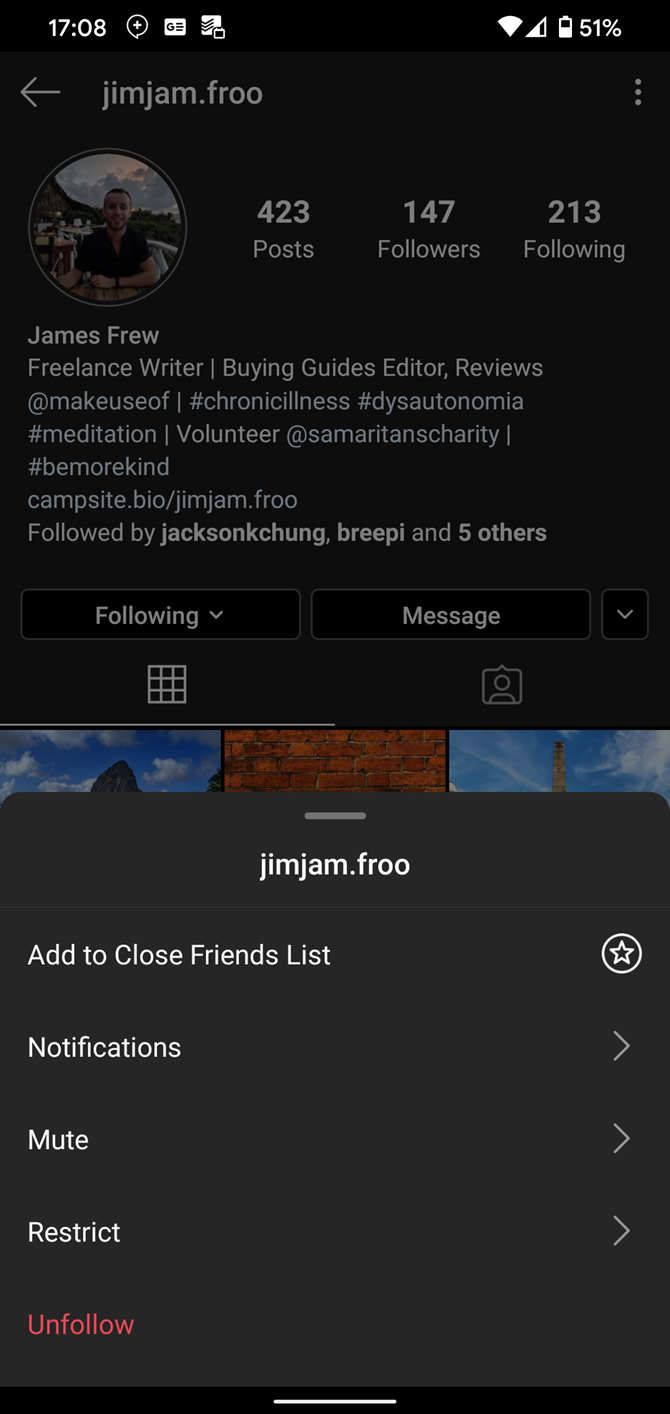
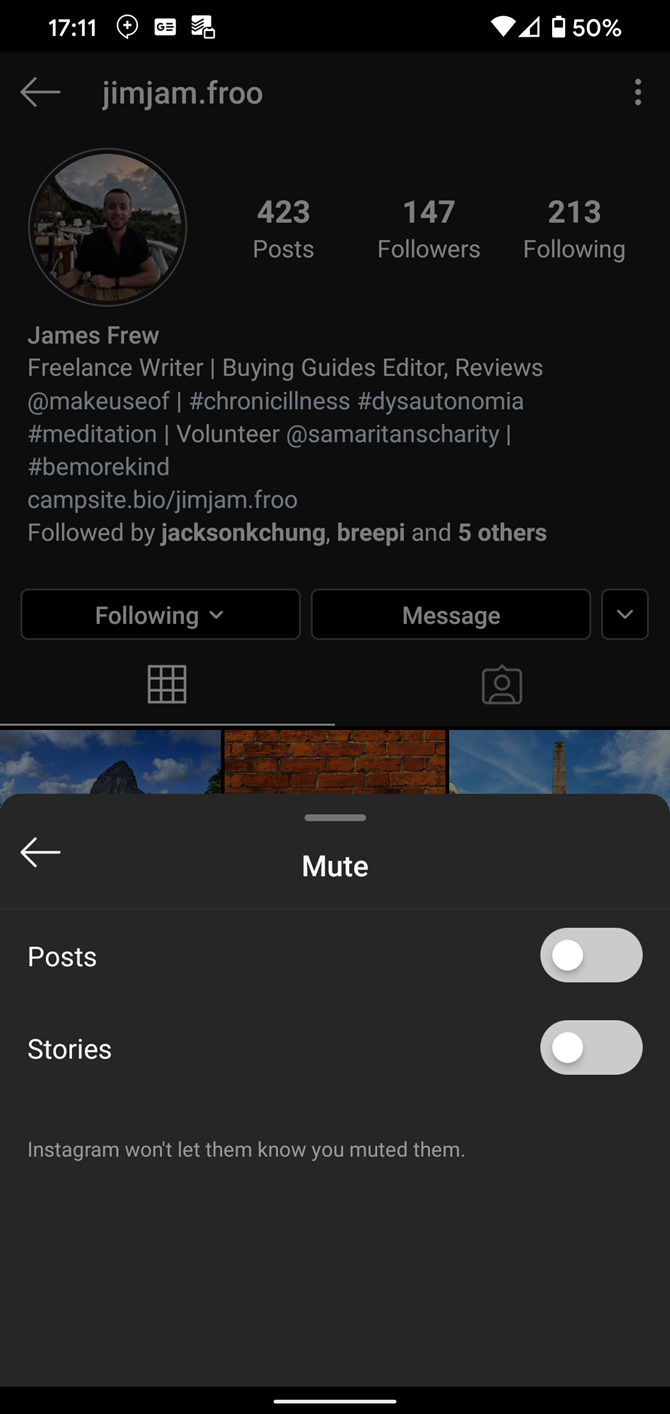
To mute content from an account, visit their profile. Tap the Following box and select Mute from the list that comes up. Use the sliders to mute Posts and/or Stories. Repeat these steps if you want to unmute the account.

When you mute stories from someone, their stories will appear at the end of the top bar, won’t light up when updated, and won’t play automatically. Muting posts means you won’t see them in your feed, but can still view them by visiting their profile.

If you like, you can also prevent certain people from viewing your stories. Visit their page, tap the menu button in the top-right, and choose Hide Your Story. They then won’t be able to see anything you post to your story.

5. Use “Close Friends” to Limit Your Audience

Sometimes you want to share a story with a select group of people. Instagram provides a Close Friends function that you can use to limit the story audience when needed.

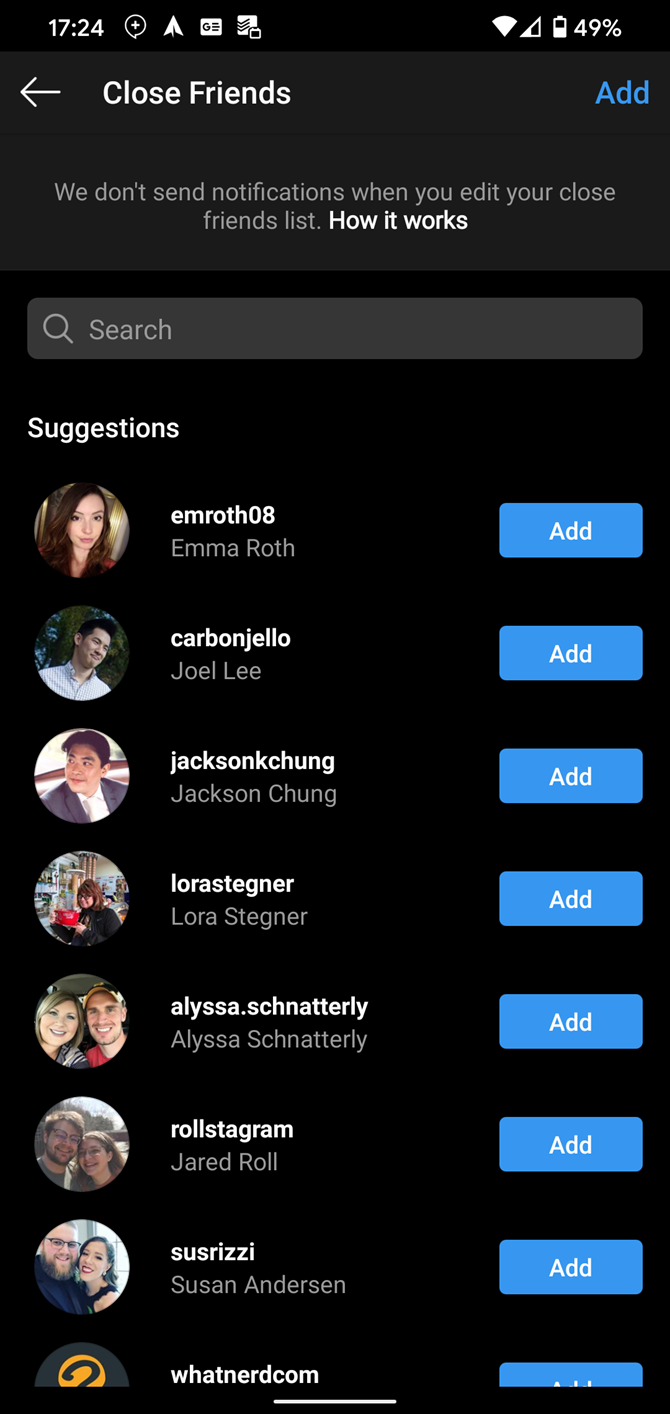
To add people to your Close Friends list, tap the Profile icon in the bottom-right and select Close Friends from the sidebar. Use the Suggestions that appear or search for people to add using the bar at the top.

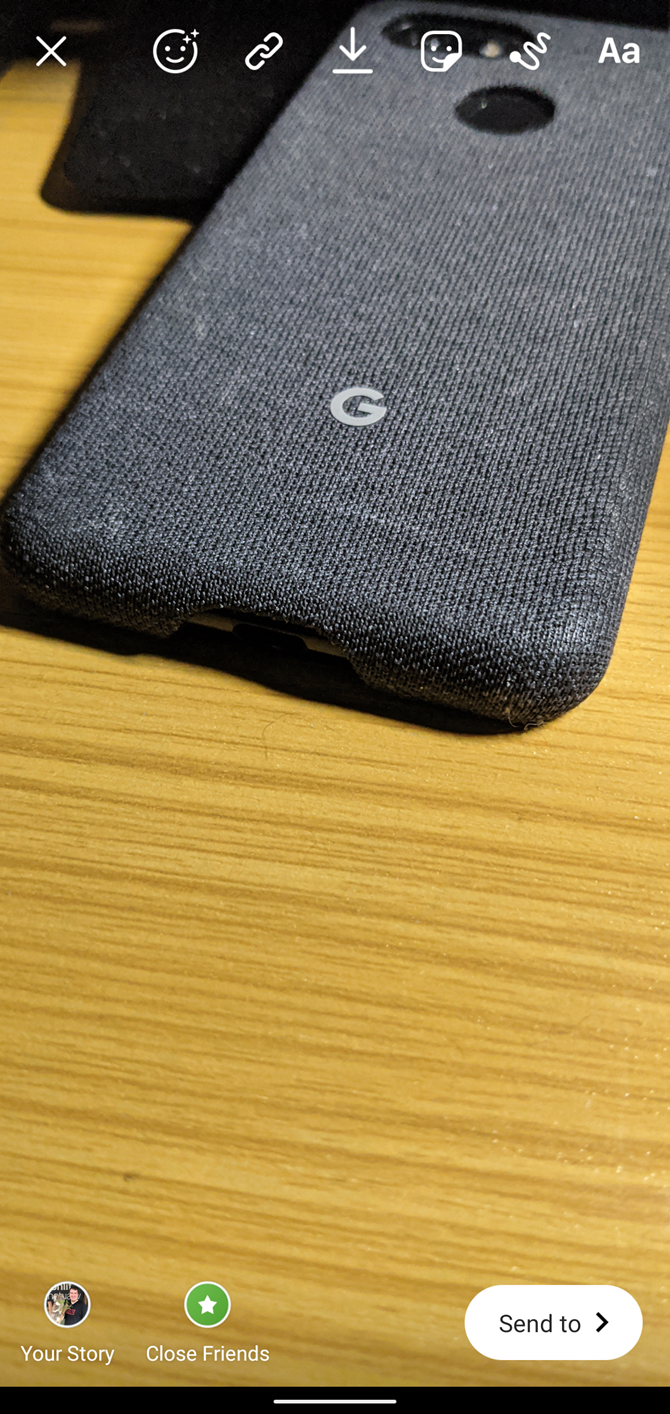
Once you have a list set up, you can use it when you’re ready to send a story. Tap Close Friends in the bottom-left of the page, and only people you’ve chosen for that list will be able to see it.

People on your Close Friends list will know because they’ll see a green ring around your profile photo when you share a story with only close friends. However, they can’t see who else is a member, and people can’t request to join your list.

6. See How Much Time You Spend on Instagram

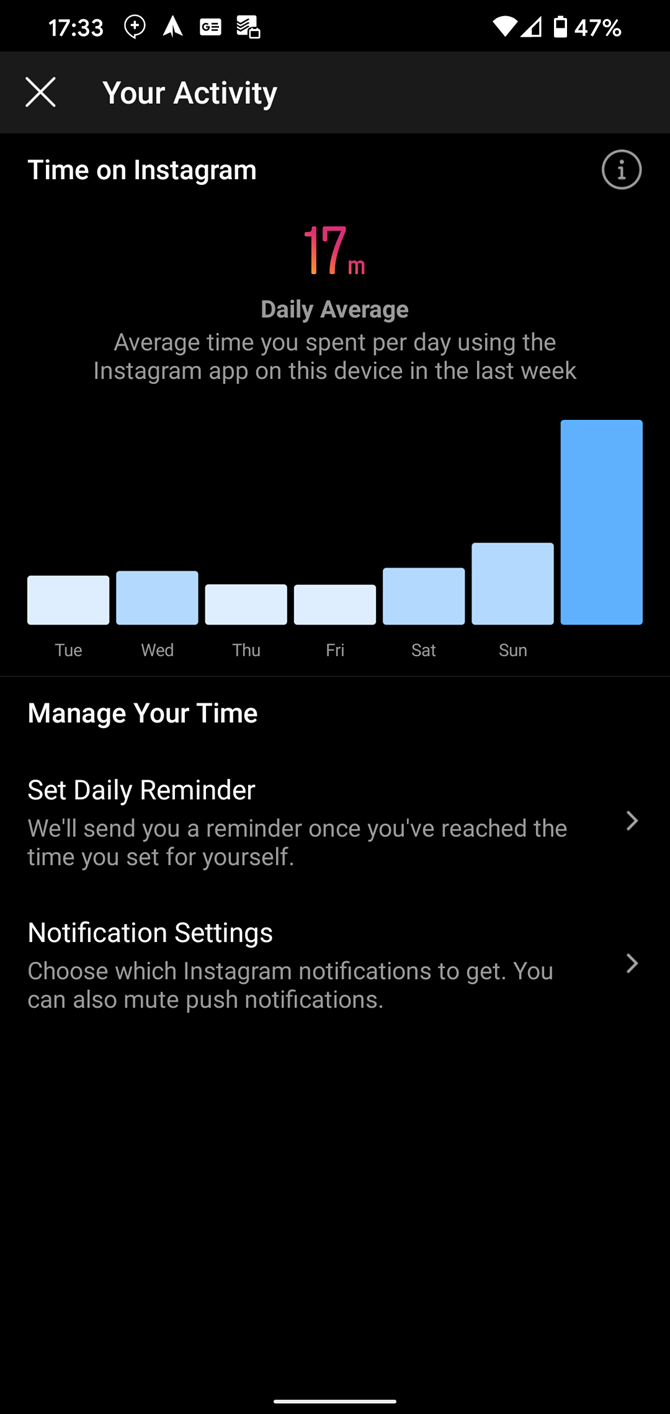
Are you worried that you spend too much time on Instagram? You can get a glimpse by visiting the Your Activity page, located on the right-hand sidebar of your profile. This shows the average amount of time you’ve spent on Instagram over the past week. Press and hold on a day’s bar to review it.

If you want to cut back on your usage, you can use the Set Daily Reminder function. Choose an amount of time, and Instagram will notify you when you’ve hit that limit for the day.

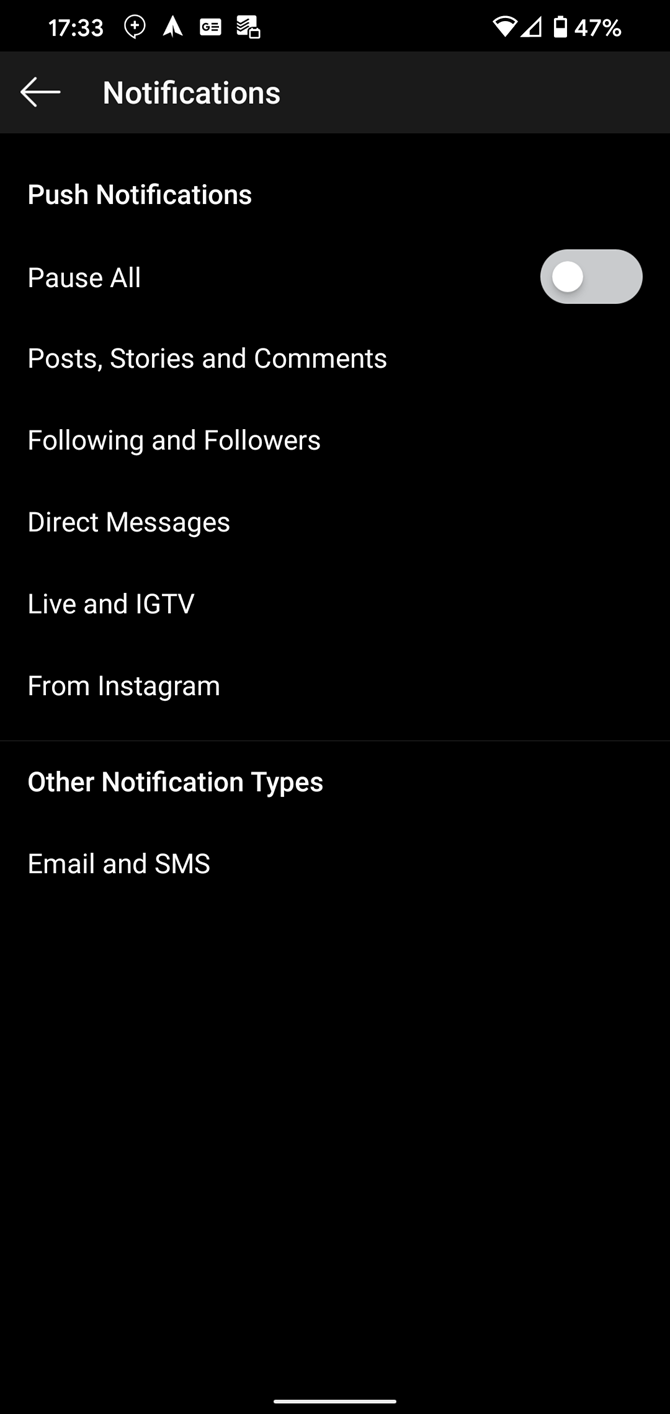
You can also modify your Notification Settings to reduce the amount of pings Instagram sends you. With fewer sounds grabbing your attention, you’ll hopefully open the app less often.

7. Restrict or Block Toxic People

If you have a serious problem with a particular user, Instagram gives you tools to shut them out.

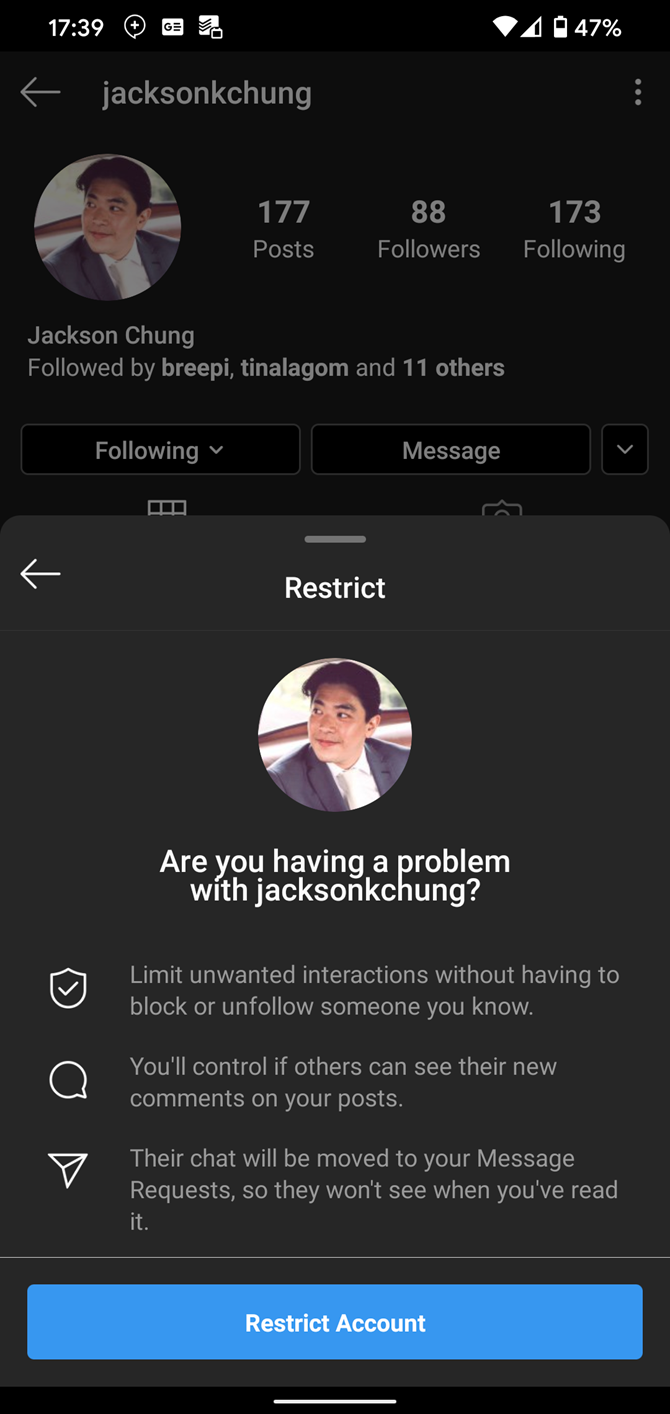
The least severe option is restricting. When you restrict someone, they effectively become shadowbanned. Their comments won’t appear publicly on your posts unless you approve them, they can’t see if your online or have read their messages, and you won’t see notifications for their comments.

To restrict someone, visit their profile, tap the three-dot Menu button in the top-right, and choose Restrict. People won’t know that you restricted them, and you can visit this window to reverse the process.

Blocking is more serious; it completely prevents people from interacting with your posts. You’ll find the option to Block on the same menu as above. Instagram doesn’t notify people when you block them, and if they visit your page, it will look completely empty.

See how to make your Instagram more private if you’re worried about sharing too much information.

8. Clean Up the Explore Page

Instagram’s Explore page helps you find new accounts to follow. However, it partially bases this on your search and activity history, meaning it can become cluttered with irrelevant suggestions over time. You can make this more useful in a number of ways.

If you see something on the Explore page you don’t like, tap it, hit the Menu button in the top-right, and choose Not Interested in This Post. This will hide the post from Explore and show fewer like it in the future.

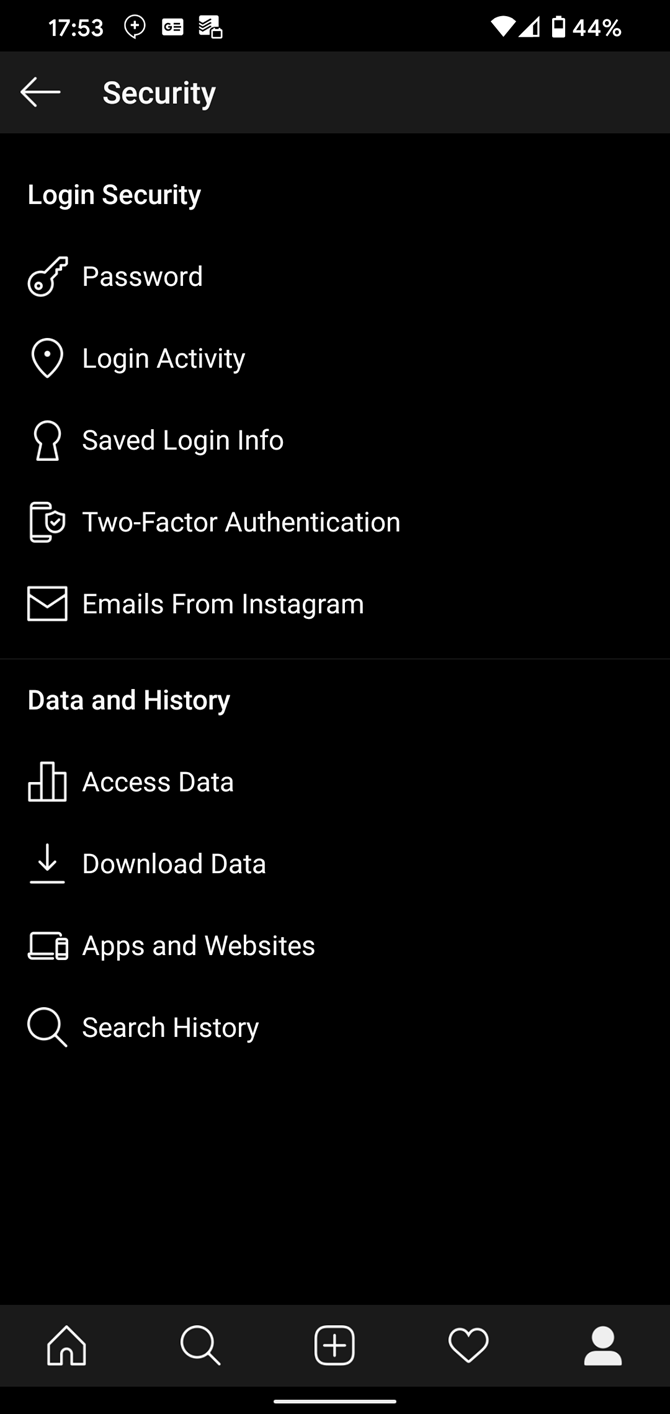
To reset your Explore page, clear your search history by visiting your profile page, opening the right sidebar, and tapping Settings. From here, go to Security > Search History. Clear individual items by tapping the X next to them, or hit Clear all to start fresh.

Maintain a Cleaner Instagram Account

With these tips, your Instagram account should look cleaner and tidier than ever. That makes your time on Instagram more efficient so you can enjoy a healthy balance of activities.

If you still feel overwhelmed by Instagram, you can temporarily disable your Instagram account using the steps outlined on Instagram Help. This allows you to take a break from Instagram without deleting all of your content, perhaps as part of a social media detox.

Read the full article: 8 Practical Ways to Clean Up Your Instagram


Read Full Article

Daily Crunch: HQ Trivia is dead


The Daily Crunch is TechCrunch’s roundup of our biggest and most important stories. If you’d like to get this delivered to your inbox every day at around 9am Pacific, you can subscribe here.

1. HQ Trivia shuts down after acquisition falls through

HQ Trivia is dead. On Valentine’s Day, the company laid off its full team of 25. The company had a deal in the works to be acquired, but the buyer pulled out and the investors aren’t willing to fund it any longer, according to a statement from CEO and co-founder Rus Yusupov.

At least the game went out with a bonkers finale, where the hosts cursed, sprayed champagne, threatened to defecate on the homes of trolls in the chat window and begged for new jobs.

2. Living with the Samsung Galaxy Z Flip

Brian Heater says he enjoyed his (admittedly brief) time with the Galaxy Z Flip. In fact, in many ways, it’s exactly the device that Samsung’s original foldable should have been.

3. Google ends its free Wi-Fi program Station

Google is winding down Google Station, a program where it worked with partners to bring free Wi-Fi to more than 400 railway stations in India and “thousands” of other public places in several additional pockets of the world.

4. Facebook pushes EU for dilute and fuzzy internet content rules

“I do think that there should be regulation on harmful content,” said CEO Mark Zuckerberg during a Q&A session at the Munich Security Conference. He then suggested that Facebook should fall “somewhere in between” media and telco regulation.

5. Is tech socialism really on the rise?

In the second part of our interview with writer/ethicist Ben Tarnoff, he goes in-depth on the relationship between socialism and technology. (Extra Crunch membership required.)

6. Oyo’s revenue surged in FY19, but loss widened, too

Budget-lodging startup Oyo on Monday reported a loss of $335 million on $951 million revenue globally for the financial year ending March 31, 2019, and pledged to cut down on its spending as the India-headquartered firm grows cautious about its aggressive expansion. (Yes, it seems a bit late to be talking about earnings from 2018-19, but that’s how Indian finance law works.)

7. This week’s TechCrunch podcasts

The latest full episode of Equity discusses a big funding round for meditation app Headspace, while its Monday news roundup looks at global growth concerns due to coronavirus. And over at Original Content, we’ve got a review of “Mythic Quest,” the video game-focused comedy on Apple TV+.


Read Full Article

Google confirms it again removed alleged spying tool ToTok from Google Play


In December, The New York Times reported a popular messaging app called ToTok was actually a spying tool used by the government of the United Arab Emirates to track users’ conversations, location and social connections. The app was removed from the Google Play store in December, while Google investigated, then reinstated in early January. Google now confirms the app has again been removed, but this time declined to comment as to why.

The site 9to5Google first noticed ToTok had again been pulled from Google Play on Friday.

Reached for comment, Google confirmed to TechCrunch that it removed the app — but not the app’s developer — from Google Play. In addition, Google noted the enforcement was not done in response to any external direction or request. That means the U.S. government did not get involved here, rather that Google chose to remove the app itself — likely for a policy violation.

According to The NYT’s original report, ToTok had been downloaded millions of times from both Apple and Google’s app stores by customers across the Middle East, Europe, Asia, Africa and North America in the few months since its launch. Citing unnamed U.S. intelligence sources, the report claimed the app had been used to track its users’ “every conversation, movement, relationship, appointment, sound, and image.”

At the time of the app’s removal, Google said the app had violated unspecified Google Play policies.

In January, ToTok’s website announced the app was again available for download.

The updated version submitted to Google Play included a new dialog that requested authorization to access and sync users’ contact list, Vice reported.

Oddly, this updated version of ToTok never ranked on Google Play’s charts again.

Typically, third-party app intelligence firms like App Annie and Sensor Tower are able to see even very lowly ranked apps. For example, App Annie’s charts track apps as poorly ranked as #1750 in any category. But after its return, ToTok never even made it that high — even in its home market of UAE.

The app was available for download, however. Google confirms it removed the app on Friday, February 14, 2020 from the Play store.

Now ToTok’s website points to the app’s listing on a number of third-party Android app stores, but not Google Play. It also offers an APK file for direct download.

ToTok remains unavailable on iOS.


Read Full Article

17 February 2020

Images of TCL’s slide-out display smartphone surface in wake of MWC cancellation


This morning brought a look at some of what we’re missing at this year’s Mobile World Congress. The show may have been called off on account of coronavirus concerns, but the news goes on.

We knew that TCL was planning to show off a number of “alternative” smartphone form factors, and one just showed up on CNET. The device presents a promising take on the world of expandable screens, with a kind of slide out display that expands the standard smartphone into something more akin to a tablet.

TCL, of course, showed off its own foldable at MWC last year, but the device was encased in a block of glass. By all accounts, the company’s decision to not rush to market was a good one, as foldables have not gotten off to the most auspicious of starts.

The sources behind the images say that the device would have debuted at MWC, though it’s hard to judge how far along the technology is, given the fact that these are, indeed, renders. If I had to venture a guess, I’d say that best case scenario, it would have been another under glass, hands off debut. These days, it seems that manufacturers are increasingly following the automative model of showing off early concepts that may or may not ever actual come to market. The word “prototype” certainly seems apt in this case. 

In either case, a TCL rep declined to offer TechCrunch a comment on the images or whether we’ll get a better look in spite of the show’s cancellation.


Read Full Article

Facebook pushes EU for dilute and fuzzy Internet content rules


Facebook founder Mark Zuckerberg is in Europe this week — attending a security conference in Germany over the weekend where he spoke about the kind of regulation he’d like applied to his platform ahead of a slate of planned meetings with digital heavyweights at the European Commission.

“I do think that there should be regulation on harmful content,” said Zuckerberg during a Q&A session at the Munich Security Conference, per Reuters, making a pitch for bespoke regulation.

He went on to suggest “there’s a question about which framework you use”, telling delegates: “Right now there are two frameworks that I think people have for existing industries — there’s like newspapers and existing media, and then there’s the telco-type model, which is ‘the data just flows through you’, but you’re not going to hold a telco responsible if someone says something harmful on a phone line.”

“I actually think where we should be is somewhere in between,” he added, making his plea for Internet platforms to be a special case.

At the conference he also said Facebook now employs 35,000 people to review content on its platform and implement security measures — including suspending around 1 million fake accounts per day, a stat he professed himself “proud” of.

The Facebook chief is due to meet with key commissioners covering the digital sphere this week, including competition chief and digital EVP Margrethe Vestager, internal market commissioner Thierry Breton and Věra Jourová, who is leading policymaking around online disinformation.

The timing of his trip is clearly linked to digital policymaking in Brussels — with the Commission due to set out its thinking around the regulation of artificial intelligence this week. (A leaked draft last month suggested policymaker are eyeing risk-based rules to wrap around AI.)

More widely, the Commission is wrestling with how to respond to a range of problematic online content — from terrorism to disinformation and election interference — which also puts Facebook’s 2BN+ social media empire squarely in regulators’ sights.

Another policymaking plan — a forthcoming Digital Service Act (DSA) — is slated to upgrade liability rules around Internet platforms.

The detail of the DSA has yet to be publicly laid out but any move to rethink platform liabilities could present a disruptive risk for a content distributing giant such as Facebook.

Going into meetings with key commissioners Zuckerberg made his preference for being considered a ‘special’ case clear — saying he wants his platform to be regulated not like the media businesses which his empire has financially disrupted; nor like a dumbpipe telco.

On the latter it’s clear — even to Facebook — that the days of Zuckerberg being able to trot out his erstwhile mantra that ‘we’re just a technology platform’, and wash his hands of tricky content stuff, are long gone.

Russia’s 2016 foray into digital campaigning in the US elections and sundry content horrors/scandals before and since have put paid to that — from nation-state backed fake news campaigns to livestreamed suicides and mass murder.

Facebook has been forced to increase its investment in content moderation. Meanwhile it announced a News section launch last year — saying it would hand pick publishers content to show in a dedicated tab.

The ‘we’re just a platform’ line hasn’t been working for years. And EU policymakers are preparing to do something about that.

With regulation looming Facebook is now directing its lobbying energies onto trying to shape a policymaking debate — calling for what it dubs “the ‘right’ regulation”.

Here the Facebook chief looks to be applying a similar playbook as the Google’s CEO, Sundar Pichai — who recently tripped to Brussels to push for AI rules so dilute they’d act as a tech enabler.

In a blog post published today Facebook pulls its latest policy lever: Putting out a white paper which poses a series of questions intended to frame the debate at a key moment of public discussion around digital policymaking.

Top of this list is a push to foreground focus on free speech, with Facebook questioning “how can content regulation best achieve the goal of reducing harmful speech while preserving free expression?” — before suggesting more of the same: (Free, to its business) user-generated policing of its platform.

Another suggestion it sets out which aligns with existing Facebook moves to steer regulation in a direction it’s comfortable with is for an appeals channel to be created for users to appeal content removal or non-removal. Which of course entirely aligns with a content decision review body Facebook is in the process of setting up — but which is not in fact independent of Facebook.

Facebook is also lobbying in the white paper to be able to throw platform levers to meet a threshold of ‘acceptable vileness’ — i.e. it wants a proportion of law-violating content to be sanctioned by regulators — with the tech giant suggesting: “Companies could be incentivized to meet specific targets such as keeping the prevalence of violating content below some agreed threshold.”

It’s also pushing for the fuzziest and most dilute definition of “harmful content” possible. On this Facebook argues that existing (national) speech laws — such as, presumably, Germany’s Network Enforcement Act (aka the NetzDG law) which already covers online hate speech in that market — should not apply to Internet content platforms, as it claims moderating this type of content is “fundamentally different”.

“Governments should create rules to address this complexity — that recognize user preferences and the variation among internet services, can be enforced at scale, and allow for flexibility across language, trends and context,” it writes — lobbying for maximum possible leeway to be baked into the coming rules.

“The development of regulatory solutions should involve not just lawmakers, private companies and civil society, but also those who use online platforms,” Facebook’s VP of content policy, Monika Bickert, also writes in the blog.

“If designed well, new frameworks for regulating harmful content can contribute to the internet’s continued success by articulating clear ways for government, companies, and civil society to share responsibilities and work together. Designed poorly, these efforts risk unintended consequences that might make people less safe online, stifle expression and slow innovation,” she adds, ticking off more of the tech giant’s usual talking points at the point policymakers start discussing putting hard limits on its ad business.


Read Full Article

Facebook pushes EU for dilute and fuzzy Internet content rules


Facebook founder Mark Zuckerberg is in Europe this week — attending a security conference in Germany over the weekend where he spoke about the kind of regulation he’d like applied to his platform ahead of a slate of planned meetings with digital heavyweights at the European Commission.

“I do think that there should be regulation on harmful content,” said Zuckerberg during a Q&A session at the Munich Security Conference, per Reuters, making a pitch for bespoke regulation.

He went on to suggest “there’s a question about which framework you use”, telling delegates: “Right now there are two frameworks that I think people have for existing industries — there’s like newspapers and existing media, and then there’s the telco-type model, which is ‘the data just flows through you’, but you’re not going to hold a telco responsible if someone says something harmful on a phone line.”

“I actually think where we should be is somewhere in between,” he added, making his plea for Internet platforms to be a special case.

At the conference he also said Facebook now employs 35,000 people to review content on its platform and implement security measures — including suspending around 1 million fake accounts per day, a stat he professed himself “proud” of.

The Facebook chief is due to meet with key commissioners covering the digital sphere this week, including competition chief and digital EVP Margrethe Vestager, internal market commissioner Thierry Breton and Věra Jourová, who is leading policymaking around online disinformation.

The timing of his trip is clearly linked to digital policymaking in Brussels — with the Commission due to set out its thinking around the regulation of artificial intelligence this week. (A leaked draft last month suggested policymaker are eyeing risk-based rules to wrap around AI.)

More widely, the Commission is wrestling with how to respond to a range of problematic online content — from terrorism to disinformation and election interference — which also puts Facebook’s 2BN+ social media empire squarely in regulators’ sights.

Another policymaking plan — a forthcoming Digital Service Act (DSA) — is slated to upgrade liability rules around Internet platforms.

The detail of the DSA has yet to be publicly laid out but any move to rethink platform liabilities could present a disruptive risk for a content distributing giant such as Facebook.

Going into meetings with key commissioners Zuckerberg made his preference for being considered a ‘special’ case clear — saying he wants his platform to be regulated not like the media businesses which his empire has financially disrupted; nor like a dumbpipe telco.

On the latter it’s clear — even to Facebook — that the days of Zuckerberg being able to trot out his erstwhile mantra that ‘we’re just a technology platform’, and wash his hands of tricky content stuff, are long gone.

Russia’s 2016 foray into digital campaigning in the US elections and sundry content horrors/scandals before and since have put paid to that — from nation-state backed fake news campaigns to livestreamed suicides and mass murder.

Facebook has been forced to increase its investment in content moderation. Meanwhile it announced a News section launch last year — saying it would hand pick publishers content to show in a dedicated tab.

The ‘we’re just a platform’ line hasn’t been working for years. And EU policymakers are preparing to do something about that.

With regulation looming Facebook is now directing its lobbying energies onto trying to shape a policymaking debate — calling for what it dubs “the ‘right’ regulation”.

Here the Facebook chief looks to be applying a similar playbook as the Google’s CEO, Sundar Pichai — who recently tripped to Brussels to push for AI rules so dilute they’d act as a tech enabler.

In a blog post published today Facebook pulls its latest policy lever: Putting out a white paper which poses a series of questions intended to frame the debate at a key moment of public discussion around digital policymaking.

Top of this list is a push to foreground focus on free speech, with Facebook questioning “how can content regulation best achieve the goal of reducing harmful speech while preserving free expression?” — before suggesting more of the same: (Free, to its business) user-generated policing of its platform.

Another suggestion it sets out which aligns with existing Facebook moves to steer regulation in a direction it’s comfortable with is for an appeals channel to be created for users to appeal content removal or non-removal. Which of course entirely aligns with a content decision review body Facebook is in the process of setting up — but which is not in fact independent of Facebook.

Facebook is also lobbying in the white paper to be able to throw platform levers to meet a threshold of ‘acceptable vileness’ — i.e. it wants a proportion of law-violating content to be sanctioned by regulators — with the tech giant suggesting: “Companies could be incentivized to meet specific targets such as keeping the prevalence of violating content below some agreed threshold.”

It’s also pushing for the fuzziest and most dilute definition of “harmful content” possible. On this Facebook argues that existing (national) speech laws — such as, presumably, Germany’s Network Enforcement Act (aka the NetzDG law) which already covers online hate speech in that market — should not apply to Internet content platforms, as it claims moderating this type of content is “fundamentally different”.

“Governments should create rules to address this complexity — that recognize user preferences and the variation among internet services, can be enforced at scale, and allow for flexibility across language, trends and context,” it writes — lobbying for maximum possible leeway to be baked into the coming rules.

“The development of regulatory solutions should involve not just lawmakers, private companies and civil society, but also those who use online platforms,” Facebook’s VP of content policy, Monika Bickert, also writes in the blog.

“If designed well, new frameworks for regulating harmful content can contribute to the internet’s continued success by articulating clear ways for government, companies, and civil society to share responsibilities and work together. Designed poorly, these efforts risk unintended consequences that might make people less safe online, stifle expression and slow innovation,” she adds, ticking off more of the tech giant’s usual talking points at the point policymakers start discussing putting hard limits on its ad business.


Read Full Article

Smart speaker sales reached new record of 146.9M in 2019, up 70% from 2018


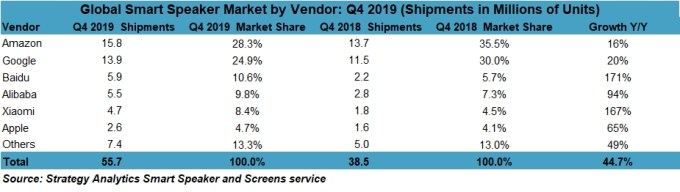
Global smart speaker sales hit a record high last year with shipments of 146.9 million units, up 70% over 2018, according to a recent report on the state of the smart speaker market from Strategy Analytics. Though Amazon still leads in the U.S. by a wide margin, its portion of the worldwide market is now declining as Chinese vendors gain traction.

However, Amazon’s Echo brand continues to lead smart speaker sales worldwide with a 26.2% share in 2019. But that’s a drop from Amazon’s 33.7% share in 2018. Amazon’s decline wasn’t Google’s gain, either, in terms of market share. Instead, second-place Google dropped from 25.9% in 2018 to 20.3% last year.

That said, Amazon and Google in 2019 retained their leadership in both North America and Europe, where they accounted for more than three-quarters of all smart speaker sales.

Meanwhile, Chinese vendors Baidu, Alibaba and Xiaomi all increased their respective shares in 2019. And Apple remained in sixth place with only a 4.7% share.

The figures were somewhat better when looking at Q4 2019 alone, thanks to the holiday shopping season where vendors slashed prices on entry-level smart speakers to encourage purchases and ran other holiday sales. In the quarter, Amazon led with 15.8 million units shipped, followed by Google with 13.9 million, then Chinese brand Baidu with 5.9 million in third.

Sales of smart speakers in Q4 totaled 55.7 million units, the highest ever to date. This was driven by the strong holiday sales in both the U.S. and Europe in the quarter. In addition, Google’s smart speaker business improved followed a combination of new product introductions, improved component supply, and strong promotional activity, the analyst firm said.

“Consumer appetite for smart speakers remained undimmed during the all-important Q4 period as newly launched devices with improved feature sets and audio performance helped drive record quarterly shipments,” said David Watkins, Director at Strategy Analytics, in a statement. “Consumers across the world were once again enticed by scarcely believable deals from leading brands such as Google, Amazon, Baidu, and Alibaba, while Google, in particular, stepped up its giveaway promotional activity in partnership with brands such as YouTube and Spotify.”

Despite the impacts to supply and demand currently being caused by coronavirus (Covid-19), Strategy Analytics believes 2020 will be another record year for smart speakers.

The full report is available here.


Read Full Article

Google ends its free Wi-Fi program Station


Google said on Monday that it is winding down Google Station, a program as part of which it worked with a number of partners to roll out free Wi-Fi in more than 400 railway stations in India and “thousands” of other public places in several additional pockets of the world.

Caesar Sengupta, VP of Payments and Next Billion Users at Google, said the program, launched in 2015, helped millions of users surf the internet — first time for many — and not worry about the amount of data they consumed. But as mobile data prices got cheaper in many markets including India, Google Station was no longer as necessary, he said. The company plans to discontinue the program this year.

Additionally, it had become difficult for Google to find a sustainable business model to scale the program, the company said, which in recent years expanded Station to Indonesia, Mexico, Thailand, Nigeria, Philippines, Brazil, and Vietnam. The company launched the program in South Africa just three months ago.

Over the years, Google also explored ways to monetize Google Station program. The company, for instance, began showing an ad when a user signed in to connect to its internet service.

In an interview early last year, Gulzar Azad, who spearheads connectivity efforts for Google in India, told me that the company was thinking about ways to scale Station to more markets, but noted that as far as deployment at Indian railway stations was concerned, Google had reached its goal (to serve 400 railway stations).

A year after Google announced its efforts to offer free Wi-Fi in India, the country’s richest man, Mukesh Ambani, launched his telecom network Reliance Jio. Jio offered customers bulk of 4G data at no charge for an extended period of time, forcing other telecom operators to slash their tariffs.

The move ushered millions of Indians to the internet, access to which was too expensive for many, for the first time. In a separate interview, I asked Azad if Google Station’s relevance had somewhat diminished because of Reliance Jio’s entrance. At the time, he said plenty of people were still signing up for the company’s program and that they were continuing to show a great appetite to consume voluminous data.

Google works with a number of companies to enable free Wi-Fi to users in public places. In India, for instance, Google has built the software stack while RailTel, a state-owned telecom infrastructure provider, delivers the free internet line.

RailTel delivers Wi-Fi in more than 5,600 railway stations and over the years has developed the capability to offer its own software stack. “We are working with our partners to transition existing sites so they can remain useful resources for the community,” said Sengupta.

TechCrunch has reached out to a RailTel spokesperson to check whether the company plans to keep offering Wi-Fi in the 400 odd railway stations where it worked with Google. Update: RailTel will continue to service free Wi-Fi in all those railway stations. “We sincerely value the support we received from Google in this journey,” the spokesperson added.

“The challenge of varying technical requirements and infrastructure among our partners across countries has also made it difficult for Station to scale and be sustainable, especially for our partners. And when we evaluate where we can truly make an impact in the future, we see greater need and bigger opportunities in making building products and features tailored to work better for the next billion user markets,” said Sengupta.

Google isn’t the only tech giant that has worked to offer free internet to users in developing markets. Facebook’s successor to Internet.org — the program that was banned in India for violating net neutrality regulations — launched in the country in 2017.


Read Full Article
The 7 Best Cloud Gaming Services to Stream Video Games


cloud-gaming-services

The future of gaming is almost certainly in the cloud. PlayStation Now, Microsoft’s Project xCloud, GeForce Now, and Google Stadia are all prominent cloud gaming services. They stream games to your TV, without a games console or gaming PC, for a fee.

But which one is best? Which of these cloud gaming services offers the best games, and which should you subscribe to? In this article, we compile a list of the best cloud gaming services to help you decide which, if any, you want to subscribe to.

What Is Cloud Gaming?

Traditionally, gaming requires expensive hardware. This might be a games console, a gaming PC, or a set-top box (such as Amazon Fire TV or Android TV).

With cloud gaming, expensive hardware is no longer required. Instead, the games are streamed to you over the internet, much like a movie is on Netflix. A fast broadband internet connection is required; the higher the better.

Cloud gaming essentially lets you play games on any device. It might be a phone or tablet, a netbook, or an older laptop or PC. Mac owners can potentially play PC games that aren’t released on their platform.

Cloud gaming services rely on a monthly subscription for access. Typically, you’ll get a few free games; while some require dedicated devices, these are cheaper than a current-gen games console. In most cases, video game streaming services offer mobile apps, meaning you can enjoy AAA games on almost any device.

Our guide to cloud gaming explains things in more detail.

Several cloud gaming platforms are available:

  1. GeForce Now
  2. PlayStation Now
  3. Jump
  4. Google Stadia
  5. Project xCloud
  6. Vortex
  7. Shadow

You can sign up to these today—but which cloud gaming service is right for you? Read on to find out…

1. GeForce Now

GeForce Now is graphics chip designer Nvidia’s cloud-based gaming service for Windows, macOS, SHIELD TV, and Android devices.

GeForce Now lets you access your existing library of games on Steam, Origin, and other digital delivery platforms for PC. These are then streamed to the device running GeForce Now.

Available in North America and Europe, it has two membership levels: Free and Founders. Free members get standard access and one-hour sessions, while Founders pay $5/month for priority server access and extended sessions. These last for up to six hours, with priority access to the next server session. Founders also get RTX (hardware ray tracing), an enhanced graphical option.

A massive benefit of GeForce Now is that you keep the games you’ve bought if you cancel the service. This makes it almost unique among cloud gaming services.

2. PlayStation Now

For a monthly subscription of $9.99 you can play hundreds of PS4, PS3, and PS2 games on-demand with PlayStation Now.

Over 800 games can be streamed to a PS4 or PC. Just connect your Dualshock 4 controller via USB, install the PlayStation Now app on Windows, and you’re ready to play.

If you’re concerned about the cost, PlayStation Now offers a free trial. With such a large library of quality games to choose from (such as Uncharted: The Lost Legacy and Horizon Zero Dawn) you’re going to be spoiled for choice. New titles are added every month.

3. Jump

AAA games not your thing? Jump might be the answer.

Designed to stream indie games to your computer for just $4.99/month (with a 14-day free trial), Jump adds new games monthly. 70 percent of the revenue supports indie game developers, with a selection of 100+ games across all genres.

“From roguelike dungeon crawlers, & artsy platformers to 8-bit narrative puzzlers, turn-based strategy games… we have it all.”

Jump is compatible with Windows, macOS, and Linux.

4. Google Stadia

Launched in late 2019, Stadia is Google’s offering to the cloud streaming market. It comes with some impressive features, such as 4K streaming at 60FPS and two free games a month for subscribers. Google Stadia includes a wireless controller and a Chromecast Ultra, geared towards minimal lag.

The Chromecast Ultra means that games can be streamed directly to your TV without additional hardware. That’s quite an advantage. Games can also be played on Android and PCs.

Costing $129 for access to the streaming service, a single wireless controller, and the Chromecast Ultra, only the Premiere Edition is currently available. This includes three months of Pro membership, after which the $9.99/month subscription kicks in. It’s expensive, but the results are stunning.

However, as good as the streaming quality is, initial set up is a little frustrating. Additionally, the selection of Google Stadia games available by early 2020 was worryingly modest. Questions over Google’s commitment to Stadia have been raised, following the tech giant’s habit of “fridging” projects.

Stadia has great technology behind it, the streaming is perfect on speeds over 40Mbps, but its long-term future is already in doubt.

For more on this game streaming service, check out our Google Stadia review.

5. Project xCloud

Developed by Microsoft, Project xCloud streams Xbox games to Android phones and tablets.

Over 50 games are included; all you need is a Bluetooth Xbox One controller. An optional gaming clip is also available for connecting your Android phone to the controller. Project xCloud primarily aims to deliver Xbox gaming to mobile devices—this requires 5Ghz Wi-Fi or 10Mbps mobile internet.

If this sounds familiar, it’s probably because Microsoft offers another game streaming solution, Xbox Console Streaming. This is also in preview, but only streams games across your home network from an Xbox console to Android.

Project xCloud is set to launch in late 2020. Before that happens, you can sign up for the preview period.

6. Vortex

A cloud service that aims to stream the best PC games, Vortex is available for Android, Windows 10, and macOS.

Three packages are available:

  • $9.99 for the Basic 50 hours a month and 97 games
  • $19.99 for Pro, with 80 hours and 178 games
  • $29.99 for Ultra, offering 140 hours and 178 games

To use Vortex, you’ll need a 10Mbps domestic internet and a 5Ghz Wi-Fi router. 4G/LTE mobile internet is also supported.

Vortex supports PCs, tablets, and set-top boxes alike, making it a strong contender.

7. Shadow

A cloud PC gaming platform with dedicated storage, Shadow launches in mid-2020. Games and progress can be imported from Steam, Epic, Uplay, Battle.net, Origin, GOG, and many other digital delivery platforms.

This sets Shadow apart from other PC game streaming services, as does the price of $12.99/month. Shadow is available for Windows 7 and later, macOS 10.10 and later, Ubuntu 18.04 and later, along with Android 5.0+, iOS 11.0+, Android TV, and Apple TV.

Real-time statistics are on offer as you play, while the vast size of the library—games you already own—should guarantee you’ll never be bored.

But there’s a downside. Despite a strong platform, Shadow is expensive compared with PlayStation Now, GeForce Now, and Google Stadia.

Which of These Cloud Gaming Services Is Best?

The game streaming platform you choose may be informed by the devices you own. PlayStation and Xbox fans might prefer to stay within their existing ecosystems, while PC users may opt for GeForce Now. While Google Stadia arguably offers the best experience, it can be difficult to use.

Overall, we suspect GeForce Now will break through as the biggest and best cloud gaming service. But only time will tell. For now, cast your eyes over the details of each of these cloud gaming services, and choose the best one for you based on the cost and supported devices.

It should be noted that you can also stream games without subscribing to one of these services. So here’s how to play local co-op games online using Parsec.

Read the full article: The 7 Best Cloud Gaming Services to Stream Video Games


Read Full Article

What Is an SEO Specialist and Could You Become One?


become-seo

We use search engines every day to find the content spread all across the internet. As such, companies are in dire need of SEO specialists to help them. But what is SEO? How do you specialize in it?

Let’s break down these terms and explore if this job is right for you.

What Does SEO Mean?

To break down how someone specializes in SEO, we must first break apart what SEO means. SEO stands for “Search Engine Optimization,” a term related to making a website or webpage more “search engine friendly.” As XKCD has pointed out, no website wants to be the one on the second page of Google!

Have you ever wondered how a search engine selects which websites to show you first? You may have even seen some odd cases where the search engine prioritizes third-party websites over “the real thing.”

For example, if you look for tickets to Bermuda from Osprey Airlines, you may find the official airline’s website will be at the number five spot, with ticket booking websites sitting above it.

The reason some websites overtake others on the listings is due to their SEO. When a search engine has to decide what order of links to show a user, it considers which one will answer the user’s query best. As such, it will look for keywords related to what the user searched.

For example, let’s say you searched “Osprey Airlines flights to Bermuda” in the above example.  The official Osprey Airlines website may not have much information on Bermuda, so Google ranks it quite low.

Ticket booking websites will capitalize on this by making webpages specifically targeting Osprey Airline flights to Bermuda, and may even use the exact search term in the text.

Because the booking websites use the search terms on their website, the search engine considers those websites a better answer to your query than the official Osprey Airlines website. That’s why the third-party websites outdo the official one in listings.

What Is an SEO Specialist?

As you might have guessed, an SEO specialist is someone who understands how SEO works and uses this knowledge to boost website statistics. Companies hire them to promote their websites as high up the search rankings as possible and earn more clicks as a result.

SEO specialists have roots in marketing. They may need to write an article or a piece that contains specific keywords as dictated by the search engines. As such, good writing skills will help the specialist create content to boost the rankings.

SEO isn’t just about content creation, however. The specialist also builds the website in a way that plays nice with both visitors and search engines. As such, an SEO specialist will often need coding knowledge, specifically with languages that handle web development.

If you like the sound of an SEO specialist role but don’t want any of the pesky coding parts, look for job adverts that want an SEO writer or SEO copywriter instead. These are 100% focused on the writing aspect and don’t involve coding.

While an English degree or similar would be advantageous for these jobs, you could use your technical background to apply to IT-related businesses to show you know your stuff.

What Are the Requirements For an SEO Specialist?

Usually, an SEO specialist job will ask for a degree of any kind; however, your odds are better if your area of expertise is in technology. After all, one requirement is knowledge of languages such as HTML and JavaScript. Studying a degree that teaches you those languages will go a long way.

A job advertisement may also ask for prior experience. A company may directly ask for SEO experience, but some may only ask for experience creating websites. This requirement is another reason why a computing course is useful; pick one with a module in web design, and you’ll develop both the skills and a portfolio to show prospective employers.

As for your mindset, you need to toe the balance between logic and experimentation. You’ll have a wide range of tools to check what people are searching for and the best way to structure the website.

However, you’ll need to perform different tests to see which ones draw in the most clicks. It’s not a “one and done” job; it requires tweaking over a long time for the best results. If you want an idea of what kind of tools you’ll use, there are free tools to get the best keywords for your website.

Interestingly, according to PayScale, SEO specialists are a rare instance where the gender balance of a tech job is close to equal. The gender breakdown is around 55% men and 45% women, which is a lot more balanced than a typical programming job with a ratio of 84% male to 16% female. As such, an SEO specialist role is a good pick if you’re worried about gender bias.

What Is an SEO Specialist’s Salary?

According to PayScale, an SEO specialist earns around $45k a year at the time of writing. The minimum is about $33k, and the maximum is around $64k.

As is the case with jobs, experience does make a huge difference to pay rate. At the time of writing, someone who’s been in the business for a long time sees a 43% increase in salary, while first-timers get 13% less.

Where Do SEO Specialists Work?

SEO specialists can work in all kinds of locations. For instance, a company may hire one to be on-site, working at an office within the company’s building. Other businesses may choose instead to hire SEO specialists on a freelance basis, where the professional works from home.

Which route you prefer comes down to you. If you can’t imagine working without having others around you, you’ll be better off applying for in-office jobs. More introverted people will prefer the isolated nature of working from home.

Coming Technology and Work

If you have a head for technology and love marketing, an SEO specialist role may be perfect for you. It strikes a balance between creativity and logic, using both marketing and programming skills to help companies climb the search engine rankings.

If you want a technically-minded job, but programming makes you wince, try these tech jobs you can get without coding experience.

Read the full article: What Is an SEO Specialist and Could You Become One?


Read Full Article

Phylogenetic Tree


Phylogenetic Tree

16 February 2020

This Week in Apps: YouTube TV cancels Apple’s rev share, more bad news for mobile voting, WhatsApp hits 2B users


Welcome back to This Week in Apps, the Extra Crunch series that recaps the latest OS news, the applications they support and the money that flows through it all.

The app industry is as hot as ever, with a record 204 billion downloads in 2019 and $120 billion in consumer spending in 2019, according to App Annie’s recently released “State of Mobile” annual report. People are now spending 3 hours and 40 minutes per day using apps, rivaling TV. Apps aren’t just a way to pass idle hours — they’re a big business. In 2019, mobile-first companies had a combined $544 billion valuation, 6.5x higher than those without a mobile focus.

In this Extra Crunch series, we help you keep up with the latest news from the world of apps, delivered on a weekly basis.

This week, we look at YouTube TV’s decision to stop revenue-sharing with Apple, another mobile voting app with serious flaws, new Apple launches in coding and AR, Microsoft’s game-streaming service Project xCloud arrival on iOS and other notable app news and trends, including WhatsApp’s big 2 billion user milestone, and more.

Headlines

YouTube TV fights back against Apple’s cut of in-app subscription revenue

This week, YouTube emailed customers subscribed to its YouTube TV service by way of Apple’s in-app purchases to let them know that this subscription offering will be discontinued starting on March 13, 2020. Current subscribers will have their subscription canceled automatically on their billing date after March 13, the letter said.

This is a pretty severe way for Google to end its subscription revenue-sharing with Apple, however. Most companies that decide to shut off in-app subscriptions still continue to honor those from existing subscribers — they just stop selling to new customers. In YouTube TV’s case, it’s actually ending its relationship with all its customers on Apple devices with the hope they’ll return and resubscribe. That’s quite a risk, given that YouTube TV is not the only streaming TV service out there, and customers getting their subscription canceled may take this opportunity to shop around. The timing is also poorly thought-out, given that YouTube TV just picked up new subs following Sony’s PlayStation Vue shutdown — and now it’s kicking them out.

The move makes Google the latest company to rebel against Apple’s 30% cut of all in-app payments (which drops to 15% in year two). A growing number of app publishers are refusing to share a cut of their revenue with Apple — even saying that Apple’s decision to charge this fee is anti-competitive. For example, Spotify believes Apple’s fee makes it more difficult to compete with Apple’s built-in music service, and has raised the issue repeatedly to regulators. Netflix also stopped paying the “Apple tax” over a year ago.

Mobile voting app Voatz, used by several states, was filled with security flaws

Above: Voatz, via The NYT

Last week, we looked at how a smartphone app meant to tabulate votes from the caucuses really screwed things up in Iowa. This week, MIT researchers took a look at mobile voting app Voatz, which has been used to tally votes for federal elections in parts of West Virginia, Oregon, Utah and Washington as part of various mobile voting pilot programs. The researchers found the app was riddled with security flaws that would let attackers monitor votes or even change ballots or block them without users’ knowledge. Attackers could also create a tainted paper trail, making a reliable audit impossible — despite Voatz’s promise of using blockchain technology to increase security. One security expert, speaking to VICE, called the app “sloppy” and filled with “elementary” mistakes.

Coming on the heels of the Iowa caucus mobile voting disaster, this latest news delivers another huge blow to the promise of mobile voting in the U.S.


Read Full Article