15 February 2020

These 15 Enjoyable Funny News Websites Could Save Your Day


funny-news-websites

It’s important to stay up-to-date on the news. But with so many depressing headlines out there it can be just as important to find some time in your day for a laugh.

These websites offer funny political news and commentary, satirized reporting, and weird news stories from real life.

We’ve tried to compile a broad selection of options here. Some are intended to create thought-provoking discussions, while funny news sites just give you the chance to see what the cute pandas of the world have been up to lately.

I do want to issue a disclaimer before the list begins—many of the websites listed below feature comments that may not be your cup of tea or headlines that might not be work appropriate! Satire’s intent is generally to spark a discussion, but do proceed cautiously through these websites if you are easily offended by language or content.

The Classics

If you don’t know these odd news websites, then I am honored to be the one who gets to introduce you to them for the first time. That being said, if you enjoy satire, you’ve probably been following these websites (or their Facebook posts) for a long time.

1. The Onion

The Onion Funny News Sites

The Onion is the biggest satire website on the Internet right now. Chances are you’ve seen more than one of your Facebook friends read an Onion article fully believing that its headline is true.

The Onion offers a huge range of headlines in a variety of categories, and its subtle hilarity is second to none.

Sample headline: “Pedestrians Passing Each Other on Sidewalk Stop to Let Children Sniff Each Other”

2. Cracked

Cracked Funny News Sites

Cracked is more of a general humor site than a site with funny news stories. But many of its articles are relevant to current events or provide insight into an area you may be interested in (such as technology, history, or entertainment).

In any case, Cracked is too popular not to be mentioned in a list like this and it will definitely provide you with a laugh or two!

Sample headline: “Media Scandals From Around the World (That Make America Look Sane)”

3. Snopes

Snopes Funny News Sites

I can’t in good conscience continue with the rest of this list until I include Snopes. Again, Snopes isn’t truly a satire news source, but it is one of the best fact-checking sites.

Snopes can lead you to the satire articles that inspire outrage on social media, and honestly, seeing the kind of articles that have to be debunked because people believe them is basically satire in itself.

Sample headline: “Is This Lawmaker Drinking From a Chocolate Syrup Bottle?”

4. ClickHole

ClickHole Funny News Sites

ClickHole focuses less on real news and more on satire. You’ll find hilarious articles that you can relate to, with topics ranging from everyday life, celebrities, and social media.

Keep in mind that this site is called ClickHole for a reason—once you start browsing through stories, you’ll quickly find yourself clicking on others that pique your interest too.

Sample Headline: “Kinda Taking a While: This Woman Is Clearly Still Scrolling to Find an Acceptable Picture of the New Guy She’s Dating to Show Her Friends”

Smaller Satire Sites

5. The Borowitz Report

Borowitz Report Funny News SItes

The Borowitz Report, which has been written by Andy Borowitz since 1998, is a satirical component of The New Yorker that offers a different perspective on political happenings in the United States.

There may be less of these articles than on larger sites, but the quality is consistent and Borowitz’s insights are hilarious.

Sample headline: “El Chapo Outraged That His Trial Included Witnesses”

6. Fark

Fark Funny News Sites

Fark is a little different than the rest of the websites featured on this list because it highlights user-submitted headlines for real news stories happening around the world. Users submit a local news story, add a custom headline highlighting the bizarre event being described, and then other Fark users can comment on the article.

The worst thing about Fark is the fact that most of the submitted headlines and news stories really seem like they should be satire!

Sample headline: “On the Plus Side, Though, the History Channel May Have Its Next Hit Series Coming. Look for ‘Melting Ice Road Census Truckers,’ Coming Soon to Your Television”

7. Huzlers

Huzlers Funny News Sites

Huzlers posts a mix of satirical blog posts, trending stories, and interesting news. While not all articles on the site are fake, you can assume that the majority of them aren’t real—any truthful article will include a link to a reliable source.

That said, it’s still a great funny fake news site that revolves around pop culture, hip hop, and bizarre happenings.

Sample Headline“Bill Nye the Science Guy Arrested for Manufacturing and Selling Illegal Drugs”

8. Reductress

Reductress Funny News Sites

On Reductress, you’ll find fake news stories from a woman’s perspective. Although most stories have to do with problems that women face, you can still have a laugh at most of these articles whether you’re a man or woman.

Sample Headline: “Woman’s Financial Plan Just Patiently Waiting for Parents to Die”

Video

If you’re looking for a replacement for watching the news, these comedic (but insightful) video commentaries may be more your style.

9. Last Week Tonight

Last Week Tonight is hosted by John Oliver and generally focuses on one large cultural phenomenon or news story that has happened over the last week. John Oliver mixes comedy with research to articulate important points about the news story in a humorous and often-sarcastic way, which gives you some intelligent insight into at least one current event per week.

10. Comedy Central’s Daily Show

Comedy Central’s The Daily Show is a satirical news show that has been running consistently since the ’90s. Currently hosted by Trevor Noah, this show offers commentary on current events in the news (jumping off from actual news footage) with a focus on humor.

Many of the clips are available online either on YouTube or on Comedy Central’s website (if you live in the United States).

Outside the United States

Many of the sites included on this list are based in the United States (even if they include a ‘World News’ section). Full disclosure, this part of the list only includes ‘International’ news satire websites from Canada, Australia, and the U.K., but I’d love to hear about any similar sites from other countries or in other languages in the comment section!

11. The Beaverton

Beaverton Funny News Site

The Beaverton is a Canadian satirical news site that tends to be more political and subtle. This site does veer into American topics as well but tends to focus primarily on topics of interest in Canada.

Sample headline: “Trudeau Slides Into African Union’s DMs”

12. The Daily Squib

The Daily Squid Funny News Sites

The Daily Squib offers political satire on world news, technology, business, sports, and health. The website doesn’t shy away from commentary on controversial topics, but many articles veer towards the ridiculous as well.

Sample headline: “Remainer Tears to be Used to Generate Electricity for Britain”

13. The Daily Mash

The Daily Mash Funny News Sites

The Daily Mash is another UK-centric site that offers a lot of commentary on current happenings. It also has plenty of ridiculous articles about commonplace events and Internet fads that can easily be shared across borders.

Sample headline: “It Sounds Completely Insane, But I Genuinely Like My Kids”

14. The Poke 

The Poke Funny News Sites

The Poke divides its content between satirical U.K. commentary and more traditional Internet humor, such as cat videos and reaction photo compilations.

Sample headline: “12 Things This Close-Up of the Sun Looks Like—And It’s Mostly Tasty Treats”

15. The Beetoota Advocate

The Betoota Advocate Funny News Sites

Aussies can get their source of satirical news from The Beetroot Advocate. Here, you’ll find bizarre fake news, as well as hilarious takes on Australia’s government.

Sample Headline: “Twist: Great Barrier Reef Apparently on Fire Now Too”

What’s Your Favorite Website for Weird News?

At least one of these funny news websites is bound to become your next favorite source for satire. They ought to give you a different (and more comedic) perspective on current events, and will hopefully brighten your day.

Looking for more weird news stories, hilarious memes, and outrageous videos? You’ll definitely want to check out these funniest websites for the best humor on the web.

Read the full article: These 15 Enjoyable Funny News Websites Could Save Your Day


Read Full Article

What Is Hinge? The Dating App for People Who Hate Dating Apps


hinge-dating-app

Dating apps are a dime a dozen. So much so that we’ve previously listed some of the best free dating apps for young adults. However, there’s one dating app growing in popularity that offers something unique compared to its competitors. And it’s called Hinge.

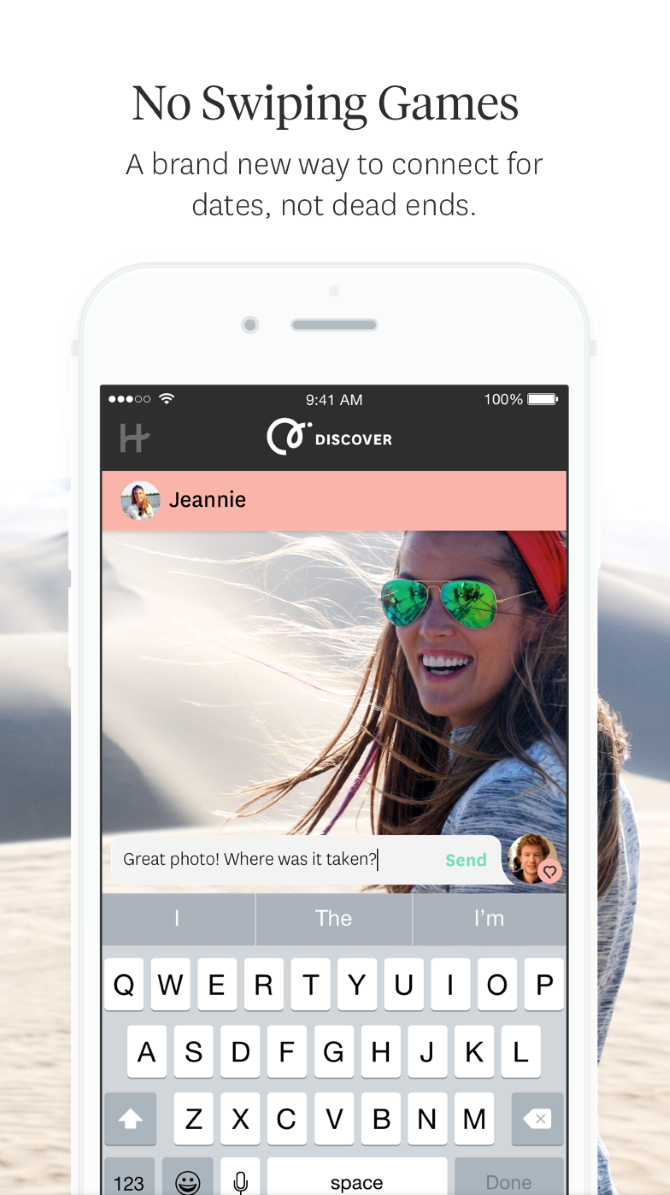
What is Hinge? Hinge aims to get away from the mindless swiping culture by matching you based upon interests and preferences, and inspiring conversations from that. Hinge claims that 75 percent of first dates that happen as a result of the app turn into second dates.

Sounds good, right? For those that are interested in an alternative dating app, here’s a short introductory guide to Hinge…

What Is Hinge?

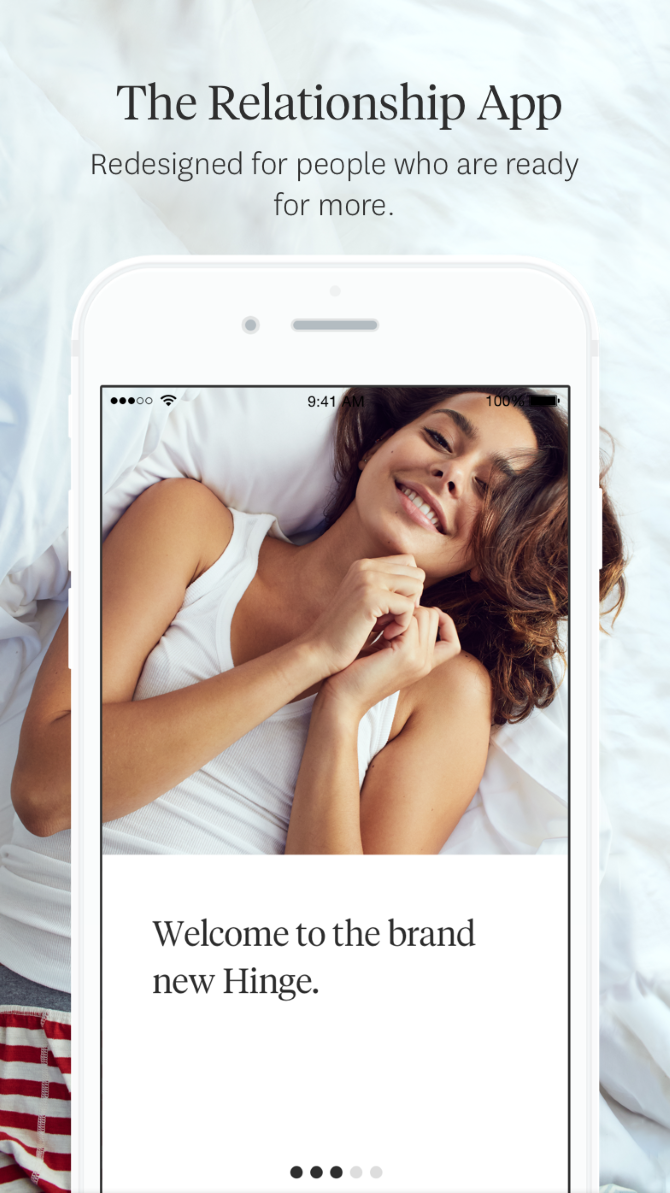
Hinge is a dating app that launched in 2012 around the same time that Tinder arrived on the scene. At first, both apps were similar, focusing on swiping through vast amounts of profiles, though Hinge tried to pair you with friends of friends on Facebook.

The company found that only one in 500 Hinge swipes led to people exchanging phone numbers, and it wanted to change that. Thus, Hinge pivoted in 2015, rebranding as an app for people after relationships and “meaningful connections” rather than people looking for friendships or one-night stands.

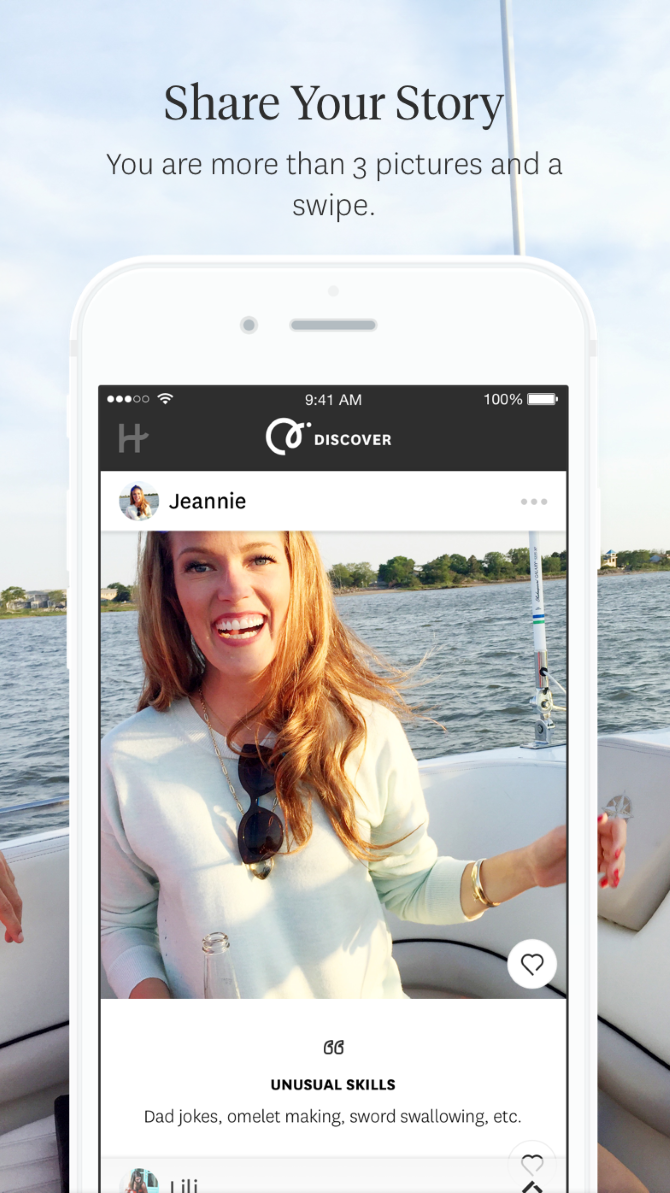
Creating a profile on Hinge is about more than just posting your photos. They’re obviously important, but so are your virtues, vitals, and vices. These encompass things like your religious beliefs, political leanings, height, ethnicity, whether you have kids, if you drink or smoke, and more.

You also have the opportunity to answer three questions from a predefined list. This includes stuff like the next vacation you want to go on, your most embarrassing Spotify song, or something you’re legitimately bad at. These available prompts are refreshed every month, with only those most likely to get a date being kept.

The purpose of all this is that it creates a well-rounded Hinge profile that reveals your personality and preferences. You don’t swipe on someone’s entire profile, but rather a specific element. It hopefully leads to better matches and sparks conversation. Just remember to avoid the classic online dating mistakes.

Hinge Focuses on Relationships

Beyond the more detailed profile, Hinge has a number of approaches to try to drive quality connections over quantity.

Likes You

On other dating apps it can sometimes be tempting to swipe “like” on everyone just to see who has done the same for you. However, whether it’s curiosity, ego, or something else, it’s not conducive to meaningful matches.

Hinge does away with that. It specifically tells you how many people have liked you. When you get to their profile, a message will appear at the top showing what it was about you that they liked. You can then immediately hop into a chat with them, if you wish.

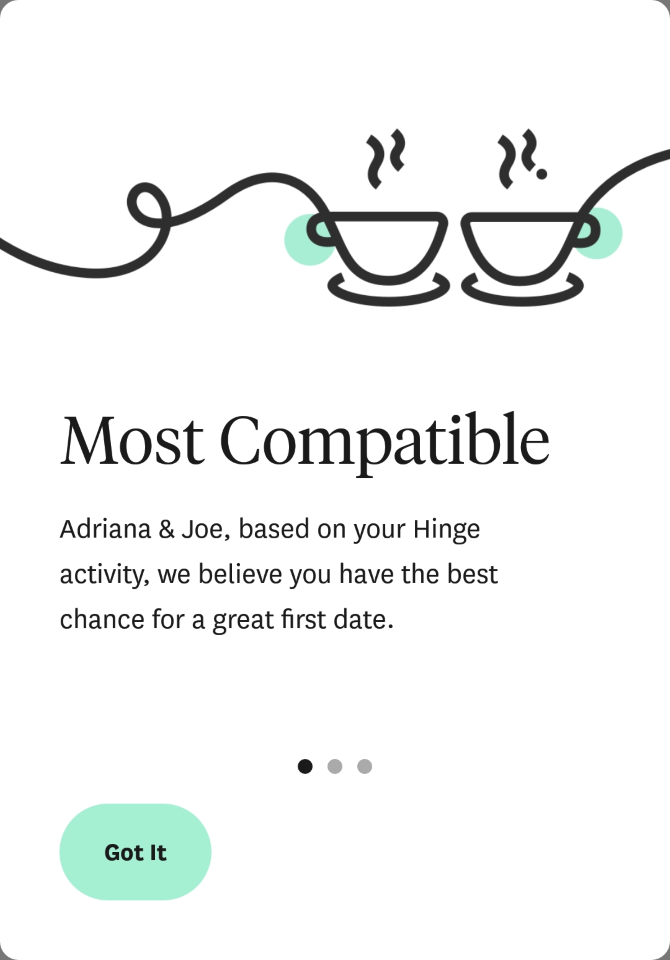
Most Compatible

As you use Hinge, the app is learning your preferences. Occasionally, it will serve you someone that it rates as “Most Compatible”. It’s based on the Gale-Shapley algorithm, which originated in the 1960s, that pairs everyone in a group together with who they most prefer.

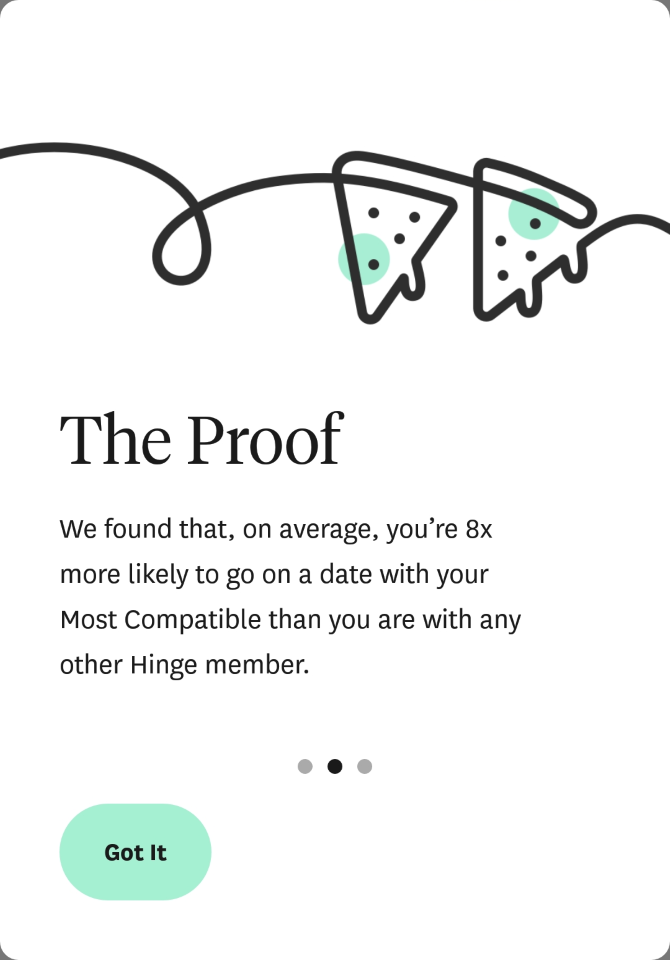
It’s by no means perfect, but Hinge claims that you are eight times more likely to go on a date with a Most Compatible match than anyone else.

Your Turn

Your matches won’t go anywhere if you don’t chat with them. In an effort to reduce ghosting, Hinge tags chats with “Your Turn” to prompt you to begin chatting or remind you that you haven’t responded.

Chats that remain inactive for 14 days get collapsed down into a Hidden Chats section. You can still respond to unhide them, but the aim is that you don’t have countless chats running at once that you’re not invested in. Since its introduction, Your Turn has reduced chat abandonment by 13 percent.

We Met

If you share your phone number with a match, Hinge will follow up a few days later and ask if you went on a date and whether you’d meet them again. The data will be used to improve any future matches to try to pair you with similar people. Apparently three out of four first dates on Hinge would like to see each other again.

we met on Hinge

Hinge also links this data with cues like inactivity in the app or deletion of an account to signify a successful relationship. All of this improves Hinge’s formula: the aim is not to find people who like the exact same things, but pair you off based on related interests.

How to Use Hinge for Dating

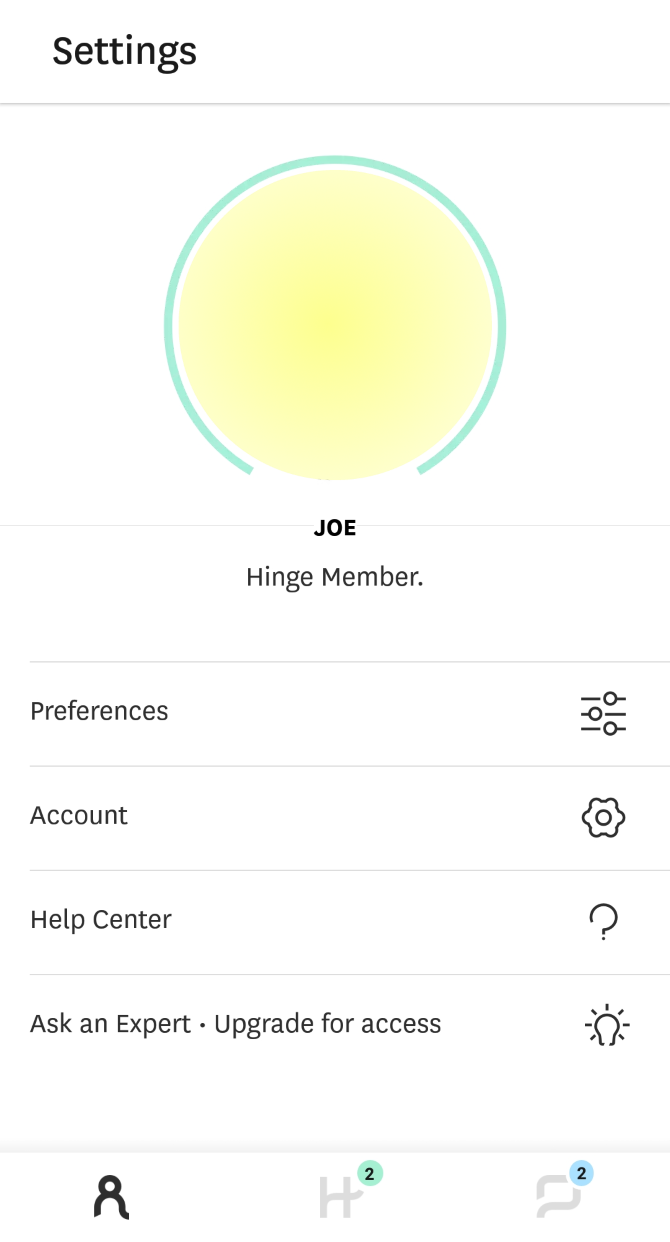
Hinge is available for Android and iOS. It’s free, but does have an optional paid subscription service. You can sign up with Facebook and import data from there, or you can use your email address. Whatever method you use, you must verify your phone number. So, how do you use Hinge?

The app guides you through the process to create your profile. You must upload six photos and answer three questions, then submit further information about yourself. The more information you provide, the more detailed the matches. You can also hide certain aspects from your profile if you like.

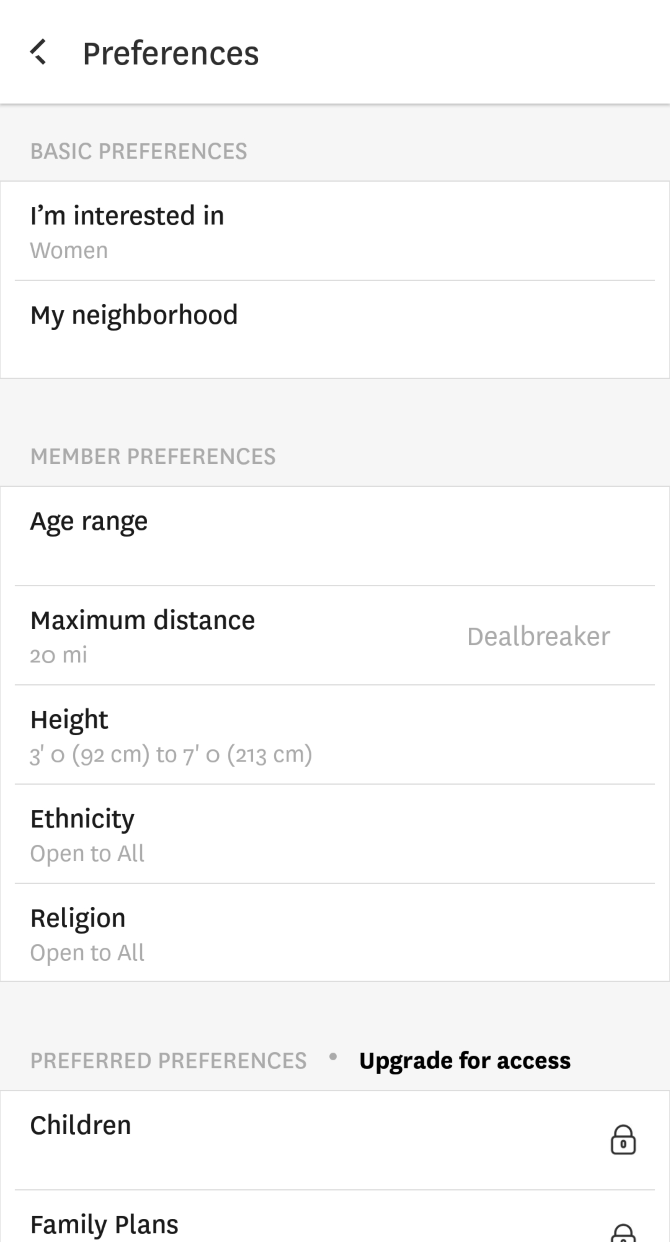
You can then set your match preferences based on age range, distance, height, ethnicity, and religion.

Hinge then shows you one profile at a time, mixing together their photos, answers, and personal information. Press the “heart” icon next to something on their profile to comment on it and then hope they match back with you. Alternatively, press the red cross icon to move to the next profile. You can only like up to 10 people per day, so use those hearts wisely.

Hinge’s paid service, which it brands as a “Preferred Subscription”, lets you specify more match preferences like family plans, education, and drugs. It will also let you see a full list of everyone who likes you (without going through each profile in turn) and remove the daily like limit.

Moving On From Hinge

It might sound counterintuitive at first, but Hinge doesn’t want you using the app for long. Tim MacGougan, Chief Product Officer at Hinge, told MixPanel that he wants people to quit the app because of a relationship they formed on it:

“Those people are out in the real world constantly answer the first question most couples get: ‘How did you two meet?’ When they say Hinge, that is the most authentic marketing, referral, and driver of growth that there could be.”

With conglomerate IAC (owners of Match, OkCupid, Tinder, and more) owning a controlling share in Hinge, and Facebook having launched its own dating service that works similarly, the company is clearly doing something right. So why not give it a shot and see how you get on.

How to Increase Your Chances of Finding Love

To increase your chances of dating success, check out our article detailing the perfect online dating profile picture, according to research. Or, if you’re over the app world, there are many free dating sites that might work for you.

And remember, no matter which dating app or site you end up using, it’s important to learn how to spot and avoid online dating scammers.

Read the full article: What Is Hinge? The Dating App for People Who Hate Dating Apps


Read Full Article

HQ Trivia shuts down after acquisition falls through


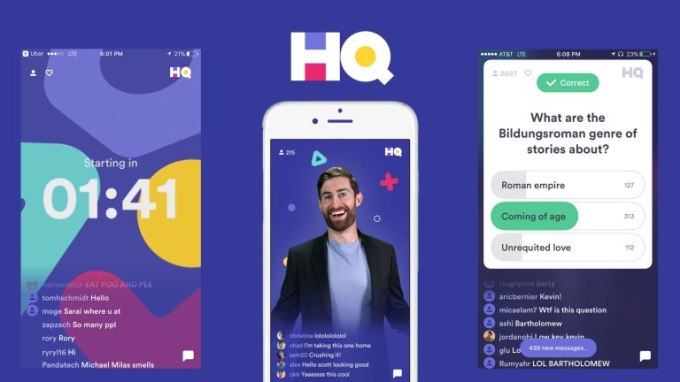
HQ Trivia is dead. Today the company laid off its full staff of 25 and will cease operation of its trivia, sports, and word guessing games, a source close to the company confirmed.

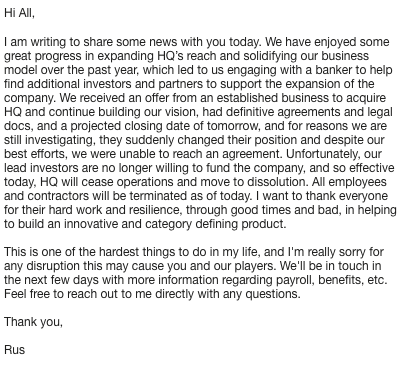
HQ Trivia had a deal in the works to be acquired, but they buyer pulled out yesterday and investors aren’t willing to fund it any longer, CEO and co-founder Rus Yusupov said in a statement attained by CNN Business’ Kerry Flynn.

“We received an offer from an established business to acquire HQ and continue building our vision, had definitive agreements and legal docs, and a projected closing date of tomorrow, and for reasons we are still investigating, they suddenly changed their position and despite our best efforts, we were unable to reach an agreement” Yusupov writes. “Unfortunately, our lead investors are no longer willing to fund the company, and so effective today, HQ will cease operations and move to dissolution. All employees and contractors will be terminated as of today.”

Launched in October 2017, TechCrunch wrote the first coverage of the 12 question live video trivia game started by two of the former Vine founders. Users could win real money by answering all the questions and not being eliminated in multiple daily games. HQ Trivia had raised over $15 million, including a Series A led by Founders Fund. At one point it had over 2.3 million concurrent players.

hq trivia app 1

But eventually the novelty began to wear off. Cheaters came in, splitting the prize money down to just a few dollars or cents per winner. Copycats emerged internationally. Engineering issues led users to get kicked out of the game.

Then tragedy struck. Co-founder Colin Kroll passed away. That exacerbated internal problems at HQ Trivia. Product development was slow, leading users to grow tired of the game. New game types and viral features materialized too late.

A failed internal mutiny saw staffers prepare to petition the board to remove Yusupov from the CEO position. When he caught wind of the plot, organizers of the revolt were fired. Morale sunk. By July 2019, downloads were just 8% of their previous year’s, and 20% of the staff was laid off. HQ managed about 15 million all-time installs, peaking at 2 million in February 2018, while last month it had just 67,000 according to Sensor Tower.

The demise of HQ Trivia demonstrates the fickle nature of the gaming and the startup scene as a whole. Momentary traction is no guarantee of future success. Products must continually evolve and adapt to their audience to stay relevant. And executives must forge ahead while communicating clearly with their teams, even amongst uncertainty, or find their companies withered by the rapid passing of time.


Read Full Article

HQ Trivia shuts down after acquisition falls through


HQ Trivia is dead. Today the company laid off its full staff of 25 and will cease operation of its trivia, sports, and word guessing games, a source close to the company confirmed.

HQ Trivia had a deal in the works to be acquired, but they buyer pulled out yesterday and investors aren’t willing to fund it any longer, CEO and co-founder Rus Yusupov said in a statement attained by CNN Business’ Kerry Flynn.

“We received an offer from an established business to acquire HQ and continue building our vision, had definitive agreements and legal docs, and a projected closing date of tomorrow, and for reasons we are still investigating, they suddenly changed their position and despite our best efforts, we were unable to reach an agreement” Yusupov writes. “Unfortunately, our lead investors are no longer willing to fund the company, and so effective today, HQ will cease operations and move to dissolution. All employees and contractors will be terminated as of today.”

Launched in October 2017, TechCrunch wrote the first coverage of the 12 question live video trivia game started by two of the former Vine founders. Users could win real money by answering all the questions and not being eliminated in multiple daily games. HQ Trivia had raised over $15 million, including a Series A led by Founders Fund. At one point it had over 2.3 million concurrent players.

hq trivia app 1

But eventually the novelty began to wear off. Cheaters came in, splitting the prize money down to just a few dollars or cents per winner. Copycats emerged internationally. Engineering issues led users to get kicked out of the game.

Then tragedy struck. Co-founder Colin Kroll passed away. That exacerbated internal problems at HQ Trivia. Product development was slow, leading users to grow tired of the game. New game types and viral features materialized too late.

A failed internal mutiny saw staffers prepare to petition the board to remove Yusupov from the CEO position. When he caught wind of the plot, organizers of the revolt were fired. Morale sunk. By July 2019, downloads were just 8% of their previous year’s, and 20% of the staff was laid off. HQ managed about 15 million all-time installs, peaking at 2 million in February 2018, while last month it had just 67,000 according to Sensor Tower.

The demise of HQ Trivia demonstrates the fickle nature of the gaming and the startup scene as a whole. Momentary traction is no guarantee of future success. Products must continually evolve and adapt to their audience to stay relevant. And executives must forge ahead while communicating clearly with their teams, even amongst uncertainty, or find their companies withered by the rapid passing of time.


Read Full Article
Tinder founder funds sex tips app Lover


Want to spice up the bedroom without paying for pills or awkward visits to a sex therapist? A new app called Lover lets you take a sexual personality quiz, explore carnal knowledge tutorials, and discretely figure out which turn-ons you share with your partner. Built by board certified sexual medicine clinical psychologist Dr. Britney Blair, Lover launches today on iOS with $5 million in seed funding from Tinder founder Sean Rad and other investors.

“It is strange that there are such taboos around sex when it is something we all do…whether we enjoy ourselves or not. We think it is time to start the conversation around this important aspect of our health” says Dr. Blair. “We believe Lover can help build confidence, facilitate communication, improve partner connection and just raise consciousness about sex and sexuality.”

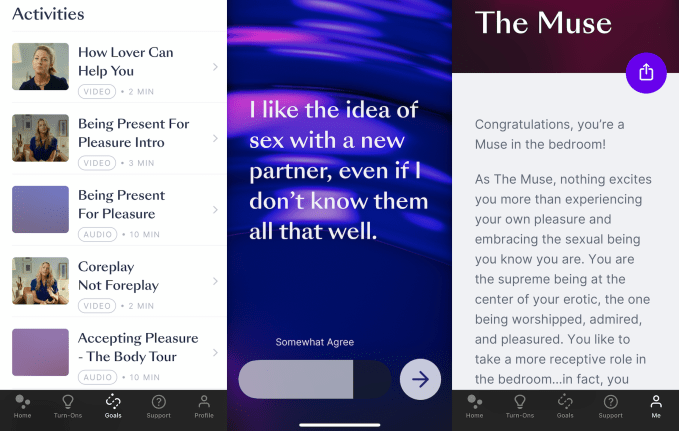
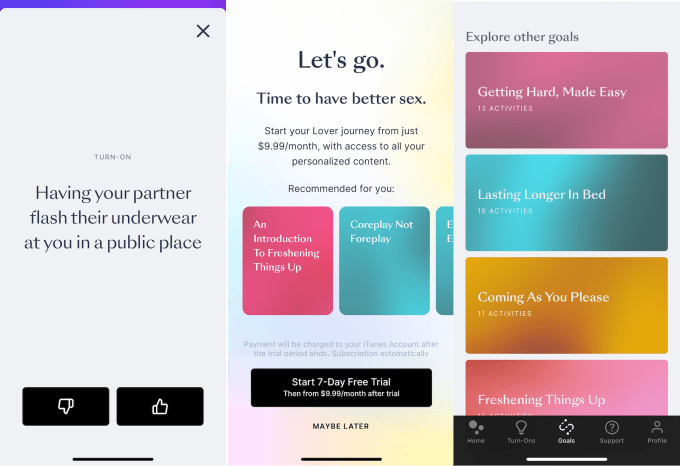
A solid portion of Lover’s content is free for the first seven days, including audio guides to oral sex, video explainers on how to be generous in bed, and multi-step ‘playlists’ of content like “Getting Hard, Made Easy”. Lover charges $9.99 per month or $59.99 per year for continued access to themed educational materials like “Coreplay Not Foreplay” and “Fantasy To Reality” that are recommended based on the results of your sexual questionnaire.

Almost 50% of women and 40% of men have a sexual complaint . . . [but] most people don’t realize how common and treatable their issues are” Dr. Blair tells me. “In our [pre-launch tests] focused purely on erectile dysfunction, 62% of users reported improvements to their erections within three weeks of using the app. That’s pretty wild when you think Viagra’s efficacy rate is approximately 65% and it lasts only five hours.”

Startups like digital pharmacy Ro have scored $500 million valuations just 18 months after launch by prescribing and selling men’s health drugs like viagra. Lover sees a market for education-based alternative approaches to sexual wellness.

Lover co-founders (from left): Jas Bagniewski, Dr. Britney Blair, and Nick Pendle

Dr. Blair got interested in the space a decade ago after a Stanford grad school lecture illuminated how prevalent sexual problems are but how quickly they can be resolved with learning and communication. She teamed up with her CEO Jas Bagniewski who’d been the manager of Europe’s largest ecommerce business Zalando in the UK, and a founder of City Deal that sold to Groupon. Bagniewski and fellow Lover co-founder Nick Pendle started European Casper mattress competitor Eve Sleep and brought it to IPO.

The plan is to combine Dr. Blair’s educational materials with Bagniewski and Pendle’s ecommerce chops to monetize Lover through subscriptions and eventually recommending products like sex toys for purchase. Now they have $5 million in seed funding led by Lerer Hippeau, and joined by Manta Ray Ventures, Oliver Samwer’s Global Founders Capital, Fabrice Grinda, and Jose Marin. The cash will go towards building out an Android app and adding games that partners can play together in bed.

There are plenty of random sex tip websites out there. Lover tries to differentiate itself by personalizing content based on the results of a Myers-Briggs-esque quiz. This asks you how adventurous, communicative, and assertive you are. You then receive a classification like “The Muse” with a few pages of explanation, for example revealing how you like to inspire others while being the center of attention.

From there, Lover can suggest guides for mastering your own sexual personality or branching out into new behavior patterns. There’s also a feature copied from another app called XConfessions for figuring out what you and your partner like. You connect your apps and then separately swipe yes or no on questions about whether you’d like “having your partner drip candle wax on you” or “your partner dressing as a strict cop”. If you and they match, the app tells you both so you can try it out.

Overall, Lover’s content is a lot higher quality and more compassionate than where most people learn about sex: pornography. Having a real sexual medicine doctor overseeing the app lends credibility to Lover. And the design and tone throughout make you feel empowered rather than sleazy.

Still, Dr. Blair admits that “it’s hard to motivate people into behavioral change, people already have subscription apps on their phones and we may run into ‘subscription fatigue'”. People might feel natural paying for viagra because the impact is obvious. The value of a subscription to sex tips might seem too vague or redundant to what’s free online.

To get a lot of users opening their wallets, not just their pants, Lover will need to do a better job of previewing what’s behind the paywall, and offering more interactivity that online content lacks. But if it can give users one unforgettable night thanks to its advice, it may be able to seduce them for the long-run.


Read Full Article

Further Research is Needed


Further Research is Needed

The six strategic stages of seed fundraising in 2020


Seed fundraising is rarely easy, but it certainly used to be a lot less complicated than it is today. In a simpler world, a seed investor (or maybe two) would lead a round, which meant that they would write the terms of the deal in a term sheet and then pass that document to their friends to flesh out the funds and eventually close the round. That universe of investors was small and (unfortunately) often cliquish, but everyone sort of knew each other and founders always knew at least who to start with in these early fundraises.

That world is long since gone, particularly at the seed stage. Now there are thousands of people who write checks into the earliest startup venture rounds, making it increasingly challenging for founders to find the right investors. “Pre-seed,” “seed,” “post-seed,” “seed extension,” “pre-Series A” and more terms get batted about, none of which are all that specific about what kinds of startups these investors actually invest in.

Worse, obvious metrics in the past that helped stack-rank investors — like size of potential check — have come to matter far less. In their place are more nuanced metrics like the ability to accelerate a deal to its closing. Today, your greatest lead investor may be the one who ends up writing the smallest check.

Given how much the landscape has changed, I wanted to do two things for founders thinking through a seed fundraise. First, I want to talk about how to strategize around a seed fundraise today, given the radical changes in the market over the past few years. Second, I want to talk about a couple of the archetypes of startup stages you see in the market today and discuss how to handle each of them.

This article focuses on “conventional” seed fundraising and doesn’t get into a bunch of alternative models of VC that I intend to explore in the coming weeks. If you thought traditional seed investing is complicated, wait until you see what the alternatives look like. The upshot, though, is that founders with the right strategy have more choices than ever, and, ultimately, that means there are more efficient ways to use capital to get the desired outcome for your startup.

Thinking through a seed fundraise strategy

Let’s get some preliminaries out of the way. This discussion assumes that you are a startup, looking to fundraise a seed round of some kind (i.e. you’re not looking to bootstrap your company) and that you are looking to close some sort of conventional venture capital round (i.e. not debt, but equity).

The problem with most seed fundraising advice is that it isn’t tailored to the specific stage of the startup under discussion. As I see it, there are now roughly six stages for startups before they reach scale. Those stages are:


Read Full Article

14 February 2020

Bloomberg memes push Instagram to require sponsorship disclosure


Instagram is changing its advertising rules to require political campaigns’ sponsored posts from influencers to use its Branded Content Ads tool that adds a disclosure label of “Paid Partnership With”. The change comes after the Bloomberg presidential campaign paid meme makers to post screenshots that showed him asking them to make him look cool.

Instagram provided this statement to TechCrunch:

“Branded content is different from advertising, but in either case we believe it’s important people know when they’re seeing paid content on our platforms. That’s why we have an Ad Library where anyone can see who paid for an ad and why we require creators to disclose any paid partnerships through our branded content tools. After hearing from multiple campaigns, we agree that there’s a place for branded content in political discussion on our platforms. We’re allowing US-based political candidates to work with creators to run this content, provided the political candidates are authorized and the creators disclose any paid partnerships through our branded content tools.”

Instagram explains to TechCrunch that branded content is different from advertising because Facebook doesn’t receive any payment and it can’t be targeted. If marketers or political campaigns pay to boost the reach of sponsored content, it’s then subject to Instagram’s ad policies and goes in its Ad Library for seven years.

But previously, Instagram banned political operations from running branded content because the policies that applied to it covered all monetization mediums on Instagram, including ad breaks and subscriptions that political entities are blocked from using. Facebook didn’t want to be seen as giving monetary contributions to campaigns, especially as the company tries to appear politically neutral.

Yet now Instagram is changing the rule and not just allowing but requiring political campaigns to use the Branded Content Ads tool when paying influencers to post sponsored content. That’s because Instagram and Facebook don’t get paid for these sponsorships. It’s now asking all sponsorships, including the Bloomberg memes retroactively, to be disclosed with a label using this tool. That would add a “Paid Partnership with Bloomberg 2020” warning to posts and Stories that the campaign paid meme pages and other influencers to post. This rule change is starting in the US today.

Instagram was moved to make the change after Bloomberg DM memes flooded the site. The New York Times’ Taylor Lorenz reported that the Bloomberg campaign worked with Meme 2020, an organization led by the head of the “FuckJerry” account’s Jerry Media company Mick Purzycki, to recruit and pay the influencers. Their posts made it look like Bloomberg himself had Direct Messaged the creators asking them to post stuff that would make him relevant to a younger audience.

Part of the campaign’s initial success came because users weren’t fully sure if the influencers’ posts were jokes or ads, even if they were disclosed with #ad or “yes this is really sponsored by @MikeBloomberg”. There’s already been a swift souring of public perception on the meme campaign, with some users calling it cringey and posting memes of Bernie Sanders, who’s anti-corporate stance pits him opposite of Bloomberg.

The change comes just two days after the FTC voted to review influencer marketing guidelines and decide if advertisers and platforms might be liable for penalties for failing to mandate disclosure.

At least the Democratic field of candidates is finally waking up to the power of memes to reach a demographic largely removed from cable television and rally speeches. The Trump campaign has used digital media to great effect, exploiting a lack of rules against misinformation in Facebook ads to make inaccurate claims and raise money. With all his baked in media exposure from being President already, the Democratic challengers need all the impressions they can get.


Read Full Article

How symbols and brands shape our humanity | Debbie Millman

How symbols and brands shape our humanity | Debbie Millman

"Branding is the profound manifestation of the human spirit," says designer and podcaster Debbie Millman. In a historical odyssey that she illustrated herself, Millman traces the evolution of branding, from cave paintings to flags to beer labels and beyond. She explores the power of symbols to unite people, beginning with prehistoric communities who used them to represent beliefs and identify affiliations to modern companies that adopt logos and trademarks to market their products -- and explains how branding reflects the state of humanity.

Click the above link to download the TED talk.

What is Pseudocode and How Does it Make You a Better Developer?


pseudocode

When you first begin to learn to program there are many things to study before you build your first app. Thinking like a programmer helps you break down problems into algorithms to solve them. Algorithms are the steps your code will take to solve a problem or answer a question.

It can be challenging if you’re a new coder to think like a programmer from the very start. Translating app ideas to actual code takes some practice.

To bridge the gap between what you want your app to do and the actual code you need to write, you can use pseudocode.

What Is Pseudocode?

Pseudocode is a plain-text description of a piece of code or an algorithm. It’s not actually coding; there is no script, no files, and no programming. As the name suggests, it’s “fake code”.

Pseudocode is not written in any particular programming language. It’s written in plain English that is clear and easy to understand.

While it’s not written in a programming language, there are still keywords used that refer to common coding concepts. These are written in uppercase letters to make it easier to read.

  • START
  • INPUT
  • READ/GET
  • PRINT/DISPLAY
  • CALCULATE/DETERMINE
  • SET
  • INCREMENT/DECREMENT
  • PROGRAM
  • END

Here is a snippet of what pseudocode might look like for a program that asks you to input your favorite color and prints your choice.

START
PROGRAM getColor
Create variable Color
Ask the user for their favorite color
READ INPUT into Color
PRINT Color
END 

This is a pretty simple algorithm written in pseudocode. Anyone can read and understand what this is trying to do. As the coder, all you have to do is bring this to life using whichever programming language you code in. Here’s the same program in JavaScript:

let color = window.prompt("What is your favorite color?");
console.log(color);

This program uses JavaScript syntax to write the algorithm. If you don’t know JavaScript it can be a little challenging to figure out what is happening.

Pseudocode writes the algorithm, programming languages write the syntax.

How Is Pseudocode Helpful?

Pseudocode helps you plan out your app before you write it. It helps you create algorithms in a format that is easier to read than code syntax. Once programming languages come into the picture it can be harder to understand what your code is doing.

The JavaScript example is easy to read if you know the language. But what if you’re just reading it and trying to determine the logic? Specific terms like window.prompt or console.log don’t reveal much about the algorithm.

Good software principles are important. If you interview to become a software engineer, they won’t expect you to memorize syntax. They will ask about your knowledge of algorithms and structure. You’ll write much better code if you construct your algorithms and structure before you start coding.

How to Write Pseudocode

Writing a full program in pseudocode requires a lot of different statements and keywords much like regular programming. In fact, once you get far enough along in your pseudocode it will start to look very close to a real program.

Let’s build on the keywords with pseudocode statements to build algorithms.

Conditionals

Conditional statements are critical to programming. These statements are IF statements or IF/ELSE statements which can add logic to your code. These statements are written in pseudocode using:

  • IF
  • ELSE
  • ELSE IF
  • THEN

Here’s a program that performs a simple IF/ELSE statement written in pseudocode. See if you can determine what this code is trying to do just by reading.

START
PROGRAM isOdd
Create variable Choice
Ask the user for a number
READ INPUT into Choice
IF Choice is even THEN
 PRINT "No"
ELSE
 PRINT "Yes"
ENDIF
END

It’s a pretty simple program. It asks the user for a number and does something depending on whether the number is odd or even.

Iteration

Another essential part of programming is iteration, also known as creating loops. Some common loops are for loops and while loops, both of which can be written in pseudocode.

START
PROGRAM forLoop
FOR 1 through 12
 PRINT "Hello"
ENDFOR
END

This algorithm is for a program that will print “Hello” 12 times, which is a bit excessive but shows how simple it is to write a loop in pseudocode.

While loops are also written very easily

START
PROGRAM whileLoop
Create variable Counter
SET Counter equal to 1
WHILE Counter is less than 10
 Print "Hello"
 INCREMENT Counter
ENDWHILE
END

Another pretty simple algorithm using a while loop to print “Hello”.  Both loop examples have a clear start and end to the iteration.

You also can write what is commonly known as Do-While loops. The keywords in pseudocode are different: REPEAT and UNTIL.

START
PROGRAM doWhileLoop
Create variable Counter
SET Counter equal to 1
REPEAT
 Print "Hello"
 INCREMENT Counter
UNTIL Counter is equal to 10
END

Just like a do-while loop, this will perform an action until certain criteria are met. Once it is met the loop will exit.

Functions

Functions are a programmer’s best friend. They contain code that can be called over and over again and are used in all high-level programming languages. Adding functions into your pseudocode is very easy.

START
PROGRAM sampleFunction
PRINT "This is a function"
END

You can call functions in pseudocode.

call sampleFunction

There is not much to functions; they’re very simple and you can add any logic you like.

Error Handling

Being able to write code that reacts to errors is very important when apps are developed. As such, you can include these catches into your pseudocode.

You can handle errors and exceptions using the keyword: EXCEPTION. Here’s a simple algorithm that catches an error

START
PROGRAM catchError
Create variable Number
Ask the user for a number
READ INPUT into Number
EXCEPTION
WHEN Number is not a number
 PRINT "Error: Please pick a number"
END

The exception code will catch bad input from the user. Code testing is vital to writing good apps. Some of these exceptions will re-appear in your testing, so it’s good to be able to write them in your pseudocode when planning the app.

Software Development and More

Pseudocode is all about making you a better coder. Now that you know how to write it you can see just how useful it can be as part of your programming process. Programmers make some pretty good money, so if this is your career move you have a lot of opportunities if you learn a lot.

Knowing how to use pseudocode is recommended however you’re learning to code. Want to know more? Check out some basic principles that every programmer should follow.

Read the full article: What is Pseudocode and How Does it Make You a Better Developer?


Read Full Article

How to Listen to Spotify on Your Fitbit


fitbit-spotify

One of the many benefits of having a smartwatch is controlling content on your wrist without having to take your phone out of your pocket. Which includes controlling music playback.

Unlock the FREE "Spotify Keyboard Shortcuts" cheat sheet now!

This will sign you up to our newsletter

Enter your Email

In this article, we’ll show you how to listen to Spotify on your Fitbit. While this only works with Fitbit’s high-end smartwatches, if you own a compatible device, it makes workouts more fun.

Which Fitbit Devices Are Compatible With Spotify?

Only Fitbit’s high-end smartwatches work with Spotify. At the time of writing, you’ll need one of these devices to listen to Spotify on your Fitbit:

  • Versa 2
  • Versa
  • Versa Lite
  • Ionic

If you have a different Fitbit, you’ll have to sit this feature out. In addition, you must have a Spotify Premium account; a free account doesn’t work with the Fitbit app. We think Spotify Premium is worth it, so consider signing up for a free trial if this feature is enticing to you.

We’ll demonstrate this process with a Versa 2, but it should be similar for other devices. Check out our Fitbit model comparison if you’re not sure which one you have.

1. Install the Spotify App on Your Fitbit

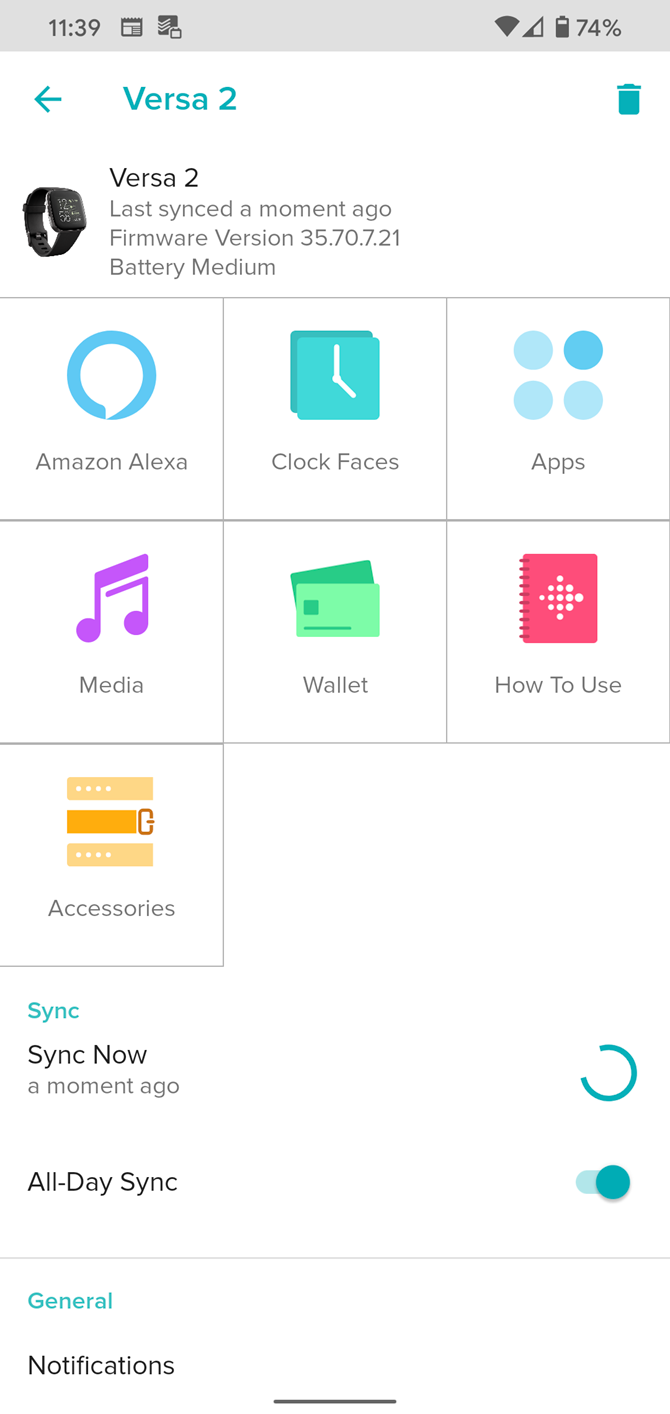
To start, you’ll need to install the Spotify app on your Fitbit. Do this by opening the Fitbit app on your phone and tapping your profile photo in the top-left.

Next, select your device from the Devices list. In the settings for your particular device, tap Apps.

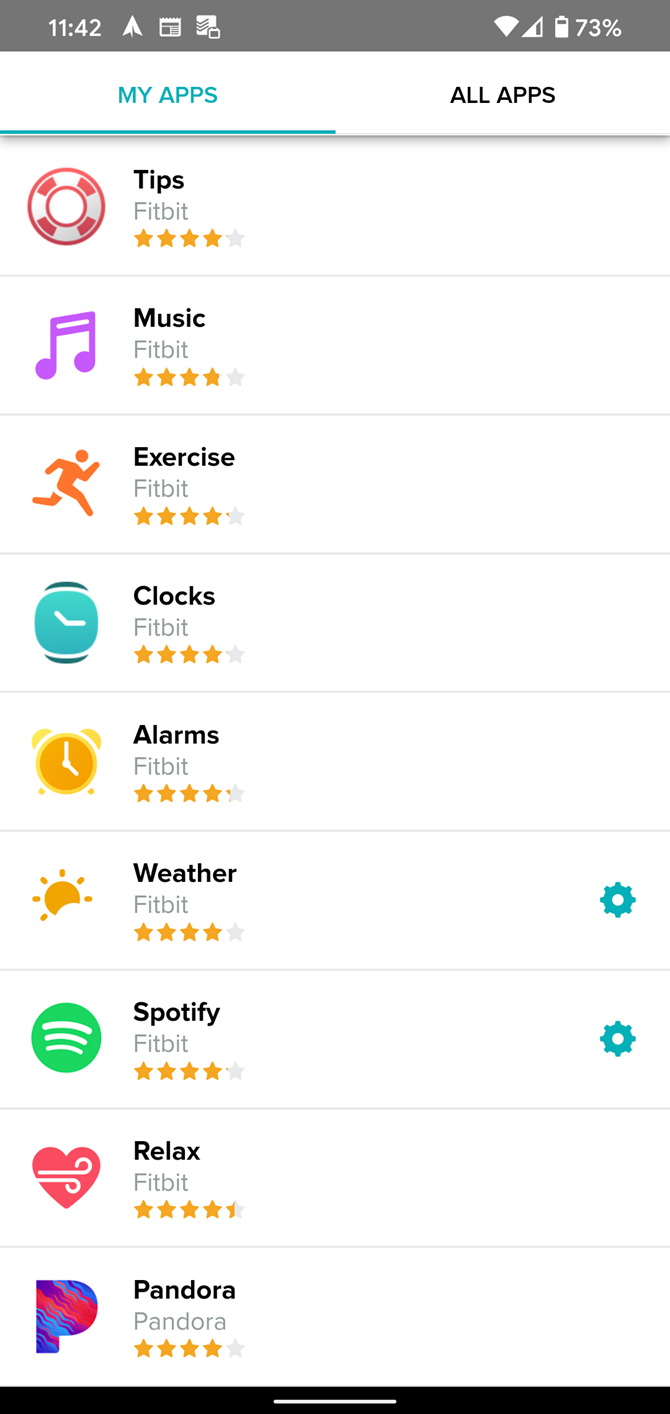
You might have Spotify pre-installed; check for it under My Apps to see. If not, switch to the All Apps tab and find Spotify by browsing or searching for it.

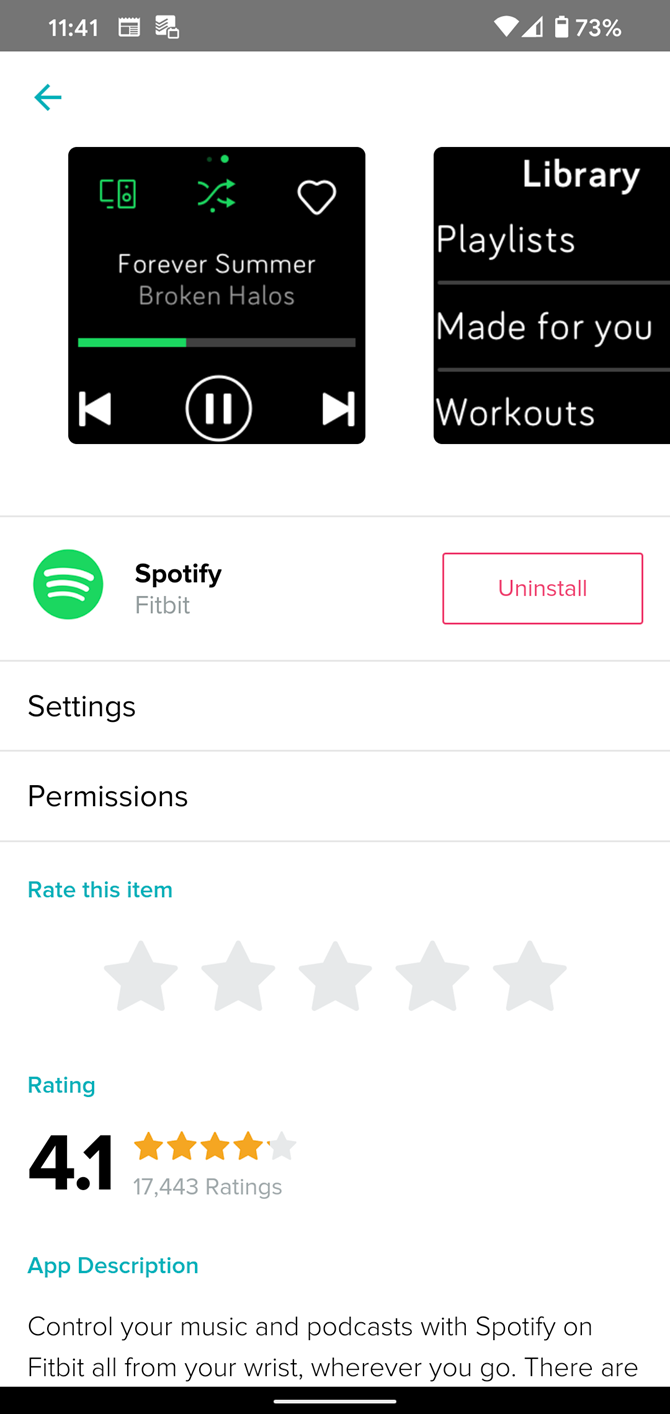
Tap Install on Spotify’s app page, then wait for the process to complete. Once it does, you must approve the permissions so it can run properly. Select Permissions on this page to double-check them if needed.

2. Authorize Your Spotify Account

Once you’ve installed the Spotify app, you’ll need to sign in. If you’re still on the app page, select Settings there. Otherwise, you can head back to My Apps, select Spotify from the list, then choose Settings.

Here, you’ll need to sign into your Spotify account to authorize its use with your Fitbit. After that’s done, you’re ready to go.

How to Use Spotify on Your Fitbit

To open Spotify on your Fitbit, wake up the watch and swipe from right to left on the home screen to show your apps. Select Spotify from the list and you’ll see a Connecting screen while it looks for compatible devices.

Fitbit Versa Spotify Apps List

For this to connect properly, you’ll need to have music playing on another device connected to your Spotify account. This could be a desktop, laptop, tablet, or even a Bluetooth speaker that supports Spotify Connect.

After a moment, you should see information about the currently playing track on your watch. Use the controls to play/pause, change tracks, toggle shuffle mode, and add the song to your library.

Spotify Now Playing Fitbit Versa

If you want to start playing something new, swipe from left to right. You’ll see a few of your recently played playlists, albums, and artists for easy access. Otherwise, tap Library and you can access all of your playlists, Spotify’s “Made for You” content, as well as Spotify workout playlists to help you get fit.

Changing the Device Used to Play Music

The Spotify Connect button in the top-left allows you to change which device is playing the music. For best results based on our testing, you should play music via the phone connected to your Fitbit.

Spotify Connect to Device Fitbit

When controlling music playing on a desktop computer, the Fitbit app only showed a Play/Pause button and the Connect button. To see track info and the rest of the controls, we had to switch to playing music on our phone.

You CAN Listen to Spotify on Fitbit, But It’s Limited

As we’ve explained, the Spotify app for Fitbit is more of a remote for music playing elsewhere than a true standalone app.

While you can pair Bluetooth headphones to your Fitbit, Spotify doesn’t work with this. Thus, you’ll want to pair headphones to your phone and use the Fitbit app as a convenient controller from your wrist.

Most of the Fitbit watches discussed do support other music services that work without your phone. Pandora, for example, offers offline listening with a Pandora Plus account. You can also sync music locally to your Versa 2.

If you’re looking for something different, take a look at the best music apps for workouts.

Read the full article: How to Listen to Spotify on Your Fitbit


Read Full Article

The 6 Best Gaming Keyboards and Mice for the PS4


gaming-keyboard-mice

In some video game genres, a keyboard and mouse offer better accuracy than a gamepad. As such, some games on the PS4 support a mouse and keyboard, even if you never knew that Sony’s console supported such hardware!

Let’s explore a few key points of using a gaming keyboard and mouse for the PS4, and a few good models to get you started.

Can You Use a Keyboard and Mouse on PS4?

Not all keyboards work with the PS4, but the ones that do don’t need special adapters. USB keyboards and mice can plug into one of the two ports on the front of the PS4.

Unfortunately, if you want both a mouse and a keyboard, you’ll come across an annoying problem. Both devices will take up a single port each, and the PS4 only has two. This means there’s no room for controller charging cables and external hard drives.

As such, you may want to consider purchasing a keyboard adapter for the PS4. These only take up one USB port and accept inputs from both the keyboard and the mouse.

One of the best adapters available is the XIM APEX, which unfortunately doesn’t come cheap. Its competitors are either not as reliable, or haven’t received enough user attention to draw a conclusive decision on their overall quality.

Which Games Are Compatible With Keyboard and Mouse?

If you’re using something like the XIM APEX above, you can use a keyboard and mouse on any game. The device will convert your keyboard and mouse inputs into a controller-like format, tricking the PS4 into thinking you’re playing with a gamepad.

If you’re not using an adapter, you can only use a keyboard and mouse on games that support it. Unfortunately, Sony doesn’t have an official page for game compatibility at the time of writing, but sources such as this Reddit discussion list a few key games that do work.

Can You Add Bluetooth Devices?

Yes! The PlayStation 4 has Bluetooth capabilities; after all, that’s how the wireless controllers connect. It takes a little bit of extra setup to pair a Bluetooth keyboard to a PS4, but it is possible. As such, it’s worth looking into Bluetooth models to see if anything matches your needs.

The Best Wired Keyboards and Mice for PS4

Now we it’s possible to connect a keyboard and mouse to the PS4, there’s only one question left to answer; which keyboards work with the PS4? Let’s cover some of the wired options available to you before diving into the Bluetooth keyboards.

1. Redragon S101 Wired Gaming Keyboard and Mouse Combo

Redragon S101 Wired Gaming Keyboard and Mouse Combo Redragon S101 Wired Gaming Keyboard and Mouse Combo Buy Now On Amazon $29.98

If you want a keyboard that does more than play games, try the Redragon S101 Wired Gaming Keyboard and Mouse Combo. It’s designed to fit every niche, from gaming to work productivity. On the gaming side, you have the Redragon keyboard’s stylish look and customizable color patterns.

The 25-key conflict-free design means you can press multiple keys down without fear of dropped inputs, and the Win key can be disabled to prevent it from interrupting your gaming. This makes it a great gaming keyboard for PS4 and PC alike. Then there’s the gaming mouse with an ergonomic design and up to 3200DPI. It even comes with six buttons, five of which are programmable.

When it’s time for work, the Redragon keyboard nicely shifts into productivity mode. The wrist rest is useful for prolonged typing, and the quiet keypresses mean you won’t annoy those around you.

2. BlueFinger RGB Gaming Keyboard and Mouse Combo

BlueFinger RGB Gaming Keyboard and Mouse Combo BlueFinger RGB Gaming Keyboard and Mouse Combo Buy Now On Amazon

If you want a keyboard and mouse package that punches above its price level, try the BlueFinger RGB Gaming Keyboard and Mouse Combo. It has an attractive, affordable price point, but nothing about this combo feels cheap. Everything has a good weight and a solid build to it, so it doesn’t feel like you’re gaming on flimsy hardware.

The usefulness of a Numpad is often a topic of fierce debate; you either love it or you loathe it. If you don’t want a Numpad taking up room in your play area, this one cuts it off to save room for more useful gaming buttons such as the Print Screen key. This makes the BlueFinger the best keyboard and mouse combo for PS4 if you want to save space without sacrificing crucial keys.

3. Orzly Gaming Keyboard and Mouse

Orzly Gaming Keyboard and Mouse Orzly Gaming Keyboard and Mouse Buy Now On Amazon $34.99

Who says you need to pay a premium to look good? The Orzly Gaming Keyboard and Mouse is a stylish addition to this list without breaking the bank. This combo also comes with a mousemat and a headset. Unfortunately, the latter has a microphone that isn’t compatible with the PS4 without an adapter. Regardless, if you want to use this hardware on your PC too, it’s a great way to get yourself fully equipped.

Just because it’s cheap, doesn’t mean the keyboard and mouse skimp on the details. The keyboard has an attractive RGB display with three different color modes, and the mouse has four adjustable DPI options.

4. HAVIT Gaming Keyboard Mouse Headset & Mouse Pad Kit

HAVIT Gaming Keyboard Mouse Headset & Mouse Pad Kit HAVIT Gaming Keyboard Mouse Headset & Mouse Pad Kit Buy Now On Amazon $43.99

In a similar vein to the above option, the HAVIT Gaming Keyboard Mouse Headset & Mouse Pad Kit also comes with everything you need to get started with gaming. However, this kit allows more customization with what you buy. For example, if you want to use the official PS4 headset instead of a third-party one, you can select the kit without the headset and save some money.

Otherwise, this kit does tick all the boxes the previous entry covered. The mouse has four DPI options and has customizable colors along with pulsing patterns. The keyboard has seven different patterns and displays an attractive range of colors.

The Best Bluetooth Keyboards and Mice for PS4

If you’re on the hunt for a wireless PS4 compatible keyboard, you’re best looking into Bluetooth keyboards. Bluetooth peripherals aren’t a gamer’s ideal choice, as the latency between a keypress and the on-screen action can make or break games. Regardless, the luxury of going cordless will appeal to some.

5. Seenda Rechargeable Keyboard and Mouse Combo

Seenda Rechargeable Keyboard and Mouse Combo Seenda Rechargeable Keyboard and Mouse Combo Buy Now On Amazon $25.99

While it’s not the most stylish or colorful selection in the list, the Seenda Rechargeable Keyboard and Mouse Combo is still a good way to get started with PS4 Bluetooth gaming. For one, the lack of flashy colors and special effects means the battery drain is reduced. This means the keyboard and mouse can be used daily for three months straight before it requires a recharge.

This combo is best for anyone interested in a Bluetooth keyboard and mouse in general. Its lightweight design and slim look make it portable enough to bring along with a tablet or phone. It doesn’t matter if you’re playing Minecraft or typing up some work on the train; this package can do both!

6. Logitech Wireless Combo MK360

Logitech Wireless Combo MK360 Logitech Wireless Combo MK360 Buy Now On Amazon $29.98

Logitech has been in the keyboard and mouse business for a long time, which makes the Logitech Wireless Combo MK360 a good choice for gamers. It’s mainly designed for business use, but as many users reported in reviews, it’s great for typing out messages in games such as Final Fantasy XIV.

The battery life of this Logitech device is one of the most impressive out there. At a solid three-year life span using only two AA-batteries, this keyboard may outlast the games you want to use it for! It also encrypts all data sent, which makes it useful as a work device on the side.

Finding the Right Keyboard and Mouse for the PS4

If you want more accuracy in your online gaming, consider a keyboard for your PS4. While it can be tricky to find some that work, those that do perform just as well as if you were playing on a PC.

If you want to kit our your PS4 even further, why not treat yourself with something from our gift guide for the ultimate PS4 fan?

Read the full article: The 6 Best Gaming Keyboards and Mice for the PS4


Read Full Article

Instagram prototypes “Latest Posts” feature


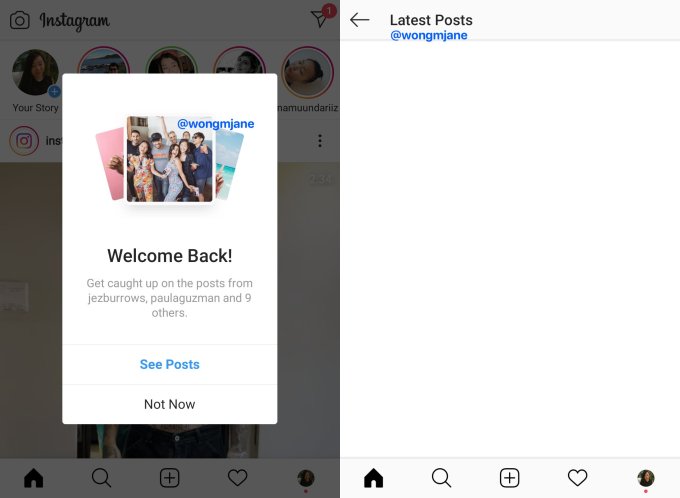
Instagram users who miss the reverse chronological feed might get a new way to see the most recent pics and videos from who they follow. Instagram has been spotted internally prototyping a “Latest Posts” feature. It appears as a pop-up over the main feed and brings users to a special area showing the newest content from their network.

Instagram Latest Posts

For now, this doesn’t look like a full-fledged “Most Recent” reverse-chronological feed option like what Facebook has for the News Feed. But if launched, Latest Posts could help satisfy users who want to make sure they haven’t missed anything or want to know what’s going on right now.

The prototype was discovered by Jane Manchun Wong, the master of reverse engineering who’s provided tips to TechCrunch on scores of new features in development by tech giants. She generated the screenshots above from the code of Instagram’s Android app. “Welcome Back! Get caught up on the posts from [names of people you follow] and 9 more” reads the pop-up that appears over the home screen. If users tap “See Posts” instead of “Not Now”, they’re sent to a separate screen showing recent feed posts.

We’ve reached out to Instagram for a confirmation of the prototype, more details, and clarification on how Latest Posts would work. The company did not respond before press time. However, it has often confirmed the authenticity of Wong’s findings, and some of the features have gone on to officially launch months later.

Back in mid-2016, Instagram switched away from a reverse-chronological feed showing all the posts of people you follow in order of decency. Instead, it forced all users to scroll through a algorithmic feed of what it thinks you’ll like best, ranked based on who and what kind of content you interact with most. That triggered significant backlash. Some users thought they were missing posts or found the jumbled timestamps confusing. But since algorithmic feeds tend to increase engagement by ensuring the first posts you see are usually relevant, Instagram gave users no way to switch back.

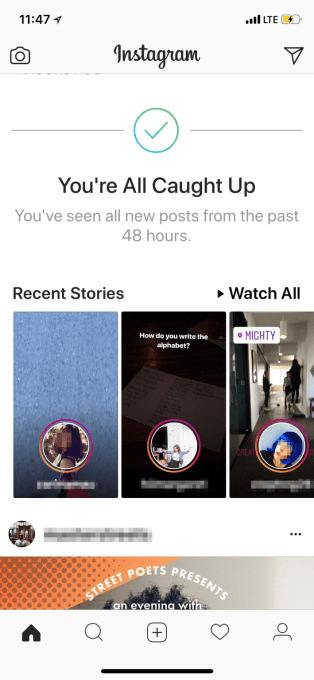
Instagram previously tried to help users get assurance that they’d seen all the posts of their network with a “You’re All Caught Up” insert in the feed if you’d scrolled past everything from the past 48 hours. Latest Posts could be another way to let frequent Instagram users know that they’re totally up to date.

That might let people close the app in confidence and resume their lives.


Read Full Article

Instagram prototypes “Latest Posts” feature


Instagram users who miss the reverse chronological feed might get a new way to see the most recent pics and videos from who they follow. Instagram has been spotted internally prototyping a “Latest Posts” feature. It appears as a pop-up over the main feed and brings users to a special area showing the newest content from their network.

Instagram Latest Posts

For now, this doesn’t look like a full-fledged “Most Recent” reverse-chronological feed option like what Facebook has for the News Feed. But if launched, Latest Posts could help satisfy users who want to make sure they haven’t missed anything or want to know what’s going on right now.

The prototype was discovered by Jane Manchun Wong, the master of reverse engineering who’s provided tips to TechCrunch on scores of new features in development by tech giants. She generated the screenshots above from the code of Instagram’s Android app. “Welcome Back! Get caught up on the posts from [names of people you follow] and 9 more” reads the pop-up that appears over the home screen. If users tap “See Posts” instead of “Not Now”, they’re sent to a separate screen showing recent feed posts.

We’ve reached out to Instagram for a confirmation of the prototype, more details, and clarification on how Latest Posts would work. The company did not respond before press time. However, it has often confirmed the authenticity of Wong’s findings, and some of the features have gone on to officially launch months later.

Back in mid-2016, Instagram switched away from a reverse-chronological feed showing all the posts of people you follow in order of decency. Instead, it forced all users to scroll through a algorithmic feed of what it thinks you’ll like best, ranked based on who and what kind of content you interact with most. That triggered significant backlash. Some users thought they were missing posts or found the jumbled timestamps confusing. But since algorithmic feeds tend to increase engagement by ensuring the first posts you see are usually relevant, Instagram gave users no way to switch back.

Instagram previously tried to help users get assurance that they’d seen all the posts of their network with a “You’re All Caught Up” insert in the feed if you’d scrolled past everything from the past 48 hours. Latest Posts could be another way to let frequent Instagram users know that they’re totally up to date.

That might let people close the app in confidence and resume their lives.


Read Full Article