10 February 2020

Web traffic increases in 2019 were driven by mobile; top 100 sites saw average of 223B monthly visits


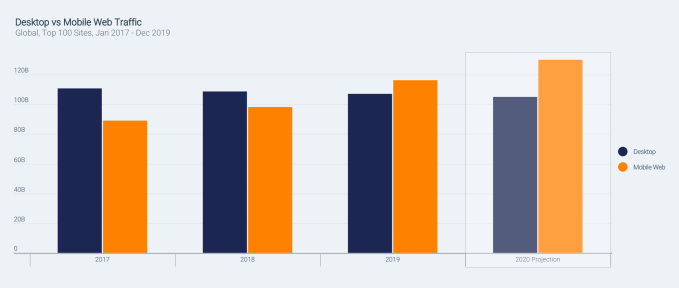
Mobile adoption around the world is having a significant impact on the web’s traffic. According to a new report from SimilarWeb, out today, mobile web traffic has jumped 30.6% since 2017, while desktop traffic dropped 3.3%. But it’s not just the numbers that are changing. Mobile visitors also behave differently from their desktop web counterparts, staying on pages for shorter periods of time, for example, which is impacting core metrics web publishers today track.

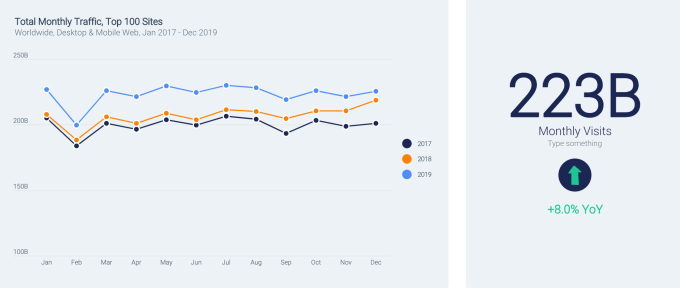
The report found that 2019’s total web traffic to the top 100 sites was up 8% from 2018, and up 11.8% over 2017, averaging 223 billion visits per month. The largest increases were in April and June 2019, when traffic was up by more than 10% over the same time in 2018.


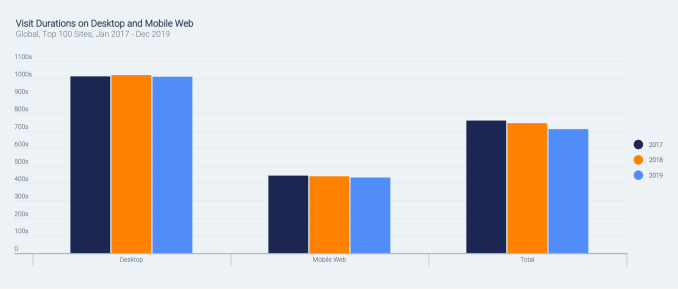
Mobile is driving these traffic increases, but mobile visitors don’t stay as long on the site. Across platforms, the overall time spent on websites has dropped by 49 seconds from 2017 to 2019, the report found.

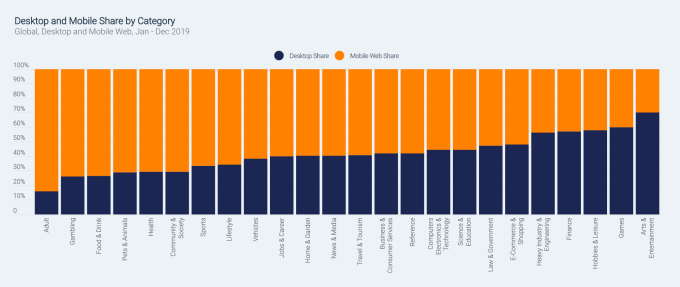
In addition, mobile has become the platform of choice for visiting certain categories of websites. Mobile traffic dwarfs desktop on adult sites, gambling sites, food & drink, pets & animals, health, community & society, sports, and lifestyle. And over the years, other categories shifted to become more mobile as well — including news and media, vehicle sites, travel, reference, finance, and others.

But not all categories are doing well, despite the shift to mobile.

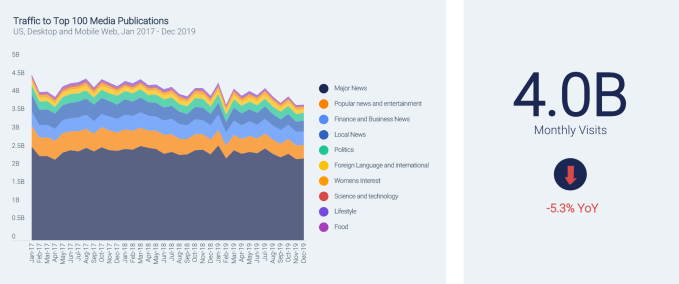
News sites, for instance, were losing traffic. The report found that traffic to the top 100 media publications is down 5.3% year-over-year from 2018 to 2019 (a loss of 4B visits), and down by 7% since 2017.

These decreases impact all sorts of media categories, with popular news, entertainment news, and local news all showing decreases of over 25%. Only business & finance and women’s interest news categories saw any increases, the report said.

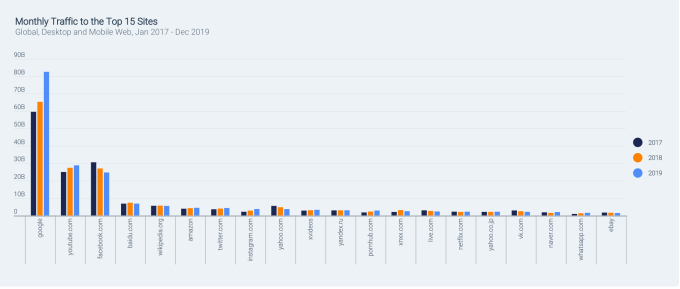
The increase in mobile traffic is also helping the biggest sites on the web grow larger, helping to further cement their position on today’s internet. The top 10 biggest sites saw a total of 167.5 billion monthly visits in 2019, up 10.7% over 2018. The remaining 90 biggest sites out of the top 100 only saw a 2.3% increase, by comparison.

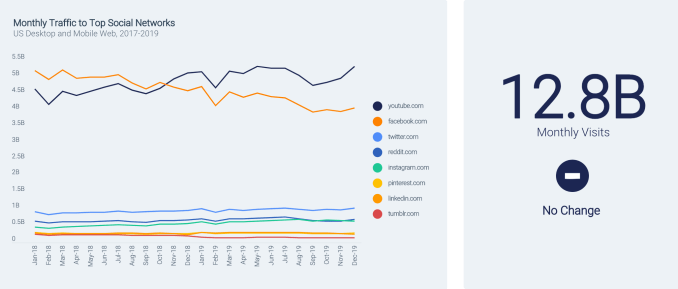
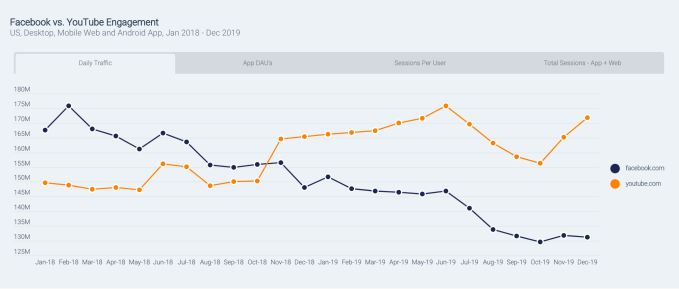
Google’s move to consolidate traffic to its core domain increased traffic to google.com helped to increase its numbers and YouTube grew as well. However, Facebook’s troubles were reflected in its numbers as it lost 8.6% of traffic over the past year alone. The report theorized that some of its lost traffic went to YouTube, which could inform Facebook’s heavier focus on video in recent years. That said, Facebook’s investments in mobile helped it grow elsewhere — both Instagram and WhatsApp saw their web traffic grow up to 74% year-over-year.

Also on the decline were Yahoo, which lost 33.6% of its 2017 traffic, and Tumblr, which banned adult sites in 2018, leading to a 33% loss in traffic.

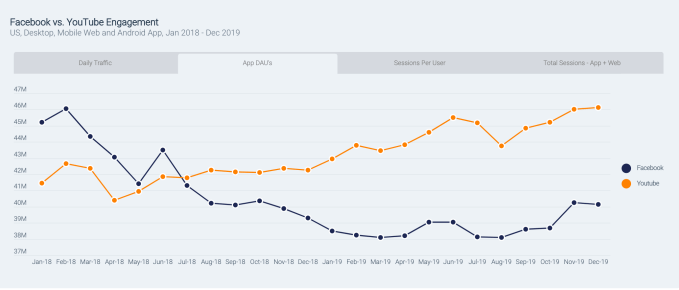
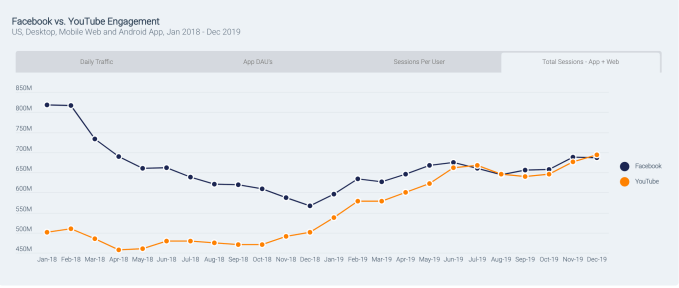
Facebook fought off the web traffic declines and related declines in app usage by re-engaging existing users in 2019, which helped it to increase the total number of app sessions throughout the year. YouTube uses a similar tactic to increase its own app engagement figures, leading to a close tie between the two on this metric.

The data for the report was gathered from January 2017 to December 2019, and tracked desktop and mobile web traffic, as well as Android app use.

The full report, available here, also dug into specific categories, like shopping, travel, finance, messaging, and more.


Read Full Article

How to Install Let’s Encrypt SSL Certificate with Apache on Ubuntu


This step-by-step tutorial will show you how to install Let’s Encrypt SSL certificate for an Apache server running on Ubuntu 18.04. I’ve created a droplet on DigitalOcean for this example but the steps should be similar AWS and other environments.

Install Apache 2

Login to your droplet with root (or use sudo with all the following commands).

Check if any Ubuntu packages are outdated.

apt update

Upgrade the outdated packages to the latest version.

apt upgrade

Install Apache2

apt install apache2

Start the Apache Server

systemctl start apache2

Check if the Apache server is running

systemctl status apache2

Enable the mod_rewrite package for Apache

sudo a2enmod rewrite

Restart Apache

systemctl restart apache2

Install PHP

Install PHP and restart the Apache server.

apt install php libapache2-mod-php
systemctl restart apache2
php —version

Install the CURL package

Install Curl and restart Apache server

apt install curl
apt install php7.2-curl
systemctl restart apache2

Install Let’s Encrypt on Apache

Install the certbot client that will help us automatically manage (install, renew or revoke) the SSL certificates on the Apache server.

Install Certbot

Install the certbot client and the plugin.

sudo apt update
sudo apt-get install software-properties-common
sudo add-apt-repository universe
sudo add-apt-repository ppa:certbot/certbot
sudo apt-get update
sudo apt-get install certbot python-certbot-apache

Install Certbot DNS Plugin

Install the certbot DNS plugin for DigitalOcean. This will automatically add the _acme-challenge TXT DNS records to your domain that are required for authentication. The records are also removed after the certificates are installed.

sudo apt-get install python3-certbot-dns-digitalocean

This will only work if you are using the DigitalOcean Name Servers with your domain.

Create DigitalOcean Credentials File

Go to your DigitalOcean account’s dashboard, choose API and choose “Generate New Token”. Copy the token to your clipboard. Inside the terminal, create a new directory ~/.ssh and create a new file to save the credentials.

vi ~/.ssh/digitalocean.ini

Paste the following line in the credentials file. Replace 1234 with your actual token value.

dns_digitalocean_token = 1234

Save the file and then run chmod to restrict access to the file.

chmod 600 ~/.ssh/digitalocean.ini

Install SSL Certificates

Replace labnol.org with your domain name. This command will install the wildcard SSL certificate for all subdomains and the main domain.

certbot certonly --dns-digitalocean
    --dns-digitalocean-credentials ~/.ssh/digitalocean.ini
    --dns-digitalocean-propagation-seconds 60
    -d "*.labnol.org" -d labnol.org

If the certificate is successfully installed, it will add the certificate and chain in the following directory

/etc/letsencrypt/live/labnol.org/

Test the SSL Certificate

Go to ssllabs.com to test if your new SSL certificate is correctly installed on your domain.

Configure Apache to Use SSL Certificate

Now that the SSL Certificate is installed, we need to enable SSL for the Apache server on Ubuntu.

Enable the SSL module for Apache

OpenSSL is installed with Ubuntu but it is disabled by default. Enable the SSL module and restart Apache to apply the changes.

sudo a2enmod ssl
sudo service apache2 restart

Update Apache Configuration File

Open the default virtual host configuration file /etc/apache2/sites-enabled/000-default.confand paste the following lines. Replace labnol with your own domain name.

<VirtualHost *:80>
        RewriteEngine On
        RewriteRule ^(.*)$ https://%{HTTP_HOST}$1 [R=301,L]
</VirtualHost>
<VirtualHost _default_:443>
        ServerAdmin amit@labnol.org
        ServerName labnol.org
        DocumentRoot /var/www/html

        ErrorLog ${APACHE_LOG_DIR}/error.log
        CustomLog ${APACHE_LOG_DIR}/access.log combined

        SSLEngine on
        SSLCertificateFile /etc/letsencrypt/live/labnol.org/fullchain.pem
        SSLCertificateKeyFile /etc/letsencrypt/live/labnol.org/privkey.pem
</VirtualHost>

Save the file and restart Apache. The SSLCertificateFile and SSLCertificateKeyFile files were saved by certbot in the /etc/letsencrypt/live directory.

Adjust the Firewall

In some cases, you may have to enable Apache on SSL port 443 manually with the following command.

sudo ufw allow "Apache Secure"

Restart Apache. All your HTTP traffic will automatically redirect to the HTTPS version with a 301 permanent redirect.

sudo service apache2 restart

Verify Auto Renewal Process

Your Let’s Encrypt SSL certificate will auto-expire every 90 days. Go to the /etc/cron.d/ folder and you should see a certbot file. This cron job will automatically renew your SSL certificate if the expiration is within 30 days.

You can also run the following command to verify if the renewal process is correctly setup.

sudo certbot renew --dry-run

Good luck!


5 ways to create stronger connections | Robert Reffkin

5 ways to create stronger connections | Robert Reffkin

In a tech-obsessed culture, it can be difficult to build genuine relationships with people, especially in the workplace. Robert Reffkin shares his tips and tricks for establishing authentic connections on the job.

Click the above link to download the TED talk.

How to know if it's time to change careers | Chieh Huang

How to know if it's time to change careers | Chieh Huang

Quitting your job can be scary, but sometimes it's the best thing you can do for your career, says entrepreneur Chieh Huang. He shares how to know when it's time to move on -- and what can you do to prepare.

Click the above link to download the TED talk.

3 things new parents should consider before going back to work | Emily Oster

3 things new parents should consider before going back to work | Emily Oster

Should you go back to work after having kids? It's an emotional decision, but weighing three factors can make it easier, says author and economist Emily Oster.

Click the above link to download the TED talk.

6 ways to improve your relationship with money | Thasunda Duckett

6 ways to improve your relationship with money | Thasunda Duckett

Taking control of our personal finances can feel overwhelming -- but it doesn't have to be. Thasunda Duckett shares how to minimize shame around money and start having honest conversations about how to save.

Click the above link to download the TED talk.

The secret to giving great feedback | LeeAnn Renninger

The secret to giving great feedback | LeeAnn Renninger

Humans have been coming up with ways to give constructive criticism for centuries, but somehow we're still pretty terrible at it. Cognitive psychologist LeeAnn Renniger shares a scientifically proven method for giving effective feedback.

Click the above link to download the TED talk.

How to embrace emotions at work | Liz Fosslien

How to embrace emotions at work | Liz Fosslien

"You can't just flip a switch when you step into the office and turn your emotions off. Feeling feelings is part of being human," says author and illustrator Liz Fosslien. She shares why selective vulnerability is the key to bringing your authentic self to work.

Click the above link to download the TED talk.

How burnout makes us less creative | Rahaf Harfoush

How burnout makes us less creative | Rahaf Harfoush

Our obsession with productivity -- to-do lists, life hacks, morning routines -- is making us less productive, says digital anthropologist Rahaf Harfoush. She explains why we need to redesign our workday around creativity -- not just efficiency.

Click the above link to download the TED talk.

How to make faster decisions | Patrick McGinnis

How to make faster decisions | Patrick McGinnis

In a world of endless reviews and options, it's easy to become paralyzed by indecision. Investor and writer Patrick McGinnis shares the dangers of "FOBO" -- the fear of better options -- and how to overcome it.

Click the above link to download the TED talk.

Sony latest phone maker to pull out of MWC over coronavirus outbreak


Japanese electronics firm Sony is the latest phone maker to announce it’s withdrawing from the Mobile World Congress (MWC) tradeshow — citing concerns about the coronavirus outbreak.

“As we place the utmost importance on the safety and wellbeing of our customers, partners, media and employees, we have taken the difficult decision to withdraw from exhibiting and participating at MWC 2020 in Barcelona, Spain,” Sony wrote in a press release.

MWC is due to take place in Barcelona between February 24-27.

Sony said it will now run a press conference planned for the event remotely, via its official Xperia YouTube channel, at the scheduled time of 8:30am (CET) on February 24.

“Sony would like to thank everyone for their understanding and ongoing support during these challenging times,” it added.

In recent days a number of companies have announced they’re pulling out or scaling back their presence at the conference as a result of concerns about the spread of the virus — including Amazon, Ericsson, LG, NVIDIA and ZTE.

The World Health Organization dubbed the emergence and spread of the novel coronavirus a global emergency late last month.

At the time of writing the majority of infections and deaths from the virus remain in China, where the virus was first identified — in the town of Wuhan in the Hubei province.

Several Chinese tech companies, including ZTE and Xiaomi, have said they will make changes to their participation in MWC related to coronavirus concerns, such as placing limits on staff travelling from China or requiring they self isolate in the period before attending.

Yesterday the organizers of MWC, the GSMA, also announced stringent rules to try to safeguard attendees, including a ban on travellers from Hubei and a requirement that all travellers who have been in China must be able to prove they have been outside the country 14 days prior to the event.

Attendees will also be required to self-certify they have not been in contact with anyone affected, the GSMA said. Temperature screening will also be implemented at the event.

Last year the annual mobile tech conference drew almost 110,000 attendees, from 198 countries.

“While further planning is underway, we will continue to monitor the situation and will adapt our plans according to developments and advice we receive. We are contending with a constantly evolving situation, that will require fast adaptability,” the GSMA also said.

Attendance at MWC has regularly broken 100,000 in recent years but 2020’s conference seems likely to mark a break with business as usual as companies face pressure to rethink their travel priorities.


Read Full Article

Samsung teases videocalling on its next foldable during the Oscars


It was South Korea’s — rather than Netflix’s — night at the Oscars, thanks to Bong Joon-ho’s biting class satire Parasite, which won a well-deserved best picture gong. 

But tech giant Samsung appears to have been hoping to steal a little of the national limelight: The Korean phone maker chose a prime Oscars ad slot to show off a 360-degree view of its next foldable, running it as a teaser for its Unpacked 2020 unboxing event — which takes place in San Francisco tomorrow.

The ad shows the flip phones from all angles, opening and closing while the Comic Strip sounds of Serge Gainsbourg and Brigitte Bardot pop and crackle in the background.

Notably we see the foldable propping itself up, with the screen half or three-quarters open, for a hands-free face-time style chat. (In case you were wondering what the point of a flip phone might be in 2020.)

There’s also an eye-popping iridescent purple colorway on show that seems intended to make the most of the screen-concealing clamshell design. A black version does a much better job of blending into the background.

While a brief side view of the phone shows what looks like a side-mounted fingerprint scanner — per earlier leaks.

And if you’re wondering how you’ll screen incoming calls when the clam is closed the ad shows a micro display that tells you the name of the person calling. tl;dr you can still ghost your frenemies while packing a flip.

We’ve seen renders of the Samsung Galaxy Z Flip leak online before but this is an official full view of the foldable Samsung hopes will spark a retro fashion craze for clamshell flip phones. (See also the rebooted Motorola Razr.)

Samsung will also of course be hoping this foldable can bend without immediately breaking…

Stay tuned for all the details from Samsung Unpacked 2020 as we get them (we’re especially keen to find out the price-tag for this foldable) — including our first look at the next flagship Galaxy S device.

TechCrunch’s intrepid hardware editor, Brian Heater, will be on the ground in San Francisco tomorrow to get hands on with all the new kit so you don’t have to.


Read Full Article

Samsung teases videocalling on its next foldable during the Oscars


It was South Korea’s — rather than Netflix’s — night at the Oscars, thanks to Bong Joon-ho’s biting class satire Parasite, which won best picture (among other well-deserved gongs). 

But tech giant Samsung appears to have been hoping to steal a little of the national limelight: The Korean phone maker chose a prime Oscars ad slot to show off a 360-degree view of its next foldable, running it as a teaser for its Unpacked 2020 unboxing event — which takes place in San Francisco tomorrow.

The ad shows the flip phones from all angles, opening and closing while the Comic Strip sounds of Serge Gainsbourg and Brigitte Bardot pop and crackle in the background.

Notably we see the foldable propping itself up, with the screen half or three-quarters open, for a hands-free face-time style chat. (In case you were wondering what the point of a flip phone might be in 2020.)

There’s also an eye-popping iridescent purple colorway on show that seems intended to make the most of the screen-concealing clamshell design. A black version does a much better job of blending into the background.

While a brief side view of the phone shows what looks like a side-mounted fingerprint scanner — per earlier leaks.

And if you’re wondering how you’ll screen incoming calls when the clam is closed the ad shows a micro display that tells you the name of the person calling. tl;dr you can still ghost your frenemies while packing a flip.

We’ve seen renders of the Samsung Galaxy Z Flip leak online before but this is an official full view of the foldable Samsung hopes will spark a retro fashion craze for clamshell flip phones. (See also the rebooted Motorola Razr.)

Samsung will also of course be hoping this foldable can bend without immediately breaking…

Stay tuned for all the details from Samsung Unpacked 2020 as we get them (we’re especially keen to find out the price-tag for this foldable) — including our first look at the next flagship Galaxy S device.

TechCrunch’s intrepid hardware editor, Brian Heater, will be on the ground in San Francisco tomorrow to get hands on with all the new kit so you don’t have to.


Read Full Article

As top exhibitors pull out of MWC, organizers implement stringent safeguards


A couple of weeks out, Mobile World Congress organizer, the GSMA, has issued some fairly sweeping safeguards over growing concerns around the coronavirus. After a number of high profile back outs, including ZTE, LG, NVIDIA and Ericsson, the company issued a new list, including a ban of visitors originating from the Hubei province, whose capital Wuhan is believed to be the origin of the epidemic.

Per GSMA CEO John Hoffman,

  • All travelers from the Hubei province will not be permitted access to the event

  • All travelers who have been in China will need to demonstrate proof they have been outside of China 14 days prior to the event (passport stamp, health certificate)

  • Temperature screening will be implemented

  • Attendees will need to self-certify they have not been in contact with anyone infected.

More than 800 people have died from the virus, surpassing the 774 people who were killed by SARS circa 2002-2003. Hoffman adds that the organizer will be increasing a disinfectant program around the site and promoting a “no handshake policy.” As the organization notes, some 5,000-6,000 people from China attend the show each year, accounting for around 5-6 percent of visitors.

The GSMA is clearly interested in addressing concerns over the virus, while limiting further attendee or exhibitor erosion. The release quotes Catalan health minister Alba Vergés, who notes, “The Catalan health system is prepared to detect and treat coronavirus, to give the most appropriate response, and this must be clear to those attending MWC Barcelona.”


Read Full Article

08 February 2020

The Phone Interview Cheat Sheet: Tips for Success


Man speaking on a cell phone

Hunting for a job? You’ll need to stay prepared for interviews conducted over both voice and video calls. These are quite common as a precursor to, and sometimes a replacement for, a face-to-face interview.

Phone-based interviews can be just as nerve-wracking as in-person interviews. So, do the same rules apply to both? Yes and no. You’ll find a few areas of overlap, but phone interviews also come with a few unique advantages and challenges.

The good news is that if you’re gearing up for a voice- or video-based interview, the cheat sheet below can help you prepare well for it.

The cheat sheet covers the prep work involved, common questions you can expect, and other essentials you need to know about for a successful interview.

FREE DOWNLOAD: This cheat sheet is available as a downloadable PDF from our distribution partner, TradePub. You will have to complete a short form to access it for the first time only. Download Phone Interview Essentials.

The Phone Interview Cheat Sheet

Tips
Advantages of a Phone Interview
■ You can participate from the comfort of your home or from anywhere else in the world.
■ You can schedule the interview in advance and this flexibility can win you extra points.
■ You can give more descriptive answers.
■ You can cover up gaps in your resume by explaining the reasons behind them.
■ You can showcase your verbal communication skills if body language is an issue.
■ You can have relevant facts and figures handy and refer to them while giving the interview.
Pre-Interview Prep: Do Your Research
■ Record a professional voicemail message as soon as you submit your resumes as calls can come at the worst possible times.
■ Make a list of your strengths and weaknesses.
■ Review the job advertisement and match your skills to the requirements asked for.
■ Research key facts about the company and the projects they are involved in. For e.g., place in the industry, future outlook, news/press, product, culture.
■ List examples and projects you can use to demonstrate how you fit the profile.
■ Print and organize this information alphabetically for each position you have applied for.
■ Prepare answers to common questions the interviewer may ask.
■ Write your elevator pitch: what you have done in the past, what you are doing now, and what you would like to be doing in the future.
■ Keep your CV and an alphabetized dossier of companies you have applied to next to your phone or computer.
■ Learn more about your interviewer so you can put a face and personality behind the voice.
■ Prepare your answers to commonly asked interview questions and visualize your response in detail. (Refer to the last section of this PDF for a few interview questions you can expect.)
Pre-Interview Prep: Set Your Environment
■ Find a quiet room that allows you to give an interview without any disturbances.
■ Optimize the room temperature and light so you can be comfortable during the interview.
■ Find a comfortable chair and desk to use.
■ Inform your family ahead of time about the interview to ensure no one interrupts you.
■ Drink plenty of water and keep more close by.
■ Switch off all push notifications on your phone.
■ Charge your phone and keep your charger handy.
■ Use a good set of noise-cancelling headphones.
■ Have a pen and paper available to take notes and a calendar to schedule any follow-up interviews.
■ Dress professionally for the interview.
■ Visualize any obstacles or interruptions (for e.g., call drops) and your ideal response to manage them.
■ Rehearse a simulated interview with someone and practice answers.
The Interview
■ Mind your posture and avoid slouching.
■ Do not eat, drink, or smoke during the interview.
■ Beware of sounding overfamiliar. Refer to the other person by their surname unless told to do otherwise.
■ Do not interrupt the interviewer.
■ Let the interviewer do most of the talking.
■ When it is your turn, be brief and factual.
■ Avoid "Yes" and "No" answers. Elaborate on your skill sets and experiences.
■ Do not hem and haw while answering as it indicates indecisiveness.
■ Sound enthusiastic with your answers.
■ Pause, think, and give your answers clearly.
■ Avoid clichéd responses.
■ Be honest about any unexpected distractions.
■ Take quick notes or record the conversation so you can refer to it later for the face-to-face interview, if there’s one.
■ Once the interview concludes, ask what the next step will be in the process.
■ Seek permission to follow up for information or queries.
■ Ensure that you have the right contact details and the correct spelling and pronunciation of the interviewer's name.
The Follow-Up
■ Ask when and how you can follow up.
■ When you don't hear back, it's ideal to send an email a week after the phone interview.
■ Send a thank-you email.
Common Questions to Prep For
■ Can you tell me a little about yourself?
■ Can you walk me through your life?
■ Why do you want this job?
■ Why do you want to work at this company?
■ What do you know about our company/and the position you are applying for?
■ Why did you leave (or are leaving) your last position?
■ Tell us about your current job role.
■ Are you willing to relocate or travel?
■ What applicable experiences or skills do you have?
■ Why do you think you are the best person for the job?
■ Why is there a work gap in your resume? (If there is...)
■ What is your greatest weakness?
■ What are some of your greatest strengths?
■ What are your career goals?
■ Tell me about a successful project you have completed.
■ How do you handle difficult situations? Give us an example.
■ What are your salary expectations?
■ When can you start with us?
■ Do you have any questions for us?

Ace That Phone Interview

Looking for more resources to help you land your next gig? Explore these mock interview websites and these sites that can help you impress potential employers. Also, pay attention to these essential job interview tips.

Read the full article: The Phone Interview Cheat Sheet: Tips for Success


Read Full Article

Download Excel For Dummies 2019 For FREE (Worth $30!)


merge-excel-files

If you’re looking for an ebook that covers all the fundamental techniques to master Microsoft Excel, this is it.

Unlock the FREE "Essential Excel Formulas" cheat sheet now!

This will sign you up to our newsletter

Enter your Email

This newly updated edition of Excel For Dummies will teach you how to create, edit, format, and print your own worksheets. You’ll then progress to charting, creating data lists, and even performing data analysis.

By improving your knowledge of how to use Excel, you’ll build the toolkit to become more effective at everything from financial reporting and project management, to data analysis and forecasting.

Download This Ebook For Free

Each chapter in the book stands alone, meaning you can dive into the relevant section whenever you need guidance with your own projects. These sections will explain what each feature is good for, and how to most efficiently use these features to get the results you require.

By working your way through this ebook, you will:

  • Get to know the new Excel interface inside-out.
  • Become a pro at this popular spreadsheet and data analysis tool.
  • Find time-tested and trusted advice from bestselling author and expert Greg Harvey.
  • Use Excel to streamline your processes and make your work life easier than ever before.

Want to download your free copy? Simply click here to download Excel For Dummies 2019 from TradePub. You will have to complete a short form to access the ebook, but it’s well worth it!

Note: this free offer expires 18 Feb 2020.

Read the full article: Download Excel For Dummies 2019 For FREE (Worth $30!)


Read Full Article

Why your next TV needs ‘filmmaker mode’


TVs this year will ship with a new feature called “filmmaker mode,” but unlike the last dozen things the display industry has tried to foist on consumers, this one actually matters. It doesn’t magically turn your living room into a movie theater, but it’s an important step in that direction.

This new setting arose out of concerns among filmmakers (hence the name) that users were getting a sub-par viewing experience of the media that creators had so painstakingly composed.

The average TV these days is actually quite a quality piece of kit compared to a few years back. But few ever leave their default settings. This was beginning to be a problem, explained LG’s director of special projects, Neil Robinson, who helped define the filmmaker mode specification and execute it on the company’s displays.

“When people take TVs out of the box, they play with the settings for maybe five minutes, if you’re lucky,” he said. “So filmmakers wanted a way to drive awareness that you should have the settings configured in this particular way.”

In the past they’ve taken to social media and other platforms to mention this sort of thing, but it’s hard to say how effective a call to action is, even when it’s Tom Cruise and Chris McQuarrie begging you:

While very few people really need to tweak the gamma or adjust individual color levels, there are a couple settings that are absolutely crucial for a film or show to look the way it’s intended. The most important are ones that fit under the general term “motion processing.”

These settings have a variety of fancy-sounding names, like “game mode,” “motion smoothing,” “truemotion,” and such like, and they are on by default on many TVs. What they do differs from model to model, but it amounts to taking content at, say, 24 frames per second, and converting it to content at, say, 120 frames per second.

Generally this means inventing the images that come between the 24 actual frames — so if a person’s hand is at point A in one frame of a movie and point C in the next, motion processing will create a point B to go in between — or B, X, Y, Z, and dozens more if necessary.

This is bad for several reasons:

First, it produces a smoothness of motion that lies somewhere between real life and film, giving an uncanny look to motion-processed imagery that people often say reminds them of bad daytime TV shot on video — which is why people call it the “soap opera effect.”

Second, some of these algorithms are better than others, and some media is more compatible than the rest (sports broadcasts, for instance). While at best they produce the soap opera effect, at worst they can produce weird visual artifacts that can distract even the least sensitive viewer.

And third, it’s an aesthetic affront to the creators of the content, who usually crafted it very deliberately, choosing this shot, this frame rate, this shutter speed, this take, this movement, and so on with purpose and a careful eye. It’s one thing if your TV has the colors a little too warm or the shadows overbright — quite another to create new frames entirely with dubious effect.

So filmmakers, and in particular cinematographers, whose work crafting the look of the movie is most affected by these settings, began petitioning TV companies to either turn motion processing off by default or create some kind of easily accessible method for users to disable it themselves.
Ironically, the option already existed on some displays. “Many manufacturers already had something like this,” said Robinson. But with different names, different locations within the settings, and different exact effects, no user could really be sure what these various modes actually did. LG’s was “Technicolor Expert Mode.” Does that sound like something the average consumer would be inclined to turn on? I like messing with settings, and I’d probably keep away from it.

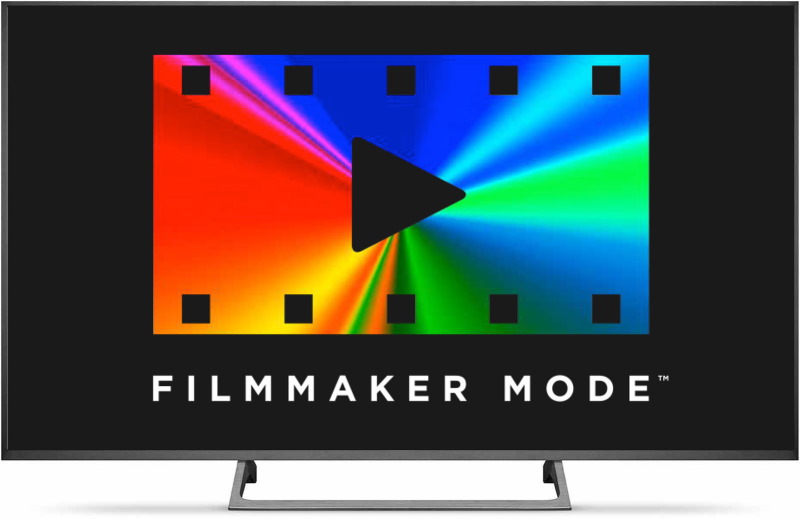
So the movement was more about standardization than reinvention. With a single name, icon, and prominent placement instead of being buried in a sub-menu somewhere, this is something people may actually see and use.

Not that there was no back-and-forth on the specification itself. For one thing, filmmaker mode also lowers the peak brightness of the TV to a relatively dark 100 nits — at a time when high brightness, daylight visibility, and contrast ratio are specs manufacturers want to show off.

The reason for this is, very simply, to make people turn off the lights.

There’s very little anyone in the production of a movie can do to control your living room setup or how you actually watch the film. But restricting your TV to certain levels of brightness does have the effect of making people want to dim the lights and sit right in front. Do you want to watch movies in broad daylight, with the shadows pumped up so bright they look grey? Feel free, but don’t imagine that’s what the creators consider ideal conditions.

Photo: Chris Ryan / Getty Images

“As long as you view in a room that’s not overly bright, I’d say you’re getting very close to what the filmmakers saw in grading,” said Robinson. Filmmaker mode’s color controls are a rather loose, he noted, but you’ll get the correct aspect ratio, white balance, no motion processing, and generally no weird surprises from not delving deep enough in the settings.

The full list of changes can be summarized as follows:

  • Maintain source frame rate and aspect ratio (no stretched or sped up imagery)
  • Motion processing off (no smoothing)
  • Peak brightness reduced (keeps shadows dark — this may change with HDR content)
  • Sharpening and noise reduction off (standard items with dubious benefit)
  • Other “image enhancements” off (non-standard items with dubious benefit)
  • White point at D65/6500K (prevents colors from looking too warm or cool)

All this, however, relies on people being aware of the mode and choosing to switch to it. Exactly how that will work depends on several factors. The ideal option is probably a filmmaker mode button right on the clicker, which is at least theoretically the plan.

The alternative is a content specification — as opposed to a display one — that allows TVs to automatically enter filmmaker mode when a piece of media requests it to. But this requires content providers to take advantage of the APIs that make the automatic switching possible, so don’t count on it.

And of course this has its own difficulties, including privacy concerns — do you really want your shows to tell your devices what to do and when? So a middle road where the TV prompts the user to “Show this content in filmmaker mode? Yes/No” and automatic fallback to the previous settings afterwards might be the best option.

There are other improvements that can be pursued to make home viewing more like the theater, but as Robinson pointed out, there are simply fundamental differences between LCD and OLED displays and the projectors used in theaters — and even then there are major differences between projectors. But that’s a whole other story.

At the very least, the mode as planned represents a wedge that content purists (it has a whiff of derogation but they may embrace the term) can widen over time. Getting the average user to turn off motion processing is the first and perhaps most important step — everything after that is incremental improvement.

So which TVs will have filmmaker mode? It’s unclear. LG, Vizio, and Panasonic have all committed to bringing models out with the feature, and it’s even possible it could be added to older models with a software update (but don’t count on it). Sony is a holdout for now. No one is sure exactly which models will have filmmaker mode available, so just cast an eye over the spec list of you’re thinking of getting and, if you’ll take my advice, don’t buy a TV without it.


Read Full Article
This Week in Apps: Chinese giants take on Google Play, Iowa caucus disaster, TikTok’s power over App Store charts


Welcome back to This Week in Apps, the Extra Crunch series that recaps the latest OS news, the applications they support and the money that flows through it all.

The app industry is as hot as ever with a record 204 billion downloads in 2019 and $120 billion in consumer spending in 2019, according to App Annie’s recently released “State of Mobile” annual report. People are now spending 3 hours and 40 minutes per day using apps, rivaling TV. Apps aren’t just a way to pass idle hours — they’re a big business. In 2019, mobile-first companies had a combined $544 billion valuation, 6.5x higher than those without a mobile focus.

In this Extra Crunch series, we help you keep up with the latest news from the world of apps, delivered on a weekly basis.

This week, we look at the app making headlines for causing a disaster in Iowa, TikTok’s power to move apps up the charts, all the news from Apple’s new betas, the plan from Chinese mobile giants to take on Google Play, subscription scams, plus app trends and other news.

Headlines

Iowa’s caucus app was a disaster

A smartphone app really screwed things up in Iowa. The app, built by Shadow Inc., was designed to help the Iowa Democratic Party tabulate votes from the caucuses. But instead of helping, the app failed, causing a massive delay of almost an entire day. According to The New York Times, the app was quickly put together in just the past two months — and wasn’t properly tested.


Read Full Article

A Better Way to Embed PDF Documents in Web Pages


How do you embed a PDF document into your website for inline viewing? One popular option is that you upload the PDF file to an online storage service, something like Google Drive or Microsoft’s OneDrive, make the file public and then copy-paste the IFRAME code provided by these services to quickly embed the document in any website.

Here’s a sample PDF embed code for Google Drive that works across all browsers.

  <iframe frameborder="0" scrolling="no"
     width="640" height="480"
     src="https://drive.google.com/file/d/<<FILE_ID>>/preview">
  </iframe>

This is the most common method for embedding PDFs - it is simple, it just works but the downside is that you have no control over how the PDF files are presented in your web pages.

If you prefer to offer a more customized and immersive reading experience for PDFs in your website, check out the new Adobe View SDK. This is part of the Adobe Document Cloud platform but doesn’t cost a penny.

Embed Adobe PDF

Here are some unique features that make this PDF embed solution stand out:

  • You can add annotation tools inside the PDF viewer. Anyone can annotate the embedded PDF and download the modified file.
  • If you have embedded a lengthy document with multiple pages, readers can use the thumbnail view to quickly jump to any page.
  • The PDF viewer can be customized to hide options for downloading and printing PDF files.
  • There’s built-in analytics so you know how many people saw your PDF file and how they interacted with the document.
  • And my favorite feature of ViewSDK is the inline embed mode. Let me explain that in detail.

Display PDF Pages Inline like Images and Videos

In Inline Mode, and this is unique to Adobe View SDK, all pages of the embedded PDF document are displayed at once so your site visitors do not have to scroll another document with the parent web page. The PDF controls are hidden from the user and the PDF pages blend with images and other HTML content on your web page.

To learn more, check this live demo - here the PDF document contains 7 pages but all are displayed at once like one long web page thus offering smooth navigation.

How to Embed PDFs with the Adobe View SDK

It does take a few extra steps to use the View SDK. Go to adobe.io and create a new set of credentials for your website. Please note that credentials are valid for one domain only so if you have multiple websites, you’d need a different set of credentials for them.

Next, open the playground and generate the embed code. You need to replace the clientId with your set of credentials. The url in the sample code should point to the location of your PDF file.

<div id="adobe-dc-view" style="width: 800px;"></div>
<script src="https://documentcloud.adobe.com/view-sdk/main.js"></script>
<script type="text/javascript">
    document.addEventListener("adobe_dc_view_sdk.ready", function () {
        var adobeDCView = new AdobeDC.View({
            clientId: "<<YOUR_CLIENT_ID>>",
            divId: "adobe-dc-view"
        });
        adobeDCView.previewFile({
            content: { location: { url: "<<PDF Location>>" } },
            metaData: { fileName: "<<PDF File Name>>" }
        }, {
            embedMode: "IN_LINE",
            showDownloadPDF: false,
            showPrintPDF: false
        });
    });
</script>

Check out the official docs and the code repository for more samples.


5 Excellent Free Lessons to Learn the Basics of Photography


Learning Photography

We are carrying phones with five cameras built into them. But having more cameras isn’t going to make your photos better. To shoot good pictures, try these free lessons to learn the basics of photography.

These resources dive into what anyone needs to know before taking up photography as a hobby. There are a couple of interactive apps that show how changing settings can alter a photo and a full-fledged university-level course.

1. Photography Fundamentals: A Basic Interactive Short Course

Courserock's Photography Fundamentals

What’s the difference between DSLR cameras and smartphone cameras? Why do professionals take much better pictures than you, even with the same phone? Photography Fundamentals is an interactive course that explains the basics of photography.

The scrolling course works well on phones as well as computers. It will explain a topic in simple language with visual aids. For example, there are short videos to demonstrate a topic. And there are pictures with sliding bars for a before-after effect of any technique.

At the end of any topic, you’ll get a short quiz. Answer it correctly to show you’ve understood that subject and get access to the next topic. Right now, the course talks about aperture, shutter speed, lenses, and editing.

2. Anton Gorlin: Definitive Guide to Photography Composition

Anton Gorlin has an in-depth, clear, and easy-to-understand guide to photography composition

Ask any photographer what you should learn first, and you’ll get the same answer: composition. When they say a picture tells a thousand words, it means the picture has a story in it. Much like you carefully pick the right words and put them in the right order while writing a story, you need to carefully compose the visual elements of a photograph.

You’ll find plenty of explanations and guides for photography composition on the internet, and Anton Gorlin’s definitive guide is among the best. It is easily accessible for a beginner, explaining the major rules of composition without getting too technical.

For each explanation, Gorlin provides photographs to illustrate his point. Items like Breathing Space and Visual Storytelling aren’t easy to understand if not shown through accompanying pictures. It’s a lengthy guide, so give yourself some time to read it and understand it.

Meanwhile, also check out Gorlin’s handy set of photography cheat sheets. These printable guides concisely explain best photography practices.

3. Bastards Book of Photography: Open Source Guide to Photography

The Bastards Book of Photography explains the basics of how to work with light

Dan Nguyen says you don’t need a high-end camera, fancy equipment, or Photoshop skills. A good photographer should know how to work with light, have a natural curiosity for the visual medium, and be willing to learn and practice. If that sounds like you, you’ll love The Bastards Book of Photography.

The idea of the digital book is to depend as little on external equipment and post-processing as possible. Nguyen teaches you to make the best use of light in any situation while keeping the language as simple as possible. In the process, you’ll learn how to use a camera’s manual settings to find the best way to light any scene.

Naturally, he focuses on exposure in different settings, and that’s the heart. But the book is thoughtfully put together for every aspect, with Nguyen explaining what he means with his own photographs. You won’t get jargon and techniques in this. Instead, he tells you the best practices he himself uses, and how they help.

4. Photoskop: Interactive Player to Learn Camera Settings

Photoskop lets you change camera settings to see their effects on photographs, and tells you what to look for

Photography experts keep talking about how you need to understand and manipulate the manual settings on a camera. But even if you know the technicalities, how exactly do you figure out what’s the best setting? Photoskop is an interactive guide to learn the best shot.

You’re given a photo. You can change aperture, shutter speed, ISO, white balance, and focal length through a menu. Each change affects how the picture looks. Every time you change any setting, the photo gets new speech bubbles that explain what is wrong or right about the change. And that’s the key to understanding these settings.

Photoskop has 15 different lessons for the common types of photos you’ll click: portraits, close-ups, low-light shots, landscapes, action, sunrises, and sunsets, etc. Go through the guide for each and pay attention to every bubble to understand how to manipulate camera settings.

5. Marc Levoy’s Lectures: Free 11-Week Stanford Course

Get Marc Levoy's Digital Photography lectures he taught at Stanford as a free 11-week course

Marc Levoy taught a course on digital photography at Stanford University for 6 years. He then turned it into an 18-lecture series for Google and put the whole thing online for free. While you won’t get an academic certification, this is perhaps the best free university-level course on digital photography.

Levoy divides the 11-week course into introduction, how digital cameras work, ‘photos, pixels, and bits’, interregnum, color and lighting, and image processing. Follow the schedule to watch a video each week, download the lecture slides, and do the optional coursework. There are two recommended textbooks for further reading, which you’ll have to buy or try to get free textbooks online.

Levoy also has a few Adobe Flash applets to demonstrate certain concepts and techniques. Now Flash player is pretty much obsolete and several browsers don’t even support it anymore, but if you can securely check out the applets, they’re worth the effort.

Best Online Photography Courses

Levoy’s lectures are only one set among the many photography courses available on the internet. In the age of online education, there is a variety of other courses to choose from, both paid and free.

Some are made by communities, like Reddit’s Photoclass, and some are hosted by acclaimed photographers like Annie Liebovitz. To make your choices easier, we rounded up the best online photography courses for beginners.

Read the full article: 5 Excellent Free Lessons to Learn the Basics of Photography


Read Full Article